Introduction
of Accounting
Accounting:-
Accounting is a Process of identifying,
recording, summarizing and reporting economic
information to decision makers in the form of
financial statements.
Advantages of Accounting
By keeping accounting we can understand the
profit or loss in a particular time period
We can understand the following financial
position of business
Also we can understand the reasons of profit
or loss by keeping accounting.
Types of Accounts
Personal Accounts
Real Accounts
Nominal Accounts
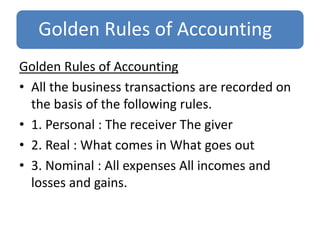
Golden Rules of Accounting
• All the business transactions are recorded on
the basis of the following rules.
• 1. Personal : The receiver The giver
• 2. Real : What comes in What goes out
• 3. Nominal : All expenses All incomes and
losses and gains.
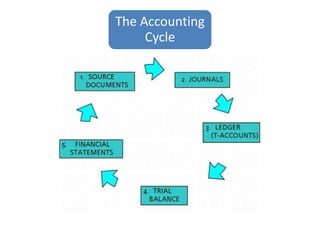
The Accounting
Cycle
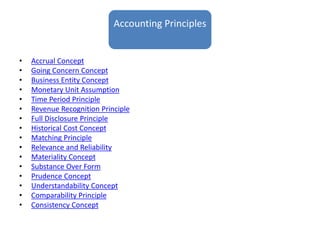
Accounting Principles
• Accrual Concept
• Going Concern Concept
• Business Entity Concept
• Monetary Unit Assumption
• Time Period Principle
• Revenue Recognition Principle
• Full Disclosure Principle
• Historical Cost Concept
• Matching Principle
• Relevance and Reliability
• Materiality Concept
• Substance Over Form
• Prudence Concept
• Understandability Concept
• Comparability Principle
• Consistency Concept
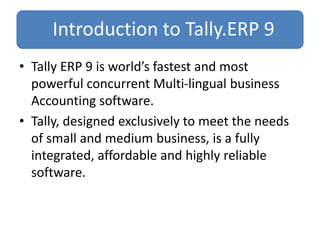
Introduction to Tally.ERP 9
• Tally ERP 9 is world’s fastest and most
powerful concurrent Multi-lingual business
Accounting software.
• Tally, designed exclusively to meet the needs
of small and medium business, is a fully
integrated, affordable and highly reliable
software.
A Brief History of Tally Software
Shri S.S Goenka is the founder of Tally
Software in 1986.
Tally Solutions Pvt Ltd is a Bangalore- based
software company that currently sells into
more than 100 countries beyond its native
India, including the UK, Bangladesh and the
Middle East.
What is ERP
• Enterprise Useful resource Planning, also
referred to as ERP, is a technique designed to
combine a number of different information
sources and/or processes into one single
unified system.
Why Tally.ERP9
• Tally is a software company that makes
business software. Some of their packages are
for accounting, inventory and payroll.
• Tally.ERP 9 is a business management
software that allows you to activate certain
functions that you need at different locations.
Advantages of Tally.ERP 9
Tally Technology Advantages
Data Reliability
Data Security
Tally Audit
Tally Vault
Features of Tally.ERP9
Remote Access
Tally.NET
Simplified Installation process
Control Centre
Enhanced Look and feel
Enhanced Payroll Compliance
Excise for Manufactures
Auditors edition of Tally.ERP9
Enhanced Tax Deducted at Source
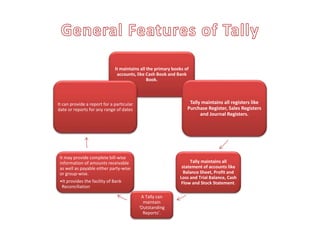
It maintains all the primary books of
accounts, like Cash Book and Bank
Book.
Tally maintains all registers like
Purchase Register, Sales Registers
and Journal Registers.
Tally maintains all
statement of accounts like
Balance Sheet, Profit and
Loss and Trial Balance, Cash
Flow and Stock Statement.
A Tally can
maintain
‘Outstanding
Reports’.
It may provide complete bill-wise
information of amounts receivable
as well as payable either party-wise
or group-wise.
•It provides the facility of Bank
Reconciliation
It can provide a report for a particular
date or reports for any range of dates
Budgets in Tally.ERP 9
• Budgeting helps a company to keep a track of
how much money it has, where its money is
going and allocate those funds at any point in
time. A proper budgeting system enables a
business to keep a track of its expenditures
and use its funds effectively. Hence, business
owners can compare revenues and expenses
with ease, and more importantly, make better
future investments
Cost Centre & Cost Category in Tally.ERP 9
• The cost centre in Tally.ERP 9 refers to an
organizational unit to which costs or expenses can be
allocated during transactions while the cost category is
used to accumulate costs or profits for parallel sets of
cost centres. For example, you can use cost centre to
track expenses of each employee while
cost category can be used to see the effectiveness of
each project.
•
• To use cost centre in Tally.ERP 9, let’s consider a ‘Sales
department’ in an organization which has 4 different
Salesmen. To record their expenses and incomes
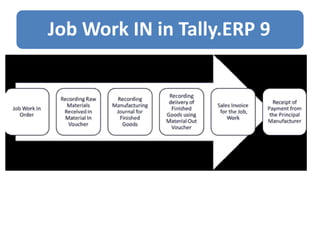
Job Work In in Tally.ERP 9
• Tally.ERP 9 provides a powerful ‘Job WorkIn’ fe
ature that simplifies handling of the Job Work
process. Users can now track all Job Worktrans
actions and generate reports instantly with all
the applicable statutory requirements.
Job Work IN in Tally.ERP 9
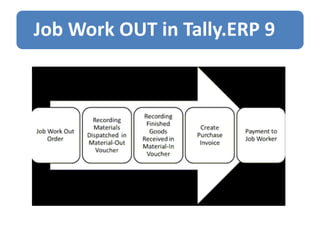
Job Work OUT in Tally.ERP 9
Tally.ERP9 provides a powerful
'Job Work Out’ feature that simplifies handling the Job
Work process. Users can now track all Job Worktransac
tions and generate reports instantly with all the
applicable statutory requirements. InTally.ERP 9, the
process of Job Work Out has the following steps:
Job Work OUT in Tally.ERP 9
• Bank Reconciliation Statement is the process of comparing and
matching figures from the accounting records against those shown
on a Bank statement or Bank pass Book. The result is that any
transactions in the accounting records not found on the bank
statement or Bank pass Book are said to be outstanding.
• Advantages of preparing Bank Reconciliation Statement are :
 A bank reconciliation statement offers checks and balances
for our accounting and bank’s accounting.
 The errors that might have been committed either in the Cash
book or in the Bank Account by Bank are revealed .
 The reconciliation statement will also indicate any undue
delay in the clearance of cheques.
 If any acts of embezzlement is committed by any staff of an
organization or the bank it can be detected immediately.
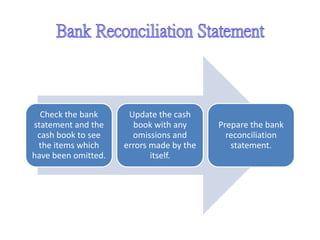
Check the bank
statement and the
cash book to see
the items which
have been omitted.
Update the cash
book with any
omissions and
errors made by the
itself.
Prepare the bank
reconciliation
statement.
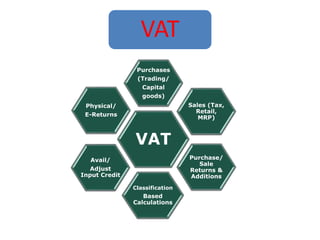
VAT
VAT
Purchases
(Trading/
Capital
goods)
Sales (Tax,
Retail,
MRP)
Purchase/
Sale
Returns &
Additions
Classification
Based
Calculations
Avail/
Adjust
Input Credit
Physical/
E-Returns
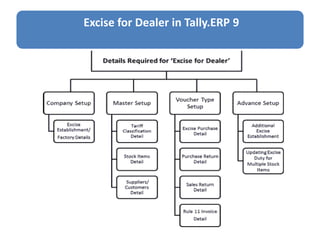
Excise for Dealer in Tally.ERP 9
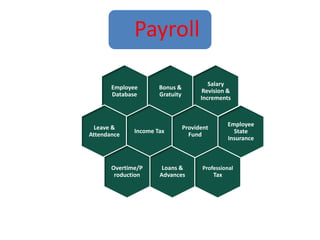
Payroll
Bonus &
Gratuity
Employee
Database
Leave &
Attendance
Income Tax
Loans &
Advances
Overtime/P
roduction
Salary
Revision &
Increments
Professional
Tax
Employee
State
Insurance
Provident
Fund
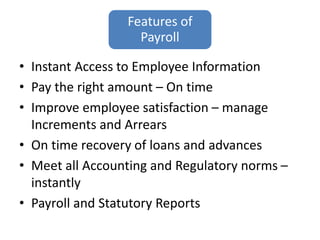
Features of
Payroll
• Instant Access to Employee Information
• Pay the right amount – On time
• Improve employee satisfaction – manage
Increments and Arrears
• On time recovery of loans and advances
• Meet all Accounting and Regulatory norms –
instantly
• Payroll and Statutory Reports
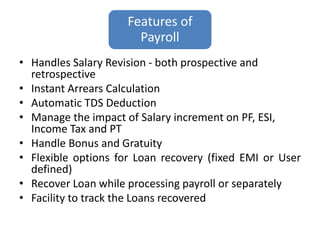
Features of
Payroll
• Handles Salary Revision - both prospective and
retrospective
• Instant Arrears Calculation
• Automatic TDS Deduction
• Manage the impact of Salary increment on PF, ESI,
Income Tax and PT
• Handle Bonus and Gratuity
• Flexible options for Loan recovery (fixed EMI or User
defined)
• Recover Loan while processing payroll or separately
• Facility to track the Loans recovered
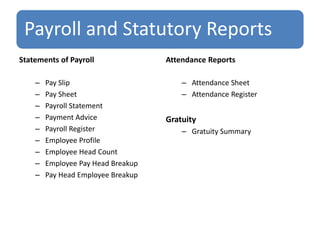
Payroll and Statutory Reports
Statements of Payroll
– Pay Slip
– Pay Sheet
– Payroll Statement
– Payment Advice
– Payroll Register
– Employee Profile
– Employee Head Count
– Employee Pay Head Breakup
– Pay Head Employee Breakup
Attendance Reports
– Attendance Sheet
– Attendance Register
Gratuity
– Gratuity Summary
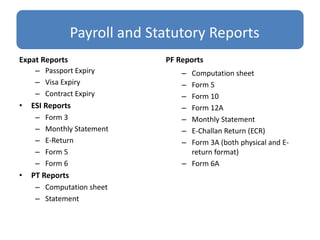
Payroll and Statutory Reports
Expat Reports
– Passport Expiry
– Visa Expiry
– Contract Expiry
• ESI Reports
– Form 3
– Monthly Statement
– E-Return
– Form 5
– Form 6
• PT Reports
– Computation sheet
– Statement
PF Reports
– Computation sheet
– Form 5
– Form 10
– Form 12A
– Monthly Statement
– E-Challan Return (ECR)
– Form 3A (both physical and E-
return format)
– Form 6A
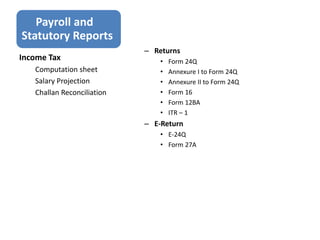
Payroll and
Statutory Reports
– Returns
• Form 24Q
• Annexure I to Form 24Q
• Annexure II to Form 24Q
• Form 16
• Form 12BA
• ITR – 1
– E-Return
• E-24Q
• Form 27A
Income Tax
Computation sheet
Salary Projection
Challan Reconciliation
Synergy School of Business
Tally_PPT.pptx

Tally_PPT.pptx

  • 1.
    Introduction of Accounting Accounting:- Accounting isa Process of identifying, recording, summarizing and reporting economic information to decision makers in the form of financial statements.
  • 2.
    Advantages of Accounting Bykeeping accounting we can understand the profit or loss in a particular time period We can understand the following financial position of business Also we can understand the reasons of profit or loss by keeping accounting.
  • 3.
    Types of Accounts PersonalAccounts Real Accounts Nominal Accounts
  • 4.
    Golden Rules ofAccounting Golden Rules of Accounting • All the business transactions are recorded on the basis of the following rules. • 1. Personal : The receiver The giver • 2. Real : What comes in What goes out • 3. Nominal : All expenses All incomes and losses and gains.
  • 5.
  • 6.
    Accounting Principles • AccrualConcept • Going Concern Concept • Business Entity Concept • Monetary Unit Assumption • Time Period Principle • Revenue Recognition Principle • Full Disclosure Principle • Historical Cost Concept • Matching Principle • Relevance and Reliability • Materiality Concept • Substance Over Form • Prudence Concept • Understandability Concept • Comparability Principle • Consistency Concept
  • 8.
    Introduction to Tally.ERP9 • Tally ERP 9 is world’s fastest and most powerful concurrent Multi-lingual business Accounting software. • Tally, designed exclusively to meet the needs of small and medium business, is a fully integrated, affordable and highly reliable software.
  • 9.
    A Brief Historyof Tally Software Shri S.S Goenka is the founder of Tally Software in 1986. Tally Solutions Pvt Ltd is a Bangalore- based software company that currently sells into more than 100 countries beyond its native India, including the UK, Bangladesh and the Middle East.
  • 10.
    What is ERP •Enterprise Useful resource Planning, also referred to as ERP, is a technique designed to combine a number of different information sources and/or processes into one single unified system.
  • 11.
    Why Tally.ERP9 • Tallyis a software company that makes business software. Some of their packages are for accounting, inventory and payroll. • Tally.ERP 9 is a business management software that allows you to activate certain functions that you need at different locations.
  • 12.
    Advantages of Tally.ERP9 Tally Technology Advantages Data Reliability Data Security Tally Audit Tally Vault
  • 13.
    Features of Tally.ERP9 RemoteAccess Tally.NET Simplified Installation process Control Centre Enhanced Look and feel Enhanced Payroll Compliance Excise for Manufactures Auditors edition of Tally.ERP9 Enhanced Tax Deducted at Source
  • 14.
    It maintains allthe primary books of accounts, like Cash Book and Bank Book. Tally maintains all registers like Purchase Register, Sales Registers and Journal Registers. Tally maintains all statement of accounts like Balance Sheet, Profit and Loss and Trial Balance, Cash Flow and Stock Statement. A Tally can maintain ‘Outstanding Reports’. It may provide complete bill-wise information of amounts receivable as well as payable either party-wise or group-wise. •It provides the facility of Bank Reconciliation It can provide a report for a particular date or reports for any range of dates
  • 19.
    Budgets in Tally.ERP9 • Budgeting helps a company to keep a track of how much money it has, where its money is going and allocate those funds at any point in time. A proper budgeting system enables a business to keep a track of its expenditures and use its funds effectively. Hence, business owners can compare revenues and expenses with ease, and more importantly, make better future investments
  • 20.
    Cost Centre &Cost Category in Tally.ERP 9 • The cost centre in Tally.ERP 9 refers to an organizational unit to which costs or expenses can be allocated during transactions while the cost category is used to accumulate costs or profits for parallel sets of cost centres. For example, you can use cost centre to track expenses of each employee while cost category can be used to see the effectiveness of each project. • • To use cost centre in Tally.ERP 9, let’s consider a ‘Sales department’ in an organization which has 4 different Salesmen. To record their expenses and incomes
  • 21.
    Job Work Inin Tally.ERP 9 • Tally.ERP 9 provides a powerful ‘Job WorkIn’ fe ature that simplifies handling of the Job Work process. Users can now track all Job Worktrans actions and generate reports instantly with all the applicable statutory requirements.
  • 22.
    Job Work INin Tally.ERP 9
  • 23.
    Job Work OUTin Tally.ERP 9 Tally.ERP9 provides a powerful 'Job Work Out’ feature that simplifies handling the Job Work process. Users can now track all Job Worktransac tions and generate reports instantly with all the applicable statutory requirements. InTally.ERP 9, the process of Job Work Out has the following steps:
  • 24.
    Job Work OUTin Tally.ERP 9
  • 25.
    • Bank ReconciliationStatement is the process of comparing and matching figures from the accounting records against those shown on a Bank statement or Bank pass Book. The result is that any transactions in the accounting records not found on the bank statement or Bank pass Book are said to be outstanding. • Advantages of preparing Bank Reconciliation Statement are :  A bank reconciliation statement offers checks and balances for our accounting and bank’s accounting.  The errors that might have been committed either in the Cash book or in the Bank Account by Bank are revealed .  The reconciliation statement will also indicate any undue delay in the clearance of cheques.  If any acts of embezzlement is committed by any staff of an organization or the bank it can be detected immediately.
  • 26.
    Check the bank statementand the cash book to see the items which have been omitted. Update the cash book with any omissions and errors made by the itself. Prepare the bank reconciliation statement.
  • 33.
  • 34.
    Excise for Dealerin Tally.ERP 9
  • 35.
    Payroll Bonus & Gratuity Employee Database Leave & Attendance IncomeTax Loans & Advances Overtime/P roduction Salary Revision & Increments Professional Tax Employee State Insurance Provident Fund
  • 36.
    Features of Payroll • InstantAccess to Employee Information • Pay the right amount – On time • Improve employee satisfaction – manage Increments and Arrears • On time recovery of loans and advances • Meet all Accounting and Regulatory norms – instantly • Payroll and Statutory Reports
  • 37.
    Features of Payroll • HandlesSalary Revision - both prospective and retrospective • Instant Arrears Calculation • Automatic TDS Deduction • Manage the impact of Salary increment on PF, ESI, Income Tax and PT • Handle Bonus and Gratuity • Flexible options for Loan recovery (fixed EMI or User defined) • Recover Loan while processing payroll or separately • Facility to track the Loans recovered
  • 38.
    Payroll and StatutoryReports Statements of Payroll – Pay Slip – Pay Sheet – Payroll Statement – Payment Advice – Payroll Register – Employee Profile – Employee Head Count – Employee Pay Head Breakup – Pay Head Employee Breakup Attendance Reports – Attendance Sheet – Attendance Register Gratuity – Gratuity Summary
  • 39.
    Payroll and StatutoryReports Expat Reports – Passport Expiry – Visa Expiry – Contract Expiry • ESI Reports – Form 3 – Monthly Statement – E-Return – Form 5 – Form 6 • PT Reports – Computation sheet – Statement PF Reports – Computation sheet – Form 5 – Form 10 – Form 12A – Monthly Statement – E-Challan Return (ECR) – Form 3A (both physical and E- return format) – Form 6A
  • 40.
    Payroll and Statutory Reports –Returns • Form 24Q • Annexure I to Form 24Q • Annexure II to Form 24Q • Form 16 • Form 12BA • ITR – 1 – E-Return • E-24Q • Form 27A Income Tax Computation sheet Salary Projection Challan Reconciliation
  • 41.

Editor's Notes

  • #2 Introduction of Accounting