Industrial Controls
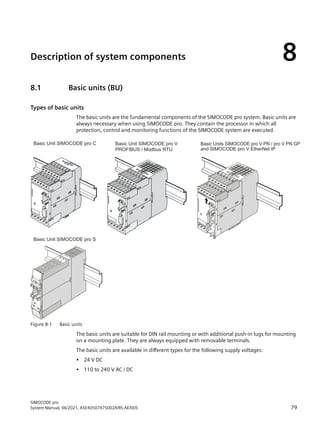
Motor management and
control devices
SIMOCODE pro
System Manual
06/2021
A5E40507475002A/RS-AE/005
Introduction 1
Advantages/benefits/
configuration with
SIMOCODE pro
2
Areas of application 3
Features 4
Overview of functions 5
Check list for selecting a
device series 6
An overview of system
components 7
Description of system
components 8
Compartment identification 9
Accessories 10
3UF50 compatibility mode 11
Mounting, wiring,
connecting 12
Commissioning, service,
troubleshooting 13
Safety and commissioning
information for Ex areas 14
Technical data 15
CAx data, dimension
drawings 16
List of abbreviations A
Legal information
Warning notice system
This manual contains notices you have to observe in order to ensure your personal safety, as well as to prevent damage
toproperty.Thenoticesreferringtoyourpersonalsafetyarehighlightedinthemanualbyasafetyalertsymbol,notices
referring only to property damage have no safety alert symbol. These notices shown below are graded according to
the degree of danger.
DANGER
indicates that death or severe personal injury will result if proper precautions are not taken.
WARNING
indicates that death or severe personal injury may result if proper precautions are not taken.
CAUTION
indicates that minor personal injury can result if proper precautions are not taken.
NOTICE
indicates that property damage can result if proper precautions are not taken.
If more than one degree of danger is present, the warning notice representing the highest degree of danger will be
used. A notice warning of injury to persons with a safety alert symbol may also include a warning relating to property
damage.
Qualified Personnel
The product/system described in this documentation may be operated only by personnel qualified for the specific
task in accordance with the relevant documentation, in particular its warning notices and safety instructions.
Qualified personnel are those who, based on their training and experience, are capable of identifying risks and
avoiding potential hazards when working with these products/systems.
Proper use of Siemens products
Note the following:
WARNING
Siemens products may only be used for the applications described in the catalog and in the relevant technical
documentation. If products and components from other manufacturers are used, these must be recommended or
approved by Siemens. Proper transport, storage, installation, assembly, commissioning, operation and maintenance
are required to ensure that the products operate safely and without any problems. The permissible ambient
conditions must be complied with. The information in the relevant documentation must be observed.
Trademarks
All names identified by ® are registered trademarks of Siemens AG. The remaining trademarks in this publication may
be trademarks whose use by third parties for their own purposes could violate the rights of the owner.
Disclaimer of Liability
We have reviewed the contents of this publication to ensure consistency with the hardware and software described.
Since variance cannot be precluded entirely, we cannot guarantee full consistency. However, the information in this
publication is reviewed regularly and any necessary corrections are included in subsequent editions.
Siemens AG
Smart Infrastructure
Electrical Products
Postfach 10 09 53
93009 Regensburg
GERMANY
A5E40507475002A/RS-AE/005
Ⓟ 06/2021 Subject to change
Copyright © Siemens AG 2017.
All rights reserved
Table of contents
1 Introduction........................................................................................................................................... 9
1.1 Important notes................................................................................................................... 9
1.2 Siemens Industry Online Support ....................................................................................... 13
1.3 Siemens Industry Online Support app................................................................................. 15
1.4 Support Request ................................................................................................................ 16
1.5 Security information .......................................................................................................... 17
1.6 Current information about operational safety ..................................................................... 18
1.7 Information about third-party software .............................................................................. 19
1.8 Recycling and disposal ....................................................................................................... 22
1.9 What is SIMOCODE pro? ..................................................................................................... 23
1.10 Device series...................................................................................................................... 24
1.11 Modules, interfaces, configuration options ......................................................................... 26
2 Advantages/benefits/configuration with SIMOCODE pro .................................................................... 29
2.1 Advantages/benefits........................................................................................................... 29
2.2 Independent operation ...................................................................................................... 32
2.3 Simplifying configuration with SIMOCODE pro.................................................................... 33
2.4 Typical configuration.......................................................................................................... 35
3 Areas of application............................................................................................................................. 37
4 Features............................................................................................................................................... 39
5 Overview of functions ......................................................................................................................... 43
5.1 Protection functions........................................................................................................... 43
5.2 Monitoring functions ......................................................................................................... 45
5.3 Safety-oriented tripping ..................................................................................................... 48
5.4 Control functions............................................................................................................... 50
5.5 Communication................................................................................................................. 51
5.6 Standard functions............................................................................................................. 54
5.7 Freely-programmable logic modules................................................................................... 55
5.8 Operating, service and diagnostics data ............................................................................. 56
SIMOCODE pro
System Manual, 06/2021, A5E40507475002A/RS-AE/005 3
6 Check list for selecting a device series ................................................................................................ 59
7 An overview of system components.................................................................................................... 63
8 Description of system components ..................................................................................................... 79
8.1 Basic units (BU).................................................................................................................. 79
8.2 Operator panel (OP)........................................................................................................... 83
8.3 Operator panel with display ............................................................................................... 86
8.3.1 Description of the operator panel with display.................................................................... 86
8.3.2 Operator controls and display elements of the operator panel with display.......................... 89
8.3.3 Menu of the operator panel with display ............................................................................ 91
8.3.3.1 Timing charts..................................................................................................................... 91
8.3.3.2 Displays of the operator panel with display....................................................................... 106
8.3.3.3 Read and adapt main display............................................................................................ 108
8.3.3.4 Display of measured values in the measured values display............................................... 110
8.3.3.5 Motor protection and motor control status ....................................................................... 112
8.3.3.6 Display of statistical and maintenance-relevant information on the statistics/
maintenance display ........................................................................................................ 113
8.3.3.7 Status display for fieldbus communication ........................................................................ 114
8.3.3.8 Displays the current status of all device I/Os...................................................................... 115
8.3.3.9 Parameters ...................................................................................................................... 117
8.3.3.10 Adapt display settings ...................................................................................................... 119
8.3.3.11 Resetting, testing and parameterizing via commands........................................................ 121
8.3.3.12 Displaying all pending messages ...................................................................................... 122
8.3.3.13 Displaying all pending warnings....................................................................................... 122
8.3.3.14 Displaying all pending faults ............................................................................................ 123
8.3.3.15 Reading the device's internal error buffer.......................................................................... 123
8.3.3.16 Reading the device's internal event memory..................................................................... 123
8.3.3.17 Identification of the motor feeder and the SIMOCODE pro components............................. 124
8.4 Current measuring modules (IM) for the SIMOCODE pro C, SIMOCODE pro S, and
SIMOCODE pro V device series.......................................................................................... 125
8.5 Current / voltage measuring modules (UM, UM+) for the SIMOCODE pro V High
Performance device series................................................................................................ 127
8.6 Decoupling module (DCM) for 1st generation current/voltage measuring modules (e.g.
3UF711.1AA00-0)............................................................................................................ 133
8.7 Spectrum of the expansion modules ................................................................................ 137
8.8 Digital module (DM) ........................................................................................................ 138
8.9 Fail-safe digital module (DM-F)......................................................................................... 139
8.10 Analog module (AM)........................................................................................................ 141
8.11 Ground-fault module (EM) ............................................................................................... 142
8.12 Temperature module (TM) ............................................................................................... 143
8.13 Multifunction module ...................................................................................................... 144
8.14 Configuration information for SIMOCODE pro V when using an older basic unit................. 145
8.15 Configuration notes for use of a SIMOCODE pro V MR and SIMOCODE pro V EIP basic unit... 148
Table of contents
SIMOCODE pro
4 System Manual, 06/2021, A5E40507475002A/RS-AE/005
9 Compartment identification .............................................................................................................. 149
9.1 Applications and advantages of compartment identification ............................................. 149
9.2 Hardware and software requirements for compartment identification ............................... 151
9.3 Operating compartment identification.............................................................................. 152
9.4 Mounting, wiring, interfaces, compartment identification................................................. 156
9.5 Commissioning and service compartment identification ................................................... 159
9.6 Alarm, fault, and system events for compartment identification........................................ 160
9.7 Compartment identification dimension drawings.............................................................. 161
9.8 Technical data compartment identification ....................................................................... 162
10 Accessories ........................................................................................................................................ 163
11 3UF50 compatibility mode................................................................................................................. 167
11.1 Application, Win-SIMOCODE-DP converter ........................................................................ 167
11.2 Diagram of send and receive data .................................................................................... 168
11.3 Diagram of diagnostics data............................................................................................. 169
12 Mounting, wiring, connecting........................................................................................................... 173
12.1 Mounting ........................................................................................................................ 173
12.1.1 Mounting basic units, expansion modules, and the decoupling module ............................ 173
12.1.2 Mounting the bus terminal............................................................................................... 175
12.1.3 Mounting of digital modules DM-F Local and DM-F PROFIsafe........................................... 176
12.1.4 Mounting of current measuring modules.......................................................................... 177
12.1.5 Mounting the current / voltage measuring modules.......................................................... 178
12.1.6 Mounting of the operator panel and operator panel with display ...................................... 179
12.2 Wiring, connecting........................................................................................................... 182
12.2.1 Wiring basic units, expansion modules and the decoupling module .................................. 182
12.2.2 Wiring digital modules DM-F Local and DM-F PROFIsafe .................................................... 207
12.2.3 Wiring of current measuring modules............................................................................... 212
12.2.4 Wiring of current / voltage measuring modules................................................................. 214
12.2.5 Measuring current with an external current transformer (interposing transformer) ........... 218
12.3 System interfaces............................................................................................................. 222
12.3.1 Information about the system interfaces .......................................................................... 222
12.3.2 System interfaces on basic units, expansion modules, decoupling module, current
measuring modules and current / voltage measuring modules.......................................... 223
12.3.3 System interfaces on the digital modules DM-F Local and DM-F PROFIsafe ........................ 228
12.3.4 System interfaces on the operator panel and the operator panel with display.................... 228
12.3.5 Closing the system interfaces with the system interface cover .......................................... 232
12.3.6 PROFIBUS DP to a 9-pole SUB-D socket.............................................................................. 233
12.3.7 Ethernet cable to RJ45 socket (PROFINET and EtherNet/IP) ................................................ 234
12.3.8 Modbus RTU connection to the SIMOCODE pro device ...................................................... 235
12.4 Configuration guidelines .................................................................................................. 237
12.4.1 Configuration guidelines on PROFIBUS DP......................................................................... 237
12.4.2 Configuration guidelines on PROFINET.............................................................................. 238
Table of contents
SIMOCODE pro
System Manual, 06/2021, A5E40507475002A/RS-AE/005 5
13 Commissioning, service, troubleshooting......................................................................................... 241
13.1 General information about commissioning and service..................................................... 241
13.2 Commissioning................................................................................................................ 243
13.2.1 Commissioning with PROFIBUS......................................................................................... 243
13.2.1.1 PROFIBUS commissioning steps........................................................................................ 243
13.2.1.2 Setting the PROFIBUS DP address...................................................................................... 244
13.2.1.3 Diagnostics via LED display on the basic unit and on the operator panel (PROFIBUS).......... 245
13.2.1.4 Diagnostics via LED display on the modules DM-F Local or DM-F PROFIsafe ....................... 245
13.2.2 Commissioning with PROFINET......................................................................................... 246
13.2.2.1 PROFINET commissioning steps........................................................................................ 246
13.2.2.2 Setting IP parameters and PROFINET device name............................................................. 247
13.2.2.3 Setting the time manually after switch-on or recovery of the supply voltage ..................... 249
13.2.2.4 Diagnostics via LED display on the basic unit and on the operator panel (PROFINET).......... 250
13.2.3 Commissioning with Modbus ........................................................................................... 251
13.2.3.1 Commissioning with Modbus RTU .................................................................................... 251
13.2.4 Commissioning with EtherNet/IP ...................................................................................... 256
13.2.4.1 EtherNet/IP commissioning steps...................................................................................... 256
13.2.4.2 Setting IP parameters and EIP device name....................................................................... 256
13.2.4.3 Set the time manually after switch-on or recovery of the supply voltage ........................... 258
13.2.4.4 Diagnostics via LED display on the basic unit and on the operator panel with EtherNet/IP... 259
13.3 Service ............................................................................................................................ 260
13.3.1 Preventive maintenance................................................................................................... 260
13.3.2 Backing up and saving parameters ................................................................................... 262
13.3.3 Replacing SIMOCODE pro components ............................................................................. 264
13.3.4 Exchanging a 3UF52 operator panel for a 3UF720 operator panel..................................... 268
13.3.5 Restoring factory settings................................................................................................. 270
13.3.6 Firmware update of device components ........................................................................... 271
13.3.7 Support Request .............................................................................................................. 273
13.4 Troubleshooting............................................................................................................... 274
13.4.1 Error buffer ...................................................................................................................... 274
13.4.2 Event memory ................................................................................................................. 276
13.4.3 Alarms, faults, and system events - error handling ............................................................ 277
14 Safety and commissioning information for Ex areas......................................................................... 287
14.1 Motor protection functions (overload protection, thermistor protection) ........................... 287
14.1.1 Module integration .......................................................................................................... 287
14.1.2 Information and standards............................................................................................... 287
14.1.3 Installation and commissioning – motor protection functions (overload protection,
thermistor protection)...................................................................................................... 289
14.1.3.1 Operating Instructions ..................................................................................................... 289
14.1.3.2 Setting the rated motor current........................................................................................ 289
14.1.3.3 SIMOCODE pro with thermistor input ............................................................................... 291
14.1.3.4 Sensor circuit wiring ........................................................................................................ 292
14.1.3.5 Short-circuit protection for type of coordination 2 according to IEC 60947-4-1 .................. 292
14.1.3.6 Cable protection .............................................................................................................. 293
14.1.3.7 Test ................................................................................................................................. 293
14.1.3.8 Further safety guidelines.................................................................................................. 294
14.1.3.9 Ambient conditions.......................................................................................................... 295
14.1.3.10 Safety values ................................................................................................................... 295
14.1.4 Maintenance and repairs.................................................................................................. 296
Table of contents
SIMOCODE pro
6 System Manual, 06/2021, A5E40507475002A/RS-AE/005
14.1.5 Warranty.......................................................................................................................... 296
14.1.6 Further information ......................................................................................................... 296
14.2 Dry-running protection for centrifugal pumps by active power monitoring........................ 297
14.2.1 Module integration .......................................................................................................... 297
14.2.2 Information and standards ............................................................................................... 297
14.2.3 Installation and commissioning – dry-running protection for centrifugal pumps by means
of active power monitoring.............................................................................................. 300
14.2.3.1 Operating Instructions ..................................................................................................... 300
14.2.3.2 General information on installation and commissioning ................................................... 301
14.2.3.3 Special conditions for commissioning and operation......................................................... 301
14.2.3.4 Setting the parameters..................................................................................................... 303
14.2.3.5 Line protection ................................................................................................................ 304
14.2.3.6 Test ................................................................................................................................. 305
14.2.3.7 Further safety information ............................................................................................... 307
14.2.3.8 Environmental conditions ................................................................................................ 308
14.2.3.9 Safety values ................................................................................................................... 308
14.2.4 Periodic tests ................................................................................................................... 308
14.2.5 Maintenance and repair ................................................................................................... 309
14.2.6 Warranty.......................................................................................................................... 309
14.2.7 More information............................................................................................................. 309
15 Technical data.................................................................................................................................... 311
15.1 Common technical data ................................................................................................... 311
15.2 Technical specifications of the SIMOCODE pro C / pro S / pro V PB / pro V MR basic units..... 313
15.3 Technical specifications of the SIMOCODE pro V PN / pro V PN GP / pro V EIP basic units ..... 318
15.4 Technical data of the current measuring modules and the current / voltage measuring
modules .......................................................................................................................... 321
15.5 Technical data of the decoupling module ......................................................................... 326
15.6 Technical data of the expansion modules ......................................................................... 327
15.6.1 Technical data of the digital modules ............................................................................... 327
15.6.2 Technical data, digital modules DM-F Local and DM-F PROFIsafe ....................................... 328
15.6.3 Technical data of the DM-F Local digital module ............................................................... 329
15.6.4 Technical data of the DM-F-PROFIsafe digital module........................................................ 331
15.6.5 Safety-related technical data of the digital modules DM-F Local and DM-F PROFIsafe......... 332
15.6.6 Technical data of the analog module ................................................................................ 332
15.6.7 Technical data of the ground-fault module 3UF7500-1AA00-0.......................................... 334
15.6.8 Technical data of the ground-fault module 3UF7510-1AA00-0.......................................... 334
15.6.9 Technical data of the temperature module ....................................................................... 335
15.7 Technical data of the multifunction module...................................................................... 337
15.8 Technical data of the operator panels ............................................................................... 340
15.8.1 Technical data of the operator panel................................................................................. 340
15.8.2 Technical data of the operator panel with display ............................................................. 340
15.9 Technical data of the compartment identification ............................................................. 342
15.10 Short-circuit protection with fuses for motor feeders for short-circuit currents up to 100
kA and 690 V for 1st generation current / voltage measuring module................................ 343
15.11 Typical reaction times ...................................................................................................... 344
15.11.1 Typical reaction times of the SIMOCODE pro C/V device series ........................................... 344
Table of contents
SIMOCODE pro
System Manual, 06/2021, A5E40507475002A/RS-AE/005 7
15.11.2 Typical response times of SIMOCODE pro S device series................................................... 345
15.11.3 Typical reaction times of the Modbus RTU device series..................................................... 346
15.12 Technical data in Siemens Industry Online Support........................................................... 347
16 CAx data, dimension drawings.......................................................................................................... 349
16.1 CAx data.......................................................................................................................... 349
A List of abbreviations .......................................................................................................................... 351
A.1 List of abbreviations......................................................................................................... 351
Glossary ............................................................................................................................................. 355
Index.................................................................................................................................................. 377
Table of contents
SIMOCODE pro
8 System Manual, 06/2021, A5E40507475002A/RS-AE/005
Introduction 1
1.1 Important notes
Purpose of this manual
The SIMOCODE pro System Manual describes in detail the motor management system and its
functions. It contains information about configuring, commissioning, service and maintenance.
In addition to help on how to identify and rectify faults in the event of a malfunction, the manual
also contains specific information for servicing and maintenance.
Required basic knowledge
To understand this manual you will require basic knowledge of low-voltage controls and
distribution, digital circuit engineering and automation technology.
Scope of the manual
This manual is applicable to the listed SIMOCODE pro system components. It contains a
description of the components applicable at the time of printing the manual. SIEMENS reserves
the right to include updated information about launched new components or new versions of
components in a Product Information.
Manual Collection
A Manual Collection (https://support.industry.siemens.com/cs/ww/en/view/109743951), a
collection of the following five SIMOCODE pro manuals, is available in Industry Online Support:
• SIMOCODE pro - 1 Getting Started
• SIMOCODE pro - 2 System Manual
• SIMOCODE pro - 3 Parameterization
• SIMOCODE pro - 4 Applications
• SIMOCODE pro - 5 Communication.
Device series
When reference is made to "SIMOCODE pro", the reference also includes the following device
series:
SIMOCODE pro C (see Device series (Page 24))
SIMOCODE pro S (see Device series (Page 24))
SIMOCODE pro V PB (PROFIBUS) (see Device series (Page 24))
SIMOCODE pro V PN (PROFINET) (see Device series (Page 24))
SIMOCODE pro
System Manual, 06/2021, A5E40507475002A/RS-AE/005 9
SIMOCODE pro V PN GP (PROFINET) (see Device series (Page 24))
SIMOCODE pro V MR (Modbus RTU) (see Device series (Page 24))
SIMOCODE pro V EIP (EtherNet/IP) (see Device series (Page 24))
When reference is made to "SIMOCODE pro V", the reference also includes all pro V devices,
independently of communication.
SIMOCODE pro response tables
Specific responses (deactivated, signaling, warning, tripping) can be parameterized for various
SIMOCODE pro functions, such as overload. These are always displayed in tabular form:
• "X" = Applicable
• "—" = not applicable
• Default values are marked "d" for "default" in parentheses.
Response Function 1 Function 2 Function 3
Tripping — X (d) X
Warning X (d) X —
Signaling X X —
Deactivated X X X (d)
Delay 0 to 25.5 s (default: 0) — —
Short description of the responses:
• Tripping: The contactor controls QE* are tripped. A fault message is generated which is
available as diagnostics via the communication bus. The fault message and the device-
internal signal remain on until the appropriate length of time has elapsed or the cause of the
fault has been eliminated and acknowledged.
• Warning: In addition to the device-internal signal, a warning signal is generated that is
available as diagnostics via the communication bus.
• Signaling: Only a device-internal signal is generated, which can be further processed as
required.
• Deactivated: The appropriate function is switched off, no signals are generated.
A delay time can also be set for specific responses.
Introduction
1.1 Important notes
SIMOCODE pro
10 System Manual, 06/2021, A5E40507475002A/RS-AE/005
Operating instructions and other manuals
• Please read the operating instructions of the respective components (Operating instructions
(https://support.industry.siemens.com/cs/ww/en/ps/16027/man))
• In addition to the "SIMOCODE pro" manual collection, the following manuals are available to
you:
– The manual "SIMOCODE pro Safety fail-safe digital modules" (https://
support.automation.siemens.com/WW/view/en/50564852)
– The appropriate manual for the DP master
– The system manual "SIMATIC PROFINET System Description" (https://
support.automation.siemens.com/WW/view/en/19292127)
– The manual "Fault-tolerant S7-400H systems" (https://support.automation.siemens.com/
WW/view/en/1186523)
– Programming manual "PROFINET IO - from PROFIBUS DP to PROFINET IO" (https://
support.automation.siemens.com/WW/view/en/19289930)
– The application description "Saving Energy with SIMATIC S7 and ET200 S" (https://
support.automation.siemens.com/WW/view/en/41986454)
More information
You will find further information on the Internet:
• SIMOCODE pro (https://www.siemens.com/simocode)
• Information and Download Center (https://support.industry.siemens.com/cs/ww/en/ps/
16027/cat)
• Siemens Industry Online Support (SIOS) (https://support.industry.siemens.com/cs/ww/en/
ps)
• Certificates (https://support.industry.siemens.com/cs/ww/en/ps/16027/cert).
Disclaimer of liability
The products described here have been developed to perform safety-related functions as part of
a complete plant or machine. In general, a complete safety system consists of sensors,
evaluation units, signaling devices and methods for safe tripping. The manufacturer is
responsible for ensuring safe functioning of the complete plant or machine. Siemens AG, its
subsidiaries, and associated companies (hereinafter referred to as "Siemens") are not in a
position to guarantee every characteristic of a complete plant or machine not designed by
Siemens.
Siemens also denies all responsibility for any recommendations that are made or implied in the
following description. No new guarantee, warranty, or liability claims above those standard to
Siemens can be derived from the following description.
Introduction
1.1 Important notes
SIMOCODE pro
System Manual, 06/2021, A5E40507475002A/RS-AE/005 11
Recycling and disposal
For environmentally friendly recycling and disposal of your old device, please contact a company
certified for the disposal of electronic waste and dispose of the device in accordance with the
regulations in your country.
Introduction
1.1 Important notes
SIMOCODE pro
12 System Manual, 06/2021, A5E40507475002A/RS-AE/005
1.2 Siemens Industry Online Support
Information and service
At Siemens Industry Online Support you can obtain up-to-date information from our global
support database:
• Product support
• Application examples
• Forum
• mySupport
Link: Siemens Industry Online Support (https://support.industry.siemens.com/cs/de/en)
Product support
You can find information and comprehensive know-how covering all aspects of your product
here:
• FAQs
Answers to frequently asked questions
• Manuals/operating instructions
Read online or download, available as PDF or individually configurable.
• Certificates
Clearly sorted according to approving authority, type and country.
• Characteristics
For support in planning and configuring your system.
• Product announcements
The latest information and news concerning our products.
• Downloads
Here you will find updates, service packs, HSPs and much more for your product.
• Application examples
Function blocks, background and system descriptions, performance statements,
demonstration systems, and application examples, clearly explained and represented.
• Technical data
Technical product data for support in planning and implementing your project
Link: Product support (https://support.industry.siemens.com/cs/ww/en/ps)
mySupport
The following functions are available in your personal work area "mySupport":
• Support Request
Search for request number, product or subject
• My filters
With filters, you limit the content of the online support to different focal points.
Introduction
1.2 Siemens Industry Online Support
SIMOCODE pro
System Manual, 06/2021, A5E40507475002A/RS-AE/005 13
• My favorites
With favorites you bookmark articles and products that you need frequently.
• My notifications
Your personal mailbox for exchanging information and managing your contacts. You can
compile your own individual newsletter in the "Notifications" section.
• My products
With product lists you can virtually map your control cabinet, your system or your entire
automation project.
• My documentation
Configure your individual documentation from different manuals.
• CAx data
Easy access to CAx data, e.g. 3D models, 2D dimension drawings, EPLAN macros, device
circuit diagrams
• My IBase registrations
Register your Siemens products, systems and software.
Introduction
1.2 Siemens Industry Online Support
SIMOCODE pro
14 System Manual, 06/2021, A5E40507475002A/RS-AE/005
1.3 Siemens Industry Online Support app
Siemens Industry Online Support app
The Siemens Industry Online Support app provides you access to all the device-specific
information available on the Siemens Industry Online Support portal for a particular article
number, such as operating instructions, manuals, data sheets, FAQs etc.
The Siemens Industry Online Support app is available for Android and iOS:
Android iOS
Introduction
1.3 Siemens Industry Online Support app
SIMOCODE pro
System Manual, 06/2021, A5E40507475002A/RS-AE/005 15
1.4 Support Request
After you have registered, you can use the Support Request online form to send your
question directly to Technical Support:
Support Request: Internet (https://support.industry.siemens.com/My/ww/en/requests)
Introduction
1.4 Support Request
SIMOCODE pro
16 System Manual, 06/2021, A5E40507475002A/RS-AE/005
1.5 Security information
Siemens provides products and solutions with industrial security functions that support the
secure operation of plants, systems, machines and networks.
In order to protect plants, systems, machines and networks against cyber threats, it is necessary
to implement – and continuously maintain – a holistic, state-of-the-art industrial security
concept. Siemens’ products and solutions constitute one element of such a concept.
Customers are responsible for preventing unauthorized access to their plants, systems,
machines and networks. Such systems, machines and components should only be connected to
an enterprise network or the internet if and to the extent such a connection is necessary and only
when appropriate security measures (e.g. firewalls and/or network segmentation) are in place.
For additional information on industrial security measures that may be implemented, please
visit
https://www.siemens.com/industrialsecurity.
Siemens’ products and solutions undergo continuous development to make them more secure.
Siemens strongly recommends that product updates are applied as soon as they are available
and that the latest product versions are used. Use of product versions that are no longer
supported, and failure to apply the latest updates may increase customer’s exposure to cyber
threats.
To stay informed about product updates, subscribe to the Siemens Industrial Security RSS Feed
under
https://www.siemens.com/industrialsecurity.
Introduction
1.5 Security information
SIMOCODE pro
System Manual, 06/2021, A5E40507475002A/RS-AE/005 17
1.6 Current information about operational safety
Important note for maintaining operational safety of your system
DANGER
Hazardous Voltage
Can Cause Death, Serious Injury or Risk of Property Damage
Please take note of our latest information!
Systems with safety-related characteristics are subject to special operational safety
requirements on the part of the operator. The supplier is also obliged to comply with special
product monitoring measures. We therefore also provide information in the newsletters
Industrial controls (https://new.siemens.com/global/en/products/automation/industrial-
controls/forms/newsletter.html) and Safety Integrated (https://new.siemens.com/global/en/
products/automation/topic-areas/safety-integrated/factory-automation/newsletter.html)
about new products, further technical developments as well as standards and guidelines.
Introduction
1.6 Current information about operational safety
SIMOCODE pro
18 System Manual, 06/2021, A5E40507475002A/RS-AE/005
1.7 Information about third-party software
Third-party software components
This product, this solution or this service ("product") contains the third-party software
components listed below. These consist either of open source software that is licensed under a
license recognized by Open Source Initiative (http://www.opensource.org) or a license defined
by Siemens as being comparable ("OSS") and/or commercial software or freeware. With regard
to the OSS components, the relevant OSS terms and conditions take priority over all other terms
and conditions applicable to this product.
SIEMENS is providing you with the OSS portions of this product at no additional cost. Insofar as
SIEMENS has combined or linked, according to the definition of the applicable license, specific
components of the product with OSS components that are licensed under GNU LGPL Version 2
or a later version, and insofar as the applicable object file may not be used without restrictions
("LGPL-licensed module", whereby the LGPL-licensed module and the components with which
the LGPL-licensed module is combined are hereinafter referred to as "combined product") and
the applicable LGPL license criteria are fulfilled, you may additionally (i) edit the combined
product for your own purposes and may in particular acquire the right to edit the combined
product to link it with a modified version of the LGPL-licensed module and (ii) reverse engineer
the combined product, but solely for the purpose of error correction of your edits. The right to
edit shall not include the right to distribute. You must treat as confidential all information you
acquire from reverse engineering of the combined product.
Certain OSS licenses require SIEMENS to publish the source code, e.g. the
GNU General Public License, the GNU Lesser General Public License and the
Mozilla Public License. Insofar as these licenses apply and the product has not already been
delivered with the necessary source code, anyone may request a copy of the source code from
Support Request during the period of time specified in the applicable OSS license:
Use the Support Request online form to send your query directly to our Technical Support. After
describing your query in a few guided steps, you will immediately be provided with possible
suggestions for solving the problem.
Support Request: Internet (https://support.industry.siemens.com/My/ww/en/requests)
Subject: open source inquiry (specify the product name and version, where applicable)
SIEMENS can charge a processing fee of up to 5 euros to respond to the inquiry.
Warranty regarding use of open source software
The warranty obligations of SIEMENS are laid down in the applicable contract with SIEMENS.
Insofar as you modify the product or the OSS components or use them in a manner other than
specified by SIEMENS, warranty shall be ruled out and no technical support shall be provided.
The following license terms and conditions may contain liability limitations that apply between
Introduction
1.7 Information about third-party software
SIMOCODE pro
System Manual, 06/2021, A5E40507475002A/RS-AE/005 19
you and the relevant licensor. To clarify matters, your attention is drawn to the fact that SIEMENS
shall not cede any warranty obligations on behalf of or as an obligation for a third-party licensor.
NOTICE
Open source software and/or third-party software included in this product
Please note the following license terms and conditions and copyright notices applicable to the
open source software and/or other components (or parts thereof):
Component Open Source
Software
[Yes/No]
Acknowledgements/
Comments
License conditions and copyright notices
tiva ware - 2.1.0 NO LICENSE AND COPYRIGHT INFORMATION FOR COMPO‐
NENT TIVA PRODUCTS - 2.1.0 (see below)
LICENSE CONDITIONS AND COPYRIGHT NOTICES
Commercial Software: tiva ware - 2.1.0
Enclosed you'll find license conditions and copyright notices applicable for Commercial
Software tiva ware - 2.1.0.
License conditions:
//
// Redistribution and use in source and binary forms, with or without
// modification, are permitted provided that the following conditions
// are met:
//
// Redistributions of source code must retain the above copyright
// notice, this list of conditions and the following disclaimer.
//
// Redistributions in binary form must reproduce the above copyright
// notice, this list of conditions and the following disclaimer in the
// documentation and/or other materials provided with the
// distribution.
//
// Neither the name of Texas Instruments Incorporated nor the names of
// its contributors may be used to endorse or promote products derived
// from this software without specific prior written permission.
//
// THIS SOFTWARE IS PROVIDED BY THE COPYRIGHT HOLDERS AND CONTRIBUTORS
Introduction
1.7 Information about third-party software
SIMOCODE pro
20 System Manual, 06/2021, A5E40507475002A/RS-AE/005
// "AS IS" AND ANY EXPRESS OR IMPLIED WARRANTIES, INCLUDING, BUT NOT
// LIMITED TO, THE IMPLIED WARRANTIES OF MERCHANTABILITY AND FITNESS FOR
// A PARTICULAR PURPOSE ARE DISCLAIMED. IN NO EVENT SHALL THE COPYRIGHT
// OWNER OR CONTRIBUTORS BE LIABLE FOR ANY DIRECT, INDIRECT, INCIDENTAL,
// SPECIAL, EXEMPLARY, OR CONSEQUENTIAL DAMAGES (INCLUDING, BUT NOT
// LIMITED TO, PROCUREMENT OF SUBSTITUTE GOODS OR SERVICES; LOSS OF USE,
// DATA, OR PROFITS; OR BUSINESS INTERRUPTION) HOWEVER CAUSED AND ON ANY
// THEORY OF LIABILITY, WHETHER IN CONTRACT, STRICT LIABILITY, OR TORT
// (INCLUDING NEGLIGENCE OR OTHERWISE) ARISING IN ANY WAY OUT OF THE USE
// OF THIS SOFTWARE, EVEN IF ADVISED OF THE POSSIBILITY OF SUCH DAMAGE.
Copyrights:
Copyright © 2013-2014 Texas Instruments Incorporated
Copyright © 2012-2014 Texas Instruments Incorporated
Copyright © 2011-2014 Texas Instruments Incorporated
Copyright © 2010-2014 Texas Instruments Incorporated
Copyright © 2008-2014 Texas Instruments Incorporated
Copyright © 2007-2014 Texas Instruments Incorporated
Copyright © 2006-2014 Texas Instruments Incorporated
Copyright © 2005-2014 Texas Instruments Incorporated
Introduction
1.7 Information about third-party software
SIMOCODE pro
System Manual, 06/2021, A5E40507475002A/RS-AE/005 21
1.8 Recycling and disposal
For environmentally friendly recycling and disposal of your old device, please contact a company
certified for the disposal of old electrical and/or electronic devices and dispose of the device in
accordance with the regulations in your country.
Introduction
1.8 Recycling and disposal
SIMOCODE pro
22 System Manual, 06/2021, A5E40507475002A/RS-AE/005
1.9 What is SIMOCODE pro?
SIMOCODE pro (SIRIUS Motor Management and Control Device) is a flexible and modular motor
management system for motors with constant speeds in low-voltage applications. It optimizes
the link between the control system and the motor feeder, increases plant availability and allows
significant savings to be made during installation, commissioning, operation and maintenance.
SIMOCODE pro is installed in the low-voltage switchgear system and links the higher-level
automation system and the motor feeder intelligently. It comprises the following functions:
• Multifunctional and electronic full motor protection, independently of the automation
system
• Integrated control functions for motor control (instead of hardware)
• Detailed operating, service and diagnostics data
• Fail-safe shutdown up to SIL3 using fail-safe expansion modules (High Performance units
only)
• Open communication through PROFIBUS DP, PROFINET, Modbus RTU and EtherNet/IP
• Parameterization with the SIMOCODE ES (TIA Portal) software package
Only the switching and short-circuit protection mechanisms of the main circuit (contactors,
circuit breakers, fuses) are additionally needed.
Introduction
1.9 What is SIMOCODE pro?
SIMOCODE pro
System Manual, 06/2021, A5E40507475002A/RS-AE/005 23
1.10 Device series
The following functionally graduated device series are available for SIMOCODE pro:
• Basic units:
SIMOCODE pro C - the compact system for PROFIBUS DP communication with a direct-on-line
and reversing starter function and/or for controlling a circuit breaker (MCCB).
• General Performance units:
– SIMOCODE pro S - the smart system for PROFIBUS DP with direct-on-line, reversing, and
star-delta starter function or for controlling a circuit breaker or soft starter. Its
expandability with a multifunction module ensures there are always plenty of inputs and
outputs. It enables precise ground-fault monitoring via the 3UL23 residual current
transformer and temperature measurement.
– SIMOCODE pro V PN GP - the smart system for PROFINET with direct-on-line, reversing,
and star-delta starter function or for controlling a circuit breaker or soft starter. Its
expandability with an expansion module ensures there are always plenty of inputs and
outputs, precise ground-fault monitoring via the 3UL23 residual current transformer and
temperature measurement.
• High Performance units:
SIMOCODE pro V – the variable system that offers numerous functions, such as voltage
measurement and fail-safe shutdown, in addition to all the SIMOCODE pro C/pro S functions.
Devices are available for the following communication protocols:
– PROFIBUS DP
– Modbus RTU
– PROFINET
– EtherNet/IP.
See Check list for selecting a device series (Page 59).
Introduction
1.10 Device series
SIMOCODE pro
24 System Manual, 06/2021, A5E40507475002A/RS-AE/005
max.
5/7
expansion
modules
1
expansion
module
Basic
control
functions
(e.g.
direct-on-line/reversing
start)
Operator
panel
Current
measuring
module
Extended
control
functions
(e.g.
positioner,
pole-changing
starter)
Safety
Operator
panel
with
display
Current/voltage
measuring
module
High
Performance
General
Performance
SIMOCODE
pro
V
MR
SIMOCODE
pro
V
EIP
SIMOCODE
pro
V
PN
GP
SIMOCODE
pro
V
PN
SIMOCODE
pro
S
SIMOCODE
pro
V
PB
MODBUS
RTU
ETHERNET
/
IP
PROFINET
IO
/
OPC
UA
PROFIBUS
Figure 1-1 SIMOCODE pro device series
Introduction
1.10 Device series
SIMOCODE pro
System Manual, 06/2021, A5E40507475002A/RS-AE/005 25
1.11 Modules, interfaces, configuration options
For each feeder, every system comprises a basic unit and a separate current measuring module.
Both modules are connected to each other electronically via the system interface, by means of
a connecting cable, and can be installed together as a unit (behind one another) or separately
(side-by-side). An operator panel can also be connected optionally via the second system
interface on the basic unit, and installed in the switchgear cabinet door. The current measuring
module and the operator panel are connected to the basic unit via connecting cables, which also
supply the power. More inputs, outputs and functions can be added to the SIMOCODE pro S,
pro V PB, pro V MR, pro V EtherNet/IP and pro V PN /pro V PN GP basic units by means of optional
expansion modules, thus supplementing the inputs and outputs already existing on the basic
unit. All modules are connected by connecting cables. The connecting cables are available with
different lengths (ribbon cable 0.025 m, 0.1 m, 0.15 m, 0.3 m, 0.5 m; round cable 0.5 m, 1.0 m,
2.5 m).
NOTICE
Maximum length of the connecting cable
The total length of all cables must not exceed 3 m on either of the system interfaces of the basic
unit!
NOTICE
The maximum distance between modules
The maximum distance between the modules (e. g. between the basic unit and the current
measuring module) must not exceed 2.5 m.
Additional control programs (star-delta starters, Dahlander starters, pole-changing starters, soft
starters, each program also possible in combination with reversing starter, solenoid valve and
positioner) are integrated in SIMOCODE pro V High Performance units. The SIMOCODE pro V
device type is also particularly versatile. Its functionality can be expanded, if required, for
example:
• The number and type of binary inputs and outputs can be increased in stages and adapted.
• A current/voltage measuring module can be used for additional voltage measurement and
for monitoring power-related measured values (power management).
• A temperature module enables the evaluation of several analog temperature sensors.
• A ground-fault detection system can be integrated together with a summation current
transformer.
• An analog module extends the system by additional analog inputs and outputs, for example,
for fill-level or flow-rate monitoring.
• An operator panel with display (OPD) is available as an alternative to the standard operator
panel (OP) (restriction in the case of the SIMOCODE pro V PB: from version *E03*).
Introduction
1.11 Modules, interfaces, configuration options
SIMOCODE pro
26 System Manual, 06/2021, A5E40507475002A/RS-AE/005
A special current/voltage measuring module for dry-running protection of centrifugal pumps in
hazardous areas by active power monitoring can be used in combination with the following high
performance devices with PTB 18 ATEX 5003:
• SIMOCODE pro V PB from version *E16*
• SIMOCODE pro V PN from version *E13*
• SIMOCODE pro V EIP from version *E04*
SIMOCODE pro C and SIMOCODE pro S are upwardly-compatible with SIMOCODE pro V. This
means you can combine different series in your plant according to functional requirements.
Depending on functional requirements, the systems can be used simultaneously in a low-
voltage switchboard without any problems and without any additional effort.
Parameterization of SIMOCODE pro C or SIMOCODE pro S can be transferred without a problem.
Introduction
1.11 Modules, interfaces, configuration options
SIMOCODE pro
System Manual, 06/2021, A5E40507475002A/RS-AE/005 27
Introduction
1.11 Modules, interfaces, configuration options
SIMOCODE pro
28 System Manual, 06/2021, A5E40507475002A/RS-AE/005
Advantages/benefits/configuration with SIMOCODE
pro 2
2.1 Advantages/benefits
• The quantity of cabling required between the motor feeder and the PLC is reduced
significantly by connecting the entire motor feeder to the process control system via the
fieldbus (see Figures "SIMOCODE pro, integrated in the main circuit, control circuit and at
automation level (PLC)")
• Automated processes are decentralized by means of configurable control and monitoring
functions in the feeder. This saves automation system resources and ensures that the feeder
is fully functional and protected even if the control system or bus system fails.
• By recording and monitoring operating, service and diagnostics data in the feeder and
process control system, plant availability is increased, and the feeder is easier to service and
maintain.
• The user can implement plant-specific requirements for every motor feeder thanks to the
high degree of modularity.
• SIMOCODE pro provides compact solutions and different levels of functions for every
customer application.
• By replacing the control circuit hardware with an integrated control function, the quantity of
required hardware components with wiring is reduced. This drives down storage costs and
limits potential wiring errors.
• Using electronic full motor protection allows the motors to be used more efficiently and
ensures that the tripping characteristic remains stable and the tripping response stays the
same, even after many years.
SIMOCODE pro
System Manual, 06/2021, A5E40507475002A/RS-AE/005 29
3URWHFWLRQ0RQLWRULQJ
RYHUORDGWKHUPLVWRUHDUWKIDXOW
RQWUROFLUFXLW
LQFOXGLQJPRQLWRULQJLQWHUORFNV
RPPXQLFDWLRQ
RQQHFWLQJFDEOH
%DVLFXQLWVSUR9
XUUHQWPHDVXULQJPRGXOH
4
RQWUROFLUFXLW $XWRPDWLRQOHYHO
/
/
/
0DLQFLUFXLW
5HPRWH

. .
2SHUDWRUSDQHO
. .
RSHUDWLQJVHUYLFHDQGGLDJQRVWLFVGDWD
FRQWUROFRPPDQGV
Figure 2-1 SIMOCODE pro C, pro V, integrated in the main circuit, control circuit and at automation level (PLC)
Advantages/benefits/configuration with SIMOCODE pro
2.1 Advantages/benefits
SIMOCODE pro
30 System Manual, 06/2021, A5E40507475002A/RS-AE/005
3URWHFWLRQ0RQLWRULQJ
RYHUORDGWKHUPLVWRUHDUWKIDXOW
RQWUROFLUFXLW
LQFOXGLQJPRQLWRULQJLQWHUORFNV
RPPXQLFDWLRQ
5HPRWH

. .
%DVLFXQLWSUR6
XUUHQWPHDVXULQJPRGXOH
RQQHFWLQJFDEOH
2SHUDWRUSDQHO
RSHUDWLQJVHUYLFHDQGGLDJQRVWLFVGDWD
FRQWUROFRPPDQGV
4
RQWUROFLUFXLW $XWRPDWLRQOHYHO
/
/
/
0DLQFLUFXLW
. .
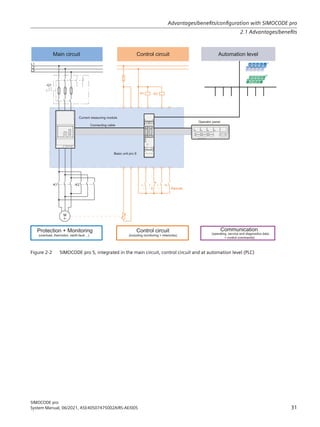
Figure 2-2 SIMOCODE pro S, integrated in the main circuit, control circuit and at automation level (PLC)
Advantages/benefits/configuration with SIMOCODE pro
2.1 Advantages/benefits
SIMOCODE pro
System Manual, 06/2021, A5E40507475002A/RS-AE/005 31
2.2 Independent operation
SIMOCODE pro protects and controls the motor feeder, independently of the automation
system. Even if the automation system (PLC) fails, or if communication is disrupted, the motor
feeder remains fully protected and controllable. SIMOCODE pro can be used without being
connected to the fieldbus. This can easily be connected later, if required.
Advantages/benefits/configuration with SIMOCODE pro
2.2 Independent operation
SIMOCODE pro
32 System Manual, 06/2021, A5E40507475002A/RS-AE/005
2.3 Simplifying configuration with SIMOCODE pro
Conventional configuration without SIMOCODE pro
Individual components are used for control, monitoring and signal pre-processing. The
component and wiring requirements for this type of configuration are as follows:
• Use and wiring of overload relays, thermistor evaluation devices, current transformers and
analog/digital converters
• Wiring of the control circuit
• Connection of start / stop control devices
• The contactor must be brought into locking mode via the auxiliary switches
• Wiring of the interlocks
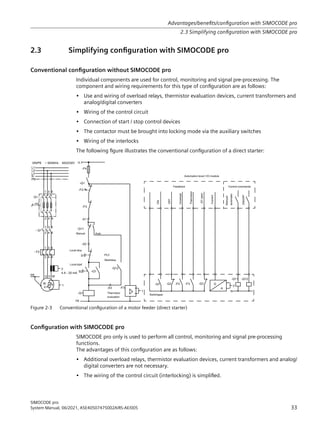
The following figure illustrates the conventional configuration of a direct starter:
3/
6WDUWVWRS
7KHUPLVWRU
HYDOXDWLRQ
/RFDO VWDUW
/RFDO VWRS
$XWR
0DQXDO
6ZLWFKJHDU
21
2))
2YHUORDG
7KHUPLVWRU
$XWRPDWLRQ OHYHO  ,2 PRGXOH
XUUHQW
4
RSHQ
)HHGEDFN RQWURO FRPPDQGV
0DQXDO
212))
DXWRPDWLF
4

;
4
4
6
6
;
;
)
)
13(a+]9
/
/
/
1
3(
4
4


)
  
  
0
a
˽ 
3(

$P$
1

'
$
4 4 ) )
)
:
9
8
4
1
4 4
)
/
4
4
Figure 2-3 Conventional configuration of a motor feeder (direct starter)
Configuration with SIMOCODE pro
SIMOCODE pro only is used to perform all control, monitoring and signal pre-processing
functions.
The advantages of this configuration are as follows:
• Additional overload relays, thermistor evaluation devices, current transformers and analog/
digital converters are not necessary.
• The wiring of the control circuit (interlocking) is simplified.
Advantages/benefits/configuration with SIMOCODE pro
2.3 Simplifying configuration with SIMOCODE pro
SIMOCODE pro
System Manual, 06/2021, A5E40507475002A/RS-AE/005 33
• The start and stop switches are wired directly to the inputs of the basic unit.
• The contactor coil is energized via the output of the basic unit. An auxiliary contact for
locking is not required.
The following figure illustrates a configuration with SIMOCODE pro connected to PROFIBUS:
6VWHP
LQWHUIDFH
XUUHQW PHDVXULQJ
PRGXOH ,0
3XPS
RQQHFWLQJ FDEOH
$QDORJ PRGXOH
)LOOOHYHO LQGLFDWRU
3/36
352),%86 '3
7KHUPLVWRU
/LTXLG FRQWDLQHU
RQWURO VWDWLRQ
3/36 '3@
RQWURO VWDWLRQ
2SHUDWRU SDQHO
2SWLRQDO
3ZLWK
6,022'( (6
'LVSOD
%DVLF XQLW 6,022'(SUR9
0RWRU FXUUHQW
$0
8QLW  RI , V
RQWURO VWDWLRQ
/RFDO FRQWURO VWDWLRQ /@
13( a  +]  9
/
/
/
1
3(
4
 4


0
a
3( :
9
8
  
//
)
4
1/ದ
6 6
$ $
7 7
,Q ,Qದ
2XW 2XWದ
7
7
352),%86 '3
,1 ,1  9
287  
/
/ದ
˽
Figure 2-4 Configuration of a load feeder (direct-on-line starter) with SIMOCODE pro
Advantages/benefits/configuration with SIMOCODE pro
2.3 Simplifying configuration with SIMOCODE pro
SIMOCODE pro
34 System Manual, 06/2021, A5E40507475002A/RS-AE/005
2.4 Typical configuration
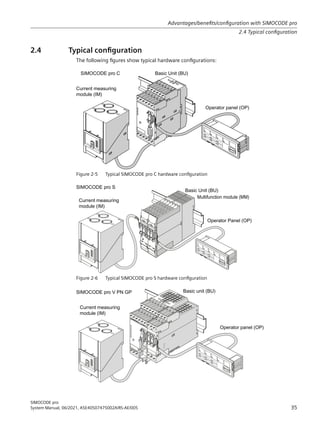
The following figures show typical hardware configurations:
8)
XUUHQW PHDVXULQJ
PRGXOH,0
%DVLF 8QLW %8
2SHUDWRU SDQHO 23
6,022'( SUR 
Figure 2-5 Typical SIMOCODE pro C hardware configuration
%DVLF 8QLW %8
2SHUDWRU 3DQHO 23
6,022'( SUR 6
XUUHQW PHDVXULQJ
PRGXOH,0
0XOWLIXQFWLRQPRGXOH00
Figure 2-6 Typical SIMOCODE pro S hardware configuration
XUUHQWPHDVXULQJ
PRGXOH,0
%DVLF XQLW %8
2SHUDWRU SDQHO 23
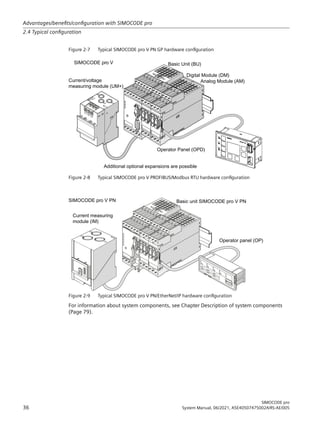
6,022'( SUR 931*3
Advantages/benefits/configuration with SIMOCODE pro
2.4 Typical configuration
SIMOCODE pro
System Manual, 06/2021, A5E40507475002A/RS-AE/005 35
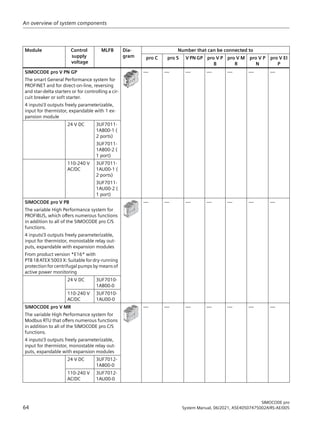
Figure 2-7 Typical SIMOCODE pro V PN GP hardware configuration
%DVLF 8QLW %8
XUUHQWYROWDJH
PHDVXULQJPRGXOH80
2SHUDWRU 3DQHO 23'
'LJLWDO 0RGXOH '0
$QDORJ 0RGXOH $0
$GGLWLRQDO RSWLRQDO H[SDQVLRQV DUH SRVVLEOH
6,022'( SUR 9
Figure 2-8 Typical SIMOCODE pro V PROFIBUS/Modbus RTU hardware configuration
XUUHQWPHDVXULQJ
PRGXOH,0
%DVLF XQLW 6,022'(SUR931
2SHUDWRU SDQHO 23
6,022'( SUR 931
Figure 2-9 Typical SIMOCODE pro V PN/EtherNet/IP hardware configuration
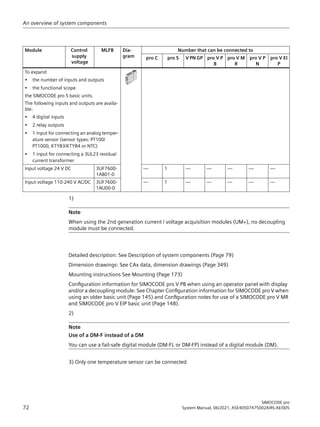
For information about system components, see Chapter Description of system components
(Page 79).
Advantages/benefits/configuration with SIMOCODE pro
2.4 Typical configuration
SIMOCODE pro
36 System Manual, 06/2021, A5E40507475002A/RS-AE/005
Areas of application 3
SIMOCODE pro is often used for automated processes where plant downtimes are very
expensive (e.g. steel or cement industry) and where it is important to prevent plant downtimes
through detailed operating, service and diagnostics data or to localize the fault very quickly in
the event of a fault.
SIMOCODE pro is modular and space-saving and suited especially for operation in motor control
centers (MCC) in the process industry and in power plants.
Applications:
• Protection and control of motors:
– in hazardous areas for different types of protection according to the ATEX
Directive 2014/34/EU (see also Section Safety and commissioning information for Ex
areas (Page 287))
– Heavy-starting motors (paper, cement and metal industries; water management)
– In high-availability plants (chemical, oil, and raw material processing industry, power
plants)
• Dry-running protection of centrifugal pumps by active power monitoring of motors and
shutdown if power consumption falls below a minimum value – especially also including
hazardous areas
– Type of ignition protection b Control of ignition sources, ignition protection system b1,
approval according to DIN EN ISO 80079-37
– Approval according to ATEX Directive 2014/34/EU and IEC Ex
See also Chapter Dry-running protection for centrifugal pumps by active power monitoring
(Page 297) in the safety and commissioning information for Ex areas.
SIMOCODE pro is especially designed for the chemical industry (including oil and gas), the steel
industry, water management, and the paper, pharmaceutical, cement and glass industries.
Further applications include power plant engineering and diamond, gold and platinum mines.
Based on the experience gained with the predecessor system SIMOCODE DP, SIMOCODE pro has
been tailored even more specifically to the requirements of these industries. The availability of
motors and thus the entire process plays an important role in these industries. Downtimes
caused by faults often lead to high costs. This is why it is even more important to detect potential
faults early on and to initiate targeted, preventative measures. SIMOCODE pro provides the user
with a motor management system based on years of experience and the latest technology.
SIMOCODE pro
System Manual, 06/2021, A5E40507475002A/RS-AE/005 37
Areas of application
SIMOCODE pro
38 System Manual, 06/2021, A5E40507475002A/RS-AE/005
Features 4
Multifunction, electronic full motor protection for rated motor currents up to 820 A
SIMOCODE pro provides comprehensive protection of the motor feeder by means of a
combination of delayable, multi-level protection and monitoring functions:
• Current-dependent delayed electronic overload protection (CLASS 5E to 40E)
• Thermistor motor protection
• Phase failure/unbalance protection
• Stalled rotor protection
• Monitoring of adjustable limit values for the motor current
• Voltage monitoring
• Active power monitoring
• Dry-running protection for centrifugal pumps by means of active power monitoring
• Monitoring of cos phi (no-load operation/load shedding)
• Ground-fault monitoring
• Temperature monitoring, e.g. using Pt100/Pt1000
• Monitoring of operating hours
• Monitoring of downtimes
• Monitoring the number of starts within a specific period of time
• Safety-related tripping of motor feeders, e.g. fail-safe tripping in the process industry, locally
or via fieldbus (see manual SIMOCODE pro Safety fail-safe digital modules (https://
support.automation.siemens.com/WW/view/en/50564852))
Recording of measured curves
SIMOCODE pro is able to record measured curves and can, for example, illustrate the
characteristic curve of the motor current during motor startup.
Flexible motor control with integrated control functions (instead of extensive hardware
interlocks):
SIMOCODE pro has many pre-defined, integrated motor control functions, including all
necessary connections and interlocks:
• Overload relay
• Direct starter (direct-on-line starter)
• Reversing starter
• Star-delta starter, also with direction reversal
• Two speeds, motors with separate windings (pole-changing starter), also with direction of
rotation reversal
SIMOCODE pro
System Manual, 06/2021, A5E40507475002A/RS-AE/005 39
• Two speeds, motors with separate Dahlander windings, also with direction of rotation
reversal
• Positioner control
• Solenoid valve control
• Actuation of a circuit breaker
• Soft starter control, possibly combined with reversing starter
These control functions are pre-defined in SIMOCODE pro and can be assigned freely to device
inputs and outputs.
These pre-defined control functions can also be adjustedflexibly to meet customer requirements
of the motor feeder, without requiring additional auxiliary relays in the control circuit. This is
achieved by means of freely parameterizable logic modules (truth tables, counters, timers, pulse
width modulators, etc.) and standard functions (power failure monitoring, emergency start,
external fault monitoring, etc.).
Detailed operating, service and diagnostics data:
SIMOCODE pro provides a range of operating, service and diagnostics data and helps to detect
impending faults in good time and stop these occurring with preventative measures. If a fault
occurs, it can be diagnosed, traced and resolved within a short period of time. Plant downtime
is thus reduced to a minimum or does not occur at all. See Chapter Overview of functions
(Page 43).
Communication:
The SIMOCODE pro basic units have integrated communication bus interfaces and are thus able
to replaces all individual wiring and distribution boxes normally required to exchange data with
a higher-level automation system with a single bus cable.
Communication through PROFIBUS:
PROFIBUS stands for Process Field Bus. PROFIBUS is a multi-vendor standard for the networking
of field devices (e.g. PLCs, drives, actuators, or sensors) in compliance with the European process
and fieldbus standard (PROFIBUS standard EN 50170, Volume 2, -PROFIBUS). It specifies the
functional, electrical and mechanical characteristics of a bit-serial fieldbus system.
PROFIBUS is a bus system that networks PROFIBUS-compatible automation systems and field
devices at the cell and field level. PROFIBUS is available with the DP (= Distributed Peripherals),
FMS (= Fieldbus Message Specification), PA (= Process Automation), or TF (= Technological
Functions) protocol.
PROFIBUS DP is a bus system with the DP (distributed I/O) protocol. The main task of PROFIBUS DP
is to manage the fast, cyclic data exchange between the central DP devices and the I/O devices.
PROFIBUS DPV1 is the extension of the DP protocol. It enables acyclic data exchange of
parameter, diagnostic, receive and test data.
SIMOCODE pro C, pro S and pro V support, among others:
• Baud rates up to 1.5 Mbit / s or 12 Mbit / s
• Automatic baud rate detection
• Communication with one master (class 1) and up to two masters (class 2)
• Time stamp with high timing precision (SIMATIC S7) for SIMOCODE pro V
Features
SIMOCODE pro
40 System Manual, 06/2021, A5E40507475002A/RS-AE/005
• Cyclic services (DPV0) and acyclic services (DPV1)
• DPV1 communication downstream from the Y-Link.
See Chapter PROFIBUS communication in the manual SIMOCODE pro - Communication (https://
support.industry.siemens.com/cs/ww/en/view/109743960).
Communication via PROFINET:
PROFINET (Process Field Network) is the open Industrial Ethernet Standard from Profibus 
Profinet International (PI) for automation.
Within the context of Totally Integrated Automation (TIA), PROFINET is the systematic
continuation of PROFIBUS DP, the established fieldbus, and Industrial Ethernet, the
communication bus for the cell level. Experiences from both systems have been and are being
integrated in PROFINET.
SIMOCODE pro V PN (High Performance unit) has two integrated PROFINET interfaces and
provides communication functions via PROFINET IO with the following properties:
• Integrated switch with two ports
• Device replacement without removable medium/programming device
• Shared device in combination with DF-FP modules
• Media redundancy
• System redundancy
• RT communication
• Support for PROFIenergy
SIMOCODE pro V PN GP (General Performance unit) has one/two integrated PROFINET
interface(s) and provides communication functions via PROFINET IO with the following
properties:
• Integrated switch with two ports (device with two ports)
• Device replacement without removable medium/programming device
• Shared device in combination with DF-FP modules
• Media redundancy (device with two ports)
• System redundancy
• RT communication
• Support for PROFIenergy
See Chapter PROFINET communication in the manual SIMOCODE pro - Communication (https://
support.industry.siemens.com/cs/ww/en/view/109743960).
Communication via Modbus:
Modbus RTU (Remote Terminal Unit) is a standard protocol for network communication and uses
the electrical RS485 connection for serial data transmission between Modbus devices in the
network.
Modbus RTU uses a master/slave network in which the entire communication is triggered by only
one master device while the slaves can only respond to the request of the master. The master
Features
SIMOCODE pro
System Manual, 06/2021, A5E40507475002A/RS-AE/005 41
sends a request to a slave address and only this slave address responds to the command
(exception: broadcast frames to slave address 0 that are not acknowledged by the slaves).
SIMOCODE pro V Modbus devices have been developed in accordance with the MODBUS over
serial line specification and implementation guide (available at www.modbus.org (http://
www.modbus.org)). You can find the relevant information on establishing Modbus RTU
communication in this specification. The key points for a Modbus RTU communication network
(Multipoint System requirements) listed in the specification apply equally for a communication
network with SIMOCODE devices.
See Chapter Modbus communication in the manual SIMOCODE pro - Communication (https://
support.industry.siemens.com/cs/ww/en/view/109743960).
Communication via EtherNet/IP:
EtherNet/IP (EtherNet Industrial Protocol, often simply called EIP) is a real-time Ethernet that is
used mainly in automation engineering. EtherNet/IP was developed by Allen-Bradley and was
later handed over to the Open DeviceNet Vendor Association (ODVA) as an open standard. See
Open DeviceNet Vendor Association (http://www.odva.org).
Besides PROFINET and Modbus/TCP, EtherNet/IP is an Ethernet-based fieldbus that is currently
widely spread.
SIMOCODE pro V EtherNet/IP devices were developed in compliance with the EtherNet/IP
standard and have the following properties:
• Integrated switch with two ports
• Media redundancy via Device Level Ring (DLR)
• System redundancy (as of E03).
See Chapter EtherNet/IP communication in the manual SIMOCODE pro - Communication
(https://support.industry.siemens.com/cs/ww/en/view/109743960).
Features
SIMOCODE pro
42 System Manual, 06/2021, A5E40507475002A/RS-AE/005
Overview of functions 5
5.1 Protection functions
Detailed description: See Chapter Motor protection in the manual Parameterizing SIMOCODE
pro (https://support.industry.siemens.com/cs/ww/en/view/109743958).
Overload protection
Current-dependent electronic protection of three-phase and AC motors with adjustable tripping
characteristics (class times) according to IEC 60947‑4‑1 requirements.
Unbalance protection
Protects motors from excessive temperatures caused by excessive phase unbalance.
Phase failure protection
Protects motors from excessive temperatures caused by phase failure.
Stalled rotor protection
Immediate trip after the motor current overshoots an adjustable threshold.
Thermistor protection
SIMOCODE pro provides the option of connecting thermistor sensors (binary PTC) for
monitoring the motor temperature.
Dry-running protection for centrifugal pumps
The following high performance devices with PTB 18 ATEX 5003 X can be used to implement dry-
running protection of centrifugal pumps (non-electrical devices) through active power
monitoring and motor shutdown:
• SIMOCODE pro V PB from version *E16*
• SIMOCODE pro V PN from version *E13*
• SIMOCODE pro V EIP from version *E04*
SIMOCODE pro
System Manual, 06/2021, A5E40507475002A/RS-AE/005 43
This applies to centrifugal pumps with progressive flow characteristics, which are also suitable
for pumping flammable media and are also installed in hazardous areas.
WARNING
Installation in potentially explosive atmospheres
SIMOCODE pro itself is not suitable for installation in potentially explosive atmospheres!
If the active power, and thus the flow rate, falls below a minimum value, the motor - and thus
the centrifugal pump - is switched off The devices support monitoring of the minimum flow rate
for a freely selectable minimum value. A delay time (effective during operation including the
pump's regular switch-off) can be specified to minimize the probability of incorrect tripping in
addition to the parameter for the trip level of the minimum active power (which corresponds to
a minimum flow rate). During the start-up procedure, operation with active power below the
trip level can constitute a regular operating status of short duration (depending on the
procedure used to open the pressure-side shut-off valve). For this reason, a start-up bridging
time can be specified to prevent incorrect tripping during the start-up procedure.
The parameters can be entered using the SIMOCODE ES (TIA Portal) engineering software.
It is also possible to determine the trip level in a teach-in and to enter the further parameters
with the aid of menu-guided input screens. Using this method, the operating point with
optimum flow rate and the point with minimum flow rate are started up with real operating
medium, as a result of which the trip level of the minimum active power is determined. The
teach-in has to be repeated following any changes in the pump or system characteristics (e.g. as
a result of changing the operating medium or of intervention in the plant configuration).
With regard to dry-running protection for centrifugal pumps, a current/voltage measuring
module especially intended for this function is also required in addition to the basic unit.
See also:
• Chapter Dry-running protection for centrifugal pumps by active power monitoring
(Page 297) in the safety and commissioning information for Ex areas
• Chapter Dry-running protection for centrifugal pumps in the manual Parameterizing
SIMOCODE pro (https://support.industry.siemens.com/cs/ww/en/view/109743958).
Overview of functions
5.1 Protection functions
SIMOCODE pro
44 System Manual, 06/2021, A5E40507475002A/RS-AE/005
5.2 Monitoring functions
Detailed description: See Chapters Monitoring functions and Logic blocks in the manual
Parameterizing SIMOCODE pro (https://support.industry.siemens.com/cs/ww/en/view/
109743958).
Current limit monitoring
Current limit monitoring is used for process monitoring. This enables incipient anomalies in the
system to be detected in good time. If a current limit is exceeded but still below the overload
limit, it can, for example, indicate a dirty filter on a pump, or an increasingly sluggish motor
bearing. If the current limit is undershot, it can be the first sign of a worn-out drive motor belt.
Ground-fault monitoring
Residual current monitoring relays are used in industry to
• Protect systems from damage caused by residual currents
• Prevent production losses caused by unplanned downtime
• Perform maintenance to meet all demands.
Basic units have:
• An internal ground-fault monitoring system: For motors with a 3-wire connection, the basic
unit calculates a possible fault current/ground-fault current from the total current via a
current measuring module or a current / voltage measuring module. Internal ground-fault
monitoring is only possible for motors with a 3-phase connection in networks that are either
grounded directly or grounded with low impedance.
• External ground-fault monitoring in SIMOCODE pro S and SIMOCODE pro V 4)
: The external
ground-fault monitoring using residual current transformer 3UL23 and ground-fault module
is normally used in the following cases:
– in cases in which power systems are grounded with high impedance
– in cases, in which precise detection of the ground-fault current is necessary, for example,
for condition monitoring.
A ground-fault module can be used to create an additional input on the SIMOCODE pro V and
SIMOCODE pro V PN GP basic units to connect a 3UL23 residual current transformer.
A multifunction module can be used to create an additional input on the SIMOCODE pro S
basic unit to connect a 3UL23 residual current transformer.
With ground-fault detection using the 3UL23 residual current transformer, it is possible to
determine the precise residual current as a measured value, and to define freely selectable
warning and trip limits in a wide range from 30 mA - 40 A.
See also Chapter External ground-fault monitoring with 3UL23 residual current transformer
in the manual Parameterizing SIMOCODE pro (https://support.industry.siemens.com/cs/ww/
en/view/109743958).
Overview of functions
5.2 Monitoring functions
SIMOCODE pro
System Manual, 06/2021, A5E40507475002A/RS-AE/005 45
Voltage monitoring 1)
High Performance SIMOCODE pro V allows voltage monitoring of a three-phase current network
or a single-phase network for undervoltage or further availability:
• Monitoring for undervoltage: Two-level monitoring for freely selectable limits. The response
of SIMOCODE pro on reaching a prewarning level or trip level can be freely parameterized.
• Monitoring for further availability: Even when the motor is switched off, SIMOCODE pro can
indicate the further availability of the feeder by measuring the voltage directly at the circuit
breaker or fuses.
Temperature monitoring 2)
The SIMOCODE pro S, SIMOCODE pro V and SIMOCODE pro V PN GP devices offer the option of
implementing analog temperature monitoring, e.g. of the motor windings or the bearings -
SIMOCODE pro S with the multifunction module, SIMOCODE pro V/SIMOCODE pro V PN with the
temperature module.
SIMOCODE pro S and SIMOCODE pro V support two-level monitoring for overtemperature for
freely selectable limit values. The response of SIMOCODE pro on reaching a prewarning level or
trip level can be freely parameterized and delayed. Temperature monitoring takes into account
the highest temperature of all the sensor measuring circuits in use.
Active power monitoring 1)
The active power curve of a motor reflects its actual load. Excess load results in increased wear
of the motor and, thus, may lead to premature motor failure. Excessively low active power can
indicate no-load operation of the motor, for example.
High Performance SIMOCODE pro V offers the option of two-level active power monitoring for
freely selectable upper and lower limits respectively. The response on reaching a prewarning
level or trip level can be freely parameterized and delayed.
Cos phi monitoring1)
The power factor fluctuates more than the motor current, particularly in the low-end
performance range of a motor. For this reason, the monitoring of the power factor comes into
consideration for the detection of faults. Examples: Breakage of a drive belt or drive shaft
High Performance SIMOCODE pro V enables two-level monitoring of the power factor cos phi for
freely selectable minimum limits. The devices' response on reaching a prewarning level or trip
level can be freely parameterized and delayed.
Monitoring operating hours, stop time, and number of starts
SIMOCODE pro can monitor the operating hours and stop times of a motor to avoid plant
downtimes due to failed motors caused by either running too long (wearing out) or being
stopped for too long. For example, if an adjustable limit value is exceeded, a signal indicating
that the relevant motor requires maintenance or replacement can be generated. After the motor
has been replaced, the operating hours and stop times can be reset.
Overview of functions
5.2 Monitoring functions
SIMOCODE pro
46 System Manual, 06/2021, A5E40507475002A/RS-AE/005
To avoid excessive thermal loads and premature aging of a motor, the number of motor starts in
a selected time frame can be limited. The limited number of possible starts can be indicated by
pre-warnings.
Monitoring additional process variables via the analog module 3)
High Performance SIMOCODE pro V allows measuring and monitoring of any other process
variables via the analog module.
For example, the fill level can be monitored to protect a pump against dry operation, or a
differential pressure transducer can be used to monitor the degree of pollution in a filter. If the
fill level undershoots a specified level, the pump can be switched off and, if a specific differential
pressure value is exceeded, the filter should be cleaned.
The devices support two-phase monitoring of the applicable process variable for freely
selectable upper and lower current limits. The response of SIMOCODE pro on reaching a
prewarning level or trip level can be freely parameterized and delayed.
Phase sequence identification 1)
SIMOCODE pro allows the direction of rotation of a motor to be determined by identification of
the phase sequence. If the direction of rotation is wrong, a signal can be generated or the motor
switched off. See Chapter Menu of the operator panel with display (Page 91).
Monitoring any measured values using unrestricted limit monitors
SIMOCODE pro can monitor every measured value in the system for undershooting or
overshooting a set threshold value by means of unrestricted limit monitors, e.g. the
frequency 1)
. Further information can be found in Chapter Limit monitors in the manual
Parameterizing SIMOCODE pro (https://support.industry.siemens.com/cs/ww/en/view/
109743958).
1) For use with current / voltage measuring module
2) Temperature module or multifunction module additionally required
3) Analog module additionally required
4) SIMOCODE pro V and pro S device types: Ground-fault module or multifunction module and
residual current transformer additionally required
See also
Dry-running protection for centrifugal pumps by active power monitoring (Page 297)
Overview of functions
5.2 Monitoring functions
SIMOCODE pro
System Manual, 06/2021, A5E40507475002A/RS-AE/005 47
5.3 Safety-oriented tripping
The SIMOCODE pro motor management system has two modules for the safety-related tripping
of motors:
• Fail-safe digital module DM-F local: For applications requiring safety-related tripping of a
motor feeder via a hardware signal that is acquired and evaluated by the module.
• DM-F PROFIsafe fail-safe digital module: For applications that require the safety-related
tripping of a motor feeder by a fail-safe controller (F‑CPU) via the communication bus with
the fail-safe PROFIsafe profile.
These modules conform to the general requirements for EMERGENCY STOP devices or safety
circuits described in EN 418 and EN 60204‑1 (06.2006).
Depending on the external circuit, the following Performance Level / Safety Integrity Level can
be achieved:
• PL e with Category 4 according to ISO 13849-1 or
• SIL 3 according to IEC 61508/62061
Safety technology and safety-related functions
• Are exclusively restricted to the fail-safe digital modules.
• Do not directly affect existing SIMOCODE pro components and concepts.
A more detailed description is provided in the documentation listed below
• Manual Fail-safe Digital Modules SIMOCODE pro, German (https://
support.automation.siemens.com/WW/view/de/50564852)
• Manual Fail-safe Digital Modules SIMOCODE pro, English (https://
support.automation.siemens.com/WW/view/de/50564852/0/en)
• Manual Fail-safe Digital Modules SIMOCODE pro, French (https://
support.automation.siemens.com/WW/view/de/50564852/0/fr)
• Manual Fail-safe Digital Modules SIMOCODE pro, Spanish (https://
support.automation.siemens.com/WW/view/de/50564852/0/es)
• Manual Fail-safe Digital Modules SIMOCODE pro, Russian (https://
support.industry.siemens.com/cs/ww/en/view/50564852)
• Manual Fail-safe Digital Modules SIMOCODE pro, Chinese (https://
support.industry.siemens.com/cs/cn/zh/view/50564852/en)
• Operating instructions Fail-Safe Digital Module DM-F Local (https://
support.automation.siemens.com/WW/view/en/49222263)
• Operating instructions Fail-Safe Digital Module DM-F PROFIsafe (https://
support.automation.siemens.com/WW/view/en/49222281).
You will find the System Manuals and Operating Instructions at Manuals/operating instructions
(https://support.industry.siemens.com/cs/ww/en/ps/16027/man)
Overview of functions
5.3 Safety-oriented tripping
SIMOCODE pro
48 System Manual, 06/2021, A5E40507475002A/RS-AE/005
CAUTION
Loss of safety function is possible
For the 24 V DC power supply, always use an SELV or PELV power supply unit!
For capacitive and inductive loads, an adequate protective circuit is required!
Overview of functions
5.3 Safety-oriented tripping
SIMOCODE pro
System Manual, 06/2021, A5E40507475002A/RS-AE/005 49
5.4 Control functions
Depending on the device series, the following parameterizable control functions are available:
Table 5-1 Control functions
Control function SIMOCODE pro
BP GP HP
C S V PN GP V PB, V MR, V PN, V EIP
Overload relay ✓ ✓ ✓ ✓
Direct starter (direct-on-line starter) ✓ ✓ ✓ ✓
Reversing starter ✓ ✓ ✓ ✓
Molded case circuit breaker (MCCB) ✓ ✓ ✓ ✓
Star-delta starter — ✓ ✓ ✓
Star-delta reversing starter — — — ✓
Dahlander starter, combinable with re‐
versing starter
— — — ✓
Pole-changing starter, combinable with
reversing starter
— — — ✓
Solenoid valve — — — ✓
Positioner — — — ✓
Soft starter — ✓ ✓ ✓
Soft starter with reversing contactor — — — ✓
All the necessary protection functions and interlocks are already available and can be flexibly
adapted and expanded.
For a detailed description of the individual control functions: See Chapter Motor control in the
manual Parameterizing SIMOCODE pro (https://support.industry.siemens.com/cs/ww/en/view/
109743958).
Overview of functions
5.4 Control functions
SIMOCODE pro
50 System Manual, 06/2021, A5E40507475002A/RS-AE/005
5.5 Communication
PROFIBUS DP
SIMOCODE pro has an integrated PROFIBUS DP interface (SUB D socket or terminal connection
on the basic units). SIMOCODE pro supports the following services, for example:
Table 5-2 PROFIBUS DP services
Service SIMOCODE pro
C S V PB
Baud rates of up to 12 Mbit / s via Sub-D socket ✓ — ✓
Baud rates of up to 1.5 Mbit / s via terminal con‐
nection
✓ ✓ ✓
Automatic baud rate detection ✓ ✓ ✓
Cyclic services (DPV0) and acyclic services
(DPV1)
✓ ✓ ✓
Operation as DPV1 slave downstream from the Y
link
✓ ✓ ✓
Alarms according to DPV1 ✓ ✓ ✓
Time synchronization via PROFIBUS DP — — ✓
3UF50 compatibility mode — — ✓
Safety-related tripping PROFIsafe — — ✓
Detailed description: See Chapter PROFIBUS DP communication in the manual SIMOCODE pro
- Communication (https://support.industry.siemens.com/cs/ww/en/view/109743960).
Modbus RTU
SIMOCODE pro V Modbus RTU possesses integrated Modbus RTU communication functions.
Detailed description: See Chapter Modbus communication in the manual SIMOCODE pro -
Communication (https://support.industry.siemens.com/cs/ww/en/view/109743960).
PROFINET
PROFINET IO
SIMOCODE pro V PN and pro V PN GP have integrated PROFINET IO device communication
functions, such as:
• Integrated switch with two RJ45 ports
• Ethernet services: ping, arp, network diagnostics (SNMP) / BIB-2, LLDP, NTP
• Port diagnostics
• Deactivation of ports
• Media redundancy
• Shared device
Overview of functions
5.5 Communication
SIMOCODE pro
System Manual, 06/2021, A5E40507475002A/RS-AE/005 51
• Device replacement without PG/PC
• I/O data
• Diagnostics and maintenance alarms
• Data records
• PROFIenergy
• PROFIsafe
Note
Use of PORT connections with SIMOCODE pro V PN GP basic units
Only PORT 1 can be used with SIMOCODE pro V PN GP 3UF7011-1A.00-2 basic units
OPC UA
In addition to the PROFINET IO device communication functions, SIMOCODE pro V PN also has
OPC UA server functions. Using these functions, an OPC UA client can access SIMOCODE pro V PN
data.
Web server
In addition to the PROFINET IO device communication functions, both the SIMOCODE pro V PN
High Performance device and the SIMOCODE pro V PN General Performance device have an
integrated web server function that permits access to the service and diagnostic data from a PC
on which a web browser is installed.
Detailed descriptions: See Chapter PROFINET communication in the manual SIMOCODE pro -
Communication (https://support.industry.siemens.com/cs/ww/en/view/109743960).
EtherNet/IP
SIMOCODE pro V EtherNet/IP has integrated EtherNet/IP communication functions:
• Integrated switch with two RJ45 ports
• Assembly objects for integration in cyclic communication with the controller
• CIP objects
• Application objects for access to SIMOCODE data such as measured values, statistics data,
diagnostics and selected parameters
• Device Level Ring support
• Ethernet services: ping, arp, network diagnostics (SNMP)/BIB-2, LLDP, NTP
• Port diagnostics
• Deactivation of ports
Detailed description: See Chapter EtherNet/IP communication in the manual SIMOCODE pro -
Communication (https://support.industry.siemens.com/cs/ww/en/view/109743960).
Overview of functions
5.5 Communication
SIMOCODE pro
52 System Manual, 06/2021, A5E40507475002A/RS-AE/005
Web server
In addition to the EtherNet/IP communication functions, SIMOCODE pro V EIP has an integrated
web server function that permits access to the service and diagnostic data from a PC on which
a web browser is installed.
Detailed descriptions: See Chapter EtherNet/IP communication in the manual SIMOCODE pro
- Communication (https://support.industry.siemens.com/cs/ww/en/view/
109743960)SIMOCODE pro - Communication.
Overview of functions
5.5 Communication
SIMOCODE pro
System Manual, 06/2021, A5E40507475002A/RS-AE/005 53
5.6 Standard functions
Standard functions are pre-defined functions that can be easily activated, e.g. time-staggered
restart of the drives after a power failure. SIMOCODE pro has the following standard functions:
Table 5-3 Standard functions
Standard function SIMOCODE pro
BP GP HP
C
Number
S
Number
V PN GP
Number
V PB
Number
V MR
Number
V PN
Number
V EIP
Number
Test 2 2 2 2 2 2 2
Reset 3 3 3 3 3 3 3
Test Position Feedback
(TPF)
1 1 1 1 1 1 1
External fault 4 4 4 6 6 6 6
Operational Protection Off
(OPO)
— — — 1 1 1 1
Power failure monitoring
(UVO)
— — — 1 1 1 1
Emergency start 1 1 1 1 1 1 1
Watchdog (PLC / PCS mon‐
itoring)
1 1 1 1 1 1 1
Time stamping — — — 1 — — —
Safety-related tripping
Local
— — — 1 1 1 1
Detailed description: See Chapter Standard functions in the manual Parameterizing SIMOCODE
pro (https://support.industry.siemens.com/cs/ww/en/view/109743958).
Overview of functions
5.6 Standard functions
SIMOCODE pro
54 System Manual, 06/2021, A5E40507475002A/RS-AE/005
5.7 Freely-programmable logic modules
If you need any other additional functions for your application, you can use the freely
programmable logic modules. These can be used, for example, to implement logical operations,
time relay functions and counter functions. Furthermore, limit monitors can monitor any value
in SIMOCODE pro for undershooting or overshooting of a freely selected limit. Depending on the
device series, the system provides several freely parameterizable logic modules:
Table 5-4 Freely-programmable logic modules
Logic module SIMOCODE pro
BP GP HP
C
Number
S
Number
V PN GP
Number
V PB
Number
V MR
Number
V PN
Number
V EIP
Number
Truth table 3 in‐
puts / 1 output
3 4 4 6 6 8 8
Truth table 2 in‐
puts / 1 output
— 2 2 2 2 2 2
Truth tables 5 in‐
puts/2 outputs
— — — 1 1 1 1
Timers 2 2 2 4 4 6 6
Counters 2 2 2 4 4 6 6
Signal condi‐
tioning
2 4 4 4 4 6 6
Non-volatile ele‐
ments
2 2 2 4 4 4 4
Flashing 3 3 3 3 3 3 3
Flicker 3 3 3 3 3 3 3
Limit monitor — — — 4 4 6 6
Calculation
modules (calcu‐
lators)
— — — 21)
2 4 4
Analog multi‐
plexer
— — — — — 1 1
Pulse width
modulator
— — — — — 1 1
1) from version *E03*
Detailed description: See Chapter Logic blocks in the manual Parameterizing SIMOCODE pro
(https://support.industry.siemens.com/cs/ww/en/view/109743958).
Overview of functions
5.7 Freely-programmable logic modules
SIMOCODE pro
System Manual, 06/2021, A5E40507475002A/RS-AE/005 55
5.8 Operating, service and diagnostics data
SIMOCODE pro supplies a large amount of detailed operating, service and diagnostics data.
Operating data
• Motor switching state (ON, OFF, LEFT, RIGHT, SLOW, FAST), derived from the current flow in
the main circuit: thus, feedback via auxiliary contacts of circuit breakers and contactors is not
necessary.
• Current in phases 1, 2 and 3 and maximum current in % of current setting
• Voltage in phases 1, 2 and 3 in V 1)
• Frequency 7)
• Active power in W 1)
• Apparent power in VA 1)
• Power factor in % 1)
• Phase unbalance in %
• Phase sequence 1)
• Ground-fault current 6)
• Temperature in the respective sensor measuring circuits, and maximum temperature in K3)
• Current analog signal values 4)
• Time to trip in s
• Temperature rise for motor model in %
• Remaining cooling down period of the motor in s, etc.
It is possible to adapt the units via the device-internal conversion of individual measured values
with the help of the logic modules (calculators) provided by SIMOCODE pro. For example, the
temperature recorded by SIMOCODE pro can be calculated in either °F or °C and transmitted to
the automation system via PROFIBUS DP.
Service data
Among other things, SIMOCODE pro provides the following relevant data for maintenance:
• Number of motor operating hours, also resettable
• Motor stop times, also resettable
• Number of motor starts, also resettable
• Number of permissible starts remaining
• Number of overload trips, also resettable
• Feeder power consumption in kWh, also resettable2)
• Internal feeder-related comments stored in the device, e.g. information regarding
maintenance events, etc.
• Safety-related tripping monitoring in h, also resettable5)
Overview of functions
5.8 Operating, service and diagnostics data
SIMOCODE pro
56 System Manual, 06/2021, A5E40507475002A/RS-AE/005
Diagnostics data
• Numerous detailed early warning and fault messages, also for further processing in the
device or in the control system
• Device-internal error logging with time stamp
• Value of the last trip current
• Feedback faults (e.g. no current flow in the main circuit after switch-on command), etc.
• Local and PROFIsafe diagnostic messages
1) When using SIMOCODE pro V High Performance basic units with current / voltage measuring
module
2) When using SIMOCODE pro V PB basic units from version *E03* current / voltage measuring
module
3) When using the SIMOCODE pro V basic units with the 3UF77 temperature module or the
SIMOCODE pro S basic unit with multifunction module
4) When using SIMOCODE pro V High Performance basic units with analog module
5) When using SIMOCODE pro V High Performance basic units together with DM-F fail-safe
digital module
6) When using the SIMOCODE pro V basic units with the 3UF7510 ground-fault module or the
SIMOCODE pro S basic unit with a multifunction module and 3UL23 residual current transformer
7) 2nd generation current / voltage measuring module necessary
Overview of functions
5.8 Operating, service and diagnostics data
SIMOCODE pro
System Manual, 06/2021, A5E40507475002A/RS-AE/005 57
Overview of functions
5.8 Operating, service and diagnostics data
SIMOCODE pro
58 System Manual, 06/2021, A5E40507475002A/RS-AE/005
Check list for selecting a device series 6
The following check list should help you decide upon the optimum device series for your
requirements:
Function/component SIMOCODE pro
BP GP HP
C S V PN GP V PB V MR V PN V EIP
Control functions Intelligent overload relay ✓ ✓ ✓ ✓ ✓ ✓ ✓
Direct starter, reversing
starter
✓ ✓ ✓ ✓ ✓ ✓ ✓
Star-delta starter — ✓ ✓ ✓ ✓ ✓ ✓
Dahlander starter — — — ✓ ✓ ✓ ✓
Pole-changing starter — — — ✓ ✓ ✓ ✓
Soft starter — ✓ ✓ ✓ ✓ ✓ ✓
Solenoid valve — — — ✓ ✓ ✓ ✓
Positioner — — — ✓ ✓ ✓ ✓
Can be combined with
reversing function
— — — ✓ ✓ ✓ ✓
Protection functions Overload protection ✓ ✓ ✓ ✓ ✓ ✓ ✓
Thermistor motor pro‐
tection with PTC (binary)
✓ ✓ ✓ ✓ ✓ ✓ ✓
Stalled rotor ✓ ✓ ✓ ✓ ✓ ✓ ✓
Unbalance ✓ ✓ ✓ ✓ ✓ ✓ ✓
Phase failure ✓ ✓ ✓ ✓ ✓ ✓ ✓
Dry-running protec‐
tion for centrifugal
pumps by means of ac‐
tive power monitoring
Minimum level; in com‐
bination with current/
voltage measuring mod‐
ules for dry-running pro‐
tection
— — — ✓ — ✓ ✓
Measurement func‐
tions
Current measurement ✓ ✓ ✓ ✓ ✓ ✓ ✓
Current/voltage/power
measurement
— — — ✓ ✓ ✓ ✓
SIMOCODE pro
System Manual, 06/2021, A5E40507475002A/RS-AE/005 59
Function/component SIMOCODE pro
BP GP HP
C S V PN GP V PB V MR V PN V EIP
Monitoring functions Current limit monitoring ✓ ✓ ✓ ✓ ✓ ✓ ✓
Ground-fault monitor‐
ing (internal)
✓ ✓ ✓ ✓ ✓ ✓ ✓
Ground-fault monitor‐
ing (residual current
transformer)
— ✓ ✓ ✓ ✓ ✓ ✓
Voltage monitoring — — — ✓ ✓ ✓ ✓
Temperature monitoring — ✓ ✓ ✓ ✓ ✓ ✓
Active power monitoring — — — ✓ ✓ ✓ ✓
Power factor (cos phi)
monitoring
— — — ✓ ✓ ✓ ✓
Monitoring operating
hours, stop time, and
number of starts
✓ ✓ ✓ ✓ ✓ ✓ ✓
Monitoring additional
process variables via the
analog module
— — — ✓ ✓ ✓ ✓
Phase sequence detec‐
tion
— — — ✓ ✓ ✓ ✓
Monitoring any meas‐
ured values using unre‐
stricted limit monitors
— — — ✓ ✓ ✓ ✓
Frequency measure‐
ment (with the 2nd gen‐
eration current/voltage
measuring modules)
— — — ✓ ✓ ✓ ✓
Safety functions Safety-related tripping — — — ✓ ✓ ✓ ✓
Number of inputs/
outputs
Number of digital inputs
of basic unit
4 4 4 4 4 4 4
Max. number of digital
inputs with expansion
modules
4 8 8 12 12 12 12
Number of outputs of
basic unit
3 2 3 3 3 3 3
Max. number of digital
outputs with expansion
modules
3 4 5 7 7 7 7
Check list for selecting a device series
SIMOCODE pro
60 System Manual, 06/2021, A5E40507475002A/RS-AE/005
Function/component SIMOCODE pro
BP GP HP
C S V PN GP V PB V MR V PN V EIP
Expansion modules Multifunction module;
monostable relay; 24 V
DC inputs, temperature
measurement, ground-
fault monitoring
— ✓ — — — — —
Multifunction module;
monostable relay; 110 -
240 V AC/DC inputs,
temperature measure‐
ment, ground-fault
monitoring
— ✓ — — — — —
Digital module; mono‐
stable relay; 24 V DC in‐
puts
— ✓ ✓ ✓ ✓ ✓ ✓
Digital module; bistable
relay; 24 V DC inputs
— — — ✓ ✓ ✓ ✓
Digital module; mono‐
stable relay; 110 to 240
V AC/DC inputs
— — ✓ ✓ ✓ ✓ ✓
Digital module; bistable
relay; 110 to 240 V
AC/DC inputs
— — — ✓ ✓ ✓ ✓
DM-F LOCAL fail-safe
digital module
— — — ✓ ✓ ✓ ✓
DM-F PROFIsafe fail-safe
digital module
— — — ✓ — ✓ —
Analog module:
Measuring, processing
and outputting analog
values
— — — ✓ ✓ ✓ ✓
Ground-fault module:
Residual current moni‐
toring using a residual
current transformer
— ✓ ✓ ✓ ✓ ✓ ✓
Temperature module:
Analog temperature
monitoring of three
measuring circuits with
NTC, PT100, PT1000,
and KTY
— ✓ 1)
✓ ✓ ✓ ✓ ✓
1) only 1 sensor can be connected
Check list for selecting a device series
SIMOCODE pro
System Manual, 06/2021, A5E40507475002A/RS-AE/005 61
Check list for selecting a device series
SIMOCODE pro
62 System Manual, 06/2021, A5E40507475002A/RS-AE/005
An overview of system components 7
Modules
Selection and ordering data: See also Catalog IC10 (https://www.siemens.com/ic10).
For simple product selection, we recommend the TIA Selection Tool (https://www.siemens.com/
TIA-Selection-Tool).
Note
Product version data
The product version data (*Exx*) refer to the device series (pro C, pro S, etc.).
Table 7-1 Modules
Module Control
supply
voltage
MLFB Dia‐
gram
Number that can be connected to
pro C pro S V PN GP pro V P
B
pro V M
R
pro V P
N
pro V EI
P
Basic units (BU)
SIMOCODE pro C
The compact Basic Performance system for
PROFIBUS and direct-on-line and reversing
starters and/or for controlling a circuit break‐
er.
4 inputs/3 outputs freely parameterizable,
input for thermistor, monostable relay out‐
puts
— — — — — — —
24 V DC 3UF7000-
1AB00-0
110-240 V
AC/DC
3UF7000-
1AU00-0
SIMOCODE pro S
The smart General Performance system for
PROFIBUS and for direct-on-line, reversing
and star-delta starters or for controlling a cir‐
cuit breaker or soft starter.
4 inputs/2 outputs freely parameterizable,
input for thermistor, expandable with expan‐
sion modules
— — — — — — —
24 V DC 3UF7020-
1AB00-0
110-240 V
AC/DC
3UF7020-
1AU00-0
SIMOCODE pro
System Manual, 06/2021, A5E40507475002A/RS-AE/005 63
Module Control
supply
voltage
MLFB Dia‐
gram
Number that can be connected to
pro C pro S V PN GP pro V P
B
pro V M
R
pro V P
N
pro V EI
P
SIMOCODE pro V PN GP
The smart General Performance system for
PROFINET and for direct-on-line, reversing
and star-delta starters or for controlling a cir‐
cuit breaker or soft starter.
4 inputs/3 outputs freely parameterizable,
input for thermistor, expandable with 1 ex‐
pansion module
— — — — — — —
24 V DC 3UF7011-
1AB00-1 (
2 ports)
3UF7011-
1AB00-2 (
1 port)
110-240 V
AC/DC
3UF7011-
1AU00-1 (
2 ports)
3UF7011-
1AU00-2 (
1 port)
SIMOCODE pro V PB
The variable High Performance system for
PROFIBUS, which offers numerous functions
in addition to all of the SIMOCODE pro C/S
functions.
4 inputs/3 outputs freely parameterizable,
input for thermistor, monostable relay out‐
puts, expandable with expansion modules
From product version *E16* with
PTB 18 ATEX 5003 X: Suitable for dry-running
protection for centrifugal pumps by means of
active power monitoring
— — — — — — —
24 V DC 3UF7010-
1AB00-0
110-240 V
AC/DC
3UF7010-
1AU00-0
SIMOCODE pro V MR
The variable High Performance system for
Modbus RTU that offers numerous functions
in addition to all of the SIMOCODE pro C/S
functions.
4 inputs/3 outputs freely parameterizable,
input for thermistor, monostable relay out‐
puts, expandable with expansion modules
— — — — — — —
24 V DC 3UF7012-
1AB00-0
110-240 V
AC/DC
3UF7012-
1AU00-0
An overview of system components
SIMOCODE pro
64 System Manual, 06/2021, A5E40507475002A/RS-AE/005
Module Control
supply
voltage
MLFB Dia‐
gram
Number that can be connected to
pro C pro S V PN GP pro V P
B
pro V M
R
pro V P
N
pro V EI
P
SIMOCODE pro V PN
The variable High Performance system for
PROFINET with extensive functions. 4 inputs/
3 outputs freely parameterizable, input for
thermistor, monostable relay outputs, ex‐
pandable with expansion modules
From product version *E13* with
PTB 18 ATEX 5003 X: Suitable for dry-running
protection for centrifugal pumps by means of
active power monitoring
— — — — — — —
24 V DC 3UF7011-
1AB00-0
110-240 V
AC/DC
3UF7011-
1AU00-0
SIMOCODE pro V EIP
The variable High Performance system for
EtherNet/IP that offers numerous functions
in addition to all of the SIMOCODE pro C/S
functions.
4 inputs/3 outputs freely parameterizable,
input for thermistor, monostable relay out‐
puts, expandable with expansion modules
From product version *E04* with
PTB 18 ATEX 5003 X: Suitable for dry-running
protection for centrifugal pumps by means of
active power monitoring
— — — — — — —
24 V DC 3UF7013-
1AB00-0
110-240 V
AC/DC
3UF7013-
1AU00-0
Operator panel (OP)
Installation in control cabinet door or front
plate, for connection to basic unit, system
interface for connecting a PC, 10 LEDs for
status indication and user-assignable but‐
tons for controlling the motor.
— 3UF7200-
1AA00-0
1 1 — 1 1 1 1
— 3UF7200-
1AA01-0
1 1 — 1 1 1 1
An overview of system components
SIMOCODE pro
System Manual, 06/2021, A5E40507475002A/RS-AE/005 65
Module Control
supply
voltage
MLFB Dia‐
gram
Number that can be connected to
pro C pro S V PN GP pro V P
B
pro V M
R
pro V P
N
pro V EI
P
Operator panel with display (OPD) 4)
Installation in control cabinet door or front
panel, for connection to a pro V basic unit,
system interface for connecting a PC, 7 LEDs
for status indication and user-assignable but‐
tons for controlling the motor, multiple-lan‐
guage display, e.g. for indication of meas‐
ured values, status information or fault mes‐
sages.
— 3UF7210-
1AA00-0
— — — 1 (from
*E03*)
1 1 1
— 3UF7210-
1BA00-0
— — — 1 (from
*E03*)
1 1 1
— 3UF7210-
1AA01-0 (
titanium
gray)
— — — 1 (from
*E03*)
1 1 1
— 3UF7210-
1BA01-0 (t
itanium
gray)
— — — 1 (from
*E03*)
1 1 1
Current measuring module (IM)
Current measuring with through-hole or bus
connection system.
0.3 A to 3 A
(straight-through
transformer)
2.4 A to 25 A
(straight-through
transformer)
10 A to 100 A
(straight-through
transformer)
20 A to 200 A
(straight-through
transformer)
20 A to 200 A
(bar connection)
63 A to 630 A
(bar connection)
— 3UF7100-
1AA00-0
3UF7101-
1AA00-0
3UF7102-
1AA00-0
3UF7103-
1AA00-0
3UF7103-
1BA00-0
3UF7104-
1BA00-0
1
1
1
1
1
1
1
1
1
1
1
1
1
1
1
1
1
1
1
1
1
1
1
1
1
1
1
1
1
1
1
1
1
1
1
1
1
1
1
1
1
1
An overview of system components
SIMOCODE pro
66 System Manual, 06/2021, A5E40507475002A/RS-AE/005
Module Control
supply
voltage
MLFB Dia‐
gram
Number that can be connected to
pro C pro S V PN GP pro V P
B
pro V M
R
pro V P
N
pro V EI
P
Current/voltage measuring module (UM)
Can only be mounted next to the basic unit,
otherwise like current measuring modules.
Additionally:
• Voltage measurement
• Power measurement
• Power factor (cos phi) measurement
• Phase sequence
0.3 A to 3 A
(through-hole
transformer)
2.4 A to 25 A
(through-hole
transformer)
10 A to 100 A
(through-hole
transformer)
20 A to 200 A
(through-hole
transformer)
20 A to 200 A (bus
connection)
63 A to 630 A (bus
connection)
— 3UF7110-
1AA00-0
3UF7111-
1AA00-0
3UF7112-
1AA00-0
3UF7113-
1AA00-0
3UF7113-
1BA00-0
3UF7114-
1BA00-0
—
—
—
—
—
—
—
—
—
—
—
—
—
—
—
—
—
—
1 (from
*E02*)
1 (from
*E02*)
1 (from
*E02*)
1 (from
*E02*)
1 (from
*E02*)
1 (from
*E02*)
1
1
1
1
1
1
1
1
1
1
1
1
1
1
1
1
1
1
An overview of system components
SIMOCODE pro
System Manual, 06/2021, A5E40507475002A/RS-AE/005 67
Module Control
supply
voltage
MLFB Dia‐
gram
Number that can be connected to
pro C pro S V PN GP pro V P
B
pro V M
R
pro V P
N
pro V EI
P
2nd generation current/voltage measur‐
ing modules (UM+)
Can only be mounted below / next to the ba‐
sic unit, otherwise like current measuring
modules.
In addition to current measurement:
• Voltage measurement
• Frequency measurement
• Power measurement
• Power factor (cos phi) measurement
• Phase sequence detection
• Dry-running protection for centrifugal
pumps by means of active power moni‐
toring (DRP device)
0.3 A to 4 A
(straight-through
transformer) 1)
3 A to 40 A
(straight-through
transformer) 1)
10 A to 115 A
(straight-through
transformer)
20 A to 200 A
(straight-through
transformer)
20 A to 200 A
(bar connection)
63 A to 630 A
(bar connection)
— 3UF7110-
1AA01-0,
3UF7120-
1AA01-0 (
DRP)
3UF7111-
1AA01-0,
3UF7121-
1AA01-0 (
DRP)
3UF7112-
1AA01-0,
3UF7122-
1AA01-0 (
DRP)
3UF7113-
1AA01-0,
3UF7123-
1AA01-0 (
TLS)
3UF7113-
1BA01-0,
3UF7123-
1BA01-0 (
DRP)
3UF7114-
1BA01-0,
3UF7124-
1BA01-0 (
DRP)
—
—
—
—
—
—
—
—
—
—
—
—
—
—
—
—
—
—
1 (from
*E15*)
1 (from
*E15*)
1 (from
*E15*)
1 (from
*E15*)
1 (from
*E15*)
1 (from
*E15*)
1 (from
*E03*)
1 (from
*E03*)
1 (from
*E03*)
1 (from
*E03*)
1 (from
*E03*)
1 (from
*E03*)
1 (from
*E10*)
1 (from
*E10*)
1 (from
*E10*)
1 (from
*E10*)
1 (from
*E10*)
1 (from
*E10*)
1
1
1
1
1
1
An overview of system components
SIMOCODE pro
68 System Manual, 06/2021, A5E40507475002A/RS-AE/005
Module Control
supply
voltage
MLFB Dia‐
gram
Number that can be connected to
pro C pro S V PN GP pro V P
B
pro V M
R
pro V P
N
pro V EI
P
Decoupling module (DCM) 1)
For connecting on the line side of a current/
voltage measuring module of the 1st gener‐
ation UM at the system interface for use of
voltage measurement in isolated-neutral sys‐
tems, systems with high-impedance resistive
or asymmetrical grounding, and in single-
phase systems.
— 3UF7150-
1AA00-0
— — 1 1 1 1 1
Digital modules (DM) 2)
Up to two digital modules can be used to add
additional binary inputs and relay outputs to
the basic unit. The input circuits of the digital
modules are supplied from an external pow‐
er supply.
4 binary inputs and 2 relay outputs.
Input voltage 24 V
DC; monostable
relay outputs
Input volt‐
age 110 V-240 V A
C/DC; monostable
relay outputs
— 3UF7300-
1AB00-0
3UF7300-
1AU00-0
—
—
1
1
1
1
2
2
2
2
2
2
2
2
Input volt‐
age 24 V DC; bista‐
ble relay outputs
Input volt‐
age 110 V-240 V A
C/DC; bistable re‐
lay outputs
— 3UF7310-
1AB00-0
3UF7310-
1AU00-0
—
—
—
—
—
—
2
2
2
2
2
2
2
2
Fail-safe digital module (DM-F)
An overview of system components
SIMOCODE pro
System Manual, 06/2021, A5E40507475002A/RS-AE/005 69
Module Control
supply
voltage
MLFB Dia‐
gram
Number that can be connected to
pro C pro S V PN GP pro V P
B
pro V M
R
pro V P
N
pro V EI
P
DM-F Local fail-safe digital module 2)
For fail-safe tripping via hardware signal.
2 relay enabling circuits, wired in parallel;
2 relay outputs, common ground, fail-safe
tripping.
Inputs for sensor circuit, start signal, cascad‐
ing and feedback circuit
Safety function via DIP switch
Rated control supply
voltage Us:
24 V DC
110 to
240 V
AC/DC
3UF7320-
1AB00-0
3UF7320-
1AU00-0
—
—
—
—
—
—
1 (from
*E07*)
1 (from
*E07*)
1
1
1
1
1
1
DM-F PROFIsafe fail-safe digital module 2)
For fail-safe tripping via PROFIBUS/PROFIsafe:
2 relay enabling circuits, wired in parallel
2 relay outputs, common ground, fail-safe
tripping
1 input for feedback circuit; 3 binary stand‐
ard inputs.
24 V DC
110 to
240 V
AC/DC
3UF7330-
1AB00-0
3UF7330-
1AU00-0
—
—
—
—
—
—
1 (from
*E07*)
1 (from
*E07*)
—
—
1
1
—
—
Analog module (AM)
By means of the analog module, the basic
unit can be optionally expanded by analog
inputs and outputs (0 to 20 mA).
2 inputs (passive) for inputting and 1 output
for outputting 0/4 to 20 mA signals.
— 3UF7400-
1AA00-0
— — — 1 1 2 2
Ground-fault module (EM)
An overview of system components
SIMOCODE pro
70 System Manual, 06/2021, A5E40507475002A/RS-AE/005
Module Control
supply
voltage
MLFB Dia‐
gram
Number that can be connected to
pro C pro S V PN GP pro V P
B
pro V M
R
pro V P
N
pro V EI
P
The external ground-fault monitoring using
residual current transformer and ground-
fault module is normally used in the follow‐
ing cases:
• in cases in which power systems are
grounded with high impedance
• in cases, in which precise detection of the
ground-fault current is necessary, for ex‐
ample, for condition monitoring.
— 3UF7500-
1AA00-0
for con‐
necting
a 3UL22 re
sidual-cur‐
rent trans‐
former
— — — 1 (from
*E02*)
1 1 1
— 3UF7510-
1AA00-0
for con‐
necting
a 3UL23 re
sidual-cur‐
rent trans‐
former
— 1 1 1 (from
*E10*)
1 1 (from
*E04*)
1
Temperature module (TM)
Irrespective of the thermistor protection of
the basic units, an additional max. 3 analog
temperature sensors can be evaluated using
a temperature module.
Sensor types: PT100/PT1000, KTY83/KTY84
or NTC
3 inputs for connecting up to 3 analog tem‐
perature sensors.
— 3UF7700-
1AA00-0
— 1 3)
1 3)
1 (from
E*E02*
)
1 2 2
Multifunction module
An overview of system components
SIMOCODE pro
System Manual, 06/2021, A5E40507475002A/RS-AE/005 71
Module Control
supply
voltage
MLFB Dia‐
gram
Number that can be connected to
pro C pro S V PN GP pro V P
B
pro V M
R
pro V P
N
pro V EI
P
To expand
• the number of inputs and outputs
• the functional scope
the SIMOCODE pro S basic units.
The following inputs and outputs are availa‐
ble:
• 4 digital inputs
• 2 relay outputs
• 1 input for connecting an analog temper‐
ature sensor (sensor types: PT100/
PT1000, KTY83/KTY84 or NTC)
• 1 input for connecting a 3UL23 residual
current transformer
Input voltage 24 V DC 3UF7600-
1AB01-0
— 1 — — — — —
Input voltage 110-240 V AC/DC 3UF7600-
1AU00-0
— 1 — — — — —
1)
Note
When using the 2nd generation current / voltage acquisition modules (UM+), no decoupling
module must be connected.
Detailed description: See Description of system components (Page 79)
Dimension drawings: See CAx data, dimension drawings (Page 349)
Mounting instructions See Mounting (Page 173)
Configuration information for SIMOCODE pro V PB when using an operator panel with display
and/or a decoupling module: See Chapter Configuration information for SIMOCODE pro V when
using an older basic unit (Page 145) and Configuration notes for use of a SIMOCODE pro V MR
and SIMOCODE pro V EIP basic unit (Page 148).
2)
Note
Use of a DM-F instead of a DM
You can use a fail-safe digital module (DM-FL or DM-FP) instead of a digital module (DM).
3) Only one temperature sensor can be connected
An overview of system components
SIMOCODE pro
72 System Manual, 06/2021, A5E40507475002A/RS-AE/005
4)
Note
Usage restrictions concerning the operator panel with display
• SIMOCODE pro V PB basic unit: The operator panel with display can only be used with
SIMOCODE pro V PB basic unit from version *E03*.
• SIMOCODE pro V PN, pro V EIP basic unit: An operator panel with display from version *E07*
is required for use with these basic units.
• In combination with the SIMOCODE pro PN basic unit, version *E09* or higher is required
when using the operator panel with the 3UF7210-1AA00-0 display.
• In combination with the SIMOCODE pro MR basic unit, version *E09* or higher is required
when using the operator panel with the 3UF7210-1AA00-0 display.
• When using the Dry-running protection by means of active power monitoring function, the
following operator panels with display are permitted:
– 3UF7210-1AA00-0: ≥ E12
– 3UF7210-1AA01-0: ≥ E03
– 3UF7210-1BA00-0: ≥ E04
– 3UF7210-1BA01-0: ≥ E03
An overview of system components
SIMOCODE pro
System Manual, 06/2021, A5E40507475002A/RS-AE/005 73
Accessories
Selection and ordering data: See also Catalog IC10 (https://www.siemens.com/ic10).
Table 7-2 System components, accessories that can be connected
System component, acces‐
sory
MLFB Diagram for
pro C
for
pro S
for V PN
GP
for pro
V PB
for
pro V
MB RT
U
for
pro V P
N
for
pro V E
IP
Connecting cable
for connecting the basic unit, current measur‐
ing module, current/voltage measuring mod‐
ule, operator panel, and decoupling module
✓ ✓ ✓ ✓ ✓ ✓ ✓
0.025 m ribbon
0.1 m ribbon
0.15 m ribbon
0.3 m ribbon
0.5 m ribbon
0.5 m round
1.0 m round
1.5 m round
2.5 m round
3UF7930-0AA0
0-0
3UF7931-0AA0
0-0
3UF7935-0AA0
0-0
3UF7932-0AA0
0-0
3UF7932-0BA0
0-0
3UF7937-0BA0
0-0
.........
3UF7933-0BA0
0-0
Interface covers
For covering unused system
interfaces
3UF7950-0AA0
0-0 (light gray)
3RA6936-0B (ti‐
tanium gray)
✓ ✓ ✓ ✓ ✓ ✓ ✓
Memory module
Backup of the full set of pa‐
rameters of a SIMO‐
CODE pro system when the
device is replaced. If a de‐
vice is replaced, parameter
transfer without PC.
3UF7900-0AA0
0-0 (light gray)
3UF7900-0AA0
1-0 (titanium
gray)
3UF7901-0AA0
0-0 (light gray)
3UF7901-0AA0
1-0 (titanium
gray)
✓
✓
—
—
✓
✓
✓
✓
✓
✓
✓
✓
✓
✓
✓ 1)
✓ 1)
✓
✓
✓
✓
—
—
✓
✓
—
—
✓
✓
Initialization module
Storage and initialization of
device parameters and de‐
vice addressing in motor
control centers.
3UF7902-0AA0
0-0
— ✓ ✓ ✓ 1)
✓ ✓ ✓
An overview of system components
SIMOCODE pro
74 System Manual, 06/2021, A5E40507475002A/RS-AE/005
System component, acces‐
sory
MLFB Diagram for
pro C
for
pro S
for V PN
GP
for pro
V PB
for
pro V
MB RT
U
for
pro V P
N
for
pro V E
IP
Y connecting cable
Connection of the basic unit and current or
current/voltage measuring module with the
initialization module when using the initiali‐
zation module
— ✓ ✓ ✓ ✓ ✓ ✓
Length of sys‐
tem interface
0.1 m
0.5 m
1.0 m
Length of
open cable
end
1.0 m
1.0 m
1.0 m
3UF7931-0CA0
0-0
3UF7932-0CA0
0-0
3UF7937-0CA0
0-0
Addressing plug
Assigning the PROFIBUS/
Modbus RTU address with‐
out using a PC/PG to SIMO‐
CODE pro through the sys‐
tem interface
3UF7910-0AA0
0-0
✓ ✓ ✓ ✓ ✓ — —
USB PC cable
for connecting SIMO‐
CODE pro to the USB inter‐
face of a PC/PG
3UF7941-0AA0
0-A
✓ ✓ ✓ ✓ ✓ ✓ ✓
USB-to-serial adapter
Forconnectingan RS232PC
cable to the interface of a
PC.
3UF7946-0AA0
-0
✓ ✓ ✓ ✓ ✓ ✓ ✓
Door adapter
for bringing out the system
interface, for example, out
of a cabinet
3UF7920-0AA0
0-0
✓ ✓ ✓ ✓ ✓ ✓ ✓
Adapter for operator pan‐
el
Enables use of the smaller
operator panel (OP) after
system replacement in a
front panel cutout in which
a larger 3UF5 2 operator
panel of SIMOCODE DP had
previously been used.
Degree of protection: IP54.
3UF7922-0AA0
0-0
✓ ✓ ✓ ✓ ✓ ✓ ✓
An overview of system components
SIMOCODE pro
System Manual, 06/2021, A5E40507475002A/RS-AE/005 75
System component, acces‐
sory
MLFB Diagram for
pro C
for
pro S
for V PN
GP
for pro
V PB
for
pro V
MB RT
U
for
pro V P
N
for
pro V E
IP
Labeling strips
for pushbuttons of the oper‐
ator panel 3UF7 20
for pushbuttons of the oper‐
ator panel with display
3UF7 21
for LEDs of the operator pan‐
el 3UF7 20
3UF7925-0AA0
0-0
3UF7925-0AA0
1-0
3UF7925-0AA0
2-0
✓ ✓ ✓ ✓ ✓ ✓ ✓
Push-in lugs for screw
mounting
e.g. on mounting plate; 2
units required per device
Can be used for the current
measuring modules and
current/voltage measuring
modules
3UF7 1.0, 3UF7 1.1 and 3U
F7 1.2
3RV2928-0B ✓ ✓ ✓ — ✓ ✓ ✓
Can be
used for 3UF700, 3UF701, 3
UF7 3, 3UF7 4, 3UF7 5 and
3UF7 7
3RP19 03 ✓ — — ✓ ✓ ✓ ✓
Can be used for 3UF7020-
1A.01-0 and 3UF7600-1A.0
1-0
3ZY1311-0AA0
0
— ✓ ✓ — — — —
Terminal covers
Covers for cable lug and
busbar connections:
Length 100 mm, can be
used for 3UF7 1.3-1BA00-0
Length 120 mm, can be
used for 3UF7 1.4-1BA00-0
3RT1956-4EA1
3RT1966-4EA1
✓ ✓ ✓ ✓ ✓ ✓ ✓
Covers for box terminals:
Length 25 mm, can be used
for 3UF7 1.3-1BA00-0
Length 30 mm, can be used
for 3UF7 1.4-1BA00-0
3RT1956-4EA2
3RT1966-4EA2
✓ ✓ ✓ ✓ ✓ ✓ ✓
An overview of system components
SIMOCODE pro
76 System Manual, 06/2021, A5E40507475002A/RS-AE/005
System component, acces‐
sory
MLFB Diagram for
pro C
for
pro S
for V PN
GP
for pro
V PB
for
pro V
MB RT
U
for
pro V P
N
for
pro V E
IP
Covers for screwed con‐
nection:
between contactor and cur‐
rent measuring module or
between current/voltage
measuring module with di‐
rect mounting
can be used for
3UF7 1.3-1BA00-0
can be used for
3UF7 1.4-1BA00-0
3RT1956-4EA3
3RT1966-4EA3
✓ ✓ ✓ ✓ ✓ ✓ ✓
Box terminal blocks
for round and ribbon cable
conductors
up to 70 mm2, can be used
for 3UF7 1.3-1BA00-0
up to 120 mm2, can be used
for 3UF7 1.3-1BA00-0
up to 240 mm2, can be used
for 3UF7 1.4-1BA00-0
3RT1955-4G
3RT1956-4G
3RT1966-4G
✓ ✓ ✓ ✓ ✓ ✓ ✓
Bus termination module
with dedicated power sup‐
ply;
for bus connection after the
last device on the bus
Supply voltage:
115/230 V AC
24 V DC
Note
The use of bus connection
modules is recommended,
in particular, when using SI‐
MOCODE pro S.
3UF1900-1KA0
0
3UF1900-1KB0
0
✓ ✓ ✓ ✓ ✓ ✓ ✓
Bus connecting terminal
For securing the PROFIBUS
cable on the SIMO‐
CODE pro S basic unit.
3UF7960-0AA0
0-0
— ✓ ✓ — — — —
1) For basic unit SIMOCODE pro V PB from version *E09*
Software, selection and ordering data:
Software for parameterization, control, diagnostics and testing: See Manual Parameterizing
SIMOCODE pro (https://support.industry.siemens.com/cs/ww/en/view/109743958).
Selection and ordering data: See Catalog IC10 (https://www.siemens.com/ic10).
An overview of system components
SIMOCODE pro
System Manual, 06/2021, A5E40507475002A/RS-AE/005 77
An overview of system components
SIMOCODE pro
78 System Manual, 06/2021, A5E40507475002A/RS-AE/005
Description of system components 8
8.1 Basic units (BU)
Types of basic units
The basic units are the fundamental components of the SIMOCODE pro system. Basic units are
always necessary when using SIMOCODE pro. They contain the processor in which all
protection, control and monitoring functions of the SIMOCODE system are executed.
%DVLF8QLW6,022'( SUR 9
352),%860RGEXV578
%DVLF8QLW6,022'( SUR 
%DVLF8QLW6,022'( SUR 6
%DVLF8QLWV6,022'( SUR 931SUR931*3
DQG6,022'(SUR9(WKHU1HW,3
Figure 8-1 Basic units
The basic units are suitable for DIN rail mounting or with additional push-in lugs for mounting
on a mounting plate. They are always equipped with removable terminals.
The basic units are available in different types for the following supply voltages:
• 24 V DC
• 110 to 240 V AC / DC
SIMOCODE pro
System Manual, 06/2021, A5E40507475002A/RS-AE/005 79
SIMOCODE pro C basic unit
Basic unit pro C is the fundamental component of the SIMOCODE pro C device series and is used
in conjunction with a current measuring module and optional operator panels.
The following motor control functions are supported:
• Overload relay
• Direct starter (direct-on-line starter) and reversing starter
• Circuit breaker control (MCCB).
SIMOCODE pro S basic unit
Basic unit pro S is the fundamental component of the SIMOCODE pro S device series and is used
in conjunction with a current measuring module and an optional operator panel. As compared
with the basic unit, SIMOCODE pro C provides the following expansion options by means of
connecting a multifunction / expansion module:
• Increased device functionality with additional inputs and outputs
• Connection of a residual current transformer
• Connection of a temperature sensor.
The following motor control functions are supported:
• Overload relay
• Direct starter (direct-on-line starter) and reversing starter
• Star-delta starter
• Circuit breaker control (MCCB)
• Control of a soft starter.
SIMOCODE pro V PN GP basic unit
The SIMOCODE pro V PN GP General Performance basic unit for PROFINET is used in combination
with a current measuring module and an optional operator panel. It provides the following
expansion options by means of connecting an expansion module:
• Increased device functionality with additional inputs and outputs
• Connection of a residual current transformer
• Connection of a temperature sensor.
The following motor control functions are supported:
• Overload relay
• Direct starter (direct-on-line starter) and reversing starter
• Star-delta starter
• Circuit breaker control (MCCB)
• Control of a soft starter.
Description of system components
8.1 Basic units (BU)
SIMOCODE pro
80 System Manual, 06/2021, A5E40507475002A/RS-AE/005
SIMOCODE pro V High Performance basic unit
The SIMOCODE pro V High Performance basic units are the fundamental components of the
SIMOCODE pro V device series and are used in combination with a current measuring module or
current / voltage measuring module and optional operator panel.
The following motor control functions are supported:
• Overload relay
• Direct starter (direct-on-line starter) and reversing starter
• Star-delta starter, possibly combined with reversing starter
• 2 speeds, motors with separate windings (pole-changing starters), possibly combined with
reversing starter
• 2 speeds, motors with separate Dahlander windings, possibly combined with reversing
starter
• Positioner control
• Solenoid valve control
• Circuit breaker control (MCCB)
• Soft starter control, possibly combined with reversing starter
The SIMOCODE pro V High Performance basic units provide the following expansion options not
offered by the SIMOCODE pro C, SIMOCODE pro S and SIMOCODE PRO V PN GP basic units:
• Increased device functionality via various expansion modules according to need
• Use of a current / voltage measuring module in place of a current measuring module
• Additional inputs and outputs, as required
• Larger number of inputs and outputs
• Use of an operator panel with display in place of a standard operator panel.
Operator controls and display elements, system interfaces basic units
LEDs for device diagnostics (DEVICE, BUS, GEN. FAULT)
These LEDs on the front of the device are used for device and fault diagnostics, and indicate the
basic status:
• Of the device itself via the DEVICE LED
• For bus communication via the BUS LED
• By displaying the activity at the two ports via the LEDs PORT 1 and PORT 2
• Of any motor feeder faults via the GEN. FAULT FAULT LED
For further information, refer to Chapters Diagnostics via LED display on the basic unit and on
the operator panel (PROFIBUS) (Page 245) and Diagnostics via LED display on the basic unit and
on the operator panel (PROFINET) (Page 250).
TEST/RESET button
Description of system components
8.1 Basic units (BU)
SIMOCODE pro
System Manual, 06/2021, A5E40507475002A/RS-AE/005 81
Enables the device to be reset after tripping or after a fault has occurred and makes it possible
to test the device/motor feeder with or without tripping the contactor control. If a memory
module or addressing plug is plugged in, parameterization can be initiated via the TEST/RESET
button or, for example, by accepting the PROFIBUS address.
You will find further information in Chapter Test/Reset in the manual Parameterizing
SIMOCODE pro (https://support.industry.siemens.com/cs/ww/en/view/109743958), in
Chapters Setting the PROFIBUS DP address (Page 244) and Setting IP parameters and PROFINET
device name (Page 247) and in Chapter Backing up and saving parameters (Page 262).
System interfaces
2 system interfaces for connecting
• a current measuring module or a current / voltage measuring module and
• an operator panel or expansion modules
Description of system components
8.1 Basic units (BU)
SIMOCODE pro
82 System Manual, 06/2021, A5E40507475002A/RS-AE/005
8.2 Operator panel (OP)
Function of the operator panel
The operator panel controls the motor feeder from the switchgear cabinet. It has an external
system interface on the front to allow easier parameterization or diagnostics via a
PC / programming device. This system interface (with cover for IP54) can be used to connect (by
means of the PC cable) a PC with the SIMOCODE ES (TIA Portal) software installed or the memory
module or the addressing plug.
On the rear system interface, it is connected to the basic unit or to an expansion module via a
connecting cable. It is supplied with power via the basic unit.
The operator panel is frequently installed in the front panels of motor control centers. It is used
in all device series. It also contains all the status LEDs available on the basic unit and the TEST/
RESET button, and facilitates access to the system interface from outside the control cabinet.
The following are available:
• 5 buttons, of which 4 are freely parameterizable
• 10 LEDs, of which 7 are freely parameterizable
The following figure shows an operator panel:
Figure 8-2 Operator panel
Labeling strips:
Labeling strips are enclosed for designating buttons 1 to 4 and the yellow LEDs 1 to 3:
• Buttons 1 to 4: 6 pre-assigned labeling strips and 1 individually inscribable labeling strip
• LEDs 1 to 3: 1 individually inscribable labeling strip
Description of system components
8.2 Operator panel (OP)
SIMOCODE pro
System Manual, 06/2021, A5E40507475002A/RS-AE/005 83
%XWWRQ
/26( 23(1
6723
/26(
23(1
/('JUHHQ
%XWWRQ %XWWRQ %XWWRQ
/('JUHHQ /('JUHHQ /('JUHHQ
/('HOORZ /('HOORZ /('HOORZ

'(9,( %86 *(1 )$8/7
7(67
5(6(7


,
Figure 8-3 Labeling strips for operator panel buttons and LEDs
Unused labeling strips can be stored on the back of the operator panel:
6WRUDJH FOLSV
/DEHOLQJ VWULSV
Figure 8-4 Storage clips for labeling strips for pushbuttons and LEDs of the operator panel
Description of system components
8.2 Operator panel (OP)
SIMOCODE pro
84 System Manual, 06/2021, A5E40507475002A/RS-AE/005
Park position for memory module:
The memory module can be protected from unauthorized use by parking it on the rear of the
operator panel inside the switchgear cabinet. In this case, the storage clips for the labeling strips
cannot be used.
0HPRU PRGXOH LQ WKH SDUN SRVLWLRQ
Figure 8-5 Park position for memory module
Description of system components
8.2 Operator panel (OP)
SIMOCODE pro
System Manual, 06/2021, A5E40507475002A/RS-AE/005 85
8.3 Operator panel with display
8.3.1 Description of the operator panel with display
Apart from the standard operator panel (OP), an optional operator panel with display (OPD) is
also available for the SIMOCODE pro V High Performance device series. This operator panel can
additionally display current measured values, operating data, diagnostics data or status
information of the motor feeder on the cabinet. It also contains all the status LEDs that are
present on the basic unit and facilitates access to the system interface from outside the cabinet.
The motor can be controlled via the buttons on the operator panel. Current measured values,
status information, fault messages or the device-internal error log are simultaneously shown on
the display.
Note
Usage restrictions concerning the operator panel with display
• SIMOCODE pro V PB basic unit: The operator panel with display can only be used with
SIMOCODE pro V PB basic unit from version *E03*.
• SIMOCODE pro V PN, pro V EIP basic unit: An operator panel with display from version *E07*
is required for use with these basic units.
• In combination with the SIMOCODE pro PN basic unit, version *E09* or higher is required
when using the operator panel with the 3UF7210-1AA00-0 display.
• In combination with the SIMOCODE pro MR basic unit, version *E09* or higher is required
when using the operator panel with the 3UF7210-1AA00-0 display.
• When using the Dry-running protection by means of active power monitoring function, the
following operator panels with display are necessary:
– 3UF7210-1AA00-0: ≥ E12
– 3UF7210-1AA01-0: ≥ E03
– 3UF7210-1BA00-0: ≥ E04
– 3UF7210-1BA01-0: ≥ E03
The following are available:
• 4 freely parameterizable buttons for controlling the motor feeder
• 4 keys for navigating the display menu, 2 of these are softkeys with different functions (e g.
test / reset)
• 2 system interfaces (front and back)
• 7 LEDs, 4 of which are freely parameterizable (4 green LEDs integrated in the motor control
buttons, primarily for feedback regarding the switching state, e.g. ON, OFF, CCW, CW, etc.)
Note
Modification of selected device parameters via the operator panel with display
Modification of selected device parameters is possible via the operator panel with display
(see Parameters (Page 117))
Description of system components
8.3 Operator panel with display
SIMOCODE pro
86 System Manual, 06/2021, A5E40507475002A/RS-AE/005
The following figure shows an operator panel with display:
Figure 8-6 Operator panel with display
The operator panel with display can be connected directly to basic unit SIMOCODE pro V or an
expansion module via the rear system interface. Voltage is supplied by the basic unit. This front
system interface (with cover for IP54) can be used to connect (by means of the PC cable) a PC
with the SIMOCODE ES (TIA Portal) software installed or the memory module and the addressing
plug.
NOTICE
Active operation
You must not remove or plug in the operator panel with display during operation!
Note
When using an operator panel with display, you may have to consider restrictions in the type and
number of expansion modules that can be connected to a basic unit!
See Chapter Configuration information for SIMOCODE pro V when using an older basic unit
(Page 145).
Labeling strips:
Labeling strips for labeling buttons 1 to 4 (6 pre-assigned and 1 that can be labeled individually)
are included:
Description of system components
8.3 Operator panel with display
SIMOCODE pro
System Manual, 06/2021, A5E40507475002A/RS-AE/005 87
/26(
23(1
6723
23(1
/26(
%XWWRQ
%XWWRQ
%XWWRQ
%XWWRQ

,
 

/('JUHHQ
/('JUHHQ
/('JUHHQ
/('JUHHQ
Figure 8-7 Labeling strips for the buttons of the operator panel with display
Unused labeling strips can be stored on the back of the operator panel with display:
/DEHOLQJ VWULSV
6WRUDJH FOLSV
Figure 8-8 Storage clips for labeling strips
Park position for memory module:
The memory module can be parked on the front of the operator panel with display beneath the
system interface:
Description of system components
8.3 Operator panel with display
SIMOCODE pro
88 System Manual, 06/2021, A5E40507475002A/RS-AE/005
Figure 8-9 Park position for memory module
8.3.2 Operator controls and display elements of the operator panel with display
Displays of the operator panel with display
The display shows current measured values, operating data and diagnostics data as well as the
status information of the motor feeder in plain text or with the aid of symbols.
0HQX
 
,/
$7
,/
,/
$
$
$ 
Figure 8-10 Display elements of the operator panel with display
1
Shows the current setting Is / rated motor current in A. For motors with two speeds, the relevant
current setting Is1 or Is2 is always displayed depending on whether the current speed is slow or
fast, e.g. 8 A. For motors with two speeds, the left-hand softkey can be used when the motor is
Description of system components
8.3 Operator panel with display
SIMOCODE pro
System Manual, 06/2021, A5E40507475002A/RS-AE/005 89
stopped to alternate between the display of the two current settings. When running, the current
setting for the active motor speed is always displayed.
2
Shows the set class time of the overload protection, e.g.: 10 = class 10E (class = trip class)
3
Indicates that temperature monitoring is active, e.g. the motor temperature is being monitored
by thermistors or analog temperature sensors (Pt100, Pt1000, KTY, NTC). (T= temperature
monitoring active.)
4
The main display enables customized depiction of different measured values when running.
This is the standard display at the topmost menu level. Predefined profiles in the display settings
can be selected for this purpose. By pressing the Menu softkey on the right, you can navigate
through the submenus of the main display (see Chapter Read and adapt main display
(Page 108)).
Operator controls of the operator panel with display
 

Figure 8-11 Operator controls of the operator panel with display
1
Four freely parameterizable operator keys with status LED. These operator keys are used to
control the motor with integrated status LEDs for any status feedback. The functions can be user-
defined. Labeling can be either freely chosen or achieved using the labeling strips supplied with
the device (see also Chapter Operator panel with display (Page 86) and Chapters Operator panel
LED and Operator panel buttons in the manual Parameterizing SIMOCODE pro (https://
support.industry.siemens.com/cs/ww/en/view/109743958))
2
Description of system components
8.3 Operator panel with display
SIMOCODE pro
90 System Manual, 06/2021, A5E40507475002A/RS-AE/005
Two softkeys. They can have different functions depending on the menu displayed (e.g. open
menu, exit menu, TEST/RESET). The currently assigned functions are shown on the lower left or
right edge of the display.
3
Two arrow keys (one upwards arrow and one downwards arrow). They serve to navigate the
menu or change the display settings, e.g. to adjust the contrast or to select a profile for the main
display.
8.3.3 Menu of the operator panel with display
8.3.3.1 Timing charts
Navigating the menu of the operator panel with display
Main menu, operator panel with display
Details: See Displays of the operator panel with display (Page 106).
Description of system components
8.3 Operator panel with display
SIMOCODE pro
System Manual, 06/2021, A5E40507475002A/RS-AE/005 91
0DLQGLVSOD
0HDVXUHGYDOXHVGLVSOD
6WDWXVGLVSOD
6WDWLVWLFVPDLQWHQDQFH
RPPXQLFDWLRQ
6WDWXVLQIRUPDWLRQ
:DUQLQJV
)DXOWV
(UURUEXIIHU
(YHQWPHPRU
,GHQWLILFDWLRQ
$ERXW6,022'(
23'DERYH
(
'HYLFH,2V


RPPDQGV


3DUDPHWHU
 'LVSODVHWWLQJV
%DVLF8QLW6,022'(SUR93%$ERYH
(
Figure 8-12 Main menu, operator panel with display
Main display, operator panel with display
Details: See Read and adapt main display (Page 108).
1 Measured values, operator panel with display
Details: See Display of measured values in the measured values display (Page 110).
Description of system components
8.3 Operator panel with display
SIMOCODE pro
92 System Manual, 06/2021, A5E40507475002A/RS-AE/005
,BPD[$@
7KHUPDOPRWRUPRGHOO@
7LPHWRWULSV@
RROLQJGRZQSHULRGV@
/DVWWULSFXUUHQW$@
3KDVHFXUUHQWV
7HPSHUDWXUHV


,/,/,/$@
3KDVHXQEDODQFH@
3RZHU36RV3KL
3KDVHYROWDJHV


8/18/18/1
/LQHWROLQHYROWDJHV
RQO23'DERYH
(
8//8//8//
RV3KLDEV@
3N:@6N9$@
7HPSHUDWXUHPRGXOH
PD[7HPSHUDWXUHrr)@
777rr)@
7HPSHUDWXUHPRGXOH
PD[7HPSHUDWXUHrr)@
777rr)@
$QDORJ,2V
([WHUQDO(DUWK)DXOW


(($P$@
$QDORJPRGXOH
(DUWKIDXOWFXUUHQW$@
ODVWWULSSFXUUHQW$@
(($P$@
$QDORJPRGXOH
Figure 8-13 Measured values, operator panel with display
Note
Numbering of the displays
The numbering is valid with the maximum expansion.
Description of system components
8.3 Operator panel with display
SIMOCODE pro
System Manual, 06/2021, A5E40507475002A/RS-AE/005 93
2 Status motor protection/motor control, operator panel with display
Details: See Motor protection and motor control status (Page 112).
*HQHUDOIDXOW
*HQHUDOZDUQLQJ
XUUHQWIORZLQJ
'HYLFHRN
%XVRN
6363/6LQ5XQ
21
2))
21!!
21
21!
6WDUWDFWLYH
,QWHUORFNLQJWLPHDFWLYH
KDQJHRYHUSDXVHDFW
232
5HPRWH
73)
)
7
)2
72
3RVLWLRQHU
ORVHV
2SHQV
1RQPDLQWDLQHG
FRPPDQGPRGH
RROLQJGRZQSHULRGDFW
3DXVHWLPHDFWLYH
(PHUJHQFVWDUWH[HFXWHG


3URWHFWLRQ
6DIHW
(QDEOLQJFLUFXLW
6ZLWFKRII
6DIHWRN 6DIHW


 ',36DIHW
(QDEOLQJFLUFXLWV
6ZLWFKRII
352),VDIHRN 6DIHW


'0)/RFDO
'0)/RFDO
'0)352),VDIH
RQO23'DERYH
(
DQG
6,022'(SUR9%DVLF8QLWDERYH
(
'HYLFHWHVW
DFWLYH
3KDVHVHTXHQFH
 
*HQHUDO
RQWURO 0LVFHOODQHRXV
Figure 8-14 Status motor protection/motor control, operator panel with display -
PROFIBUS / Modbus RTU
Description of system components
8.3 Operator panel with display
SIMOCODE pro
94 System Manual, 06/2021, A5E40507475002A/RS-AE/005
*HQHUDOIDXOW
*HQHUDOZDUQLQJ
XUUHQWIORZLQJ
'HYLFHRN
%XVRN
6363/6LQ5XQ
21
2))
21!!
21
21!
6WDUWDFWLYH
,QWHUORFNLQJWLPHDFWLYH
KDQJHRYHUSDXVHDFW
232
5HPRWH
73)
)
7
)2
72
3RVLWLRQHU
ORVHV
2SHQV
1RQPDLQWDLQHG
FRPPDQGPRGH
RROLQJGRZQSHULRGDFW
3DXVHWLPHDFWLYH
(PHUJHQFVWDUWH[HFXWHG


3URWHFWLRQ
6DIHW
(QDEOLQJFLUFXLW
6ZLWFKRII
6DIHWRN 6DIHW


 ',36DIHW
(QDEOLQJFLUFXLWV
6ZLWFKRII
352),VDIHRN 6DIHW


'0)/RFDO
'0)/RFDO
'0)352),VDIH
*HQHUDO
RQWURO
'HYLFHWHVW
DFWLYH
3KDVHVHTXHQFH
 
0LVFHOODQHRXV
RPPDQG6WDUWB3DXVH
(QHUJVDYLQJPRGHDFWLYH

352),HQHUJ
RQO23'DERYH
(
Figure 8-15 Status motor protection/motor control, operator panel with display - PROFINET / EtherNet/
IP
3 Statistics/maintenance, operator panel with display
Details: See Display of statistical and maintenance-relevant information on the statistics/
maintenance display (Page 113).
Description of system components
8.3 Operator panel with display
SIMOCODE pro
System Manual, 06/2021, A5E40507475002A/RS-AE/005 95
6WDUWVSRVVLEOH
2QHPRUHVWDUWRQOSRVVLEOH
1RVWDUWSRVVLEOH
2SHUDWLQJKRXUV
0RWRU!
1XPEHURIRYHUORDGWULSV
0RWRURSHUDWLQJKRXUVK@
1XPEHURIVWDUWV
3HUPLVVLEOHVWDUWV$FWXDOYDOXH
0RWRUVWRSWLPHK@
0RWRUVWRSWLPH!
(QHUJFRQVXPHGN:K@
1XPEHURISDUDPHWHUL]DWLRQV
2SHUDWLQJKRXUVEDVLFXQLWK@
7LPHU
7LPHU
$FWXDOYDOXHV@
7LPHU
2XWSXW
2XWSXW
RXQWHU
RXQWHU
$FWXDOYDOXH
DOFXODWRUV
DOFXODWRU
RXQWHU
2XWSXW
DOFXODWRU
6DIHW7LPHXQWLO
7HVWUHTXLUHGZHHNV@
23'DERYH
(
DQG%DVLF8QLW
6,022'(SUR9DERYH
(
Figure 8-16 Statistics/maintenance, operator panel with display - PROFIBUS / Modbus
Description of system components
8.3 Operator panel with display
SIMOCODE pro
96 System Manual, 06/2021, A5E40507475002A/RS-AE/005
6WDUWVSRVVLEOH
2QHPRUHVWDUWRQOSRVVLEOH
1RVWDUWSRVVLEOH
2SHUDWLQJKRXUV
0RWRU!
1XPEHURIRYHUORDGWULSV
0RWRURSHUDWLQJKRXUVK@
1XPEHURIVWDUWV
3HUPLVVLEOHVWDUWV$FWXDOYDOXH
0RWRUVWRSWLPHK@
0RWRUVWRSWLPH!
(QHUJFRQVXPHGN:K@
1XPEHURISDUDPHWHUL]DWLRQV
2SHUDWLQJKRXUVEDVLFXQLWK@
7LPHU
7LPHU
$FWXDOYDOXHV@
7LPHU
2XWSXW
2XWSXW
RXQWHU
RXQWHU
$FWXDOYDOXH
DOFXODWRUV
DOFXODWRU
RXQWHU
2XWSXW
DOFXODWRU
6DIHW7LPHXQWLO
7HVWUHTXLUHGZHHNV@


5HDOWLPHEDVLFXQLW


DOFXODWRU
DOFXODWRU
Figure 8-17 Statistics/maintenance, operator panel with display - PROFINET / EtherNet/IP
4 Communication on the fieldbus, operator panel with display
Details: See Status display for fieldbus communication (Page 114).
Description of system components
8.3 Operator panel with display
SIMOCODE pro
System Manual, 06/2021, A5E40507475002A/RS-AE/005 97
RPSDWLELOLWPRGH
8)PRGH
352),%860RGEXVDGGUHVV
352),VDIHDGGUHVV
%XV
RN
0RQLWRULQJ
%DXGUDWH
3/36
LQ5XQ
0RQLWRULQJ
%XV3/IDXOW5HVHW
0DQXDO
$XWR
6WDUWXSSDUDPHWHUEORFN
7LPHVWDPSLQJ
$FWLYH
RPSDWLELOLWPRGH
8)2SHUDWLQJPRGH
'39
'39
8)EDVLFWSH
'LDJQRVWLFV
'HYLFHIDXOW
(YHQW
'LDJQRVWLFV
:DUQLQJ
)DXOW
23'DERYH
(
DQG%DVLF8QLW
6,022'(SUR9DERYH
(
RPPXQLFDWLRQ


Figure 8-18 Communication on PROFIBUS / Modbus, operator panel with display
Description of system components
8.3 Operator panel with display
SIMOCODE pro
98 System Manual, 06/2021, A5E40507475002A/RS-AE/005
0$DGGUHVV
352),VDIHDGGUHVV
%XV
RN
0RQLWRULQJ
3/36
LQ5XQ
0RQLWRULQJ
%XV3/IDXOW5HVHW
0DQXDO
$XWR
6WDUWXSSDUDPHWHUEORFN
7LPHVWDPSLQJ
$FWLYH
'LDJQRVWLFV
'HYLFHIDXOW
(YHQW
'LDJQRVWLFV
:DUQLQJ
)DXOW

RPPXQLFDWLRQ


'HYLFHQDPH


,3DGGUHVV
,3FRQILJXUDWLRQ
6XEQHWPDVN
$GGUHVVURXWHU

%DXGUDWH

Figure 8-19 Communication on PROFINET/EtherNet/IP, operator panel with display
5 Device I/Os, operator panel with display
Details: See Displays the current status of all device I/Os (Page 115).
Description of system components
8.3 Operator panel with display
SIMOCODE pro
System Manual, 06/2021, A5E40507475002A/RS-AE/005 99
(0
(0
'0 '0)/RFDO


'0 '0)/RFDO
'0 '0)/RFDO
'0 '0)352),VDIH


777r)@
3W
17
.7
3W
.7
6HQVRU

37
,/,/,/$@
8//8//8//9@


37
8/18/18/19@


'0 '0)352),VDIH

%DVLF8QLW
,QSXWV
2XWSXWV
+LJKUHVLVWDQFHQRWSUHVHQW
RN
6KRUWFLUFXLW
XUUHQWPHDVXULQJ
9ROWDJHPHDVXULQJ
RQO23'DERYH
(
RU
'LJLWDOPRGXOH
'LJLWDOPRGXOH
,QSXWV
0RQRVWDEOHRXWSXWV
%LVWDEOHRXWSXWV
,QSXWV 6WDUW
,1
)HHGEDFNFLUFXLW
DVFDGHG
6HQVRUFKDQQHOV
'0)/RFDO

(QDEOLQJFLUFXLW
2XWSXWV


)HHGEDFNFLUFXLW
,QSXWV  
'0)352),VDIH

(QDEOLQJFLUFXLW
2XWSXWV

*URXQGIDXOWPRGXOH
*URXQGIDXOWFXUUHQW$@
6KRUWFLUFXLW
2SHQFLUFXLW
,QSXWV
$QDORJPRGXO
,QSXWV
,QSXW(
P$@
,QSXW(
P$@
2XWSXWP$@
,QSXWV
2SHQFLUFXLW
7HPSHUDWXUHPRGXOH
PD[WHPSr)@
6HQVRUWSH
)DXOW
2XWRI5DQJH
Figure 8-20 Device I/Os, operator panel with display
6 Parameters, operator panel with display
SIMOCODE pro V allows selected parameters to be set using the operator panel with display 1)
.
Details: See Parameters (Page 117)
Description of system components
8.3 Operator panel with display
SIMOCODE pro
100 System Manual, 06/2021, A5E40507475002A/RS-AE/005
6HWFXUUHQW,V,V
7ULS,!,
:DUQLQJ,,
6WDOOHG5RWRU
XUUHQW/LPLWV
9ROWDJH
/LPLWV
7ULS
:DUQLQJ
RV3KL
/LPLWV
7ULS
:DUQLQJ
$FWLYH3RZHU
/LPLWV
7ULS3!3
:DUQLQJ33
([WHUQDO
(DUWK)DXOW
7ULS
:DUQLQJ
$07ULS!
$0:DUQLQJ!
P$
/LPLWV
7HPSHUDWXUH
/LPLWV
707ULS!
70:DUQLQJ!
/LPLW
PRQLWRU
/LPLW
Figure 8-21 Parameter settings, operator panel with display
1)
Overview of the basic units and operator panels and their product versions, which permit the
setting of parameters via the operator panel with display:
Operator panel
3UF7210-1AA00-
0
3UF7210-1BA0
0-0
3UF7210-1AA01
-0
3UF7210-1BA01
-0
SIMOCODE pro V PN 3UF7011-1A.00-0 E01 E07 E01 E01 E01
SIMOCODE pro V EIP 3UF7013-1A.00-0 E01 E07 E01 E01 E01
SIMO‐
CODE pro V PROFI‐
BUS
3UF7010-1A.00-0 E15 E10 E02 E01 E01
SIMOCODE pro V MR 3UF7012-1A.00-0 E03 E10 E02 E01 E01
You will find usage restrictions concerning the operator panel with display in Chapter
Description of the operator panel with display (Page 86).
7 Display settings, operator panel with display
Details: See Adapt display settings (Page 119).
Description of system components
8.3 Operator panel with display
SIMOCODE pro
System Manual, 06/2021, A5E40507475002A/RS-AE/005 101
/DQJXDJHV
RQWUDVW@
)DFWRUVHWWLQJV
,OOXPLQDWLRQ2IIV
VPLQPLQ@
3URILOHV
9ROWDJHGLVSOD
:DUQLQJV
'RQRWGLVSOD
'LVSOD
3KDVHYROWDJHV
/LQHWROLQHYROWDJHV
)DXOWV
'RQRWGLVSOD
'LVSOD
5HWXUQWRPDLQ
GLVSOD0DQXDOVV
PLQPLQ@
'LVSOD
5HVWRUH
GLVSODVHWWLQJV
RQO23'DERYH
(
,/,O,/$@
,/,O,/@
,PD[$@
,PD[@
,PD[RV
,PD[8/1RV6
,PD[8//RV6
,PD[8/1RV3
,PD[8//RV3
P$@,QSXW2XWSXW$0
P$@,QSXW2XWSXW$0
P$@,QSXW,QSXW$0
P$@,QSXW2XWSXW$0
P$@,QSXW2XWSXW$0
P$@,QSXW,QSXW$0
PD[7HPSHUDWXUHr70
7HPSHUDWXUHr70
PD[7HPSHUDWXUHr)70
7HPSHUDWXUr)70
PD[7HPSHUDWXUHr70
7HPSHUDWXUHr70
PD[7HPSHUDWXUHr)70
7HPSHUDWXUHr)70
8/18/18/1
8//8//8//
,PD[8/1RV
,PD[8//RV
,PD[8/17PD[r
,PD[8//7PD[r
,PD[8/17PD[r)
,PD[8//7PD[r)
DOFXODWRU
DOFXODWRU
(QHUJFRQVXPHGN:K@
8)b%$
(QJOLVK
₼⦌
̷͚͑͘͘͏͐
뼑霢꽩
8)b$$
(QJOLVK
'HXWVFK
)UDQ©DLV
3ROVNL
(VSDQRO
3RUWXJX¬V
,WDOLDQR
6XRPL
Figure 8-22 Display settings, operator panel with display
8 commands, operator panel with display (for pro V PB / pro V MR basic units)
Details: See Resetting, testing and parameterizing via commands (Page 121).
Description of system components
8.3 Operator panel with display
SIMOCODE pro
102 System Manual, 06/2021, A5E40507475002A/RS-AE/005
([HFXWH7HVW5HVHW
$SSODGGUHVV
OHDU
3URJUDP
5HDG
5HVWDUW
)DFWRUVHWWLQJV
352),%860RGEXV
0HPRU0RGXOH
0HPRU0RGXOH
0HPRU0RGXOH
'HYLFH
%DVLF8QLW
 RPPDQGV
Figure 8-23 Commands, operator panel with display
9 Messages, operator panel with display
Details: See Display of all pending status information (Page 122).
7KHUPLVWRUWULS
:DUQLQJ7!
Figure 8-24 Messages, operator panel with display
10 Warnings, operator panel with display
Details: See Display of all pending warnings (Page 122).
7KHUPLVWRUWULS
:DUQLQJ7!
Figure 8-25 Warnings, operator panel with display
Description of system components
8.3 Operator panel with display
SIMOCODE pro
System Manual, 06/2021, A5E40507475002A/RS-AE/005 103
11 Faults, operator panel with display
Details: See Display of all pending faults (Page 123).
7ULS7!
2YHUORDGSKDVHIDLOXUH
Figure 8-26 Faults, operator panel with display
12 Fault memory, operator panel with display
Details: See Reading the device's internal error buffer (Page 123)
)DXOW
)DXOW
Figure 8-27 Fault memory, operator panel with display
13 Event memory, operator panel with display (only for OPD as from *E06* and BU2 as from
*E07*)
Details: See Reading out the device-internal event memory (Page 123).

(QDEOLQJFLUFXLW!
'0 '0)352),VDIH
(YHQWPHPRU
'0 '0)/RFDO
      
352),VDIH$GGUHVV
(QDEOLQJFLUFXLW!

'0 '0)/RFDORU'0)352),VDIH
(QDEOLQJFLUFXLW!
'0 '0)/RFDORU'0)352),VDIH
Figure 8-28 Event memory, operator panel with display
14 Identification, operator panel with display
Details: See Identification of the motor feeder and the SIMOCODE pro components (Page 124).
Description of system components
8.3 Operator panel with display
SIMOCODE pro
104 System Manual, 06/2021, A5E40507475002A/RS-AE/005
Short code
6,022'(SUR9
Comment
0/)% 0/)%
Plant identifier
Location designation
Date
Manufacturer
6,(0(16
Device family
Load feeder
Device subfamily
Motor management
Device class
6,022'(SUR9
HW version
FW version
,GHQWLILFDWLRQ

 
%DVLF8QLW
Time stamp
6VWHP
6,022'(SUR
ID number
HW version
FW version
'LVSOD
Figure 8-29 Identification, operator panel with display
Description of system components
8.3 Operator panel with display
SIMOCODE pro
System Manual, 06/2021, A5E40507475002A/RS-AE/005 105
8.3.3.2 Displays of the operator panel with display
You can navigate through the menu using the arrow keys and softkeys. Each menu item may
have one or more submenus. The menu structure and display are, in part, directly dependent on
the device parameterization (e. g. selected control function) and hardware configuration (e.g.
type and number of expansion modules used).
• Main display
The main display is the standard display of the SIMOCODE pro. It displays current measured
values, which can be selected via profiles predefined to meet user-specific requirements. For
detailed information: See Read and adapt main display (Page 108)
• Measured values display
The Measured values display provides an overview of all values measured by SIMOCODE
pro. For example, all phase currents, phase voltages, power-related measured values or
temperatures. For detailed information: See Display of measured values in the measured
values display (Page 110).
• Status display
The Status display shows all higher-level status information, i.e. all status information
relevant to the protection and control of the motor. For detailed information: See Motor
protection and motor control status (Page 112).
• Statistics/Maintenance
The Statistics/Maintenance menu item provides an overview of all SIMOCODE pro
information that is primarily relevant to maintenance. For detailed information: See Display
of statistical and maintenance-relevant information on the statistics/maintenance display
(Page 113).
• Communication
The Communication menu item displays all important information concerning fieldbus
communication. For detailed information: See Status display for fieldbus communication
(Page 114)
• Device I/Os
The Device I/Os menu item provides a complete overview of the current status of all inputs
and outputs of the basic unit as well as any connected expansion modules. For detailed
information: See Displays the current status of all device I/Os (Page 115)
• Parameters
SIMOCODE pro V allows selected parameters to be set using the operator panel with display:
For detailed information: See Parameters (Page 117)
The parameterization is possible with the following combinations of basic unit/operator panel
with display:
Operator panel
3UF7210-1AA00-
0
3UF7210-1BA00-
0
3UF7210-1AA01
-0
3UF7210-1BA01
-0
SIMOCODE pro V PN 3UF7011-1A.00-0 E01 E07 E01 E01 E01
SIMOCODE pro V EIP 3UF7013-1A.00-0 E01 E07 E01 E01 E01
Description of system components
8.3 Operator panel with display
SIMOCODE pro
106 System Manual, 06/2021, A5E40507475002A/RS-AE/005
SIMO‐
CODE pro V PROFI‐
BUS
3UF7010-1A.00-0 E15 E10 E02 E01 E01
SIMO‐
CODE pro V Mod‐
bus RTU
3UF7012-1A.00-0 E03 E10 E02 E01 E01
You will find usage restrictions concerning the operator panel with display in Chapter
Description of the operator panel with display (Page 86).
• Display settings
All settings relevant to the operator panel with display can be carried out via Display
Settings. In addition to selecting the language and adjusting the contrast or illumination, it
is also possible to select the profiles here that are relevant for adjusting the main display. For
detailed information: See also Adapt display settings (Page 119).
• Commands
The Commands menu item contains all commands relating to SIMOCODE pro, e.g. for
testing the feeder, resetting after tripping and/or transferring parameters into the memory
module or into SIMOCODE pro. For detailed information: See Resetting, testing and
parameterizing via commands (Page 121).
• Messages
The Status Information menu item provides an overview of all pending status information.
For detailed information: See Display of all pending status information (Page 122).
• Warnings
The Warnings menu item provides an overview of all pending warnings. For detailed
information: See Display of all pending warnings (Page 122).
• Faults
The Faults menu item provides an overview of all pending faults. For detailed information:
See Display of all pending faults (Page 123).
• Error buffer
The Error buffer menu item displays the SIMOCODE pro device-internal error buffer. For
detailed information: See Reading out the device-internal error buffer (Page 123).
• Event memory
The Event Memory menu item enables access to the SIMOCODE pro device-internal event
memory. For detailed information: See Reading out the device-internal event memory
(Page 123).
Note
Precondition for event memory display
Is only displayed if DM-F present.
• Identification
In the Identification menu item, you will find detailed information/labeling regarding
SIMOCODE pro hardware components (basic unit, operator panel with display). For detailed
information: See Identification of the motor feeder and the SIMOCODE pro components
(Page 124).
• About SIMOCODE
The About SIMOCODE menu item displays further information about SIMOCODE pro.
See Timing charts (Page 91).
Description of system components
8.3 Operator panel with display
SIMOCODE pro
System Manual, 06/2021, A5E40507475002A/RS-AE/005 107
8.3.3.3 Read and adapt main display
To enable users speedy viewing of the measured values typically shown on their switchboard,
various profiles are stored in the operator panel with display that enable user-specific adaptation
of the standard measured values displayed in the SIMOCODE pro main display. The profile is
selected in the menu Display settings → Profiles (see Section Adapt display settings
(Page 119)).
The set current, the selected class time for the overload protection system and the use of
temperature monitoring based on thermistors or analog temperature sensors are displayed (if
programmed) at the bottom left of the main display. The submenus of the main display can be
navigated with the right-hand softkey. For motors with two speeds, the left-hand softkey can be
used to alternate between the display of the two set currents.
• IL1, IL2, IL3 [A] 1)
Shows the currents in all three phases in A.
• IL1, IL2, IL3 [%] 1)
Displays the currents in all three phases as a percentage of the set current.
• Imax [A] 1)
Shows the maximum current of all three phases in A.
• Imax [%] 1)
Displays the maximum current of all three phases as a percentage of the set current.
• Imax, Cos phi 2)
Displays the maximum current of all three phases in amps and the power factor.
• Imax, UL1-N, Cos phi, S 3)
Shows the maximum current of all three phases in amps, the phase voltage UL1 in V, the power
factor, and the apparent power in kVA.
• Imax, UL1-L2, Cos phi, S 4)
Shows the maximum current of all three phases in A, the line-to-line voltage UL1-L2 in V, the
power factor, and the apparent power in kVA.
• Imax, UL1-N, Cos phi, P 3)
Shows the maximum current of all three phases in amps, the phase voltage UL1 in V, the power
factor, and the active power in kW.
• Imax, UL1-L2, Cos phi, P 4)
Shows the maximum current of all three phases in A, the line-to-line voltage UL1-L2 in V, the
power factor, and the active power in W.
• In1/output AM1 / In1/output AM2 5)
[mA]
Shows the current value at input 1 of analog module 1 / 2 and at the output of analog module
1 / 2 in mA.
• In2/output AM1 / In2/output AM2 5)
[mA]
Shows the current value at input 2 of analog module 1 / 2 and at the output of analog module
1 / 2 in mA.
• Inputs AM 1 / inputs AM2 5)
[mA]
Description of system components
8.3 Operator panel with display
SIMOCODE pro
108 System Manual, 06/2021, A5E40507475002A/RS-AE/005
Shows the current value at the two inputs of analog module 1 / 2 in mA.
• Max. temp. °C TM 1 / TM2 6)
Shows the maximum temperature of all used sensor measuring circuits of the temperature
module 1 / 2 in °C.
• Temperatures °C TM 1 / TM2 6)
Shows the individual temperatures of all used sensor measuring circuits of the temperature
module 1 / 2 in °C.
• Max. temp. °F TM 1 / TM2 6)
Shows the maximum temperature of all used sensor measuring circuits of the temperature
module 1 / 2 in °F.
• Temperatures °F TM 1 / TM2 6)
Shows the individual temperatures of all used sensor measuring circuits of the temperature
module 1 / 2 in °F.
• UL1-N, UL2-N, UL3-N 3)
Shows all phase voltages in V.
• UL1-L1, UL2-L3, UL3-L1 4)
Shows line-to-line voltages UL1-L2, UL2-L3, UL3-L1 in V.
• Imax, UL1-N, Cos phi 3)
Shows the maximum current of all three phases in amps, the phase voltage UL1-N in V, and the
power factor as absolute values.
• Imax, UL1-L2, Cos phi 4)
Shows the maximum current of all three phases in A, the line-to-line voltage UL1-L2 in V and the
power factor.
• Imax, UL1-N, °C 7)
Shows the maximum current of all three phases in amps, the phase voltage UL1-N in V, and the
maximum temperature of all used sensor measuring circuits of the temperature module in °C.
• Imax, UL1-L2, °F 7)
Shows the maximum current of all three phases in A, the line-to-line voltage UL1-L2 in V, and the
maximum temperature of all used sensor measuring circuits of the temperature module in °F.
• Calculator 1
Shows the calculated result that the function block Calculator 1 provides without units in the
range 0 ... 65535.
Permits display, for example, of a 2-byte value sent directly from the automation system on the
display of the switchboard or the display without units of each 2-byte value in SIMOCODE pro.
• Calculator 2
Shows the calculated result that the function block Calculator 2 provides without units in the
range 0 ... 65535.
Description of system components
8.3 Operator panel with display
SIMOCODE pro
System Manual, 06/2021, A5E40507475002A/RS-AE/005 109
Permits display, for example, of a 2-byte or 4-byte value sent directly from the automation
system on the display of the switchboard or the display without units of each 2-byte and 4-byte
value in SIMOCODE pro.
• Energy consumed 2)
Note
Modified system expansion or hardware configuration
If the main display permanently fails to show measured values, this indicates that a profile has
been selected in the display settings that is no longer supported, due, for example, to a changed
system expansion or changed hardware configuration. The profile must be reselected.
1) Possible only if a current measuring module or current / voltage measuring module is used
2) Possible only if a current / voltage measuring module is used
3) Possible only if a current / voltage measuring module is used Values will only be displayed if
phase voltage is set/configured
4) Possible only if a current / voltage measuring module is used and line-to-line voltage is set/
configured
5) Possible only if the analog module is used
6) Possible only if the temperature module is used
7) Possible only if a current / voltage measuring module and temperature module are used
Values will only be displayed if phase voltage is set/configured
8.3.3.4 Display of measured values in the measured values display
The Measured Values menu item displays all current SIMOCODE pro measured values.
Depending upon the type of expansion modules used, all or only some of the values listed here
will be available. These are the most important menus by way of example:
• Imax 1)
Shows the maximum current of all three phases and can be switched between A or % of Is
• IL1, IL2, IL3 1)
Shows the currents of all three phases and can be switched between A or % of Is.
• Phase unbalance 1)
Shows the current phase unbalance as a percentage.
• UL1-N, UL2-N, UL3-N 2)
Shows all phase voltages in V.
• U L1-L2, U L2-L3, U L3-L1 3)
Shows all line-to-line voltages in V.
• Cos phi, P, S 4)
Shows the power factor (0 to 100 % or absolute, switchable using the right softkey), the
active power in kW, and the apparent power in kVA.
• Frequency [Hz] 7)
Description of system components
8.3 Operator panel with display
SIMOCODE pro
110 System Manual, 06/2021, A5E40507475002A/RS-AE/005
• Ground-fault current [mA]
Shows the measured value of the residual current.
• Last trip current [mA]
Shows the last measured value of the residual current.
• Analog input 1, analog input 2, analog output (for AM1) 5)
Shows the current values at both inputs and the actual value at the output of analog
module 1 and can be switched over between mA and %.
• Analog input 1, analog input 2, analog output (for AM2) 5)
Shows the actual values at both inputs and the actual value at the output of analog module 2
and can be switched over between mA and %.
• Max. temperature 6)
Shows the maximum temperature of all used sensor measuring circuits of the temperature
module 1 in °C (can be switched to °F).
• Max. temperature 6)
Shows the maximum temperature of all used sensor measuring circuits of the temperature
module 2 in °C (can be switched to °F).
• T1, T2, T3 6)
Shows the individual temperatures of all used sensor measuring circuits of the temperature
module 1 in °C (can be switched to °F).
• T1, T2, T3 6)
Shows the individual temperatures of all used sensor measuring circuits of the temperature
module 2 in °C (can be switched to °F).
• Thermal motor model
Shows the current temperature rise of the internal thermal motor model in %.
• Time to trip
Shows the estimated time to trip.
• Cooling down period
Displays the cooling down period remaining before the motor can be switched on again after
an overload trip.
• Last trip current
Shows the magnitude of the current that was measured at the moment of the overload trip,
unit of measurement can be switched between A and % of Is.
1) Possible only if a current measuring module or current / voltage measuring module is used
2) Possible only if a current / voltage measuring module is used Values will only be displayed if
phase voltage is set/configured
3) Possible only if a current / voltage measuring module is used and line-to-line voltage is set/
configured
4) Possible only if a current / voltage measuring module is used
5) Possible only if the analog module is used
6) Possible only if the temperature module is used
7) 2nd generation current / voltage measuring module necessary
Description of system components
8.3 Operator panel with display
SIMOCODE pro
System Manual, 06/2021, A5E40507475002A/RS-AE/005 111
8.3.3.5 Motor protection and motor control status
The status display shows all higher-level status information, i.e. all status information relevant
to the protection and controlling of the motor. The type of status information depicted is,
therefore, in part directly dependent upon the parameterized control function and the hardware
configuration of SIMOCODE pro, and may vary.
These are the most important menus by way of example:
General
• General fault, general warning
• Current flowing, device ok
• Bus ok, PLC/PCS in Run
Control
Note
Display status information
The display of the status information can vary according to the control function.
• ON, ON, OFF, ON, ON, start active
• Interlocking time active, change-over pause active
• OPO, Remote, TPF
• FC, FO, TC, TO: Only for Positioner control functions.
• Positioner runs in CLOSED direction, positioner runs in OPEN direction: Only for Positioner
control functions.
• Non-maintained command mode
Protection
• Cooling down period active, pause time active, emergency start executed
Other
• Device test active
• Phase sequence 1-2-3, phase sequence 3-2-1
Possible only if a current / voltage measuring module is used.
Description of system components
8.3 Operator panel with display
SIMOCODE pro
112 System Manual, 06/2021, A5E40507475002A/RS-AE/005
Safety
• Safety DM-F Local: Status of enabling circuit, shutdown Safety, Safety o.k. (only with an
OPD as from product version *E04*, a SIMOCODE pro V MR / PN / EIP basic unit or a
SIMOCODE pro V PB basic unit as from product version *E07* and a DM-F Local)
• DIP switches, DM-F Local: Status of DIP switches 1, 2, 3, 4, 5, 6, 7, 8 (only with an OPD as from
product version *E04*, a SIMOCODE pro V MR/PN/EIP basic unit or a SIMOCODE pro V PB basic
unit as from product version *E07* and a DM-F Local)
• Safety DM-F PROFIsafe: Status of enabling circuit, shutdown Safety, PROFIsafe active (only
with an OPD as from product version *E04*, a SIMOCODE pro V PN basic unit or a
SIMOCODE pro V PB basic unit as from product version *E07* and a DM-F PROFIsafe).
8.3.3.6 Display of statistical and maintenance-relevant information on the statistics/
maintenance display
The Statistics/Maintenance menu item gives an overview of all SIMOCODE pro information that
is primarily relevant to maintenance. The states of timers and counters, etc. are displayed, as
well as operating hours, stop times and the number of starts.
These are the most important menus by way of example:
General
• Number of overload trips
• Motor operating hours
• Motor operating hours : Displays overshooting of the set limit for operating hours
monitoring.
• No. of starts - actual value
• Permissible starts - actual value
• One more start only, no start
• Stop time: Displays overshooting of the set limit for motor stop time monitoring.
• Energy consumed (possible only if a current / voltage measuring module is used)
• Number of parameterizations
• Motor operating hours basic unit
• Real time basic unit
• Timer
• Timer 1 (2, 3, 4, 5, 6) actual value
• Timer 1 (2, 3, 4, 5, 6) output
• Counter
• Counter 1 (2, 3, 4, 5, 6) actual value
• Counter 1 (2, 3, 4, 5, 6) output
Description of system components
8.3 Operator panel with display
SIMOCODE pro
System Manual, 06/2021, A5E40507475002A/RS-AE/005 113
Calculators
• Calculator 1
• Calculator 2
• Calculator 3
• Calculator 4
Safety
• Time until test requirement: Remaining time until next test requirement in weeks (displayed
only when DM-F is installed).
8.3.3.7 Status display for fieldbus communication
The Communication menu item displays all important information concerning fieldbus
communication.
PROFIBUS/Modbus:
In addition to the current PROFIBUS/Modbus device address, the baud rate or fieldbus-relevant
settings concerning process and diagnostic alarms to the automation system.
These are the most important menus by way of example:
• PROFIBUS/Modbus address
• PROFIsafe address: Indicates the PROFIsafe address (only for OPD versions as from *E04*,
SIMOCODE pro V PB basic unit as from *E07* and an available with a DM-F PROFIsafe)
• Baud rate
• Bus ok, Bus monitoring
• PLC/PCS in Run, PLC/PCS monitoring
• Bus/PLC fault - reset
• Startup parameter block
• Time stamping active
• Compatibility mode
• Compatibility mode 1, 3UF50 Mode
• 3UF50 mode DPV0, DPV1
• 3UF50 basic type
• Diagnostics device error, diagnostics message: Displays which diagnostic information of type
device error and/or message is sent by SIMOCODE pro to a higher-level automation system
via PROFIBUS.
• Diagnostics warning, diagnostics trip: Displays which diagnostic information of type
warning and/or trip is sent by SIMOCODE pro to a higher-level automation system via
PROFIBUS.
Description of system components
8.3 Operator panel with display
SIMOCODE pro
114 System Manual, 06/2021, A5E40507475002A/RS-AE/005
PROFINET:
Not only information about IP configuration, device name, MAC address, PROFIsafe address but
also settings about the status of communication and the response of SIMOCODE pro if
communication failures are displayed.
These are the most important menus by way of example:
• IP configuration
• Device name
• MAC address
• PROFIsafe address: Shows the PROFIsafe address (only when DM-F PROFIsafe is installed)
• Baud rate
• Bus OK, bus monitoring
• PLC/PCS in Run, PLC/PCS monitoring
• Bus/PLC fault - reset
• Startup parameter block
• Diagnostics device error, diagnostics message: Shows which type of diagnostic information
is sent by SIMOCODE pro to a higher-level automation system via PROFINET.
• Diagnostics warning, diagnostics trip: Shows which type of diagnostic information is sent by
SIMOCODE pro to a higher-level automation system via PROFINET.
8.3.3.8 Displays the current status of all device I/Os
The Device I/Os menu item provides a complete overview of the current status of all inputs and
outputs of the basic unit as well as any connected expansion modules. The type of status
information displayed is directly dependent upon the SIMOCODE pro hardware configuration.
These are the most important menus by way of example:
Basic unit
• Inputs 1 (2, 3, 4)
• Outputs 1 (2, 3)
• PTC high resistance/not present
• PTC ok, PTC short circuit
Current measurement
IL1, Il2, IL3: Displays the currents (in A) in all three phases (possible only if a current measuring
module or current / voltage measuring module is used).
Description of system components
8.3 Operator panel with display
SIMOCODE pro
System Manual, 06/2021, A5E40507475002A/RS-AE/005 115
Voltage measurement
• UL1-N, UL2-N, UL3-N: Displays all line-to-line voltages in V (possible only if a current / voltage
measuring module is used and the OPD is version *E04* or higher and line-to-line voltage is
set/configured).
• U L1-L2, U L2-L3, U L3-L1: Displays all line-to-line voltages in V (possible only if a current /
voltage measuring module is used, line-to-line voltage is set/configured and the OPD used is
version *E04* or higher).
Digital module 1, digital module 2
• Inputs 1 (2, 3, 4): Inputs 1, 2, 3, 4 monostable or bistable.
• Outputs 1, 2 monostable (possible only if digital module 1 is used as monostable).
Note
Display
For OPD up to product version *E03*, the display is different.
• Outputs 1, 2 bistable (possible only if digital module 1 is used as monostable or bistable).
Digital module 1 as DM-F Local
Possible only if digital module 1 is Local, an OPD as from version *E04* and a SIMOCODE pro V
(PB basic unit as from product version *E07*) is used.
• Inputs DM-F Local: Inputs IN, Start, Feedback circuit, Cascaded.
• Sensor channels DM-F Local: Sensor channels 1, 2
• Outputs DM-F Local: Outputs 1, 2, Enabling circuit.
Digital module 1 is DM-F PROFIsafe
Possible only if digital module 1 is PROFIsafe, an OPD as from version *E04* and a
SIMOCODE pro V PB / PN basic unit (PB as from product version *E07*) is used.
• Inputs DM-F PROFIsafe: Inputs 1, 2, 3, Feedback circuit.
• Outputs DM-F PROFIsafe: Outputs 1, 2, Enabling circuit.
Ground-fault module
Possible only if the ground-fault module is used.
• Ground-fault current [mA]
• Inputs
- Open circuit
- Short-circuit.
Description of system components
8.3 Operator panel with display
SIMOCODE pro
116 System Manual, 06/2021, A5E40507475002A/RS-AE/005
Analog module
Possible only if the analog module is used.
• Input 1, input 2
• Output
• Open circuit
Temperature module
Possible only if the temperature module is used.
• Max. temperature
• T1, T2, T3
• Sensor type Pt100, Pt1000, NTC, KTY83, KTY85
• Sensor fault sensor out of range
8.3.3.9 Parameters
You can set the following parameters using the operator panel with display:
Parameters Range Note
Overload protection → current settings Possible only if a current measuring module is config‐
ured
Current setting Is1 0.00 - 9,999.00 A -
Current setting Is2 0.00 - 9,999.00 A Possible only in conjunction with the following control
functions:
• Dahlander starter
• Dahlander reversing starter
• Pole-changing starter
• Pole-changing reversing starter
Current limits Possible only if a current measuring module is config‐
ured
Monitoring of current limits → trip level I  (up‐
per limit)
0 - 1020 % of Is -
Monitoring of current limits → warning level I 
(upper limit)
0 - 1020 % of Is -
Monitoring of current limits → trip level I 
(lower limit)
0 - 1020 % of Is -
Monitoring of current limits → warning level I 
(lower limit)
0 - 1020 % of Is -
Motor protection → stalled rotor protection
level
0 - 1020 % of Is -
Voltage monitoring → voltage limits Possible only if a current / voltage measuring module is
configured
Trip level U  (lower limit) 0 - 2040 V -
Warning level U  (lower limit) 0 - 2040 V -
Description of system components
8.3 Operator panel with display
SIMOCODE pro
System Manual, 06/2021, A5E40507475002A/RS-AE/005 117
Parameters Range Note
Cos phi monitoring → Cos phi limits Possible only if a current / voltage measuring module is
configured
Trip level cos phi  (lower limit) 0 - 100 % -
Warning level cos phi  (lower limit) 0 - 100 % -
Active power monitoring → Active power
limits
Possible only if a current / voltage measuring module is
configured
Trip level P  (upper limit) 0.000 - 9999.000 kW -
Warning level P  (upper limit) 0.000 - 9999.000 kW -
Trip level P  (lower limit) 0.000 - 9999.000 kW -
Warning level P  (lower limit) 0.000 - 9999.000 kW -
Ground fault monitoring → Ground fault
limits
Possible only if a 3UF7510 ground-fault module is con‐
figured
Trip level 0.00 - 40.00 A -
Warning level 0.00 - 40.00 A -
0/4-20 mA monitoring → 0/4-20 mA limits Possible only if analog module 1 and/or 2 is configured
Analog module 1 - trip level 0/4-20 mA  (up‐
per limit)
0 - 255 Represented in 0/4 - 20 mA similar to Measured val‐
ues menu
Analog module 1 - warning lev‐
el 0/4-20 mA  (upper limit)
0 - 255 Represented in 0/4 - 20 mA similar to Measured val‐
ues menu
Analog module 1 - trip level 0/4-20 mA  (lower
limit)
0 - 255 Represented in 0/4 - 20 mA similar to Measured val‐
ues menu
Analog module 1 - warning lev‐
el 0/4-20 mA  (lower limit)
0 - 255 Represented in 0/4 - 20 mA similar to Measured val‐
ues menu
Analog module 2 - trip level 0/4-20 mA  (up‐
per limit)
0 - 255 Represented in 0/4 - 20 mA similar to Measured val‐
ues menu
Analog module 2 - warning lev‐
el 0/4-20 mA  (upper limit)
0 - 255 Represented in 0/4 - 20 mA similar to Measured val‐
ues menu
Analog module 2 - trip level 0/4-20 mA  (lower
limit)
0 - 255 Represented in 0/4 - 20 mA similar to Measured val‐
ues menu
Analog module 2 - warning lev‐
el 0/4-20 mA  (lower limit)
0 - 255 Represented in 0/4 - 20 mA similar to Measured val‐
ues menu
Temperature monitoring → temperature
limits
Possible only if temperature module 1 and/or 2 is con‐
figured
Temperature module 1 - trip level  (upper lim‐
it)
0 - 65,535 K Represented in °C/F similar to Measured values menu
Temperature module 1 - warning level  (upper
limit)
0 - 65,535 K Represented in °C/F similar to Measured values menu
Temperature module 2 - trip level  (upper lim‐
it)
0 - 65,535 K Represented in °C/F similar to Measured values menu
Temperature module 2 - warning level  (upper
limit)
0 - 65,535 K Represented in °C/F similar to Measured values menu
Limit monitor - limit monitor limit 0 - 65535 -
Limit 1 0 - 65535 -
Limit 2 0 - 65535 -
Limit 3 0 - 65535 -
Description of system components
8.3 Operator panel with display
SIMOCODE pro
118 System Manual, 06/2021, A5E40507475002A/RS-AE/005
Parameters Range Note
Limit 4 0 - 65535 -
Limit 5 0 - 65535 -
Limit 6 0 - 65535 -
Note
Password protection
It is only possible to change these parameters if password protection is not active. Only then can
you choose the parameter to be modified with the OK button.
Proceed as follows to change a parameter:
• Choose menu item Parameters from the main menu
• Then choose the parameter to be changed in the relevant submenu
• Click OK to confirm the selection
You can now change the value with the ▲ and ▼ buttons. The longer you hold these buttons for,
the larger the step by which the value changes.
8.3.3.10 Adapt display settings
The default settings configured in the basic unit can be modified via the display settings.
However, changes made in this way do not result in a change to the configured defaults. In
addition to selecting the language and adjusting the contrast or illumination, it is also possible
to select the profiles here that are relevant for adjusting the main display. In the factory settings
menu item, the changes made to the display settings can be reset to the values configured in the
basic unit.
These are the most important menus by way of example:
Languages
English (default), German, French, Polish, Spanish, Portuguese, Italian, Finnish
or alternatively
English, Chinese, Russian, Korean.
Contrast
0 % to 100 % (default: 50 %)
Illumination
Specifies how long the backlit display will remain on on the operator panel with display after the
last keystroke and enables permanent activation or deactivation of the backlit display. Off, 3 s,
10 s (default), 1 min, 5 min
Description of system components
8.3 Operator panel with display
SIMOCODE pro
System Manual, 06/2021, A5E40507475002A/RS-AE/005 119
Profiles
Enables selection of the display profiles for the main display. If a defined profile is no longer
supported by SIMOCODE pro, for example, due to a changed hardware configuration, the start
display will be shown instead of the default main display:
• IL1, IL2, IL3 [A] (default)
• Imax [A]
• IL1, IL2, IL3 [%]
• Imax [%]
• Imax, Cos phi
• Imax, UL1-N, Cos phi, S
• Imax, UL1-L2, Cos phi, S
• Imax, UL1-N, Cos phi, P
• Imax, UL1-L2, Cos phi, P
• In1/output AM1 [mA] (only if analog module 1 is present and configured)
• In2/output AM1 [mA] (only if analog module 1 is present and configured)
• In1/output AM2 [mA] (only if analog module 2 is present and configured)
• In2/output AM2 [mA] (only if analog module 2 is present and configured)
• Inputs AM 1 / inputs AM2 [mA]
• Max. temp. °C/°F TM1 (only if temperature module 1 is present and configured)
• Temperatures °C/°F TM1 (only if temperature module 1 is present and configured)
• Max. temp. °C/°F TM2 (only if temperature module 2 is present and configured)
• Temperatures °C/°F TM2 (only if temperature module 2 is present and configured)
• UL1-N, UL2-N, UL3-N
• UL1-L2, UL2-L3, UL3-L1
• Imax, UL1-N, Cos phi
• Imax, UL1-L2, Cos phi
• Imax, UL1-N °C/°F (temperature display TM1! 1)
)
• Imax, UL1-L2, °C/°F 1)
(temperature display TM1! 1)
)
• Calculator 1
• Calculator 2
• Energy consumed [kWh] (only if a current / voltage measuring module is configured).
Description of system components
8.3 Operator panel with display
SIMOCODE pro
120 System Manual, 06/2021, A5E40507475002A/RS-AE/005
See Section Read and adapt main display (Page 108).
NOTICE
1) Temperatures
The temperature from temperature module 1 is always shown in this display profile.
The temperature from temperature module 2 is not shown in this profile.
Voltage display
Switch voltage display: Defines whether phase voltages or line-to-line voltages will be
displayed (available only with an OPD as from product version *E04* and a SIMOCODE pro V PB
basic unit up to product version *E06*). Configuration is performed in the basic unit as from
SIMOCODE pro V PB basic unit, product version *E07*.
Warnings
Determines whether, in the case of a pending general warning, the display is switched over to
the menu item Warnings so that details are displayed (not activated per default): Do not display
(default) - Display
Faults
Determines whether, in the case of a pending general fault, the display is switched over to the
menu item Faults so that details are displayed (switched on per default, higher priority than
pending warnings): Do not display - Display (default)
Return to main display
Determines whether and when to return from the current menu to the main display:
Manual, 3 s, 10 s (default), 1 min, 5 min
8.3.3.11 Resetting, testing and parameterizing via commands
The Commands menu item contains all commands relating to SIMOCODE pro, e.g. for testing
the feeder, resetting after tripping and/or transferring parameters into the memory module or
into SIMOCODE pro.
Program memory module
Parameters are transferred to memory module The memory module must be plugged into the
system interface for this purpose.
Clear memory module
Parameters in memory module are reset. The memory module must be plugged into the system
interface for this purpose.
Read memory module
Acceptance of the parameters from the memory module into the basic unit. The memory
module must be plugged into the system interface for this purpose.
Description of system components
8.3 Operator panel with display
SIMOCODE pro
System Manual, 06/2021, A5E40507475002A/RS-AE/005 121
Memory module write protection on
All contents of the memory module are write-protected. This prevents any inadvertent changes
to the contents of the memory module and any parameter changes to the connected
SIMOCODE pro V basic unit.
An inadvertent change of parameters for a motor feeder is prevented.
SIMOCODE pro signals the successful execution of the command with the event Memory
module write-protected.
Memory module write protection off
With this command you can cancel the write protection of the memory module.
Restart
Initialization of SIMOCODE pro. New start.
Factory settings
All parameters assume their factory settings again.
Set time (= PC time)
If no NTP server address has been configured or no server has been found in the network, you
can set the time of day here, that is, the real-time clock of SIMOCODE pro is set to the system time
of the computer.
Test
Execute the test function. Same function as TEST/RESET button on the basic unit and operator
panel
Reset
Execute a reset operation. Same function at TEST/RESET button on the basic unit and operator
panel.
8.3.3.12 Displaying all pending messages
This menu item provides an overview of all pending status information. A precise description of
the pending status information messages can be found in Chapter Alarms, faults, and system
events - error handling (Page 277).
8.3.3.13 Displaying all pending warnings
This menu item provides an overview of all pending warnings. In the displays settings, it is
possible to set that the display will automatically switch to this menu item when a new general
warning occurs so that the exact cause of the general warning can be displayed. A precise
description of the pending warnings can be found in Chapter Alarms, faults, and system events
- error handling (Page 277).
Description of system components
8.3 Operator panel with display
SIMOCODE pro
122 System Manual, 06/2021, A5E40507475002A/RS-AE/005
8.3.3.14 Displaying all pending faults
This menu item provides an overview of all pending faults. In the display settings, it is possible
to set that the display will automatically switch to this menu item when a new general fault
occurs so that the exact cause of the general fault can be displayed. A precise description of the
pending faults can be found in Chapter Alarms, faults, and system events - error handling
(Page 277).
8.3.3.15 Reading the device's internal error buffer
The Error buffer menu item enables access to the SIMOCODE pro's internal error buffer. The
time and cause of the last 21 faults are displayed here. See also Chapter Error buffer (Page 274).
A precise description of the faults can be found in Chapter Alarms, faults, and system events -
error handling (Page 277).
8.3.3.16 Reading the device's internal event memory
The Event memory menu item enables access to the SIMOCODE pro's internal event memory.
The two most recent events DM-F enabling circuit closed and DM-F enabling circuit open are
displayed, together with the time, for both digital modules DM-F Local and DM-F PROFIsafe.
Event memory
The event memory is displayed.
Last event Enabling circuit closed, DM-F Local
The entry contains the last event DM-F enabling circuit closed, the time and the related DIP
switch configuration.
Note
Requirements
Possible only if digital module 1 is used as a DM-F Local module.
Last event Enabling circuit closed, DM-F PROFIsafe
The entry contains the last event DM-F enabling circuit closed, the time and the related
PROFIsafe address.
Note
Requirements
Possible only if digital module 1 is used as a DM-F PROFIsafe module.
Last event Enabling circuit open
The entry contains the last event DM-F enabling circuit open and the corresponding time.
Description of system components
8.3 Operator panel with display
SIMOCODE pro
System Manual, 06/2021, A5E40507475002A/RS-AE/005 123
Note
Requirements
Possible only if digital module 1 is used as a DM-F Local or DM-F PROFIsafe module.
8.3.3.17 Identification of the motor feeder and the SIMOCODE pro components
In the Identification menu item, you will find detailed information about the used SIMOCODE
pro hardware components, e.g. hardware and firmware versions. This dialog box also enables
identification of the motor feeder via a plant identifier stored in SIMOCODE pro, as well as a
request for the location designation and display of the device's internal comment.
The essential menus are described by way of an example below:
Identification
• Plant identifier
• Location designation
• Date installed
• Description
Basic unit
• Order number
• Short code
• Vendor
• Device subfamily
• Device class
• System
• Ident. no.
• Hardware version
• Firmware version
• Time stamp
Display
• Order number
• Hardware version
• Firmware version
Description of system components
8.3 Operator panel with display
SIMOCODE pro
124 System Manual, 06/2021, A5E40507475002A/RS-AE/005
8.4 Current measuring modules (IM) for the SIMOCODE pro C,
SIMOCODE pro S, and SIMOCODE pro V device series
Current measuring modules can be used together with all device series.
The current measuring module must be selected according to the current setting to be
monitored for each feeder (rated operating current of the motor). The current measuring
modules cover current ranges between 0.3 A and 630 A, with interposing transformers up to
820 A.
Current measuring modules are available for the following current ranges (see figure below):
• 0.3 to 3 A with through-hole connection
• 2.4 to 25 A with through-hole connection
• 10 to 100 A with through-hole connection
• 20 to 200 A with through-hole technology or bus connection system
• 63 to 630 A with bus connection system
 $   $
 $   $
 $   $
$$
$$
Figure 8-30 Types of current measuring modules
The current measuring module is connected to the basic unit via a connecting cable, which also
supplies the power. Current measuring modules up to 100 A are suitable for standard rail
mounting or can be fixed directly to the mounting plate using additional push-in lugs. Basic units
can be snapped directly onto the current measuring modules. Current measuring modules up to
200 A can also be mounted on the standard mounting rail or, optionally, they can be fixed
directly to the mounting plate with the screw attachments that are integrated in the enclosure.
Description of system components
8.4 Current measuring modules (IM) for the SIMOCODE pro C, SIMOCODE pro S, and SIMOCODE pro V device series
SIMOCODE pro
System Manual, 06/2021, A5E40507475002A/RS-AE/005 125
The current measuring module up to 630 A can only be mounted using the integrated screw
attachments.
Note
Current measuring modules with a current setting of up to 100 A can be connected to the basic
unit mechanically and be installed as a unit (behind one another). Larger current measuring
modules can only be mounted separately.
Description of system components
8.4 Current measuring modules (IM) for the SIMOCODE pro C, SIMOCODE pro S, and SIMOCODE pro V device series
SIMOCODE pro
126 System Manual, 06/2021, A5E40507475002A/RS-AE/005
8.5 Current / voltage measuring modules (UM, UM+) for the
SIMOCODE pro V High Performance device series
Variants
Two device generations of the current / voltage measuring modules are available:
1st generation: UM, MLFB ending in 000 (e.g. 3UF7110-1AA00-0).
A decoupling module may be required when using these current / voltage measuring modules.
See Chapter Decoupling module (DCM) for 1st generation current/voltage measuring modules
(e.g. 3UF711.1AA00-0) (Page 133).
2nd generation: UM+, MLFB ending in 010 (e.g. 3UF7110-1AA01-0).
Note
When using the 2nd generation current / voltage acquisition modules (UM+), no decoupling
module must be connected.
Function
The SIMOCODE pro V High Performance device series allows use of a current / voltage measuring
module instead of a current measuring module. In addition to measuring the motor current,
current / voltage measuring modules also enable:
• Monitoring voltages up to 690 V (UM, UM+)
• Calculation and monitoring of power and cos phi (UM, UM+)
• Determining the frequency (UM+)
• Monitoring the phase sequence (UM, UM+)
With SIMOCODE ES (TIA Portal), you can define under Parameters → Device
configuration → Display voltage whether the phase voltage or line-to-line voltage is to be used
system-wide (when using a SIMOCODE pro V High Performance basic unit from firmware
version V3.0).
Current / voltage measuring modules are available for the following current ranges:
Current range Through-hole connec‐
tion
Through-hole technolo‐
gy or bus connection sys‐
tem
Bus connection system
UM 0.3 to 3 A ✓ — —
2.4 to 25 A ✓ — —
10 to 100 A ✓ — —
20 to 200 A — ✓ —
63 to 630 A — — ✓
Description of system components
8.5 Current / voltage measuring modules (UM, UM+) for the SIMOCODE pro V High Performance device series
SIMOCODE pro
System Manual, 06/2021, A5E40507475002A/RS-AE/005 127
Current range Through-hole connec‐
tion
Through-hole technolo‐
gy or bus connection sys‐
tem
Bus connection system
UM+ 0.3 to 4 A ✓ — —
3 to 40 A ✓ — —
10 to 115 A ✓ — —
20 to 200 A — ✓ —
63 to 630 A — — ✓
The diagram below shows the various current / voltage measuring modules:
 $   $
$  $
 $   $
$$
$$
 $   $
 $   $
 $   $
Figure 8-31 Variants of current / voltage measuring modules
Description of system components
8.5 Current / voltage measuring modules (UM, UM+) for the SIMOCODE pro V High Performance device series
SIMOCODE pro
128 System Manual, 06/2021, A5E40507475002A/RS-AE/005
Wiring:
The current / voltage measuring modules are connected to the basic unit via a connecting cable,
which also supplies the power.
For the purpose of calculating or monitoring power-related measured values, current / voltage
measuring modules are equipped with additional, removable terminals to which the voltages of
all three phases of the main circuit are connected. An additional 3-core cable can be used, for
example, to connect the main circuit directly from the bus connections of the current / voltage
measuring module with the connection terminals of the voltage measuring module.
Mounting:
The current / voltage measuring modules UM / UM+ with a current setting of up to 115 A are
suitable for standard rail mounting or can befixed directly to the mounting plate using additional
push-in lugs. These can be connected to the basic unit mechanically and installed as a unit
(behind one another). For current / voltage measuring modules UM+ with a current setting of up
to 115 A it is possible to mount the basic unit on the current / voltage measuring module.
Current / voltage measuring modules with a setting current up to 200 A can also be mounted on
the standard mounting rail or, optionally, they can be fixed directly to the mounting plate with
the screw attachments that are integrated in the enclosure.
The current / voltage measuring module with a current setting of up to 630 A can only be
mounted using the integrated screw attachments. In this case, basic units can only be installed
separately next to the current / voltage measuring modules.
Application notes when using a 2nd generation current / voltage measuring module
Note
MLFB
The MLFBs of 2nd generation current / voltage measuring modules end
in 010 (e.g. 3UF71101AA010)
Measured variables and measurement accuracies
The following new measured quantities are available:
• Frequency f of the supply voltage 1)
• Average phase current - mean value (I1/I2/I3) I_avg:
Thanks to the internally determined ground-fault current, it is possible to monitor it by means of
a warning and tripping threshold (up to max. 6x Io). The relevant settings are made via the
Internal ground fault function block. See Chapter Ground fault monitoring in the manual
Parameterizing SIMOCODE pro (https://support.industry.siemens.com/cs/ww/en/view/
109743958).
The accuracy of measured values has been improved. The following measuring accuracies are
possible in the rated ranges:
• Current I: 1.5%
• Voltage U: 1.5%
Description of system components
8.5 Current / voltage measuring modules (UM, UM+) for the SIMOCODE pro V High Performance device series
SIMOCODE pro
System Manual, 06/2021, A5E40507475002A/RS-AE/005 129
• Power factor cos phi: 1.5%
• Active power P: 5%
• Active energy E: 5%
• Frequency f of the supply voltage: 1.5%
• Average phase current - mean value (I1/I2/I3) I_avg: 1.5%
• Ground-fault detection according to IEC 60947-1:
– in the range 30% - 120% Is: ± 10% (Class CI-A)
– in the range 15% - 30% Is: ± 25% (Class CI-B)
The measurement ranges of the current / voltage measuring modules have been adjusted to the
current ranges of SIRIUS Innovations contactors and load feeders. This results in increases to the
following measuring ranges: 0.3 to 4 A; 3 to 40 A and 10 to 115 A.
The measured values with the accuracy figures mentioned can be found in data record 94 -
Measured values (from byte position 132) and in data record 95 - Statistics data in the manual
SIMOCODE pro - Communication (https://support.industry.siemens.com/cs/ww/en/view/
109743960).
1)
Note
Frequency measurement
For a correct frequency measurement, the voltage measurement must be connected.
Measurement performance
The rate of measured value acquisition has been improved, and so updating of all measured
values within 200 ms can be assumed.
Tripping characteristic
The overload tripping characteristic, which is calculated in the measuring modules, has been
revised in the 2nd generation current / voltage measuring modules. By means of diverse
analyses, the characteristic curve has been adjusted further to the actual requirements for
overload release.
The tripping characteristic fulfills all basic points defined for overload protection
in IEC 60947-4-1. In particular in the range of the 2-fold motor rated current, the characteristic
curve was approximated to the practical conditions. Thus, the characteristic curve has
steepened slightly, which produces slower tripping in the range between 1.15-fold and 6-fold
motor rated current, and faster tripping in the range above 6-fold motor rated current.
The tripping characteristics can be found in Chapter Overload protection in the manual
Parameterizing SIMOCODE pro (https://support.industry.siemens.com/cs/ww/en/view/
109743958).
The trip classes have been extended with trip class 7. Thus, if required, finer coordination of the
trip classes can be chosen in the lower range (if, for example, there is a wish to approximate to
the characteristic curve of the class 10E current measuring modules).
Description of system components
8.5 Current / voltage measuring modules (UM, UM+) for the SIMOCODE pro V High Performance device series
SIMOCODE pro
130 System Manual, 06/2021, A5E40507475002A/RS-AE/005
Interaction with the SIMOCODE basic units
The 2nd generation current / voltage measuring modules operate with the new functions
together with the basic units as from the following product versions:
• SIMOCODE pro V PB: From E15
• SIMOCODE pro V MR: From E03
• SIMOCODE pro V PN: From E10
• SIMOCODE pro V EIP: From E01.
NOTICE
Connecting current / voltage measuring modules to the basic unit
The 2nd generation current / voltage measuring modules must be connected directly to the
basic unit in order to achieve the full performance capability.
NOTICE
Compatibility/compatibility mode
• The 2nd generation current / voltage measuring modules also function with older
SIMOCODE basic units. In this case, they behave compatibly with the 1st generation
current / voltage measuring modules and can replace them in an application (compatibility
mode). The prerequisite is that the current setting must lie within the permitted range of the
2nd generation current/voltage measuring module. Example: A 1st generation current /
voltage measuring module 3UF7111-1AA00-0 (2.4 - 25 A) is to be replaced. If the current
setting lies within the range of 2.4 to 3.0 A, a 2nd generation current / voltage measuring
module 3UF7110-1AA01-0 (0.3 - 4 A) must be used.
• If both the SIMOCODE pro basic unit and also the current / voltage measuring module are
replaced and the hardware parameterization is unchanged (the SIMOCODE ES
parameterization still contains a 1st generation current / voltage measuring module), the
compatibility mode of the current / voltage measuring module is also active.
• In the event that a 1st generation current / voltage measuring module is replaced by a
2nd generation current / voltage measuring module, an existing decoupling module must
be removed to ensure fault-free operation.
Specifically, this means:
• The tripping characteristic remains as in the 1st generation current / voltage measuring
modules.
• The measurement accuracy figures and measured values correspond to those of the 1st
generation current / voltage measuring modules.
• The new measured values stored as float in the data records are not entered (see manual
SIMOCODE pro - Communication (https://support.industry.siemens.com/cs/ww/en/view/
109743960) → Tables, data records - definitions).
Description of system components
8.5 Current / voltage measuring modules (UM, UM+) for the SIMOCODE pro V High Performance device series
SIMOCODE pro
System Manual, 06/2021, A5E40507475002A/RS-AE/005 131
The following restrictions still have to be observed:
NOTICE
Maximum configuration of the SIMOCODE system with older basic units
SIMOCODE pro V PB (≤ E14) or pro V MR (E01) and a 2nd generation current / voltage
measuring module
• When using BU / UM+: max. 4 expansion modules
• When using BU / UM+ / OP:
– max. 4 expansion modules
– max. 3 expansion modules when using AM, TM and EM
• when using BU / UM+ / OPD: Max. 3 expansion modules, of which one AM, TM or EM or max.
2 expansion modules from AM, TM and EM when using a BU 24 V DC
• when using BU / UM+ / OPD: Max. 2 expansion modules, of which one AM, TM or EM when
using a BU 110-240 V AC/DC
In this case, the installation guidelines for configuration with the 2nd generation current /
voltage measuring modules must be observed.
See also Configuration information for SIMOCODE pro V when using an older basic unit
(Page 145) for more information.
NOTICE
Rated motor current is in the range from 2.4 - 2.99 A and a 1st generation current / voltage
measuring module with the 2.4 - 25 A measuring range is used
In this case, the 0.3 - 4 A measuring range must be used for the 2nd generation current / voltage
measuring modules.
This requires a change of the parameterization to the smaller measuring range (0.3 - 4 A).
Attention must be paid to this with regard to code conversion of the MLFB numbers.
The installation width of the two measuring ranges is identical.
Description of system components
8.5 Current / voltage measuring modules (UM, UM+) for the SIMOCODE pro V High Performance device series
SIMOCODE pro
132 System Manual, 06/2021, A5E40507475002A/RS-AE/005
8.6 Decoupling module (DCM) for 1st generation current/voltage
measuring modules (e.g. 3UF711.1AA00-0)
Function of the decoupling module
When measuring voltage and power with SIMOCODE pro in ungrounded networks, each
current / voltage measuring module must have a decoupling module connected upstream in
series at the system interface. Where voltage or power is measured with SIMOCODE pro in
systems with additional insulation measurement or insulation monitoring, a decoupling module
must be connected between the basic unit and each current / voltage measuring module. If
using the 3UF710 current measuring module in these networks, it is imperative that an
additional decoupling module is not used.
Figure 8-32 Decoupling module, SIMOCODE pro V device series
Note
Connectable expansion modules
When using a decoupling module, note that the type and number of expansion modules that
can be connected to a basic unit are limited! See Chapter Configuration information for
SIMOCODE pro V when using an older basic unit (Page 145).
Note
Using the decoupling module
Do not use the decoupling module with the 2nd generation current / voltage measuring
modules.
In the event that a 1st generation current / voltage measuring module is replaced by a
2nd generation current / voltage measuring module, remove the decoupling module.
Description of system components
8.6 Decoupling module (DCM) for 1st generation current/voltage measuring modules (e.g. 3UF711.1AA00-0)
SIMOCODE pro
System Manual, 06/2021, A5E40507475002A/RS-AE/005 133
Using the decoupling module in different networks
A decoupling module may be required when using a voltage measuring module, especially for
the following networks:
• Isolated systems
• High-impedance grounded systems
• Asymmetrically grounded systems
• Single-phase systems
The tables below show decoupling module requirements for different grounding systems and
system configurations (star systems, delta systems, and single-phase systems):
Star networks:
Table 8-1 Decoupling module requirements for star networks
Star configuration Network configuration Decoupling module re‐
quired?
Note
4-wire, star, grounded with
low impedance
L1
L2
L3
N
PE
No TN-S system according to
IEC 60364
4-wire, star, grounded with
high impedance
L1
L2
L3
N
PE
R
Yes —
3-wire, star, grounded with
low impedance
L1
L2
L3
PE
No TN-C system according to
IEC 60364
Description of system components
8.6 Decoupling module (DCM) for 1st generation current/voltage measuring modules (e.g. 3UF711.1AA00-0)
SIMOCODE pro
134 System Manual, 06/2021, A5E40507475002A/RS-AE/005
Star configuration Network configuration Decoupling module re‐
quired?
Note
3-wire, star, grounded with
high impedance
L1
L2
L3
PE
R
Yes —
3-wire, star, with isolated neu‐
tral
L1
L2
L3
PE
Yes IT system according to
IEC 60364
Delta configurations
Table 8-2 Decoupling module requirements for delta networks
Delta network1)
Network configuration Decoupling module re‐
quired?
Note
3-wire, delta, one phase
grounded
L1
L2
L3
PE
Yes Parameter Voltage display →
phase voltages must be ac‐
tive.
3-wire, delta,
with isolated ground
L1
L2
L3
PE
Yes Parameter Voltage display →
phase voltages must be ac‐
tive.
Center tap grounded L1
L2
L3
PE
N
Yes Parameter Voltage display →
phase voltages must be ac‐
tive.
1) Mainly encountered in North America
Description of system components
8.6 Decoupling module (DCM) for 1st generation current/voltage measuring modules (e.g. 3UF711.1AA00-0)
SIMOCODE pro
System Manual, 06/2021, A5E40507475002A/RS-AE/005 135
Single-phase systems
Table 8-3 Decoupling module requirements for single-phase networks
Single-phase network Network configuration Decoupling module re‐
quired?
Note
N
L Yes Parameter Voltage dis‐
play → Phase voltages must
be active. The voltage applied
is calculated from U_L1N +
U_l2N
Description of system components
8.6 Decoupling module (DCM) for 1st generation current/voltage measuring modules (e.g. 3UF711.1AA00-0)
SIMOCODE pro
136 System Manual, 06/2021, A5E40507475002A/RS-AE/005
8.7 Spectrum of the expansion modules
Expansion modules are provided as optional additions for the SIMOCODE pro S and pro V device
series. The following expansion modules are available:
• Digital modules (DM) (Page 138)
• Fail-safe digital module Local (DM-F Local) (Page 139)
• PROFIsafe fail-safe digital module (DM-F PROFIsafe) (Page 139)
• Analog module (AM) (Page 141)
• Ground-fault module (EM) (Page 142)
• Temperature module (TM) (Page 143)
• Multifunction module (Page 144) (for the SIMOCODE pro S device series)
All expansion modules have an enclosure width of 22.5 mm or 45 mm. They are equipped with
2 system interfaces (incoming/outgoing) and removable terminals on the front panel. The
expansion module is connected, for example, to the system interface of the basic unit via the
first system interface using a connecting cable. For example, further expansion modules can be
connected via the second system interface or the operator panel.
All expansion modules are suitable for DIN rail mounting or can be fastened directly to a
mounting plate using additional push-in lugs.
Figure 8-33 Expansion module
Note
When an operator panel with display and/or a decoupling module is used, you may have to take
further restrictions into consideration concerning the number of expansion modules
connectable per basic unit.
See Chapters Configuration information for SIMOCODE pro V when using an older basic unit
(Page 145) and Configuration notes for use of a SIMOCODE pro V MR and SIMOCODE pro V EIP
basic unit (Page 148)
Description of system components
8.7 Spectrum of the expansion modules
SIMOCODE pro
System Manual, 06/2021, A5E40507475002A/RS-AE/005 137
8.8 Digital module (DM)
Digital modules offer the option of further increasing the types and number of binary inputs and
relay outputs available at the SIMOCODE pro basic unit.
The following digital modules are available:
Table 8-4 Versions of digital modules
Inputs Power supply Outputs
4 inputs External 24 V DC 2 monostable relay outputs
4 inputs External 110 V to 240 V AC/DC 2 monostable relay outputs
4 inputs External 24 V DC 2 bistable relay outputs
4 inputs External 110 V to 240 V AC/DC 2 bistable relay outputs
Up to 2 digital modules can be connected to one SIMOCODE pro basic unit. 4 additional binary
inputs and 2 additional binary outputs are thus provided by each module. All types can be
combined with each other. SIMOCODE pro can therefore be expanded to provide a maximum of
12 binary inputs and 7 relay outputs.
With the monostable version, the relay outputs open after disconnection/failure/interruption of
the supply voltage. With the bistable version, the switching state of the relay outputs is
maintained even after disconnection/failure/interruption of the supply voltage.
You can set a debouncing time for the digital module inputs if required (see Chapter Digital
module inputs in the manual Parameterizing SIMOCODE pro (https://
support.industry.siemens.com/cs/ww/en/view/109743958)).
Power supply to the inputs: See Chapter Wiring basic units, expansion modules and the
decoupling module (Page 182).
Note
To implement some motor control functions, a further digital module is required in addition to
the relay outputs on the basic unit.
Note
If 2 digital modules are being used, the digital module connected the closest to the basic unit via
the system interface will be identified as digital module 1. The digital module connected next in
line will be identified as digital module 2. If one digital module is connected to the front and
another to the lower system interface of the basic unit, the digital module on the front system
interface of the basic unit will always be identified as digital module 1.
Description of system components
8.8 Digital module (DM)
SIMOCODE pro
138 System Manual, 06/2021, A5E40507475002A/RS-AE/005
8.9 Fail-safe digital module (DM-F)
Requirements and safety-related functions of the DM-F fail-safe digital modules
The fail-safe digital module DM-F extends the SIMOCODE pro motor management system with
fail-safe functions for switching off motors:
• DM-F Local fail-safe digital module
• DM-F PROFIsafe fail-safe digital module
These modules conform to the general requirements for emergency stop devices or safety
circuits described in EN 418 and EN 60204-1 (06.2006).
With appropriate external circuitry, the following performance levels / safety integrity levels can
be achieved:
• PL e with Category 4 according to ISO 13849-1 or
• SIL 3 according to IEC 61508 / 62061.
Safety engineering and safety-related functions:
• These are exclusively restricted to the fail-safe digital modules.
• They therefore have no direct impact on existing SIMOCODE pro components and concepts.
LEDs for DM-F device diagnostics: See Chapter Technical data (Page 311) and / or Manual
SIMOCODE pro fail-safe digital modules (https://support.automation.siemens.com/WW/
view/en/50564852).
TEST/RESET DM-F button, setting the DM-F DIP switches, DM-F system interfaces: See Manual
SIMOCODE pro fail-safe digital modules (https://support.automation.siemens.com/WW/
view/en/50564852).
Documentation for safety-related functions and fail-safe digital modules
Safety-related functions and additional information on fail-safe digital modules can be found in
the following documentation:
• Manual SIMOCODE pro fail-safe digital modules (https://
support.automation.siemens.com/WW/view/en/50564852)
• Operating Instructions Fail-safe Digital Module DM-F Local
• Operating Instructions Fail-safe Digital Module DM-F PROFIsafe
You can find the manual and operating instructions under Manuals/operating instructions
(https://support.industry.siemens.com/cs/ww/en/ps/16027/man)
The fail-safe DM-F Local digital module facilitates safety-related tripping of a motor feeder by
means of a hardware signal that is detected and evaluated by the module.
Description of system components
8.9 Fail-safe digital module (DM-F)
SIMOCODE pro
System Manual, 06/2021, A5E40507475002A/RS-AE/005 139
From a non-safety-related perspective, the DM-F module comprises:
Table 8-5 Inputs, outputs and voltage supply to the digital module Fail-safe Local (DM‑F Local)
Inputs Power supply Outputs
4 non-safety-related digital in‐
puts:
• Input 1: Sensor circuit
• Input 2: Start input
• Input 3: Feedback circuit
• Input 4: Cascading input
24 V DC 2 non-safety-related monostable
relay outputs
The fail-safe DM-F PROFIsafe digital module provides safety-related tripping of a motor feeder
by a fail-safe control (F-CPU) via PROFIBUS with the fail-safe PROFIsafe profile.
From a non-safety-related perspective, the DM-PROFIsafe module comprises:
Table 8-6 Inputs, outputs and voltage supply to the digital module Fail-safe PROFIsafe
(DM‑F PROFIsafe)
Inputs Power supply Outputs
4 non-safety-related digital in‐
puts
24 V DC 2 non-safety-related monostable
relay outputs
WARNING
Hazardous voltage
For the 24 V DC power supply, always use an SELV or PELV power supply unit!
Surge suppressors are required for inductive loads!
Description of system components
8.9 Fail-safe digital module (DM-F)
SIMOCODE pro
140 System Manual, 06/2021, A5E40507475002A/RS-AE/005
8.10 Analog module (AM)
By means of the analog module, the SIMOCODE pro V High Performance basic units can be
optionally expanded by analog inputs and outputs (0/4 mA to 20 mA). This makes it possible to
detect and monitor any process variables that can be mapped onto a 0/4 to 20 mA signal.
Typical applications are, for example, fill-level monitoring for protecting pumps from dry
operation, or the monitoring of pollution in a filter using a differential pressure transducer. The
automation system has free access to the measured process variables. The analog output can,
for example, be used for the visualization of any process variables on a pointer instrument. The
automation system can also freely access the output via the communication bus.
• 1 analog module can be connected to the SIMOCODE pro V PB and pro V MR basic units
• 2 analog modules can be connected to the SIMOCODE pro V PN and pro V EIP basic units
• For each analog module, 2 analog inputs (passive) for detecting 0/4 mA to 20 mA signals.
Both inputs are set either to 0 mA to 20 mA or to 4 mA to 20 mA.
• For each analog module, 1 output for issuing a 0/4 mA to 20 mA signal.
Note
The inputs of the analog module are passive inputs that have to be supplied in each case by an
external, isolated current source (e.g. isolating transformer). If the output of the analog module
is not being utilized, it can be used as current source for an input.
Note
Requirements for using an analog module with SIMOCODE pro V PB
Use of an analog module requires a SIMOCODE pro V PB basic unit, at least version *E02* or
later (from 04/2005).
Description of system components
8.10 Analog module (AM)
SIMOCODE pro
System Manual, 06/2021, A5E40507475002A/RS-AE/005 141
8.11 Ground-fault module (EM)
The 3UF7 500-1AA00-0 and 3UF7 510-1AA00-0 ground-fault modules are suitable for use with
the SIMOCODE pro V/pro S basic units. 1 ground-fault module can be connected to 1 basic unit.
NOTICE
Use of residual current transformers
The 3UF7 500-1AA00-0 ground-fault module requires the 3UL22 residual current transformer.
The 3UF7 510-1AA00-0 ground-fault module requires the 3UL23 residual current transformer.
Requirements for use of ground-fault modules in combination with SIMOCODE pro V basic
unit:
Note
Requirements for use of a 3UF7 500-1AA00-0 ground-fault module with
SIMOCODE pro V PB
Use of a ground-fault module requires a SIMOCODE pro V PB basic unit, at least version *E02*
or later (from 04/2005).
Note
Requirements for use of a 3UF7 510-1AA00-0 ground-fault module with
SIMOCODE pro V PB
Use of this ground-fault module requires a SIMOCODE pro V PB basic unit, with at least product
version *E10* (from 09/2013).
Detailed information on ground-fault monitoring: See Chapter Monitoring functions in the
manual Parameterizing SIMOCODE pro (https://support.industry.siemens.com/cs/ww/en/view/
109743958).
Description of system components
8.11 Ground-fault module (EM)
SIMOCODE pro
142 System Manual, 06/2021, A5E40507475002A/RS-AE/005
8.12 Temperature module (TM)
The temperature module offers the option of expanding the SIMOCODE pro V/pro S device series
by an analog temperature monitoring system. In addition to the thermistor monitoring system
for the basic units, up to 3 analog sensor measuring circuits (in two or three-wire systems) can
be connected, the temperatures in the 3 sensor measuring circuits can be measured, and the
highest temperature in all sensor measuring circuits can be determined. The temperatures
recorded can be fully integrated and monitored in the process and can also be transferred to a
higher-level automation system via the communication bus.
You can, for example, implement analog temperature monitoring of the motor windings,
bearings, coolant or gearbox oil.
Various sensor types (NTC, KTY83/84, PT100/PT1000) for use with solid, liquid, or gaseous
media are supported.
Note
The same sensor type must be used in all sensor measuring circuits.
• 1 temperature module can be connected to the SIMOCODE pro V PB and pro V MR basic units
• 1 temperature module with 1 sensor to the SIMOCODE pro S basic unit
• 2 temperature modules can be connected to the SIMOCODE pro V PN and pro V EIP basic units
• 1 temperature module to the SIMOCODE pro V PN GP basic unit
• 3 sensor measuring circuits in 2 or 3-wire systems.
Note
Requirements for using a temperature module with SIMOCODE pro V PB
Use of a temperature module requires a SIMOCODE pro V PB basic unit, at least version *E02* or
later (from 04/2005).
Description of system components
8.12 Temperature module (TM)
SIMOCODE pro
System Manual, 06/2021, A5E40507475002A/RS-AE/005 143
8.13 Multifunction module
The multifunction module is the expansion module of the SIMOCODE pro S device series with
the following functions:
• Digital module function with four digital inputs and two monostable relay outputs
• Ground-fault module function with one input for connecting a 3UL23 residual current
transformer
• Temperature module function with an input for connecting a PT100, PT1000, KTY83, KTY84,
or NTC analog temperature sensor
No more than one multifunction module can be connected to one SIMOCODE pro S basic unit.
Note
Use of expansion modules of SIMOCODE pro V with the SIMOCODE pro S basic unit
One of the following expansion modules of SIMOCODE pro V can be used with the
SIMOCODE pro S basic unit (3UF7020-1AB01-0 or 3UF7020-1AU01-0) instead of the 3UF76*
multifunction module:
• 24 V DC digital module with monostable relay outputs (3UF7300-1AB00-0) or
110 ... 240 V AC/DC digital module (3UF7300-1AU00-0)
• Ground-fault module (3UF7510-1AA0-0)
• Temperature module (3UF7700-1AA00-0), limited to use of one sensor input only
Description of system components
8.13 Multifunction module
SIMOCODE pro
144 System Manual, 06/2021, A5E40507475002A/RS-AE/005
8.14 Configuration information for SIMOCODE pro V when using an
older basic unit
Note
Restrictions for the SIMOCODE pro V device series
The restrictions mentioned here apply to the SIMOCODE pro V High Performance device series
with the following product versions:
• SIMOCODE pro V PB: Before E15
• SIMOCODE pro V PN: Before E10
• SIMOCODE pro V MR: Before E03
Devices with the stated product versions or later can be used without restriction with an
operator panel with display and 2nd generation current/voltage measuring modules.
You will find usage restrictions concerning the operator panel with display in Chapter
Description of the operator panel with display (Page 86).
Use of a decoupling module and/or an operator panel with display
If you want to use an operator panel with display and/or a decoupling module in the
SIMOCODE pro V system, then the following configuration instructions concerning the type and
number of connectable expansion modules must be observed.
The following table shows the maximum possible configuration with expansion modules for the
various combinations (✓ = possible, - = not possible):
Maximum configuration with expansion modules
Table 8-7 Maximum configuration with expansion modules when using an operator panel/operator panel with display, a
1st generation current/voltage measuring module and a decoupling module for SIMOCODE pro V PB basic units
(3UF7010-1A.00-0) with a 24 V DC or 110 V - 240 V AC/DC supply
SIMOCODE pro basic unit
Us = 24 V DC
SIMOCODE pro basic unit
Us = 110-240 V AC/DC
OP Meas‐
ure‐
ment
Decou‐
pling
module
DM-
F/DM
DM AM TM EM DM-
F/DM
DM AM TM EM
None/O
P
I - ✓ ✓ ✓ ✓ ✓ ✓ ✓ ✓ ✓ ✓
U/I - ✓ ✓ ✓ ✓ ✓ ✓ ✓ ✓ ✓ ✓
U/I 4)
✓ ✓1)
✓1)
✓ ✓ ✓ ✓ ✓ - ✓ ✓
✓ 1)
✓ 1)
✓ ✓ -
✓ - ✓ ✓ -
✓ - ✓ - ✓
Description of system components
8.14 Configuration information for SIMOCODE pro V when using an older basic unit
SIMOCODE pro
System Manual, 06/2021, A5E40507475002A/RS-AE/005 145
SIMOCODE pro basic unit
Us = 24 V DC
SIMOCODE pro basic unit
Us = 110-240 V AC/DC
OPD I - Max. 4 modules Max. 4 modules
U/I - Max. 4 modules Max. 3 modules 5)
- - ✓ ✓ -
U/I 4)
✓ ✓
✓
-
✓
✓
-
✓
✓
✓
✓
✓ 2)
- ✓ ✓ ✓
✓ ✓ - - -
✓ 1)
✓ 1)
✓3)
- -
✓ - - ✓ ✓
1) No bistable relay outputs and no more than 5 of 7 relay outputs active simultaneously ( 3 s)
2) No bistable relay outputs and no more than 3 of 5 relay outputs active simultaneously ( 3 s)
3) Analog module output is not used.
4) 1st generation current/voltage measuring modules; MLFB ending in 000
(e.g. 3UF7110-1AA00-0)
5) AM and TM cannot be used at the same time
Table 8-8 Maximum configuration with expansion modules when using an operator panel/operator panel with display, a
2nd generation current/voltage measuring module and a SIMOCODE pro V-PB basic unit with a product version
earlier than E15 / SIMOCODE pro V Modbus basic unit with product version E01
SIMOCODE pro basic unit
Us = 24 V DC
SIMOCODE pro basic unit
Us = 110-240 V AC/DC
OP Meas‐
urement
DM-
F/DM
DM AM TM EM DM-
F/DM
DM AM TM EM
None/UI Max. 4 modules
OP U/I Max. 4 modules 1)
- - ✓ ✓ ✓ - - ✓ ✓ ✓
OPD U/I Max. 3 modules 1)
Max. 2 modules 1)
- - ✓ ✓ -
- - ✓ - ✓
- - - ✓ ✓
1) Max. 1 AM, TM, EM module
Note
Decoupling module
A decoupling module is not necessary for 2nd generation current/voltage measuring modules.
Description of system components
8.14 Configuration information for SIMOCODE pro V when using an older basic unit
SIMOCODE pro
146 System Manual, 06/2021, A5E40507475002A/RS-AE/005
Configuration instructions for the use of fail-safe expansion modules
In conjunction with DM-F Local and DM-F PROFIsafe fail-safe digital modules, the expansion
modules can be used as follows:
Fail-safe digital
module
Number of expansion
modules
Digital module 2 Analog module Temperature
module
Ground-fault
module
DM-F Local max. 4 ✓ ✓ ✓ ✓
DM-F PROFIsafe max. 3 ✓ ✓ ✓ —
Note
Restrictions for the SIMOCODE pro V device series
The restrictions mentioned here apply to the SIMOCODE pro V High Performance device series
with the following product versions:
• SIMOCODE pro V PB: Before E15
• SIMOCODE pro V PN: Before E10
• SIMOCODE pro V MR: Before E03
Devices with the stated product versions or later can be used without restriction with an
operator panel with display and 2nd generation current/voltage measuring modules.
Description of system components
8.14 Configuration information for SIMOCODE pro V when using an older basic unit
SIMOCODE pro
System Manual, 06/2021, A5E40507475002A/RS-AE/005 147
8.15 Configuration notes for use of a SIMOCODE pro V MR and
SIMOCODE pro V EIP basic unit
The following expansion modules are not supported:
• DM-F PROFIsafe fail-safe digital module (3UF7330-..)
• Ground-fault module (3UF7500-..).
You will find usage restrictions concerning the operator panel with display in Chapter
Description of the operator panel with display (Page 86).
Description of system components
8.15 Configuration notes for use of a SIMOCODE pro V MR and SIMOCODE pro V EIP basic unit
SIMOCODE pro
148 System Manual, 06/2021, A5E40507475002A/RS-AE/005
Compartment identification 9
9.1 Applications and advantages of compartment identification
The compartment identification described in this chapter is mainly used in application in which
SIMOCODE pro is used in a withdrawable motor control center (MCC).
In withdrawable motor control centers, all components belonging to the motor feeder are
grouped together as one unit in a switchboard-specific enclosure. In this way, a complete
withdrawable module can be replaced very quickly and without isolating the MCC if a
component is defective.
This principle is very often used in the various branches of the process industry. That is why a
SIMOCODE pro with such a design is used in very many of its applications.
With the compartment identification mechanism, programming a SIMOCODE pro S/pro V device
when a withdrawable module is replaced is completely automated.
The initialization module (3UF7 902-0AA00-0) permanently installed in the switchboard
contains a copy of the SIMOCODE device parameters and the device addressing, which are taken
over completely automatically by the new SIMOCODE pro device after replacement of the
withdrawable module.
No special knowledge of SIMOCODE is necessary any longer to replace withdrawable modules
and at the same time the risk of incorrect parameterization in the SIMOCODE device is reduced.
8)
 RQO8)
LQFO8)
8)$ 8)$$
SIMOCODE pro
System Manual, 06/2021, A5E40507475002A/RS-AE/005 149
Figure 9-1 Compartment identification
CAUTION
Basic units SIMOCODE pro C (3UF7000*) and basic units SIMOCODE pro V (3UF7010*) to
E08, V3.0
These basic units do not support the initialization module and start with the internal
parameters.
A configuration such as the one shown above ensures
• that the parameters, device addressing, and IM data of the initialization module are
downloaded to the SIMOCODE basic unit during device start-up of SIMOCODE pro
• the parameters, device addressing, and IM data are additionally written to the initialization
module when parameterizing SIMOCODE pro
This makes it simple for a user to change a withdrawable module without having to deal with
further details of parameterization or address assignment.
The advantages of operation with a permanently installed initialization module in the
switchboard:
• Device parameters and device addressing are automatically stored in the initialization
module in the motor control center and loaded form this initialization module (initialized).
• It is possible to replace an MCC motor feeder without special knowledge of SIMOCODE pro.
• Manual addressing and parameterization are no longer necessary. The simplifies operation
of the switchboard.
Compartment identification
9.1 Applications and advantages of compartment identification
SIMOCODE pro
150 System Manual, 06/2021, A5E40507475002A/RS-AE/005
9.2 Hardware and software requirements for compartment
identification
Basic unit versions
The compartment identification function is supported by the following basic units:
• SIMOCODE pro S basic units
• SIMOCODE pro V PB basic units as from product version E09, firmware version V3.1
• SIMOCODE pro V MR basic units
• SIMOCODE pro V PN basic units
• SIMOCODE pro V EIP basic units.
NOTICE
Basic units SIMOCODE pro C (3UF7000*) and basic units SIMOCODE pro V (3UF7010*) to
E08, V3.0
These basic units do not support the initialization module and start with the internal
parameters.
NOTICE
Current measuring module required
To operate SIMOCODE pro with an initialization module, a current measuring module or a
current / voltage measuring module must be connected to the basic unit.
Version of the operator panel with display
The compartment identification function is supported by operator panels with display as from
product version *E07*.
When using the Dry-running protection by means of active power monitoring function, one of
the following operator panels with display is necessary:
• 3UF7210-1AA00-0: ≥ E12
• 3UF7210-1AA01-0: ≥ E03
• 3UF7210-1BA00-0: ≥ E04
• 3UF7210-1BA01-0: ≥ E03
Compartment identification
9.2 Hardware and software requirements for compartment identification
SIMOCODE pro
System Manual, 06/2021, A5E40507475002A/RS-AE/005 151
9.3 Operating compartment identification
Safety guidelines
Note
Startup with an initialization module
During device startup with an initialization module, there must be no memory module in the
system interface of the SIMOCODE basic unit.
If there is a memory module in the system interface of the SIMOCODE pro basic unit,
• the Fault - parameterization fault message will be output
• the Gen.Fault LED will flash red.
Note
Contacting of the initialization module
The initialization module must be contacted before or together with the voltage supply of the
basic unit.
Loading parameters from the initialization module
As soon as contact has been established with the initialization module and the voltage has been
switched on, the parameters of the initialization module are loaded into the basic unit. The
previous parameterization is overwritten and the compartment identification is activated (see
the following topic Autoactivation of compartment identification).
You can also track successful read-in of the parameters from the initialization module with the
initialization module read in event in the SIMOCODE ES (TIA Portal) online functions.
Note
Loading parameters from the initialization module into the SIMOCODE pro V basic units
with an earlier product version
Basic units SIMOCODE pro C (3UF7000*) and SIMOCODE pro V (3UF7010*) to E08, V3.0 do not
detect the initialization module and ignore its parameters!
Note
Connecting a SIMOCODE pro S basic unit or a SIMOCODE pro V basic unit
Because a basic unit in these device series does not find any valid parameters on start-up with
an empty initialization module, Trip - Parameterization is signaled. The general fault LED of
the basic unit flashes red.
Reparameterization of the device, e.g. with SIMOCODE ES (TIA Portal), writes valid parameters
to the basic unit and the initialization module again.
You can then acknowledge the fault message.
Compartment identification
9.3 Operating compartment identification
SIMOCODE pro
152 System Manual, 06/2021, A5E40507475002A/RS-AE/005
Saving parameters onto the initialization module
If an initialization module is connected to a SIMOCODE pro basic unit, all parameters that are
saved to the SIMOCODE basic unit, e.g. SIMOCODE ES (TIA Portal), are automatically copied into
the initialization module.
You can also track successful writing of the parameters into the initialization module with the
initialization module programmed event in the SIMOCODE ES online functions.
Parameter settings in the SIMOCODE ES (TIA Portal) software
From a technical point of view, the initialization module is treated like an expansion module of
SIMOCODE pro.
To use the mechanism of compartment identification, choose the initialization module option
in the Parameter → Device configuration dialog box in the SIMOCODE ES software.
Autoactivation of compartment identification
If a SIMOCODE pro S or SIMOCODE pro V basic unit detects a connected initialization module
during device startup, it will automatically load the parameters stored in it and will start with
these parameters.
At the same time, the Initialization module parameter of the device configuration in the
SIMOCODE pro basic unit is activated so that, on each new device startup, an initialization
module is expected.
Note
Device startup when the initialization module parameter is activated
If no initialization module is detected during device start-up, SIMOCODE pro will signal Trip -
Configuration fault. The General Fault LED of the basic unit flashes.
The basic unit can only be reset when the configuration error has been remedied by connecting
an initialization module or when a configuration has been loaded into the device without the
initialization module option.
Deactivation of the compartment identification
To prevent SIMOCODE pro V from expecting an initialization module during device startup, you
clear the Initialization module check mark in the Parameter → Device configuration dialog
box. In this case, no initialization module must be connected to the SIMOCODE basic unit while
this configuration is being downloaded.
A further way of deactivating the compartment identification is to reset the SIMOCODE pro basic
unit to the factory settings. Resetting is performed in the Commands dialog box. In this case,
too, no initialization module must be connected to the SIMOCODE pro basic unit. The parameter
settings can then also be reloaded into the SIMOCODE pro basic unit.
Compartment identification
9.3 Operating compartment identification
SIMOCODE pro
System Manual, 06/2021, A5E40507475002A/RS-AE/005 153
Commands
Initialization module write protection on command
All contents of the initialization module are write-protected. This prevents any inadvertent
changes to the contents of the initialization module and any parameter changes to the
connected SIMOCODE pro basic unit. An inadvertent change of parameters for a motor feeder
is prevented. SIMOCODE pro signals successful execution of the command with the
initialization module write-protected event.
Initialization module write protection off command
With this command, you can remove the write protection of the initialization module.
Initialization module write protection identification data on command
The device addressing stored in the initialization module and the IM data (identification 
maintenance) are write-protected. With this command, you can
• prevent inadvertent changes to the addressing and IM data for the motor feeder.
• continue to make parameter changes in the initialization module as well as in the
SIMOCODE pro basic unit if the address data and IM data are identical to the data already
contained in the device when parameters are downloaded.
SIMOCODE pro signals the successful execution of the command with the initialization module
identification data write-protected event.
Initialization module write protection identification data off command
With this command, you can remove the write protection of the identification data of the
initialization module.
Clear initialization module data command:
With this command
• all contents of the initialization module are erased
• The initialization module is reset to the as-delivered state.
SIMOCODE pro signals the successful deletion with the Initialization module cleared event.
On startup with an empty initialization module, the basic unit signals Fault - parameterization.
The general fault LED of the basic unit flashes red.
Reparameterization of the device, e.g. with SIMOCODE ES (TIA Portal), writes valid parameters
to the basic unit and the initialization module again. You can then acknowledge the fault
message
Messages
You can check the states of the initialization module by the following events (in the
Commissioning → Faults, warnings, event dialog box of the SIMOCODE ES (TIA Portal)
software:
• Initialization module write-protected
• Initialization module write-protected, parameter changes not allowed
• Initialization module identification data write-protected
Compartment identification
9.3 Operating compartment identification
SIMOCODE pro
154 System Manual, 06/2021, A5E40507475002A/RS-AE/005
• Initialization module read in
• Initialization module programmed
• Initialization module cleared.
See Alarm, fault, and system events for compartment identification (Page 160).
Compartment identification
9.3 Operating compartment identification
SIMOCODE pro
System Manual, 06/2021, A5E40507475002A/RS-AE/005 155
9.4 Mounting, wiring, interfaces, compartment identification
Mounting the initialization module in the switchboard
Mounting the initialization module with the mounting lugs in the switchboard
)DVWHQLQJVWUDS
Figure 9-2 Mounting the initialization module
Wiring the initialization module
Unlike the other expansion components of the system, the initialization module does not have
a connector. It is intended for installation in the fixed part of the switchboard. Connect the
initialization module to a motor control center's control connector toward the switchboard using
the four connecting wires.
On the mating side, there is a withdrawable module to whose control connectors the
corresponding four connecting wires of the Y connecting cable are connected (see figure).
Connect each of the wires that are of the same color on the initialization module and the Y
connecting cable.
NOTICE
Note the correct colors!
Incorrect wiring can destroy the initialization module.
Note
Cable routing
When wiring the initialization module make sure the individual conductors are routed as close
together as possible (ribbon cable).
NOTICE
Maximum length of the connecting cable
The total length of all cables must not exceed 3 m on either of the system interfaces of the basic
unit!
Compartment identification
9.4 Mounting, wiring, interfaces, compartment identification
SIMOCODE pro
156 System Manual, 06/2021, A5E40507475002A/RS-AE/005
8)
ุ(98)
 RQO8)
LQFO8)
8)$ 8)$$
DVUHTXLUHG
2EVHUYHFRORUV
Figure 9-3 Wiring the initialization module
CAUTION
SIMOCODE pro basic units with an earlier product version
SIMOCODE pro C basic units (3UF7000*) and SIMOCODE pro V PB basic units (3UF7010*) up
to E08, V3.0 do not support the initialization module and start with the internal parameters.
Compartment identification
9.4 Mounting, wiring, interfaces, compartment identification
SIMOCODE pro
System Manual, 06/2021, A5E40507475002A/RS-AE/005 157
Connecting the Y connecting cable to the basic unit and to the current measuring module
or to the current / voltage measuring module
• Connect the connector in the middle of the Y connecting cable (1) on the basic unit
• Connect the connector at the end of the Y connecting cable (2) to a current measuring
module or current / voltage measuring module
• If you are using a decoupling module:
– Connect the connector at the end of the initialization cable (2) on the decoupling module.
– Connect the decoupling module with a system interface connecting cable to the current /
voltage measuring module.


Figure 9-4 Connecting the Y connecting cable to the basic unit and to the current measuring module
or to the current / voltage measuring module
Compartment identification
9.4 Mounting, wiring, interfaces, compartment identification
SIMOCODE pro
158 System Manual, 06/2021, A5E40507475002A/RS-AE/005
9.5 Commissioning and service compartment identification
General safety information
Note
Operating Instructions
During commissioning and service work, also heed the relevant Initialization Module
Operating Instructions!
You will find the operating instructions for SIMOCODE pro at Manuals/operating instructions
(https://support.industry.siemens.com/cs/ww/en/ps/16027/man).
Commissioning the initialization module
Sequence for initial startup of a new SIMOCODE pro basic unit and a new initialization
module
Step Description
1 Connect the SIMOCODE pro basic unit to the planned expansion modules and to the initialization module.
2 Switch on the power supply. The following LED states result:
• The DEVICE LED lights up green
• The BUS LED lights up or flashes green when the bus is connected
• The GEN.FAULT LED flashes red
At the same time, the Fault - parameterization fault message is output.
3 Parameterize SIMOCODE pro with a PC with the SIMOCODE ES (TIA Portal) software installed. For this, connect the
PC/PG to the system interface with the PC cable (see the figure below) or to the basic unit via the communication
bus.
4 Acknowledge the pending fault either locally on the device or via the SIMOCODE ES software by means of the
TEST/RESET button.
Figure 9-5 Connecting a PC to a SIMOCODE pro basic unit
Compartment identification
9.5 Commissioning and service compartment identification
SIMOCODE pro
System Manual, 06/2021, A5E40507475002A/RS-AE/005 159
9.6 Alarm, fault, and system events for compartment identification
Messages
Table 9-1 Alarm, fault, and system events
Message Description Troubleshooting
Initialization module write-protected The initialization module is completely
write-protected.
Deactivate write protection of the initial‐
ization module.
Initialization module write-protected,
parameter changes not allowed
The initialization module is completely
or partially write-protected. Reparamete‐
rization of SIMOCODE pro is denied be‐
cause the initialization module is write-
protected.
Deactivate write protection of the initial‐
ization module.
Initialization module identification data
write-protected
The device addressing and the IM data
in the initialization module are write-pro‐
tected. Parameterization will only be ac‐
cepted by SIMOCODE if the new param‐
eter set is identical to the data stored in
the initialization module at that time.
• Select a parameterization with iden‐
tical addressing and IM data
• Deactivate the partial write protec‐
tion of the initialization module.
Initialization module read in The parameters of the initialization mod‐
ule were read into SIMOCODE.
-
Initialization module programmed The reparameterization was accepted in
the initialization module.
-
Initialization module cleared The initialization module has been
cleared and is now back in the as-deliv‐
ered condition.
-
Compartment identification
9.6 Alarm, fault, and system events for compartment identification
SIMOCODE pro
160 System Manual, 06/2021, A5E40507475002A/RS-AE/005
9.7 Compartment identification dimension drawings

ุ


š


[PP
Figure 9-6 Dimension drawing initialization module
4 x 1 mm2
Version 1 - 0,1 m: 3UF7 931-0CA00-0
Version 2 - 0,5 m: 3UF7 932-0CA00-0
Version 3 - 1,0 m: 3UF7 937-0CA00-0
Figure 9-7 Dimension drawing Y connecting cable
Compartment identification
9.7 Compartment identification dimension drawings
SIMOCODE pro
System Manual, 06/2021, A5E40507475002A/RS-AE/005 161
9.8 Technical data compartment identification
Technical data initialization module
• Order number (MLFB): 3UF7 902-0AA00-0
• Ambient temperature: -25 ... +80 °C
• Rated insulation voltage: 300 V
• Rated operating voltage: 24 V.
Technical data Y connecting cable
• Order numbers (MLFB):
– Version 1 - 0.1 m: 3UF7 931-0CA00-0
– Version 2 - 0.5 m: 3UF7 932-0CA00-0
– Version 3 - 1.0 m: 3UF7 937-0CA00-0.
• Ambient temperature: -25 ... +60 °C
• Rated insulation voltage: 300 V
• Rated operating voltage: 24 V.
Compartment identification
9.8 Technical data compartment identification
SIMOCODE pro
162 System Manual, 06/2021, A5E40507475002A/RS-AE/005
Accessories 10
Accessories overview
The following figure shows selected accessories:
0HPRUPRGXOH6,022'(SUR
,QLWLDOL]DWLRQPRGXOH
RQQHFWLQJFDEOH
$GDSWHUIRU
2SHUDWRUSDQHO
6VWHPLQWHIDFH
FRYHU
86% 3FDEOH
'RRUDGDSWHU
Figure 10-1 Accessories
USB PC cable
For device parameterization, for connecting a PC via its USB interface or serial interface to the
system interface of a basic unit.
Note
PC cable variant
For SIMOCODE pro V PN / EIP, a serial PC cable 3UF7940-0AA00-0 as from product version *E02*
or a USB PC cable USB 3UF7941-0AA00-0 can be used.
USB-to-serial adapter
For connecting an RS -232 PC cable to the USB interface of a PC.
SIMOCODE pro
System Manual, 06/2021, A5E40507475002A/RS-AE/005 163
Memory module
Enable all system parameter settings to be backed up and transferred to a new system without
the need for additional resources or specialist expertise, for example, if the device is replaced
(see also Chapter Replacing SIMOCODE pro components (Page 264)).
Note
Memory module type
• The SIMOCODE pro C and SIMOCODE pro V PB basic units up to product version *E08* only
support the 3UF7900* memory module.
• The SIMOCODE pro S, SIMOCODE pro V MR and SIMOCODE pro V PB basic units support all
memory modules as from product version *E09*.
• A 3UF7901* memory module is required for the SIMOCODE pro V PN and
SIMOCODE pro V EIP basic units. The 3UF7900* memory module is not supported.
Initialization module
The initialization module enables all system parameter settings to be backed up and transferred
to a new system without the need for additional resources or specialist expertise, for example,
if the device is replaced. It can be installed permanently in the switchboard.
Note
Basic unit support
The SIMOCODE pro S and SIMOCODE pro V PB basic units (as from product version *E09*)
support the initialization module.
Further information: See Chapter Compartment identification (Page 149).
Addressing plug
For hardware assignment of the PROFIBUS DP address without PC/PG on SIMOCODE pro via the
system interface. Setting the PROFIBUS DP address with the addressing plug: See
Chapter Setting the PROFIBUS DP address (Page 244).
Connecting cable
Different types and lengths of connecting cable are available. It is required to connect the basic
unit to its current measuring module and, if applicable, to its expansion modules or the operator
panel.
Note
The total length of all cables must not exceed 3 m on either of the system interfaces of the basic
unit!
Accessories
SIMOCODE pro
164 System Manual, 06/2021, A5E40507475002A/RS-AE/005
Door adapter
The door adapter is used to facilitate access to the SIMOCODE pro system interface, for example
via the front panel, to ensure fast parameterization.
System interface cover
The system interface cover helps to protect and/or seal the system interfaces against the ingress
of dirt. In normal operation, unused system interfaces must be closed.
Operator panel adapter
The operator panel adapter enables use of the 3UF720 operator panel of SIMOCODE pro in a
front panel cutout, in which a 3UF52 operator panel of SIMOCODE-DP (IP54 degree of
protection) has previously been used, e.g. after system replacement.
Accessories
SIMOCODE pro
System Manual, 06/2021, A5E40507475002A/RS-AE/005 165
Accessories
SIMOCODE pro
166 System Manual, 06/2021, A5E40507475002A/RS-AE/005
3UF50 compatibility mode 11
11.1 Application, Win-SIMOCODE-DP converter
Application of 3UF50 compatibility mode
3UF50 compatibility mode is used whenever a SIMOCODE-DP device is to be replaced with a
SIMOCODE pro V PB device without modification of the configuration.
In 3UF50 compatibility mode, you can operate a SIMOCODE pro V PB basic unit with a 3UF50
configuration. In this case, from the point of view of the PLC (master class 1) communication
with SIMOCODE pro is the same as communication with SIMOCODE-DP.
SIMOCODE-DP supports cyclic communication (basic types 1-3), diagnosis, as well as DPV1 data
sets (DS 130, DS 131, DS 133).
Win SIMOCODE-DP converter
In order for the technical functions (parameterization) of SIMOCODE-DP to be integrated into the
technical functions of SIMOCODE pro V PB, the device parameters must be adjusted accordingly.
The Win SIMOCODE-DP Converter software supports you in this process. This software enables
you to convert the parameter files (smc files) created with Win SIMOCODE-DP into SIMOCODE ES
parameter files (sdp files).
Safety guidelines
Note
Communication with a DP master (class 2 master), e.g. with the Win-SIMOCODE-DP Professional
software via PROFIBUS DP, is not covered by the 3UF50 compatibility mode.
Note
In the 3UF50 compatibility mode, the startup parameter block is always set, i.e. the transmission
of the device parameters created using the SIMOCODE-DP GSD or the SIMOCODE-DP Object
Manager cannot be integrated into SIMOCODE pro V PB.
Note
The 3UF50 compatibility mode supports SIMOCODE-DP projects in which SIMOCODE-DP is
integrated via GSD SIEM8031.gs?, SIEM8069.gs? or via the SIMOCODE-DP Object Manager
(OM).
SIMOCODE pro
System Manual, 06/2021, A5E40507475002A/RS-AE/005 167
11.2 Diagram of send and receive data
The following table shows the send and receive data in compatibility mode:
Table 11-1 Receive configuration
Receive
Basic
type 1, SI‐
MOCODE
DP
Basic
type 1, SI‐
MO‐
CODE pro V
Basic
type 2, SI‐
MOCODE
DP
Basic
type 2, SI‐
MO‐
CODE pro V
Basic
type 3, SI‐
MOCODE
DP
Basic
type 3, SI‐
MO‐
CODE pro V
0 Receive da‐
ta
Cyclic re‐
ceive
bit 0 to 1.7
0 Receive da‐
ta
Cyclic re‐
ceive
bit 0 to 1.7
0 Receive da‐
ta
Cyclic re‐
ceive
bit 0 to 1.7
1 1 1
2 Not suppor‐
ted
2 Not suppor‐
ted
2 Not suppor‐
ted
3 3 3
Table 11-2 Send configuration
Send
Basic
type 1, SI‐
MOCODE
DP
Basic
type 1, SI‐
MO‐
CODE pro V
Basic
type 2, SI‐
MOCODE
DP
Basic
type 2, SI‐
MO‐
CODE pro V
Basic
type 3, SI‐
MOCODE
DP
Basic
type 3, SI‐
MO‐
CODE pro V
0 Send data Cyclic
send
bit 0 to 1.7
0 Send data Cyclic
send
bit 0 to 1.7
0 Send data Cyclic
send
bit 0 to 1.7
1 1 1
2 Motor cur‐
rent
Specified:
max. cur‐
rent Imax
2 Motor cur‐
rent
Specified:
max. cur‐
rent Imax
2 Acycl. Send
Bit 0 to 1.7
3 3 3
4 Number of
starts
Specified:
Number of
starts
(Byte 0)
5
6
7 Counter 1
value
Specified:
Counter 1 -
Actual value
8
9 Counter 2
value
Specified:
Counter 2 -
Actual value
10
11 Sensor val‐
ue
Specified:
TM - Max.
tempera‐
ture
Note
The send data bytes 2 - 11 are always permanently assigned in compatibility mode (see Table
'Send' configuration).
3UF50 compatibility mode
11.2 Diagram of send and receive data
SIMOCODE pro
168 System Manual, 06/2021, A5E40507475002A/RS-AE/005
11.3 Diagram of diagnostics data
The following table shows the diagnostics data in the 3UF50 compatibility mode:
Table 11-3 Diagram of the diagnostics data in the 3UF50 compatibility mode
Byte.Bit Setup 3UF50 -
Device-specific diag‐
nostics according to
DP standard SIMO‐
CODE DP
Byte.Bit Setup 3UF50 -
Device-specific diag‐
nostics according to
DPV1 SIMOCODE DP
Equivalent in SIMO‐
CODE pro V
6 0x0B Same as 3UF-50 diag‐
nostics
7 0x81
8 0x04
6 0x0E 9 0x00
7.0 Free 10.0 Free
7.1 Event: DP block 10.1 Event: DP block Event - Startup param‐
eter block active
7.2 Event: Emergency start 10.2 Event: Emergency start Status - Emergency
start executed
7.3 Event: HW test OK 10.3 Event: HW test OK • No fault - HW fault
basic unit
• No fault - Module
fault
• No fault - tempora‐
ry components
7.4 Free 10.4 Free —
7.5 Event: Ext. event 1 10.5 Event: Ext. event 1 Event - Ext. fault 5
7.6 Event: Ext. event 2 10.6 Event: Ext. event 2 Event - Ext. fault 6
7.7 Event: Ext. event 3 10.7 Event: Ext. event 3 —
8.0 Warning: Ext. warning 11.0 Warning: Ext. warning Warning: Ext. fault 3
8.1 Warning: Unbalance 
40 %
11.1 Warning: Unbalance 
40 %
Warning - Unbalance
8.2 Event: Failure PLC-CPU 11.2 Event: Failure PLC-CPU Status - PLC / PCS (inter‐
vened)
8.3 Warning: Sensor short
circuit
11.3 Warning: Sensor short
circuit
Warning - Thermistor
short circuit
8.4 Event: Cooling down
period active
11.4 Event: Cooling down
period active
Status - Cooling down
period active
8.5 Status: TPF 11.5 Status: TPF Status - Test position
(TPF)
8.6 Free 11.6 Free —
8.7 Free 11.7 Free —
9.0 Warning: Ground fault 12.0 Warning: Ground fault • Warning internal
ground fault or
• Warning external
ground fault
9.1 Warning: Overload 12.1 Warning: Overload Warning - Overload
3UF50 compatibility mode
11.3 Diagram of diagnostics data
SIMOCODE pro
System Manual, 06/2021, A5E40507475002A/RS-AE/005 169
Byte.Bit Setup 3UF50 -
Device-specific diag‐
nostics according to
DP standard SIMO‐
CODE DP
Byte.Bit Setup 3UF50 -
Device-specific diag‐
nostics according to
DPV1 SIMOCODE DP
Equivalent in SIMO‐
CODE pro V
9.2 Warning: Overload +
unbalance
12.2 Warning: Overload +
unbalance
Warning - Overload +
unbalance
9.3 Warning: I1 response
level overshot
12.3 Warning: I1 response
level overshot
Warning - Warning lev‐
el I 
9.4 Warning: I1 response
level undershot
12.4 Warning: I1 response
level undershot
Warning - Warning lev‐
el I 
9.5 Warning: I2 response
level overshot
12.5 Warning: I2 response
level overshot
—
9.6 Warning: I2 response
level undershot
12.6 Warning: I2 response
level undershot
—
9.7 Warning: Thermistor 12.7 Warning: Thermistor • Warning - Thermis‐
tor overload
• Warning - Thermis‐
tor open circuit
• Warning - TM warn‐
ing T 
• Warning - TM sen‐
sor fault
• Warning - TM out of
range
10.0 Trip: Ground fault 13.0 Trip: Ground fault • Fault - internal
ground fault or
• Fault - ext. ground
fault
10.1 Trip: Overload 13.1 Trip: Overload Fault - overload
10.2 Trip: Overload + unbal‐
ance
13.2 Trip: Overload + unbal‐
ance
Fault - overload + phase
failure
10.3 Trip: I1 response level
overshot
13.3 Trip: I1 response level
overshot
Fault - trip level I 
10.4 Trip: I1 response level
undershot
13.4 Trip: I1 response level
undershot
Fault - trip level I 
10.5 Trip: I2 response level
overshot
13.5 Trip: I2 response level
overshot
—
10.6 Trip: I2 response level
undershot
13.6 Trip: I2 response level
undershot
—
3UF50 compatibility mode
11.3 Diagram of diagnostics data
SIMOCODE pro
170 System Manual, 06/2021, A5E40507475002A/RS-AE/005
Byte.Bit Setup 3UF50 -
Device-specific diag‐
nostics according to
DP standard SIMO‐
CODE DP
Byte.Bit Setup 3UF50 -
Device-specific diag‐
nostics according to
DPV1 SIMOCODE DP
Equivalent in SIMO‐
CODE pro V
10.7 Trip: Thermistor 13.7 Trip: Thermistor • Fault - thermistor
overload
• Fault - thermistor
short circuit
• Fault - thermistor
open circuit
• Fault - TM trip T 
• Fault - TM sensor
fault
• Fault - TM out of
range
11.0 Trip: FB ON 14.0 Trip: FB ON Fault - feedback (FB)
ON
11.1 Trip: FB OFF 14.1 Trip: FB OFF Fault - feedback (FB)
OFF
11.2 Trip: Stalled rotor 14.2 Trip: Stalled rotor Fault - stalled rotor
11.3 Trip: Stalled positioner 14.3 Trip: Stalled positioner Fault - stalled position‐
er
11.4 Trip: Double 0 14.4 Trip: Double 0 Fault - double 0
11.5 Trip: Double 1 14.5 Trip: Double 1 Fault - double 1
11.6 Trip: End position 14.6 Trip: End position Fault - end position
11.7 Trip: Antivalence 14.7 Trip: Antivalence Fault - antivalence
12.0 Trip: ESB 15.0 Trip: ESB Fault - ext. fault 4
12.1 Trip: OPO 15.1 Trip: OPO Fault - Operational Pro‐
tection Off (OPO)
12.2 Trip: UVO 15.2 Trip: UVO Fault - power failure
(UVO)
12.3 Trip: Ext. fault 1 15.3 Trip: Ext. fault 1 Fault - ext. fault 1
12.4 Trip: Ext. fault 2 15.4 Trip: Ext. fault 2 Fault - ext. fault 2
12.5 Trip: TPF fault 15.5 Trip: TPF fault Fault - Test Position
Feedback (TPF)
12.6 Trip: Runtime ON 15.6 Trip: Runtime ON Fault - execution ON
command
12.7 Trip: Runtime OFF 15.7 Trip: Runtime OFF Fault - execution STOP
command
13.0 Trip: Parameter fault 0 16.0 Trip: Parameter fault 0 Fault - parameteriza‐
tion
13.1 Trip: Parameter fault 1 16.1 Trip: Parameter fault 1 —
13.2 Trip: Parameter fault 2 16.2 Trip: Parameter fault 2 —
13.3 Trip: Parameter fault 3 16.3 Trip: Parameter fault 3 —
13.4 Trip: Parameter fault 4 16.4 Trip: Parameter fault 4 Fault - configuration er‐
ror
3UF50 compatibility mode
11.3 Diagram of diagnostics data
SIMOCODE pro
System Manual, 06/2021, A5E40507475002A/RS-AE/005 171
Byte.Bit Setup 3UF50 -
Device-specific diag‐
nostics according to
DP standard SIMO‐
CODE DP
Byte.Bit Setup 3UF50 -
Device-specific diag‐
nostics according to
DPV1 SIMOCODE DP
Equivalent in SIMO‐
CODE pro V
13.5 Trip: Parameter fault 5 16.5 Trip: Parameter fault 5
13.6 Trip: Parameter fault 6 16.6 Trip: Parameter fault 6
13.7 Trip: Parameter fault 7 16.7 Trip: Parameter fault 7 Fault - hardware fault
basic unit
14 - 15 Number of overload
trips
Number of overload
trips
16 - 17 I of the overload trip
[% / IE)]
Last trip current
18 - 19 Operating hours [10 h] Motor operating hours
3UF50 compatibility mode
11.3 Diagram of diagnostics data
SIMOCODE pro
172 System Manual, 06/2021, A5E40507475002A/RS-AE/005
Mounting, wiring, connecting 12
12.1 Mounting
12.1.1 Mounting basic units, expansion modules, and the decoupling module
You can attach these system components as follows:
• Snap-on mounting onto a 35 mm standard mounting rail, without tools
• Snap-on mounting of basic units (no tools required) onto current measuring modules of
45 mm and 55 mm in width (up to 100 A or 115 A (UM+))) with integrated standard
mounting rail
• Screw fixing with fixing lugs (article number: 3RP1903 or 3ZY1311-0AA00 for
SIMOCODE pro S) and screws on a flat surface. These fixing lugs are only suitable for basic
units, expansion modules and the decoupling module!
SIMOCODE pro
System Manual, 06/2021, A5E40507475002A/RS-AE/005 173
ZLWK LQFUHDVHG LQVWDOODWLRQ
6QDSRQ PRXQWLQJ RQWR VWDQGDUG PRXQWLQJ UDLOV
6FUHZ DWWDFKPHQW
([SDQVLRQ PRGXOHV
6QDSRQ PRXQWLQJ RQWR D FXUUHQW PHDVXULQJ PRGXOH
HJ D  PP ZLGH FXUUHQW PHDVXULQJ PRGXO
ZLWK %86,022'(SUR
GHFRXSOLQJ PRGXOH
GHSWK
6,022'( SUR  6,022'( SUR 9
53
š  PP š  PP
53
Figure 12-1 Mounting basic unit, expansion modules or the decoupling module, SIMOCODE pro C/V
Mounting, wiring, connecting
12.1 Mounting
SIMOCODE pro
174 System Manual, 06/2021, A5E40507475002A/RS-AE/005
=$$
Figure 12-2 Mounting of basic unit and multifunction module, SIMOCODE pro S
12.1.2 Mounting the bus terminal
Sequence for mounting the bus terminal on the SIMOCODE pro S basic unit
Proceed as follows:
Table 12-1 Mounting the bus terminal on the SIMOCODE pro S basic unit
Step Description
1 Screw the two PROFIBUS cables to the bus terminal as shown
2 Attach the bus terminal to the SIMOCODE pro S basic unit as shown.
Mounting, wiring, connecting
12.1 Mounting
SIMOCODE pro
System Manual, 06/2021, A5E40507475002A/RS-AE/005 175
s
FOLF
D
E
*1
5'
8)$$
Figure 12-3 Mounting the bus terminal on the SIMOCODE pro S basic unit
12.1.3 Mounting of digital modules DM-F Local and DM-F PROFIsafe
See Manual SIMOCODE pro fail-safe digital modules (https://support.automation.siemens.com/
WW/view/en/50564852), Chapter Mounting and connection.
Mounting, wiring, connecting
12.1 Mounting
SIMOCODE pro
176 System Manual, 06/2021, A5E40507475002A/RS-AE/005
12.1.4 Mounting of current measuring modules
You can attach these system components as follows:
• Current measuring modules up to 100 A: Standard mounting rail mounting or screw
attachment with mounting lugs (Order No: 3RV2928-0B) and screws for mounting on a level
surface. These mounting lugs are suitable only for current measuring modules and current /
voltage measuring modules! For current measuring modules up to 25 A you will require an
additional 25 mm spacer.
• Current measuring modules up to 200 A: Rail-mounting or screw attachment
• Current measuring modules up to 630 A: Screw mounting.
 PP VSDFHU
6QDSRQ PRXQWLQJ
6FUHZ DWWDFKPHQW
 PP ZLGWK  PP ZLGWK
VFUHZ DWWDFKPHQW
6QDSRQ PRXQWLQJ RU
6FUHZ DWWDFKPHQW
6QDSRQ PRXQWLQJ RU
VFUHZ DWWDFKPHQW
59%
8)$$ $ XS WR  $
8)$$ $ XS WR  $
59%
8)$$$XSWR$
8)$$
 $ XS WR  $
8)%$
 $ XS WR  $
8)%$
 $ XS WR  $
Figure 12-4 Mounting the current measuring modules
Mounting, wiring, connecting
12.1 Mounting
SIMOCODE pro
System Manual, 06/2021, A5E40507475002A/RS-AE/005 177
12.1.5 Mounting the current / voltage measuring modules
You can attach these system components as follows:
• Current / voltage measuring modules up to 115 A: Standard mounting rail mounting or screw
attachment with mounting lugs (article number: 3RV2928-0B) and screws for mounting on
a level surface. These mounting lugs are suitable only for current / voltage measuring
modules (and current measuring modules)! For current / voltage measuring modules up to
25 A you will require an additional spacer, 25 mm in length.
• Current / voltage measuring modules up to 200 A: Standard mounting rail or screw
attachment.
• Current / voltage measuring modules up to 630 A: Screw mounting
Note
Current / voltage measuring modules with a current setting of up to 115 A can be connected to
the basic unit mechanically and installed as a unit (behind one another).
Larger current / voltage measuring modules can only be mounted separately.
VQDSRQPRXQWLQJ
VFUHZPRXQWLQJ
ZLGWK PP ZLGWK PP
 $ WR $
8)[$$
8)[$$
8)[$$
59%
$WR$
$WR$
59%
 PP VSDFHU
Figure 12-5 Mounting the current / voltage measuring modules UM+ with through-hole technology
Mounting, wiring, connecting
12.1 Mounting
SIMOCODE pro
178 System Manual, 06/2021, A5E40507475002A/RS-AE/005
PP VSDFHU
6QDSRQ PRXQWLQJ
6FUHZ DWWDFKPHQW
 PP ZLGWK  PP ZLGWK
 $ XS WR  $
 $ XS WR  $  $ XS WR  $
8)$$
8)$$
59%
8)$$
59%
Figure 12-6 Mounting the current / voltage measuring modules UM with through-hole technology
 $ XS WR  $  $ XS WR  $  $ XS WR  $
VFUHZ DWWDFKPHQW
6QDSRQ PRXQWLQJ RU
VFUHZ DWWDFKPHQW
6QDSRQ PRXQWLQJ RU
VFUHZ DWWDFKPHQW
8)$$ 8)%$ 8)%$
Figure 12-7 Mounting the current / voltage measuring modules UM with bus connection system
12.1.6 Mounting of the operator panel and operator panel with display
The operator panels are designed for installation in the front panels of motor control centers, for
example, or in control cabinet doors.
Mounting, wiring, connecting
12.1 Mounting
SIMOCODE pro
System Manual, 06/2021, A5E40507475002A/RS-AE/005 179
To install, proceed as follows:
Table 12-2 Sequence for installing the operator panel / operator panel with display
Step Description
1 Make a cutout, e.g. in the front panel or switchgear cabinet door. Dimensions (see figure
Mounting the operator panel or figure Mounting the operator panel with display).
2 Position the operator panel or the operator panel with display in the cutout.
3 Snap the four mounting brackets onto the operator panel.
4 Lock the operator panel in position by tightening the four screws on the securing brackets.
)URQW SDQHO
VZLWFKJHDU
HWF
XWRXW
2SHUDWRU SDQHO 0RXQWLQJ EUDFNHW
FDELQHW GRRU
 [    1P


Figure 12-8 Mounting the operator panel
Mounting, wiring, connecting
12.1 Mounting
SIMOCODE pro
180 System Manual, 06/2021, A5E40507475002A/RS-AE/005
XWRXW
)URQW SDQHO
VZLWFKJHDU FDELQHW GRRU
HWF
2SHUDWRU SDQHO ZLWK GLVSOD 0RXQWLQJ EUDFNHW


 [    1P
Figure 12-9 Mounting the operator panel with display
WARNING
Tightening torque of the screws
To ensure that the panel will function correctly and is sealed to comply with IP54, the tightening
torque of the screws provided must not be set too high when mounting and the seal must be
properly fitted.
Note
Only one connecting cable is required for connecting the operator panel with display to
SIMOCODE pro (see Chapter An overview of system components (Page 63)). Additional wiring
for the power supply or ground is not required.
Mounting, wiring, connecting
12.1 Mounting
SIMOCODE pro
System Manual, 06/2021, A5E40507475002A/RS-AE/005 181
12.2 Wiring, connecting
12.2.1 Wiring basic units, expansion modules and the decoupling module
Removable terminals
Basic units, expansion modules and the decoupling module have removable terminals. You do
not have to detach the wiring to exchange these devices!
5HPRYDEOH WHUPLQDOV
%DVLF XQLWV ([SDQVLRQ PRGXOHV
$  ' RGLQJ
GHFRXSOLQJ PRGXOH
$
'

$

'
Figure 12-10 Removable terminals for basic units, expansion modules, or the decoupling module,
SIMOCODE pro C/V
Note
The removable terminals are mechanically coded and will only fit in a certain position!
Mounting, wiring, connecting
12.2 Wiring, connecting
SIMOCODE pro
182 System Manual, 06/2021, A5E40507475002A/RS-AE/005
8 9
DEFG
D
E
F
G
Figure 12-11 Removable terminals for SIMOCODE pro C and pro V basic units
1
2 1
2
Figure 12-12 Removable terminals for basic unit and multifunction module, SIMOCODE pro S
Mounting, wiring, connecting
12.2 Wiring, connecting
SIMOCODE pro
System Manual, 06/2021, A5E40507475002A/RS-AE/005 183
%DVLF XQLW ([SDQVLRQ PRGXOHV
GHFRXSOLQJ PRGXOH
$  ' RGLQJ

'
$

'
$
Figure 12-13 Removable terminals for SIMOCODE pro V PN / pro V EIP basic units, expansion modules
and decoupling module
Cables
The conductor cross sections are the same for all devices. The following table shows conductor
cross sections, stripped lengths, and tightening torques of the cables for the removable
terminals:
Table 12-3 Conductor cross sections, stripped lengths, and tightening torques of the cables for the basic units
SIMOCODE pro C and pro V
Removable terminals Screwdriver Tightening torque
PZ2 / Ø 5 to 6 mm TORQUE:
7 to 10.3 lb.in
0.8 to 1.2 Nm
Stripped lengths Conductor cross section
10 +1 Solid 2x 0.5 to 2.5 mm2
/ 1x 0.5 to 4 mm2
2x AWG 20 to 14 / 1x AWG 20 to 12
10 Finely stranded
with / without end
sleeve
2x 0.5 to 1.5 mm2
/ 1x 0.5 to 2.5 mm2
2x AWG 20 to 16 / 1x AWG 20 to 14
Mounting, wiring, connecting
12.2 Wiring, connecting
SIMOCODE pro
184 System Manual, 06/2021, A5E40507475002A/RS-AE/005
Table 12-4 Conductor cross sections, stripped lengths, and tightening torques of the cables for the basic unit SIMOCODE pro S
Removable terminals Screwdriver Tightening torque
PZ1 / Ø 4.5 mm TORQUE:
5.2 to 7.0 lb.in
0.6 to 0.8 Nm
Stripped lengths Conductor cross section
10 +1 Solid 2x 0.5 to 1.5 mm2
/ 1x 0.5 to 2.5 mm2
2x AWG 20 to 16 / 1x AWG 20 to 14
10 +1 Finely stranded with
end sleeve
2x 0.5 to 1.0 mm2
/ 1x 0.5 to 2.5 mm2
10 +1 Finely stranded with‐
out end sleeve
-
PROFIBUS 2x 0.34 mm2
/ 1x 0.34 mm2
Mounting, wiring, connecting
12.2 Wiring, connecting
SIMOCODE pro
System Manual, 06/2021, A5E40507475002A/RS-AE/005 185
Pin assignment for SIMOCODE pro C / pro V PB basic units
The following table show the assignment of the removable terminals of the SIMOCODE pro C/
pro V PB basic units:
Table 12-5 Assignment of the removable terminals, SIMOCODE pro C / pro V PB basic units
Terminal Assignment
Upper terminals
'(9,(
%86
*(1)$8/7

 287   ,1 ,1 7
287   ,1 ,1 7

˽
7(67
5(6(7
352),%86'3
$ $ $ %   63(
9
6,022'( 352
1 Common potential for relay outputs 1 and 2
2 Relay output OUT1
3 Relay output OUT2
4 Digital input IN3
5 Digital input IN4
T2 Thermistor connection (binary PTC)
6 Relay output OUT3
7 Relay output OUT3
8 24 V DC only for IN1 to IN4
9 Digital input IN1
10 Digital input IN2
T1 Thermistor connection (binary PTC)
Lower terminals
A1 Supply voltage terminal 1
A2 Supply voltage terminal 2
A PROFIBUS DP terminal A
B PROFIBUS DP terminal B
SPE 1)
System shielding
1)
Note
Connect SIMOCODE pro via terminal SPE with the maximum possible cross-section and with as
short a cable as possible to the functional ground of the control cabinet, e.g. to the grounded
mounting plate of the control cabinet.
Mounting, wiring, connecting
12.2 Wiring, connecting
SIMOCODE pro
186 System Manual, 06/2021, A5E40507475002A/RS-AE/005
Assignment of the removable terminals, SIMOCODE pro S basic units
The following table shows the assignment of the removable terminals of the SIMOCODE pro S
basic unit:
Table 12-6 Assignment of the removable terminals, SIMOCODE pro S basic unit
Terminal Assignment
Upper terminals
IN+ 24 V DC only for IN1 to IN4
A1 Supply voltage terminal 1
A2 Supply voltage terminal 2
A PROFIBUS DP terminal A
B PROFIBUS DP terminal B
SPE 1)
System shielding
IN1 Digital input IN1
IN2 Digital input IN2
IN3 Digital input IN3
Lower terminals
T1 Thermistor connection 1 (binary PTC)
T2 Thermistor connection 2 (binary PTC)
IN4 Digital input IN4
13 Common potential for relay outputs 1
and 2
14 Relay output OUT1
24 Relay output OUT2
1)
Note
Connect SIMOCODE pro via terminal SPE with the maximum possible cross-section and with as
short a cable as possible to the functional ground of the control cabinet, e.g. to the grounded
mounting plate of the control cabinet.
Mounting, wiring, connecting
12.2 Wiring, connecting
SIMOCODE pro
System Manual, 06/2021, A5E40507475002A/RS-AE/005 187
Pin assignment for SIMOCODE pro V PN GP basic unit
The following table shows the pin assignment of the removable terminals:
Table 12-7 Pin assignments of the removable terminals of the basic unit
Terminal Assignment
Upper terminals


31/$1
!V
V
8)
'(9,(
%86
*(1)$8/7
3257
3257

$ 63(
287  
 
 ,1
,1 7
 287   ,1 ,1  7
7(67
5(6(7

$
6,022'(352931*3
9

31/$1
!V
V
8)
'(9,(
%86
*(1)$8/7
3257
3257

$ 63(
287  
 
 ,1
,1 7
 287   ,1 ,1  7
7(67
5(6(7

$
6,022'(352931*3
9
1 Common potential for relay out‐
puts 1 and 2
2 Relay output OUT1
3 Relay output OUT2
4 Digital input IN3
5 Digital input IN4
T2 Thermistor connection (binary PTC)
6 Relay output OUT3
7 Relay output OUT3
8 24 V DC only for IN1 to IN4
9 Digital input IN1
10 Digital input IN2
T1 Thermistor connection (binary PTC)
Lower terminals
A1 Supply voltage terminal 1
A2 Supply voltage terminal 2
PORT 1 PROFINET connection 1
PORT 2 1)
PROFINET connection 2
SPE 2))
System shielding
1) Not available for SIMOCODE pro V PN GP 3UF7011-1AB00-2 and 3UF7011-1AU00-2 basic
units
2)
Note
Connect SIMOCODE pro via terminal SPE with the maximum possible cross-section and with as
short a cable as possible to the functional ground of the control cabinet, e.g. to the grounded
mounting plate of the control cabinet.
Mounting, wiring, connecting
12.2 Wiring, connecting
SIMOCODE pro
188 System Manual, 06/2021, A5E40507475002A/RS-AE/005
Pin assignment for SIMOCODE pro V PN / EIP basic units
The following table shows the pin assignment of the removable terminals:
Table 12-8 Pin assignments of the removable terminals of the basic unit
Terminal Assignment
Upper terminals


31/$1
!V
V
8)
'(9,(
%86
*(1)$8/7
3257
3257

$ 63(
287  
 
 ,1
,1 7
 287   ,1 ,1  7
7(67
5(6(7

$
6,022'(352931
9
1 Common potential for relay outputs 1 and 2
2 Relay output OUT1
3 Relay output OUT2
4 Digital input IN3
5 Digital input IN4
T2 Thermistor connection (binary PTC)
6 Relay output OUT3
7 Relay output OUT3
8 24 V DC only for IN1 to IN4
9 Digital input IN1
10 Digital input IN2
T1 Thermistor connection (binary PTC)
Lower terminals
A1 Supply voltage terminal 1
A2 Supply voltage terminal 2
PORT 1 PROFINET connection 1
PORT 2 PROFINET connection 2
SPE 1)
System shielding
1)
Note
Connect SIMOCODE pro via terminal SPE with the maximum possible cross-section and with as
short a cable as possible to the functional ground of the control cabinet, e.g. to the grounded
mounting plate of the control cabinet.
Power supply to the inputs of the basic unit
There are three possibilities for powering the inputs:
a): 24 V DC internal
b): 24 V DC external. Input 3 is the reference potential, i.e. three inputs are available.
c): 24 V DC external. Only possible for a basic unit with 24 V DC supply voltage!
Mounting, wiring, connecting
12.2 Wiring, connecting
SIMOCODE pro
System Manual, 06/2021, A5E40507475002A/RS-AE/005 189
%DVLFXQLWb%8
%8LQSXWV
9'LQWHUQDOLQSXWVXVDEOH
%DVLFXQLWb%8
%8LQSXWV
9'H[WHUQDOLQSXWVXVDEOH
%DVLFXQLWb%8
%8LQSXWV
9'H[WHUQDOLQSXWVXVDEOH
2QOSRVVLEOHIRUEDVLFXQLWZLWK9'
VXSSOYROWDJH
FDQQRWEHXVHG
,1
,1
,1
,1


,1
,1
,1
,1


,1
,1
,1
,1
$
$
F
E
D
 9 '
Figure 12-14 24 V DC to supply the inputs, basic units SIMOCODE pro C / pro 'V PB pro V MB RTU / pro V S
%DVLFXQLWb%8
%8LQSXWV
9'LQWHUQDOLQSXWVXVDEOH
%DVLFXQLWb%8
%8LQSXWV
9'H[WHUQDOLQSXWVXVDEOH
%DVLFXQLWb%8
%8LQSXWV
9'H[WHUQDOLQSXWVXVDEOH
2QOSRVVLEOHIRUEDVLFXQLWZLWK9'
VXSSOYROWDJH
FDQQRWEHXVHG
,1
,1
,1
,1


,1
,1
,1
,1


,1
,1
,1
,1
$
$
F
E
D
 9 '
Figure 12-15 24 V DC to supply the inputs, basic units SIMOCODE pro V PN / pro V EIP
All inputs work reaction-free, i.e. the signal statuses on neighboring inputs do not influence
each other.
Wiring sequence of the removable terminal of the SIMOCODE pro C/V basic units
Proceed as follows:
Table 12-9 Wiring of the removable terminals of the SIMOCODE pro C/V basic units
Step Description
1 Connect the cables to the upper and lower terminals.
2 If you wish to use the A/B terminals for PROFIBUS DP, connect the PROFIBUS DP cable shield to the SPE / PE terminal.
3 Connect the equipment shield to the SPE 1)
terminal.
Mounting, wiring, connecting
12.2 Wiring, connecting
SIMOCODE pro
190 System Manual, 06/2021, A5E40507475002A/RS-AE/005
1)
Note
Connect SIMOCODE pro via terminal SPE with the maximum possible cross-section and with as
short a cable as possible to the functional ground of the control cabinet, e.g. to the grounded
mounting plate of the control cabinet.
Note
The A / B terminals are an alternative to the 9-way SUB-D connection! Baud rates of up to
1.5 Mbit / s 1)
are possible.
Note
1) Baud rates  1.5 Mbit / s
At baud rates  1.5 Mbit / s, the Bus fault is generated and the Bus LED lights up.
Wiring sequence of the PROFIBUS cable for SIMOCODE pro S basic units
Proceed as follows:
Table 12-10 Wiring of the removable terminals on the basic units
Step Description
1 Insulate the PROFIBUS cable as shown below.
2 Screw the SPE cable to the bus terminal as shown below.
3 Connect the PROFIBUS cables A and B and the SPE cable to terminals A, B, and SPE 1)
as shown below.
Note
Connect SIMOCODE pro via terminal SPE with the maximum possible cross-section and with as
short a cable as possible to the functional ground of the control cabinet, e.g. to the grounded
mounting plate of the control cabinet.
CAUTION
SPE connection
Connect the SPE cable to the SPE terminal or alternatively to the bus connection terminal with
a ring cable lug.
Mounting, wiring, connecting
12.2 Wiring, connecting
SIMOCODE pro
System Manual, 06/2021, A5E40507475002A/RS-AE/005 191
1
2
3
10+1
10
37±3
Figure 12-16 Wiring sequence of the PROFIBUS cable for SIMOCODE pro S basic units
Sequence for wiring the removable terminals for SIMOCODE pro V PN / pro V EIP / pro V PN GP basic
units
Proceed as follows:
Table 12-11 Wiring the removable terminals of the basic unit
Step Description
1 Connect the cables to the upper and lower terminals.
2 Connect the equipment shield to the SPE 1)
terminal.
DANGER
Hazardous voltage. Can cause death or serious injury
To ensure touch protection and degree of protection IP20 for SIMOCODE pro S, screw in all
screws which are not used for conductor clamping and close the terminal covers.
Mounting, wiring, connecting
12.2 Wiring, connecting
SIMOCODE pro
192 System Manual, 06/2021, A5E40507475002A/RS-AE/005
1)
Note
Connect SIMOCODE pro via terminal SPE with the maximum possible cross-section and with as
short a cable as possible to the functional ground of the control cabinet, e.g. to the grounded
mounting plate of the control cabinet.
Connection examples SIMOCODE pro C / pro V PB / pro V MR / pro S basic unit
'HYLFH
%XV
*HQ )DXOW
PD[  0%G


352),%86 '3
63(
$ %
7 7
$ $
,1 ,1 ,1 ,1  9
287
287
287

37
9'
99$'


D
E
Figure 12-17 Connection example SIMOCODE pro C / pro V PB / pro V MR basic units
Mounting, wiring, connecting
12.2 Wiring, connecting
SIMOCODE pro
System Manual, 06/2021, A5E40507475002A/RS-AE/005 193
'HYLFH
%XV
*HQ )DXOW
0D[  0%G


352),%86 '3
63(
$ %
7 7
$
$
,1 ,1 ,1 ,1 ,1
287
287
37
9
9'
99$'


D
E
Figure 12-18 Connection example SIMOCODE pro S basic unit
Note
Only three inputs can be used
With an external 24 V DC supply, only three inputs can be used (see section Power supply to the
inputs of the basic unit above).
Note
Baud rates PROFIBUS DP
Baud rates up to 1.5 Mbits are possible via bus terminals A/B.
Mounting, wiring, connecting
12.2 Wiring, connecting
SIMOCODE pro
194 System Manual, 06/2021, A5E40507475002A/RS-AE/005
Connection examples for SIMOCODE pro V PN / pro V EIP basic units
9'
99$'
3257
'(9,(
287
287
287
,1
,1
,1
$
$
E
D
63(


3257
*(1)$8/7
%86
9
,1
  
7
7
37
Figure 12-19 Connection examples for SIMOCODE pro V PN / pro V EIP basic units
Mounting, wiring, connecting
12.2 Wiring, connecting
SIMOCODE pro
System Manual, 06/2021, A5E40507475002A/RS-AE/005 195
Terminal assignment of the digital module
The following table shows the assignment of the removable terminals:
Table 12-12 Pin assignment of the removable terminals of the digital module
Terminal Assignment
Upper terminals
  
287 
  
,1
5($'
 63(
,1 ,1
,1
20 Common potential for relay outputs 1 and 2
21 Relay output OUT1
22 Relay output OUT2
23 Digital input IN1
24 Digital input IN2
25 N / M for IN1 to IN4
Lower terminals
26 Digital input IN3
27 Digital input IN4
SPE 1)
System shielding
1)
Note
Connect SIMOCODE pro via terminal SPE with the maximum possible cross-section and with as
short a cable as possible to the functional ground of the control cabinet, e.g. to the grounded
mounting plate of the control cabinet.
Power supply to the digital module inputs
There are two possibilities for powering the inputs:
a) Digital module with 24 V DC input supply
b) Digital module with 110 to 240 V AC / DC input supply
Mounting, wiring, connecting
12.2 Wiring, connecting
SIMOCODE pro
196 System Manual, 06/2021, A5E40507475002A/RS-AE/005
9 ' H[WHUQDO  9 XS WR  9 $' H[WHUQDO
'LJLWDO PRGXOH '0
'0 ,QSXWV
'LJLWDO PRGXOH '0
'0 ,QSXWV


,1
,1
,1
,1
10


,1
,1
,1
,1
10
a
Figure 12-20 Power supply to the digital module inputs
Digital module connection example
5HDG


63(


ದ
a $
'
10
,1 ,1 ,1 ,1
287
287
Figure 12-21 Digital module connection example
Mounting, wiring, connecting
12.2 Wiring, connecting
SIMOCODE pro
System Manual, 06/2021, A5E40507475002A/RS-AE/005 197
Terminal assignment of the multifunction module
Table 12-13 Assignment of the removable terminals, multifunction module
Terminal Assignment
Upper terminals
IN1 Digital input IN1
IN2 Digital input IN2
IN3 Digital input IN3
SPE 1)
System shielding
IN- Ground for IN1 to IN4
IN4 Digital input IN4
C1 Terminal 1, 3UL23 residual current trans‐
former
C2 Terminal 2, 3UL23 residual current trans‐
former
Lower terminals
T1 Input T1, temperature sensor
T2 Input T2, temperature sensor
T3 Input T3, temperature sensor
13 Common potential for relay outputs 1 and 2
14 Relay output OUT1
24 Relay output OUT2
DANGER
Hazardous voltage. Can cause death or serious injury
To ensure touch protection and degree of protection IP20 for SIMOCODE pro S, screw in all
screws which are not used for conductor clamping and close the terminal covers.
1)
Note
Connect SIMOCODE pro via terminal SPE with the maximum possible cross-section and with as
short a cable as possible to the functional ground of the control cabinet, e.g. to the grounded
mounting plate of the control cabinet.
Mounting, wiring, connecting
12.2 Wiring, connecting
SIMOCODE pro
198 System Manual, 06/2021, A5E40507475002A/RS-AE/005
Connection example for multifunction module
∼
5HDG


63(
7
,1
287
287
7 7
ϑ
ϑ
63(
8/
,1 ,1 ,1 ,1
'
$


/
/
/
1
ZLUHWHPSHUDWXUHVHQVRUV
6KLHOGHGFDEOHUHFRPPHQGHG
Figure 12-22 Connection example for multifunction module
Safety information on installing the 3UL23 residual current transformer:
See Chapter 14.2.5 in the Manual 3UG4/3RR2 Monitoring Relay (https://
support.industry.siemens.com/cs/ww/en/view/54397927).
NOTICE
Routing the connecting cables / using shielded cables
To avoid interference injection, which could result in incorrect measurements, route these
connecting lines parallel and twisted, if possible, or use shielded cables.
Mounting, wiring, connecting
12.2 Wiring, connecting
SIMOCODE pro
System Manual, 06/2021, A5E40507475002A/RS-AE/005 199
Terminal assignment of the ground-fault module
The following table shows the assignment of the removable terminals:
Table 12-14 Terminal assignment of the removable terminals of the ground-fault module
Terminal Assignment
Upper terminals
*00''

5($'


(0
8)ದ$$ದ
63(
([[

40 Input C1 residual current transformer
43 Input C2 residual current transformer
Lower terminals
SPE 1)
System shielding
1)
Note
Connect SIMOCODE pro via terminal SPE with the maximum possible cross-section and with as
short a cable as possible to the functional ground of the control cabinet, e.g. to the grounded
mounting plate of the control cabinet.
NOTICE
Types of ground-fault module
The 3UF7 500-1AA00-0 ground-fault module requires the 3UL22 residual current transformer.
The 3UF7 510-1AA00-0 ground-fault module requires the 3UL23 residual current transformer.
Mounting, wiring, connecting
12.2 Wiring, connecting
SIMOCODE pro
200 System Manual, 06/2021, A5E40507475002A/RS-AE/005
Ground-fault module connection example
DEOH VKLHOGLQJ UHFRPPHQGHG
5HDG

63(
8/RU8/
=

 
/
/
/
1
=
Figure 12-23 Ground-fault module connection example
The output signal of the transformers 3UL22/3UL23 is connected to terminals C1 and C2 of the
corresponding ground-fault module.
Information on installing the residual current transformer 3UL23: See Manual 3UG4/3RR2
Monitoring Relay (https://support.industry.siemens.com/cs/ww/en/view/54397927), Chapter
13.2.5.
NOTICE
Routing the connecting cables / using shielded cables
To avoid interference injection, which could result in incorrect measurements, route these
connecting lines parallel and twisted, if possible, or use shielded cables.
Mounting, wiring, connecting
12.2 Wiring, connecting
SIMOCODE pro
System Manual, 06/2021, A5E40507475002A/RS-AE/005 201
Terminal assignment of the temperature module
The following table shows the assignment of the removable terminals:
Table 12-15 Pin assignment of the removable terminals of the temperature module
Terminal Assignment
Upper terminals
70
*00''
5($'
8)ದ$$ದ
777
777
7
 63(

([[
50 Input T3, temperature sensor 1
51 Input T3, temperature sensor 2
52 Input T3, temperature sensor 3
53 Input T2, temperature sensor 1
54 Input T2, temperature sensor 2
55 Input T2, temperature sensor 3
Lower terminals
56 Input T1, temperature sensor 1 to 3
57 Input T1, temperature sensor 1 to 3
SPE 1)
System shielding
1)
Note
Connect SIMOCODE pro via terminal SPE with the maximum possible cross-section and with as
short a cable as possible to the functional ground of the control cabinet, e.g. to the grounded
mounting plate of the control cabinet.
You can connect up to three 2-wire or 3-wire temperature sensors.
• 2-wire temperature sensors: Connect a jumper between the T2 terminals and T3 terminals.
• 3-wire temperature sensors: Assign terminals 56 and 57 twice when three sensors are used.
Mounting, wiring, connecting
12.2 Wiring, connecting
SIMOCODE pro
202 System Manual, 06/2021, A5E40507475002A/RS-AE/005
Temperature module connection example
17 WSH % .$
-
5
DEOH VKLHOGLQJ UHFRPPHQGHG
17 WHPSHUDWXUH VHQVRU
4 .6
5HDG
7 7
 
7
˽
 [ PD[

7
7

7

7

7

7

7
˽
 [ PD[
7
7 7 7
7 7 7
7 7 7
7 7 7
7 7 7
63(
Figure 12-24 Temperature module connection example
Mounting, wiring, connecting
12.2 Wiring, connecting
SIMOCODE pro
System Manual, 06/2021, A5E40507475002A/RS-AE/005 203
Terminal assignment of the analog module
The following table shows the assignment of the removable terminals:
Table 12-16 Pin assignment of the removable terminals of the analog module
Terminal Assignment
Upper terminals
$0
*00''
5($'
8)ದ$$ದ
,1 ,1
287 63(

,1 ,1

([[
30 Analog input IN1+
31 Analog input IN2+
33 Analog input IN1+
34 Analog input IN2+
Lower terminals
36 Analog output OUT+
37 Analog output OUT+
SPE 1)
System shielding
1)
Note
Connect SIMOCODE pro via terminal SPE with the maximum possible cross-section and with as
short a cable as possible to the functional ground of the control cabinet, e.g. to the grounded
mounting plate of the control cabinet.
Mounting, wiring, connecting
12.2 Wiring, connecting
SIMOCODE pro
204 System Manual, 06/2021, A5E40507475002A/RS-AE/005
Analog module connection example
  2KP
DEOH VKLHOGLQJ UHFRPPHQGHG IRU XS WR  P
DEOH VKLHOGLQJ QHFHVVDU IRU RYHU  P
SRWHQWLDOIUHH FXUUHQW VRXUFH HJ LVRODWLRQ DPSOLILHU
DQG IRU RXWVLGH RI WKH VZLWFKJHDU FDELQHW
5HDG
63(
 

,1

,1

,1

,1
/


,1 ,1
5/
5/


,,1  P$   P$
287 287
,287  $   P$
,1 ,1
 [ PD[
0
Figure 12-25 Analog module connection example
Mounting, wiring, connecting
12.2 Wiring, connecting
SIMOCODE pro
System Manual, 06/2021, A5E40507475002A/RS-AE/005 205
Terminal assignment of the decoupling module
The following table shows the assignment of the removable terminals:
Table 12-17 Pin assignment of the removable terminals of the decoupling module
Terminal Assignment
Upper terminals
*00''
5($'
'0
8)ದ$$ದ
63(

([[

([[
—
Lower terminals
SPE 1)
System shielding
1)
Note
Connect SIMOCODE pro via terminal SPE with the maximum possible cross-section and with as
short a cable as possible to the functional ground of the control cabinet, e.g. to the grounded
mounting plate of the control cabinet.
Mounting, wiring, connecting
12.2 Wiring, connecting
SIMOCODE pro
206 System Manual, 06/2021, A5E40507475002A/RS-AE/005
Decoupling module connection example
5HDG
Figure 12-26 Decoupling module connection example
Wiring the removable terminals of the expansion modules and the decoupling module
Connect the equipment shield to the SPE terminal.
12.2.2 Wiring digital modules DM-F Local and DM-F PROFIsafe
Safety guidelines
See Manual Fail-safe Digital Modules SIMOCODE pro (https://support.automation.siemens.com/
WW/view/en/50564852), Chapter Mounting and connection.
WARNING
Loss of safety function is possible
For the 24 V DC power supply, always use an SELV or PELV power supply unit!
Note
Surge suppressors are required for inductive loads.
Mounting, wiring, connecting
12.2 Wiring, connecting
SIMOCODE pro
System Manual, 06/2021, A5E40507475002A/RS-AE/005 207
Terminal assignment for digital module DM-F Local
The following table shows the pin assignment of the removable terminals:
Table 12-18 Terminal assignment of the removable terminals of the digital module DM-F Local, 24 V DC
version and 110 to 240 V UC version.
Terminal Assignment
Upper terminals
60, 66 Digital module, relay outputs 1 (60)
and 2 (66)
61, 67 Relay enabling circuit 1, NO
62, 68 Relay enabling circuit 2, NO
Y12, Y22 Sensor input channel 1, channel 2
T1, T2 Supply for sensor inputs (24 V DC,
pulsed)
Y33 Start button (start after rising and fall‐
ing edge)
Y34 Feedback circuit
Lower terminals
A1 (+) Power supply connection 110 to
240 V AC/DC or +24 V DC
A2 (-) N or -24 V
M Ground (reference potential for sen‐
sor inputs, 3UF7320-1AU00-0 only)
1 Cascading input
T3 Supply for sensor inputs (24 V DC,
static)
SPE 1)
System shielding
Mounting, wiring, connecting
12.2 Wiring, connecting
SIMOCODE pro
208 System Manual, 06/2021, A5E40507475002A/RS-AE/005
1)
Note
Connect SIMOCODE pro via terminal SPE with the maximum possible cross-section and with as
short a cable as possible to the functional ground of the control cabinet, e.g. to the grounded
mounting plate of the control cabinet.
Mounting, wiring, connecting
12.2 Wiring, connecting
SIMOCODE pro
System Manual, 06/2021, A5E40507475002A/RS-AE/005 209
Terminal assignment for digital module DM-F PROFIsafe
Table 12-19 Terminal assignment of the removable terminals of the digital module DM-F PROFIsafe,
24 V DC version and 110 to 240 V UC version.
Terminal Assignment
Upper terminals
80, 86 Digital module, relay outputs 1 (80)
and 2 (86)
81, 87 Relay enabling circuit 1, NO
82, 88 Relay enabling circuit 2, NO
83 (IN1)
85 (IN2)
89 (IN3)
Digital module, inputs 1, 2, 3
84 Power supply, diigital module, inputs
1 to 3, 24 V DC
90 (T) Feedback circuit supply (FBC) 24 V DC
91 (FBC) Feedback circuit
Lower terminals
A1 (+) Power supply connection 110 to
240 V AC/DC or +24 V DC
A2 (-) N or -24 V
M Ground (reference potential inputs,
only 3UF7320‑1AU00-0)
1 Cascading input
T3 Supply for sensor inputs (24 V DC,
static)
SPE 1)
System shielding
1)
Note
Connect SIMOCODE pro via terminal SPE with the maximum possible cross-section and with as
short a cable as possible to the functional ground of the control cabinet, e.g. to the grounded
mounting plate of the control cabinet.
Mounting, wiring, connecting
12.2 Wiring, connecting
SIMOCODE pro
210 System Manual, 06/2021, A5E40507475002A/RS-AE/005
Digital module DM-F Local connection example
DM-F Local with cross-circuit detection, 2 NCs, 2 channels, monitored start
WARNING
Fuse protection required!
Always install the prescribed fuse protection.
This ensures safe tripping in the event of a fault.
21
21
 
0

7

7
67$57
4
4


7

    63(
4 4 4 4
+
+
287
287
$ $
/ 1
'LJLWDO0RGXOH2XWSXW
6DIHW/RJLF
5($'
'(9,(
287
,1
6)


1(2=('$J/J*6(
ODVV$TXLFNUHVSRQVH
1:+*
Figure 12-27 Connection example for DM-F Local with cross-circuit detection, 2 NCs, 2 channels,
monitored start
For further connection examples: See Manual Fail-safe Digital Modules SIMOCODE pro (https://
support.automation.siemens.com/WW/view/en/50564852).
Digital module DM-F PROFIsafe connection example
WARNING
Fuse protection required!
Always install the prescribed fuse protection.
This ensures safe tripping in the event of a fault.
Mounting, wiring, connecting
12.2 Wiring, connecting
SIMOCODE pro
System Manual, 06/2021, A5E40507475002A/RS-AE/005 211
0

7
9
67$57
4
4


    63(
4 4 4
4
+
+
287

287

$ $
/ 1
'LJLWDO0RGXOH2XWSXW
6DIHW/RJLF
5($'
'(9,(
287
6)
)%
,1
,1
,1
1(2=('$J/J*6(
ODVV$TXLFNUHVSRQVH
1:+*
Figure 12-28 Block diagram of DM-F PROFIsafe
Connection examples fail-safe digital module DM-F
See Manual Fail-safe Digital Modules SIMOCODE pro (https://support.automation.siemens.com/
WW/view/en/50564852).
12.2.3 Wiring of current measuring modules
Selection
Select the appropriate current measuring module according to the motor current:
• Through-hole connection up to 200 A: The cables of the three phases are passed through the
feed-through openings.
• Bus connection system from 20 A to 630 A, also for direct connection to Siemens contactors.
Mounting, wiring, connecting
12.2 Wiring, connecting
SIMOCODE pro
212 System Manual, 06/2021, A5E40507475002A/RS-AE/005
The following table shows the various current measuring modules:
Table 12-20 Current measuring modules
Current measuring module Version
3UF7100-1AA00-0; 0.3 to 3 A
Ø feed-through openings: 7.5 mm
Through-hole connection
3UF7101-1AA00-0; 2.4 to 25 A
Ø feed-through openings: 7.5 mm
3UF7102-1AA00-0; 10 - 100 A
Ø feed-through openings: 14 mm
3UF7103-1AA00-0; 20 to- 200 A
Ø feed-through openings: 25 mm
3UF7103-1BA00-0; 20 to 200 A
Conductor cross section: 16 to 95 mm²,
AWG 5 to 3/0
Bus connection system
3UF7104-1BA00-0; 63 to 630 A
Conductor cross section: 50 to 240 mm²,
AWG 1/0 to 500 kcmil
L1
L2
L3
N
L1 L2 L3
T1 T2 T3
M
~
3
Figure 12-29 Main circuit connection
Mounting, wiring, connecting
12.2 Wiring, connecting
SIMOCODE pro
System Manual, 06/2021, A5E40507475002A/RS-AE/005 213
Note
When connecting or routing the cables of the individual phases of the main circuit, ensure
correct assignment of the phases on the current measuring module and correct routing
direction!
Please note the information in the Operating Instructions. You will also find the Operating
Instructions for SIMOCODE pro at Operating instructions (https://
support.industry.siemens.com/cs/ww/en/ps/16027/man)
12.2.4 Wiring of current / voltage measuring modules
Selection
Select the appropriate current / voltage measuring module according to the motor current.
• Through-hole connection up to 200 A: The cables of the three phases are passed through the
feed-through openings.
• Bus connection system from 20 A to 630 A, also for direct connection to Siemens contactors.
Mounting, wiring, connecting
12.2 Wiring, connecting
SIMOCODE pro
214 System Manual, 06/2021, A5E40507475002A/RS-AE/005
The following table shows the various current / voltage measuring modules:
Table 12-21 Current / voltage measuring modules
1) Current / voltage measuring module UM
2) 2nd generation current / voltage measuring module UM+
3) 2nd generation current / voltage measuring module UM+ for ATEX dry-run‐
ning protection
Version
1) 3UF7110-1AA00-0; 0.3 - 3 A
2) 3UF7110-1AA01-0; 0.3 - 4 A
3) 3UF7120-1AA01-0; 0.3 - 4 A
Ø feed-through openings: 7.5 mm
Through-hole connection
1) 3UF7111-1AA00-0; 2.4 - 25 A
2) 3UF7111-1AA01-0; 3 - 40 A
3) 3UF7121-1AA01-0; 3 - 40 A
Ø feed-through openings: 7.5 mm
1) 3UF7112-1AA00-0; 10 - 100 A
2) 3UF7112-1AA01-0; 10 - 115 A
3) 3UF7122-1AA01-0; 10 - 115 A
Ø feed-through openings: 14 mm
1) 3UF7113-1AA00-0; 20 - 200 A
2) 3UF7113-1AA01-0; 20 - 200 A
3) 3UF7123-1AA01-0; 20 - 200 A
Ø feed-through openings: 25 mm
1) 3UF7113-1BA00-0; 20 - 200 A
2) 3UF7113-1BA01-0; 20 - 200 A
3) 3UF7123-1BA01-0; 20 - 200 A
Conductor cross section: 16 to 95 mm²,
AWG 5 to 3/0
Bus connection system
1) 3UF7114-1BA00-0; 63 - 630 A
2) 3UF7114-1BA01-0; 63 - 630 A
3) 3UF7124-1BA01-0; 63 - 630 A
Conductor cross section: 50 to 240 mm²,
AWG 1/0 to 500 kcmil
Mounting, wiring, connecting
12.2 Wiring, connecting
SIMOCODE pro
System Manual, 06/2021, A5E40507475002A/RS-AE/005 215
L1
L2
L3
N
M
~
3
L1 L2 L3
T1 T2 T3
L1 L2 L3
Safety guidelines
WARNING
1) Short-circuit proof wiring or line protection recommended
Note
Acquisition of the line supply voltage
A voltage tap between the circuit breaker or fuse and the contactor is recommended for
acquisition of the line supply voltage.
Thus, when the motor is shut down, its operable state can be derived from the presence of the
supply voltage.
Note
Measurement of voltage or power-related variables
Connect the main circuit L1, L2, L3 of a current / voltage measuring module to the clamps (L1,
L2, L3) of the removable terminal with a 3-core cable. The supply cables may require additional
cable protection, for example via short-circuit proof cable or fuses.
Note
When connecting or routing the cables of the individual phases of the main circuit, ensure
correct assignment of the phases on the current / voltage measuring module and correct routing
direction!
Please note the information in the Operating Instructions. You will also find the Operating
Instructions for SIMOCODE pro at Operating instructions (https://
support.industry.siemens.com/cs/ww/en/ps/16027/man)
Mounting, wiring, connecting
12.2 Wiring, connecting
SIMOCODE pro
216 System Manual, 06/2021, A5E40507475002A/RS-AE/005
Removable terminals
The following tables show conductor cross-sections, stripped lengths, tightening torques of
conductors and pin assignments of the removable terminals of the current / voltage measuring
modules:
Table 12-22 Conductor cross-sections, stripped lengths, tightening torques of conductors of the 2nd generation 45 mm and
55 mm current / voltage measuring modules
Removable termi‐
nals
Screwdriver Tightening torque
ISO 2380-
A 0.6 x 3.5 (8WA2803)
TORQUE:
4.4 to 5.3 lb.in
0.5 to 0.6 Nm
Stripped lengths Conductor cross section
8 Solid 1x 0.25 - 2.5 mm2
/ 1x AWG 24 to 14
2x 0.25 - 1 mm2
/ 2x AWG 24 to 18
8 Finely stranded with end
sleeve
Table 12-23 Conductor cross-sections, stripped lengths, tightening torques of conductors of the 2nd generation 120 mm and
145 mm current / voltage measuring modules
Removable termi‐
nals
Screwdriver Tightening torque
PZ 2 / ∅ 5 ... 6 mm TORQUE:
7 to 10.3 lb.in
0.8 ... 1.2 Nm
Stripped lengths Conductor cross section
10 Solid 1x 0.5 - 4 mm2
/ 1x AWG 20 to 12
2x 0.5 - 2.5 mm2
/ 2x AWG 20 to 14
10 Finely stranded with end
sleeve
1x 0.5 - 2.5 mm2
/ 1x AWG 20 to 14
2x 0.5 - 1.5 mm2
/ 2x AWG 20 to 16
Pin assignments of the removable terminals of the 2nd generation current / voltage
measuring modules
L1, L2, L3: Terminals for connecting the 3-wire cable of the main circuit
Mounting, wiring, connecting
12.2 Wiring, connecting
SIMOCODE pro
System Manual, 06/2021, A5E40507475002A/RS-AE/005 217
Table 12-24 Conductor cross-sections, stripped lengths, tightening torques of conductors of the 1st generation current /
voltage measuring modules
Removable termi‐
nals
Screwdriver Tightening torque
PZ2 / Ø 5 to 6 mm TORQUE:
7 to 10.3 lb.in
0.8 to 1.2 Nm
Stripped lengths Conductor cross section
10 Solid 1x 0.5 - 4 mm2
/ 1x AWG 20 to 12
2x 0.5 - 2.5 mm2
/ 2x AWG 20 to 14
10 Finely stranded with / with‐
out end sleeve
1x 0.5 - 2.5 mm2
/ 1x AWG 20 to 14
2x 0.5 - 1.5 mm2
/ 2x AWG 20 to 16
Pin assignments of the removable terminals of the 1st generation current / voltage
measuring modules
%RWWRP 8SSHU
L1, L2, L3: Terminals for connecting the 3-wire cable of the main circuit
12.2.5 Measuring current with an external current transformer (interposing
transformer)
Functional principle
SIMOCODE pro can be operated with external current transformers. The secondary cables of the
current transformer are looped through the three feed-through openings of the current
measuring module, and short-circuited. The secondary current of the external current
transformer is the primary current of the SIMOCODE pro current measuring module.
Note
If the main circuit is using rated current, the secondary current of the current transformer must
be within the setting range of the current measuring module used!
Mounting, wiring, connecting
12.2 Wiring, connecting
SIMOCODE pro
218 System Manual, 06/2021, A5E40507475002A/RS-AE/005
0DLQ FLUFXLW
XUUHQW PHDVXULQJ
PRGXOH 8) 
8) FXUUHQW WUDQVIRUPHU
%DVLF XQLW
8) 
6HFRQGDU FLUFXLW
0
a
///
.
.
.
/
Figure 12-30 Measuring current with an external 3UF18 current transformer
Transformation ratio
The transformation ratio is calculated using the following formula:
Transformation ratio =
Primary current (external current transformer)
Secondary current x number of loops n
(ext. current transformer) (current measuring module)
In the following examples, the displayed actual current flowing does not need to be converted,
even when an interposing transformer is used, since SIMOCODE pro only outputs the
proportional value, based upon the parameterized current setting Is.
Requirements for an interposing current transformer
• Secondary current: 1 A
• Frequency: 50 Hz/60 Hz
• Transformer rating: Recommended ≥ 2.5 VA, depending on the secondary current and cable
length
• Overcurrent factor: 5P10 or 10P10
• Accuracy class: 1
Mounting, wiring, connecting
12.2 Wiring, connecting
SIMOCODE pro
System Manual, 06/2021, A5E40507475002A/RS-AE/005 219
Example 1
• 3UF1868-3GA00 current transformer:
– Primary current: 820 A at nominal load
– Secondary current: 1 A
• SIMOCODE pro with 3UF7100-1AA00-0 current measuring module, current setting
0.3 A to 3 A. This means:
– The secondary current of the current transformer is 1 A at rated load and is, therefore,
within the 0.3 to 3 A setting range of the current measuring module used
– The current setting Is to be parameterized in SIMOCODE pro is 1 A.
0DLQ FLUFXLW
XUUHQW PHDVXULQJ
PRGXOH 8) 
8) FXUUHQW WUDQVIRUPHU
%DVLF XQLW
8) 
6HFRQGDU FLUFXLW
3ULPDU FXUUHQW DW
QRPLQDO ORDG  $
6HFRQGDU FXUUHQW  $
$GMXVWPHQW UDQJH
 $   $
6HWFXUUHQW,V
$
0
a
/ / /
.
.
.
/
Figure 12-31 Example (1 of 2) for measuring current with an 3UF18 external current transformer
Example 2
• 3UF1868-3GA00 current transformer:
– Primary current: 205 A at nominal load
– Secondary current: 0.25 A
• SIMOCODE pro with 3UF7100-1AA00-0 current measuring module, current setting 0.3 to 3
A. This means:
– The secondary current of the current transformer is 0.25 A at rated load and is,
therefore, not within the 0.3 to 3 A setting range of the current measuring module used.
– The secondary current must be boosted by multiple looping of the secondary cables
through the feed-through openings of the current measuring module. Double-looping
results in 2 x 0.25 A = 0.5 A.
– The current setting Is to be parameterized in SIMOCODE pro is 0.5 A.
Mounting, wiring, connecting
12.2 Wiring, connecting
SIMOCODE pro
220 System Manual, 06/2021, A5E40507475002A/RS-AE/005
0DLQ FLUFXLW
8) FXUUHQW WUDQVIRUPHU
%DVLF XQLW
6HFRQGDU FLUFXLW
3ULPDU FXUUHQW DW
QRPLQDO ORDG  $
6HFRQGDU FXUUHQW [$
XUUHQW PHDVXULQJ
PRGXOH 8) 
$GMXVWPHQW UDQJH
'RXEOHORRSLQJ WKURXJK RI WKH VHFRQGDU FDEOHV
6HW FXUUHQW ,V$
0
a
/ / /
.
.
.
/
8) 
 $   $
Figure 12-32 Example (2 of 2) for measuring current with an external 3UF18 current transformer
Note
If the SIMOCODE pro V PB basic unit as from version *E03* is used, the current setting does not
have to be converted but is the same as the nominal primary current.
By additionally entering the transformation ratio of the current transformer (interposing
transformer), conversion will be performed automatically in the device.
Mounting, wiring, connecting
12.2 Wiring, connecting
SIMOCODE pro
System Manual, 06/2021, A5E40507475002A/RS-AE/005 221
12.3 System interfaces
12.3.1 Information about the system interfaces
Information about the system interfaces
• SIMOCODE pro system components are connected to each other via the system interfaces.
The system interfaces are provided on the front and bottom of the devices.
• Connecting cables of different lengths are available for connecting the system components.
• The PC cables, addressing plugs, and memory modules can be plugged directly into the
system interface.
• The system is always configured according to the basic unit. Basic units have two system
interfaces:
– Bottom/left: For outgoing connecting cable to the current or current / voltage measuring
module.
– Front side: For outgoing connecting cables leading to an expansion module or operator
panel, or for PC cables, memory modules or addressing plugs.
• Current measuring modules and current / voltage measuring modules have one system
interface:
– Bottom or front: For incoming connecting cable from the basic unit.
• Expansion modules have two interfaces on the front:
– Left: For incoming connecting cables from the upstream expansion module or
SIMOCODE pro S/SIMOCODE pro V basic unit.
– Right: For outgoing connecting cables leading to an expansion module or operator panel,
and for PC cables, memory modules or addressing plugs.
• Decoupling modules have 2 interfaces on the front:
– Left: For incoming connecting cable from the upstream expansion module or basic unit.
– Right: Exclusively for the outgoing connecting cable to the current / voltage measuring
module.
• Operator panels have two system interfaces:
– Front side: For PC cables, memory modules and addressing plugs.
– Rear side: For incoming connecting cable from the upstream expansion module or basic
unit.
WARNING
Hazardous voltage
Connect the system interfaces only when they are fully de-energized!
Mounting, wiring, connecting
12.3 System interfaces
SIMOCODE pro
222 System Manual, 06/2021, A5E40507475002A/RS-AE/005
See also
Closing the system interfaces with the system interface cover (Page 232)
12.3.2 System interfaces on basic units, expansion modules, decoupling module,
current measuring modules and current / voltage measuring modules
Examples of connection of system components to the system interface and system structure
Close system interfaces not in use with the system interface cover (see Closing the system
interfaces with the system interface cover (Page 232).
WARNING
System interface on the operator panels (degree of protection IP54):
To ensure degree of protection IP 54
• press the cover into the socket as far as it will go when it is used for the first time!
• When fastening the operator panel with the screws supplied, do not apply an excessive
tightening torque.
The following figure shows an example for SIMOCODE pro C/V of connecting system
components to the
system interfaces:
Mounting, wiring, connecting
12.3 System interfaces
SIMOCODE pro
System Manual, 06/2021, A5E40507475002A/RS-AE/005 223
([SDQVLRQ PRGXOHV '0 $0 (0 70
,QFRPLQJ IURP
ವ H[SDQVLRQ PRGXOH
ವ EDVLFXQLWSUR9
,QFRPLQJ IURP
EDVLFXQLWSUR9
2SHUDWRU SDQHO 23
,QFRPLQJ IURP
ವ XSVWUHDP H[SDQVLRQ
PRGXOH
ವ EDVLFXQLW
%DVLF XQLWV %8
SUR9
2XWJRLQJ WR
ವ FXUUHQW PHDVXULQJ PRGXOH
2XWJRLQJ WR
ವ H[SDQVLRQ PRGXOHRQOSUR9
ವ RSHUDWRU SDQHO
RQQHFWLRQPHPRUPRGXOHDGGUHVVLQJSOXJ3FDEOH
ವ GHFRXSOLQJ PRGXOHRQOSUR9
'LJLWDOPRGXOHV'0) /RFDO
2XWJRLQJ WR
ವ H[SDQVLRQ PRGXOH
ವ RSHUDWRU SDQHO
,QFRPLQJ IURP
ವ H[SDQVLRQ PRGXOH
ವ EDVLF XQLWSUR9
'HFRXSOLQJPRGXOH'0
,QFRPLQJ IURP
ವ H[SDQVLRQ PRGXOH
ವ EDVLF XQLWSUR9
2XWJRLQJWRFXUUHQWYROWDJH PHDVXULQJ PRGXOH
,QFRPLQJ IURP
EDLVFXQLW
2XWJRLQJ WR
ವ H[SDQVLRQ PRGXOH
ವ RSHUDWRU SDQHO
RQQHFWLRQPHPRUPRGXOHDGGUHVVLQJSOXJ
3FDEOH
'0) 352),VDIH
XUUHQW PHDVXULQJ PRGXOHV ,0
XUUHQWYROWDJH PHDVXULQJ PRGXOHV80
Figure 12-33 Example of system interfaces - SIMOCODE pro C/V with system component IM, UM+
The following figure shows an example for SIMOCODE pro S of connecting system components
to the system interfaces:
Mounting, wiring, connecting
12.3 System interfaces
SIMOCODE pro
224 System Manual, 06/2021, A5E40507475002A/RS-AE/005
%DVLF XQLW %8
SUR63%
,QFRPLQJ IURPEDVLFXQLW
2XWJRLQJ WRRSHUDWRUSDQHO
RQQHFWLRQPHPRUPRGXOH
DGGUHVVLQJSOXJ3FDEOH
0XOWLIXQFWLRQPRGXOH00
2XWJRLQJ WR
ವ PXOWLIXQFWLRQPRGXOH
ವ RSHUDWRU SDQHO
RQQHFWLRQPHPRUPRGXOH
DGGUHVVLQJSOXJ3FDEOH
2XWJRLQJ WR
FXUUHQW PHDVXULQJPRGXOH
2SHUDWRU SDQHO 23
,QFRPLQJ IURP
EDVLFXQLW
,QFRPLQJ IURP
EDVLFXQLW
XUUHQW PHDVXULQJ PRGXOHV ,0
Figure 12-34 Example of system interface - SIMOCODE pro S
The following figure shows an example of a SIMOCODE pro V system installation:
%DVLFXQLW%8
XUUHQW PHDVXULQJ
PRGXOH,0
2SHUDWRUSDQHO23
([SDQVLRQ PRGXOHV
Figure 12-35 Example of SIMOCODE pro V installation
The following figure shows an example of a SIMOCODE pro S system installation:
Mounting, wiring, connecting
12.3 System interfaces
SIMOCODE pro
System Manual, 06/2021, A5E40507475002A/RS-AE/005 225
%DVLFXQLW%8
0XOWLSOHIXQFWLRQPRGXOH00
2SHUDWRUSDQHO23
XUUHQW PHDVXULQJ
PRGXOH,0
Figure 12-36 Example of SIMOCODE pro S installation
Sequence for connecting cables to the system interface
Proceed as follows:
Table 12-25 Connecting to the system interface
Step Description
1 Place the plug in the plug shaft, keeping it is as straight as possible. Ensure the locking
mechanisms of the connector slot audibly snap onto the connector enclosure.
2 System interfaces not in use can be closed using the system interface cover.
Mounting, wiring, connecting
12.3 System interfaces
SIMOCODE pro
226 System Manual, 06/2021, A5E40507475002A/RS-AE/005
6VWHPLQWHUIDFHVRQWKH
IURQWVLGHDQERWWRP
([DPSOH6,022'( SUR 
DWFKHV
DWFKHV
RORUFRGLQJ


([DPSOH6,022'( SUR 6
DWFKHV RORUFRGLQJ
6VWHPLQWHUIDFHVRQWKH
IURQWVLGH
DWFKHV
6VWHPLQWHUIDFHFRYHU


Figure 12-37 Sequence for connecting cables to the system interfaces
Safety guidelines
Note
Only a current / voltage measuring module may be connected to the right-hand system interface
of the decoupling module. Memory modules, addressing plugs or PC cables will not be
recognized there.
Note
Observe the color coding of the connecting cable (see diagram)!
Mounting, wiring, connecting
12.3 System interfaces
SIMOCODE pro
System Manual, 06/2021, A5E40507475002A/RS-AE/005 227
12.3.3 System interfaces on the digital modules DM-F Local and DM-F PROFIsafe
See System Manual SIMOCODE pro fail-safe digital modules (https://
support.automation.siemens.com/WW/view/en/50564852), Chapter Mounting and
connection.
12.3.4 System interfaces on the operator panel and the operator panel with display
Versions and safety notices
The operator panel has two system interfaces:
• Rear side system interface. This is not normally accessible on an integrated operator panel.
The incoming cable from the basic unit or expansion module is always connected here.
• Front system interface. This is normally accessible on an integrated operator panel.
Components are only connected directly when needed, and removed again after use. These
can be:
– Memory module
– Addressing plug
– PC cable for connecting a PC / PG
– Cover (if the system interface is not in use).
WARNING
Hazardous voltage
Connect the system interfaces only when they are fully de-energized!
WARNING
System interface on the operator panels (degree of protection IP54):
To ensure degree of protection IP 54
• press the cover into the socket as far as it will go when it is used for the first time!
• When fastening the operator panel with the screws supplied, do not apply an excessive
tightening torque.
Mounting, wiring, connecting
12.3 System interfaces
SIMOCODE pro
228 System Manual, 06/2021, A5E40507475002A/RS-AE/005
Sequence for connecting cables to the system interface of the operator panel and the operator
panel with display
Proceed as follows:
Table 12-26 Connecting system components to the system interface
Step Description
1 Place the plug in the plug shaft, keeping it is as straight as possible. Ensure the locking
mechanisms of the connector slot audibly snap onto the connector enclosure.
The incoming connecting cable is connected on the rear.
2 System interfaces not in use can be closed using the system interface cover.
Note
Throughout connection, you can place the cover on one of the two park positions (see figure
below).
Note
Observe the color coding of the connecting cable (see diagram)!
Mounting, wiring, connecting
12.3 System interfaces
SIMOCODE pro
System Manual, 06/2021, A5E40507475002A/RS-AE/005 229
RQQHFWLQJ FDEOH
DWFKHV
DWFKHV
RORU FRGLQJ
RYHU 3DUN SRV
)URQW
5HDU


Figure 12-38 Sequence for connecting cables to the system interface of the operator panel
Mounting, wiring, connecting
12.3 System interfaces
SIMOCODE pro
230 System Manual, 06/2021, A5E40507475002A/RS-AE/005
)URQW
5HDU
RYHU
3DUN SRVLWLRQ
Figure 12-39 Sequence for connecting cables to the system interface of the operator panel with display
Mounting, wiring, connecting
12.3 System interfaces
SIMOCODE pro
System Manual, 06/2021, A5E40507475002A/RS-AE/005 231
12.3.5 Closing the system interfaces with the system interface cover
Examples of closing the system interface with the system interface cover


Figure 12-40 Examples of closing the system interface with the system interface cover
WARNING
System interface on the operator panels (degree of protection IP54):
To ensure degree of protection IP 54
• press the cover into the socket as far as it will go when it is used for the first time!
• When fastening the operator panel with the screws supplied, do not apply an excessive
tightening torque.
Mounting, wiring, connecting
12.3 System interfaces
SIMOCODE pro
232 System Manual, 06/2021, A5E40507475002A/RS-AE/005
12.3.6 PROFIBUS DP to a 9-pole SUB-D socket
PROFIBUS DP connection
The PROFIBUS DP can be connected to the basic unit.
System PROFIBUS DP via Sub-D PROFIBUS DP via terminals A/B
SIMOCODE pro C 12 Mbaud 1.5 Mbaud
SIMOCODE pro S - 1.5 Mbaud
SIMOCODE pro V 12 Mbaud 1.5 Mbaud
Note
The 9-way SUB-D connection is an alternative to the A / B terminals!
Sequence for connecting PROFIBUS DP to the SIMOCODE pro C and SIMOCODE pro V basic units
Proceed as follows:
Table 12-27 Sequence for connecting PROFIBUS DP to the basic unit
Step Description
1 Connect the PROFIBUS DP cable with the 9-pole SUB-D plug to the PROFIBUS DP interface.
([DPSOH 6,022'( SUR 
352),%86 '3 FDEOH
352),%86 '3 LQWHUIDFH
SROH
68%' SOXJ
SROH 68%' VRFNHW
Figure 12-41 Connecting the PROFIBUS DP to the 9-way SUB-D socket
Mounting, wiring, connecting
12.3 System interfaces
SIMOCODE pro
System Manual, 06/2021, A5E40507475002A/RS-AE/005 233
12.3.7 Ethernet cable to RJ45 socket (PROFINET and EtherNet/IP)
The ETHERNET cable is connected to the basic unit.
NOTICE
Ethernet connector
Connect using only Industrial Ethernet connectors, e.g.
• Siemens IE FC RJ45 PLUG 180 2x2, RJ45 connector (10/100MBIT/S) with robust metal
housing and Fast Connect connection method, for IE FC Cable 2x2 180° cable outlet, order
number 6GK1901-1BB10-2AA0 or
• Siemens IE FC RJ45 PLUG 90 2x2, RJ45 connector (10/100MBIT/S) with robust metal
housing and Fast Connect connection method, for IE FC Cable 2x2 90° cable outlet, order
number 6GK1901-1BB20-2AA0.
Sequence for connecting ETHERNET to the basic unit
Table 12-28 Connecting the ETHERNET cable to the basic unit pro V
Step Description
1 Connect the Ethernet cable to the Ethernet interface 1 and/or Ethernet interface 2
The following connection options are available:
• with connector IE FC RJ45 Plug 180 on interface 1 and/or interface 2 (left)
• with connector IE FC RJ45 Plug 90 on interface 1 (right).
Figure 12-42 Connecting the Ethernet cable to the basic unit pro V
Mounting, wiring, connecting
12.3 System interfaces
SIMOCODE pro
234 System Manual, 06/2021, A5E40507475002A/RS-AE/005
12.3.8 Modbus RTU connection to the SIMOCODE pro device
Connecting Modbus RTU to the SIMOCODE pro V Modbus basic unit
Modbus RTU can be connected to the SIMOCODE pro V basic unit both via the connecting
terminals as well as via the sub-D connector. The maximum data transfer rate for both
connection methods is 57,600 bps.
NOTICE
9-pin sub-D connection
The 9-way sub-D connection is an alternative to the A/B terminals!
Connecting Modbus RTU to the SIMOCODE pro V Modbus basic unit via the device terminals
Terminal assignment:
Terminal Modbus signal
A D0 or DA
B D1 or DB
SPE Cable shielding
Connecting Modbus RTU to the SIMOCODE pro V Modbus basic unit via the sub-D connector
The pin assignments of the 9-pin sub-D socket for SIMOCODE pro correspond to the assignments
defined for PROFIBUS DP. The sub-D connector has the following assignments:
Pin Modbus signal
8 D0 or DA
3 D1 or DB
5 GND
Mounting, wiring, connecting
12.3 System interfaces
SIMOCODE pro
System Manual, 06/2021, A5E40507475002A/RS-AE/005 235
Figure 12-43 Connecting the 9-pin sub-D connector to the SIMOCODE pro V Modbus RTU basic unit


Figure 12-44 PIN assignments 9-pin sub-D socket
SIMATIC Industrial Communication 6ES7972* RS485 connectors can be used to connect
Modbus RTU to the sub-D interface thanks to the identical pin assignments to PROFIBUS DP (see
RS485 bus connector (https://mall.industry.siemens.com/mall/en/WW/Catalog/Products/
9300041?tree=CatalogTree) in the Industry Mall).
NOTICE
Using the PROFIBUS DP connector
When the PROFIBUS DP connector is used, the bus terminator does not conform to the Modbus
specification.
Possible functional constraints resulting from the use of the PROFIBUS DP bus terminator with
a MODBUS TCP are the user's responsibility.
You can find recommendations for a suitable layout of the serial communication bus in the
document MODBUS over Serial Line - Specification and Implementation Guide - V1.02 (http://
www.modbus.org/docs/Modbus_over_serial_line_V1_02.pdf) on the Internet.
Mounting, wiring, connecting
12.3 System interfaces
SIMOCODE pro
236 System Manual, 06/2021, A5E40507475002A/RS-AE/005
12.4 Configuration guidelines
12.4.1 Configuration guidelines on PROFIBUS DP
Definition
The key data contained in this chapter is valid for Siemens products and cables.
PROFIBUS User Organization (PNO) installation guidelines
In the case of electric PROFIBUS networks, note also the PROFIBUS DP / FMS installation
guidelines defined by the PROFIBUS user organization. These contain important information
about cable routing and the commissioning of PROFIBUS networks.
Publisher:
PROFIBUS-Nutzerorganisation e. V.
Haid-und-Neu-Strasse 7
76131 Karlsruhe / Germany
Phone: ++49 721 965 85 90
Fax: ++49 721 965 85 89
Internet: PROFIBUS user organization (http://www.profibus.com)
Guideline: Order no. 2.111
See also Manual SIMATIC NET PROFIBUS Networks (https://
support.automation.siemens.com/WW/view/en/1971286).
Application of bus termination modules
The 3UF1900-1K.00 bus termination module is primarily intended for use in MCC motor feeders.
It provides correct bus termination, even when MCC plug-in units have been removed. The bus
termination module can also be utilized when a standard SUB-D plug cannot be used for the last
device on a bus line.
The 3UF1900-1KA00 bus termination module can be connected to either a 220 / 230 V,
380 / 400 V, 115 / 120 V or 24 V AC supply. The 3UF1900‑1KB00 type can be used for a 24 V DC
supply.
Note
Use of SIMOCODE pro S basic units
In particular, when using SIMOCODE pro S basic units, use the bus termination module for
connecting a PROFIBUS segments.
Mounting, wiring, connecting
12.4 Configuration guidelines
SIMOCODE pro
System Manual, 06/2021, A5E40507475002A/RS-AE/005 237
Figure 12-45 Bus termination module
12.4.2 Configuration guidelines on PROFINET
PROFINET installation guidelines
Please also note the PROFINET installation guidelines of the PROFIBUS user organization. These
contain important information about planning, installing, and commissioning PROFINET
networks.
Publisher:
PROFIBUS-Nutzerorganisation e. V.
Haid-und-Neu-Strasse 7
76131 Karlsruhe / Germany
Phone: +49 (721) 965-8590
Fax: +49 (721) 965-8589
Internet: PI - PROFIBUS  PROFINET International Home (http://www.profibus.com)
PROFINET installation guidelines:
• PROFINET planning
Version: 1.04
Order No.: 8.061
Language: German
• PROFINET installation
Version: 1.0
Order No.: 8.071
Language: German
Mounting, wiring, connecting
12.4 Configuration guidelines
SIMOCODE pro
238 System Manual, 06/2021, A5E40507475002A/RS-AE/005
• PROFINET commissioning
Version: 1.01
Order No.: 8.081
Language: German
• PROFINET commissioning
Checklist version: 1.01
Order No.: 8.091
Language: German
For an overview of the structure and configuration of Industrial Ethernet networks with
SIMATIC NET: See also Industrial Ethernet Networking Manual system manual (https://
support.automation.siemens.com/WW/view/en/27069465)
Mounting, wiring, connecting
12.4 Configuration guidelines
SIMOCODE pro
System Manual, 06/2021, A5E40507475002A/RS-AE/005 239
Mounting, wiring, connecting
12.4 Configuration guidelines
SIMOCODE pro
240 System Manual, 06/2021, A5E40507475002A/RS-AE/005
Commissioning, service, troubleshooting 13
13.1 General information about commissioning and service
Safety guidelines
WARNING
Hazardous voltage!
Can cause electric shock and burns.
Before starting work, disconnect the system and the device from the power supply.
Note
Please also observe the following SIMOCODE pro Operating Instructions (supplied with the
devices):
Table 13-1 SIMOCODE pro operating instructions
Device Article No. Operating instructions
Basic unit 3ZX1012-0UF70-3BA1
SIMOCODE pro S basic unit 3ZX1012-0UF70-2BA1
Operator panel 3ZX1012-0UF72-1AA1
Operator panel adapter 3ZX1012-0UF78-2BA1
Operator panel with display 3ZX3012-0UF72-2AA1
Digital module 3ZX1012-0UF73-1AA1
DM-F Local fail-safe digital module 3ZX1012-0UF73-1BA1
DM-F PROFIsafe fail-safe digital module 3ZX1012-0UF73-3BA1
Expansion modules 3ZX1012-0UF75-1BA1
Multifunction module 3ZX1012-0UF76-1AA1
Current measuring module 3ZX1012-0UF71-1AA1
Current / voltage measuring module 3ZX1012-0UF71-1BA1
Door adapter 3ZX1012-0UF78-1AA1
Decoupling module 3ZX1012-0UF71-5BA1
Initialization module 3ZX1012-0UF70-2AA1
You will also find the Operating Instructions for SIMOCODE pro at Operating Instructions (https://
support.industry.siemens.com/cs/ww/en/ps/16027/man)
SIMOCODE pro
System Manual, 06/2021, A5E40507475002A/RS-AE/005 241
Prerequisites
The following prerequisites must be fulfilled for commissioning and servicing:
• SIMOCODE pro is already installed and wired
• The motor is switched off.
Parameterization methods
You can parameterize SIMOCODE pro as follows:
• With the memory module in which the parameters have already been saved from a basic unit.
The memory module is plugged into the system interface. If the memory module is
connected to the system interface and the supply voltage returns to the basic unit, the basic
unit will be automatically parameterized by the memory module. The parameters can also be
downloaded to the basic unit from the memory module by pressing the TEST / RESET button
briefly.
• With the SIMOCODE ES software via serial or USB interface: The PC / PG is connected to the
system interface with a PC cable.
• With an automation system and/or SIMOCODE ES software via PROFIBUS DP. For this purpose,
the PROFIBUS DP cable is connected to the PROFIBUS DP interface of the basic unit.
• With the initialization module in which the parameters have already been saved from a basic
unit. The initialization module is permanently installed in the switchboard in a Motor
Control Center (MCC). If a withdrawable unit with a SIMOCODE pro S or SIMOCODE pro V
basic unit into the MCC and the power supply returns to the basic unit, it will automatically
be parameterized by the initialization module.
Commissioning options
There are two commissioning options:
1. Standard case: SIMOCODE pro has not yet been parameterized and has the factory setting
2. SIMOCODE pro has already been parameterized:
– The parameters have already been loaded into the basic unit.
– The parameters from a previous application still exist. Check whether the parameters
(e.g. the set current) are correct for the new application. Change these accordingly, if
necessary.
Commissioning, service, troubleshooting
13.1 General information about commissioning and service
SIMOCODE pro
242 System Manual, 06/2021, A5E40507475002A/RS-AE/005
13.2 Commissioning
13.2.1 Commissioning with PROFIBUS
13.2.1.1 PROFIBUS commissioning steps
Please observe the information in Chapter General information about commissioning and
service (Page 241).
To commission SIMOCODE pro, proceed as follows:
Table 13-2 Commissioning the basic unit
Step Description
1 Switch on the power supply. In a fault-free state, the following LEDS should light up or flash green:
• Device (lights up)
• Bus if PROFIBUS DP is connected (lights up or flashes).
Proceed to Step 2.
Otherwise, carry out diagnostics according to the LED display. For more information, see Chapter Diagnostics
via LED display on the basic unit and on the operator panel (PROFIBUS) (Page 245). Try to rectify the fault.
2 If you wish to make SIMOCODE pro available on the PROFIBUS DP, set the PROFIBUS DP address. For more
information, see Chapter Setting the PROFIBUS DP address (Page 244).
3 Parameterize SIMOCODE pro or check the existing parameterization, e.g. with a PC on which SIMO‐
CODE ES (TIA Portal) software is installed. For this, connect the PC / PG to the system interface with the PC cable
(see the figure below).
Notice
With SIMOCODE pro C use the system interface on the front and with SIMOCODE pro S use the right-hand
system interface.
4 Start SIMOCODE ES.
3 FDEOH
2UGHU 1R 8)$$
Commissioning, service, troubleshooting
13.2 Commissioning
SIMOCODE pro
System Manual, 06/2021, A5E40507475002A/RS-AE/005 243
Figure 13-1 Connecting a PC to the basic unit
13.2.1.2 Setting the PROFIBUS DP address
Setting the PROFIBUS DP address via the addressing plug
Note
This setting cannot be made if the TEST / RESET button has been blocked.
Proceed as follows:
Table 13-3 Setting the PROFIBUS DP address via the addressing plug
Step Description
1 Set the desired valid address on the DIP switch.
The switches are numbered.
For example, address 21: Put the 16+4+1 switches in the ON position.
2 Plug the addressing plug into the system interface. The Device LED lights up yellow.
3 Briefly press the TEST / RESET button. The address you set is now stored. The Device LED flashes yellow for
approx. 3 seconds.
4 Remove the addressing plug from the system interface.
Setting the PROFIBUS DP address via SIMOCODE ES (TIA Portal)
Proceed as follows:
Table 13-4 Setting the PROFIBUS DP address via SIMOCODE ES (TIA Portal)
Step Description
1 Switch on the power supply of the basic unit.
2 Connect the USB interface of the PC/PG and the system interface of the basic unit to the Sirius USB PC cable.
It may be necessary to install a device driver for the parameterization cable when using the USB PC cable for the
first time.
3 Observe the status LED on the basic unit. The Device LED should light up green.
SIMOCODE pro can be started up.
4a Setting the address of a device configured in SIMOCODE ES (TIA Portal) (as started in steps 2 and 3):
Under Parameters → Fieldbus interface, set the Station address to the required address and then download
the parameterization to the device.
4b Setting the address of a SIMOCODE device without integration in the current project:
In the project navigator, open Online access via Online  Diagnostics. Here, the device currently connected
to the serial interface can be accessed using COMx [SIRIUS PtP] → Update accessible devices. If the serial
interface COMx should indicate a protocol other than SIRIUS PtP, you can change this via the context menu
(right mouse button) → Properties. There, under Parameters → Fieldbus interface, set the Station address
to the required address and then download the change into the device again.
5 After the parameters have been transferred to the basic unit, the message confirming successful downloading
appears under Info → General in the status window.
Commissioning, service, troubleshooting
13.2 Commissioning
SIMOCODE pro
244 System Manual, 06/2021, A5E40507475002A/RS-AE/005
Setting the PROFIsafe address on DM-F PROFIsafe
See Chapter Safety-related tripping in the manual Parameterizing SIMOCODE pro (https://
support.industry.siemens.com/cs/ww/en/view/109743958).
13.2.1.3 Diagnostics via LED display on the basic unit and on the operator panel (PROFIBUS)
The basic units and the operating panel have three LEDs for displaying specific device states:
Table 13-5 Diagnostics via LED display on the basic unit and on the operator panel
LED Status Display Description Corrective measures for faults
Device Device status Green Device ON -
Green – flicker‐
ing
Internal fault Send the basic unit in for repair
Yellow Memory module or addressing
plug recognized, TEST/RESET but‐
tons control the memory module
or addressing plug
-
Yellow – flashing Memory module / addressing plug
read in; factory settings restored
(duration: 3 s)
_
Yellow – flicker‐
ing
Memory module programmed (du‐
ration: 3 s)
-
Red Incorrect parameterization (also
GEN. FAULT on)
Parameterize again, then switch the
control voltage off and on again
Basic unit defective (also
GEN. FAULT on)
Replace the basic unit!
Red – flashing Memory module, addressing plug
or expansion modules defective (al‐
so GEN. FAULT on - flashing)
Reprogram/replace the memory mod‐
ule, replace the expansion modules
Off Supply voltage too low Check whether the supply voltage is
connected/switched on
Bus Bus status Off Bus not connected or bus fault Connect the bus or check the bus pa‐
rameters
Green – flashing Baud rate recognized / communica‐
tion with PC / programming device
-
Green Communication with PLC/PCS -
GEN. FAULT Fault status Red Fault pending; reset has been saved Rectify fault, e.g., overload
Red – flashing Fault pending; reset has not been
saved
Clear the error and press Reset;
Configuration error: Parameterize again
and reset, or switch the control voltage
off and on again
Off No fault -
13.2.1.4 Diagnostics via LED display on the modules DM-F Local or DM-F PROFIsafe
See Manual Fail-safe Digital Modules SIMOCODE pro (https://support.automation.siemens.com/
WW/view/en/50564852).
Commissioning, service, troubleshooting
13.2 Commissioning
SIMOCODE pro
System Manual, 06/2021, A5E40507475002A/RS-AE/005 245
13.2.2 Commissioning with PROFINET
13.2.2.1 PROFINET commissioning steps
Please observe the information in Chapter General information about commissioning and
service (Page 241).
To commission SIMOCODE pro, proceed as follows:
Table 13-6 Commissioning the basic unit
Step Description
1 Switch on the power supply. In a fault-free state, the following LEDS should light up green:
• Device (lights up)
• PORT 1 / PORT 2 when the PROFINET cable is connected (lighted or flashing).
Continue with step 2.
Otherwise, carry out diagnostics according to the LED display. For more information, see Chapter Diagnostics
via LED display on the basic unit and on the operator panel (PROFINET) (Page 250). Try to rectify the fault.
2 If you want to make SIMOCODE pro available to PROFINET, you must set the IP parameters and the PROFINET
device names. For more information, see Chapter Setting IP parameters and PROFINET device name
(Page 247).
3 Parameterize SIMOCODE pro or check the existing parameterization, e.g. with a PC on which SIMO‐
CODE ES (TIA Portal) software is installed. For this, connect the PC / PG to the system interface with the PC cable
(see the figure below).
4 Start SIMOCODE ES.
Figure 13-2 Connecting a PC to the basic unit
Commissioning, service, troubleshooting
13.2 Commissioning
SIMOCODE pro
246 System Manual, 06/2021, A5E40507475002A/RS-AE/005
13.2.2.2 Setting IP parameters and PROFINET device name
Setting IP parameters and PROFINET device name on a plant-specific basis
The setting of IP parameters and the PROFINET device name is a mandatory step for
communication via PROFINET.
These parameters can be set in different ways, depending on the needs of the plant
configuration.
A detailed description of these possible approaches can be found in the Chapter Configuration
of further properties of SIMOCODE pro V PN as IO Device in the manual SIMOCODE pro -
Communication (https://support.industry.siemens.com/cs/ww/en/view/109743960).
Setting IP parameters and PROFINET device name with SIMOCODE ES (TIA Portal) via PC cable
Proceed as follows:
Table 13-7 Setting IP parameters and PROFINET device name with SIMOCODE ES (TIA Portal) via PC cable
Step Description
1 Plug the PC cable into the system interface.
2 Start SIMOCODE ES (TIA Portal).
Commissioning, service, troubleshooting
13.2 Commissioning
SIMOCODE pro
System Manual, 06/2021, A5E40507475002A/RS-AE/005 247
Step Description
3 1st option: Create new project
• In the Project view, create a new project via
Project → New
• Add a new device by double-clicking the button Add new
device in the project navigator and select the application
in the device wizard. The selected application corre‐
sponds to the description in the manual SIMOCODE pro -
Application examples (https://
support.industry.siemens.com/cs/ww/en/view/
109743959).
• Check the device configuration and adapt it to the actual
configuration, if applicable
• Select the communication settings under Parame‐
ters → PROFINET parameters and set the IP parameters
and the device name
• Under Parameters → Motor protection, set the current
setting and, if applicable, other parameters
• Adapt other parameters in the parameter editor if neces‐
sary
• Save the project and transfer the device parameters to the
device
2nd option: Do not create a new project
• In the portal view, click on the button Online  Di‐
agnostics
• Click Accessible devices. The Accessible devices
window opens
• Click the Start search button
• Select a station
4 Select the type of the PG/PC interface (SIRIUS PtP in this case)
5 Select the PG/PC interface via which the USB PC cable is con‐
nected to the computer.
6 Click on the Start search button and load the parameteriza‐
tion into the device.
After successfully transferring the parameters into the device
(see message in inspector window), the device is ready to
operate.
7 Select a suitable station. You can show the following devices/
stations:
• devices with the same addresses
• all compatible stations
• accessible stations
8 Click the Connect... button.
9 Open the PROFINET parameters dialog box in the parameter editor
10 Activate/deactivate Overwrite IP parameters in device and set the IP address, subnet mask, and router as appropriate.
The IP parameters are configured with SIMOCODE ES and transferred to the device. In this case, the Overwrite IP
parameters in device checkbox must be selected. Choose the IP parameters to match the configuration in the auto‐
mation system. If the IP parameters are assigned by the IO controller in the automation system, no setting is necessary
here and the Overwrite IP parameters in device checkbox must not be selected 1)
11 Enter the IP address.
12 Activate the checkbox Use router if you want to use a router
13 Enter the IP address (gateway) of the router
14 Select the device name to match the configuration in the automation system
15 Activate the Overwrite device name in device checkbox if you want to transfer the device name to the device.
Commissioning, service, troubleshooting
13.2 Commissioning
SIMOCODE pro
248 System Manual, 06/2021, A5E40507475002A/RS-AE/005
Step Description
16 If necessary, select the Web server activated checkbox
17 If necessary, select the OPC-UA server activated checkbox
18 Select the Activate NTP synchronization checkbox if you want to synchronize the unbuffered real-time clock of SIMO‐
CODE pro V PN using the NTP procedure.
19 Enter the NTP server address when the Activate NTP synchronization checkbox is selected.
20 Enter a value for the time shift: -1440 min to +1440 min (default value: 0 min)
21 Enter a value for the cyclic update interval when the Activate NTP synchronization checkbox is selected: 10 to 86400 s
(default value: 10 s)
22 Load the data to the basic unit via Online → Load to device or click the corresponding button in the menu bar
1)
Note
Initial transfer of device name
The initial transfer of the device name must take place via the SIMOCODE pro system interface,
since the device cannot be reached via PROFINET as address settings are missing.
Setting the PROFIsafe address on DM-F PROFIsafe
See Chapter Safety-related tripping in the manual Parameterizing SIMOCODE pro (https://
support.industry.siemens.com/cs/ww/en/view/109743958).
13.2.2.3 Setting the time manually after switch-on or recovery of the supply voltage
Setting the time with SIMOCODE ES (TIA Portal)
If the internal realtime clock of the devices is not automatically synchronized via NTP, you can
make the setting manually with SIMOCODE ES.
To do so, follow these steps:
Set the time manually after switch-on or recovery of the supply voltage
Step Description
1 Go online, e.g. via Online  Diagnostics → Accessible devices
2 • In the project navigator, double-click Commissioning.
• Click on Command
• Choose Set time (=PC time in UTC)
Commissioning, service, troubleshooting
13.2 Commissioning
SIMOCODE pro
System Manual, 06/2021, A5E40507475002A/RS-AE/005 249
13.2.2.4 Diagnostics via LED display on the basic unit and on the operator panel (PROFINET)
The basic unit and the operating panel have LEDs for displaying specific device states:
Table 13-8 Diagnostics via LED display
LED Status Display Description Corrective measures for faults
Device Device sta‐
tus
Green Device ON _
Green – flicker‐
ing
Internal fault Send the basic unit in for repair
Yellow Memory module recognized, TEST/RESET
buttons control the memory module
_
Yellow – flashing Memory module read in; factory settings
configured (duration: 3 s)
_
Yellow – flicker‐
ing
Memory module programmed (duration: 3 s) _
Red Device defective (also GEN. FAULT on) Replace the basic unit!
Red – flashing Memory module or expansion modules de‐
fective (also GEN. FAULT on - flashing)
Reprogram/replace the memory
module, replace the expansion
modules
Off Supply voltage too low Check whether the supply volt‐
age is connected/switched on
Green - flashing PE energy saving mode active _
Bus Bus status Off No communication with the IO Controller of
the PLC/PCS via PROFINET
Connect the bus or check PROFI‐
NET parameters (IP parameters,
device name)
Green Communication with the IO Controller of the
PLC/PCS via PROFINET is active
_
GEN.
FAULT
Fault status Red Fault pending; reset has been saved Rectify fault, e.g., overload
Red – flashing Fault pending; reset has not been saved Clear the error and reset.
Configuration error: Parameter‐
ize again and reset, or switch the
control voltage off and on again
Off No fault _
PORT1
(only on
basic unit)
Bus status Green Ethernet connection available _
Off No Ethernet connection available Check the Ethernet connection
and the wiring
Flashing Station flash test for device location active _
PORT2
(only on
basic unit)
Bus status Green Ethernet connection available _
Off No Ethernet connection available Check the Ethernet connection
and the wiring
Flashing Station flash test for device location active _
Commissioning, service, troubleshooting
13.2 Commissioning
SIMOCODE pro
250 System Manual, 06/2021, A5E40507475002A/RS-AE/005
13.2.3 Commissioning with Modbus
13.2.3.1 Commissioning with Modbus RTU
Commissioning sequence of the SIMOCODE pro V Modbus basic unit
Table 13-9 Commissioning sequence of the SIMOCODE pro V Modbus basic unit
Step Description
1 Switch on the power supply. In a fault-free state, the Device LED should light up green.
2 Connect the PC / PG to the system interface with the PC cable (see the figure below)
3 Parameterize SIMOCODE pro or check the existing parameterization with a PC on which
SIMOCODE ES (TIA Portal) is installed
4 If automatic baud rate detection is activated, the Bus LED flashes green as soon as the
setting selected by the controller is found.
When the controller exchanges data with the device, the Bus LED lights up green.
86%3 FDEOH
2UGHU 1R 8)$$
Figure 13-3 Connecting a PC to the SIMOCODE pro V Modbus RTU basic unit
Software for configuring and commissioning
SIMOCODE ES V14 + SP1 (or a later version) is required for full configuring and commissioning.
Here, you can choose between:
• SIMOCODE ES Basic: text-oriented configuration of SIMOCODE
• SIMOCODE ES Standard: configuration of SIMOCODE using graphically interconnectable
function blocks.
Commissioning, service, troubleshooting
13.2 Commissioning
SIMOCODE pro
System Manual, 06/2021, A5E40507475002A/RS-AE/005 251
Note
The SIMOCODE ES Premium software does not have more functionality than
SIMOCODE ES Standard for SIMOCODE pro Modbus devices, but it can nevertheless be used for
commissioning.
The functional principle of SIMOCODE ES software is described in the online help. A Getting
Started is available on the internet in a multimedia format to help you become more familiar
with the software in the initial fundamental steps: Guided Tour (https://
www.industry.siemens.com/topics/global/en/tia-portal/tia-portal-framework/tabcardpages/
Pages/guided-tour.aspx)
Device addressing
As supplied, the default setting for the device address 126. This must be reassigned when
commissioning the devices.
Setting the Modbus RTU address via addressing plug
Proceed as follows:
Table 13-10 Setting the Modbus RTU address via addressing plug
Step Description
1 Set the desired valid address on the DIP switch.
The switches are numbered. Addresses from 1 to 247 can be assigned.
For example, address 21: Put the 16+4+1 switches in the ON position. 1)
2 Plug the addressing plug into the system interface. The Device LED lights up yellow.
3 Briefly press the TEST/RESET button. The address you set is now stored. The Device LED
flashes yellow for approx. 3 seconds.
4 Remove the addressing plug from the system interface.
1)
Note
Labeling for the address 128
Labeling for the address 128 is not available on the addressing plug, that is, the unlabeled
switch corresponds to the address 128.
Commissioning, service, troubleshooting
13.2 Commissioning
SIMOCODE pro
252 System Manual, 06/2021, A5E40507475002A/RS-AE/005
Setting the Modbus RTU address with SIMOCODE ES (TIA Portal)
Proceed as follows:
Table 13-11 Setting the Modbus RTU address with SIMOCODE ES (TIA Portal)
Step Description
1 Plug the PC cable into the system interface.
2 Start SIMOCODE ES
3 Select Online → Go online or click the Go online button
Communication parameters
The following Modbus communication parameters can be set in the SIMOCODE ES (TIA Portal)
software under Parameters → Modbus:
Figure 13-4 Modbus settings
Commissioning, service, troubleshooting
13.2 Commissioning
SIMOCODE pro
System Manual, 06/2021, A5E40507475002A/RS-AE/005 253
• Baud rate: The baud rate of SIMOCODE pro V Modbus can be set in the range from 0.3 - 57.6
kbps. The parameter setting auto activates automatic baud rate detection with which the
device autonomously determines the setting selected by the controller. Automatic baud rate
search encompasses baud rates in the range from 4.8 ... 57.6 kbps.
Note
Automatic baud rate detection
Use of this function is only possible when the Watchdog function is activated.
Idle time:
Messages begin and end with a transmission break of at least 3.5 characters. The shortest
idle time depends on the baud rate. The following table shows the default values:
Bits per second (bps) Shortest idle time (ms)
300 128
600 64
1200 32
2400 16
4800 8
9600 4
19200 2
57600 2
• Baud rate (detected): Information about the detected baud rate, if automatic baud rate
detection (baud rate = auto) is set.
• Modbus address: Setting the Modbus address for the SIMOCODE device. The address can be
set in the range from 1 - 247. As supplied, the address for SIMOCODE pro V devices is set to
the default value of 126
• Port configuration: The number of stop bits and the selected parity of the Modbus interface
can be set here. The following settings are possible:
– 8E1 - 1 stop bit, even parity
– 8O1 - 1 stop bit, odd parity
– 8N2 - 2 stop bits, no parity
– 8N1 - 1 stop bit, no parity
Commissioning, service, troubleshooting
13.2 Commissioning
SIMOCODE pro
254 System Manual, 06/2021, A5E40507475002A/RS-AE/005
• Wait time / wait time (default value): The time duration of the pause between a received
request and the reply from SIMOCODE pro can be set with the Wait time and Wait time
(default value) parameters. If the default value of the Modbus specification is to be used,
selection of the Wait time (default value) parameter is recommended. The Wait time
parameter is available for free setting. The setting is made in ms. The smallest settable value
corresponds to the default value of the Modbus specification. If longer wait times are
required, these can be defined using the Wait time parameter.
• Watchdog / Watchdog time: Monitoring of the bus communication can be activated with
these parameters. This is necessary when automatic baud rate detection is selected, or if the
SIMOCODE device were to experience a fault if the bus communication fails. If the watchdog
is activated, SIMOCODE monitors whether a valid read or write access to the device occurs
within the set watchdog time. If this is not the case, SIMOCODE begins a new search for a
valid baud rate if automatic rate detection is set. In addition, a Fault - bus is generated if the
Watchdog → Bus monitoring parameter is also activated.
Bus and controller monitoring on Modbus
With the SIMOCODE pro V Modbus basic unit, both the bus communication and the controller
function can be monitored. The functions Bus monitoring and PLC / PCS monitoring are
available for this purpose.
The functionality differs slightly from that described for SIMOCODE pro PROFIBUS.
• Bus monitoring: With this type of monitoring, the Fault - bus fault is generated if
– Bus monitoring is active
– In the Remote operating mode (mode selector S1 = 1 and S2 = 1), cyclic data access to
Modbus registers between the PLC and SIMOCODE pro is interrupted for longer than the
set bus monitoring time, e.g. as the result of an interruption of the Modbus connection.
– The Status - bus o. k. can always be evaluated. If SIMOCODE pro is cyclically exchanging
data with the PLC, Status - Bus o. k. is set to 1.
• PLC / PCS monitoring: With this type of monitoring, the Fault - PLC/PCS message is generated
if
– PLC/PCS monitoring is active
– The input PLC/PCS monitoring - input switches to logic zero when in the Remote
operating mode (mode selector S1=1 and S2=1). PLC/PCS monitoring - input is
connected preferably with the bit Cyclic receive - bit 0.7.
– The status PLC/PCS in Run can always be evaluated. If SIMOCODE pro is in cyclic data
exchange with the PLC, and the input PLC/PCS monitoring is set, PLC/PCS in Run is set
to 1.
You can find the further description of the Watchdog function block (PLC/PCS monitoring) in
Chapter Watchdog (PLC/PCS monitoring) in the manual Parameterizing SIMOCODE pro (https://
support.industry.siemens.com/cs/ww/en/view/109743958).
Commissioning, service, troubleshooting
13.2 Commissioning
SIMOCODE pro
System Manual, 06/2021, A5E40507475002A/RS-AE/005 255
13.2.4 Commissioning with EtherNet/IP
13.2.4.1 EtherNet/IP commissioning steps
Please observe the information in Chapter General information about commissioning and
service (Page 241).
To commission SIMOCODE pro, proceed as follows:
Table 13-12 Commissioning the basic unit
Step Description
1 Switch on the power supply. In a fault-free state, the following LEDS should light up green:
• Device (lights up)
• PORT 1 / PORT 2 when the Ethernet cable is connected (lighted or flashing).
Continue with step 2.
Otherwise, carry out diagnostics according to the LED display. For more information, see Chapter Diagnostics
via LED display on the basic unit and on the operator panel with EtherNet/IP (Page 259). Try to rectify the fault.
2 If you want to make SIMOCODE pro available to EtherNet/IP, you must set the IP parameters and the device
name. For more information, see Chapter Setting IP parameters and EIP device name (Page 256).
3 Parameterize SIMOCODE pro or check the existing parameterization, e.g. with a PC on which SIMOCODE ES
software is installed. For this, connect the PC / PG to the system interface with the PC cable (see the figure
below).
4 Start SIMOCODE ES.
Figure 13-5 Connecting a PC to the basic unit
13.2.4.2 Setting IP parameters and EIP device name
Setting IP parameters and device name on a plant-specific basis
For communication via EtherNet/IP it is mandatory to set the IP parameters and the device name.
Commissioning, service, troubleshooting
13.2 Commissioning
SIMOCODE pro
256 System Manual, 06/2021, A5E40507475002A/RS-AE/005
These parameters can be set in different ways, depending on the needs of the plant
configuration.
Setting IP parameters and EtherNet/IP device name with SIMOCODE ES via PC cable
Proceed as follows:
Table 13-13 Setting IP parameters and EtherNet/IP device name with SIMOCODE ES via PC cable
Step Description
1 Plug the PC cable into the system interface
2 Start SIMOCODE ES (TIA Portal)
3 1st option: Create new project
• In the Project view, create a new project via
Project → New
• Add a new device by double-clicking the button Add new
device in the project navigator and select the application
in the device wizard. The selected application corre‐
sponds to the description in the manual SIMOCODE pro -
Application examples (https://
support.industry.siemens.com/cs/ww/en/view/
109743959).
• Check the device configuration and adapt it to the actual
configuration, if applicable
• Select the communication settings under Parameters →
Ethernet parameters and set the IP parameters and the
device name
• Under Parameters → Motor protection, set the current
setting and, if applicable, other parameters
• Adapt other parameters in the parameter editor if neces‐
sary
• Save the project and transfer the device parameters to
the device
2nd option: Do not create a new project
• In the portal view, click on the button Online  Di‐
agnostics
• Click Accessible devices. The Accessible devices
window opens
• Click the Start search button
• Select a station
4 Select the type of the PG/PC interface (SIRIUS PtP in this case)
5 Select the PG/PC interface via which the USB PC cable is con‐
nected to the computer.
6 Click on the Start search button and load the parameteriza‐
tion into the device.
After successfully transferring the parameters into the device
(see message in inspector window), the device is ready to
operate.
7 Select a suitable station. You can show the following devices/
stations:
• devices with the same addresses
• all compatible stations
• accessible stations
8 Click the Connect... button.
9 Open the Ethernet parameters dialog box in the parameter editor
Commissioning, service, troubleshooting
13.2 Commissioning
SIMOCODE pro
System Manual, 06/2021, A5E40507475002A/RS-AE/005 257
Step Description
10 Select Use BOOTP/DHCP if the IP parameters are obtained from a DHCP server and assigned to the IO Device.
If the DHCP mode is selected, SIMOCODE pro immediately receives an IP address if the DHCP server is available in the
same network. Otherwise the device searches for an IP address. If SIMOCODE pro finds no IP address when setting up
an online connection or during a loading operation, because no DHCP server is available in the network, SIMOCODE ES
assigns the device a temporary IP address. If the DHCP mode is selected, SIMOCODE pro accepts this temporary address
as if it came from a DHCP server. There are two options for deactivating a temporary IP address again:
• Restart the device by means of Commissioning → Command → Restart/Cold start
• Switch the device off and on again. After the restart, the device runs in the DHCP mode and looks for an IP address
again.
11 Activate/deactivate Overwrite IP parameters in device and set the IP address, subnet mask, and router as appropriate.
The IP parameters are configured with SIMOCODE ES and transferred to the device. In this case, the Overwrite IP
parameters in device checkbox must be selected. Choose the IP parameters to match the configuration in the auto‐
mation system. If the IP parameters are assigned by the IO controller in the automation system, no setting is necessary
here and the Overwrite IP parameters in device checkbox must not be selected 1)
12 Enter the IP address.
13 Activate the checkbox Use router if you want to use a router
14 Enter the IP address (gateway) of the router
15 Select the EtherNet/IP device name to match the configuration in the automation system.
16 Activate the Overwrite device name in device checkbox if you want to transfer the device name to the device.
17 If necessary, select the Web server activated checkbox
18 Select the Activate NTP synchronization checkbox if you want to synchronize the unbuffered real-time clock of SIMO‐
CODE pro V EIP using the NTP procedure.
19 Enter the NTP server address when the Activate NTP synchronization checkbox is selected.
20 Enter a value for the time shift: -1440 min to +1440 min (default value: 0 min)
21 Enter a value for the cyclic update interval when the Activate NTP synchronization checkbox is selected: 10 to 86400 s
(default value: 10 s)
22 Load the data to the basic unit via Online → Load to device or click the corresponding button in the menu bar
1)
Note
Initial transfer of device name
The initial transfer of the device name must occur via the SIMOCODE pro system interface, since
the device is not yet accessible via EtherNet/IP due to the missing address settings.
13.2.4.3 Set the time manually after switch-on or recovery of the supply voltage
Setting the timer with SIMOCODE ES
If the internal realtime clock of the devices is not automatically synchronized via NTP, you can
make the setting manually with SIMOCODE ES.
To do so, follow these steps:
Commissioning, service, troubleshooting
13.2 Commissioning
SIMOCODE pro
258 System Manual, 06/2021, A5E40507475002A/RS-AE/005
Set the time manually after switch-on or recovery of the supply voltage
Step Description
1 Start SIMOCODE ES
2 Establish an online connection.
3 Set the device-internal real time clock via Commissioning → Command → Set time (= PC time in UTC)
13.2.4.4 Diagnostics via LED display on the basic unit and on the operator panel with EtherNet/
IP
The basic unit and the operating panel have LEDs for displaying specific device states:
Table 13-14 Diagnostics via LED display
LED Status Display Description Corrective measures for faults
Device Device sta‐
tus
Green Device ON _
Green flickering Internal fault Send back the basic unit!
Yellow Memory module recognized, TEST/RESET
buttons control the memory module
_
Yellow flashing Memory module read in; factory settings
configured (duration: 3 s)
_
Yellow flickering Memory module programmed (duration: 3 s) _
Red Device defective (also GEN. FAULT on) Replace the basic unit!
Red – flashing Memory module or expansion modules de‐
fective (also GEN. FAULT on - flashing)
Reprogram/replace the memory
module, replace the expansion
modules
Off Supply voltage too low Check whether the supply volt‐
age is connected/switched on
Green flashing PE energy saving mode active _
Bus Bus status Off No communication with a controller active Connect the bus or check Ether‐
net parameters (IP parameters,
device name)
Green flashing Communication with a controller active (e.g.
Rockwell Automation controller)
_
GEN.
FAULT
Fault status Red Fault pending; reset has been saved Rectify fault, e.g., overload
Flashing red Fault pending; reset has not been saved _
Off No fault _
PORT1
(only on
basic unit)
Bus status Green Ethernet connection available _
Off No Ethernet connection available Check the Ethernet connection
and the wiring
Flashing Station flash test for device location active _
PORT2
(only on
basic unit)
Bus status Green Ethernet connection available _
Off No Ethernet connection available Check the Ethernet connection
and the wiring
Flashing Station flash test for device location active _
Commissioning, service, troubleshooting
13.2 Commissioning
SIMOCODE pro
System Manual, 06/2021, A5E40507475002A/RS-AE/005 259
13.3 Service
13.3.1 Preventive maintenance
Preventive maintenance - general information
Preventive maintenance is an important step towards avoiding faults and unforeseen costs.
Industrial plants require regular professional maintenance, for example, to avoid production
losses due to plant downtimes. Preventive maintenance ensures that all components are always
kept in perfect working order.
Reading out statistical data
SIMOCODE pro makes statistical data available that can, for example, be read out with
SIMOCODE ES (TIA Portal) under Commissioning → Service Data / Statistical Data. For
example, based on Motor operating hours and Number of starts, you can decide whether
motor and / or motor contactors should be replaced.
Commissioning, service, troubleshooting
13.3 Service
SIMOCODE pro
260 System Manual, 06/2021, A5E40507475002A/RS-AE/005
Figure 13-6 Reading out statistical data
Commissioning, service, troubleshooting
13.3 Service
SIMOCODE pro
System Manual, 06/2021, A5E40507475002A/RS-AE/005 261
13.3.2 Backing up and saving parameters
Always save the parameters in the memory module or in a SIMOCODE ES file. This particularly
applies if you replace a basic unit, or if you wish to transfer data from one basic unit to another.
Saving parameters from the basic unit into the memory module
Note
This function will not be available if the TEST / RESET button has been disabled.
Proceed as follows:
Table 13-15 Saving the parameters into the memory module
Step Description
1. Plug the memory module into the system interface. The Device LED lights up yellow for
approx. 10 seconds. During this time, press the TEST / RESET button for approx. 3 seconds. The
parameters will be saved in the memory module. After successful data transfer, the Device
LED flickers yellow for approx. 3 seconds.
2. If necessary, unplug the memory module from the system interface.
Saving parameters from the memory module into the basic unit
Note
This function will not be available if the TEST / RESET button has been disabled.
Proceed as follows:
Table 13-16 Saving parameters from the memory module into the basic unit
Step Description
1. Plug the memory module into the system interface. The Device LED lights up yellow for approx.
10 seconds. During this time, briefly press the TEST / RESET button. The parameters will be
transferred to the basic unit. After successful data transfer, the Device LED flashes yellow for
approx. 3 seconds.
2. If necessary, unplug the memory module from the system interface.
Note
If the memory module is plugged in, the parameters will be transferred from the memory
module to the basic unit when the supply voltage is switched on.
Commissioning, service, troubleshooting
13.3 Service
SIMOCODE pro
262 System Manual, 06/2021, A5E40507475002A/RS-AE/005

Systemhandbuch_SIMOCODE_pro_en-US.pdf

  • 1.
    Industrial Controls Motor managementand control devices SIMOCODE pro System Manual 06/2021 A5E40507475002A/RS-AE/005 Introduction 1 Advantages/benefits/ configuration with SIMOCODE pro 2 Areas of application 3 Features 4 Overview of functions 5 Check list for selecting a device series 6 An overview of system components 7 Description of system components 8 Compartment identification 9 Accessories 10 3UF50 compatibility mode 11 Mounting, wiring, connecting 12 Commissioning, service, troubleshooting 13 Safety and commissioning information for Ex areas 14 Technical data 15 CAx data, dimension drawings 16 List of abbreviations A
  • 2.
    Legal information Warning noticesystem This manual contains notices you have to observe in order to ensure your personal safety, as well as to prevent damage toproperty.Thenoticesreferringtoyourpersonalsafetyarehighlightedinthemanualbyasafetyalertsymbol,notices referring only to property damage have no safety alert symbol. These notices shown below are graded according to the degree of danger. DANGER indicates that death or severe personal injury will result if proper precautions are not taken. WARNING indicates that death or severe personal injury may result if proper precautions are not taken. CAUTION indicates that minor personal injury can result if proper precautions are not taken. NOTICE indicates that property damage can result if proper precautions are not taken. If more than one degree of danger is present, the warning notice representing the highest degree of danger will be used. A notice warning of injury to persons with a safety alert symbol may also include a warning relating to property damage. Qualified Personnel The product/system described in this documentation may be operated only by personnel qualified for the specific task in accordance with the relevant documentation, in particular its warning notices and safety instructions. Qualified personnel are those who, based on their training and experience, are capable of identifying risks and avoiding potential hazards when working with these products/systems. Proper use of Siemens products Note the following: WARNING Siemens products may only be used for the applications described in the catalog and in the relevant technical documentation. If products and components from other manufacturers are used, these must be recommended or approved by Siemens. Proper transport, storage, installation, assembly, commissioning, operation and maintenance are required to ensure that the products operate safely and without any problems. The permissible ambient conditions must be complied with. The information in the relevant documentation must be observed. Trademarks All names identified by ® are registered trademarks of Siemens AG. The remaining trademarks in this publication may be trademarks whose use by third parties for their own purposes could violate the rights of the owner. Disclaimer of Liability We have reviewed the contents of this publication to ensure consistency with the hardware and software described. Since variance cannot be precluded entirely, we cannot guarantee full consistency. However, the information in this publication is reviewed regularly and any necessary corrections are included in subsequent editions. Siemens AG Smart Infrastructure Electrical Products Postfach 10 09 53 93009 Regensburg GERMANY A5E40507475002A/RS-AE/005 Ⓟ 06/2021 Subject to change Copyright © Siemens AG 2017. All rights reserved
  • 3.
    Table of contents 1Introduction........................................................................................................................................... 9 1.1 Important notes................................................................................................................... 9 1.2 Siemens Industry Online Support ....................................................................................... 13 1.3 Siemens Industry Online Support app................................................................................. 15 1.4 Support Request ................................................................................................................ 16 1.5 Security information .......................................................................................................... 17 1.6 Current information about operational safety ..................................................................... 18 1.7 Information about third-party software .............................................................................. 19 1.8 Recycling and disposal ....................................................................................................... 22 1.9 What is SIMOCODE pro? ..................................................................................................... 23 1.10 Device series...................................................................................................................... 24 1.11 Modules, interfaces, configuration options ......................................................................... 26 2 Advantages/benefits/configuration with SIMOCODE pro .................................................................... 29 2.1 Advantages/benefits........................................................................................................... 29 2.2 Independent operation ...................................................................................................... 32 2.3 Simplifying configuration with SIMOCODE pro.................................................................... 33 2.4 Typical configuration.......................................................................................................... 35 3 Areas of application............................................................................................................................. 37 4 Features............................................................................................................................................... 39 5 Overview of functions ......................................................................................................................... 43 5.1 Protection functions........................................................................................................... 43 5.2 Monitoring functions ......................................................................................................... 45 5.3 Safety-oriented tripping ..................................................................................................... 48 5.4 Control functions............................................................................................................... 50 5.5 Communication................................................................................................................. 51 5.6 Standard functions............................................................................................................. 54 5.7 Freely-programmable logic modules................................................................................... 55 5.8 Operating, service and diagnostics data ............................................................................. 56 SIMOCODE pro System Manual, 06/2021, A5E40507475002A/RS-AE/005 3
  • 4.
    6 Check listfor selecting a device series ................................................................................................ 59 7 An overview of system components.................................................................................................... 63 8 Description of system components ..................................................................................................... 79 8.1 Basic units (BU).................................................................................................................. 79 8.2 Operator panel (OP)........................................................................................................... 83 8.3 Operator panel with display ............................................................................................... 86 8.3.1 Description of the operator panel with display.................................................................... 86 8.3.2 Operator controls and display elements of the operator panel with display.......................... 89 8.3.3 Menu of the operator panel with display ............................................................................ 91 8.3.3.1 Timing charts..................................................................................................................... 91 8.3.3.2 Displays of the operator panel with display....................................................................... 106 8.3.3.3 Read and adapt main display............................................................................................ 108 8.3.3.4 Display of measured values in the measured values display............................................... 110 8.3.3.5 Motor protection and motor control status ....................................................................... 112 8.3.3.6 Display of statistical and maintenance-relevant information on the statistics/ maintenance display ........................................................................................................ 113 8.3.3.7 Status display for fieldbus communication ........................................................................ 114 8.3.3.8 Displays the current status of all device I/Os...................................................................... 115 8.3.3.9 Parameters ...................................................................................................................... 117 8.3.3.10 Adapt display settings ...................................................................................................... 119 8.3.3.11 Resetting, testing and parameterizing via commands........................................................ 121 8.3.3.12 Displaying all pending messages ...................................................................................... 122 8.3.3.13 Displaying all pending warnings....................................................................................... 122 8.3.3.14 Displaying all pending faults ............................................................................................ 123 8.3.3.15 Reading the device's internal error buffer.......................................................................... 123 8.3.3.16 Reading the device's internal event memory..................................................................... 123 8.3.3.17 Identification of the motor feeder and the SIMOCODE pro components............................. 124 8.4 Current measuring modules (IM) for the SIMOCODE pro C, SIMOCODE pro S, and SIMOCODE pro V device series.......................................................................................... 125 8.5 Current / voltage measuring modules (UM, UM+) for the SIMOCODE pro V High Performance device series................................................................................................ 127 8.6 Decoupling module (DCM) for 1st generation current/voltage measuring modules (e.g. 3UF711.1AA00-0)............................................................................................................ 133 8.7 Spectrum of the expansion modules ................................................................................ 137 8.8 Digital module (DM) ........................................................................................................ 138 8.9 Fail-safe digital module (DM-F)......................................................................................... 139 8.10 Analog module (AM)........................................................................................................ 141 8.11 Ground-fault module (EM) ............................................................................................... 142 8.12 Temperature module (TM) ............................................................................................... 143 8.13 Multifunction module ...................................................................................................... 144 8.14 Configuration information for SIMOCODE pro V when using an older basic unit................. 145 8.15 Configuration notes for use of a SIMOCODE pro V MR and SIMOCODE pro V EIP basic unit... 148 Table of contents SIMOCODE pro 4 System Manual, 06/2021, A5E40507475002A/RS-AE/005
  • 5.
    9 Compartment identification.............................................................................................................. 149 9.1 Applications and advantages of compartment identification ............................................. 149 9.2 Hardware and software requirements for compartment identification ............................... 151 9.3 Operating compartment identification.............................................................................. 152 9.4 Mounting, wiring, interfaces, compartment identification................................................. 156 9.5 Commissioning and service compartment identification ................................................... 159 9.6 Alarm, fault, and system events for compartment identification........................................ 160 9.7 Compartment identification dimension drawings.............................................................. 161 9.8 Technical data compartment identification ....................................................................... 162 10 Accessories ........................................................................................................................................ 163 11 3UF50 compatibility mode................................................................................................................. 167 11.1 Application, Win-SIMOCODE-DP converter ........................................................................ 167 11.2 Diagram of send and receive data .................................................................................... 168 11.3 Diagram of diagnostics data............................................................................................. 169 12 Mounting, wiring, connecting........................................................................................................... 173 12.1 Mounting ........................................................................................................................ 173 12.1.1 Mounting basic units, expansion modules, and the decoupling module ............................ 173 12.1.2 Mounting the bus terminal............................................................................................... 175 12.1.3 Mounting of digital modules DM-F Local and DM-F PROFIsafe........................................... 176 12.1.4 Mounting of current measuring modules.......................................................................... 177 12.1.5 Mounting the current / voltage measuring modules.......................................................... 178 12.1.6 Mounting of the operator panel and operator panel with display ...................................... 179 12.2 Wiring, connecting........................................................................................................... 182 12.2.1 Wiring basic units, expansion modules and the decoupling module .................................. 182 12.2.2 Wiring digital modules DM-F Local and DM-F PROFIsafe .................................................... 207 12.2.3 Wiring of current measuring modules............................................................................... 212 12.2.4 Wiring of current / voltage measuring modules................................................................. 214 12.2.5 Measuring current with an external current transformer (interposing transformer) ........... 218 12.3 System interfaces............................................................................................................. 222 12.3.1 Information about the system interfaces .......................................................................... 222 12.3.2 System interfaces on basic units, expansion modules, decoupling module, current measuring modules and current / voltage measuring modules.......................................... 223 12.3.3 System interfaces on the digital modules DM-F Local and DM-F PROFIsafe ........................ 228 12.3.4 System interfaces on the operator panel and the operator panel with display.................... 228 12.3.5 Closing the system interfaces with the system interface cover .......................................... 232 12.3.6 PROFIBUS DP to a 9-pole SUB-D socket.............................................................................. 233 12.3.7 Ethernet cable to RJ45 socket (PROFINET and EtherNet/IP) ................................................ 234 12.3.8 Modbus RTU connection to the SIMOCODE pro device ...................................................... 235 12.4 Configuration guidelines .................................................................................................. 237 12.4.1 Configuration guidelines on PROFIBUS DP......................................................................... 237 12.4.2 Configuration guidelines on PROFINET.............................................................................. 238 Table of contents SIMOCODE pro System Manual, 06/2021, A5E40507475002A/RS-AE/005 5
  • 6.
    13 Commissioning, service,troubleshooting......................................................................................... 241 13.1 General information about commissioning and service..................................................... 241 13.2 Commissioning................................................................................................................ 243 13.2.1 Commissioning with PROFIBUS......................................................................................... 243 13.2.1.1 PROFIBUS commissioning steps........................................................................................ 243 13.2.1.2 Setting the PROFIBUS DP address...................................................................................... 244 13.2.1.3 Diagnostics via LED display on the basic unit and on the operator panel (PROFIBUS).......... 245 13.2.1.4 Diagnostics via LED display on the modules DM-F Local or DM-F PROFIsafe ....................... 245 13.2.2 Commissioning with PROFINET......................................................................................... 246 13.2.2.1 PROFINET commissioning steps........................................................................................ 246 13.2.2.2 Setting IP parameters and PROFINET device name............................................................. 247 13.2.2.3 Setting the time manually after switch-on or recovery of the supply voltage ..................... 249 13.2.2.4 Diagnostics via LED display on the basic unit and on the operator panel (PROFINET).......... 250 13.2.3 Commissioning with Modbus ........................................................................................... 251 13.2.3.1 Commissioning with Modbus RTU .................................................................................... 251 13.2.4 Commissioning with EtherNet/IP ...................................................................................... 256 13.2.4.1 EtherNet/IP commissioning steps...................................................................................... 256 13.2.4.2 Setting IP parameters and EIP device name....................................................................... 256 13.2.4.3 Set the time manually after switch-on or recovery of the supply voltage ........................... 258 13.2.4.4 Diagnostics via LED display on the basic unit and on the operator panel with EtherNet/IP... 259 13.3 Service ............................................................................................................................ 260 13.3.1 Preventive maintenance................................................................................................... 260 13.3.2 Backing up and saving parameters ................................................................................... 262 13.3.3 Replacing SIMOCODE pro components ............................................................................. 264 13.3.4 Exchanging a 3UF52 operator panel for a 3UF720 operator panel..................................... 268 13.3.5 Restoring factory settings................................................................................................. 270 13.3.6 Firmware update of device components ........................................................................... 271 13.3.7 Support Request .............................................................................................................. 273 13.4 Troubleshooting............................................................................................................... 274 13.4.1 Error buffer ...................................................................................................................... 274 13.4.2 Event memory ................................................................................................................. 276 13.4.3 Alarms, faults, and system events - error handling ............................................................ 277 14 Safety and commissioning information for Ex areas......................................................................... 287 14.1 Motor protection functions (overload protection, thermistor protection) ........................... 287 14.1.1 Module integration .......................................................................................................... 287 14.1.2 Information and standards............................................................................................... 287 14.1.3 Installation and commissioning – motor protection functions (overload protection, thermistor protection)...................................................................................................... 289 14.1.3.1 Operating Instructions ..................................................................................................... 289 14.1.3.2 Setting the rated motor current........................................................................................ 289 14.1.3.3 SIMOCODE pro with thermistor input ............................................................................... 291 14.1.3.4 Sensor circuit wiring ........................................................................................................ 292 14.1.3.5 Short-circuit protection for type of coordination 2 according to IEC 60947-4-1 .................. 292 14.1.3.6 Cable protection .............................................................................................................. 293 14.1.3.7 Test ................................................................................................................................. 293 14.1.3.8 Further safety guidelines.................................................................................................. 294 14.1.3.9 Ambient conditions.......................................................................................................... 295 14.1.3.10 Safety values ................................................................................................................... 295 14.1.4 Maintenance and repairs.................................................................................................. 296 Table of contents SIMOCODE pro 6 System Manual, 06/2021, A5E40507475002A/RS-AE/005
  • 7.
    14.1.5 Warranty.......................................................................................................................... 296 14.1.6Further information ......................................................................................................... 296 14.2 Dry-running protection for centrifugal pumps by active power monitoring........................ 297 14.2.1 Module integration .......................................................................................................... 297 14.2.2 Information and standards ............................................................................................... 297 14.2.3 Installation and commissioning – dry-running protection for centrifugal pumps by means of active power monitoring.............................................................................................. 300 14.2.3.1 Operating Instructions ..................................................................................................... 300 14.2.3.2 General information on installation and commissioning ................................................... 301 14.2.3.3 Special conditions for commissioning and operation......................................................... 301 14.2.3.4 Setting the parameters..................................................................................................... 303 14.2.3.5 Line protection ................................................................................................................ 304 14.2.3.6 Test ................................................................................................................................. 305 14.2.3.7 Further safety information ............................................................................................... 307 14.2.3.8 Environmental conditions ................................................................................................ 308 14.2.3.9 Safety values ................................................................................................................... 308 14.2.4 Periodic tests ................................................................................................................... 308 14.2.5 Maintenance and repair ................................................................................................... 309 14.2.6 Warranty.......................................................................................................................... 309 14.2.7 More information............................................................................................................. 309 15 Technical data.................................................................................................................................... 311 15.1 Common technical data ................................................................................................... 311 15.2 Technical specifications of the SIMOCODE pro C / pro S / pro V PB / pro V MR basic units..... 313 15.3 Technical specifications of the SIMOCODE pro V PN / pro V PN GP / pro V EIP basic units ..... 318 15.4 Technical data of the current measuring modules and the current / voltage measuring modules .......................................................................................................................... 321 15.5 Technical data of the decoupling module ......................................................................... 326 15.6 Technical data of the expansion modules ......................................................................... 327 15.6.1 Technical data of the digital modules ............................................................................... 327 15.6.2 Technical data, digital modules DM-F Local and DM-F PROFIsafe ....................................... 328 15.6.3 Technical data of the DM-F Local digital module ............................................................... 329 15.6.4 Technical data of the DM-F-PROFIsafe digital module........................................................ 331 15.6.5 Safety-related technical data of the digital modules DM-F Local and DM-F PROFIsafe......... 332 15.6.6 Technical data of the analog module ................................................................................ 332 15.6.7 Technical data of the ground-fault module 3UF7500-1AA00-0.......................................... 334 15.6.8 Technical data of the ground-fault module 3UF7510-1AA00-0.......................................... 334 15.6.9 Technical data of the temperature module ....................................................................... 335 15.7 Technical data of the multifunction module...................................................................... 337 15.8 Technical data of the operator panels ............................................................................... 340 15.8.1 Technical data of the operator panel................................................................................. 340 15.8.2 Technical data of the operator panel with display ............................................................. 340 15.9 Technical data of the compartment identification ............................................................. 342 15.10 Short-circuit protection with fuses for motor feeders for short-circuit currents up to 100 kA and 690 V for 1st generation current / voltage measuring module................................ 343 15.11 Typical reaction times ...................................................................................................... 344 15.11.1 Typical reaction times of the SIMOCODE pro C/V device series ........................................... 344 Table of contents SIMOCODE pro System Manual, 06/2021, A5E40507475002A/RS-AE/005 7
  • 8.
    15.11.2 Typical responsetimes of SIMOCODE pro S device series................................................... 345 15.11.3 Typical reaction times of the Modbus RTU device series..................................................... 346 15.12 Technical data in Siemens Industry Online Support........................................................... 347 16 CAx data, dimension drawings.......................................................................................................... 349 16.1 CAx data.......................................................................................................................... 349 A List of abbreviations .......................................................................................................................... 351 A.1 List of abbreviations......................................................................................................... 351 Glossary ............................................................................................................................................. 355 Index.................................................................................................................................................. 377 Table of contents SIMOCODE pro 8 System Manual, 06/2021, A5E40507475002A/RS-AE/005
  • 9.
    Introduction 1 1.1 Importantnotes Purpose of this manual The SIMOCODE pro System Manual describes in detail the motor management system and its functions. It contains information about configuring, commissioning, service and maintenance. In addition to help on how to identify and rectify faults in the event of a malfunction, the manual also contains specific information for servicing and maintenance. Required basic knowledge To understand this manual you will require basic knowledge of low-voltage controls and distribution, digital circuit engineering and automation technology. Scope of the manual This manual is applicable to the listed SIMOCODE pro system components. It contains a description of the components applicable at the time of printing the manual. SIEMENS reserves the right to include updated information about launched new components or new versions of components in a Product Information. Manual Collection A Manual Collection (https://support.industry.siemens.com/cs/ww/en/view/109743951), a collection of the following five SIMOCODE pro manuals, is available in Industry Online Support: • SIMOCODE pro - 1 Getting Started • SIMOCODE pro - 2 System Manual • SIMOCODE pro - 3 Parameterization • SIMOCODE pro - 4 Applications • SIMOCODE pro - 5 Communication. Device series When reference is made to "SIMOCODE pro", the reference also includes the following device series: SIMOCODE pro C (see Device series (Page 24)) SIMOCODE pro S (see Device series (Page 24)) SIMOCODE pro V PB (PROFIBUS) (see Device series (Page 24)) SIMOCODE pro V PN (PROFINET) (see Device series (Page 24)) SIMOCODE pro System Manual, 06/2021, A5E40507475002A/RS-AE/005 9
  • 10.
    SIMOCODE pro VPN GP (PROFINET) (see Device series (Page 24)) SIMOCODE pro V MR (Modbus RTU) (see Device series (Page 24)) SIMOCODE pro V EIP (EtherNet/IP) (see Device series (Page 24)) When reference is made to "SIMOCODE pro V", the reference also includes all pro V devices, independently of communication. SIMOCODE pro response tables Specific responses (deactivated, signaling, warning, tripping) can be parameterized for various SIMOCODE pro functions, such as overload. These are always displayed in tabular form: • "X" = Applicable • "—" = not applicable • Default values are marked "d" for "default" in parentheses. Response Function 1 Function 2 Function 3 Tripping — X (d) X Warning X (d) X — Signaling X X — Deactivated X X X (d) Delay 0 to 25.5 s (default: 0) — — Short description of the responses: • Tripping: The contactor controls QE* are tripped. A fault message is generated which is available as diagnostics via the communication bus. The fault message and the device- internal signal remain on until the appropriate length of time has elapsed or the cause of the fault has been eliminated and acknowledged. • Warning: In addition to the device-internal signal, a warning signal is generated that is available as diagnostics via the communication bus. • Signaling: Only a device-internal signal is generated, which can be further processed as required. • Deactivated: The appropriate function is switched off, no signals are generated. A delay time can also be set for specific responses. Introduction 1.1 Important notes SIMOCODE pro 10 System Manual, 06/2021, A5E40507475002A/RS-AE/005
  • 11.
    Operating instructions andother manuals • Please read the operating instructions of the respective components (Operating instructions (https://support.industry.siemens.com/cs/ww/en/ps/16027/man)) • In addition to the "SIMOCODE pro" manual collection, the following manuals are available to you: – The manual "SIMOCODE pro Safety fail-safe digital modules" (https:// support.automation.siemens.com/WW/view/en/50564852) – The appropriate manual for the DP master – The system manual "SIMATIC PROFINET System Description" (https:// support.automation.siemens.com/WW/view/en/19292127) – The manual "Fault-tolerant S7-400H systems" (https://support.automation.siemens.com/ WW/view/en/1186523) – Programming manual "PROFINET IO - from PROFIBUS DP to PROFINET IO" (https:// support.automation.siemens.com/WW/view/en/19289930) – The application description "Saving Energy with SIMATIC S7 and ET200 S" (https:// support.automation.siemens.com/WW/view/en/41986454) More information You will find further information on the Internet: • SIMOCODE pro (https://www.siemens.com/simocode) • Information and Download Center (https://support.industry.siemens.com/cs/ww/en/ps/ 16027/cat) • Siemens Industry Online Support (SIOS) (https://support.industry.siemens.com/cs/ww/en/ ps) • Certificates (https://support.industry.siemens.com/cs/ww/en/ps/16027/cert). Disclaimer of liability The products described here have been developed to perform safety-related functions as part of a complete plant or machine. In general, a complete safety system consists of sensors, evaluation units, signaling devices and methods for safe tripping. The manufacturer is responsible for ensuring safe functioning of the complete plant or machine. Siemens AG, its subsidiaries, and associated companies (hereinafter referred to as "Siemens") are not in a position to guarantee every characteristic of a complete plant or machine not designed by Siemens. Siemens also denies all responsibility for any recommendations that are made or implied in the following description. No new guarantee, warranty, or liability claims above those standard to Siemens can be derived from the following description. Introduction 1.1 Important notes SIMOCODE pro System Manual, 06/2021, A5E40507475002A/RS-AE/005 11
  • 12.
    Recycling and disposal Forenvironmentally friendly recycling and disposal of your old device, please contact a company certified for the disposal of electronic waste and dispose of the device in accordance with the regulations in your country. Introduction 1.1 Important notes SIMOCODE pro 12 System Manual, 06/2021, A5E40507475002A/RS-AE/005
  • 13.
    1.2 Siemens IndustryOnline Support Information and service At Siemens Industry Online Support you can obtain up-to-date information from our global support database: • Product support • Application examples • Forum • mySupport Link: Siemens Industry Online Support (https://support.industry.siemens.com/cs/de/en) Product support You can find information and comprehensive know-how covering all aspects of your product here: • FAQs Answers to frequently asked questions • Manuals/operating instructions Read online or download, available as PDF or individually configurable. • Certificates Clearly sorted according to approving authority, type and country. • Characteristics For support in planning and configuring your system. • Product announcements The latest information and news concerning our products. • Downloads Here you will find updates, service packs, HSPs and much more for your product. • Application examples Function blocks, background and system descriptions, performance statements, demonstration systems, and application examples, clearly explained and represented. • Technical data Technical product data for support in planning and implementing your project Link: Product support (https://support.industry.siemens.com/cs/ww/en/ps) mySupport The following functions are available in your personal work area "mySupport": • Support Request Search for request number, product or subject • My filters With filters, you limit the content of the online support to different focal points. Introduction 1.2 Siemens Industry Online Support SIMOCODE pro System Manual, 06/2021, A5E40507475002A/RS-AE/005 13
  • 14.
    • My favorites Withfavorites you bookmark articles and products that you need frequently. • My notifications Your personal mailbox for exchanging information and managing your contacts. You can compile your own individual newsletter in the "Notifications" section. • My products With product lists you can virtually map your control cabinet, your system or your entire automation project. • My documentation Configure your individual documentation from different manuals. • CAx data Easy access to CAx data, e.g. 3D models, 2D dimension drawings, EPLAN macros, device circuit diagrams • My IBase registrations Register your Siemens products, systems and software. Introduction 1.2 Siemens Industry Online Support SIMOCODE pro 14 System Manual, 06/2021, A5E40507475002A/RS-AE/005
  • 15.
    1.3 Siemens IndustryOnline Support app Siemens Industry Online Support app The Siemens Industry Online Support app provides you access to all the device-specific information available on the Siemens Industry Online Support portal for a particular article number, such as operating instructions, manuals, data sheets, FAQs etc. The Siemens Industry Online Support app is available for Android and iOS: Android iOS Introduction 1.3 Siemens Industry Online Support app SIMOCODE pro System Manual, 06/2021, A5E40507475002A/RS-AE/005 15
  • 16.
    1.4 Support Request Afteryou have registered, you can use the Support Request online form to send your question directly to Technical Support: Support Request: Internet (https://support.industry.siemens.com/My/ww/en/requests) Introduction 1.4 Support Request SIMOCODE pro 16 System Manual, 06/2021, A5E40507475002A/RS-AE/005
  • 17.
    1.5 Security information Siemensprovides products and solutions with industrial security functions that support the secure operation of plants, systems, machines and networks. In order to protect plants, systems, machines and networks against cyber threats, it is necessary to implement – and continuously maintain – a holistic, state-of-the-art industrial security concept. Siemens’ products and solutions constitute one element of such a concept. Customers are responsible for preventing unauthorized access to their plants, systems, machines and networks. Such systems, machines and components should only be connected to an enterprise network or the internet if and to the extent such a connection is necessary and only when appropriate security measures (e.g. firewalls and/or network segmentation) are in place. For additional information on industrial security measures that may be implemented, please visit https://www.siemens.com/industrialsecurity. Siemens’ products and solutions undergo continuous development to make them more secure. Siemens strongly recommends that product updates are applied as soon as they are available and that the latest product versions are used. Use of product versions that are no longer supported, and failure to apply the latest updates may increase customer’s exposure to cyber threats. To stay informed about product updates, subscribe to the Siemens Industrial Security RSS Feed under https://www.siemens.com/industrialsecurity. Introduction 1.5 Security information SIMOCODE pro System Manual, 06/2021, A5E40507475002A/RS-AE/005 17
  • 18.
    1.6 Current informationabout operational safety Important note for maintaining operational safety of your system DANGER Hazardous Voltage Can Cause Death, Serious Injury or Risk of Property Damage Please take note of our latest information! Systems with safety-related characteristics are subject to special operational safety requirements on the part of the operator. The supplier is also obliged to comply with special product monitoring measures. We therefore also provide information in the newsletters Industrial controls (https://new.siemens.com/global/en/products/automation/industrial- controls/forms/newsletter.html) and Safety Integrated (https://new.siemens.com/global/en/ products/automation/topic-areas/safety-integrated/factory-automation/newsletter.html) about new products, further technical developments as well as standards and guidelines. Introduction 1.6 Current information about operational safety SIMOCODE pro 18 System Manual, 06/2021, A5E40507475002A/RS-AE/005
  • 19.
    1.7 Information aboutthird-party software Third-party software components This product, this solution or this service ("product") contains the third-party software components listed below. These consist either of open source software that is licensed under a license recognized by Open Source Initiative (http://www.opensource.org) or a license defined by Siemens as being comparable ("OSS") and/or commercial software or freeware. With regard to the OSS components, the relevant OSS terms and conditions take priority over all other terms and conditions applicable to this product. SIEMENS is providing you with the OSS portions of this product at no additional cost. Insofar as SIEMENS has combined or linked, according to the definition of the applicable license, specific components of the product with OSS components that are licensed under GNU LGPL Version 2 or a later version, and insofar as the applicable object file may not be used without restrictions ("LGPL-licensed module", whereby the LGPL-licensed module and the components with which the LGPL-licensed module is combined are hereinafter referred to as "combined product") and the applicable LGPL license criteria are fulfilled, you may additionally (i) edit the combined product for your own purposes and may in particular acquire the right to edit the combined product to link it with a modified version of the LGPL-licensed module and (ii) reverse engineer the combined product, but solely for the purpose of error correction of your edits. The right to edit shall not include the right to distribute. You must treat as confidential all information you acquire from reverse engineering of the combined product. Certain OSS licenses require SIEMENS to publish the source code, e.g. the GNU General Public License, the GNU Lesser General Public License and the Mozilla Public License. Insofar as these licenses apply and the product has not already been delivered with the necessary source code, anyone may request a copy of the source code from Support Request during the period of time specified in the applicable OSS license: Use the Support Request online form to send your query directly to our Technical Support. After describing your query in a few guided steps, you will immediately be provided with possible suggestions for solving the problem. Support Request: Internet (https://support.industry.siemens.com/My/ww/en/requests) Subject: open source inquiry (specify the product name and version, where applicable) SIEMENS can charge a processing fee of up to 5 euros to respond to the inquiry. Warranty regarding use of open source software The warranty obligations of SIEMENS are laid down in the applicable contract with SIEMENS. Insofar as you modify the product or the OSS components or use them in a manner other than specified by SIEMENS, warranty shall be ruled out and no technical support shall be provided. The following license terms and conditions may contain liability limitations that apply between Introduction 1.7 Information about third-party software SIMOCODE pro System Manual, 06/2021, A5E40507475002A/RS-AE/005 19
  • 20.
    you and therelevant licensor. To clarify matters, your attention is drawn to the fact that SIEMENS shall not cede any warranty obligations on behalf of or as an obligation for a third-party licensor. NOTICE Open source software and/or third-party software included in this product Please note the following license terms and conditions and copyright notices applicable to the open source software and/or other components (or parts thereof): Component Open Source Software [Yes/No] Acknowledgements/ Comments License conditions and copyright notices tiva ware - 2.1.0 NO LICENSE AND COPYRIGHT INFORMATION FOR COMPO‐ NENT TIVA PRODUCTS - 2.1.0 (see below) LICENSE CONDITIONS AND COPYRIGHT NOTICES Commercial Software: tiva ware - 2.1.0 Enclosed you'll find license conditions and copyright notices applicable for Commercial Software tiva ware - 2.1.0. License conditions: // // Redistribution and use in source and binary forms, with or without // modification, are permitted provided that the following conditions // are met: // // Redistributions of source code must retain the above copyright // notice, this list of conditions and the following disclaimer. // // Redistributions in binary form must reproduce the above copyright // notice, this list of conditions and the following disclaimer in the // documentation and/or other materials provided with the // distribution. // // Neither the name of Texas Instruments Incorporated nor the names of // its contributors may be used to endorse or promote products derived // from this software without specific prior written permission. // // THIS SOFTWARE IS PROVIDED BY THE COPYRIGHT HOLDERS AND CONTRIBUTORS Introduction 1.7 Information about third-party software SIMOCODE pro 20 System Manual, 06/2021, A5E40507475002A/RS-AE/005
  • 21.
    // "AS IS"AND ANY EXPRESS OR IMPLIED WARRANTIES, INCLUDING, BUT NOT // LIMITED TO, THE IMPLIED WARRANTIES OF MERCHANTABILITY AND FITNESS FOR // A PARTICULAR PURPOSE ARE DISCLAIMED. IN NO EVENT SHALL THE COPYRIGHT // OWNER OR CONTRIBUTORS BE LIABLE FOR ANY DIRECT, INDIRECT, INCIDENTAL, // SPECIAL, EXEMPLARY, OR CONSEQUENTIAL DAMAGES (INCLUDING, BUT NOT // LIMITED TO, PROCUREMENT OF SUBSTITUTE GOODS OR SERVICES; LOSS OF USE, // DATA, OR PROFITS; OR BUSINESS INTERRUPTION) HOWEVER CAUSED AND ON ANY // THEORY OF LIABILITY, WHETHER IN CONTRACT, STRICT LIABILITY, OR TORT // (INCLUDING NEGLIGENCE OR OTHERWISE) ARISING IN ANY WAY OUT OF THE USE // OF THIS SOFTWARE, EVEN IF ADVISED OF THE POSSIBILITY OF SUCH DAMAGE. Copyrights: Copyright © 2013-2014 Texas Instruments Incorporated Copyright © 2012-2014 Texas Instruments Incorporated Copyright © 2011-2014 Texas Instruments Incorporated Copyright © 2010-2014 Texas Instruments Incorporated Copyright © 2008-2014 Texas Instruments Incorporated Copyright © 2007-2014 Texas Instruments Incorporated Copyright © 2006-2014 Texas Instruments Incorporated Copyright © 2005-2014 Texas Instruments Incorporated Introduction 1.7 Information about third-party software SIMOCODE pro System Manual, 06/2021, A5E40507475002A/RS-AE/005 21
  • 22.
    1.8 Recycling anddisposal For environmentally friendly recycling and disposal of your old device, please contact a company certified for the disposal of old electrical and/or electronic devices and dispose of the device in accordance with the regulations in your country. Introduction 1.8 Recycling and disposal SIMOCODE pro 22 System Manual, 06/2021, A5E40507475002A/RS-AE/005
  • 23.
    1.9 What isSIMOCODE pro? SIMOCODE pro (SIRIUS Motor Management and Control Device) is a flexible and modular motor management system for motors with constant speeds in low-voltage applications. It optimizes the link between the control system and the motor feeder, increases plant availability and allows significant savings to be made during installation, commissioning, operation and maintenance. SIMOCODE pro is installed in the low-voltage switchgear system and links the higher-level automation system and the motor feeder intelligently. It comprises the following functions: • Multifunctional and electronic full motor protection, independently of the automation system • Integrated control functions for motor control (instead of hardware) • Detailed operating, service and diagnostics data • Fail-safe shutdown up to SIL3 using fail-safe expansion modules (High Performance units only) • Open communication through PROFIBUS DP, PROFINET, Modbus RTU and EtherNet/IP • Parameterization with the SIMOCODE ES (TIA Portal) software package Only the switching and short-circuit protection mechanisms of the main circuit (contactors, circuit breakers, fuses) are additionally needed. Introduction 1.9 What is SIMOCODE pro? SIMOCODE pro System Manual, 06/2021, A5E40507475002A/RS-AE/005 23
  • 24.
    1.10 Device series Thefollowing functionally graduated device series are available for SIMOCODE pro: • Basic units: SIMOCODE pro C - the compact system for PROFIBUS DP communication with a direct-on-line and reversing starter function and/or for controlling a circuit breaker (MCCB). • General Performance units: – SIMOCODE pro S - the smart system for PROFIBUS DP with direct-on-line, reversing, and star-delta starter function or for controlling a circuit breaker or soft starter. Its expandability with a multifunction module ensures there are always plenty of inputs and outputs. It enables precise ground-fault monitoring via the 3UL23 residual current transformer and temperature measurement. – SIMOCODE pro V PN GP - the smart system for PROFINET with direct-on-line, reversing, and star-delta starter function or for controlling a circuit breaker or soft starter. Its expandability with an expansion module ensures there are always plenty of inputs and outputs, precise ground-fault monitoring via the 3UL23 residual current transformer and temperature measurement. • High Performance units: SIMOCODE pro V – the variable system that offers numerous functions, such as voltage measurement and fail-safe shutdown, in addition to all the SIMOCODE pro C/pro S functions. Devices are available for the following communication protocols: – PROFIBUS DP – Modbus RTU – PROFINET – EtherNet/IP. See Check list for selecting a device series (Page 59). Introduction 1.10 Device series SIMOCODE pro 24 System Manual, 06/2021, A5E40507475002A/RS-AE/005
  • 25.
  • 26.
    1.11 Modules, interfaces,configuration options For each feeder, every system comprises a basic unit and a separate current measuring module. Both modules are connected to each other electronically via the system interface, by means of a connecting cable, and can be installed together as a unit (behind one another) or separately (side-by-side). An operator panel can also be connected optionally via the second system interface on the basic unit, and installed in the switchgear cabinet door. The current measuring module and the operator panel are connected to the basic unit via connecting cables, which also supply the power. More inputs, outputs and functions can be added to the SIMOCODE pro S, pro V PB, pro V MR, pro V EtherNet/IP and pro V PN /pro V PN GP basic units by means of optional expansion modules, thus supplementing the inputs and outputs already existing on the basic unit. All modules are connected by connecting cables. The connecting cables are available with different lengths (ribbon cable 0.025 m, 0.1 m, 0.15 m, 0.3 m, 0.5 m; round cable 0.5 m, 1.0 m, 2.5 m). NOTICE Maximum length of the connecting cable The total length of all cables must not exceed 3 m on either of the system interfaces of the basic unit! NOTICE The maximum distance between modules The maximum distance between the modules (e. g. between the basic unit and the current measuring module) must not exceed 2.5 m. Additional control programs (star-delta starters, Dahlander starters, pole-changing starters, soft starters, each program also possible in combination with reversing starter, solenoid valve and positioner) are integrated in SIMOCODE pro V High Performance units. The SIMOCODE pro V device type is also particularly versatile. Its functionality can be expanded, if required, for example: • The number and type of binary inputs and outputs can be increased in stages and adapted. • A current/voltage measuring module can be used for additional voltage measurement and for monitoring power-related measured values (power management). • A temperature module enables the evaluation of several analog temperature sensors. • A ground-fault detection system can be integrated together with a summation current transformer. • An analog module extends the system by additional analog inputs and outputs, for example, for fill-level or flow-rate monitoring. • An operator panel with display (OPD) is available as an alternative to the standard operator panel (OP) (restriction in the case of the SIMOCODE pro V PB: from version *E03*). Introduction 1.11 Modules, interfaces, configuration options SIMOCODE pro 26 System Manual, 06/2021, A5E40507475002A/RS-AE/005
  • 27.
    A special current/voltagemeasuring module for dry-running protection of centrifugal pumps in hazardous areas by active power monitoring can be used in combination with the following high performance devices with PTB 18 ATEX 5003: • SIMOCODE pro V PB from version *E16* • SIMOCODE pro V PN from version *E13* • SIMOCODE pro V EIP from version *E04* SIMOCODE pro C and SIMOCODE pro S are upwardly-compatible with SIMOCODE pro V. This means you can combine different series in your plant according to functional requirements. Depending on functional requirements, the systems can be used simultaneously in a low- voltage switchboard without any problems and without any additional effort. Parameterization of SIMOCODE pro C or SIMOCODE pro S can be transferred without a problem. Introduction 1.11 Modules, interfaces, configuration options SIMOCODE pro System Manual, 06/2021, A5E40507475002A/RS-AE/005 27
  • 28.
    Introduction 1.11 Modules, interfaces,configuration options SIMOCODE pro 28 System Manual, 06/2021, A5E40507475002A/RS-AE/005
  • 29.
    Advantages/benefits/configuration with SIMOCODE pro2 2.1 Advantages/benefits • The quantity of cabling required between the motor feeder and the PLC is reduced significantly by connecting the entire motor feeder to the process control system via the fieldbus (see Figures "SIMOCODE pro, integrated in the main circuit, control circuit and at automation level (PLC)") • Automated processes are decentralized by means of configurable control and monitoring functions in the feeder. This saves automation system resources and ensures that the feeder is fully functional and protected even if the control system or bus system fails. • By recording and monitoring operating, service and diagnostics data in the feeder and process control system, plant availability is increased, and the feeder is easier to service and maintain. • The user can implement plant-specific requirements for every motor feeder thanks to the high degree of modularity. • SIMOCODE pro provides compact solutions and different levels of functions for every customer application. • By replacing the control circuit hardware with an integrated control function, the quantity of required hardware components with wiring is reduced. This drives down storage costs and limits potential wiring errors. • Using electronic full motor protection allows the motors to be used more efficiently and ensures that the tripping characteristic remains stable and the tripping response stays the same, even after many years. SIMOCODE pro System Manual, 06/2021, A5E40507475002A/RS-AE/005 29
  • 30.
  • 31.
  • 32.
    RPPXQLFDWLRQ RQQHFWLQJFDEOH %DVLFXQLWVSUR9 XUUHQWPHDVXULQJPRGXOH 4 RQWUROFLUFXLW $XWRPDWLRQOHYHO / / / 0DLQFLUFXLW 5HPRWH . . 2SHUDWRUSDQHO .. RSHUDWLQJVHUYLFHDQGGLDJQRVWLFVGDWD FRQWUROFRPPDQGV Figure 2-1 SIMOCODE pro C, pro V, integrated in the main circuit, control circuit and at automation level (PLC) Advantages/benefits/configuration with SIMOCODE pro 2.1 Advantages/benefits SIMOCODE pro 30 System Manual, 06/2021, A5E40507475002A/RS-AE/005
  • 33.
  • 34.
  • 35.
  • 36.
    4 RQWUROFLUFXLW $XWRPDWLRQOHYHO / / / 0DLQFLUFXLW . . Figure2-2 SIMOCODE pro S, integrated in the main circuit, control circuit and at automation level (PLC) Advantages/benefits/configuration with SIMOCODE pro 2.1 Advantages/benefits SIMOCODE pro System Manual, 06/2021, A5E40507475002A/RS-AE/005 31
  • 37.
    2.2 Independent operation SIMOCODEpro protects and controls the motor feeder, independently of the automation system. Even if the automation system (PLC) fails, or if communication is disrupted, the motor feeder remains fully protected and controllable. SIMOCODE pro can be used without being connected to the fieldbus. This can easily be connected later, if required. Advantages/benefits/configuration with SIMOCODE pro 2.2 Independent operation SIMOCODE pro 32 System Manual, 06/2021, A5E40507475002A/RS-AE/005
  • 38.
    2.3 Simplifying configurationwith SIMOCODE pro Conventional configuration without SIMOCODE pro Individual components are used for control, monitoring and signal pre-processing. The component and wiring requirements for this type of configuration are as follows: • Use and wiring of overload relays, thermistor evaluation devices, current transformers and analog/digital converters • Wiring of the control circuit • Connection of start / stop control devices • The contactor must be brought into locking mode via the auxiliary switches • Wiring of the interlocks The following figure illustrates the conventional configuration of a direct starter: 3/ 6WDUWVWRS 7KHUPLVWRU HYDOXDWLRQ /RFDO VWDUW /RFDO VWRS $XWR 0DQXDO 6ZLWFKJHDU 21 2)) 2YHUORDG 7KHUPLVWRU $XWRPDWLRQ OHYHO ,2 PRGXOH XUUHQW 4 RSHQ )HHGEDFN RQWURO FRPPDQGV 0DQXDO 212)) DXWRPDWLF 4 ; 4 4 6 6 ; ; ) ) 13(a+]9 / / / 1 3( 4 4 ) 0 a ˽ 3( $P$ 1 ' $ 4 4 ) ) ) : 9 8 4 1 4 4 ) / 4 4 Figure 2-3 Conventional configuration of a motor feeder (direct starter) Configuration with SIMOCODE pro SIMOCODE pro only is used to perform all control, monitoring and signal pre-processing functions. The advantages of this configuration are as follows: • Additional overload relays, thermistor evaluation devices, current transformers and analog/ digital converters are not necessary. • The wiring of the control circuit (interlocking) is simplified. Advantages/benefits/configuration with SIMOCODE pro 2.3 Simplifying configuration with SIMOCODE pro SIMOCODE pro System Manual, 06/2021, A5E40507475002A/RS-AE/005 33
  • 39.
    • The startand stop switches are wired directly to the inputs of the basic unit. • The contactor coil is energized via the output of the basic unit. An auxiliary contact for locking is not required. The following figure illustrates a configuration with SIMOCODE pro connected to PROFIBUS: 6VWHP LQWHUIDFH XUUHQW PHDVXULQJ PRGXOH ,0
  • 40.
    3XPS RQQHFWLQJ FDEOH $QDORJ PRGXOH )LOOOHYHOLQGLFDWRU 3/36 352),%86 '3 7KHUPLVWRU /LTXLG FRQWDLQHU RQWURO VWDWLRQ 3/36 '3@ RQWURO VWDWLRQ 2SHUDWRU SDQHO 2SWLRQDO 3ZLWK 6,022'( (6 'LVSOD %DVLF XQLW 6,022'(SUR9 0RWRU FXUUHQW $0
  • 41.
  • 42.
    RQWURO VWDWLRQ /RFDO FRQWUROVWDWLRQ /@ 13( a +] 9 / / / 1 3( 4 4 0 a 3( : 9 8 // ) 4 1/ದ 6 6 $ $ 7 7 ,Q ,Qದ 2XW 2XWದ 7 7 352),%86 '3 ,1 ,1 9 287 / /ದ ˽ Figure 2-4 Configuration of a load feeder (direct-on-line starter) with SIMOCODE pro Advantages/benefits/configuration with SIMOCODE pro 2.3 Simplifying configuration with SIMOCODE pro SIMOCODE pro 34 System Manual, 06/2021, A5E40507475002A/RS-AE/005
  • 43.
    2.4 Typical configuration Thefollowing figures show typical hardware configurations: 8) XUUHQW PHDVXULQJ PRGXOH,0
  • 44.
  • 45.
  • 46.
    6,022'( SUR Figure2-5 Typical SIMOCODE pro C hardware configuration %DVLF 8QLW %8
  • 47.
  • 48.
    6,022'( SUR 6 XUUHQWPHDVXULQJ PRGXOH,0
  • 49.
  • 50.
    Figure 2-6 TypicalSIMOCODE pro S hardware configuration XUUHQWPHDVXULQJ PRGXOH,0
  • 51.
  • 52.
  • 53.
    6,022'( SUR 931*3 Advantages/benefits/configurationwith SIMOCODE pro 2.4 Typical configuration SIMOCODE pro System Manual, 06/2021, A5E40507475002A/RS-AE/005 35
  • 54.
    Figure 2-7 TypicalSIMOCODE pro V PN GP hardware configuration %DVLF 8QLW %8
  • 55.
  • 56.
  • 57.
  • 58.
  • 59.
    $GGLWLRQDO RSWLRQDO H[SDQVLRQVDUH SRVVLEOH 6,022'( SUR 9 Figure 2-8 Typical SIMOCODE pro V PROFIBUS/Modbus RTU hardware configuration XUUHQWPHDVXULQJ PRGXOH,0
  • 60.
  • 61.
    6,022'( SUR 931 Figure2-9 Typical SIMOCODE pro V PN/EtherNet/IP hardware configuration For information about system components, see Chapter Description of system components (Page 79). Advantages/benefits/configuration with SIMOCODE pro 2.4 Typical configuration SIMOCODE pro 36 System Manual, 06/2021, A5E40507475002A/RS-AE/005
  • 62.
    Areas of application3 SIMOCODE pro is often used for automated processes where plant downtimes are very expensive (e.g. steel or cement industry) and where it is important to prevent plant downtimes through detailed operating, service and diagnostics data or to localize the fault very quickly in the event of a fault. SIMOCODE pro is modular and space-saving and suited especially for operation in motor control centers (MCC) in the process industry and in power plants. Applications: • Protection and control of motors: – in hazardous areas for different types of protection according to the ATEX Directive 2014/34/EU (see also Section Safety and commissioning information for Ex areas (Page 287)) – Heavy-starting motors (paper, cement and metal industries; water management) – In high-availability plants (chemical, oil, and raw material processing industry, power plants) • Dry-running protection of centrifugal pumps by active power monitoring of motors and shutdown if power consumption falls below a minimum value – especially also including hazardous areas – Type of ignition protection b Control of ignition sources, ignition protection system b1, approval according to DIN EN ISO 80079-37 – Approval according to ATEX Directive 2014/34/EU and IEC Ex See also Chapter Dry-running protection for centrifugal pumps by active power monitoring (Page 297) in the safety and commissioning information for Ex areas. SIMOCODE pro is especially designed for the chemical industry (including oil and gas), the steel industry, water management, and the paper, pharmaceutical, cement and glass industries. Further applications include power plant engineering and diamond, gold and platinum mines. Based on the experience gained with the predecessor system SIMOCODE DP, SIMOCODE pro has been tailored even more specifically to the requirements of these industries. The availability of motors and thus the entire process plays an important role in these industries. Downtimes caused by faults often lead to high costs. This is why it is even more important to detect potential faults early on and to initiate targeted, preventative measures. SIMOCODE pro provides the user with a motor management system based on years of experience and the latest technology. SIMOCODE pro System Manual, 06/2021, A5E40507475002A/RS-AE/005 37
  • 63.
    Areas of application SIMOCODEpro 38 System Manual, 06/2021, A5E40507475002A/RS-AE/005
  • 64.
    Features 4 Multifunction, electronicfull motor protection for rated motor currents up to 820 A SIMOCODE pro provides comprehensive protection of the motor feeder by means of a combination of delayable, multi-level protection and monitoring functions: • Current-dependent delayed electronic overload protection (CLASS 5E to 40E) • Thermistor motor protection • Phase failure/unbalance protection • Stalled rotor protection • Monitoring of adjustable limit values for the motor current • Voltage monitoring • Active power monitoring • Dry-running protection for centrifugal pumps by means of active power monitoring • Monitoring of cos phi (no-load operation/load shedding) • Ground-fault monitoring • Temperature monitoring, e.g. using Pt100/Pt1000 • Monitoring of operating hours • Monitoring of downtimes • Monitoring the number of starts within a specific period of time • Safety-related tripping of motor feeders, e.g. fail-safe tripping in the process industry, locally or via fieldbus (see manual SIMOCODE pro Safety fail-safe digital modules (https:// support.automation.siemens.com/WW/view/en/50564852)) Recording of measured curves SIMOCODE pro is able to record measured curves and can, for example, illustrate the characteristic curve of the motor current during motor startup. Flexible motor control with integrated control functions (instead of extensive hardware interlocks): SIMOCODE pro has many pre-defined, integrated motor control functions, including all necessary connections and interlocks: • Overload relay • Direct starter (direct-on-line starter) • Reversing starter • Star-delta starter, also with direction reversal • Two speeds, motors with separate windings (pole-changing starter), also with direction of rotation reversal SIMOCODE pro System Manual, 06/2021, A5E40507475002A/RS-AE/005 39
  • 65.
    • Two speeds,motors with separate Dahlander windings, also with direction of rotation reversal • Positioner control • Solenoid valve control • Actuation of a circuit breaker • Soft starter control, possibly combined with reversing starter These control functions are pre-defined in SIMOCODE pro and can be assigned freely to device inputs and outputs. These pre-defined control functions can also be adjustedflexibly to meet customer requirements of the motor feeder, without requiring additional auxiliary relays in the control circuit. This is achieved by means of freely parameterizable logic modules (truth tables, counters, timers, pulse width modulators, etc.) and standard functions (power failure monitoring, emergency start, external fault monitoring, etc.). Detailed operating, service and diagnostics data: SIMOCODE pro provides a range of operating, service and diagnostics data and helps to detect impending faults in good time and stop these occurring with preventative measures. If a fault occurs, it can be diagnosed, traced and resolved within a short period of time. Plant downtime is thus reduced to a minimum or does not occur at all. See Chapter Overview of functions (Page 43). Communication: The SIMOCODE pro basic units have integrated communication bus interfaces and are thus able to replaces all individual wiring and distribution boxes normally required to exchange data with a higher-level automation system with a single bus cable. Communication through PROFIBUS: PROFIBUS stands for Process Field Bus. PROFIBUS is a multi-vendor standard for the networking of field devices (e.g. PLCs, drives, actuators, or sensors) in compliance with the European process and fieldbus standard (PROFIBUS standard EN 50170, Volume 2, -PROFIBUS). It specifies the functional, electrical and mechanical characteristics of a bit-serial fieldbus system. PROFIBUS is a bus system that networks PROFIBUS-compatible automation systems and field devices at the cell and field level. PROFIBUS is available with the DP (= Distributed Peripherals), FMS (= Fieldbus Message Specification), PA (= Process Automation), or TF (= Technological Functions) protocol. PROFIBUS DP is a bus system with the DP (distributed I/O) protocol. The main task of PROFIBUS DP is to manage the fast, cyclic data exchange between the central DP devices and the I/O devices. PROFIBUS DPV1 is the extension of the DP protocol. It enables acyclic data exchange of parameter, diagnostic, receive and test data. SIMOCODE pro C, pro S and pro V support, among others: • Baud rates up to 1.5 Mbit / s or 12 Mbit / s • Automatic baud rate detection • Communication with one master (class 1) and up to two masters (class 2) • Time stamp with high timing precision (SIMATIC S7) for SIMOCODE pro V Features SIMOCODE pro 40 System Manual, 06/2021, A5E40507475002A/RS-AE/005
  • 66.
    • Cyclic services(DPV0) and acyclic services (DPV1) • DPV1 communication downstream from the Y-Link. See Chapter PROFIBUS communication in the manual SIMOCODE pro - Communication (https:// support.industry.siemens.com/cs/ww/en/view/109743960). Communication via PROFINET: PROFINET (Process Field Network) is the open Industrial Ethernet Standard from Profibus Profinet International (PI) for automation. Within the context of Totally Integrated Automation (TIA), PROFINET is the systematic continuation of PROFIBUS DP, the established fieldbus, and Industrial Ethernet, the communication bus for the cell level. Experiences from both systems have been and are being integrated in PROFINET. SIMOCODE pro V PN (High Performance unit) has two integrated PROFINET interfaces and provides communication functions via PROFINET IO with the following properties: • Integrated switch with two ports • Device replacement without removable medium/programming device • Shared device in combination with DF-FP modules • Media redundancy • System redundancy • RT communication • Support for PROFIenergy SIMOCODE pro V PN GP (General Performance unit) has one/two integrated PROFINET interface(s) and provides communication functions via PROFINET IO with the following properties: • Integrated switch with two ports (device with two ports) • Device replacement without removable medium/programming device • Shared device in combination with DF-FP modules • Media redundancy (device with two ports) • System redundancy • RT communication • Support for PROFIenergy See Chapter PROFINET communication in the manual SIMOCODE pro - Communication (https:// support.industry.siemens.com/cs/ww/en/view/109743960). Communication via Modbus: Modbus RTU (Remote Terminal Unit) is a standard protocol for network communication and uses the electrical RS485 connection for serial data transmission between Modbus devices in the network. Modbus RTU uses a master/slave network in which the entire communication is triggered by only one master device while the slaves can only respond to the request of the master. The master Features SIMOCODE pro System Manual, 06/2021, A5E40507475002A/RS-AE/005 41
  • 67.
    sends a requestto a slave address and only this slave address responds to the command (exception: broadcast frames to slave address 0 that are not acknowledged by the slaves). SIMOCODE pro V Modbus devices have been developed in accordance with the MODBUS over serial line specification and implementation guide (available at www.modbus.org (http:// www.modbus.org)). You can find the relevant information on establishing Modbus RTU communication in this specification. The key points for a Modbus RTU communication network (Multipoint System requirements) listed in the specification apply equally for a communication network with SIMOCODE devices. See Chapter Modbus communication in the manual SIMOCODE pro - Communication (https:// support.industry.siemens.com/cs/ww/en/view/109743960). Communication via EtherNet/IP: EtherNet/IP (EtherNet Industrial Protocol, often simply called EIP) is a real-time Ethernet that is used mainly in automation engineering. EtherNet/IP was developed by Allen-Bradley and was later handed over to the Open DeviceNet Vendor Association (ODVA) as an open standard. See Open DeviceNet Vendor Association (http://www.odva.org). Besides PROFINET and Modbus/TCP, EtherNet/IP is an Ethernet-based fieldbus that is currently widely spread. SIMOCODE pro V EtherNet/IP devices were developed in compliance with the EtherNet/IP standard and have the following properties: • Integrated switch with two ports • Media redundancy via Device Level Ring (DLR) • System redundancy (as of E03). See Chapter EtherNet/IP communication in the manual SIMOCODE pro - Communication (https://support.industry.siemens.com/cs/ww/en/view/109743960). Features SIMOCODE pro 42 System Manual, 06/2021, A5E40507475002A/RS-AE/005
  • 68.
    Overview of functions5 5.1 Protection functions Detailed description: See Chapter Motor protection in the manual Parameterizing SIMOCODE pro (https://support.industry.siemens.com/cs/ww/en/view/109743958). Overload protection Current-dependent electronic protection of three-phase and AC motors with adjustable tripping characteristics (class times) according to IEC 60947‑4‑1 requirements. Unbalance protection Protects motors from excessive temperatures caused by excessive phase unbalance. Phase failure protection Protects motors from excessive temperatures caused by phase failure. Stalled rotor protection Immediate trip after the motor current overshoots an adjustable threshold. Thermistor protection SIMOCODE pro provides the option of connecting thermistor sensors (binary PTC) for monitoring the motor temperature. Dry-running protection for centrifugal pumps The following high performance devices with PTB 18 ATEX 5003 X can be used to implement dry- running protection of centrifugal pumps (non-electrical devices) through active power monitoring and motor shutdown: • SIMOCODE pro V PB from version *E16* • SIMOCODE pro V PN from version *E13* • SIMOCODE pro V EIP from version *E04* SIMOCODE pro System Manual, 06/2021, A5E40507475002A/RS-AE/005 43
  • 69.
    This applies tocentrifugal pumps with progressive flow characteristics, which are also suitable for pumping flammable media and are also installed in hazardous areas. WARNING Installation in potentially explosive atmospheres SIMOCODE pro itself is not suitable for installation in potentially explosive atmospheres! If the active power, and thus the flow rate, falls below a minimum value, the motor - and thus the centrifugal pump - is switched off The devices support monitoring of the minimum flow rate for a freely selectable minimum value. A delay time (effective during operation including the pump's regular switch-off) can be specified to minimize the probability of incorrect tripping in addition to the parameter for the trip level of the minimum active power (which corresponds to a minimum flow rate). During the start-up procedure, operation with active power below the trip level can constitute a regular operating status of short duration (depending on the procedure used to open the pressure-side shut-off valve). For this reason, a start-up bridging time can be specified to prevent incorrect tripping during the start-up procedure. The parameters can be entered using the SIMOCODE ES (TIA Portal) engineering software. It is also possible to determine the trip level in a teach-in and to enter the further parameters with the aid of menu-guided input screens. Using this method, the operating point with optimum flow rate and the point with minimum flow rate are started up with real operating medium, as a result of which the trip level of the minimum active power is determined. The teach-in has to be repeated following any changes in the pump or system characteristics (e.g. as a result of changing the operating medium or of intervention in the plant configuration). With regard to dry-running protection for centrifugal pumps, a current/voltage measuring module especially intended for this function is also required in addition to the basic unit. See also: • Chapter Dry-running protection for centrifugal pumps by active power monitoring (Page 297) in the safety and commissioning information for Ex areas • Chapter Dry-running protection for centrifugal pumps in the manual Parameterizing SIMOCODE pro (https://support.industry.siemens.com/cs/ww/en/view/109743958). Overview of functions 5.1 Protection functions SIMOCODE pro 44 System Manual, 06/2021, A5E40507475002A/RS-AE/005
  • 70.
    5.2 Monitoring functions Detaileddescription: See Chapters Monitoring functions and Logic blocks in the manual Parameterizing SIMOCODE pro (https://support.industry.siemens.com/cs/ww/en/view/ 109743958). Current limit monitoring Current limit monitoring is used for process monitoring. This enables incipient anomalies in the system to be detected in good time. If a current limit is exceeded but still below the overload limit, it can, for example, indicate a dirty filter on a pump, or an increasingly sluggish motor bearing. If the current limit is undershot, it can be the first sign of a worn-out drive motor belt. Ground-fault monitoring Residual current monitoring relays are used in industry to • Protect systems from damage caused by residual currents • Prevent production losses caused by unplanned downtime • Perform maintenance to meet all demands. Basic units have: • An internal ground-fault monitoring system: For motors with a 3-wire connection, the basic unit calculates a possible fault current/ground-fault current from the total current via a current measuring module or a current / voltage measuring module. Internal ground-fault monitoring is only possible for motors with a 3-phase connection in networks that are either grounded directly or grounded with low impedance. • External ground-fault monitoring in SIMOCODE pro S and SIMOCODE pro V 4) : The external ground-fault monitoring using residual current transformer 3UL23 and ground-fault module is normally used in the following cases: – in cases in which power systems are grounded with high impedance – in cases, in which precise detection of the ground-fault current is necessary, for example, for condition monitoring. A ground-fault module can be used to create an additional input on the SIMOCODE pro V and SIMOCODE pro V PN GP basic units to connect a 3UL23 residual current transformer. A multifunction module can be used to create an additional input on the SIMOCODE pro S basic unit to connect a 3UL23 residual current transformer. With ground-fault detection using the 3UL23 residual current transformer, it is possible to determine the precise residual current as a measured value, and to define freely selectable warning and trip limits in a wide range from 30 mA - 40 A. See also Chapter External ground-fault monitoring with 3UL23 residual current transformer in the manual Parameterizing SIMOCODE pro (https://support.industry.siemens.com/cs/ww/ en/view/109743958). Overview of functions 5.2 Monitoring functions SIMOCODE pro System Manual, 06/2021, A5E40507475002A/RS-AE/005 45
  • 71.
    Voltage monitoring 1) HighPerformance SIMOCODE pro V allows voltage monitoring of a three-phase current network or a single-phase network for undervoltage or further availability: • Monitoring for undervoltage: Two-level monitoring for freely selectable limits. The response of SIMOCODE pro on reaching a prewarning level or trip level can be freely parameterized. • Monitoring for further availability: Even when the motor is switched off, SIMOCODE pro can indicate the further availability of the feeder by measuring the voltage directly at the circuit breaker or fuses. Temperature monitoring 2) The SIMOCODE pro S, SIMOCODE pro V and SIMOCODE pro V PN GP devices offer the option of implementing analog temperature monitoring, e.g. of the motor windings or the bearings - SIMOCODE pro S with the multifunction module, SIMOCODE pro V/SIMOCODE pro V PN with the temperature module. SIMOCODE pro S and SIMOCODE pro V support two-level monitoring for overtemperature for freely selectable limit values. The response of SIMOCODE pro on reaching a prewarning level or trip level can be freely parameterized and delayed. Temperature monitoring takes into account the highest temperature of all the sensor measuring circuits in use. Active power monitoring 1) The active power curve of a motor reflects its actual load. Excess load results in increased wear of the motor and, thus, may lead to premature motor failure. Excessively low active power can indicate no-load operation of the motor, for example. High Performance SIMOCODE pro V offers the option of two-level active power monitoring for freely selectable upper and lower limits respectively. The response on reaching a prewarning level or trip level can be freely parameterized and delayed. Cos phi monitoring1) The power factor fluctuates more than the motor current, particularly in the low-end performance range of a motor. For this reason, the monitoring of the power factor comes into consideration for the detection of faults. Examples: Breakage of a drive belt or drive shaft High Performance SIMOCODE pro V enables two-level monitoring of the power factor cos phi for freely selectable minimum limits. The devices' response on reaching a prewarning level or trip level can be freely parameterized and delayed. Monitoring operating hours, stop time, and number of starts SIMOCODE pro can monitor the operating hours and stop times of a motor to avoid plant downtimes due to failed motors caused by either running too long (wearing out) or being stopped for too long. For example, if an adjustable limit value is exceeded, a signal indicating that the relevant motor requires maintenance or replacement can be generated. After the motor has been replaced, the operating hours and stop times can be reset. Overview of functions 5.2 Monitoring functions SIMOCODE pro 46 System Manual, 06/2021, A5E40507475002A/RS-AE/005
  • 72.
    To avoid excessivethermal loads and premature aging of a motor, the number of motor starts in a selected time frame can be limited. The limited number of possible starts can be indicated by pre-warnings. Monitoring additional process variables via the analog module 3) High Performance SIMOCODE pro V allows measuring and monitoring of any other process variables via the analog module. For example, the fill level can be monitored to protect a pump against dry operation, or a differential pressure transducer can be used to monitor the degree of pollution in a filter. If the fill level undershoots a specified level, the pump can be switched off and, if a specific differential pressure value is exceeded, the filter should be cleaned. The devices support two-phase monitoring of the applicable process variable for freely selectable upper and lower current limits. The response of SIMOCODE pro on reaching a prewarning level or trip level can be freely parameterized and delayed. Phase sequence identification 1) SIMOCODE pro allows the direction of rotation of a motor to be determined by identification of the phase sequence. If the direction of rotation is wrong, a signal can be generated or the motor switched off. See Chapter Menu of the operator panel with display (Page 91). Monitoring any measured values using unrestricted limit monitors SIMOCODE pro can monitor every measured value in the system for undershooting or overshooting a set threshold value by means of unrestricted limit monitors, e.g. the frequency 1) . Further information can be found in Chapter Limit monitors in the manual Parameterizing SIMOCODE pro (https://support.industry.siemens.com/cs/ww/en/view/ 109743958). 1) For use with current / voltage measuring module 2) Temperature module or multifunction module additionally required 3) Analog module additionally required 4) SIMOCODE pro V and pro S device types: Ground-fault module or multifunction module and residual current transformer additionally required See also Dry-running protection for centrifugal pumps by active power monitoring (Page 297) Overview of functions 5.2 Monitoring functions SIMOCODE pro System Manual, 06/2021, A5E40507475002A/RS-AE/005 47
  • 73.
    5.3 Safety-oriented tripping TheSIMOCODE pro motor management system has two modules for the safety-related tripping of motors: • Fail-safe digital module DM-F local: For applications requiring safety-related tripping of a motor feeder via a hardware signal that is acquired and evaluated by the module. • DM-F PROFIsafe fail-safe digital module: For applications that require the safety-related tripping of a motor feeder by a fail-safe controller (F‑CPU) via the communication bus with the fail-safe PROFIsafe profile. These modules conform to the general requirements for EMERGENCY STOP devices or safety circuits described in EN 418 and EN 60204‑1 (06.2006). Depending on the external circuit, the following Performance Level / Safety Integrity Level can be achieved: • PL e with Category 4 according to ISO 13849-1 or • SIL 3 according to IEC 61508/62061 Safety technology and safety-related functions • Are exclusively restricted to the fail-safe digital modules. • Do not directly affect existing SIMOCODE pro components and concepts. A more detailed description is provided in the documentation listed below • Manual Fail-safe Digital Modules SIMOCODE pro, German (https:// support.automation.siemens.com/WW/view/de/50564852) • Manual Fail-safe Digital Modules SIMOCODE pro, English (https:// support.automation.siemens.com/WW/view/de/50564852/0/en) • Manual Fail-safe Digital Modules SIMOCODE pro, French (https:// support.automation.siemens.com/WW/view/de/50564852/0/fr) • Manual Fail-safe Digital Modules SIMOCODE pro, Spanish (https:// support.automation.siemens.com/WW/view/de/50564852/0/es) • Manual Fail-safe Digital Modules SIMOCODE pro, Russian (https:// support.industry.siemens.com/cs/ww/en/view/50564852) • Manual Fail-safe Digital Modules SIMOCODE pro, Chinese (https:// support.industry.siemens.com/cs/cn/zh/view/50564852/en) • Operating instructions Fail-Safe Digital Module DM-F Local (https:// support.automation.siemens.com/WW/view/en/49222263) • Operating instructions Fail-Safe Digital Module DM-F PROFIsafe (https:// support.automation.siemens.com/WW/view/en/49222281). You will find the System Manuals and Operating Instructions at Manuals/operating instructions (https://support.industry.siemens.com/cs/ww/en/ps/16027/man) Overview of functions 5.3 Safety-oriented tripping SIMOCODE pro 48 System Manual, 06/2021, A5E40507475002A/RS-AE/005
  • 74.
    CAUTION Loss of safetyfunction is possible For the 24 V DC power supply, always use an SELV or PELV power supply unit! For capacitive and inductive loads, an adequate protective circuit is required! Overview of functions 5.3 Safety-oriented tripping SIMOCODE pro System Manual, 06/2021, A5E40507475002A/RS-AE/005 49
  • 75.
    5.4 Control functions Dependingon the device series, the following parameterizable control functions are available: Table 5-1 Control functions Control function SIMOCODE pro BP GP HP C S V PN GP V PB, V MR, V PN, V EIP Overload relay ✓ ✓ ✓ ✓ Direct starter (direct-on-line starter) ✓ ✓ ✓ ✓ Reversing starter ✓ ✓ ✓ ✓ Molded case circuit breaker (MCCB) ✓ ✓ ✓ ✓ Star-delta starter — ✓ ✓ ✓ Star-delta reversing starter — — — ✓ Dahlander starter, combinable with re‐ versing starter — — — ✓ Pole-changing starter, combinable with reversing starter — — — ✓ Solenoid valve — — — ✓ Positioner — — — ✓ Soft starter — ✓ ✓ ✓ Soft starter with reversing contactor — — — ✓ All the necessary protection functions and interlocks are already available and can be flexibly adapted and expanded. For a detailed description of the individual control functions: See Chapter Motor control in the manual Parameterizing SIMOCODE pro (https://support.industry.siemens.com/cs/ww/en/view/ 109743958). Overview of functions 5.4 Control functions SIMOCODE pro 50 System Manual, 06/2021, A5E40507475002A/RS-AE/005
  • 76.
    5.5 Communication PROFIBUS DP SIMOCODEpro has an integrated PROFIBUS DP interface (SUB D socket or terminal connection on the basic units). SIMOCODE pro supports the following services, for example: Table 5-2 PROFIBUS DP services Service SIMOCODE pro C S V PB Baud rates of up to 12 Mbit / s via Sub-D socket ✓ — ✓ Baud rates of up to 1.5 Mbit / s via terminal con‐ nection ✓ ✓ ✓ Automatic baud rate detection ✓ ✓ ✓ Cyclic services (DPV0) and acyclic services (DPV1) ✓ ✓ ✓ Operation as DPV1 slave downstream from the Y link ✓ ✓ ✓ Alarms according to DPV1 ✓ ✓ ✓ Time synchronization via PROFIBUS DP — — ✓ 3UF50 compatibility mode — — ✓ Safety-related tripping PROFIsafe — — ✓ Detailed description: See Chapter PROFIBUS DP communication in the manual SIMOCODE pro - Communication (https://support.industry.siemens.com/cs/ww/en/view/109743960). Modbus RTU SIMOCODE pro V Modbus RTU possesses integrated Modbus RTU communication functions. Detailed description: See Chapter Modbus communication in the manual SIMOCODE pro - Communication (https://support.industry.siemens.com/cs/ww/en/view/109743960). PROFINET PROFINET IO SIMOCODE pro V PN and pro V PN GP have integrated PROFINET IO device communication functions, such as: • Integrated switch with two RJ45 ports • Ethernet services: ping, arp, network diagnostics (SNMP) / BIB-2, LLDP, NTP • Port diagnostics • Deactivation of ports • Media redundancy • Shared device Overview of functions 5.5 Communication SIMOCODE pro System Manual, 06/2021, A5E40507475002A/RS-AE/005 51
  • 77.
    • Device replacementwithout PG/PC • I/O data • Diagnostics and maintenance alarms • Data records • PROFIenergy • PROFIsafe Note Use of PORT connections with SIMOCODE pro V PN GP basic units Only PORT 1 can be used with SIMOCODE pro V PN GP 3UF7011-1A.00-2 basic units OPC UA In addition to the PROFINET IO device communication functions, SIMOCODE pro V PN also has OPC UA server functions. Using these functions, an OPC UA client can access SIMOCODE pro V PN data. Web server In addition to the PROFINET IO device communication functions, both the SIMOCODE pro V PN High Performance device and the SIMOCODE pro V PN General Performance device have an integrated web server function that permits access to the service and diagnostic data from a PC on which a web browser is installed. Detailed descriptions: See Chapter PROFINET communication in the manual SIMOCODE pro - Communication (https://support.industry.siemens.com/cs/ww/en/view/109743960). EtherNet/IP SIMOCODE pro V EtherNet/IP has integrated EtherNet/IP communication functions: • Integrated switch with two RJ45 ports • Assembly objects for integration in cyclic communication with the controller • CIP objects • Application objects for access to SIMOCODE data such as measured values, statistics data, diagnostics and selected parameters • Device Level Ring support • Ethernet services: ping, arp, network diagnostics (SNMP)/BIB-2, LLDP, NTP • Port diagnostics • Deactivation of ports Detailed description: See Chapter EtherNet/IP communication in the manual SIMOCODE pro - Communication (https://support.industry.siemens.com/cs/ww/en/view/109743960). Overview of functions 5.5 Communication SIMOCODE pro 52 System Manual, 06/2021, A5E40507475002A/RS-AE/005
  • 78.
    Web server In additionto the EtherNet/IP communication functions, SIMOCODE pro V EIP has an integrated web server function that permits access to the service and diagnostic data from a PC on which a web browser is installed. Detailed descriptions: See Chapter EtherNet/IP communication in the manual SIMOCODE pro - Communication (https://support.industry.siemens.com/cs/ww/en/view/ 109743960)SIMOCODE pro - Communication. Overview of functions 5.5 Communication SIMOCODE pro System Manual, 06/2021, A5E40507475002A/RS-AE/005 53
  • 79.
    5.6 Standard functions Standardfunctions are pre-defined functions that can be easily activated, e.g. time-staggered restart of the drives after a power failure. SIMOCODE pro has the following standard functions: Table 5-3 Standard functions Standard function SIMOCODE pro BP GP HP C Number S Number V PN GP Number V PB Number V MR Number V PN Number V EIP Number Test 2 2 2 2 2 2 2 Reset 3 3 3 3 3 3 3 Test Position Feedback (TPF) 1 1 1 1 1 1 1 External fault 4 4 4 6 6 6 6 Operational Protection Off (OPO) — — — 1 1 1 1 Power failure monitoring (UVO) — — — 1 1 1 1 Emergency start 1 1 1 1 1 1 1 Watchdog (PLC / PCS mon‐ itoring) 1 1 1 1 1 1 1 Time stamping — — — 1 — — — Safety-related tripping Local — — — 1 1 1 1 Detailed description: See Chapter Standard functions in the manual Parameterizing SIMOCODE pro (https://support.industry.siemens.com/cs/ww/en/view/109743958). Overview of functions 5.6 Standard functions SIMOCODE pro 54 System Manual, 06/2021, A5E40507475002A/RS-AE/005
  • 80.
    5.7 Freely-programmable logicmodules If you need any other additional functions for your application, you can use the freely programmable logic modules. These can be used, for example, to implement logical operations, time relay functions and counter functions. Furthermore, limit monitors can monitor any value in SIMOCODE pro for undershooting or overshooting of a freely selected limit. Depending on the device series, the system provides several freely parameterizable logic modules: Table 5-4 Freely-programmable logic modules Logic module SIMOCODE pro BP GP HP C Number S Number V PN GP Number V PB Number V MR Number V PN Number V EIP Number Truth table 3 in‐ puts / 1 output 3 4 4 6 6 8 8 Truth table 2 in‐ puts / 1 output — 2 2 2 2 2 2 Truth tables 5 in‐ puts/2 outputs — — — 1 1 1 1 Timers 2 2 2 4 4 6 6 Counters 2 2 2 4 4 6 6 Signal condi‐ tioning 2 4 4 4 4 6 6 Non-volatile ele‐ ments 2 2 2 4 4 4 4 Flashing 3 3 3 3 3 3 3 Flicker 3 3 3 3 3 3 3 Limit monitor — — — 4 4 6 6 Calculation modules (calcu‐ lators) — — — 21) 2 4 4 Analog multi‐ plexer — — — — — 1 1 Pulse width modulator — — — — — 1 1 1) from version *E03* Detailed description: See Chapter Logic blocks in the manual Parameterizing SIMOCODE pro (https://support.industry.siemens.com/cs/ww/en/view/109743958). Overview of functions 5.7 Freely-programmable logic modules SIMOCODE pro System Manual, 06/2021, A5E40507475002A/RS-AE/005 55
  • 81.
    5.8 Operating, serviceand diagnostics data SIMOCODE pro supplies a large amount of detailed operating, service and diagnostics data. Operating data • Motor switching state (ON, OFF, LEFT, RIGHT, SLOW, FAST), derived from the current flow in the main circuit: thus, feedback via auxiliary contacts of circuit breakers and contactors is not necessary. • Current in phases 1, 2 and 3 and maximum current in % of current setting • Voltage in phases 1, 2 and 3 in V 1) • Frequency 7) • Active power in W 1) • Apparent power in VA 1) • Power factor in % 1) • Phase unbalance in % • Phase sequence 1) • Ground-fault current 6) • Temperature in the respective sensor measuring circuits, and maximum temperature in K3) • Current analog signal values 4) • Time to trip in s • Temperature rise for motor model in % • Remaining cooling down period of the motor in s, etc. It is possible to adapt the units via the device-internal conversion of individual measured values with the help of the logic modules (calculators) provided by SIMOCODE pro. For example, the temperature recorded by SIMOCODE pro can be calculated in either °F or °C and transmitted to the automation system via PROFIBUS DP. Service data Among other things, SIMOCODE pro provides the following relevant data for maintenance: • Number of motor operating hours, also resettable • Motor stop times, also resettable • Number of motor starts, also resettable • Number of permissible starts remaining • Number of overload trips, also resettable • Feeder power consumption in kWh, also resettable2) • Internal feeder-related comments stored in the device, e.g. information regarding maintenance events, etc. • Safety-related tripping monitoring in h, also resettable5) Overview of functions 5.8 Operating, service and diagnostics data SIMOCODE pro 56 System Manual, 06/2021, A5E40507475002A/RS-AE/005
  • 82.
    Diagnostics data • Numerousdetailed early warning and fault messages, also for further processing in the device or in the control system • Device-internal error logging with time stamp • Value of the last trip current • Feedback faults (e.g. no current flow in the main circuit after switch-on command), etc. • Local and PROFIsafe diagnostic messages 1) When using SIMOCODE pro V High Performance basic units with current / voltage measuring module 2) When using SIMOCODE pro V PB basic units from version *E03* current / voltage measuring module 3) When using the SIMOCODE pro V basic units with the 3UF77 temperature module or the SIMOCODE pro S basic unit with multifunction module 4) When using SIMOCODE pro V High Performance basic units with analog module 5) When using SIMOCODE pro V High Performance basic units together with DM-F fail-safe digital module 6) When using the SIMOCODE pro V basic units with the 3UF7510 ground-fault module or the SIMOCODE pro S basic unit with a multifunction module and 3UL23 residual current transformer 7) 2nd generation current / voltage measuring module necessary Overview of functions 5.8 Operating, service and diagnostics data SIMOCODE pro System Manual, 06/2021, A5E40507475002A/RS-AE/005 57
  • 83.
    Overview of functions 5.8Operating, service and diagnostics data SIMOCODE pro 58 System Manual, 06/2021, A5E40507475002A/RS-AE/005
  • 84.
    Check list forselecting a device series 6 The following check list should help you decide upon the optimum device series for your requirements: Function/component SIMOCODE pro BP GP HP C S V PN GP V PB V MR V PN V EIP Control functions Intelligent overload relay ✓ ✓ ✓ ✓ ✓ ✓ ✓ Direct starter, reversing starter ✓ ✓ ✓ ✓ ✓ ✓ ✓ Star-delta starter — ✓ ✓ ✓ ✓ ✓ ✓ Dahlander starter — — — ✓ ✓ ✓ ✓ Pole-changing starter — — — ✓ ✓ ✓ ✓ Soft starter — ✓ ✓ ✓ ✓ ✓ ✓ Solenoid valve — — — ✓ ✓ ✓ ✓ Positioner — — — ✓ ✓ ✓ ✓ Can be combined with reversing function — — — ✓ ✓ ✓ ✓ Protection functions Overload protection ✓ ✓ ✓ ✓ ✓ ✓ ✓ Thermistor motor pro‐ tection with PTC (binary) ✓ ✓ ✓ ✓ ✓ ✓ ✓ Stalled rotor ✓ ✓ ✓ ✓ ✓ ✓ ✓ Unbalance ✓ ✓ ✓ ✓ ✓ ✓ ✓ Phase failure ✓ ✓ ✓ ✓ ✓ ✓ ✓ Dry-running protec‐ tion for centrifugal pumps by means of ac‐ tive power monitoring Minimum level; in com‐ bination with current/ voltage measuring mod‐ ules for dry-running pro‐ tection — — — ✓ — ✓ ✓ Measurement func‐ tions Current measurement ✓ ✓ ✓ ✓ ✓ ✓ ✓ Current/voltage/power measurement — — — ✓ ✓ ✓ ✓ SIMOCODE pro System Manual, 06/2021, A5E40507475002A/RS-AE/005 59
  • 85.
    Function/component SIMOCODE pro BPGP HP C S V PN GP V PB V MR V PN V EIP Monitoring functions Current limit monitoring ✓ ✓ ✓ ✓ ✓ ✓ ✓ Ground-fault monitor‐ ing (internal) ✓ ✓ ✓ ✓ ✓ ✓ ✓ Ground-fault monitor‐ ing (residual current transformer) — ✓ ✓ ✓ ✓ ✓ ✓ Voltage monitoring — — — ✓ ✓ ✓ ✓ Temperature monitoring — ✓ ✓ ✓ ✓ ✓ ✓ Active power monitoring — — — ✓ ✓ ✓ ✓ Power factor (cos phi) monitoring — — — ✓ ✓ ✓ ✓ Monitoring operating hours, stop time, and number of starts ✓ ✓ ✓ ✓ ✓ ✓ ✓ Monitoring additional process variables via the analog module — — — ✓ ✓ ✓ ✓ Phase sequence detec‐ tion — — — ✓ ✓ ✓ ✓ Monitoring any meas‐ ured values using unre‐ stricted limit monitors — — — ✓ ✓ ✓ ✓ Frequency measure‐ ment (with the 2nd gen‐ eration current/voltage measuring modules) — — — ✓ ✓ ✓ ✓ Safety functions Safety-related tripping — — — ✓ ✓ ✓ ✓ Number of inputs/ outputs Number of digital inputs of basic unit 4 4 4 4 4 4 4 Max. number of digital inputs with expansion modules 4 8 8 12 12 12 12 Number of outputs of basic unit 3 2 3 3 3 3 3 Max. number of digital outputs with expansion modules 3 4 5 7 7 7 7 Check list for selecting a device series SIMOCODE pro 60 System Manual, 06/2021, A5E40507475002A/RS-AE/005
  • 86.
    Function/component SIMOCODE pro BPGP HP C S V PN GP V PB V MR V PN V EIP Expansion modules Multifunction module; monostable relay; 24 V DC inputs, temperature measurement, ground- fault monitoring — ✓ — — — — — Multifunction module; monostable relay; 110 - 240 V AC/DC inputs, temperature measure‐ ment, ground-fault monitoring — ✓ — — — — — Digital module; mono‐ stable relay; 24 V DC in‐ puts — ✓ ✓ ✓ ✓ ✓ ✓ Digital module; bistable relay; 24 V DC inputs — — — ✓ ✓ ✓ ✓ Digital module; mono‐ stable relay; 110 to 240 V AC/DC inputs — — ✓ ✓ ✓ ✓ ✓ Digital module; bistable relay; 110 to 240 V AC/DC inputs — — — ✓ ✓ ✓ ✓ DM-F LOCAL fail-safe digital module — — — ✓ ✓ ✓ ✓ DM-F PROFIsafe fail-safe digital module — — — ✓ — ✓ — Analog module: Measuring, processing and outputting analog values — — — ✓ ✓ ✓ ✓ Ground-fault module: Residual current moni‐ toring using a residual current transformer — ✓ ✓ ✓ ✓ ✓ ✓ Temperature module: Analog temperature monitoring of three measuring circuits with NTC, PT100, PT1000, and KTY — ✓ 1) ✓ ✓ ✓ ✓ ✓ 1) only 1 sensor can be connected Check list for selecting a device series SIMOCODE pro System Manual, 06/2021, A5E40507475002A/RS-AE/005 61
  • 87.
    Check list forselecting a device series SIMOCODE pro 62 System Manual, 06/2021, A5E40507475002A/RS-AE/005
  • 88.
    An overview ofsystem components 7 Modules Selection and ordering data: See also Catalog IC10 (https://www.siemens.com/ic10). For simple product selection, we recommend the TIA Selection Tool (https://www.siemens.com/ TIA-Selection-Tool). Note Product version data The product version data (*Exx*) refer to the device series (pro C, pro S, etc.). Table 7-1 Modules Module Control supply voltage MLFB Dia‐ gram Number that can be connected to pro C pro S V PN GP pro V P B pro V M R pro V P N pro V EI P Basic units (BU) SIMOCODE pro C The compact Basic Performance system for PROFIBUS and direct-on-line and reversing starters and/or for controlling a circuit break‐ er. 4 inputs/3 outputs freely parameterizable, input for thermistor, monostable relay out‐ puts — — — — — — — 24 V DC 3UF7000- 1AB00-0 110-240 V AC/DC 3UF7000- 1AU00-0 SIMOCODE pro S The smart General Performance system for PROFIBUS and for direct-on-line, reversing and star-delta starters or for controlling a cir‐ cuit breaker or soft starter. 4 inputs/2 outputs freely parameterizable, input for thermistor, expandable with expan‐ sion modules — — — — — — — 24 V DC 3UF7020- 1AB00-0 110-240 V AC/DC 3UF7020- 1AU00-0 SIMOCODE pro System Manual, 06/2021, A5E40507475002A/RS-AE/005 63
  • 89.
    Module Control supply voltage MLFB Dia‐ gram Numberthat can be connected to pro C pro S V PN GP pro V P B pro V M R pro V P N pro V EI P SIMOCODE pro V PN GP The smart General Performance system for PROFINET and for direct-on-line, reversing and star-delta starters or for controlling a cir‐ cuit breaker or soft starter. 4 inputs/3 outputs freely parameterizable, input for thermistor, expandable with 1 ex‐ pansion module — — — — — — — 24 V DC 3UF7011- 1AB00-1 ( 2 ports) 3UF7011- 1AB00-2 ( 1 port) 110-240 V AC/DC 3UF7011- 1AU00-1 ( 2 ports) 3UF7011- 1AU00-2 ( 1 port) SIMOCODE pro V PB The variable High Performance system for PROFIBUS, which offers numerous functions in addition to all of the SIMOCODE pro C/S functions. 4 inputs/3 outputs freely parameterizable, input for thermistor, monostable relay out‐ puts, expandable with expansion modules From product version *E16* with PTB 18 ATEX 5003 X: Suitable for dry-running protection for centrifugal pumps by means of active power monitoring — — — — — — — 24 V DC 3UF7010- 1AB00-0 110-240 V AC/DC 3UF7010- 1AU00-0 SIMOCODE pro V MR The variable High Performance system for Modbus RTU that offers numerous functions in addition to all of the SIMOCODE pro C/S functions. 4 inputs/3 outputs freely parameterizable, input for thermistor, monostable relay out‐ puts, expandable with expansion modules — — — — — — — 24 V DC 3UF7012- 1AB00-0 110-240 V AC/DC 3UF7012- 1AU00-0 An overview of system components SIMOCODE pro 64 System Manual, 06/2021, A5E40507475002A/RS-AE/005
  • 90.
    Module Control supply voltage MLFB Dia‐ gram Numberthat can be connected to pro C pro S V PN GP pro V P B pro V M R pro V P N pro V EI P SIMOCODE pro V PN The variable High Performance system for PROFINET with extensive functions. 4 inputs/ 3 outputs freely parameterizable, input for thermistor, monostable relay outputs, ex‐ pandable with expansion modules From product version *E13* with PTB 18 ATEX 5003 X: Suitable for dry-running protection for centrifugal pumps by means of active power monitoring — — — — — — — 24 V DC 3UF7011- 1AB00-0 110-240 V AC/DC 3UF7011- 1AU00-0 SIMOCODE pro V EIP The variable High Performance system for EtherNet/IP that offers numerous functions in addition to all of the SIMOCODE pro C/S functions. 4 inputs/3 outputs freely parameterizable, input for thermistor, monostable relay out‐ puts, expandable with expansion modules From product version *E04* with PTB 18 ATEX 5003 X: Suitable for dry-running protection for centrifugal pumps by means of active power monitoring — — — — — — — 24 V DC 3UF7013- 1AB00-0 110-240 V AC/DC 3UF7013- 1AU00-0 Operator panel (OP) Installation in control cabinet door or front plate, for connection to basic unit, system interface for connecting a PC, 10 LEDs for status indication and user-assignable but‐ tons for controlling the motor. — 3UF7200- 1AA00-0 1 1 — 1 1 1 1 — 3UF7200- 1AA01-0 1 1 — 1 1 1 1 An overview of system components SIMOCODE pro System Manual, 06/2021, A5E40507475002A/RS-AE/005 65
  • 91.
    Module Control supply voltage MLFB Dia‐ gram Numberthat can be connected to pro C pro S V PN GP pro V P B pro V M R pro V P N pro V EI P Operator panel with display (OPD) 4) Installation in control cabinet door or front panel, for connection to a pro V basic unit, system interface for connecting a PC, 7 LEDs for status indication and user-assignable but‐ tons for controlling the motor, multiple-lan‐ guage display, e.g. for indication of meas‐ ured values, status information or fault mes‐ sages. — 3UF7210- 1AA00-0 — — — 1 (from *E03*) 1 1 1 — 3UF7210- 1BA00-0 — — — 1 (from *E03*) 1 1 1 — 3UF7210- 1AA01-0 ( titanium gray) — — — 1 (from *E03*) 1 1 1 — 3UF7210- 1BA01-0 (t itanium gray) — — — 1 (from *E03*) 1 1 1 Current measuring module (IM) Current measuring with through-hole or bus connection system. 0.3 A to 3 A (straight-through transformer) 2.4 A to 25 A (straight-through transformer) 10 A to 100 A (straight-through transformer) 20 A to 200 A (straight-through transformer) 20 A to 200 A (bar connection) 63 A to 630 A (bar connection) — 3UF7100- 1AA00-0 3UF7101- 1AA00-0 3UF7102- 1AA00-0 3UF7103- 1AA00-0 3UF7103- 1BA00-0 3UF7104- 1BA00-0 1 1 1 1 1 1 1 1 1 1 1 1 1 1 1 1 1 1 1 1 1 1 1 1 1 1 1 1 1 1 1 1 1 1 1 1 1 1 1 1 1 1 An overview of system components SIMOCODE pro 66 System Manual, 06/2021, A5E40507475002A/RS-AE/005
  • 92.
    Module Control supply voltage MLFB Dia‐ gram Numberthat can be connected to pro C pro S V PN GP pro V P B pro V M R pro V P N pro V EI P Current/voltage measuring module (UM) Can only be mounted next to the basic unit, otherwise like current measuring modules. Additionally: • Voltage measurement • Power measurement • Power factor (cos phi) measurement • Phase sequence 0.3 A to 3 A (through-hole transformer) 2.4 A to 25 A (through-hole transformer) 10 A to 100 A (through-hole transformer) 20 A to 200 A (through-hole transformer) 20 A to 200 A (bus connection) 63 A to 630 A (bus connection) — 3UF7110- 1AA00-0 3UF7111- 1AA00-0 3UF7112- 1AA00-0 3UF7113- 1AA00-0 3UF7113- 1BA00-0 3UF7114- 1BA00-0 — — — — — — — — — — — — — — — — — — 1 (from *E02*) 1 (from *E02*) 1 (from *E02*) 1 (from *E02*) 1 (from *E02*) 1 (from *E02*) 1 1 1 1 1 1 1 1 1 1 1 1 1 1 1 1 1 1 An overview of system components SIMOCODE pro System Manual, 06/2021, A5E40507475002A/RS-AE/005 67
  • 93.
    Module Control supply voltage MLFB Dia‐ gram Numberthat can be connected to pro C pro S V PN GP pro V P B pro V M R pro V P N pro V EI P 2nd generation current/voltage measur‐ ing modules (UM+) Can only be mounted below / next to the ba‐ sic unit, otherwise like current measuring modules. In addition to current measurement: • Voltage measurement • Frequency measurement • Power measurement • Power factor (cos phi) measurement • Phase sequence detection • Dry-running protection for centrifugal pumps by means of active power moni‐ toring (DRP device) 0.3 A to 4 A (straight-through transformer) 1) 3 A to 40 A (straight-through transformer) 1) 10 A to 115 A (straight-through transformer) 20 A to 200 A (straight-through transformer) 20 A to 200 A (bar connection) 63 A to 630 A (bar connection) — 3UF7110- 1AA01-0, 3UF7120- 1AA01-0 ( DRP) 3UF7111- 1AA01-0, 3UF7121- 1AA01-0 ( DRP) 3UF7112- 1AA01-0, 3UF7122- 1AA01-0 ( DRP) 3UF7113- 1AA01-0, 3UF7123- 1AA01-0 ( TLS) 3UF7113- 1BA01-0, 3UF7123- 1BA01-0 ( DRP) 3UF7114- 1BA01-0, 3UF7124- 1BA01-0 ( DRP) — — — — — — — — — — — — — — — — — — 1 (from *E15*) 1 (from *E15*) 1 (from *E15*) 1 (from *E15*) 1 (from *E15*) 1 (from *E15*) 1 (from *E03*) 1 (from *E03*) 1 (from *E03*) 1 (from *E03*) 1 (from *E03*) 1 (from *E03*) 1 (from *E10*) 1 (from *E10*) 1 (from *E10*) 1 (from *E10*) 1 (from *E10*) 1 (from *E10*) 1 1 1 1 1 1 An overview of system components SIMOCODE pro 68 System Manual, 06/2021, A5E40507475002A/RS-AE/005
  • 94.
    Module Control supply voltage MLFB Dia‐ gram Numberthat can be connected to pro C pro S V PN GP pro V P B pro V M R pro V P N pro V EI P Decoupling module (DCM) 1) For connecting on the line side of a current/ voltage measuring module of the 1st gener‐ ation UM at the system interface for use of voltage measurement in isolated-neutral sys‐ tems, systems with high-impedance resistive or asymmetrical grounding, and in single- phase systems. — 3UF7150- 1AA00-0 — — 1 1 1 1 1 Digital modules (DM) 2) Up to two digital modules can be used to add additional binary inputs and relay outputs to the basic unit. The input circuits of the digital modules are supplied from an external pow‐ er supply. 4 binary inputs and 2 relay outputs. Input voltage 24 V DC; monostable relay outputs Input volt‐ age 110 V-240 V A C/DC; monostable relay outputs — 3UF7300- 1AB00-0 3UF7300- 1AU00-0 — — 1 1 1 1 2 2 2 2 2 2 2 2 Input volt‐ age 24 V DC; bista‐ ble relay outputs Input volt‐ age 110 V-240 V A C/DC; bistable re‐ lay outputs — 3UF7310- 1AB00-0 3UF7310- 1AU00-0 — — — — — — 2 2 2 2 2 2 2 2 Fail-safe digital module (DM-F) An overview of system components SIMOCODE pro System Manual, 06/2021, A5E40507475002A/RS-AE/005 69
  • 95.
    Module Control supply voltage MLFB Dia‐ gram Numberthat can be connected to pro C pro S V PN GP pro V P B pro V M R pro V P N pro V EI P DM-F Local fail-safe digital module 2) For fail-safe tripping via hardware signal. 2 relay enabling circuits, wired in parallel; 2 relay outputs, common ground, fail-safe tripping. Inputs for sensor circuit, start signal, cascad‐ ing and feedback circuit Safety function via DIP switch Rated control supply voltage Us: 24 V DC 110 to 240 V AC/DC 3UF7320- 1AB00-0 3UF7320- 1AU00-0 — — — — — — 1 (from *E07*) 1 (from *E07*) 1 1 1 1 1 1 DM-F PROFIsafe fail-safe digital module 2) For fail-safe tripping via PROFIBUS/PROFIsafe: 2 relay enabling circuits, wired in parallel 2 relay outputs, common ground, fail-safe tripping 1 input for feedback circuit; 3 binary stand‐ ard inputs. 24 V DC 110 to 240 V AC/DC 3UF7330- 1AB00-0 3UF7330- 1AU00-0 — — — — — — 1 (from *E07*) 1 (from *E07*) — — 1 1 — — Analog module (AM) By means of the analog module, the basic unit can be optionally expanded by analog inputs and outputs (0 to 20 mA). 2 inputs (passive) for inputting and 1 output for outputting 0/4 to 20 mA signals. — 3UF7400- 1AA00-0 — — — 1 1 2 2 Ground-fault module (EM) An overview of system components SIMOCODE pro 70 System Manual, 06/2021, A5E40507475002A/RS-AE/005
  • 96.
    Module Control supply voltage MLFB Dia‐ gram Numberthat can be connected to pro C pro S V PN GP pro V P B pro V M R pro V P N pro V EI P The external ground-fault monitoring using residual current transformer and ground- fault module is normally used in the follow‐ ing cases: • in cases in which power systems are grounded with high impedance • in cases, in which precise detection of the ground-fault current is necessary, for ex‐ ample, for condition monitoring. — 3UF7500- 1AA00-0 for con‐ necting a 3UL22 re sidual-cur‐ rent trans‐ former — — — 1 (from *E02*) 1 1 1 — 3UF7510- 1AA00-0 for con‐ necting a 3UL23 re sidual-cur‐ rent trans‐ former — 1 1 1 (from *E10*) 1 1 (from *E04*) 1 Temperature module (TM) Irrespective of the thermistor protection of the basic units, an additional max. 3 analog temperature sensors can be evaluated using a temperature module. Sensor types: PT100/PT1000, KTY83/KTY84 or NTC 3 inputs for connecting up to 3 analog tem‐ perature sensors. — 3UF7700- 1AA00-0 — 1 3) 1 3) 1 (from E*E02* ) 1 2 2 Multifunction module An overview of system components SIMOCODE pro System Manual, 06/2021, A5E40507475002A/RS-AE/005 71
  • 97.
    Module Control supply voltage MLFB Dia‐ gram Numberthat can be connected to pro C pro S V PN GP pro V P B pro V M R pro V P N pro V EI P To expand • the number of inputs and outputs • the functional scope the SIMOCODE pro S basic units. The following inputs and outputs are availa‐ ble: • 4 digital inputs • 2 relay outputs • 1 input for connecting an analog temper‐ ature sensor (sensor types: PT100/ PT1000, KTY83/KTY84 or NTC) • 1 input for connecting a 3UL23 residual current transformer Input voltage 24 V DC 3UF7600- 1AB01-0 — 1 — — — — — Input voltage 110-240 V AC/DC 3UF7600- 1AU00-0 — 1 — — — — — 1) Note When using the 2nd generation current / voltage acquisition modules (UM+), no decoupling module must be connected. Detailed description: See Description of system components (Page 79) Dimension drawings: See CAx data, dimension drawings (Page 349) Mounting instructions See Mounting (Page 173) Configuration information for SIMOCODE pro V PB when using an operator panel with display and/or a decoupling module: See Chapter Configuration information for SIMOCODE pro V when using an older basic unit (Page 145) and Configuration notes for use of a SIMOCODE pro V MR and SIMOCODE pro V EIP basic unit (Page 148). 2) Note Use of a DM-F instead of a DM You can use a fail-safe digital module (DM-FL or DM-FP) instead of a digital module (DM). 3) Only one temperature sensor can be connected An overview of system components SIMOCODE pro 72 System Manual, 06/2021, A5E40507475002A/RS-AE/005
  • 98.
    4) Note Usage restrictions concerningthe operator panel with display • SIMOCODE pro V PB basic unit: The operator panel with display can only be used with SIMOCODE pro V PB basic unit from version *E03*. • SIMOCODE pro V PN, pro V EIP basic unit: An operator panel with display from version *E07* is required for use with these basic units. • In combination with the SIMOCODE pro PN basic unit, version *E09* or higher is required when using the operator panel with the 3UF7210-1AA00-0 display. • In combination with the SIMOCODE pro MR basic unit, version *E09* or higher is required when using the operator panel with the 3UF7210-1AA00-0 display. • When using the Dry-running protection by means of active power monitoring function, the following operator panels with display are permitted: – 3UF7210-1AA00-0: ≥ E12 – 3UF7210-1AA01-0: ≥ E03 – 3UF7210-1BA00-0: ≥ E04 – 3UF7210-1BA01-0: ≥ E03 An overview of system components SIMOCODE pro System Manual, 06/2021, A5E40507475002A/RS-AE/005 73
  • 99.
    Accessories Selection and orderingdata: See also Catalog IC10 (https://www.siemens.com/ic10). Table 7-2 System components, accessories that can be connected System component, acces‐ sory MLFB Diagram for pro C for pro S for V PN GP for pro V PB for pro V MB RT U for pro V P N for pro V E IP Connecting cable for connecting the basic unit, current measur‐ ing module, current/voltage measuring mod‐ ule, operator panel, and decoupling module ✓ ✓ ✓ ✓ ✓ ✓ ✓ 0.025 m ribbon 0.1 m ribbon 0.15 m ribbon 0.3 m ribbon 0.5 m ribbon 0.5 m round 1.0 m round 1.5 m round 2.5 m round 3UF7930-0AA0 0-0 3UF7931-0AA0 0-0 3UF7935-0AA0 0-0 3UF7932-0AA0 0-0 3UF7932-0BA0 0-0 3UF7937-0BA0 0-0 ......... 3UF7933-0BA0 0-0 Interface covers For covering unused system interfaces 3UF7950-0AA0 0-0 (light gray) 3RA6936-0B (ti‐ tanium gray) ✓ ✓ ✓ ✓ ✓ ✓ ✓ Memory module Backup of the full set of pa‐ rameters of a SIMO‐ CODE pro system when the device is replaced. If a de‐ vice is replaced, parameter transfer without PC. 3UF7900-0AA0 0-0 (light gray) 3UF7900-0AA0 1-0 (titanium gray) 3UF7901-0AA0 0-0 (light gray) 3UF7901-0AA0 1-0 (titanium gray) ✓ ✓ — — ✓ ✓ ✓ ✓ ✓ ✓ ✓ ✓ ✓ ✓ ✓ 1) ✓ 1) ✓ ✓ ✓ ✓ — — ✓ ✓ — — ✓ ✓ Initialization module Storage and initialization of device parameters and de‐ vice addressing in motor control centers. 3UF7902-0AA0 0-0 — ✓ ✓ ✓ 1) ✓ ✓ ✓ An overview of system components SIMOCODE pro 74 System Manual, 06/2021, A5E40507475002A/RS-AE/005
  • 100.
    System component, acces‐ sory MLFBDiagram for pro C for pro S for V PN GP for pro V PB for pro V MB RT U for pro V P N for pro V E IP Y connecting cable Connection of the basic unit and current or current/voltage measuring module with the initialization module when using the initiali‐ zation module — ✓ ✓ ✓ ✓ ✓ ✓ Length of sys‐ tem interface 0.1 m 0.5 m 1.0 m Length of open cable end 1.0 m 1.0 m 1.0 m 3UF7931-0CA0 0-0 3UF7932-0CA0 0-0 3UF7937-0CA0 0-0 Addressing plug Assigning the PROFIBUS/ Modbus RTU address with‐ out using a PC/PG to SIMO‐ CODE pro through the sys‐ tem interface 3UF7910-0AA0 0-0 ✓ ✓ ✓ ✓ ✓ — — USB PC cable for connecting SIMO‐ CODE pro to the USB inter‐ face of a PC/PG 3UF7941-0AA0 0-A ✓ ✓ ✓ ✓ ✓ ✓ ✓ USB-to-serial adapter Forconnectingan RS232PC cable to the interface of a PC. 3UF7946-0AA0 -0 ✓ ✓ ✓ ✓ ✓ ✓ ✓ Door adapter for bringing out the system interface, for example, out of a cabinet 3UF7920-0AA0 0-0 ✓ ✓ ✓ ✓ ✓ ✓ ✓ Adapter for operator pan‐ el Enables use of the smaller operator panel (OP) after system replacement in a front panel cutout in which a larger 3UF5 2 operator panel of SIMOCODE DP had previously been used. Degree of protection: IP54. 3UF7922-0AA0 0-0 ✓ ✓ ✓ ✓ ✓ ✓ ✓ An overview of system components SIMOCODE pro System Manual, 06/2021, A5E40507475002A/RS-AE/005 75
  • 101.
    System component, acces‐ sory MLFBDiagram for pro C for pro S for V PN GP for pro V PB for pro V MB RT U for pro V P N for pro V E IP Labeling strips for pushbuttons of the oper‐ ator panel 3UF7 20 for pushbuttons of the oper‐ ator panel with display 3UF7 21 for LEDs of the operator pan‐ el 3UF7 20 3UF7925-0AA0 0-0 3UF7925-0AA0 1-0 3UF7925-0AA0 2-0 ✓ ✓ ✓ ✓ ✓ ✓ ✓ Push-in lugs for screw mounting e.g. on mounting plate; 2 units required per device Can be used for the current measuring modules and current/voltage measuring modules 3UF7 1.0, 3UF7 1.1 and 3U F7 1.2 3RV2928-0B ✓ ✓ ✓ — ✓ ✓ ✓ Can be used for 3UF700, 3UF701, 3 UF7 3, 3UF7 4, 3UF7 5 and 3UF7 7 3RP19 03 ✓ — — ✓ ✓ ✓ ✓ Can be used for 3UF7020- 1A.01-0 and 3UF7600-1A.0 1-0 3ZY1311-0AA0 0 — ✓ ✓ — — — — Terminal covers Covers for cable lug and busbar connections: Length 100 mm, can be used for 3UF7 1.3-1BA00-0 Length 120 mm, can be used for 3UF7 1.4-1BA00-0 3RT1956-4EA1 3RT1966-4EA1 ✓ ✓ ✓ ✓ ✓ ✓ ✓ Covers for box terminals: Length 25 mm, can be used for 3UF7 1.3-1BA00-0 Length 30 mm, can be used for 3UF7 1.4-1BA00-0 3RT1956-4EA2 3RT1966-4EA2 ✓ ✓ ✓ ✓ ✓ ✓ ✓ An overview of system components SIMOCODE pro 76 System Manual, 06/2021, A5E40507475002A/RS-AE/005
  • 102.
    System component, acces‐ sory MLFBDiagram for pro C for pro S for V PN GP for pro V PB for pro V MB RT U for pro V P N for pro V E IP Covers for screwed con‐ nection: between contactor and cur‐ rent measuring module or between current/voltage measuring module with di‐ rect mounting can be used for 3UF7 1.3-1BA00-0 can be used for 3UF7 1.4-1BA00-0 3RT1956-4EA3 3RT1966-4EA3 ✓ ✓ ✓ ✓ ✓ ✓ ✓ Box terminal blocks for round and ribbon cable conductors up to 70 mm2, can be used for 3UF7 1.3-1BA00-0 up to 120 mm2, can be used for 3UF7 1.3-1BA00-0 up to 240 mm2, can be used for 3UF7 1.4-1BA00-0 3RT1955-4G 3RT1956-4G 3RT1966-4G ✓ ✓ ✓ ✓ ✓ ✓ ✓ Bus termination module with dedicated power sup‐ ply; for bus connection after the last device on the bus Supply voltage: 115/230 V AC 24 V DC Note The use of bus connection modules is recommended, in particular, when using SI‐ MOCODE pro S. 3UF1900-1KA0 0 3UF1900-1KB0 0 ✓ ✓ ✓ ✓ ✓ ✓ ✓ Bus connecting terminal For securing the PROFIBUS cable on the SIMO‐ CODE pro S basic unit. 3UF7960-0AA0 0-0 — ✓ ✓ — — — — 1) For basic unit SIMOCODE pro V PB from version *E09* Software, selection and ordering data: Software for parameterization, control, diagnostics and testing: See Manual Parameterizing SIMOCODE pro (https://support.industry.siemens.com/cs/ww/en/view/109743958). Selection and ordering data: See Catalog IC10 (https://www.siemens.com/ic10). An overview of system components SIMOCODE pro System Manual, 06/2021, A5E40507475002A/RS-AE/005 77
  • 103.
    An overview ofsystem components SIMOCODE pro 78 System Manual, 06/2021, A5E40507475002A/RS-AE/005
  • 104.
    Description of systemcomponents 8 8.1 Basic units (BU) Types of basic units The basic units are the fundamental components of the SIMOCODE pro system. Basic units are always necessary when using SIMOCODE pro. They contain the processor in which all protection, control and monitoring functions of the SIMOCODE system are executed. %DVLF8QLW6,022'( SUR 9 352),%860RGEXV578 %DVLF8QLW6,022'( SUR %DVLF8QLW6,022'( SUR 6 %DVLF8QLWV6,022'( SUR 931SUR931*3 DQG6,022'(SUR9(WKHU1HW,3 Figure 8-1 Basic units The basic units are suitable for DIN rail mounting or with additional push-in lugs for mounting on a mounting plate. They are always equipped with removable terminals. The basic units are available in different types for the following supply voltages: • 24 V DC • 110 to 240 V AC / DC SIMOCODE pro System Manual, 06/2021, A5E40507475002A/RS-AE/005 79
  • 105.
    SIMOCODE pro Cbasic unit Basic unit pro C is the fundamental component of the SIMOCODE pro C device series and is used in conjunction with a current measuring module and optional operator panels. The following motor control functions are supported: • Overload relay • Direct starter (direct-on-line starter) and reversing starter • Circuit breaker control (MCCB). SIMOCODE pro S basic unit Basic unit pro S is the fundamental component of the SIMOCODE pro S device series and is used in conjunction with a current measuring module and an optional operator panel. As compared with the basic unit, SIMOCODE pro C provides the following expansion options by means of connecting a multifunction / expansion module: • Increased device functionality with additional inputs and outputs • Connection of a residual current transformer • Connection of a temperature sensor. The following motor control functions are supported: • Overload relay • Direct starter (direct-on-line starter) and reversing starter • Star-delta starter • Circuit breaker control (MCCB) • Control of a soft starter. SIMOCODE pro V PN GP basic unit The SIMOCODE pro V PN GP General Performance basic unit for PROFINET is used in combination with a current measuring module and an optional operator panel. It provides the following expansion options by means of connecting an expansion module: • Increased device functionality with additional inputs and outputs • Connection of a residual current transformer • Connection of a temperature sensor. The following motor control functions are supported: • Overload relay • Direct starter (direct-on-line starter) and reversing starter • Star-delta starter • Circuit breaker control (MCCB) • Control of a soft starter. Description of system components 8.1 Basic units (BU) SIMOCODE pro 80 System Manual, 06/2021, A5E40507475002A/RS-AE/005
  • 106.
    SIMOCODE pro VHigh Performance basic unit The SIMOCODE pro V High Performance basic units are the fundamental components of the SIMOCODE pro V device series and are used in combination with a current measuring module or current / voltage measuring module and optional operator panel. The following motor control functions are supported: • Overload relay • Direct starter (direct-on-line starter) and reversing starter • Star-delta starter, possibly combined with reversing starter • 2 speeds, motors with separate windings (pole-changing starters), possibly combined with reversing starter • 2 speeds, motors with separate Dahlander windings, possibly combined with reversing starter • Positioner control • Solenoid valve control • Circuit breaker control (MCCB) • Soft starter control, possibly combined with reversing starter The SIMOCODE pro V High Performance basic units provide the following expansion options not offered by the SIMOCODE pro C, SIMOCODE pro S and SIMOCODE PRO V PN GP basic units: • Increased device functionality via various expansion modules according to need • Use of a current / voltage measuring module in place of a current measuring module • Additional inputs and outputs, as required • Larger number of inputs and outputs • Use of an operator panel with display in place of a standard operator panel. Operator controls and display elements, system interfaces basic units LEDs for device diagnostics (DEVICE, BUS, GEN. FAULT) These LEDs on the front of the device are used for device and fault diagnostics, and indicate the basic status: • Of the device itself via the DEVICE LED • For bus communication via the BUS LED • By displaying the activity at the two ports via the LEDs PORT 1 and PORT 2 • Of any motor feeder faults via the GEN. FAULT FAULT LED For further information, refer to Chapters Diagnostics via LED display on the basic unit and on the operator panel (PROFIBUS) (Page 245) and Diagnostics via LED display on the basic unit and on the operator panel (PROFINET) (Page 250). TEST/RESET button Description of system components 8.1 Basic units (BU) SIMOCODE pro System Manual, 06/2021, A5E40507475002A/RS-AE/005 81
  • 107.
    Enables the deviceto be reset after tripping or after a fault has occurred and makes it possible to test the device/motor feeder with or without tripping the contactor control. If a memory module or addressing plug is plugged in, parameterization can be initiated via the TEST/RESET button or, for example, by accepting the PROFIBUS address. You will find further information in Chapter Test/Reset in the manual Parameterizing SIMOCODE pro (https://support.industry.siemens.com/cs/ww/en/view/109743958), in Chapters Setting the PROFIBUS DP address (Page 244) and Setting IP parameters and PROFINET device name (Page 247) and in Chapter Backing up and saving parameters (Page 262). System interfaces 2 system interfaces for connecting • a current measuring module or a current / voltage measuring module and • an operator panel or expansion modules Description of system components 8.1 Basic units (BU) SIMOCODE pro 82 System Manual, 06/2021, A5E40507475002A/RS-AE/005
  • 108.
    8.2 Operator panel(OP) Function of the operator panel The operator panel controls the motor feeder from the switchgear cabinet. It has an external system interface on the front to allow easier parameterization or diagnostics via a PC / programming device. This system interface (with cover for IP54) can be used to connect (by means of the PC cable) a PC with the SIMOCODE ES (TIA Portal) software installed or the memory module or the addressing plug. On the rear system interface, it is connected to the basic unit or to an expansion module via a connecting cable. It is supplied with power via the basic unit. The operator panel is frequently installed in the front panels of motor control centers. It is used in all device series. It also contains all the status LEDs available on the basic unit and the TEST/ RESET button, and facilitates access to the system interface from outside the control cabinet. The following are available: • 5 buttons, of which 4 are freely parameterizable • 10 LEDs, of which 7 are freely parameterizable The following figure shows an operator panel: Figure 8-2 Operator panel Labeling strips: Labeling strips are enclosed for designating buttons 1 to 4 and the yellow LEDs 1 to 3: • Buttons 1 to 4: 6 pre-assigned labeling strips and 1 individually inscribable labeling strip • LEDs 1 to 3: 1 individually inscribable labeling strip Description of system components 8.2 Operator panel (OP) SIMOCODE pro System Manual, 06/2021, A5E40507475002A/RS-AE/005 83
  • 109.
    %XWWRQ /26( 23(1 6723 /26( 23(1 /('JUHHQ %XWWRQ %XWWRQ%XWWRQ /('JUHHQ /('JUHHQ /('JUHHQ /('HOORZ /('HOORZ /('HOORZ '(9,( %86 *(1 )$8/7 7(67 5(6(7 , Figure 8-3 Labeling strips for operator panel buttons and LEDs Unused labeling strips can be stored on the back of the operator panel: 6WRUDJH FOLSV /DEHOLQJ VWULSV Figure 8-4 Storage clips for labeling strips for pushbuttons and LEDs of the operator panel Description of system components 8.2 Operator panel (OP) SIMOCODE pro 84 System Manual, 06/2021, A5E40507475002A/RS-AE/005
  • 110.
    Park position formemory module: The memory module can be protected from unauthorized use by parking it on the rear of the operator panel inside the switchgear cabinet. In this case, the storage clips for the labeling strips cannot be used. 0HPRU PRGXOH LQ WKH SDUN SRVLWLRQ Figure 8-5 Park position for memory module Description of system components 8.2 Operator panel (OP) SIMOCODE pro System Manual, 06/2021, A5E40507475002A/RS-AE/005 85
  • 111.
    8.3 Operator panelwith display 8.3.1 Description of the operator panel with display Apart from the standard operator panel (OP), an optional operator panel with display (OPD) is also available for the SIMOCODE pro V High Performance device series. This operator panel can additionally display current measured values, operating data, diagnostics data or status information of the motor feeder on the cabinet. It also contains all the status LEDs that are present on the basic unit and facilitates access to the system interface from outside the cabinet. The motor can be controlled via the buttons on the operator panel. Current measured values, status information, fault messages or the device-internal error log are simultaneously shown on the display. Note Usage restrictions concerning the operator panel with display • SIMOCODE pro V PB basic unit: The operator panel with display can only be used with SIMOCODE pro V PB basic unit from version *E03*. • SIMOCODE pro V PN, pro V EIP basic unit: An operator panel with display from version *E07* is required for use with these basic units. • In combination with the SIMOCODE pro PN basic unit, version *E09* or higher is required when using the operator panel with the 3UF7210-1AA00-0 display. • In combination with the SIMOCODE pro MR basic unit, version *E09* or higher is required when using the operator panel with the 3UF7210-1AA00-0 display. • When using the Dry-running protection by means of active power monitoring function, the following operator panels with display are necessary: – 3UF7210-1AA00-0: ≥ E12 – 3UF7210-1AA01-0: ≥ E03 – 3UF7210-1BA00-0: ≥ E04 – 3UF7210-1BA01-0: ≥ E03 The following are available: • 4 freely parameterizable buttons for controlling the motor feeder • 4 keys for navigating the display menu, 2 of these are softkeys with different functions (e g. test / reset) • 2 system interfaces (front and back) • 7 LEDs, 4 of which are freely parameterizable (4 green LEDs integrated in the motor control buttons, primarily for feedback regarding the switching state, e.g. ON, OFF, CCW, CW, etc.) Note Modification of selected device parameters via the operator panel with display Modification of selected device parameters is possible via the operator panel with display (see Parameters (Page 117)) Description of system components 8.3 Operator panel with display SIMOCODE pro 86 System Manual, 06/2021, A5E40507475002A/RS-AE/005
  • 112.
    The following figureshows an operator panel with display: Figure 8-6 Operator panel with display The operator panel with display can be connected directly to basic unit SIMOCODE pro V or an expansion module via the rear system interface. Voltage is supplied by the basic unit. This front system interface (with cover for IP54) can be used to connect (by means of the PC cable) a PC with the SIMOCODE ES (TIA Portal) software installed or the memory module and the addressing plug. NOTICE Active operation You must not remove or plug in the operator panel with display during operation! Note When using an operator panel with display, you may have to consider restrictions in the type and number of expansion modules that can be connected to a basic unit! See Chapter Configuration information for SIMOCODE pro V when using an older basic unit (Page 145). Labeling strips: Labeling strips for labeling buttons 1 to 4 (6 pre-assigned and 1 that can be labeled individually) are included: Description of system components 8.3 Operator panel with display SIMOCODE pro System Manual, 06/2021, A5E40507475002A/RS-AE/005 87
  • 113.
    /26( 23(1 6723 23(1 /26( %XWWRQ %XWWRQ %XWWRQ %XWWRQ , /('JUHHQ /('JUHHQ /('JUHHQ /('JUHHQ Figure 8-7Labeling strips for the buttons of the operator panel with display Unused labeling strips can be stored on the back of the operator panel with display: /DEHOLQJ VWULSV 6WRUDJH FOLSV Figure 8-8 Storage clips for labeling strips Park position for memory module: The memory module can be parked on the front of the operator panel with display beneath the system interface: Description of system components 8.3 Operator panel with display SIMOCODE pro 88 System Manual, 06/2021, A5E40507475002A/RS-AE/005
  • 114.
    Figure 8-9 Parkposition for memory module 8.3.2 Operator controls and display elements of the operator panel with display Displays of the operator panel with display The display shows current measured values, operating data and diagnostics data as well as the status information of the motor feeder in plain text or with the aid of symbols. 0HQX ,/ $7 ,/ ,/ $ $ $ Figure 8-10 Display elements of the operator panel with display 1 Shows the current setting Is / rated motor current in A. For motors with two speeds, the relevant current setting Is1 or Is2 is always displayed depending on whether the current speed is slow or fast, e.g. 8 A. For motors with two speeds, the left-hand softkey can be used when the motor is Description of system components 8.3 Operator panel with display SIMOCODE pro System Manual, 06/2021, A5E40507475002A/RS-AE/005 89
  • 115.
    stopped to alternatebetween the display of the two current settings. When running, the current setting for the active motor speed is always displayed. 2 Shows the set class time of the overload protection, e.g.: 10 = class 10E (class = trip class) 3 Indicates that temperature monitoring is active, e.g. the motor temperature is being monitored by thermistors or analog temperature sensors (Pt100, Pt1000, KTY, NTC). (T= temperature monitoring active.) 4 The main display enables customized depiction of different measured values when running. This is the standard display at the topmost menu level. Predefined profiles in the display settings can be selected for this purpose. By pressing the Menu softkey on the right, you can navigate through the submenus of the main display (see Chapter Read and adapt main display (Page 108)). Operator controls of the operator panel with display Figure 8-11 Operator controls of the operator panel with display 1 Four freely parameterizable operator keys with status LED. These operator keys are used to control the motor with integrated status LEDs for any status feedback. The functions can be user- defined. Labeling can be either freely chosen or achieved using the labeling strips supplied with the device (see also Chapter Operator panel with display (Page 86) and Chapters Operator panel LED and Operator panel buttons in the manual Parameterizing SIMOCODE pro (https:// support.industry.siemens.com/cs/ww/en/view/109743958)) 2 Description of system components 8.3 Operator panel with display SIMOCODE pro 90 System Manual, 06/2021, A5E40507475002A/RS-AE/005
  • 116.
    Two softkeys. Theycan have different functions depending on the menu displayed (e.g. open menu, exit menu, TEST/RESET). The currently assigned functions are shown on the lower left or right edge of the display. 3 Two arrow keys (one upwards arrow and one downwards arrow). They serve to navigate the menu or change the display settings, e.g. to adjust the contrast or to select a profile for the main display. 8.3.3 Menu of the operator panel with display 8.3.3.1 Timing charts Navigating the menu of the operator panel with display Main menu, operator panel with display Details: See Displays of the operator panel with display (Page 106). Description of system components 8.3 Operator panel with display SIMOCODE pro System Manual, 06/2021, A5E40507475002A/RS-AE/005 91
  • 117.
  • 118.
  • 119.
  • 120.
    %DVLF8QLW6,022'(SUR93%$ERYH ( Figure 8-12 Mainmenu, operator panel with display Main display, operator panel with display Details: See Read and adapt main display (Page 108). 1 Measured values, operator panel with display Details: See Display of measured values in the measured values display (Page 110). Description of system components 8.3 Operator panel with display SIMOCODE pro 92 System Manual, 06/2021, A5E40507475002A/RS-AE/005
  • 121.
  • 122.
    8//8//8// RV3KLDEV@ 3N:@6N9$@ 7HPSHUDWXUHPRGXOH PD[7HPSHUDWXUHrr)@ 777rr)@ 7HPSHUDWXUHPRGXOH PD[7HPSHUDWXUHrr)@ 777rr)@ $QDORJ,2V ([WHUQDO(DUWK)DXOW (($P$@ $QDORJPRGXOH (DUWKIDXOWFXUUHQW$@ ODVWWULSSFXUUHQW$@ (($P$@ $QDORJPRGXOH Figure 8-13 Measuredvalues, operator panel with display Note Numbering of the displays The numbering is valid with the maximum expansion. Description of system components 8.3 Operator panel with display SIMOCODE pro System Manual, 06/2021, A5E40507475002A/RS-AE/005 93
  • 123.
    2 Status motorprotection/motor control, operator panel with display Details: See Motor protection and motor control status (Page 112). *HQHUDOIDXOW *HQHUDOZDUQLQJ XUUHQWIORZLQJ 'HYLFHRN %XVRN 6363/6LQ5XQ 21 2)) 21!! 21 21! 6WDUWDFWLYH ,QWHUORFNLQJWLPHDFWLYH KDQJHRYHUSDXVHDFW 232 5HPRWH 73) ) 7 )2 72 3RVLWLRQHU ORVHV 2SHQV 1RQPDLQWDLQHG FRPPDQGPRGH RROLQJGRZQSHULRGDFW 3DXVHWLPHDFWLYH (PHUJHQFVWDUWH[HFXWHG 3URWHFWLRQ 6DIHW (QDEOLQJFLUFXLW 6ZLWFKRII 6DIHWRN 6DIHW ',36DIHW (QDEOLQJFLUFXLWV 6ZLWFKRII 352),VDIHRN 6DIHW '0)/RFDO '0)/RFDO '0)352),VDIH
  • 124.
  • 125.
    Figure 8-14 Statusmotor protection/motor control, operator panel with display - PROFIBUS / Modbus RTU Description of system components 8.3 Operator panel with display SIMOCODE pro 94 System Manual, 06/2021, A5E40507475002A/RS-AE/005
  • 126.
  • 127.
  • 128.
    RQO23'DERYH ( Figure 8-15 Statusmotor protection/motor control, operator panel with display - PROFINET / EtherNet/ IP 3 Statistics/maintenance, operator panel with display Details: See Display of statistical and maintenance-relevant information on the statistics/ maintenance display (Page 113). Description of system components 8.3 Operator panel with display SIMOCODE pro System Manual, 06/2021, A5E40507475002A/RS-AE/005 95
  • 129.
  • 130.
  • 131.
  • 132.
  • 133.
  • 134.
    Figure 8-16 Statistics/maintenance,operator panel with display - PROFIBUS / Modbus Description of system components 8.3 Operator panel with display SIMOCODE pro 96 System Manual, 06/2021, A5E40507475002A/RS-AE/005
  • 135.
  • 136.
  • 137.
  • 138.
  • 139.
    2XWSXW DOFXODWRU 6DIHW7LPHXQWLO 7HVWUHTXLUHGZHHNV@ 5HDOWLPHEDVLFXQLW DOFXODWRU DOFXODWRU Figure 8-17 Statistics/maintenance,operator panel with display - PROFINET / EtherNet/IP 4 Communication on the fieldbus, operator panel with display Details: See Status display for fieldbus communication (Page 114). Description of system components 8.3 Operator panel with display SIMOCODE pro System Manual, 06/2021, A5E40507475002A/RS-AE/005 97
  • 140.
  • 141.
    RPPXQLFDWLRQ Figure 8-18 Communicationon PROFIBUS / Modbus, operator panel with display Description of system components 8.3 Operator panel with display SIMOCODE pro 98 System Manual, 06/2021, A5E40507475002A/RS-AE/005
  • 142.
    0$DGGUHVV 352),VDIHDGGUHVV %XV RN 0RQLWRULQJ 3/36 LQ5XQ 0RQLWRULQJ %XV3/IDXOW5HVHW 0DQXDO $XWR 6WDUWXSSDUDPHWHUEORFN 7LPHVWDPSLQJ $FWLYH 'LDJQRVWLFV 'HYLFHIDXOW (YHQW 'LDJQRVWLFV :DUQLQJ )DXOW RPPXQLFDWLRQ 'HYLFHQDPH ,3DGGUHVV ,3FRQILJXUDWLRQ 6XEQHWPDVN $GGUHVVURXWHU %DXGUDWH Figure 8-19 Communicationon PROFINET/EtherNet/IP, operator panel with display 5 Device I/Os, operator panel with display Details: See Displays the current status of all device I/Os (Page 115). Description of system components 8.3 Operator panel with display SIMOCODE pro System Manual, 06/2021, A5E40507475002A/RS-AE/005 99
  • 143.
    (0 (0 '0 '0)/RFDO '0 '0)/RFDO '0'0)/RFDO '0 '0)352),VDIH 777r)@ 3W 17 .7 3W .7 6HQVRU 37 ,/,/,/$@ 8//8//8//9@ 37 8/18/18/19@ '0 '0)352),VDIH %DVLF8QLW ,QSXWV 2XWSXWV +LJKUHVLVWDQFHQRWSUHVHQW RN 6KRUWFLUFXLW XUUHQWPHDVXULQJ 9ROWDJHPHDVXULQJ RQO23'DERYH ( RU 'LJLWDOPRGXOH 'LJLWDOPRGXOH ,QSXWV 0RQRVWDEOHRXWSXWV %LVWDEOHRXWSXWV ,QSXWV 6WDUW ,1 )HHGEDFNFLUFXLW DVFDGHG 6HQVRUFKDQQHOV '0)/RFDO (QDEOLQJFLUFXLW 2XWSXWV )HHGEDFNFLUFXLW ,QSXWV '0)352),VDIH (QDEOLQJFLUFXLW 2XWSXWV *URXQGIDXOWPRGXOH *URXQGIDXOWFXUUHQW$@ 6KRUWFLUFXLW 2SHQFLUFXLW ,QSXWV $QDORJPRGXO ,QSXWV ,QSXW(
  • 144.
  • 145.
    P$@ 2XWSXWP$@ ,QSXWV 2SHQFLUFXLW 7HPSHUDWXUHPRGXOH PD[WHPSr)@ 6HQVRUWSH )DXOW 2XWRI5DQJH Figure 8-20 DeviceI/Os, operator panel with display 6 Parameters, operator panel with display SIMOCODE pro V allows selected parameters to be set using the operator panel with display 1) . Details: See Parameters (Page 117) Description of system components 8.3 Operator panel with display SIMOCODE pro 100 System Manual, 06/2021, A5E40507475002A/RS-AE/005
  • 146.
    6HWFXUUHQW,V,V 7ULS,!, :DUQLQJ,, 6WDOOHG5RWRU XUUHQW/LPLWV 9ROWDJH /LPLWV 7ULS :DUQLQJ RV3KL /LPLWV 7ULS :DUQLQJ $FWLYH3RZHU /LPLWV 7ULS3!3 :DUQLQJ33 ([WHUQDO (DUWK)DXOW 7ULS :DUQLQJ $07ULS! $0:DUQLQJ! P$ /LPLWV 7HPSHUDWXUH /LPLWV 707ULS! 70:DUQLQJ! /LPLW PRQLWRU /LPLW Figure 8-21 Parametersettings, operator panel with display 1) Overview of the basic units and operator panels and their product versions, which permit the setting of parameters via the operator panel with display: Operator panel 3UF7210-1AA00- 0 3UF7210-1BA0 0-0 3UF7210-1AA01 -0 3UF7210-1BA01 -0 SIMOCODE pro V PN 3UF7011-1A.00-0 E01 E07 E01 E01 E01 SIMOCODE pro V EIP 3UF7013-1A.00-0 E01 E07 E01 E01 E01 SIMO‐ CODE pro V PROFI‐ BUS 3UF7010-1A.00-0 E15 E10 E02 E01 E01 SIMOCODE pro V MR 3UF7012-1A.00-0 E03 E10 E02 E01 E01 You will find usage restrictions concerning the operator panel with display in Chapter Description of the operator panel with display (Page 86). 7 Display settings, operator panel with display Details: See Adapt display settings (Page 119). Description of system components 8.3 Operator panel with display SIMOCODE pro System Manual, 06/2021, A5E40507475002A/RS-AE/005 101
  • 147.
  • 148.
  • 149.
  • 150.
  • 151.
  • 152.
  • 153.
    8)b$$ (QJOLVK 'HXWVFK )UDQ©DLV 3ROVNL (VSDQRO 3RUWXJX¬V ,WDOLDQR 6XRPL Figure 8-22 Displaysettings, operator panel with display 8 commands, operator panel with display (for pro V PB / pro V MR basic units) Details: See Resetting, testing and parameterizing via commands (Page 121). Description of system components 8.3 Operator panel with display SIMOCODE pro 102 System Manual, 06/2021, A5E40507475002A/RS-AE/005
  • 154.
    ([HFXWH7HVW5HVHW $SSODGGUHVV OHDU 3URJUDP 5HDG 5HVWDUW )DFWRUVHWWLQJV 352),%860RGEXV 0HPRU0RGXOH 0HPRU0RGXOH 0HPRU0RGXOH 'HYLFH %DVLF8QLW RPPDQGV Figure 8-23Commands, operator panel with display 9 Messages, operator panel with display Details: See Display of all pending status information (Page 122). 7KHUPLVWRUWULS :DUQLQJ7! Figure 8-24 Messages, operator panel with display 10 Warnings, operator panel with display Details: See Display of all pending warnings (Page 122). 7KHUPLVWRUWULS :DUQLQJ7! Figure 8-25 Warnings, operator panel with display Description of system components 8.3 Operator panel with display SIMOCODE pro System Manual, 06/2021, A5E40507475002A/RS-AE/005 103
  • 155.
    11 Faults, operatorpanel with display Details: See Display of all pending faults (Page 123). 7ULS7! 2YHUORDGSKDVHIDLOXUH Figure 8-26 Faults, operator panel with display 12 Fault memory, operator panel with display Details: See Reading the device's internal error buffer (Page 123) )DXOW )DXOW Figure 8-27 Fault memory, operator panel with display 13 Event memory, operator panel with display (only for OPD as from *E06* and BU2 as from *E07*) Details: See Reading out the device-internal event memory (Page 123). (QDEOLQJFLUFXLW! '0 '0)352),VDIH (YHQWPHPRU '0 '0)/RFDO 352),VDIH$GGUHVV (QDEOLQJFLUFXLW! '0 '0)/RFDORU'0)352),VDIH (QDEOLQJFLUFXLW! '0 '0)/RFDORU'0)352),VDIH Figure 8-28 Event memory, operator panel with display 14 Identification, operator panel with display Details: See Identification of the motor feeder and the SIMOCODE pro components (Page 124). Description of system components 8.3 Operator panel with display SIMOCODE pro 104 System Manual, 06/2021, A5E40507475002A/RS-AE/005
  • 156.
    Short code 6,022'(SUR9 Comment 0/)% 0/)% Plantidentifier Location designation Date Manufacturer 6,(0(16 Device family Load feeder Device subfamily Motor management Device class 6,022'(SUR9 HW version FW version ,GHQWLILFDWLRQ %DVLF8QLW Time stamp 6VWHP 6,022'(SUR ID number HW version FW version 'LVSOD Figure 8-29 Identification, operator panel with display Description of system components 8.3 Operator panel with display SIMOCODE pro System Manual, 06/2021, A5E40507475002A/RS-AE/005 105
  • 157.
    8.3.3.2 Displays ofthe operator panel with display You can navigate through the menu using the arrow keys and softkeys. Each menu item may have one or more submenus. The menu structure and display are, in part, directly dependent on the device parameterization (e. g. selected control function) and hardware configuration (e.g. type and number of expansion modules used). • Main display The main display is the standard display of the SIMOCODE pro. It displays current measured values, which can be selected via profiles predefined to meet user-specific requirements. For detailed information: See Read and adapt main display (Page 108) • Measured values display The Measured values display provides an overview of all values measured by SIMOCODE pro. For example, all phase currents, phase voltages, power-related measured values or temperatures. For detailed information: See Display of measured values in the measured values display (Page 110). • Status display The Status display shows all higher-level status information, i.e. all status information relevant to the protection and control of the motor. For detailed information: See Motor protection and motor control status (Page 112). • Statistics/Maintenance The Statistics/Maintenance menu item provides an overview of all SIMOCODE pro information that is primarily relevant to maintenance. For detailed information: See Display of statistical and maintenance-relevant information on the statistics/maintenance display (Page 113). • Communication The Communication menu item displays all important information concerning fieldbus communication. For detailed information: See Status display for fieldbus communication (Page 114) • Device I/Os The Device I/Os menu item provides a complete overview of the current status of all inputs and outputs of the basic unit as well as any connected expansion modules. For detailed information: See Displays the current status of all device I/Os (Page 115) • Parameters SIMOCODE pro V allows selected parameters to be set using the operator panel with display: For detailed information: See Parameters (Page 117) The parameterization is possible with the following combinations of basic unit/operator panel with display: Operator panel 3UF7210-1AA00- 0 3UF7210-1BA00- 0 3UF7210-1AA01 -0 3UF7210-1BA01 -0 SIMOCODE pro V PN 3UF7011-1A.00-0 E01 E07 E01 E01 E01 SIMOCODE pro V EIP 3UF7013-1A.00-0 E01 E07 E01 E01 E01 Description of system components 8.3 Operator panel with display SIMOCODE pro 106 System Manual, 06/2021, A5E40507475002A/RS-AE/005
  • 158.
    SIMO‐ CODE pro VPROFI‐ BUS 3UF7010-1A.00-0 E15 E10 E02 E01 E01 SIMO‐ CODE pro V Mod‐ bus RTU 3UF7012-1A.00-0 E03 E10 E02 E01 E01 You will find usage restrictions concerning the operator panel with display in Chapter Description of the operator panel with display (Page 86). • Display settings All settings relevant to the operator panel with display can be carried out via Display Settings. In addition to selecting the language and adjusting the contrast or illumination, it is also possible to select the profiles here that are relevant for adjusting the main display. For detailed information: See also Adapt display settings (Page 119). • Commands The Commands menu item contains all commands relating to SIMOCODE pro, e.g. for testing the feeder, resetting after tripping and/or transferring parameters into the memory module or into SIMOCODE pro. For detailed information: See Resetting, testing and parameterizing via commands (Page 121). • Messages The Status Information menu item provides an overview of all pending status information. For detailed information: See Display of all pending status information (Page 122). • Warnings The Warnings menu item provides an overview of all pending warnings. For detailed information: See Display of all pending warnings (Page 122). • Faults The Faults menu item provides an overview of all pending faults. For detailed information: See Display of all pending faults (Page 123). • Error buffer The Error buffer menu item displays the SIMOCODE pro device-internal error buffer. For detailed information: See Reading out the device-internal error buffer (Page 123). • Event memory The Event Memory menu item enables access to the SIMOCODE pro device-internal event memory. For detailed information: See Reading out the device-internal event memory (Page 123). Note Precondition for event memory display Is only displayed if DM-F present. • Identification In the Identification menu item, you will find detailed information/labeling regarding SIMOCODE pro hardware components (basic unit, operator panel with display). For detailed information: See Identification of the motor feeder and the SIMOCODE pro components (Page 124). • About SIMOCODE The About SIMOCODE menu item displays further information about SIMOCODE pro. See Timing charts (Page 91). Description of system components 8.3 Operator panel with display SIMOCODE pro System Manual, 06/2021, A5E40507475002A/RS-AE/005 107
  • 159.
    8.3.3.3 Read andadapt main display To enable users speedy viewing of the measured values typically shown on their switchboard, various profiles are stored in the operator panel with display that enable user-specific adaptation of the standard measured values displayed in the SIMOCODE pro main display. The profile is selected in the menu Display settings → Profiles (see Section Adapt display settings (Page 119)). The set current, the selected class time for the overload protection system and the use of temperature monitoring based on thermistors or analog temperature sensors are displayed (if programmed) at the bottom left of the main display. The submenus of the main display can be navigated with the right-hand softkey. For motors with two speeds, the left-hand softkey can be used to alternate between the display of the two set currents. • IL1, IL2, IL3 [A] 1) Shows the currents in all three phases in A. • IL1, IL2, IL3 [%] 1) Displays the currents in all three phases as a percentage of the set current. • Imax [A] 1) Shows the maximum current of all three phases in A. • Imax [%] 1) Displays the maximum current of all three phases as a percentage of the set current. • Imax, Cos phi 2) Displays the maximum current of all three phases in amps and the power factor. • Imax, UL1-N, Cos phi, S 3) Shows the maximum current of all three phases in amps, the phase voltage UL1 in V, the power factor, and the apparent power in kVA. • Imax, UL1-L2, Cos phi, S 4) Shows the maximum current of all three phases in A, the line-to-line voltage UL1-L2 in V, the power factor, and the apparent power in kVA. • Imax, UL1-N, Cos phi, P 3) Shows the maximum current of all three phases in amps, the phase voltage UL1 in V, the power factor, and the active power in kW. • Imax, UL1-L2, Cos phi, P 4) Shows the maximum current of all three phases in A, the line-to-line voltage UL1-L2 in V, the power factor, and the active power in W. • In1/output AM1 / In1/output AM2 5) [mA] Shows the current value at input 1 of analog module 1 / 2 and at the output of analog module 1 / 2 in mA. • In2/output AM1 / In2/output AM2 5) [mA] Shows the current value at input 2 of analog module 1 / 2 and at the output of analog module 1 / 2 in mA. • Inputs AM 1 / inputs AM2 5) [mA] Description of system components 8.3 Operator panel with display SIMOCODE pro 108 System Manual, 06/2021, A5E40507475002A/RS-AE/005
  • 160.
    Shows the currentvalue at the two inputs of analog module 1 / 2 in mA. • Max. temp. °C TM 1 / TM2 6) Shows the maximum temperature of all used sensor measuring circuits of the temperature module 1 / 2 in °C. • Temperatures °C TM 1 / TM2 6) Shows the individual temperatures of all used sensor measuring circuits of the temperature module 1 / 2 in °C. • Max. temp. °F TM 1 / TM2 6) Shows the maximum temperature of all used sensor measuring circuits of the temperature module 1 / 2 in °F. • Temperatures °F TM 1 / TM2 6) Shows the individual temperatures of all used sensor measuring circuits of the temperature module 1 / 2 in °F. • UL1-N, UL2-N, UL3-N 3) Shows all phase voltages in V. • UL1-L1, UL2-L3, UL3-L1 4) Shows line-to-line voltages UL1-L2, UL2-L3, UL3-L1 in V. • Imax, UL1-N, Cos phi 3) Shows the maximum current of all three phases in amps, the phase voltage UL1-N in V, and the power factor as absolute values. • Imax, UL1-L2, Cos phi 4) Shows the maximum current of all three phases in A, the line-to-line voltage UL1-L2 in V and the power factor. • Imax, UL1-N, °C 7) Shows the maximum current of all three phases in amps, the phase voltage UL1-N in V, and the maximum temperature of all used sensor measuring circuits of the temperature module in °C. • Imax, UL1-L2, °F 7) Shows the maximum current of all three phases in A, the line-to-line voltage UL1-L2 in V, and the maximum temperature of all used sensor measuring circuits of the temperature module in °F. • Calculator 1 Shows the calculated result that the function block Calculator 1 provides without units in the range 0 ... 65535. Permits display, for example, of a 2-byte value sent directly from the automation system on the display of the switchboard or the display without units of each 2-byte value in SIMOCODE pro. • Calculator 2 Shows the calculated result that the function block Calculator 2 provides without units in the range 0 ... 65535. Description of system components 8.3 Operator panel with display SIMOCODE pro System Manual, 06/2021, A5E40507475002A/RS-AE/005 109
  • 161.
    Permits display, forexample, of a 2-byte or 4-byte value sent directly from the automation system on the display of the switchboard or the display without units of each 2-byte and 4-byte value in SIMOCODE pro. • Energy consumed 2) Note Modified system expansion or hardware configuration If the main display permanently fails to show measured values, this indicates that a profile has been selected in the display settings that is no longer supported, due, for example, to a changed system expansion or changed hardware configuration. The profile must be reselected. 1) Possible only if a current measuring module or current / voltage measuring module is used 2) Possible only if a current / voltage measuring module is used 3) Possible only if a current / voltage measuring module is used Values will only be displayed if phase voltage is set/configured 4) Possible only if a current / voltage measuring module is used and line-to-line voltage is set/ configured 5) Possible only if the analog module is used 6) Possible only if the temperature module is used 7) Possible only if a current / voltage measuring module and temperature module are used Values will only be displayed if phase voltage is set/configured 8.3.3.4 Display of measured values in the measured values display The Measured Values menu item displays all current SIMOCODE pro measured values. Depending upon the type of expansion modules used, all or only some of the values listed here will be available. These are the most important menus by way of example: • Imax 1) Shows the maximum current of all three phases and can be switched between A or % of Is • IL1, IL2, IL3 1) Shows the currents of all three phases and can be switched between A or % of Is. • Phase unbalance 1) Shows the current phase unbalance as a percentage. • UL1-N, UL2-N, UL3-N 2) Shows all phase voltages in V. • U L1-L2, U L2-L3, U L3-L1 3) Shows all line-to-line voltages in V. • Cos phi, P, S 4) Shows the power factor (0 to 100 % or absolute, switchable using the right softkey), the active power in kW, and the apparent power in kVA. • Frequency [Hz] 7) Description of system components 8.3 Operator panel with display SIMOCODE pro 110 System Manual, 06/2021, A5E40507475002A/RS-AE/005
  • 162.
    • Ground-fault current[mA] Shows the measured value of the residual current. • Last trip current [mA] Shows the last measured value of the residual current. • Analog input 1, analog input 2, analog output (for AM1) 5) Shows the current values at both inputs and the actual value at the output of analog module 1 and can be switched over between mA and %. • Analog input 1, analog input 2, analog output (for AM2) 5) Shows the actual values at both inputs and the actual value at the output of analog module 2 and can be switched over between mA and %. • Max. temperature 6) Shows the maximum temperature of all used sensor measuring circuits of the temperature module 1 in °C (can be switched to °F). • Max. temperature 6) Shows the maximum temperature of all used sensor measuring circuits of the temperature module 2 in °C (can be switched to °F). • T1, T2, T3 6) Shows the individual temperatures of all used sensor measuring circuits of the temperature module 1 in °C (can be switched to °F). • T1, T2, T3 6) Shows the individual temperatures of all used sensor measuring circuits of the temperature module 2 in °C (can be switched to °F). • Thermal motor model Shows the current temperature rise of the internal thermal motor model in %. • Time to trip Shows the estimated time to trip. • Cooling down period Displays the cooling down period remaining before the motor can be switched on again after an overload trip. • Last trip current Shows the magnitude of the current that was measured at the moment of the overload trip, unit of measurement can be switched between A and % of Is. 1) Possible only if a current measuring module or current / voltage measuring module is used 2) Possible only if a current / voltage measuring module is used Values will only be displayed if phase voltage is set/configured 3) Possible only if a current / voltage measuring module is used and line-to-line voltage is set/ configured 4) Possible only if a current / voltage measuring module is used 5) Possible only if the analog module is used 6) Possible only if the temperature module is used 7) 2nd generation current / voltage measuring module necessary Description of system components 8.3 Operator panel with display SIMOCODE pro System Manual, 06/2021, A5E40507475002A/RS-AE/005 111
  • 163.
    8.3.3.5 Motor protectionand motor control status The status display shows all higher-level status information, i.e. all status information relevant to the protection and controlling of the motor. The type of status information depicted is, therefore, in part directly dependent upon the parameterized control function and the hardware configuration of SIMOCODE pro, and may vary. These are the most important menus by way of example: General • General fault, general warning • Current flowing, device ok • Bus ok, PLC/PCS in Run Control Note Display status information The display of the status information can vary according to the control function. • ON, ON, OFF, ON, ON, start active • Interlocking time active, change-over pause active • OPO, Remote, TPF • FC, FO, TC, TO: Only for Positioner control functions. • Positioner runs in CLOSED direction, positioner runs in OPEN direction: Only for Positioner control functions. • Non-maintained command mode Protection • Cooling down period active, pause time active, emergency start executed Other • Device test active • Phase sequence 1-2-3, phase sequence 3-2-1 Possible only if a current / voltage measuring module is used. Description of system components 8.3 Operator panel with display SIMOCODE pro 112 System Manual, 06/2021, A5E40507475002A/RS-AE/005
  • 164.
    Safety • Safety DM-FLocal: Status of enabling circuit, shutdown Safety, Safety o.k. (only with an OPD as from product version *E04*, a SIMOCODE pro V MR / PN / EIP basic unit or a SIMOCODE pro V PB basic unit as from product version *E07* and a DM-F Local) • DIP switches, DM-F Local: Status of DIP switches 1, 2, 3, 4, 5, 6, 7, 8 (only with an OPD as from product version *E04*, a SIMOCODE pro V MR/PN/EIP basic unit or a SIMOCODE pro V PB basic unit as from product version *E07* and a DM-F Local) • Safety DM-F PROFIsafe: Status of enabling circuit, shutdown Safety, PROFIsafe active (only with an OPD as from product version *E04*, a SIMOCODE pro V PN basic unit or a SIMOCODE pro V PB basic unit as from product version *E07* and a DM-F PROFIsafe). 8.3.3.6 Display of statistical and maintenance-relevant information on the statistics/ maintenance display The Statistics/Maintenance menu item gives an overview of all SIMOCODE pro information that is primarily relevant to maintenance. The states of timers and counters, etc. are displayed, as well as operating hours, stop times and the number of starts. These are the most important menus by way of example: General • Number of overload trips • Motor operating hours • Motor operating hours : Displays overshooting of the set limit for operating hours monitoring. • No. of starts - actual value • Permissible starts - actual value • One more start only, no start • Stop time: Displays overshooting of the set limit for motor stop time monitoring. • Energy consumed (possible only if a current / voltage measuring module is used) • Number of parameterizations • Motor operating hours basic unit • Real time basic unit • Timer • Timer 1 (2, 3, 4, 5, 6) actual value • Timer 1 (2, 3, 4, 5, 6) output • Counter • Counter 1 (2, 3, 4, 5, 6) actual value • Counter 1 (2, 3, 4, 5, 6) output Description of system components 8.3 Operator panel with display SIMOCODE pro System Manual, 06/2021, A5E40507475002A/RS-AE/005 113
  • 165.
    Calculators • Calculator 1 •Calculator 2 • Calculator 3 • Calculator 4 Safety • Time until test requirement: Remaining time until next test requirement in weeks (displayed only when DM-F is installed). 8.3.3.7 Status display for fieldbus communication The Communication menu item displays all important information concerning fieldbus communication. PROFIBUS/Modbus: In addition to the current PROFIBUS/Modbus device address, the baud rate or fieldbus-relevant settings concerning process and diagnostic alarms to the automation system. These are the most important menus by way of example: • PROFIBUS/Modbus address • PROFIsafe address: Indicates the PROFIsafe address (only for OPD versions as from *E04*, SIMOCODE pro V PB basic unit as from *E07* and an available with a DM-F PROFIsafe) • Baud rate • Bus ok, Bus monitoring • PLC/PCS in Run, PLC/PCS monitoring • Bus/PLC fault - reset • Startup parameter block • Time stamping active • Compatibility mode • Compatibility mode 1, 3UF50 Mode • 3UF50 mode DPV0, DPV1 • 3UF50 basic type • Diagnostics device error, diagnostics message: Displays which diagnostic information of type device error and/or message is sent by SIMOCODE pro to a higher-level automation system via PROFIBUS. • Diagnostics warning, diagnostics trip: Displays which diagnostic information of type warning and/or trip is sent by SIMOCODE pro to a higher-level automation system via PROFIBUS. Description of system components 8.3 Operator panel with display SIMOCODE pro 114 System Manual, 06/2021, A5E40507475002A/RS-AE/005
  • 166.
    PROFINET: Not only informationabout IP configuration, device name, MAC address, PROFIsafe address but also settings about the status of communication and the response of SIMOCODE pro if communication failures are displayed. These are the most important menus by way of example: • IP configuration • Device name • MAC address • PROFIsafe address: Shows the PROFIsafe address (only when DM-F PROFIsafe is installed) • Baud rate • Bus OK, bus monitoring • PLC/PCS in Run, PLC/PCS monitoring • Bus/PLC fault - reset • Startup parameter block • Diagnostics device error, diagnostics message: Shows which type of diagnostic information is sent by SIMOCODE pro to a higher-level automation system via PROFINET. • Diagnostics warning, diagnostics trip: Shows which type of diagnostic information is sent by SIMOCODE pro to a higher-level automation system via PROFINET. 8.3.3.8 Displays the current status of all device I/Os The Device I/Os menu item provides a complete overview of the current status of all inputs and outputs of the basic unit as well as any connected expansion modules. The type of status information displayed is directly dependent upon the SIMOCODE pro hardware configuration. These are the most important menus by way of example: Basic unit • Inputs 1 (2, 3, 4) • Outputs 1 (2, 3) • PTC high resistance/not present • PTC ok, PTC short circuit Current measurement IL1, Il2, IL3: Displays the currents (in A) in all three phases (possible only if a current measuring module or current / voltage measuring module is used). Description of system components 8.3 Operator panel with display SIMOCODE pro System Manual, 06/2021, A5E40507475002A/RS-AE/005 115
  • 167.
    Voltage measurement • UL1-N,UL2-N, UL3-N: Displays all line-to-line voltages in V (possible only if a current / voltage measuring module is used and the OPD is version *E04* or higher and line-to-line voltage is set/configured). • U L1-L2, U L2-L3, U L3-L1: Displays all line-to-line voltages in V (possible only if a current / voltage measuring module is used, line-to-line voltage is set/configured and the OPD used is version *E04* or higher). Digital module 1, digital module 2 • Inputs 1 (2, 3, 4): Inputs 1, 2, 3, 4 monostable or bistable. • Outputs 1, 2 monostable (possible only if digital module 1 is used as monostable). Note Display For OPD up to product version *E03*, the display is different. • Outputs 1, 2 bistable (possible only if digital module 1 is used as monostable or bistable). Digital module 1 as DM-F Local Possible only if digital module 1 is Local, an OPD as from version *E04* and a SIMOCODE pro V (PB basic unit as from product version *E07*) is used. • Inputs DM-F Local: Inputs IN, Start, Feedback circuit, Cascaded. • Sensor channels DM-F Local: Sensor channels 1, 2 • Outputs DM-F Local: Outputs 1, 2, Enabling circuit. Digital module 1 is DM-F PROFIsafe Possible only if digital module 1 is PROFIsafe, an OPD as from version *E04* and a SIMOCODE pro V PB / PN basic unit (PB as from product version *E07*) is used. • Inputs DM-F PROFIsafe: Inputs 1, 2, 3, Feedback circuit. • Outputs DM-F PROFIsafe: Outputs 1, 2, Enabling circuit. Ground-fault module Possible only if the ground-fault module is used. • Ground-fault current [mA] • Inputs - Open circuit - Short-circuit. Description of system components 8.3 Operator panel with display SIMOCODE pro 116 System Manual, 06/2021, A5E40507475002A/RS-AE/005
  • 168.
    Analog module Possible onlyif the analog module is used. • Input 1, input 2 • Output • Open circuit Temperature module Possible only if the temperature module is used. • Max. temperature • T1, T2, T3 • Sensor type Pt100, Pt1000, NTC, KTY83, KTY85 • Sensor fault sensor out of range 8.3.3.9 Parameters You can set the following parameters using the operator panel with display: Parameters Range Note Overload protection → current settings Possible only if a current measuring module is config‐ ured Current setting Is1 0.00 - 9,999.00 A - Current setting Is2 0.00 - 9,999.00 A Possible only in conjunction with the following control functions: • Dahlander starter • Dahlander reversing starter • Pole-changing starter • Pole-changing reversing starter Current limits Possible only if a current measuring module is config‐ ured Monitoring of current limits → trip level I (up‐ per limit) 0 - 1020 % of Is - Monitoring of current limits → warning level I (upper limit) 0 - 1020 % of Is - Monitoring of current limits → trip level I (lower limit) 0 - 1020 % of Is - Monitoring of current limits → warning level I (lower limit) 0 - 1020 % of Is - Motor protection → stalled rotor protection level 0 - 1020 % of Is - Voltage monitoring → voltage limits Possible only if a current / voltage measuring module is configured Trip level U (lower limit) 0 - 2040 V - Warning level U (lower limit) 0 - 2040 V - Description of system components 8.3 Operator panel with display SIMOCODE pro System Manual, 06/2021, A5E40507475002A/RS-AE/005 117
  • 169.
    Parameters Range Note Cosphi monitoring → Cos phi limits Possible only if a current / voltage measuring module is configured Trip level cos phi (lower limit) 0 - 100 % - Warning level cos phi (lower limit) 0 - 100 % - Active power monitoring → Active power limits Possible only if a current / voltage measuring module is configured Trip level P (upper limit) 0.000 - 9999.000 kW - Warning level P (upper limit) 0.000 - 9999.000 kW - Trip level P (lower limit) 0.000 - 9999.000 kW - Warning level P (lower limit) 0.000 - 9999.000 kW - Ground fault monitoring → Ground fault limits Possible only if a 3UF7510 ground-fault module is con‐ figured Trip level 0.00 - 40.00 A - Warning level 0.00 - 40.00 A - 0/4-20 mA monitoring → 0/4-20 mA limits Possible only if analog module 1 and/or 2 is configured Analog module 1 - trip level 0/4-20 mA (up‐ per limit) 0 - 255 Represented in 0/4 - 20 mA similar to Measured val‐ ues menu Analog module 1 - warning lev‐ el 0/4-20 mA (upper limit) 0 - 255 Represented in 0/4 - 20 mA similar to Measured val‐ ues menu Analog module 1 - trip level 0/4-20 mA (lower limit) 0 - 255 Represented in 0/4 - 20 mA similar to Measured val‐ ues menu Analog module 1 - warning lev‐ el 0/4-20 mA (lower limit) 0 - 255 Represented in 0/4 - 20 mA similar to Measured val‐ ues menu Analog module 2 - trip level 0/4-20 mA (up‐ per limit) 0 - 255 Represented in 0/4 - 20 mA similar to Measured val‐ ues menu Analog module 2 - warning lev‐ el 0/4-20 mA (upper limit) 0 - 255 Represented in 0/4 - 20 mA similar to Measured val‐ ues menu Analog module 2 - trip level 0/4-20 mA (lower limit) 0 - 255 Represented in 0/4 - 20 mA similar to Measured val‐ ues menu Analog module 2 - warning lev‐ el 0/4-20 mA (lower limit) 0 - 255 Represented in 0/4 - 20 mA similar to Measured val‐ ues menu Temperature monitoring → temperature limits Possible only if temperature module 1 and/or 2 is con‐ figured Temperature module 1 - trip level (upper lim‐ it) 0 - 65,535 K Represented in °C/F similar to Measured values menu Temperature module 1 - warning level (upper limit) 0 - 65,535 K Represented in °C/F similar to Measured values menu Temperature module 2 - trip level (upper lim‐ it) 0 - 65,535 K Represented in °C/F similar to Measured values menu Temperature module 2 - warning level (upper limit) 0 - 65,535 K Represented in °C/F similar to Measured values menu Limit monitor - limit monitor limit 0 - 65535 - Limit 1 0 - 65535 - Limit 2 0 - 65535 - Limit 3 0 - 65535 - Description of system components 8.3 Operator panel with display SIMOCODE pro 118 System Manual, 06/2021, A5E40507475002A/RS-AE/005
  • 170.
    Parameters Range Note Limit4 0 - 65535 - Limit 5 0 - 65535 - Limit 6 0 - 65535 - Note Password protection It is only possible to change these parameters if password protection is not active. Only then can you choose the parameter to be modified with the OK button. Proceed as follows to change a parameter: • Choose menu item Parameters from the main menu • Then choose the parameter to be changed in the relevant submenu • Click OK to confirm the selection You can now change the value with the ▲ and ▼ buttons. The longer you hold these buttons for, the larger the step by which the value changes. 8.3.3.10 Adapt display settings The default settings configured in the basic unit can be modified via the display settings. However, changes made in this way do not result in a change to the configured defaults. In addition to selecting the language and adjusting the contrast or illumination, it is also possible to select the profiles here that are relevant for adjusting the main display. In the factory settings menu item, the changes made to the display settings can be reset to the values configured in the basic unit. These are the most important menus by way of example: Languages English (default), German, French, Polish, Spanish, Portuguese, Italian, Finnish or alternatively English, Chinese, Russian, Korean. Contrast 0 % to 100 % (default: 50 %) Illumination Specifies how long the backlit display will remain on on the operator panel with display after the last keystroke and enables permanent activation or deactivation of the backlit display. Off, 3 s, 10 s (default), 1 min, 5 min Description of system components 8.3 Operator panel with display SIMOCODE pro System Manual, 06/2021, A5E40507475002A/RS-AE/005 119
  • 171.
    Profiles Enables selection ofthe display profiles for the main display. If a defined profile is no longer supported by SIMOCODE pro, for example, due to a changed hardware configuration, the start display will be shown instead of the default main display: • IL1, IL2, IL3 [A] (default) • Imax [A] • IL1, IL2, IL3 [%] • Imax [%] • Imax, Cos phi • Imax, UL1-N, Cos phi, S • Imax, UL1-L2, Cos phi, S • Imax, UL1-N, Cos phi, P • Imax, UL1-L2, Cos phi, P • In1/output AM1 [mA] (only if analog module 1 is present and configured) • In2/output AM1 [mA] (only if analog module 1 is present and configured) • In1/output AM2 [mA] (only if analog module 2 is present and configured) • In2/output AM2 [mA] (only if analog module 2 is present and configured) • Inputs AM 1 / inputs AM2 [mA] • Max. temp. °C/°F TM1 (only if temperature module 1 is present and configured) • Temperatures °C/°F TM1 (only if temperature module 1 is present and configured) • Max. temp. °C/°F TM2 (only if temperature module 2 is present and configured) • Temperatures °C/°F TM2 (only if temperature module 2 is present and configured) • UL1-N, UL2-N, UL3-N • UL1-L2, UL2-L3, UL3-L1 • Imax, UL1-N, Cos phi • Imax, UL1-L2, Cos phi • Imax, UL1-N °C/°F (temperature display TM1! 1) ) • Imax, UL1-L2, °C/°F 1) (temperature display TM1! 1) ) • Calculator 1 • Calculator 2 • Energy consumed [kWh] (only if a current / voltage measuring module is configured). Description of system components 8.3 Operator panel with display SIMOCODE pro 120 System Manual, 06/2021, A5E40507475002A/RS-AE/005
  • 172.
    See Section Readand adapt main display (Page 108). NOTICE 1) Temperatures The temperature from temperature module 1 is always shown in this display profile. The temperature from temperature module 2 is not shown in this profile. Voltage display Switch voltage display: Defines whether phase voltages or line-to-line voltages will be displayed (available only with an OPD as from product version *E04* and a SIMOCODE pro V PB basic unit up to product version *E06*). Configuration is performed in the basic unit as from SIMOCODE pro V PB basic unit, product version *E07*. Warnings Determines whether, in the case of a pending general warning, the display is switched over to the menu item Warnings so that details are displayed (not activated per default): Do not display (default) - Display Faults Determines whether, in the case of a pending general fault, the display is switched over to the menu item Faults so that details are displayed (switched on per default, higher priority than pending warnings): Do not display - Display (default) Return to main display Determines whether and when to return from the current menu to the main display: Manual, 3 s, 10 s (default), 1 min, 5 min 8.3.3.11 Resetting, testing and parameterizing via commands The Commands menu item contains all commands relating to SIMOCODE pro, e.g. for testing the feeder, resetting after tripping and/or transferring parameters into the memory module or into SIMOCODE pro. Program memory module Parameters are transferred to memory module The memory module must be plugged into the system interface for this purpose. Clear memory module Parameters in memory module are reset. The memory module must be plugged into the system interface for this purpose. Read memory module Acceptance of the parameters from the memory module into the basic unit. The memory module must be plugged into the system interface for this purpose. Description of system components 8.3 Operator panel with display SIMOCODE pro System Manual, 06/2021, A5E40507475002A/RS-AE/005 121
  • 173.
    Memory module writeprotection on All contents of the memory module are write-protected. This prevents any inadvertent changes to the contents of the memory module and any parameter changes to the connected SIMOCODE pro V basic unit. An inadvertent change of parameters for a motor feeder is prevented. SIMOCODE pro signals the successful execution of the command with the event Memory module write-protected. Memory module write protection off With this command you can cancel the write protection of the memory module. Restart Initialization of SIMOCODE pro. New start. Factory settings All parameters assume their factory settings again. Set time (= PC time) If no NTP server address has been configured or no server has been found in the network, you can set the time of day here, that is, the real-time clock of SIMOCODE pro is set to the system time of the computer. Test Execute the test function. Same function as TEST/RESET button on the basic unit and operator panel Reset Execute a reset operation. Same function at TEST/RESET button on the basic unit and operator panel. 8.3.3.12 Displaying all pending messages This menu item provides an overview of all pending status information. A precise description of the pending status information messages can be found in Chapter Alarms, faults, and system events - error handling (Page 277). 8.3.3.13 Displaying all pending warnings This menu item provides an overview of all pending warnings. In the displays settings, it is possible to set that the display will automatically switch to this menu item when a new general warning occurs so that the exact cause of the general warning can be displayed. A precise description of the pending warnings can be found in Chapter Alarms, faults, and system events - error handling (Page 277). Description of system components 8.3 Operator panel with display SIMOCODE pro 122 System Manual, 06/2021, A5E40507475002A/RS-AE/005
  • 174.
    8.3.3.14 Displaying allpending faults This menu item provides an overview of all pending faults. In the display settings, it is possible to set that the display will automatically switch to this menu item when a new general fault occurs so that the exact cause of the general fault can be displayed. A precise description of the pending faults can be found in Chapter Alarms, faults, and system events - error handling (Page 277). 8.3.3.15 Reading the device's internal error buffer The Error buffer menu item enables access to the SIMOCODE pro's internal error buffer. The time and cause of the last 21 faults are displayed here. See also Chapter Error buffer (Page 274). A precise description of the faults can be found in Chapter Alarms, faults, and system events - error handling (Page 277). 8.3.3.16 Reading the device's internal event memory The Event memory menu item enables access to the SIMOCODE pro's internal event memory. The two most recent events DM-F enabling circuit closed and DM-F enabling circuit open are displayed, together with the time, for both digital modules DM-F Local and DM-F PROFIsafe. Event memory The event memory is displayed. Last event Enabling circuit closed, DM-F Local The entry contains the last event DM-F enabling circuit closed, the time and the related DIP switch configuration. Note Requirements Possible only if digital module 1 is used as a DM-F Local module. Last event Enabling circuit closed, DM-F PROFIsafe The entry contains the last event DM-F enabling circuit closed, the time and the related PROFIsafe address. Note Requirements Possible only if digital module 1 is used as a DM-F PROFIsafe module. Last event Enabling circuit open The entry contains the last event DM-F enabling circuit open and the corresponding time. Description of system components 8.3 Operator panel with display SIMOCODE pro System Manual, 06/2021, A5E40507475002A/RS-AE/005 123
  • 175.
    Note Requirements Possible only ifdigital module 1 is used as a DM-F Local or DM-F PROFIsafe module. 8.3.3.17 Identification of the motor feeder and the SIMOCODE pro components In the Identification menu item, you will find detailed information about the used SIMOCODE pro hardware components, e.g. hardware and firmware versions. This dialog box also enables identification of the motor feeder via a plant identifier stored in SIMOCODE pro, as well as a request for the location designation and display of the device's internal comment. The essential menus are described by way of an example below: Identification • Plant identifier • Location designation • Date installed • Description Basic unit • Order number • Short code • Vendor • Device subfamily • Device class • System • Ident. no. • Hardware version • Firmware version • Time stamp Display • Order number • Hardware version • Firmware version Description of system components 8.3 Operator panel with display SIMOCODE pro 124 System Manual, 06/2021, A5E40507475002A/RS-AE/005
  • 176.
    8.4 Current measuringmodules (IM) for the SIMOCODE pro C, SIMOCODE pro S, and SIMOCODE pro V device series Current measuring modules can be used together with all device series. The current measuring module must be selected according to the current setting to be monitored for each feeder (rated operating current of the motor). The current measuring modules cover current ranges between 0.3 A and 630 A, with interposing transformers up to 820 A. Current measuring modules are available for the following current ranges (see figure below): • 0.3 to 3 A with through-hole connection • 2.4 to 25 A with through-hole connection • 10 to 100 A with through-hole connection • 20 to 200 A with through-hole technology or bus connection system • 63 to 630 A with bus connection system $ $ $ $ $ $ $$ $$ Figure 8-30 Types of current measuring modules The current measuring module is connected to the basic unit via a connecting cable, which also supplies the power. Current measuring modules up to 100 A are suitable for standard rail mounting or can be fixed directly to the mounting plate using additional push-in lugs. Basic units can be snapped directly onto the current measuring modules. Current measuring modules up to 200 A can also be mounted on the standard mounting rail or, optionally, they can be fixed directly to the mounting plate with the screw attachments that are integrated in the enclosure. Description of system components 8.4 Current measuring modules (IM) for the SIMOCODE pro C, SIMOCODE pro S, and SIMOCODE pro V device series SIMOCODE pro System Manual, 06/2021, A5E40507475002A/RS-AE/005 125
  • 177.
    The current measuringmodule up to 630 A can only be mounted using the integrated screw attachments. Note Current measuring modules with a current setting of up to 100 A can be connected to the basic unit mechanically and be installed as a unit (behind one another). Larger current measuring modules can only be mounted separately. Description of system components 8.4 Current measuring modules (IM) for the SIMOCODE pro C, SIMOCODE pro S, and SIMOCODE pro V device series SIMOCODE pro 126 System Manual, 06/2021, A5E40507475002A/RS-AE/005
  • 178.
    8.5 Current /voltage measuring modules (UM, UM+) for the SIMOCODE pro V High Performance device series Variants Two device generations of the current / voltage measuring modules are available: 1st generation: UM, MLFB ending in 000 (e.g. 3UF7110-1AA00-0). A decoupling module may be required when using these current / voltage measuring modules. See Chapter Decoupling module (DCM) for 1st generation current/voltage measuring modules (e.g. 3UF711.1AA00-0) (Page 133). 2nd generation: UM+, MLFB ending in 010 (e.g. 3UF7110-1AA01-0). Note When using the 2nd generation current / voltage acquisition modules (UM+), no decoupling module must be connected. Function The SIMOCODE pro V High Performance device series allows use of a current / voltage measuring module instead of a current measuring module. In addition to measuring the motor current, current / voltage measuring modules also enable: • Monitoring voltages up to 690 V (UM, UM+) • Calculation and monitoring of power and cos phi (UM, UM+) • Determining the frequency (UM+) • Monitoring the phase sequence (UM, UM+) With SIMOCODE ES (TIA Portal), you can define under Parameters → Device configuration → Display voltage whether the phase voltage or line-to-line voltage is to be used system-wide (when using a SIMOCODE pro V High Performance basic unit from firmware version V3.0). Current / voltage measuring modules are available for the following current ranges: Current range Through-hole connec‐ tion Through-hole technolo‐ gy or bus connection sys‐ tem Bus connection system UM 0.3 to 3 A ✓ — — 2.4 to 25 A ✓ — — 10 to 100 A ✓ — — 20 to 200 A — ✓ — 63 to 630 A — — ✓ Description of system components 8.5 Current / voltage measuring modules (UM, UM+) for the SIMOCODE pro V High Performance device series SIMOCODE pro System Manual, 06/2021, A5E40507475002A/RS-AE/005 127
  • 179.
    Current range Through-holeconnec‐ tion Through-hole technolo‐ gy or bus connection sys‐ tem Bus connection system UM+ 0.3 to 4 A ✓ — — 3 to 40 A ✓ — — 10 to 115 A ✓ — — 20 to 200 A — ✓ — 63 to 630 A — — ✓ The diagram below shows the various current / voltage measuring modules: $ $ $ $ $ $ $$ $$ $ $ $ $ $ $ Figure 8-31 Variants of current / voltage measuring modules Description of system components 8.5 Current / voltage measuring modules (UM, UM+) for the SIMOCODE pro V High Performance device series SIMOCODE pro 128 System Manual, 06/2021, A5E40507475002A/RS-AE/005
  • 180.
    Wiring: The current /voltage measuring modules are connected to the basic unit via a connecting cable, which also supplies the power. For the purpose of calculating or monitoring power-related measured values, current / voltage measuring modules are equipped with additional, removable terminals to which the voltages of all three phases of the main circuit are connected. An additional 3-core cable can be used, for example, to connect the main circuit directly from the bus connections of the current / voltage measuring module with the connection terminals of the voltage measuring module. Mounting: The current / voltage measuring modules UM / UM+ with a current setting of up to 115 A are suitable for standard rail mounting or can befixed directly to the mounting plate using additional push-in lugs. These can be connected to the basic unit mechanically and installed as a unit (behind one another). For current / voltage measuring modules UM+ with a current setting of up to 115 A it is possible to mount the basic unit on the current / voltage measuring module. Current / voltage measuring modules with a setting current up to 200 A can also be mounted on the standard mounting rail or, optionally, they can be fixed directly to the mounting plate with the screw attachments that are integrated in the enclosure. The current / voltage measuring module with a current setting of up to 630 A can only be mounted using the integrated screw attachments. In this case, basic units can only be installed separately next to the current / voltage measuring modules. Application notes when using a 2nd generation current / voltage measuring module Note MLFB The MLFBs of 2nd generation current / voltage measuring modules end in 010 (e.g. 3UF71101AA010) Measured variables and measurement accuracies The following new measured quantities are available: • Frequency f of the supply voltage 1) • Average phase current - mean value (I1/I2/I3) I_avg: Thanks to the internally determined ground-fault current, it is possible to monitor it by means of a warning and tripping threshold (up to max. 6x Io). The relevant settings are made via the Internal ground fault function block. See Chapter Ground fault monitoring in the manual Parameterizing SIMOCODE pro (https://support.industry.siemens.com/cs/ww/en/view/ 109743958). The accuracy of measured values has been improved. The following measuring accuracies are possible in the rated ranges: • Current I: 1.5% • Voltage U: 1.5% Description of system components 8.5 Current / voltage measuring modules (UM, UM+) for the SIMOCODE pro V High Performance device series SIMOCODE pro System Manual, 06/2021, A5E40507475002A/RS-AE/005 129
  • 181.
    • Power factorcos phi: 1.5% • Active power P: 5% • Active energy E: 5% • Frequency f of the supply voltage: 1.5% • Average phase current - mean value (I1/I2/I3) I_avg: 1.5% • Ground-fault detection according to IEC 60947-1: – in the range 30% - 120% Is: ± 10% (Class CI-A) – in the range 15% - 30% Is: ± 25% (Class CI-B) The measurement ranges of the current / voltage measuring modules have been adjusted to the current ranges of SIRIUS Innovations contactors and load feeders. This results in increases to the following measuring ranges: 0.3 to 4 A; 3 to 40 A and 10 to 115 A. The measured values with the accuracy figures mentioned can be found in data record 94 - Measured values (from byte position 132) and in data record 95 - Statistics data in the manual SIMOCODE pro - Communication (https://support.industry.siemens.com/cs/ww/en/view/ 109743960). 1) Note Frequency measurement For a correct frequency measurement, the voltage measurement must be connected. Measurement performance The rate of measured value acquisition has been improved, and so updating of all measured values within 200 ms can be assumed. Tripping characteristic The overload tripping characteristic, which is calculated in the measuring modules, has been revised in the 2nd generation current / voltage measuring modules. By means of diverse analyses, the characteristic curve has been adjusted further to the actual requirements for overload release. The tripping characteristic fulfills all basic points defined for overload protection in IEC 60947-4-1. In particular in the range of the 2-fold motor rated current, the characteristic curve was approximated to the practical conditions. Thus, the characteristic curve has steepened slightly, which produces slower tripping in the range between 1.15-fold and 6-fold motor rated current, and faster tripping in the range above 6-fold motor rated current. The tripping characteristics can be found in Chapter Overload protection in the manual Parameterizing SIMOCODE pro (https://support.industry.siemens.com/cs/ww/en/view/ 109743958). The trip classes have been extended with trip class 7. Thus, if required, finer coordination of the trip classes can be chosen in the lower range (if, for example, there is a wish to approximate to the characteristic curve of the class 10E current measuring modules). Description of system components 8.5 Current / voltage measuring modules (UM, UM+) for the SIMOCODE pro V High Performance device series SIMOCODE pro 130 System Manual, 06/2021, A5E40507475002A/RS-AE/005
  • 182.
    Interaction with theSIMOCODE basic units The 2nd generation current / voltage measuring modules operate with the new functions together with the basic units as from the following product versions: • SIMOCODE pro V PB: From E15 • SIMOCODE pro V MR: From E03 • SIMOCODE pro V PN: From E10 • SIMOCODE pro V EIP: From E01. NOTICE Connecting current / voltage measuring modules to the basic unit The 2nd generation current / voltage measuring modules must be connected directly to the basic unit in order to achieve the full performance capability. NOTICE Compatibility/compatibility mode • The 2nd generation current / voltage measuring modules also function with older SIMOCODE basic units. In this case, they behave compatibly with the 1st generation current / voltage measuring modules and can replace them in an application (compatibility mode). The prerequisite is that the current setting must lie within the permitted range of the 2nd generation current/voltage measuring module. Example: A 1st generation current / voltage measuring module 3UF7111-1AA00-0 (2.4 - 25 A) is to be replaced. If the current setting lies within the range of 2.4 to 3.0 A, a 2nd generation current / voltage measuring module 3UF7110-1AA01-0 (0.3 - 4 A) must be used. • If both the SIMOCODE pro basic unit and also the current / voltage measuring module are replaced and the hardware parameterization is unchanged (the SIMOCODE ES parameterization still contains a 1st generation current / voltage measuring module), the compatibility mode of the current / voltage measuring module is also active. • In the event that a 1st generation current / voltage measuring module is replaced by a 2nd generation current / voltage measuring module, an existing decoupling module must be removed to ensure fault-free operation. Specifically, this means: • The tripping characteristic remains as in the 1st generation current / voltage measuring modules. • The measurement accuracy figures and measured values correspond to those of the 1st generation current / voltage measuring modules. • The new measured values stored as float in the data records are not entered (see manual SIMOCODE pro - Communication (https://support.industry.siemens.com/cs/ww/en/view/ 109743960) → Tables, data records - definitions). Description of system components 8.5 Current / voltage measuring modules (UM, UM+) for the SIMOCODE pro V High Performance device series SIMOCODE pro System Manual, 06/2021, A5E40507475002A/RS-AE/005 131
  • 183.
    The following restrictionsstill have to be observed: NOTICE Maximum configuration of the SIMOCODE system with older basic units SIMOCODE pro V PB (≤ E14) or pro V MR (E01) and a 2nd generation current / voltage measuring module • When using BU / UM+: max. 4 expansion modules • When using BU / UM+ / OP: – max. 4 expansion modules – max. 3 expansion modules when using AM, TM and EM • when using BU / UM+ / OPD: Max. 3 expansion modules, of which one AM, TM or EM or max. 2 expansion modules from AM, TM and EM when using a BU 24 V DC • when using BU / UM+ / OPD: Max. 2 expansion modules, of which one AM, TM or EM when using a BU 110-240 V AC/DC In this case, the installation guidelines for configuration with the 2nd generation current / voltage measuring modules must be observed. See also Configuration information for SIMOCODE pro V when using an older basic unit (Page 145) for more information. NOTICE Rated motor current is in the range from 2.4 - 2.99 A and a 1st generation current / voltage measuring module with the 2.4 - 25 A measuring range is used In this case, the 0.3 - 4 A measuring range must be used for the 2nd generation current / voltage measuring modules. This requires a change of the parameterization to the smaller measuring range (0.3 - 4 A). Attention must be paid to this with regard to code conversion of the MLFB numbers. The installation width of the two measuring ranges is identical. Description of system components 8.5 Current / voltage measuring modules (UM, UM+) for the SIMOCODE pro V High Performance device series SIMOCODE pro 132 System Manual, 06/2021, A5E40507475002A/RS-AE/005
  • 184.
    8.6 Decoupling module(DCM) for 1st generation current/voltage measuring modules (e.g. 3UF711.1AA00-0) Function of the decoupling module When measuring voltage and power with SIMOCODE pro in ungrounded networks, each current / voltage measuring module must have a decoupling module connected upstream in series at the system interface. Where voltage or power is measured with SIMOCODE pro in systems with additional insulation measurement or insulation monitoring, a decoupling module must be connected between the basic unit and each current / voltage measuring module. If using the 3UF710 current measuring module in these networks, it is imperative that an additional decoupling module is not used. Figure 8-32 Decoupling module, SIMOCODE pro V device series Note Connectable expansion modules When using a decoupling module, note that the type and number of expansion modules that can be connected to a basic unit are limited! See Chapter Configuration information for SIMOCODE pro V when using an older basic unit (Page 145). Note Using the decoupling module Do not use the decoupling module with the 2nd generation current / voltage measuring modules. In the event that a 1st generation current / voltage measuring module is replaced by a 2nd generation current / voltage measuring module, remove the decoupling module. Description of system components 8.6 Decoupling module (DCM) for 1st generation current/voltage measuring modules (e.g. 3UF711.1AA00-0) SIMOCODE pro System Manual, 06/2021, A5E40507475002A/RS-AE/005 133
  • 185.
    Using the decouplingmodule in different networks A decoupling module may be required when using a voltage measuring module, especially for the following networks: • Isolated systems • High-impedance grounded systems • Asymmetrically grounded systems • Single-phase systems The tables below show decoupling module requirements for different grounding systems and system configurations (star systems, delta systems, and single-phase systems): Star networks: Table 8-1 Decoupling module requirements for star networks Star configuration Network configuration Decoupling module re‐ quired? Note 4-wire, star, grounded with low impedance L1 L2 L3 N PE No TN-S system according to IEC 60364 4-wire, star, grounded with high impedance L1 L2 L3 N PE R Yes — 3-wire, star, grounded with low impedance L1 L2 L3 PE No TN-C system according to IEC 60364 Description of system components 8.6 Decoupling module (DCM) for 1st generation current/voltage measuring modules (e.g. 3UF711.1AA00-0) SIMOCODE pro 134 System Manual, 06/2021, A5E40507475002A/RS-AE/005
  • 186.
    Star configuration Networkconfiguration Decoupling module re‐ quired? Note 3-wire, star, grounded with high impedance L1 L2 L3 PE R Yes — 3-wire, star, with isolated neu‐ tral L1 L2 L3 PE Yes IT system according to IEC 60364 Delta configurations Table 8-2 Decoupling module requirements for delta networks Delta network1) Network configuration Decoupling module re‐ quired? Note 3-wire, delta, one phase grounded L1 L2 L3 PE Yes Parameter Voltage display → phase voltages must be ac‐ tive. 3-wire, delta, with isolated ground L1 L2 L3 PE Yes Parameter Voltage display → phase voltages must be ac‐ tive. Center tap grounded L1 L2 L3 PE N Yes Parameter Voltage display → phase voltages must be ac‐ tive. 1) Mainly encountered in North America Description of system components 8.6 Decoupling module (DCM) for 1st generation current/voltage measuring modules (e.g. 3UF711.1AA00-0) SIMOCODE pro System Manual, 06/2021, A5E40507475002A/RS-AE/005 135
  • 187.
    Single-phase systems Table 8-3Decoupling module requirements for single-phase networks Single-phase network Network configuration Decoupling module re‐ quired? Note N L Yes Parameter Voltage dis‐ play → Phase voltages must be active. The voltage applied is calculated from U_L1N + U_l2N Description of system components 8.6 Decoupling module (DCM) for 1st generation current/voltage measuring modules (e.g. 3UF711.1AA00-0) SIMOCODE pro 136 System Manual, 06/2021, A5E40507475002A/RS-AE/005
  • 188.
    8.7 Spectrum ofthe expansion modules Expansion modules are provided as optional additions for the SIMOCODE pro S and pro V device series. The following expansion modules are available: • Digital modules (DM) (Page 138) • Fail-safe digital module Local (DM-F Local) (Page 139) • PROFIsafe fail-safe digital module (DM-F PROFIsafe) (Page 139) • Analog module (AM) (Page 141) • Ground-fault module (EM) (Page 142) • Temperature module (TM) (Page 143) • Multifunction module (Page 144) (for the SIMOCODE pro S device series) All expansion modules have an enclosure width of 22.5 mm or 45 mm. They are equipped with 2 system interfaces (incoming/outgoing) and removable terminals on the front panel. The expansion module is connected, for example, to the system interface of the basic unit via the first system interface using a connecting cable. For example, further expansion modules can be connected via the second system interface or the operator panel. All expansion modules are suitable for DIN rail mounting or can be fastened directly to a mounting plate using additional push-in lugs. Figure 8-33 Expansion module Note When an operator panel with display and/or a decoupling module is used, you may have to take further restrictions into consideration concerning the number of expansion modules connectable per basic unit. See Chapters Configuration information for SIMOCODE pro V when using an older basic unit (Page 145) and Configuration notes for use of a SIMOCODE pro V MR and SIMOCODE pro V EIP basic unit (Page 148) Description of system components 8.7 Spectrum of the expansion modules SIMOCODE pro System Manual, 06/2021, A5E40507475002A/RS-AE/005 137
  • 189.
    8.8 Digital module(DM) Digital modules offer the option of further increasing the types and number of binary inputs and relay outputs available at the SIMOCODE pro basic unit. The following digital modules are available: Table 8-4 Versions of digital modules Inputs Power supply Outputs 4 inputs External 24 V DC 2 monostable relay outputs 4 inputs External 110 V to 240 V AC/DC 2 monostable relay outputs 4 inputs External 24 V DC 2 bistable relay outputs 4 inputs External 110 V to 240 V AC/DC 2 bistable relay outputs Up to 2 digital modules can be connected to one SIMOCODE pro basic unit. 4 additional binary inputs and 2 additional binary outputs are thus provided by each module. All types can be combined with each other. SIMOCODE pro can therefore be expanded to provide a maximum of 12 binary inputs and 7 relay outputs. With the monostable version, the relay outputs open after disconnection/failure/interruption of the supply voltage. With the bistable version, the switching state of the relay outputs is maintained even after disconnection/failure/interruption of the supply voltage. You can set a debouncing time for the digital module inputs if required (see Chapter Digital module inputs in the manual Parameterizing SIMOCODE pro (https:// support.industry.siemens.com/cs/ww/en/view/109743958)). Power supply to the inputs: See Chapter Wiring basic units, expansion modules and the decoupling module (Page 182). Note To implement some motor control functions, a further digital module is required in addition to the relay outputs on the basic unit. Note If 2 digital modules are being used, the digital module connected the closest to the basic unit via the system interface will be identified as digital module 1. The digital module connected next in line will be identified as digital module 2. If one digital module is connected to the front and another to the lower system interface of the basic unit, the digital module on the front system interface of the basic unit will always be identified as digital module 1. Description of system components 8.8 Digital module (DM) SIMOCODE pro 138 System Manual, 06/2021, A5E40507475002A/RS-AE/005
  • 190.
    8.9 Fail-safe digitalmodule (DM-F) Requirements and safety-related functions of the DM-F fail-safe digital modules The fail-safe digital module DM-F extends the SIMOCODE pro motor management system with fail-safe functions for switching off motors: • DM-F Local fail-safe digital module • DM-F PROFIsafe fail-safe digital module These modules conform to the general requirements for emergency stop devices or safety circuits described in EN 418 and EN 60204-1 (06.2006). With appropriate external circuitry, the following performance levels / safety integrity levels can be achieved: • PL e with Category 4 according to ISO 13849-1 or • SIL 3 according to IEC 61508 / 62061. Safety engineering and safety-related functions: • These are exclusively restricted to the fail-safe digital modules. • They therefore have no direct impact on existing SIMOCODE pro components and concepts. LEDs for DM-F device diagnostics: See Chapter Technical data (Page 311) and / or Manual SIMOCODE pro fail-safe digital modules (https://support.automation.siemens.com/WW/ view/en/50564852). TEST/RESET DM-F button, setting the DM-F DIP switches, DM-F system interfaces: See Manual SIMOCODE pro fail-safe digital modules (https://support.automation.siemens.com/WW/ view/en/50564852). Documentation for safety-related functions and fail-safe digital modules Safety-related functions and additional information on fail-safe digital modules can be found in the following documentation: • Manual SIMOCODE pro fail-safe digital modules (https:// support.automation.siemens.com/WW/view/en/50564852) • Operating Instructions Fail-safe Digital Module DM-F Local • Operating Instructions Fail-safe Digital Module DM-F PROFIsafe You can find the manual and operating instructions under Manuals/operating instructions (https://support.industry.siemens.com/cs/ww/en/ps/16027/man) The fail-safe DM-F Local digital module facilitates safety-related tripping of a motor feeder by means of a hardware signal that is detected and evaluated by the module. Description of system components 8.9 Fail-safe digital module (DM-F) SIMOCODE pro System Manual, 06/2021, A5E40507475002A/RS-AE/005 139
  • 191.
    From a non-safety-relatedperspective, the DM-F module comprises: Table 8-5 Inputs, outputs and voltage supply to the digital module Fail-safe Local (DM‑F Local) Inputs Power supply Outputs 4 non-safety-related digital in‐ puts: • Input 1: Sensor circuit • Input 2: Start input • Input 3: Feedback circuit • Input 4: Cascading input 24 V DC 2 non-safety-related monostable relay outputs The fail-safe DM-F PROFIsafe digital module provides safety-related tripping of a motor feeder by a fail-safe control (F-CPU) via PROFIBUS with the fail-safe PROFIsafe profile. From a non-safety-related perspective, the DM-PROFIsafe module comprises: Table 8-6 Inputs, outputs and voltage supply to the digital module Fail-safe PROFIsafe (DM‑F PROFIsafe) Inputs Power supply Outputs 4 non-safety-related digital in‐ puts 24 V DC 2 non-safety-related monostable relay outputs WARNING Hazardous voltage For the 24 V DC power supply, always use an SELV or PELV power supply unit! Surge suppressors are required for inductive loads! Description of system components 8.9 Fail-safe digital module (DM-F) SIMOCODE pro 140 System Manual, 06/2021, A5E40507475002A/RS-AE/005
  • 192.
    8.10 Analog module(AM) By means of the analog module, the SIMOCODE pro V High Performance basic units can be optionally expanded by analog inputs and outputs (0/4 mA to 20 mA). This makes it possible to detect and monitor any process variables that can be mapped onto a 0/4 to 20 mA signal. Typical applications are, for example, fill-level monitoring for protecting pumps from dry operation, or the monitoring of pollution in a filter using a differential pressure transducer. The automation system has free access to the measured process variables. The analog output can, for example, be used for the visualization of any process variables on a pointer instrument. The automation system can also freely access the output via the communication bus. • 1 analog module can be connected to the SIMOCODE pro V PB and pro V MR basic units • 2 analog modules can be connected to the SIMOCODE pro V PN and pro V EIP basic units • For each analog module, 2 analog inputs (passive) for detecting 0/4 mA to 20 mA signals. Both inputs are set either to 0 mA to 20 mA or to 4 mA to 20 mA. • For each analog module, 1 output for issuing a 0/4 mA to 20 mA signal. Note The inputs of the analog module are passive inputs that have to be supplied in each case by an external, isolated current source (e.g. isolating transformer). If the output of the analog module is not being utilized, it can be used as current source for an input. Note Requirements for using an analog module with SIMOCODE pro V PB Use of an analog module requires a SIMOCODE pro V PB basic unit, at least version *E02* or later (from 04/2005). Description of system components 8.10 Analog module (AM) SIMOCODE pro System Manual, 06/2021, A5E40507475002A/RS-AE/005 141
  • 193.
    8.11 Ground-fault module(EM) The 3UF7 500-1AA00-0 and 3UF7 510-1AA00-0 ground-fault modules are suitable for use with the SIMOCODE pro V/pro S basic units. 1 ground-fault module can be connected to 1 basic unit. NOTICE Use of residual current transformers The 3UF7 500-1AA00-0 ground-fault module requires the 3UL22 residual current transformer. The 3UF7 510-1AA00-0 ground-fault module requires the 3UL23 residual current transformer. Requirements for use of ground-fault modules in combination with SIMOCODE pro V basic unit: Note Requirements for use of a 3UF7 500-1AA00-0 ground-fault module with SIMOCODE pro V PB Use of a ground-fault module requires a SIMOCODE pro V PB basic unit, at least version *E02* or later (from 04/2005). Note Requirements for use of a 3UF7 510-1AA00-0 ground-fault module with SIMOCODE pro V PB Use of this ground-fault module requires a SIMOCODE pro V PB basic unit, with at least product version *E10* (from 09/2013). Detailed information on ground-fault monitoring: See Chapter Monitoring functions in the manual Parameterizing SIMOCODE pro (https://support.industry.siemens.com/cs/ww/en/view/ 109743958). Description of system components 8.11 Ground-fault module (EM) SIMOCODE pro 142 System Manual, 06/2021, A5E40507475002A/RS-AE/005
  • 194.
    8.12 Temperature module(TM) The temperature module offers the option of expanding the SIMOCODE pro V/pro S device series by an analog temperature monitoring system. In addition to the thermistor monitoring system for the basic units, up to 3 analog sensor measuring circuits (in two or three-wire systems) can be connected, the temperatures in the 3 sensor measuring circuits can be measured, and the highest temperature in all sensor measuring circuits can be determined. The temperatures recorded can be fully integrated and monitored in the process and can also be transferred to a higher-level automation system via the communication bus. You can, for example, implement analog temperature monitoring of the motor windings, bearings, coolant or gearbox oil. Various sensor types (NTC, KTY83/84, PT100/PT1000) for use with solid, liquid, or gaseous media are supported. Note The same sensor type must be used in all sensor measuring circuits. • 1 temperature module can be connected to the SIMOCODE pro V PB and pro V MR basic units • 1 temperature module with 1 sensor to the SIMOCODE pro S basic unit • 2 temperature modules can be connected to the SIMOCODE pro V PN and pro V EIP basic units • 1 temperature module to the SIMOCODE pro V PN GP basic unit • 3 sensor measuring circuits in 2 or 3-wire systems. Note Requirements for using a temperature module with SIMOCODE pro V PB Use of a temperature module requires a SIMOCODE pro V PB basic unit, at least version *E02* or later (from 04/2005). Description of system components 8.12 Temperature module (TM) SIMOCODE pro System Manual, 06/2021, A5E40507475002A/RS-AE/005 143
  • 195.
    8.13 Multifunction module Themultifunction module is the expansion module of the SIMOCODE pro S device series with the following functions: • Digital module function with four digital inputs and two monostable relay outputs • Ground-fault module function with one input for connecting a 3UL23 residual current transformer • Temperature module function with an input for connecting a PT100, PT1000, KTY83, KTY84, or NTC analog temperature sensor No more than one multifunction module can be connected to one SIMOCODE pro S basic unit. Note Use of expansion modules of SIMOCODE pro V with the SIMOCODE pro S basic unit One of the following expansion modules of SIMOCODE pro V can be used with the SIMOCODE pro S basic unit (3UF7020-1AB01-0 or 3UF7020-1AU01-0) instead of the 3UF76* multifunction module: • 24 V DC digital module with monostable relay outputs (3UF7300-1AB00-0) or 110 ... 240 V AC/DC digital module (3UF7300-1AU00-0) • Ground-fault module (3UF7510-1AA0-0) • Temperature module (3UF7700-1AA00-0), limited to use of one sensor input only Description of system components 8.13 Multifunction module SIMOCODE pro 144 System Manual, 06/2021, A5E40507475002A/RS-AE/005
  • 196.
    8.14 Configuration informationfor SIMOCODE pro V when using an older basic unit Note Restrictions for the SIMOCODE pro V device series The restrictions mentioned here apply to the SIMOCODE pro V High Performance device series with the following product versions: • SIMOCODE pro V PB: Before E15 • SIMOCODE pro V PN: Before E10 • SIMOCODE pro V MR: Before E03 Devices with the stated product versions or later can be used without restriction with an operator panel with display and 2nd generation current/voltage measuring modules. You will find usage restrictions concerning the operator panel with display in Chapter Description of the operator panel with display (Page 86). Use of a decoupling module and/or an operator panel with display If you want to use an operator panel with display and/or a decoupling module in the SIMOCODE pro V system, then the following configuration instructions concerning the type and number of connectable expansion modules must be observed. The following table shows the maximum possible configuration with expansion modules for the various combinations (✓ = possible, - = not possible): Maximum configuration with expansion modules Table 8-7 Maximum configuration with expansion modules when using an operator panel/operator panel with display, a 1st generation current/voltage measuring module and a decoupling module for SIMOCODE pro V PB basic units (3UF7010-1A.00-0) with a 24 V DC or 110 V - 240 V AC/DC supply SIMOCODE pro basic unit Us = 24 V DC SIMOCODE pro basic unit Us = 110-240 V AC/DC OP Meas‐ ure‐ ment Decou‐ pling module DM- F/DM DM AM TM EM DM- F/DM DM AM TM EM None/O P I - ✓ ✓ ✓ ✓ ✓ ✓ ✓ ✓ ✓ ✓ U/I - ✓ ✓ ✓ ✓ ✓ ✓ ✓ ✓ ✓ ✓ U/I 4) ✓ ✓1) ✓1) ✓ ✓ ✓ ✓ ✓ - ✓ ✓ ✓ 1) ✓ 1) ✓ ✓ - ✓ - ✓ ✓ - ✓ - ✓ - ✓ Description of system components 8.14 Configuration information for SIMOCODE pro V when using an older basic unit SIMOCODE pro System Manual, 06/2021, A5E40507475002A/RS-AE/005 145
  • 197.
    SIMOCODE pro basicunit Us = 24 V DC SIMOCODE pro basic unit Us = 110-240 V AC/DC OPD I - Max. 4 modules Max. 4 modules U/I - Max. 4 modules Max. 3 modules 5) - - ✓ ✓ - U/I 4) ✓ ✓ ✓ - ✓ ✓ - ✓ ✓ ✓ ✓ ✓ 2) - ✓ ✓ ✓ ✓ ✓ - - - ✓ 1) ✓ 1) ✓3) - - ✓ - - ✓ ✓ 1) No bistable relay outputs and no more than 5 of 7 relay outputs active simultaneously ( 3 s) 2) No bistable relay outputs and no more than 3 of 5 relay outputs active simultaneously ( 3 s) 3) Analog module output is not used. 4) 1st generation current/voltage measuring modules; MLFB ending in 000 (e.g. 3UF7110-1AA00-0) 5) AM and TM cannot be used at the same time Table 8-8 Maximum configuration with expansion modules when using an operator panel/operator panel with display, a 2nd generation current/voltage measuring module and a SIMOCODE pro V-PB basic unit with a product version earlier than E15 / SIMOCODE pro V Modbus basic unit with product version E01 SIMOCODE pro basic unit Us = 24 V DC SIMOCODE pro basic unit Us = 110-240 V AC/DC OP Meas‐ urement DM- F/DM DM AM TM EM DM- F/DM DM AM TM EM None/UI Max. 4 modules OP U/I Max. 4 modules 1) - - ✓ ✓ ✓ - - ✓ ✓ ✓ OPD U/I Max. 3 modules 1) Max. 2 modules 1) - - ✓ ✓ - - - ✓ - ✓ - - - ✓ ✓ 1) Max. 1 AM, TM, EM module Note Decoupling module A decoupling module is not necessary for 2nd generation current/voltage measuring modules. Description of system components 8.14 Configuration information for SIMOCODE pro V when using an older basic unit SIMOCODE pro 146 System Manual, 06/2021, A5E40507475002A/RS-AE/005
  • 198.
    Configuration instructions forthe use of fail-safe expansion modules In conjunction with DM-F Local and DM-F PROFIsafe fail-safe digital modules, the expansion modules can be used as follows: Fail-safe digital module Number of expansion modules Digital module 2 Analog module Temperature module Ground-fault module DM-F Local max. 4 ✓ ✓ ✓ ✓ DM-F PROFIsafe max. 3 ✓ ✓ ✓ — Note Restrictions for the SIMOCODE pro V device series The restrictions mentioned here apply to the SIMOCODE pro V High Performance device series with the following product versions: • SIMOCODE pro V PB: Before E15 • SIMOCODE pro V PN: Before E10 • SIMOCODE pro V MR: Before E03 Devices with the stated product versions or later can be used without restriction with an operator panel with display and 2nd generation current/voltage measuring modules. Description of system components 8.14 Configuration information for SIMOCODE pro V when using an older basic unit SIMOCODE pro System Manual, 06/2021, A5E40507475002A/RS-AE/005 147
  • 199.
    8.15 Configuration notesfor use of a SIMOCODE pro V MR and SIMOCODE pro V EIP basic unit The following expansion modules are not supported: • DM-F PROFIsafe fail-safe digital module (3UF7330-..) • Ground-fault module (3UF7500-..). You will find usage restrictions concerning the operator panel with display in Chapter Description of the operator panel with display (Page 86). Description of system components 8.15 Configuration notes for use of a SIMOCODE pro V MR and SIMOCODE pro V EIP basic unit SIMOCODE pro 148 System Manual, 06/2021, A5E40507475002A/RS-AE/005
  • 200.
    Compartment identification 9 9.1Applications and advantages of compartment identification The compartment identification described in this chapter is mainly used in application in which SIMOCODE pro is used in a withdrawable motor control center (MCC). In withdrawable motor control centers, all components belonging to the motor feeder are grouped together as one unit in a switchboard-specific enclosure. In this way, a complete withdrawable module can be replaced very quickly and without isolating the MCC if a component is defective. This principle is very often used in the various branches of the process industry. That is why a SIMOCODE pro with such a design is used in very many of its applications. With the compartment identification mechanism, programming a SIMOCODE pro S/pro V device when a withdrawable module is replaced is completely automated. The initialization module (3UF7 902-0AA00-0) permanently installed in the switchboard contains a copy of the SIMOCODE device parameters and the device addressing, which are taken over completely automatically by the new SIMOCODE pro device after replacement of the withdrawable module. No special knowledge of SIMOCODE is necessary any longer to replace withdrawable modules and at the same time the risk of incorrect parameterization in the SIMOCODE device is reduced. 8) RQO8) LQFO8)
  • 201.
    8)$ 8)$$ SIMOCODE pro SystemManual, 06/2021, A5E40507475002A/RS-AE/005 149
  • 202.
    Figure 9-1 Compartmentidentification CAUTION Basic units SIMOCODE pro C (3UF7000*) and basic units SIMOCODE pro V (3UF7010*) to E08, V3.0 These basic units do not support the initialization module and start with the internal parameters. A configuration such as the one shown above ensures • that the parameters, device addressing, and IM data of the initialization module are downloaded to the SIMOCODE basic unit during device start-up of SIMOCODE pro • the parameters, device addressing, and IM data are additionally written to the initialization module when parameterizing SIMOCODE pro This makes it simple for a user to change a withdrawable module without having to deal with further details of parameterization or address assignment. The advantages of operation with a permanently installed initialization module in the switchboard: • Device parameters and device addressing are automatically stored in the initialization module in the motor control center and loaded form this initialization module (initialized). • It is possible to replace an MCC motor feeder without special knowledge of SIMOCODE pro. • Manual addressing and parameterization are no longer necessary. The simplifies operation of the switchboard. Compartment identification 9.1 Applications and advantages of compartment identification SIMOCODE pro 150 System Manual, 06/2021, A5E40507475002A/RS-AE/005
  • 203.
    9.2 Hardware andsoftware requirements for compartment identification Basic unit versions The compartment identification function is supported by the following basic units: • SIMOCODE pro S basic units • SIMOCODE pro V PB basic units as from product version E09, firmware version V3.1 • SIMOCODE pro V MR basic units • SIMOCODE pro V PN basic units • SIMOCODE pro V EIP basic units. NOTICE Basic units SIMOCODE pro C (3UF7000*) and basic units SIMOCODE pro V (3UF7010*) to E08, V3.0 These basic units do not support the initialization module and start with the internal parameters. NOTICE Current measuring module required To operate SIMOCODE pro with an initialization module, a current measuring module or a current / voltage measuring module must be connected to the basic unit. Version of the operator panel with display The compartment identification function is supported by operator panels with display as from product version *E07*. When using the Dry-running protection by means of active power monitoring function, one of the following operator panels with display is necessary: • 3UF7210-1AA00-0: ≥ E12 • 3UF7210-1AA01-0: ≥ E03 • 3UF7210-1BA00-0: ≥ E04 • 3UF7210-1BA01-0: ≥ E03 Compartment identification 9.2 Hardware and software requirements for compartment identification SIMOCODE pro System Manual, 06/2021, A5E40507475002A/RS-AE/005 151
  • 204.
    9.3 Operating compartmentidentification Safety guidelines Note Startup with an initialization module During device startup with an initialization module, there must be no memory module in the system interface of the SIMOCODE basic unit. If there is a memory module in the system interface of the SIMOCODE pro basic unit, • the Fault - parameterization fault message will be output • the Gen.Fault LED will flash red. Note Contacting of the initialization module The initialization module must be contacted before or together with the voltage supply of the basic unit. Loading parameters from the initialization module As soon as contact has been established with the initialization module and the voltage has been switched on, the parameters of the initialization module are loaded into the basic unit. The previous parameterization is overwritten and the compartment identification is activated (see the following topic Autoactivation of compartment identification). You can also track successful read-in of the parameters from the initialization module with the initialization module read in event in the SIMOCODE ES (TIA Portal) online functions. Note Loading parameters from the initialization module into the SIMOCODE pro V basic units with an earlier product version Basic units SIMOCODE pro C (3UF7000*) and SIMOCODE pro V (3UF7010*) to E08, V3.0 do not detect the initialization module and ignore its parameters! Note Connecting a SIMOCODE pro S basic unit or a SIMOCODE pro V basic unit Because a basic unit in these device series does not find any valid parameters on start-up with an empty initialization module, Trip - Parameterization is signaled. The general fault LED of the basic unit flashes red. Reparameterization of the device, e.g. with SIMOCODE ES (TIA Portal), writes valid parameters to the basic unit and the initialization module again. You can then acknowledge the fault message. Compartment identification 9.3 Operating compartment identification SIMOCODE pro 152 System Manual, 06/2021, A5E40507475002A/RS-AE/005
  • 205.
    Saving parameters ontothe initialization module If an initialization module is connected to a SIMOCODE pro basic unit, all parameters that are saved to the SIMOCODE basic unit, e.g. SIMOCODE ES (TIA Portal), are automatically copied into the initialization module. You can also track successful writing of the parameters into the initialization module with the initialization module programmed event in the SIMOCODE ES online functions. Parameter settings in the SIMOCODE ES (TIA Portal) software From a technical point of view, the initialization module is treated like an expansion module of SIMOCODE pro. To use the mechanism of compartment identification, choose the initialization module option in the Parameter → Device configuration dialog box in the SIMOCODE ES software. Autoactivation of compartment identification If a SIMOCODE pro S or SIMOCODE pro V basic unit detects a connected initialization module during device startup, it will automatically load the parameters stored in it and will start with these parameters. At the same time, the Initialization module parameter of the device configuration in the SIMOCODE pro basic unit is activated so that, on each new device startup, an initialization module is expected. Note Device startup when the initialization module parameter is activated If no initialization module is detected during device start-up, SIMOCODE pro will signal Trip - Configuration fault. The General Fault LED of the basic unit flashes. The basic unit can only be reset when the configuration error has been remedied by connecting an initialization module or when a configuration has been loaded into the device without the initialization module option. Deactivation of the compartment identification To prevent SIMOCODE pro V from expecting an initialization module during device startup, you clear the Initialization module check mark in the Parameter → Device configuration dialog box. In this case, no initialization module must be connected to the SIMOCODE basic unit while this configuration is being downloaded. A further way of deactivating the compartment identification is to reset the SIMOCODE pro basic unit to the factory settings. Resetting is performed in the Commands dialog box. In this case, too, no initialization module must be connected to the SIMOCODE pro basic unit. The parameter settings can then also be reloaded into the SIMOCODE pro basic unit. Compartment identification 9.3 Operating compartment identification SIMOCODE pro System Manual, 06/2021, A5E40507475002A/RS-AE/005 153
  • 206.
    Commands Initialization module writeprotection on command All contents of the initialization module are write-protected. This prevents any inadvertent changes to the contents of the initialization module and any parameter changes to the connected SIMOCODE pro basic unit. An inadvertent change of parameters for a motor feeder is prevented. SIMOCODE pro signals successful execution of the command with the initialization module write-protected event. Initialization module write protection off command With this command, you can remove the write protection of the initialization module. Initialization module write protection identification data on command The device addressing stored in the initialization module and the IM data (identification maintenance) are write-protected. With this command, you can • prevent inadvertent changes to the addressing and IM data for the motor feeder. • continue to make parameter changes in the initialization module as well as in the SIMOCODE pro basic unit if the address data and IM data are identical to the data already contained in the device when parameters are downloaded. SIMOCODE pro signals the successful execution of the command with the initialization module identification data write-protected event. Initialization module write protection identification data off command With this command, you can remove the write protection of the identification data of the initialization module. Clear initialization module data command: With this command • all contents of the initialization module are erased • The initialization module is reset to the as-delivered state. SIMOCODE pro signals the successful deletion with the Initialization module cleared event. On startup with an empty initialization module, the basic unit signals Fault - parameterization. The general fault LED of the basic unit flashes red. Reparameterization of the device, e.g. with SIMOCODE ES (TIA Portal), writes valid parameters to the basic unit and the initialization module again. You can then acknowledge the fault message Messages You can check the states of the initialization module by the following events (in the Commissioning → Faults, warnings, event dialog box of the SIMOCODE ES (TIA Portal) software: • Initialization module write-protected • Initialization module write-protected, parameter changes not allowed • Initialization module identification data write-protected Compartment identification 9.3 Operating compartment identification SIMOCODE pro 154 System Manual, 06/2021, A5E40507475002A/RS-AE/005
  • 207.
    • Initialization moduleread in • Initialization module programmed • Initialization module cleared. See Alarm, fault, and system events for compartment identification (Page 160). Compartment identification 9.3 Operating compartment identification SIMOCODE pro System Manual, 06/2021, A5E40507475002A/RS-AE/005 155
  • 208.
    9.4 Mounting, wiring,interfaces, compartment identification Mounting the initialization module in the switchboard Mounting the initialization module with the mounting lugs in the switchboard )DVWHQLQJVWUDS Figure 9-2 Mounting the initialization module Wiring the initialization module Unlike the other expansion components of the system, the initialization module does not have a connector. It is intended for installation in the fixed part of the switchboard. Connect the initialization module to a motor control center's control connector toward the switchboard using the four connecting wires. On the mating side, there is a withdrawable module to whose control connectors the corresponding four connecting wires of the Y connecting cable are connected (see figure). Connect each of the wires that are of the same color on the initialization module and the Y connecting cable. NOTICE Note the correct colors! Incorrect wiring can destroy the initialization module. Note Cable routing When wiring the initialization module make sure the individual conductors are routed as close together as possible (ribbon cable). NOTICE Maximum length of the connecting cable The total length of all cables must not exceed 3 m on either of the system interfaces of the basic unit! Compartment identification 9.4 Mounting, wiring, interfaces, compartment identification SIMOCODE pro 156 System Manual, 06/2021, A5E40507475002A/RS-AE/005
  • 209.
  • 210.
    8)$ 8)$$ DVUHTXLUHG 2EVHUYHFRORUV Figure 9-3Wiring the initialization module CAUTION SIMOCODE pro basic units with an earlier product version SIMOCODE pro C basic units (3UF7000*) and SIMOCODE pro V PB basic units (3UF7010*) up to E08, V3.0 do not support the initialization module and start with the internal parameters. Compartment identification 9.4 Mounting, wiring, interfaces, compartment identification SIMOCODE pro System Manual, 06/2021, A5E40507475002A/RS-AE/005 157
  • 211.
    Connecting the Yconnecting cable to the basic unit and to the current measuring module or to the current / voltage measuring module • Connect the connector in the middle of the Y connecting cable (1) on the basic unit • Connect the connector at the end of the Y connecting cable (2) to a current measuring module or current / voltage measuring module • If you are using a decoupling module: – Connect the connector at the end of the initialization cable (2) on the decoupling module. – Connect the decoupling module with a system interface connecting cable to the current / voltage measuring module. Figure 9-4 Connecting the Y connecting cable to the basic unit and to the current measuring module or to the current / voltage measuring module Compartment identification 9.4 Mounting, wiring, interfaces, compartment identification SIMOCODE pro 158 System Manual, 06/2021, A5E40507475002A/RS-AE/005
  • 212.
    9.5 Commissioning andservice compartment identification General safety information Note Operating Instructions During commissioning and service work, also heed the relevant Initialization Module Operating Instructions! You will find the operating instructions for SIMOCODE pro at Manuals/operating instructions (https://support.industry.siemens.com/cs/ww/en/ps/16027/man). Commissioning the initialization module Sequence for initial startup of a new SIMOCODE pro basic unit and a new initialization module Step Description 1 Connect the SIMOCODE pro basic unit to the planned expansion modules and to the initialization module. 2 Switch on the power supply. The following LED states result: • The DEVICE LED lights up green • The BUS LED lights up or flashes green when the bus is connected • The GEN.FAULT LED flashes red At the same time, the Fault - parameterization fault message is output. 3 Parameterize SIMOCODE pro with a PC with the SIMOCODE ES (TIA Portal) software installed. For this, connect the PC/PG to the system interface with the PC cable (see the figure below) or to the basic unit via the communication bus. 4 Acknowledge the pending fault either locally on the device or via the SIMOCODE ES software by means of the TEST/RESET button. Figure 9-5 Connecting a PC to a SIMOCODE pro basic unit Compartment identification 9.5 Commissioning and service compartment identification SIMOCODE pro System Manual, 06/2021, A5E40507475002A/RS-AE/005 159
  • 213.
    9.6 Alarm, fault,and system events for compartment identification Messages Table 9-1 Alarm, fault, and system events Message Description Troubleshooting Initialization module write-protected The initialization module is completely write-protected. Deactivate write protection of the initial‐ ization module. Initialization module write-protected, parameter changes not allowed The initialization module is completely or partially write-protected. Reparamete‐ rization of SIMOCODE pro is denied be‐ cause the initialization module is write- protected. Deactivate write protection of the initial‐ ization module. Initialization module identification data write-protected The device addressing and the IM data in the initialization module are write-pro‐ tected. Parameterization will only be ac‐ cepted by SIMOCODE if the new param‐ eter set is identical to the data stored in the initialization module at that time. • Select a parameterization with iden‐ tical addressing and IM data • Deactivate the partial write protec‐ tion of the initialization module. Initialization module read in The parameters of the initialization mod‐ ule were read into SIMOCODE. - Initialization module programmed The reparameterization was accepted in the initialization module. - Initialization module cleared The initialization module has been cleared and is now back in the as-deliv‐ ered condition. - Compartment identification 9.6 Alarm, fault, and system events for compartment identification SIMOCODE pro 160 System Manual, 06/2021, A5E40507475002A/RS-AE/005
  • 214.
    9.7 Compartment identificationdimension drawings ุ š [PP Figure 9-6 Dimension drawing initialization module 4 x 1 mm2 Version 1 - 0,1 m: 3UF7 931-0CA00-0 Version 2 - 0,5 m: 3UF7 932-0CA00-0 Version 3 - 1,0 m: 3UF7 937-0CA00-0 Figure 9-7 Dimension drawing Y connecting cable Compartment identification 9.7 Compartment identification dimension drawings SIMOCODE pro System Manual, 06/2021, A5E40507475002A/RS-AE/005 161
  • 215.
    9.8 Technical datacompartment identification Technical data initialization module • Order number (MLFB): 3UF7 902-0AA00-0 • Ambient temperature: -25 ... +80 °C • Rated insulation voltage: 300 V • Rated operating voltage: 24 V. Technical data Y connecting cable • Order numbers (MLFB): – Version 1 - 0.1 m: 3UF7 931-0CA00-0 – Version 2 - 0.5 m: 3UF7 932-0CA00-0 – Version 3 - 1.0 m: 3UF7 937-0CA00-0. • Ambient temperature: -25 ... +60 °C • Rated insulation voltage: 300 V • Rated operating voltage: 24 V. Compartment identification 9.8 Technical data compartment identification SIMOCODE pro 162 System Manual, 06/2021, A5E40507475002A/RS-AE/005
  • 216.
    Accessories 10 Accessories overview Thefollowing figure shows selected accessories: 0HPRUPRGXOH6,022'(SUR ,QLWLDOL]DWLRQPRGXOH RQQHFWLQJFDEOH $GDSWHUIRU 2SHUDWRUSDQHO 6VWHPLQWHIDFH FRYHU 86% 3FDEOH 'RRUDGDSWHU Figure 10-1 Accessories USB PC cable For device parameterization, for connecting a PC via its USB interface or serial interface to the system interface of a basic unit. Note PC cable variant For SIMOCODE pro V PN / EIP, a serial PC cable 3UF7940-0AA00-0 as from product version *E02* or a USB PC cable USB 3UF7941-0AA00-0 can be used. USB-to-serial adapter For connecting an RS -232 PC cable to the USB interface of a PC. SIMOCODE pro System Manual, 06/2021, A5E40507475002A/RS-AE/005 163
  • 217.
    Memory module Enable allsystem parameter settings to be backed up and transferred to a new system without the need for additional resources or specialist expertise, for example, if the device is replaced (see also Chapter Replacing SIMOCODE pro components (Page 264)). Note Memory module type • The SIMOCODE pro C and SIMOCODE pro V PB basic units up to product version *E08* only support the 3UF7900* memory module. • The SIMOCODE pro S, SIMOCODE pro V MR and SIMOCODE pro V PB basic units support all memory modules as from product version *E09*. • A 3UF7901* memory module is required for the SIMOCODE pro V PN and SIMOCODE pro V EIP basic units. The 3UF7900* memory module is not supported. Initialization module The initialization module enables all system parameter settings to be backed up and transferred to a new system without the need for additional resources or specialist expertise, for example, if the device is replaced. It can be installed permanently in the switchboard. Note Basic unit support The SIMOCODE pro S and SIMOCODE pro V PB basic units (as from product version *E09*) support the initialization module. Further information: See Chapter Compartment identification (Page 149). Addressing plug For hardware assignment of the PROFIBUS DP address without PC/PG on SIMOCODE pro via the system interface. Setting the PROFIBUS DP address with the addressing plug: See Chapter Setting the PROFIBUS DP address (Page 244). Connecting cable Different types and lengths of connecting cable are available. It is required to connect the basic unit to its current measuring module and, if applicable, to its expansion modules or the operator panel. Note The total length of all cables must not exceed 3 m on either of the system interfaces of the basic unit! Accessories SIMOCODE pro 164 System Manual, 06/2021, A5E40507475002A/RS-AE/005
  • 218.
    Door adapter The dooradapter is used to facilitate access to the SIMOCODE pro system interface, for example via the front panel, to ensure fast parameterization. System interface cover The system interface cover helps to protect and/or seal the system interfaces against the ingress of dirt. In normal operation, unused system interfaces must be closed. Operator panel adapter The operator panel adapter enables use of the 3UF720 operator panel of SIMOCODE pro in a front panel cutout, in which a 3UF52 operator panel of SIMOCODE-DP (IP54 degree of protection) has previously been used, e.g. after system replacement. Accessories SIMOCODE pro System Manual, 06/2021, A5E40507475002A/RS-AE/005 165
  • 219.
    Accessories SIMOCODE pro 166 SystemManual, 06/2021, A5E40507475002A/RS-AE/005
  • 220.
    3UF50 compatibility mode11 11.1 Application, Win-SIMOCODE-DP converter Application of 3UF50 compatibility mode 3UF50 compatibility mode is used whenever a SIMOCODE-DP device is to be replaced with a SIMOCODE pro V PB device without modification of the configuration. In 3UF50 compatibility mode, you can operate a SIMOCODE pro V PB basic unit with a 3UF50 configuration. In this case, from the point of view of the PLC (master class 1) communication with SIMOCODE pro is the same as communication with SIMOCODE-DP. SIMOCODE-DP supports cyclic communication (basic types 1-3), diagnosis, as well as DPV1 data sets (DS 130, DS 131, DS 133). Win SIMOCODE-DP converter In order for the technical functions (parameterization) of SIMOCODE-DP to be integrated into the technical functions of SIMOCODE pro V PB, the device parameters must be adjusted accordingly. The Win SIMOCODE-DP Converter software supports you in this process. This software enables you to convert the parameter files (smc files) created with Win SIMOCODE-DP into SIMOCODE ES parameter files (sdp files). Safety guidelines Note Communication with a DP master (class 2 master), e.g. with the Win-SIMOCODE-DP Professional software via PROFIBUS DP, is not covered by the 3UF50 compatibility mode. Note In the 3UF50 compatibility mode, the startup parameter block is always set, i.e. the transmission of the device parameters created using the SIMOCODE-DP GSD or the SIMOCODE-DP Object Manager cannot be integrated into SIMOCODE pro V PB. Note The 3UF50 compatibility mode supports SIMOCODE-DP projects in which SIMOCODE-DP is integrated via GSD SIEM8031.gs?, SIEM8069.gs? or via the SIMOCODE-DP Object Manager (OM). SIMOCODE pro System Manual, 06/2021, A5E40507475002A/RS-AE/005 167
  • 221.
    11.2 Diagram ofsend and receive data The following table shows the send and receive data in compatibility mode: Table 11-1 Receive configuration Receive Basic type 1, SI‐ MOCODE DP Basic type 1, SI‐ MO‐ CODE pro V Basic type 2, SI‐ MOCODE DP Basic type 2, SI‐ MO‐ CODE pro V Basic type 3, SI‐ MOCODE DP Basic type 3, SI‐ MO‐ CODE pro V 0 Receive da‐ ta Cyclic re‐ ceive bit 0 to 1.7 0 Receive da‐ ta Cyclic re‐ ceive bit 0 to 1.7 0 Receive da‐ ta Cyclic re‐ ceive bit 0 to 1.7 1 1 1 2 Not suppor‐ ted 2 Not suppor‐ ted 2 Not suppor‐ ted 3 3 3 Table 11-2 Send configuration Send Basic type 1, SI‐ MOCODE DP Basic type 1, SI‐ MO‐ CODE pro V Basic type 2, SI‐ MOCODE DP Basic type 2, SI‐ MO‐ CODE pro V Basic type 3, SI‐ MOCODE DP Basic type 3, SI‐ MO‐ CODE pro V 0 Send data Cyclic send bit 0 to 1.7 0 Send data Cyclic send bit 0 to 1.7 0 Send data Cyclic send bit 0 to 1.7 1 1 1 2 Motor cur‐ rent Specified: max. cur‐ rent Imax 2 Motor cur‐ rent Specified: max. cur‐ rent Imax 2 Acycl. Send Bit 0 to 1.7 3 3 3 4 Number of starts Specified: Number of starts (Byte 0) 5 6 7 Counter 1 value Specified: Counter 1 - Actual value 8 9 Counter 2 value Specified: Counter 2 - Actual value 10 11 Sensor val‐ ue Specified: TM - Max. tempera‐ ture Note The send data bytes 2 - 11 are always permanently assigned in compatibility mode (see Table 'Send' configuration). 3UF50 compatibility mode 11.2 Diagram of send and receive data SIMOCODE pro 168 System Manual, 06/2021, A5E40507475002A/RS-AE/005
  • 222.
    11.3 Diagram ofdiagnostics data The following table shows the diagnostics data in the 3UF50 compatibility mode: Table 11-3 Diagram of the diagnostics data in the 3UF50 compatibility mode Byte.Bit Setup 3UF50 - Device-specific diag‐ nostics according to DP standard SIMO‐ CODE DP Byte.Bit Setup 3UF50 - Device-specific diag‐ nostics according to DPV1 SIMOCODE DP Equivalent in SIMO‐ CODE pro V 6 0x0B Same as 3UF-50 diag‐ nostics 7 0x81 8 0x04 6 0x0E 9 0x00 7.0 Free 10.0 Free 7.1 Event: DP block 10.1 Event: DP block Event - Startup param‐ eter block active 7.2 Event: Emergency start 10.2 Event: Emergency start Status - Emergency start executed 7.3 Event: HW test OK 10.3 Event: HW test OK • No fault - HW fault basic unit • No fault - Module fault • No fault - tempora‐ ry components 7.4 Free 10.4 Free — 7.5 Event: Ext. event 1 10.5 Event: Ext. event 1 Event - Ext. fault 5 7.6 Event: Ext. event 2 10.6 Event: Ext. event 2 Event - Ext. fault 6 7.7 Event: Ext. event 3 10.7 Event: Ext. event 3 — 8.0 Warning: Ext. warning 11.0 Warning: Ext. warning Warning: Ext. fault 3 8.1 Warning: Unbalance 40 % 11.1 Warning: Unbalance 40 % Warning - Unbalance 8.2 Event: Failure PLC-CPU 11.2 Event: Failure PLC-CPU Status - PLC / PCS (inter‐ vened) 8.3 Warning: Sensor short circuit 11.3 Warning: Sensor short circuit Warning - Thermistor short circuit 8.4 Event: Cooling down period active 11.4 Event: Cooling down period active Status - Cooling down period active 8.5 Status: TPF 11.5 Status: TPF Status - Test position (TPF) 8.6 Free 11.6 Free — 8.7 Free 11.7 Free — 9.0 Warning: Ground fault 12.0 Warning: Ground fault • Warning internal ground fault or • Warning external ground fault 9.1 Warning: Overload 12.1 Warning: Overload Warning - Overload 3UF50 compatibility mode 11.3 Diagram of diagnostics data SIMOCODE pro System Manual, 06/2021, A5E40507475002A/RS-AE/005 169
  • 223.
    Byte.Bit Setup 3UF50- Device-specific diag‐ nostics according to DP standard SIMO‐ CODE DP Byte.Bit Setup 3UF50 - Device-specific diag‐ nostics according to DPV1 SIMOCODE DP Equivalent in SIMO‐ CODE pro V 9.2 Warning: Overload + unbalance 12.2 Warning: Overload + unbalance Warning - Overload + unbalance 9.3 Warning: I1 response level overshot 12.3 Warning: I1 response level overshot Warning - Warning lev‐ el I 9.4 Warning: I1 response level undershot 12.4 Warning: I1 response level undershot Warning - Warning lev‐ el I 9.5 Warning: I2 response level overshot 12.5 Warning: I2 response level overshot — 9.6 Warning: I2 response level undershot 12.6 Warning: I2 response level undershot — 9.7 Warning: Thermistor 12.7 Warning: Thermistor • Warning - Thermis‐ tor overload • Warning - Thermis‐ tor open circuit • Warning - TM warn‐ ing T • Warning - TM sen‐ sor fault • Warning - TM out of range 10.0 Trip: Ground fault 13.0 Trip: Ground fault • Fault - internal ground fault or • Fault - ext. ground fault 10.1 Trip: Overload 13.1 Trip: Overload Fault - overload 10.2 Trip: Overload + unbal‐ ance 13.2 Trip: Overload + unbal‐ ance Fault - overload + phase failure 10.3 Trip: I1 response level overshot 13.3 Trip: I1 response level overshot Fault - trip level I 10.4 Trip: I1 response level undershot 13.4 Trip: I1 response level undershot Fault - trip level I 10.5 Trip: I2 response level overshot 13.5 Trip: I2 response level overshot — 10.6 Trip: I2 response level undershot 13.6 Trip: I2 response level undershot — 3UF50 compatibility mode 11.3 Diagram of diagnostics data SIMOCODE pro 170 System Manual, 06/2021, A5E40507475002A/RS-AE/005
  • 224.
    Byte.Bit Setup 3UF50- Device-specific diag‐ nostics according to DP standard SIMO‐ CODE DP Byte.Bit Setup 3UF50 - Device-specific diag‐ nostics according to DPV1 SIMOCODE DP Equivalent in SIMO‐ CODE pro V 10.7 Trip: Thermistor 13.7 Trip: Thermistor • Fault - thermistor overload • Fault - thermistor short circuit • Fault - thermistor open circuit • Fault - TM trip T • Fault - TM sensor fault • Fault - TM out of range 11.0 Trip: FB ON 14.0 Trip: FB ON Fault - feedback (FB) ON 11.1 Trip: FB OFF 14.1 Trip: FB OFF Fault - feedback (FB) OFF 11.2 Trip: Stalled rotor 14.2 Trip: Stalled rotor Fault - stalled rotor 11.3 Trip: Stalled positioner 14.3 Trip: Stalled positioner Fault - stalled position‐ er 11.4 Trip: Double 0 14.4 Trip: Double 0 Fault - double 0 11.5 Trip: Double 1 14.5 Trip: Double 1 Fault - double 1 11.6 Trip: End position 14.6 Trip: End position Fault - end position 11.7 Trip: Antivalence 14.7 Trip: Antivalence Fault - antivalence 12.0 Trip: ESB 15.0 Trip: ESB Fault - ext. fault 4 12.1 Trip: OPO 15.1 Trip: OPO Fault - Operational Pro‐ tection Off (OPO) 12.2 Trip: UVO 15.2 Trip: UVO Fault - power failure (UVO) 12.3 Trip: Ext. fault 1 15.3 Trip: Ext. fault 1 Fault - ext. fault 1 12.4 Trip: Ext. fault 2 15.4 Trip: Ext. fault 2 Fault - ext. fault 2 12.5 Trip: TPF fault 15.5 Trip: TPF fault Fault - Test Position Feedback (TPF) 12.6 Trip: Runtime ON 15.6 Trip: Runtime ON Fault - execution ON command 12.7 Trip: Runtime OFF 15.7 Trip: Runtime OFF Fault - execution STOP command 13.0 Trip: Parameter fault 0 16.0 Trip: Parameter fault 0 Fault - parameteriza‐ tion 13.1 Trip: Parameter fault 1 16.1 Trip: Parameter fault 1 — 13.2 Trip: Parameter fault 2 16.2 Trip: Parameter fault 2 — 13.3 Trip: Parameter fault 3 16.3 Trip: Parameter fault 3 — 13.4 Trip: Parameter fault 4 16.4 Trip: Parameter fault 4 Fault - configuration er‐ ror 3UF50 compatibility mode 11.3 Diagram of diagnostics data SIMOCODE pro System Manual, 06/2021, A5E40507475002A/RS-AE/005 171
  • 225.
    Byte.Bit Setup 3UF50- Device-specific diag‐ nostics according to DP standard SIMO‐ CODE DP Byte.Bit Setup 3UF50 - Device-specific diag‐ nostics according to DPV1 SIMOCODE DP Equivalent in SIMO‐ CODE pro V 13.5 Trip: Parameter fault 5 16.5 Trip: Parameter fault 5 13.6 Trip: Parameter fault 6 16.6 Trip: Parameter fault 6 13.7 Trip: Parameter fault 7 16.7 Trip: Parameter fault 7 Fault - hardware fault basic unit 14 - 15 Number of overload trips Number of overload trips 16 - 17 I of the overload trip [% / IE)] Last trip current 18 - 19 Operating hours [10 h] Motor operating hours 3UF50 compatibility mode 11.3 Diagram of diagnostics data SIMOCODE pro 172 System Manual, 06/2021, A5E40507475002A/RS-AE/005
  • 226.
    Mounting, wiring, connecting12 12.1 Mounting 12.1.1 Mounting basic units, expansion modules, and the decoupling module You can attach these system components as follows: • Snap-on mounting onto a 35 mm standard mounting rail, without tools • Snap-on mounting of basic units (no tools required) onto current measuring modules of 45 mm and 55 mm in width (up to 100 A or 115 A (UM+))) with integrated standard mounting rail • Screw fixing with fixing lugs (article number: 3RP1903 or 3ZY1311-0AA00 for SIMOCODE pro S) and screws on a flat surface. These fixing lugs are only suitable for basic units, expansion modules and the decoupling module! SIMOCODE pro System Manual, 06/2021, A5E40507475002A/RS-AE/005 173
  • 227.
    ZLWK LQFUHDVHG LQVWDOODWLRQ 6QDSRQPRXQWLQJ RQWR VWDQGDUG PRXQWLQJ UDLOV 6FUHZ DWWDFKPHQW ([SDQVLRQ PRGXOHV 6QDSRQ PRXQWLQJ RQWR D FXUUHQW PHDVXULQJ PRGXOH HJ D PP ZLGH FXUUHQW PHDVXULQJ PRGXO ZLWK %86,022'(SUR GHFRXSOLQJ PRGXOH GHSWK 6,022'( SUR 6,022'( SUR 9 53 š PP š PP 53 Figure 12-1 Mounting basic unit, expansion modules or the decoupling module, SIMOCODE pro C/V Mounting, wiring, connecting 12.1 Mounting SIMOCODE pro 174 System Manual, 06/2021, A5E40507475002A/RS-AE/005
  • 228.
    =$$ Figure 12-2 Mountingof basic unit and multifunction module, SIMOCODE pro S 12.1.2 Mounting the bus terminal Sequence for mounting the bus terminal on the SIMOCODE pro S basic unit Proceed as follows: Table 12-1 Mounting the bus terminal on the SIMOCODE pro S basic unit Step Description 1 Screw the two PROFIBUS cables to the bus terminal as shown 2 Attach the bus terminal to the SIMOCODE pro S basic unit as shown. Mounting, wiring, connecting 12.1 Mounting SIMOCODE pro System Manual, 06/2021, A5E40507475002A/RS-AE/005 175
  • 229.
    s FOLF D E *1 5' 8)$$ Figure 12-3 Mountingthe bus terminal on the SIMOCODE pro S basic unit 12.1.3 Mounting of digital modules DM-F Local and DM-F PROFIsafe See Manual SIMOCODE pro fail-safe digital modules (https://support.automation.siemens.com/ WW/view/en/50564852), Chapter Mounting and connection. Mounting, wiring, connecting 12.1 Mounting SIMOCODE pro 176 System Manual, 06/2021, A5E40507475002A/RS-AE/005
  • 230.
    12.1.4 Mounting ofcurrent measuring modules You can attach these system components as follows: • Current measuring modules up to 100 A: Standard mounting rail mounting or screw attachment with mounting lugs (Order No: 3RV2928-0B) and screws for mounting on a level surface. These mounting lugs are suitable only for current measuring modules and current / voltage measuring modules! For current measuring modules up to 25 A you will require an additional 25 mm spacer. • Current measuring modules up to 200 A: Rail-mounting or screw attachment • Current measuring modules up to 630 A: Screw mounting. PP VSDFHU 6QDSRQ PRXQWLQJ 6FUHZ DWWDFKPHQW PP ZLGWK PP ZLGWK VFUHZ DWWDFKPHQW 6QDSRQ PRXQWLQJ RU 6FUHZ DWWDFKPHQW 6QDSRQ PRXQWLQJ RU VFUHZ DWWDFKPHQW 59% 8)$$ $ XS WR $ 8)$$ $ XS WR $ 59% 8)$$$XSWR$ 8)$$ $ XS WR $ 8)%$ $ XS WR $ 8)%$ $ XS WR $ Figure 12-4 Mounting the current measuring modules Mounting, wiring, connecting 12.1 Mounting SIMOCODE pro System Manual, 06/2021, A5E40507475002A/RS-AE/005 177
  • 231.
    12.1.5 Mounting thecurrent / voltage measuring modules You can attach these system components as follows: • Current / voltage measuring modules up to 115 A: Standard mounting rail mounting or screw attachment with mounting lugs (article number: 3RV2928-0B) and screws for mounting on a level surface. These mounting lugs are suitable only for current / voltage measuring modules (and current measuring modules)! For current / voltage measuring modules up to 25 A you will require an additional spacer, 25 mm in length. • Current / voltage measuring modules up to 200 A: Standard mounting rail or screw attachment. • Current / voltage measuring modules up to 630 A: Screw mounting Note Current / voltage measuring modules with a current setting of up to 115 A can be connected to the basic unit mechanically and installed as a unit (behind one another). Larger current / voltage measuring modules can only be mounted separately. VQDSRQPRXQWLQJ VFUHZPRXQWLQJ ZLGWK PP ZLGWK PP $ WR $ 8)[$$ 8)[$$ 8)[$$ 59% $WR$ $WR$ 59% PP VSDFHU Figure 12-5 Mounting the current / voltage measuring modules UM+ with through-hole technology Mounting, wiring, connecting 12.1 Mounting SIMOCODE pro 178 System Manual, 06/2021, A5E40507475002A/RS-AE/005
  • 232.
    PP VSDFHU 6QDSRQ PRXQWLQJ 6FUHZDWWDFKPHQW PP ZLGWK PP ZLGWK $ XS WR $ $ XS WR $ $ XS WR $ 8)$$ 8)$$ 59% 8)$$ 59% Figure 12-6 Mounting the current / voltage measuring modules UM with through-hole technology $ XS WR $ $ XS WR $ $ XS WR $ VFUHZ DWWDFKPHQW 6QDSRQ PRXQWLQJ RU VFUHZ DWWDFKPHQW 6QDSRQ PRXQWLQJ RU VFUHZ DWWDFKPHQW 8)$$ 8)%$ 8)%$ Figure 12-7 Mounting the current / voltage measuring modules UM with bus connection system 12.1.6 Mounting of the operator panel and operator panel with display The operator panels are designed for installation in the front panels of motor control centers, for example, or in control cabinet doors. Mounting, wiring, connecting 12.1 Mounting SIMOCODE pro System Manual, 06/2021, A5E40507475002A/RS-AE/005 179
  • 233.
    To install, proceedas follows: Table 12-2 Sequence for installing the operator panel / operator panel with display Step Description 1 Make a cutout, e.g. in the front panel or switchgear cabinet door. Dimensions (see figure Mounting the operator panel or figure Mounting the operator panel with display). 2 Position the operator panel or the operator panel with display in the cutout. 3 Snap the four mounting brackets onto the operator panel. 4 Lock the operator panel in position by tightening the four screws on the securing brackets. )URQW SDQHO VZLWFKJHDU HWF XWRXW 2SHUDWRU SDQHO 0RXQWLQJ EUDFNHW FDELQHW GRRU [ 1P Figure 12-8 Mounting the operator panel Mounting, wiring, connecting 12.1 Mounting SIMOCODE pro 180 System Manual, 06/2021, A5E40507475002A/RS-AE/005
  • 234.
    XWRXW )URQW SDQHO VZLWFKJHDU FDELQHWGRRU HWF 2SHUDWRU SDQHO ZLWK GLVSOD 0RXQWLQJ EUDFNHW [ 1P Figure 12-9 Mounting the operator panel with display WARNING Tightening torque of the screws To ensure that the panel will function correctly and is sealed to comply with IP54, the tightening torque of the screws provided must not be set too high when mounting and the seal must be properly fitted. Note Only one connecting cable is required for connecting the operator panel with display to SIMOCODE pro (see Chapter An overview of system components (Page 63)). Additional wiring for the power supply or ground is not required. Mounting, wiring, connecting 12.1 Mounting SIMOCODE pro System Manual, 06/2021, A5E40507475002A/RS-AE/005 181
  • 235.
    12.2 Wiring, connecting 12.2.1Wiring basic units, expansion modules and the decoupling module Removable terminals Basic units, expansion modules and the decoupling module have removable terminals. You do not have to detach the wiring to exchange these devices! 5HPRYDEOH WHUPLQDOV %DVLF XQLWV ([SDQVLRQ PRGXOHV $ ' RGLQJ GHFRXSOLQJ PRGXOH $ ' $ ' Figure 12-10 Removable terminals for basic units, expansion modules, or the decoupling module, SIMOCODE pro C/V Note The removable terminals are mechanically coded and will only fit in a certain position! Mounting, wiring, connecting 12.2 Wiring, connecting SIMOCODE pro 182 System Manual, 06/2021, A5E40507475002A/RS-AE/005
  • 236.
    8 9 DEFG D E F G Figure 12-11Removable terminals for SIMOCODE pro C and pro V basic units 1 2 1 2 Figure 12-12 Removable terminals for basic unit and multifunction module, SIMOCODE pro S Mounting, wiring, connecting 12.2 Wiring, connecting SIMOCODE pro System Manual, 06/2021, A5E40507475002A/RS-AE/005 183
  • 237.
    %DVLF XQLW ([SDQVLRQPRGXOHV GHFRXSOLQJ PRGXOH $ ' RGLQJ ' $ ' $ Figure 12-13 Removable terminals for SIMOCODE pro V PN / pro V EIP basic units, expansion modules and decoupling module Cables The conductor cross sections are the same for all devices. The following table shows conductor cross sections, stripped lengths, and tightening torques of the cables for the removable terminals: Table 12-3 Conductor cross sections, stripped lengths, and tightening torques of the cables for the basic units SIMOCODE pro C and pro V Removable terminals Screwdriver Tightening torque PZ2 / Ø 5 to 6 mm TORQUE: 7 to 10.3 lb.in 0.8 to 1.2 Nm Stripped lengths Conductor cross section 10 +1 Solid 2x 0.5 to 2.5 mm2 / 1x 0.5 to 4 mm2 2x AWG 20 to 14 / 1x AWG 20 to 12 10 Finely stranded with / without end sleeve 2x 0.5 to 1.5 mm2 / 1x 0.5 to 2.5 mm2 2x AWG 20 to 16 / 1x AWG 20 to 14 Mounting, wiring, connecting 12.2 Wiring, connecting SIMOCODE pro 184 System Manual, 06/2021, A5E40507475002A/RS-AE/005
  • 238.
    Table 12-4 Conductorcross sections, stripped lengths, and tightening torques of the cables for the basic unit SIMOCODE pro S Removable terminals Screwdriver Tightening torque PZ1 / Ø 4.5 mm TORQUE: 5.2 to 7.0 lb.in 0.6 to 0.8 Nm Stripped lengths Conductor cross section 10 +1 Solid 2x 0.5 to 1.5 mm2 / 1x 0.5 to 2.5 mm2 2x AWG 20 to 16 / 1x AWG 20 to 14 10 +1 Finely stranded with end sleeve 2x 0.5 to 1.0 mm2 / 1x 0.5 to 2.5 mm2 10 +1 Finely stranded with‐ out end sleeve - PROFIBUS 2x 0.34 mm2 / 1x 0.34 mm2 Mounting, wiring, connecting 12.2 Wiring, connecting SIMOCODE pro System Manual, 06/2021, A5E40507475002A/RS-AE/005 185
  • 239.
    Pin assignment forSIMOCODE pro C / pro V PB basic units The following table show the assignment of the removable terminals of the SIMOCODE pro C/ pro V PB basic units: Table 12-5 Assignment of the removable terminals, SIMOCODE pro C / pro V PB basic units Terminal Assignment Upper terminals '(9,( %86 *(1)$8/7 287 ,1 ,1 7 287 ,1 ,1 7 ˽ 7(67 5(6(7 352),%86'3 $ $ $ % 63( 9 6,022'( 352 1 Common potential for relay outputs 1 and 2 2 Relay output OUT1 3 Relay output OUT2 4 Digital input IN3 5 Digital input IN4 T2 Thermistor connection (binary PTC) 6 Relay output OUT3 7 Relay output OUT3 8 24 V DC only for IN1 to IN4 9 Digital input IN1 10 Digital input IN2 T1 Thermistor connection (binary PTC) Lower terminals A1 Supply voltage terminal 1 A2 Supply voltage terminal 2 A PROFIBUS DP terminal A B PROFIBUS DP terminal B SPE 1) System shielding 1) Note Connect SIMOCODE pro via terminal SPE with the maximum possible cross-section and with as short a cable as possible to the functional ground of the control cabinet, e.g. to the grounded mounting plate of the control cabinet. Mounting, wiring, connecting 12.2 Wiring, connecting SIMOCODE pro 186 System Manual, 06/2021, A5E40507475002A/RS-AE/005
  • 240.
    Assignment of theremovable terminals, SIMOCODE pro S basic units The following table shows the assignment of the removable terminals of the SIMOCODE pro S basic unit: Table 12-6 Assignment of the removable terminals, SIMOCODE pro S basic unit Terminal Assignment Upper terminals IN+ 24 V DC only for IN1 to IN4 A1 Supply voltage terminal 1 A2 Supply voltage terminal 2 A PROFIBUS DP terminal A B PROFIBUS DP terminal B SPE 1) System shielding IN1 Digital input IN1 IN2 Digital input IN2 IN3 Digital input IN3 Lower terminals T1 Thermistor connection 1 (binary PTC) T2 Thermistor connection 2 (binary PTC) IN4 Digital input IN4 13 Common potential for relay outputs 1 and 2 14 Relay output OUT1 24 Relay output OUT2 1) Note Connect SIMOCODE pro via terminal SPE with the maximum possible cross-section and with as short a cable as possible to the functional ground of the control cabinet, e.g. to the grounded mounting plate of the control cabinet. Mounting, wiring, connecting 12.2 Wiring, connecting SIMOCODE pro System Manual, 06/2021, A5E40507475002A/RS-AE/005 187
  • 241.
    Pin assignment forSIMOCODE pro V PN GP basic unit The following table shows the pin assignment of the removable terminals: Table 12-7 Pin assignments of the removable terminals of the basic unit Terminal Assignment Upper terminals 31/$1
  • 242.
    !V V 8) '(9,( %86 *(1)$8/7 3257 3257 $ 63( 287 ,1 ,1 7 287 ,1 ,1 7 7(67 5(6(7 $ 6,022'(352931*3 9 31/$1
  • 243.
    !V V 8) '(9,( %86 *(1)$8/7 3257 3257 $ 63( 287 ,1 ,1 7 287 ,1 ,1 7 7(67 5(6(7 $ 6,022'(352931*3 9 1 Common potential for relay out‐ puts 1 and 2 2 Relay output OUT1 3 Relay output OUT2 4 Digital input IN3 5 Digital input IN4 T2 Thermistor connection (binary PTC) 6 Relay output OUT3 7 Relay output OUT3 8 24 V DC only for IN1 to IN4 9 Digital input IN1 10 Digital input IN2 T1 Thermistor connection (binary PTC) Lower terminals A1 Supply voltage terminal 1 A2 Supply voltage terminal 2 PORT 1 PROFINET connection 1 PORT 2 1) PROFINET connection 2 SPE 2)) System shielding 1) Not available for SIMOCODE pro V PN GP 3UF7011-1AB00-2 and 3UF7011-1AU00-2 basic units 2) Note Connect SIMOCODE pro via terminal SPE with the maximum possible cross-section and with as short a cable as possible to the functional ground of the control cabinet, e.g. to the grounded mounting plate of the control cabinet. Mounting, wiring, connecting 12.2 Wiring, connecting SIMOCODE pro 188 System Manual, 06/2021, A5E40507475002A/RS-AE/005
  • 244.
    Pin assignment forSIMOCODE pro V PN / EIP basic units The following table shows the pin assignment of the removable terminals: Table 12-8 Pin assignments of the removable terminals of the basic unit Terminal Assignment Upper terminals 31/$1
  • 245.
    !V V 8) '(9,( %86 *(1)$8/7 3257 3257 $ 63( 287 ,1 ,1 7 287 ,1 ,1 7 7(67 5(6(7 $ 6,022'(352931 9 1 Common potential for relay outputs 1 and 2 2 Relay output OUT1 3 Relay output OUT2 4 Digital input IN3 5 Digital input IN4 T2 Thermistor connection (binary PTC) 6 Relay output OUT3 7 Relay output OUT3 8 24 V DC only for IN1 to IN4 9 Digital input IN1 10 Digital input IN2 T1 Thermistor connection (binary PTC) Lower terminals A1 Supply voltage terminal 1 A2 Supply voltage terminal 2 PORT 1 PROFINET connection 1 PORT 2 PROFINET connection 2 SPE 1) System shielding 1) Note Connect SIMOCODE pro via terminal SPE with the maximum possible cross-section and with as short a cable as possible to the functional ground of the control cabinet, e.g. to the grounded mounting plate of the control cabinet. Power supply to the inputs of the basic unit There are three possibilities for powering the inputs: a): 24 V DC internal b): 24 V DC external. Input 3 is the reference potential, i.e. three inputs are available. c): 24 V DC external. Only possible for a basic unit with 24 V DC supply voltage! Mounting, wiring, connecting 12.2 Wiring, connecting SIMOCODE pro System Manual, 06/2021, A5E40507475002A/RS-AE/005 189
  • 246.
  • 247.
  • 248.
  • 249.
  • 250.
  • 251.
  • 252.
  • 253.
    D 9 ' Figure12-14 24 V DC to supply the inputs, basic units SIMOCODE pro C / pro 'V PB pro V MB RTU / pro V S %DVLFXQLWb%8
  • 254.
  • 255.
  • 256.
  • 257.
  • 258.
  • 259.
  • 260.
    D 9 ' Figure12-15 24 V DC to supply the inputs, basic units SIMOCODE pro V PN / pro V EIP All inputs work reaction-free, i.e. the signal statuses on neighboring inputs do not influence each other. Wiring sequence of the removable terminal of the SIMOCODE pro C/V basic units Proceed as follows: Table 12-9 Wiring of the removable terminals of the SIMOCODE pro C/V basic units Step Description 1 Connect the cables to the upper and lower terminals. 2 If you wish to use the A/B terminals for PROFIBUS DP, connect the PROFIBUS DP cable shield to the SPE / PE terminal. 3 Connect the equipment shield to the SPE 1) terminal. Mounting, wiring, connecting 12.2 Wiring, connecting SIMOCODE pro 190 System Manual, 06/2021, A5E40507475002A/RS-AE/005
  • 261.
    1) Note Connect SIMOCODE provia terminal SPE with the maximum possible cross-section and with as short a cable as possible to the functional ground of the control cabinet, e.g. to the grounded mounting plate of the control cabinet. Note The A / B terminals are an alternative to the 9-way SUB-D connection! Baud rates of up to 1.5 Mbit / s 1) are possible. Note 1) Baud rates 1.5 Mbit / s At baud rates 1.5 Mbit / s, the Bus fault is generated and the Bus LED lights up. Wiring sequence of the PROFIBUS cable for SIMOCODE pro S basic units Proceed as follows: Table 12-10 Wiring of the removable terminals on the basic units Step Description 1 Insulate the PROFIBUS cable as shown below. 2 Screw the SPE cable to the bus terminal as shown below. 3 Connect the PROFIBUS cables A and B and the SPE cable to terminals A, B, and SPE 1) as shown below. Note Connect SIMOCODE pro via terminal SPE with the maximum possible cross-section and with as short a cable as possible to the functional ground of the control cabinet, e.g. to the grounded mounting plate of the control cabinet. CAUTION SPE connection Connect the SPE cable to the SPE terminal or alternatively to the bus connection terminal with a ring cable lug. Mounting, wiring, connecting 12.2 Wiring, connecting SIMOCODE pro System Manual, 06/2021, A5E40507475002A/RS-AE/005 191
  • 262.
    1 2 3 10+1 10 37±3 Figure 12-16 Wiringsequence of the PROFIBUS cable for SIMOCODE pro S basic units Sequence for wiring the removable terminals for SIMOCODE pro V PN / pro V EIP / pro V PN GP basic units Proceed as follows: Table 12-11 Wiring the removable terminals of the basic unit Step Description 1 Connect the cables to the upper and lower terminals. 2 Connect the equipment shield to the SPE 1) terminal. DANGER Hazardous voltage. Can cause death or serious injury To ensure touch protection and degree of protection IP20 for SIMOCODE pro S, screw in all screws which are not used for conductor clamping and close the terminal covers. Mounting, wiring, connecting 12.2 Wiring, connecting SIMOCODE pro 192 System Manual, 06/2021, A5E40507475002A/RS-AE/005
  • 263.
    1) Note Connect SIMOCODE provia terminal SPE with the maximum possible cross-section and with as short a cable as possible to the functional ground of the control cabinet, e.g. to the grounded mounting plate of the control cabinet. Connection examples SIMOCODE pro C / pro V PB / pro V MR / pro S basic unit 'HYLFH %XV *HQ )DXOW PD[ 0%G 352),%86 '3 63( $ % 7 7 $ $ ,1 ,1 ,1 ,1 9 287 287 287 37 9' 99$' D
  • 264.
  • 265.
    Figure 12-17 Connectionexample SIMOCODE pro C / pro V PB / pro V MR basic units Mounting, wiring, connecting 12.2 Wiring, connecting SIMOCODE pro System Manual, 06/2021, A5E40507475002A/RS-AE/005 193
  • 266.
    'HYLFH %XV *HQ )DXOW 0D[ 0%G 352),%86 '3 63( $ % 7 7 $ $ ,1 ,1 ,1 ,1 ,1 287 287 37 9 9' 99$' D
  • 267.
  • 268.
    Figure 12-18 Connectionexample SIMOCODE pro S basic unit Note Only three inputs can be used With an external 24 V DC supply, only three inputs can be used (see section Power supply to the inputs of the basic unit above). Note Baud rates PROFIBUS DP Baud rates up to 1.5 Mbits are possible via bus terminals A/B. Mounting, wiring, connecting 12.2 Wiring, connecting SIMOCODE pro 194 System Manual, 06/2021, A5E40507475002A/RS-AE/005
  • 269.
    Connection examples forSIMOCODE pro V PN / pro V EIP basic units 9' 99$' 3257 '(9,( 287 287 287 ,1 ,1 ,1 $ $ E
  • 270.
  • 271.
    63( 3257 *(1)$8/7 %86 9 ,1 7 7 37 Figure12-19 Connection examples for SIMOCODE pro V PN / pro V EIP basic units Mounting, wiring, connecting 12.2 Wiring, connecting SIMOCODE pro System Manual, 06/2021, A5E40507475002A/RS-AE/005 195
  • 272.
    Terminal assignment ofthe digital module The following table shows the assignment of the removable terminals: Table 12-12 Pin assignment of the removable terminals of the digital module Terminal Assignment Upper terminals 287 ,1 5($' 63( ,1 ,1 ,1 20 Common potential for relay outputs 1 and 2 21 Relay output OUT1 22 Relay output OUT2 23 Digital input IN1 24 Digital input IN2 25 N / M for IN1 to IN4 Lower terminals 26 Digital input IN3 27 Digital input IN4 SPE 1) System shielding 1) Note Connect SIMOCODE pro via terminal SPE with the maximum possible cross-section and with as short a cable as possible to the functional ground of the control cabinet, e.g. to the grounded mounting plate of the control cabinet. Power supply to the digital module inputs There are two possibilities for powering the inputs: a) Digital module with 24 V DC input supply b) Digital module with 110 to 240 V AC / DC input supply Mounting, wiring, connecting 12.2 Wiring, connecting SIMOCODE pro 196 System Manual, 06/2021, A5E40507475002A/RS-AE/005
  • 273.
    9 ' H[WHUQDO 9 XS WR 9 $' H[WHUQDO 'LJLWDO PRGXOH '0
  • 274.
  • 275.
    '0 ,QSXWV ,1 ,1 ,1 ,1 10 ,1 ,1 ,1 ,1 10 a Figure 12-20Power supply to the digital module inputs Digital module connection example 5HDG 63( ದ a $ ' 10 ,1 ,1 ,1 ,1 287 287 Figure 12-21 Digital module connection example Mounting, wiring, connecting 12.2 Wiring, connecting SIMOCODE pro System Manual, 06/2021, A5E40507475002A/RS-AE/005 197
  • 276.
    Terminal assignment ofthe multifunction module Table 12-13 Assignment of the removable terminals, multifunction module Terminal Assignment Upper terminals IN1 Digital input IN1 IN2 Digital input IN2 IN3 Digital input IN3 SPE 1) System shielding IN- Ground for IN1 to IN4 IN4 Digital input IN4 C1 Terminal 1, 3UL23 residual current trans‐ former C2 Terminal 2, 3UL23 residual current trans‐ former Lower terminals T1 Input T1, temperature sensor T2 Input T2, temperature sensor T3 Input T3, temperature sensor 13 Common potential for relay outputs 1 and 2 14 Relay output OUT1 24 Relay output OUT2 DANGER Hazardous voltage. Can cause death or serious injury To ensure touch protection and degree of protection IP20 for SIMOCODE pro S, screw in all screws which are not used for conductor clamping and close the terminal covers. 1) Note Connect SIMOCODE pro via terminal SPE with the maximum possible cross-section and with as short a cable as possible to the functional ground of the control cabinet, e.g. to the grounded mounting plate of the control cabinet. Mounting, wiring, connecting 12.2 Wiring, connecting SIMOCODE pro 198 System Manual, 06/2021, A5E40507475002A/RS-AE/005
  • 277.
    Connection example formultifunction module ∼ 5HDG 63( 7 ,1 287 287 7 7 ϑ ϑ
  • 278.
  • 279.
    8/ ,1 ,1 ,1,1 ' $ / / / 1
  • 280.
  • 281.
  • 282.
    6KLHOGHGFDEOHUHFRPPHQGHG Figure 12-22 Connectionexample for multifunction module Safety information on installing the 3UL23 residual current transformer: See Chapter 14.2.5 in the Manual 3UG4/3RR2 Monitoring Relay (https:// support.industry.siemens.com/cs/ww/en/view/54397927). NOTICE Routing the connecting cables / using shielded cables To avoid interference injection, which could result in incorrect measurements, route these connecting lines parallel and twisted, if possible, or use shielded cables. Mounting, wiring, connecting 12.2 Wiring, connecting SIMOCODE pro System Manual, 06/2021, A5E40507475002A/RS-AE/005 199
  • 283.
    Terminal assignment ofthe ground-fault module The following table shows the assignment of the removable terminals: Table 12-14 Terminal assignment of the removable terminals of the ground-fault module Terminal Assignment Upper terminals *00'' 5($' (0 8)ದ$$ದ 63( ([[ 40 Input C1 residual current transformer 43 Input C2 residual current transformer Lower terminals SPE 1) System shielding 1) Note Connect SIMOCODE pro via terminal SPE with the maximum possible cross-section and with as short a cable as possible to the functional ground of the control cabinet, e.g. to the grounded mounting plate of the control cabinet. NOTICE Types of ground-fault module The 3UF7 500-1AA00-0 ground-fault module requires the 3UL22 residual current transformer. The 3UF7 510-1AA00-0 ground-fault module requires the 3UL23 residual current transformer. Mounting, wiring, connecting 12.2 Wiring, connecting SIMOCODE pro 200 System Manual, 06/2021, A5E40507475002A/RS-AE/005
  • 284.
    Ground-fault module connectionexample DEOH VKLHOGLQJ UHFRPPHQGHG 5HDG 63( 8/RU8/ = / / / 1 = Figure 12-23 Ground-fault module connection example The output signal of the transformers 3UL22/3UL23 is connected to terminals C1 and C2 of the corresponding ground-fault module. Information on installing the residual current transformer 3UL23: See Manual 3UG4/3RR2 Monitoring Relay (https://support.industry.siemens.com/cs/ww/en/view/54397927), Chapter 13.2.5. NOTICE Routing the connecting cables / using shielded cables To avoid interference injection, which could result in incorrect measurements, route these connecting lines parallel and twisted, if possible, or use shielded cables. Mounting, wiring, connecting 12.2 Wiring, connecting SIMOCODE pro System Manual, 06/2021, A5E40507475002A/RS-AE/005 201
  • 285.
    Terminal assignment ofthe temperature module The following table shows the assignment of the removable terminals: Table 12-15 Pin assignment of the removable terminals of the temperature module Terminal Assignment Upper terminals 70 *00'' 5($' 8)ದ$$ದ 777 777 7 63( ([[ 50 Input T3, temperature sensor 1 51 Input T3, temperature sensor 2 52 Input T3, temperature sensor 3 53 Input T2, temperature sensor 1 54 Input T2, temperature sensor 2 55 Input T2, temperature sensor 3 Lower terminals 56 Input T1, temperature sensor 1 to 3 57 Input T1, temperature sensor 1 to 3 SPE 1) System shielding 1) Note Connect SIMOCODE pro via terminal SPE with the maximum possible cross-section and with as short a cable as possible to the functional ground of the control cabinet, e.g. to the grounded mounting plate of the control cabinet. You can connect up to three 2-wire or 3-wire temperature sensors. • 2-wire temperature sensors: Connect a jumper between the T2 terminals and T3 terminals. • 3-wire temperature sensors: Assign terminals 56 and 57 twice when three sensors are used. Mounting, wiring, connecting 12.2 Wiring, connecting SIMOCODE pro 202 System Manual, 06/2021, A5E40507475002A/RS-AE/005
  • 286.
    Temperature module connectionexample 17 WSH % .$ - 5
  • 287.
    DEOH VKLHOGLQJ UHFRPPHQGHG 17WHPSHUDWXUH VHQVRU 4 .6 5HDG 7 7 7
  • 288.
  • 289.
    ˽ [ PD[ 7 77 7 7 7 7 7 7 7 7 7 7 7 7 7
  • 291.
    63( Figure 12-24 Temperaturemodule connection example Mounting, wiring, connecting 12.2 Wiring, connecting SIMOCODE pro System Manual, 06/2021, A5E40507475002A/RS-AE/005 203
  • 292.
    Terminal assignment ofthe analog module The following table shows the assignment of the removable terminals: Table 12-16 Pin assignment of the removable terminals of the analog module Terminal Assignment Upper terminals $0 *00'' 5($' 8)ದ$$ದ ,1 ,1 287 63( ,1 ,1 ([[ 30 Analog input IN1+ 31 Analog input IN2+ 33 Analog input IN1+ 34 Analog input IN2+ Lower terminals 36 Analog output OUT+ 37 Analog output OUT+ SPE 1) System shielding 1) Note Connect SIMOCODE pro via terminal SPE with the maximum possible cross-section and with as short a cable as possible to the functional ground of the control cabinet, e.g. to the grounded mounting plate of the control cabinet. Mounting, wiring, connecting 12.2 Wiring, connecting SIMOCODE pro 204 System Manual, 06/2021, A5E40507475002A/RS-AE/005
  • 293.
  • 294.
    DEOH VKLHOGLQJ UHFRPPHQGHGIRU XS WR P DEOH VKLHOGLQJ QHFHVVDU IRU RYHU P SRWHQWLDOIUHH FXUUHQW VRXUFH HJ LVRODWLRQ DPSOLILHU
  • 295.
    DQG IRU RXWVLGHRI WKH VZLWFKJHDU FDELQHW 5HDG 63( ,1 ,1 ,1 ,1 / ,1 ,1 5/ 5/ ,,1 P$ P$
  • 296.
  • 297.
  • 298.
  • 299.
    Figure 12-25 Analogmodule connection example Mounting, wiring, connecting 12.2 Wiring, connecting SIMOCODE pro System Manual, 06/2021, A5E40507475002A/RS-AE/005 205
  • 300.
    Terminal assignment ofthe decoupling module The following table shows the assignment of the removable terminals: Table 12-17 Pin assignment of the removable terminals of the decoupling module Terminal Assignment Upper terminals *00'' 5($' '0 8)ದ$$ದ 63( ([[ ([[ — Lower terminals SPE 1) System shielding 1) Note Connect SIMOCODE pro via terminal SPE with the maximum possible cross-section and with as short a cable as possible to the functional ground of the control cabinet, e.g. to the grounded mounting plate of the control cabinet. Mounting, wiring, connecting 12.2 Wiring, connecting SIMOCODE pro 206 System Manual, 06/2021, A5E40507475002A/RS-AE/005
  • 301.
    Decoupling module connectionexample 5HDG Figure 12-26 Decoupling module connection example Wiring the removable terminals of the expansion modules and the decoupling module Connect the equipment shield to the SPE terminal. 12.2.2 Wiring digital modules DM-F Local and DM-F PROFIsafe Safety guidelines See Manual Fail-safe Digital Modules SIMOCODE pro (https://support.automation.siemens.com/ WW/view/en/50564852), Chapter Mounting and connection. WARNING Loss of safety function is possible For the 24 V DC power supply, always use an SELV or PELV power supply unit! Note Surge suppressors are required for inductive loads. Mounting, wiring, connecting 12.2 Wiring, connecting SIMOCODE pro System Manual, 06/2021, A5E40507475002A/RS-AE/005 207
  • 302.
    Terminal assignment fordigital module DM-F Local The following table shows the pin assignment of the removable terminals: Table 12-18 Terminal assignment of the removable terminals of the digital module DM-F Local, 24 V DC version and 110 to 240 V UC version. Terminal Assignment Upper terminals 60, 66 Digital module, relay outputs 1 (60) and 2 (66) 61, 67 Relay enabling circuit 1, NO 62, 68 Relay enabling circuit 2, NO Y12, Y22 Sensor input channel 1, channel 2 T1, T2 Supply for sensor inputs (24 V DC, pulsed) Y33 Start button (start after rising and fall‐ ing edge) Y34 Feedback circuit Lower terminals A1 (+) Power supply connection 110 to 240 V AC/DC or +24 V DC A2 (-) N or -24 V M Ground (reference potential for sen‐ sor inputs, 3UF7320-1AU00-0 only) 1 Cascading input T3 Supply for sensor inputs (24 V DC, static) SPE 1) System shielding Mounting, wiring, connecting 12.2 Wiring, connecting SIMOCODE pro 208 System Manual, 06/2021, A5E40507475002A/RS-AE/005
  • 303.
    1) Note Connect SIMOCODE provia terminal SPE with the maximum possible cross-section and with as short a cable as possible to the functional ground of the control cabinet, e.g. to the grounded mounting plate of the control cabinet. Mounting, wiring, connecting 12.2 Wiring, connecting SIMOCODE pro System Manual, 06/2021, A5E40507475002A/RS-AE/005 209
  • 304.
    Terminal assignment fordigital module DM-F PROFIsafe Table 12-19 Terminal assignment of the removable terminals of the digital module DM-F PROFIsafe, 24 V DC version and 110 to 240 V UC version. Terminal Assignment Upper terminals 80, 86 Digital module, relay outputs 1 (80) and 2 (86) 81, 87 Relay enabling circuit 1, NO 82, 88 Relay enabling circuit 2, NO 83 (IN1) 85 (IN2) 89 (IN3) Digital module, inputs 1, 2, 3 84 Power supply, diigital module, inputs 1 to 3, 24 V DC 90 (T) Feedback circuit supply (FBC) 24 V DC 91 (FBC) Feedback circuit Lower terminals A1 (+) Power supply connection 110 to 240 V AC/DC or +24 V DC A2 (-) N or -24 V M Ground (reference potential inputs, only 3UF7320‑1AU00-0) 1 Cascading input T3 Supply for sensor inputs (24 V DC, static) SPE 1) System shielding 1) Note Connect SIMOCODE pro via terminal SPE with the maximum possible cross-section and with as short a cable as possible to the functional ground of the control cabinet, e.g. to the grounded mounting plate of the control cabinet. Mounting, wiring, connecting 12.2 Wiring, connecting SIMOCODE pro 210 System Manual, 06/2021, A5E40507475002A/RS-AE/005
  • 305.
    Digital module DM-FLocal connection example DM-F Local with cross-circuit detection, 2 NCs, 2 channels, monitored start WARNING Fuse protection required! Always install the prescribed fuse protection. This ensures safe tripping in the event of a fault. 21 21 0 7 7 67$57 4 4 7 63( 4 4 4 4 + + 287 287 $ $ / 1 'LJLWDO0RGXOH2XWSXW 6DIHW/RJLF 5($' '(9,( 287 ,1 6) 1(2=('$J/J*6(
  • 306.
  • 307.
    Figure 12-27 Connectionexample for DM-F Local with cross-circuit detection, 2 NCs, 2 channels, monitored start For further connection examples: See Manual Fail-safe Digital Modules SIMOCODE pro (https:// support.automation.siemens.com/WW/view/en/50564852). Digital module DM-F PROFIsafe connection example WARNING Fuse protection required! Always install the prescribed fuse protection. This ensures safe tripping in the event of a fault. Mounting, wiring, connecting 12.2 Wiring, connecting SIMOCODE pro System Manual, 06/2021, A5E40507475002A/RS-AE/005 211
  • 308.
  • 309.
  • 310.
    67$57 4 4 63( 4 4 4 4 + + 287 287 $ $ / 1 'LJLWDO0RGXOH2XWSXW 6DIHW/RJLF 5($' '(9,( 287 6) )%
  • 311.
  • 312.
  • 313.
  • 314.
  • 315.
  • 316.
    Figure 12-28 Blockdiagram of DM-F PROFIsafe Connection examples fail-safe digital module DM-F See Manual Fail-safe Digital Modules SIMOCODE pro (https://support.automation.siemens.com/ WW/view/en/50564852). 12.2.3 Wiring of current measuring modules Selection Select the appropriate current measuring module according to the motor current: • Through-hole connection up to 200 A: The cables of the three phases are passed through the feed-through openings. • Bus connection system from 20 A to 630 A, also for direct connection to Siemens contactors. Mounting, wiring, connecting 12.2 Wiring, connecting SIMOCODE pro 212 System Manual, 06/2021, A5E40507475002A/RS-AE/005
  • 317.
    The following tableshows the various current measuring modules: Table 12-20 Current measuring modules Current measuring module Version 3UF7100-1AA00-0; 0.3 to 3 A Ø feed-through openings: 7.5 mm Through-hole connection 3UF7101-1AA00-0; 2.4 to 25 A Ø feed-through openings: 7.5 mm 3UF7102-1AA00-0; 10 - 100 A Ø feed-through openings: 14 mm 3UF7103-1AA00-0; 20 to- 200 A Ø feed-through openings: 25 mm 3UF7103-1BA00-0; 20 to 200 A Conductor cross section: 16 to 95 mm², AWG 5 to 3/0 Bus connection system 3UF7104-1BA00-0; 63 to 630 A Conductor cross section: 50 to 240 mm², AWG 1/0 to 500 kcmil L1 L2 L3 N L1 L2 L3 T1 T2 T3 M ~ 3 Figure 12-29 Main circuit connection Mounting, wiring, connecting 12.2 Wiring, connecting SIMOCODE pro System Manual, 06/2021, A5E40507475002A/RS-AE/005 213
  • 318.
    Note When connecting orrouting the cables of the individual phases of the main circuit, ensure correct assignment of the phases on the current measuring module and correct routing direction! Please note the information in the Operating Instructions. You will also find the Operating Instructions for SIMOCODE pro at Operating instructions (https:// support.industry.siemens.com/cs/ww/en/ps/16027/man) 12.2.4 Wiring of current / voltage measuring modules Selection Select the appropriate current / voltage measuring module according to the motor current. • Through-hole connection up to 200 A: The cables of the three phases are passed through the feed-through openings. • Bus connection system from 20 A to 630 A, also for direct connection to Siemens contactors. Mounting, wiring, connecting 12.2 Wiring, connecting SIMOCODE pro 214 System Manual, 06/2021, A5E40507475002A/RS-AE/005
  • 319.
    The following tableshows the various current / voltage measuring modules: Table 12-21 Current / voltage measuring modules 1) Current / voltage measuring module UM 2) 2nd generation current / voltage measuring module UM+ 3) 2nd generation current / voltage measuring module UM+ for ATEX dry-run‐ ning protection Version 1) 3UF7110-1AA00-0; 0.3 - 3 A 2) 3UF7110-1AA01-0; 0.3 - 4 A 3) 3UF7120-1AA01-0; 0.3 - 4 A Ø feed-through openings: 7.5 mm Through-hole connection 1) 3UF7111-1AA00-0; 2.4 - 25 A 2) 3UF7111-1AA01-0; 3 - 40 A 3) 3UF7121-1AA01-0; 3 - 40 A Ø feed-through openings: 7.5 mm 1) 3UF7112-1AA00-0; 10 - 100 A 2) 3UF7112-1AA01-0; 10 - 115 A 3) 3UF7122-1AA01-0; 10 - 115 A Ø feed-through openings: 14 mm 1) 3UF7113-1AA00-0; 20 - 200 A 2) 3UF7113-1AA01-0; 20 - 200 A 3) 3UF7123-1AA01-0; 20 - 200 A Ø feed-through openings: 25 mm 1) 3UF7113-1BA00-0; 20 - 200 A 2) 3UF7113-1BA01-0; 20 - 200 A 3) 3UF7123-1BA01-0; 20 - 200 A Conductor cross section: 16 to 95 mm², AWG 5 to 3/0 Bus connection system 1) 3UF7114-1BA00-0; 63 - 630 A 2) 3UF7114-1BA01-0; 63 - 630 A 3) 3UF7124-1BA01-0; 63 - 630 A Conductor cross section: 50 to 240 mm², AWG 1/0 to 500 kcmil Mounting, wiring, connecting 12.2 Wiring, connecting SIMOCODE pro System Manual, 06/2021, A5E40507475002A/RS-AE/005 215
  • 320.
  • 321.
    Safety guidelines WARNING 1) Short-circuitproof wiring or line protection recommended Note Acquisition of the line supply voltage A voltage tap between the circuit breaker or fuse and the contactor is recommended for acquisition of the line supply voltage. Thus, when the motor is shut down, its operable state can be derived from the presence of the supply voltage. Note Measurement of voltage or power-related variables Connect the main circuit L1, L2, L3 of a current / voltage measuring module to the clamps (L1, L2, L3) of the removable terminal with a 3-core cable. The supply cables may require additional cable protection, for example via short-circuit proof cable or fuses. Note When connecting or routing the cables of the individual phases of the main circuit, ensure correct assignment of the phases on the current / voltage measuring module and correct routing direction! Please note the information in the Operating Instructions. You will also find the Operating Instructions for SIMOCODE pro at Operating instructions (https:// support.industry.siemens.com/cs/ww/en/ps/16027/man) Mounting, wiring, connecting 12.2 Wiring, connecting SIMOCODE pro 216 System Manual, 06/2021, A5E40507475002A/RS-AE/005
  • 322.
    Removable terminals The followingtables show conductor cross-sections, stripped lengths, tightening torques of conductors and pin assignments of the removable terminals of the current / voltage measuring modules: Table 12-22 Conductor cross-sections, stripped lengths, tightening torques of conductors of the 2nd generation 45 mm and 55 mm current / voltage measuring modules Removable termi‐ nals Screwdriver Tightening torque ISO 2380- A 0.6 x 3.5 (8WA2803) TORQUE: 4.4 to 5.3 lb.in 0.5 to 0.6 Nm Stripped lengths Conductor cross section 8 Solid 1x 0.25 - 2.5 mm2 / 1x AWG 24 to 14 2x 0.25 - 1 mm2 / 2x AWG 24 to 18 8 Finely stranded with end sleeve Table 12-23 Conductor cross-sections, stripped lengths, tightening torques of conductors of the 2nd generation 120 mm and 145 mm current / voltage measuring modules Removable termi‐ nals Screwdriver Tightening torque PZ 2 / ∅ 5 ... 6 mm TORQUE: 7 to 10.3 lb.in 0.8 ... 1.2 Nm Stripped lengths Conductor cross section 10 Solid 1x 0.5 - 4 mm2 / 1x AWG 20 to 12 2x 0.5 - 2.5 mm2 / 2x AWG 20 to 14 10 Finely stranded with end sleeve 1x 0.5 - 2.5 mm2 / 1x AWG 20 to 14 2x 0.5 - 1.5 mm2 / 2x AWG 20 to 16 Pin assignments of the removable terminals of the 2nd generation current / voltage measuring modules L1, L2, L3: Terminals for connecting the 3-wire cable of the main circuit Mounting, wiring, connecting 12.2 Wiring, connecting SIMOCODE pro System Manual, 06/2021, A5E40507475002A/RS-AE/005 217
  • 323.
    Table 12-24 Conductorcross-sections, stripped lengths, tightening torques of conductors of the 1st generation current / voltage measuring modules Removable termi‐ nals Screwdriver Tightening torque PZ2 / Ø 5 to 6 mm TORQUE: 7 to 10.3 lb.in 0.8 to 1.2 Nm Stripped lengths Conductor cross section 10 Solid 1x 0.5 - 4 mm2 / 1x AWG 20 to 12 2x 0.5 - 2.5 mm2 / 2x AWG 20 to 14 10 Finely stranded with / with‐ out end sleeve 1x 0.5 - 2.5 mm2 / 1x AWG 20 to 14 2x 0.5 - 1.5 mm2 / 2x AWG 20 to 16 Pin assignments of the removable terminals of the 1st generation current / voltage measuring modules %RWWRP 8SSHU L1, L2, L3: Terminals for connecting the 3-wire cable of the main circuit 12.2.5 Measuring current with an external current transformer (interposing transformer) Functional principle SIMOCODE pro can be operated with external current transformers. The secondary cables of the current transformer are looped through the three feed-through openings of the current measuring module, and short-circuited. The secondary current of the external current transformer is the primary current of the SIMOCODE pro current measuring module. Note If the main circuit is using rated current, the secondary current of the current transformer must be within the setting range of the current measuring module used! Mounting, wiring, connecting 12.2 Wiring, connecting SIMOCODE pro 218 System Manual, 06/2021, A5E40507475002A/RS-AE/005
  • 324.
    0DLQ FLUFXLW XUUHQW PHDVXULQJ PRGXOH8) 8) FXUUHQW WUDQVIRUPHU %DVLF XQLW 8) 6HFRQGDU FLUFXLW 0 a /// . . . / Figure 12-30 Measuring current with an external 3UF18 current transformer Transformation ratio The transformation ratio is calculated using the following formula: Transformation ratio = Primary current (external current transformer) Secondary current x number of loops n (ext. current transformer) (current measuring module) In the following examples, the displayed actual current flowing does not need to be converted, even when an interposing transformer is used, since SIMOCODE pro only outputs the proportional value, based upon the parameterized current setting Is. Requirements for an interposing current transformer • Secondary current: 1 A • Frequency: 50 Hz/60 Hz • Transformer rating: Recommended ≥ 2.5 VA, depending on the secondary current and cable length • Overcurrent factor: 5P10 or 10P10 • Accuracy class: 1 Mounting, wiring, connecting 12.2 Wiring, connecting SIMOCODE pro System Manual, 06/2021, A5E40507475002A/RS-AE/005 219
  • 325.
    Example 1 • 3UF1868-3GA00current transformer: – Primary current: 820 A at nominal load – Secondary current: 1 A • SIMOCODE pro with 3UF7100-1AA00-0 current measuring module, current setting 0.3 A to 3 A. This means: – The secondary current of the current transformer is 1 A at rated load and is, therefore, within the 0.3 to 3 A setting range of the current measuring module used – The current setting Is to be parameterized in SIMOCODE pro is 1 A. 0DLQ FLUFXLW XUUHQW PHDVXULQJ PRGXOH 8) 8) FXUUHQW WUDQVIRUPHU %DVLF XQLW 8) 6HFRQGDU FLUFXLW 3ULPDU FXUUHQW DW QRPLQDO ORDG $ 6HFRQGDU FXUUHQW $ $GMXVWPHQW UDQJH $ $ 6HWFXUUHQW,V $ 0 a / / / . . . / Figure 12-31 Example (1 of 2) for measuring current with an 3UF18 external current transformer Example 2 • 3UF1868-3GA00 current transformer: – Primary current: 205 A at nominal load – Secondary current: 0.25 A • SIMOCODE pro with 3UF7100-1AA00-0 current measuring module, current setting 0.3 to 3 A. This means: – The secondary current of the current transformer is 0.25 A at rated load and is, therefore, not within the 0.3 to 3 A setting range of the current measuring module used. – The secondary current must be boosted by multiple looping of the secondary cables through the feed-through openings of the current measuring module. Double-looping results in 2 x 0.25 A = 0.5 A. – The current setting Is to be parameterized in SIMOCODE pro is 0.5 A. Mounting, wiring, connecting 12.2 Wiring, connecting SIMOCODE pro 220 System Manual, 06/2021, A5E40507475002A/RS-AE/005
  • 326.
    0DLQ FLUFXLW 8) FXUUHQWWUDQVIRUPHU %DVLF XQLW 6HFRQGDU FLUFXLW 3ULPDU FXUUHQW DW QRPLQDO ORDG $ 6HFRQGDU FXUUHQW [$ XUUHQW PHDVXULQJ PRGXOH 8) $GMXVWPHQW UDQJH 'RXEOHORRSLQJ WKURXJK RI WKH VHFRQGDU FDEOHV 6HW FXUUHQW ,V$ 0 a / / / . . . / 8) $ $ Figure 12-32 Example (2 of 2) for measuring current with an external 3UF18 current transformer Note If the SIMOCODE pro V PB basic unit as from version *E03* is used, the current setting does not have to be converted but is the same as the nominal primary current. By additionally entering the transformation ratio of the current transformer (interposing transformer), conversion will be performed automatically in the device. Mounting, wiring, connecting 12.2 Wiring, connecting SIMOCODE pro System Manual, 06/2021, A5E40507475002A/RS-AE/005 221
  • 327.
    12.3 System interfaces 12.3.1Information about the system interfaces Information about the system interfaces • SIMOCODE pro system components are connected to each other via the system interfaces. The system interfaces are provided on the front and bottom of the devices. • Connecting cables of different lengths are available for connecting the system components. • The PC cables, addressing plugs, and memory modules can be plugged directly into the system interface. • The system is always configured according to the basic unit. Basic units have two system interfaces: – Bottom/left: For outgoing connecting cable to the current or current / voltage measuring module. – Front side: For outgoing connecting cables leading to an expansion module or operator panel, or for PC cables, memory modules or addressing plugs. • Current measuring modules and current / voltage measuring modules have one system interface: – Bottom or front: For incoming connecting cable from the basic unit. • Expansion modules have two interfaces on the front: – Left: For incoming connecting cables from the upstream expansion module or SIMOCODE pro S/SIMOCODE pro V basic unit. – Right: For outgoing connecting cables leading to an expansion module or operator panel, and for PC cables, memory modules or addressing plugs. • Decoupling modules have 2 interfaces on the front: – Left: For incoming connecting cable from the upstream expansion module or basic unit. – Right: Exclusively for the outgoing connecting cable to the current / voltage measuring module. • Operator panels have two system interfaces: – Front side: For PC cables, memory modules and addressing plugs. – Rear side: For incoming connecting cable from the upstream expansion module or basic unit. WARNING Hazardous voltage Connect the system interfaces only when they are fully de-energized! Mounting, wiring, connecting 12.3 System interfaces SIMOCODE pro 222 System Manual, 06/2021, A5E40507475002A/RS-AE/005
  • 328.
    See also Closing thesystem interfaces with the system interface cover (Page 232) 12.3.2 System interfaces on basic units, expansion modules, decoupling module, current measuring modules and current / voltage measuring modules Examples of connection of system components to the system interface and system structure Close system interfaces not in use with the system interface cover (see Closing the system interfaces with the system interface cover (Page 232). WARNING System interface on the operator panels (degree of protection IP54): To ensure degree of protection IP 54 • press the cover into the socket as far as it will go when it is used for the first time! • When fastening the operator panel with the screws supplied, do not apply an excessive tightening torque. The following figure shows an example for SIMOCODE pro C/V of connecting system components to the system interfaces: Mounting, wiring, connecting 12.3 System interfaces SIMOCODE pro System Manual, 06/2021, A5E40507475002A/RS-AE/005 223
  • 329.
  • 330.
    ,QFRPLQJ IURP ವ H[SDQVLRQPRGXOH ವ EDVLFXQLWSUR9 ,QFRPLQJ IURP EDVLFXQLWSUR9 2SHUDWRU SDQHO 23
  • 331.
    ,QFRPLQJ IURP ವ XSVWUHDPH[SDQVLRQ PRGXOH ವ EDVLFXQLW %DVLF XQLWV %8
  • 332.
    SUR9 2XWJRLQJ WR ವ FXUUHQWPHDVXULQJ PRGXOH 2XWJRLQJ WR ವ H[SDQVLRQ PRGXOHRQOSUR9
  • 333.
  • 334.
    'LJLWDOPRGXOHV'0) /RFDO 2XWJRLQJ WR ವH[SDQVLRQ PRGXOH ವ RSHUDWRU SDQHO ,QFRPLQJ IURP ವ H[SDQVLRQ PRGXOH ವ EDVLF XQLWSUR9 'HFRXSOLQJPRGXOH'0
  • 335.
    ,QFRPLQJ IURP ವ H[SDQVLRQPRGXOH ವ EDVLF XQLWSUR9 2XWJRLQJWRFXUUHQWYROWDJH PHDVXULQJ PRGXOH ,QFRPLQJ IURP EDLVFXQLW 2XWJRLQJ WR ವ H[SDQVLRQ PRGXOH ವ RSHUDWRU SDQHO RQQHFWLRQPHPRUPRGXOHDGGUHVVLQJSOXJ 3FDEOH '0) 352),VDIH XUUHQW PHDVXULQJ PRGXOHV ,0
  • 336.
  • 337.
    Figure 12-33 Exampleof system interfaces - SIMOCODE pro C/V with system component IM, UM+ The following figure shows an example for SIMOCODE pro S of connecting system components to the system interfaces: Mounting, wiring, connecting 12.3 System interfaces SIMOCODE pro 224 System Manual, 06/2021, A5E40507475002A/RS-AE/005
  • 338.
  • 339.
  • 340.
    2XWJRLQJ WR ವ PXOWLIXQFWLRQPRGXOH ವRSHUDWRU SDQHO RQQHFWLRQPHPRUPRGXOH DGGUHVVLQJSOXJ3FDEOH 2XWJRLQJ WR FXUUHQW PHDVXULQJPRGXOH 2SHUDWRU SDQHO 23
  • 341.
  • 342.
    Figure 12-34 Exampleof system interface - SIMOCODE pro S The following figure shows an example of a SIMOCODE pro V system installation: %DVLFXQLW%8
  • 343.
  • 344.
  • 345.
    ([SDQVLRQ PRGXOHV Figure 12-35Example of SIMOCODE pro V installation The following figure shows an example of a SIMOCODE pro S system installation: Mounting, wiring, connecting 12.3 System interfaces SIMOCODE pro System Manual, 06/2021, A5E40507475002A/RS-AE/005 225
  • 346.
  • 347.
  • 348.
  • 349.
  • 350.
    Figure 12-36 Exampleof SIMOCODE pro S installation Sequence for connecting cables to the system interface Proceed as follows: Table 12-25 Connecting to the system interface Step Description 1 Place the plug in the plug shaft, keeping it is as straight as possible. Ensure the locking mechanisms of the connector slot audibly snap onto the connector enclosure. 2 System interfaces not in use can be closed using the system interface cover. Mounting, wiring, connecting 12.3 System interfaces SIMOCODE pro 226 System Manual, 06/2021, A5E40507475002A/RS-AE/005
  • 351.
    6VWHPLQWHUIDFHVRQWKH IURQWVLGHDQERWWRP ([DPSOH6,022'( SUR DWFKHV DWFKHV RORUFRGLQJ ([DPSOH6,022'(SUR 6 DWFKHV RORUFRGLQJ 6VWHPLQWHUIDFHVRQWKH IURQWVLGH DWFKHV 6VWHPLQWHUIDFHFRYHU Figure 12-37 Sequence for connecting cables to the system interfaces Safety guidelines Note Only a current / voltage measuring module may be connected to the right-hand system interface of the decoupling module. Memory modules, addressing plugs or PC cables will not be recognized there. Note Observe the color coding of the connecting cable (see diagram)! Mounting, wiring, connecting 12.3 System interfaces SIMOCODE pro System Manual, 06/2021, A5E40507475002A/RS-AE/005 227
  • 352.
    12.3.3 System interfaceson the digital modules DM-F Local and DM-F PROFIsafe See System Manual SIMOCODE pro fail-safe digital modules (https:// support.automation.siemens.com/WW/view/en/50564852), Chapter Mounting and connection. 12.3.4 System interfaces on the operator panel and the operator panel with display Versions and safety notices The operator panel has two system interfaces: • Rear side system interface. This is not normally accessible on an integrated operator panel. The incoming cable from the basic unit or expansion module is always connected here. • Front system interface. This is normally accessible on an integrated operator panel. Components are only connected directly when needed, and removed again after use. These can be: – Memory module – Addressing plug – PC cable for connecting a PC / PG – Cover (if the system interface is not in use). WARNING Hazardous voltage Connect the system interfaces only when they are fully de-energized! WARNING System interface on the operator panels (degree of protection IP54): To ensure degree of protection IP 54 • press the cover into the socket as far as it will go when it is used for the first time! • When fastening the operator panel with the screws supplied, do not apply an excessive tightening torque. Mounting, wiring, connecting 12.3 System interfaces SIMOCODE pro 228 System Manual, 06/2021, A5E40507475002A/RS-AE/005
  • 353.
    Sequence for connectingcables to the system interface of the operator panel and the operator panel with display Proceed as follows: Table 12-26 Connecting system components to the system interface Step Description 1 Place the plug in the plug shaft, keeping it is as straight as possible. Ensure the locking mechanisms of the connector slot audibly snap onto the connector enclosure. The incoming connecting cable is connected on the rear. 2 System interfaces not in use can be closed using the system interface cover. Note Throughout connection, you can place the cover on one of the two park positions (see figure below). Note Observe the color coding of the connecting cable (see diagram)! Mounting, wiring, connecting 12.3 System interfaces SIMOCODE pro System Manual, 06/2021, A5E40507475002A/RS-AE/005 229
  • 354.
    RQQHFWLQJ FDEOH DWFKHV DWFKHV RORU FRGLQJ RYHU3DUN SRV )URQW 5HDU Figure 12-38 Sequence for connecting cables to the system interface of the operator panel Mounting, wiring, connecting 12.3 System interfaces SIMOCODE pro 230 System Manual, 06/2021, A5E40507475002A/RS-AE/005
  • 355.
    )URQW 5HDU RYHU 3DUN SRVLWLRQ Figure 12-39Sequence for connecting cables to the system interface of the operator panel with display Mounting, wiring, connecting 12.3 System interfaces SIMOCODE pro System Manual, 06/2021, A5E40507475002A/RS-AE/005 231
  • 356.
    12.3.5 Closing thesystem interfaces with the system interface cover Examples of closing the system interface with the system interface cover Figure 12-40 Examples of closing the system interface with the system interface cover WARNING System interface on the operator panels (degree of protection IP54): To ensure degree of protection IP 54 • press the cover into the socket as far as it will go when it is used for the first time! • When fastening the operator panel with the screws supplied, do not apply an excessive tightening torque. Mounting, wiring, connecting 12.3 System interfaces SIMOCODE pro 232 System Manual, 06/2021, A5E40507475002A/RS-AE/005
  • 357.
    12.3.6 PROFIBUS DPto a 9-pole SUB-D socket PROFIBUS DP connection The PROFIBUS DP can be connected to the basic unit. System PROFIBUS DP via Sub-D PROFIBUS DP via terminals A/B SIMOCODE pro C 12 Mbaud 1.5 Mbaud SIMOCODE pro S - 1.5 Mbaud SIMOCODE pro V 12 Mbaud 1.5 Mbaud Note The 9-way SUB-D connection is an alternative to the A / B terminals! Sequence for connecting PROFIBUS DP to the SIMOCODE pro C and SIMOCODE pro V basic units Proceed as follows: Table 12-27 Sequence for connecting PROFIBUS DP to the basic unit Step Description 1 Connect the PROFIBUS DP cable with the 9-pole SUB-D plug to the PROFIBUS DP interface. ([DPSOH 6,022'( SUR 352),%86 '3 FDEOH 352),%86 '3 LQWHUIDFH SROH 68%' SOXJ SROH 68%' VRFNHW Figure 12-41 Connecting the PROFIBUS DP to the 9-way SUB-D socket Mounting, wiring, connecting 12.3 System interfaces SIMOCODE pro System Manual, 06/2021, A5E40507475002A/RS-AE/005 233
  • 358.
    12.3.7 Ethernet cableto RJ45 socket (PROFINET and EtherNet/IP) The ETHERNET cable is connected to the basic unit. NOTICE Ethernet connector Connect using only Industrial Ethernet connectors, e.g. • Siemens IE FC RJ45 PLUG 180 2x2, RJ45 connector (10/100MBIT/S) with robust metal housing and Fast Connect connection method, for IE FC Cable 2x2 180° cable outlet, order number 6GK1901-1BB10-2AA0 or • Siemens IE FC RJ45 PLUG 90 2x2, RJ45 connector (10/100MBIT/S) with robust metal housing and Fast Connect connection method, for IE FC Cable 2x2 90° cable outlet, order number 6GK1901-1BB20-2AA0. Sequence for connecting ETHERNET to the basic unit Table 12-28 Connecting the ETHERNET cable to the basic unit pro V Step Description 1 Connect the Ethernet cable to the Ethernet interface 1 and/or Ethernet interface 2 The following connection options are available: • with connector IE FC RJ45 Plug 180 on interface 1 and/or interface 2 (left) • with connector IE FC RJ45 Plug 90 on interface 1 (right). Figure 12-42 Connecting the Ethernet cable to the basic unit pro V Mounting, wiring, connecting 12.3 System interfaces SIMOCODE pro 234 System Manual, 06/2021, A5E40507475002A/RS-AE/005
  • 359.
    12.3.8 Modbus RTUconnection to the SIMOCODE pro device Connecting Modbus RTU to the SIMOCODE pro V Modbus basic unit Modbus RTU can be connected to the SIMOCODE pro V basic unit both via the connecting terminals as well as via the sub-D connector. The maximum data transfer rate for both connection methods is 57,600 bps. NOTICE 9-pin sub-D connection The 9-way sub-D connection is an alternative to the A/B terminals! Connecting Modbus RTU to the SIMOCODE pro V Modbus basic unit via the device terminals Terminal assignment: Terminal Modbus signal A D0 or DA B D1 or DB SPE Cable shielding Connecting Modbus RTU to the SIMOCODE pro V Modbus basic unit via the sub-D connector The pin assignments of the 9-pin sub-D socket for SIMOCODE pro correspond to the assignments defined for PROFIBUS DP. The sub-D connector has the following assignments: Pin Modbus signal 8 D0 or DA 3 D1 or DB 5 GND Mounting, wiring, connecting 12.3 System interfaces SIMOCODE pro System Manual, 06/2021, A5E40507475002A/RS-AE/005 235
  • 360.
    Figure 12-43 Connectingthe 9-pin sub-D connector to the SIMOCODE pro V Modbus RTU basic unit Figure 12-44 PIN assignments 9-pin sub-D socket SIMATIC Industrial Communication 6ES7972* RS485 connectors can be used to connect Modbus RTU to the sub-D interface thanks to the identical pin assignments to PROFIBUS DP (see RS485 bus connector (https://mall.industry.siemens.com/mall/en/WW/Catalog/Products/ 9300041?tree=CatalogTree) in the Industry Mall). NOTICE Using the PROFIBUS DP connector When the PROFIBUS DP connector is used, the bus terminator does not conform to the Modbus specification. Possible functional constraints resulting from the use of the PROFIBUS DP bus terminator with a MODBUS TCP are the user's responsibility. You can find recommendations for a suitable layout of the serial communication bus in the document MODBUS over Serial Line - Specification and Implementation Guide - V1.02 (http:// www.modbus.org/docs/Modbus_over_serial_line_V1_02.pdf) on the Internet. Mounting, wiring, connecting 12.3 System interfaces SIMOCODE pro 236 System Manual, 06/2021, A5E40507475002A/RS-AE/005
  • 361.
    12.4 Configuration guidelines 12.4.1Configuration guidelines on PROFIBUS DP Definition The key data contained in this chapter is valid for Siemens products and cables. PROFIBUS User Organization (PNO) installation guidelines In the case of electric PROFIBUS networks, note also the PROFIBUS DP / FMS installation guidelines defined by the PROFIBUS user organization. These contain important information about cable routing and the commissioning of PROFIBUS networks. Publisher: PROFIBUS-Nutzerorganisation e. V. Haid-und-Neu-Strasse 7 76131 Karlsruhe / Germany Phone: ++49 721 965 85 90 Fax: ++49 721 965 85 89 Internet: PROFIBUS user organization (http://www.profibus.com) Guideline: Order no. 2.111 See also Manual SIMATIC NET PROFIBUS Networks (https:// support.automation.siemens.com/WW/view/en/1971286). Application of bus termination modules The 3UF1900-1K.00 bus termination module is primarily intended for use in MCC motor feeders. It provides correct bus termination, even when MCC plug-in units have been removed. The bus termination module can also be utilized when a standard SUB-D plug cannot be used for the last device on a bus line. The 3UF1900-1KA00 bus termination module can be connected to either a 220 / 230 V, 380 / 400 V, 115 / 120 V or 24 V AC supply. The 3UF1900‑1KB00 type can be used for a 24 V DC supply. Note Use of SIMOCODE pro S basic units In particular, when using SIMOCODE pro S basic units, use the bus termination module for connecting a PROFIBUS segments. Mounting, wiring, connecting 12.4 Configuration guidelines SIMOCODE pro System Manual, 06/2021, A5E40507475002A/RS-AE/005 237
  • 362.
    Figure 12-45 Bustermination module 12.4.2 Configuration guidelines on PROFINET PROFINET installation guidelines Please also note the PROFINET installation guidelines of the PROFIBUS user organization. These contain important information about planning, installing, and commissioning PROFINET networks. Publisher: PROFIBUS-Nutzerorganisation e. V. Haid-und-Neu-Strasse 7 76131 Karlsruhe / Germany Phone: +49 (721) 965-8590 Fax: +49 (721) 965-8589 Internet: PI - PROFIBUS PROFINET International Home (http://www.profibus.com) PROFINET installation guidelines: • PROFINET planning Version: 1.04 Order No.: 8.061 Language: German • PROFINET installation Version: 1.0 Order No.: 8.071 Language: German Mounting, wiring, connecting 12.4 Configuration guidelines SIMOCODE pro 238 System Manual, 06/2021, A5E40507475002A/RS-AE/005
  • 363.
    • PROFINET commissioning Version:1.01 Order No.: 8.081 Language: German • PROFINET commissioning Checklist version: 1.01 Order No.: 8.091 Language: German For an overview of the structure and configuration of Industrial Ethernet networks with SIMATIC NET: See also Industrial Ethernet Networking Manual system manual (https:// support.automation.siemens.com/WW/view/en/27069465) Mounting, wiring, connecting 12.4 Configuration guidelines SIMOCODE pro System Manual, 06/2021, A5E40507475002A/RS-AE/005 239
  • 364.
    Mounting, wiring, connecting 12.4Configuration guidelines SIMOCODE pro 240 System Manual, 06/2021, A5E40507475002A/RS-AE/005
  • 365.
    Commissioning, service, troubleshooting13 13.1 General information about commissioning and service Safety guidelines WARNING Hazardous voltage! Can cause electric shock and burns. Before starting work, disconnect the system and the device from the power supply. Note Please also observe the following SIMOCODE pro Operating Instructions (supplied with the devices): Table 13-1 SIMOCODE pro operating instructions Device Article No. Operating instructions Basic unit 3ZX1012-0UF70-3BA1 SIMOCODE pro S basic unit 3ZX1012-0UF70-2BA1 Operator panel 3ZX1012-0UF72-1AA1 Operator panel adapter 3ZX1012-0UF78-2BA1 Operator panel with display 3ZX3012-0UF72-2AA1 Digital module 3ZX1012-0UF73-1AA1 DM-F Local fail-safe digital module 3ZX1012-0UF73-1BA1 DM-F PROFIsafe fail-safe digital module 3ZX1012-0UF73-3BA1 Expansion modules 3ZX1012-0UF75-1BA1 Multifunction module 3ZX1012-0UF76-1AA1 Current measuring module 3ZX1012-0UF71-1AA1 Current / voltage measuring module 3ZX1012-0UF71-1BA1 Door adapter 3ZX1012-0UF78-1AA1 Decoupling module 3ZX1012-0UF71-5BA1 Initialization module 3ZX1012-0UF70-2AA1 You will also find the Operating Instructions for SIMOCODE pro at Operating Instructions (https:// support.industry.siemens.com/cs/ww/en/ps/16027/man) SIMOCODE pro System Manual, 06/2021, A5E40507475002A/RS-AE/005 241
  • 366.
    Prerequisites The following prerequisitesmust be fulfilled for commissioning and servicing: • SIMOCODE pro is already installed and wired • The motor is switched off. Parameterization methods You can parameterize SIMOCODE pro as follows: • With the memory module in which the parameters have already been saved from a basic unit. The memory module is plugged into the system interface. If the memory module is connected to the system interface and the supply voltage returns to the basic unit, the basic unit will be automatically parameterized by the memory module. The parameters can also be downloaded to the basic unit from the memory module by pressing the TEST / RESET button briefly. • With the SIMOCODE ES software via serial or USB interface: The PC / PG is connected to the system interface with a PC cable. • With an automation system and/or SIMOCODE ES software via PROFIBUS DP. For this purpose, the PROFIBUS DP cable is connected to the PROFIBUS DP interface of the basic unit. • With the initialization module in which the parameters have already been saved from a basic unit. The initialization module is permanently installed in the switchboard in a Motor Control Center (MCC). If a withdrawable unit with a SIMOCODE pro S or SIMOCODE pro V basic unit into the MCC and the power supply returns to the basic unit, it will automatically be parameterized by the initialization module. Commissioning options There are two commissioning options: 1. Standard case: SIMOCODE pro has not yet been parameterized and has the factory setting 2. SIMOCODE pro has already been parameterized: – The parameters have already been loaded into the basic unit. – The parameters from a previous application still exist. Check whether the parameters (e.g. the set current) are correct for the new application. Change these accordingly, if necessary. Commissioning, service, troubleshooting 13.1 General information about commissioning and service SIMOCODE pro 242 System Manual, 06/2021, A5E40507475002A/RS-AE/005
  • 367.
    13.2 Commissioning 13.2.1 Commissioningwith PROFIBUS 13.2.1.1 PROFIBUS commissioning steps Please observe the information in Chapter General information about commissioning and service (Page 241). To commission SIMOCODE pro, proceed as follows: Table 13-2 Commissioning the basic unit Step Description 1 Switch on the power supply. In a fault-free state, the following LEDS should light up or flash green: • Device (lights up) • Bus if PROFIBUS DP is connected (lights up or flashes). Proceed to Step 2. Otherwise, carry out diagnostics according to the LED display. For more information, see Chapter Diagnostics via LED display on the basic unit and on the operator panel (PROFIBUS) (Page 245). Try to rectify the fault. 2 If you wish to make SIMOCODE pro available on the PROFIBUS DP, set the PROFIBUS DP address. For more information, see Chapter Setting the PROFIBUS DP address (Page 244). 3 Parameterize SIMOCODE pro or check the existing parameterization, e.g. with a PC on which SIMO‐ CODE ES (TIA Portal) software is installed. For this, connect the PC / PG to the system interface with the PC cable (see the figure below). Notice With SIMOCODE pro C use the system interface on the front and with SIMOCODE pro S use the right-hand system interface. 4 Start SIMOCODE ES. 3 FDEOH 2UGHU 1R 8)$$ Commissioning, service, troubleshooting 13.2 Commissioning SIMOCODE pro System Manual, 06/2021, A5E40507475002A/RS-AE/005 243
  • 368.
    Figure 13-1 Connectinga PC to the basic unit 13.2.1.2 Setting the PROFIBUS DP address Setting the PROFIBUS DP address via the addressing plug Note This setting cannot be made if the TEST / RESET button has been blocked. Proceed as follows: Table 13-3 Setting the PROFIBUS DP address via the addressing plug Step Description 1 Set the desired valid address on the DIP switch. The switches are numbered. For example, address 21: Put the 16+4+1 switches in the ON position. 2 Plug the addressing plug into the system interface. The Device LED lights up yellow. 3 Briefly press the TEST / RESET button. The address you set is now stored. The Device LED flashes yellow for approx. 3 seconds. 4 Remove the addressing plug from the system interface. Setting the PROFIBUS DP address via SIMOCODE ES (TIA Portal) Proceed as follows: Table 13-4 Setting the PROFIBUS DP address via SIMOCODE ES (TIA Portal) Step Description 1 Switch on the power supply of the basic unit. 2 Connect the USB interface of the PC/PG and the system interface of the basic unit to the Sirius USB PC cable. It may be necessary to install a device driver for the parameterization cable when using the USB PC cable for the first time. 3 Observe the status LED on the basic unit. The Device LED should light up green. SIMOCODE pro can be started up. 4a Setting the address of a device configured in SIMOCODE ES (TIA Portal) (as started in steps 2 and 3): Under Parameters → Fieldbus interface, set the Station address to the required address and then download the parameterization to the device. 4b Setting the address of a SIMOCODE device without integration in the current project: In the project navigator, open Online access via Online Diagnostics. Here, the device currently connected to the serial interface can be accessed using COMx [SIRIUS PtP] → Update accessible devices. If the serial interface COMx should indicate a protocol other than SIRIUS PtP, you can change this via the context menu (right mouse button) → Properties. There, under Parameters → Fieldbus interface, set the Station address to the required address and then download the change into the device again. 5 After the parameters have been transferred to the basic unit, the message confirming successful downloading appears under Info → General in the status window. Commissioning, service, troubleshooting 13.2 Commissioning SIMOCODE pro 244 System Manual, 06/2021, A5E40507475002A/RS-AE/005
  • 369.
    Setting the PROFIsafeaddress on DM-F PROFIsafe See Chapter Safety-related tripping in the manual Parameterizing SIMOCODE pro (https:// support.industry.siemens.com/cs/ww/en/view/109743958). 13.2.1.3 Diagnostics via LED display on the basic unit and on the operator panel (PROFIBUS) The basic units and the operating panel have three LEDs for displaying specific device states: Table 13-5 Diagnostics via LED display on the basic unit and on the operator panel LED Status Display Description Corrective measures for faults Device Device status Green Device ON - Green – flicker‐ ing Internal fault Send the basic unit in for repair Yellow Memory module or addressing plug recognized, TEST/RESET but‐ tons control the memory module or addressing plug - Yellow – flashing Memory module / addressing plug read in; factory settings restored (duration: 3 s) _ Yellow – flicker‐ ing Memory module programmed (du‐ ration: 3 s) - Red Incorrect parameterization (also GEN. FAULT on) Parameterize again, then switch the control voltage off and on again Basic unit defective (also GEN. FAULT on) Replace the basic unit! Red – flashing Memory module, addressing plug or expansion modules defective (al‐ so GEN. FAULT on - flashing) Reprogram/replace the memory mod‐ ule, replace the expansion modules Off Supply voltage too low Check whether the supply voltage is connected/switched on Bus Bus status Off Bus not connected or bus fault Connect the bus or check the bus pa‐ rameters Green – flashing Baud rate recognized / communica‐ tion with PC / programming device - Green Communication with PLC/PCS - GEN. FAULT Fault status Red Fault pending; reset has been saved Rectify fault, e.g., overload Red – flashing Fault pending; reset has not been saved Clear the error and press Reset; Configuration error: Parameterize again and reset, or switch the control voltage off and on again Off No fault - 13.2.1.4 Diagnostics via LED display on the modules DM-F Local or DM-F PROFIsafe See Manual Fail-safe Digital Modules SIMOCODE pro (https://support.automation.siemens.com/ WW/view/en/50564852). Commissioning, service, troubleshooting 13.2 Commissioning SIMOCODE pro System Manual, 06/2021, A5E40507475002A/RS-AE/005 245
  • 370.
    13.2.2 Commissioning withPROFINET 13.2.2.1 PROFINET commissioning steps Please observe the information in Chapter General information about commissioning and service (Page 241). To commission SIMOCODE pro, proceed as follows: Table 13-6 Commissioning the basic unit Step Description 1 Switch on the power supply. In a fault-free state, the following LEDS should light up green: • Device (lights up) • PORT 1 / PORT 2 when the PROFINET cable is connected (lighted or flashing). Continue with step 2. Otherwise, carry out diagnostics according to the LED display. For more information, see Chapter Diagnostics via LED display on the basic unit and on the operator panel (PROFINET) (Page 250). Try to rectify the fault. 2 If you want to make SIMOCODE pro available to PROFINET, you must set the IP parameters and the PROFINET device names. For more information, see Chapter Setting IP parameters and PROFINET device name (Page 247). 3 Parameterize SIMOCODE pro or check the existing parameterization, e.g. with a PC on which SIMO‐ CODE ES (TIA Portal) software is installed. For this, connect the PC / PG to the system interface with the PC cable (see the figure below). 4 Start SIMOCODE ES. Figure 13-2 Connecting a PC to the basic unit Commissioning, service, troubleshooting 13.2 Commissioning SIMOCODE pro 246 System Manual, 06/2021, A5E40507475002A/RS-AE/005
  • 371.
    13.2.2.2 Setting IPparameters and PROFINET device name Setting IP parameters and PROFINET device name on a plant-specific basis The setting of IP parameters and the PROFINET device name is a mandatory step for communication via PROFINET. These parameters can be set in different ways, depending on the needs of the plant configuration. A detailed description of these possible approaches can be found in the Chapter Configuration of further properties of SIMOCODE pro V PN as IO Device in the manual SIMOCODE pro - Communication (https://support.industry.siemens.com/cs/ww/en/view/109743960). Setting IP parameters and PROFINET device name with SIMOCODE ES (TIA Portal) via PC cable Proceed as follows: Table 13-7 Setting IP parameters and PROFINET device name with SIMOCODE ES (TIA Portal) via PC cable Step Description 1 Plug the PC cable into the system interface. 2 Start SIMOCODE ES (TIA Portal). Commissioning, service, troubleshooting 13.2 Commissioning SIMOCODE pro System Manual, 06/2021, A5E40507475002A/RS-AE/005 247
  • 372.
    Step Description 3 1stoption: Create new project • In the Project view, create a new project via Project → New • Add a new device by double-clicking the button Add new device in the project navigator and select the application in the device wizard. The selected application corre‐ sponds to the description in the manual SIMOCODE pro - Application examples (https:// support.industry.siemens.com/cs/ww/en/view/ 109743959). • Check the device configuration and adapt it to the actual configuration, if applicable • Select the communication settings under Parame‐ ters → PROFINET parameters and set the IP parameters and the device name • Under Parameters → Motor protection, set the current setting and, if applicable, other parameters • Adapt other parameters in the parameter editor if neces‐ sary • Save the project and transfer the device parameters to the device 2nd option: Do not create a new project • In the portal view, click on the button Online Di‐ agnostics • Click Accessible devices. The Accessible devices window opens • Click the Start search button • Select a station 4 Select the type of the PG/PC interface (SIRIUS PtP in this case) 5 Select the PG/PC interface via which the USB PC cable is con‐ nected to the computer. 6 Click on the Start search button and load the parameteriza‐ tion into the device. After successfully transferring the parameters into the device (see message in inspector window), the device is ready to operate. 7 Select a suitable station. You can show the following devices/ stations: • devices with the same addresses • all compatible stations • accessible stations 8 Click the Connect... button. 9 Open the PROFINET parameters dialog box in the parameter editor 10 Activate/deactivate Overwrite IP parameters in device and set the IP address, subnet mask, and router as appropriate. The IP parameters are configured with SIMOCODE ES and transferred to the device. In this case, the Overwrite IP parameters in device checkbox must be selected. Choose the IP parameters to match the configuration in the auto‐ mation system. If the IP parameters are assigned by the IO controller in the automation system, no setting is necessary here and the Overwrite IP parameters in device checkbox must not be selected 1) 11 Enter the IP address. 12 Activate the checkbox Use router if you want to use a router 13 Enter the IP address (gateway) of the router 14 Select the device name to match the configuration in the automation system 15 Activate the Overwrite device name in device checkbox if you want to transfer the device name to the device. Commissioning, service, troubleshooting 13.2 Commissioning SIMOCODE pro 248 System Manual, 06/2021, A5E40507475002A/RS-AE/005
  • 373.
    Step Description 16 Ifnecessary, select the Web server activated checkbox 17 If necessary, select the OPC-UA server activated checkbox 18 Select the Activate NTP synchronization checkbox if you want to synchronize the unbuffered real-time clock of SIMO‐ CODE pro V PN using the NTP procedure. 19 Enter the NTP server address when the Activate NTP synchronization checkbox is selected. 20 Enter a value for the time shift: -1440 min to +1440 min (default value: 0 min) 21 Enter a value for the cyclic update interval when the Activate NTP synchronization checkbox is selected: 10 to 86400 s (default value: 10 s) 22 Load the data to the basic unit via Online → Load to device or click the corresponding button in the menu bar 1) Note Initial transfer of device name The initial transfer of the device name must take place via the SIMOCODE pro system interface, since the device cannot be reached via PROFINET as address settings are missing. Setting the PROFIsafe address on DM-F PROFIsafe See Chapter Safety-related tripping in the manual Parameterizing SIMOCODE pro (https:// support.industry.siemens.com/cs/ww/en/view/109743958). 13.2.2.3 Setting the time manually after switch-on or recovery of the supply voltage Setting the time with SIMOCODE ES (TIA Portal) If the internal realtime clock of the devices is not automatically synchronized via NTP, you can make the setting manually with SIMOCODE ES. To do so, follow these steps: Set the time manually after switch-on or recovery of the supply voltage Step Description 1 Go online, e.g. via Online Diagnostics → Accessible devices 2 • In the project navigator, double-click Commissioning. • Click on Command • Choose Set time (=PC time in UTC) Commissioning, service, troubleshooting 13.2 Commissioning SIMOCODE pro System Manual, 06/2021, A5E40507475002A/RS-AE/005 249
  • 374.
    13.2.2.4 Diagnostics viaLED display on the basic unit and on the operator panel (PROFINET) The basic unit and the operating panel have LEDs for displaying specific device states: Table 13-8 Diagnostics via LED display LED Status Display Description Corrective measures for faults Device Device sta‐ tus Green Device ON _ Green – flicker‐ ing Internal fault Send the basic unit in for repair Yellow Memory module recognized, TEST/RESET buttons control the memory module _ Yellow – flashing Memory module read in; factory settings configured (duration: 3 s) _ Yellow – flicker‐ ing Memory module programmed (duration: 3 s) _ Red Device defective (also GEN. FAULT on) Replace the basic unit! Red – flashing Memory module or expansion modules de‐ fective (also GEN. FAULT on - flashing) Reprogram/replace the memory module, replace the expansion modules Off Supply voltage too low Check whether the supply volt‐ age is connected/switched on Green - flashing PE energy saving mode active _ Bus Bus status Off No communication with the IO Controller of the PLC/PCS via PROFINET Connect the bus or check PROFI‐ NET parameters (IP parameters, device name) Green Communication with the IO Controller of the PLC/PCS via PROFINET is active _ GEN. FAULT Fault status Red Fault pending; reset has been saved Rectify fault, e.g., overload Red – flashing Fault pending; reset has not been saved Clear the error and reset. Configuration error: Parameter‐ ize again and reset, or switch the control voltage off and on again Off No fault _ PORT1 (only on basic unit) Bus status Green Ethernet connection available _ Off No Ethernet connection available Check the Ethernet connection and the wiring Flashing Station flash test for device location active _ PORT2 (only on basic unit) Bus status Green Ethernet connection available _ Off No Ethernet connection available Check the Ethernet connection and the wiring Flashing Station flash test for device location active _ Commissioning, service, troubleshooting 13.2 Commissioning SIMOCODE pro 250 System Manual, 06/2021, A5E40507475002A/RS-AE/005
  • 375.
    13.2.3 Commissioning withModbus 13.2.3.1 Commissioning with Modbus RTU Commissioning sequence of the SIMOCODE pro V Modbus basic unit Table 13-9 Commissioning sequence of the SIMOCODE pro V Modbus basic unit Step Description 1 Switch on the power supply. In a fault-free state, the Device LED should light up green. 2 Connect the PC / PG to the system interface with the PC cable (see the figure below) 3 Parameterize SIMOCODE pro or check the existing parameterization with a PC on which SIMOCODE ES (TIA Portal) is installed 4 If automatic baud rate detection is activated, the Bus LED flashes green as soon as the setting selected by the controller is found. When the controller exchanges data with the device, the Bus LED lights up green. 86%3 FDEOH 2UGHU 1R 8)$$ Figure 13-3 Connecting a PC to the SIMOCODE pro V Modbus RTU basic unit Software for configuring and commissioning SIMOCODE ES V14 + SP1 (or a later version) is required for full configuring and commissioning. Here, you can choose between: • SIMOCODE ES Basic: text-oriented configuration of SIMOCODE • SIMOCODE ES Standard: configuration of SIMOCODE using graphically interconnectable function blocks. Commissioning, service, troubleshooting 13.2 Commissioning SIMOCODE pro System Manual, 06/2021, A5E40507475002A/RS-AE/005 251
  • 376.
    Note The SIMOCODE ESPremium software does not have more functionality than SIMOCODE ES Standard for SIMOCODE pro Modbus devices, but it can nevertheless be used for commissioning. The functional principle of SIMOCODE ES software is described in the online help. A Getting Started is available on the internet in a multimedia format to help you become more familiar with the software in the initial fundamental steps: Guided Tour (https:// www.industry.siemens.com/topics/global/en/tia-portal/tia-portal-framework/tabcardpages/ Pages/guided-tour.aspx) Device addressing As supplied, the default setting for the device address 126. This must be reassigned when commissioning the devices. Setting the Modbus RTU address via addressing plug Proceed as follows: Table 13-10 Setting the Modbus RTU address via addressing plug Step Description 1 Set the desired valid address on the DIP switch. The switches are numbered. Addresses from 1 to 247 can be assigned. For example, address 21: Put the 16+4+1 switches in the ON position. 1) 2 Plug the addressing plug into the system interface. The Device LED lights up yellow. 3 Briefly press the TEST/RESET button. The address you set is now stored. The Device LED flashes yellow for approx. 3 seconds. 4 Remove the addressing plug from the system interface. 1) Note Labeling for the address 128 Labeling for the address 128 is not available on the addressing plug, that is, the unlabeled switch corresponds to the address 128. Commissioning, service, troubleshooting 13.2 Commissioning SIMOCODE pro 252 System Manual, 06/2021, A5E40507475002A/RS-AE/005
  • 377.
    Setting the ModbusRTU address with SIMOCODE ES (TIA Portal) Proceed as follows: Table 13-11 Setting the Modbus RTU address with SIMOCODE ES (TIA Portal) Step Description 1 Plug the PC cable into the system interface. 2 Start SIMOCODE ES 3 Select Online → Go online or click the Go online button Communication parameters The following Modbus communication parameters can be set in the SIMOCODE ES (TIA Portal) software under Parameters → Modbus: Figure 13-4 Modbus settings Commissioning, service, troubleshooting 13.2 Commissioning SIMOCODE pro System Manual, 06/2021, A5E40507475002A/RS-AE/005 253
  • 378.
    • Baud rate:The baud rate of SIMOCODE pro V Modbus can be set in the range from 0.3 - 57.6 kbps. The parameter setting auto activates automatic baud rate detection with which the device autonomously determines the setting selected by the controller. Automatic baud rate search encompasses baud rates in the range from 4.8 ... 57.6 kbps. Note Automatic baud rate detection Use of this function is only possible when the Watchdog function is activated. Idle time: Messages begin and end with a transmission break of at least 3.5 characters. The shortest idle time depends on the baud rate. The following table shows the default values: Bits per second (bps) Shortest idle time (ms) 300 128 600 64 1200 32 2400 16 4800 8 9600 4 19200 2 57600 2 • Baud rate (detected): Information about the detected baud rate, if automatic baud rate detection (baud rate = auto) is set. • Modbus address: Setting the Modbus address for the SIMOCODE device. The address can be set in the range from 1 - 247. As supplied, the address for SIMOCODE pro V devices is set to the default value of 126 • Port configuration: The number of stop bits and the selected parity of the Modbus interface can be set here. The following settings are possible: – 8E1 - 1 stop bit, even parity – 8O1 - 1 stop bit, odd parity – 8N2 - 2 stop bits, no parity – 8N1 - 1 stop bit, no parity Commissioning, service, troubleshooting 13.2 Commissioning SIMOCODE pro 254 System Manual, 06/2021, A5E40507475002A/RS-AE/005
  • 379.
    • Wait time/ wait time (default value): The time duration of the pause between a received request and the reply from SIMOCODE pro can be set with the Wait time and Wait time (default value) parameters. If the default value of the Modbus specification is to be used, selection of the Wait time (default value) parameter is recommended. The Wait time parameter is available for free setting. The setting is made in ms. The smallest settable value corresponds to the default value of the Modbus specification. If longer wait times are required, these can be defined using the Wait time parameter. • Watchdog / Watchdog time: Monitoring of the bus communication can be activated with these parameters. This is necessary when automatic baud rate detection is selected, or if the SIMOCODE device were to experience a fault if the bus communication fails. If the watchdog is activated, SIMOCODE monitors whether a valid read or write access to the device occurs within the set watchdog time. If this is not the case, SIMOCODE begins a new search for a valid baud rate if automatic rate detection is set. In addition, a Fault - bus is generated if the Watchdog → Bus monitoring parameter is also activated. Bus and controller monitoring on Modbus With the SIMOCODE pro V Modbus basic unit, both the bus communication and the controller function can be monitored. The functions Bus monitoring and PLC / PCS monitoring are available for this purpose. The functionality differs slightly from that described for SIMOCODE pro PROFIBUS. • Bus monitoring: With this type of monitoring, the Fault - bus fault is generated if – Bus monitoring is active – In the Remote operating mode (mode selector S1 = 1 and S2 = 1), cyclic data access to Modbus registers between the PLC and SIMOCODE pro is interrupted for longer than the set bus monitoring time, e.g. as the result of an interruption of the Modbus connection. – The Status - bus o. k. can always be evaluated. If SIMOCODE pro is cyclically exchanging data with the PLC, Status - Bus o. k. is set to 1. • PLC / PCS monitoring: With this type of monitoring, the Fault - PLC/PCS message is generated if – PLC/PCS monitoring is active – The input PLC/PCS monitoring - input switches to logic zero when in the Remote operating mode (mode selector S1=1 and S2=1). PLC/PCS monitoring - input is connected preferably with the bit Cyclic receive - bit 0.7. – The status PLC/PCS in Run can always be evaluated. If SIMOCODE pro is in cyclic data exchange with the PLC, and the input PLC/PCS monitoring is set, PLC/PCS in Run is set to 1. You can find the further description of the Watchdog function block (PLC/PCS monitoring) in Chapter Watchdog (PLC/PCS monitoring) in the manual Parameterizing SIMOCODE pro (https:// support.industry.siemens.com/cs/ww/en/view/109743958). Commissioning, service, troubleshooting 13.2 Commissioning SIMOCODE pro System Manual, 06/2021, A5E40507475002A/RS-AE/005 255
  • 380.
    13.2.4 Commissioning withEtherNet/IP 13.2.4.1 EtherNet/IP commissioning steps Please observe the information in Chapter General information about commissioning and service (Page 241). To commission SIMOCODE pro, proceed as follows: Table 13-12 Commissioning the basic unit Step Description 1 Switch on the power supply. In a fault-free state, the following LEDS should light up green: • Device (lights up) • PORT 1 / PORT 2 when the Ethernet cable is connected (lighted or flashing). Continue with step 2. Otherwise, carry out diagnostics according to the LED display. For more information, see Chapter Diagnostics via LED display on the basic unit and on the operator panel with EtherNet/IP (Page 259). Try to rectify the fault. 2 If you want to make SIMOCODE pro available to EtherNet/IP, you must set the IP parameters and the device name. For more information, see Chapter Setting IP parameters and EIP device name (Page 256). 3 Parameterize SIMOCODE pro or check the existing parameterization, e.g. with a PC on which SIMOCODE ES software is installed. For this, connect the PC / PG to the system interface with the PC cable (see the figure below). 4 Start SIMOCODE ES. Figure 13-5 Connecting a PC to the basic unit 13.2.4.2 Setting IP parameters and EIP device name Setting IP parameters and device name on a plant-specific basis For communication via EtherNet/IP it is mandatory to set the IP parameters and the device name. Commissioning, service, troubleshooting 13.2 Commissioning SIMOCODE pro 256 System Manual, 06/2021, A5E40507475002A/RS-AE/005
  • 381.
    These parameters canbe set in different ways, depending on the needs of the plant configuration. Setting IP parameters and EtherNet/IP device name with SIMOCODE ES via PC cable Proceed as follows: Table 13-13 Setting IP parameters and EtherNet/IP device name with SIMOCODE ES via PC cable Step Description 1 Plug the PC cable into the system interface 2 Start SIMOCODE ES (TIA Portal) 3 1st option: Create new project • In the Project view, create a new project via Project → New • Add a new device by double-clicking the button Add new device in the project navigator and select the application in the device wizard. The selected application corre‐ sponds to the description in the manual SIMOCODE pro - Application examples (https:// support.industry.siemens.com/cs/ww/en/view/ 109743959). • Check the device configuration and adapt it to the actual configuration, if applicable • Select the communication settings under Parameters → Ethernet parameters and set the IP parameters and the device name • Under Parameters → Motor protection, set the current setting and, if applicable, other parameters • Adapt other parameters in the parameter editor if neces‐ sary • Save the project and transfer the device parameters to the device 2nd option: Do not create a new project • In the portal view, click on the button Online Di‐ agnostics • Click Accessible devices. The Accessible devices window opens • Click the Start search button • Select a station 4 Select the type of the PG/PC interface (SIRIUS PtP in this case) 5 Select the PG/PC interface via which the USB PC cable is con‐ nected to the computer. 6 Click on the Start search button and load the parameteriza‐ tion into the device. After successfully transferring the parameters into the device (see message in inspector window), the device is ready to operate. 7 Select a suitable station. You can show the following devices/ stations: • devices with the same addresses • all compatible stations • accessible stations 8 Click the Connect... button. 9 Open the Ethernet parameters dialog box in the parameter editor Commissioning, service, troubleshooting 13.2 Commissioning SIMOCODE pro System Manual, 06/2021, A5E40507475002A/RS-AE/005 257
  • 382.
    Step Description 10 SelectUse BOOTP/DHCP if the IP parameters are obtained from a DHCP server and assigned to the IO Device. If the DHCP mode is selected, SIMOCODE pro immediately receives an IP address if the DHCP server is available in the same network. Otherwise the device searches for an IP address. If SIMOCODE pro finds no IP address when setting up an online connection or during a loading operation, because no DHCP server is available in the network, SIMOCODE ES assigns the device a temporary IP address. If the DHCP mode is selected, SIMOCODE pro accepts this temporary address as if it came from a DHCP server. There are two options for deactivating a temporary IP address again: • Restart the device by means of Commissioning → Command → Restart/Cold start • Switch the device off and on again. After the restart, the device runs in the DHCP mode and looks for an IP address again. 11 Activate/deactivate Overwrite IP parameters in device and set the IP address, subnet mask, and router as appropriate. The IP parameters are configured with SIMOCODE ES and transferred to the device. In this case, the Overwrite IP parameters in device checkbox must be selected. Choose the IP parameters to match the configuration in the auto‐ mation system. If the IP parameters are assigned by the IO controller in the automation system, no setting is necessary here and the Overwrite IP parameters in device checkbox must not be selected 1) 12 Enter the IP address. 13 Activate the checkbox Use router if you want to use a router 14 Enter the IP address (gateway) of the router 15 Select the EtherNet/IP device name to match the configuration in the automation system. 16 Activate the Overwrite device name in device checkbox if you want to transfer the device name to the device. 17 If necessary, select the Web server activated checkbox 18 Select the Activate NTP synchronization checkbox if you want to synchronize the unbuffered real-time clock of SIMO‐ CODE pro V EIP using the NTP procedure. 19 Enter the NTP server address when the Activate NTP synchronization checkbox is selected. 20 Enter a value for the time shift: -1440 min to +1440 min (default value: 0 min) 21 Enter a value for the cyclic update interval when the Activate NTP synchronization checkbox is selected: 10 to 86400 s (default value: 10 s) 22 Load the data to the basic unit via Online → Load to device or click the corresponding button in the menu bar 1) Note Initial transfer of device name The initial transfer of the device name must occur via the SIMOCODE pro system interface, since the device is not yet accessible via EtherNet/IP due to the missing address settings. 13.2.4.3 Set the time manually after switch-on or recovery of the supply voltage Setting the timer with SIMOCODE ES If the internal realtime clock of the devices is not automatically synchronized via NTP, you can make the setting manually with SIMOCODE ES. To do so, follow these steps: Commissioning, service, troubleshooting 13.2 Commissioning SIMOCODE pro 258 System Manual, 06/2021, A5E40507475002A/RS-AE/005
  • 383.
    Set the timemanually after switch-on or recovery of the supply voltage Step Description 1 Start SIMOCODE ES 2 Establish an online connection. 3 Set the device-internal real time clock via Commissioning → Command → Set time (= PC time in UTC) 13.2.4.4 Diagnostics via LED display on the basic unit and on the operator panel with EtherNet/ IP The basic unit and the operating panel have LEDs for displaying specific device states: Table 13-14 Diagnostics via LED display LED Status Display Description Corrective measures for faults Device Device sta‐ tus Green Device ON _ Green flickering Internal fault Send back the basic unit! Yellow Memory module recognized, TEST/RESET buttons control the memory module _ Yellow flashing Memory module read in; factory settings configured (duration: 3 s) _ Yellow flickering Memory module programmed (duration: 3 s) _ Red Device defective (also GEN. FAULT on) Replace the basic unit! Red – flashing Memory module or expansion modules de‐ fective (also GEN. FAULT on - flashing) Reprogram/replace the memory module, replace the expansion modules Off Supply voltage too low Check whether the supply volt‐ age is connected/switched on Green flashing PE energy saving mode active _ Bus Bus status Off No communication with a controller active Connect the bus or check Ether‐ net parameters (IP parameters, device name) Green flashing Communication with a controller active (e.g. Rockwell Automation controller) _ GEN. FAULT Fault status Red Fault pending; reset has been saved Rectify fault, e.g., overload Flashing red Fault pending; reset has not been saved _ Off No fault _ PORT1 (only on basic unit) Bus status Green Ethernet connection available _ Off No Ethernet connection available Check the Ethernet connection and the wiring Flashing Station flash test for device location active _ PORT2 (only on basic unit) Bus status Green Ethernet connection available _ Off No Ethernet connection available Check the Ethernet connection and the wiring Flashing Station flash test for device location active _ Commissioning, service, troubleshooting 13.2 Commissioning SIMOCODE pro System Manual, 06/2021, A5E40507475002A/RS-AE/005 259
  • 384.
    13.3 Service 13.3.1 Preventivemaintenance Preventive maintenance - general information Preventive maintenance is an important step towards avoiding faults and unforeseen costs. Industrial plants require regular professional maintenance, for example, to avoid production losses due to plant downtimes. Preventive maintenance ensures that all components are always kept in perfect working order. Reading out statistical data SIMOCODE pro makes statistical data available that can, for example, be read out with SIMOCODE ES (TIA Portal) under Commissioning → Service Data / Statistical Data. For example, based on Motor operating hours and Number of starts, you can decide whether motor and / or motor contactors should be replaced. Commissioning, service, troubleshooting 13.3 Service SIMOCODE pro 260 System Manual, 06/2021, A5E40507475002A/RS-AE/005
  • 385.
    Figure 13-6 Readingout statistical data Commissioning, service, troubleshooting 13.3 Service SIMOCODE pro System Manual, 06/2021, A5E40507475002A/RS-AE/005 261
  • 386.
    13.3.2 Backing upand saving parameters Always save the parameters in the memory module or in a SIMOCODE ES file. This particularly applies if you replace a basic unit, or if you wish to transfer data from one basic unit to another. Saving parameters from the basic unit into the memory module Note This function will not be available if the TEST / RESET button has been disabled. Proceed as follows: Table 13-15 Saving the parameters into the memory module Step Description 1. Plug the memory module into the system interface. The Device LED lights up yellow for approx. 10 seconds. During this time, press the TEST / RESET button for approx. 3 seconds. The parameters will be saved in the memory module. After successful data transfer, the Device LED flickers yellow for approx. 3 seconds. 2. If necessary, unplug the memory module from the system interface. Saving parameters from the memory module into the basic unit Note This function will not be available if the TEST / RESET button has been disabled. Proceed as follows: Table 13-16 Saving parameters from the memory module into the basic unit Step Description 1. Plug the memory module into the system interface. The Device LED lights up yellow for approx. 10 seconds. During this time, briefly press the TEST / RESET button. The parameters will be transferred to the basic unit. After successful data transfer, the Device LED flashes yellow for approx. 3 seconds. 2. If necessary, unplug the memory module from the system interface. Note If the memory module is plugged in, the parameters will be transferred from the memory module to the basic unit when the supply voltage is switched on. Commissioning, service, troubleshooting 13.3 Service SIMOCODE pro 262 System Manual, 06/2021, A5E40507475002A/RS-AE/005