INDEX
* SECTION 1 * SECTION 2
ENTITY-RELATIONSHIP
DIAGRAM
DATA FLOW
DIAGRAM
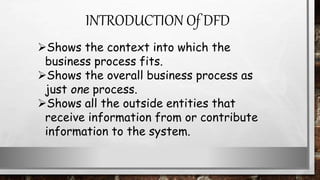
Shows the context into which the
business process fits.
Shows the overall business process as
just one process.
Shows all the outside entities that
receive information from or contribute
information to the system.
INTRODUCTION Of DFD
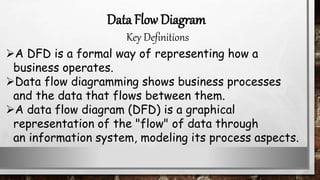
A DFD is a formal way of representing how a
business operates.
Data flow diagramming shows business processes
and the data that flows between them.
A data flow diagram (DFD) is a graphical
representation of the "flow" of data through
an information system, modeling its process aspects.
Data Flow Diagram
Key Definitions
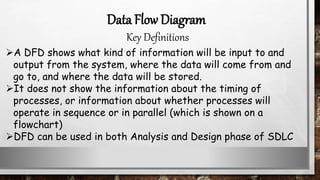
A DFD shows what kind of information will be input to and
output from the system, where the data will come from and
go to, and where the data will be stored.
It does not show the information about the timing of
processes, or information about whether processes will
operate in sequence or in parallel (which is shown on a
flowchart)
DFD can be used in both Analysis and Design phase of SDLC
Data Flow Diagram
Key Definitions
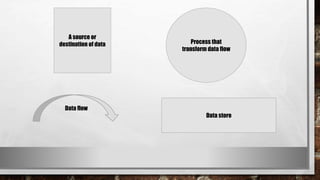
A source or
destination of data
Data flow
Process that
transform data flow
Data store
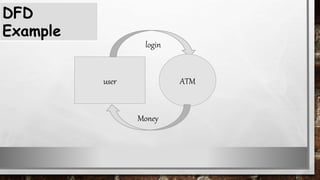
user
login
ATM
DFD
Example
Money
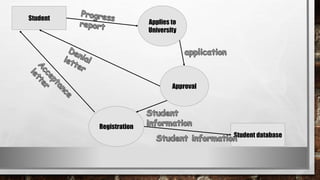
Student
Applies to
University
Approval
Registration
Student database
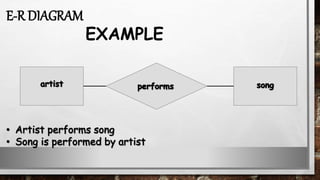
An entity-relationship diagram is a
data modeling technique that
creates a graphical representation
of the entities, and the
relationships between entities,
within an information system.
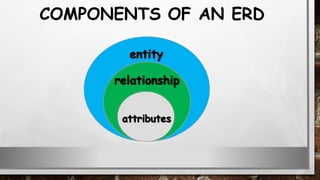
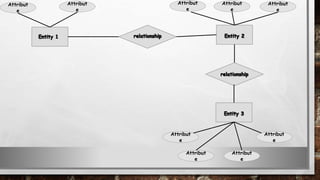
COMPONENTS OF AN ERD
•ENTITY − It specifies distinct real world items in an
application. For example: vendor, item, student, course,
teachers, etc.
•RELATIONSHIP − They are the meaningful dependencies
between entities. For example, vendor supplies items,
teacher teaches courses, then supplies and course are
relationship
•ATTRIBUTES − It specifies the properties of
relationships. For example, vendor code, student name.
Symbols used in E-R model and their respective meanings.
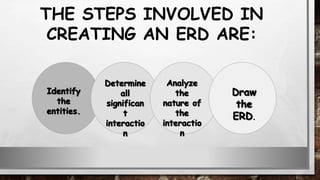
THE STEPS INVOLVED IN
CREATING AN ERD ARE:
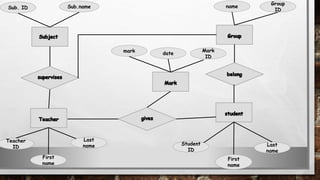
E-R DIAGRAM
EXAMPLE
Attribut
e
Attribut
e
Attribut
e
Attribut
e
Attribut
e
Attribut
e
Attribut
e
Attribut
e
Attribut
e
Group
ID
name
Last
name
First
name
Student
ID
Sub. ID Sub.name
Last
name
First
name
Teacher
ID
Mark
ID
date
mark
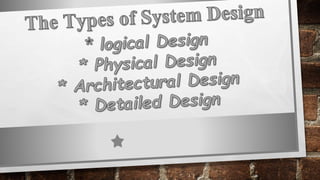
Logical design pertains to an abstract
representation of the data flow, inputs, and
outputs of the system.
It describes the inputs (sources), outputs
(destinations), databases (data stores),
procedures (data flows) all in a format that meets
the user requirements.
Logical design
While preparing the logical design of a system,
the system analyst specifies the user needs at
level of detail that virtually determines the
information flow into and out of the system and
the required data sources. Data flow diagram, E-R
diagram modeling are used..
Logical design
Physical design relates to the actual input and
output processes of the system. It focuses on how
data is entered into a system, verified, processed,
and displayed as output.
It produces the working system by defining the
design specification that specifies exactly what the
candidate system does. It is concerned with user
interface design, process design, and data design.
physical design
Specifying the input/output media, designing the
database, and specifying backup procedures.
Planning system implementation.
Devising a test and implementation plan, and
specifying any new hardware and software.
Updating costs, benefits, conversion dates, and
system constraints.
physical design
It consists of the following steps:
It is also known as high level design that focuses
on the design of system architecture. It describes
the structure and behavior of the system. It
defines the structure and relationship between
various modules of system development process.
architectural design
It follows Architectural design and
focuses on development of each module.
detailed design
The software system needs to be checked for its
intended behavior and direction of progress at
each development stage to avoid duplication of
efforts, time and cost overruns, and to assure
completion of the system within stipulated time.
System testing and quality assurance come to
aid for checking the system.
It includes −
Product level quality (Testing)
Process level quality.
Testing is the process or activity that checks the
functionality and correctness of software
according to specified user requirements in order
to improve the quality and reliability of system. It
is an expensive, time consuming, and critical
approach in system development which requires
proper planning of overall testing process.
testing
A successful test is one that finds the errors. It
executes the program with explicit intention of
finding error, i.e., making the program fail. It is a
process of evaluating system with an intention of
creating a strong system and mainly focuses on the
weak areas of the system or software.
testing
System testing begins at the module level and
proceeds towards the integration of the
entire software system. Different testing
techniques are used at different times while
testing the system. It is conducted by the
developer for small projects and by
independent testing groups for large projects.
The following stages are involved in testing:
 Test Strategy
 Test Plan
 Test Case Design
 Test Procedures
 Test Result Documentation
It is a statement that provides information about
the various levels, methods, tools, and techniques
used for testing the system. It should satisfy all
the needs of an organization.
Test Strategy
It provides a plan for testing the system and verifies that the system
under testing fulfils all the design and functional specifications. The
test plan provides the following information:
 Objectives of each test phase
 Approaches and tools used for testing
 Responsibilities and time required for each testing activity
 Availability of tools, facilities, and test libraries
 Procedures and standards required for planning and conducting
the tests
 Factors responsible for successful completion of testing process.
Test Plan
A number of test cases are identified for each module of the
system to be tested.
Each test case will specify how the implementation of a
particular requirement or design decision is to be tested and
the criteria for the success of the test.
The test cases along with the test plan are documented as a
part of a system specification document or in a separate
document called test specification or test description.
Test Case Design
It consists of the steps that should be followed to
execute each of the test cases. These procedures
are specified in a separate document called test
procedure specification. This document also
specifies any special requirements and formats for
reporting the result of testing.
Test Procedures
Test result file contains brief information
about the total number of test cases
executed, the number of errors, and nature
of errors. These results are then assessed
against criteria in the test specification to
determine the overall outcome of the test.
Test Result Documentation
Testing can be of various types and different
types of tests are conducted depending on the
kind of bugs one seeks to discover-
 Unit Testing
 Integration Testing
 Functional Testing
Also known as Program Testing, it is a type of testing where
the analyst tests or focuses on each program or module
independently. It is carried out with the intention of
executing each statement of the module at least once.
In unit testing, accuracy of program cannot be assured
and it is difficult to conduct testing of various input
combination in detail.
It identifies maximum errors in a program as compared to
other testing techniques.
Unit Testing
In Integration Testing, the analyst tests multiple module
working together. It is used to find discrepancies between
the system and its original objective, current
specifications, and systems documentation.
Here the analysts are try to find areas where modules
have been designed with different specifications for
data length, type, and data element name.
It verifies that file sizes are adequate and that indices
have been built properly.
Integration Testing
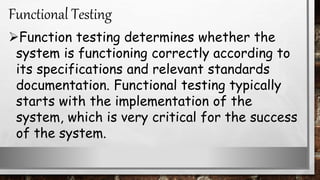
Function testing determines whether the
system is functioning correctly according to
its specifications and relevant standards
documentation. Functional testing typically
starts with the implementation of the
system, which is very critical for the success
of the system.
Functional Testing
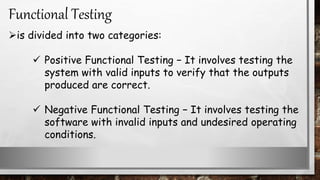
is divided into two categories:
 Positive Functional Testing − It involves testing the
system with valid inputs to verify that the outputs
produced are correct.
 Negative Functional Testing − It involves testing the
software with invalid inputs and undesired operating
conditions.
Functional Testing
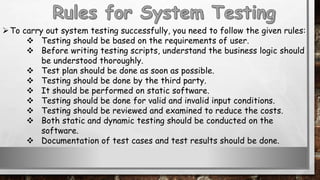
To carry out system testing successfully, you need to follow the given rules:
 Testing should be based on the requirements of user.
 Before writing testing scripts, understand the business logic should
be understood thoroughly.
 Test plan should be done as soon as possible.
 Testing should be done by the third party.
 It should be performed on static software.
 Testing should be done for valid and invalid input conditions.
 Testing should be reviewed and examined to reduce the costs.
 Both static and dynamic testing should be conducted on the
software.
 Documentation of test cases and test results should be done.
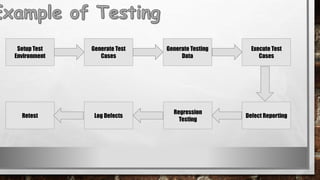
Setup Test
Environment
Generate Test
Cases
Generate Testing
Data
Execute Test
Cases
Retest Log Defects
Regression
Testing
Defect Reporting
System Integration and Architecture.pptx

System Integration and Architecture.pptx

  • 2.
    INDEX * SECTION 1* SECTION 2 ENTITY-RELATIONSHIP DIAGRAM DATA FLOW DIAGRAM
  • 4.
    Shows the contextinto which the business process fits. Shows the overall business process as just one process. Shows all the outside entities that receive information from or contribute information to the system. INTRODUCTION Of DFD
  • 5.
    A DFD isa formal way of representing how a business operates. Data flow diagramming shows business processes and the data that flows between them. A data flow diagram (DFD) is a graphical representation of the "flow" of data through an information system, modeling its process aspects. Data Flow Diagram Key Definitions
  • 6.
    A DFD showswhat kind of information will be input to and output from the system, where the data will come from and go to, and where the data will be stored. It does not show the information about the timing of processes, or information about whether processes will operate in sequence or in parallel (which is shown on a flowchart) DFD can be used in both Analysis and Design phase of SDLC Data Flow Diagram Key Definitions
  • 8.
    A source or destinationof data Data flow Process that transform data flow Data store
  • 10.
  • 11.
  • 13.
    An entity-relationship diagramis a data modeling technique that creates a graphical representation of the entities, and the relationships between entities, within an information system.
  • 14.
  • 15.
    COMPONENTS OF ANERD •ENTITY − It specifies distinct real world items in an application. For example: vendor, item, student, course, teachers, etc. •RELATIONSHIP − They are the meaningful dependencies between entities. For example, vendor supplies items, teacher teaches courses, then supplies and course are relationship •ATTRIBUTES − It specifies the properties of relationships. For example, vendor code, student name. Symbols used in E-R model and their respective meanings.
  • 16.
    THE STEPS INVOLVEDIN CREATING AN ERD ARE:
  • 17.
  • 18.
  • 19.
  • 23.
    Logical design pertainsto an abstract representation of the data flow, inputs, and outputs of the system. It describes the inputs (sources), outputs (destinations), databases (data stores), procedures (data flows) all in a format that meets the user requirements. Logical design
  • 24.
    While preparing thelogical design of a system, the system analyst specifies the user needs at level of detail that virtually determines the information flow into and out of the system and the required data sources. Data flow diagram, E-R diagram modeling are used.. Logical design
  • 26.
    Physical design relatesto the actual input and output processes of the system. It focuses on how data is entered into a system, verified, processed, and displayed as output. It produces the working system by defining the design specification that specifies exactly what the candidate system does. It is concerned with user interface design, process design, and data design. physical design
  • 27.
    Specifying the input/outputmedia, designing the database, and specifying backup procedures. Planning system implementation. Devising a test and implementation plan, and specifying any new hardware and software. Updating costs, benefits, conversion dates, and system constraints. physical design It consists of the following steps:
  • 29.
    It is alsoknown as high level design that focuses on the design of system architecture. It describes the structure and behavior of the system. It defines the structure and relationship between various modules of system development process. architectural design
  • 31.
    It follows Architecturaldesign and focuses on development of each module. detailed design
  • 34.
    The software systemneeds to be checked for its intended behavior and direction of progress at each development stage to avoid duplication of efforts, time and cost overruns, and to assure completion of the system within stipulated time. System testing and quality assurance come to aid for checking the system. It includes − Product level quality (Testing) Process level quality.
  • 35.
    Testing is theprocess or activity that checks the functionality and correctness of software according to specified user requirements in order to improve the quality and reliability of system. It is an expensive, time consuming, and critical approach in system development which requires proper planning of overall testing process. testing
  • 36.
    A successful testis one that finds the errors. It executes the program with explicit intention of finding error, i.e., making the program fail. It is a process of evaluating system with an intention of creating a strong system and mainly focuses on the weak areas of the system or software. testing
  • 37.
    System testing beginsat the module level and proceeds towards the integration of the entire software system. Different testing techniques are used at different times while testing the system. It is conducted by the developer for small projects and by independent testing groups for large projects.
  • 38.
    The following stagesare involved in testing:  Test Strategy  Test Plan  Test Case Design  Test Procedures  Test Result Documentation
  • 39.
    It is astatement that provides information about the various levels, methods, tools, and techniques used for testing the system. It should satisfy all the needs of an organization. Test Strategy
  • 40.
    It provides aplan for testing the system and verifies that the system under testing fulfils all the design and functional specifications. The test plan provides the following information:  Objectives of each test phase  Approaches and tools used for testing  Responsibilities and time required for each testing activity  Availability of tools, facilities, and test libraries  Procedures and standards required for planning and conducting the tests  Factors responsible for successful completion of testing process. Test Plan
  • 41.
    A number oftest cases are identified for each module of the system to be tested. Each test case will specify how the implementation of a particular requirement or design decision is to be tested and the criteria for the success of the test. The test cases along with the test plan are documented as a part of a system specification document or in a separate document called test specification or test description. Test Case Design
  • 42.
    It consists ofthe steps that should be followed to execute each of the test cases. These procedures are specified in a separate document called test procedure specification. This document also specifies any special requirements and formats for reporting the result of testing. Test Procedures
  • 43.
    Test result filecontains brief information about the total number of test cases executed, the number of errors, and nature of errors. These results are then assessed against criteria in the test specification to determine the overall outcome of the test. Test Result Documentation
  • 44.
    Testing can beof various types and different types of tests are conducted depending on the kind of bugs one seeks to discover-  Unit Testing  Integration Testing  Functional Testing
  • 45.
    Also known asProgram Testing, it is a type of testing where the analyst tests or focuses on each program or module independently. It is carried out with the intention of executing each statement of the module at least once. In unit testing, accuracy of program cannot be assured and it is difficult to conduct testing of various input combination in detail. It identifies maximum errors in a program as compared to other testing techniques. Unit Testing
  • 46.
    In Integration Testing,the analyst tests multiple module working together. It is used to find discrepancies between the system and its original objective, current specifications, and systems documentation. Here the analysts are try to find areas where modules have been designed with different specifications for data length, type, and data element name. It verifies that file sizes are adequate and that indices have been built properly. Integration Testing
  • 47.
    Function testing determineswhether the system is functioning correctly according to its specifications and relevant standards documentation. Functional testing typically starts with the implementation of the system, which is very critical for the success of the system. Functional Testing
  • 48.
    is divided intotwo categories:  Positive Functional Testing − It involves testing the system with valid inputs to verify that the outputs produced are correct.  Negative Functional Testing − It involves testing the software with invalid inputs and undesired operating conditions. Functional Testing
  • 49.
    To carry outsystem testing successfully, you need to follow the given rules:  Testing should be based on the requirements of user.  Before writing testing scripts, understand the business logic should be understood thoroughly.  Test plan should be done as soon as possible.  Testing should be done by the third party.  It should be performed on static software.  Testing should be done for valid and invalid input conditions.  Testing should be reviewed and examined to reduce the costs.  Both static and dynamic testing should be conducted on the software.  Documentation of test cases and test results should be done.
  • 50.
    Setup Test Environment Generate Test Cases GenerateTesting Data Execute Test Cases Retest Log Defects Regression Testing Defect Reporting