Synchronization in Selenium WebDriver
1. What is Synchronization.
2. Why Synchronization is required.
3. When Synchronization is required.
4. Conditional and Unconditional Synchronization in Selenium WebDriver.
Synchronization in Selenium WebDriver
• It is a mechanism which involves more than one components to work parallel with Each other.
Generally in Test Automation, we have two components
1. Application Under Test.
2. Test Automation Tool.
• Both these components will have their own speed. We should write our scripts in such a way that both
the components should move with same and desired speed, so that we will not encounter "Element Not
Found" errors which will consume time again in debugging.
• It is a process of coordinating or matching two or more activities/devices/processes in time.
• Process of matching the speed of AUT(Application under test) & Test tool in order to get proper
execution.
• During the test execution Test tool gives instructions one by one with same speed, but AUT takes less
time for some steps execution and more time for some steps execution, in order to keep them in sync
then Synchronization is required.
• Whenever any step required time more than Synchronization time for execution, then Synchronization
is required.
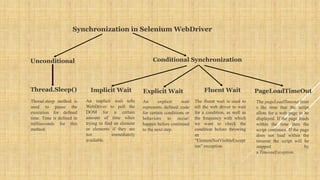
Synchronization in Selenium WebDriver
Unconditional Conditional Synchronization
Implicit WaitThread.Sleep() Fluent Wait PageLoadTimeOutExplicit Wait
An implicit wait tells
WebDriver to poll the
DOM for a certain
amount of time when
trying to find an element
or elements if they are
not immediately
available.
An explicit wait
represents defined code
for certain conditions or
behaviors to occur/
happen before continued
to the next step.
The pageLoadTimeout limit
s the time that the script
allots for a web page to be
displayed. If the page loads
within the time then the
script continues. If the page
does not load within the
timeout the script will be
stopped by
a TimeoutException.
Thread.sleep method is
used to pause the
execution for defined
time. Time is defined in
milliseconds for this
method.
The fluent wait is used to
tell the web driver to wait
for a condition, as well as
the frequency with which
we want to check the
condition before throwing
an
"ElementNotVisibleExcept
ion" exception.
Thread.Sleep:
• Thread.sleep method is used to pause the execution for defined time. Time is defined in milliseconds for this method.
Implicit Wait:
• During Implicit wait if the Web Driver cannot find it immediately because of its availability, it will keep polling the DOM to get
the element.
• If the element is not available within the specified Time an NoSuchElementException will be raised.
• The default setting is zero.
• Once we set a time, the Web Driver waits for the period of the WebDriver object instance.
Explicit Wait:
• There can be instance when a particular element takes more than a minute to load.
• In that case you definitely not like to set a huge time to Implicit wait, as if you do this your browser will going to wait for the
same time for every element.
• To avoid that situation you can simply put a separate time on the required element only.
• By following this your browser implicit wait time would be short for every element and it would be large for specific element.
Fluent Wait:
• Let’s say you have an element which sometime appears in just 1 second and some time it takes minutes to appear.
• In that case it is better to use fluent wait, as this will try to find element again and again until it find it or until the final timer
runs out.
Page Load Time Out:
• The pageLoadTimeout limits the time that the script allots for a web page to be displayed.
• If the page loads within the time then the script continues.
• If the page does not load within the timeout the script will be stopped by a TimeoutException.

Synchronization in Selenium WebDriver

  • 1.
    Synchronization in SeleniumWebDriver 1. What is Synchronization. 2. Why Synchronization is required. 3. When Synchronization is required. 4. Conditional and Unconditional Synchronization in Selenium WebDriver.
  • 2.
    Synchronization in SeleniumWebDriver • It is a mechanism which involves more than one components to work parallel with Each other. Generally in Test Automation, we have two components 1. Application Under Test. 2. Test Automation Tool. • Both these components will have their own speed. We should write our scripts in such a way that both the components should move with same and desired speed, so that we will not encounter "Element Not Found" errors which will consume time again in debugging. • It is a process of coordinating or matching two or more activities/devices/processes in time. • Process of matching the speed of AUT(Application under test) & Test tool in order to get proper execution. • During the test execution Test tool gives instructions one by one with same speed, but AUT takes less time for some steps execution and more time for some steps execution, in order to keep them in sync then Synchronization is required. • Whenever any step required time more than Synchronization time for execution, then Synchronization is required.
  • 3.
    Synchronization in SeleniumWebDriver Unconditional Conditional Synchronization Implicit WaitThread.Sleep() Fluent Wait PageLoadTimeOutExplicit Wait An implicit wait tells WebDriver to poll the DOM for a certain amount of time when trying to find an element or elements if they are not immediately available. An explicit wait represents defined code for certain conditions or behaviors to occur/ happen before continued to the next step. The pageLoadTimeout limit s the time that the script allots for a web page to be displayed. If the page loads within the time then the script continues. If the page does not load within the timeout the script will be stopped by a TimeoutException. Thread.sleep method is used to pause the execution for defined time. Time is defined in milliseconds for this method. The fluent wait is used to tell the web driver to wait for a condition, as well as the frequency with which we want to check the condition before throwing an "ElementNotVisibleExcept ion" exception.
  • 4.
    Thread.Sleep: • Thread.sleep methodis used to pause the execution for defined time. Time is defined in milliseconds for this method. Implicit Wait: • During Implicit wait if the Web Driver cannot find it immediately because of its availability, it will keep polling the DOM to get the element. • If the element is not available within the specified Time an NoSuchElementException will be raised. • The default setting is zero. • Once we set a time, the Web Driver waits for the period of the WebDriver object instance. Explicit Wait: • There can be instance when a particular element takes more than a minute to load. • In that case you definitely not like to set a huge time to Implicit wait, as if you do this your browser will going to wait for the same time for every element. • To avoid that situation you can simply put a separate time on the required element only. • By following this your browser implicit wait time would be short for every element and it would be large for specific element. Fluent Wait: • Let’s say you have an element which sometime appears in just 1 second and some time it takes minutes to appear. • In that case it is better to use fluent wait, as this will try to find element again and again until it find it or until the final timer runs out. Page Load Time Out: • The pageLoadTimeout limits the time that the script allots for a web page to be displayed. • If the page loads within the time then the script continues. • If the page does not load within the timeout the script will be stopped by a TimeoutException.