Multithreading
and
concurrency
SHYMA’A QADOOM
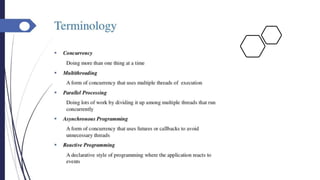
Concurrency
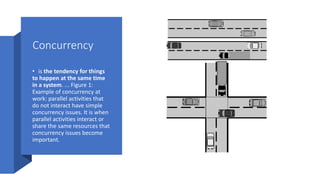
• is the tendency for things
to happen at the same time
in a system. ... Figure 1:
Example of concurrency at
work: parallel activities that
do not interact have simple
concurrency issues. It is when
parallel activities interact or
share the same resources that
concurrency issues become
important.
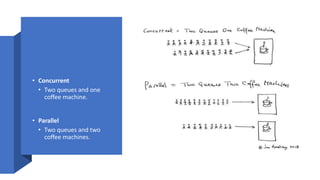
• Concurrent
• Two queues and one
coffee machine.
• Parallel
• Two queues and two
coffee machines.
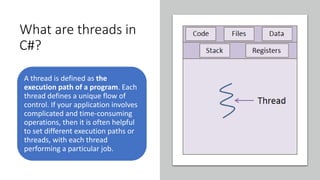
What are threads in
C#?
A thread is defined as the
execution path of a program. Each
thread defines a unique flow of
control. If your application involves
complicated and time-consuming
operations, then it is often helpful
to set different execution paths or
threads, with each thread
performing a particular job.
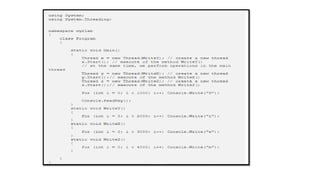
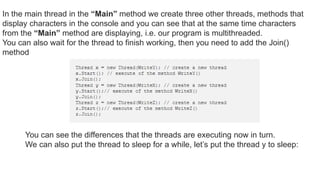
In the main thread in the “Main” method we create three other threads, methods that
display characters in the console and you can see that at the same time characters
from the “Main” method are displaying, i.e. our program is multithreaded.
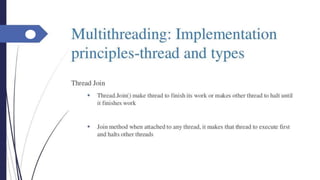
You can also wait for the thread to finish working, then you need to add the Join()
method
You can see the differences that the threads are executing now in turn.
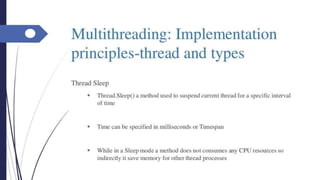
We can also put the thread to sleep for a while, let’s put the thread y to sleep:
Synchronization - lock
Keyword
Since we got inconsistent result, we need to find a way to
programmatically enforce synchronized access to the shared
resources. The System.Threading provides a number of
synchronization types as we'll see in the following sections.
In this section, we're going to use lock keyword for the synchronized
access to shared resources. The lock allows us to define a scope of
code that must be synchronized between threads so that incoming
threads cannot interrupt the current thread. To use the lock, we
need to specify a token that must be acquired by a thread to enter
inside the scope which has been locked. So, when we want to lock
down a private instance method, we can simply pass in an object
reference to the current type:
Synchronization - Mutex
A Mutex is like the lock, however, it can work
across multiple processes. But it is slower than
the lock.
Mutex allows us to call the WaitOne() method to
lock and ReleaseMutex() to unlock. Note that
a Mutex can be released only from the same
thread which obtained it. The primary use for a
cross-process Mutex is to ensure that only one
instance of a program can run at a time.
Synchronization -
Semaphore
A Semaphore restricts the number of simultaneous
users of the shared resources up to a maximum
number. It ensures not more than a specific
number of concurrent threads, which can access a
resource.
A Semaphore is like a football team, it has a
certain capacity Once it is full, no more player can
enter and other players wait outside in the form of
queue. For each player that leaves, another one
enters from the head of the queue.
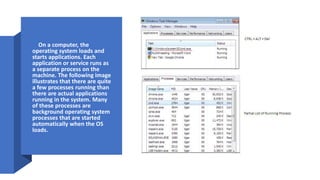
• On a computer, the
operating system loads and
starts applications. Each
application or service runs as
a separate process on the
machine. The following image
illustrates that there are quite
a few processes running than
there are actual applications
running in the system. Many
of these processes are
background operating system
processes that are started
automatically when the OS
loads.

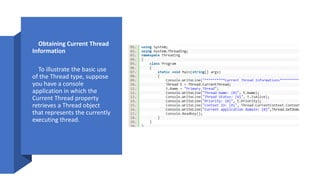
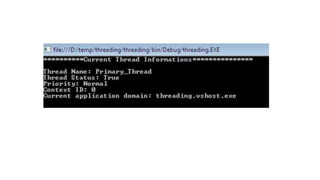
• Obtaining Current Thread
Information
• To illustrate the basic use
of the Thread type, suppose
you have a console
application in which the
Current Thread property
retrieves a Thread object
that represents the currently
executing thread.
Tasks
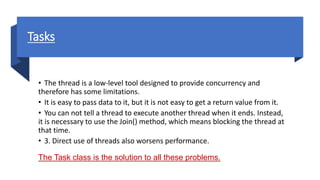
• The thread is a low-level tool designed to provide concurrency and
therefore has some limitations.
• It is easy to pass data to it, but it is not easy to get a return value from it.
• You can not tell a thread to execute another thread when it ends. Instead,
it is necessary to use the Join() method, which means blocking the thread at
that time.
• 3. Direct use of threads also worsens performance.
The Task class is the solution to all these problems.
Go to demos…
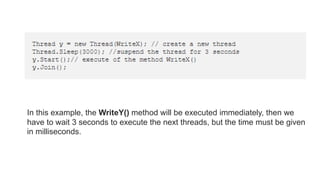
In this example, the WriteY() method will be executed immediately, then we
have to wait 3 seconds to execute the next threads, but the time must be given
in milliseconds.
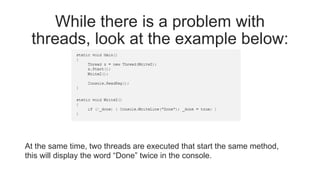
While there is a problem with
threads, look at the example below:
At the same time, two threads are executed that start the same method,
this will display the word “Done” twice in the console.
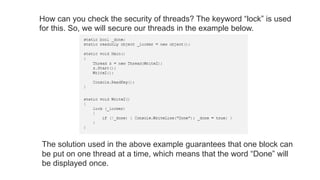
How can you check the security of threads? The keyword “lock” is used
for this. So, we will secure our threads in the example below.
The solution used in the above example guarantees that one block can
be put on one thread at a time, which means that the word “Done” will
be displayed once.
Thank you..
Have a nice day!

Multithreading and concurrency.pptx

  • 1.
  • 2.
    Concurrency • is thetendency for things to happen at the same time in a system. ... Figure 1: Example of concurrency at work: parallel activities that do not interact have simple concurrency issues. It is when parallel activities interact or share the same resources that concurrency issues become important.
  • 3.
    • Concurrent • Twoqueues and one coffee machine. • Parallel • Two queues and two coffee machines.
  • 6.
    What are threadsin C#? A thread is defined as the execution path of a program. Each thread defines a unique flow of control. If your application involves complicated and time-consuming operations, then it is often helpful to set different execution paths or threads, with each thread performing a particular job.
  • 26.
    In the mainthread in the “Main” method we create three other threads, methods that display characters in the console and you can see that at the same time characters from the “Main” method are displaying, i.e. our program is multithreaded. You can also wait for the thread to finish working, then you need to add the Join() method You can see the differences that the threads are executing now in turn. We can also put the thread to sleep for a while, let’s put the thread y to sleep:
  • 28.
    Synchronization - lock Keyword Sincewe got inconsistent result, we need to find a way to programmatically enforce synchronized access to the shared resources. The System.Threading provides a number of synchronization types as we'll see in the following sections. In this section, we're going to use lock keyword for the synchronized access to shared resources. The lock allows us to define a scope of code that must be synchronized between threads so that incoming threads cannot interrupt the current thread. To use the lock, we need to specify a token that must be acquired by a thread to enter inside the scope which has been locked. So, when we want to lock down a private instance method, we can simply pass in an object reference to the current type:
  • 29.
    Synchronization - Mutex AMutex is like the lock, however, it can work across multiple processes. But it is slower than the lock. Mutex allows us to call the WaitOne() method to lock and ReleaseMutex() to unlock. Note that a Mutex can be released only from the same thread which obtained it. The primary use for a cross-process Mutex is to ensure that only one instance of a program can run at a time.
  • 30.
    Synchronization - Semaphore A Semaphorerestricts the number of simultaneous users of the shared resources up to a maximum number. It ensures not more than a specific number of concurrent threads, which can access a resource. A Semaphore is like a football team, it has a certain capacity Once it is full, no more player can enter and other players wait outside in the form of queue. For each player that leaves, another one enters from the head of the queue.
  • 31.
    • On acomputer, the operating system loads and starts applications. Each application or service runs as a separate process on the machine. The following image illustrates that there are quite a few processes running than there are actual applications running in the system. Many of these processes are background operating system processes that are started automatically when the OS loads.
  • 32.
    • Obtaining CurrentThread Information • To illustrate the basic use of the Thread type, suppose you have a console application in which the Current Thread property retrieves a Thread object that represents the currently executing thread.
  • 34.
    Tasks • The threadis a low-level tool designed to provide concurrency and therefore has some limitations. • It is easy to pass data to it, but it is not easy to get a return value from it. • You can not tell a thread to execute another thread when it ends. Instead, it is necessary to use the Join() method, which means blocking the thread at that time. • 3. Direct use of threads also worsens performance. The Task class is the solution to all these problems.
  • 35.
  • 36.
    In this example,the WriteY() method will be executed immediately, then we have to wait 3 seconds to execute the next threads, but the time must be given in milliseconds.
  • 37.
    While there isa problem with threads, look at the example below: At the same time, two threads are executed that start the same method, this will display the word “Done” twice in the console.
  • 38.
    How can youcheck the security of threads? The keyword “lock” is used for this. So, we will secure our threads in the example below. The solution used in the above example guarantees that one block can be put on one thread at a time, which means that the word “Done” will be displayed once.
  • 39.