
Advanced NEO
Smart Contracts
Presented by:
#SwitchtoSwitcheo
Ivan Poon
Co-Founder, CEO
Switcheo Network
Speaker Info
ivan.poon@switcheo.network
#SwitchtoSwitcheo
Some Questions First!
1. Has anyone read Satoshi’s whitepaper?
2. Does anyone have experience with Ethereum 

smart contract development?
#SwitchtoSwitcheo
Workshop Agenda
1. How Does NEO Verify Transactions?
2. How To Make Withdrawals From A Smart Contract?
3. NEO Smart Contracts Best Practices
4. Questions and Answers (Q&A)
5. Demo (If there is time)
#SwitchtoSwitcheo
Presentation Materials
https://bit.ly/2tSoHDC
#SwitchtoSwitcheo
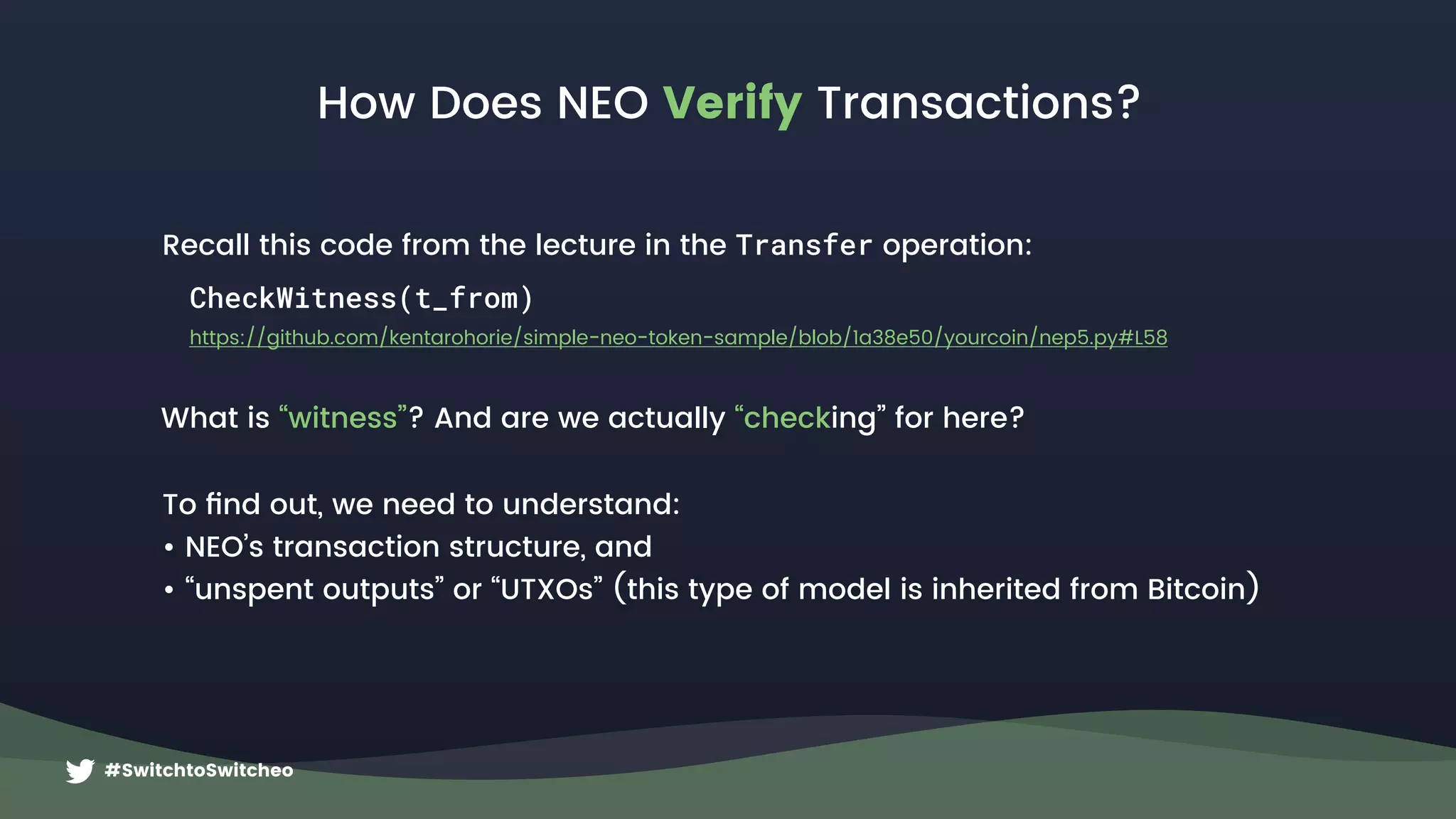
How Does NEO Verify Transactions?
CheckWitness(t_from)
What is “witness”? And are we actually “checking” for here?
https://github.com/kentarohorie/simple-neo-token-sample/blob/1a38e50/yourcoin/nep5.py#L58
To find out, we need to understand:
• NEO’s transaction structure, and
• “unspent outputs” or “UTXOs” (this type of model is inherited from Bitcoin)
Recall this code from the lecture in the Transfer operation:
#SwitchtoSwitcheo
NEO Transaction Structure
https://github.com/CityOfZion/neon-js/blob/e5b63db/src/
transactions/core.js#L79
f9592fc8a8fbc6be23963983f28179dcb341219b
a12431d0b9db640034b0cdfceef9cce161e62be4
560827208eed0ec04254f523cd5373ec1b394683
6e3382c4c4a69a3a62b489a456b327b5d301bea6
8888888721e49496726d4bf1c32876c0b41cd01f
https://github.com/neo-project/neo/blob/
23bbe9b/neo/Core/Transaction.cs#L18
JSON Byte Code
{
“type”: …,
“version”: …,
“attributes”: […],
“inputs”: […],
“outputs”: […],
“scripts”: […],
“script”: …,
}
#SwitchtoSwitcheo
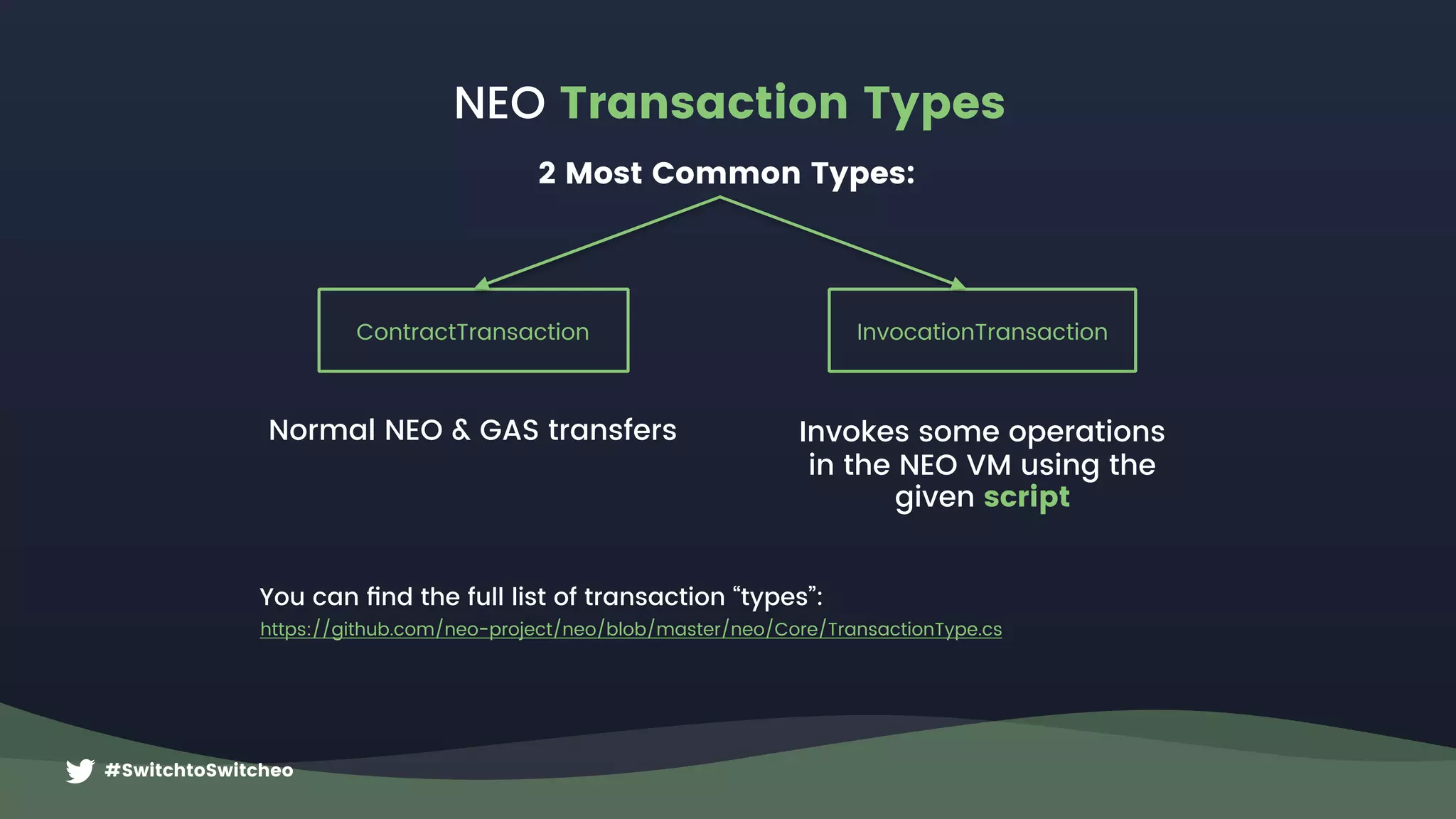
NEO Transaction Types
You can find the full list of transaction “types”:
https://github.com/neo-project/neo/blob/master/neo/Core/TransactionType.cs
ContractTransaction
Normal NEO & GAS transfers
InvocationTransaction
Invokes some operations
in the NEO VM using the
given script
2 Most Common Types:
#SwitchtoSwitcheo
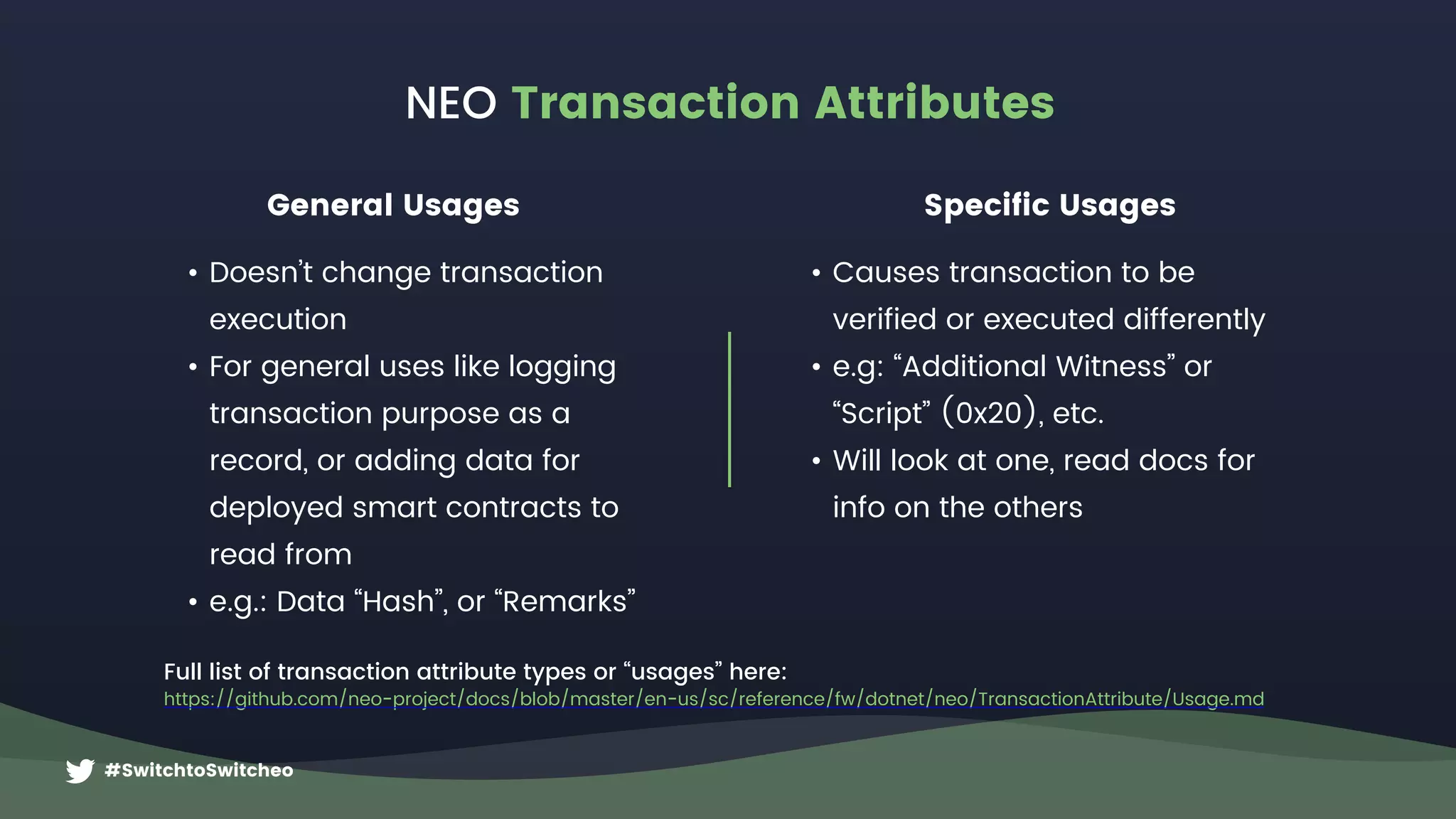
NEO Transaction Attributes
Full list of transaction attribute types or “usages” here:
https://github.com/neo-project/docs/blob/master/en-us/sc/reference/fw/dotnet/neo/TransactionAttribute/Usage.md
General Usages Specific Usages
• Doesn’t change transaction
execution
• For general uses like logging
transaction purpose as a
record, or adding data for
deployed smart contracts to
read from
• e.g.: Data “Hash”, or “Remarks”
• Causes transaction to be
verified or executed differently
• e.g: “Additional Witness” or
“Script” (0x20), etc.
• Will look at one, read docs for
info on the others
#SwitchtoSwitcheo
NEO Inputs & Outputs
{
inputs: [{
txid: “0xa…”,
index: 0,
address: A,
amount: 5,
}, {
txid: “0xb…”,
index: 0,
address: B,
amount: 7,
}],
outputs: [{
address: C, 

amount: 12
}],

attributes: [{
usage: 0x20, // Script
data: <addr D>],
}
Transaction

must be 

witnessed by
A+B+D
Address A
+5
Address B
+7
Address C
12
https://bitcoin.org/en/developer-guide#block-chain
#SwitchtoSwitcheo
{
scripts: [{
invocation: <addressA_Signature>,
verification: <addressA_VerificationScript>
},
invocation: <addressB_Signature>,
verification: <addressB_VerificationScript>
},
invocation: <addressD_Signature>,
verification: <addressD_VerificationScript>
},
],
}
NEO Witness Scripts
0x … … … … … …
ECDSA Signature
0x … … … …
Public Key
0xac
Check Signature
64 bytes long
33 bytes long
Invocation: https://github.com/CityOfZion/neon-js/blob/4634e74/src/wallet/core.js#L84
Verification: https://github.com/CityOfZion/neon-js/blob/4634e74/src/transactions/core.js#L150
Witness Scripts for a standard “wallet contract”
0x40
Push 40 Bytes
invocation
0x21
Push 33 Bytesverification
#SwitchtoSwitcheo
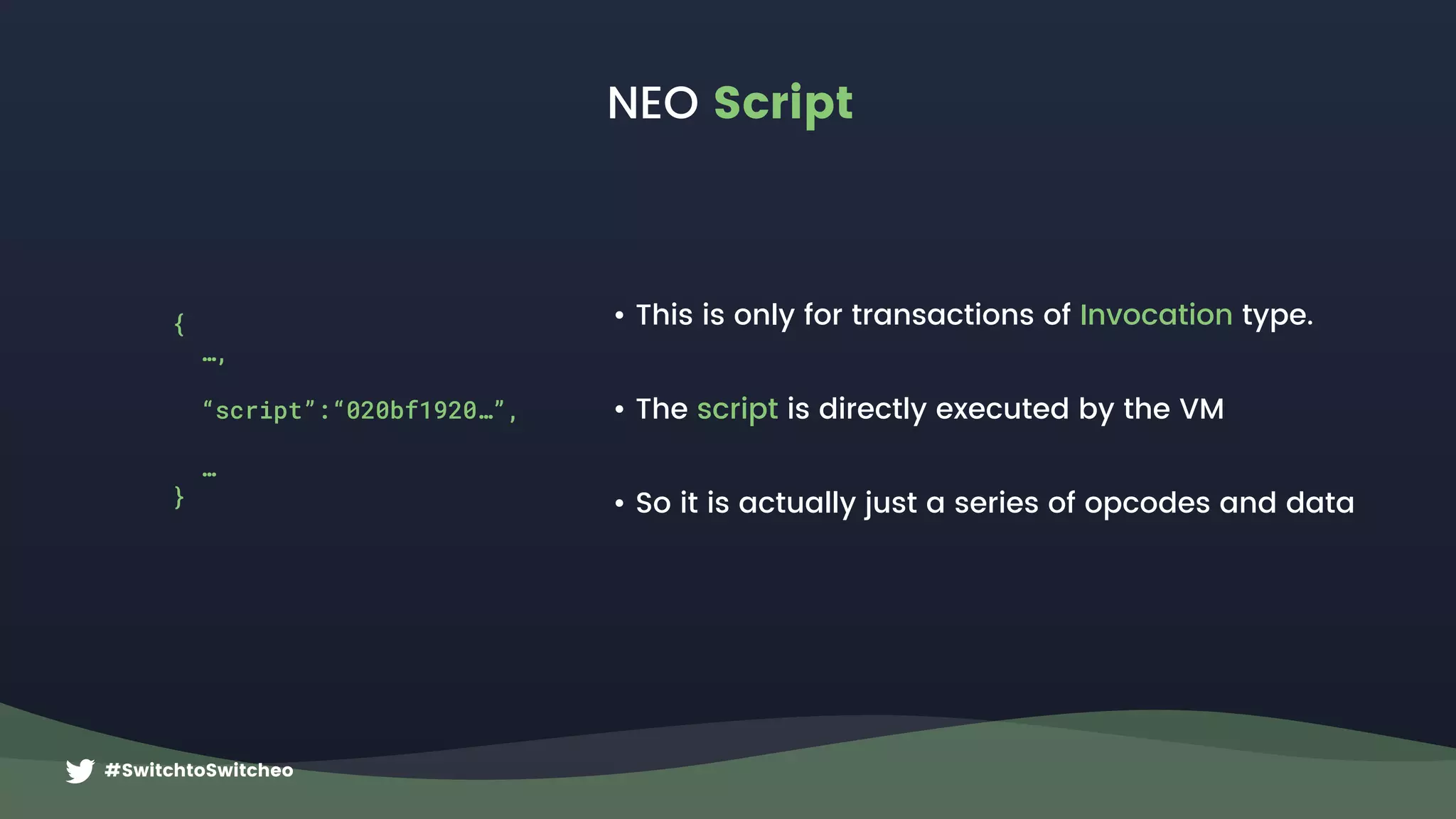
NEO Script
• This is only for transactions of Invocation type.
• The script is directly executed by the VM
• So it is actually just a series of opcodes and data
{
…,
“script”:“020bf1920…”,
…
}
#SwitchtoSwitcheo
OpCode Hex Explanation
PUSH20 0x20 Pushes the next 20 bytes onto the stack
<from> 0x11fg876d..
Push the “from” address for an NEP-5 transfer
operation
PUSH3 0x53 Pushes the number ‘3' onto the stack
0x11fg876d..
0x225ab73..
0x3356765..
3
… … … … … … … … … … … …
PACK 0xC1
Pops N from stack and combines the next N items into an
array
PUSHBYTES8 0x08 Pushes the next 8 bytes onto the stack
“transfer” 0x7472616e73666572
the operation string as bytes in this case it is the
“transfer” operation for NEP-5
APPCALL 0x67
Reads the next 20 bytes and invokes the corresponding
deployed contract with Application Trigger.
<scriptHash> 0xa12cde… The hash of the deployed smart contract to invoke
So transaction will have: { …, “script”:“020bf1920…” }
0x11 0x22 0x3
0x7472616..
Stack
https://github.com/neo-project/neo-vm/blob/master/src/neo-vm/OpCode.cs
Script example for a standard entrypoint: Main(string operation, params object[] args)
NEO Script
#SwitchtoSwitcheo
Verification of Smart Contracts
Verify([mempool]) VerifyScripts(IVerifiable) GetScriptHashesForVerifying()
https://github.com/neo-project/neo/blob/
23bbe9b/neo/Core/Transaction.cs#L330
https://github.com/neo-project/neo/blob/
23bbe9b/neo/Core/Helper.cs#L46
https://github.com/neo-project/neo/blob/
23bbe9b/neo/Core/Transaction.cs#L227
Check Double Spend,
etc..
Get hashes that must match
Verification Scripts
(found in “scripts”)
Get hashes of inputs
Add data (hash) in
transaction attribute
0x20 (usage “Script”
a.k.a. “Additional
Witness”)


This is useful if you
want to ensure
Verification runs on a
deployed contract, but
are not using inputs
from a smart contract
Hashes each VerificationScript
and compares hashes in order.
Fails if any missing or does
not match.
Executes Invocation Script
+ Verification Script.
Fails if hash mismatch, or
does not return true
Pass!
#SwitchtoSwitcheo
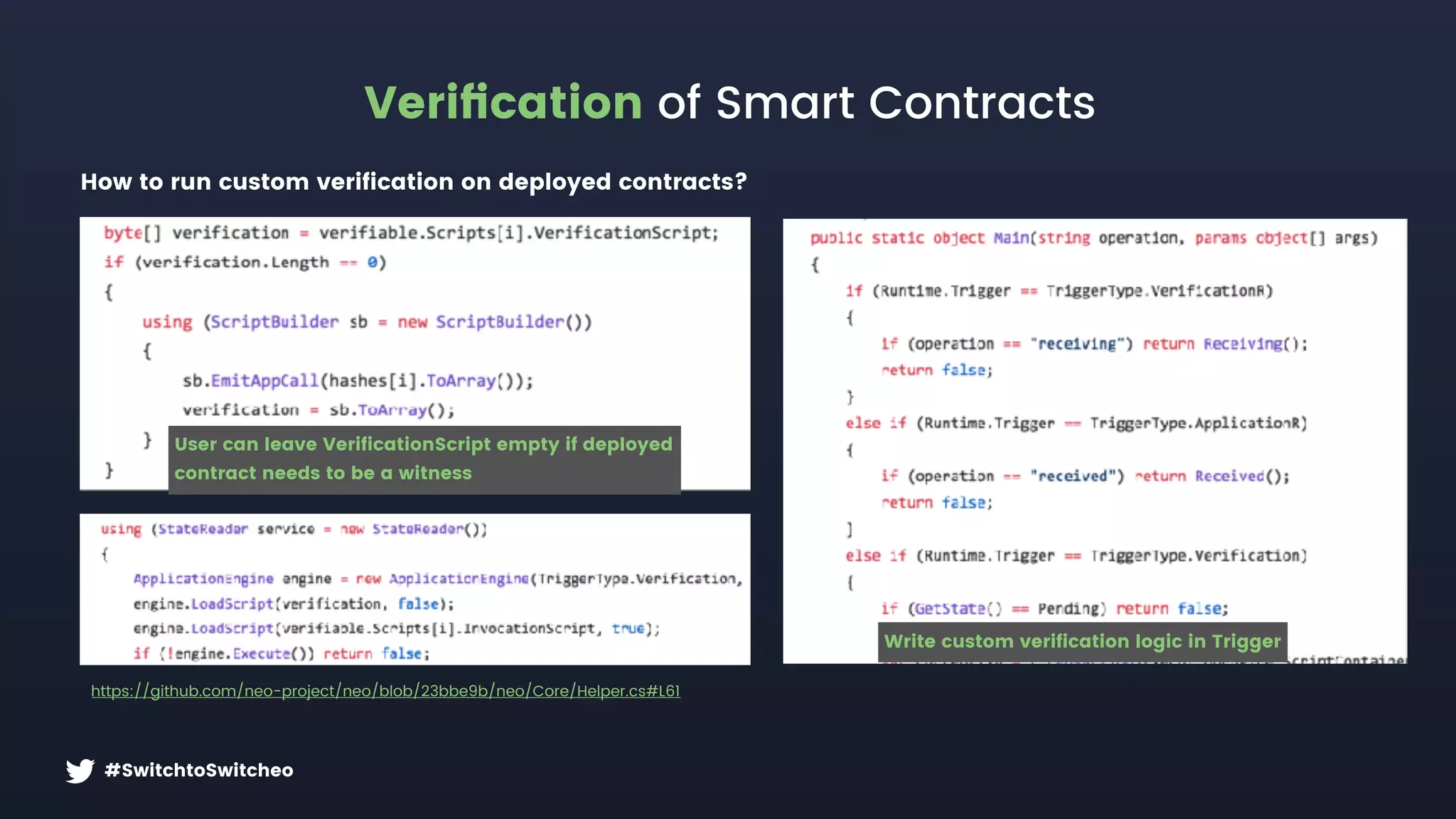
Verification of Smart Contracts
https://github.com/neo-project/neo/blob/23bbe9b/neo/Core/Helper.cs#L61
How to run custom verification on deployed contracts?
Write custom verification logic in Trigger
User can leave VerificationScript empty if deployed 

contract needs to be a witness
#SwitchtoSwitcheo
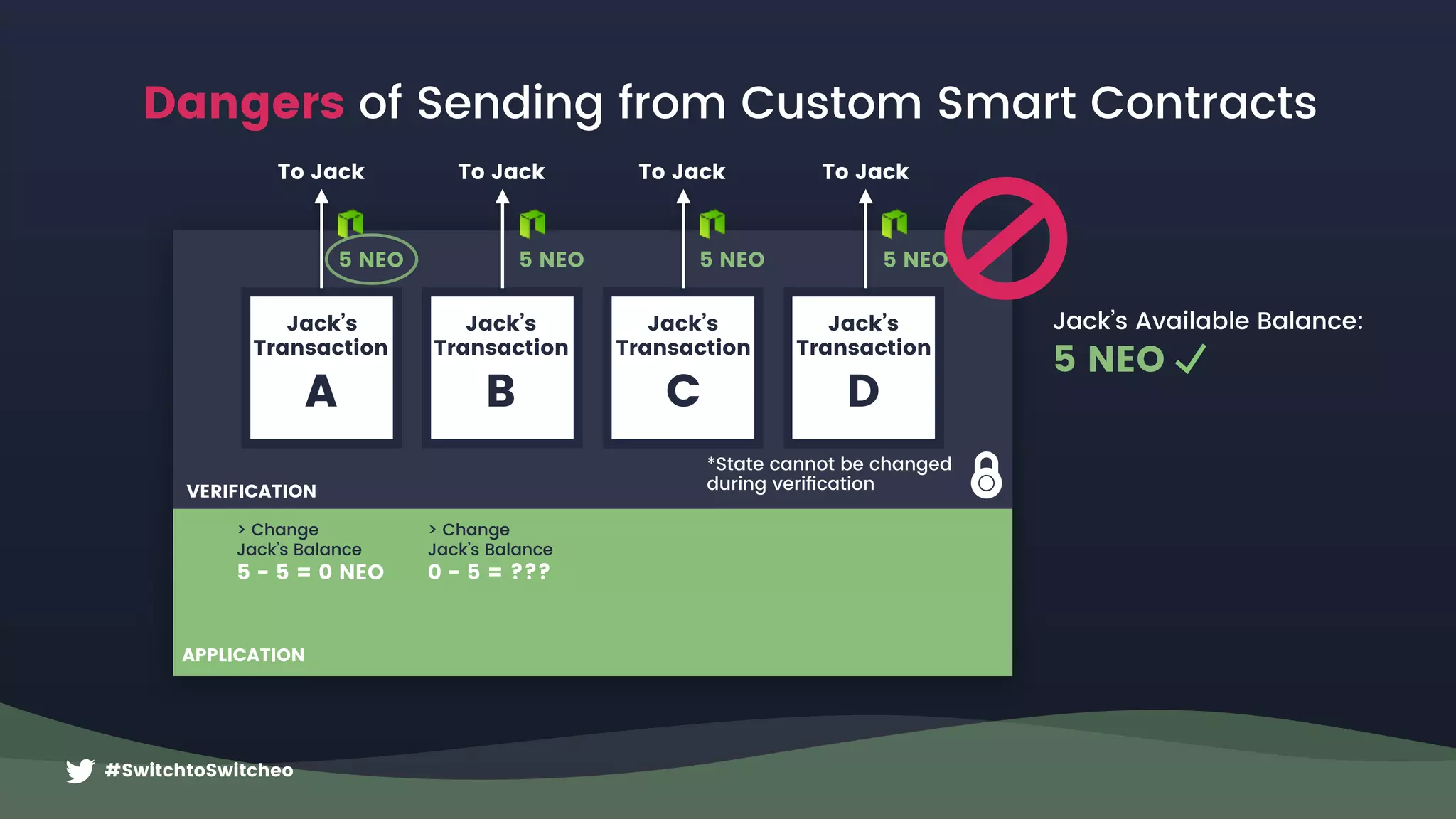
Dangers of Sending from Custom Smart Contracts
Jack’s Available Balance:
5 NEO
Jack’s
Transaction
A
5 NEO
To Jack
*State cannot be changed
during verification
5 NEO
To Jack
Jack’s
Transaction
B
5 NEO
To Jack
Jack’s
Transaction
C
5 NEO
To Jack
Jack’s
Transaction
D
> Change 

Jack’s Balance
0 - 5 = ???
> Change 

Jack’s Balance
5 - 5 = 0 NEO
VERIFICATION
APPLICATION
#SwitchtoSwitcheo
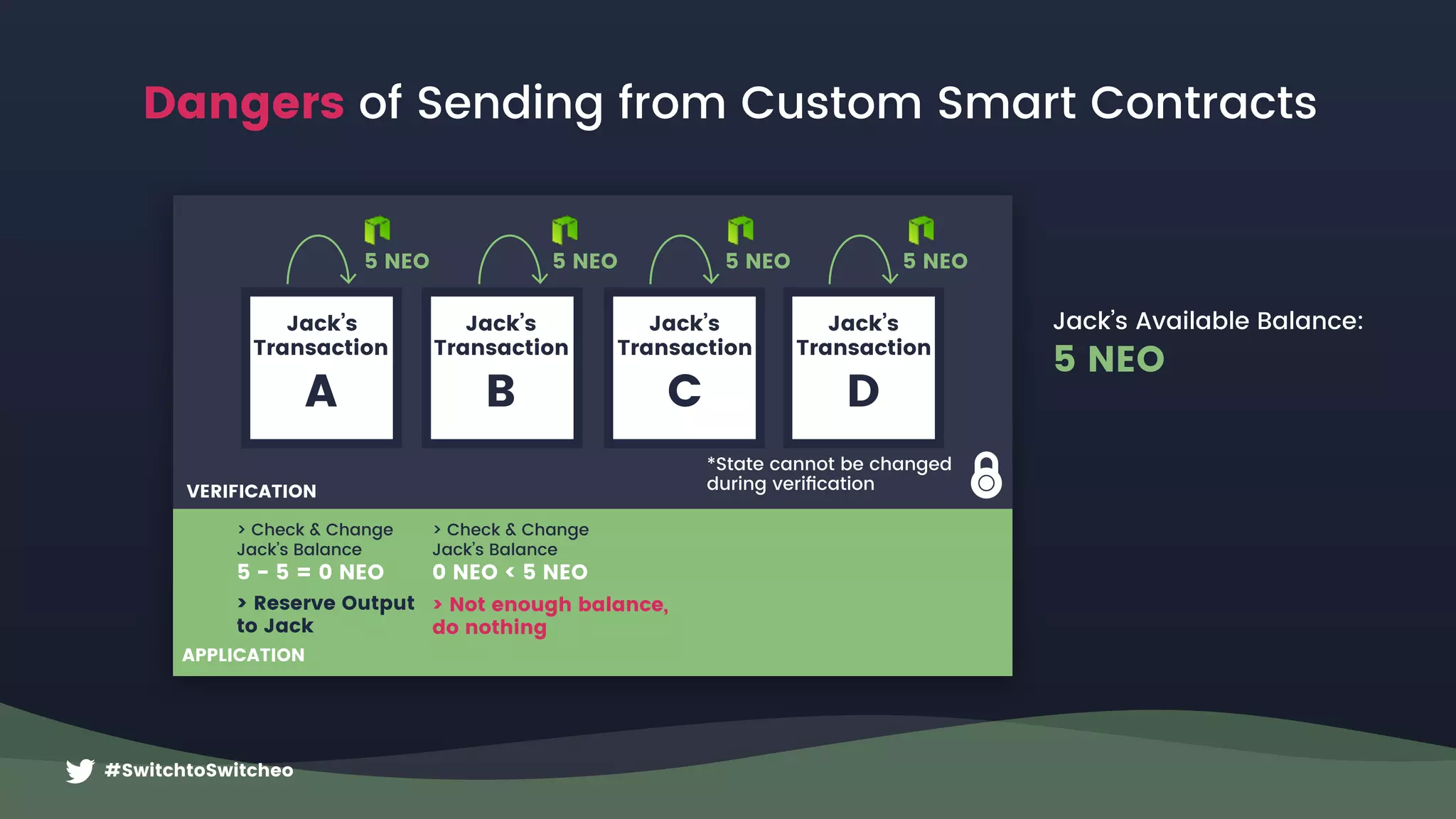
VERIFICATION
APPLICATION
*State cannot be changed
during verification
5 NEO
Jack’s
Transaction
A
5 NEO
Jack’s
Transaction
B
5 NEO
Jack’s
Transaction
C
5 NEO
Jack’s
Transaction
D
Jack’s Available Balance:
5 NEO
> Not enough balance,
do nothing
> Check & Change
Jack’s Balance
0 NEO < 5 NEO
> Reserve Output
to Jack
> Check & Change 

Jack’s Balance
5 - 5 = 0 NEO
Dangers of Sending from Custom Smart Contracts
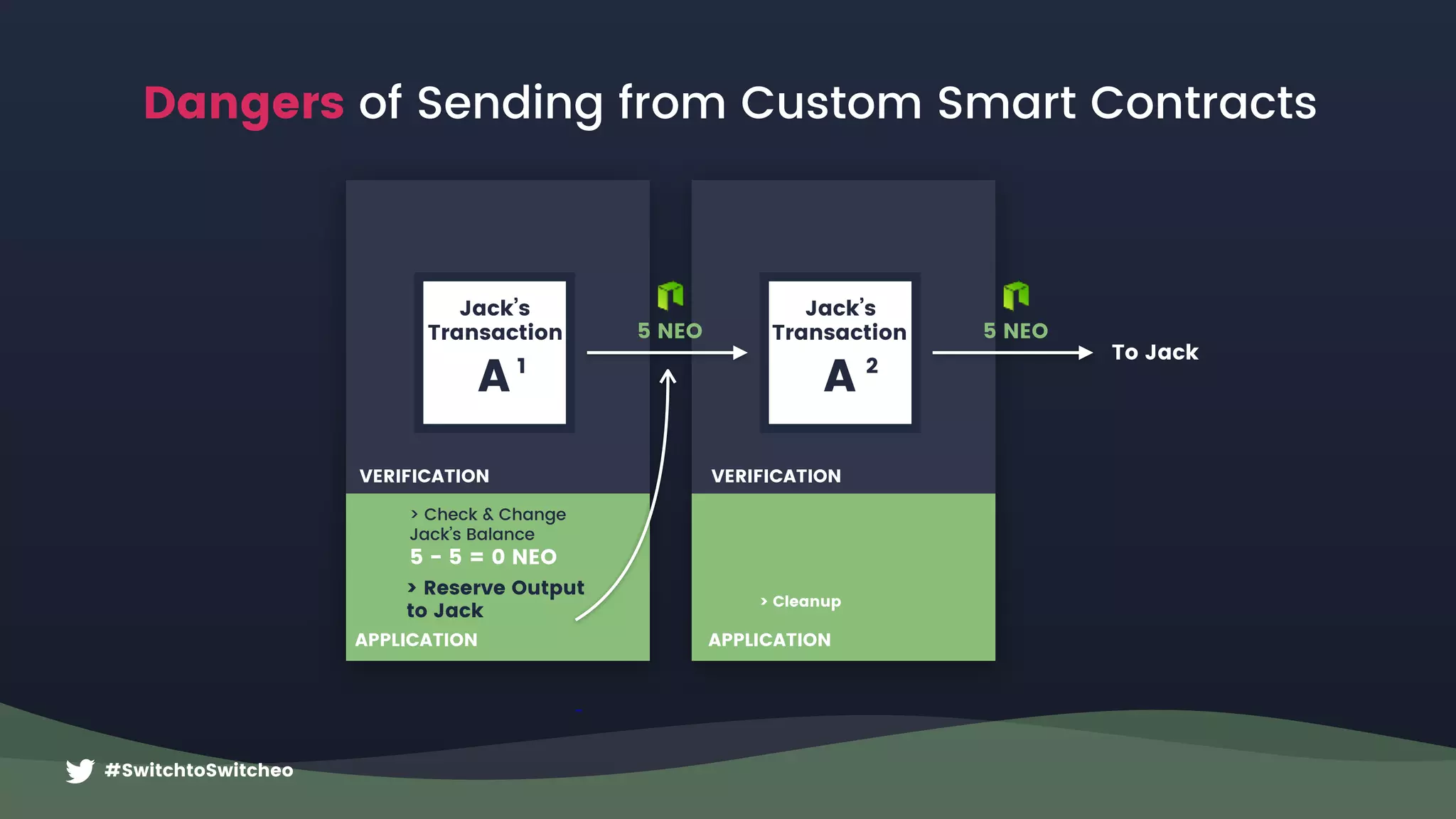
Jack’s
Transaction
A
> Cleanup
2
VERIFICATION
APPLICATION
#SwitchtoSwitcheo
Jack’s
Transaction
A 1
5 NEO 5 NEO
To Jack
> Reserve Output
to Jack
> Check & Change 

Jack’s Balance
5 - 5 = 0 NEO
VERIFICATION
APPLICATION
Dangers of Sending from Custom Smart Contracts
#SwitchtoSwitcheo
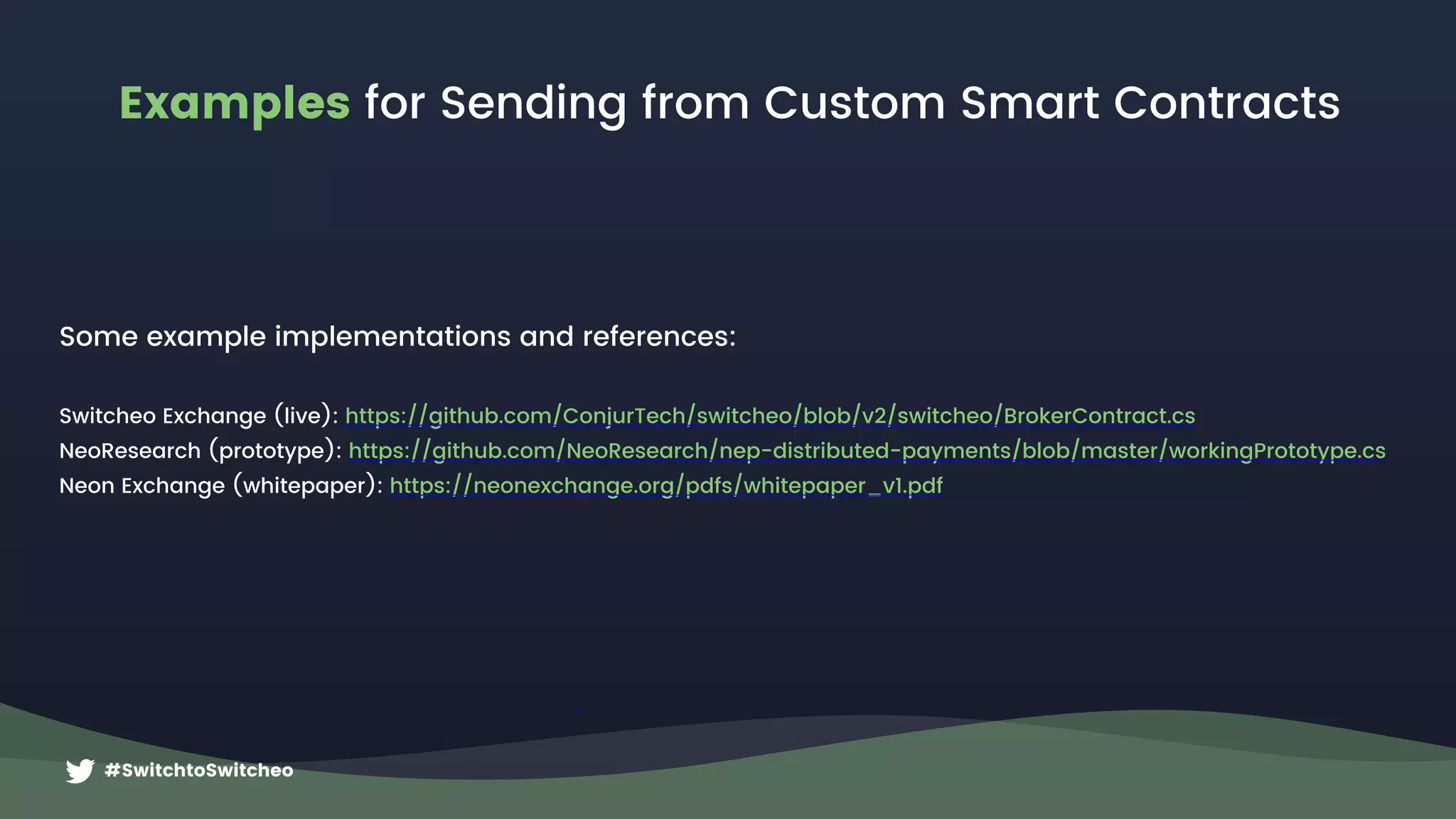
Examples for Sending from Custom Smart Contracts
Some example implementations and references:
Switcheo Exchange (live): https://github.com/ConjurTech/switcheo/blob/v2/switcheo/BrokerContract.cs
NeoResearch (prototype): https://github.com/NeoResearch/nep-distributed-payments/blob/master/workingPrototype.cs
Neon Exchange (whitepaper): https://neonexchange.org/pdfs/whitepaper_v1.pdf
#SwitchtoSwitcheo
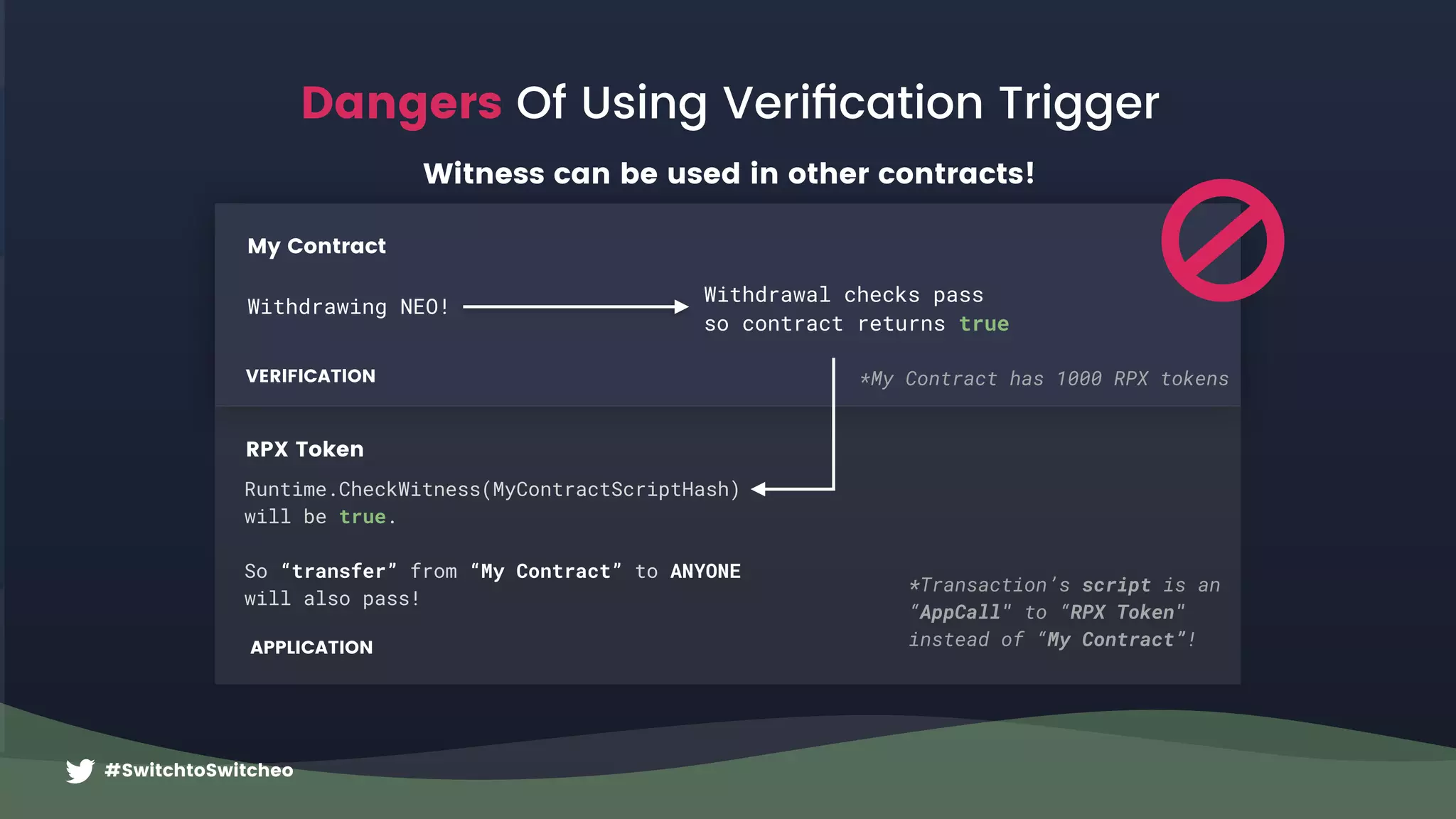
Dangers Of Using Verification Trigger
Witness can be used in other contracts!
Withdrawing NEO!
Runtime.CheckWitness(MyContractScriptHash)
will be true.
So “transfer” from “My Contract” to ANYONE
will also pass!
My Contract
RPX Token
*My Contract has 1000 RPX tokens
*Transaction’s script is an
“AppCall" to “RPX Token"
instead of “My Contract”!
Withdrawal checks pass 

so contract returns true
VERIFICATION
APPLICATION
#SwitchtoSwitcheo
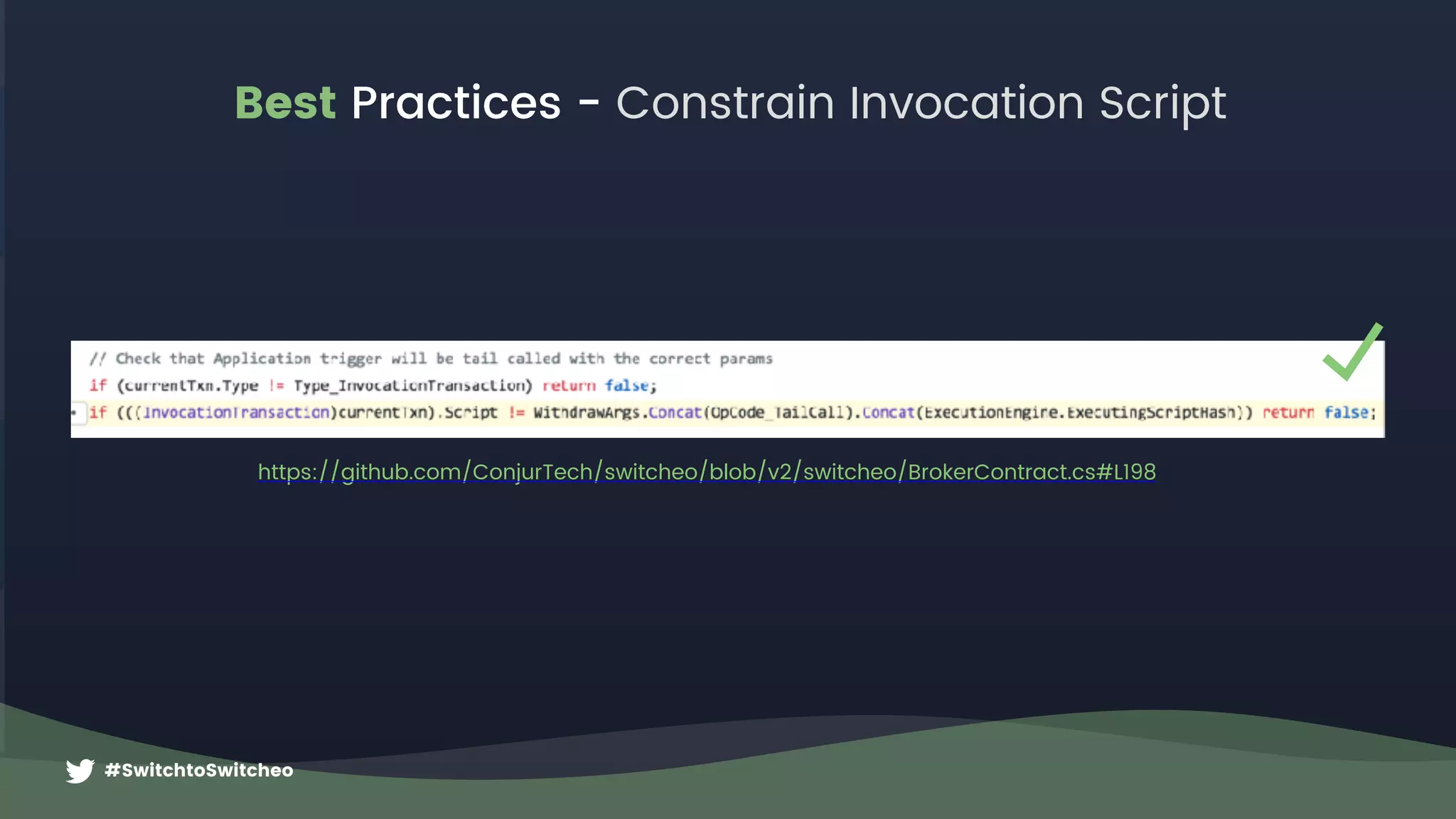
Best Practices - Constrain Invocation Script
*My Contract has 1000 RPX tokensVERIFICATION
https://github.com/ConjurTech/switcheo/blob/v2/switcheo/BrokerContract.cs#L198
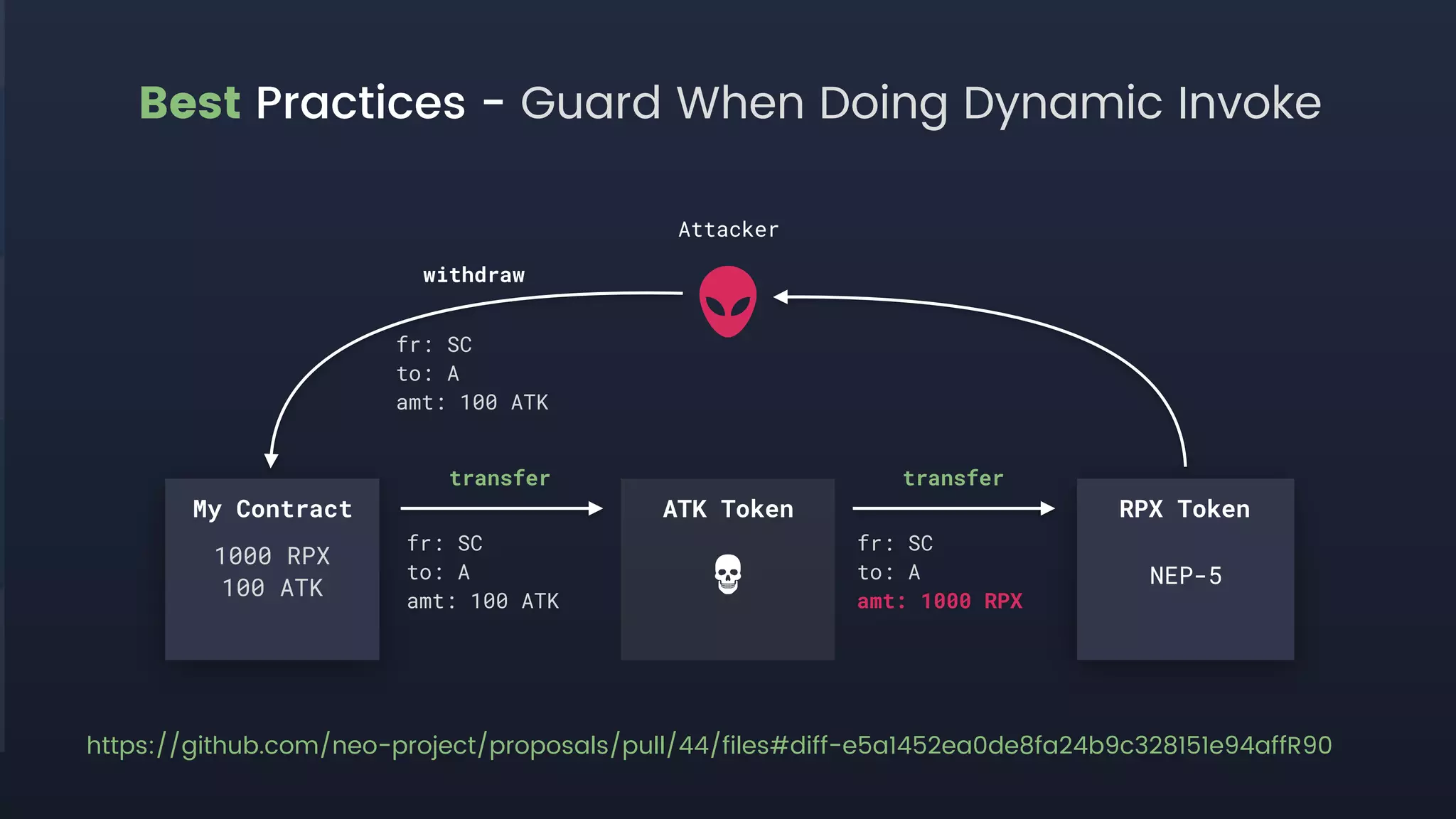
Best Practices - Guard When Doing Dynamic Invoke
My Contract ATK Token RPX Token
1000 RPX
100 ATK
transfer transfer
fr: SC
to: A
amt: 100 ATK
fr: SC
to: A
amt: 1000 RPX
Attacker
withdraw
fr: SC
to: A
amt: 100 ATK
https://github.com/neo-project/proposals/pull/44/files#diff-e5a1452ea0de8fa24b9c328151e94affR90
NEP-5
#SwitchtoSwitcheo
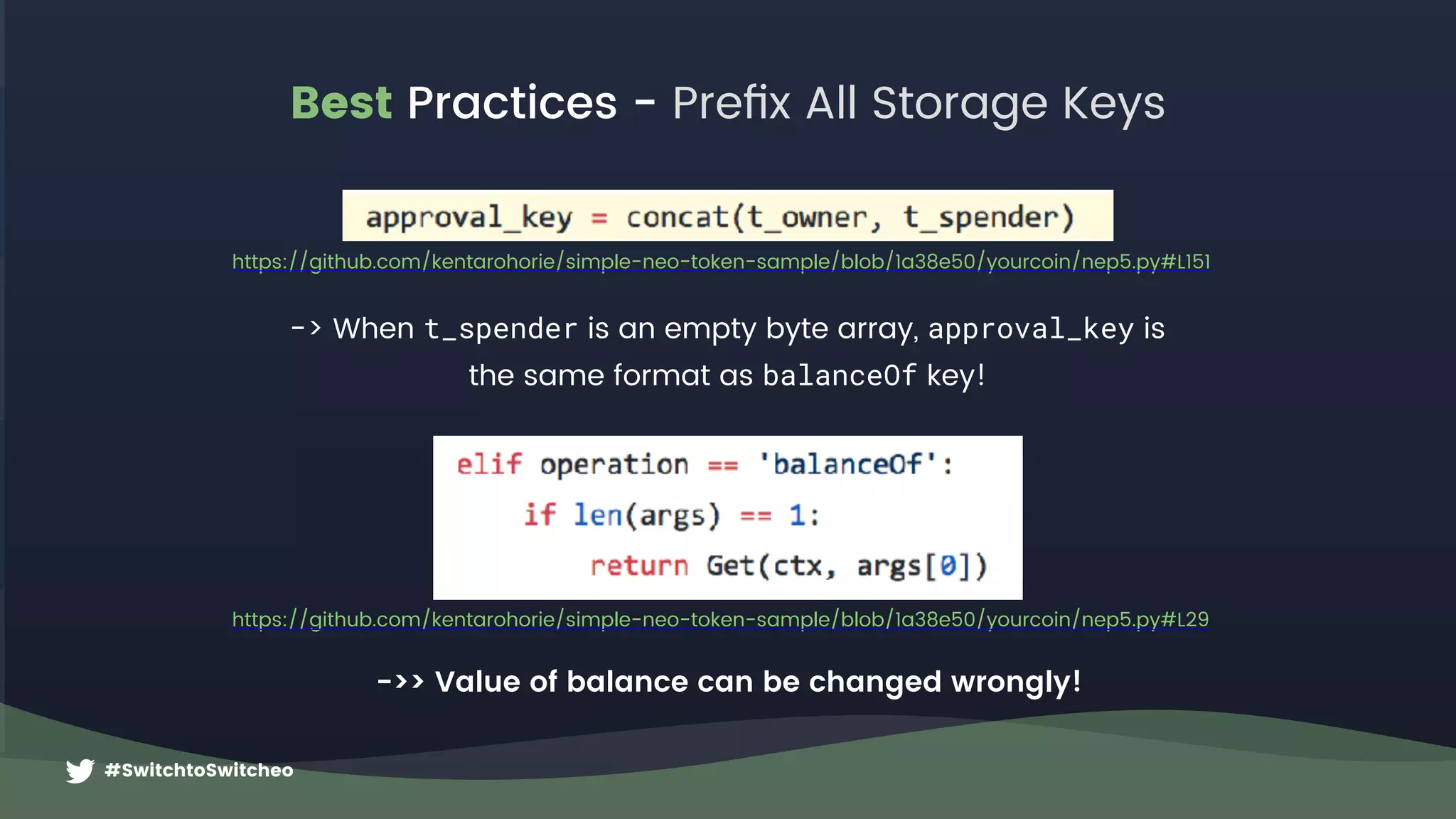
Best Practices - Prefix All Storage Keys
https://github.com/kentarohorie/simple-neo-token-sample/blob/1a38e50/yourcoin/nep5.py#L151
-> When t_spender is an empty byte array, approval_key is 

the same format as balanceOf key!
https://github.com/kentarohorie/simple-neo-token-sample/blob/1a38e50/yourcoin/nep5.py#L29
->> Value of balance can be changed wrongly!
#SwitchtoSwitcheo
Best Practices - Prefix All Storage Keys
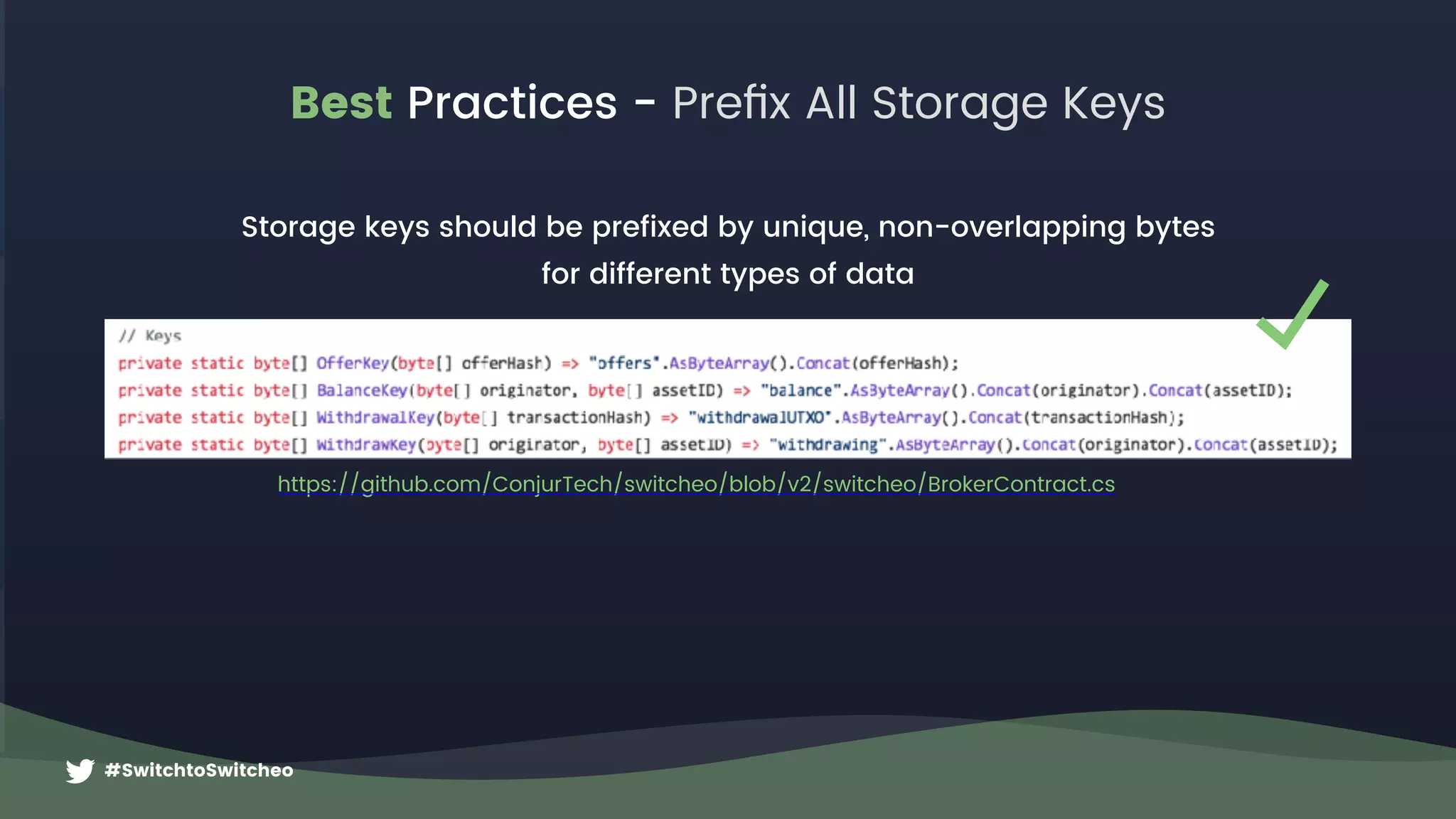
https://github.com/ConjurTech/switcheo/blob/v2/switcheo/BrokerContract.cs
Storage keys should be prefixed by unique, non-overlapping bytes 

for different types of data
#SwitchtoSwitcheo
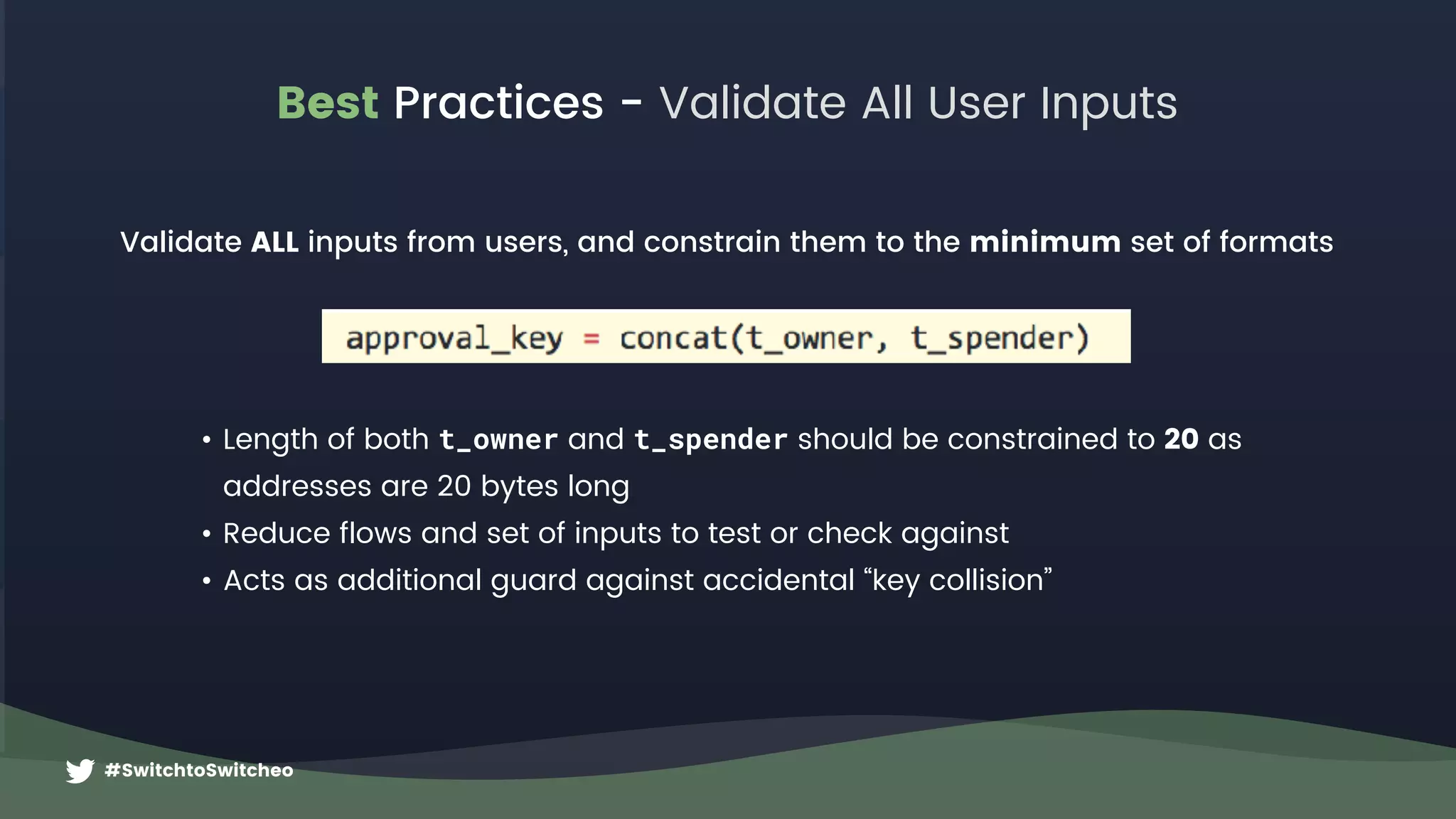
Best Practices - Validate All User Inputs
Validate ALL inputs from users, and constrain them to the minimum set of formats
• Length of both t_owner and t_spender should be constrained to 20 as 

addresses are 20 bytes long
• Reduce flows and set of inputs to test or check against
• Acts as additional guard against accidental “key collision”
#SwitchtoSwitcheo
Best Practices - Protect Users Whenever Possible
Don’t assume honest clients will always send in valid inputs!
• Don’t let user lose assets or “burn” tokens accidentally through malformed script 

or transaction
• Never ignore receiving of system assets if possible, in case of accidental sends
• Always handle received system assets by moving to an internal user balance and let
users withdraw it later
• When encountering invalid state or input during smart contract execution, revert
whole script by throwing Exceptions, see link
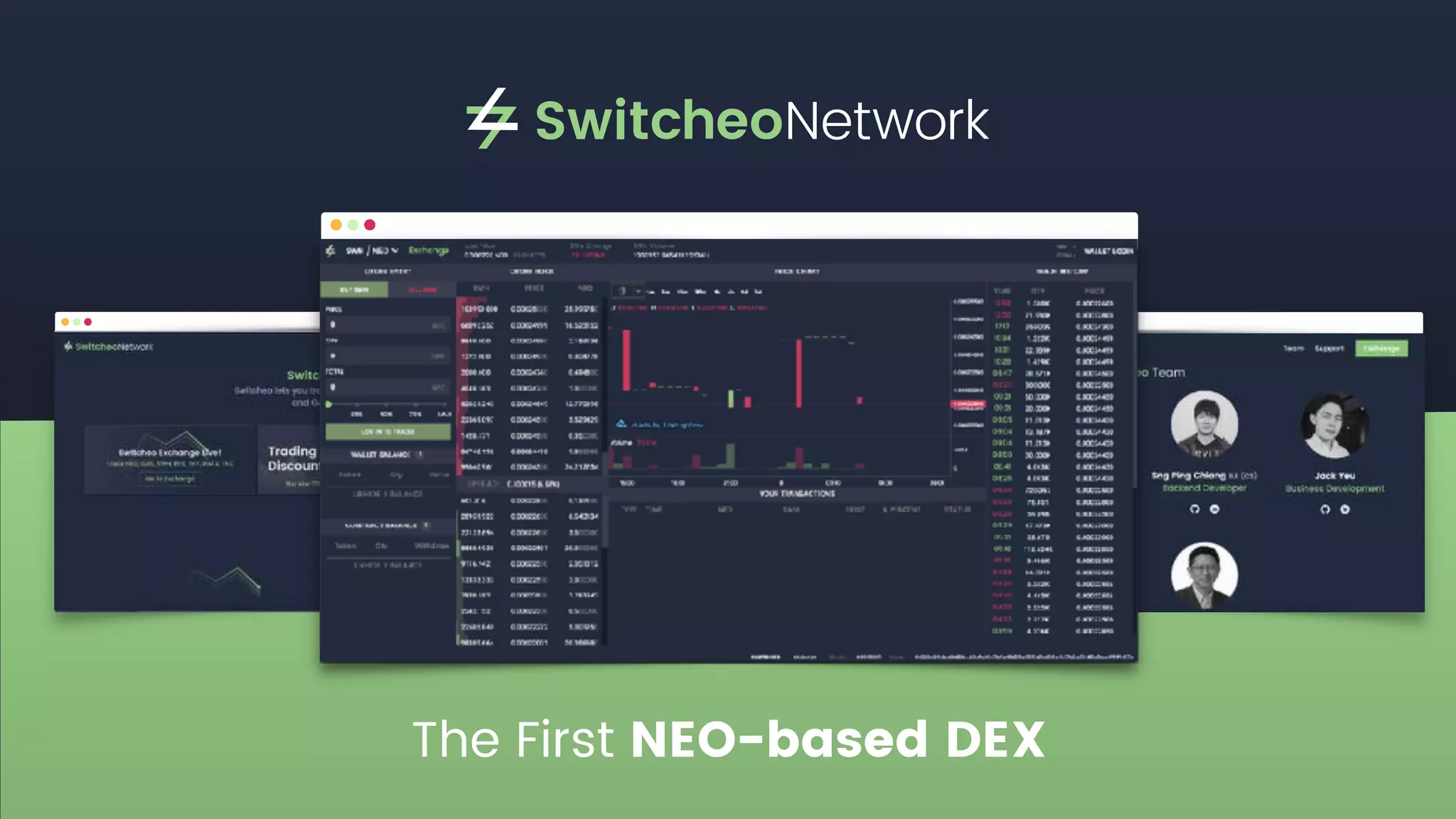
The First NEO-based DEX
#SwitchtoSwitcheo
V2 Launch - API Development Competition
Switcheo is holding an API Development
Contest for our upcoming V2 launch!
Prizes include:
1,000,000 SWTH Tokens, 

Customised Switcheo Ledger Nano S’s,

and various Switcheo Merch!
Follow us for more details!
Thank You
Switcheo.Network
Contact@Switcheo.Network
Come Talk To Us!
https://t.me/switcheo
@switcheonetwork

Switcheo Network - Advanced NEO Smart Contracts

  • 1.
  • 2.
    Ivan Poon Co-Founder, CEO SwitcheoNetwork Speaker Info ivan.poon@switcheo.network
  • 3.
    #SwitchtoSwitcheo Some Questions First! 1.Has anyone read Satoshi’s whitepaper? 2. Does anyone have experience with Ethereum 
 smart contract development?
  • 4.
    #SwitchtoSwitcheo Workshop Agenda 1. HowDoes NEO Verify Transactions? 2. How To Make Withdrawals From A Smart Contract? 3. NEO Smart Contracts Best Practices 4. Questions and Answers (Q&A) 5. Demo (If there is time)
  • 5.
  • 6.
    #SwitchtoSwitcheo How Does NEOVerify Transactions? CheckWitness(t_from) What is “witness”? And are we actually “checking” for here? https://github.com/kentarohorie/simple-neo-token-sample/blob/1a38e50/yourcoin/nep5.py#L58 To find out, we need to understand: • NEO’s transaction structure, and • “unspent outputs” or “UTXOs” (this type of model is inherited from Bitcoin) Recall this code from the lecture in the Transfer operation:
  • 7.
  • 8.
    #SwitchtoSwitcheo NEO Transaction Types Youcan find the full list of transaction “types”: https://github.com/neo-project/neo/blob/master/neo/Core/TransactionType.cs ContractTransaction Normal NEO & GAS transfers InvocationTransaction Invokes some operations in the NEO VM using the given script 2 Most Common Types:
  • 9.
    #SwitchtoSwitcheo NEO Transaction Attributes Fulllist of transaction attribute types or “usages” here: https://github.com/neo-project/docs/blob/master/en-us/sc/reference/fw/dotnet/neo/TransactionAttribute/Usage.md General Usages Specific Usages • Doesn’t change transaction execution • For general uses like logging transaction purpose as a record, or adding data for deployed smart contracts to read from • e.g.: Data “Hash”, or “Remarks” • Causes transaction to be verified or executed differently • e.g: “Additional Witness” or “Script” (0x20), etc. • Will look at one, read docs for info on the others
  • 10.
    #SwitchtoSwitcheo NEO Inputs &Outputs { inputs: [{ txid: “0xa…”, index: 0, address: A, amount: 5, }, { txid: “0xb…”, index: 0, address: B, amount: 7, }], outputs: [{ address: C, 
 amount: 12 }],
 attributes: [{ usage: 0x20, // Script data: <addr D>], } Transaction
 must be 
 witnessed by A+B+D Address A +5 Address B +7 Address C 12 https://bitcoin.org/en/developer-guide#block-chain
  • 11.
    #SwitchtoSwitcheo { scripts: [{ invocation: <addressA_Signature>, verification:<addressA_VerificationScript> }, invocation: <addressB_Signature>, verification: <addressB_VerificationScript> }, invocation: <addressD_Signature>, verification: <addressD_VerificationScript> }, ], } NEO Witness Scripts 0x … … … … … … ECDSA Signature 0x … … … … Public Key 0xac Check Signature 64 bytes long 33 bytes long Invocation: https://github.com/CityOfZion/neon-js/blob/4634e74/src/wallet/core.js#L84 Verification: https://github.com/CityOfZion/neon-js/blob/4634e74/src/transactions/core.js#L150 Witness Scripts for a standard “wallet contract” 0x40 Push 40 Bytes invocation 0x21 Push 33 Bytesverification
  • 12.
    #SwitchtoSwitcheo NEO Script • Thisis only for transactions of Invocation type. • The script is directly executed by the VM • So it is actually just a series of opcodes and data { …, “script”:“020bf1920…”, … }
  • 13.
    #SwitchtoSwitcheo OpCode Hex Explanation PUSH200x20 Pushes the next 20 bytes onto the stack <from> 0x11fg876d.. Push the “from” address for an NEP-5 transfer operation PUSH3 0x53 Pushes the number ‘3' onto the stack 0x11fg876d.. 0x225ab73.. 0x3356765.. 3 … … … … … … … … … … … … PACK 0xC1 Pops N from stack and combines the next N items into an array PUSHBYTES8 0x08 Pushes the next 8 bytes onto the stack “transfer” 0x7472616e73666572 the operation string as bytes in this case it is the “transfer” operation for NEP-5 APPCALL 0x67 Reads the next 20 bytes and invokes the corresponding deployed contract with Application Trigger. <scriptHash> 0xa12cde… The hash of the deployed smart contract to invoke So transaction will have: { …, “script”:“020bf1920…” } 0x11 0x22 0x3 0x7472616.. Stack https://github.com/neo-project/neo-vm/blob/master/src/neo-vm/OpCode.cs Script example for a standard entrypoint: Main(string operation, params object[] args) NEO Script
  • 14.
    #SwitchtoSwitcheo Verification of SmartContracts Verify([mempool]) VerifyScripts(IVerifiable) GetScriptHashesForVerifying() https://github.com/neo-project/neo/blob/ 23bbe9b/neo/Core/Transaction.cs#L330 https://github.com/neo-project/neo/blob/ 23bbe9b/neo/Core/Helper.cs#L46 https://github.com/neo-project/neo/blob/ 23bbe9b/neo/Core/Transaction.cs#L227 Check Double Spend, etc.. Get hashes that must match Verification Scripts (found in “scripts”) Get hashes of inputs Add data (hash) in transaction attribute 0x20 (usage “Script” a.k.a. “Additional Witness”)
 
 This is useful if you want to ensure Verification runs on a deployed contract, but are not using inputs from a smart contract Hashes each VerificationScript and compares hashes in order. Fails if any missing or does not match. Executes Invocation Script + Verification Script. Fails if hash mismatch, or does not return true Pass!
  • 15.
    #SwitchtoSwitcheo Verification of SmartContracts https://github.com/neo-project/neo/blob/23bbe9b/neo/Core/Helper.cs#L61 How to run custom verification on deployed contracts? Write custom verification logic in Trigger User can leave VerificationScript empty if deployed 
 contract needs to be a witness
  • 16.
    #SwitchtoSwitcheo Dangers of Sendingfrom Custom Smart Contracts Jack’s Available Balance: 5 NEO Jack’s Transaction A 5 NEO To Jack *State cannot be changed during verification 5 NEO To Jack Jack’s Transaction B 5 NEO To Jack Jack’s Transaction C 5 NEO To Jack Jack’s Transaction D > Change 
 Jack’s Balance 0 - 5 = ??? > Change 
 Jack’s Balance 5 - 5 = 0 NEO VERIFICATION APPLICATION
  • 17.
    #SwitchtoSwitcheo VERIFICATION APPLICATION *State cannot bechanged during verification 5 NEO Jack’s Transaction A 5 NEO Jack’s Transaction B 5 NEO Jack’s Transaction C 5 NEO Jack’s Transaction D Jack’s Available Balance: 5 NEO > Not enough balance, do nothing > Check & Change Jack’s Balance 0 NEO < 5 NEO > Reserve Output to Jack > Check & Change 
 Jack’s Balance 5 - 5 = 0 NEO Dangers of Sending from Custom Smart Contracts
  • 18.
    Jack’s Transaction A > Cleanup 2 VERIFICATION APPLICATION #SwitchtoSwitcheo Jack’s Transaction A 1 5NEO 5 NEO To Jack > Reserve Output to Jack > Check & Change 
 Jack’s Balance 5 - 5 = 0 NEO VERIFICATION APPLICATION Dangers of Sending from Custom Smart Contracts
  • 19.
    #SwitchtoSwitcheo Examples for Sendingfrom Custom Smart Contracts Some example implementations and references: Switcheo Exchange (live): https://github.com/ConjurTech/switcheo/blob/v2/switcheo/BrokerContract.cs NeoResearch (prototype): https://github.com/NeoResearch/nep-distributed-payments/blob/master/workingPrototype.cs Neon Exchange (whitepaper): https://neonexchange.org/pdfs/whitepaper_v1.pdf
  • 20.
    #SwitchtoSwitcheo Dangers Of UsingVerification Trigger Witness can be used in other contracts! Withdrawing NEO! Runtime.CheckWitness(MyContractScriptHash) will be true. So “transfer” from “My Contract” to ANYONE will also pass! My Contract RPX Token *My Contract has 1000 RPX tokens *Transaction’s script is an “AppCall" to “RPX Token" instead of “My Contract”! Withdrawal checks pass 
 so contract returns true VERIFICATION APPLICATION
  • 21.
    #SwitchtoSwitcheo Best Practices -Constrain Invocation Script *My Contract has 1000 RPX tokensVERIFICATION https://github.com/ConjurTech/switcheo/blob/v2/switcheo/BrokerContract.cs#L198
  • 22.
    Best Practices -Guard When Doing Dynamic Invoke My Contract ATK Token RPX Token 1000 RPX 100 ATK transfer transfer fr: SC to: A amt: 100 ATK fr: SC to: A amt: 1000 RPX Attacker withdraw fr: SC to: A amt: 100 ATK https://github.com/neo-project/proposals/pull/44/files#diff-e5a1452ea0de8fa24b9c328151e94affR90 NEP-5
  • 23.
    #SwitchtoSwitcheo Best Practices -Prefix All Storage Keys https://github.com/kentarohorie/simple-neo-token-sample/blob/1a38e50/yourcoin/nep5.py#L151 -> When t_spender is an empty byte array, approval_key is 
 the same format as balanceOf key! https://github.com/kentarohorie/simple-neo-token-sample/blob/1a38e50/yourcoin/nep5.py#L29 ->> Value of balance can be changed wrongly!
  • 24.
    #SwitchtoSwitcheo Best Practices -Prefix All Storage Keys https://github.com/ConjurTech/switcheo/blob/v2/switcheo/BrokerContract.cs Storage keys should be prefixed by unique, non-overlapping bytes 
 for different types of data
  • 25.
    #SwitchtoSwitcheo Best Practices -Validate All User Inputs Validate ALL inputs from users, and constrain them to the minimum set of formats • Length of both t_owner and t_spender should be constrained to 20 as 
 addresses are 20 bytes long • Reduce flows and set of inputs to test or check against • Acts as additional guard against accidental “key collision”
  • 26.
    #SwitchtoSwitcheo Best Practices -Protect Users Whenever Possible Don’t assume honest clients will always send in valid inputs! • Don’t let user lose assets or “burn” tokens accidentally through malformed script 
 or transaction • Never ignore receiving of system assets if possible, in case of accidental sends • Always handle received system assets by moving to an internal user balance and let users withdraw it later • When encountering invalid state or input during smart contract execution, revert whole script by throwing Exceptions, see link
  • 27.
  • 28.
    #SwitchtoSwitcheo V2 Launch -API Development Competition Switcheo is holding an API Development Contest for our upcoming V2 launch! Prizes include: 1,000,000 SWTH Tokens, 
 Customised Switcheo Ledger Nano S’s,
 and various Switcheo Merch! Follow us for more details!
  • 29.
    Thank You Switcheo.Network Contact@Switcheo.Network Come TalkTo Us! https://t.me/switcheo @switcheonetwork