
Switching Paradigms: From Regular Web to Flex Joshua Partogi September 13th, 2008
About Me 2,5 years professional experience in Enterprise Java  Focusing in web technology  All of them is HTML based  Currently doing freelance Flex project
Objectives One of the main challenge in Flex is getting in the way of thinking of how things work in Flex Especially when you've been working with HTML for a long time  Everything is asynchronous! This presentation is intended to get you inline with Flex
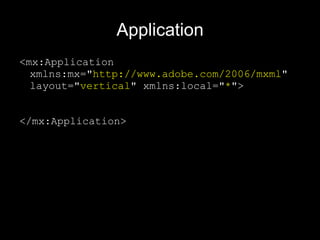
Application <mx:Application  xmlns:mx=&quot; http://www.adobe.com/2006/mxml &quot;  layout=&quot; vertical &quot; xmlns:local=&quot; * &quot;>  </mx:Application>
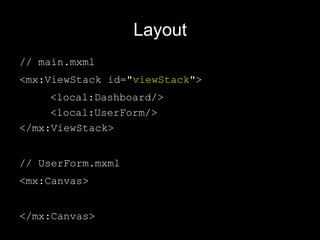
Layout // main.mxml <mx:ViewStack id=&quot; viewStack &quot;> <local:Dashboard/>   <local:UserForm/> </mx:ViewStack> // UserForm.mxml <mx:Canvas> </mx:Canvas>
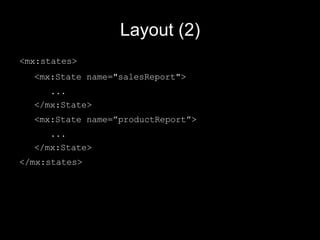
Layout (2) <mx:states> <mx:State name=&quot;salesReport&quot;> ... </mx:State> <mx:State name=”productReport”> ... </mx:State> </mx:states>
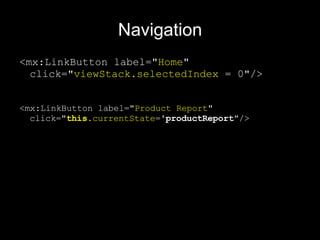
Navigation <mx:LinkButton label=&quot; Home &quot; click=&quot; viewStack.selectedIndex  = 0&quot;/> <mx:LinkButton label=&quot; Product Report &quot; click=&quot; this .currentState = 'productReport &quot;/>
Binding Java Objects package { import mx.collections.ArrayCollection; [ Bindable ] [ RemoteClass (alias=&quot;model.Product&quot;)] public class Product { public var id: Number; public var name: String; } }
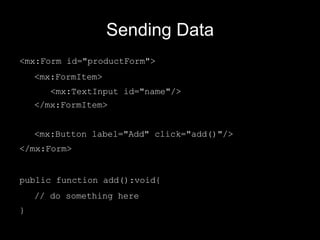
Sending Data <mx:Form id=&quot;productForm&quot;> <mx:FormItem> <mx:TextInput id=&quot;name&quot;/> </mx:FormItem> <mx:Button label=&quot;Add&quot; click=&quot;add()&quot;/> </mx:Form> public function add():void{ // do something here }
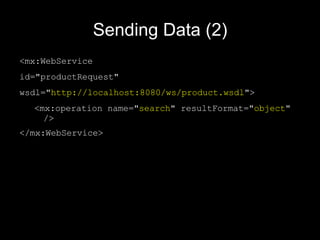
Sending Data (2) <mx:WebService   id=&quot;productRequest&quot;   wsdl=&quot; http://localhost:8080/ws/product.wsdl &quot;>   <mx:operation name=&quot; search &quot; resultFormat=&quot; object &quot;   /> </mx:WebService>
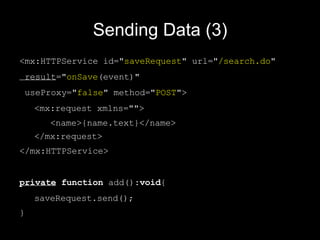
Sending Data (3) <mx:HTTPService  id=&quot; save Request &quot; url=&quot; /search.do &quot;  result =&quot; onSave (event)&quot;  useProxy=&quot; false &quot; method=&quot; POST &quot;>  <mx:request xmlns=&quot;&quot;>  <name>{name.text}</name>  </mx:request> </mx:HTTPService> private   function  add(): void { saveRequest.send(); }
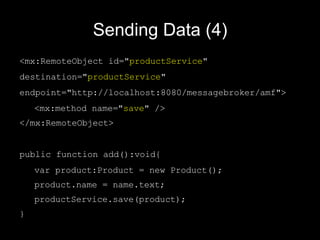
Sending Data (4) <mx:RemoteObject id=&quot; productService &quot;  destination=&quot; productService &quot;  endpoint=&quot;http://localhost:8080/messagebroker/amf&quot;> <mx:method name=&quot; save &quot; /> </mx:RemoteObject> public function add():void{ var product:Product = new Product(); product.name = name.text; productService.save(product); }
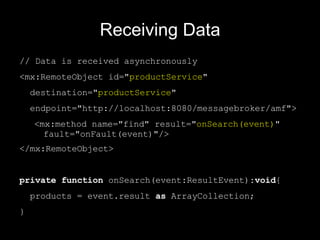
Receiving Data // Data is received asynchronously <mx:RemoteObject id=&quot; productService &quot;  destination=&quot; productService &quot;  endpoint=&quot; http://localhost:8080/messagebroker/amf &quot;> <mx:method name=&quot;find&quot; result=&quot; onSearch(event) &quot;  fault=&quot;onFault(event)&quot;/> </mx:RemoteObject> private   function  onSearch(event:ResultEvent): void { products = event.result  as  ArrayCollection; }
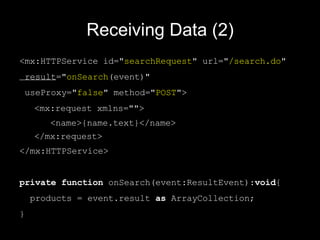
Receiving Data (2) <mx:HTTPService  id=&quot; search Request &quot; url=&quot; /search.do &quot;  result =&quot; onSearch (event)&quot;  useProxy=&quot; false &quot; method=&quot; POST &quot;>  <mx:request xmlns=&quot;&quot;>  <name>{name.text}</name>  </mx:request> </mx:HTTPService> private   function  onSearch(event:ResultEvent): void { products = event.result  as  ArrayCollection; }
Data Table [ Bindable ] public   var  products:ArrayCollection; <mx:DataGrid dataProvider=&quot; {products} &quot;> <mx:columns> <mx:DataGridColumn dataField=&quot; name &quot;/> </mx:columns> </mx:DataGrid>
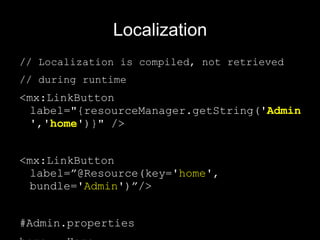
Localization // Localization is compiled, not retrieved  // during runtime <mx:LinkButton label=&quot;{resourceManager.getString( ' Admin ' , ' home ' )}&quot; /> <mx:LinkButton label=”@Resource(key=' home ', bundle=' Admin ')”/> #Admin.properties home = Home
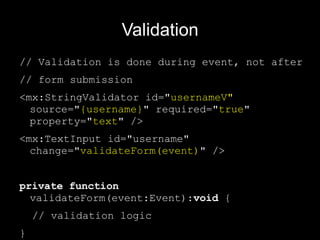
Validation // Validation is done during event, not after // form submission <mx:StringValidator id=&quot; usernameV&quot;  source=&quot; {username} &quot; required=&quot; true &quot; property=&quot; text &quot; /> <mx:TextInput id=&quot;username&quot; change=&quot; validateForm(event) &quot; /> private   function  validateForm(event:Event): void  { // validation logic }
Demo
Questions?
Thank You! [email_address] http://joshuajava.wordpress.com

Switch To Flex

  • 1.
    Switching Paradigms: FromRegular Web to Flex Joshua Partogi September 13th, 2008
  • 2.
    About Me 2,5years professional experience in Enterprise Java Focusing in web technology All of them is HTML based Currently doing freelance Flex project
  • 3.
    Objectives One ofthe main challenge in Flex is getting in the way of thinking of how things work in Flex Especially when you've been working with HTML for a long time Everything is asynchronous! This presentation is intended to get you inline with Flex
  • 4.
    Application <mx:Application xmlns:mx=&quot; http://www.adobe.com/2006/mxml &quot; layout=&quot; vertical &quot; xmlns:local=&quot; * &quot;> </mx:Application>
  • 5.
    Layout // main.mxml<mx:ViewStack id=&quot; viewStack &quot;> <local:Dashboard/> <local:UserForm/> </mx:ViewStack> // UserForm.mxml <mx:Canvas> </mx:Canvas>
  • 6.
    Layout (2) <mx:states><mx:State name=&quot;salesReport&quot;> ... </mx:State> <mx:State name=”productReport”> ... </mx:State> </mx:states>
  • 7.
    Navigation <mx:LinkButton label=&quot;Home &quot; click=&quot; viewStack.selectedIndex = 0&quot;/> <mx:LinkButton label=&quot; Product Report &quot; click=&quot; this .currentState = 'productReport &quot;/>
  • 8.
    Binding Java Objectspackage { import mx.collections.ArrayCollection; [ Bindable ] [ RemoteClass (alias=&quot;model.Product&quot;)] public class Product { public var id: Number; public var name: String; } }
  • 9.
    Sending Data <mx:Formid=&quot;productForm&quot;> <mx:FormItem> <mx:TextInput id=&quot;name&quot;/> </mx:FormItem> <mx:Button label=&quot;Add&quot; click=&quot;add()&quot;/> </mx:Form> public function add():void{ // do something here }
  • 10.
    Sending Data (2)<mx:WebService id=&quot;productRequest&quot; wsdl=&quot; http://localhost:8080/ws/product.wsdl &quot;> <mx:operation name=&quot; search &quot; resultFormat=&quot; object &quot; /> </mx:WebService>
  • 11.
    Sending Data (3)<mx:HTTPService id=&quot; save Request &quot; url=&quot; /search.do &quot; result =&quot; onSave (event)&quot; useProxy=&quot; false &quot; method=&quot; POST &quot;> <mx:request xmlns=&quot;&quot;> <name>{name.text}</name> </mx:request> </mx:HTTPService> private function add(): void { saveRequest.send(); }
  • 12.
    Sending Data (4)<mx:RemoteObject id=&quot; productService &quot; destination=&quot; productService &quot; endpoint=&quot;http://localhost:8080/messagebroker/amf&quot;> <mx:method name=&quot; save &quot; /> </mx:RemoteObject> public function add():void{ var product:Product = new Product(); product.name = name.text; productService.save(product); }
  • 13.
    Receiving Data //Data is received asynchronously <mx:RemoteObject id=&quot; productService &quot; destination=&quot; productService &quot; endpoint=&quot; http://localhost:8080/messagebroker/amf &quot;> <mx:method name=&quot;find&quot; result=&quot; onSearch(event) &quot; fault=&quot;onFault(event)&quot;/> </mx:RemoteObject> private function onSearch(event:ResultEvent): void { products = event.result as ArrayCollection; }
  • 14.
    Receiving Data (2)<mx:HTTPService id=&quot; search Request &quot; url=&quot; /search.do &quot; result =&quot; onSearch (event)&quot; useProxy=&quot; false &quot; method=&quot; POST &quot;> <mx:request xmlns=&quot;&quot;> <name>{name.text}</name> </mx:request> </mx:HTTPService> private function onSearch(event:ResultEvent): void { products = event.result as ArrayCollection; }
  • 15.
    Data Table [Bindable ] public var products:ArrayCollection; <mx:DataGrid dataProvider=&quot; {products} &quot;> <mx:columns> <mx:DataGridColumn dataField=&quot; name &quot;/> </mx:columns> </mx:DataGrid>
  • 16.
    Localization // Localizationis compiled, not retrieved // during runtime <mx:LinkButton label=&quot;{resourceManager.getString( ' Admin ' , ' home ' )}&quot; /> <mx:LinkButton label=”@Resource(key=' home ', bundle=' Admin ')”/> #Admin.properties home = Home
  • 17.
    Validation // Validationis done during event, not after // form submission <mx:StringValidator id=&quot; usernameV&quot; source=&quot; {username} &quot; required=&quot; true &quot; property=&quot; text &quot; /> <mx:TextInput id=&quot;username&quot; change=&quot; validateForm(event) &quot; /> private function validateForm(event:Event): void { // validation logic }
  • 18.
  • 19.
  • 20.
    Thank You! [email_address]http://joshuajava.wordpress.com