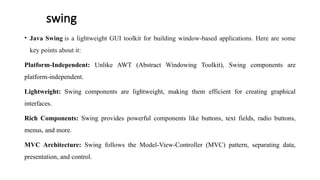
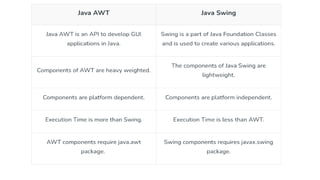
Java Swing is a lightweight, platform-independent GUI toolkit for building window-based applications, following the Model-View-Controller (MVC) architecture. It includes a variety of rich components such as buttons, text fields, and combo boxes, allowing for the creation of complex interfaces. Example code snippets demonstrate how to create simple applications using Swing components like JFrame, JButton, JTextField, and others.
![swing
• Swing is a Java Foundation Classes [JFC] library and an extension of the Abstract Window Toolkit [AWT].](https://image.slidesharecdn.com/swing-240918035905-3b77228a/85/Swings-in-java-to-develop-applications-in-java-3-320.jpg)


![simple swing example where we are creating one button and adding it on the JFrame object inside the
main() method.
import javax.swing.*;
public class FirstSwingExample {
public static void main(String[] args) {
JFrame f=new JFrame();//creating instance of JFrame
JButton b=new JButton("click");//creating instance of
JButton
b.setBounds(130,100,100, 40);//x axis, y axis, width,
height
f.add(b);//adding button in JFrame
f.setSize(400,500);//400 width and 500 height
f.setLayout(null);//using no layout managers
f.setVisible(true);//making the frame visible
}
}](https://image.slidesharecdn.com/swing-240918035905-3b77228a/85/Swings-in-java-to-develop-applications-in-java-6-320.jpg)
![import javax.swing.*;
public class example{
public static void main(String args[]) {
JFrame a = new JFrame("example");
JButton b = new JButton("click me");
b.setBounds(40,90,85,20);
a.add(b);
a.setSize(300,300);
a.setLayout(null);
a.setVisible(true);
}
}
Output:](https://image.slidesharecdn.com/swing-240918035905-3b77228a/85/Swings-in-java-to-develop-applications-in-java-9-320.jpg)
![JTextField Class
It inherits the JTextComponent class and it is used to allow editing of single line text.
import javax.swing.*;
public class example{
public static void main(String args[]) {
JFrame a = new JFrame("example");
JTextField b = new JTextField("edureka");
b.setBounds(50,100,200,30);
a.add(b);
a.setSize(300,300);
a.setLayout(null);
a.setVisible(true);
}
}](https://image.slidesharecdn.com/swing-240918035905-3b77228a/85/Swings-in-java-to-develop-applications-in-java-10-320.jpg)
![JScrollBar Class
It is used to add scroll bar, both horizontal and vertical.
import javax.swing.*;
class example{
example(){
JFrame a = new JFrame("example");
JScrollBar b = new JScrollBar();
b.setBounds(90,90,40,90);
a.add(b);
a.setSize(300,300);
a.setLayout(null);
a.setVisible(true);
}
public static void main(String args[]){
new example();
}
}](https://image.slidesharecdn.com/swing-240918035905-3b77228a/85/Swings-in-java-to-develop-applications-in-java-11-320.jpg)
![JList Class
It inherits JComponent class, the object of JList class represents a list of text items.
import javax.swing.*;
public class Example
{
Example(){
JFrame a = new JFrame("example");
DefaultListModel<String> l = new DefaultListModel< >();
l.addElement("first item");
l.addElement("second item");
JList<String> b = new JList< >(l);
b.setBounds(100,100,75,75);
a.add(b);
a.setSize(400,400);
a.setVisible(true);
a.setLayout(null);
}
public static void main(String args[])
{
new Example();
}
}](https://image.slidesharecdn.com/swing-240918035905-3b77228a/85/Swings-in-java-to-develop-applications-in-java-12-320.jpg)
![JLabel Class
It is used for placing text in a container. It also inherits JComponent class.
import javax.swing.*;
public class Example{
public static void main(String args[])
{
JFrame a = new JFrame("example");
JLabel b1;
b1 = new JLabel("edureka");
b1.setBounds(40,40,90,20);
a.add(b1);
a.setSize(400,400);
a.setLayout(null);
a.setVisible(true);
}
}](https://image.slidesharecdn.com/swing-240918035905-3b77228a/85/Swings-in-java-to-develop-applications-in-java-13-320.jpg)
![JComboBox Class
It inherits the JComponent class and is used to show pop up menu of choices.
import javax.swing.*;
public class Example{
JFrame a;
Example(){
a = new JFrame("example");
string courses[] = { "core java","advance java", "java servlet"};
JComboBox c = new JComboBox(courses);
c.setBounds(40,40,90,20);
a.add(c);
a.setSize(400,400);
a.setLayout(null);
a.setVisible(true);
}
public static void main(String args[])
{
new Example();
}
}](https://image.slidesharecdn.com/swing-240918035905-3b77228a/85/Swings-in-java-to-develop-applications-in-java-14-320.jpg)


