Download as PDF, PPTX
![Collections
• Collection Types
• Array, Set, Dictionary
• Array 도 클래스 객체
• C : int arr[5]
• Swift : var arr = Array<Int>( repeating : 0, count:5 )](https://image.slidesharecdn.com/04-161004113042/85/Swift-3-Programming-for-iOS-Collection-2-320.jpg)
![Array
• Array의 선언
• Array 변수의 선언 1
• 빈 Array 변수의 선언 2
• 빈 Array 변수의 선언 3
C : int[] arrInt;
var arrInt : Array<Int> ;
arrInt = Array();
C : int[] arrInt;
var arrInt : [Int];
arrInt = [Int]();
C : int arrInt[5];
var arrInt = Array<Int>( repeating : 0, count:5 );
C : double arrDbl[3];
var arrDbl = Array( repeating:0.0, count:3);](https://image.slidesharecdn.com/04-161004113042/85/Swift-3-Programming-for-iOS-Collection-3-320.jpg)
![var arrInt: Array<Int> = [3, 4];
var arrInt: [Int] = [3, 4];
• Array의 선언과 초기화
• Array<Int> 형
• [Int] 형
• 예 : String 배열의 선언과 초기화
• 예 : type의 생략
var shoppingList : [String] = [“Eggs”, “Milk”];
var shoppingList = [“Eggs”, “Milk”];
Array](https://image.slidesharecdn.com/04-161004113042/85/Swift-3-Programming-for-iOS-Collection-4-320.jpg)
![• Array에 데이터 넣기
• Array<Int>(repeating:0, count:0) 로 선언한 경우
• 예 : 배열 데이터 수정과 내용 출력
• Range를 이용한 갱신
arr[2] = 1;
arr[2…3] = [5,5];
Array
Swift2 : (count:5, repeatedValue:0)](https://image.slidesharecdn.com/04-161004113042/85/Swift-3-Programming-for-iOS-Collection-5-320.jpg)
![• Array에 데이터 넣기
• 다음과 같이 빈 Array를 생성한 경우
• 데이터 추가
• empty array 할당
var arrInt : Array<Int> ;
arrInt = Array();
var arrInt : [Int];
arrInt = [Int]();
arrInt.append(3);
arrInt = [];
arrInt += [3] ;
shoppingList.append(“Flour”);
shoppingList += [“Flour”];
Array](https://image.slidesharecdn.com/04-161004113042/85/Swift-3-Programming-for-iOS-Collection-6-320.jpg)
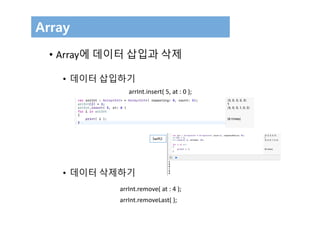

![Set
var letters = Set<Character>()
print("letters is of type Set<Character> with (letters.count) items.")
// Prints "letters is of type Set<Character> with 0 items."
• Set의 생성
• Set에 데이터 넣기
letters.insert("a")
// letters now contains 1 value of type Character
letters = []
// letters is now an empty set, but is still of type Set<Character>](https://image.slidesharecdn.com/04-161004113042/85/Swift-3-Programming-for-iOS-Collection-9-320.jpg)
![Set
• Set 변수와 초기화
• Set 초기화
// letters is now an empty set, but is still of type Set<Character>
var favoriteGenres: Set<String> = ["Rock", "Classical", "Hip hop"]
// favoriteGenres has been initialized with three initial items
var favoriteGenres: Set = ["Rock", "Classical", "Hip hop"]](https://image.slidesharecdn.com/04-161004113042/85/Swift-3-Programming-for-iOS-Collection-10-320.jpg)
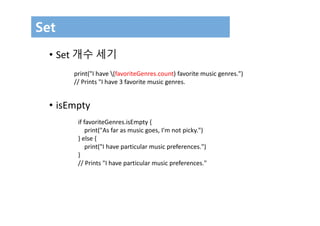
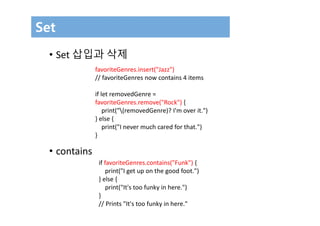


![• Set Operation
let oddDigits: Set = [1, 3, 5, 7, 9]
let evenDigits: Set = [0, 2, 4, 6, 8]
let singleDigitPrimeNumbers: Set = [2, 3, 5, 7]
oddDigits.union(evenDigits).sorted()
// [0, 1, 2, 3, 4, 5, 6, 7, 8, 9]
oddDigits.intersection(evenDigits).sorted()
// []
oddDigits.subtracting(singleDigitPrimeNumbers).sorted()
// [1, 9]
oddDigits.symmetricDifference(singleDigitPrimeNumbers).sorted()
// [1, 2, 9]
Set](https://image.slidesharecdn.com/04-161004113042/85/Swift-3-Programming-for-iOS-Collection-15-320.jpg)
![• Set Operation
let houseAnimals: Set = ["🐶", "🐱"]
let farmAnimals: Set = ["🐮", "🐔", "🐑", "🐶", "🐱"]
let cityAnimals: Set = ["🐦", "🐭"]
houseAnimals.isSubset(of: farmAnimals)
// true
farmAnimals.isSuperset(of: houseAnimals)
// true
farmAnimals.isDisjoint(with: cityAnimals)
// true
Set](https://image.slidesharecdn.com/04-161004113042/85/Swift-3-Programming-for-iOS-Collection-16-320.jpg)
![Dictionary
• Dictionary 생성
• Dictionary에 값 넣고 출력하기
var namesOfIntegers = [Int: String]()
// namesOfIntegers is an empty [Int: String] dictionary
nameOfIntegers[3] = "three";
for i in nameOfIntegers
{
print( "(i.0) (i.1) " );
}](https://image.slidesharecdn.com/04-161004113042/85/Swift-3-Programming-for-iOS-Collection-17-320.jpg)
![Dictionary
• Dictionary 생성과 초기화
• type 없는 생성
var airports: [String: String] = ["YYZ": "Toronto Pearson", "DUB": "Dublin"]
var airports = ["YYZ": "Toronto Pearson", "DUB": "Dublin"]](https://image.slidesharecdn.com/04-161004113042/85/Swift-3-Programming-for-iOS-Collection-18-320.jpg)
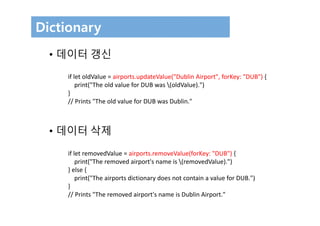
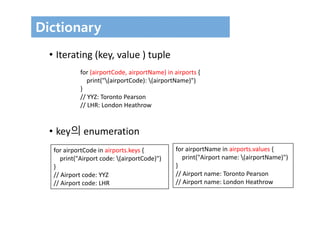

// airportCodes is ["YYZ", "LHR"]
let airportNames = [String](airports.values)
// airportNames is ["Toronto Pearson", "London Heathrow"]](https://image.slidesharecdn.com/04-161004113042/85/Swift-3-Programming-for-iOS-Collection-21-320.jpg)

This document summarizes Swift collection types including arrays, sets, and dictionaries. It provides examples of initializing and manipulating each collection type through actions like inserting and removing items. Key points covered include declaring and initializing each type, accessing and modifying items, and common operations like union, intersection and iteration.


![[공간정보시스템 개론] L03 지구의형상과좌표체계](https://cdn.slidesharecdn.com/ss_thumbnails/l03-170314115023-thumbnail.jpg?width=640&height=640&fit=bounds)
![[공간정보시스템 개론] L06 GIS의 이해](https://cdn.slidesharecdn.com/ss_thumbnails/l06gis-170314114559-thumbnail.jpg?width=640&height=640&fit=bounds)

![[공간정보시스템 개론] L11 공간정보의 구축](https://cdn.slidesharecdn.com/ss_thumbnails/l11-170314114751-thumbnail.jpg?width=640&height=640&fit=bounds)


![[공간정보시스템 개론] L04 항공사진의 이해](https://cdn.slidesharecdn.com/ss_thumbnails/l04-170314115042-thumbnail.jpg?width=640&height=640&fit=bounds)
![[공간정보시스템 개론] L09 공간 데이터 모델](https://cdn.slidesharecdn.com/ss_thumbnails/l09-170314114718-thumbnail.jpg?width=640&height=640&fit=bounds)

![[공간정보시스템 개론] L01 공간정보시스템개요](https://cdn.slidesharecdn.com/ss_thumbnails/l01-170314114926-thumbnail.jpg?width=640&height=640&fit=bounds)
![[공간정보시스템 개론] L07 원격탐사의 개념과 활용](https://cdn.slidesharecdn.com/ss_thumbnails/l07-170314114620-thumbnail.jpg?width=640&height=640&fit=bounds)
![[공간정보시스템 개론] L12 공간정보분석](https://cdn.slidesharecdn.com/ss_thumbnails/l12-170314114828-thumbnail.jpg?width=640&height=640&fit=bounds)
![[공간정보시스템 개론] L02 공간정보와 지리정보](https://cdn.slidesharecdn.com/ss_thumbnails/l02-170314114945-thumbnail.jpg?width=640&height=640&fit=bounds)

![[공간정보시스템 개론] L05 우리나라의 수치지도](https://cdn.slidesharecdn.com/ss_thumbnails/l05-170314114527-thumbnail.jpg?width=640&height=640&fit=bounds)

![[공간정보시스템 개론] L10 수치표고모델](https://cdn.slidesharecdn.com/ss_thumbnails/l10-170314114727-thumbnail.jpg?width=640&height=640&fit=bounds)
![[공간정보시스템 개론] L08 gnss의 개념과 활용](https://cdn.slidesharecdn.com/ss_thumbnails/l08gnss-170314114625-thumbnail.jpg?width=640&height=640&fit=bounds)

