SVG, Canvas e
Animations in
Angular
Leonardo Buscemi
Agenda
Premessa
SVG CANVAS
Librerie terze parti
Confronti
Angular compila il nostro codice
Tutto quello che scriviamo nella nostra applicazione
Angular (componenti, logica e stili) viene ‘compilato’
in codice Javascript.
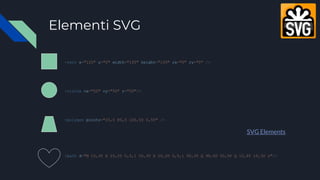
Elementi SVG
<rect x="120" y="0" width="100" height="100" rx="0" ry="0" />
<circle cx="50" cy="50" r="50"/>
<polygon points="20,0 80,0 100,50 0,50" />
<path d="M 10,30 A 20,20 0,0,1 50,30 A 20,20 0,0,1 90,30 Q 90,60 50,90 Q 10,60 10,30 z"/>
SVG Elements
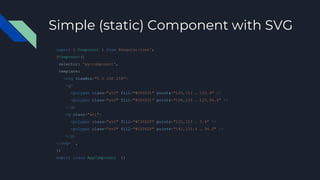
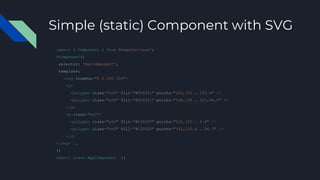
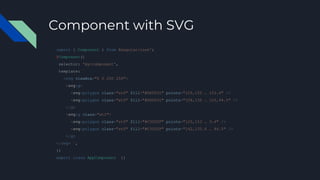
Simple (static) Component with SVG
import { Component } from @angular/core';
@Component({
selector: 'my-component',
template: `
<svg viewBox="0 0 250 250">
<g>
<polygon class="st0" fill="#DD0031" points="125,153 … 153.4" />
<polygon class="st0" fill="#DD0031" points="108,135 … 125,94.5" />
</g>
<g class="st1">
<polygon class="st0" fill="#C3002F" points="125,153 … 3.4" />
<polygon class="st0" fill="#C3002F" points="142,135.4 … 94.5" />
</g>
</svg> `,
})
export class AppComponent {}
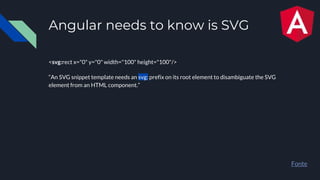
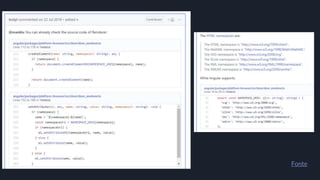
Angular needs to know is SVG
<svg:rect x="0" y="0" width="100" height="100"/>
“An SVG snippet template needs an svg: prefix on its root element to disambiguate the SVG
element from an HTML component.”
Fonte
Fonte
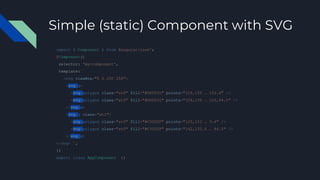
Simple (static) Component with SVG
import { Component } from @angular/core';
@Component({
selector: 'my-component',
template: `
<svg viewBox="0 0 250 250">
<g>
<polygon class="st0" fill="#DD0031" points="125,153 … 153.4" />
<polygon class="st0" fill="#DD0031" points="108,135 … 125,94.5" />
</g>
<g class="st1">
<polygon class="st0" fill="#C3002F" points="125,153 … 3.4" />
<polygon class="st0" fill="#C3002F" points="142,135.4 … 94.5" />
</g>
</svg> `,
})
export class AppComponent {}
Simple (static) Component with SVG
import { Component } from @angular/core';
@Component({
selector: 'my-component',
template: `
<svg viewBox="0 0 250 250">
<svg:g>
<svg:polygon class="st0" fill="#DD0031" points="125,153 … 153.4" />
<svg:polygon class="st0" fill="#DD0031" points="108,135 … 125,94.5" />
</svg:g>
<svg:g class="st1">
<svg:polygon class="st0" fill="#C3002F" points="125,153 … 3.4" />
<svg:polygon class="st0" fill="#C3002F" points="142,135.4 … 94.5" />
</svg:g>
</svg> `,
})
export class AppComponent {}
Esempio live
https://stackblitz.com/edit/angular-svg-static
Component with SVG
import { Component } from @angular/core';
@Component({
selector: 'my-component',
template: `
<svg viewBox="0 0 250 250">
<svg:g>
<svg:polygon class="st0" fill="#DD0031" points="125,153 … 153.4" />
<svg:polygon class="st0" fill="#DD0031" points="108,135 … 125,94.5" />
</g>
<svg:g class="st1">
<svg:polygon class="st0" fill="#C3002F" points="125,153 … 3.4" />
<svg:polygon class="st0" fill="#C3002F" points="142,135.4 … 94.5" />
</g>
</svg> `,
})
export class AppComponent {}
Component with SVG
import { Component } from @angular/core';
@Component({
selector: 'my-component',
template: `
<svg viewBox="0 0 250 250">
<svg:g>
<svg:polygon class="st0" fill="#DD0031" points="125,153 … 153.4" />
<svg:polygon class="st0" fill="#DD0031" [points]="someMagic()" />
</g>
<svg:g class="st1">
<svg:polygon class="st0" fill="#C3002F" points="125,153 … 3.4" />
<svg:polygon class="st0" fill="#C3002F" points="142,135.4 … 94.5" />
</g>
</svg> `,
})
export class AppComponent {}
Component with SVG
import { Component } from @angular/core';
@Component({
selector: 'my-component',
template: `
<svg viewBox="0 0 250 250">
<svg:g>
<svg:polygon class="st0" fill="#DD0031" points="125,153 … 153.4" />
<svg:polygon class="st0" fill="#DD0031" [points]="someMagic()" />
</g>
<svg:g class="st1">
<svg:polygon class="st0" fill="#C3002F" points="125,153 … 3.4" />
<svg:polygon class="st0" fill="#C3002F" points="142,135.4 … 94.5" />
</g>
</svg> `,
})
export class AppComponent {}
HTML attribute vs. DOM property
❖ Alcuni attributi HTML hanno un mapping 1: 1 alle proprietà
➢ Ad esempio id
❖ Alcuni attributi HTML non hanno proprietà corrispondenti
➢ Ad esempio colspan e tutti gli attributi svg
❖ Alcune proprietà DOM non hanno attributi corrispondenti
➢ Ad esempio textContent
❖ Molti attributi HTML sembrano mappare alle proprietà ... ma non nel modo in cui si potrebbe pensare!
Gli attributi inizializzano le proprietà del DOM, queste possono cambiare; i valori degli attributi no.
Fonte
Un mondo senza attributi
In Angular l'unico scopo degli attributi è quello di inizializzare lo stato degli elementi e direttive, una volta
compilati gli attributi spariscono!
Fonte
Fonte
È necessario utilizzare il binding dell'attributo quando non esiste alcuna proprietà dell'elemento da associare.
Component with SVG
import { Component } from @angular/core';
@Component({
selector: 'my-component',
template: `
<svg viewBox="0 0 250 250">
<svg:g>
<svg:polygon class="st0" fill="#DD0031" points="125,153 … 153.4" />
<svg:polygon class="st0" fill="#DD0031" [attr.points]="someMagic()" />
</g>
<svg:g class="st1">
<svg:polygon class="st0" fill="#C3002F" points="125,153 … 3.4" />
<svg:polygon class="st0" fill="#C3002F" points="142,135.4 … 94.5" />
</g>
</svg> `,
})
export class AppComponent {}
Esempio live
https://stackblitz.com/edit/angular-svg-attribute
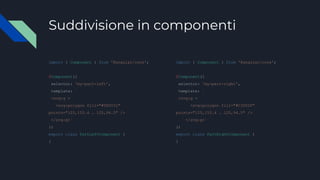
Suddivisione in componenti
import { Component } from '@angular/core';
@Component({
selector: 'my-part-left',
template: `
<svg:g >
<svg:polygon fill="#DD0031"
points="125,153.4 … 125,94.5" />
</svg:g>`
})
export class PartLeftComponent {
}
import { Component } from '@angular/core';
@Component({
selector: 'my-part-right',
template: `
<svg:g >
<svg:polygon fill="#C3002F"
points="125,153.4 … 125,94.5" />
</svg:g>`
})
export class PartRightComponent {
}
Suddivisione in componenti
<svg viewBox="0 0 250 250">
<my-part-left></my-part-left>
<my-part-right></my-part-right>
</svg>
Non viene renderizzato!
Selettore per attributo
import { Component } from '@angular/core';
@Component({
selector: '[my-part-left]',
template: `
<svg:g >
<svg:polygon fill="#DD0031"
points="125,153.4 ... 125,94.5" />
</svg:g>`
})
export class PartLeftComponent {
}
import { Component } from '@angular/core';
@Component({
selector: '[my-part-right]',
template: `
<svg:g >
<svg:polygon fill="#C3002F"
points="125,153.4 125,94.5" />
</svg:g>`
})
export class PartRightComponent {
}
Suddivisione in componenti OK
<svg viewBox="0 0 250 250">
<svg:g my-part-left />
<svg:g my-part-right />
</svg>
Esempio live
https://stackblitz.com/edit/angular-svg-components
Animazioni su SVG
● SMIL
○ Deprecato
● CSS
● Angular Animation
● Javascript
○ Green Sock
Esempio live
Animazione di SVG in CSS
https://stackblitz.com/edit/angular-svg-components
Angular Animation
npm i @angular/animations
app.module.ts
import { NgModule } from '@angular/core';
import { BrowserModule } from '@angular/platform-browser';
import { FormsModule } from '@angular/forms';
import { BrowserAnimationsModule } from '@angular/platform-browser/animations';
import { AppComponent } from './app.component';
@NgModule({
imports: [ BrowserModule, BrowserAnimationsModule, FormsModule ],
declarations: [ AppComponent ],
bootstrap: [ AppComponent ]
})
export class AppModule { }
Esempio live
Animazione di SVG con
Angular Animation
https://stackblitz.com/edit/angular-svg-anim-ng
Animazione in Javascript
Vogliamo animare anche la proprietà points del nostro polygon
@ViewChild e
template reference
https://stackblitz.com/edit/viewchild-template-ref
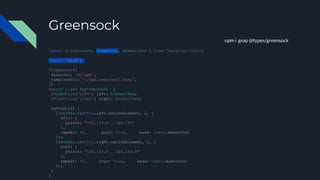
Greensock
npm i gsap @types/greensock
import { Component, ViewChild, ElementRef } from '@angular/core';
import 'gsap';
@Component({
selector: 'my-app',
templateUrl: './app.component.html',
})
export class AppComponent {
@ViewChild('left') left: ElementRef;
@ViewChild('right') right: ElementRef;
ngOnInit() {
TweenMax.to(this.left.nativeElement, 2, {
attr: {
points: "125,153.4 … 125,195"
},
repeat: -1, yoyo: true, ease: Cubic.easeInOut
});
TweenMax.to(this.right.nativeElement, 2, {
attr: {
points: "125,153.4 … 125,153.4"
},
repeat: -1, yoyo: true, ease: Cubic.easeInOut
});
}
}
Esempio live
Animazione di SVG con GreenSock
https://stackblitz.com/edit/angular-svg-static-grensock
Canvas
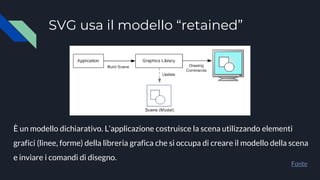
SVG usa il modello “retained”
Fonte
È un modello dichiarativo. L’applicazione costruisce la scena utilizzando elementi
grafici (linee, forme) della libreria grafica che si occupa di creare il modello della scena
e inviare i comandi di disegno.
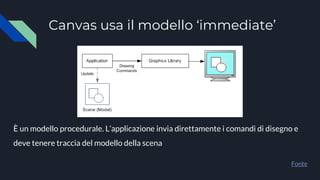
Canvas usa il modello ‘immediate’
Fonte
È un modello procedurale. L’applicazione invia direttamente i comandi di disegno e
deve tenere traccia del modello della scena
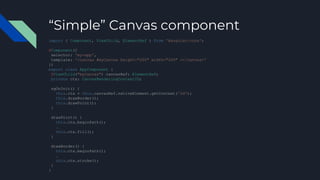
“Simple” Canvas component
import { Component, ViewChild, ElementRef } from '@angular/core';
@Component({
selector: 'my-app',
template: '<canvas #myCanvas height="200" width="200" ></canvas>'
})
export class AppComponent {
@ViewChild("myCanvas") canvasRef: ElementRef;
private ctx: CanvasRenderingContext2D;
ngOnInit() {
this.ctx = this.canvasRef.nativeElement.getContext('2d');
this.drawBorder();
this.drawPoint();
}
drawPoint() {
this.ctx.beginPath();
…
this.ctx.fill();
}
drawBorder() {
this.ctx.beginPath();
…
this.ctx.stroke();
}
}
Esempio live
Componente con canvas
https://stackblitz.com/edit/angular-canvas-simple
Esempio live
Animazione con canvas
https://stackblitz.com/edit/angular-canvas-animation
Librerie terze parti
SVG
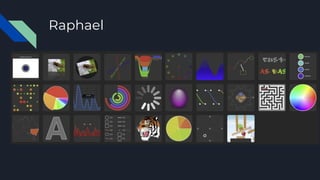
● Raphael
● SnapSVG
● D3
CANVAS
● EaselJS
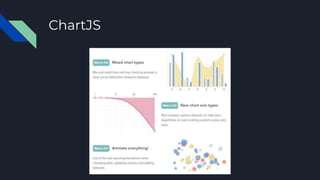
● ChartJS
● ThreeJS
Raphael
SnapSVG
D3.js
EaselJS
ChartJS
ThreeJS
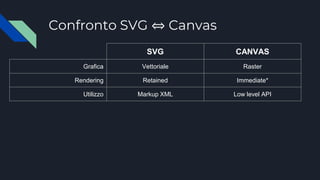
Confronto SVG ⇔ Canvas
SVG CANVAS
Grafica Vettoriale Raster
Rendering Retained Immediate*
Utilizzo Markup XML Low level API
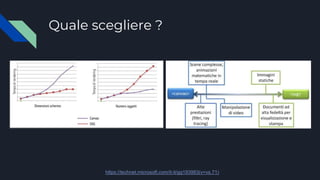
Quale scegliere ?
https://technet.microsoft.com/it-it/gg193983(v=vs.71)
Leonardo Buscemi
Software Developer presso
https://www.linkedin.com/in/leonardobuscemi/
https://www.facebook.com/leonardo.buscemi
https://twitter.com/leonardobuscemi
GRAZIE

Svg, canvas e animations in angular (3 maggio 2019)

  • 1.
    SVG, Canvas e Animationsin Angular Leonardo Buscemi
  • 2.
  • 3.
    Angular compila ilnostro codice Tutto quello che scriviamo nella nostra applicazione Angular (componenti, logica e stili) viene ‘compilato’ in codice Javascript.
  • 5.
    Elementi SVG <rect x="120"y="0" width="100" height="100" rx="0" ry="0" /> <circle cx="50" cy="50" r="50"/> <polygon points="20,0 80,0 100,50 0,50" /> <path d="M 10,30 A 20,20 0,0,1 50,30 A 20,20 0,0,1 90,30 Q 90,60 50,90 Q 10,60 10,30 z"/> SVG Elements
  • 6.
    Simple (static) Componentwith SVG import { Component } from @angular/core'; @Component({ selector: 'my-component', template: ` <svg viewBox="0 0 250 250"> <g> <polygon class="st0" fill="#DD0031" points="125,153 … 153.4" /> <polygon class="st0" fill="#DD0031" points="108,135 … 125,94.5" /> </g> <g class="st1"> <polygon class="st0" fill="#C3002F" points="125,153 … 3.4" /> <polygon class="st0" fill="#C3002F" points="142,135.4 … 94.5" /> </g> </svg> `, }) export class AppComponent {}
  • 7.
    Angular needs toknow is SVG <svg:rect x="0" y="0" width="100" height="100"/> “An SVG snippet template needs an svg: prefix on its root element to disambiguate the SVG element from an HTML component.” Fonte
  • 8.
  • 9.
    Simple (static) Componentwith SVG import { Component } from @angular/core'; @Component({ selector: 'my-component', template: ` <svg viewBox="0 0 250 250"> <g> <polygon class="st0" fill="#DD0031" points="125,153 … 153.4" /> <polygon class="st0" fill="#DD0031" points="108,135 … 125,94.5" /> </g> <g class="st1"> <polygon class="st0" fill="#C3002F" points="125,153 … 3.4" /> <polygon class="st0" fill="#C3002F" points="142,135.4 … 94.5" /> </g> </svg> `, }) export class AppComponent {}
  • 10.
    Simple (static) Componentwith SVG import { Component } from @angular/core'; @Component({ selector: 'my-component', template: ` <svg viewBox="0 0 250 250"> <svg:g> <svg:polygon class="st0" fill="#DD0031" points="125,153 … 153.4" /> <svg:polygon class="st0" fill="#DD0031" points="108,135 … 125,94.5" /> </svg:g> <svg:g class="st1"> <svg:polygon class="st0" fill="#C3002F" points="125,153 … 3.4" /> <svg:polygon class="st0" fill="#C3002F" points="142,135.4 … 94.5" /> </svg:g> </svg> `, }) export class AppComponent {}
  • 11.
  • 13.
    Component with SVG import{ Component } from @angular/core'; @Component({ selector: 'my-component', template: ` <svg viewBox="0 0 250 250"> <svg:g> <svg:polygon class="st0" fill="#DD0031" points="125,153 … 153.4" /> <svg:polygon class="st0" fill="#DD0031" points="108,135 … 125,94.5" /> </g> <svg:g class="st1"> <svg:polygon class="st0" fill="#C3002F" points="125,153 … 3.4" /> <svg:polygon class="st0" fill="#C3002F" points="142,135.4 … 94.5" /> </g> </svg> `, }) export class AppComponent {}
  • 14.
    Component with SVG import{ Component } from @angular/core'; @Component({ selector: 'my-component', template: ` <svg viewBox="0 0 250 250"> <svg:g> <svg:polygon class="st0" fill="#DD0031" points="125,153 … 153.4" /> <svg:polygon class="st0" fill="#DD0031" [points]="someMagic()" /> </g> <svg:g class="st1"> <svg:polygon class="st0" fill="#C3002F" points="125,153 … 3.4" /> <svg:polygon class="st0" fill="#C3002F" points="142,135.4 … 94.5" /> </g> </svg> `, }) export class AppComponent {}
  • 15.
    Component with SVG import{ Component } from @angular/core'; @Component({ selector: 'my-component', template: ` <svg viewBox="0 0 250 250"> <svg:g> <svg:polygon class="st0" fill="#DD0031" points="125,153 … 153.4" /> <svg:polygon class="st0" fill="#DD0031" [points]="someMagic()" /> </g> <svg:g class="st1"> <svg:polygon class="st0" fill="#C3002F" points="125,153 … 3.4" /> <svg:polygon class="st0" fill="#C3002F" points="142,135.4 … 94.5" /> </g> </svg> `, }) export class AppComponent {}
  • 16.
    HTML attribute vs.DOM property ❖ Alcuni attributi HTML hanno un mapping 1: 1 alle proprietà ➢ Ad esempio id ❖ Alcuni attributi HTML non hanno proprietà corrispondenti ➢ Ad esempio colspan e tutti gli attributi svg ❖ Alcune proprietà DOM non hanno attributi corrispondenti ➢ Ad esempio textContent ❖ Molti attributi HTML sembrano mappare alle proprietà ... ma non nel modo in cui si potrebbe pensare! Gli attributi inizializzano le proprietà del DOM, queste possono cambiare; i valori degli attributi no. Fonte
  • 17.
    Un mondo senzaattributi In Angular l'unico scopo degli attributi è quello di inizializzare lo stato degli elementi e direttive, una volta compilati gli attributi spariscono! Fonte Fonte È necessario utilizzare il binding dell'attributo quando non esiste alcuna proprietà dell'elemento da associare.
  • 18.
    Component with SVG import{ Component } from @angular/core'; @Component({ selector: 'my-component', template: ` <svg viewBox="0 0 250 250"> <svg:g> <svg:polygon class="st0" fill="#DD0031" points="125,153 … 153.4" /> <svg:polygon class="st0" fill="#DD0031" [attr.points]="someMagic()" /> </g> <svg:g class="st1"> <svg:polygon class="st0" fill="#C3002F" points="125,153 … 3.4" /> <svg:polygon class="st0" fill="#C3002F" points="142,135.4 … 94.5" /> </g> </svg> `, }) export class AppComponent {}
  • 19.
  • 20.
    Suddivisione in componenti import{ Component } from '@angular/core'; @Component({ selector: 'my-part-left', template: ` <svg:g > <svg:polygon fill="#DD0031" points="125,153.4 … 125,94.5" /> </svg:g>` }) export class PartLeftComponent { } import { Component } from '@angular/core'; @Component({ selector: 'my-part-right', template: ` <svg:g > <svg:polygon fill="#C3002F" points="125,153.4 … 125,94.5" /> </svg:g>` }) export class PartRightComponent { }
  • 21.
    Suddivisione in componenti <svgviewBox="0 0 250 250"> <my-part-left></my-part-left> <my-part-right></my-part-right> </svg> Non viene renderizzato!
  • 22.
    Selettore per attributo import{ Component } from '@angular/core'; @Component({ selector: '[my-part-left]', template: ` <svg:g > <svg:polygon fill="#DD0031" points="125,153.4 ... 125,94.5" /> </svg:g>` }) export class PartLeftComponent { } import { Component } from '@angular/core'; @Component({ selector: '[my-part-right]', template: ` <svg:g > <svg:polygon fill="#C3002F" points="125,153.4 125,94.5" /> </svg:g>` }) export class PartRightComponent { }
  • 23.
    Suddivisione in componentiOK <svg viewBox="0 0 250 250"> <svg:g my-part-left /> <svg:g my-part-right /> </svg>
  • 24.
  • 25.
    Animazioni su SVG ●SMIL ○ Deprecato ● CSS ● Angular Animation ● Javascript ○ Green Sock
  • 26.
    Esempio live Animazione diSVG in CSS https://stackblitz.com/edit/angular-svg-components
  • 28.
    Angular Animation npm i@angular/animations app.module.ts import { NgModule } from '@angular/core'; import { BrowserModule } from '@angular/platform-browser'; import { FormsModule } from '@angular/forms'; import { BrowserAnimationsModule } from '@angular/platform-browser/animations'; import { AppComponent } from './app.component'; @NgModule({ imports: [ BrowserModule, BrowserAnimationsModule, FormsModule ], declarations: [ AppComponent ], bootstrap: [ AppComponent ] }) export class AppModule { }
  • 29.
    Esempio live Animazione diSVG con Angular Animation https://stackblitz.com/edit/angular-svg-anim-ng
  • 30.
    Animazione in Javascript Vogliamoanimare anche la proprietà points del nostro polygon
  • 31.
  • 32.
    Greensock npm i gsap@types/greensock import { Component, ViewChild, ElementRef } from '@angular/core'; import 'gsap'; @Component({ selector: 'my-app', templateUrl: './app.component.html', }) export class AppComponent { @ViewChild('left') left: ElementRef; @ViewChild('right') right: ElementRef; ngOnInit() { TweenMax.to(this.left.nativeElement, 2, { attr: { points: "125,153.4 … 125,195" }, repeat: -1, yoyo: true, ease: Cubic.easeInOut }); TweenMax.to(this.right.nativeElement, 2, { attr: { points: "125,153.4 … 125,153.4" }, repeat: -1, yoyo: true, ease: Cubic.easeInOut }); } }
  • 33.
    Esempio live Animazione diSVG con GreenSock https://stackblitz.com/edit/angular-svg-static-grensock
  • 34.
  • 35.
    SVG usa ilmodello “retained” Fonte È un modello dichiarativo. L’applicazione costruisce la scena utilizzando elementi grafici (linee, forme) della libreria grafica che si occupa di creare il modello della scena e inviare i comandi di disegno.
  • 36.
    Canvas usa ilmodello ‘immediate’ Fonte È un modello procedurale. L’applicazione invia direttamente i comandi di disegno e deve tenere traccia del modello della scena
  • 37.
    “Simple” Canvas component import{ Component, ViewChild, ElementRef } from '@angular/core'; @Component({ selector: 'my-app', template: '<canvas #myCanvas height="200" width="200" ></canvas>' }) export class AppComponent { @ViewChild("myCanvas") canvasRef: ElementRef; private ctx: CanvasRenderingContext2D; ngOnInit() { this.ctx = this.canvasRef.nativeElement.getContext('2d'); this.drawBorder(); this.drawPoint(); } drawPoint() { this.ctx.beginPath(); … this.ctx.fill(); } drawBorder() { this.ctx.beginPath(); … this.ctx.stroke(); } }
  • 38.
    Esempio live Componente concanvas https://stackblitz.com/edit/angular-canvas-simple
  • 39.
    Esempio live Animazione concanvas https://stackblitz.com/edit/angular-canvas-animation
  • 40.
    Librerie terze parti SVG ●Raphael ● SnapSVG ● D3 CANVAS ● EaselJS ● ChartJS ● ThreeJS
  • 41.
  • 42.
  • 43.
  • 44.
  • 45.
  • 46.
  • 47.
    Confronto SVG ⇔Canvas SVG CANVAS Grafica Vettoriale Raster Rendering Retained Immediate* Utilizzo Markup XML Low level API
  • 48.
  • 49.
    Leonardo Buscemi Software Developerpresso https://www.linkedin.com/in/leonardobuscemi/ https://www.facebook.com/leonardo.buscemi https://twitter.com/leonardobuscemi GRAZIE

Editor's Notes

  • #4 Spiegare icona Angular in alto
  • #6 Il link punta alla pagina di Mozilla
  • #8 Spiegare subito perchè
  • #14 Adesso vogliamo rendere dinamica una parte del nostro componente
  • #18 $0.getAttribute("value") $0.value