Use Angular Schematics to Simplify Your Life
August 15, 2019
Matt Raible | @mraible
Photo by Trish McGinity mcginityphoto.com
Blogger on raibledesigns.com and

developer.okta.com/blog
Web Developer and Java Champion
Father, Husband, Skier, Mountain
Biker, Whitewater Rafter
Open Source Connoisseur
Hi, I’m Matt Raible!
Bus Lover
Okta Developer Advocate
developer.okta.com
Agenda
1. What are Angular Schematics?
2. Create and Test a Schematic
3. Schematic Templates
4. Template Expression Language
5. OpenID Connect Authentication
6. Schematics for React, Vue, and Ionic
What are Angular Schematics?
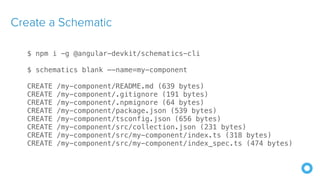
Create a Schematic
$ npm i -g @angular-devkit/schematics-cli
$ schematics blank —-name=my-component
CREATE /my-component/README.md (639 bytes)
CREATE /my-component/.gitignore (191 bytes)
CREATE /my-component/.npmignore (64 bytes)
CREATE /my-component/package.json (539 bytes)
CREATE /my-component/tsconfig.json (656 bytes)
CREATE /my-component/src/collection.json (231 bytes)
CREATE /my-component/src/my-component/index.ts (318 bytes)
CREATE /my-component/src/my-component/index_spec.ts (474 bytes)
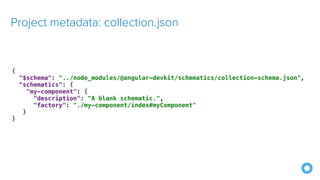
Project metadata: collection.json
{
"$schema": "../node_modules/@angular-devkit/schematics/collection-schema.json",
"schematics": {
"my-component": {
"description": "A blank schematic.",
"factory": "./my-component/index#myComponent"
}
}
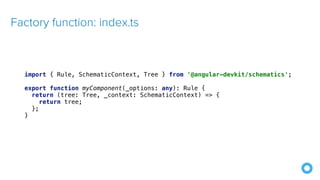
Factory function: index.ts
import { Rule, SchematicContext, Tree } from '@angular-devkit/schematics';
export function myComponent(_options: any): Rule {
return (tree: Tree, _context: SchematicContext) => {
return tree;
};
}
Unit test: index_spec.ts
import { Tree } from '@angular-devkit/schematics';
import { SchematicTestRunner } from '@angular-devkit/schematics/testing';
import * as path from 'path';
const collectionPath = path.join(__dirname, '../collection.json');
describe('my-component', () => {
it('works', () => {
const runner = new SchematicTestRunner('schematics', collectionPath);
const tree = runner.runSchematic('my-component', {}, Tree.empty());
expect(tree.files).toEqual([]);
});
});
Schematic Templates
Copy and Manipulate Templates: directory structure
$ tree .
src/my-component/
├── files
│ └── src
│ └── app
│ ├── app.component.html
│ └── app.component.ts
├── index.ts
└── index_spec.ts
Copy and Manipulate Templates: app.component.ts
import { Component } from '@angular/core';
@Component({
selector: 'app-root',
templateUrl: './app.component.html',
styleUrls: ['./app.component.css']
})
export class AppComponent {
name = '<%= name %>';
}
src/my-component/files/src/app/app.component.ts
Copy and Manipulate Templates: app.component.html
src/my-component/files/src/app/app.component.html
<div style="text-align:center">
<h1>
Hello, {{ name }}
</h1>
</div>
<router-outlet></router-outlet>
Copy and Manipulate Templates: schema.json
{
"$schema": "http://json-schema.org/schema",
"id": "SchematicsMyComponent",
"title": "My Component Schema",
"type": "object",
"properties": {
"name": {
"type": "string",
"description": "Your Name",
"x-prompt": "What is your name?"
}
},
"required": ["name"]
}
Copy and Manipulate Templates: collection.json
{
"$schema": "../node_modules/@angular-devkit/schematics/collection-schema.json",
"schematics": {
"my-component": {
"description": "A blank schematic.",
"factory": "./my-component/index#myComponent",
"schema": "./my-component/schema.json"
}
}
}
Copy and Manipulate Templates: index.ts
export function myComponent(_options: any): Rule {
return (tree: Tree, _context: SchematicContext) => {
setupOptions(tree, _options);
const movePath = normalize(_options.path + '/');
const templateSource = apply(url('./files/src'), [
template({..._options}),
move(movePath),
// fix for https://github.com/angular/angular-cli/issues/11337
forEach((fileEntry: FileEntry) => {
if (tree.exists(fileEntry.path)) {
tree.overwrite(fileEntry.path, fileEntry.content);
}
return fileEntry;
}),
]);
const rule = mergeWith(templateSource, MergeStrategy.Overwrite);
return rule(tree, _context);
};
}
Copy and Manipulate Templates: setupOptions()
export function setupOptions(host: Tree, options: any): Tree {
const workspace = getWorkspace(host);
if (!options.project) {
options.project = Object.keys(workspace.projects)[0];
}
const project = workspace.projects[options.project];
options.path = join(normalize(project.root), 'src');
return host;
}
Copy and Manipulate Templates: index_spec.ts
beforeEach(() => {
appTree = schematicRunner.runExternalSchematic(
'@schematics/angular', 'workspace', workspaceOptions);
appTree = schematicRunner.runExternalSchematic(
'@schematics/angular', 'application', appOptions, appTree);
});
it('works', () => {
const runner = new SchematicTestRunner('schematics', collectionPath);
runner.runSchematicAsync(
'my-component', schemaOptions, appTree).toPromise().then(tree => {
const appComponent = tree.readContent(
‘/projects/schematest/src/app/app.component.ts');
expect(appComponent).toContain(`name = '${schemaOptions.name}'`);
});
});
Run Your Schematic with Angular CLI
$ npm pack
$ ng new my-test-app --routing --style css
$ cd my-test-app
$ npm install ../my-component/my-component-0.0.0.tgz
$ ng g my-component:my-component
Publish Your Schematic to npm
!22
By default, .npmignore ignores all TypeScript files
Modify .npmignore so it doesn't exclude your template files!
Run npm publish
Add Support for ng add with Angular CLI
!23
{
"$schema": "../node_modules/@angular-devkit/schematics/collection-schema.json",
"schematics": {
"my-component": {
"description": "A blank schematic.",
"factory": "./my-component/index#myComponent",
"schema": "./my-component/schema.json"
},
"ng-add": {
"factory": "./ng-add/index",
"description": "Add schematic",
"schema": "./my-component/schema.json"
}
}
}
Add Support for ng add with Angular CLI
!24
import { chain, Rule, schematic, SchematicContext, Tree, }
from '@angular-devkit/schematics';
export default function (options: any): Rule {
return (host: Tree, context: SchematicContext) => {
return chain([
schematic('my-component', options)
])(host, context);
};
}
Template Expression Language
Placeholder Description
<%= expression %>
Replaced with the result of the call of the given expression. This only supports
direct expressions, no structural (for/if/...) JavaScript.
<%- expression %>
Same as above, but the value of the result will be escaped for HTML when
inserted (i.e. replacing '<' with '<')
<% inline code %>
Inserts the given code into the template structure, allowing to insert structural
JavaScript.
<%# text %> A comment, which gets entirely dropped.
https://www.npmjs.com/package/@angular-devkit/schematics#content-templating
Example Template Code
import { Injectable } from '@angular/core';
<% if (platform === 'cordova') { %>
import { CordovaBrowser } from 'ionic-appauth/lib/cordova';
<% } else { %>
import { CapacitorBrowser } from 'ionic-appauth/lib/capacitor';
<% } %>
@Injectable({
providedIn: 'root'
})
export class BrowserService extends
<%= (platform === 'cordova') ? 'CordovaBrowser' : 'CapacitorBrowser' %> {
}
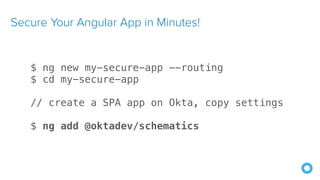
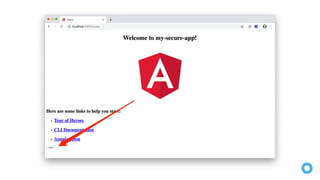
Secure Your Angular App in Minutes!
$ ng new my-secure-app --routing
$ cd my-secure-app
// create a SPA app on Okta, copy settings
$ ng add @oktadev/schematics
git clone https://github.com/oktadeveloper/okta-spring-webflux-react-
example.git
Blog, Screencast, and Source Code
https://developer.okta.com/blog/2019/02/13/angular-schematics
Supports Angular, React, Vue, and Ionic 4
Detects JavaScript or TypeScript
https://github.com/oktadeveloper/schematics
OktaDev Schematics
!31
📱
Thanks!
Keep in Touch
raibledesigns.com
@mraible
Presentations
speakerdeck.com/mraible
Code
github.com/oktadeveloper
developer.okta.com
developer.okta.com

Use Angular Schematics to Simplify Your Life - Develop Denver 2019

  • 1.
    Use Angular Schematicsto Simplify Your Life August 15, 2019 Matt Raible | @mraible Photo by Trish McGinity mcginityphoto.com
  • 2.
    Blogger on raibledesigns.comand developer.okta.com/blog Web Developer and Java Champion Father, Husband, Skier, Mountain Biker, Whitewater Rafter Open Source Connoisseur Hi, I’m Matt Raible! Bus Lover Okta Developer Advocate
  • 5.
  • 6.
    Agenda 1. What areAngular Schematics? 2. Create and Test a Schematic 3. Schematic Templates 4. Template Expression Language 5. OpenID Connect Authentication 6. Schematics for React, Vue, and Ionic
  • 7.
    What are AngularSchematics?
  • 8.
    Create a Schematic $npm i -g @angular-devkit/schematics-cli $ schematics blank —-name=my-component CREATE /my-component/README.md (639 bytes) CREATE /my-component/.gitignore (191 bytes) CREATE /my-component/.npmignore (64 bytes) CREATE /my-component/package.json (539 bytes) CREATE /my-component/tsconfig.json (656 bytes) CREATE /my-component/src/collection.json (231 bytes) CREATE /my-component/src/my-component/index.ts (318 bytes) CREATE /my-component/src/my-component/index_spec.ts (474 bytes)
  • 9.
    Project metadata: collection.json { "$schema":"../node_modules/@angular-devkit/schematics/collection-schema.json", "schematics": { "my-component": { "description": "A blank schematic.", "factory": "./my-component/index#myComponent" } }
  • 10.
    Factory function: index.ts import{ Rule, SchematicContext, Tree } from '@angular-devkit/schematics'; export function myComponent(_options: any): Rule { return (tree: Tree, _context: SchematicContext) => { return tree; }; }
  • 11.
    Unit test: index_spec.ts import{ Tree } from '@angular-devkit/schematics'; import { SchematicTestRunner } from '@angular-devkit/schematics/testing'; import * as path from 'path'; const collectionPath = path.join(__dirname, '../collection.json'); describe('my-component', () => { it('works', () => { const runner = new SchematicTestRunner('schematics', collectionPath); const tree = runner.runSchematic('my-component', {}, Tree.empty()); expect(tree.files).toEqual([]); }); });
  • 12.
  • 13.
    Copy and ManipulateTemplates: directory structure $ tree . src/my-component/ ├── files │ └── src │ └── app │ ├── app.component.html │ └── app.component.ts ├── index.ts └── index_spec.ts
  • 14.
    Copy and ManipulateTemplates: app.component.ts import { Component } from '@angular/core'; @Component({ selector: 'app-root', templateUrl: './app.component.html', styleUrls: ['./app.component.css'] }) export class AppComponent { name = '<%= name %>'; } src/my-component/files/src/app/app.component.ts
  • 15.
    Copy and ManipulateTemplates: app.component.html src/my-component/files/src/app/app.component.html <div style="text-align:center"> <h1> Hello, {{ name }} </h1> </div> <router-outlet></router-outlet>
  • 16.
    Copy and ManipulateTemplates: schema.json { "$schema": "http://json-schema.org/schema", "id": "SchematicsMyComponent", "title": "My Component Schema", "type": "object", "properties": { "name": { "type": "string", "description": "Your Name", "x-prompt": "What is your name?" } }, "required": ["name"] }
  • 17.
    Copy and ManipulateTemplates: collection.json { "$schema": "../node_modules/@angular-devkit/schematics/collection-schema.json", "schematics": { "my-component": { "description": "A blank schematic.", "factory": "./my-component/index#myComponent", "schema": "./my-component/schema.json" } } }
  • 18.
    Copy and ManipulateTemplates: index.ts export function myComponent(_options: any): Rule { return (tree: Tree, _context: SchematicContext) => { setupOptions(tree, _options); const movePath = normalize(_options.path + '/'); const templateSource = apply(url('./files/src'), [ template({..._options}), move(movePath), // fix for https://github.com/angular/angular-cli/issues/11337 forEach((fileEntry: FileEntry) => { if (tree.exists(fileEntry.path)) { tree.overwrite(fileEntry.path, fileEntry.content); } return fileEntry; }), ]); const rule = mergeWith(templateSource, MergeStrategy.Overwrite); return rule(tree, _context); }; }
  • 19.
    Copy and ManipulateTemplates: setupOptions() export function setupOptions(host: Tree, options: any): Tree { const workspace = getWorkspace(host); if (!options.project) { options.project = Object.keys(workspace.projects)[0]; } const project = workspace.projects[options.project]; options.path = join(normalize(project.root), 'src'); return host; }
  • 20.
    Copy and ManipulateTemplates: index_spec.ts beforeEach(() => { appTree = schematicRunner.runExternalSchematic( '@schematics/angular', 'workspace', workspaceOptions); appTree = schematicRunner.runExternalSchematic( '@schematics/angular', 'application', appOptions, appTree); }); it('works', () => { const runner = new SchematicTestRunner('schematics', collectionPath); runner.runSchematicAsync( 'my-component', schemaOptions, appTree).toPromise().then(tree => { const appComponent = tree.readContent( ‘/projects/schematest/src/app/app.component.ts'); expect(appComponent).toContain(`name = '${schemaOptions.name}'`); }); });
  • 21.
    Run Your Schematicwith Angular CLI $ npm pack $ ng new my-test-app --routing --style css $ cd my-test-app $ npm install ../my-component/my-component-0.0.0.tgz $ ng g my-component:my-component
  • 22.
    Publish Your Schematicto npm !22 By default, .npmignore ignores all TypeScript files Modify .npmignore so it doesn't exclude your template files! Run npm publish
  • 23.
    Add Support forng add with Angular CLI !23 { "$schema": "../node_modules/@angular-devkit/schematics/collection-schema.json", "schematics": { "my-component": { "description": "A blank schematic.", "factory": "./my-component/index#myComponent", "schema": "./my-component/schema.json" }, "ng-add": { "factory": "./ng-add/index", "description": "Add schematic", "schema": "./my-component/schema.json" } } }
  • 24.
    Add Support forng add with Angular CLI !24 import { chain, Rule, schematic, SchematicContext, Tree, } from '@angular-devkit/schematics'; export default function (options: any): Rule { return (host: Tree, context: SchematicContext) => { return chain([ schematic('my-component', options) ])(host, context); }; }
  • 25.
    Template Expression Language PlaceholderDescription <%= expression %> Replaced with the result of the call of the given expression. This only supports direct expressions, no structural (for/if/...) JavaScript. <%- expression %> Same as above, but the value of the result will be escaped for HTML when inserted (i.e. replacing '<' with '<') <% inline code %> Inserts the given code into the template structure, allowing to insert structural JavaScript. <%# text %> A comment, which gets entirely dropped. https://www.npmjs.com/package/@angular-devkit/schematics#content-templating
  • 26.
    Example Template Code import{ Injectable } from '@angular/core'; <% if (platform === 'cordova') { %> import { CordovaBrowser } from 'ionic-appauth/lib/cordova'; <% } else { %> import { CapacitorBrowser } from 'ionic-appauth/lib/capacitor'; <% } %> @Injectable({ providedIn: 'root' }) export class BrowserService extends <%= (platform === 'cordova') ? 'CordovaBrowser' : 'CapacitorBrowser' %> { }
  • 27.
    Secure Your AngularApp in Minutes! $ ng new my-secure-app --routing $ cd my-secure-app // create a SPA app on Okta, copy settings $ ng add @oktadev/schematics
  • 30.
    git clone https://github.com/oktadeveloper/okta-spring-webflux-react- example.git Blog,Screencast, and Source Code https://developer.okta.com/blog/2019/02/13/angular-schematics
  • 31.
    Supports Angular, React,Vue, and Ionic 4 Detects JavaScript or TypeScript https://github.com/oktadeveloper/schematics OktaDev Schematics !31 📱
  • 32.
  • 33.