Supercharge your map
production
FME
User
Conference
20
22
How to use this deck
This deck follows a “Story” structure. It’s set up to draw the audience in and hold their
attention. To give your most effective presentation, follow the suggested format.
That being said, make this deck your own! In addition to several slide design options, we’ve
provided extra slide designs towards the bottom of this template that can be swapped out if
they fit your presentation better.
FME
User
Conference
20
22
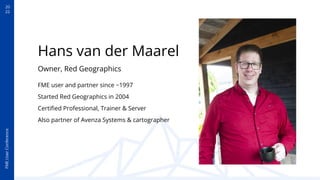
Hans van der Maarel
Owner, Red Geographics
FME user and partner since ~1997
Started Red Geographics in 2004
Certified Professional, Trainer & Server
Also partner of Avenza Systems & cartographer
20
22
FME
User
Conference
Agenda
● Introduction
● A typical project
● Introduce MAPublisher & FME Auto
● The FME side
● The MAPublisher side
● Demo time!
● The results
FME
User
Conference
20
22
About us
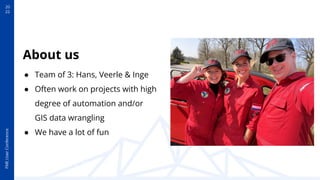
● Team of 3: Hans, Veerle & Inge
● Often work on projects with high
degree of automation and/or
GIS data wrangling
● We have a lot of fun
FME
User
Conference
20
22
Company Name, Title
Use this slide to introduce yourself here.
Company Name, Title
Use this slide to introduce yourself here.
Presenter’s Name
Presenter’s Name
20
22
FME
User
Conference
A LOT OF MAPS
WE OFTEN HAVE TO MAKE
IN A SHORT AMOUNT OF TIME
20
22
FME
User
Conference
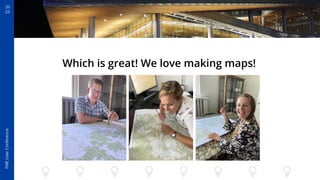
Which is great! We love making maps!
20
22
FME
User
Conference
A LOT OF TIME
AND CAN BE TEDIOUS
BUT…
MAKING GREAT MAPS TAKES
20
22
FME
User
Conference
Automating the mapping process
is great
but…
We don’t want to sacrifice quality!
20
22
FME
User
Conference
This is where you can
provide a sentence
that states your belief
about the subject.
Option 2
FME
User
Conference
20
22
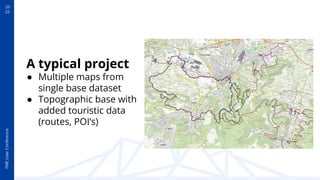
A typical project
● Multiple maps from
single base dataset
● Topographic base with
added touristic data
(routes, POI’s)
20
22
FME
User
Conference
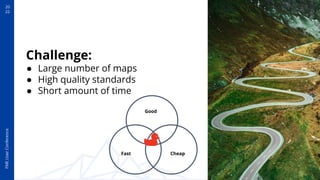
Challenge:
● Large number of maps
● High quality standards
● Short amount of time
Good
Fast Cheap
20
22
FME
User
Conference
2 great tools!
Let’s make them work
together!
20
22
FME
User
Conference
MAPublisher in a nutshell
● Plug-in for Adobe Illustrator (Windows and Macintosh)
● Adds GIS functionality
● Supports most popular GIS/CAD formats
● Work at scale, in projection and with access to GIS attributes
● Map Themes to style data based on attributes
● Optional Label Pro text placement add-on
● Optional FME Auto add-on
20
22
FME
User
Conference
FME Auto for MAPublisher
● Extra-cost add-on
● Writer in FME (Avenza MAPublisher)
● Extra format in MAPublisher (.FFS)
● Use in combintion with automation options in MAPublisher
● Cutting production time down to seconds per map
20
22
FME
User
Conference
Transition Slide
20
22
FME
User
Conference
Our sample setup
● PostGIS database with topographic data
● WFS service with bike route network
● Shapefile with map sheets
20
22
FME
User
Conference
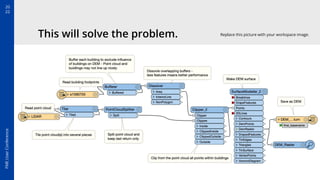
Our process
● FME clips, sorts and pre-processes data
● Sends each map sheet’s data on to MAPublisher
(Requires both installed on same machine)
● Uses template file
● Map Themes (styling) and Label Pro (text
placement) settings are automatically applied
● File is saved as .AI
20
22
FME
User
Conference
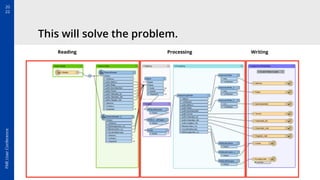
This will solve the problem.
Reading Processing Writing
20
22
FME
User
Conference
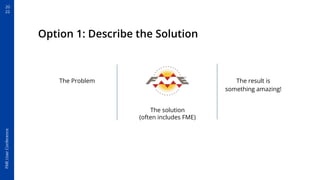
Option 1: Describe the Solution
The solution
(often includes FME)
The Problem The result is
something amazing!
20
22
FME
User
Conference
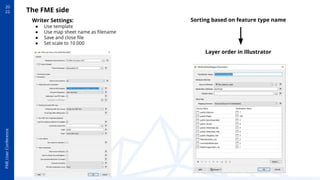
Writer Settings:
● Use template
● Use map sheet name as filename
● Save and close file
● Set scale to 10.000
Sorting based on feature type name
Layer order in Illustrator
The FME side
20
22
FME
User
Conference
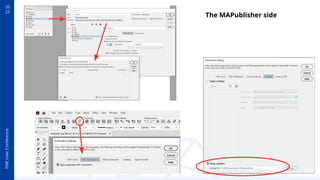
The MAPublisher side
20
22
FME
User
Conference
Demo time!
20
22
FME
User
Conference
Title To Go Here
Add your image by right clicking the
placeholder, then select “Replace image”.
Subheading To Go Here
Lorem ipsum dolor sit amet,
consectetur adipiscing elit.
Place your screen
capture here
20
22
FME
User
Conference
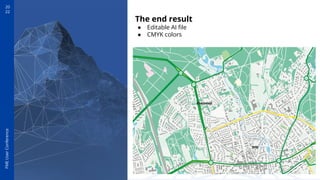
The end result
● Editable AI file
● CMYK colors
20
22
FME
User
Conference
Through automation
we’ve saved ourselves
our most precious
commodity: time
20
22
FME
User
Conference
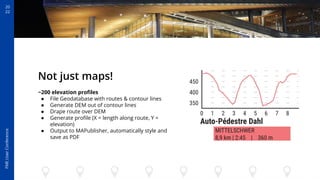
Not just maps!
~200 elevation profiles
● File Geodatabase with routes & contour lines
● Generate DEM out of contour lines
● Drape route over DEM
● Generate profile (X = length along route, Y =
elevation)
● Output to MAPublisher, automatically style and
save as PDF
20
22
FME
User
Conference
This will solve the problem. Replace this picture with your workspace image.
20
22
FME
User
Conference
Conclusion
FME can help!
Map production can be
time consuming and
error-prone

Automating the boring bits saves
time and reduces errors
FME Auto is a great addition to
the toolkit
20
22
FME
User
Conference
Option 3: The Output
We solved the problem. Add your
image by right clicking the placeholder,
then select “Replace image”.
Place your screen capture here
20
22
FME
User
Conference
Call to Action
Give it a try, next time you need to make a lot of maps!
Download MAPublisher demo from www.avenza.com
Contact us if you want to try FME Auto
Let’s make awesome maps!
Thank You!
hans@redgeographics.com
@redgeographics
20
22
FME
User
Conference
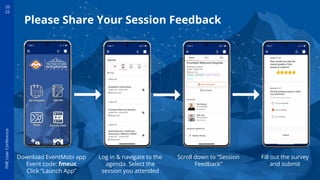
Please Share Your Session Feedback
Log in & navigate to the
agenda. Select the
session you attended
Scroll down to “Session
Feedback”
Download EventMobi app
Event code: fmeuc
Click “Launch App”
Fill out the survey
and submit
The slides below are extras, which you can pull from if you like to change
it up or add an extra slide or two.
20
22
FME
User
Conference
Title To Go Here
Add your image by right clicking
the placeholder, then select
“Replace image”.
Place your screen
capture here
20
22
FME
User
Conference
Title To Go Here
Lorem ipsum dolor sit amet,
consectetur adipiscing elit. Curabitur
eros erat, facilisis id vehicula nec,
consequat quis magna.
20
22
FME
User
Conference
Title To Go Here
Subheading To Go Here
Lorem ipsum dolor sit amet, consectetur adipiscing elit. Curabitur eros erat, facilisis id
vehicula nec, consequat quis magna.

Supercharging Your Map Production