Sanzida Akter
Overview
1
About Sudoku
 A Logical game of numbers.
 Recreational and increasing focus.
 Solving puzzle as a challenge.
 No need of calculation or arithmatic skills.
 It can be played by both children and adults.
Features
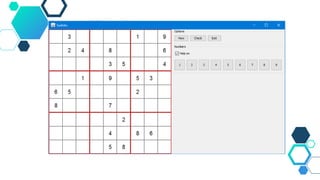
 New Game button allows to get new puzzles everytime.
 Check button allows to check the numbers to place in grid.
 Selecting a number by clicking on the given buttons to
place a number in grid.
 Help on feature help us to place the right number in the
grid’s right place.
Design and Implementation
2
PackageS
 java.awt.event.*;
 javax.swing.*;
 java.awt.*;
 java.util.*;
 Import other classes of other packages of this game.
New Things I Learn
3
 Usage of new classes and packages.
 Learning more about Graphical User Interface
 Designing a concept on the basis of algorithm.
 Using various classes & packages in a project and use them
efficiently.
Difficulties
4
 Logic implementation of the game.
 Designing the main frame.
 Various package usage.
 Extending different classes & implementing interfaces
 Getting all things work altogether.
Improvements
5
 Design of the mainframe can be improved more.
 Adding various input option for the user.
 Creating multiple level of the game.
 Including more sound to give a good effect.
 Logic can be more efficient.
6
Sudoku

Sudoku

  • 1.
  • 2.
  • 3.
    About Sudoku  ALogical game of numbers.  Recreational and increasing focus.  Solving puzzle as a challenge.  No need of calculation or arithmatic skills.  It can be played by both children and adults.
  • 4.
    Features  New Gamebutton allows to get new puzzles everytime.  Check button allows to check the numbers to place in grid.  Selecting a number by clicking on the given buttons to place a number in grid.  Help on feature help us to place the right number in the grid’s right place.
  • 5.
  • 7.
    PackageS  java.awt.event.*;  javax.swing.*; java.awt.*;  java.util.*;  Import other classes of other packages of this game.
  • 8.
    New Things ILearn 3
  • 9.
     Usage ofnew classes and packages.  Learning more about Graphical User Interface  Designing a concept on the basis of algorithm.  Using various classes & packages in a project and use them efficiently.
  • 10.
  • 11.
     Logic implementationof the game.  Designing the main frame.  Various package usage.  Extending different classes & implementing interfaces  Getting all things work altogether.
  • 12.
  • 13.
     Design ofthe mainframe can be improved more.  Adding various input option for the user.  Creating multiple level of the game.  Including more sound to give a good effect.  Logic can be more efficient.
  • 14.