1
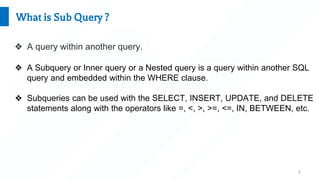
What is Sub Query ?
❖ A query within another query.
❖ A Subquery or Inner query or a Nested query is a query within another SQL
query and embedded within the WHERE clause.
❖ Subqueries can be used with the SELECT, INSERT, UPDATE, and DELETE
statements along with the operators like =, <, >, >=, <=, IN, BETWEEN, etc.
2
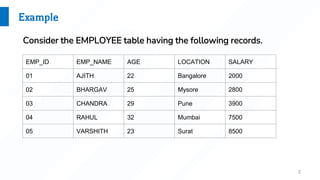
Example
EMP_ID EMP_NAME AGE LOCATION SALARY
01 AJITH 22 Bangalore 2000
02 BHARGAV 25 Mysore 2800
03 CHANDRA 29 Pune 3900
04 RAHUL 32 Mumbai 7500
05 VARSHITH 23 Surat 8500
Consider the EMPLOYEE table having the following records.
3
Subqueries with the SELECT Statement
➔ Subqueries are most frequently used with the SELECT statement.
SELECT * FROM EMPLOYEE
WHERE EMP_ID IN (SELECT ID
FROM EMPLOYEE WHERE SALARY > 3500);
EMP_ID EMP_NAME AGE LOCATION SALARY
03 CHANDRA 29 Pune 3900
04 RAHUL 32 Mumbai 7500
05 VARSHITH 23 Surat 8500
This would produce the following result.
4
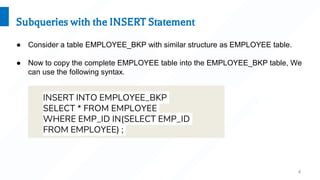
Subqueries with the INSERT Statement
● Consider a table EMPLOYEE_BKP with similar structure as EMPLOYEE table.
● Now to copy the complete EMPLOYEE table into the EMPLOYEE_BKP table, We
can use the following syntax.
INSERT INTO EMPLOYEE_BKP
SELECT * FROM EMPLOYEE
WHERE EMP_ID IN(SELECT EMP_ID
FROM EMPLOYEE) ;
5
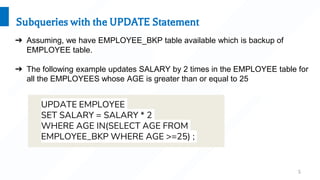
Subqueries with the UPDATE Statement
➔ Assuming, we have EMPLOYEE_BKP table available which is backup of
EMPLOYEE table.
➔ The following example updates SALARY by 2 times in the EMPLOYEE table for
all the EMPLOYEES whose AGE is greater than or equal to 25
UPDATE EMPLOYEE
SET SALARY = SALARY * 2
WHERE AGE IN(SELECT AGE FROM
EMPLOYEE_BKP WHERE AGE >=25) ;
6
Subqueries with the UPDATE Statement
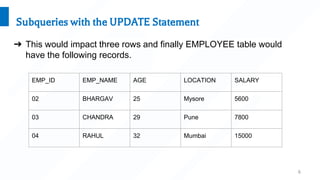
➔ This would impact three rows and finally EMPLOYEE table would
have the following records.
EMP_ID EMP_NAME AGE LOCATION SALARY
02 BHARGAV 25 Mysore 5600
03 CHANDRA 29 Pune 7800
04 RAHUL 32 Mumbai 15000
7
Subqueries with the DELETE Statement
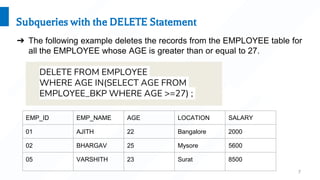
➔ The following example deletes the records from the EMPLOYEE table for
all the EMPLOYEE whose AGE is greater than or equal to 27.
DELETE FROM EMPLOYEE
WHERE AGE IN(SELECT AGE FROM
EMPLOYEE_BKP WHERE AGE >=27) ;
EMP_ID EMP_NAME AGE LOCATION SALARY
01 AJITH 22 Bangalore 2000
02 BHARGAV 25 Mysore 5600
05 VARSHITH 23 Surat 8500

Subquery.pptx

  • 1.
    1 What is SubQuery ? ❖ A query within another query. ❖ A Subquery or Inner query or a Nested query is a query within another SQL query and embedded within the WHERE clause. ❖ Subqueries can be used with the SELECT, INSERT, UPDATE, and DELETE statements along with the operators like =, <, >, >=, <=, IN, BETWEEN, etc.
  • 2.
    2 Example EMP_ID EMP_NAME AGELOCATION SALARY 01 AJITH 22 Bangalore 2000 02 BHARGAV 25 Mysore 2800 03 CHANDRA 29 Pune 3900 04 RAHUL 32 Mumbai 7500 05 VARSHITH 23 Surat 8500 Consider the EMPLOYEE table having the following records.
  • 3.
    3 Subqueries with theSELECT Statement ➔ Subqueries are most frequently used with the SELECT statement. SELECT * FROM EMPLOYEE WHERE EMP_ID IN (SELECT ID FROM EMPLOYEE WHERE SALARY > 3500); EMP_ID EMP_NAME AGE LOCATION SALARY 03 CHANDRA 29 Pune 3900 04 RAHUL 32 Mumbai 7500 05 VARSHITH 23 Surat 8500 This would produce the following result.
  • 4.
    4 Subqueries with theINSERT Statement ● Consider a table EMPLOYEE_BKP with similar structure as EMPLOYEE table. ● Now to copy the complete EMPLOYEE table into the EMPLOYEE_BKP table, We can use the following syntax. INSERT INTO EMPLOYEE_BKP SELECT * FROM EMPLOYEE WHERE EMP_ID IN(SELECT EMP_ID FROM EMPLOYEE) ;
  • 5.
    5 Subqueries with theUPDATE Statement ➔ Assuming, we have EMPLOYEE_BKP table available which is backup of EMPLOYEE table. ➔ The following example updates SALARY by 2 times in the EMPLOYEE table for all the EMPLOYEES whose AGE is greater than or equal to 25 UPDATE EMPLOYEE SET SALARY = SALARY * 2 WHERE AGE IN(SELECT AGE FROM EMPLOYEE_BKP WHERE AGE >=25) ;
  • 6.
    6 Subqueries with theUPDATE Statement ➔ This would impact three rows and finally EMPLOYEE table would have the following records. EMP_ID EMP_NAME AGE LOCATION SALARY 02 BHARGAV 25 Mysore 5600 03 CHANDRA 29 Pune 7800 04 RAHUL 32 Mumbai 15000
  • 7.
    7 Subqueries with theDELETE Statement ➔ The following example deletes the records from the EMPLOYEE table for all the EMPLOYEE whose AGE is greater than or equal to 27. DELETE FROM EMPLOYEE WHERE AGE IN(SELECT AGE FROM EMPLOYEE_BKP WHERE AGE >=27) ; EMP_ID EMP_NAME AGE LOCATION SALARY 01 AJITH 22 Bangalore 2000 02 BHARGAV 25 Mysore 5600 05 VARSHITH 23 Surat 8500