Lab#5 Style and Selector
322432 Web Design Technology


CSS	
  Basic	
  
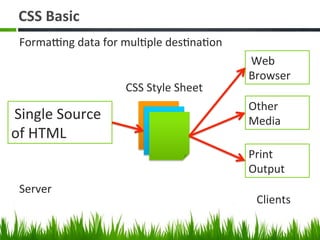
Single	
  Source	
  
of	
  HTML	
  
CSS	
  Style	
  Sheet	
  
Web	
  
Browser	
  
Other	
  
Media	
  
Print	
  
Output	
  
FormaAng	
  data	
  for	
  mulBple	
  desBnaBon	
  	
  
Server	
  
Clients	
  
CSS	
  Syntax	
  
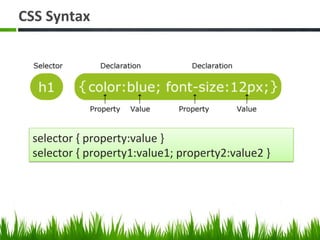
selector	
  {	
  property:value	
  }	
  	
  
selector	
  {	
  property1:value1;	
  property2:value2	
  }	
  
วิธีใช้งาน Style Sheet	
  
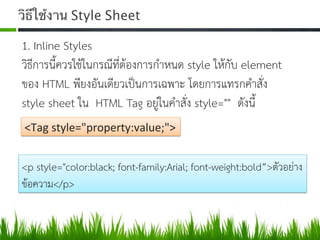
1. Inline Styles  
วิธีการนี้ควรใชในกรณีที่ตองการกำหนด style ใหกับ element
ของ HTML พียงอันเดียวเปนการเฉพาะ โดยการแทรกคำสั่ง
style sheet ใน HTML Tag อยูในคำสั่ง style="" ดังนี้ 
<Tag	
  style="property:value;">	
  
<p style="color:black; font-family:Arial; font-weight:bold”>ตัวอยาง
ขอความ</p>  
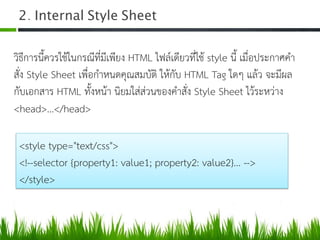
2. Internal Style Sheet 	
  
วิธีการนี้ควรใชในกรณีที่มีเพียง HTML ไฟลเดียวที่ใช style นี้ เมื่อประกาศคำ
สั่ง Style Sheet เพื่อกำหนดคุณสมบัติ ใหกับ HTML Tag ใดๆ แลว จะมีผล
กับเอกสาร HTML ทั้งหนา นิยมใสสวนของคำสั่ง Style Sheet ไวระหวาง
<head>...</head> 
<style type="text/css"> 
<!--selector {property1: value1; property2: value2}... --> 
</style> 
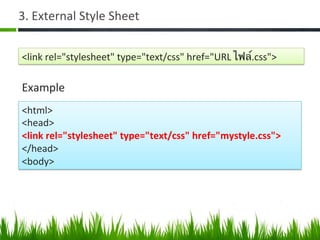
3.	
  External	
  Style	
  Sheet	
  	
  
<link	
  rel="stylesheet"	
  type="text/css"	
  href="URL	
  ไฟล์.css">	
  
<html>	
  
<head>	
  
<link	
  rel="stylesheet"	
  type="text/css"	
  href="mystyle.css">	
  
</head>	
  
<body>	
  	
  
Example	
  
CSS	
  Selector	
  
•  Descendant	
  Selector	
  
•  Parent-­‐Child	
  Selector	
  
•  Adjacent	
  Selector	
  
•  AZribute	
  Selector	
  
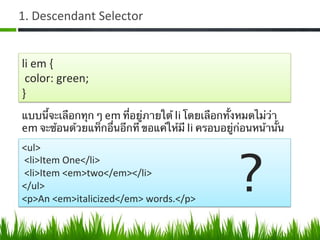
1.	
  Descendant	
  Selector	
  
li	
  em	
  {	
  
	
  color:	
  green;	
  
}	
  
แบบนี้จะเลือกทุก ๆ em ที่อยู่ภายใต้ li โดยเลือกทั้งหมดไม่ว่า
em จะซ้อนด้วยแท็กอื่นอีกที ขอแค่ให้มี li ครอบอยู่ก่อนหน้านั้น	
  
<ul>	
  
	
  <li>Item	
  One</li>	
  
	
  <li>Item	
  <em>two</em></li>	
  
</ul>	
  
<p>An	
  <em>italicized</em>	
  words.</p>	
  
?	
  
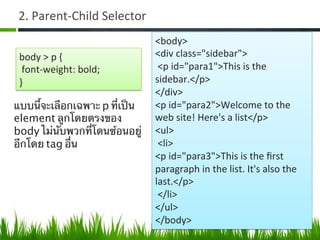
2.	
  Parent-­‐Child	
  Selector	
  
body	
  >	
  p	
  {	
  
	
  font-­‐weight:	
  bold;	
  
}	
  
แบบนี้จะเลือกเฉพาะ p ที่เป็น
element ลูกโดยตรงของ
body ไม่นับพวกที่โดนซ้อนอยู่
อีกโดย tag อื่น	
  
<body>	
  
<div	
  class="sidebar">	
  
	
  <p	
  id="para1">This	
  is	
  the	
  
sidebar.</p>	
  
</div>	
  
<p	
  id="para2">Welcome	
  to	
  the	
  
web	
  site!	
  Here's	
  a	
  list</p>	
  
<ul>	
  
	
  <li>	
  
<p	
  id="para3">This	
  is	
  the	
  first	
  
paragraph	
  in	
  the	
  list.	
  It's	
  also	
  the	
  
last.</p>	
  
	
  </li>	
  
</ul>	
  
</body>	
  
3.	
  Adjacent	
  Selector	
  
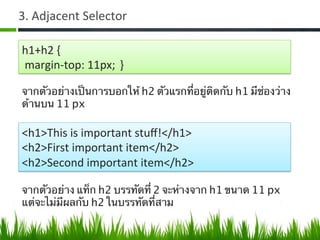
h1+h2	
  {	
  
	
  margin-­‐top:	
  11px; }	
  
จากตัวอย่างเป็นการบอกให้ h2 ตัวแรกที่อยู่ติดกับ h1 มีช่องว่าง
ด้านบน 11 px	
  
<h1>This	
  is	
  important	
  stuff!</h1>	
  
<h2>First	
  important	
  item</h2>	
  
<h2>Second	
  important	
  item</h2>	
  
จากตัวอย่าง แท็ก h2 บรรทัดที่ 2 จะห่างจาก h1 ขนาด 11 px
แต่จะไม่มีผลกับ h2 ในบรรทัดที่สาม	
  
4.	
  AZribute	
  Selectors	
  
selector แบบที่ 4 นี้จะคล้ายกับการเขียนโปรแกรม โดยมีรูปแบบ
ดังนี้	
1.  [attribute] จะเข้าเงื่อนไขคือกําหนด attribute ทั้งหมด	
2.  [attribute="value"] จะเข้าเงื่อนไขเมื่อมีการกําหนดค่าให้กับ
attribute	
3.  [attribute~="value"] คือ attribute ใด ๆ ที่มีคําตรงกับค่าที่
กําหนด จากการเว้นช่องว่าง	
4.  [attribute|="value"] คือ attribute ใด ๆ ที่มีคําตรงกับค่าที่
กําหนด โดยใช้เครื่องหมายคําพูด	
  
4.	
  AZribute	
  Selectors	
  
input[type="text"]	
  {	
  
color:	
  white;	
  
background-­‐color:	
  black;	
  
}	
  
ถ้าต้องการให้ textbox (<input type=”text” />) มีตัวอักษรสี
ขาว และพื้นหลังเป็นสีดํา 	
  
Selector	
  ที่เป็น	
  Class	
  aZribute	
  	
  
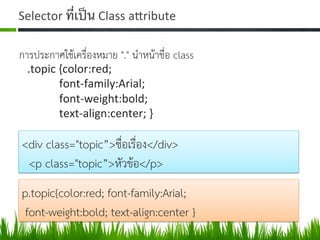
การประกาศใชเครื่องหมาย "." นำหนาชื่อ class 
.topic	
  {color:red;	


  font-­‐family:Arial;	


  font-­‐weight:bold;	


  text-­‐align:center;	
  }	
  	
  
<div class="topic”>ชื่อเรื่อง</div> 
<p class="topic”>หัวขอ</p> 
p.topic{color:red; font-family:Arial; 
font-weight:bold; text-align:center } 
Selector	
  ที่เป็น	
  ID	
  aZribute	
  
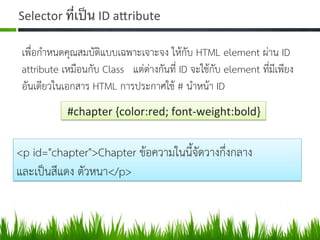
เพื่อกำหนดคุณสมบัติแบบเฉพาะเจาะจง ใหกับ HTML element ผาน ID
attribute เหมือนกับ Class แตตางกันที่ ID จะใชกับ element ที่มีเพียง
อันเดียวในเอกสาร HTML การประกาศใช # นำหนา ID 
	
  #chapter	
  {color:red;	
  font-­‐weight:bold}	
  
<p id="chapter">Chapter ขอความในนี้จัดวางกึ่งกลาง  
และเปนสีแดง ตัวหนา</p> 
CSS3	
  Selector	
  
a[href$=.“.pdf”] //ตัวอยาง ลิ้งคเพื่อเรียกไฟล Adobe Acrobat ได 
Child	
  Selector	
  
:first-child เปน Selector สำหรับจัดรูปแบบใหกับ Child เชน  
ul :frist-child // จัดรูปแบบใหกับ text child  
.book :first-child { color: #F33F00; } 
Lab#5 Style and Selectors 
คำสั่ง 
กำหนดขอมูลให ขาวมา 2 เรื่อง ใหใช CSS จัดรูปแบบขอมูลให
สวยงาม โดยจะใหโจทยในชั่วโมงเรียน 
คะแนนเต็ม 10 คะแนน เกณฑในการใหคะแนนความสวยงาม
และเทคนิควิธีที่ใช  
สงงานเขา LMS โดยหากมีไฟลรูปภาพที่โหลดมาเองใหใสมาใน
โฟลเดอรดวย  
 style and selector

style and selector

  • 1.
    Lab#5 Style andSelector 322432 Web Design Technology
  • 2.
                                                                       
  • 3.
    CSS  Basic   Single  Source   of  HTML   CSS  Style  Sheet   Web   Browser   Other   Media   Print   Output   FormaAng  data  for  mulBple  desBnaBon     Server   Clients  
  • 4.
    CSS  Syntax   selector  {  property:value  }     selector  {  property1:value1;  property2:value2  }  
  • 5.
    วิธีใช้งาน Style Sheet   1. Inline Styles   วิธีการนี้ควรใชในกรณีที่ตองการกำหนด style ใหกับ element ของ HTML พียงอันเดียวเปนการเฉพาะ โดยการแทรกคำสั่ง style sheet ใน HTML Tag อยูในคำสั่ง style="" ดังนี้  <Tag  style="property:value;">   <p style="color:black; font-family:Arial; font-weight:bold”>ตัวอยาง ขอความ</p>  
  • 6.
    2. Internal StyleSheet   วิธีการนี้ควรใชในกรณีที่มีเพียง HTML ไฟลเดียวที่ใช style นี้ เมื่อประกาศคำ สั่ง Style Sheet เพื่อกำหนดคุณสมบัติ ใหกับ HTML Tag ใดๆ แลว จะมีผล กับเอกสาร HTML ทั้งหนา นิยมใสสวนของคำสั่ง Style Sheet ไวระหวาง <head>...</head>  <style type="text/css">  <!--selector {property1: value1; property2: value2}... -->  </style> 
  • 7.
    3.  External  Style  Sheet     <link  rel="stylesheet"  type="text/css"  href="URL  ไฟล์.css">   <html>   <head>   <link  rel="stylesheet"  type="text/css"  href="mystyle.css">   </head>   <body>     Example  
  • 8.
    CSS  Selector   • Descendant  Selector   •  Parent-­‐Child  Selector   •  Adjacent  Selector   •  AZribute  Selector  
  • 9.
    1.  Descendant  Selector   li  em  {    color:  green;   }   แบบนี้จะเลือกทุก ๆ em ที่อยู่ภายใต้ li โดยเลือกทั้งหมดไม่ว่า em จะซ้อนด้วยแท็กอื่นอีกที ขอแค่ให้มี li ครอบอยู่ก่อนหน้านั้น   <ul>    <li>Item  One</li>    <li>Item  <em>two</em></li>   </ul>   <p>An  <em>italicized</em>  words.</p>   ?  
  • 10.
    2.  Parent-­‐Child  Selector   body  >  p  {    font-­‐weight:  bold;   }   แบบนี้จะเลือกเฉพาะ p ที่เป็น element ลูกโดยตรงของ body ไม่นับพวกที่โดนซ้อนอยู่ อีกโดย tag อื่น   <body>   <div  class="sidebar">    <p  id="para1">This  is  the   sidebar.</p>   </div>   <p  id="para2">Welcome  to  the   web  site!  Here's  a  list</p>   <ul>    <li>   <p  id="para3">This  is  the  first   paragraph  in  the  list.  It's  also  the   last.</p>    </li>   </ul>   </body>  
  • 11.
    3.  Adjacent  Selector   h1+h2  {    margin-­‐top:  11px; }   จากตัวอย่างเป็นการบอกให้ h2 ตัวแรกที่อยู่ติดกับ h1 มีช่องว่าง ด้านบน 11 px   <h1>This  is  important  stuff!</h1>   <h2>First  important  item</h2>   <h2>Second  important  item</h2>   จากตัวอย่าง แท็ก h2 บรรทัดที่ 2 จะห่างจาก h1 ขนาด 11 px แต่จะไม่มีผลกับ h2 ในบรรทัดที่สาม  
  • 12.
    4.  AZribute  Selectors   selector แบบที่ 4 นี้จะคล้ายกับการเขียนโปรแกรม โดยมีรูปแบบ ดังนี้ 1.  [attribute] จะเข้าเงื่อนไขคือกําหนด attribute ทั้งหมด 2.  [attribute="value"] จะเข้าเงื่อนไขเมื่อมีการกําหนดค่าให้กับ attribute 3.  [attribute~="value"] คือ attribute ใด ๆ ที่มีคําตรงกับค่าที่ กําหนด จากการเว้นช่องว่าง 4.  [attribute|="value"] คือ attribute ใด ๆ ที่มีคําตรงกับค่าที่ กําหนด โดยใช้เครื่องหมายคําพูด  
  • 13.
    4.  AZribute  Selectors   input[type="text"]  {   color:  white;   background-­‐color:  black;   }   ถ้าต้องการให้ textbox (<input type=”text” />) มีตัวอักษรสี ขาว และพื้นหลังเป็นสีดํา  
  • 14.
    Selector  ที่เป็น  Class  aZribute     การประกาศใชเครื่องหมาย "." นำหนาชื่อ class  .topic  {color:red;      font-­‐family:Arial;      font-­‐weight:bold;      text-­‐align:center;  }     <div class="topic”>ชื่อเรื่อง</div>  <p class="topic”>หัวขอ</p>  p.topic{color:red; font-family:Arial;  font-weight:bold; text-align:center } 
  • 15.
    Selector  ที่เป็น  ID  aZribute   เพื่อกำหนดคุณสมบัติแบบเฉพาะเจาะจง ใหกับ HTML element ผาน ID attribute เหมือนกับ Class แตตางกันที่ ID จะใชกับ element ที่มีเพียง อันเดียวในเอกสาร HTML การประกาศใช # นำหนา ID   #chapter  {color:red;  font-­‐weight:bold}   <p id="chapter">Chapter ขอความในนี้จัดวางกึ่งกลาง   และเปนสีแดง ตัวหนา</p> 
  • 16.
    CSS3  Selector   a[href$=.“.pdf”]//ตัวอยาง ลิ้งคเพื่อเรียกไฟล Adobe Acrobat ได  Child  Selector   :first-child เปน Selector สำหรับจัดรูปแบบใหกับ Child เชน   ul :frist-child // จัดรูปแบบใหกับ text child   .book :first-child { color: #F33F00; } 
  • 17.
    Lab#5 Style andSelectors  คำสั่ง  กำหนดขอมูลให ขาวมา 2 เรื่อง ใหใช CSS จัดรูปแบบขอมูลให สวยงาม โดยจะใหโจทยในชั่วโมงเรียน  คะแนนเต็ม 10 คะแนน เกณฑในการใหคะแนนความสวยงาม และเทคนิควิธีที่ใช   สงงานเขา LMS โดยหากมีไฟลรูปภาพที่โหลดมาเองใหใสมาใน โฟลเดอรดวย