RequestProcessor 类
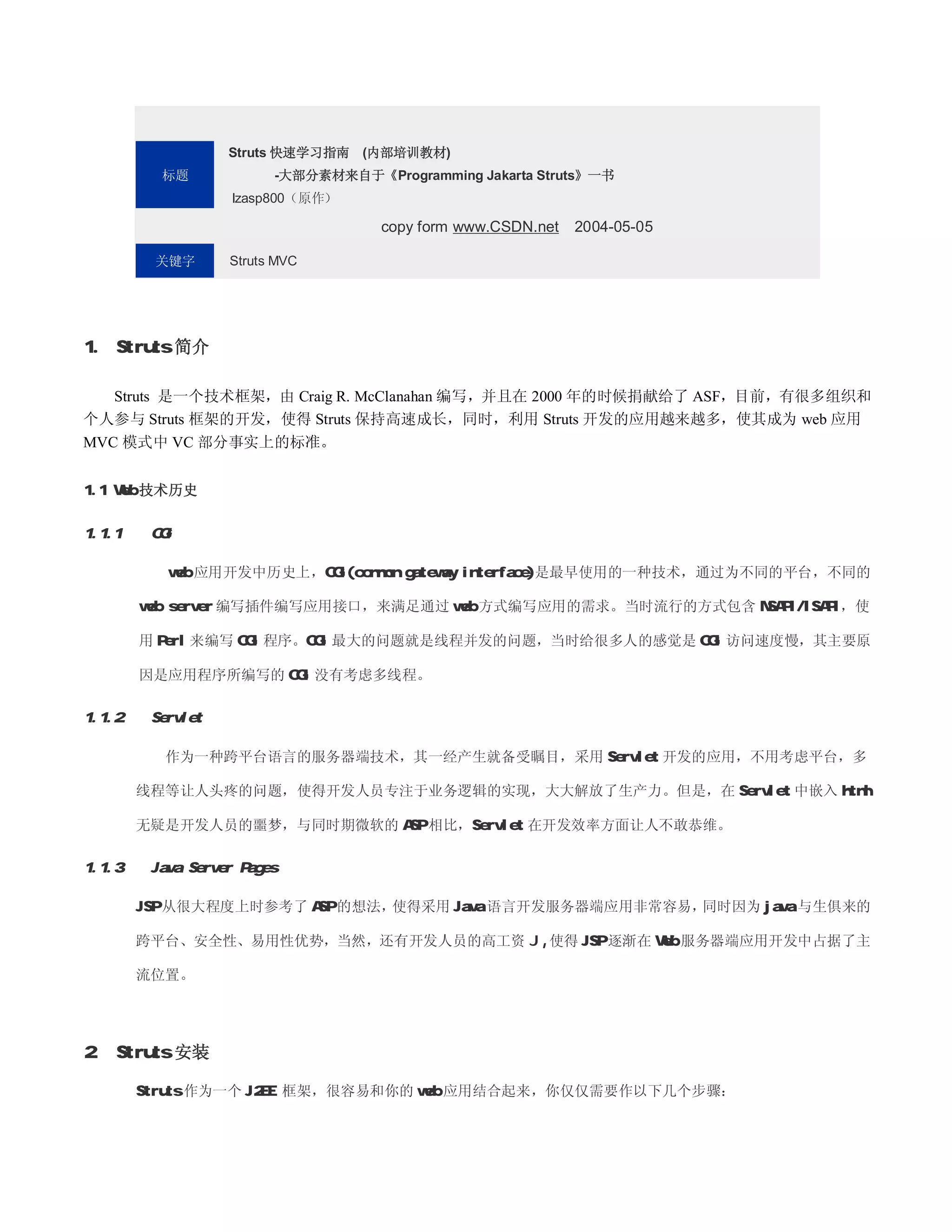
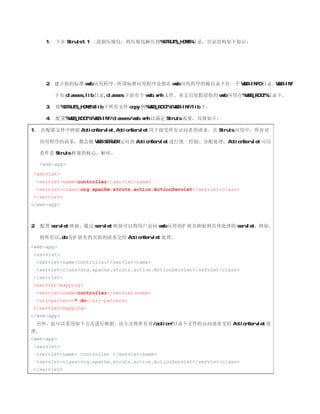
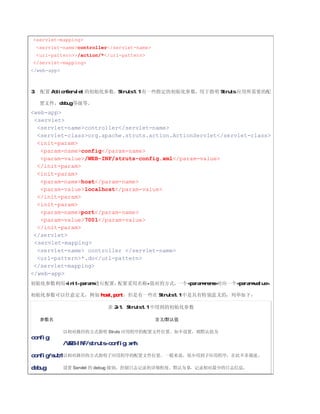
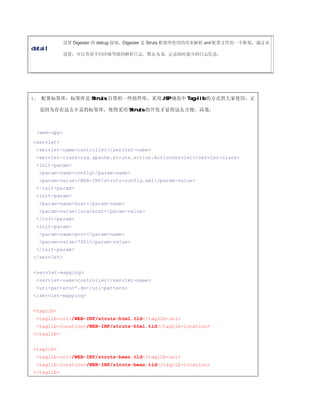
前面提到过,当 ActionServlet 接收到客户请求后,会进行一连串的初始化操作,然后,就会将客户请求转交给合适的
处理器进行处理,这个合适的处理器就是 org.apache.struts.action.RequestProcessor 或其子类的一个实例(根据 Struts
配置文件中的配置)。提供了默认实现,如果需要自定义这些行为,可以重载这个类定义自己的处理行为,当你想要自定义操
作时,Struts 推荐你重载这个类而不是 ActionServlet。
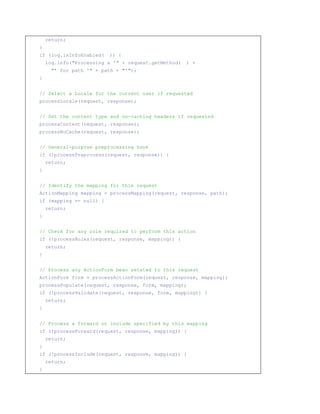
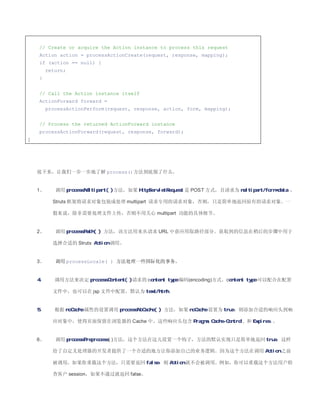
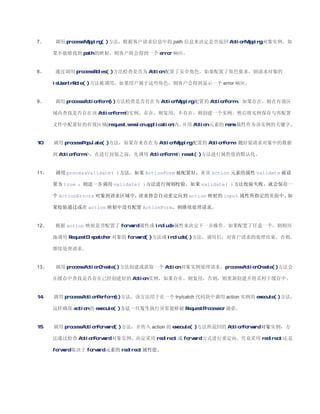
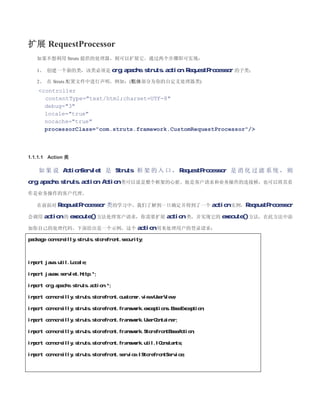
下面的代码片断提供了 RequestProcessor 的默认行为实现代码:
public void process(HttpServletRequest request, HttpServletResponse response)
throws IOException, ServletException {
// Wrap multipart requests with a special wrapper
request = processMultipart(request);
// Identify the path component we will use to select a mapping
String path = processPath(request, response);
if (path == null) {
13.
return;
}
if (log.isInfoEnabled( )) {
log.info(Processing a ' + request.getMethod( ) +
' for path ' + path + ');
}
// Select a Locale for the current user if requested
processLocale(request, response);
// Set the content type and no-caching headers if requested
processContent(request, response);
processNoCache(request, response);
// General-purpose preprocessing hook
if (!processPreprocess(request, response)) {
return;
}
// Identify the mapping for this request
ActionMapping mapping = processMapping(request, response, path);
if (mapping == null) {
return;
}
// Check for any role required to perform this action
if (!processRoles(request, response, mapping)) {
return;
}
// Process any ActionForm bean related to this request
ActionForm form = processActionForm(request, response, mapping);
processPopulate(request, response, form, mapping);
if (!processValidate(request, response, form, mapping)) {
return;
}
// Process a forward or include specified by this mapping
if (!processForward(request, response, mapping)) {
return;
}
if (!processInclude(request, response, mapping)) {
return;
}
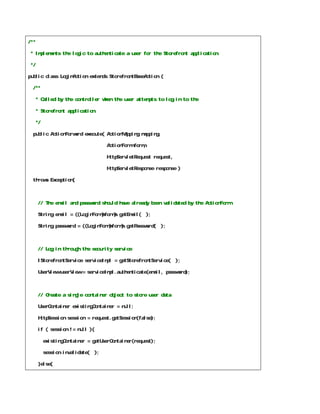
/**
* Implementsthe logic to authenticate a user for the Storefront application.
*/
public class LoginAction extends StorefrontBaseAction {
/**
* Called by the controller when the user attempts to log in to the
* Storefront application.
*/
public ActionForward execute( ActionMapping mapping,
ActionForm form,
HttpServletRequest request,
HttpServletResponse response )
throws Exception{
// The email and password should have already been validated by the ActionForm
String email = ((LoginForm)form).getEmail( );
String password = ((LoginForm)form).getPassword( );
// Log in through the security service
IStorefrontService serviceImpl = getStorefrontService( );
UserView userView = serviceImpl.authenticate(email, password);
// Create a single container object to store user data
UserContainer existingContainer = null;
HttpSession session = request.getSession(false);
if ( session != null ){
existingContainer = getUserContainer(request);
session.invalidate( );
}else{
18.
existingContainer = newUserContainer( );
}
// Create a new session for the user
session = request.getSession(true);
// Store the UserView in the container and store the container in the session
existingContainer.setUserView(userView);
session.setAttribute(IConstants.USER_CONTAINER_KEY, existingContainer);
// Return a Success forward
return mapping.findForward(IConstants.SUCCESS_KEY);
}
}
1.1.1.1.1 Action 类缓冲
Action 类 被 设 计 为 线 程 安 全 的 , 在 每 个 应 用 中 每 个 Action 类 只 会 被 实 例 化 一 次 , 供 所 有 线 程 共 享 。
RequestProcessor 利用一个 HashMap 用来保存 Action 实例。
思考题?
所有线程共享一个 Action 类实例意味着什么?我们在编程中需要注意些什么呢?
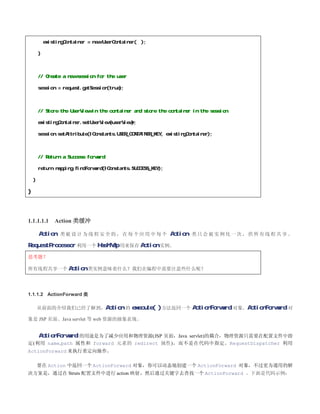
1.1.1.2 ActionForward 类
从前面的介绍我们已经了解到,Action 的 execute( ) 方法返回一个 ActionForward 对象。ActionForward 对
象是 JSP 页面、Java servlet 等 web 资源的抽象表现。
ActionForward 的用途是为了减少应用和物理资源(JSP 页面,Java servlet)的耦合,物理资源只需要在配置文件中指
定(利用 name,path 属性和 forward 元素的 redirect 属性),而不是在代码中指定。RequestDispatcher 利用
ActionForward 来执行重定向操作。
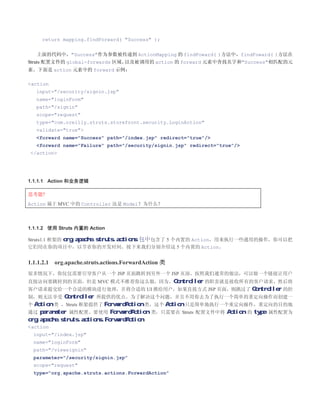
要在 Action 中返回一个 ActionForward 对象,你可以动态地创建一个 ActionForward 对象,不过更为通用的解
决方案是,通过在 Struts 配置文件中进行 action 映射,然后通过关键字去查找一个 ActionForward 。下面是代码示例:
import org.apache.struts.action.ActionError;
import org.apache.struts.action.ActionErrors;
importorg.apache.struts.action.ActionForm;
import org.apache.struts.action.ActionMapping;
import org.apache.struts.util.MessageResources;
/**
* This ActionForm is used by the online banking appliation to validate
* that the user has entered an accessNumber and a pinNumber. If one or
* both of the fields are empty when validate( ) is called by the
* ActionServlet, error messages are created.
*/
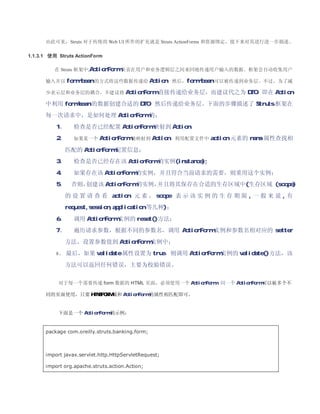
public class LoginForm extends ActionForm {
// The user's private ID number
private String pinNumber;
// The user's access number
private String accessNumber;
public LoginForm( ) {
super( );
resetFields( );
}
/**
* Called by the framework to validate the user has entered values in the
* accessNumber and pinNumber fields.
*/
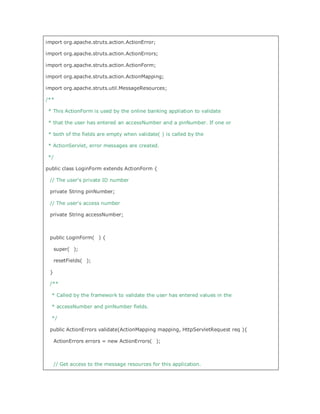
public ActionErrors validate(ActionMapping mapping, HttpServletRequest req ){
ActionErrors errors = new ActionErrors( );
// Get access to the message resources for this application.
23.
// There's noeasy way to access the resources from an ActionForm.
MessageResources resources =
(MessageResources)req.getAttribute( Action.MESSAGES_KEY );
// Check and see if the access number is missing.
if(accessNumber == null || accessNumber.length( ) == 0) {
String accessNumberLabel = resources.getMessage( label.accessnumber );
ActionError newError =
new ActionError(global.error.login.requiredfield, accessNumberLabel );
errors.add(ActionErrors.GLOBAL_ERROR, newError);
}
// Check and see if the pin number is missing.
if(pinNumber == null || pinNumber.length( ) == 0) {
String pinNumberLabel = resources.getMessage( label.pinnumber );
ActionError newError =
new ActionError(global.error.login.requiredfield, pinNumberLabel );
errors.add(ActionErrors.GLOBAL_ERROR, newError);
}
// Return the ActionErrors, if any.
return errors;
}
/**
* Called by the framework to reset the fields back to their default values.
*/
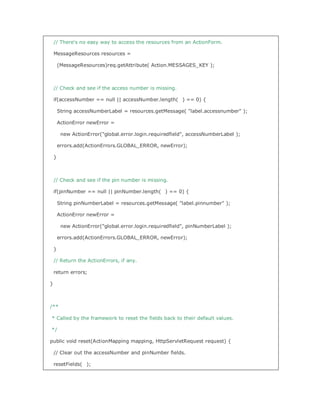
public void reset(ActionMapping mapping, HttpServletRequest request) {
// Clear out the accessNumber and pinNumber fields.
resetFields( );
24.
}
/**
* Reset the fields back to their defaults.
*/
protected void resetFields( ) {
this.accessNumber = ;
this.pinNumber = ;
}
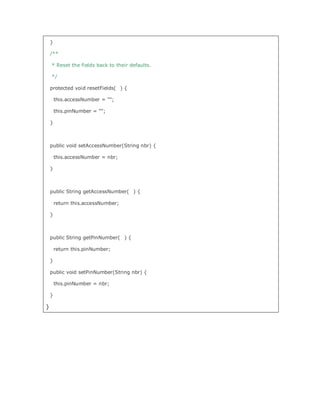
public void setAccessNumber(String nbr) {
this.accessNumber = nbr;
}
public String getAccessNumber( ) {
return this.accessNumber;
}
public String getPinNumber( ) {
return this.pinNumber;
}
public void setPinNumber(String nbr) {
this.pinNumber = nbr;
}
}
3. method 指定含有具体校验规则 Java Class 的具体方法,一个校验规则有实现校验的
Java Class 的一个方法来实现。
4. methodParams 声明 method 属性所指定的方法的参数,参数之间用逗号分隔。
5. msg msg 是用来指定当校验不通过时,Validator 框架所给出的提示信息。它的值
是应用所配置的资源文件中的一个关键字,当校验失败时,Validator 框架利
用 msg 所指定的值到应用配置的资源文件中去查找匹配记录。Validator 框架
默认使用以下提示信息:
errors.required={0} is required.
errors.minlength={0} cannot be less than {1} characters.
errors.maxlength={0} cannot be greater than {1}
characters.
errors.invalid={0} is invalid.
errors.byte={0} must be a byte.
errors.short={0} must be a short.
errors.integer={0} must be an integer.
errors.long={0} must be a long.
errors.float={0} must be a float.
errors.double={0} must be a double.
errors.date={0} is not a date.
errors.range={0} is not in the range {1} through {2}.
errors.creditcard={0} is not a valid credit card number.
errors.email={0} is an invalid email address
可以将上面的这些信息添加到你的 Struts 应用所配置的资源文件(例如:
ApplicationResources.properties)中,也可以修改这些值之后,将其添
加到配置文件中,示例如下:
errors.required={0} 是必填项。
6. depends depends 指定在本校验规则的前置校验规则,下面的片断定义了一个最小长
度的校验规则,含义是在进行最小长度校验之前,会先调用 required 校验
规则确保数据不为空:
validator
name=minLength
classname=org.apache.struts.util.StrutsValidator
method=validateMinLength
methodParams=java.lang.Object,
org.apache.commons.validator.ValidatorAction,
org.apache.commons.validator.Field,
org.apache.struts.action.ActionErrors,
javax.servlet.http.HttpServletRequest
depends=required
31.
msg=errors.minlength
/validator
如果存在多个前置校验规则,则可以用以下的方式进行声明,各校验规则之间
用逗号分隔:
depends=required,integer
如果前置校验规则失败,则后续的校验规则不会被执行。
7. jsFunctionName 可选属性。用来指定 JavaScript 函数的名字。
The final attribute supported by the validator element is the
jsFunctionName attribute. This optional attribute allows you to
specify the name of the JavaScript function. By default, the Validator
action name is used.
前面已经介绍了,org.apache.struts.util.StrutsValidator 是 Validator 框架自带的一个校验规则类,其实现
了一些常用的校验规则,其包含的校验方法(method)如下所列:
• validateByte 检查值能够安全地转换为 byte
• validateCreditCard 检查值是一个有效的信用卡号码
• validateDate 检查值是一个有效的日期
• validateDouble 检查值能够安全地转换为 double
• validateEmail 检查值是一个有效的 Email 地址
• validateFloat 检查值能够安全地转换为 double
• validateInteger 检查值能够安全地转换为 int
• validateLong 检查值能够安全地转换为 long
• validateMask 检查值符合掩码规则,掩码采用规则表达式的方式
• validateMinLength 检查值的长度大于等于指定长度
• validateMaxLength 检查值的长度小于指定长度
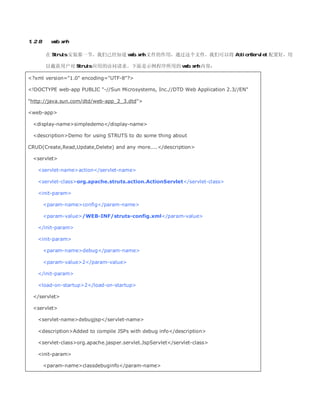
taglib-location/WEB-INF/struts-logic.tld/taglib-location
/taglib
2、 在 JSP 页面中引入标签库:
%@ taglib uri=/WEB-INF/struts-html.tld prefix=html %
%@ taglib uri=/WEB-INF/struts-logic.tld prefix=logic %
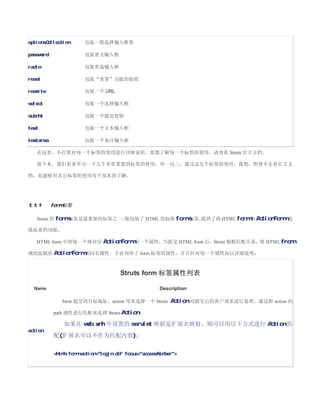
1.4 Struts HTML 标签库
HTML 标签库中的标签列表
标签名 描述
base 包装 HTML 的 base 元素
button 包装 HTML 的 button 类型的 input 元素
cancel 包装 HTML cancel 按钮
checkbox 包装 HTML checkbox 类型的输入域
errors 有条件地显示一些 error 消息,显示 ActionErrors 信息
file 包装 HTML 文件上传输入域
form 定义 HTML form 元素
frame 包装 HTML frame 元素
hidden 包装 HTML hidden 输入域
html 包装 HTML 中的 html 元素
image 包装 image类型的输入域
img 包装 HTML 的 img 元素
javascript 包装根据 ValidatorPlugIn 提供的校验规则所提供的 javascript 校验脚本
link 包装超链接
messages 有条件地显示一些提示信息,显示 ActionMessages 信息
multibox 包装多选输入框
option 包装一个选择输入框
options 包装一批选择输入框
41.
optionsCollection 包装一批选择输入框集
password 包装密文输入框
radio 包装单选输入框
reset 包装“重置”功能的按钮
rewrite 包装一个 URL
select 包装一个选择输入框
submit 包装一个提交按钮
text 包装一个文本输入框
textarea 包装一个备注输入框
在这里,不打算对每一个标签的使用进行详细说明,要想了解每一个标签的使用,请查看 Struts 官方文档。
接下来,我们着重学习一下几个非常重要的标签的使用,举一反三,通过这几个标签的使用,我想,即使不去看官方文
档,也能够对其它标签的使用有个基本的了解。
1.1.1 form 标签
Struts 的 form 标签是最重要的标签之一,
他包装了 HTML 的标准 form 标签,
提供了将 HTML form 和 ActionForm 连
接起来的功能。
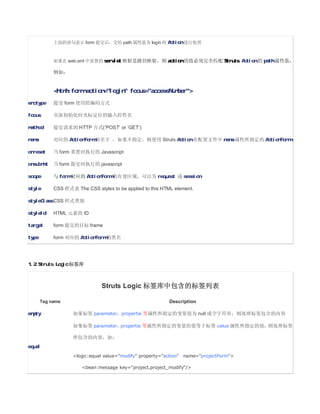
HTML form 中的每一个域对应 ActionForm 的一个属性,当提交 HTML from 后,Struts 根据匹配关系,将 HTML from
域的值赋给 ActionForm 的同名属性。下表列举了 form 标签的属性,并且针对每一个属性加以详细说明:
Struts form 标签属性列表
Name Description
form 提交的目标地址,action 用来选择一个 Struts Action 对提交后的客户请求进行处理。通过和 action 的
path 属性进行匹配来选择 Struts Action。
如果在 web.xml 中设置的 servlet 映射是扩展名映射,则可以用以下方式进行 Action 匹
action
配(扩展名可以不作为匹配内容):
html:form action=login.do focus=accessNumber
42.
上面的语句表示 form 提交后,交给path 属性值为 login 的 Action 进行处理
如果在 web.xml 中设置的 servlet 映射是路径映射,则 action 的值必须完全匹配 Struts Action 的 path 属性值,
例如:
html:form action=login focus=accessNumber
enctype 提交 form 使用的编码方式
focus 页面初始化时光标定位的输入控件名
method 提交请求的 HTTP 方式(‘POST’ or ‘GET’)
name 对应的 ActionForm 的名字 ,如果不指定,则使用 Struts Action 在配置文件中 name 属性所指定的 ActionForm。
onreset 当 form 重置时执行的 Javascript
onsubmit 当 form 提交时执行的 javascript
scope 与 form 对应的 ActionForm 的有效区域,可以为 request 或 session
style CSS 样式表 The CSS styles to be applied to this HTML element.
styleClass CSS 样式类别
styleId HTML 元素的 ID
target form 提交的目标 frame
type form 对应的 ActionForm 的类名
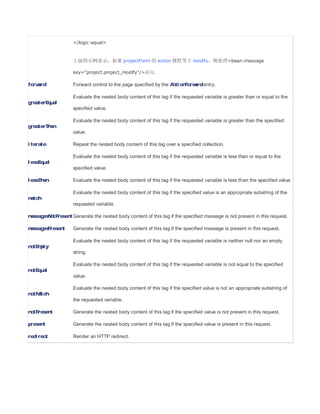
1.2 Struts Logic 标签库
Struts Logic 标签库中包含的标签列表
Tag name Description
empty 如果标签 parameter,propertie 等属性所指定的变量值为 null 或空字符串,则处理标签包含的内容
如果标签 parameter,propertie 等属性所指定的变量的值等于标签 value 属性所指定的值,则处理标签
所包含的内容,如:
equal
logic:equal value=modify property=action name=projectForm
bean:message key=project.project_modify/
43.
/logic:equal
上面的示例表示,如果 projectForm 的 action 属性等于 modify,则处理bean:message
key=project.project_modify/语句。
forward Forward control to the page specified by the ActionForward entry.
Evaluate the nested body content of this tag if the requested variable is greater than or equal to the
greaterEqual
specified value.
Evaluate the nested body content of this tag if the requested variable is greater than the specified
greaterThan
value.
iterate Repeat the nested body content of this tag over a specified collection.
Evaluate the nested body content of this tag if the requested variable is less than or equal to the
lessEqual
specified value.
lessThan Evaluate the nested body content of this tag if the requested variable is less than the specified value.
Evaluate the nested body content of this tag if the specified value is an appropriate substring of the
match
requested variable.
messagesNotPresent Generate the nested body content of this tag if the specified message is not present in this request.
messagesPresent Generate the nested body content of this tag if the specified message is present in this request.
Evaluate the nested body content of this tag if the requested variable is neither null nor an empty
notEmpty
string.
Evaluate the nested body content of this tag if the requested variable is not equal to the specified
notEqual
value.
Evaluate the nested body content of this tag if the specified value is not an appropriate substring of
notMatch
the requested variable.
notPresent Generate the nested body content of this tag if the specified value is not present in this request.
present Generate the nested body content of this tag if the specified value is present in this request.
redirect Render an HTTP redirect.
44.
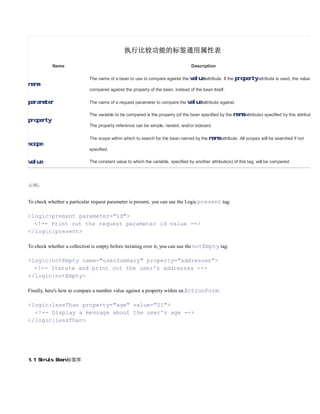
执行比较功能的标签通用属性表
Name Description
The name of a bean to use to compare against the value attribute. If the property attribute is used, the value is
name
compared against the property of the bean, instead of the bean itself.
parameter The name of a request parameter to compare the value attribute against.
The variable to be compared is the property (of the bean specified by the name attribute) specified by this attribute.
property
The property reference can be simple, nested, and/or indexed.
The scope within which to search for the bean named by the name attribute. All scopes will be searched if not
scope
specified.
value The constant value to which the variable, specified by another attribute(s) of this tag, will be compared.
示例:
To check whether a particular request parameter is present, you can use the Logic present tag:
logic:present parameter=id
!-- Print out the request parameter id value --
/logic:present
To check whether a collection is empty before iterating over it, you can use the notEmpty tag:
logic:notEmpty name=userSummary property=addresses
!-- Iterate and print out the user's addresses --
/logic:notEmpty
Finally, here's how to compare a number value against a property within an ActionForm:
logic:lessThan property=age value=21
!-- Display a message about the user's age --
/logic:lessThan
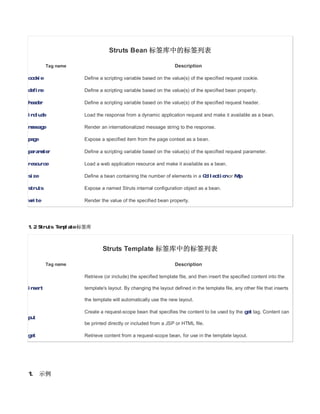
1.1 Struts Bean 标签库
45.
Struts Bean 标签库中的标签列表
Tag name Description
cookie Define a scripting variable based on the value(s) of the specified request cookie.
define Define a scripting variable based on the value(s) of the specified bean property.
header Define a scripting variable based on the value(s) of the specified request header.
include Load the response from a dynamic application request and make it available as a bean.
message Render an internationalized message string to the response.
page Expose a specified item from the page context as a bean.
parameter Define a scripting variable based on the value(s) of the specified request parameter.
resource Load a web application resource and make it available as a bean.
size Define a bean containing the number of elements in a Collection or Map.
struts Expose a named Struts internal configuration object as a bean.
write Render the value of the specified bean property.
1.2 Struts Template 标签库
Struts Template 标签库中的标签列表
Tag name Description
Retrieve (or include) the specified template file, and then insert the specified content into the
insert template's layout. By changing the layout defined in the template file, any other file that inserts
the template will automatically use the new layout.
Create a request-scope bean that specifies the content to be used by the get tag. Content can
put
be printed directly or included from a JSP or HTML file.
get Retrieve content from a request-scope bean, for use in the template layout.
1. 示例
46.
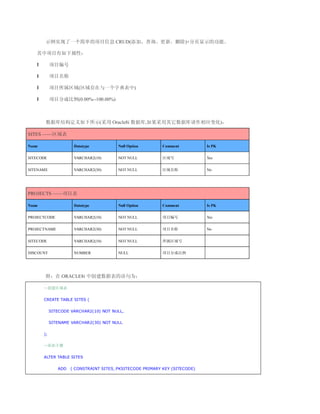
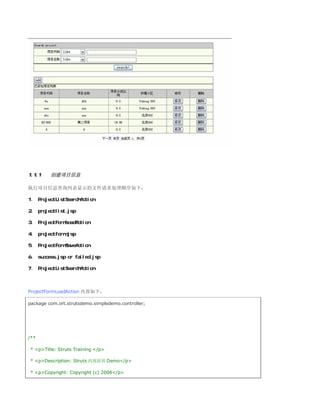
示例实现了一个简单的项目信息 CRUD(添加、查询、更新、删除)+分页显示的功能。
其中项目有如下属性:
l 项目编号
l 项目名称
l 项目所属区域(区域存在与一个字典表中)
l 项目分成比例(0.00%--100.00%)
数据库结构定义如下所示(采用 Oracle8i 数据库,如果采用其它数据库请作相应变化):
SITES ——区域表
Name Datatype Null Option Comment Is PK
SITECODE VARCHAR2(10) NOT NULL 区域号 Yes
SITENAME VARCHAR2(30) NOT NULL 区域名称 No
PROJECTS ——项目表
Name Datatype Null Option Comment Is PK
PROJECTCODE VARCHAR2(10) NOT NULL 项目编号 Yes
PROJECTNAME VARCHAR2(30) NOT NULL 项目名称 No
SITECODE VARCHAR2(10) NOT NULL 所属区域号
DISCOUNT NUMBER NULL 项目分成比例
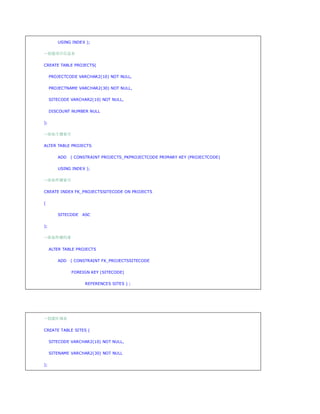
附:在 ORACLE8i 中创建数据表的语句为:
--创建区域表
CREATE TABLE SITES (
SITECODE VARCHAR2(10) NOT NULL,
SITENAME VARCHAR2(30) NOT NULL
);
--添加主键
ALTER TABLE SITES
ADD ( CONSTRAINT SITES_PKSITECODE PRIMARY KEY (SITECODE)
47.
USING INDEX );
--创建项目信息表
CREATETABLE PROJECTS(
PROJECTCODE VARCHAR2(10) NOT NULL,
PROJECTNAME VARCHAR2(30) NOT NULL,
SITECODE VARCHAR2(10) NOT NULL,
DISCOUNT NUMBER NULL
);
--添加主键索引
ALTER TABLE PROJECTS
ADD ( CONSTRAINT PROJECTS_PKPROJECTCODE PRIMARY KEY (PROJECTCODE)
USING INDEX );
--添加外键索引
CREATE INDEX FK_PROJECTSSITECODE ON PROJECTS
(
SITECODE ASC
);
--添加外键约束
ALTER TABLE PROJECTS
ADD ( CONSTRAINT FK_PROJECTSSITECODE
FOREIGN KEY (SITECODE)
REFERENCES SITES ) ;
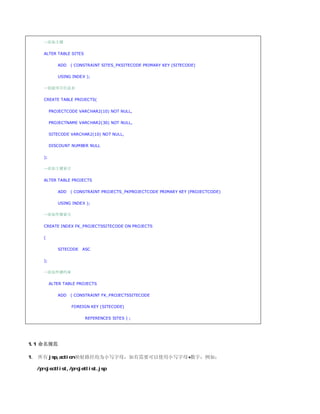
--创建区域表
CREATE TABLE SITES (
SITECODE VARCHAR2(10) NOT NULL,
SITENAME VARCHAR2(30) NOT NULL
);
48.
--添加主键
ALTER TABLE SITES
ADD ( CONSTRAINT SITES_PKSITECODE PRIMARY KEY (SITECODE)
USING INDEX );
--创建项目信息表
CREATE TABLE PROJECTS(
PROJECTCODE VARCHAR2(10) NOT NULL,
PROJECTNAME VARCHAR2(30) NOT NULL,
SITECODE VARCHAR2(10) NOT NULL,
DISCOUNT NUMBER NULL
);
--添加主键索引
ALTER TABLE PROJECTS
ADD ( CONSTRAINT PROJECTS_PKPROJECTCODE PRIMARY KEY (PROJECTCODE)
USING INDEX );
--添加外键索引
CREATE INDEX FK_PROJECTSSITECODE ON PROJECTS
(
SITECODE ASC
);
--添加外键约束
ALTER TABLE PROJECTS
ADD ( CONSTRAINT FK_PROJECTSSITECODE
FOREIGN KEY (SITECODE)
REFERENCES SITES ) ;
1.1 命名规范
1、 所有 jsp,action 映射路径均为小写字母,如有需要可以使用小写字母+数字:例如:
/projectlist,/projetlist.jsp
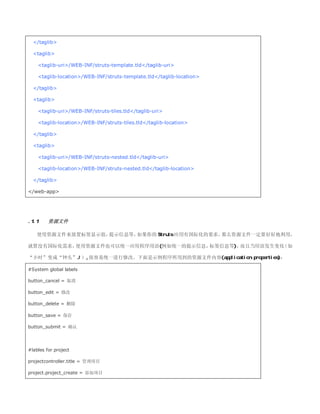
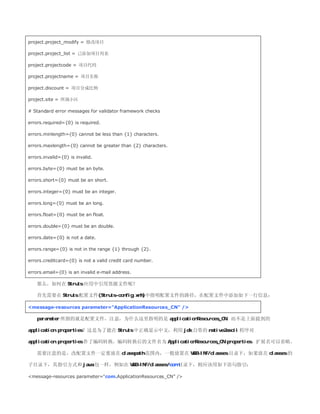
project.project_modify = 修改项目
project.project_list= 已添加项目列表
project.projectcode = 项目代码
project.projectname = 项目名称
project.discount = 项目分成比例
project.site = 所属小区
# Standard error messages for validator framework checks
errors.required={0} is required.
errors.minlength={0} cannot be less than {1} characters.
errors.maxlength={0} cannot be greater than {2} characters.
errors.invalid={0} is invalid.
errors.byte={0} must be an byte.
errors.short={0} must be an short.
errors.integer={0} must be an integer.
errors.long={0} must be an long.
errors.float={0} must be an float.
errors.double={0} must be an double.
errors.date={0} is not a date.
errors.range={0} is not in the range {1} through {2}.
errors.creditcard={0} is not a valid credit card number.
errors.email={0} is an invalid e-mail address.
那么,如何在 Struts 应用中引用资源文件呢?
首先需要在 Struts 配置文件(Struts-config.xml)中指明配置文件的路径,在配置文件中添加如下一行信息:
message-resources parameter=ApplicationResources_CN /
parameter 所指的就是配置文件,注意,为什么这里指明的是 applicationResources_CN,而不是上面提到的
application.properties?这是为了能在 Struts 中正确显示中文,利用 jdk 自带的 native2ascii 程序对
application.properties 作了编码转换,编码转换后的文件名为 ApplicationResources_CN.properties,扩展名可以省略。
需要注意的是,改配置文件一定要放在 classpath 范围内,一般放置在 WEB-INF/classes 目录下,如果放在 classes 的
子目录下,其指引方式和 java 包一样,例如在 WEB-INF/classes/com 目录下,则应该用如下语句指引:
message-resources parameter=com.ApplicationResources_CN /
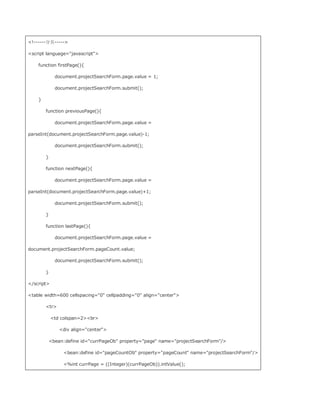
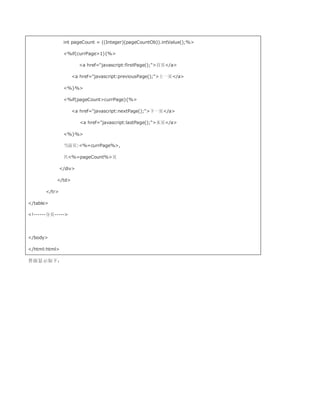
int pageCount =((Integer)(pageCountOb)).intValue();%
%if(currPage1){%
a href=javascript:firstPage();首页/a
a href=javascript:previousPage();上一页/a
%}%
%if(pageCountcurrPage){%
a href=javascript:nextPage();下一页/a
a href=javascript:lastPage();末页/a
%}%
当前页:%=currPage%,
共%=pageCount%页
/div
/td
/tr
/table
!------分页-----
/body
/html:html
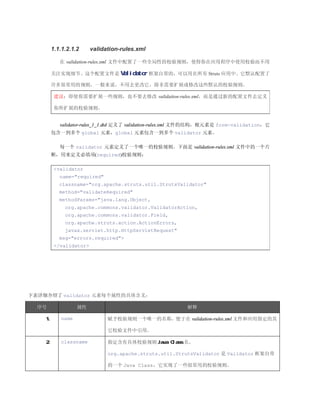
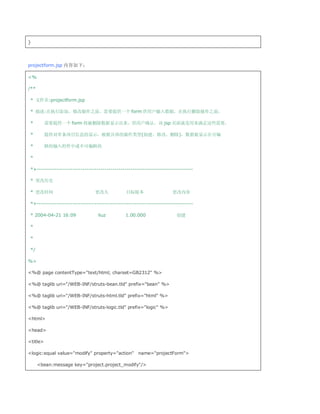
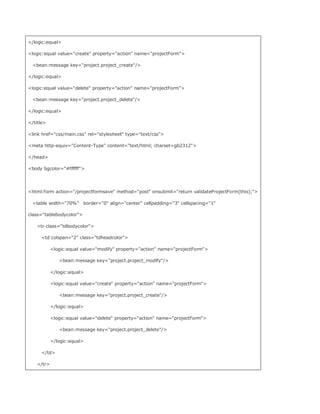
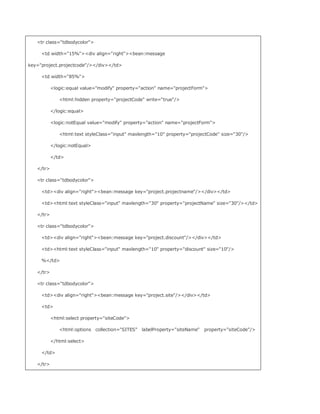
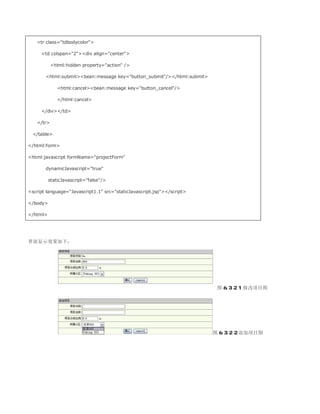
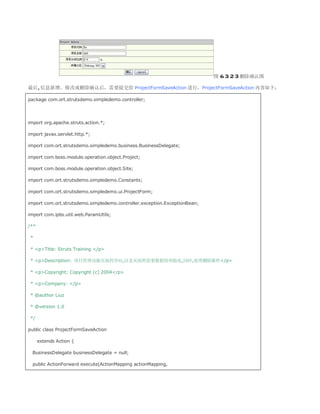
界面显示如下:

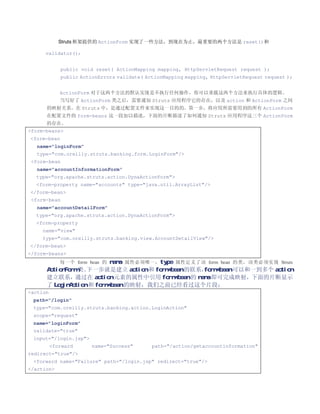
![• validateRange 检查值的有效范围在指定范围内
• validateRequired 检查值不为 null 或长度0
• validateShort 检查值能够安全地转换为 short
.1.1.1.1.1 validation.xml
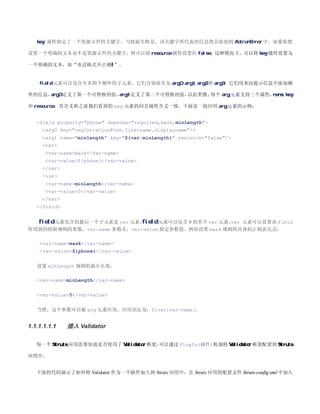
Validator 框架所需要的第二个配置文件是 validation.xml,这个配置文件是具体应用(项目)所特定的,可以根据你的应
用(项目)情况进行自定义配置。它描述了具体的 ActionForm 使用 validation-rules.xml 文件中的哪个校验规则进行校验。
validation_1_1.dtd 定义了 validation.xml 的结构,根元素为 form-validation,其包含 0 到多个 global 元素和一到多个
formset 元素:
!ELEMENT form-validation (global*, formset+)
global 元素包含 0 到多个 constant 子元素:
!ELEMENT global (constant*)
constant 子元素和 Java 里面常量的含义是一样的,下面的片断定义了两个常量:
global
constant
constant-namephone/constant-name
constant-value^(?(d{3}))?[-| ]?(d{3})[-| ]?(d{4})$/constant-value
/constant
constant
constant-namezip/constant-name
constant-value^d{5}(-d{4})?$/constant-value
/constant
/global
上面的片断包含了两个常量,phone 和 zip,这些常量在所有 formset 元素中有效,在 formset 中通过名称引用这些常
量。
下面的片断展示了一个简单的 validation.xml 文件说明:](https://image.slidesharecdn.com/struts-090923072200-phpapp01/85/Struts-32-320.jpg)
![代码片断 3.3.3.3.1.3.1
form-validation
global
constant
constant-namephone/constant-name
constant-value^(?(d{3}))?[-| ]?(d{3})[-| ]?(d{4})$/constant-value
/constant
/global
formset
form name=checkoutForm
field
property=phone
depends=required,mask
arg0 key=registrationForm.firstname.displayname/
var
var-namemask/var-name
var-value${phone}/var-value
/var
/field
/form
/formset
/form-validation
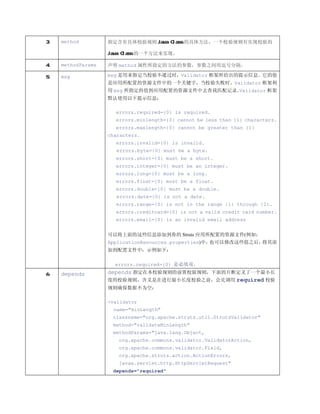
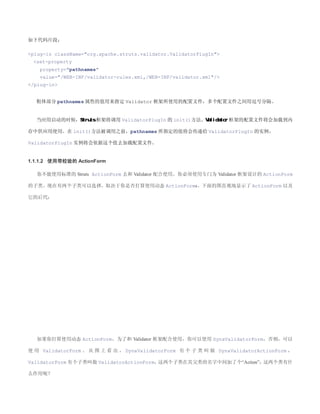
在上面的代码片断中,var 元素应用了在 global 中定义了 phone 常量,用来配合对 phone 属性的校验。
formset 元素可以包含两个子元素,constant 和 form。constant 元素和 global 区域定义的 constant 元素格式和用途一样,
只不过作用范围不同, formset 中定义的 constant 元素其作用范围只限于该 formset 覆盖区域。
在 Formset 元素中的 form 元
素至少要出现一次。DTD 描述如下:
!ELEMENT formset (constant*, form+)
form 元素定义了需要进行校验的域,其 name 属性对应应用中分配给 form 的标识,在 Struts 框架中,就是在 Struts 配置
文件中 form-beans 区域定义的 ActionForm 的 name 属性。
下面是 form 元素的 DTD 定义:
!ELEMENT form (field+)
field 元素指明了 JavaBean 中需要被校验的属性。在上面的代码片断中,在 Struts 中,ActionForm
就是这个需要被校验的 JavaBean。在代码片断 3.3.3.3.1.3.1 中,定义了对 Struts 配置文件中名称为](https://image.slidesharecdn.com/struts-090923072200-phpapp01/85/Struts-33-320.jpg)
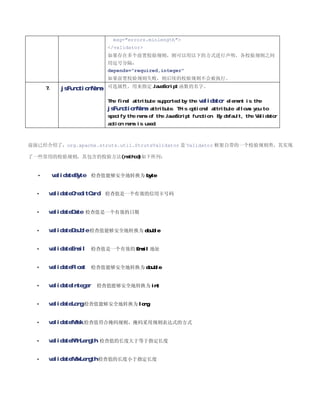
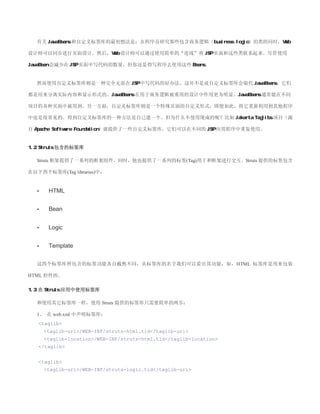
![同 样 , 根 据 你 是 否 打 算 使 用 动 态 ActionForm , 你 可 以 使 用 DynaValidatorActionForm 或
来配合使用 Validator 框架,
ValidatorActionForm, 当使用这两个类时,它们将 action 的 path 属性传递给 Validator,
Validator
使用 action 的名字去查找使用的校验规则。 则是使用的 ActionForm 的
而使用 DynaValidatorForm 和 ValidatorForm,
name 属性去查找匹配校验规则。(???)
1.1.1.1.1 示例
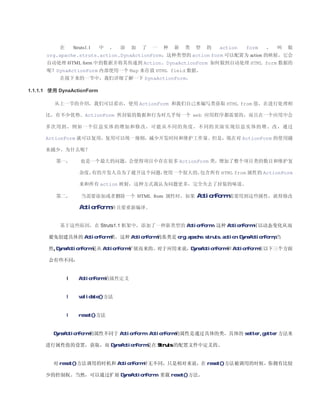
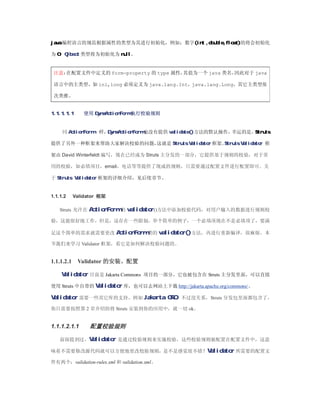
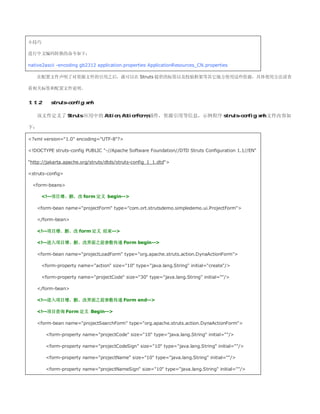
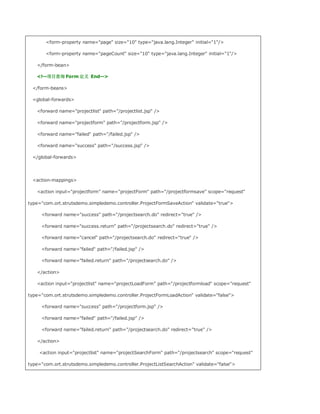
第一步,在 Struts-config.xml 中配置一个 ActionForm,示例如下:
form-bean
name=checkoutForm
type=org.apache.struts.validator.DynaValidatorForm
form-property name=firstName type=java.lang.String/
form-property name=lastName type=java.lang.String/
form-property name=address type=java.lang.String/
form-property name=city type=java.lang.String/
form-property name=state type=java.lang.String/
form-property name=postalCode type=java.lang.String/
form-property name=country type=java.lang.String/
form-property name=phone type=java.lang.String/
/form-bean
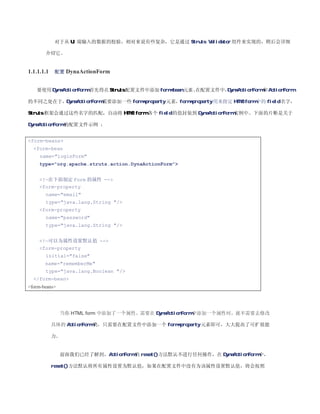
第二步,在 Struts-config.xml 中配置一个 Action,示例如下:
action
input=/checkout.jsp
name=checkoutForm
path=/checkout
scope=request
type=com.ort.struts.example.checkOutAction
validate=true
/action
第三布,在 validation.xml 文件中定义如下:
formset
constant
constant-namephone/constant-name
constant-value^(?(d{3}))?[-| ]?(d{3})[-| ]?(d{4})$/constant-value
/constant
constant
constant-namezip/constant-name
constant-value^d{5}(-d{4})?$/constant-value
/constant](https://image.slidesharecdn.com/struts-090923072200-phpapp01/85/Struts-37-320.jpg)
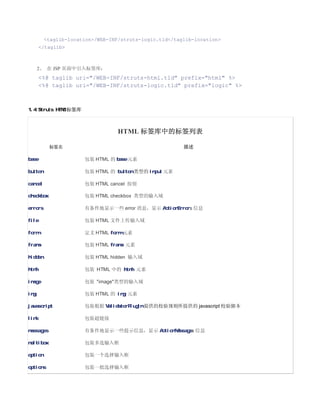
![form name=checkoutForm
field
property=firstName
depends=required,mask
arg0 key=label.firstName/
var
var-namemask/var-name
var-value^[a-zA-Z]*$/var-value
/var
/field
field
property=postalCode
depends=required,mask
arg0 key=registrationForm.zip/
var
var-namemask/var-name
var-value${zip}/var-value
/var
/field
field
property=phone
depends=required,mask
arg0 key=registrationForm.phone/
var
var-namemask/var-name
var-value${phone}/var-value
/var
/field
/form
/formset
/form-validation
第四部,编写 HTML 页面如下:
暂略
1. JSP 自定义标签库
1.1 概述
在 JSP 开发中会遇到一些重复的工作。而使用自定义标签库是一种方法,可以用来将这些功能封装起来并在多个项目中
重新用到它。此外,应用逻辑还可以包含在基于服务器的资源中,比如 JavaBeans。这种架构显示出使用自定义标签库可以
更快更容易地开发基于 Web 的应用程序。](https://image.slidesharecdn.com/struts-090923072200-phpapp01/85/Struts-38-320.jpg)
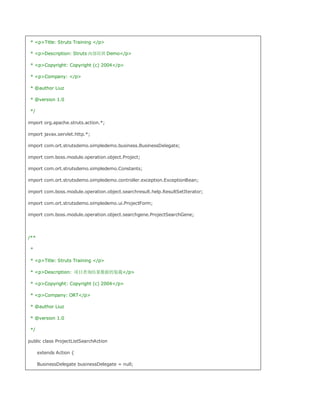
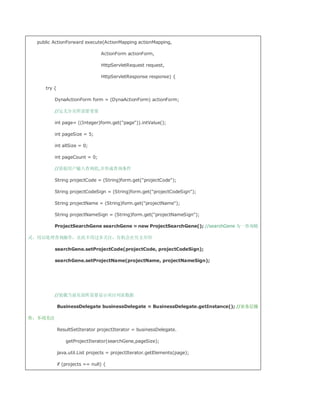
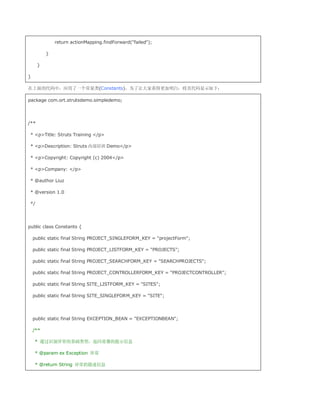
![projects = new java.util.ArrayList();
}
//将项目列表查询结果放置到请求对象中
request.removeAttribute(Constants.PROJECT_LISTFORM_KEY);
request.setAttribute(Constants.PROJECT_LISTFORM_KEY, projects);
//计算总页数
allSize = projectIterator.getAllSize();
pageCount = (allSize % pageSize == 0) ? allSize / pageSize :
allSize / pageSize + 1;
// System.err.print(pageCount);
form.set(pageCount, new Integer(pageCount));
//装载当前页面所需要现实小区信息
ResultSetIterator siteIterator = businessDelegate.getSitesIterator();
java.util.List sites = siteIterator.getElements(1);
request.getSession().setAttribute(Constants.SITE_LISTFORM_KEY,
sites);
//重定向到 mapping 中配置的 input 页面
// return actionMapping.findForward(success);
return actionMapping.getInputForward();
}
catch (Exception ex) {
com.ipbs.util.Log.println(
[ProjectListSearchAction.java][Exception]: + ex.getMessage());
ExceptionBean exception = new ExceptionBean();
exception.setErrorMsg(Constants.getExceptionMsg(ex));
exception.setReturnPath(actionMapping.findForward(failed.return).
getPath());
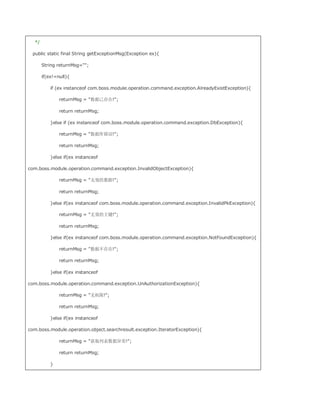
request.setAttribute(Constants.EXCEPTION_BEAN, exception);](https://image.slidesharecdn.com/struts-090923072200-phpapp01/85/Struts-59-320.jpg)
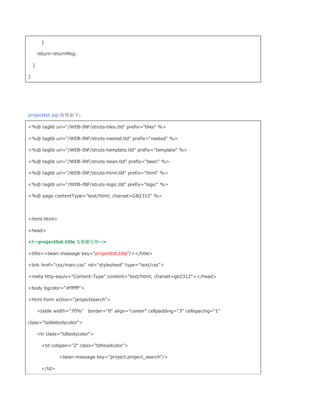
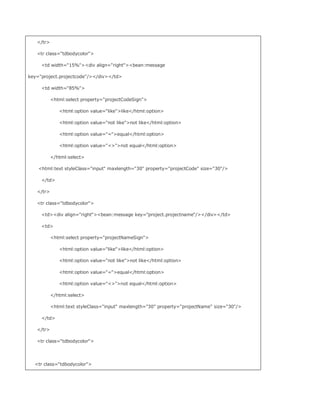
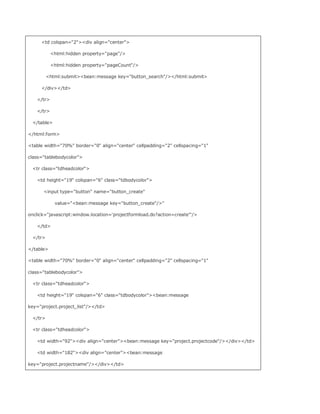
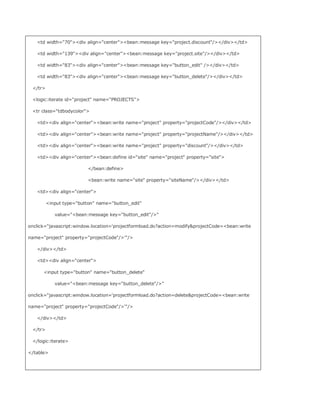
![else {
project = businessDelegate.getProject(projectCode);
}
project.setAction(action);
ProjectForm modifyForm = new ProjectForm();
org.apache.commons.beanutils.PropertyUtils.copyProperties(
modifyForm, project);
if (! (create.equals(action))) {
modifyForm.setSiteCode(project.getSite().getSiteCode());
}
request.setAttribute(Constants.PROJECT_SINGLEFORM_KEY, modifyForm); //为下一个页面,
即 projectform.jsp 的显示提供数据
//装载当前页面所需要显示小区信息
ResultSetIterator siteIterator = businessDelegate.getSitesIterator();
java.util.List sites = siteIterator.getElements(1);
request.getSession().setAttribute(Constants.SITE_LISTFORM_KEY,
sites);
return actionMapping.findForward(success);
}
catch (Exception ex) {
com.ipbs.util.Log.println([ProjectFormLoadAction.java][Exception]:+ex.getMessage());
ExceptionBean exception = new ExceptionBean();
exception.setErrorMsg(Constants.getExceptionMsg(ex));
exception.setReturnPath(actionMapping.findForward(failed.return).getPath());
request.setAttribute(Constants.EXCEPTION_BEAN,exception);
return actionMapping.findForward(failed);
}
}](https://image.slidesharecdn.com/struts-090923072200-phpapp01/85/Struts-70-320.jpg)
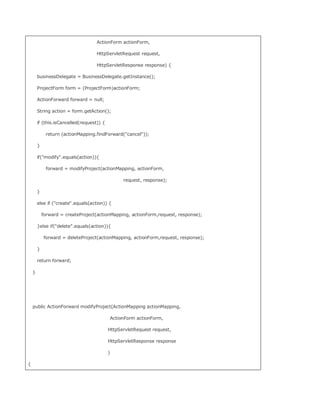
![ProjectForm form = (ProjectForm) actionForm;
String projectCode = form.getProjectCode();
String projectName = form.getProjectName();
String siteCode = form.getSiteCode();
double discount = form.getDiscount();
try{
Site site = businessDelegate.getSite(siteCode);
Project project = new Project();
project.setProjectCode(projectCode);
project.setProjectName(projectName);
project.setDiscount(discount);
project.setSite(site);
businessDelegate.modifyProject(project);
return actionMapping.findForward(success);
}catch(Exception ex){
com.ipbs.util.Log.println(
[ProjectFormSaveAction.java][Exception]: + ex.getMessage());
ExceptionBean exception = new ExceptionBean();
exception.setErrorMsg(Constants.getExceptionMsg(ex));
exception.setReturnPath(actionMapping.getPath());
request.setAttribute(Constants.EXCEPTION_BEAN, exception);
return actionMapping.findForward(failed);
}
}
public ActionForward createProject(ActionMapping actionMapping,
ActionForm actionForm,
HttpServletRequest request,
HttpServletResponse response](https://image.slidesharecdn.com/struts-090923072200-phpapp01/85/Struts-77-320.jpg)
![){
ProjectForm form = (ProjectForm) actionForm;
String projectCode = form.getProjectCode();
String projectName = form.getProjectName();
String siteCode = form.getSiteCode();
double discount = form.getDiscount();
try{
Site site = businessDelegate.getSite(siteCode);
Project project = new Project();
project.setProjectCode(projectCode);
project.setProjectName(projectName);
project.setDiscount(discount);
project.setSite(site);
businessDelegate.createProject(project);
return actionMapping.findForward(success);
}catch(Exception ex){
com.ipbs.util.Log.println(
[ProjectFormSaveAction.java][Exception]: + ex.getMessage());
ExceptionBean exception = new ExceptionBean();
exception.setErrorMsg(Constants.getExceptionMsg(ex));
exception.setReturnPath(actionMapping.getPath());
request.setAttribute(Constants.EXCEPTION_BEAN, exception);
return actionMapping.findForward(failed);
}
}
public ActionForward deleteProject(ActionMapping actionMapping,
ActionForm actionForm,
HttpServletRequest request,](https://image.slidesharecdn.com/struts-090923072200-phpapp01/85/Struts-78-320.jpg)
![HttpServletResponse response
){
ProjectForm form = (ProjectForm)actionForm;
String projectCode = form.getProjectCode();
try{
businessDelegate.deleteProject(projectCode);
request.removeAttribute(Constants.PROJECT_SINGLEFORM_KEY);
return actionMapping.findForward(success);
}catch(Exception ex){
com.ipbs.util.Log.println(
[ProjectControllerAction.java][Exception]: + ex.getMessage());
ExceptionBean exception = new ExceptionBean();
exception.setErrorMsg(Constants.getExceptionMsg(ex));
exception.setReturnPath(actionMapping.findForward(failed.return).getPath());
request.setAttribute(Constants.EXCEPTION_BEAN,exception);
return actionMapping.findForward(failed);
}
}
}
至此为止,该示例项目所使用的绝大部分内容已经介绍完了,因为时间问题,没有对示例程序进行很详细的一一讲解,
代码上有些简单的注释,希望你能够看明白,如果大家对以上代码有疑问会发现什么问题,可以发邮件和我沟通
(lzasp800@sina.com),另外,我保证上面的代码是真实可运行的,如果用心看,也是可以看明白的(当然只有文章中所列的
代码是无法通过编译的)。
个人觉得,做 Struts 项目非常重要的一个环节就是请求处理流程设计,这也是本示例强调的重点,弄清楚了这一点,看
代码也会容易很多。
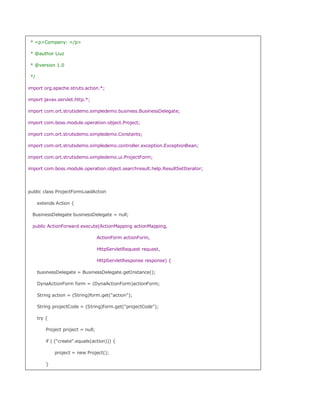
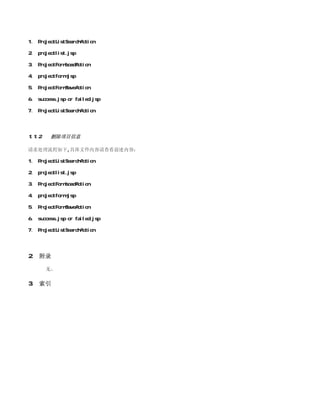
1.1.1 修改项目信息
请求处理流程如下,具体文件内容请查看前述内容:](https://image.slidesharecdn.com/struts-090923072200-phpapp01/85/Struts-79-320.jpg)


![Lucene 3[1] 0 原理与代码分析](https://cdn.slidesharecdn.com/ss_thumbnails/lucene31-0-100225194736-phpapp02-thumbnail.jpg?width=640&height=640&fit=bounds)


