Structured and Centralized
Logging with Serilog
Make your logs work for you and go beyond unstructured
textual logs to create modern log information with rich,
structured and centralized log.
Who am I?
Microsoft Certified Professional - 70-480
Software Engineer - Social Miner
Computer Engineer - UNIFIEO
LinkedIn: http://bit.ly/2VK2xA1
GitHub: http://bit.ly/2UjCVbN
Why Log?
● Logging is a fundamental part of applications
● A well designed logging system is a huge utility for system administrators and
developers
● Logs save many valuable hours for both the support team or developers
● Reporting and analysis
“We are a log Management Company that happens to Stream Videos”
- Netflix Chief Architect
What is Log?
Log is a file of events that are logged by a software application. It contains errors,
informational events and warnings. The format and content of a log are determined by the
developer of the software program.
A log may also be referred to a log file.
Why Serilog?
● Provides diagnostic logging to files, the console, and elsewhere;
● Easy to set up
● Clean API
● Portable between recent .NET platforms
● Serilog is built with powerful structured event data in mind
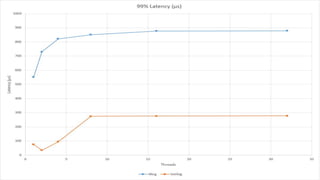
But and others?
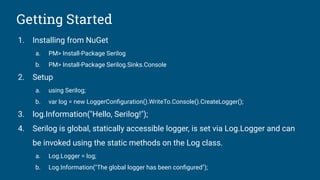
Getting Started
1. Installing from NuGet
a. PM> Install-Package Serilog
b. PM> Install-Package Serilog.Sinks.Console
2. Setup
a. using Serilog;
b. var log = new LoggerConfiguration().WriteTo.Console().CreateLogger();
3. log.Information("Hello, Serilog!");
4. Serilog is global, statically accessible logger, is set via Log.Logger and can
be invoked using the static methods on the Log class.
a. Log.Logger = log;
b. Log.Information("The global logger has been configured");
Demo 1Example application
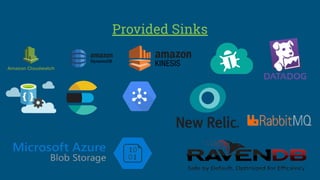
Provided Sinks
Demo 2Serilog.Sinks.MongoDB
Social Miner
stack of Logging
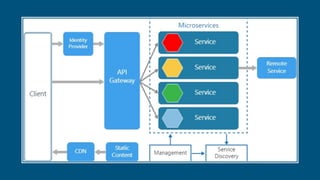
Architecture
Obrigado!

Structured and centralized logging with serilog

  • 1.
    Structured and Centralized Loggingwith Serilog Make your logs work for you and go beyond unstructured textual logs to create modern log information with rich, structured and centralized log.
  • 2.
    Who am I? MicrosoftCertified Professional - 70-480 Software Engineer - Social Miner Computer Engineer - UNIFIEO LinkedIn: http://bit.ly/2VK2xA1 GitHub: http://bit.ly/2UjCVbN
  • 3.
    Why Log? ● Loggingis a fundamental part of applications ● A well designed logging system is a huge utility for system administrators and developers ● Logs save many valuable hours for both the support team or developers ● Reporting and analysis “We are a log Management Company that happens to Stream Videos” - Netflix Chief Architect
  • 4.
    What is Log? Logis a file of events that are logged by a software application. It contains errors, informational events and warnings. The format and content of a log are determined by the developer of the software program. A log may also be referred to a log file.
  • 7.
    Why Serilog? ● Providesdiagnostic logging to files, the console, and elsewhere; ● Easy to set up ● Clean API ● Portable between recent .NET platforms ● Serilog is built with powerful structured event data in mind
  • 8.
  • 12.
    Getting Started 1. Installingfrom NuGet a. PM> Install-Package Serilog b. PM> Install-Package Serilog.Sinks.Console 2. Setup a. using Serilog; b. var log = new LoggerConfiguration().WriteTo.Console().CreateLogger(); 3. log.Information("Hello, Serilog!"); 4. Serilog is global, statically accessible logger, is set via Log.Logger and can be invoked using the static methods on the Log class. a. Log.Logger = log; b. Log.Information("The global logger has been configured");
  • 13.
  • 14.
  • 15.
  • 16.
    Social Miner stack ofLogging Architecture
  • 17.