Serilog & Seq
Doruk Uluçay
Senior Backend Developer @ InGame Group
A Little
Review unto
Logging
Why we are logging
Logging has a crucial part to play in a scenario
where you can’t use interactive debugging (that is,
attaching a debugger like Visual Studio). It allows
us to investigate errors after the problem already
happened. In some cases, like Production
Debugging, logs might be the only information you
have.[1]
Logging Best Practises
● Use log levels appropriately[1]
● Only high severity logs in prod[1]
● Log all exceptions[1]
Logging Best Practises
● Implement logging in all projects. You always
end up needing it at some point.[2]
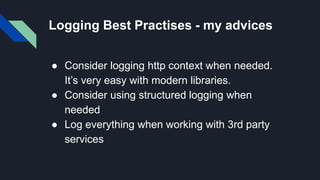
Logging Best Practises - my advices
● Consider logging http context when needed.
It’s very easy with modern libraries.
● Consider using structured logging when
needed
● Log everything when working with 3rd party
services
Logging
Frameworks
for .NET
log4net, NLog, Serilog
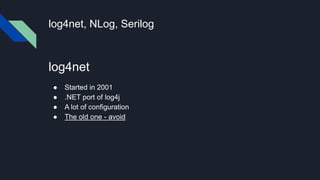
log4net
● Started in 2001
● .NET port of log4j
● A lot of configuration
● The old one - avoid
log4net, NLog, Serilog
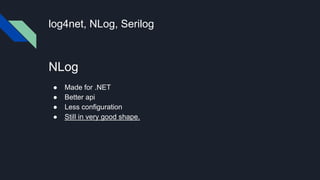
NLog
● Made for .NET
● Better api
● Less configuration
● Still in very good shape.
log4net, NLog, Serilog
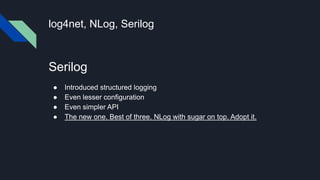
Serilog
● Introduced structured logging
● Even lesser configuration
● Even simpler API
● The new one. Best of three. NLog with sugar on top. Adopt it.
log4net, NLog, Serilog
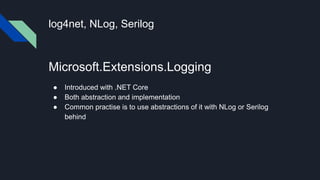
Microsoft.Extensions.Logging
● Introduced with .NET Core
● Both abstraction and implementation
● Common practise is to use abstractions of it with NLog or Serilog
behind
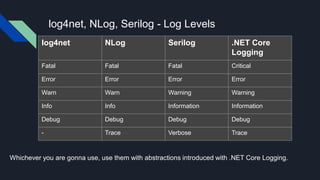
log4net, NLog, Serilog - Log Levels
log4net NLog Serilog .NET Core
Logging
Fatal Fatal Fatal Critical
Error Error Error Error
Warn Warn Warning Warning
Info Info Information Information
Debug Debug Debug Debug
- Trace Verbose Trace
Whichever you are gonna use, use them with abstractions introduced with .NET Core Logging.
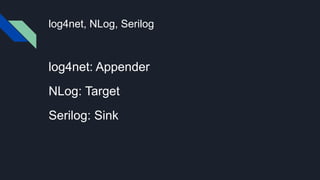
log4net, NLog, Serilog
log4net: Appender
NLog: Target
Serilog: Sink
Serilog
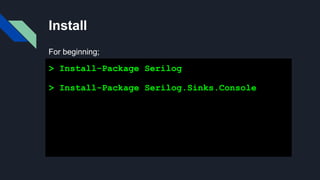
Install
> Install-Package Serilog
> Install-Package Serilog.Sinks.Console
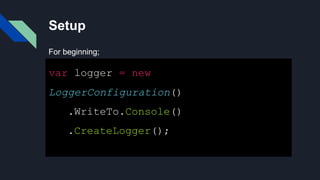
For beginning;
Setup
var logger = new
LoggerConfiguration()
.WriteTo.Console()
.CreateLogger();
For beginning;
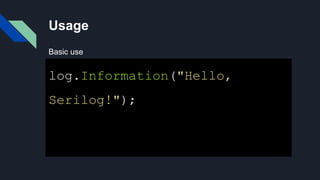
Usage
log.Information("Hello,
Serilog!");
Basic use
Structured logging
var name = "Doruk";
Log.Information("Hello, {Name}!", name
);
[21:38:02 INF] Hello, Doruk!
Looks like just string.format, isn’t it ?
No it isn’t really. We’ll come to that later.
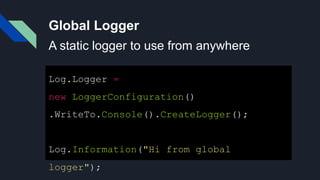
Global Logger
Log.Logger =
new LoggerConfiguration()
.WriteTo.Console().CreateLogger();
Log.Information("Hi from global
logger");
A static logger to use from anywhere
Output formatting
var logger =
new LoggerConfiguration()
.WriteTo.File("log.txt", outputTemplate:
"{Timestamp:yyyy-MM-dd HH:mm:ss.fff zzz}
[{Level:u3}]
{Message:lj}{NewLine}{Exception}").
CreateLogger();
Timestamp
here is an
Enricher.
More on to
that later
u3 here
means first
three
characters,
uppercase
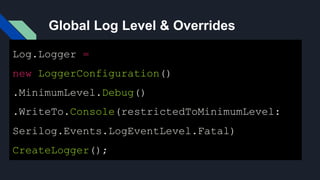
Global Log Level & Overrides
Log.Logger =
new LoggerConfiguration()
.MinimumLevel.Debug()
.WriteTo.Console(restrictedToMinimumLevel:
Serilog.Events.LogEventLevel.Fatal)
CreateLogger();
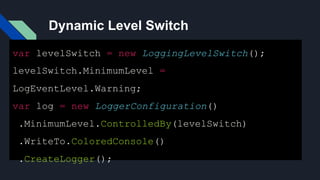
Dynamic Level Switch
var levelSwitch = new LoggingLevelSwitch();
levelSwitch.MinimumLevel =
LogEventLevel.Warning;
var log = new LoggerConfiguration()
.MinimumLevel.ControlledBy(levelSwitch)
.WriteTo.ColoredConsole()
.CreateLogger();
Enrichers - 1 - Code
.WriteTo.File("log.txt", outputTemplate:
"{Timestamp:yyyy-MM-dd HH:mm:ss.fff zzz} [{Level:u3}]
Version:{Version} {Message:lj}{NewLine}{Exception}")
.Enrich.WithProperty("Version", "1.0.0")
Enrichers - 2 - Output
2020-06-02 22:00:47.826 +03:00 [INF] Version:1.0.0
Hello, Doruk!
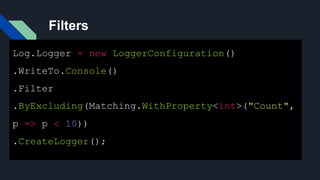
Filters
Log.Logger = new LoggerConfiguration()
.WriteTo.Console()
.Filter
.ByExcluding(Matching.WithProperty<int>("Count",
p => p < 10))
.CreateLogger();
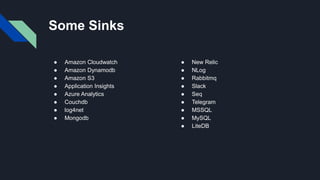
Some Sinks
● Amazon Cloudwatch
● Amazon Dynamodb
● Amazon S3
● Application Insights
● Azure Analytics
● Couchdb
● log4net
● Mongodb
● New Relic
● NLog
● Rabbitmq
● Slack
● Seq
● Telegram
● MSSQL
● MySQL
● LiteDB
Structured
Logging
What is structured logging
A better way to capture and render log messages for machine and
human use.[4]
In structured logging logs are saved in raw json format that contains
your message format and data.
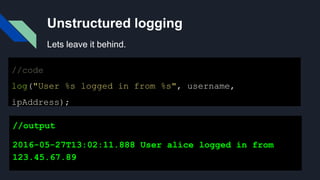
Unstructured logging
//code
log("User %s logged in from %s", username,
ipAddress);
//output
2016-05-27T13:02:11.888 User alice logged in from
123.45.67.89
Lets leave it behind.
Structured Logging
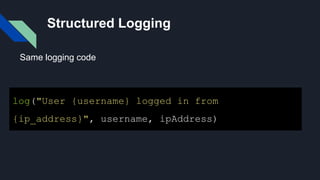
log("User {username} logged in from
{ip_address}", username, ipAddress)
Same logging code
Structured Logging
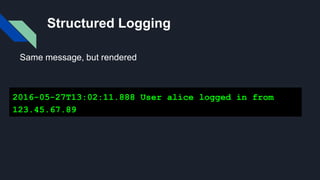
2016-05-27T13:02:11.888 User alice logged in from
123.45.67.89
Same message, but rendered
Structured Logging
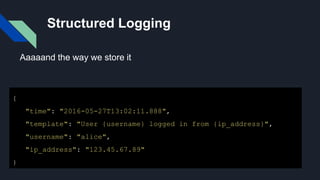
{
"time": "2016-05-27T13:02:11.888",
"template": "User {username} logged in from {ip_address}",
"username": "alice",
"ip_address": "123.45.67.89"
}
Aaaaand the way we store it
Seq
Seq - what is it
Seq is a platform that has in it;
● Log store
● Visualizer
● Rest api for directly logging to it
Seq - what is it
Seq is built for modern structured logging with
message templates. Rather than waste time and effort
trying to extract data from plain-text logs with fragile
log parsing, the properties associated with each log
event are captured and sent to Seq in a clean JSON
format. Message templates are supported natively by
ASP.NET Core, Serilog, NLog, and many other libraries,
so your application can use the best available
diagnostic logging for your platform.
Seq - what is it
● It’s a log server. Store your logs in it.
● Use it’s ui to filter logs
● Create charts, analyze
● Integrate it to slack or equivalent for alerts
Serilog & Seq
doing
structured
logging
Serilog & Seq doing structured
logging
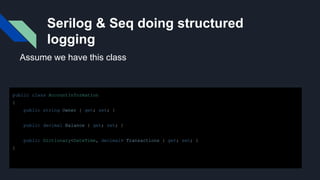
public class AccountInformation
{
public string Owner { get; set; }
public decimal Balance { get; set; }
public Dictionary<DateTime, decimal> Transactions { get; set; }
}
Assume we have this class
Serilog & Seq doing structured
logging
var info = new AccountInformation()
{
Balance = 1000,
Owner = "Doruk",
Transactions = new System.Collections.Generic.Dictionary<DateTime, decimal>()
{
[DateTime.Now] = 100,
[DateTime.Now.AddDays(-1)] = 200
}
};
Log.Information("New Account Added {@account}", info);
And we log it to Seq through Serilog this way
Serilog & Seq doing structured
logging
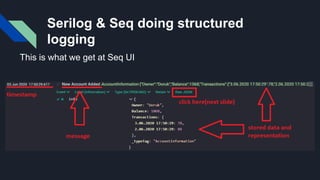
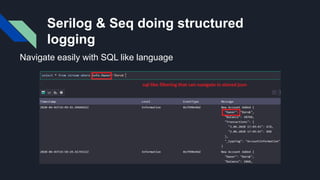
This is what we get at Seq UI
Serilog & Seq doing structured
logging
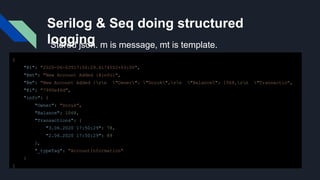
{
"@t": "2020-06-03T17:50:29.6174552+03:00",
"@mt": "New Account Added {@info}",
"@m": "New Account Added {rn "Owner": "Doruk",rn "Balance": 1068,rn "Transactio",
"@i": "7990e46d",
"info": {
"Owner": "Doruk",
"Balance": 1068,
"Transactions": {
"3.06.2020 17:50:29": 78,
"2.06.2020 17:50:29": 89
},
"_typeTag": "AccountInformation"
}
}
Stored json. m is message, mt is template.
Serilog & Seq doing structured
logging
Navigate easily with SQL like language
Conclusion
My humble conclusion is
● NLog is still great but Serilog is easier to use
and has more to offer.
● Structured logging is a lifesaver if we write lots
of logs that has data fused with them.
● Platforms like Seq helps a lot while dealing with
logs.
References
● [1] https://michaelscodingspot.com/dotnet-debugging-tools/
● [2] .NET Web Application Logging Essentials by Thomas Ardal
● [3]https://github.com/serilog/serilog/wiki
● [4]https://messagetemplates.org/
Thanks a lot.
Doruk Uluçay

Logging, Serilog, Structured Logging, Seq

  • 1.
    Serilog & Seq DorukUluçay Senior Backend Developer @ InGame Group
  • 2.
  • 3.
    Why we arelogging Logging has a crucial part to play in a scenario where you can’t use interactive debugging (that is, attaching a debugger like Visual Studio). It allows us to investigate errors after the problem already happened. In some cases, like Production Debugging, logs might be the only information you have.[1]
  • 4.
    Logging Best Practises ●Use log levels appropriately[1] ● Only high severity logs in prod[1] ● Log all exceptions[1]
  • 5.
    Logging Best Practises ●Implement logging in all projects. You always end up needing it at some point.[2]
  • 6.
    Logging Best Practises- my advices ● Consider logging http context when needed. It’s very easy with modern libraries. ● Consider using structured logging when needed ● Log everything when working with 3rd party services
  • 7.
  • 8.
    log4net, NLog, Serilog log4net ●Started in 2001 ● .NET port of log4j ● A lot of configuration ● The old one - avoid
  • 9.
    log4net, NLog, Serilog NLog ●Made for .NET ● Better api ● Less configuration ● Still in very good shape.
  • 10.
    log4net, NLog, Serilog Serilog ●Introduced structured logging ● Even lesser configuration ● Even simpler API ● The new one. Best of three. NLog with sugar on top. Adopt it.
  • 11.
    log4net, NLog, Serilog Microsoft.Extensions.Logging ●Introduced with .NET Core ● Both abstraction and implementation ● Common practise is to use abstractions of it with NLog or Serilog behind
  • 12.
    log4net, NLog, Serilog- Log Levels log4net NLog Serilog .NET Core Logging Fatal Fatal Fatal Critical Error Error Error Error Warn Warn Warning Warning Info Info Information Information Debug Debug Debug Debug - Trace Verbose Trace Whichever you are gonna use, use them with abstractions introduced with .NET Core Logging.
  • 13.
    log4net, NLog, Serilog log4net:Appender NLog: Target Serilog: Sink
  • 14.
  • 15.
    Install > Install-Package Serilog >Install-Package Serilog.Sinks.Console For beginning;
  • 16.
    Setup var logger =new LoggerConfiguration() .WriteTo.Console() .CreateLogger(); For beginning;
  • 17.
  • 18.
    Structured logging var name= "Doruk"; Log.Information("Hello, {Name}!", name ); [21:38:02 INF] Hello, Doruk! Looks like just string.format, isn’t it ? No it isn’t really. We’ll come to that later.
  • 19.
    Global Logger Log.Logger = newLoggerConfiguration() .WriteTo.Console().CreateLogger(); Log.Information("Hi from global logger"); A static logger to use from anywhere
  • 20.
    Output formatting var logger= new LoggerConfiguration() .WriteTo.File("log.txt", outputTemplate: "{Timestamp:yyyy-MM-dd HH:mm:ss.fff zzz} [{Level:u3}] {Message:lj}{NewLine}{Exception}"). CreateLogger(); Timestamp here is an Enricher. More on to that later u3 here means first three characters, uppercase
  • 21.
    Global Log Level& Overrides Log.Logger = new LoggerConfiguration() .MinimumLevel.Debug() .WriteTo.Console(restrictedToMinimumLevel: Serilog.Events.LogEventLevel.Fatal) CreateLogger();
  • 22.
    Dynamic Level Switch varlevelSwitch = new LoggingLevelSwitch(); levelSwitch.MinimumLevel = LogEventLevel.Warning; var log = new LoggerConfiguration() .MinimumLevel.ControlledBy(levelSwitch) .WriteTo.ColoredConsole() .CreateLogger();
  • 23.
    Enrichers - 1- Code .WriteTo.File("log.txt", outputTemplate: "{Timestamp:yyyy-MM-dd HH:mm:ss.fff zzz} [{Level:u3}] Version:{Version} {Message:lj}{NewLine}{Exception}") .Enrich.WithProperty("Version", "1.0.0")
  • 24.
    Enrichers - 2- Output 2020-06-02 22:00:47.826 +03:00 [INF] Version:1.0.0 Hello, Doruk!
  • 25.
    Filters Log.Logger = newLoggerConfiguration() .WriteTo.Console() .Filter .ByExcluding(Matching.WithProperty<int>("Count", p => p < 10)) .CreateLogger();
  • 26.
    Some Sinks ● AmazonCloudwatch ● Amazon Dynamodb ● Amazon S3 ● Application Insights ● Azure Analytics ● Couchdb ● log4net ● Mongodb ● New Relic ● NLog ● Rabbitmq ● Slack ● Seq ● Telegram ● MSSQL ● MySQL ● LiteDB
  • 27.
  • 28.
    What is structuredlogging A better way to capture and render log messages for machine and human use.[4] In structured logging logs are saved in raw json format that contains your message format and data.
  • 29.
    Unstructured logging //code log("User %slogged in from %s", username, ipAddress); //output 2016-05-27T13:02:11.888 User alice logged in from 123.45.67.89 Lets leave it behind.
  • 30.
    Structured Logging log("User {username}logged in from {ip_address}", username, ipAddress) Same logging code
  • 31.
    Structured Logging 2016-05-27T13:02:11.888 Useralice logged in from 123.45.67.89 Same message, but rendered
  • 32.
    Structured Logging { "time": "2016-05-27T13:02:11.888", "template":"User {username} logged in from {ip_address}", "username": "alice", "ip_address": "123.45.67.89" } Aaaaand the way we store it
  • 33.
  • 34.
    Seq - whatis it Seq is a platform that has in it; ● Log store ● Visualizer ● Rest api for directly logging to it
  • 35.
    Seq - whatis it Seq is built for modern structured logging with message templates. Rather than waste time and effort trying to extract data from plain-text logs with fragile log parsing, the properties associated with each log event are captured and sent to Seq in a clean JSON format. Message templates are supported natively by ASP.NET Core, Serilog, NLog, and many other libraries, so your application can use the best available diagnostic logging for your platform.
  • 36.
    Seq - whatis it ● It’s a log server. Store your logs in it. ● Use it’s ui to filter logs ● Create charts, analyze ● Integrate it to slack or equivalent for alerts
  • 37.
  • 38.
    Serilog & Seqdoing structured logging public class AccountInformation { public string Owner { get; set; } public decimal Balance { get; set; } public Dictionary<DateTime, decimal> Transactions { get; set; } } Assume we have this class
  • 39.
    Serilog & Seqdoing structured logging var info = new AccountInformation() { Balance = 1000, Owner = "Doruk", Transactions = new System.Collections.Generic.Dictionary<DateTime, decimal>() { [DateTime.Now] = 100, [DateTime.Now.AddDays(-1)] = 200 } }; Log.Information("New Account Added {@account}", info); And we log it to Seq through Serilog this way
  • 40.
    Serilog & Seqdoing structured logging This is what we get at Seq UI
  • 41.
    Serilog & Seqdoing structured logging { "@t": "2020-06-03T17:50:29.6174552+03:00", "@mt": "New Account Added {@info}", "@m": "New Account Added {rn "Owner": "Doruk",rn "Balance": 1068,rn "Transactio", "@i": "7990e46d", "info": { "Owner": "Doruk", "Balance": 1068, "Transactions": { "3.06.2020 17:50:29": 78, "2.06.2020 17:50:29": 89 }, "_typeTag": "AccountInformation" } } Stored json. m is message, mt is template.
  • 42.
    Serilog & Seqdoing structured logging Navigate easily with SQL like language
  • 43.
  • 44.
    My humble conclusionis ● NLog is still great but Serilog is easier to use and has more to offer. ● Structured logging is a lifesaver if we write lots of logs that has data fused with them. ● Platforms like Seq helps a lot while dealing with logs.
  • 45.
    References ● [1] https://michaelscodingspot.com/dotnet-debugging-tools/ ●[2] .NET Web Application Logging Essentials by Thomas Ardal ● [3]https://github.com/serilog/serilog/wiki ● [4]https://messagetemplates.org/ Thanks a lot. Doruk Uluçay