09IST
J. Kinchant
2013
STORING DATA
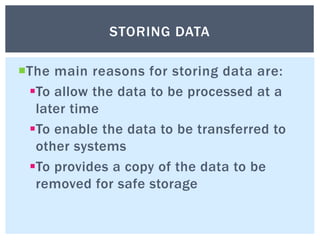
The main reasons for storing data are:
To allow the data to be processed at a
later time
To enable the data to be transferred to
other systems
To provides a copy of the data to be
removed for safe storage
STORING DATA
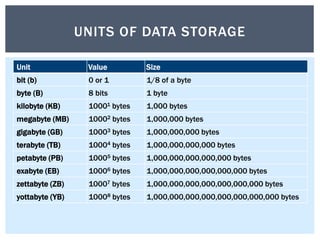
Unit Value Size
bit (b) 0 or 1 1/8 of a byte
byte (B) 8 bits 1 byte
kilobyte (KB) 10001 bytes 1,000 bytes
megabyte (MB) 10002 bytes 1,000,000 bytes
gigabyte (GB) 10003 bytes 1,000,000,000 bytes
terabyte (TB) 10004 bytes 1,000,000,000,000 bytes
petabyte (PB) 10005 bytes 1,000,000,000,000,000 bytes
exabyte (EB) 10006 bytes 1,000,000,000,000,000,000 bytes
zettabyte (ZB) 10007 bytes 1,000,000,000,000,000,000,000 bytes
yottabyte (YB) 10008 bytes 1,000,000,000,000,000,000,000,000 bytes
UNITS OF DATA STORAGE
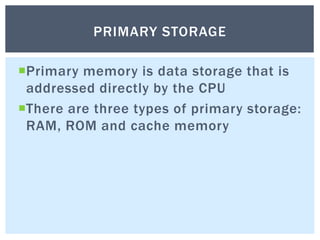
Primary memory is data storage that is
addressed directly by the CPU
There are three types of primary storage:
RAM, ROM and cache memory
PRIMARY STORAGE
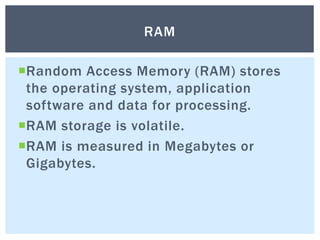
Random Access Memory (RAM) stores
the operating system, application
software and data for processing.
RAM storage is volatile.
RAM is measured in Megabytes or
Gigabytes.
RAM
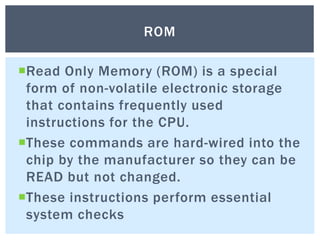
Read Only Memory (ROM) is a special
form of non-volatile electronic storage
that contains frequently used
instructions for the CPU.
These commands are hard-wired into the
chip by the manufacturer so they can be
READ but not changed.
These instructions perform essential
system checks
ROM
High speed electronic storage
Improves processor performance
CACHE STORAGE
Media that holds data and instructions
outside the system unit for long periods
of time.
Secondary storage is non-volatile,
expandable and portable.
The five main uses of secondary storage
are saving, backup, distribution,
transport and archiving.
SECONDARY STORAGE
Paper tape, punched cards, and
magnetic tape were early forms of
secondary storage.
Modern forms of secondary storage
include external hard discs, optical discs,
flash drives and portable music players.
EXAMPLES OF SECONDARY STORAGE
Non-volatile storage is computer memory
that can retain stored information even
when not powered.
NON-VOLATILE DATA STORAGE
read-only memory,
flash memory,
magnetic computer storage devices (e.g.
hard disks, floppy disks, and magnetic
tape)
optical discs (e.g. CD and DVD)
early computer storage methods such as
paper tape and punched cards.
EXAMPLES OF NON-VOLATILE STORAGE
Volatile storage is computer memory that
requires power to maintain the stored
information.
Volatile memory retains the information as
long as power supply is on, but when power
supply is off or interrupted the stored memory
is lost.
The most widely used form of primary storage
today is a volatile form of random access
memory (RAM)
VOLATILE DATA STORAGE
The ability to obtain data from a storage
device by going directly to where it is
physically located on the device rather
than by having to sequentially look for
the data at one physical location after
another.
Examples of direct access devices
include CDs, DVDs, Flash storage devices
and hard drives.
RANDOM/DIRECT ACCESS
A data location is found by starting at the
beginning of the data storage area and
seeking through every successive
location until the data is found.
Tape storage is an example of a
sequential access device.
SEQUENTIAL ACCESS
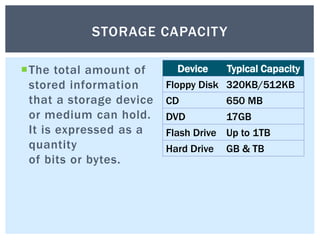
The total amount of
stored information
that a storage device
or medium can hold.
It is expressed as a
quantity
of bits or bytes.
Device Typical Capacity
Floppy Disk 320KB/512KB
CD 650 MB
DVD 17GB
Flash Drive Up to 1TB
Hard Drive GB & TB
STORAGE CAPACITY
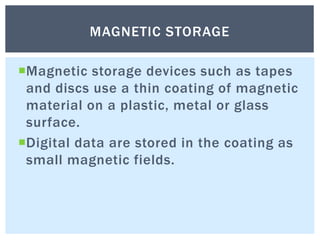
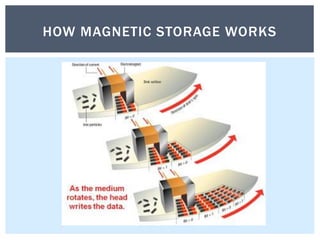
Magnetic storage devices such as tapes
and discs use a thin coating of magnetic
material on a plastic, metal or glass
surface.
Digital data are stored in the coating as
small magnetic fields.
MAGNETIC STORAGE
HOW MAGNETIC STORAGE WORKS
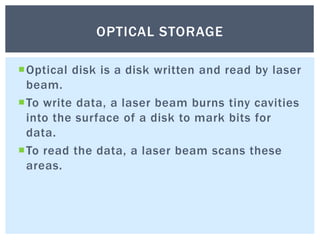
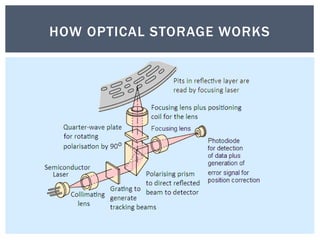
Optical disk is a disk written and read by laser
beam.
To write data, a laser beam burns tiny cavities
into the surface of a disk to mark bits for
data.
To read the data, a laser beam scans these
areas.
OPTICAL STORAGE
HOW OPTICAL STORAGE WORKS
The flash memory chip is a solid-state
chip that maintains stored data without
any external power source.
Flash memory devices provide non-
volatile, high capacity random access.
The flash drive has no moving parts and
information stored on the NAND flash
memory chip remains semi-permanently
(until you delete/edit the file).
FLASH MEMORY
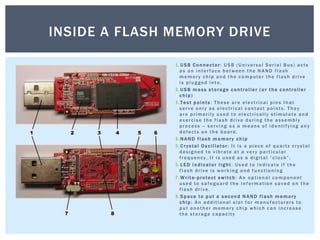
1.USB Co nnector: USB (Universal Serial Bus) acts
as an interface between the NAND flash
memory chip and the computer the flash drive
is plugged into.
2.USB m a ss s torage c ontroller ( or t he c ontroller
c hip)
3.Test p oints : These are electrical pins that
serve only as electrical contact points. They
are primarily used to electrically stimulate and
exercise the flash drive during the assembly
process – serving as a means of identifying any
defects on the board.
4.N AND flash m emory c hip
5.Crystal Oscillator: It is a piece of quartz crystal
designed to vibrate at a very particular
frequency. It is used as a digital “clock”.
6.L ED i ndicator l ight : Used to indicate if the
flash drive is working and functioning
7.Write-protect s witch: An optional component
used to safeguard the information saved on the
flash drive.
8.Space t o p ut a s econd N AND flash m emory
c hip: An additional slot for manufacturers to
put another memory chip which can increase
the storage capacity
INSIDE A FLASH MEMORY DRIVE
The web is becoming a major data
storage medium
Portable flash memory is widely used
and will continue to increase in capacity
and usefulness
Spinning hard disk mechanical drives
will be replaced completely by solid state
drives
FUTURE STORAGE

Storing Data Information Software Technology

  • 1.
  • 2.
    The main reasonsfor storing data are: To allow the data to be processed at a later time To enable the data to be transferred to other systems To provides a copy of the data to be removed for safe storage STORING DATA
  • 3.
    Unit Value Size bit(b) 0 or 1 1/8 of a byte byte (B) 8 bits 1 byte kilobyte (KB) 10001 bytes 1,000 bytes megabyte (MB) 10002 bytes 1,000,000 bytes gigabyte (GB) 10003 bytes 1,000,000,000 bytes terabyte (TB) 10004 bytes 1,000,000,000,000 bytes petabyte (PB) 10005 bytes 1,000,000,000,000,000 bytes exabyte (EB) 10006 bytes 1,000,000,000,000,000,000 bytes zettabyte (ZB) 10007 bytes 1,000,000,000,000,000,000,000 bytes yottabyte (YB) 10008 bytes 1,000,000,000,000,000,000,000,000 bytes UNITS OF DATA STORAGE
  • 4.
    Primary memory isdata storage that is addressed directly by the CPU There are three types of primary storage: RAM, ROM and cache memory PRIMARY STORAGE
  • 5.
    Random Access Memory(RAM) stores the operating system, application software and data for processing. RAM storage is volatile. RAM is measured in Megabytes or Gigabytes. RAM
  • 6.
    Read Only Memory(ROM) is a special form of non-volatile electronic storage that contains frequently used instructions for the CPU. These commands are hard-wired into the chip by the manufacturer so they can be READ but not changed. These instructions perform essential system checks ROM
  • 7.
    High speed electronicstorage Improves processor performance CACHE STORAGE
  • 8.
    Media that holdsdata and instructions outside the system unit for long periods of time. Secondary storage is non-volatile, expandable and portable. The five main uses of secondary storage are saving, backup, distribution, transport and archiving. SECONDARY STORAGE
  • 9.
    Paper tape, punchedcards, and magnetic tape were early forms of secondary storage. Modern forms of secondary storage include external hard discs, optical discs, flash drives and portable music players. EXAMPLES OF SECONDARY STORAGE
  • 10.
    Non-volatile storage iscomputer memory that can retain stored information even when not powered. NON-VOLATILE DATA STORAGE
  • 11.
    read-only memory, flash memory, magneticcomputer storage devices (e.g. hard disks, floppy disks, and magnetic tape) optical discs (e.g. CD and DVD) early computer storage methods such as paper tape and punched cards. EXAMPLES OF NON-VOLATILE STORAGE
  • 12.
    Volatile storage iscomputer memory that requires power to maintain the stored information. Volatile memory retains the information as long as power supply is on, but when power supply is off or interrupted the stored memory is lost. The most widely used form of primary storage today is a volatile form of random access memory (RAM) VOLATILE DATA STORAGE
  • 13.
    The ability toobtain data from a storage device by going directly to where it is physically located on the device rather than by having to sequentially look for the data at one physical location after another. Examples of direct access devices include CDs, DVDs, Flash storage devices and hard drives. RANDOM/DIRECT ACCESS
  • 14.
    A data locationis found by starting at the beginning of the data storage area and seeking through every successive location until the data is found. Tape storage is an example of a sequential access device. SEQUENTIAL ACCESS
  • 15.
    The total amountof stored information that a storage device or medium can hold. It is expressed as a quantity of bits or bytes. Device Typical Capacity Floppy Disk 320KB/512KB CD 650 MB DVD 17GB Flash Drive Up to 1TB Hard Drive GB & TB STORAGE CAPACITY
  • 16.
    Magnetic storage devicessuch as tapes and discs use a thin coating of magnetic material on a plastic, metal or glass surface. Digital data are stored in the coating as small magnetic fields. MAGNETIC STORAGE
  • 17.
  • 18.
    Optical disk isa disk written and read by laser beam. To write data, a laser beam burns tiny cavities into the surface of a disk to mark bits for data. To read the data, a laser beam scans these areas. OPTICAL STORAGE
  • 19.
  • 20.
    The flash memorychip is a solid-state chip that maintains stored data without any external power source. Flash memory devices provide non- volatile, high capacity random access. The flash drive has no moving parts and information stored on the NAND flash memory chip remains semi-permanently (until you delete/edit the file). FLASH MEMORY
  • 21.
    1.USB Co nnector:USB (Universal Serial Bus) acts as an interface between the NAND flash memory chip and the computer the flash drive is plugged into. 2.USB m a ss s torage c ontroller ( or t he c ontroller c hip) 3.Test p oints : These are electrical pins that serve only as electrical contact points. They are primarily used to electrically stimulate and exercise the flash drive during the assembly process – serving as a means of identifying any defects on the board. 4.N AND flash m emory c hip 5.Crystal Oscillator: It is a piece of quartz crystal designed to vibrate at a very particular frequency. It is used as a digital “clock”. 6.L ED i ndicator l ight : Used to indicate if the flash drive is working and functioning 7.Write-protect s witch: An optional component used to safeguard the information saved on the flash drive. 8.Space t o p ut a s econd N AND flash m emory c hip: An additional slot for manufacturers to put another memory chip which can increase the storage capacity INSIDE A FLASH MEMORY DRIVE
  • 22.
    The web isbecoming a major data storage medium Portable flash memory is widely used and will continue to increase in capacity and usefulness Spinning hard disk mechanical drives will be replaced completely by solid state drives FUTURE STORAGE