Stepping Into the
     Future
      iPads 101
iTunes - Management
   Individual iTunes           One class iTunes
    accounts for each iPad       account
   Allows for greater          Participate in Apple’s
    differentiation among        Volume Purchase
    apps                         Program to buy apps in
   Better if managing a         bulk at a discounted
    small number of iPads        rate
                                Allows teacher to sync
                                 multiple iPads at once
Setting up Ipads
   Create iTunes account(s)
   Purchase desired apps (either through VPP
    or individually)
   When students find additional, relevant
    apps, re-sync iPads to iTunes account and
    update
   Perhaps establish a day - once a month - for
    all iPads to be updated?
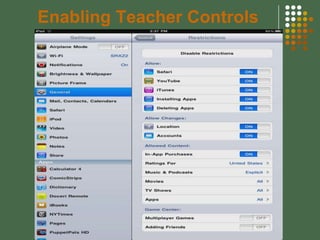
Enabling Teacher Controls
Student Responsibilities
   Charging iPads
   Maintaining updates to apps (via app store)
   Researching available apps, finding
    educational value
   Using iPads for educational purposes
   Syncing iPads with iTunes
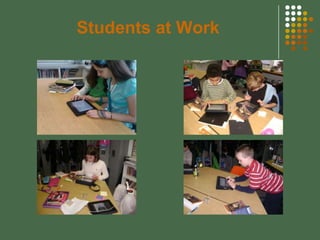
Students at Work
Printing
   Printopia - download software to MAC
    computer, enables all Apple devices to print
   Email or share via iWork (Apple Suite only)
   AirPrint - requires newer printers that have
    AirPrint capability
   Printing Apps (varied success)
Classroom Uses - Literacy
   Students create, write, publish texts in a variety of
    apps
   Access to internet for research and online
    discussions (wikis, etc)
    www.mphgradefive.wikispaces.com
   Voice recorders, dictation programs, books on
    “tape,” digital books
   Apps: StoryKit, PuppetPals, Toontastic, Doodle
    Buddy, Kid Animation, Strip Design, Comic
    Strip, Audible, Dragon Dictation
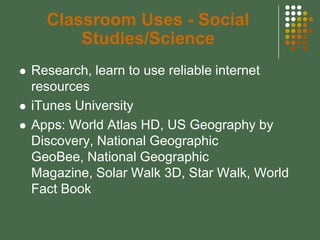
Classroom Uses - Social
          Studies/Science
   Research, learn to use reliable internet
    resources
   iTunes University
   Apps: World Atlas HD, US Geography by
    Discovery, National Geographic
    GeoBee, National Geographic
    Magazine, Solar Walk 3D, Star Walk, World
    Fact Book
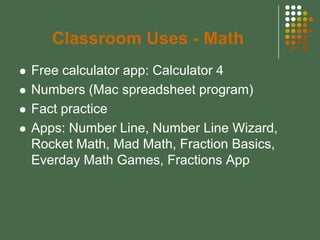
Classroom Uses - Math
   Free calculator app: Calculator 4
   Numbers (Mac spreadsheet program)
   Fact practice
   Apps: Number Line, Number Line Wizard,
    Rocket Math, Mad Math, Fraction Basics,
    Everday Math Games, Fractions App
A Beginning Picture Book…


                    QuickTime™ an d a
                       decompressor
              are need ed to see this picture .

Stepping Into the Future

  • 1.
    Stepping Into the Future iPads 101
  • 2.
    iTunes - Management  Individual iTunes  One class iTunes accounts for each iPad account  Allows for greater  Participate in Apple’s differentiation among Volume Purchase apps Program to buy apps in  Better if managing a bulk at a discounted small number of iPads rate  Allows teacher to sync multiple iPads at once
  • 3.
    Setting up Ipads  Create iTunes account(s)  Purchase desired apps (either through VPP or individually)  When students find additional, relevant apps, re-sync iPads to iTunes account and update  Perhaps establish a day - once a month - for all iPads to be updated?
  • 4.
  • 5.
    Student Responsibilities  Charging iPads  Maintaining updates to apps (via app store)  Researching available apps, finding educational value  Using iPads for educational purposes  Syncing iPads with iTunes
  • 6.
  • 7.
    Printing  Printopia - download software to MAC computer, enables all Apple devices to print  Email or share via iWork (Apple Suite only)  AirPrint - requires newer printers that have AirPrint capability  Printing Apps (varied success)
  • 8.
    Classroom Uses -Literacy  Students create, write, publish texts in a variety of apps  Access to internet for research and online discussions (wikis, etc) www.mphgradefive.wikispaces.com  Voice recorders, dictation programs, books on “tape,” digital books  Apps: StoryKit, PuppetPals, Toontastic, Doodle Buddy, Kid Animation, Strip Design, Comic Strip, Audible, Dragon Dictation
  • 9.
    Classroom Uses -Social Studies/Science  Research, learn to use reliable internet resources  iTunes University  Apps: World Atlas HD, US Geography by Discovery, National Geographic GeoBee, National Geographic Magazine, Solar Walk 3D, Star Walk, World Fact Book
  • 10.
    Classroom Uses -Math  Free calculator app: Calculator 4  Numbers (Mac spreadsheet program)  Fact practice  Apps: Number Line, Number Line Wizard, Rocket Math, Mad Math, Fraction Basics, Everday Math Games, Fractions App
  • 11.
    A Beginning PictureBook… QuickTime™ an d a decompressor are need ed to see this picture .