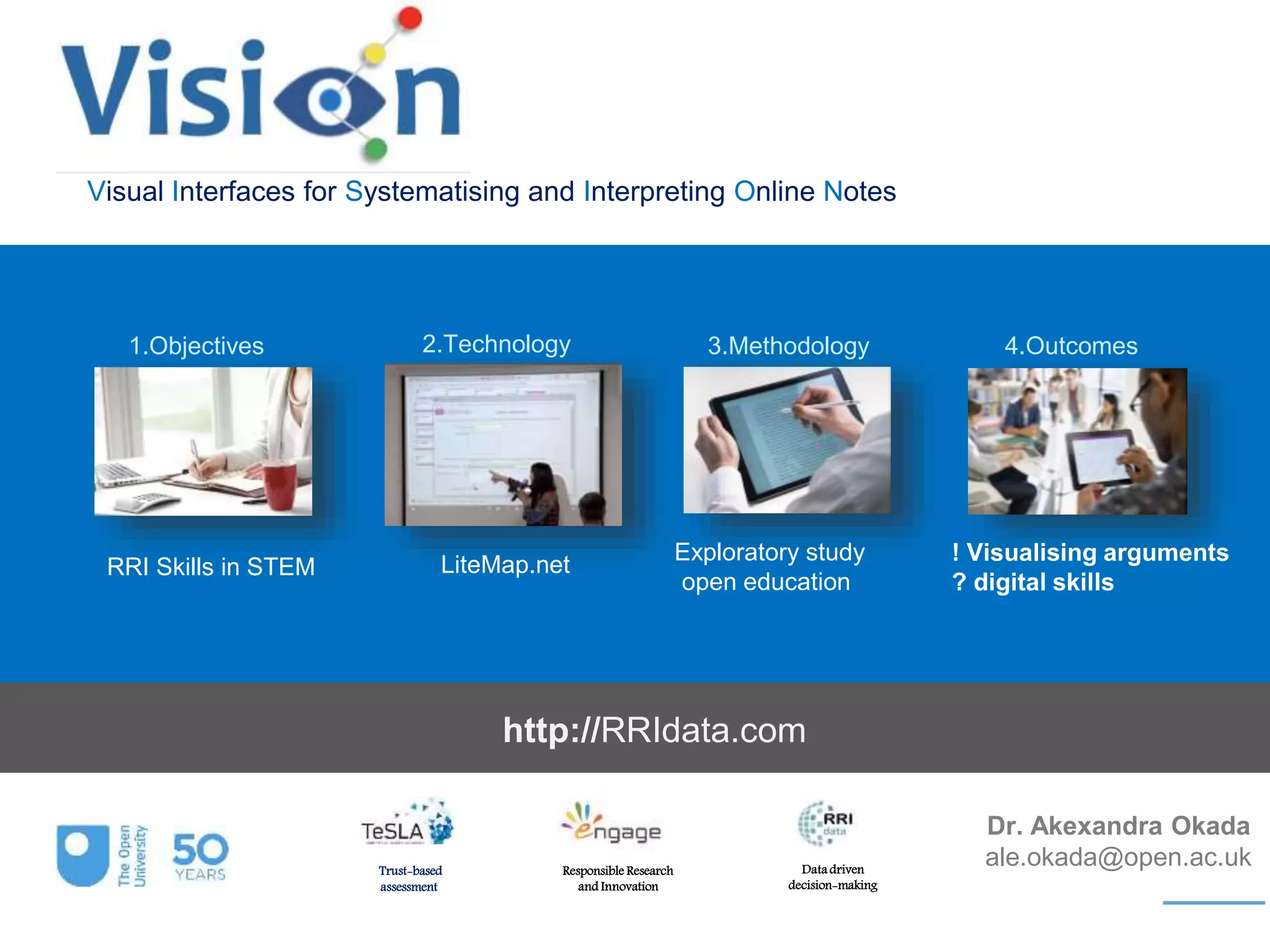
Visual Interfaces for Systematising and Interpreting Online Notes
Dr. Akexandra Okada
ale.okada@open.ac.ukTrust-based
assessment
Responsible Research
and Innovation
Data driven
decision-making
2.Technology
RRI Skills in STEM
3.Methodology 4.Outcomes1.Objectives
LiteMap.net
Exploratory study
open education
! Visualising arguments
? digital skills
http://RRIdata.com
RRI Skills in STEM
1.Objectives
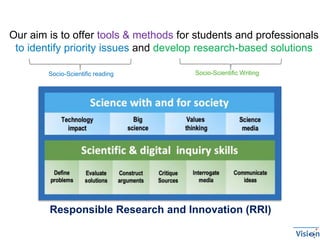
Our aim is to offer tools & methods for students and professionals
to identify priority issues and develop research-based solutions
Socio-Scientific reading Socio-Scientific Writing
Responsible Research and Innovation (RRI)
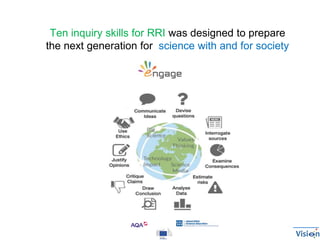
Ten inquiry skills for RRI was designed to prepare
the next generation for science with and for society
2.Technology
LiteMap.net
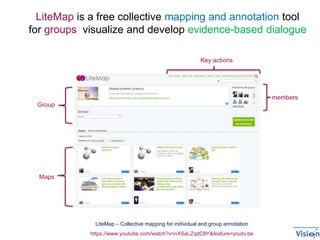
LiteMap – Collective mapping for individual and group annotation
members
Groupo
Maps
https://www.youtube.com/watch?v=nXSaLZqdC8Y&feature=youtu.be
Key actions
LiteMap is a free collective mapping and annotation tool
for groups visualize and develop evidence-based dialogue
LiteMap – Collective mapping for individual and group annotation
https://www.youtube.com/watch?v=nXSaLZqdC8Y&feature=youtu.be
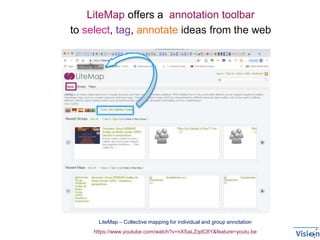
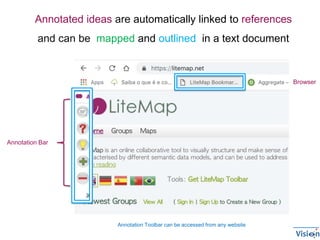
LiteMap offers a annotation toolbar
to select, tag, annotate ideas from the web
Annotation Bar
Annotation Toolbar can be accessed from any website
Browser
Annotated ideas are automatically linked to references
and can be mapped and outlined in a text document
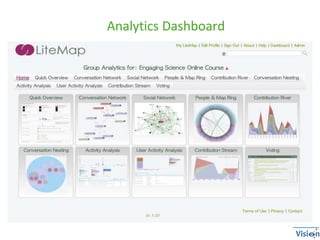
Analytics Dashboard
3.Methodology
Exploratory study
in open education
LiteMap – Collective mapping for individual and group annotation
https://www.youtube.com/watch?v=nXSaLZqdC8Y&feature=youtu.be
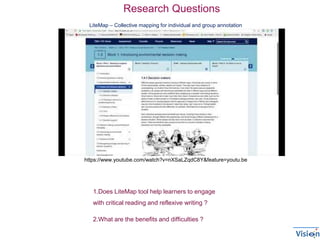
1.Does LiteMap tool help learners to engage
with critical reading and reflexive writing ?
2.What are the benefits and difficulties ?
Research Questions
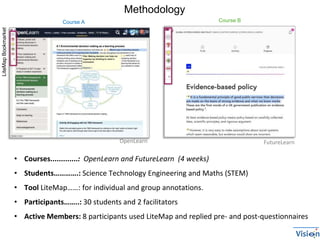
• Courses.............: OpenLearn and FutureLearn (4 weeks)
• Students………….: ​Science Technology Engineering and Maths (STEM)
• Tool LiteMap……: for individual and group annotations.
• Participants……..: 30 students and 2 facilitators
• Active Members: 8 participants used LiteMap and replied pre- and post-questionnaires
OpenLearn
LiteMapBookmarket
FutureLearn
Course BCourse A
Methodology
4.Outcomes
!!!! Visualising arguments
?? Digital skills
OpenLearn
FutureLearn
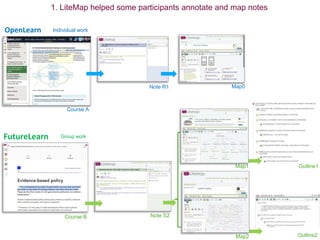
Individual work
Group work
Course B Note S2
Map1
Map2
Course A
Note R1 Map0
Outline1
Outline2
1. LiteMap helped some participants annotate and map notes
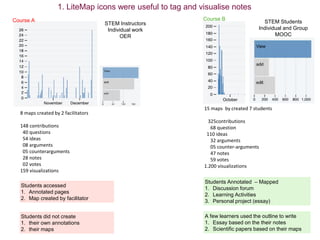
15 maps by created 7 students
325contributions
68 question
110 ideas
32 arguments
05 counter-arguments
47 notes
59 votes
1.200 visualizations
8 maps created by 2 facilitators
148 contributions
40 questions
54 ideas
08 arguments
05 counterarguments
28 notes
02 votes
159 visualizations
STEM Instructors
Individual work
OER
STEM Students
Individual and Group
MOOC
Students Annotated – Mapped
1. Discussion forum
2. Learning Activities
3. Personal project (essay)
Students accessed
1. Annotated pages
2. Map created by facilitator
Course BCourse A
Students did not create
1. their own annotations
2. their maps
A few learners used the outline to write
1. Essay based on the their notes
2. Scientific papers based on their maps
1. LiteMap icons were useful to tag and visualise notes
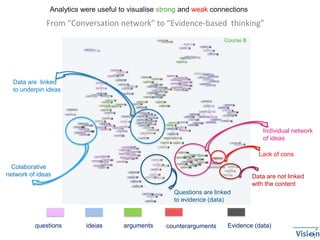
Individual network
of ideas
Colaborative
network of ideas
questions ideias arguments counterarguments Evidence (data)
From “Conversation network” to “Evidence-based thinking”
Data are not linked
with the content
Questions are linked
to evidence (data)
Data are linked
to underpin ideas
Lack of cons
Course B
Analytics were useful to visualise strong and weak connections
I feel more connected with the topic
when I can tag and annotate from various
sources for reusing notes anytime, anywhere
Actually I feel this is the best miracle
happening in my study world. I'm such
a wonderful snail in making notes on
printed text
I must admit I rather read from a
piece of paper; however, I do believe
that change is not a bad thing and
willing to give it a go
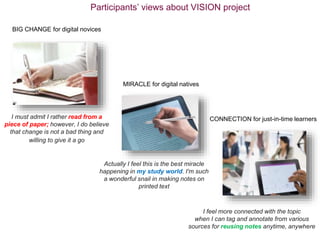
BIG CHANGE for digital novices
MIRACLE for digital natives
CONNECTION for just-in-time learners
Participants’ views about VISION project
Concerns:
• Time for planning, annotating and mapping
• Training to be able to use the tool effectively.
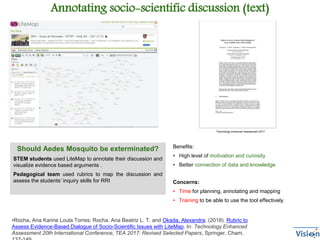
Annotating socio-scientific discussion (text)
Technology enhanced Assessment 2017
Should Aedes Mosquito be exterminated?
STEM students used LiteMap to annotate their discussion and
visualize evidence based arguments .
Pedagogical team used rubrics to map the discussion and
assess the students’ inquiry skills for RRI
Benefits:
• High level of motivation and curiosity
• Better connection of data and knowledge
•Rocha, Ana Karine Loula Torres; Rocha, Ana Beatriz L. T. and Okada, Alexandra. (2018). Rubric to
Assess Evidence-Based Dialogue of Socio-Scientific Issues with LiteMap. In: Technology Enhanced
Assessment 20th International Conference, TEA 2017: Revised Selected Papers, Springer, Cham,
Concerns:
• Time for planning, annotating and mapping
• Training to be able to use the tool effectively.
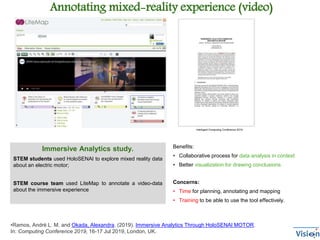
Immersive Analytics study.
STEM students used HoloSENAI to explore mixed reality data
about an electric motor;
STEM course team used LiteMap to annotate a video-data
about the immersive experience
Benefits:
• Collaborative process for data analysis in context
• Better visualization for drawing conclusions
Intelligent Computing Conference 2019
Annotating mixed-reality experience (video)
•Ramos, André L. M. and Okada, Alexandra. (2019). Immersive Analytics Through HoloSENAI MOTOR.
In: Computing Conference 2019, 16-17 Jul 2019, London, UK.
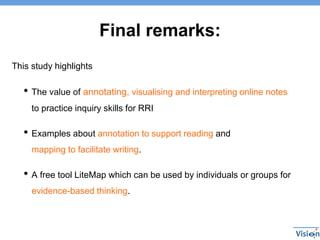
Final remarks:
This study highlights
• The value of annotating, visualising and interpreting online notes
to practice inquiry skills for RRI
• Examples about annotation to support reading and
mapping to facilitate writing.
• A free tool LiteMap which can be used by individuals or groups for
evidence-based thinking.
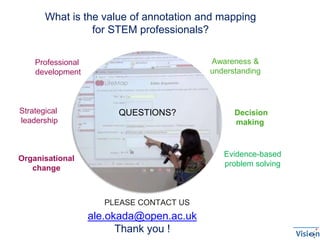
What is the value of annotation and mapping
for STEM professionals?
ale.okada@open.ac.uk
Thank you !
Strategical
leadership
Awareness &
understanding
Professional
development
Evidence-based
problem solving
Decision
making
Organisational
change
PLEASE CONTACT US
QUESTIONS?

STEM 2019 LiteMap

  • 1.
    Visual Interfaces forSystematising and Interpreting Online Notes Dr. Akexandra Okada ale.okada@open.ac.ukTrust-based assessment Responsible Research and Innovation Data driven decision-making 2.Technology RRI Skills in STEM 3.Methodology 4.Outcomes1.Objectives LiteMap.net Exploratory study open education ! Visualising arguments ? digital skills http://RRIdata.com
  • 2.
    RRI Skills inSTEM 1.Objectives
  • 3.
    Our aim isto offer tools & methods for students and professionals to identify priority issues and develop research-based solutions Socio-Scientific reading Socio-Scientific Writing Responsible Research and Innovation (RRI)
  • 4.
    Ten inquiry skillsfor RRI was designed to prepare the next generation for science with and for society
  • 5.
  • 6.
    LiteMap – Collectivemapping for individual and group annotation members Groupo Maps https://www.youtube.com/watch?v=nXSaLZqdC8Y&feature=youtu.be Key actions LiteMap is a free collective mapping and annotation tool for groups visualize and develop evidence-based dialogue
  • 7.
    LiteMap – Collectivemapping for individual and group annotation https://www.youtube.com/watch?v=nXSaLZqdC8Y&feature=youtu.be LiteMap offers a annotation toolbar to select, tag, annotate ideas from the web
  • 8.
    Annotation Bar Annotation Toolbarcan be accessed from any website Browser Annotated ideas are automatically linked to references and can be mapped and outlined in a text document
  • 9.
  • 10.
  • 11.
    LiteMap – Collectivemapping for individual and group annotation https://www.youtube.com/watch?v=nXSaLZqdC8Y&feature=youtu.be 1.Does LiteMap tool help learners to engage with critical reading and reflexive writing ? 2.What are the benefits and difficulties ? Research Questions
  • 12.
    • Courses.............: OpenLearnand FutureLearn (4 weeks) • Students………….: ​Science Technology Engineering and Maths (STEM) • Tool LiteMap……: for individual and group annotations. • Participants……..: 30 students and 2 facilitators • Active Members: 8 participants used LiteMap and replied pre- and post-questionnaires OpenLearn LiteMapBookmarket FutureLearn Course BCourse A Methodology
  • 13.
  • 14.
    OpenLearn FutureLearn Individual work Group work CourseB Note S2 Map1 Map2 Course A Note R1 Map0 Outline1 Outline2 1. LiteMap helped some participants annotate and map notes
  • 15.
    15 maps bycreated 7 students 325contributions 68 question 110 ideas 32 arguments 05 counter-arguments 47 notes 59 votes 1.200 visualizations 8 maps created by 2 facilitators 148 contributions 40 questions 54 ideas 08 arguments 05 counterarguments 28 notes 02 votes 159 visualizations STEM Instructors Individual work OER STEM Students Individual and Group MOOC Students Annotated – Mapped 1. Discussion forum 2. Learning Activities 3. Personal project (essay) Students accessed 1. Annotated pages 2. Map created by facilitator Course BCourse A Students did not create 1. their own annotations 2. their maps A few learners used the outline to write 1. Essay based on the their notes 2. Scientific papers based on their maps 1. LiteMap icons were useful to tag and visualise notes
  • 16.
    Individual network of ideas Colaborative networkof ideas questions ideias arguments counterarguments Evidence (data) From “Conversation network” to “Evidence-based thinking” Data are not linked with the content Questions are linked to evidence (data) Data are linked to underpin ideas Lack of cons Course B Analytics were useful to visualise strong and weak connections
  • 17.
    I feel moreconnected with the topic when I can tag and annotate from various sources for reusing notes anytime, anywhere Actually I feel this is the best miracle happening in my study world. I'm such a wonderful snail in making notes on printed text I must admit I rather read from a piece of paper; however, I do believe that change is not a bad thing and willing to give it a go BIG CHANGE for digital novices MIRACLE for digital natives CONNECTION for just-in-time learners Participants’ views about VISION project
  • 18.
    Concerns: • Time forplanning, annotating and mapping • Training to be able to use the tool effectively. Annotating socio-scientific discussion (text) Technology enhanced Assessment 2017 Should Aedes Mosquito be exterminated? STEM students used LiteMap to annotate their discussion and visualize evidence based arguments . Pedagogical team used rubrics to map the discussion and assess the students’ inquiry skills for RRI Benefits: • High level of motivation and curiosity • Better connection of data and knowledge •Rocha, Ana Karine Loula Torres; Rocha, Ana Beatriz L. T. and Okada, Alexandra. (2018). Rubric to Assess Evidence-Based Dialogue of Socio-Scientific Issues with LiteMap. In: Technology Enhanced Assessment 20th International Conference, TEA 2017: Revised Selected Papers, Springer, Cham,
  • 19.
    Concerns: • Time forplanning, annotating and mapping • Training to be able to use the tool effectively. Immersive Analytics study. STEM students used HoloSENAI to explore mixed reality data about an electric motor; STEM course team used LiteMap to annotate a video-data about the immersive experience Benefits: • Collaborative process for data analysis in context • Better visualization for drawing conclusions Intelligent Computing Conference 2019 Annotating mixed-reality experience (video) •Ramos, André L. M. and Okada, Alexandra. (2019). Immersive Analytics Through HoloSENAI MOTOR. In: Computing Conference 2019, 16-17 Jul 2019, London, UK.
  • 20.
    Final remarks: This studyhighlights • The value of annotating, visualising and interpreting online notes to practice inquiry skills for RRI • Examples about annotation to support reading and mapping to facilitate writing. • A free tool LiteMap which can be used by individuals or groups for evidence-based thinking.
  • 21.
    What is thevalue of annotation and mapping for STEM professionals? ale.okada@open.ac.uk Thank you ! Strategical leadership Awareness & understanding Professional development Evidence-based problem solving Decision making Organisational change PLEASE CONTACT US QUESTIONS?

Editor's Notes

  • #3 This study is about a mapping annotation tool to help students and professionals with scientific writing
  • #6 This study is about a mapping annotation tool to help students and professionals with scientific writing
  • #11 This study is about a mapping annotation tool to help students and professionals with scientific writing
  • #14 This study is about a mapping annotation tool to help students and professionals with scientific writing
  • #15 1.Does LiteMap tool help learners to engage with critical reading and reflexive writing ? 2.What are the benefits and difficulties ?
  • #16 1.Does LiteMap tool help learners to engage with critical reading and reflexive writing ? 2.What are the benefits and difficulties ?
  • #19 What are the benefits & barriers of video annotation and mixed reality for research students?
  • #20 What are the benefits & barriers of video annotation and mixed reality for research students?