StaffTime
Getting Started
MANAGER Mode
April 2013
Managing attendance
2
Dashboard
Punch (in/out)
 Graphic view
 Dynamic view
 Dynamic view
 Add a punch
 Statistics  Graphic view
 Edit a punch
Main Menu
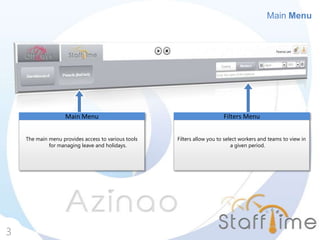
Main Menu
3
The main menu provides access to various tools
for managing leave and holidays.
Main Menu
Filters allow you to select workers and teams to view in
a given period.
Filters Menu
Dashboard : Statistics
4
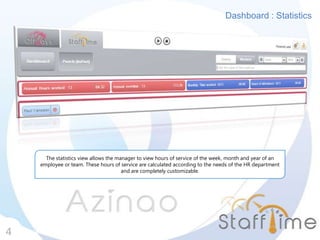
The statistics view allows the manager to view hours of service of the week, month and year of an
employee or team. These hours of service are calculated according to the needs of the HR department
and are completely customizable.
Dashboard : Statistics
5
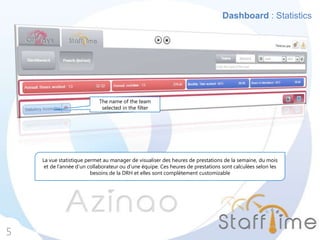
La vue statistique permet au manager de visualiser des heures de prestations de la semaine, du mois
et de l’année d’un collaborateur ou d’une équipe. Ces heures de prestations sont calculées selon les
besoins de la DRH et elles sont complètement customizable
The name of the team
selected in the filter
Dashboard : Calendar View
6
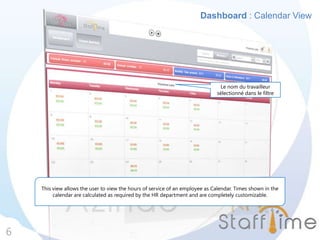
This view allows the user to view the hours of service of an employee as Calendar. Times shown in the
calendar are calculated as required by the HR department and are completely customizable.
Le nom du travailleur
sélectionné dans le filtre
Dashboard : Calendar View
7
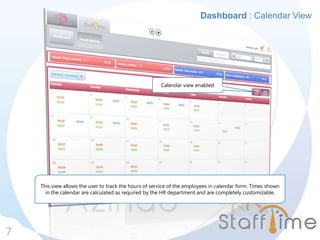
This view allows the user to track the hours of service of the employees in calendar form. Times shown
in the calendar are calculated as required by the HR department and are completely customizable.
Calendar view enabled
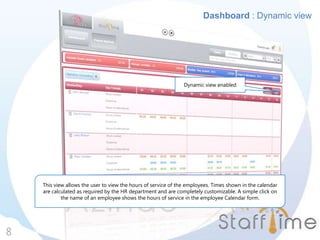
Dashboard : Dynamic view
8
This view allows the user to view the hours of service of the employees. Times shown in the calendar
are calculated as required by the HR department and are completely customizable. A simple click on
the name of an employee shows the hours of service in the employee Calendar form.
Dynamic view enabled
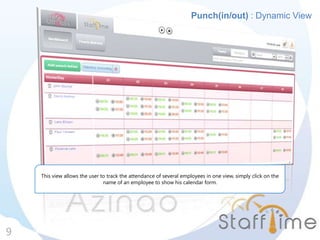
Punch(in/out) : Dynamic View
9
This view allows the user to track the attendance of several employees in one view, simply click on the
name of an employee to show his calendar form.
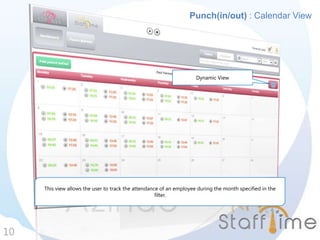
Punch(in/out) : Calendar View
10
This view allows the user to track the attendance of an employee during the month specified in the
filter.
Dynamic View
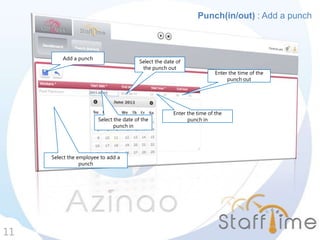
Punch(in/out) : Add a punch
11
Select the employee to add a
punch
Select the date of the
punch in
Select the date of
the punch out
Enter the time of the
punch in
Enter the time of the
punch out
Add a punch
12
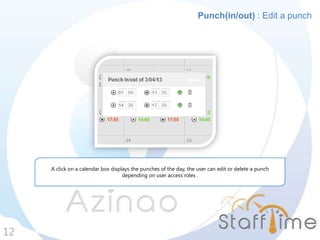
Punch(in/out) : Edit a punch
A click on a calendar box displays the punches of the day, the user can edit or delete a punch
depending on user access roles .
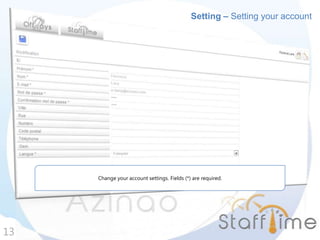
Setting – Setting your account
13
Change your account settings. Fields (*) are required.

Stafftime tuto mode manager-EN

  • 1.
  • 2.
    Managing attendance 2 Dashboard Punch (in/out) Graphic view  Dynamic view  Dynamic view  Add a punch  Statistics  Graphic view  Edit a punch Main Menu
  • 3.
    Main Menu 3 The mainmenu provides access to various tools for managing leave and holidays. Main Menu Filters allow you to select workers and teams to view in a given period. Filters Menu
  • 4.
    Dashboard : Statistics 4 Thestatistics view allows the manager to view hours of service of the week, month and year of an employee or team. These hours of service are calculated according to the needs of the HR department and are completely customizable.
  • 5.
    Dashboard : Statistics 5 Lavue statistique permet au manager de visualiser des heures de prestations de la semaine, du mois et de l’année d’un collaborateur ou d’une équipe. Ces heures de prestations sont calculées selon les besoins de la DRH et elles sont complètement customizable The name of the team selected in the filter
  • 6.
    Dashboard : CalendarView 6 This view allows the user to view the hours of service of an employee as Calendar. Times shown in the calendar are calculated as required by the HR department and are completely customizable. Le nom du travailleur sélectionné dans le filtre
  • 7.
    Dashboard : CalendarView 7 This view allows the user to track the hours of service of the employees in calendar form. Times shown in the calendar are calculated as required by the HR department and are completely customizable. Calendar view enabled
  • 8.
    Dashboard : Dynamicview 8 This view allows the user to view the hours of service of the employees. Times shown in the calendar are calculated as required by the HR department and are completely customizable. A simple click on the name of an employee shows the hours of service in the employee Calendar form. Dynamic view enabled
  • 9.
    Punch(in/out) : DynamicView 9 This view allows the user to track the attendance of several employees in one view, simply click on the name of an employee to show his calendar form.
  • 10.
    Punch(in/out) : CalendarView 10 This view allows the user to track the attendance of an employee during the month specified in the filter. Dynamic View
  • 11.
    Punch(in/out) : Adda punch 11 Select the employee to add a punch Select the date of the punch in Select the date of the punch out Enter the time of the punch in Enter the time of the punch out Add a punch
  • 12.
    12 Punch(in/out) : Edita punch A click on a calendar box displays the punches of the day, the user can edit or delete a punch depending on user access roles .
  • 13.
    Setting – Settingyour account 13 Change your account settings. Fields (*) are required.