Download free for 30 days
Sign in
Upload
Language (EN)
Support
Business
Mobile
Social Media
Marketing
Technology
Art & Photos
Career
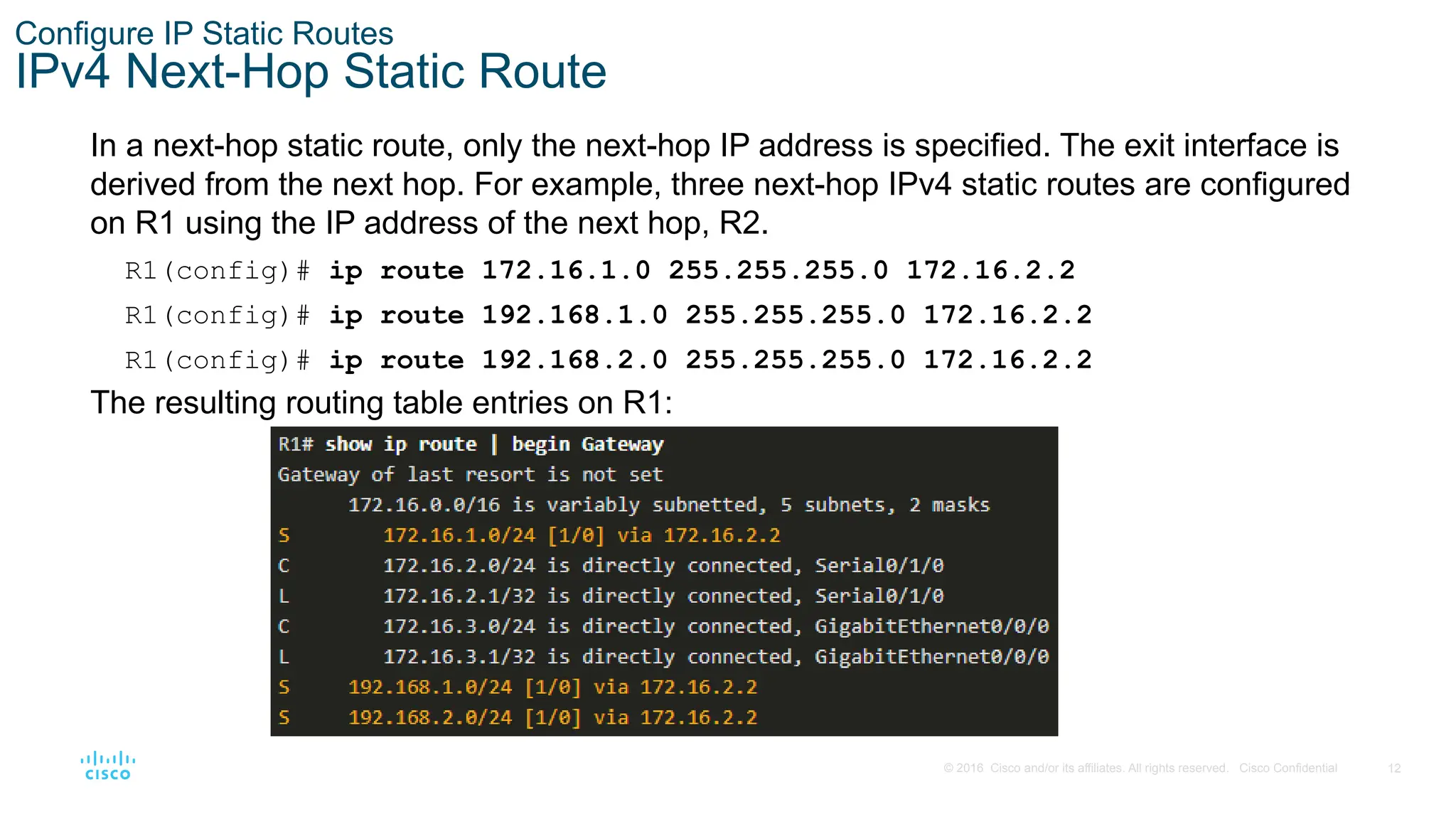
Design
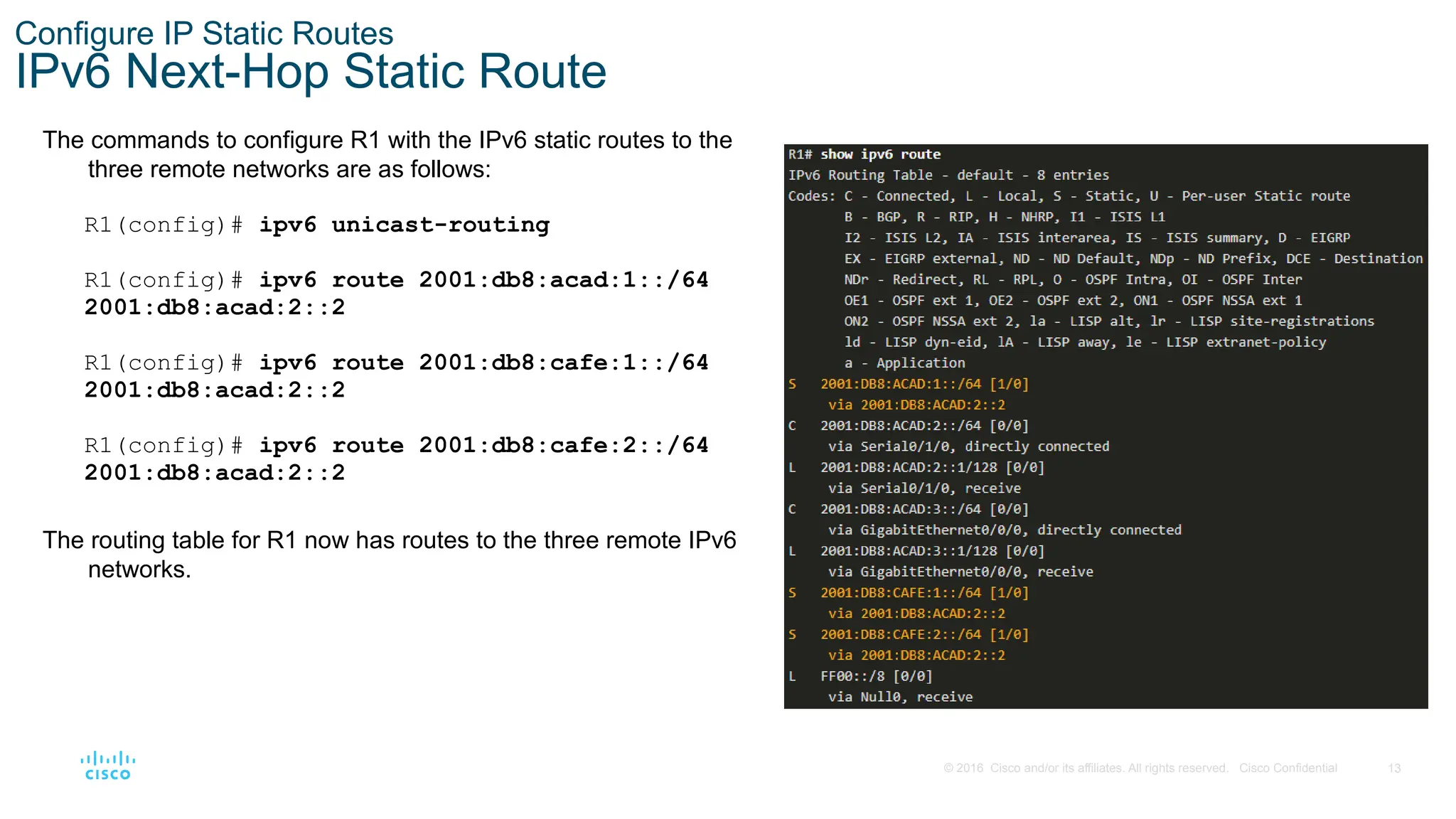
Education
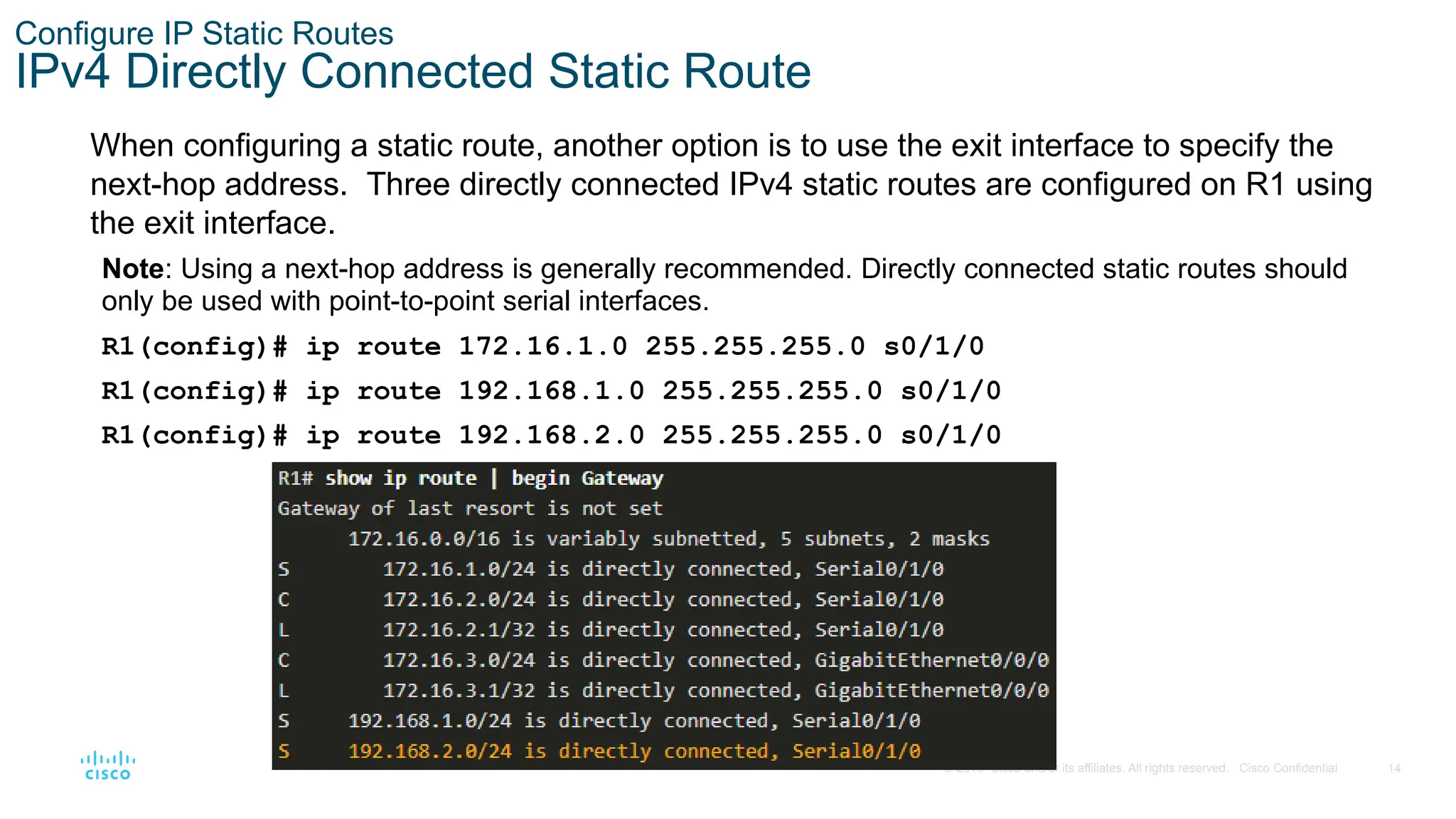
Presentations & Public Speaking
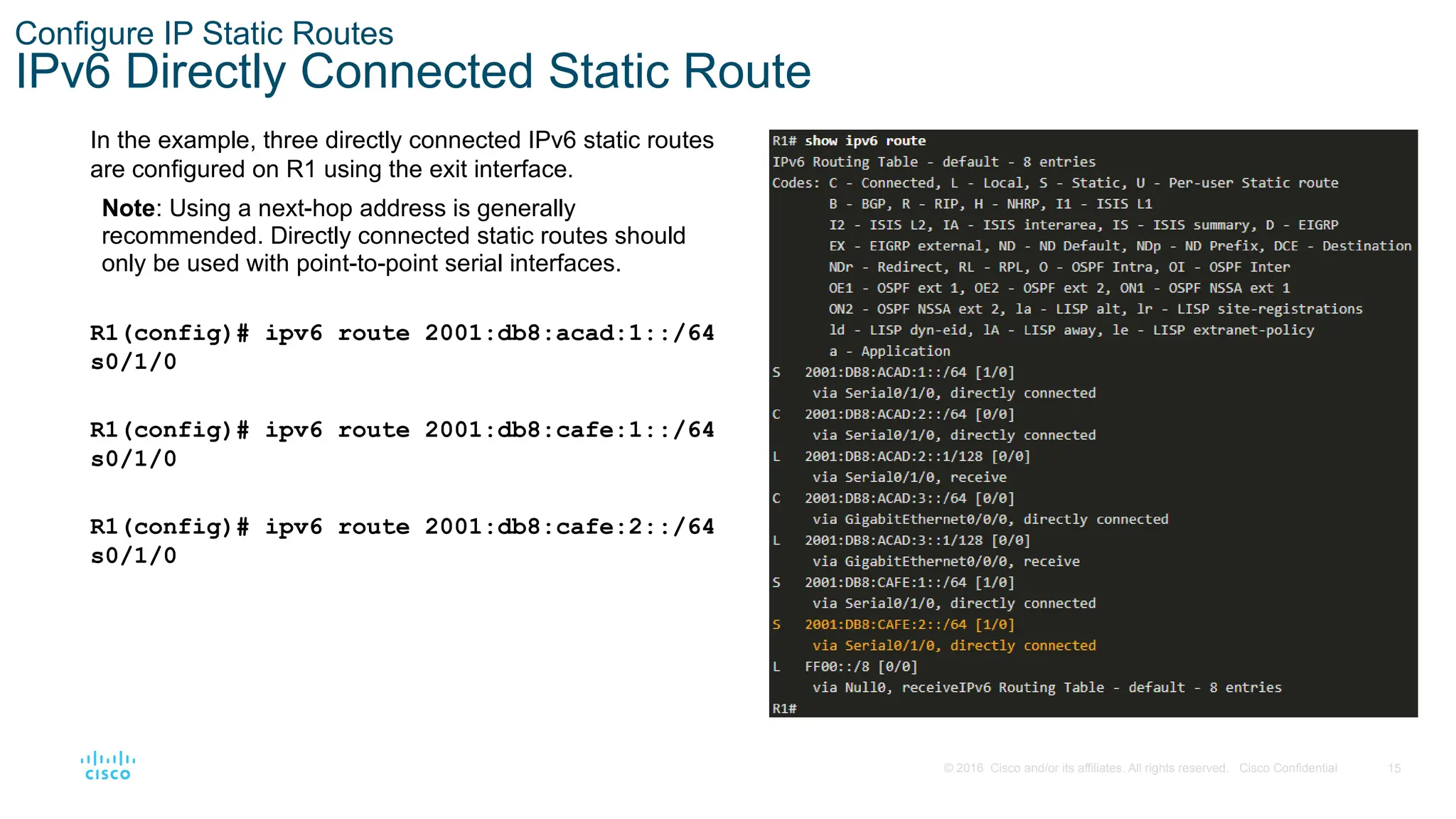
Government & Nonprofit
Healthcare
Internet
Law
Leadership & Management
Automotive
Engineering
Software
Recruiting & HR
Retail
Sales
Services
Science
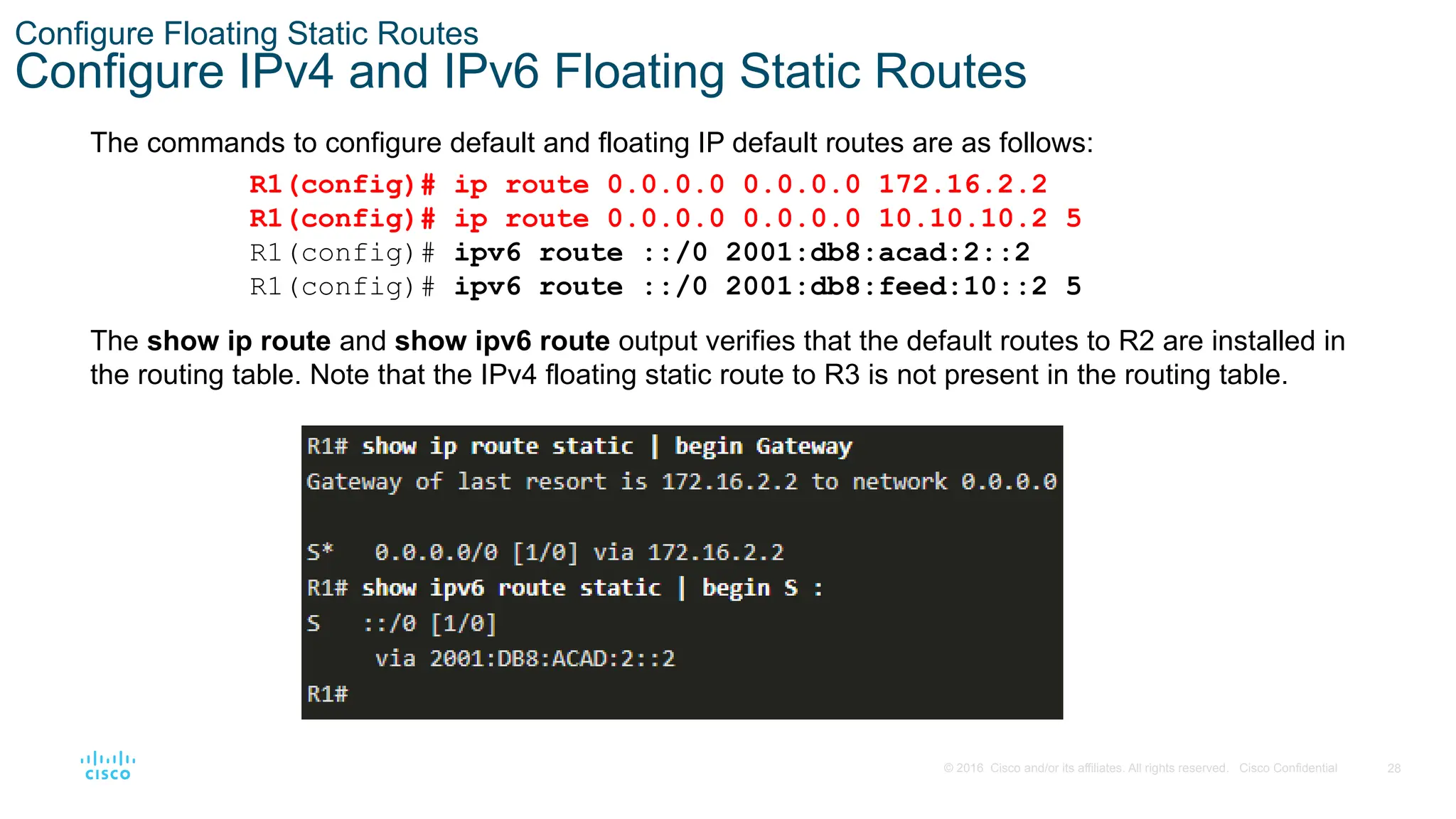
Small Business & Entrepreneurship
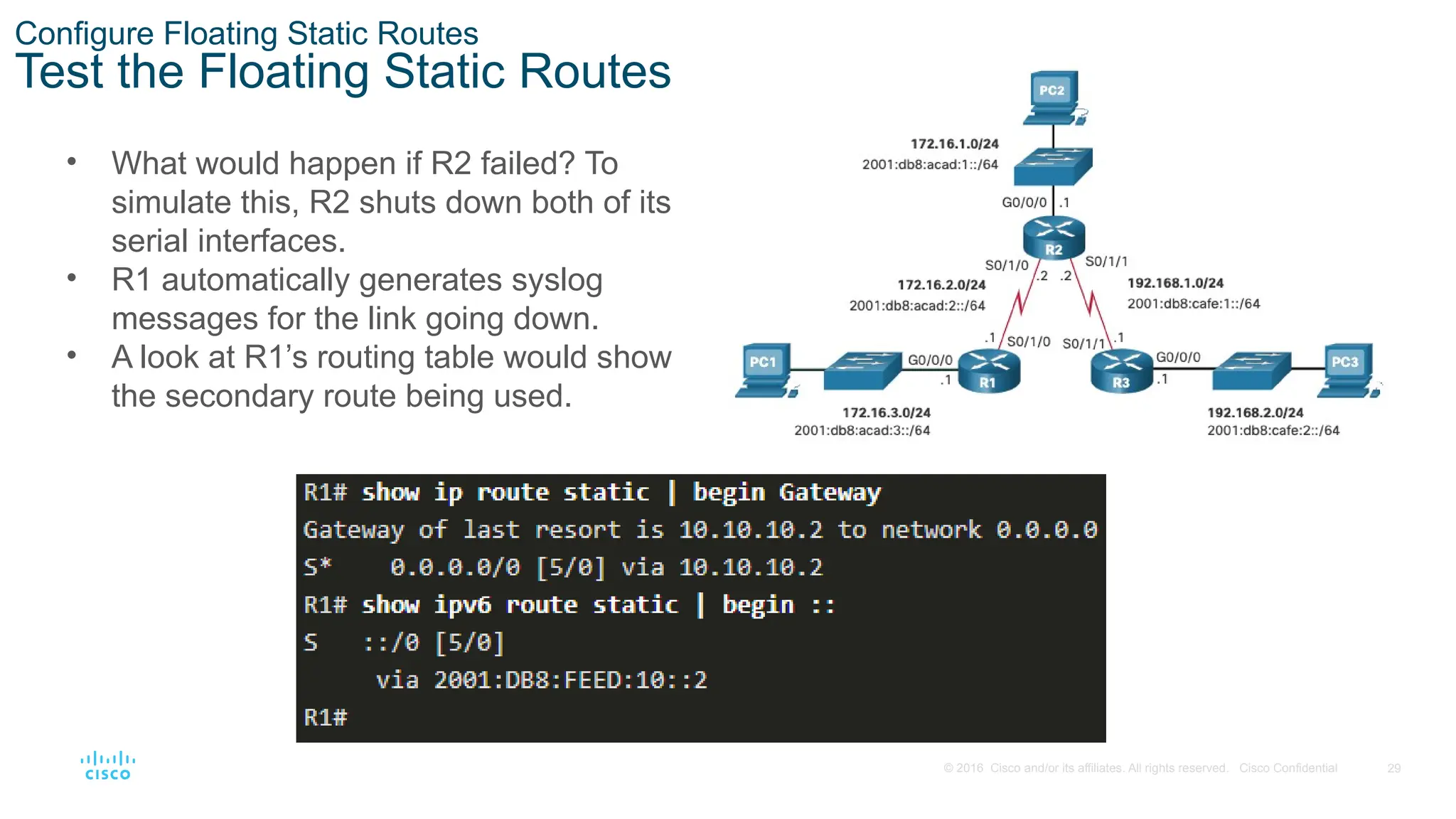
Food
Environment
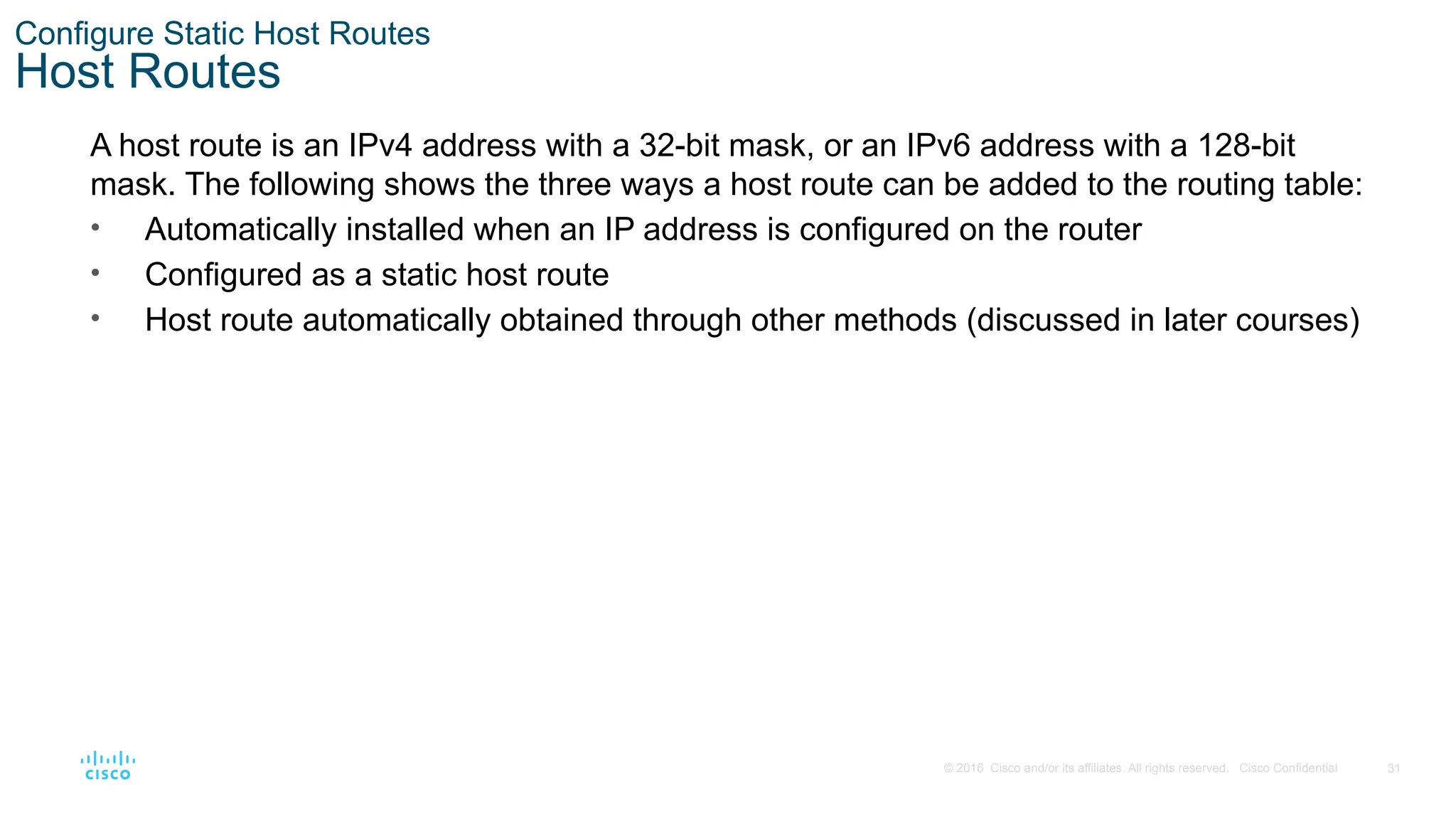
Economy & Finance
Data & Analytics
Investor Relations
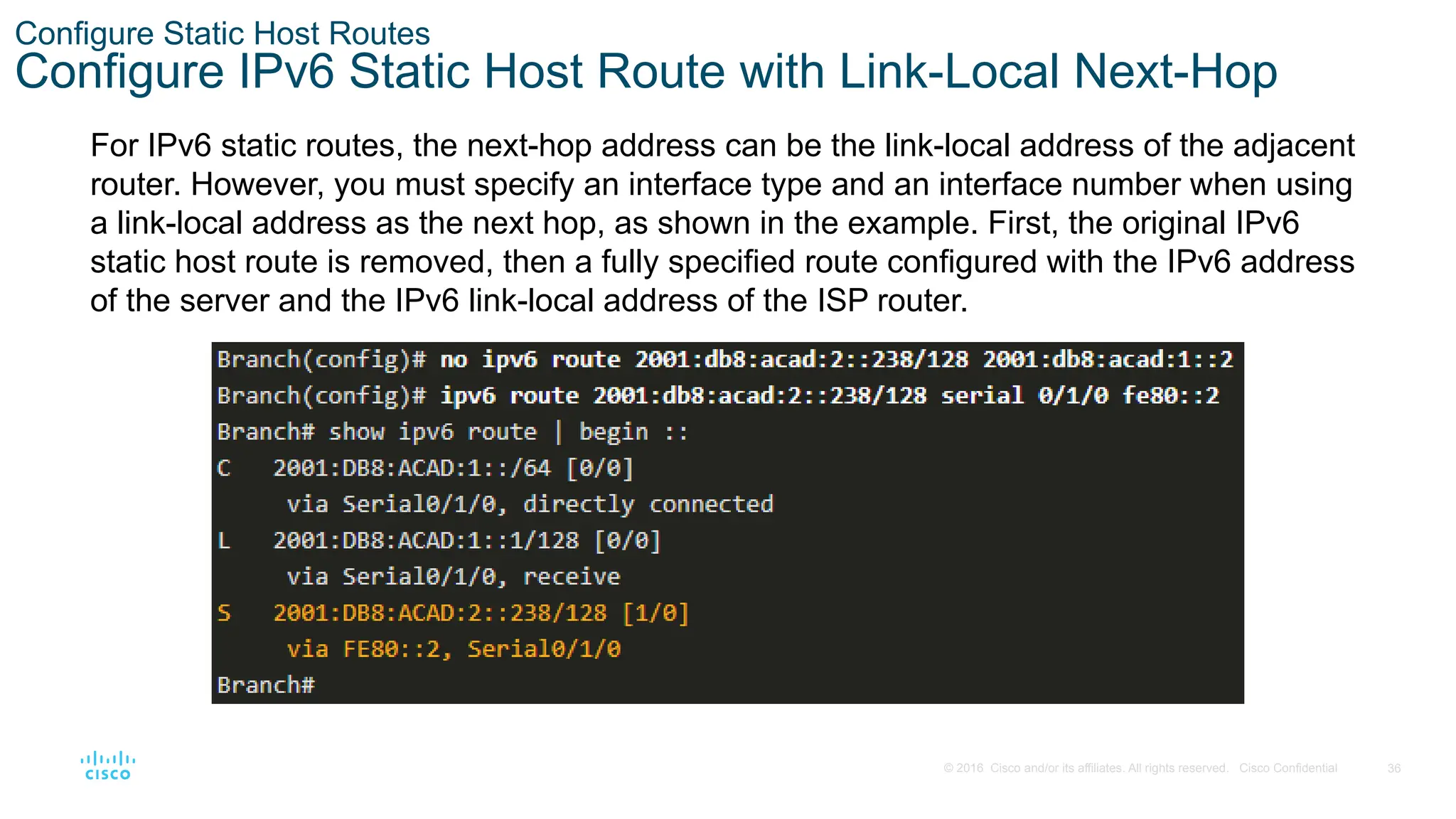
Sports
Spiritual
News & Politics
Travel
Self Improvement
Real Estate
Entertainment & Humor
Health & Medicine
Devices & Hardware
Lifestyle
Change Language
Language
English
Español
Português
Français
Deutsche
Cancel
Save
Submit search
EN
Uploaded by
efazalammahi
PPTX, PDF
9 views
SRWE_Mod-15.pptx ASDFGHJKLKJHGFDXSZasDFGHJKLKJHGFDSZA
aSDFGHJKLOPLKJHGFDSAaSDFGHJKLKJHGFDSA
Engineering
◦
Read more
0
Save
Share
Embed
Embed presentation
Download
Download to read offline
1
/ 43
2
/ 43
3
/ 43
4
/ 43
5
/ 43
6
/ 43
7
/ 43
8
/ 43
9
/ 43
10
/ 43
11
/ 43
12
/ 43
13
/ 43
14
/ 43
15
/ 43
16
/ 43
17
/ 43
18
/ 43
19
/ 43
20
/ 43
21
/ 43
22
/ 43
23
/ 43
24
/ 43
25
/ 43
26
/ 43
27
/ 43
28
/ 43
29
/ 43
30
/ 43
31
/ 43
32
/ 43
33
/ 43
34
/ 43
35
/ 43
36
/ 43
37
/ 43
38
/ 43
39
/ 43
40
/ 43
41
/ 43
42
/ 43
43
/ 43
More Related Content
PPTX
CCNA_RSE_Chp2-1 Static Routing for Networking
by
pmonchai1
PPTX
CCNA CISCO Chapter 02 Routing Concepts and Network
by
MonchaiPhaichitchan1
PPTX
static routing slide lab.pptx
by
GirT2
PPTX
CCNA 2 Routing and Switching v5.0 Chapter 6
by
Nil Menon
PDF
CCNAv5 - S2: Chapter 6 Static Routing
by
Vuz Dở Hơi
PPTX
Ccna rse chp2
by
newbie2019
PPTX
RS_instructorPPT_Chapter6RS_instructorPPT_Chapter6.pptx
by
FutureTechnologies3
PPTX
KPUCC-Rs instructor ppt_chapter6_final
by
Fisal Anwari
CCNA_RSE_Chp2-1 Static Routing for Networking
by
pmonchai1
CCNA CISCO Chapter 02 Routing Concepts and Network
by
MonchaiPhaichitchan1
static routing slide lab.pptx
by
GirT2
CCNA 2 Routing and Switching v5.0 Chapter 6
by
Nil Menon
CCNAv5 - S2: Chapter 6 Static Routing
by
Vuz Dở Hơi
Ccna rse chp2
by
newbie2019
RS_instructorPPT_Chapter6RS_instructorPPT_Chapter6.pptx
by
FutureTechnologies3
KPUCC-Rs instructor ppt_chapter6_final
by
Fisal Anwari
Similar to SRWE_Mod-15.pptx ASDFGHJKLKJHGFDXSZasDFGHJKLKJHGFDSZA
PPTX
Chapter 17 : static routing
by
teknetir
PPTX
Detailed explanation of Basic router configuration
by
samreenghauri786
PPT
Chapter_2_Configure_Static Routing_CCNA.ppt
by
huyquocngo
PPTX
Статическая IP-маршрутизация_Теоретическая часть ПЗ_2 (1).pptx
by
MuhdQawiem1
PPTX
CCNA (R & S) Module 03 - Routing & Switching Essentials - Chapter 2
by
Waqas Ahmed Nawaz
PPT
1 Routing Concepts-students to download only.ppt
by
alvindalejoyosa1
PPT
Routing Protocols and Concepts – Chapter 2
by
arcijaz
PPTX
Chapter 15 : routing concepts
by
teknetir
PPTX
ITN_Module_10.pptx gfhfdgsrfryrenikerrtvbter
by
crystaljhoyl
PPT
Static Routing
by
Sachii Dosti
PDF
CCNAv5 - S2: Chapter4 Routing Concepts
by
Vuz Dở Hơi
PPTX
SRWE_Module_16.pptx
by
RobinRohit2
PPTX
SRWE_Module_16.pptx
by
RobinRohit2
PPTX
IPv6 Static Routes
by
Irsandi Hasan
PPTX
Chapter: Basic Router Configuration Cisco
by
samiulsuman
PPTX
CCNA (R & S) Module 03 - Routing & Switching Essentials - Chapter 1
by
Waqas Ahmed Nawaz
PDF
CCNA Routing Protocols
by
Mansour Naslcheraghi
PPTX
CCNA2 Verson6 Chapter2
by
Chaing Ravuth
PPTX
CCNA2 Verson6 Chapter1
by
Chaing Ravuth
PPTX
KPUCC-Rs instructor ppt_chapter4_final
by
Fisal Anwari
Chapter 17 : static routing
by
teknetir
Detailed explanation of Basic router configuration
by
samreenghauri786
Chapter_2_Configure_Static Routing_CCNA.ppt
by
huyquocngo
Статическая IP-маршрутизация_Теоретическая часть ПЗ_2 (1).pptx
by
MuhdQawiem1
CCNA (R & S) Module 03 - Routing & Switching Essentials - Chapter 2
by
Waqas Ahmed Nawaz
1 Routing Concepts-students to download only.ppt
by
alvindalejoyosa1
Routing Protocols and Concepts – Chapter 2
by
arcijaz
Chapter 15 : routing concepts
by
teknetir
ITN_Module_10.pptx gfhfdgsrfryrenikerrtvbter
by
crystaljhoyl
Static Routing
by
Sachii Dosti
CCNAv5 - S2: Chapter4 Routing Concepts
by
Vuz Dở Hơi
SRWE_Module_16.pptx
by
RobinRohit2
SRWE_Module_16.pptx
by
RobinRohit2
IPv6 Static Routes
by
Irsandi Hasan
Chapter: Basic Router Configuration Cisco
by
samiulsuman
CCNA (R & S) Module 03 - Routing & Switching Essentials - Chapter 1
by
Waqas Ahmed Nawaz
CCNA Routing Protocols
by
Mansour Naslcheraghi
CCNA2 Verson6 Chapter2
by
Chaing Ravuth
CCNA2 Verson6 Chapter1
by
Chaing Ravuth
KPUCC-Rs instructor ppt_chapter4_final
by
Fisal Anwari
More from efazalammahi
PPTX
SRWE_Mod-8.pptx asdfghj,./.l,kjhgfvcxzczx
by
efazalammahi
PPTX
SRWE_Mod-14.pptx ASDFGHJKL;LKJHGFDSZAzsDFGHJHGFDSZzxCVBHJKLP;;LKJHBGVCXZ
by
efazalammahi
PPTX
SRWE_Mod-5.pptxZXcvgbhjkiolp;'[]\';l,kmjnhbgvfcdxszaAZSXDcfvgbhnjmk,.
by
efazalammahi
PPTX
SRWE_Mod-3.pptxazsDFGHJK,./.L,MNBVCXZzxCV
by
efazalammahi
PPTX
ITN_Mod-4.pptx sxdvgrthyjukilo;p'['oDCDVS
by
efazalammahi
PPTX
PromotionCyberRace_Learn-a-thon-Updated (1).pptx
by
efazalammahi
SRWE_Mod-8.pptx asdfghj,./.l,kjhgfvcxzczx
by
efazalammahi
SRWE_Mod-14.pptx ASDFGHJKL;LKJHGFDSZAzsDFGHJHGFDSZzxCVBHJKLP;;LKJHBGVCXZ
by
efazalammahi
SRWE_Mod-5.pptxZXcvgbhjkiolp;'[]\';l,kmjnhbgvfcdxszaAZSXDcfvgbhnjmk,.
by
efazalammahi
SRWE_Mod-3.pptxazsDFGHJK,./.L,MNBVCXZzxCV
by
efazalammahi
ITN_Mod-4.pptx sxdvgrthyjukilo;p'['oDCDVS
by
efazalammahi
PromotionCyberRace_Learn-a-thon-Updated (1).pptx
by
efazalammahi
Recently uploaded
PDF
Sensor & Instrument MODULE 3 REVISION PPT.pdf
by
26dsyogam
PDF
PROPEX-RAG: Prompt-Driven GraphRAG for Multi-Hop QA
by
apurvakarne
PPTX
Engineering Economics CHAPTER 4.pptx - R
by
MisgnaArefe
PPTX
How to Create an Effective Monthly Preventive Maintenance Plan
by
MaintWiz Technologies Private Limited
PPTX
Industrial Smart Ventilation system.pptx
by
fsanjay42
PPTX
Data Science with R Final yrUnit II.pptx
by
Osmania University
PPTX
The Complete Guide to Energy Audits_ Unlocking Savings, Sustainability, and P...
by
greentechnexus2024
PPTX
Industrial Plant Safety – Comprehensive Guide for Workplace Safety & Risk Pre...
by
MaintWiz Technologies Private Limited
PPTX
22PEOIT4C Session 7 A searching algorithm.pptx
by
mailmegokilavani
PPTX
Introduction to Civil Engineering-Defination, Branches of civil engineering a...
by
vidyanand kadam
PPTX
MODULE 1-UNIT_1.pptx MODULE 1-UNIT_1.pptx MODULE 1-UNIT_1.pptx
by
pavanscholar123
PPTX
infosecurity & Cyber Sec 2025 September for deep.pptx
by
msrehan
PDF
Nostr : A protocol for freedom of speech
by
Emre YILMAZ
PPTX
Aix-Marseille Université Diploma
by
美国加利福尼亚州立理工大学波莫纳分校学位证书补办【Q微号:1954 292 140】CPP毕业证购买
PPTX
22PEOIT4C Session 1 Introduction to AI and intelligent agents.pptx
by
mailmegokilavani
PPTX
1_Sources of security threats, Motives, Target.pptx
by
dolly475229
PPTX
KTU 2024 SCHEME -PEMET 413 COMPOSITE MATERIALS MODULE 1 LECTURE 1.pptx
by
VinayB68
DOCX
Project Management(BOE 070) notes Unite 4 AKTU
by
26dsyogam
PDF
22PEOIT4C Artificial Intelligence Syllab
by
mailmegokilavani
DOCX
Buy Facebook Ads Accounts_ Boost Your Professional ....docx
by
topusapro.com
Sensor & Instrument MODULE 3 REVISION PPT.pdf
by
26dsyogam
PROPEX-RAG: Prompt-Driven GraphRAG for Multi-Hop QA
by
apurvakarne
Engineering Economics CHAPTER 4.pptx - R
by
MisgnaArefe
How to Create an Effective Monthly Preventive Maintenance Plan
by
MaintWiz Technologies Private Limited
Industrial Smart Ventilation system.pptx
by
fsanjay42
Data Science with R Final yrUnit II.pptx
by
Osmania University
The Complete Guide to Energy Audits_ Unlocking Savings, Sustainability, and P...
by
greentechnexus2024
Industrial Plant Safety – Comprehensive Guide for Workplace Safety & Risk Pre...
by
MaintWiz Technologies Private Limited
22PEOIT4C Session 7 A searching algorithm.pptx
by
mailmegokilavani
Introduction to Civil Engineering-Defination, Branches of civil engineering a...
by
vidyanand kadam
MODULE 1-UNIT_1.pptx MODULE 1-UNIT_1.pptx MODULE 1-UNIT_1.pptx
by
pavanscholar123
infosecurity & Cyber Sec 2025 September for deep.pptx
by
msrehan
Nostr : A protocol for freedom of speech
by
Emre YILMAZ
Aix-Marseille Université Diploma
by
美国加利福尼亚州立理工大学波莫纳分校学位证书补办【Q微号:1954 292 140】CPP毕业证购买
22PEOIT4C Session 1 Introduction to AI and intelligent agents.pptx
by
mailmegokilavani
1_Sources of security threats, Motives, Target.pptx
by
dolly475229
KTU 2024 SCHEME -PEMET 413 COMPOSITE MATERIALS MODULE 1 LECTURE 1.pptx
by
VinayB68
Project Management(BOE 070) notes Unite 4 AKTU
by
26dsyogam
22PEOIT4C Artificial Intelligence Syllab
by
mailmegokilavani
Buy Facebook Ads Accounts_ Boost Your Professional ....docx
by
topusapro.com
SRWE_Mod-15.pptx ASDFGHJKLKJHGFDXSZasDFGHJKLKJHGFDSZA
1.
Switching, Routing, and
Wireless Essentials v7.0 (SRWE) Module 15: IP Static Routing
2.
2 © 2016 Cisco
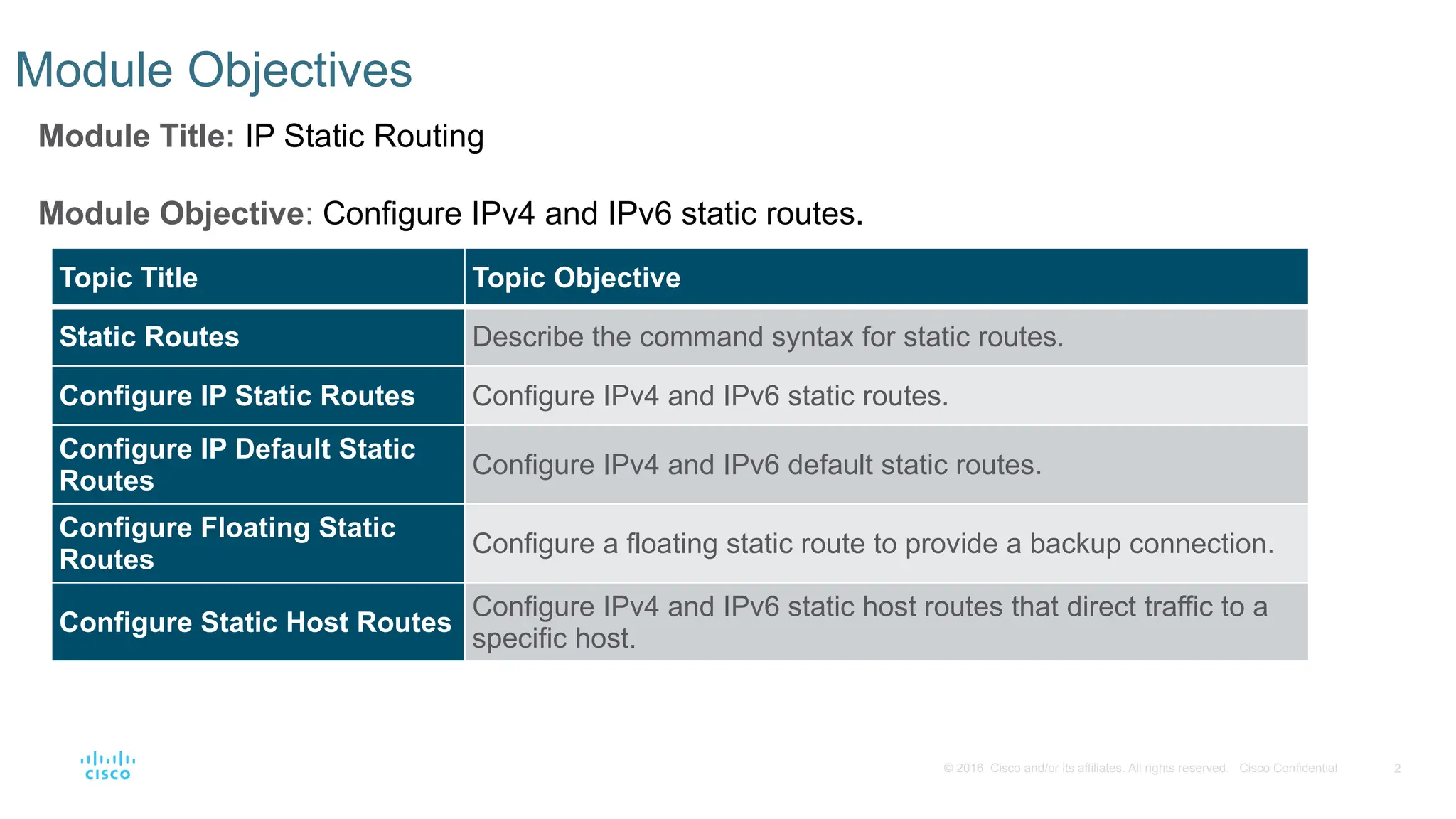
and/or its affiliates. All rights reserved. Cisco Confidential Module Objectives Module Title: IP Static Routing Module Objective: Configure IPv4 and IPv6 static routes. Topic Title Topic Objective Static Routes Describe the command syntax for static routes. Configure IP Static Routes Configure IPv4 and IPv6 static routes. Configure IP Default Static Routes Configure IPv4 and IPv6 default static routes. Configure Floating Static Routes Configure a floating static route to provide a backup connection. Configure Static Host Routes Configure IPv4 and IPv6 static host routes that direct traffic to a specific host.
3.
3 © 2016 Cisco
and/or its affiliates. All rights reserved. Cisco Confidential 15.1 Static Routes
4.
4 © 2016 Cisco
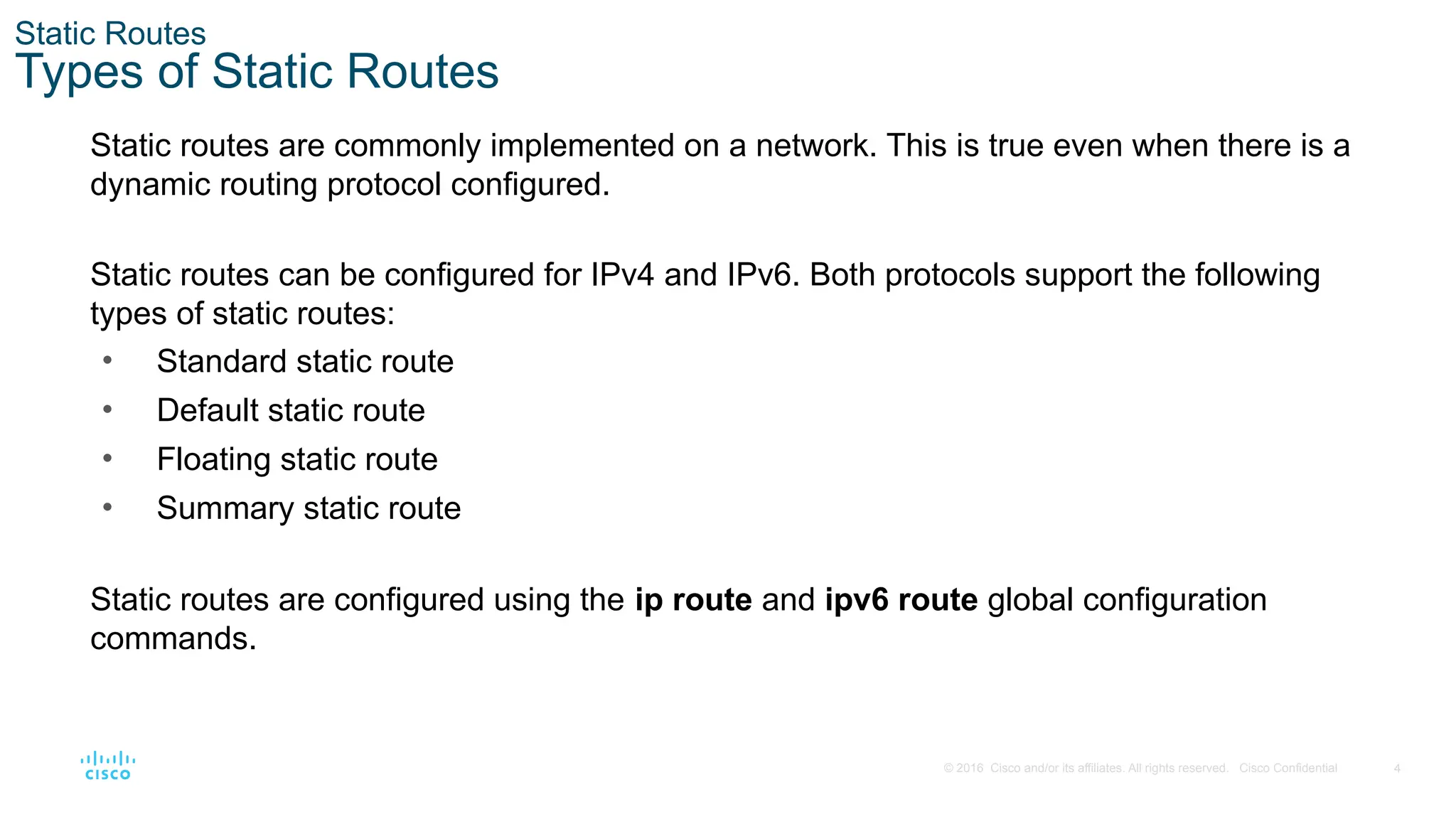
and/or its affiliates. All rights reserved. Cisco Confidential Static Routes Types of Static Routes Static routes are commonly implemented on a network. This is true even when there is a dynamic routing protocol configured. Static routes can be configured for IPv4 and IPv6. Both protocols support the following types of static routes: • Standard static route • Default static route • Floating static route • Summary static route Static routes are configured using the ip route and ipv6 route global configuration commands.
5.
5 © 2016 Cisco
and/or its affiliates. All rights reserved. Cisco Confidential Static Routes Next-Hop Options When configuring a static route, the next hop can be identified by an IP address, exit interface, or both. How the destination is specified creates one of the three following types of static route: • Next-hop route - Only the next-hop IP address is specified • Directly connected static route - Only the router exit interface is specified • Fully specified static route - The next-hop IP address and exit interface are specified
6.
6 © 2016 Cisco
and/or its affiliates. All rights reserved. Cisco Confidential Static Routes IPv4 Static Route Command IPv4 static routes are configured using the following global configuration command: Router(config)# ip route network-address subnet-mask { ip-address | exit-intf [ip-address]} [distance] Note: Either the ip-address, exit-intf, or the ip-address and exit-intf parameters must be configured.
7.
7 © 2016 Cisco
and/or its affiliates. All rights reserved. Cisco Confidential Static Routes IPv6 Static Route Command IPv6 static routes are configured using the following global configuration command: Router(config)# ipv6 route ipv6-prefix/prefix-length {ipv6-address | exit-intf [ipv6-address]} [distance] Most of parameters are identical to the IPv4 version of the command.
8.
8 © 2016 Cisco
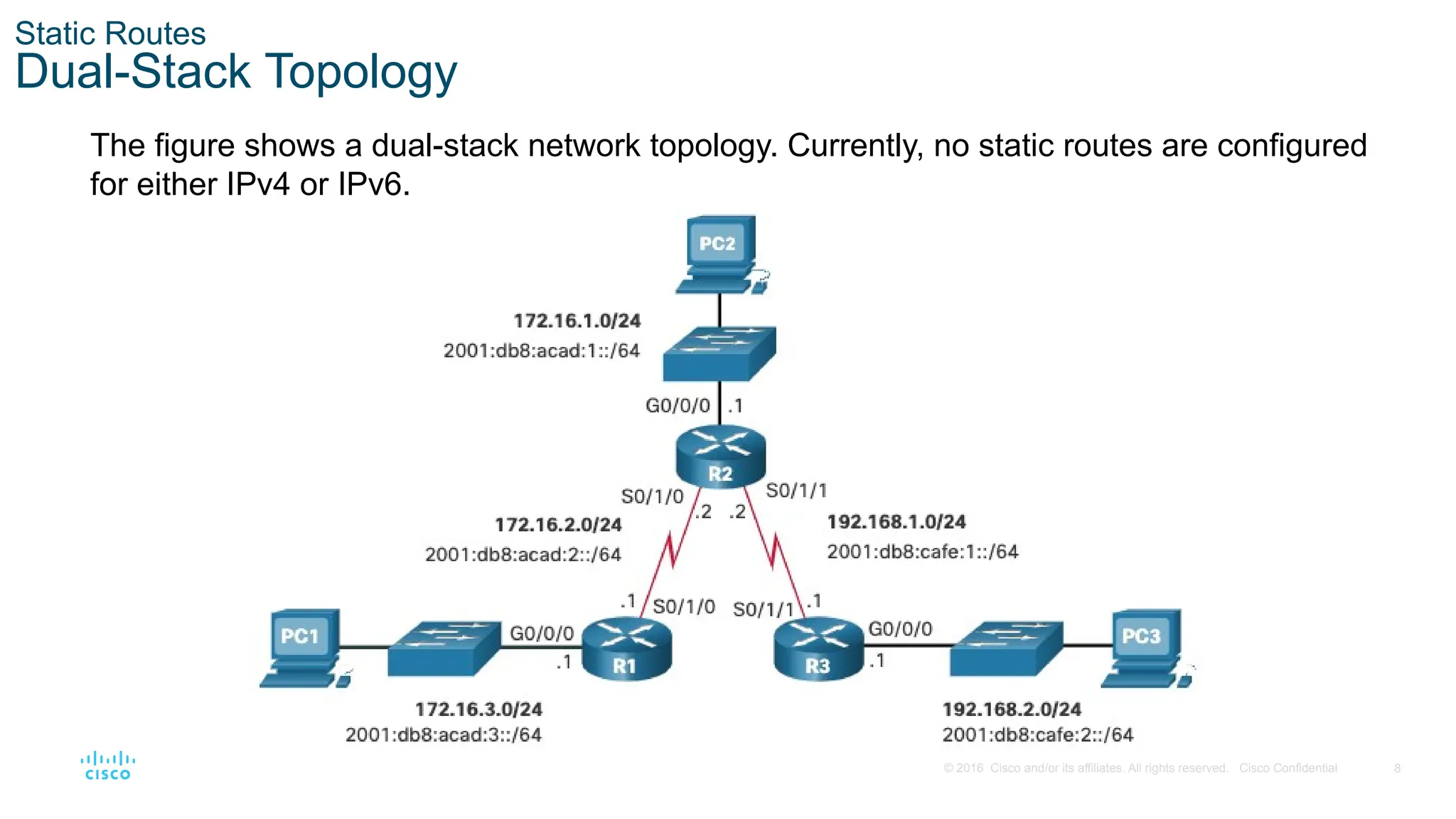
and/or its affiliates. All rights reserved. Cisco Confidential Static Routes Dual-Stack Topology The figure shows a dual-stack network topology. Currently, no static routes are configured for either IPv4 or IPv6.
9.
9 © 2016 Cisco
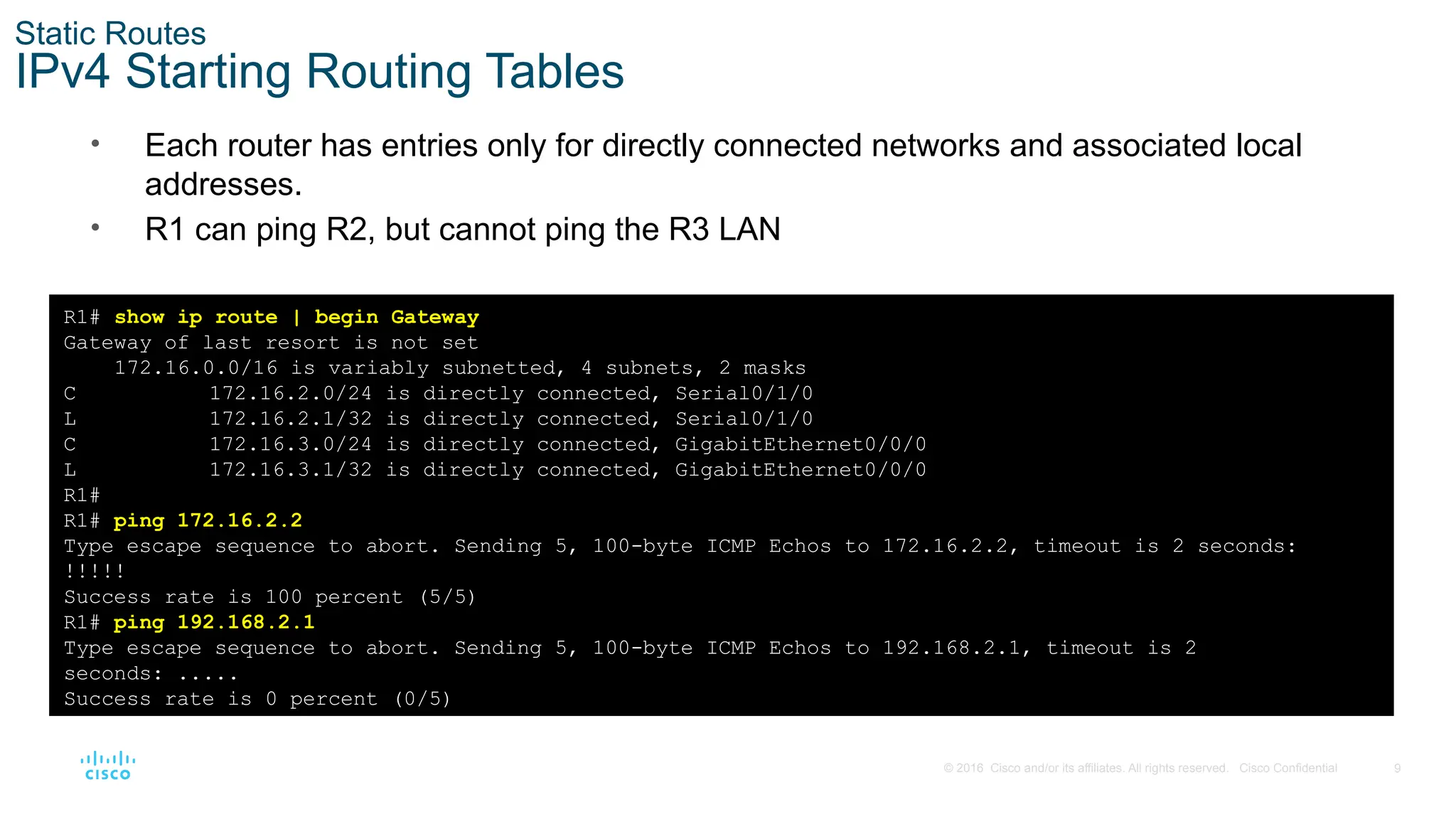
and/or its affiliates. All rights reserved. Cisco Confidential Static Routes IPv4 Starting Routing Tables • Each router has entries only for directly connected networks and associated local addresses. • R1 can ping R2, but cannot ping the R3 LAN R1# show ip route | begin Gateway Gateway of last resort is not set 172.16.0.0/16 is variably subnetted, 4 subnets, 2 masks C 172.16.2.0/24 is directly connected, Serial0/1/0 L 172.16.2.1/32 is directly connected, Serial0/1/0 C 172.16.3.0/24 is directly connected, GigabitEthernet0/0/0 L 172.16.3.1/32 is directly connected, GigabitEthernet0/0/0 R1# R1# ping 172.16.2.2 Type escape sequence to abort. Sending 5, 100-byte ICMP Echos to 172.16.2.2, timeout is 2 seconds: !!!!! Success rate is 100 percent (5/5) R1# ping 192.168.2.1 Type escape sequence to abort. Sending 5, 100-byte ICMP Echos to 192.168.2.1, timeout is 2 seconds: ..... Success rate is 0 percent (0/5)
10.
10 © 2016 Cisco
and/or its affiliates. All rights reserved. Cisco Confidential Static Routes IPv6 Starting Routing Tables • Each router has entries only for directly connected networks and associated local addresses. • R1 can ping R2, but cannot ping the R3 LAN. R1# show ipv6 route | begin C C 2001:DB8:ACAD:2::/64 [0/0] via Serial0/1/0, directly connected L 2001:DB8:ACAD:2::1/128 [0/0] via Serial0/1/0, receive C 2001:DB8:ACAD:3::/64 [0/0] via GigabitEthernet0/0/0, directly connected L 2001:DB8:ACAD:3::1/128 [0/0] via GigabitEthernet0/0/0, receive L FF00::/8 [0/0] via Null0, receive R1# R1# ping 2001:db8:acad:2::2 Type escape sequence to abort. Sending 5, 100-byte ICMP Echos to 2001:DB8:ACAD:2::2, timeout is 2 seconds: !!!!! Success rate is 100 percent (5/5), round-trip min/avg/max = 2/2/3 ms) R1# ping 2001:DB8:cafe:2::1 Type escape sequence to abort. Sending 5, 100-byte ICMP Echos to 2001:DB8:CAFE:2::1, timeout is 2 seconds: % No valid route for destination Success rate is 0 percent (0/1)
11.
11 © 2016 Cisco
and/or its affiliates. All rights reserved. Cisco Confidential 15.2 Configure IP Static Routes
12.
12 © 2016 Cisco
and/or its affiliates. All rights reserved. Cisco Confidential Configure IP Static Routes IPv4 Next-Hop Static Route In a next-hop static route, only the next-hop IP address is specified. The exit interface is derived from the next hop. For example, three next-hop IPv4 static routes are configured on R1 using the IP address of the next hop, R2. R1(config)# ip route 172.16.1.0 255.255.255.0 172.16.2.2 R1(config)# ip route 192.168.1.0 255.255.255.0 172.16.2.2 R1(config)# ip route 192.168.2.0 255.255.255.0 172.16.2.2 The resulting routing table entries on R1:
13.
13 © 2016 Cisco
and/or its affiliates. All rights reserved. Cisco Confidential Configure IP Static Routes IPv6 Next-Hop Static Route The commands to configure R1 with the IPv6 static routes to the three remote networks are as follows: R1(config)# ipv6 unicast-routing R1(config)# ipv6 route 2001:db8:acad:1::/64 2001:db8:acad:2::2 R1(config)# ipv6 route 2001:db8:cafe:1::/64 2001:db8:acad:2::2 R1(config)# ipv6 route 2001:db8:cafe:2::/64 2001:db8:acad:2::2 The routing table for R1 now has routes to the three remote IPv6 networks.
14.
14 © 2016 Cisco
and/or its affiliates. All rights reserved. Cisco Confidential Configure IP Static Routes IPv4 Directly Connected Static Route When configuring a static route, another option is to use the exit interface to specify the next-hop address. Three directly connected IPv4 static routes are configured on R1 using the exit interface. Note: Using a next-hop address is generally recommended. Directly connected static routes should only be used with point-to-point serial interfaces. R1(config)# ip route 172.16.1.0 255.255.255.0 s0/1/0 R1(config)# ip route 192.168.1.0 255.255.255.0 s0/1/0 R1(config)# ip route 192.168.2.0 255.255.255.0 s0/1/0
15.
15 © 2016 Cisco
and/or its affiliates. All rights reserved. Cisco Confidential Configure IP Static Routes IPv6 Directly Connected Static Route In the example, three directly connected IPv6 static routes are configured on R1 using the exit interface. Note: Using a next-hop address is generally recommended. Directly connected static routes should only be used with point-to-point serial interfaces. R1(config)# ipv6 route 2001:db8:acad:1::/64 s0/1/0 R1(config)# ipv6 route 2001:db8:cafe:1::/64 s0/1/0 R1(config)# ipv6 route 2001:db8:cafe:2::/64 s0/1/0
16.
16 © 2016 Cisco
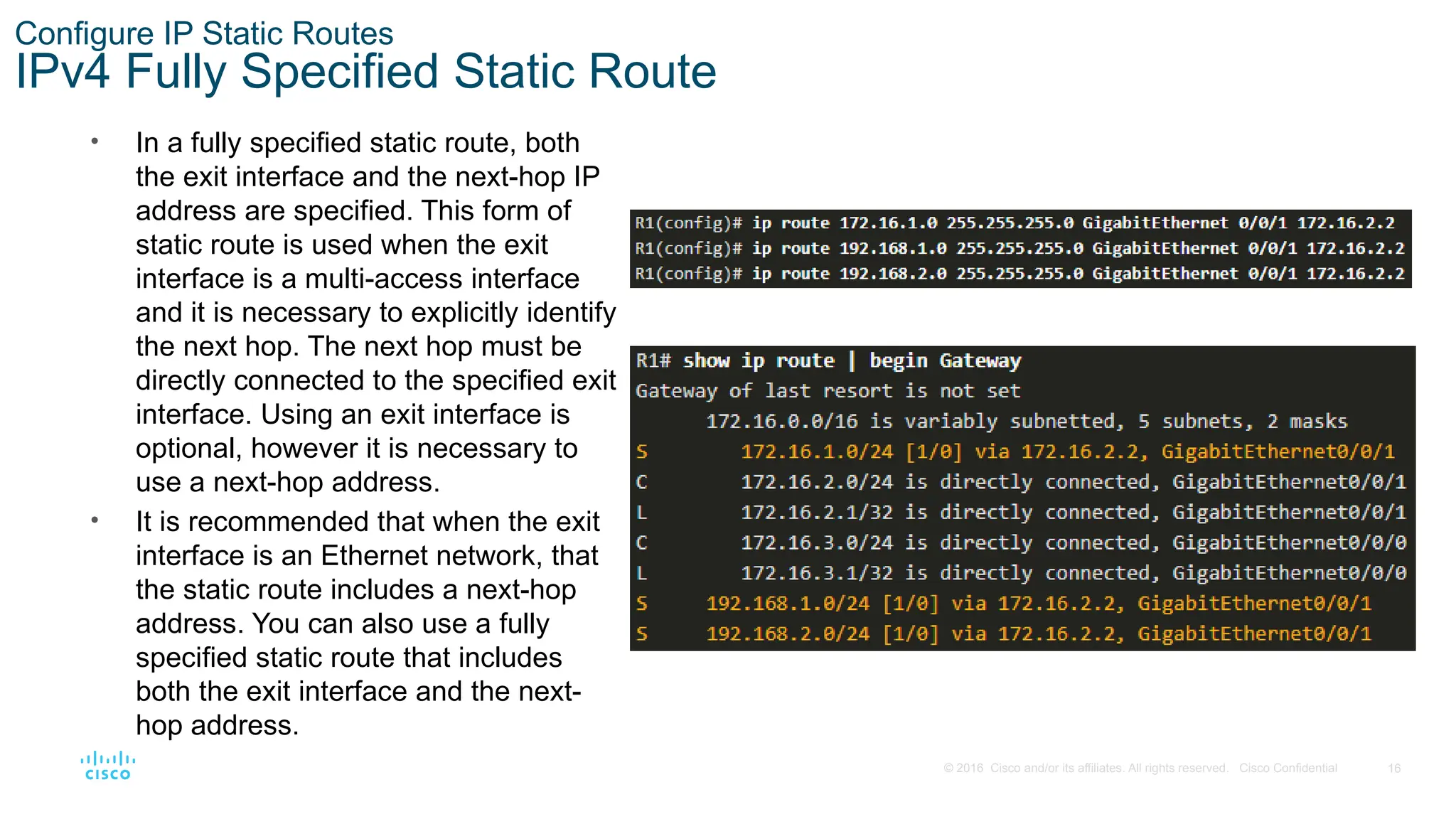
and/or its affiliates. All rights reserved. Cisco Confidential Configure IP Static Routes IPv4 Fully Specified Static Route • In a fully specified static route, both the exit interface and the next-hop IP address are specified. This form of static route is used when the exit interface is a multi-access interface and it is necessary to explicitly identify the next hop. The next hop must be directly connected to the specified exit interface. Using an exit interface is optional, however it is necessary to use a next-hop address. • It is recommended that when the exit interface is an Ethernet network, that the static route includes a next-hop address. You can also use a fully specified static route that includes both the exit interface and the next- hop address.
17.
17 © 2016 Cisco
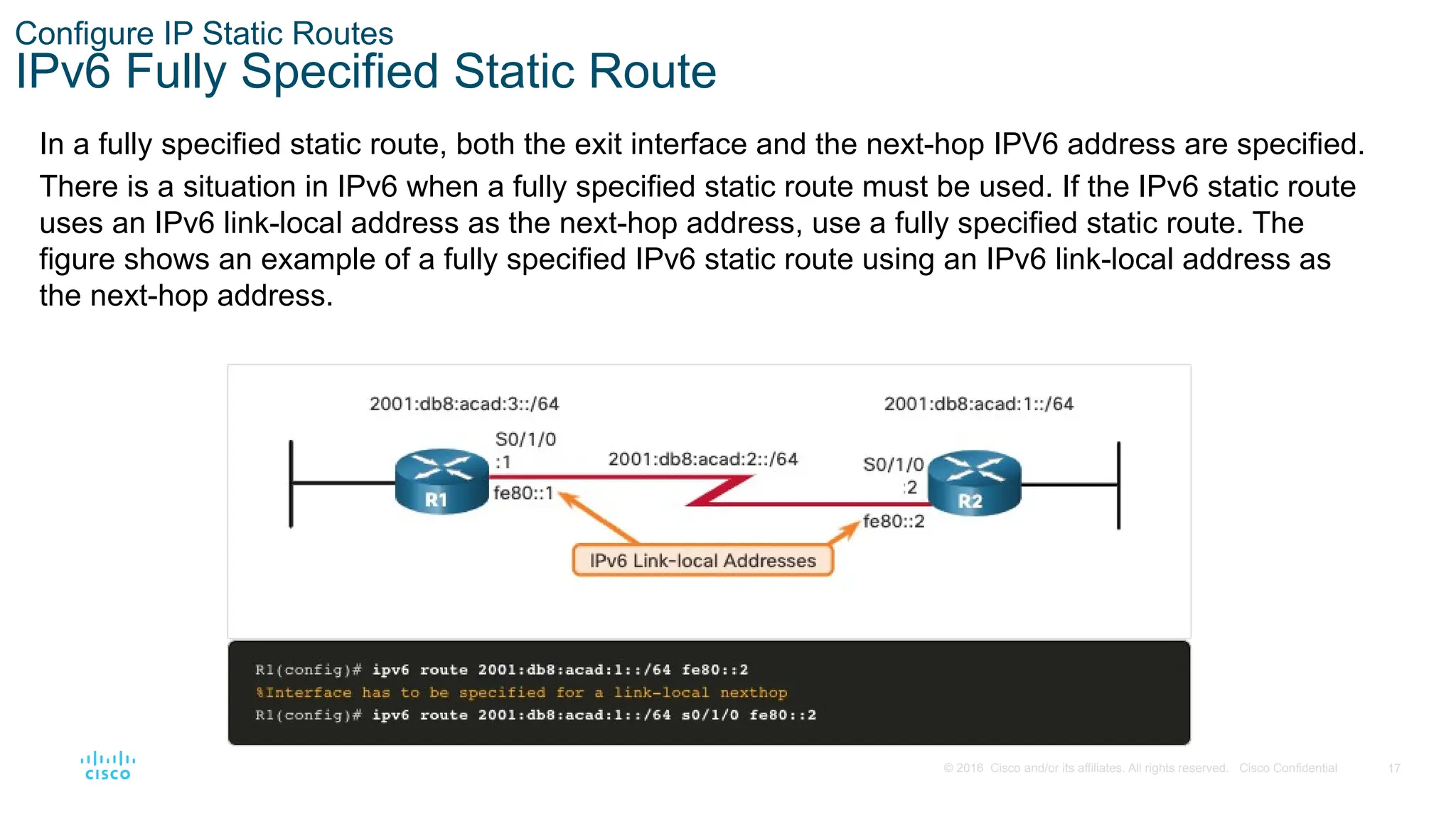
and/or its affiliates. All rights reserved. Cisco Confidential Configure IP Static Routes IPv6 Fully Specified Static Route In a fully specified static route, both the exit interface and the next-hop IPV6 address are specified. There is a situation in IPv6 when a fully specified static route must be used. If the IPv6 static route uses an IPv6 link-local address as the next-hop address, use a fully specified static route. The figure shows an example of a fully specified IPv6 static route using an IPv6 link-local address as the next-hop address.
18.
18 © 2016 Cisco
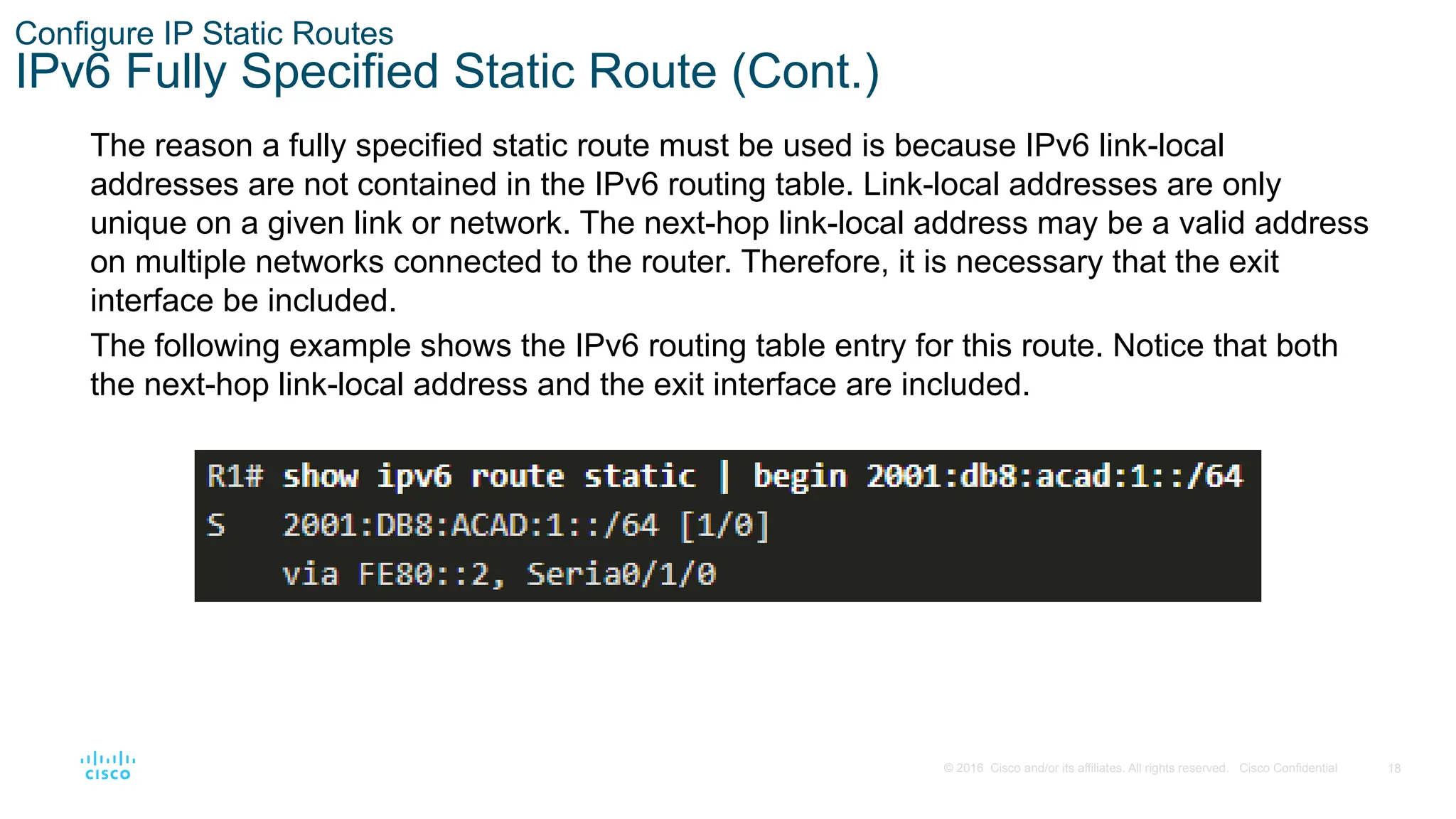
and/or its affiliates. All rights reserved. Cisco Confidential Configure IP Static Routes IPv6 Fully Specified Static Route (Cont.) The reason a fully specified static route must be used is because IPv6 link-local addresses are not contained in the IPv6 routing table. Link-local addresses are only unique on a given link or network. The next-hop link-local address may be a valid address on multiple networks connected to the router. Therefore, it is necessary that the exit interface be included. The following example shows the IPv6 routing table entry for this route. Notice that both the next-hop link-local address and the exit interface are included.
19.
19 © 2016 Cisco
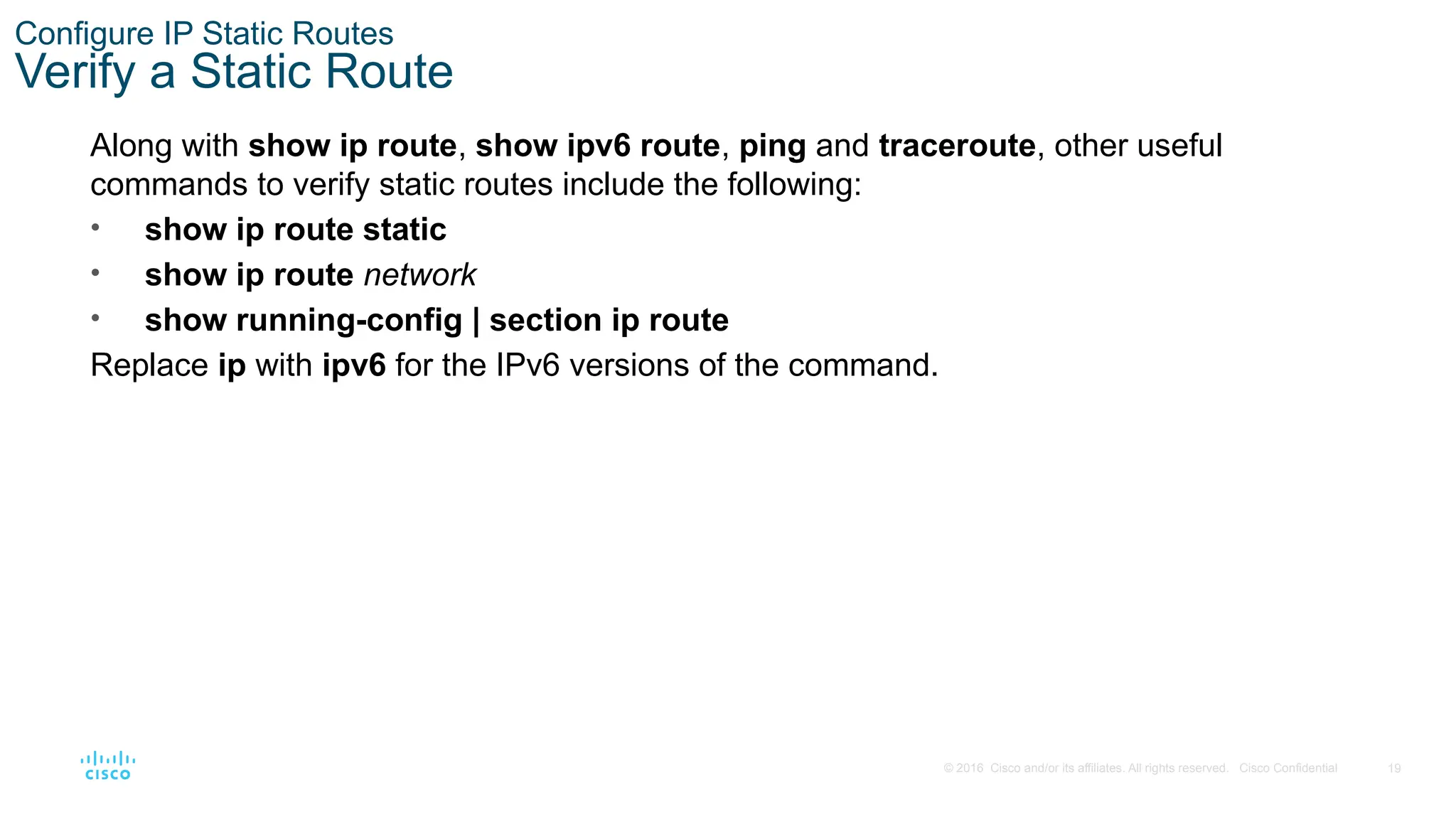
and/or its affiliates. All rights reserved. Cisco Confidential Configure IP Static Routes Verify a Static Route Along with show ip route, show ipv6 route, ping and traceroute, other useful commands to verify static routes include the following: • show ip route static • show ip route network • show running-config | section ip route Replace ip with ipv6 for the IPv6 versions of the command.
20.
20 © 2016 Cisco
and/or its affiliates. All rights reserved. Cisco Confidential 15.3 Configure IP Default Static Routes
21.
21 © 2016 Cisco
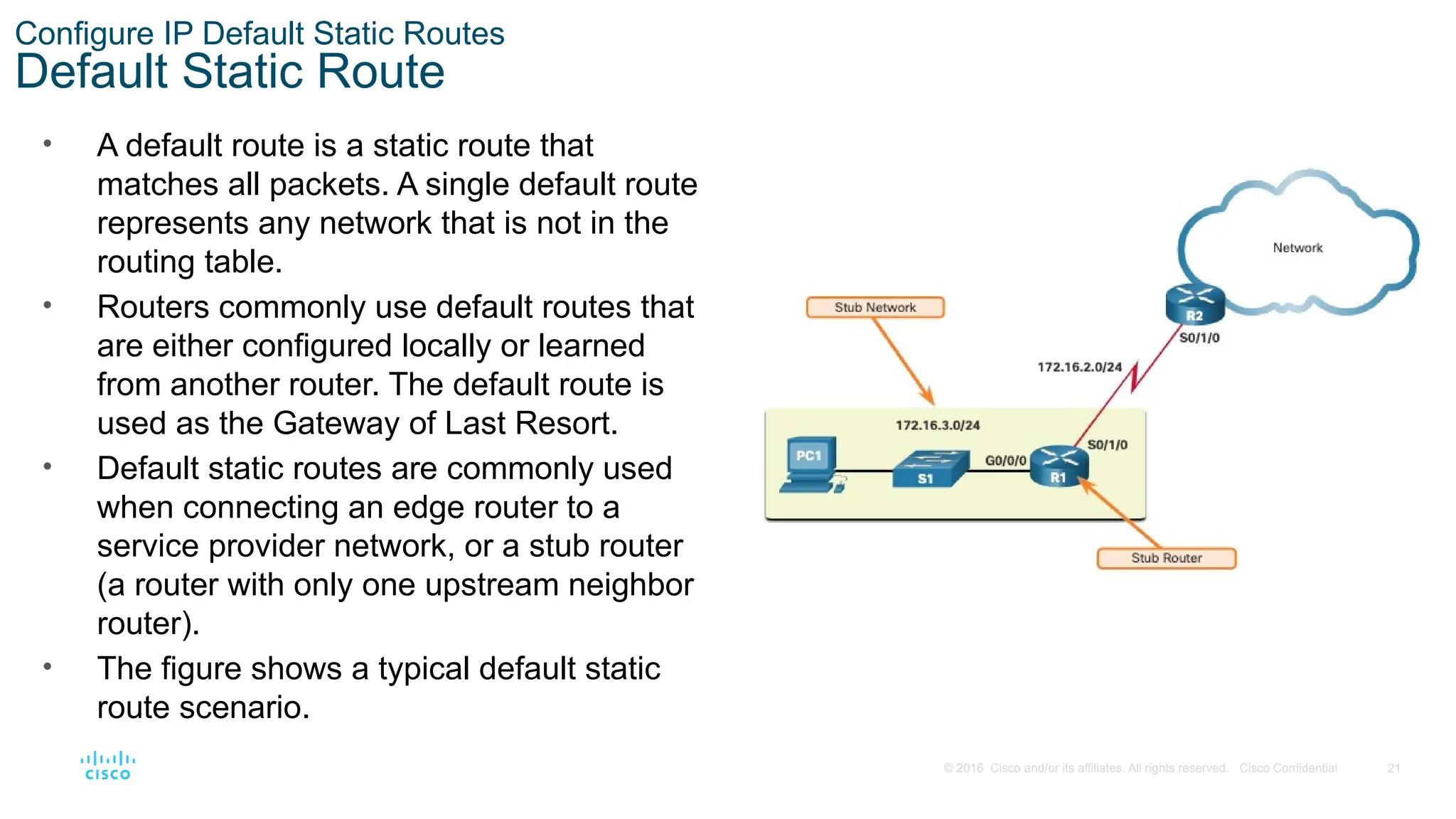
and/or its affiliates. All rights reserved. Cisco Confidential Configure IP Default Static Routes Default Static Route • A default route is a static route that matches all packets. A single default route represents any network that is not in the routing table. • Routers commonly use default routes that are either configured locally or learned from another router. The default route is used as the Gateway of Last Resort. • Default static routes are commonly used when connecting an edge router to a service provider network, or a stub router (a router with only one upstream neighbor router). • The figure shows a typical default static route scenario.
22.
22 © 2016 Cisco
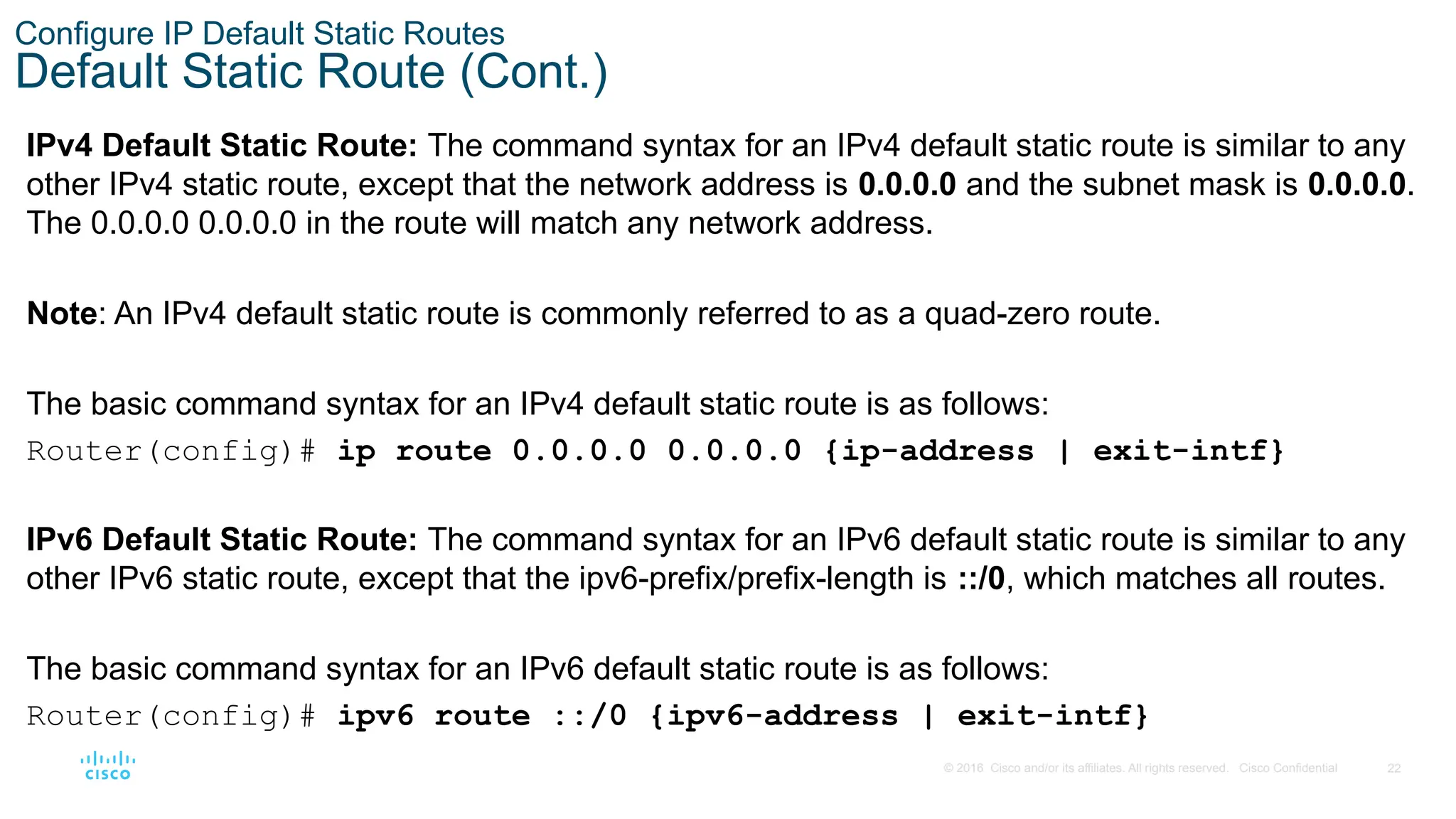
and/or its affiliates. All rights reserved. Cisco Confidential Configure IP Default Static Routes Default Static Route (Cont.) IPv4 Default Static Route: The command syntax for an IPv4 default static route is similar to any other IPv4 static route, except that the network address is 0.0.0.0 and the subnet mask is 0.0.0.0. The 0.0.0.0 0.0.0.0 in the route will match any network address. Note: An IPv4 default static route is commonly referred to as a quad-zero route. The basic command syntax for an IPv4 default static route is as follows: Router(config)# ip route 0.0.0.0 0.0.0.0 {ip-address | exit-intf} IPv6 Default Static Route: The command syntax for an IPv6 default static route is similar to any other IPv6 static route, except that the ipv6-prefix/prefix-length is ::/0, which matches all routes. The basic command syntax for an IPv6 default static route is as follows: Router(config)# ipv6 route ::/0 {ipv6-address | exit-intf}
23.
23 © 2016 Cisco
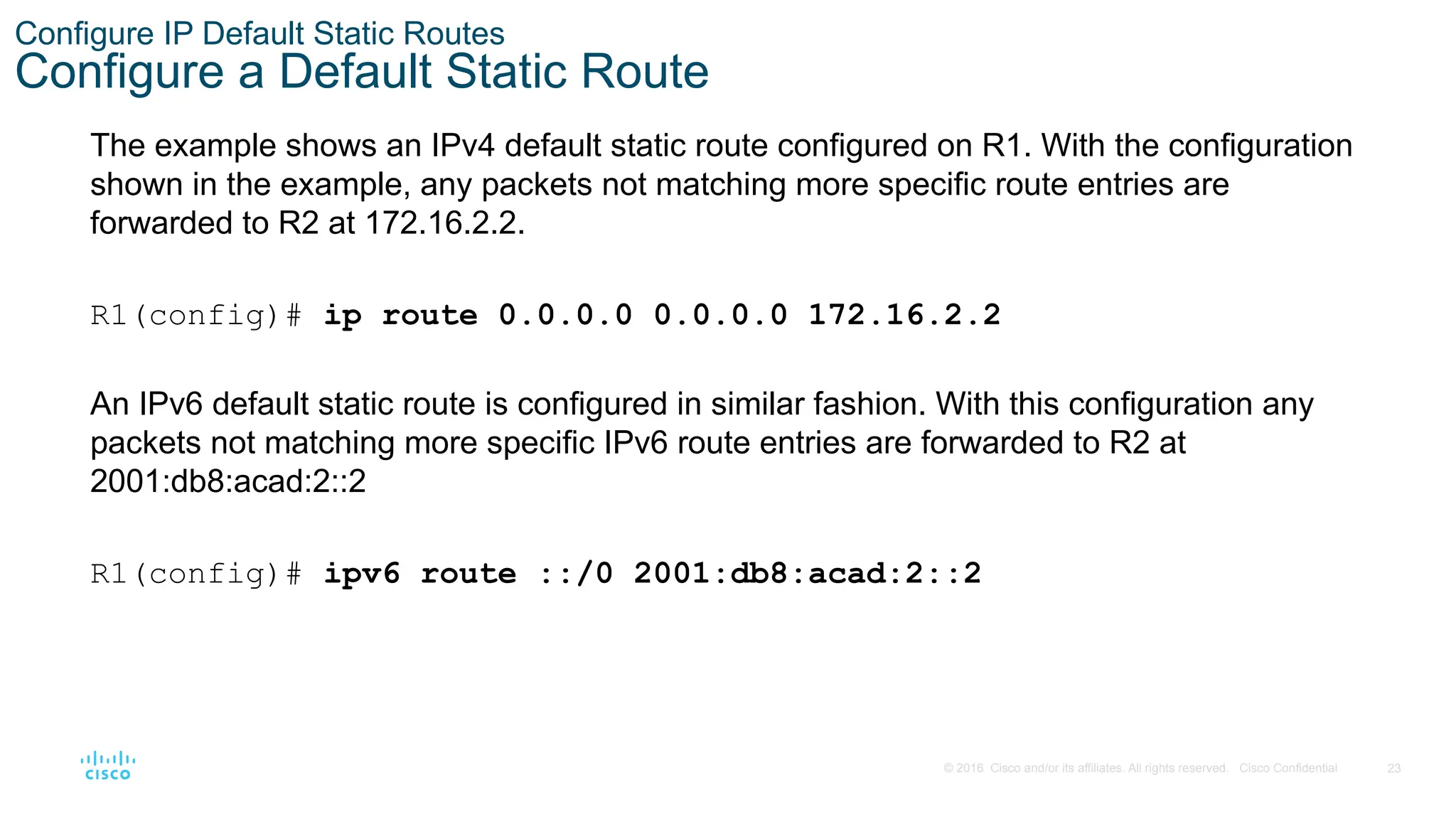
and/or its affiliates. All rights reserved. Cisco Confidential Configure IP Default Static Routes Configure a Default Static Route The example shows an IPv4 default static route configured on R1. With the configuration shown in the example, any packets not matching more specific route entries are forwarded to R2 at 172.16.2.2. R1(config)# ip route 0.0.0.0 0.0.0.0 172.16.2.2 An IPv6 default static route is configured in similar fashion. With this configuration any packets not matching more specific IPv6 route entries are forwarded to R2 at 2001:db8:acad:2::2 R1(config)# ipv6 route ::/0 2001:db8:acad:2::2
24.
24 © 2016 Cisco
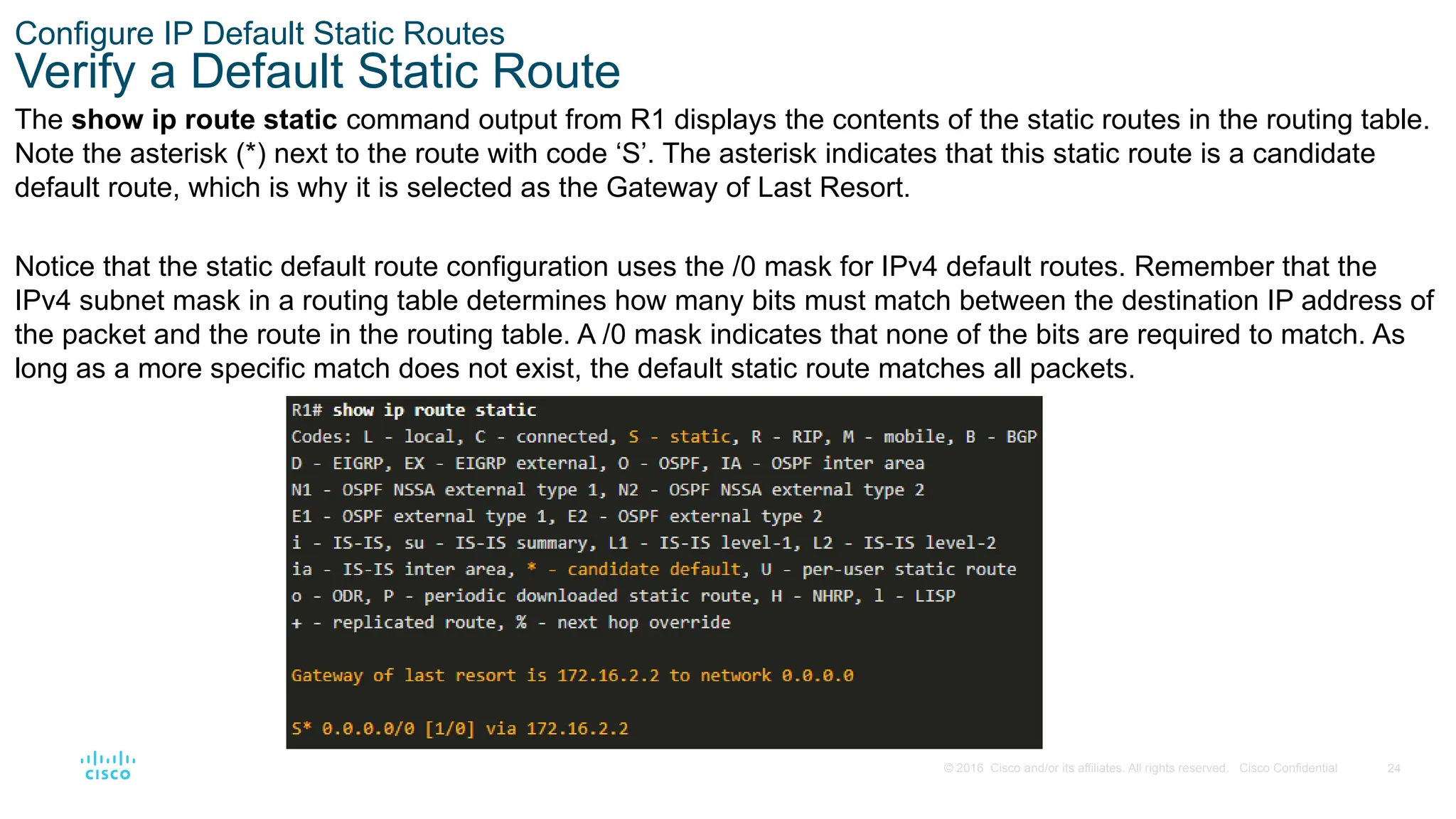
and/or its affiliates. All rights reserved. Cisco Confidential Configure IP Default Static Routes Verify a Default Static Route The show ip route static command output from R1 displays the contents of the static routes in the routing table. Note the asterisk (*) next to the route with code ‘S’. The asterisk indicates that this static route is a candidate default route, which is why it is selected as the Gateway of Last Resort. Notice that the static default route configuration uses the /0 mask for IPv4 default routes. Remember that the IPv4 subnet mask in a routing table determines how many bits must match between the destination IP address of the packet and the route in the routing table. A /0 mask indicates that none of the bits are required to match. As long as a more specific match does not exist, the default static route matches all packets.
25.
25 © 2016 Cisco
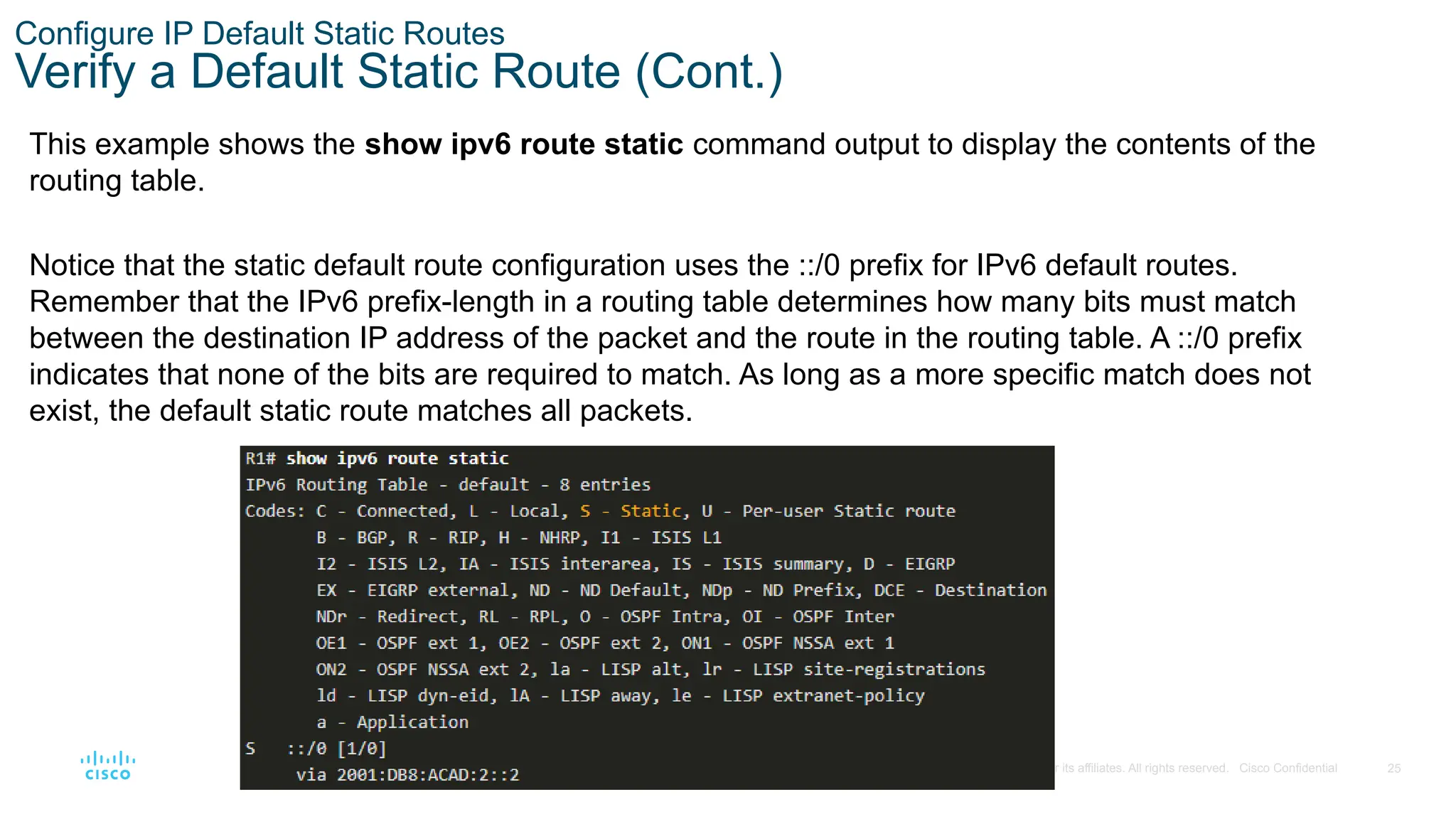
and/or its affiliates. All rights reserved. Cisco Confidential Configure IP Default Static Routes Verify a Default Static Route (Cont.) This example shows the show ipv6 route static command output to display the contents of the routing table. Notice that the static default route configuration uses the ::/0 prefix for IPv6 default routes. Remember that the IPv6 prefix-length in a routing table determines how many bits must match between the destination IP address of the packet and the route in the routing table. A ::/0 prefix indicates that none of the bits are required to match. As long as a more specific match does not exist, the default static route matches all packets.
26.
26 © 2016 Cisco
and/or its affiliates. All rights reserved. Cisco Confidential 15.4 Configure Floating Static Routes
27.
27 © 2016 Cisco
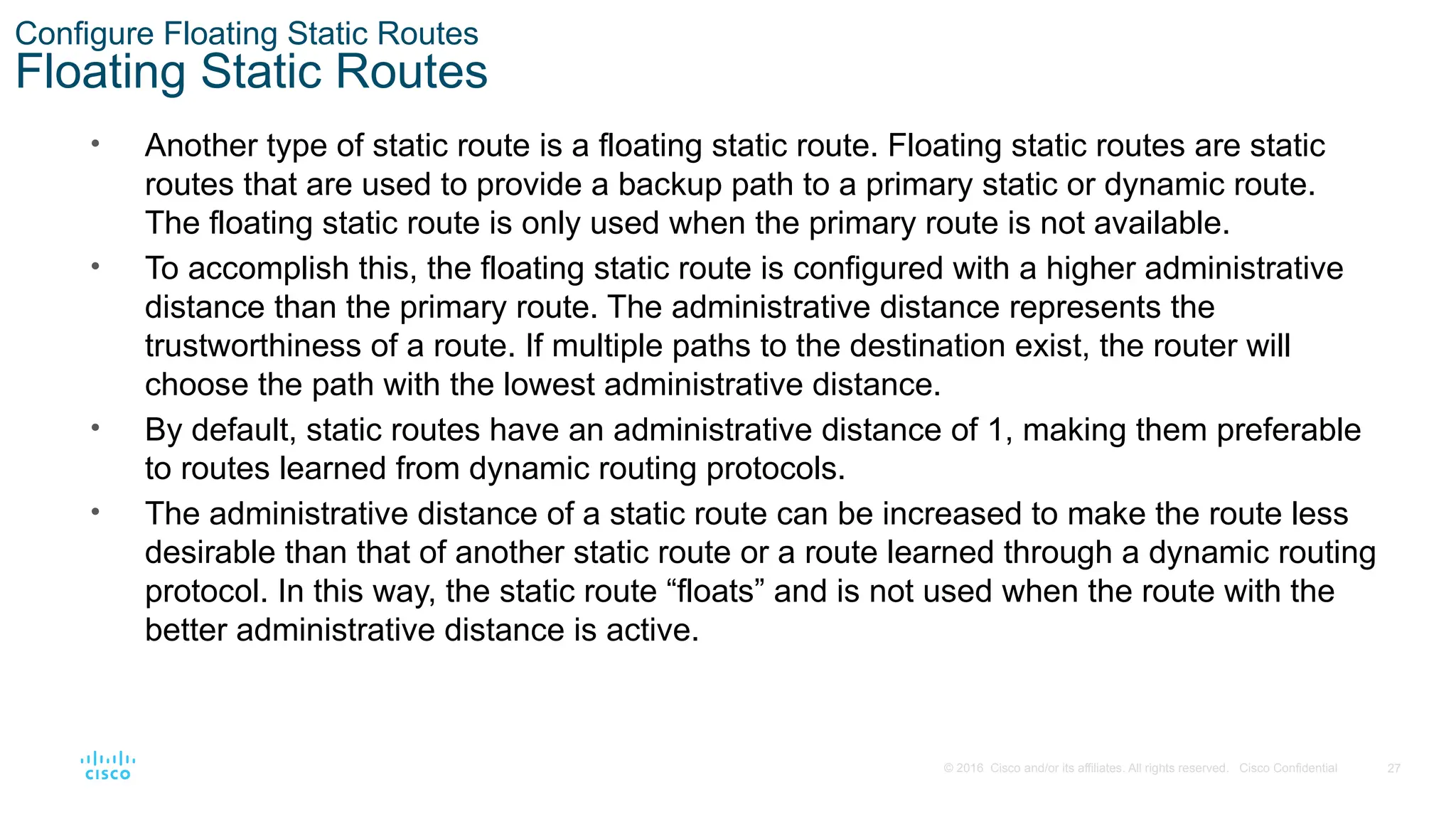
and/or its affiliates. All rights reserved. Cisco Confidential Configure Floating Static Routes Floating Static Routes • Another type of static route is a floating static route. Floating static routes are static routes that are used to provide a backup path to a primary static or dynamic route. The floating static route is only used when the primary route is not available. • To accomplish this, the floating static route is configured with a higher administrative distance than the primary route. The administrative distance represents the trustworthiness of a route. If multiple paths to the destination exist, the router will choose the path with the lowest administrative distance. • By default, static routes have an administrative distance of 1, making them preferable to routes learned from dynamic routing protocols. • The administrative distance of a static route can be increased to make the route less desirable than that of another static route or a route learned through a dynamic routing protocol. In this way, the static route “floats” and is not used when the route with the better administrative distance is active.
28.
28 © 2016 Cisco
and/or its affiliates. All rights reserved. Cisco Confidential Configure Floating Static Routes Configure IPv4 and IPv6 Floating Static Routes The commands to configure default and floating IP default routes are as follows: The show ip route and show ipv6 route output verifies that the default routes to R2 are installed in the routing table. Note that the IPv4 floating static route to R3 is not present in the routing table. R1(config)# ip route 0.0.0.0 0.0.0.0 172.16.2.2 R1(config)# ip route 0.0.0.0 0.0.0.0 10.10.10.2 5 R1(config)# ipv6 route ::/0 2001:db8:acad:2::2 R1(config)# ipv6 route ::/0 2001:db8:feed:10::2 5
29.
29 © 2016 Cisco
and/or its affiliates. All rights reserved. Cisco Confidential Configure Floating Static Routes Test the Floating Static Routes • What would happen if R2 failed? To simulate this, R2 shuts down both of its serial interfaces. • R1 automatically generates syslog messages for the link going down. • A look at R1’s routing table would show the secondary route being used.
30.
30 © 2016 Cisco
and/or its affiliates. All rights reserved. Cisco Confidential 15.5 Configure Static Host Routes
31.
31 © 2016 Cisco
and/or its affiliates. All rights reserved. Cisco Confidential Configure Static Host Routes Host Routes A host route is an IPv4 address with a 32-bit mask, or an IPv6 address with a 128-bit mask. The following shows the three ways a host route can be added to the routing table: • Automatically installed when an IP address is configured on the router • Configured as a static host route • Host route automatically obtained through other methods (discussed in later courses)
32.
32 © 2016 Cisco
and/or its affiliates. All rights reserved. Cisco Confidential Configure Static Host Routes Automatically Installed Host Routes • Cisco IOS automatically installs a host route, also known as a local host route, when an interface address is configured on the router. A host route allows for a more efficient process for packets that are directed to the router itself, rather than for packet forwarding. • This is in addition to the connected route, designated with a C in the routing table for the network address of the interface. • The local routes are marked with L in the output of the routing table.
33.
33 © 2016 Cisco
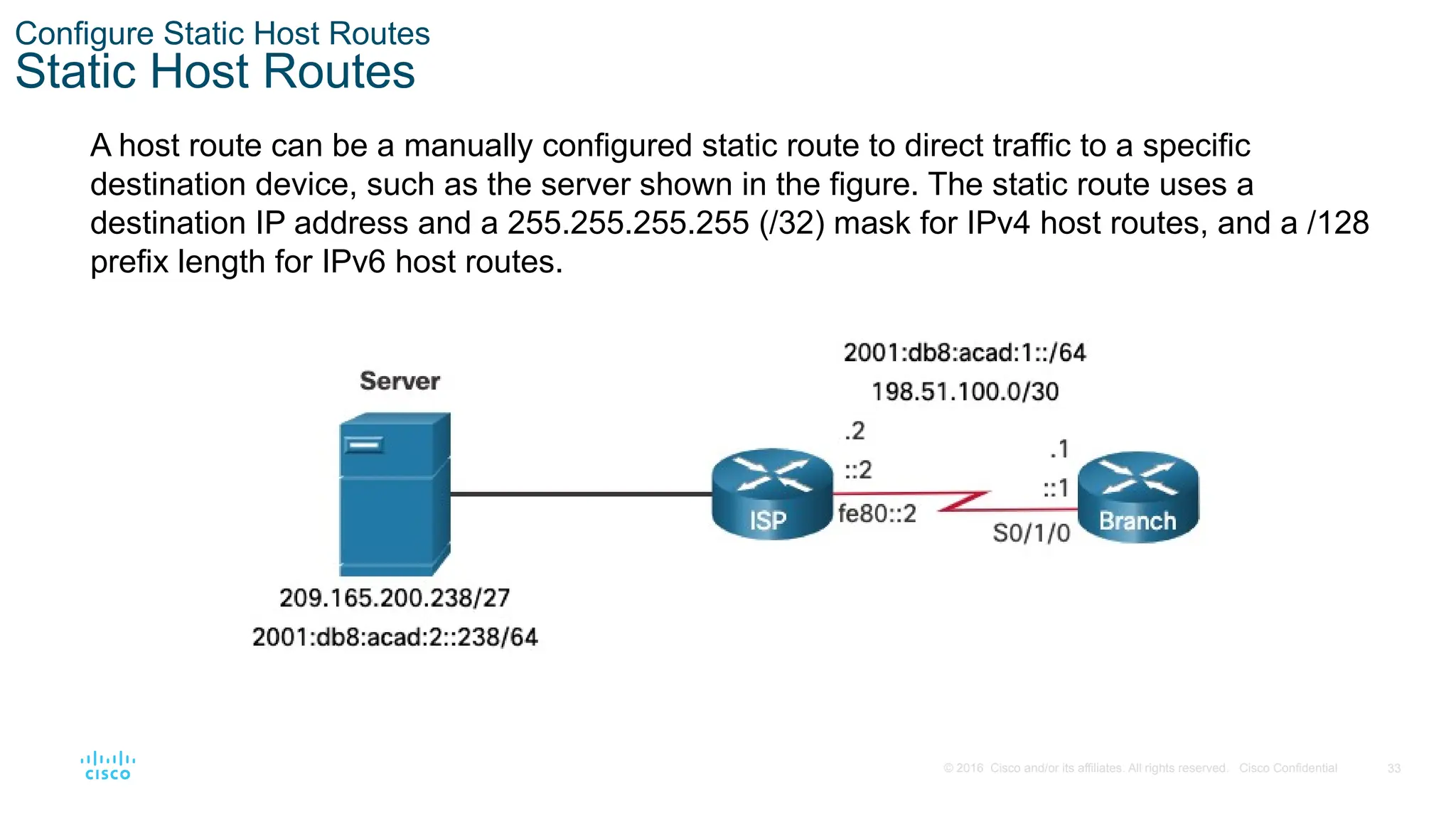
and/or its affiliates. All rights reserved. Cisco Confidential Configure Static Host Routes Static Host Routes A host route can be a manually configured static route to direct traffic to a specific destination device, such as the server shown in the figure. The static route uses a destination IP address and a 255.255.255.255 (/32) mask for IPv4 host routes, and a /128 prefix length for IPv6 host routes.
34.
34 © 2016 Cisco
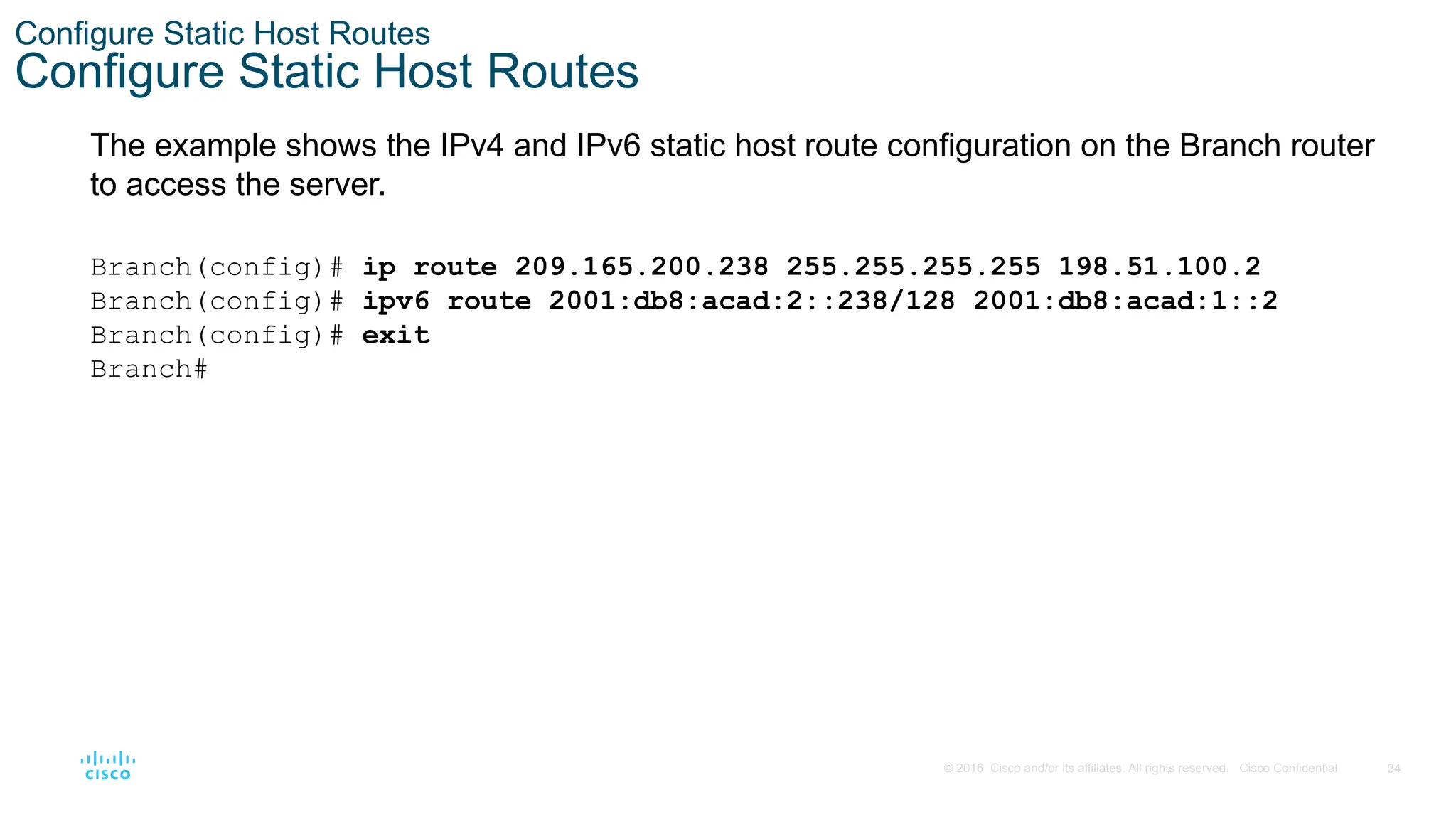
and/or its affiliates. All rights reserved. Cisco Confidential Configure Static Host Routes Configure Static Host Routes The example shows the IPv4 and IPv6 static host route configuration on the Branch router to access the server. Branch(config)# ip route 209.165.200.238 255.255.255.255 198.51.100.2 Branch(config)# ipv6 route 2001:db8:acad:2::238/128 2001:db8:acad:1::2 Branch(config)# exit Branch#
35.
35 © 2016 Cisco
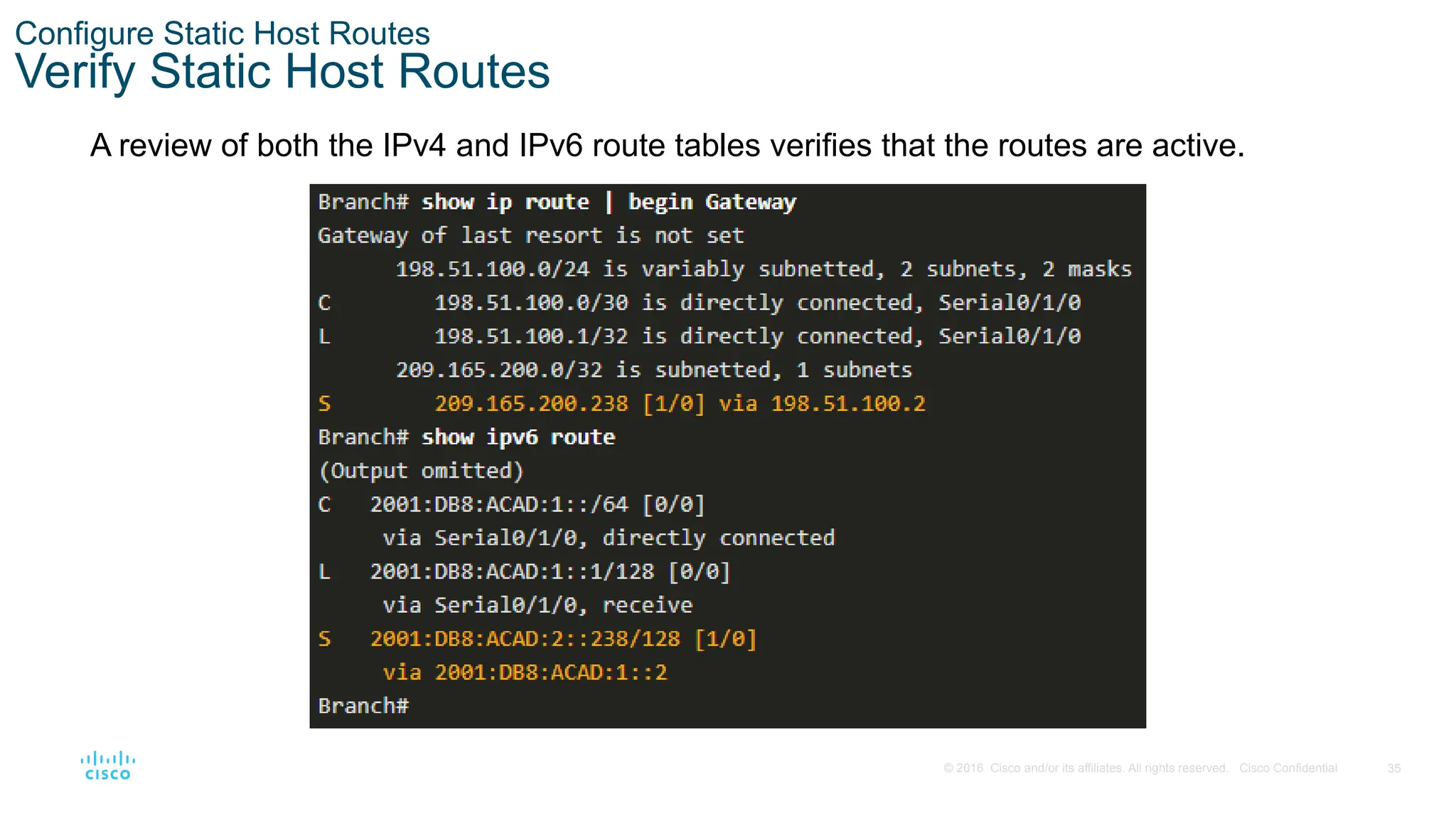
and/or its affiliates. All rights reserved. Cisco Confidential Configure Static Host Routes Verify Static Host Routes A review of both the IPv4 and IPv6 route tables verifies that the routes are active.
36.
36 © 2016 Cisco
and/or its affiliates. All rights reserved. Cisco Confidential Configure Static Host Routes Configure IPv6 Static Host Route with Link-Local Next-Hop For IPv6 static routes, the next-hop address can be the link-local address of the adjacent router. However, you must specify an interface type and an interface number when using a link-local address as the next hop, as shown in the example. First, the original IPv6 static host route is removed, then a fully specified route configured with the IPv6 address of the server and the IPv6 link-local address of the ISP router.
37.
37 © 2016 Cisco
and/or its affiliates. All rights reserved. Cisco Confidential 15.6 Module Practice and Quiz
38.
38 © 2016 Cisco
and/or its affiliates. All rights reserved. Cisco Confidential Module Practice and Quiz Packet Tracer – Configure IPv4 and IPv6 Static and Default Routes In this Packet Tracer, you will do the following: • Configure IPv4 Static and floating static default routers • Configure IPv6 static and floating static default routes • ConfigureIPv4 static and floating static routes to internal LANs • Configure IPv6 static and floating static routes to the internal LANS • Configure IPv4 host routes • Configure IPv6 host routes
39.
39 © 2016 Cisco
and/or its affiliates. All rights reserved. Cisco Confidential Module Practice and Quiz Lab - Configure IPv4 and IPv6 Static and Default Routes In this lab, you will complete the following objectives: • Build the Network and Configure Basic Device Settings • Configure and Verify IP and IPv6 Addressing on R1 and R2 • Configure and Verify Static and Default Routing for IPv4 on R1 and R2 • Configure and Verify Static and Default Routing for IPv6 on R1 and R2
40.
40 © 2016 Cisco
and/or its affiliates. All rights reserved. Cisco Confidential Module Practice and Quiz What Did I Learn In This Module? • Static routes can be configured for IPv4 and IPv6. Both protocols support the following types of static routes: standard static route, default static route, floating static route, and summary static route. • When configuring a static route, the next hop can be identified by an IP address, exit interface, or both. How the destination is specified creates one of the three following types of static route: next-hop, directly connected, and fully specified. • IPv4 static routes are configured using the following global configuration command: ip route network- address subnet-mask { ip-address | exit-intf [ip=address] } [distance]. • IPv6 static routes are configured using the following global configuration command: ipv6 route ipv6- prefix/prefix-length { ipv6-address | exit-intf [ipv6-address]} [distance]. • In a next-hop static route, only the next-hop IP address is specified. The exit interface is derived from the next hop. • When configuring a static route, another option is to use the exit interface to specify the next-hop address. Directly connected static routes should only be used with point-to-point serial interfaces. • In a fully specified static route, both the exit interface and the next-hop IP address are specified. This form of static route is used when the exit interface is a multi-access interface and it is necessary to explicitly identify the next hop. The next hop must be directly connected to the specified exit interface. • In a fully specified IPv6 static route, both the exit interface and the next-hop IPv6 address are specified.
41.
41 © 2016 Cisco
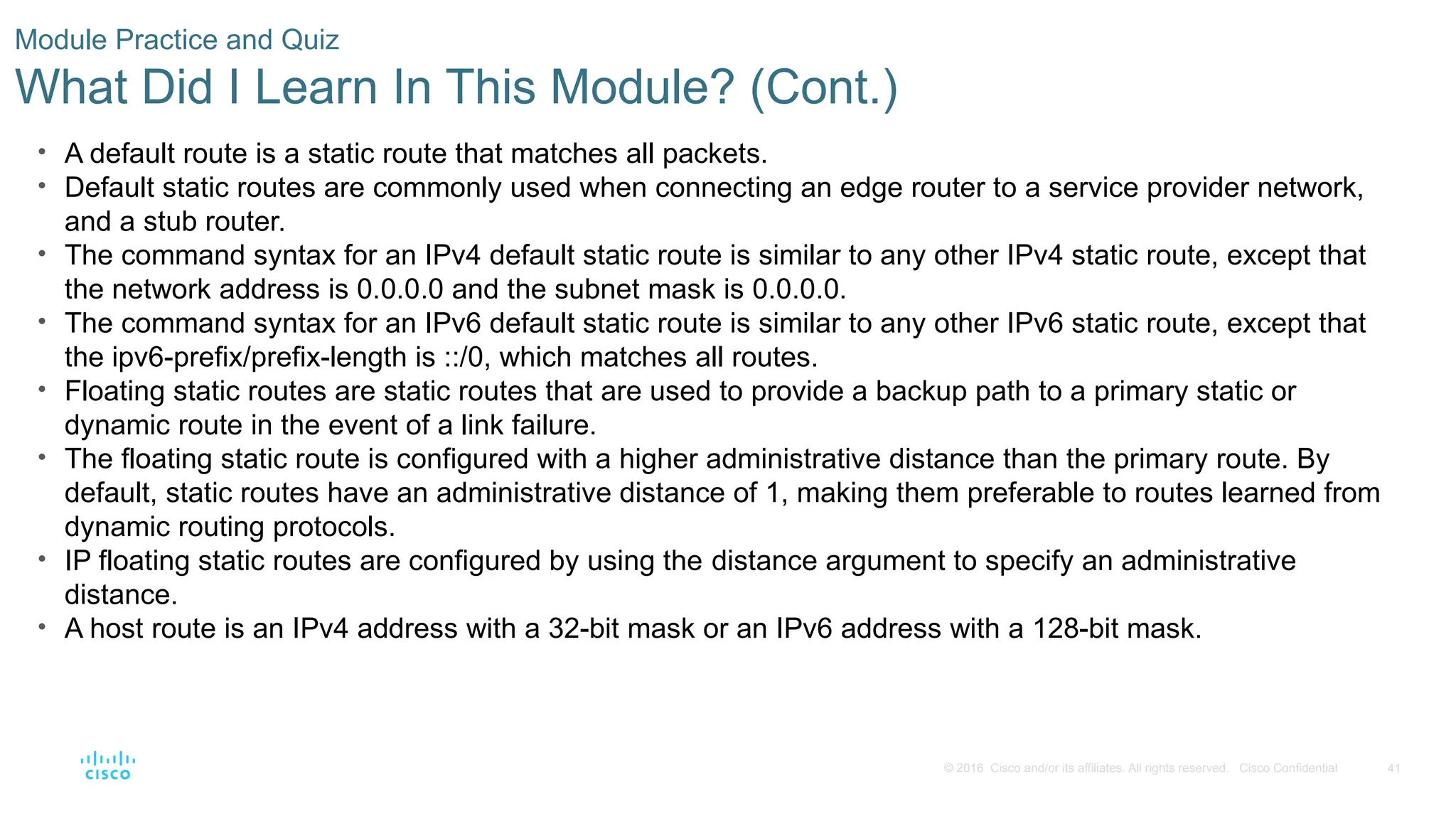
and/or its affiliates. All rights reserved. Cisco Confidential Module Practice and Quiz What Did I Learn In This Module? (Cont.) • A default route is a static route that matches all packets. • Default static routes are commonly used when connecting an edge router to a service provider network, and a stub router. • The command syntax for an IPv4 default static route is similar to any other IPv4 static route, except that the network address is 0.0.0.0 and the subnet mask is 0.0.0.0. • The command syntax for an IPv6 default static route is similar to any other IPv6 static route, except that the ipv6-prefix/prefix-length is ::/0, which matches all routes. • Floating static routes are static routes that are used to provide a backup path to a primary static or dynamic route in the event of a link failure. • The floating static route is configured with a higher administrative distance than the primary route. By default, static routes have an administrative distance of 1, making them preferable to routes learned from dynamic routing protocols. • IP floating static routes are configured by using the distance argument to specify an administrative distance. • A host route is an IPv4 address with a 32-bit mask or an IPv6 address with a 128-bit mask.
42.
42 © 2016 Cisco
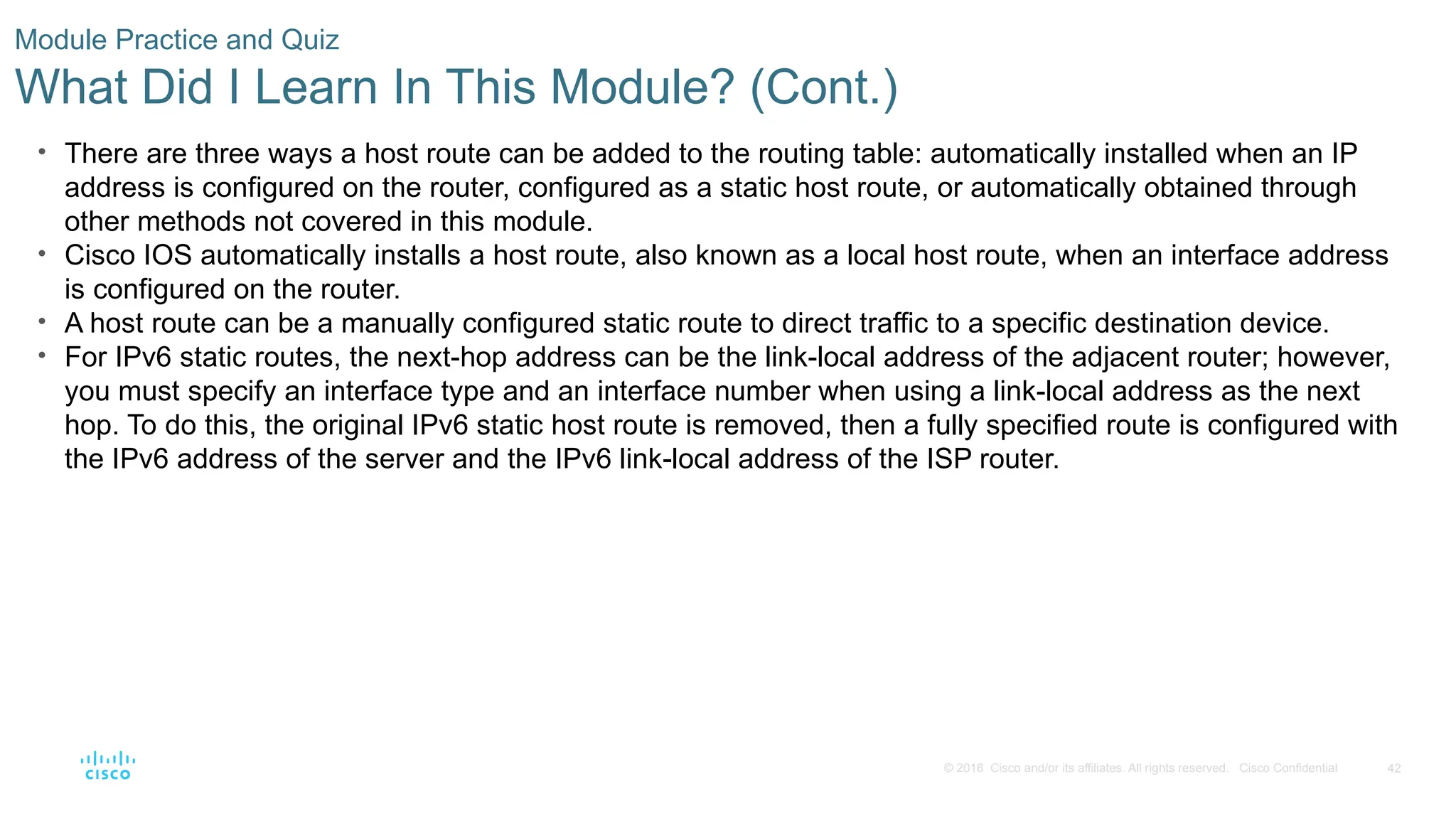
and/or its affiliates. All rights reserved. Cisco Confidential Module Practice and Quiz What Did I Learn In This Module? (Cont.) • There are three ways a host route can be added to the routing table: automatically installed when an IP address is configured on the router, configured as a static host route, or automatically obtained through other methods not covered in this module. • Cisco IOS automatically installs a host route, also known as a local host route, when an interface address is configured on the router. • A host route can be a manually configured static route to direct traffic to a specific destination device. • For IPv6 static routes, the next-hop address can be the link-local address of the adjacent router; however, you must specify an interface type and an interface number when using a link-local address as the next hop. To do this, the original IPv6 static host route is removed, then a fully specified route is configured with the IPv6 address of the server and the IPv6 link-local address of the ISP router.
Editor's Notes
#1
Cisco Networking Academy Program Switching, Routing, and Wireless Essentials v7.0 (SRWE) Module 15: IP Static Routing
#2
15- IP Static Routing 15.0 – Introduction 15.0.2 – What will I learn to do in this module?
#3
15 – IP Static Routing 15.1 – Static Routes
#4
15 – IP Static Routing 15.1 – Static Routes 15.1.1 - Type of Static Routes
#5
15 – IP Static Routing 15.1 – Static Routes 15.1.2 - Next-Hop Options
#6
15 – IP Static Routing 15.1 – Static Routes 15.1.3 - IPv4 Static Route Command
#7
15 – IP Static Routing 15.1 – Static Routes 15.1.4 - IPv6 Static Route Command
#8
15 – IP Static Routing 15.1 – Static Routes 15.1.5 - Dual-Stack Topology
#9
15 – IP Static Routing 15.1 – Static Routes 15.1.6 - IPv4 Starting Routing Tables
#10
15 – IP Static Routing 15.1 – Static Routes 15.1.7 - IPv6 Starting Routing Tables 15.1.8 - Check Your Understanding - Static Routes
#11
15 – Static IP Routes 15.2 – Configure IP Static Routes
#12
15 – Static IP Routes 15.2 – Configure IP Static Routes 15.2.1 - IPv4 Next-Hop Static Route
#13
15 – Static IP Routes 15.2 – Configure IP Static Routes 15.2.2 - IPv6 Next-Hop Static Route
#14
15 – Static IP Routes 15.2 – Configure IP Static Routes 15.2.3 - IPv4 Directly Connected Static Route
#15
15 – Static IP Routes 15.2 – Configure IP Static Routes 15.2.4 - IPv6 Directly Connected Static Route
#16
15 – Static IP Routes 15.2 – Configure IP Static Routes 15.2.5 - IPv4 Fully Specified Static Route
#17
15 – Static IP Routes 15.2 – Configure IP Static Routes 15.2.6 - IPv6 Fully Specified Static Route
#18
15 – Static IP Routes 15.2 – Configure IP Static Routes 15.2.6 - IPv6 Fully Specified Static Route (Cont.)
#19
15 – Static IP Routes 15.2 – Configure IP Static Routes 15.2.7 - Verify a Static Route 15.2.8 - Syntax Checker - Configure Static Routes
#20
15 – IP Static Routing 15.3 – Configure IP Default Static Routes
#21
15 – IP Static Routing 15.3 – Configure IP Default Static Routes 15.3.1 - Default Static Route
#22
15 – IP Static Routing 15.3 – Configure IP Default Static Routes 15.3.1 - Default Static Route (Cont.)
#23
15 – IP Static Routing 15.3 – Configure IP Default Static Routes 15.3.2 - Configure a Default Static Route
#24
15 – IP Static Routing 15.3 – Configure IP Default Static Routes 15.3.3 - Verify a Default Static Route
#25
15 – IP Static Routing 15.3 – Configure IP Default Static Routes 15.3.3 - Verify a Default Static Route (Cont.) 15.3.4 - Syntax Checker - Configure Default Static Routes
#26
15 – IP Static Routing 15.4 – Configure Floating Static Routes
#27
15 – IP Static Routing 15.4 – Configure Floating Static Routes 15.4.1 - Floating Static Routes
#28
15 – IP Static Routing 15.4 – Configure Floating Static Routes 15.4.2 - Configure IPv4 and IPv6 Floating Static Routes
#29
15 – IP Static Routing 15.4 – Configure Floating Static Routes 15.4.3 - Test the Floating Static Routes 15.4.4 - Syntax Checker - Configure Floating Static Route
#30
15 – IP Static Routing 15.5 - Configure Static Host Routes
#31
15 – IP Static Routing 15.5 - Configure Static Host Routes 15.5.1 - Host Routes
#32
15 – IP Static Routing 15.5 - Configure Static Host Routes 15.5.2- Automatically Installed Host Routes
#33
15 – IP Static Routing 15.5 - Configure Static Host Routes 15.5.3- Static Host Routes
#34
15 – IP Static Routing 15.5 - Configure Static Host Routes 15.5.4 - Configure Static Host Routes
#35
15 – IP Static Routing 15.5 - Configure Static Host Routes 15.5.5 - Verify Static Host Routes
#36
15 – IP Static Routing 15.5 - Configure Static Host Routes 15.5.6 - Configure IPv6 Static Host Route with Link-Local Next-Hop 15.5.7 - Syntax Checker - Configure Static Host Routes
#37
15 - IP Static Routing 15.6 - Module Practice and Quiz
#38
15 - IP Static Routing 15.6 - Module Practice and Quiz 15.6.1 - Packet Tracer - Configure IPv4 and IPv6 Static and Default Routes
#39
15 - IP Static Routing 15.6 - Module Practice and Quiz 15.6.2 - Lab- Configure IPv4 and IPv6 Static and Default Routes
#40
15 - IP Static Routing 15.6 - Module Practice and Quiz 15.6.2 - What Did I Learn In This Module?
#41
15 - IP Static Routing 15.6 - Module Practice and Quiz 15.6.2 - What Did I Learn In This Module? (Cont.)
#42
15 - IP Static Routing 15.6 - Module Practice and Quiz 15.6.2 - What Did I Learn In This Module? 15.6.3 - Module Quiz - IP Static Routing
Download
![6
© 2016 Cisco and/or its affiliates. All rights reserved. Cisco Confidential
Static Routes
IPv4 Static Route Command
IPv4 static routes are configured using the following global configuration command:
Router(config)# ip route network-address subnet-mask { ip-address
| exit-intf [ip-address]} [distance]
Note: Either the ip-address, exit-intf, or the ip-address and exit-intf parameters must be
configured.](https://image.slidesharecdn.com/srwemod-15-250407154518-0f9550af/75/SRWE_Mod-15-pptx-ASDFGHJKLKJHGFDXSZasDFGHJKLKJHGFDSZA-6-2048.jpg)
![7
© 2016 Cisco and/or its affiliates. All rights reserved. Cisco Confidential
Static Routes
IPv6 Static Route Command
IPv6 static routes are configured using the following global configuration command:
Router(config)# ipv6 route ipv6-prefix/prefix-length {ipv6-address
| exit-intf [ipv6-address]} [distance]
Most of parameters are identical to the IPv4 version of the command.](https://image.slidesharecdn.com/srwemod-15-250407154518-0f9550af/75/SRWE_Mod-15-pptx-ASDFGHJKLKJHGFDXSZasDFGHJKLKJHGFDSZA-7-2048.jpg)
![10
© 2016 Cisco and/or its affiliates. All rights reserved. Cisco Confidential
Static Routes
IPv6 Starting Routing Tables
• Each router has entries only for directly connected networks and associated local addresses.
• R1 can ping R2, but cannot ping the R3 LAN.
R1# show ipv6 route | begin C
C 2001:DB8:ACAD:2::/64 [0/0]
via Serial0/1/0, directly connected
L 2001:DB8:ACAD:2::1/128 [0/0]
via Serial0/1/0, receive
C 2001:DB8:ACAD:3::/64 [0/0]
via GigabitEthernet0/0/0, directly connected
L 2001:DB8:ACAD:3::1/128 [0/0]
via GigabitEthernet0/0/0, receive
L FF00::/8 [0/0]
via Null0, receive
R1#
R1# ping 2001:db8:acad:2::2
Type escape sequence to abort.
Sending 5, 100-byte ICMP Echos to 2001:DB8:ACAD:2::2, timeout is 2 seconds:
!!!!!
Success rate is 100 percent (5/5), round-trip min/avg/max = 2/2/3 ms)
R1# ping 2001:DB8:cafe:2::1
Type escape sequence to abort.
Sending 5, 100-byte ICMP Echos to 2001:DB8:CAFE:2::1, timeout is 2 seconds:
% No valid route for destination
Success rate is 0 percent (0/1)](https://image.slidesharecdn.com/srwemod-15-250407154518-0f9550af/75/SRWE_Mod-15-pptx-ASDFGHJKLKJHGFDXSZasDFGHJKLKJHGFDSZA-10-2048.jpg)
![40
© 2016 Cisco and/or its affiliates. All rights reserved. Cisco Confidential
Module Practice and Quiz
What Did I Learn In This Module?
• Static routes can be configured for IPv4 and IPv6. Both protocols support the following types of static
routes: standard static route, default static route, floating static route, and summary static route.
• When configuring a static route, the next hop can be identified by an IP address, exit interface, or both.
How the destination is specified creates one of the three following types of static route: next-hop, directly
connected, and fully specified.
• IPv4 static routes are configured using the following global configuration command: ip route network-
address subnet-mask { ip-address | exit-intf [ip=address] } [distance].
• IPv6 static routes are configured using the following global configuration command: ipv6 route ipv6-
prefix/prefix-length { ipv6-address | exit-intf [ipv6-address]} [distance].
• In a next-hop static route, only the next-hop IP address is specified. The exit interface is derived from the
next hop.
• When configuring a static route, another option is to use the exit interface to specify the next-hop address.
Directly connected static routes should only be used with point-to-point serial interfaces.
• In a fully specified static route, both the exit interface and the next-hop IP address are specified. This form
of static route is used when the exit interface is a multi-access interface and it is necessary to explicitly
identify the next hop. The next hop must be directly connected to the specified exit interface.
• In a fully specified IPv6 static route, both the exit interface and the next-hop IPv6 address are specified.](https://image.slidesharecdn.com/srwemod-15-250407154518-0f9550af/75/SRWE_Mod-15-pptx-ASDFGHJKLKJHGFDXSZasDFGHJKLKJHGFDSZA-40-2048.jpg)



![SRWE_Mod-5.pptxZXcvgbhjkiolp;'[]\';l,kmjnhbgvfcdxszaAZSXDcfvgbhnjmk,.](https://cdn.slidesharecdn.com/ss_thumbnails/srwemod-5-250407154145-a4e95907-thumbnail.jpg?width=640&height=640&fit=bounds)


