SQLite & ORM Binding - Part II
Now that we covered the basic persistence abstraction lets proceed to integrate it into the app
Integrating Persistence
✦If there are no dishes we load them from the app
storage in the dishes list
© Codename One 2017 all rights reserved
if(Restaurant.getInstance().menu.get().dishes.size() == 0) {
for(PropertyBusinessObject d : AppStorage.getInstance().fetchDishes()) {
Restaurant.getInstance().menu.get().dishes.add((Dish)d);
}
}
for(Dish d : Restaurant.getInstance().menu.get().dishes) {
addDish(app, d);
}
We fetch dishes as we need them implicitly from storage, this is pretty simple code that just adds all the dish elements to the dishes list property
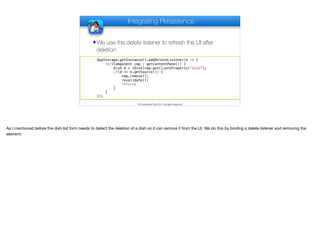
Integrating Persistence
✦We use the delete listener to refresh the UI after
deletion
© Codename One 2017 all rights reserved
AppStorage.getInstance().addDeleteListener(e -> {
for(Component cmp : getContentPane()) {
Dish d = (Dish)cmp.getClientProperty("dish");
if(d == e.getSource()) {
cmp.remove();
revalidate();
return;
}
}
});
As I mentioned before the dish list form needs to detect the deletion of a dish so it can remove it from the UI. We do this by binding a delete listener and removing the
element.
Property Binding
✦If the properties change (when data is persisted) we
map that to the UI of the dish in the main dish list
© Codename One 2017 all rights reserved
public void addDish(AppSettings app, Dish d) {
ScaleImageButton sb = new ScaleImageButton(d.getFullSize());
sb.setBackgroundType(Style.BACKGROUND_IMAGE_SCALED_FILL);
Label title = new Label(d.name.get(), "DishName");
d.name.addChangeListener(pl -> title.setText(d.name.get()));
Label description = new Label(d.description.get(), "DishDescription");
d.description.addChangeListener(pl -> description.setText(d.description.get()));
One of the really cool things about properties is the ability to bind property change listeners to properties so we can decouple code that uses the same data model to
display a view in two different places. 

I wrote this code before the ui binding API code existed in Codename One but it’s pretty trivial either way, I just update the text when the property changes.
delete.addActionListener(e -> {
previous.addShowListener(prev -> {
previous.removeAllShowListeners();
ToastBar.showMessage("Deleted " + d.name.get() + ". Undo?”,
FontImage.MATERIAL_UNDO, ee -> {
DishListForm dlf = (DishListForm)previous;
dlf.addDish(app, d);
d.id.set(null);
bld.addDish(app, d);
d.id.addChangeListener(pl -> AppStorage.getInstance().insert(d));
});
});
previous.showBack();
bld.deleteDish(app, d);
AppStorage.getInstance().delete(d);
});
DishEditForm
It's Better to Beg for Forgiveness than to Ask for Permission is a proverb sometimes attributed to programming pioneer Grace Hopper. Regardless of the source of that
great quote it’s a wonderful example of good mobile app design. In a mobile app you shouldn’t bother users with “Are you sure” prompts. You should just do what the
user does and provide a way to undo which is exactly what we do when we delete a dish in this code…
delete.addActionListener(e -> {
previous.addShowListener(prev -> {
previous.removeAllShowListeners();
ToastBar.showMessage("Deleted " + d.name.get() + ". Undo?”,
FontImage.MATERIAL_UNDO, ee -> {
DishListForm dlf = (DishListForm)previous;
dlf.addDish(app, d);
d.id.set(null);
bld.addDish(app, d);
d.id.addChangeListener(pl -> AppStorage.getInstance().insert(d));
});
});
previous.showBack();
bld.deleteDish(app, d);
AppStorage.getInstance().delete(d);
});
DishEditForm
I’ll skip a bit ahead because the code above is asynchronous. When delete is pressed we show the previous dish list form since the edit form is no longer applicable.
Then we delete the dish in the server and in the storage. You will notice that there is no prompt.
delete.addActionListener(e -> {
previous.addShowListener(prev -> {
previous.removeAllShowListeners();
ToastBar.showMessage("Deleted " + d.name.get() + ". Undo?”,
FontImage.MATERIAL_UNDO, ee -> {
DishListForm dlf = (DishListForm)previous;
dlf.addDish(app, d);
d.id.set(null);
bld.addDish(app, d);
d.id.addChangeListener(pl -> AppStorage.getInstance().insert(d));
});
});
previous.showBack();
bld.deleteDish(app, d);
AppStorage.getInstance().delete(d);
});
DishEditForm
Now we need to show a UI that allows the user to undo the delete operation but here is the problem… We just navigated to the dish list from the form we were in since
the edit form is no longer applicable. So we use a listener on the parent form so we will know when it is shown again. The problem is that if we do that without the next
line we’ll get prompts every time we enter that form after the deletion.

So the obvious question is: why didn’t we just call removeShowListener(this). Well, funny story… This is a lambda expression and here this is always the parent class so
removeShowListener(this) won’t have the desired affect. So the solution is a bit of a hack but it was either this or use inner classes so I chose this hack.
delete.addActionListener(e -> {
previous.addShowListener(prev -> {
previous.removeAllShowListeners();
ToastBar.showMessage("Deleted " + d.name.get() + ". Undo?”,
FontImage.MATERIAL_UNDO, ee -> {
DishListForm dlf = (DishListForm)previous;
dlf.addDish(app, d);
d.id.set(null);
bld.addDish(app, d);
d.id.addChangeListener(pl -> AppStorage.getInstance().insert(d));
});
});
previous.showBack();
bld.deleteDish(app, d);
AppStorage.getInstance().delete(d);
});
DishEditForm
This is relatively simple, we are now in the right form after the deletion and I can now show the undo toast message that will appear in the bottom of the form. If a user
taps this popup it will undo the deletion instantly
delete.addActionListener(e -> {
previous.addShowListener(prev -> {
previous.removeAllShowListeners();
ToastBar.showMessage("Deleted " + d.name.get() + ". Undo?”,
FontImage.MATERIAL_UNDO, ee -> {
DishListForm dlf = (DishListForm)previous;
dlf.addDish(app, d);
d.id.set(null);
bld.addDish(app, d);
d.id.addChangeListener(pl -> AppStorage.getInstance().insert(d));
});
});
previous.showBack();
bld.deleteDish(app, d);
AppStorage.getInstance().delete(d);
});
DishEditForm
The undo code doesn’t really “undo” as there is no meaningful way to undo in code. We just re-add the dish.
ok.addActionListener(e -> {
previous.showBack();
d.name.set(title.getText());
d.description.set(description.getText());
try {
d.price.set(Double.parseDouble(price.getText()));
} catch(NumberFormatException err) {
Log.e(err);
ToastBar.showErrorMessage("Malformed price");
}
bld.updateDish(app, d);
Restaurant.getInstance().menu.get().dishes.add(d);
if(d.id.get() != null) {
AppStorage.getInstance().update(d);
}
//bld.updateDishImage(app, d);
});
DishEditForm
By comparison saving the dish is much easier and practically trivial. All of the logic to save a dish to the server and update it to storage is just a couple of lines of code
TextField title = new TextField(app.name.get());
title.setUIID("NavigationTitle");
title.addActionListener(a -> {
app.name.set(title.getText());
AppStorage.getInstance().update(app);
});
TextField tagline = new TextField(app.tagline.get());
tagline.setUIID("Tagline");
tagline.addActionListener(a -> {
app.tagline.set(tagline.getText());
AppStorage.getInstance().update(app);
});
BaseNavigationForm
In the case of the tagline & title we currently only save them locally but we will add the server update code as well
Thank You
Thanks for watching. I hope you found this informative

SQLite and ORM Binding - Part 2 - Transcript.pdf

  • 1.
    SQLite & ORMBinding - Part II Now that we covered the basic persistence abstraction lets proceed to integrate it into the app
  • 2.
    Integrating Persistence ✦If thereare no dishes we load them from the app storage in the dishes list © Codename One 2017 all rights reserved if(Restaurant.getInstance().menu.get().dishes.size() == 0) { for(PropertyBusinessObject d : AppStorage.getInstance().fetchDishes()) { Restaurant.getInstance().menu.get().dishes.add((Dish)d); } } for(Dish d : Restaurant.getInstance().menu.get().dishes) { addDish(app, d); } We fetch dishes as we need them implicitly from storage, this is pretty simple code that just adds all the dish elements to the dishes list property
  • 3.
    Integrating Persistence ✦We usethe delete listener to refresh the UI after deletion © Codename One 2017 all rights reserved AppStorage.getInstance().addDeleteListener(e -> { for(Component cmp : getContentPane()) { Dish d = (Dish)cmp.getClientProperty("dish"); if(d == e.getSource()) { cmp.remove(); revalidate(); return; } } }); As I mentioned before the dish list form needs to detect the deletion of a dish so it can remove it from the UI. We do this by binding a delete listener and removing the element.
  • 4.
    Property Binding ✦If theproperties change (when data is persisted) we map that to the UI of the dish in the main dish list © Codename One 2017 all rights reserved public void addDish(AppSettings app, Dish d) { ScaleImageButton sb = new ScaleImageButton(d.getFullSize()); sb.setBackgroundType(Style.BACKGROUND_IMAGE_SCALED_FILL); Label title = new Label(d.name.get(), "DishName"); d.name.addChangeListener(pl -> title.setText(d.name.get())); Label description = new Label(d.description.get(), "DishDescription"); d.description.addChangeListener(pl -> description.setText(d.description.get())); One of the really cool things about properties is the ability to bind property change listeners to properties so we can decouple code that uses the same data model to display a view in two different places. I wrote this code before the ui binding API code existed in Codename One but it’s pretty trivial either way, I just update the text when the property changes.
  • 5.
    delete.addActionListener(e -> { previous.addShowListener(prev-> { previous.removeAllShowListeners(); ToastBar.showMessage("Deleted " + d.name.get() + ". Undo?”, FontImage.MATERIAL_UNDO, ee -> { DishListForm dlf = (DishListForm)previous; dlf.addDish(app, d); d.id.set(null); bld.addDish(app, d); d.id.addChangeListener(pl -> AppStorage.getInstance().insert(d)); }); }); previous.showBack(); bld.deleteDish(app, d); AppStorage.getInstance().delete(d); }); DishEditForm It's Better to Beg for Forgiveness than to Ask for Permission is a proverb sometimes attributed to programming pioneer Grace Hopper. Regardless of the source of that great quote it’s a wonderful example of good mobile app design. In a mobile app you shouldn’t bother users with “Are you sure” prompts. You should just do what the user does and provide a way to undo which is exactly what we do when we delete a dish in this code…
  • 6.
    delete.addActionListener(e -> { previous.addShowListener(prev-> { previous.removeAllShowListeners(); ToastBar.showMessage("Deleted " + d.name.get() + ". Undo?”, FontImage.MATERIAL_UNDO, ee -> { DishListForm dlf = (DishListForm)previous; dlf.addDish(app, d); d.id.set(null); bld.addDish(app, d); d.id.addChangeListener(pl -> AppStorage.getInstance().insert(d)); }); }); previous.showBack(); bld.deleteDish(app, d); AppStorage.getInstance().delete(d); }); DishEditForm I’ll skip a bit ahead because the code above is asynchronous. When delete is pressed we show the previous dish list form since the edit form is no longer applicable. Then we delete the dish in the server and in the storage. You will notice that there is no prompt.
  • 7.
    delete.addActionListener(e -> { previous.addShowListener(prev-> { previous.removeAllShowListeners(); ToastBar.showMessage("Deleted " + d.name.get() + ". Undo?”, FontImage.MATERIAL_UNDO, ee -> { DishListForm dlf = (DishListForm)previous; dlf.addDish(app, d); d.id.set(null); bld.addDish(app, d); d.id.addChangeListener(pl -> AppStorage.getInstance().insert(d)); }); }); previous.showBack(); bld.deleteDish(app, d); AppStorage.getInstance().delete(d); }); DishEditForm Now we need to show a UI that allows the user to undo the delete operation but here is the problem… We just navigated to the dish list from the form we were in since the edit form is no longer applicable. So we use a listener on the parent form so we will know when it is shown again. The problem is that if we do that without the next line we’ll get prompts every time we enter that form after the deletion. So the obvious question is: why didn’t we just call removeShowListener(this). Well, funny story… This is a lambda expression and here this is always the parent class so removeShowListener(this) won’t have the desired affect. So the solution is a bit of a hack but it was either this or use inner classes so I chose this hack.
  • 8.
    delete.addActionListener(e -> { previous.addShowListener(prev-> { previous.removeAllShowListeners(); ToastBar.showMessage("Deleted " + d.name.get() + ". Undo?”, FontImage.MATERIAL_UNDO, ee -> { DishListForm dlf = (DishListForm)previous; dlf.addDish(app, d); d.id.set(null); bld.addDish(app, d); d.id.addChangeListener(pl -> AppStorage.getInstance().insert(d)); }); }); previous.showBack(); bld.deleteDish(app, d); AppStorage.getInstance().delete(d); }); DishEditForm This is relatively simple, we are now in the right form after the deletion and I can now show the undo toast message that will appear in the bottom of the form. If a user taps this popup it will undo the deletion instantly
  • 9.
    delete.addActionListener(e -> { previous.addShowListener(prev-> { previous.removeAllShowListeners(); ToastBar.showMessage("Deleted " + d.name.get() + ". Undo?”, FontImage.MATERIAL_UNDO, ee -> { DishListForm dlf = (DishListForm)previous; dlf.addDish(app, d); d.id.set(null); bld.addDish(app, d); d.id.addChangeListener(pl -> AppStorage.getInstance().insert(d)); }); }); previous.showBack(); bld.deleteDish(app, d); AppStorage.getInstance().delete(d); }); DishEditForm The undo code doesn’t really “undo” as there is no meaningful way to undo in code. We just re-add the dish.
  • 10.
    ok.addActionListener(e -> { previous.showBack(); d.name.set(title.getText()); d.description.set(description.getText()); try{ d.price.set(Double.parseDouble(price.getText())); } catch(NumberFormatException err) { Log.e(err); ToastBar.showErrorMessage("Malformed price"); } bld.updateDish(app, d); Restaurant.getInstance().menu.get().dishes.add(d); if(d.id.get() != null) { AppStorage.getInstance().update(d); } //bld.updateDishImage(app, d); }); DishEditForm By comparison saving the dish is much easier and practically trivial. All of the logic to save a dish to the server and update it to storage is just a couple of lines of code
  • 11.
    TextField title =new TextField(app.name.get()); title.setUIID("NavigationTitle"); title.addActionListener(a -> { app.name.set(title.getText()); AppStorage.getInstance().update(app); }); TextField tagline = new TextField(app.tagline.get()); tagline.setUIID("Tagline"); tagline.addActionListener(a -> { app.tagline.set(tagline.getText()); AppStorage.getInstance().update(app); }); BaseNavigationForm In the case of the tagline & title we currently only save them locally but we will add the server update code as well
  • 12.
    Thank You Thanks forwatching. I hope you found this informative