Database Management
System
Aggregate Function:
Aggregate functions are functions that take a collection of values as input
and return a single value.
➢ Behavior of Aggregate Functions:
Operates - on a single column
Return - a single value.
Used only in the SELECT list and in the HAVING clause.
Behavior of Aggregate function
Continued…
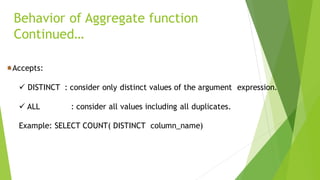
Accepts:
✓ DISTINCT : consider only distinct values of the argument expression.
✓ ALL : consider all values including all duplicates.
Example: SELECT COUNT( DISTINCT column_name)
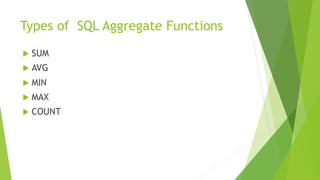
Types of SQL Aggregate Functions
 SUM
 AVG
 MIN
 MAX
 COUNT
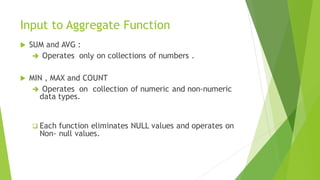
Input to Aggregate Function
 SUM and AVG :
➔ Operates only on collections of numbers .
 MIN , MAX and COUNT
➔ Operates on collection of numeric and non-numeric
data types.
❑ Each function eliminates NULL values and operates on
Non- null values.
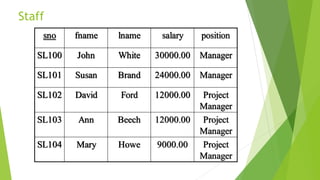
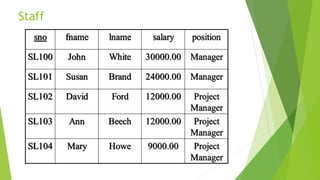
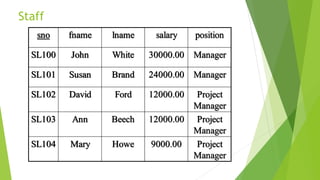
Staff
sno fname lname salary position
SL100 John White 30000.00 Manager
SL101 Susan Brand 24000.00 Manager
SL102 David Ford 12000.00 Project
Manager
SL103 Ann Beech 12000.00 Project
Manager
SL104 Mary Howe 9000.00 Project
Manager
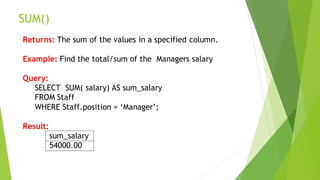
SUM()
Returns: The sum of the values in a specified column.
Example: Find the total/sum of the Managers salary
Query:
SELECT SUM( salary) AS sum_salary
FROM Staff
WHERE Staff.position = ‘Manager’;
Result:
sum_salary
54000.00
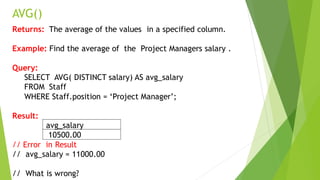
AVG()
Returns: The average of the values in a specified column.
Example: Find the average of the Project Managers salary .
Query:
SELECT AVG( DISTINCT salary) AS avg_salary
FROM Staff
WHERE Staff.position = ‘Project Manager’;
Result:
avg_salary
10500.00
// Error in Result
// avg_salary = 11000.00
// What is wrong?
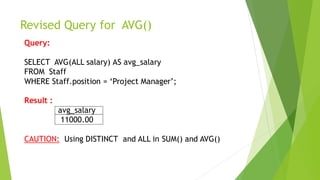
Revised Query for AVG()
Query:
SELECT AVG(ALL salary) AS avg_salary
FROM Staff
WHERE Staff.position = ‘Project Manager’;
Result :
avg_salary
11000.00
CAUTION: Using DISTINCT and ALL in SUM() and AVG()
Staff
sno fname lname salary position
SL100 John White 30000.00 Manager
SL101 Susan Brand 24000.00 Manager
SL102 David Ford 12000.00 Project
Manager
SL103 Ann Beech 12000.00 Project
Manager
SL104 Mary Howe 9000.00 Project
Manager
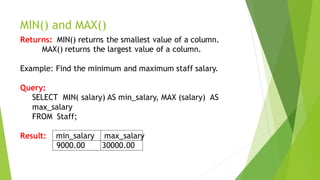
MIN() and MAX()
Returns: MIN() returns the smallest value of a column.
MAX() returns the largest value of a column.
Example: Find the minimum and maximum staff salary.
Query:
SELECT MIN( salary) AS min_salary, MAX (salary) AS
max_salary
FROM Staff;
Result: min_salary max_salary
9000.00 30000.00
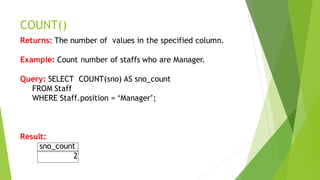
COUNT()
Returns: The number of values in the specified column.
Example: Count number of staffs who are Manager.
Query: SELECT COUNT(sno) AS sno_count
FROM Staff
WHERE Staff.position = ‘Manager’;
Result:
sno_count
2
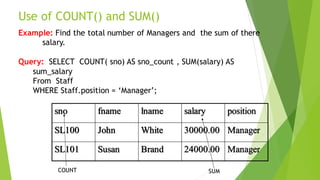
Use of COUNT() and SUM()
Example: Find the total number of Managers and the sum of there
salary.
Query: SELECT COUNT( sno) AS sno_count , SUM(salary) AS
sum_salary
From Staff
WHERE Staff.position = ‘Manager’;
sno fname lname salary position
SL100 John White 30000.00 Manager
SL101 Susan Brand 24000.00 Manager
SUM
COUNT
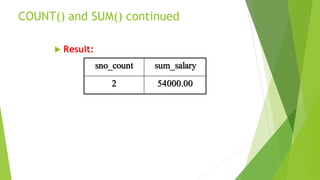
COUNT() and SUM() continued
 Result:
sno_count sum_salary
2 54000.00
Staff
sno fname lname salary position
SL100 John White 30000.00 Manager
SL101 Susan Brand 24000.00 Manager
SL102 David Ford 12000.00 Project
Manager
SL103 Ann Beech 12000.00 Project
Manager
SL104 Mary Howe 9000.00 Project
Manager
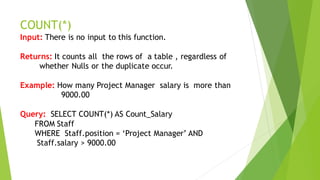
COUNT(*)
Input: There is no input to this function.
Returns: It counts all the rows of a table , regardless of
whether Nulls or the duplicate occur.
Example: How many Project Manager salary is more than
9000.00
Query: SELECT COUNT(*) AS Count_Salary
FROM Staff
WHERE Staff.position = ‘Project Manager’ AND
Staff.salary > 9000.00
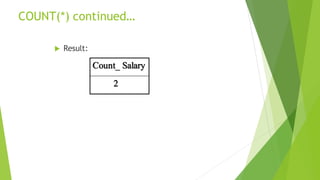
COUNT(*) continued…
 Result:
Count_ Salary
2
Usage of Aggregation Functions
 Use of GROUP BY
 Use of HAVING
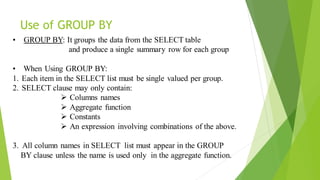
Use of GROUP BY
• GROUP BY: It groups the data from the SELECT table
and produce a single summary row for each group
• When Using GROUP BY:
1. Each item in the SELECT list must be single valued per group.
2. SELECT clause may only contain:
➢ Columns names
➢ Aggregate function
➢ Constants
➢ An expression involving combinations of the above.
3. All column names in SELECT list must appear in the GROUP
BY clause unless the name is used only in the aggregate function.
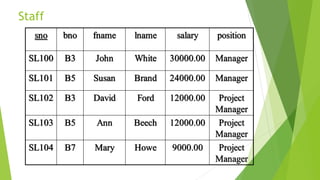
Staff
sno bno fname lname salary position
SL100 B3 John White 30000.00 Manager
SL101 B5 Susan Brand 24000.00 Manager
SL102 B3 David Ford 12000.00 Project
Manager
SL103 B5 Ann Beech 12000.00 Project
Manager
SL104 B7 Mary Howe 9000.00 Project
Manager
GROUP BY
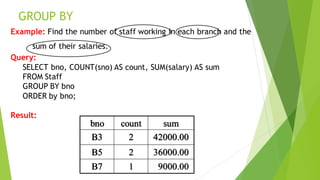
Example: Find the number of staff working in each branch and the
sum of their salaries.
Query:
SELECT bno, COUNT(sno) AS count, SUM(salary) AS sum
FROM Staff
GROUP BY bno
ORDER by bno;
Result:
bno count sum
B3 2 42000.00
B5 2 36000.00
B7 1 9000.00
SQL’S ROLE
bno sno salary COUNT
(sno)
SUM
(salary)
B3
B3
SL100
SL102
30000.00
12000.00
2 42000.00
B5
B5
SL101
SL103
24000.00
12000.00
2 36000.00
B7 Sl104 9000.00 1 9000.00
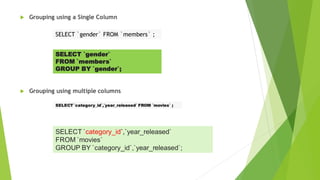
 Grouping using a Single Column
 Grouping using multiple columns
SELECT `gender` FROM `members` ;
SELECT `gender`
FROM `members`
GROUP BY `gender`;
SELECT `category_id`,`year_released` FROM `movies` ;
SELECT `category_id`,`year_released`
FROM `movies`
GROUP BY `category_id`,`year_released`;
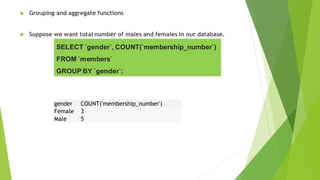
 Grouping and aggregate functions
 Suppose we want total number of males and females in our database.
SELECT `gender`, COUNT(`membership_number`)
FROM `members`
GROUP BY `gender`;
gender COUNT('membership_number')
Female 3
Male 5
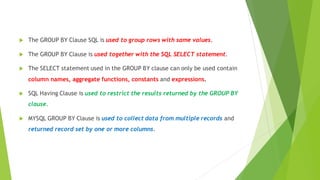
 The GROUP BY Clause SQL is used to group rows with same values.
 The GROUP BY Clause is used together with the SQL SELECT statement.
 The SELECT statement used in the GROUP BY clause can only be used contain
column names, aggregate functions, constants and expressions.
 SQL Having Clause is used to restrict the results returned by the GROUP BY
clause.
 MYSQL GROUP BY Clause is used to collect data from multiple records and
returned record set by one or more columns.
SQL HAVING Clause
 HAVING clause: It is designedto be used with GROUP BY so that it can restrict
the groups that appear in the final result table.
 SELECT column_name(s)
FROM table_name
WHERE condition
GROUP BY column_name(s)
HAVING condition
ORDER BY column_name(s);
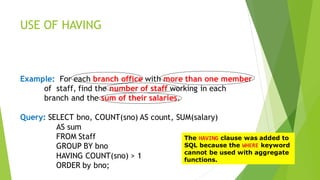
USE OF HAVING
Example: For each branch office with more than one member
of staff, find the number of staff working in each
branch and the sum of their salaries.
Query: SELECT bno, COUNT(sno) AS count, SUM(salary)
AS sum
FROM Staff
GROUP BY bno
HAVING COUNT(sno) > 1
ORDER by bno;
The HAVING clause was added to
SQL because the WHERE keyword
cannot be used with aggregate
functions.
Having Clause continued….
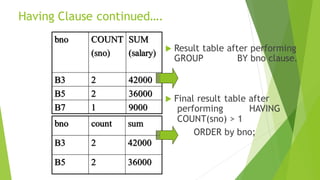
 Result table after performing
GROUP BY bno clause.
 Final result table after
performing HAVING
COUNT(sno) > 1
ORDER by bno;
bno COUNT
(sno)
SUM
(salary)
B3 2 42000
B5 2 36000
B7 1 9000
bno count sum
B3 2 42000
B5 2 36000
 Lists the number of customers in each country. Only include countries with
more than 5 customers:
 SELECT COUNT(CustomerID), Country
FROM Customers
GROUP BY Country
HAVING COUNT(CustomerID) > 5;
 Lists the number of customers in each country, sorted high to low (only
include countries with more than 5 customers):
 SELECT COUNT(CustomerID), Country
FROM Customers
GROUP BY Country
HAVING COUNT(CustomerID) > 5
ORDER BY COUNT(CustomerID) DESC;
Queries
1. SQL Query to find second highest salary of Employee
select max(salary)
from employee
where salary not in (select max(salary) from employee);
2. SQL Query to find Max Salary from each department.
SELECT DeptID, MAX(Salary)
FROM Employee
GROUP BY DeptID.

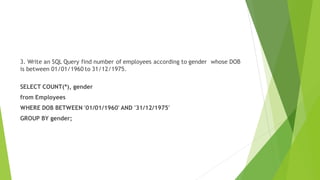
3. Write an SQL Query find number of employees according to gender whose DOB
is between 01/01/1960 to 31/12/1975.
SELECT COUNT(*), gender
from Employees
WHERE DOB BETWEEN '01/01/1960' AND '31/12/1975'
GROUP BY gender;
4. There is a table which contains two column Student and Marks, you need to
find all the students, whose marks are greater than average marks i.e. list of
above average students.
SELECT student, marks
from table
where marks > SELECT AVG(marks) from table
5.How to generate row number in SQL Without ROWNUM
SELECT name, sal, (SELECT COUNT(*)
FROM EMPLOYEE i
WHERE o.name >= i.name) as row_num
FROM EMPLOYEE o order by row_num

SQL-AGG-FUN.pdfiiiijuyyttfffgyyuyyyyyhhh

  • 1.
  • 2.
    Aggregate Function: Aggregate functionsare functions that take a collection of values as input and return a single value. ➢ Behavior of Aggregate Functions: Operates - on a single column Return - a single value. Used only in the SELECT list and in the HAVING clause.
  • 3.
    Behavior of Aggregatefunction Continued… Accepts: ✓ DISTINCT : consider only distinct values of the argument expression. ✓ ALL : consider all values including all duplicates. Example: SELECT COUNT( DISTINCT column_name)
  • 4.
    Types of SQLAggregate Functions  SUM  AVG  MIN  MAX  COUNT
  • 5.
    Input to AggregateFunction  SUM and AVG : ➔ Operates only on collections of numbers .  MIN , MAX and COUNT ➔ Operates on collection of numeric and non-numeric data types. ❑ Each function eliminates NULL values and operates on Non- null values.
  • 6.
    Staff sno fname lnamesalary position SL100 John White 30000.00 Manager SL101 Susan Brand 24000.00 Manager SL102 David Ford 12000.00 Project Manager SL103 Ann Beech 12000.00 Project Manager SL104 Mary Howe 9000.00 Project Manager
  • 7.
    SUM() Returns: The sumof the values in a specified column. Example: Find the total/sum of the Managers salary Query: SELECT SUM( salary) AS sum_salary FROM Staff WHERE Staff.position = ‘Manager’; Result: sum_salary 54000.00
  • 8.
    AVG() Returns: The averageof the values in a specified column. Example: Find the average of the Project Managers salary . Query: SELECT AVG( DISTINCT salary) AS avg_salary FROM Staff WHERE Staff.position = ‘Project Manager’; Result: avg_salary 10500.00 // Error in Result // avg_salary = 11000.00 // What is wrong?
  • 9.
    Revised Query forAVG() Query: SELECT AVG(ALL salary) AS avg_salary FROM Staff WHERE Staff.position = ‘Project Manager’; Result : avg_salary 11000.00 CAUTION: Using DISTINCT and ALL in SUM() and AVG()
  • 10.
    Staff sno fname lnamesalary position SL100 John White 30000.00 Manager SL101 Susan Brand 24000.00 Manager SL102 David Ford 12000.00 Project Manager SL103 Ann Beech 12000.00 Project Manager SL104 Mary Howe 9000.00 Project Manager
  • 11.
    MIN() and MAX() Returns:MIN() returns the smallest value of a column. MAX() returns the largest value of a column. Example: Find the minimum and maximum staff salary. Query: SELECT MIN( salary) AS min_salary, MAX (salary) AS max_salary FROM Staff; Result: min_salary max_salary 9000.00 30000.00
  • 12.
    COUNT() Returns: The numberof values in the specified column. Example: Count number of staffs who are Manager. Query: SELECT COUNT(sno) AS sno_count FROM Staff WHERE Staff.position = ‘Manager’; Result: sno_count 2
  • 13.
    Use of COUNT()and SUM() Example: Find the total number of Managers and the sum of there salary. Query: SELECT COUNT( sno) AS sno_count , SUM(salary) AS sum_salary From Staff WHERE Staff.position = ‘Manager’; sno fname lname salary position SL100 John White 30000.00 Manager SL101 Susan Brand 24000.00 Manager SUM COUNT
  • 14.
    COUNT() and SUM()continued  Result: sno_count sum_salary 2 54000.00
  • 15.
    Staff sno fname lnamesalary position SL100 John White 30000.00 Manager SL101 Susan Brand 24000.00 Manager SL102 David Ford 12000.00 Project Manager SL103 Ann Beech 12000.00 Project Manager SL104 Mary Howe 9000.00 Project Manager
  • 16.
    COUNT(*) Input: There isno input to this function. Returns: It counts all the rows of a table , regardless of whether Nulls or the duplicate occur. Example: How many Project Manager salary is more than 9000.00 Query: SELECT COUNT(*) AS Count_Salary FROM Staff WHERE Staff.position = ‘Project Manager’ AND Staff.salary > 9000.00
  • 17.
  • 18.
    Usage of AggregationFunctions  Use of GROUP BY  Use of HAVING
  • 19.
    Use of GROUPBY • GROUP BY: It groups the data from the SELECT table and produce a single summary row for each group • When Using GROUP BY: 1. Each item in the SELECT list must be single valued per group. 2. SELECT clause may only contain: ➢ Columns names ➢ Aggregate function ➢ Constants ➢ An expression involving combinations of the above. 3. All column names in SELECT list must appear in the GROUP BY clause unless the name is used only in the aggregate function.
  • 20.
    Staff sno bno fnamelname salary position SL100 B3 John White 30000.00 Manager SL101 B5 Susan Brand 24000.00 Manager SL102 B3 David Ford 12000.00 Project Manager SL103 B5 Ann Beech 12000.00 Project Manager SL104 B7 Mary Howe 9000.00 Project Manager
  • 21.
    GROUP BY Example: Findthe number of staff working in each branch and the sum of their salaries. Query: SELECT bno, COUNT(sno) AS count, SUM(salary) AS sum FROM Staff GROUP BY bno ORDER by bno; Result: bno count sum B3 2 42000.00 B5 2 36000.00 B7 1 9000.00
  • 22.
    SQL’S ROLE bno snosalary COUNT (sno) SUM (salary) B3 B3 SL100 SL102 30000.00 12000.00 2 42000.00 B5 B5 SL101 SL103 24000.00 12000.00 2 36000.00 B7 Sl104 9000.00 1 9000.00
  • 23.
     Grouping usinga Single Column  Grouping using multiple columns SELECT `gender` FROM `members` ; SELECT `gender` FROM `members` GROUP BY `gender`; SELECT `category_id`,`year_released` FROM `movies` ; SELECT `category_id`,`year_released` FROM `movies` GROUP BY `category_id`,`year_released`;
  • 24.
     Grouping andaggregate functions  Suppose we want total number of males and females in our database. SELECT `gender`, COUNT(`membership_number`) FROM `members` GROUP BY `gender`; gender COUNT('membership_number') Female 3 Male 5
  • 25.
     The GROUPBY Clause SQL is used to group rows with same values.  The GROUP BY Clause is used together with the SQL SELECT statement.  The SELECT statement used in the GROUP BY clause can only be used contain column names, aggregate functions, constants and expressions.  SQL Having Clause is used to restrict the results returned by the GROUP BY clause.  MYSQL GROUP BY Clause is used to collect data from multiple records and returned record set by one or more columns.
  • 26.
    SQL HAVING Clause HAVING clause: It is designedto be used with GROUP BY so that it can restrict the groups that appear in the final result table.  SELECT column_name(s) FROM table_name WHERE condition GROUP BY column_name(s) HAVING condition ORDER BY column_name(s);
  • 27.
    USE OF HAVING Example:For each branch office with more than one member of staff, find the number of staff working in each branch and the sum of their salaries. Query: SELECT bno, COUNT(sno) AS count, SUM(salary) AS sum FROM Staff GROUP BY bno HAVING COUNT(sno) > 1 ORDER by bno; The HAVING clause was added to SQL because the WHERE keyword cannot be used with aggregate functions.
  • 28.
    Having Clause continued…. Result table after performing GROUP BY bno clause.  Final result table after performing HAVING COUNT(sno) > 1 ORDER by bno; bno COUNT (sno) SUM (salary) B3 2 42000 B5 2 36000 B7 1 9000 bno count sum B3 2 42000 B5 2 36000
  • 29.
     Lists thenumber of customers in each country. Only include countries with more than 5 customers:  SELECT COUNT(CustomerID), Country FROM Customers GROUP BY Country HAVING COUNT(CustomerID) > 5;
  • 30.
     Lists thenumber of customers in each country, sorted high to low (only include countries with more than 5 customers):  SELECT COUNT(CustomerID), Country FROM Customers GROUP BY Country HAVING COUNT(CustomerID) > 5 ORDER BY COUNT(CustomerID) DESC;
  • 31.
    Queries 1. SQL Queryto find second highest salary of Employee select max(salary) from employee where salary not in (select max(salary) from employee);
  • 32.
    2. SQL Queryto find Max Salary from each department. SELECT DeptID, MAX(Salary) FROM Employee GROUP BY DeptID. 
  • 33.
    3. Write anSQL Query find number of employees according to gender whose DOB is between 01/01/1960 to 31/12/1975. SELECT COUNT(*), gender from Employees WHERE DOB BETWEEN '01/01/1960' AND '31/12/1975' GROUP BY gender;
  • 34.
    4. There isa table which contains two column Student and Marks, you need to find all the students, whose marks are greater than average marks i.e. list of above average students. SELECT student, marks from table where marks > SELECT AVG(marks) from table
  • 35.
    5.How to generaterow number in SQL Without ROWNUM SELECT name, sal, (SELECT COUNT(*) FROM EMPLOYEE i WHERE o.name >= i.name) as row_num FROM EMPLOYEE o order by row_num