AGGREGATE FUNCTIONS
INTRODUCTION
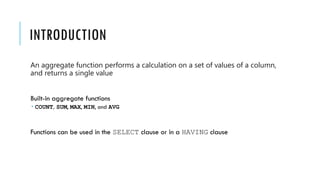
An aggregate function performs a calculation on a set of values of a column,
and returns a single value
Built-in aggregate functions
 COUNT, SUM, MAX, MIN, and AVG
Functions can be used in the SELECT clause or in a HAVING clause
EXAMPLE
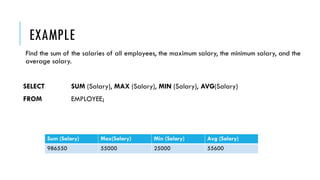
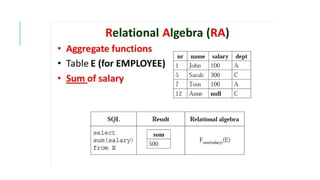
Find the sum of the salaries of all employees, the maximum salary, the minimum salary, and the
average salary.
SELECT SUM (Salary), MAX (Salary), MIN (Salary), AVG(Salary)
FROM EMPLOYEE;
Sum (Salary) Max(Salary) Min (Salary) Avg (Salary)
986550 55000 25000 55600
EXAMPLE
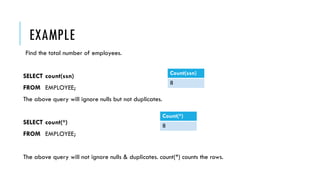
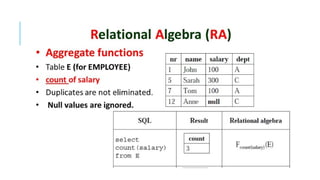
Find the total number of employees.
SELECT count(ssn)
FROM EMPLOYEE;
The above query will ignore nulls but not duplicates.
SELECT count(*)
FROM EMPLOYEE;
The above query will not ignore nulls & duplicates. count(*) counts the rows.
Count(*)
8
Count(ssn)
8
HOW COUNT() HANDLES NULL VALUES?
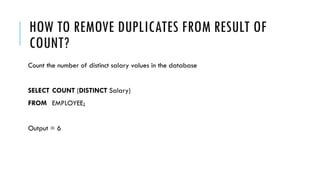
HOW TO REMOVE DUPLICATES FROM RESULT OF
COUNT?
Count the number of distinct salary values in the database
SELECT COUNT (DISTINCT Salary)
FROM EMPLOYEE;
Output = 6
GROUP BY
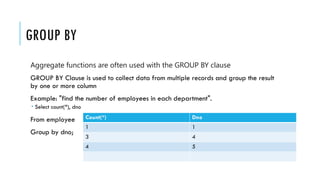
Aggregate functions are often used with the GROUP BY clause
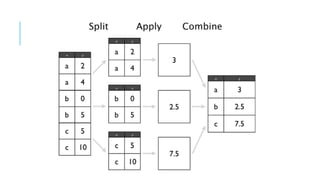
GROUP BY Clause is used to collect data from multiple records and group the result
by one or more column
Example: "find the number of employees in each department".
 Select count(*), dno
From employee
Group by dno;
Count(*) Dno
1 1
3 4
4 5
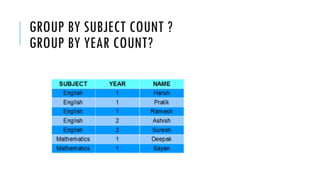
GROUP BY SUBJECT COUNT ?
GROUP BY YEAR COUNT?
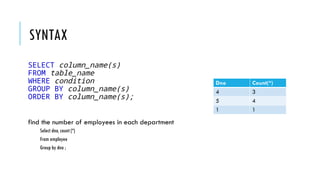
SYNTAX
SELECT column_name(s)
FROM table_name
WHERE condition
GROUP BY column_name(s)
ORDER BY column_name(s);
find the number of employees in each department
Select dno, count (*)
From employee
Group by dno ;
Dno Count(*)
4 3
5 4
1 1
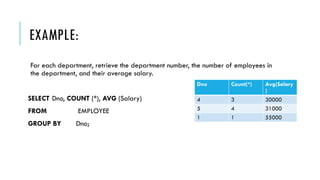
EXAMPLE:
For each department, retrieve the department number, the number of employees in
the department, and their average salary.
SELECT Dno, COUNT (*), AVG (Salary)
FROM EMPLOYEE
GROUP BY Dno;
Dno Count(*) Avg(Salary
)
4 3 30000
5 4 31000
1 1 55000
PRACTICE:
For each project, retrieve the project number, the project name, and the number of
employees who work on that project.
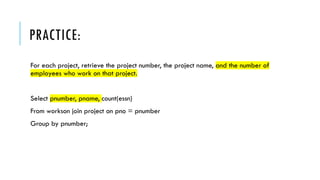
PRACTICE:
For each project, retrieve the project number, the project name, and the number of
employees who work on that project.
Select pnumber, pname, count(essn)
From workson join project on pno = pnumber
Group by pnumber;
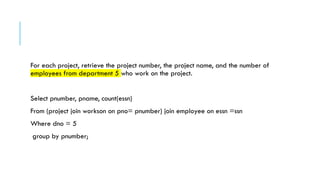
For each project, retrieve the project number, the project name, and the number of
employees from department 5 who work on the project.
For each project, retrieve the project number, the project name, and the number of
employees from department 5 who work on the project.
Select pnumber, pname, count(essn)
From (project join workson on pno= pnumber) join employee on essn =ssn
Where dno = 5
group by pnumber;
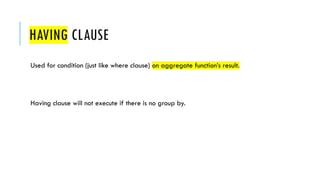
HAVING CLAUSE
Used for condition (just like where clause) on aggregate function’s result.
Having clause will not execute if there is no group by.
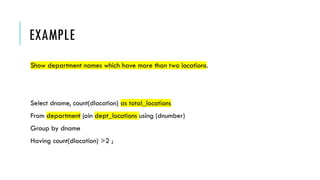
EXAMPLE
Show department names which have more than two locations.
Select dname, count(dlocation) as total_locations
From department join dept_locations using (dnumber)
Group by dname
Having count(dlocation) >2 ;
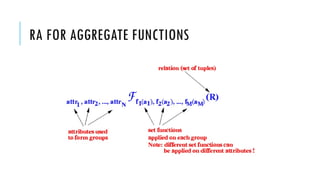
RA FOR AGGREGATE FUNCTIONS
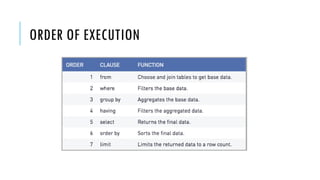
ORDER OF EXECUTION
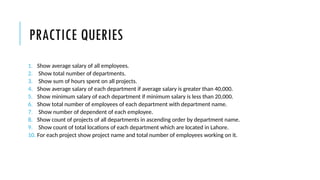
PRACTICE QUERIES
1. Show average salary of all employees.
2. Show total number of departments.
3. Show sum of hours spent on all projects.
4. Show average salary of each department if average salary is greater than 40,000.
5. Show minimum salary of each department if minimum salary is less than 20,000.
6. Show total number of employees of each department with department name.
7. Show number of dependent of each employee.
8. Show count of projects of all departments in ascending order by department name.
9. Show count of total locations of each department which are located in Lahore.
10. For each project show project name and total number of employees working on it.

Lecture 8 DML3 aggregate functions in DB.pptx

  • 1.
  • 2.
    INTRODUCTION An aggregate functionperforms a calculation on a set of values of a column, and returns a single value Built-in aggregate functions  COUNT, SUM, MAX, MIN, and AVG Functions can be used in the SELECT clause or in a HAVING clause
  • 3.
    EXAMPLE Find the sumof the salaries of all employees, the maximum salary, the minimum salary, and the average salary. SELECT SUM (Salary), MAX (Salary), MIN (Salary), AVG(Salary) FROM EMPLOYEE; Sum (Salary) Max(Salary) Min (Salary) Avg (Salary) 986550 55000 25000 55600
  • 4.
    EXAMPLE Find the totalnumber of employees. SELECT count(ssn) FROM EMPLOYEE; The above query will ignore nulls but not duplicates. SELECT count(*) FROM EMPLOYEE; The above query will not ignore nulls & duplicates. count(*) counts the rows. Count(*) 8 Count(ssn) 8
  • 5.
    HOW COUNT() HANDLESNULL VALUES?
  • 6.
    HOW TO REMOVEDUPLICATES FROM RESULT OF COUNT? Count the number of distinct salary values in the database SELECT COUNT (DISTINCT Salary) FROM EMPLOYEE; Output = 6
  • 7.
    GROUP BY Aggregate functionsare often used with the GROUP BY clause GROUP BY Clause is used to collect data from multiple records and group the result by one or more column Example: "find the number of employees in each department".  Select count(*), dno From employee Group by dno; Count(*) Dno 1 1 3 4 4 5
  • 9.
    GROUP BY SUBJECTCOUNT ? GROUP BY YEAR COUNT?
  • 10.
    SYNTAX SELECT column_name(s) FROM table_name WHEREcondition GROUP BY column_name(s) ORDER BY column_name(s); find the number of employees in each department Select dno, count (*) From employee Group by dno ; Dno Count(*) 4 3 5 4 1 1
  • 11.
    EXAMPLE: For each department,retrieve the department number, the number of employees in the department, and their average salary. SELECT Dno, COUNT (*), AVG (Salary) FROM EMPLOYEE GROUP BY Dno; Dno Count(*) Avg(Salary ) 4 3 30000 5 4 31000 1 1 55000
  • 12.
    PRACTICE: For each project,retrieve the project number, the project name, and the number of employees who work on that project.
  • 13.
    PRACTICE: For each project,retrieve the project number, the project name, and the number of employees who work on that project. Select pnumber, pname, count(essn) From workson join project on pno = pnumber Group by pnumber;
  • 14.
    For each project,retrieve the project number, the project name, and the number of employees from department 5 who work on the project.
  • 15.
    For each project,retrieve the project number, the project name, and the number of employees from department 5 who work on the project. Select pnumber, pname, count(essn) From (project join workson on pno= pnumber) join employee on essn =ssn Where dno = 5 group by pnumber;
  • 16.
    HAVING CLAUSE Used forcondition (just like where clause) on aggregate function’s result. Having clause will not execute if there is no group by.
  • 17.
    EXAMPLE Show department nameswhich have more than two locations. Select dname, count(dlocation) as total_locations From department join dept_locations using (dnumber) Group by dname Having count(dlocation) >2 ;
  • 18.
  • 21.
  • 22.
    PRACTICE QUERIES 1. Showaverage salary of all employees. 2. Show total number of departments. 3. Show sum of hours spent on all projects. 4. Show average salary of each department if average salary is greater than 40,000. 5. Show minimum salary of each department if minimum salary is less than 20,000. 6. Show total number of employees of each department with department name. 7. Show number of dependent of each employee. 8. Show count of projects of all departments in ascending order by department name. 9. Show count of total locations of each department which are located in Lahore. 10. For each project show project name and total number of employees working on it.