SQL for DataScience -1
I N T R O D U C T I O N TO
DATA B A S E S A N D B A S I C S Q L
2.
Edit Master textstyles
Edit Master text styles
‹#›
Speaker
• Navin Manaswi
Published Author of AI Books, Ex-Chief Data
Scientist, Guest Faculty at IIT Kgp, IIT Kanpur
Alumnus
3.
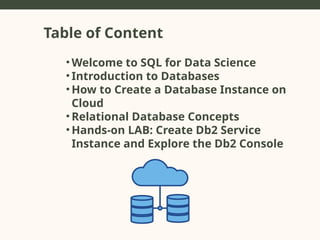
Table of Content
•Welcome to SQL for Data Science
• Introduction to Databases
• How to Create a Database Instance on
Cloud
• Relational Database Concepts
• Hands-on LAB: Create Db2 Service
Instance and Explore the Db2 Console
4.
Learning Objectives
• Introductionto SQL and Relational
Databases
• Introduction to Cloud Databases
• Step-by-Step: Creating IBM Db2
Instance on Cloud
• Creating a Sample Database and Tables
• Running Basic SQL Queries
• Hands-On Lab and Demo
• Q&A
Introduction to Database
Definitionof a Database
• A collection of organized information or data.
Types of Databases
• Relational Databases (SQL)
• Non-Relational Databases (NoSQL)
Popular SQL Databases in Data Science
• MySQL
• PostgreSQL
• IBM Db2
• SQLite
• Oracle
• Microsoft SQL Server
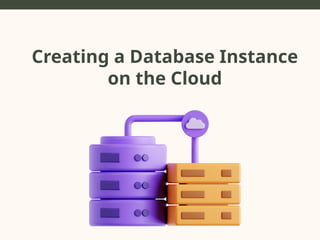
Creating a DatabaseInstance on
the Cloud
Why Use the Cloud?
• Scalability, accessibility, and low maintenance.
• Pay-as-you-go pricing models make cloud databases
affordable and adaptable to varying workloads.
Steps to Create a Database Instance:
1.Choose a Cloud Provider (AWS, IBM Cloud, Google Cloud,
Azure).
2.Select Database Service (e.g., IBM Db2, Amazon RDS).
3.Configure the Instance (set region, name, storage, access
credentials).
4.Launch the Database Instance.
5.Access via SQL client or browser interface.
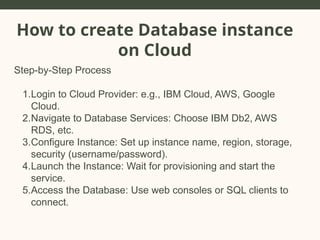
How to createDatabase instance
on Cloud
Step-by-Step Process
1.Login to Cloud Provider: e.g., IBM Cloud, AWS, Google
Cloud.
2.Navigate to Database Services: Choose IBM Db2, AWS
RDS, etc.
3.Configure Instance: Set up instance name, region, storage,
security (username/password).
4.Launch the Instance: Wait for provisioning and start the
service.
5.Access the Database: Use web consoles or SQL clients to
connect.
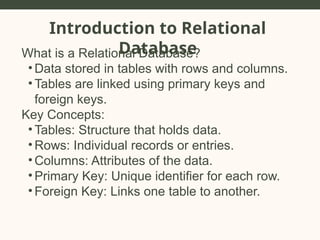
Introduction to Relational
Database
Whatis a Relational Database?
• Data stored in tables with rows and columns.
• Tables are linked using primary keys and
foreign keys.
Key Concepts:
• Tables: Structure that holds data.
• Rows: Individual records or entries.
• Columns: Attributes of the data.
• Primary Key: Unique identifier for each row.
• Foreign Key: Links one table to another.
13.
Relational Database: KeyConcepts
• Tables, Rows, and Columns:
⚬ Tables: The fundamental structure in relational databases
(like spreadsheets).
⚬ Rows: Records or tuples, representing individual data
points.
⚬ Columns: Fields or attributes representing data
properties.
• Keys:
⚬ Primary Key: Unique identifier for rows.
⚬ Foreign Key: Links tables by referencing a primary key in
another table.
• Normalization: Organizing data to reduce redundancy.
• Joins:
⚬ Inner Join: Retrieves matching rows from two tables.
⚬ Left Join, Right Join, Full Join: Variants that retrieve non-
matching rows as well.
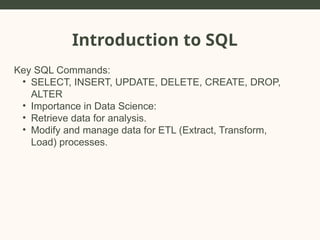
Introduction to SQL
Whatis SQL?
• SQL stands for Structured Query Language.
• SQL is the standard language used for interacting with
relational databases.
• SQL is used for querying, updating, and managing
databases.
17.
Introduction to SQL
KeySQL Commands:
• SELECT, INSERT, UPDATE, DELETE, CREATE, DROP,
ALTER
• Importance in Data Science:
• Retrieve data for analysis.
• Modify and manage data for ETL (Extract, Transform,
Load) processes.
Introduction to CloudDatabase
What is a Cloud Database?
• A cloud database is a database that runs on
cloud computing platforms such as AWS, Google
Cloud, and IBM Cloud.
• Benefits: Scalability, flexibility, cost-
effectiveness, and accessibility.
Popular Cloud Databases:
• AWS RDS (Relational Database Service)
• Google Cloud SQL
• IBM Db2 on Cloud
Why Use IBMDb2 for Data
Science?
• Features of IBM Db2:
• SQL support for relational databases.
• Optimized for large datasets and analytics.
• Strong integration with cloud and on-prem
solutions.
• Built-in AI features.
• Benefits for Data Science:
• Scalability: Handles large datasets for analysis.
• Security: Secure data access and management.
• Flexibility: Suitable for various data types and
analytics.
22.
In a relationaldatabase, what is a
primary key used for?
A) To define the structure of a table.
B) To uniquely identify each row in a table.
C) To link two tables together.
D) To store large amounts of text.
Poll
Time
23.
Which of thefollowing is NOT a
characteristic of a relational database?
A) Tables are related by foreign keys.
B) Data is stored in JSON format.
C) Data is organized into rows and columns.
D) Relationships between data are defined
by keys.
Poll
Time
24.
Which of thefollowing SQL statements
is used to add a new row of data to a
table?
A) ALTER
B) UPDATE
C) INSERT INTO
D) DELETE FROM
Poll
Time
25.
Which of thefollowing is true
about relational databases?
A) Data is stored in a hierarchical structure.
B) Data is stored in a network model.
C) Data is stored in tables with rows and
columns.
D) Data is stored in a document-based
structure.
Poll
Time
26.
What is theprimary benefit of
using cloud-based databases over
traditional on-premise databases?
A) No need for internet access.
B) Unlimited free storage.
C) Scalability and easy access from
anywhere.
D) Cloud databases do not require SQL
knowledge.
Poll
Time
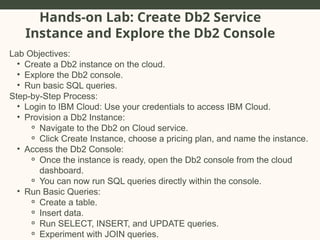
Hands-on Lab: CreateDb2 Service
Instance and Explore the Db2 Console
Lab Objectives:
• Create a Db2 instance on the cloud.
• Explore the Db2 console.
• Run basic SQL queries.
Step-by-Step Process:
• Login to IBM Cloud: Use your credentials to access IBM Cloud.
• Provision a Db2 Instance:
⚬ Navigate to the Db2 on Cloud service.
⚬ Click Create Instance, choose a pricing plan, and name the instance.
• Access the Db2 Console:
⚬ Once the instance is ready, open the Db2 console from the cloud
dashboard.
⚬ You can now run SQL queries directly within the console.
• Run Basic Queries:
⚬ Create a table.
⚬ Insert data.
⚬ Run SELECT, INSERT, and UPDATE queries.
⚬ Experiment with JOIN queries.
29.
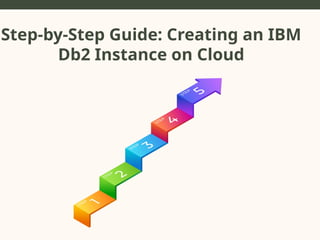
Step-by-Step Guide: Creatingan IBM Db2
Instance on Cloud
• Step 1: Sign in to IBM Cloud
• Visit IBM Cloud.
• Log in or create a new account.
30.
Step-by-Step Guide: Creatingan IBM Db2
Instance on Cloud
Step 2: Navigate to Db2 Service
• Go to the Catalog.
• Search for Db2 under databases.
• Select Db2 on Cloud.
31.
Step-by-Step Guide: Creatingan IBM Db2
Instance on Cloud
Step 3: Configure the Instance
• Select a pricing plan: Free, Lite, Standard.
• Name your instance.
• Select region and other configurations (memory,
storage, etc.).
32.
Step-by-Step Guide: Creatingan IBM Db2
Instance on Cloud
Step 4: Provision the Db2 Instance
• Click Create.
• Wait for the instance to be provisioned (this may
take a few minutes).
33.
Step-by-Step Guide: Creatingan IBM Db2
Instance on Cloud
Step 5: Access the Db2 Dashboard
• After provisioning, go to your IBM Cloud
Dashboard.
• Select your Db2 instance and click Open Console.
• This opens the Db2 management console where
you can run queries and manage databases.
34.
Overview of IBMDb2 Console
• Features of Db2 Console:
⚬ Visualize tables and data.
⚬ Create, modify, and delete databases and
tables.
⚬ Run SQL queries using an interactive query
editor.
⚬ Access logs, performance metrics, and security
settings.
35.
Creating a SampleDatabase in IBM Db2
Step 6: Create a New Database
• Navigate to the Database tab in the Db2 Console.
• Click Create Database.
• Name your database (e.g., SampleDB) and click
Create.
36.
Creating a SampleTable in a sample Database
Step 7: Create a Table
⚬ In your SampleDB, go to the Tables section.
⚬ Click Create Table.
⚬ Define the table schema: Columns, Data types,
Primary Key.
⚬ Example Table: Employees
■ Columns: EmpID (int, primary key), Name
(varchar), Position (varchar), Salary (float).
37.
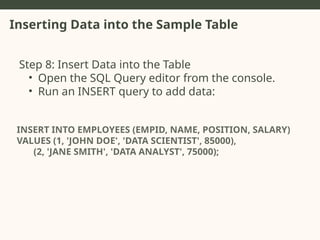
Inserting Data intothe Sample Table
Step 8: Insert Data into the Table
• Open the SQL Query editor from the console.
• Run an INSERT query to add data:
INSERT INTO EMPLOYEES (EMPID, NAME, POSITION, SALARY)
VALUES (1, 'JOHN DOE', 'DATA SCIENTIST', 85000),
(2, 'JANE SMITH', 'DATA ANALYST', 75000);
38.
Running a simplequery
Step 9: Run a SELECT Query
• Open the SQL Query editor and run the following
query to retrieve data from the table:
SELECT * FROM EMPLOYEES;
39.
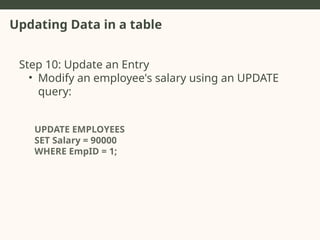
Updating Data ina table
Step 10: Update an Entry
• Modify an employee's salary using an UPDATE
query:
UPDATE EMPLOYEES
SET Salary = 90000
WHERE EmpID = 1;
40.
Delete Data froma Table
Step 11: Delete an Entry
• Remove an employee from the table using a
DELETE query
DELETE FROM EMPLOYEES
WHERE EMPID = 2;
41.
Which SQL commandis used to retrieve
data from a database table?
A) UPDATE
B) INSERT
C) DELETE
D) SELECT
Poll
Time
42.
Additional SQL Concepts
•Joins: How to join multiple tables in SQL.
• Aggregate Functions: Using COUNT, SUM, AVG,
MIN, MAX.
• Filtering Data: Using WHERE, LIKE, IN conditions to
filter data.
43.
What feature ofthe Db2 Console allows
you to execute SQL commands directly
within the web interface?
A) Db2 Query Builder.
B) SQL Query Editor.
C) Schema Designer.
D) Database Optimizer.
Poll
Time
44.
Hands-on Lab: CreateDb2 service instance
• Objective: Walk through creating your own Db2
instance.
• Log in to IBM Cloud.
• Provision a Db2 instance.
• Create a new database.
• Create tables and run basic queries.
45.
Hands-on Lab: Explorethe Db2 Console
• Objective: Explore the features of the Db2 console.
• Use the SQL query editor.
• Visualize data in tables.
• Modify table schemas.
• Explore other console features like performance
monitoring and logs.
46.
Advanced SQL Queries
•SELECT Name, Position, Salary
• FROM Employees
• WHERE Salary > (SELECT AVG(Salary) FROM
Employees);
47.
Best Practice forSQL in data science
• Efficient Query Writing:
• Use indexes for faster query execution.
• Avoid unnecessary joins and subqueries.
• Limit data retrieval using LIMIT and OFFSET.
• Data Integrity:
• Always define primary keys and foreign keys.
• Use constraints (e.g., NOT NULL, UNIQUE) to
enforce data integrity.
48.
Real-world Applications ofSQL in Data Science
• Data Extraction for Analytics:
• Use SQL to retrieve specific datasets for machine
learning and statistical analysis.
• ETL Processes:
• Use SQL to extract, transform, and load data into
data warehouses for analysis.
49.
Key Take-aways
• SQLis essential for managing and querying
relational databases.
• IBM Db2 on Cloud provides a scalable, secure
platform for data science projects.
• Hands-on experience with cloud databases and SQL
queries is crucial for effective data analysis.
Editor's Notes
#3 Today, we will explore techniques for identifying risks, how to assess their impact, and how AI tools can be leveraged in risk management.
#4 Today, we will explore techniques for identifying risks, how to assess their impact, and how AI tools can be leveraged in risk management.
#6 Identifying risks early allows the team to mitigate potential problems before they impact the project.
#8 Identifying risks early allows the team to mitigate potential problems before they impact the project.
#10 Identifying risks early allows the team to mitigate potential problems before they impact the project.
#12 Each technique has its advantages. For example, brainstorming helps generate a wide range of risks, while interviews offer in-depth insights from stakeholders.
#13 Identifying risks early allows the team to mitigate potential problems before they impact the project.
#14 Identifying risks early allows the team to mitigate potential problems before they impact the project.
#16 Identifying risks early allows the team to mitigate potential problems before they impact the project.
#17 Identifying risks early allows the team to mitigate potential problems before they impact the project.
#19 A risk’s likelihood and consequence determine its priority. High-priority risks should be addressed first to minimize project disruptions.
#21
Risk identification is an ongoing process. Regular reviews and updates are necessary to ensure that all potential risks are accounted for.
#28
Risk identification is an ongoing process. Regular reviews and updates are necessary to ensure that all potential risks are accounted for.
#29 Canva is a powerful tool that simplifies the creation of visually engaging presentations, with features designed for collaboration and customization.
#30 Canva is a powerful tool that simplifies the creation of visually engaging presentations, with features designed for collaboration and customization.
#31 Canva is a powerful tool that simplifies the creation of visually engaging presentations, with features designed for collaboration and customization.
#32 Canva is a powerful tool that simplifies the creation of visually engaging presentations, with features designed for collaboration and customization.
#33 Canva is a powerful tool that simplifies the creation of visually engaging presentations, with features designed for collaboration and customization.
#34 Canva is a powerful tool that simplifies the creation of visually engaging presentations, with features designed for collaboration and customization.
#35 Canva is a powerful tool that simplifies the creation of visually engaging presentations, with features designed for collaboration and customization.
#36 Canva is a powerful tool that simplifies the creation of visually engaging presentations, with features designed for collaboration and customization.
#37 Canva is a powerful tool that simplifies the creation of visually engaging presentations, with features designed for collaboration and customization.
#38 Canva is a powerful tool that simplifies the creation of visually engaging presentations, with features designed for collaboration and customization.
#39 Canva is a powerful tool that simplifies the creation of visually engaging presentations, with features designed for collaboration and customization.
#40 Canva is a powerful tool that simplifies the creation of visually engaging presentations, with features designed for collaboration and customization.
#42 Canva is a powerful tool that simplifies the creation of visually engaging presentations, with features designed for collaboration and customization.
#44 Canva is a powerful tool that simplifies the creation of visually engaging presentations, with features designed for collaboration and customization.
#45 Canva is a powerful tool that simplifies the creation of visually engaging presentations, with features designed for collaboration and customization.
#46 Canva is a powerful tool that simplifies the creation of visually engaging presentations, with features designed for collaboration and customization.
#47 Canva is a powerful tool that simplifies the creation of visually engaging presentations, with features designed for collaboration and customization.
#48 Canva is a powerful tool that simplifies the creation of visually engaging presentations, with features designed for collaboration and customization.
#49 Canva is a powerful tool that simplifies the creation of visually engaging presentations, with features designed for collaboration and customization.


















![[DSC Europe 25] Slobodan Dolinic - Smart and Intelligent Green Region.pptx](https://cdn.slidesharecdn.com/ss_thumbnails/0bribinjsp6ghwtvsvor-2-sigre-slobodan-dolinic-260115093812-c9c10e90-thumbnail.jpg?width=640&height=640&fit=bounds)

![[DSC Europe 25] Srba Markovic - From Pilot to Production: Overcoming AI Deplo...](https://cdn.slidesharecdn.com/ss_thumbnails/yjjmrtytmwbalxlba7px-4-srba-markovic-from-pilot-to-production-overcoming-ai-deployment-blockers-with-260114111931-4a892d44-thumbnail.jpg?width=640&height=640&fit=bounds)


