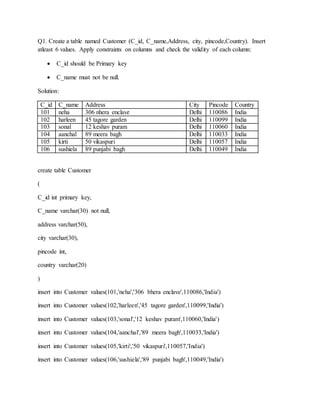
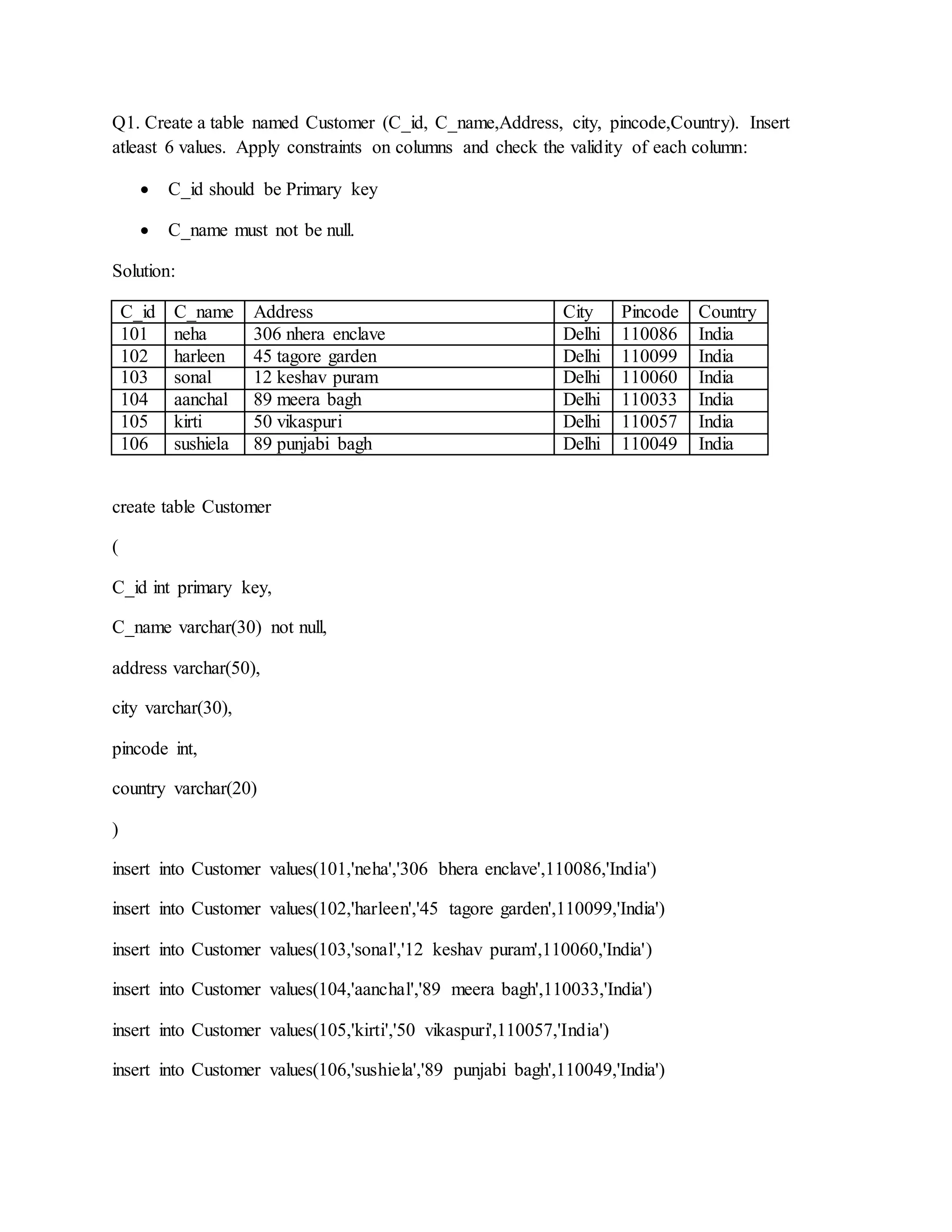
Q1. Create a table named Customer (C_id, C_name,Address, city, pincode,Country). Insert
atleast 6 values. Apply constraints on columns and check the validity of each column:
 C_id should be Primary key
 C_name must not be null.
Solution:
C_id C_name Address City Pincode Country
101 neha 306 nhera enclave Delhi 110086 India
102 harleen 45 tagore garden Delhi 110099 India
103 sonal 12 keshav puram Delhi 110060 India
104 aanchal 89 meera bagh Delhi 110033 India
105 kirti 50 vikaspuri Delhi 110057 India
106 sushiela 89 punjabi bagh Delhi 110049 India
create table Customer
(
C_id int primary key,
C_name varchar(30) not null,
address varchar(50),
city varchar(30),
pincode int,
country varchar(20)
)
insert into Customer values(101,'neha','306 bhera enclave',110086,'India')
insert into Customer values(102,'harleen','45 tagore garden',110099,'India')
insert into Customer values(103,'sonal','12 keshav puram',110060,'India')
insert into Customer values(104,'aanchal','89 meera bagh',110033,'India')
insert into Customer values(105,'kirti','50 vikaspuri',110057,'India')
insert into Customer values(106,'sushiela','89 punjabi bagh',110049,'India')
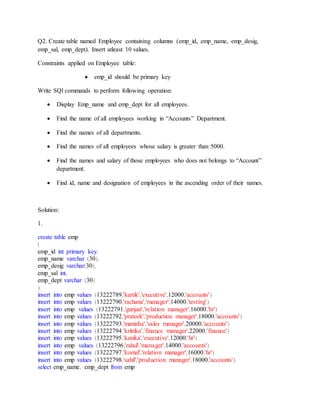
Q2. Create table named Employee containing columns (emp_id, emp_name, emp_desig,
emp_sal, emp_dept). Insert atleast 10 values.
Constraints applied on Employee table:
 emp_id should be primary key
Write SQl commands to perform following operation:
 Display Emp_name and emp_dept for all employees.
 Find the name of all employees working in “Accounts” Department.
 Find the names of all departments.
 Find the names of all employees whose salary is greater than 5000.
 Find the names and salary of those employees who does not belongs to “Account”
department.
 Find id, name and designation of employees in the ascending order of their names.
Solution:
1.
create table emp
(
emp_id int primary key,
emp_name varchar (30),
emp_desig varchar(30),
emp_sal int,
emp_dept varchar (30)
)
insert into emp values (13222789,'kartik','executive',12000,'accounts')
insert into emp values (13222790,'rachana','manager',14000,'testing')
insert into emp values (13222791,'gunjan','relation manager',16000,'hr')
insert into emp values (13222792,'prateek','production manager',18000,'accounts')
insert into emp values (13222793,'manisha','sales manager',20000,'accounts')
insert into emp values (13222794,'krittika','finance manager',22000,'finance')
insert into emp values (13222795,'kanika','executive',12000,'hr')
insert into emp values (13222796,'rahul','manager',14000,'accounts')
insert into emp values (13222797,'komal','relation manager',16000,'hr')
insert into emp values (13222798,'sahil','production manager',18000,'accounts')
select emp_name, emp_dept from emp
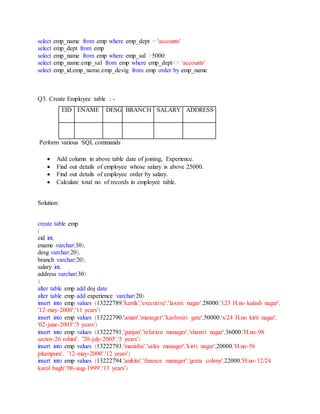
select emp_name from emp where emp_dept = 'accounts'
select emp_dept from emp
select emp_name from emp where emp_sal >5000
select emp_name,emp_sal from emp where emp_dept<> 'accounts'
select emp_id,emp_name,emp_desig from emp order by emp_name
Q3. Create Employee table : -
EID ENAME DESG BRANCH SALARY ADDRESS
Perform various SQL commands
 Add column in above table date of joining, Experience.
 Find out details of employee whose salary is above 25000.
 Find out details of employee order by salary.
 Calculate total no. of records in employee table.
Solution:
create table emp
(
eid int,
ename varchar(30),
desg varchar(20),
branch varchar(20),
salary int,
address varchar(30)
)
alter table emp add doj date
alter table emp add experience varchar(20)
insert into emp values (13222789,'kartik','executive','laxmi nagar',28000,'123 H.no kalash nagar',
'12-may-2000','11 years')
insert into emp values (13222790,'aman','manager','kashmiri gate',50000,'x/24 H.no kirti nagar',
'02-june-2003','5 years')
insert into emp values (13222791,'gunjan','relation manager','shastri nagar',36000,'H.no-98
sector-26 rohini', '20-july-2005','3 years')
insert into emp values (13222793,'manisha','sales manager','kirti nagar',20000,'H.no-56
pitampura', '12-may-2000','12 years')
insert into emp values (13222794,'anikita','finance manager','geeta colony',22000,'H.no-12/24
karol bagh','06-aug-1999','13 years')
insert into emp values (13222792,'prateek','production manager','moti nagar',18000,'H.no-28
shastri park','17-may-2009','2 years')
select * from emp where salary > 25000
select * from emp order by salary
select count ('records')from emp
select * from emp
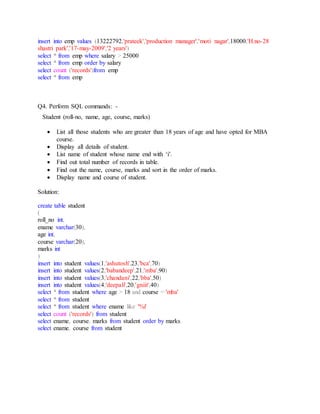
Q4. Perform SQL commands: -
Student (roll-no, name, age, course, marks)
 List all those students who are greater than 18 years of age and have opted for MBA
course.
 Display all details of student.
 List name of student whose name end with ‘i’.
 Find out total number of records in table.
 Find out the name, course, marks and sort in the order of marks.
 Display name and course of student.
Solution:
create table student
(
roll_no int,
ename varchar(30),
age int,
course varchar(20),
marks int
)
insert into student values(1,'ashutosh',23,'bca',70)
insert into student values(2,'babandeep',21,'mba',90)
insert into student values(3,'chandani',22,'bba',50)
insert into student values(4,'deepali',20,'gniit',40)
select * from student where age > 18 and course = 'mba'
select * from student
select * from student where ename like '%i'
select count ('records') from student
select ename, course, marks from student order by marks
select ename, course from student

Sql file (1)

  • 1.
    Q1. Create atable named Customer (C_id, C_name,Address, city, pincode,Country). Insert atleast 6 values. Apply constraints on columns and check the validity of each column:  C_id should be Primary key  C_name must not be null. Solution: C_id C_name Address City Pincode Country 101 neha 306 nhera enclave Delhi 110086 India 102 harleen 45 tagore garden Delhi 110099 India 103 sonal 12 keshav puram Delhi 110060 India 104 aanchal 89 meera bagh Delhi 110033 India 105 kirti 50 vikaspuri Delhi 110057 India 106 sushiela 89 punjabi bagh Delhi 110049 India create table Customer ( C_id int primary key, C_name varchar(30) not null, address varchar(50), city varchar(30), pincode int, country varchar(20) ) insert into Customer values(101,'neha','306 bhera enclave',110086,'India') insert into Customer values(102,'harleen','45 tagore garden',110099,'India') insert into Customer values(103,'sonal','12 keshav puram',110060,'India') insert into Customer values(104,'aanchal','89 meera bagh',110033,'India') insert into Customer values(105,'kirti','50 vikaspuri',110057,'India') insert into Customer values(106,'sushiela','89 punjabi bagh',110049,'India')
  • 2.
    Q2. Create tablenamed Employee containing columns (emp_id, emp_name, emp_desig, emp_sal, emp_dept). Insert atleast 10 values. Constraints applied on Employee table:  emp_id should be primary key Write SQl commands to perform following operation:  Display Emp_name and emp_dept for all employees.  Find the name of all employees working in “Accounts” Department.  Find the names of all departments.  Find the names of all employees whose salary is greater than 5000.  Find the names and salary of those employees who does not belongs to “Account” department.  Find id, name and designation of employees in the ascending order of their names. Solution: 1. create table emp ( emp_id int primary key, emp_name varchar (30), emp_desig varchar(30), emp_sal int, emp_dept varchar (30) ) insert into emp values (13222789,'kartik','executive',12000,'accounts') insert into emp values (13222790,'rachana','manager',14000,'testing') insert into emp values (13222791,'gunjan','relation manager',16000,'hr') insert into emp values (13222792,'prateek','production manager',18000,'accounts') insert into emp values (13222793,'manisha','sales manager',20000,'accounts') insert into emp values (13222794,'krittika','finance manager',22000,'finance') insert into emp values (13222795,'kanika','executive',12000,'hr') insert into emp values (13222796,'rahul','manager',14000,'accounts') insert into emp values (13222797,'komal','relation manager',16000,'hr') insert into emp values (13222798,'sahil','production manager',18000,'accounts') select emp_name, emp_dept from emp
  • 3.
    select emp_name fromemp where emp_dept = 'accounts' select emp_dept from emp select emp_name from emp where emp_sal >5000 select emp_name,emp_sal from emp where emp_dept<> 'accounts' select emp_id,emp_name,emp_desig from emp order by emp_name Q3. Create Employee table : - EID ENAME DESG BRANCH SALARY ADDRESS Perform various SQL commands  Add column in above table date of joining, Experience.  Find out details of employee whose salary is above 25000.  Find out details of employee order by salary.  Calculate total no. of records in employee table. Solution: create table emp ( eid int, ename varchar(30), desg varchar(20), branch varchar(20), salary int, address varchar(30) ) alter table emp add doj date alter table emp add experience varchar(20) insert into emp values (13222789,'kartik','executive','laxmi nagar',28000,'123 H.no kalash nagar', '12-may-2000','11 years') insert into emp values (13222790,'aman','manager','kashmiri gate',50000,'x/24 H.no kirti nagar', '02-june-2003','5 years') insert into emp values (13222791,'gunjan','relation manager','shastri nagar',36000,'H.no-98 sector-26 rohini', '20-july-2005','3 years') insert into emp values (13222793,'manisha','sales manager','kirti nagar',20000,'H.no-56 pitampura', '12-may-2000','12 years') insert into emp values (13222794,'anikita','finance manager','geeta colony',22000,'H.no-12/24 karol bagh','06-aug-1999','13 years')
  • 4.
    insert into empvalues (13222792,'prateek','production manager','moti nagar',18000,'H.no-28 shastri park','17-may-2009','2 years') select * from emp where salary > 25000 select * from emp order by salary select count ('records')from emp select * from emp Q4. Perform SQL commands: - Student (roll-no, name, age, course, marks)  List all those students who are greater than 18 years of age and have opted for MBA course.  Display all details of student.  List name of student whose name end with ‘i’.  Find out total number of records in table.  Find out the name, course, marks and sort in the order of marks.  Display name and course of student. Solution: create table student ( roll_no int, ename varchar(30), age int, course varchar(20), marks int ) insert into student values(1,'ashutosh',23,'bca',70) insert into student values(2,'babandeep',21,'mba',90) insert into student values(3,'chandani',22,'bba',50) insert into student values(4,'deepali',20,'gniit',40) select * from student where age > 18 and course = 'mba' select * from student select * from student where ename like '%i' select count ('records') from student select ename, course, marks from student order by marks select ename, course from student