
SQL Commands executed in
SQL Plus
Sunil Kumar Gunasekaran
Creating table PERSONS1013 with the following Attribute names

Altering the Column name of the table P_ID to include NOT NULL and PRIMARY
KEY status

Adding another column SALARY with data type as Number;

Page 1
After all the modifications done to the table

Sample of records into the table using INSERT command
Inse

Page 2
The table with the values loaded is shown below

Page 3
Getting the details of the record having the highest salary

Getting the name of the person with the highest salary

Getting the name of the person with minimum salary

Page 4
Getting the names of persons with salary greater than the average salary
The nested statements are used when there is one to one relationship between
person and salary.

Need to work out on Inner Join Outer Join and Natural Join and other functions and update here to be
done or revised before any interview.

Dropping the whole table using DROP DDL command

Deleting a particular record

Using Group by with a function to group by the entities based on the function;
Note that only Sum and average require group by since

Page 5
This is the Orders table for the above GROUP BY function execution.
The requirement is that there need to be a customer and many orders placed by him and hence many
orderprices. If we want info of the max min avg sum of the orderprices placed by each customer, then
use group by along with the functions.
Usage of Having
Having and group by are used in one t omany relationship between customer and orderprice
This is similar to where only that the aggregate functions can be used in having and aggregate functions
cannot be used in where.

Page 6
Note that the having can hold expressions involving aggregate functions
INNER JOIN
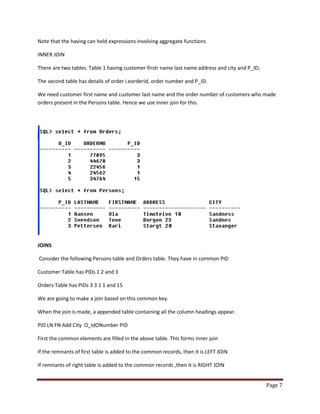
There are two tables. Table 1 having customer firstr name last name address and city and P_ID;
The second table has details of order i.eorderid, order number and P_ID.
We need customer first name and customer last name and the order number of customers who made
orders present in the Persons table. Hence we use inner join for this.

JOINS
Consider the following Persons table and Orders table. They have in common PID
Customer Table has PIDs 1 2 and 3
Orders Table has PIDs 3 3 1 1 and 15
We are going to make a join based on this common key.
When the join is made, a appended table containing all the column headings appear.
PID LN FN Add City O_IdONumber PID
First the common elements are filled in the above table. This forms inner join
If the remnants of first table is added to the common records, then it is LEFT JOIN
If remnants of right table is added to the common records ,then it is RIGHT JOIN
Page 7
If remnants of left and right are added to the common records, then it is FULL JOIN.
In all cases remember the appended table in mind and work out accordingly.

Page 8

Sql commands worked out in sql plus with screen shots

  • 1.
    SQL Commands executedin SQL Plus Sunil Kumar Gunasekaran
  • 2.
    Creating table PERSONS1013with the following Attribute names Altering the Column name of the table P_ID to include NOT NULL and PRIMARY KEY status Adding another column SALARY with data type as Number; Page 1
  • 3.
    After all themodifications done to the table Sample of records into the table using INSERT command Inse Page 2
  • 4.
    The table withthe values loaded is shown below Page 3
  • 5.
    Getting the detailsof the record having the highest salary Getting the name of the person with the highest salary Getting the name of the person with minimum salary Page 4
  • 6.
    Getting the namesof persons with salary greater than the average salary The nested statements are used when there is one to one relationship between person and salary. Need to work out on Inner Join Outer Join and Natural Join and other functions and update here to be done or revised before any interview. Dropping the whole table using DROP DDL command Deleting a particular record Using Group by with a function to group by the entities based on the function; Note that only Sum and average require group by since Page 5
  • 7.
    This is theOrders table for the above GROUP BY function execution. The requirement is that there need to be a customer and many orders placed by him and hence many orderprices. If we want info of the max min avg sum of the orderprices placed by each customer, then use group by along with the functions. Usage of Having Having and group by are used in one t omany relationship between customer and orderprice This is similar to where only that the aggregate functions can be used in having and aggregate functions cannot be used in where. Page 6
  • 8.
    Note that thehaving can hold expressions involving aggregate functions INNER JOIN There are two tables. Table 1 having customer firstr name last name address and city and P_ID; The second table has details of order i.eorderid, order number and P_ID. We need customer first name and customer last name and the order number of customers who made orders present in the Persons table. Hence we use inner join for this. JOINS Consider the following Persons table and Orders table. They have in common PID Customer Table has PIDs 1 2 and 3 Orders Table has PIDs 3 3 1 1 and 15 We are going to make a join based on this common key. When the join is made, a appended table containing all the column headings appear. PID LN FN Add City O_IdONumber PID First the common elements are filled in the above table. This forms inner join If the remnants of first table is added to the common records, then it is LEFT JOIN If remnants of right table is added to the common records ,then it is RIGHT JOIN Page 7
  • 9.
    If remnants ofleft and right are added to the common records, then it is FULL JOIN. In all cases remember the appended table in mind and work out accordingly. Page 8