SINGAPORE	
@wwcodesingapore	
singapore@womenwhocode.com	
www.womenwhocode.com/singapore	
facebook.com/groups/wwcodesingapore
Before we begin…
Required installations –
•  Java 8
•  A Github account & Git (CLI or Desktop)
•  Maven 3.3+
•  IntelliJ IDEA or Eclipse
•  Google Chrome with Postman extension
•  Heroku account and CLI
Clone from Git –
•  git clone https://github.com/pkamath2/GOT-heroes
•  git clone https://github.com/pkamath2/GOT-heroes-full
What to expect…
•  What is Spring?
•  Bootiful Microservices
•  Let’s build a ‘Game Of Thrones - Heroes’ page
•  Spring Security
•  Deploy to Heroku
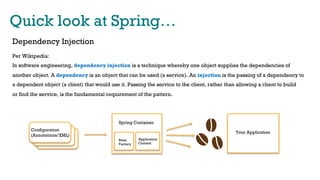
Quick look at Spring…
Dependency Injection
Per Wikipedia:
In software engineering, dependency injection is a technique whereby one object supplies the dependencies of
another object. A dependency is an object that can be used (a service). An injection is the passing of a dependency to
a dependent object (a client) that would use it. Passing the service to the client, rather than allowing a client to build
or find the service, is the fundamental requirement of the pattern.
Configuration
(Annotations/XML)
Your Application
Spring Container
Bean
Factory
Application
Context
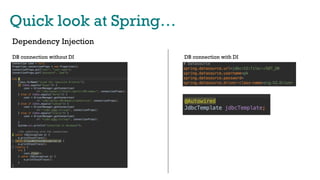
Quick look at Spring…
Dependency Injection
DB connection without DI DB connection with DI
Quick look at Spring…
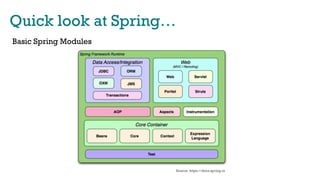
Basic Spring Modules
Source: https://docs.spring.io
Microservices
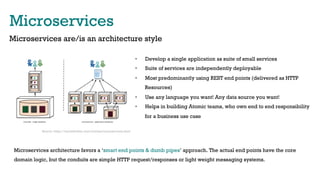
Microservices are/is an architecture style
•  Develop a single application as suite of small services
•  Suite of services are independently deployable
•  Most predominantly using REST end points (delivered as HTTP
Resources)
•  Use any language you want! Any data source you want!
•  Helps in building Atomic teams, who own end to end responsibility
for a business use case
Microservices architecture favors a ‘smart end points & dumb pipes’ approach. The actual end points have the core
domain logic, but the conduits are simple HTTP request/responses or light weight messaging systems.
Source: https://martinfowler.com/articles/microservices.html
Embedded Containers
•  What are Embedded Containers & their advantages?
•  What are the current available options?
ü  Tomcat
ü  Jetty
ü  Undertow
ü  TomEE (JEE server)
ü  Spring Boot (Not a container, but a framework which enables embedding)
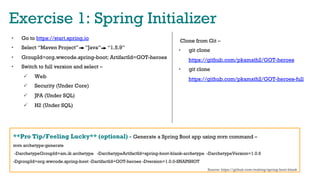
Exercise 1: Spring Initializer
•  Go to https://start.spring.io
•  Select “Maven Project” ”Java” “1.5.9”
•  GroupId=org.wwcode.spring-boot; ArtifactId=GOT-heroes
•  Switch to full version and select –
ü  Web
ü  Security (Under Core)
ü  JPA (Under SQL)
ü  H2 (Under SQL)
**Pro Tip/Feeling Lucky** (optional) - Generate a Spring Boot app using mvn command –
mvn archetype:generate
-DarchetypeGroupId=am.ik.archetype -DarchetypeArtifactId=spring-boot-blank-archetype -DarchetypeVersion=1.0.6
-DgroupId=org.wwcode.spring-boot -DartifactId=GOT-heroes -Dversion=1.0.0-SNAPSHOT
Source: https://github.com/making/spring-boot-blank
Clone from Git –
•  git clone
https://github.com/pkamath2/GOT-heroes
•  git clone
https://github.com/pkamath2/GOT-heroes-full
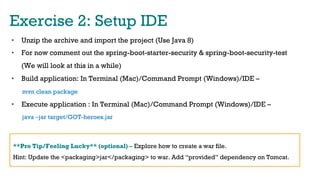
Exercise 2: Setup IDE
•  Unzip the archive and import the project (Use Java 8)
•  For now comment out the spring-boot-starter-security & spring-boot-security-test
(We will look at this in a while)
•  Build application: In Terminal (Mac)/Command Prompt (Windows)/IDE –
mvn clean package
•  Execute application : In Terminal (Mac)/Command Prompt (Windows)/IDE –
java –jar target/GOT-heroes.jar
**Pro Tip/Feeling Lucky** (optional) – Explore how to create a war file.
Hint: Update the <packaging>jar</packaging> to war. Add “provided” dependency on Tomcat.
Exercise 3: First Rest Controller
•  Context Path & Port in application.properties
•  Annotations used –
•  @RestController
•  @RequestMapping
•  @ResponseBody
•  @PathVariable/@RequestParam
•  @RequestBody
•  Chrome://apps for Postman to test Restful end points.
Exercise 4: Properties
•  Create an additional property file. Additional application specific properties are
used for functionalities like -
•  Additional annotations –
•  @Configuration
•  @PropertySource
•  @Value
**Pro Tip/Feeling Lucky** (optional) – Apply Profiles (LOCAL/DEV/QA/UAT/PROD) to the
property files.
Exercise 5: Database integration
•  H2 – filesystem database. Update application.properties with required
configuration.
•  JDBCTemplate auto-configures using datasource configurations.
•  Annotations used –
•  @Service
•  @Component
•  JDBCTemplate / JPA using @Entity & @Repository
**Pro Tip/Feeling Lucky** (optional) – Try in-memory options. Visit
http://www.h2database.com/ for in-depth details on H2
Exercise 5.1: Jackson API
•  In built with Spring boot
•  Annotations used –
•  @JsonProperty
•  @JsonFormat
•  @JacksonXmlProperty
**Pro Tip/Feeling Lucky** (optional) – Spring boot can send XML responses as well. See
https://github.com/FasterXML/jackson.
Exercise 6: UI Integration
•  Copy heros.html into static folder. Run mvn clean package and execute jar.
•  Navigate to http://localhost:8080/heros.html to display
Exercise 7: Security
•  Simple Username and Password security
•  Annotations used –
•  @Configuration
•  Extend WebSecurityConfigurerAdapter
•  @EnableWebSecurity
•  @EnableGlobalMethodSecurity(securedEnabled=true)
**Pro Tip/Feeling Lucky** (optional) – Create more than one user. Allow access to individual
rest end points to each of the users.
Exercise 8: Deploy on Cloud
•  Install Heroku CLI
•  Command prompt – heroku create
•  Add Heroku Maven Plugin to pom.xml (https://github.com/heroku/heroku-maven-
plugin)
•  <plugin>
<groupId>com.heroku.sdk</groupId>
<artifactId>heroku-maven-plugin</artifactId>
<version>2.0.2</version>
<configuration>
<appName>fierce-escarpment-39158</appName>
<processTypes>
<web>java -jar target/workshop-0.0.1-SNAPSHOT.jar</web>
</processTypes>
</configuration>
</plugin>
Further Readings…
•  If you are on Twitter – follow
@SpringTipsLive
@microservicely (Weekly Microservices)
@starbuxman (Josh Long from Pivotal)
•  Like reading blogs? –
http://www.baeldung.com/
https://spring.io/blog
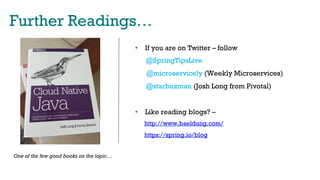
One of the few good books on the topic…
Connect with us…
•  Follow me on Twitter @purnimakamath
•  Follow WWCODE Singapore on Twitter @wwcodesingapore
•  Email us: singapore@womenwhocode.com
•  Facebook: facebook.com/groups/wwcodesingapore
•  Sign Up: www.womenwhocode.com/singapore

Spring Boot Workshop - January w/ Women Who Code

  • 1.
  • 2.
    Before we begin… Requiredinstallations – •  Java 8 •  A Github account & Git (CLI or Desktop) •  Maven 3.3+ •  IntelliJ IDEA or Eclipse •  Google Chrome with Postman extension •  Heroku account and CLI Clone from Git – •  git clone https://github.com/pkamath2/GOT-heroes •  git clone https://github.com/pkamath2/GOT-heroes-full
  • 3.
    What to expect… • What is Spring? •  Bootiful Microservices •  Let’s build a ‘Game Of Thrones - Heroes’ page •  Spring Security •  Deploy to Heroku
  • 4.
    Quick look atSpring… Dependency Injection Per Wikipedia: In software engineering, dependency injection is a technique whereby one object supplies the dependencies of another object. A dependency is an object that can be used (a service). An injection is the passing of a dependency to a dependent object (a client) that would use it. Passing the service to the client, rather than allowing a client to build or find the service, is the fundamental requirement of the pattern. Configuration (Annotations/XML) Your Application Spring Container Bean Factory Application Context
  • 5.
    Quick look atSpring… Dependency Injection DB connection without DI DB connection with DI
  • 6.
    Quick look atSpring… Basic Spring Modules Source: https://docs.spring.io
  • 7.
    Microservices Microservices are/is anarchitecture style •  Develop a single application as suite of small services •  Suite of services are independently deployable •  Most predominantly using REST end points (delivered as HTTP Resources) •  Use any language you want! Any data source you want! •  Helps in building Atomic teams, who own end to end responsibility for a business use case Microservices architecture favors a ‘smart end points & dumb pipes’ approach. The actual end points have the core domain logic, but the conduits are simple HTTP request/responses or light weight messaging systems. Source: https://martinfowler.com/articles/microservices.html
  • 8.
    Embedded Containers •  Whatare Embedded Containers & their advantages? •  What are the current available options? ü  Tomcat ü  Jetty ü  Undertow ü  TomEE (JEE server) ü  Spring Boot (Not a container, but a framework which enables embedding)
  • 9.
    Exercise 1: SpringInitializer •  Go to https://start.spring.io •  Select “Maven Project” ”Java” “1.5.9” •  GroupId=org.wwcode.spring-boot; ArtifactId=GOT-heroes •  Switch to full version and select – ü  Web ü  Security (Under Core) ü  JPA (Under SQL) ü  H2 (Under SQL) **Pro Tip/Feeling Lucky** (optional) - Generate a Spring Boot app using mvn command – mvn archetype:generate -DarchetypeGroupId=am.ik.archetype -DarchetypeArtifactId=spring-boot-blank-archetype -DarchetypeVersion=1.0.6 -DgroupId=org.wwcode.spring-boot -DartifactId=GOT-heroes -Dversion=1.0.0-SNAPSHOT Source: https://github.com/making/spring-boot-blank Clone from Git – •  git clone https://github.com/pkamath2/GOT-heroes •  git clone https://github.com/pkamath2/GOT-heroes-full
  • 10.
    Exercise 2: SetupIDE •  Unzip the archive and import the project (Use Java 8) •  For now comment out the spring-boot-starter-security & spring-boot-security-test (We will look at this in a while) •  Build application: In Terminal (Mac)/Command Prompt (Windows)/IDE – mvn clean package •  Execute application : In Terminal (Mac)/Command Prompt (Windows)/IDE – java –jar target/GOT-heroes.jar **Pro Tip/Feeling Lucky** (optional) – Explore how to create a war file. Hint: Update the <packaging>jar</packaging> to war. Add “provided” dependency on Tomcat.
  • 11.
    Exercise 3: FirstRest Controller •  Context Path & Port in application.properties •  Annotations used – •  @RestController •  @RequestMapping •  @ResponseBody •  @PathVariable/@RequestParam •  @RequestBody •  Chrome://apps for Postman to test Restful end points.
  • 12.
    Exercise 4: Properties • Create an additional property file. Additional application specific properties are used for functionalities like - •  Additional annotations – •  @Configuration •  @PropertySource •  @Value **Pro Tip/Feeling Lucky** (optional) – Apply Profiles (LOCAL/DEV/QA/UAT/PROD) to the property files.
  • 13.
    Exercise 5: Databaseintegration •  H2 – filesystem database. Update application.properties with required configuration. •  JDBCTemplate auto-configures using datasource configurations. •  Annotations used – •  @Service •  @Component •  JDBCTemplate / JPA using @Entity & @Repository **Pro Tip/Feeling Lucky** (optional) – Try in-memory options. Visit http://www.h2database.com/ for in-depth details on H2
  • 14.
    Exercise 5.1: JacksonAPI •  In built with Spring boot •  Annotations used – •  @JsonProperty •  @JsonFormat •  @JacksonXmlProperty **Pro Tip/Feeling Lucky** (optional) – Spring boot can send XML responses as well. See https://github.com/FasterXML/jackson.
  • 15.
    Exercise 6: UIIntegration •  Copy heros.html into static folder. Run mvn clean package and execute jar. •  Navigate to http://localhost:8080/heros.html to display
  • 16.
    Exercise 7: Security • Simple Username and Password security •  Annotations used – •  @Configuration •  Extend WebSecurityConfigurerAdapter •  @EnableWebSecurity •  @EnableGlobalMethodSecurity(securedEnabled=true) **Pro Tip/Feeling Lucky** (optional) – Create more than one user. Allow access to individual rest end points to each of the users.
  • 17.
    Exercise 8: Deployon Cloud •  Install Heroku CLI •  Command prompt – heroku create •  Add Heroku Maven Plugin to pom.xml (https://github.com/heroku/heroku-maven- plugin) •  <plugin> <groupId>com.heroku.sdk</groupId> <artifactId>heroku-maven-plugin</artifactId> <version>2.0.2</version> <configuration> <appName>fierce-escarpment-39158</appName> <processTypes> <web>java -jar target/workshop-0.0.1-SNAPSHOT.jar</web> </processTypes> </configuration> </plugin>
  • 18.
    Further Readings… •  Ifyou are on Twitter – follow @SpringTipsLive @microservicely (Weekly Microservices) @starbuxman (Josh Long from Pivotal) •  Like reading blogs? – http://www.baeldung.com/ https://spring.io/blog One of the few good books on the topic…
  • 19.
    Connect with us… • Follow me on Twitter @purnimakamath •  Follow WWCODE Singapore on Twitter @wwcodesingapore •  Email us: singapore@womenwhocode.com •  Facebook: facebook.com/groups/wwcodesingapore •  Sign Up: www.womenwhocode.com/singapore