SP REST API Documentation
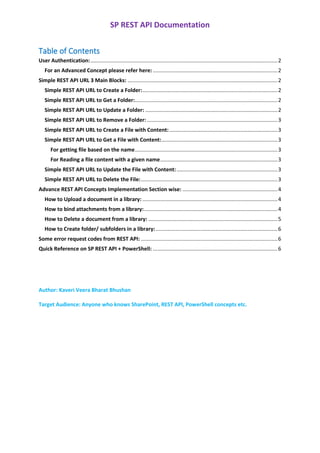
Table of Contents
User Authentication:..............................................................................................................................2
For an Advanced Concept please refer here:....................................................................................2
Simple REST API URL 3 Main Blocks: .....................................................................................................2
Simple REST API URL to Create a Folder:...........................................................................................2
Simple REST API URL to Get a Folder:................................................................................................2
Simple REST API URL to Update a Folder: .........................................................................................2
Simple REST API URL to Remove a Folder:........................................................................................3
Simple REST API URL to Create a File with Content:.........................................................................3
Simple REST API URL to Get a File with Content:..............................................................................3
For getting file based on the name................................................................................................3
For Reading a file content with a given name...............................................................................3
Simple REST API URL to Update the File with Content:....................................................................3
Simple REST API URL to Delete the File:............................................................................................3
Advance REST API Concepts Implementation Section wise: ................................................................4
How to Upload a document in a library: ...........................................................................................4
How to bind attachments from a library:..........................................................................................4
How to Delete a document from a library: .......................................................................................5
How to Create folder/ subfolders in a library:..................................................................................6
Some error request codes from REST API: ............................................................................................6
Quick Reference on SP REST API + PowerShell: ....................................................................................6
Author: Kaveri Veera Bharat Bhushan
Target Audience: Anyone who knows SharePoint, REST API, PowerShell concepts etc.
SP REST API Documentation
User Authentication:
It Is handled by the portal.office.com automatically at the time of User Signing which gets
reflected across all the Sites/Libraries/Folders/SubFolders/Files etc as it promotes Service
Account Authenticate via SharePointOnlineCredentials.
Can be further more customized using Item Pane[In Modern SharePoint] & Share Option for
establishing Item Level/Folder Level permissions to promote only the required members
sharing.
For an Advanced Concept please refer here:
Access SharePoint
Online REST API Via Postman With User Context.docx
Simple REST API URL 3 Main Blocks:
➢ Get the URL ready
➢ Metadata info POST
➢ REST Type(GET,PUT,POST,MERGE,DELETE)
View the results finally after above REST API URL is properly framed.
Simple REST API URL to Create a Folder:
<SPSiteURL>/_api/web/<FolderName/LibName>
{‘_metadata’:{‘type’:’SP.Folder’},’
ServerRelativeUrl’:’/sites/dev/<LibName>/<FolderName>’}
REQUEST TYPE: POST
Note: Use Folder name if for creating a Sub-Folder & Lib Name for creating a Folder.
Simple REST API URL to Get a Folder:
<SPSiteURL>/_api/web/GetFolderByServerRelativeUrl(‘/sites/dev/<LibName>/<FolderNam
e>’)
$select=Title
/_api/web/GetFolderByServerRelativeUrl(‘/sites/dev/<LibName>’)/folders?select=
ServerRelativeUrl
REQUEST TYPE: GET
Simple REST API URL to Update a Folder:
<SPSiteURL>/_api/web/GetFolderByServerRelativeURL(‘/sites/dev/<LibName>/<OldFolder
Name>’)/ListItemAllFields?$select= FileLeafRef
{‘_metadata’:{‘type’:
SP REST API Documentation
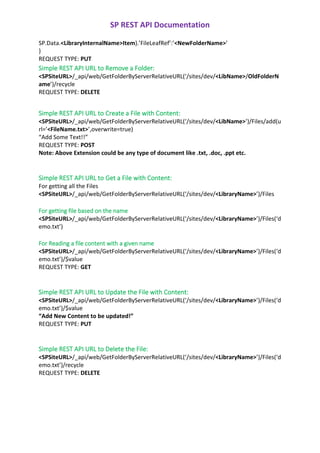
SP.Data.<LibraryInternalName>Item}.’FileLeafRef’:’<NewFolderName>’
}
REQUEST TYPE: PUT
Simple REST API URL to Remove a Folder:
<SPSiteURL>/_api/web/GetFolderByServerRelativeURL(‘/sites/dev/<LibName>/OldFolderN
ame’)/recycle
REQUEST TYPE: DELETE
Simple REST API URL to Create a File with Content:
<SPSiteURL>/_api/web/GetFolderByServerRelativeURL(‘/sites/dev/<LibName>’)/Files/add(u
rl=’<FileName.txt>’,overwrite=true)
“Add Some Text!!”
REQUEST TYPE: POST
Note: Above Extension could be any type of document like .txt, .doc, .ppt etc.
Simple REST API URL to Get a File with Content:
For getting all the Files
<SPSiteURL>/_api/web/GetFolderByServerRelativeURL(‘/sites/dev/<LibraryName>’)/Files
For getting file based on the name
<SPSiteURL>/_api/web/GetFolderByServerRelativeURL(‘/sites/dev/<LibraryName>’)/Files(‘d
emo.txt’)
For Reading a file content with a given name
<SPSiteURL>/_api/web/GetFolderByServerRelativeURL(‘/sites/dev/<LibraryName>’)/Files(‘d
emo.txt’)/$value
REQUEST TYPE: GET
Simple REST API URL to Update the File with Content:
<SPSiteURL>/_api/web/GetFolderByServerRelativeURL(‘/sites/dev/<LibraryName>’)/Files(‘d
emo.txt’)/$value
“Add New Content to be updated!”
REQUEST TYPE: PUT
Simple REST API URL to Delete the File:
<SPSiteURL>/_api/web/GetFolderByServerRelativeURL(‘/sites/dev/<LibraryName>’)/Files(‘d
emo.txt’)/recycle
REQUEST TYPE: DELETE
SP REST API Documentation
Advance REST API Concepts Implementation Section wise:
How to Upload a document in a library:
/*********Function to upload files ********/
/** Here I am uploading multiple files by using the attachment Buffer: array which is having
multiple file info.
If you want to upload single file we can skip the iteration of array on below code. **/
function uploadFile() {
$.each(attachmentBuffer, function () {
var url = String.format(
“{0}/_api/Web/Lists/getByTitle(‘” + attachmentLibraryName + “‘)/RootFolder/folders(‘” +
folderName + “‘)/Files/Add(url='{1}’, overwrite=true)”,
appWebUrl.split(‘appname’)[0], this.File.name);
/* attachmentLibraryName , folderName is the library name which is from constant
entry. this.File.name dynamic name we can directly pass file.name */
$.ajax({
url: url,
method: “POST”,
contentType: “application/json;odata=verbose”,
processData: false,
data: this.File,
async: false,
headers: {
“Accept”: “application/json; odata=verbose”,
“X-RequestDigest”: formDigestValues
},
success: function () {
onUploadSucess();
},
error: function () {
onUploadFailure();
}
});
});
}
How to bind attachments from a library:
/*********Function to bind the attachments from document library ********/
function getAttachments() {
var getDocumentsUrl = String.format(
“{0}/_api/web/GetFolderByServerRelativeUrl(‘” + attachmentLibraryUrl + “” + “/” +
SP REST API Documentation
folderName + “‘)/files?$select=Name,ServerRelativeUrl”,
appWebUrl.split(‘appname’)[0]);
$.ajax({
url: getDocumentsUrl,
type: ‘GET’,
headers: {
“Accept”: “application/json; odata=verbose”,
“content-type”: “application/json;odata=verbose”
},
success: function (data) {
$.each(data.d.results, function (i, result) {
/* The below code which will disply the files from the folder */
$(“[id^=’fileAttachments’]”).append(‘<a href=”‘ + result.ServerRelativeUrl + ‘”
target=”_blank”>’ + result.Name + ‘</a><br/>’);
});
},
error: function onGetFilesFailure(response) {
console.log(response.status + ‘ ‘ + response.statusText);
}
});
}
How to Delete a document from a library:
/*********Function to delete a document ********/
$.ajax(
{
"url":
"/sites/test/_api/web/getfilebyserverrelativeurl('/sites/test/Shared%20Documents/Airplane
Logo.jpg')",
"method": "POST",
"headers": {
"accept": "application/json;odata=verbose",
"content-type": "application/json;odata=verbose",
"X-HTTP-Method": "DELETE",
"If-Match": "*",
"X-RequestDigest": "yourRequestDigestGoesHere"
},
"success" = successfunction,
"error" = errorfunction
}
);
SP REST API Documentation
How to Create folder/ subfolders in a library:
/*********Function to create the folder ********/
function createFolder() {
var docCreationUrl = appWebUrl.split(‘appname’)[0];
/* Here i am doing manipulation at host web level, as per the my requirement i am using the
above url instead of _spPageContextInfo.siteAbsoluteUrl */
var serverRelativeUrl = docCreationUrl.slice(docCreationUrl.indexOf(‘/’) + 2);
serverRelativeUrl = serverRelativeUrl.slice(serverRelativeUrl.indexOf(‘/’) + 0);
var docLibURL = { ‘__metadata’: { ‘type’: ‘SP.Folder’ }, ‘ServerRelativeUrl’: serverRelativeUrl
+ “/” + ‘attachmentLibraryUrl’ + “/” + ‘folderName’ };
/* attachmentLibraryUrl is the library url */
return $.ajax({
url: appWebUrl.split(‘appname’)[0] + “/_api/web/folders”,
type: “POST”,
contentType: “application/json;odata=verbose”,
data: JSON.stringify(docLibURL),
headers: {
“Accept”: “application/json;odata=verbose”,
“X-RequestDigest”: formDigestValues
/* formDigestValues is the request digest value like $(“#__REQUESTDIGEST”).val() **/
}, success: function () {
onAttachmentSucess();
},
error: function () {
onAttachmentFailure();
}
});
}
Some error request codes from REST API:
Http 404 – You queried an invalid URL
Http 400 – Bad request, the URL was right but you sent an invalid rest call
Http 412 – Concurrency violation
Http 500 – Genuine server side error, error will include correlation ID
Quick Reference on SP REST API + PowerShell:
https://collab365.community/tutorial-create-read-update-delete-files-sharepoint-using-
rest/

SP Rest API Documentation

  • 1.
    SP REST APIDocumentation Table of Contents User Authentication:..............................................................................................................................2 For an Advanced Concept please refer here:....................................................................................2 Simple REST API URL 3 Main Blocks: .....................................................................................................2 Simple REST API URL to Create a Folder:...........................................................................................2 Simple REST API URL to Get a Folder:................................................................................................2 Simple REST API URL to Update a Folder: .........................................................................................2 Simple REST API URL to Remove a Folder:........................................................................................3 Simple REST API URL to Create a File with Content:.........................................................................3 Simple REST API URL to Get a File with Content:..............................................................................3 For getting file based on the name................................................................................................3 For Reading a file content with a given name...............................................................................3 Simple REST API URL to Update the File with Content:....................................................................3 Simple REST API URL to Delete the File:............................................................................................3 Advance REST API Concepts Implementation Section wise: ................................................................4 How to Upload a document in a library: ...........................................................................................4 How to bind attachments from a library:..........................................................................................4 How to Delete a document from a library: .......................................................................................5 How to Create folder/ subfolders in a library:..................................................................................6 Some error request codes from REST API: ............................................................................................6 Quick Reference on SP REST API + PowerShell: ....................................................................................6 Author: Kaveri Veera Bharat Bhushan Target Audience: Anyone who knows SharePoint, REST API, PowerShell concepts etc.
  • 2.
    SP REST APIDocumentation User Authentication: It Is handled by the portal.office.com automatically at the time of User Signing which gets reflected across all the Sites/Libraries/Folders/SubFolders/Files etc as it promotes Service Account Authenticate via SharePointOnlineCredentials. Can be further more customized using Item Pane[In Modern SharePoint] & Share Option for establishing Item Level/Folder Level permissions to promote only the required members sharing. For an Advanced Concept please refer here: Access SharePoint Online REST API Via Postman With User Context.docx Simple REST API URL 3 Main Blocks: ➢ Get the URL ready ➢ Metadata info POST ➢ REST Type(GET,PUT,POST,MERGE,DELETE) View the results finally after above REST API URL is properly framed. Simple REST API URL to Create a Folder: <SPSiteURL>/_api/web/<FolderName/LibName> {‘_metadata’:{‘type’:’SP.Folder’},’ ServerRelativeUrl’:’/sites/dev/<LibName>/<FolderName>’} REQUEST TYPE: POST Note: Use Folder name if for creating a Sub-Folder & Lib Name for creating a Folder. Simple REST API URL to Get a Folder: <SPSiteURL>/_api/web/GetFolderByServerRelativeUrl(‘/sites/dev/<LibName>/<FolderNam e>’) $select=Title /_api/web/GetFolderByServerRelativeUrl(‘/sites/dev/<LibName>’)/folders?select= ServerRelativeUrl REQUEST TYPE: GET Simple REST API URL to Update a Folder: <SPSiteURL>/_api/web/GetFolderByServerRelativeURL(‘/sites/dev/<LibName>/<OldFolder Name>’)/ListItemAllFields?$select= FileLeafRef {‘_metadata’:{‘type’:
  • 3.
    SP REST APIDocumentation SP.Data.<LibraryInternalName>Item}.’FileLeafRef’:’<NewFolderName>’ } REQUEST TYPE: PUT Simple REST API URL to Remove a Folder: <SPSiteURL>/_api/web/GetFolderByServerRelativeURL(‘/sites/dev/<LibName>/OldFolderN ame’)/recycle REQUEST TYPE: DELETE Simple REST API URL to Create a File with Content: <SPSiteURL>/_api/web/GetFolderByServerRelativeURL(‘/sites/dev/<LibName>’)/Files/add(u rl=’<FileName.txt>’,overwrite=true) “Add Some Text!!” REQUEST TYPE: POST Note: Above Extension could be any type of document like .txt, .doc, .ppt etc. Simple REST API URL to Get a File with Content: For getting all the Files <SPSiteURL>/_api/web/GetFolderByServerRelativeURL(‘/sites/dev/<LibraryName>’)/Files For getting file based on the name <SPSiteURL>/_api/web/GetFolderByServerRelativeURL(‘/sites/dev/<LibraryName>’)/Files(‘d emo.txt’) For Reading a file content with a given name <SPSiteURL>/_api/web/GetFolderByServerRelativeURL(‘/sites/dev/<LibraryName>’)/Files(‘d emo.txt’)/$value REQUEST TYPE: GET Simple REST API URL to Update the File with Content: <SPSiteURL>/_api/web/GetFolderByServerRelativeURL(‘/sites/dev/<LibraryName>’)/Files(‘d emo.txt’)/$value “Add New Content to be updated!” REQUEST TYPE: PUT Simple REST API URL to Delete the File: <SPSiteURL>/_api/web/GetFolderByServerRelativeURL(‘/sites/dev/<LibraryName>’)/Files(‘d emo.txt’)/recycle REQUEST TYPE: DELETE
  • 4.
    SP REST APIDocumentation Advance REST API Concepts Implementation Section wise: How to Upload a document in a library: /*********Function to upload files ********/ /** Here I am uploading multiple files by using the attachment Buffer: array which is having multiple file info. If you want to upload single file we can skip the iteration of array on below code. **/ function uploadFile() { $.each(attachmentBuffer, function () { var url = String.format( “{0}/_api/Web/Lists/getByTitle(‘” + attachmentLibraryName + “‘)/RootFolder/folders(‘” + folderName + “‘)/Files/Add(url='{1}’, overwrite=true)”, appWebUrl.split(‘appname’)[0], this.File.name); /* attachmentLibraryName , folderName is the library name which is from constant entry. this.File.name dynamic name we can directly pass file.name */ $.ajax({ url: url, method: “POST”, contentType: “application/json;odata=verbose”, processData: false, data: this.File, async: false, headers: { “Accept”: “application/json; odata=verbose”, “X-RequestDigest”: formDigestValues }, success: function () { onUploadSucess(); }, error: function () { onUploadFailure(); } }); }); } How to bind attachments from a library: /*********Function to bind the attachments from document library ********/ function getAttachments() { var getDocumentsUrl = String.format( “{0}/_api/web/GetFolderByServerRelativeUrl(‘” + attachmentLibraryUrl + “” + “/” +
  • 5.
    SP REST APIDocumentation folderName + “‘)/files?$select=Name,ServerRelativeUrl”, appWebUrl.split(‘appname’)[0]); $.ajax({ url: getDocumentsUrl, type: ‘GET’, headers: { “Accept”: “application/json; odata=verbose”, “content-type”: “application/json;odata=verbose” }, success: function (data) { $.each(data.d.results, function (i, result) { /* The below code which will disply the files from the folder */ $(“[id^=’fileAttachments’]”).append(‘<a href=”‘ + result.ServerRelativeUrl + ‘” target=”_blank”>’ + result.Name + ‘</a><br/>’); }); }, error: function onGetFilesFailure(response) { console.log(response.status + ‘ ‘ + response.statusText); } }); } How to Delete a document from a library: /*********Function to delete a document ********/ $.ajax( { "url": "/sites/test/_api/web/getfilebyserverrelativeurl('/sites/test/Shared%20Documents/Airplane Logo.jpg')", "method": "POST", "headers": { "accept": "application/json;odata=verbose", "content-type": "application/json;odata=verbose", "X-HTTP-Method": "DELETE", "If-Match": "*", "X-RequestDigest": "yourRequestDigestGoesHere" }, "success" = successfunction, "error" = errorfunction } );
  • 6.
    SP REST APIDocumentation How to Create folder/ subfolders in a library: /*********Function to create the folder ********/ function createFolder() { var docCreationUrl = appWebUrl.split(‘appname’)[0]; /* Here i am doing manipulation at host web level, as per the my requirement i am using the above url instead of _spPageContextInfo.siteAbsoluteUrl */ var serverRelativeUrl = docCreationUrl.slice(docCreationUrl.indexOf(‘/’) + 2); serverRelativeUrl = serverRelativeUrl.slice(serverRelativeUrl.indexOf(‘/’) + 0); var docLibURL = { ‘__metadata’: { ‘type’: ‘SP.Folder’ }, ‘ServerRelativeUrl’: serverRelativeUrl + “/” + ‘attachmentLibraryUrl’ + “/” + ‘folderName’ }; /* attachmentLibraryUrl is the library url */ return $.ajax({ url: appWebUrl.split(‘appname’)[0] + “/_api/web/folders”, type: “POST”, contentType: “application/json;odata=verbose”, data: JSON.stringify(docLibURL), headers: { “Accept”: “application/json;odata=verbose”, “X-RequestDigest”: formDigestValues /* formDigestValues is the request digest value like $(“#__REQUESTDIGEST”).val() **/ }, success: function () { onAttachmentSucess(); }, error: function () { onAttachmentFailure(); } }); } Some error request codes from REST API: Http 404 – You queried an invalid URL Http 400 – Bad request, the URL was right but you sent an invalid rest call Http 412 – Concurrency violation Http 500 – Genuine server side error, error will include correlation ID Quick Reference on SP REST API + PowerShell: https://collab365.community/tutorial-create-read-update-delete-files-sharepoint-using- rest/