Software Development
Ideas from Corporate
America
Philip (Phil) Adenekan
Frank Lab
Frank Lab Group Meeting
University of California at San Francisco
Intent
 Few tricks on how Corporate America builds
Enterprise Software
 Focus on concepts rather than code or specific tools
(Maybe in a future talk?)
 Hopefully someone gains something
Outline
 Software Development Methodologies
 Source Control
 Code Quality
 Testing
 Acknowledgments
Software Development Methodologies
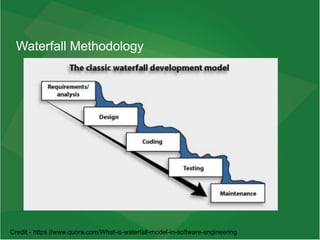
Waterfall Methodology – Older way
 Sequential phrases of Software development with each phrase
depending on the previous phrase
 Lost favor in industry
 Relegated to small prototypes
 Good to be aware of it as it still popular and intuitive
Waterfall Process – Work flow
 Big Upfront Design
 Team given a few week to 6 months to complete work
 Complete functional software expected when time expires
 Intuitive; akin to building a house
Waterfall Methodology
Credit - https://www.quora.com/What-is-waterfall-model-in-software-engineering
Waterfall - Issues
 Not flexible in a constantly changing world
 Progress not transparent
 Poor outcomes in practice (e.g. late, feature-creep, Brook’s
law/mythical Man-month)
 In-crowd moving away from it
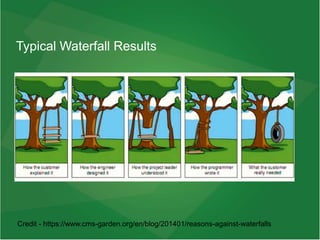
Typical Waterfall Results
Credit - https://www.cms-garden.org/en/blog/201401/reasons-against-waterfalls
Remedying Waterfall
 Here a bright idea – STOP doing sh*t; I mean “stuff” that don’t work!!!
Madness!
 As usual-
 Dust off an old academic paper or some obscure Software principle
 Rebrand it as “new innovation”
 Look perplex when people who know history tell you it is an old idea
Agile
 Developed ~2000. Became very popular around ~2018
 Applicable to sales, construction, business management; not just
Software
 Constantly delivered small features rather than one large application
 Make progress transparent
 Work fast, fail fast
 Limit team size between 2 – 8 people (enough for one plate of pizza)
 Since time estimates are almost always wrong, drop the concept
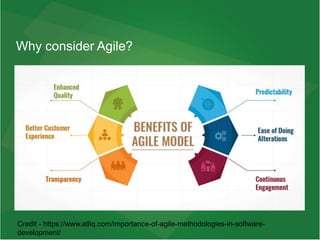
Why consider Agile?
Credit - https://www.atliq.com/importance-of-agile-methodologies-in-software-
development/
Agile – Bird’s eye view
 No big upfront design
 Backlog groomed continuously updated
 No feature-creep during 2-week period
 Completed features rather than completed application
 No time line for completed application
 Akin to a plant
Agile – The Orchestra
 Roles
 Backlogs
 Tickets
 Meetings
 Life with Agile
 Usage in a Research Lab?
 Review
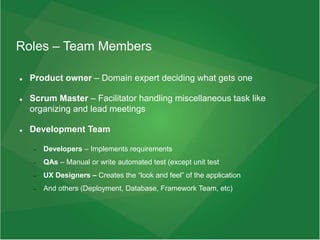
Roles – Team Members
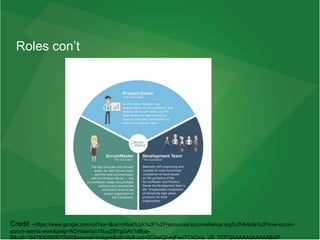
 Product owner – Domain expert deciding what gets one
 Scrum Master – Facilitator handling miscellaneous task like
organizing and lead meetings
 Development Team
 Developers – Implements requirements
 QAs – Manual or write automated test (except unit test
 UX Designers – Creates the “look and feel” of the application
 And others (Deployment, Database, Framework Team, etc)
Roles con’t
Credit -https://www.google.com/url?sa=i&url=https%3A%2F%2Fresources.scrumalliance.org%2FArticle%2Fhow-scrum-
scrum-teams-work&psig=AOvVaw0yxY8uyZ9lYgGAV1dByp-
B&ust=1647830360670000&source=images&cd=vfe&ved=0CAwQjhxqFwoTCIiCms_U0_YCFQAAAAAdAAAAABAP
About the Team
 Should be small enough to be satisfied by with 1 or 2 Pizza Platters
 Large teams hamper communication which in turn affects agility
 Multiple people can have multiple roles
 Some resources can be shared with other teams (like Scrum Master
usually serve multiple teams)
Product Backlog and Sprint Backlog
Product Backlog – Living Collection of Future
Work
 Collection of tickets (features/work)
 Product Owner triage tickets with assistance from Scrum Master
 Constantly updated
 Contains bugs
Sprint Backlog – Sprint work
 Populated from Product Backlog
 Collection of work to be completed in the current Sprint
 Any work not completed in sprint moved back to Product Backlog
 Updated by everyone
Tickets
Tickets in Product Backlog and Sprint Backlog
 Adventure (Product)
 Epics (Product)
 User Story (Product and Sprint)
 Task (Sprint, maybe Product)
 Bugs (Product and Sprint)
Adventure
 Grand vision
 Collection of Epics
 Owned by Product Owner
 Based on ideas from someone very high up like C-Level (CEO, CTO),
market demands, Presidential executive order, etc
 Cannot be tackled directly and must be broken down into Epics
 Not commonly used and may be written as an Epic
Epic
 A vision
 Too complex to be tackled directly
 Broken done into User stories
 Created and controlled by Product owner
User Story
 Focused, clear work and completable in 2 weeks or less
 Format:
 As a <your job title>, I need <work request>,
because <explain how your request benefits the
business>
 Code-independent request for work (VERY IMPORTANT)
 Prioritized - 1 (Must do), 2 (important), 3 (needed can wait), 4 (not
urgent), 5 (cosmetic)
 Created and controlled by a Product Owner
 Implemented by a Developer
Task
 Steps to solve a problem
 Contains technical details
 Should be concise
 Expatiates User Story
 Done by Developer
Bug
 Two interpretations
 Undesired or lack of desired behavior
 All Unit test pass despite a User Story not being properly
supported (TDD)
 Undocumented Feature request is not a bug
 Done by everyone but usually Developers
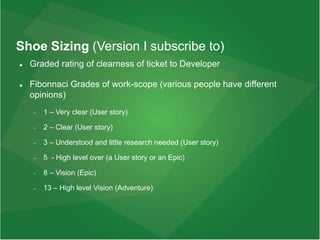
Shoe Sizing (Version I subscribe to)
 Graded rating of clearness of ticket to Developer
 Fibonnaci Grades of work-scope (various people have different
opinions)
 1 – Very clear (User story)
 2 – Clear (User story)
 3 – Understood and little research needed (User story)
 5 - High level over (a User story or an Epic)
 8 – Vision (Epic)
 13 – High level Vision (Adventure)
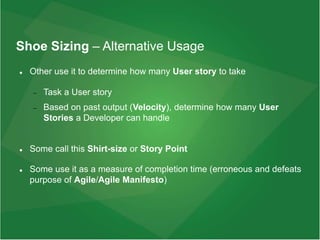
Shoe Sizing – Alternative Usage
 Other use it to determine how many User story to take
 Task a User story
 Based on past output (Velocity), determine how many User
Stories a Developer can handle
 Some call this Shirt-size or Story Point
 Some use it as a measure of completion time (erroneous and defeats
purpose of Agile/Agile Manifesto)
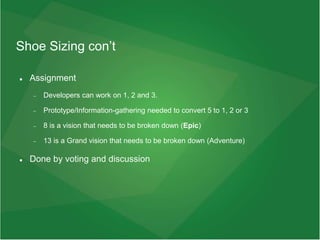
Shoe Sizing con’t
 Assignment
 Developers can work on 1, 2 and 3.
 Prototype/Information-gathering needed to convert 5 to 1, 2 or 3
 8 is a vision that needs to be broken down (Epic)
 13 is a Grand vision that needs to be broken down (Adventure)
 Done by voting and discussion
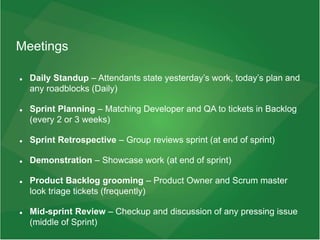
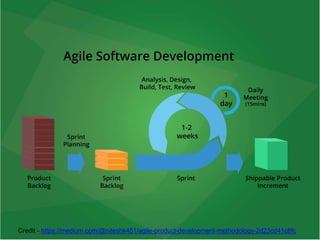
Meetings
 Daily Standup – Attendants state yesterday’s work, today’s plan and
any roadblocks (Daily)
 Sprint Planning – Matching Developer and QA to tickets in Backlog
(every 2 or 3 weeks)
 Sprint Retrospective – Group reviews sprint (at end of sprint)
 Demonstration – Showcase work (at end of sprint)
 Product Backlog grooming – Product Owner and Scrum master
look triage tickets (frequently)
 Mid-sprint Review – Checkup and discussion of any pressing issue
(middle of Sprint)
Credit - https://medium.com/@niteshk451/agile-product-development-methodology-2d23cd41c8fc
Transparency
 Kanban board
 Burndown sheet
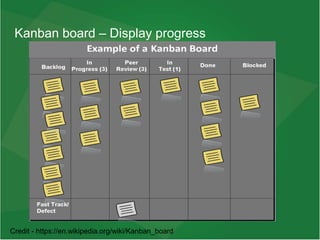
Kanban board – Display progress
Credit - https://en.wikipedia.org/wiki/Kanban_board
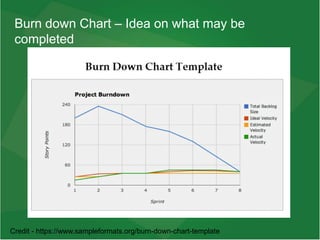
Burn down Chart – Idea on what may be
completed
Credit - https://www.sampleformats.org/burn-down-chart-template
Transparency
 No need to ask for status, read Burn down chart and Kanban board
 Product owner can better identify concerns based on what may not
be completed
 Meetings focused on what is not done rather that finding out what
team member think he/she is doing
Life with Agile
Product Owner Ongoing Activities
 Product Backlog grooming (with Scrum Master)
 Meeting with end-users and discussing new features, bugs, fixes,
etc
 Development Team questions
 Verify Behavior Driven Development (BDD test) if application
 Daily scrum
Scrum Masters Ongoing Activities
 Meetings, meeting and meetings
 Address any non-technical roadblocks
Development Team Ongoing Activities
 Suspend sprint work to address Production issues
 Daily scrum
 Select more tickets if work finished earlier than expected
 Deployment to QA and Production (no need to wait until end of Sprint
Day 1: Sprint Planning
 Team members select assign tickets
 Shoe-sizing
Days 1 - ~10
 Works on feature if shoe-size 1 – 3
 Working on prototype/information-gathering if shoe-size 5
~Day 11
 Team meeting to determine progress (Mid-Sprint review)
 Some tickets may be moved to next Backlog
 Challenges/issues may be discussed Mid-Sprint meeting
~Day 11 - 14
 Wrap up work
 Move tickets to next sprint if cannot be completed
Day 14 - 19
 Testing and bug fixes
 Some tickets may be moved to next sprint if bug prior to end of sprint
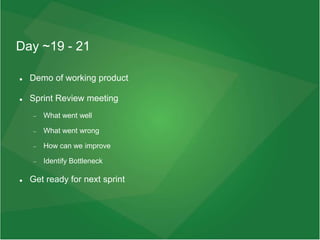
Day ~19 - 21
 Demo of working product
 Sprint Review meeting
 What went well
 What went wrong
 How can we improve
 Identify Bottleneck
 Get ready for next sprint
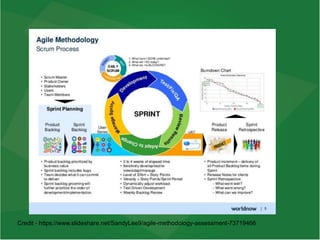
Credit - https://www.slideshare.net/SandyLee9/agile-methodology-assessment-73719466
Xtreme Programming
 Variant of Agile
 Pushes for -
 Code Review: No code merged to Dev until another developer deems it
satisfactory
 Unit test – Testing functionality independent of dependencies
 Pair programming – Two programmers work on code together
 More experienced programmers can better teach others
 One code, other write unit test
 Programmer knowledgeable of business model but learning how to code can
work with someone knowledgeable of code but not business model
Issues with Adopting Agile
 Agile does not fix bad ideas
 Helps implement good ideas more efficient
 Likewise, helps implement of bad ideas more efficient
 Trying to do it by the book rather than adopting to needs
 Not understanding the point (doing Waterfall and calling it Agile)
Other Topics
 Velocity
 Agile Coach
 Agile rules are flexible
Agile in Research lab
Research Lab vs Corporate America
 Every team member is a Product owner and Development team
member
 End-users are other researchers rather than business-minded users
 No Scrum Master to facilitate meetings
Applying Spirit of Agile
 Backlog and sprint log?
 2-week sprints?
 Meetings – Daily scrum, End of sprint review?
 Every team member is a Product Owner and on Development Team
 Tuesday meetings alternate between works planned for the week and
uncompleted work?
Gotcha’s
 Can’t do things based on “it’s fun” or “I think it is cool”
 Tickets triaged and someone else vet for relevant
 User story forces Product Owner to justify financial merits of work
 It is hard writing down tickets
 Many meetings
 Learning Curve
 Less telling and more showing what you have done
 Must remove “how long will it take?” from mindset
Personal Experience with Agile
 Better personal experience with Agile than Waterfall
 Less bugs
 Better at adapting to changing needs
 Lots of meeting and other events; but each adding value
 Progress was more visible
 Many co-workers did not try to mix in Waterfall ideas
 Learning curve
Reminders
 Tickets should not change during sprint
 Work on shoe-size 1 – 3, prototype shoe-size 5 so they can become
shoe-size 1 – 3.. Break 5+ to 3’s.
 Daily scrum and mid-sprint meeting means of providing assistance
 Very few follow Agile by the book, modify as needed
 The goal is to have working code after a 2-week work period
 The sprint actually last for 2 - 4 weeks (1 week or more for test,
tasking/planning/prototyping and demos)
Key Points of Agile
 Living triaged Product Backlog
 Work in chunk and constantly demonstrate and vet
 Product owner and End-user liking each chunk implies liking a huge
collection of chunks
 Grow Software like a plant rather than build like a house
Source Control
Old Days – Central Version Control (CVC)
 Developers store code in a repository
 Files are versioned by replacing previous version (previous versions
saved though)
 Akin to having multiple versions of a file in the same folder and
naming them file_v1, file_v2 etc
 Not used by the in-crowd
The Creator of Linux issue
 Company hosting Linux code stop doing it completely
 Needed a system where Developers around the globe can work on
features
 Needed a way for recover code in case main repository crashes
Distributed Version Control (DVC)
 Each user has own Version Control
 Each user can share own Version Control with other user via a main
repository
 Difference between files are stored rather than entire file (save on
memory and processing on files like for Blame)
Key part of Git
 git add <file name>: Selecting file to store in source control
 git commit -m “some message”: Updating your own source control
 git push origin branch-name: Sharing your own source control with
the group
About Push
 git push origin branch-name: Sharing your own source control with
the group
 Each push corresponds to a user story (a feature)
 Should be focused on a particular problem
Branches
 Main (used to be called Master) – Repository that mirrors Production
and used in case production server crashes
 Dev – branch with features for sprint; later merged to Main when
sprint is over
 Branches – Features for Sprint
Removing Commits
 Interactive Rebase
 git rebase -i <prior hash>
 Called “changing history”
Testing
 Manual
 Unit Test
 Integration Test
 BDD
 Automated Functionality Test
 UX Test
Manual Testing
 Tested by professional tester or staff
 Time intensive
 Large companies replaced with automated tests
 Practice still to a large degree
Unit Test
 Test code with without external dependencies (replaced by spy, stub
or mock)
 Stub (substitute behavior), spy (stub with ability to return value and
keep track of code lines hit), mock (stub with assert functionality)
 Suppose to run fast; within a few seconds at most
 Run often, after modifying code
 Quick ways to check if something is wrong
Unit Test
 Format
 Arrange - Set conditions for test
 Act – Perform test
 Assert – Verify
 Writing Unit test after functionality is like adding suture after recovery
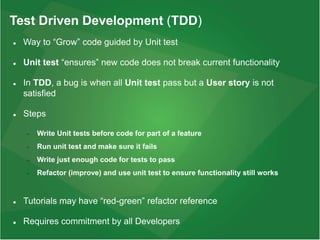
Test Driven Development (TDD)
 Way to “Grow” code guided by Unit test
 Unit test “ensures” new code does not break current functionality
 In TDD, a bug is when all Unit test pass but a User story is not
satisfied
 Steps
 Write Unit tests before code for part of a feature
 Run unit test and make sure it fails
 Write just enough code for tests to pass
 Refactor (improve) and use unit test to ensure functionality still works
 Tutorials may have “red-green” refactor reference
 Requires commitment by all Developers
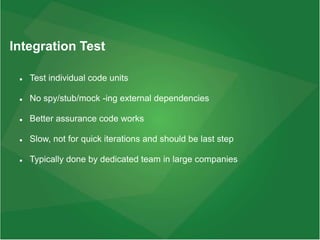
Integration Test
 Test individual code units
 No spy/stub/mock -ing external dependencies
 Better assurance code works
 Slow, not for quick iterations and should be last step
 Typically done by dedicated team in large companies
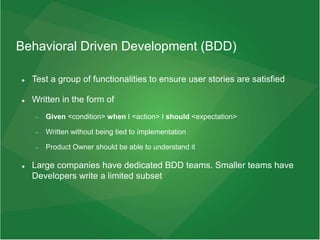
Behavioral Driven Development (BDD)
 Test a group of functionalities to ensure user stories are satisfied
 Written in the form of
 Given <condition> when I <action> I should <expectation>
 Written without being tied to implementation
 Product Owner should be able to understand it
 Large companies have dedicated BDD teams. Smaller teams have
Developers write a limited subset
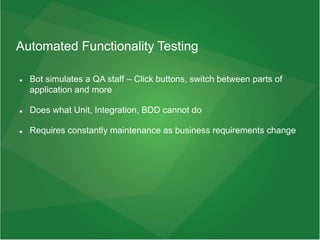
Automated Functionality Testing
 Bot simulates a QA staff – Click buttons, switch between parts of
application and more
 Does what Unit, Integration, BDD cannot do
 Requires constantly maintenance as business requirements change
UX testing
 Takes pictures of application in various test modes
 Compares Production (Main/Master branch) to Feature-complete Dev
branch
 Analyze differences
 Ensures styling requirements are satisfied
Continuous Delivery
 Quick deployment to production after code completion (between a
few minutes to a few days)
 Relies heavy on automated test and little or no manual test
 Requires executive-level and team-wide commitment
Code Quality
 Linting (huge fan)
 Code review (huge fan)
 Pair programming
 Unit test
 Best when done with TDD
 Written long after code is like suturing a rat a day after surgery (has pros and
cons)
Code Quality con’t
 Continuous integration (like with Github Action)
 Single Responsible Principle
 Names like method-name be intuitive
 Use the code you write
 Steve Jobs with iPod
 Microsoft EVP Scott with his Azure team
In Review
 Agile
 Testing
 Source Control
 Code Quality
 Lab rats are the real heroes!
Acknowledgments
 Everyone in Frank Lab
 David
 Kyu
 Loren
 ENCODE/IGVF team at Stanford
 Lab rats
Questions/Comments/Critique

software-dev-life.pptx

  • 1.
    Software Development Ideas fromCorporate America Philip (Phil) Adenekan Frank Lab Frank Lab Group Meeting University of California at San Francisco
  • 2.
    Intent  Few trickson how Corporate America builds Enterprise Software  Focus on concepts rather than code or specific tools (Maybe in a future talk?)  Hopefully someone gains something
  • 3.
    Outline  Software DevelopmentMethodologies  Source Control  Code Quality  Testing  Acknowledgments
  • 4.
  • 5.
    Waterfall Methodology –Older way  Sequential phrases of Software development with each phrase depending on the previous phrase  Lost favor in industry  Relegated to small prototypes  Good to be aware of it as it still popular and intuitive
  • 6.
    Waterfall Process –Work flow  Big Upfront Design  Team given a few week to 6 months to complete work  Complete functional software expected when time expires  Intuitive; akin to building a house
  • 7.
    Waterfall Methodology Credit -https://www.quora.com/What-is-waterfall-model-in-software-engineering
  • 8.
    Waterfall - Issues Not flexible in a constantly changing world  Progress not transparent  Poor outcomes in practice (e.g. late, feature-creep, Brook’s law/mythical Man-month)  In-crowd moving away from it
  • 9.
    Typical Waterfall Results Credit- https://www.cms-garden.org/en/blog/201401/reasons-against-waterfalls
  • 10.
    Remedying Waterfall  Herea bright idea – STOP doing sh*t; I mean “stuff” that don’t work!!! Madness!  As usual-  Dust off an old academic paper or some obscure Software principle  Rebrand it as “new innovation”  Look perplex when people who know history tell you it is an old idea
  • 11.
    Agile  Developed ~2000.Became very popular around ~2018  Applicable to sales, construction, business management; not just Software  Constantly delivered small features rather than one large application  Make progress transparent  Work fast, fail fast  Limit team size between 2 – 8 people (enough for one plate of pizza)  Since time estimates are almost always wrong, drop the concept
  • 12.
    Why consider Agile? Credit- https://www.atliq.com/importance-of-agile-methodologies-in-software- development/
  • 13.
    Agile – Bird’seye view  No big upfront design  Backlog groomed continuously updated  No feature-creep during 2-week period  Completed features rather than completed application  No time line for completed application  Akin to a plant
  • 14.
    Agile – TheOrchestra  Roles  Backlogs  Tickets  Meetings  Life with Agile  Usage in a Research Lab?  Review
  • 15.
    Roles – TeamMembers  Product owner – Domain expert deciding what gets one  Scrum Master – Facilitator handling miscellaneous task like organizing and lead meetings  Development Team  Developers – Implements requirements  QAs – Manual or write automated test (except unit test  UX Designers – Creates the “look and feel” of the application  And others (Deployment, Database, Framework Team, etc)
  • 16.
  • 17.
    About the Team Should be small enough to be satisfied by with 1 or 2 Pizza Platters  Large teams hamper communication which in turn affects agility  Multiple people can have multiple roles  Some resources can be shared with other teams (like Scrum Master usually serve multiple teams)
  • 18.
    Product Backlog andSprint Backlog
  • 19.
    Product Backlog –Living Collection of Future Work  Collection of tickets (features/work)  Product Owner triage tickets with assistance from Scrum Master  Constantly updated  Contains bugs
  • 20.
    Sprint Backlog –Sprint work  Populated from Product Backlog  Collection of work to be completed in the current Sprint  Any work not completed in sprint moved back to Product Backlog  Updated by everyone
  • 21.
  • 22.
    Tickets in ProductBacklog and Sprint Backlog  Adventure (Product)  Epics (Product)  User Story (Product and Sprint)  Task (Sprint, maybe Product)  Bugs (Product and Sprint)
  • 23.
    Adventure  Grand vision Collection of Epics  Owned by Product Owner  Based on ideas from someone very high up like C-Level (CEO, CTO), market demands, Presidential executive order, etc  Cannot be tackled directly and must be broken down into Epics  Not commonly used and may be written as an Epic
  • 24.
    Epic  A vision Too complex to be tackled directly  Broken done into User stories  Created and controlled by Product owner
  • 25.
    User Story  Focused,clear work and completable in 2 weeks or less  Format:  As a <your job title>, I need <work request>, because <explain how your request benefits the business>  Code-independent request for work (VERY IMPORTANT)  Prioritized - 1 (Must do), 2 (important), 3 (needed can wait), 4 (not urgent), 5 (cosmetic)  Created and controlled by a Product Owner  Implemented by a Developer
  • 26.
    Task  Steps tosolve a problem  Contains technical details  Should be concise  Expatiates User Story  Done by Developer
  • 27.
    Bug  Two interpretations Undesired or lack of desired behavior  All Unit test pass despite a User Story not being properly supported (TDD)  Undocumented Feature request is not a bug  Done by everyone but usually Developers
  • 28.
    Shoe Sizing (VersionI subscribe to)  Graded rating of clearness of ticket to Developer  Fibonnaci Grades of work-scope (various people have different opinions)  1 – Very clear (User story)  2 – Clear (User story)  3 – Understood and little research needed (User story)  5 - High level over (a User story or an Epic)  8 – Vision (Epic)  13 – High level Vision (Adventure)
  • 29.
    Shoe Sizing –Alternative Usage  Other use it to determine how many User story to take  Task a User story  Based on past output (Velocity), determine how many User Stories a Developer can handle  Some call this Shirt-size or Story Point  Some use it as a measure of completion time (erroneous and defeats purpose of Agile/Agile Manifesto)
  • 30.
    Shoe Sizing con’t Assignment  Developers can work on 1, 2 and 3.  Prototype/Information-gathering needed to convert 5 to 1, 2 or 3  8 is a vision that needs to be broken down (Epic)  13 is a Grand vision that needs to be broken down (Adventure)  Done by voting and discussion
  • 31.
    Meetings  Daily Standup– Attendants state yesterday’s work, today’s plan and any roadblocks (Daily)  Sprint Planning – Matching Developer and QA to tickets in Backlog (every 2 or 3 weeks)  Sprint Retrospective – Group reviews sprint (at end of sprint)  Demonstration – Showcase work (at end of sprint)  Product Backlog grooming – Product Owner and Scrum master look triage tickets (frequently)  Mid-sprint Review – Checkup and discussion of any pressing issue (middle of Sprint)
  • 32.
  • 33.
  • 34.
    Kanban board –Display progress Credit - https://en.wikipedia.org/wiki/Kanban_board
  • 35.
    Burn down Chart– Idea on what may be completed Credit - https://www.sampleformats.org/burn-down-chart-template
  • 36.
    Transparency  No needto ask for status, read Burn down chart and Kanban board  Product owner can better identify concerns based on what may not be completed  Meetings focused on what is not done rather that finding out what team member think he/she is doing
  • 37.
  • 38.
    Product Owner OngoingActivities  Product Backlog grooming (with Scrum Master)  Meeting with end-users and discussing new features, bugs, fixes, etc  Development Team questions  Verify Behavior Driven Development (BDD test) if application  Daily scrum
  • 39.
    Scrum Masters OngoingActivities  Meetings, meeting and meetings  Address any non-technical roadblocks
  • 40.
    Development Team OngoingActivities  Suspend sprint work to address Production issues  Daily scrum  Select more tickets if work finished earlier than expected  Deployment to QA and Production (no need to wait until end of Sprint
  • 41.
    Day 1: SprintPlanning  Team members select assign tickets  Shoe-sizing
  • 42.
    Days 1 -~10  Works on feature if shoe-size 1 – 3  Working on prototype/information-gathering if shoe-size 5
  • 43.
    ~Day 11  Teammeeting to determine progress (Mid-Sprint review)  Some tickets may be moved to next Backlog  Challenges/issues may be discussed Mid-Sprint meeting
  • 44.
    ~Day 11 -14  Wrap up work  Move tickets to next sprint if cannot be completed
  • 45.
    Day 14 -19  Testing and bug fixes  Some tickets may be moved to next sprint if bug prior to end of sprint
  • 46.
    Day ~19 -21  Demo of working product  Sprint Review meeting  What went well  What went wrong  How can we improve  Identify Bottleneck  Get ready for next sprint
  • 47.
  • 48.
    Xtreme Programming  Variantof Agile  Pushes for -  Code Review: No code merged to Dev until another developer deems it satisfactory  Unit test – Testing functionality independent of dependencies  Pair programming – Two programmers work on code together  More experienced programmers can better teach others  One code, other write unit test  Programmer knowledgeable of business model but learning how to code can work with someone knowledgeable of code but not business model
  • 49.
    Issues with AdoptingAgile  Agile does not fix bad ideas  Helps implement good ideas more efficient  Likewise, helps implement of bad ideas more efficient  Trying to do it by the book rather than adopting to needs  Not understanding the point (doing Waterfall and calling it Agile)
  • 50.
    Other Topics  Velocity Agile Coach  Agile rules are flexible
  • 51.
  • 52.
    Research Lab vsCorporate America  Every team member is a Product owner and Development team member  End-users are other researchers rather than business-minded users  No Scrum Master to facilitate meetings
  • 53.
    Applying Spirit ofAgile  Backlog and sprint log?  2-week sprints?  Meetings – Daily scrum, End of sprint review?  Every team member is a Product Owner and on Development Team  Tuesday meetings alternate between works planned for the week and uncompleted work?
  • 54.
    Gotcha’s  Can’t dothings based on “it’s fun” or “I think it is cool”  Tickets triaged and someone else vet for relevant  User story forces Product Owner to justify financial merits of work  It is hard writing down tickets  Many meetings  Learning Curve  Less telling and more showing what you have done  Must remove “how long will it take?” from mindset
  • 55.
    Personal Experience withAgile  Better personal experience with Agile than Waterfall  Less bugs  Better at adapting to changing needs  Lots of meeting and other events; but each adding value  Progress was more visible  Many co-workers did not try to mix in Waterfall ideas  Learning curve
  • 56.
    Reminders  Tickets shouldnot change during sprint  Work on shoe-size 1 – 3, prototype shoe-size 5 so they can become shoe-size 1 – 3.. Break 5+ to 3’s.  Daily scrum and mid-sprint meeting means of providing assistance  Very few follow Agile by the book, modify as needed  The goal is to have working code after a 2-week work period  The sprint actually last for 2 - 4 weeks (1 week or more for test, tasking/planning/prototyping and demos)
  • 57.
    Key Points ofAgile  Living triaged Product Backlog  Work in chunk and constantly demonstrate and vet  Product owner and End-user liking each chunk implies liking a huge collection of chunks  Grow Software like a plant rather than build like a house
  • 58.
  • 59.
    Old Days –Central Version Control (CVC)  Developers store code in a repository  Files are versioned by replacing previous version (previous versions saved though)  Akin to having multiple versions of a file in the same folder and naming them file_v1, file_v2 etc  Not used by the in-crowd
  • 60.
    The Creator ofLinux issue  Company hosting Linux code stop doing it completely  Needed a system where Developers around the globe can work on features  Needed a way for recover code in case main repository crashes
  • 61.
    Distributed Version Control(DVC)  Each user has own Version Control  Each user can share own Version Control with other user via a main repository  Difference between files are stored rather than entire file (save on memory and processing on files like for Blame)
  • 62.
    Key part ofGit  git add <file name>: Selecting file to store in source control  git commit -m “some message”: Updating your own source control  git push origin branch-name: Sharing your own source control with the group
  • 63.
    About Push  gitpush origin branch-name: Sharing your own source control with the group  Each push corresponds to a user story (a feature)  Should be focused on a particular problem
  • 64.
    Branches  Main (usedto be called Master) – Repository that mirrors Production and used in case production server crashes  Dev – branch with features for sprint; later merged to Main when sprint is over  Branches – Features for Sprint
  • 65.
    Removing Commits  InteractiveRebase  git rebase -i <prior hash>  Called “changing history”
  • 66.
    Testing  Manual  UnitTest  Integration Test  BDD  Automated Functionality Test  UX Test
  • 67.
    Manual Testing  Testedby professional tester or staff  Time intensive  Large companies replaced with automated tests  Practice still to a large degree
  • 68.
    Unit Test  Testcode with without external dependencies (replaced by spy, stub or mock)  Stub (substitute behavior), spy (stub with ability to return value and keep track of code lines hit), mock (stub with assert functionality)  Suppose to run fast; within a few seconds at most  Run often, after modifying code  Quick ways to check if something is wrong
  • 69.
    Unit Test  Format Arrange - Set conditions for test  Act – Perform test  Assert – Verify  Writing Unit test after functionality is like adding suture after recovery
  • 70.
    Test Driven Development(TDD)  Way to “Grow” code guided by Unit test  Unit test “ensures” new code does not break current functionality  In TDD, a bug is when all Unit test pass but a User story is not satisfied  Steps  Write Unit tests before code for part of a feature  Run unit test and make sure it fails  Write just enough code for tests to pass  Refactor (improve) and use unit test to ensure functionality still works  Tutorials may have “red-green” refactor reference  Requires commitment by all Developers
  • 71.
    Integration Test  Testindividual code units  No spy/stub/mock -ing external dependencies  Better assurance code works  Slow, not for quick iterations and should be last step  Typically done by dedicated team in large companies
  • 72.
    Behavioral Driven Development(BDD)  Test a group of functionalities to ensure user stories are satisfied  Written in the form of  Given <condition> when I <action> I should <expectation>  Written without being tied to implementation  Product Owner should be able to understand it  Large companies have dedicated BDD teams. Smaller teams have Developers write a limited subset
  • 73.
    Automated Functionality Testing Bot simulates a QA staff – Click buttons, switch between parts of application and more  Does what Unit, Integration, BDD cannot do  Requires constantly maintenance as business requirements change
  • 74.
    UX testing  Takespictures of application in various test modes  Compares Production (Main/Master branch) to Feature-complete Dev branch  Analyze differences  Ensures styling requirements are satisfied
  • 75.
    Continuous Delivery  Quickdeployment to production after code completion (between a few minutes to a few days)  Relies heavy on automated test and little or no manual test  Requires executive-level and team-wide commitment
  • 76.
    Code Quality  Linting(huge fan)  Code review (huge fan)  Pair programming  Unit test  Best when done with TDD  Written long after code is like suturing a rat a day after surgery (has pros and cons)
  • 77.
    Code Quality con’t Continuous integration (like with Github Action)  Single Responsible Principle  Names like method-name be intuitive  Use the code you write  Steve Jobs with iPod  Microsoft EVP Scott with his Azure team
  • 78.
    In Review  Agile Testing  Source Control  Code Quality  Lab rats are the real heroes!
  • 79.
    Acknowledgments  Everyone inFrank Lab  David  Kyu  Loren  ENCODE/IGVF team at Stanford  Lab rats
  • 80.