SOFTWARE TESTING
UNIT-II
Black Box Testing
Black Box Testing
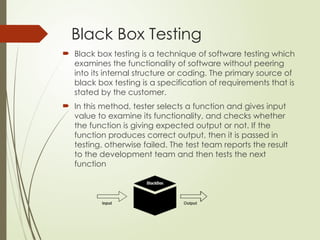
 Black box testing is a technique of software testing which
examines the functionality of software without peering
into its internal structure or coding. The primary source of
black box testing is a specification of requirements that is
stated by the customer.
 In this method, tester selects a function and gives input
value to examine its functionality, and checks whether
the function is giving expected output or not. If the
function produces correct output, then it is passed in
testing, otherwise failed. The test team reports the result
to the development team and then tests the next
function
RANDOM TESTING
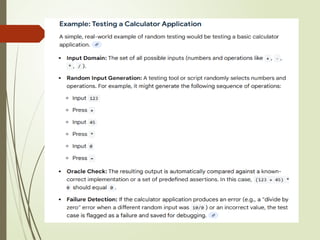
 Random testing is a type of functional black box
testing technique in which test inputs are generated
randomly without following any specific test design or
test case specification. It is also known as
monkey testing.
 Here, random inputs are used to test the program. The
test results are then compared to the expected
outcomes to determine if the test passes or fails.
Requirements-based testing
 Requirements-based testing is a testing approach in which
test cases, conditions and data are derived from
requirements. It includes functional tests and also non-
functional attributes such as performance, reliability or
usability.
Stages :
 Defining Test Completion Criteria
 Design Test Cases
 Execute Tests
 Verify Test Results
 Verify Test Coverage
 Track and Manage Defects
Requirements Testing process:
 Testing must be carried out in a timely
manner.
 Testing process should add value to the
software life cycle, hence it needs to be
effective.
 Testing the system exhaustively is impossible
hence the testing process needs to be
efficient as well.
 Testing must provide the overall status of
the project, hence it should be
manageable.
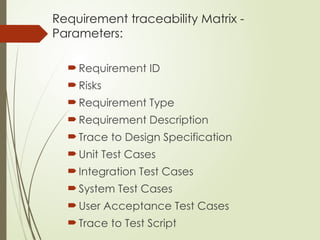
Requirement traceability Matrix -
Parameters:
Requirement ID
Risks
Requirement Type
Requirement Description
Trace to Design Specification
Unit Test Cases
Integration Test Cases
System Test Cases
User Acceptance Test Cases
Trace to Test Script
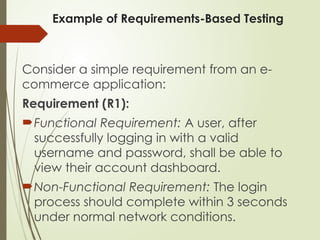
Example of Requirements-Based Testing
Consider a simple requirement from an e-
commerce application:
Requirement (R1):
Functional Requirement: A user, after
successfully logging in with a valid
username and password, shall be able to
view their account dashboard.
Non-Functional Requirement: The login
process should complete within 3 seconds
under normal network conditions.
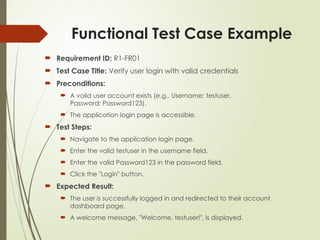
Functional Test Case Example
 Requirement ID: R1-FR01
 Test Case Title: Verify user login with valid credentials
 Preconditions:
 A valid user account exists (e.g., Username: testuser,
Password: Password123).
 The application login page is accessible.
 Test Steps:
 Navigate to the application login page.
 Enter the valid testuser in the username field.
 Enter the valid Password123 in the password field.
 Click the "Login" button.
 Expected Result:
 The user is successfully logged in and redirected to their account
dashboard page.
 A welcome message, "Welcome, testuser!", is displayed.
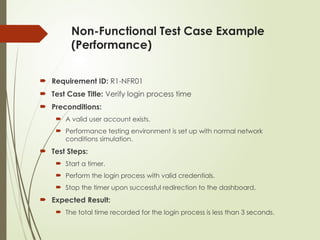
Non-Functional Test Case Example
(Performance)
 Requirement ID: R1-NFR01
 Test Case Title: Verify login process time
 Preconditions:
 A valid user account exists.
 Performance testing environment is set up with normal network
conditions simulation.
 Test Steps:
 Start a timer.
 Perform the login process with valid credentials.
 Stop the timer upon successful redirection to the dashboard.
 Expected Result:
 The total time recorded for the login process is less than 3 seconds.
Boundary Value Analysis
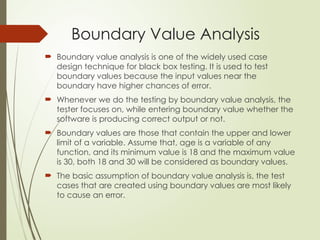
 Boundary value analysis is one of the widely used case
design technique for black box testing. It is used to test
boundary values because the input values near the
boundary have higher chances of error.
 Whenever we do the testing by boundary value analysis, the
tester focuses on, while entering boundary value whether the
software is producing correct output or not.
 Boundary values are those that contain the upper and lower
limit of a variable. Assume that, age is a variable of any
function, and its minimum value is 18 and the maximum value
is 30, both 18 and 30 will be considered as boundary values.
 The basic assumption of boundary value analysis is, the test
cases that are created using boundary values are most likely
to cause an error.
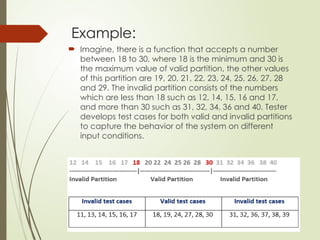
Example:
 Imagine, there is a function that accepts a number
between 18 to 30, where 18 is the minimum and 30 is
the maximum value of valid partition, the other values
of this partition are 19, 20, 21, 22, 23, 24, 25, 26, 27, 28
and 29. The invalid partition consists of the numbers
which are less than 18 such as 12, 14, 15, 16 and 17,
and more than 30 such as 31, 32, 34, 36 and 40. Tester
develops test cases for both valid and invalid partitions
to capture the behavior of the system on different
input conditions.
Equivalence class partitioning
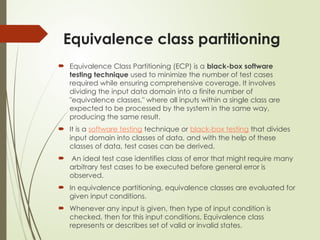
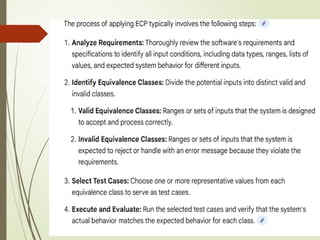
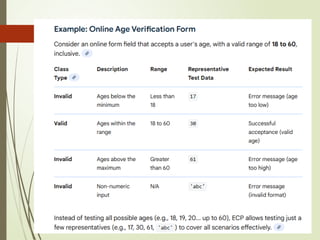
 Equivalence Class Partitioning (ECP) is a black-box software
testing technique used to minimize the number of test cases
required while ensuring comprehensive coverage. It involves
dividing the input data domain into a finite number of
"equivalence classes," where all inputs within a single class are
expected to be processed by the system in the same way,
producing the same result.
 It is a software testing technique or black-box testing that divides
input domain into classes of data, and with the help of these
classes of data, test cases can be derived.
 An ideal test case identifies class of error that might require many
arbitrary test cases to be executed before general error is
observed.
 In equivalence partitioning, equivalence classes are evaluated for
given input conditions.
 Whenever any input is given, then type of input condition is
checked, then for this input conditions, Equivalence class
represents or describes set of valid or invalid states.
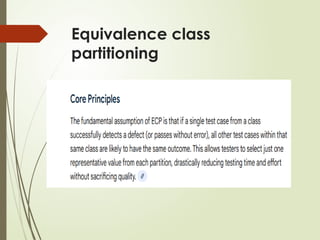
Equivalence class
partitioning
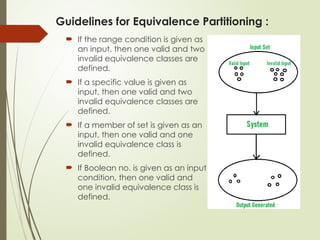
Guidelines for Equivalence Partitioning :
 If the range condition is given as
an input, then one valid and two
invalid equivalence classes are
defined.
 If a specific value is given as
input, then one valid and two
invalid equivalence classes are
defined.
 If a member of set is given as an
input, then one valid and one
invalid equivalence class is
defined.
 If Boolean no. is given as an input
condition, then one valid and
one invalid equivalence class is
defined.
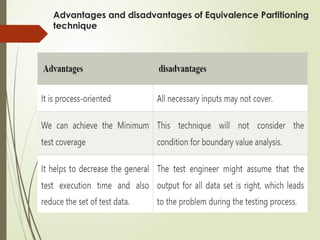
Advantages and disadvantages of Equivalence Partitioning
technique
State Based Testing
 The general meaning of state transition is, different
forms of the same situation, and according to the
meaning, the state transition method does the same.
It is used to capture the behavior of the software
application when different input values are given to
the same function.
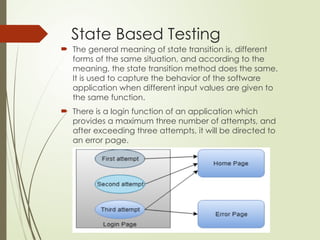
 There is a login function of an application which
provides a maximum three number of attempts, and
after exceeding three attempts, it will be directed to
an error page.
state transition testing
 State-based testing (or state transition testing) is a
black-box technique used to verify a system's behavior
as it moves through different "states" based on various
inputs or events. It is especially effective for systems
where the current response depends on what
happened in the past, like an ATM or a login screen.
Core Components
 State: A stable condition of the software (e.g.,
"Logged Out," "Processing").
 Transition: The movement from one state to another.
 Event: The trigger that causes a transition (e.g., clicking
"Submit").
 Action: The system's response during a transition (e.g.,
showing an error message)
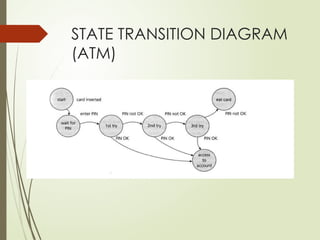
Example: ATM PIN Entry
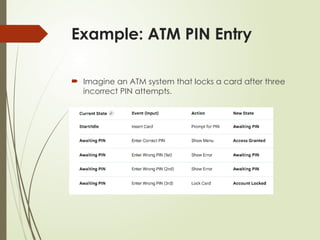
 Imagine an ATM system that locks a card after three
incorrect PIN attempts.
STATE TRANSITION DIAGRAM
(ATM)
Test Case Types
 Valid Transitions: Testing the "happy path" (e.g., Card
Inserted → Correct PIN → Access Granted).
 Invalid Transitions: Testing actions that shouldn't
happen (e.g., trying to withdraw cash while in the
"Awaiting PIN" state).
 Boundary Conditions: Testing the exact limit of
attempts (e.g., verifying the account locks exactly at
the 3rd fail, not the 2nd or 4th).
Decision Table
 Decision table technique is one of the widely used case
design techniques for black box testing. This is a systematic
approach where various input combinations and their
respective system behavior are captured in a tabular form.
 That's why it is also known as a cause-effect table. This
technique is used to pick the test cases in a systematic
manner; it saves the testing time and gives good coverage
to the testing area of the software application.
 Decision table technique is appropriate for the functions
that have a logical relationship between two and more
than two inputs.
 This technique is related to the correct combination of
inputs and determines the result of various combinations of
input. To design the test cases by decision table technique,
we need to consider conditions as input and actions as
output.
Example:
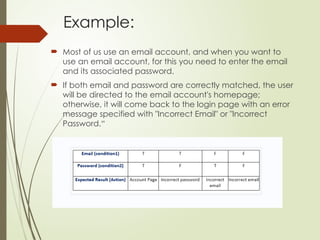
 Most of us use an email account, and when you want to
use an email account, for this you need to enter the email
and its associated password.
 If both email and password are correctly matched, the user
will be directed to the email account's homepage;
otherwise, it will come back to the login page with an error
message specified with "Incorrect Email" or "Incorrect
Password.“
Cause-effect graphing
 Cause-effect graphing is a black-box testing
technique that uses a graph to depict relationships
between input conditions (causes) and output
actions/states (effects), which is then converted into a
decision table to generate test cases. The process
systematically explores combinations of inputs,
avoiding the combinatorial explosion of simple
exhaustive testing
Example: File Update Scenario
Consider the following specification for a simple system that
processes two input columns, col1 and col2:
 col1 must contain either 'a' or 'b'.
 col2 must contain a digit from 0-9.
 Effect 1: If both col1 and col2 are correct, a file is updated.
 Effect 2: If col1 is incorrect, message 'X' is displayed.
 Effect 3: If col2 is incorrect, message 'Y' is displayed.
Steps to Apply Cause-Effect
Graphing
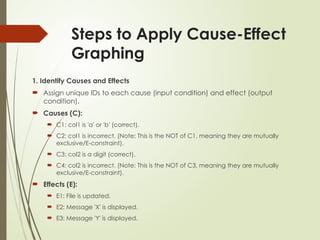
1. Identify Causes and Effects
 Assign unique IDs to each cause (input condition) and effect (output
condition).
 Causes (C):
 C1: col1 is 'a' or 'b' (correct).
 C2: col1 is incorrect. (Note: This is the NOT of C1, meaning they are mutually
exclusive/E-constraint).
 C3: col2 is a digit (correct).
 C4: col2 is incorrect. (Note: This is the NOT of C3, meaning they are mutually
exclusive/E-constraint).
 Effects (E):
 E1: File is updated.
 E2: Message 'X' is displayed.
 E3: Message 'Y' is displayed.
Steps to Apply Cause-Effect
Graphing
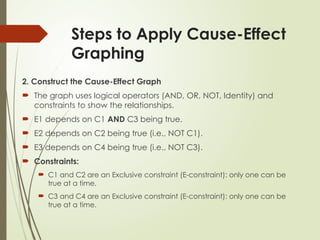
2. Construct the Cause-Effect Graph
 The graph uses logical operators (AND, OR, NOT, Identity) and
constraints to show the relationships.
 E1 depends on C1 AND C3 being true.
 E2 depends on C2 being true (i.e., NOT C1).
 E3 depends on C4 being true (i.e., NOT C3).
 Constraints:
 C1 and C2 are an Exclusive constraint (E-constraint): only one can be
true at a time.
 C3 and C4 are an Exclusive constraint (E-constraint): only one can be
true at a time.
Steps to Apply Cause-Effect Graphing
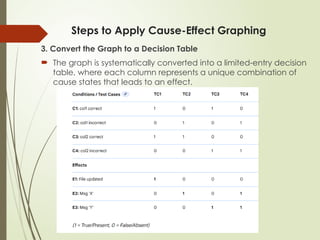
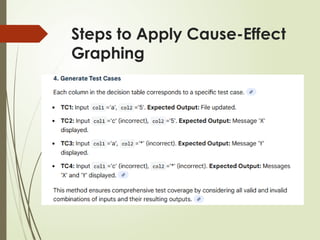
3. Convert the Graph to a Decision Table
 The graph is systematically converted into a limited-entry decision
table, where each column represents a unique combination of
cause states that leads to an effect.
Steps to Apply Cause-Effect
Graphing
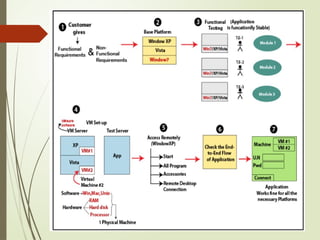
Compatibility Testing
 It is part of non-functional testing.
 Checking the functionality of an application on different
software, hardware platforms, network, and browsers is
known as compatibility testing.
Compatibility testing tools
 Some of the most commonly used compatibility testing
tools are as follows:
 LambdaTest
 BrowserStack
 BrowseEMAll
 TestingBot
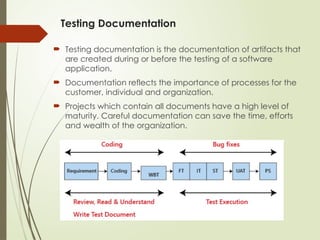
Testing Documentation
 Testing documentation is the documentation of artifacts that
are created during or before the testing of a software
application.
 Documentation reflects the importance of processes for the
customer, individual and organization.
 Projects which contain all documents have a high level of
maturity. Careful documentation can save the time, efforts
and wealth of the organization.
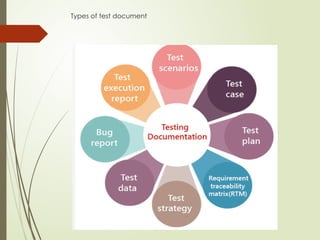
Types of test document
Benefits of using Documentation
 Documentation clarifies the quality of methods and objectives.
 It ensures internal coordination when a customer uses software
application.
 It ensures clarity about the stability of tasks and performance.
 It provides feedback on preventive tasks.
 It provides feedback for your planning cycle.
 It creates objective evidence for the performance of the quality
management system.
 If we write the test document, we can't forget the values which we put in
the first phase.
 It is also a time-saving process because we can easily refer to the text
document.
 It is also consistent because we will test on the same value.
The drawback of the test document
 It is a bit tedious because we have to maintain the modification provided
by the customer and parallel change in the document.
 If the test documentation is not proper, it will replicate the quality of the
application.
 Sometimes it is written by that person who does not have the product
knowledge.
 Sometimes the cost of the document will be exceeding its value.
Domain testing
 Domain testing is a testing process where the software is tested
to ensure it doesn't accept invalid or out-of-range values.
 The output is tested against a minimum number of inputs to see
whether the system is accepting the input within the required
range or not. The white box testing is a perfect example of
domain testing.
Domain Testing Strategy
 A specific boundary defines every domain. During the test,
testers analyze each point nearby those boundaries. Each
testing process starts with a question, and the purpose of
domain testing is to find solutions to these questions.
 What domains to choose for the testing process?
 What values should one choose for the test?
 How do you group values into classes?
 How do you get the results?
Is it important to have domain knowledge for
domain testing?
 Is it important to have domain knowledge for domain testing?
 It is highly important to have at least basic domain knowledge for
an expert to conduct domain testing.
 Domain knowledge is crucial as each industry or field is unique and
has specific requirements.
 Retail − In retail domains, the workflow runs at different levels.
Therefore, testing engineers looking forward to running domain
testing in retail must know how things work in warehouse
management, in-store solutions, and so on.
 Online Banking − Online banking consists of several crucial internet-
dependent activities such as login, money transfer, bill payment,
etc., which is quite different than retails.
 Healthcare − Handling healthcare domains is quite critical as it holds
a huge risk to someone's life. Besides, it includes numerous menial
yet time-consuming tasks like patient's entry, health history,
prescriptions, setting & modifying schedules, insurance, etc.

software testing-unit2-black box testing.pptx

  • 1.
  • 2.
  • 3.
    Black Box Testing Black box testing is a technique of software testing which examines the functionality of software without peering into its internal structure or coding. The primary source of black box testing is a specification of requirements that is stated by the customer.  In this method, tester selects a function and gives input value to examine its functionality, and checks whether the function is giving expected output or not. If the function produces correct output, then it is passed in testing, otherwise failed. The test team reports the result to the development team and then tests the next function
  • 4.
    RANDOM TESTING  Randomtesting is a type of functional black box testing technique in which test inputs are generated randomly without following any specific test design or test case specification. It is also known as monkey testing.  Here, random inputs are used to test the program. The test results are then compared to the expected outcomes to determine if the test passes or fails.
  • 6.
    Requirements-based testing  Requirements-basedtesting is a testing approach in which test cases, conditions and data are derived from requirements. It includes functional tests and also non- functional attributes such as performance, reliability or usability. Stages :  Defining Test Completion Criteria  Design Test Cases  Execute Tests  Verify Test Results  Verify Test Coverage  Track and Manage Defects
  • 7.
    Requirements Testing process: Testing must be carried out in a timely manner.  Testing process should add value to the software life cycle, hence it needs to be effective.  Testing the system exhaustively is impossible hence the testing process needs to be efficient as well.  Testing must provide the overall status of the project, hence it should be manageable.
  • 8.
    Requirement traceability Matrix- Parameters: Requirement ID Risks Requirement Type Requirement Description Trace to Design Specification Unit Test Cases Integration Test Cases System Test Cases User Acceptance Test Cases Trace to Test Script
  • 9.
    Example of Requirements-BasedTesting Consider a simple requirement from an e- commerce application: Requirement (R1): Functional Requirement: A user, after successfully logging in with a valid username and password, shall be able to view their account dashboard. Non-Functional Requirement: The login process should complete within 3 seconds under normal network conditions.
  • 10.
    Functional Test CaseExample  Requirement ID: R1-FR01  Test Case Title: Verify user login with valid credentials  Preconditions:  A valid user account exists (e.g., Username: testuser, Password: Password123).  The application login page is accessible.  Test Steps:  Navigate to the application login page.  Enter the valid testuser in the username field.  Enter the valid Password123 in the password field.  Click the "Login" button.  Expected Result:  The user is successfully logged in and redirected to their account dashboard page.  A welcome message, "Welcome, testuser!", is displayed.
  • 11.
    Non-Functional Test CaseExample (Performance)  Requirement ID: R1-NFR01  Test Case Title: Verify login process time  Preconditions:  A valid user account exists.  Performance testing environment is set up with normal network conditions simulation.  Test Steps:  Start a timer.  Perform the login process with valid credentials.  Stop the timer upon successful redirection to the dashboard.  Expected Result:  The total time recorded for the login process is less than 3 seconds.
  • 12.
    Boundary Value Analysis Boundary value analysis is one of the widely used case design technique for black box testing. It is used to test boundary values because the input values near the boundary have higher chances of error.  Whenever we do the testing by boundary value analysis, the tester focuses on, while entering boundary value whether the software is producing correct output or not.  Boundary values are those that contain the upper and lower limit of a variable. Assume that, age is a variable of any function, and its minimum value is 18 and the maximum value is 30, both 18 and 30 will be considered as boundary values.  The basic assumption of boundary value analysis is, the test cases that are created using boundary values are most likely to cause an error.
  • 13.
    Example:  Imagine, thereis a function that accepts a number between 18 to 30, where 18 is the minimum and 30 is the maximum value of valid partition, the other values of this partition are 19, 20, 21, 22, 23, 24, 25, 26, 27, 28 and 29. The invalid partition consists of the numbers which are less than 18 such as 12, 14, 15, 16 and 17, and more than 30 such as 31, 32, 34, 36 and 40. Tester develops test cases for both valid and invalid partitions to capture the behavior of the system on different input conditions.
  • 14.
    Equivalence class partitioning Equivalence Class Partitioning (ECP) is a black-box software testing technique used to minimize the number of test cases required while ensuring comprehensive coverage. It involves dividing the input data domain into a finite number of "equivalence classes," where all inputs within a single class are expected to be processed by the system in the same way, producing the same result.  It is a software testing technique or black-box testing that divides input domain into classes of data, and with the help of these classes of data, test cases can be derived.  An ideal test case identifies class of error that might require many arbitrary test cases to be executed before general error is observed.  In equivalence partitioning, equivalence classes are evaluated for given input conditions.  Whenever any input is given, then type of input condition is checked, then for this input conditions, Equivalence class represents or describes set of valid or invalid states.
  • 15.
  • 18.
    Guidelines for EquivalencePartitioning :  If the range condition is given as an input, then one valid and two invalid equivalence classes are defined.  If a specific value is given as input, then one valid and two invalid equivalence classes are defined.  If a member of set is given as an input, then one valid and one invalid equivalence class is defined.  If Boolean no. is given as an input condition, then one valid and one invalid equivalence class is defined.
  • 19.
    Advantages and disadvantagesof Equivalence Partitioning technique
  • 20.
    State Based Testing The general meaning of state transition is, different forms of the same situation, and according to the meaning, the state transition method does the same. It is used to capture the behavior of the software application when different input values are given to the same function.  There is a login function of an application which provides a maximum three number of attempts, and after exceeding three attempts, it will be directed to an error page.
  • 21.
    state transition testing State-based testing (or state transition testing) is a black-box technique used to verify a system's behavior as it moves through different "states" based on various inputs or events. It is especially effective for systems where the current response depends on what happened in the past, like an ATM or a login screen.
  • 22.
    Core Components  State:A stable condition of the software (e.g., "Logged Out," "Processing").  Transition: The movement from one state to another.  Event: The trigger that causes a transition (e.g., clicking "Submit").  Action: The system's response during a transition (e.g., showing an error message)
  • 23.
    Example: ATM PINEntry  Imagine an ATM system that locks a card after three incorrect PIN attempts.
  • 24.
  • 25.
    Test Case Types Valid Transitions: Testing the "happy path" (e.g., Card Inserted → Correct PIN → Access Granted).  Invalid Transitions: Testing actions that shouldn't happen (e.g., trying to withdraw cash while in the "Awaiting PIN" state).  Boundary Conditions: Testing the exact limit of attempts (e.g., verifying the account locks exactly at the 3rd fail, not the 2nd or 4th).
  • 26.
    Decision Table  Decisiontable technique is one of the widely used case design techniques for black box testing. This is a systematic approach where various input combinations and their respective system behavior are captured in a tabular form.  That's why it is also known as a cause-effect table. This technique is used to pick the test cases in a systematic manner; it saves the testing time and gives good coverage to the testing area of the software application.  Decision table technique is appropriate for the functions that have a logical relationship between two and more than two inputs.  This technique is related to the correct combination of inputs and determines the result of various combinations of input. To design the test cases by decision table technique, we need to consider conditions as input and actions as output.
  • 27.
    Example:  Most ofus use an email account, and when you want to use an email account, for this you need to enter the email and its associated password.  If both email and password are correctly matched, the user will be directed to the email account's homepage; otherwise, it will come back to the login page with an error message specified with "Incorrect Email" or "Incorrect Password.“
  • 28.
    Cause-effect graphing  Cause-effectgraphing is a black-box testing technique that uses a graph to depict relationships between input conditions (causes) and output actions/states (effects), which is then converted into a decision table to generate test cases. The process systematically explores combinations of inputs, avoiding the combinatorial explosion of simple exhaustive testing
  • 29.
    Example: File UpdateScenario Consider the following specification for a simple system that processes two input columns, col1 and col2:  col1 must contain either 'a' or 'b'.  col2 must contain a digit from 0-9.  Effect 1: If both col1 and col2 are correct, a file is updated.  Effect 2: If col1 is incorrect, message 'X' is displayed.  Effect 3: If col2 is incorrect, message 'Y' is displayed.
  • 30.
    Steps to ApplyCause-Effect Graphing 1. Identify Causes and Effects  Assign unique IDs to each cause (input condition) and effect (output condition).  Causes (C):  C1: col1 is 'a' or 'b' (correct).  C2: col1 is incorrect. (Note: This is the NOT of C1, meaning they are mutually exclusive/E-constraint).  C3: col2 is a digit (correct).  C4: col2 is incorrect. (Note: This is the NOT of C3, meaning they are mutually exclusive/E-constraint).  Effects (E):  E1: File is updated.  E2: Message 'X' is displayed.  E3: Message 'Y' is displayed.
  • 31.
    Steps to ApplyCause-Effect Graphing 2. Construct the Cause-Effect Graph  The graph uses logical operators (AND, OR, NOT, Identity) and constraints to show the relationships.  E1 depends on C1 AND C3 being true.  E2 depends on C2 being true (i.e., NOT C1).  E3 depends on C4 being true (i.e., NOT C3).  Constraints:  C1 and C2 are an Exclusive constraint (E-constraint): only one can be true at a time.  C3 and C4 are an Exclusive constraint (E-constraint): only one can be true at a time.
  • 32.
    Steps to ApplyCause-Effect Graphing 3. Convert the Graph to a Decision Table  The graph is systematically converted into a limited-entry decision table, where each column represents a unique combination of cause states that leads to an effect.
  • 33.
    Steps to ApplyCause-Effect Graphing
  • 34.
    Compatibility Testing  Itis part of non-functional testing.  Checking the functionality of an application on different software, hardware platforms, network, and browsers is known as compatibility testing. Compatibility testing tools  Some of the most commonly used compatibility testing tools are as follows:  LambdaTest  BrowserStack  BrowseEMAll  TestingBot
  • 36.
    Testing Documentation  Testingdocumentation is the documentation of artifacts that are created during or before the testing of a software application.  Documentation reflects the importance of processes for the customer, individual and organization.  Projects which contain all documents have a high level of maturity. Careful documentation can save the time, efforts and wealth of the organization.
  • 37.
    Types of testdocument
  • 38.
    Benefits of usingDocumentation  Documentation clarifies the quality of methods and objectives.  It ensures internal coordination when a customer uses software application.  It ensures clarity about the stability of tasks and performance.  It provides feedback on preventive tasks.  It provides feedback for your planning cycle.  It creates objective evidence for the performance of the quality management system.  If we write the test document, we can't forget the values which we put in the first phase.  It is also a time-saving process because we can easily refer to the text document.  It is also consistent because we will test on the same value. The drawback of the test document  It is a bit tedious because we have to maintain the modification provided by the customer and parallel change in the document.  If the test documentation is not proper, it will replicate the quality of the application.  Sometimes it is written by that person who does not have the product knowledge.  Sometimes the cost of the document will be exceeding its value.
  • 39.
    Domain testing  Domaintesting is a testing process where the software is tested to ensure it doesn't accept invalid or out-of-range values.  The output is tested against a minimum number of inputs to see whether the system is accepting the input within the required range or not. The white box testing is a perfect example of domain testing. Domain Testing Strategy  A specific boundary defines every domain. During the test, testers analyze each point nearby those boundaries. Each testing process starts with a question, and the purpose of domain testing is to find solutions to these questions.  What domains to choose for the testing process?  What values should one choose for the test?  How do you group values into classes?  How do you get the results?
  • 40.
    Is it importantto have domain knowledge for domain testing?  Is it important to have domain knowledge for domain testing?  It is highly important to have at least basic domain knowledge for an expert to conduct domain testing.  Domain knowledge is crucial as each industry or field is unique and has specific requirements.  Retail − In retail domains, the workflow runs at different levels. Therefore, testing engineers looking forward to running domain testing in retail must know how things work in warehouse management, in-store solutions, and so on.  Online Banking − Online banking consists of several crucial internet- dependent activities such as login, money transfer, bill payment, etc., which is quite different than retails.  Healthcare − Handling healthcare domains is quite critical as it holds a huge risk to someone's life. Besides, it includes numerous menial yet time-consuming tasks like patient's entry, health history, prescriptions, setting & modifying schedules, insurance, etc.
Editor's Notes

  • #20 State-based testing, or state transition testing, is a black-box software testing technique used to verify systems that have a finite number of states and undergo transitions based on specific inputs or events. This technique ensures the system behaves correctly when moving between these different conditions.