

 It is a good all-round specification-based black-box technique. It can be
applied at any level of testing and is often a good technique.
 It is better to use the technique informally than not at all, it is much
better to use the technique in a formal way to attain the full benefits
that it can deliver.
 The idea behind the technique is to divide a set of test conditions into
groups or sets that can be considered the same.
 The equivalence partitioning technique then describes that we need to
test only one condition from each partition.
 For example, a saving account in a bank earns a different rate of interest
depending on the balance in the account.
 When we say a partition is ‘invalid ‘,it doesn’t mean that it represents a
value that cannot be entered by user. It just means that it is not one of
the expected inputs for this particular field.
 The software should correctly handle values from the invalid partition,
by replying with an error message ‘Balance must me at least $0.00.
 Definition:
A boundary value is any input or output value on the
edge of an equivalence partition. It’s a black box test
design technique where test cases are designed by
using boundary values; BVA is used in range checking.
 Objective :
Boundary value analysis leads to a selection of test
cases that exercise bounding values.
 Guidelines :
If an input condition specifies a range bounded by
values a and b, test cases should be designed with
value a and b, just above and below a and b.
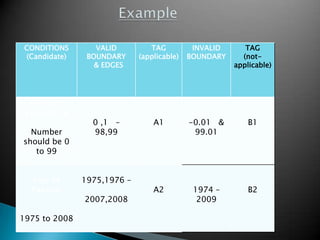
CONDITIONS
(Candidate)
VALID
BOUNDARY
& EDGES
TAG
(applicable)
INVALID
BOUNDARY
TAG
(not-
applicable)
Relevant
Experience
Number
should be 0
to 99
0 ,1 –
98,99
A1 -0.01 &
99.01
B1
Year of
Passing
1975 to 2008
1975,1976 –
2007,2008
A2 1974 –
2009
B2
 A black-box test design technique where the cases
are designed to execute the combinations of
inputs(causes) with their associated outputs(effects)
in a table format where each column represents a
unique combination.
 The input conditions and actions are often stated
either true/false(Boolean).
 It overcomes the defect of EP/BVP which becomes
complicated when different combinations of inputs
has to be given.
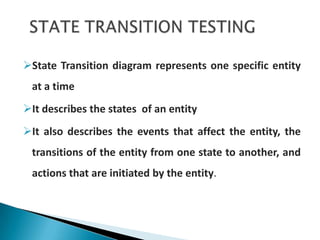
State Transition diagram represents one specific entity
at a time
It describes the states of an entity
It also describes the events that affect the entity, the
transitions of the entity from one state to another, and
actions that are initiated by the entity.
o What is a Scenario?
o Who is an Actor?
o What is a Use case?
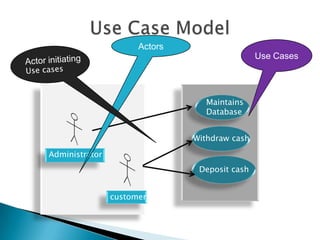
Maintains
Database
Withdraw cash
Deposit cash
Administrator
customer
Actors
Use Cases
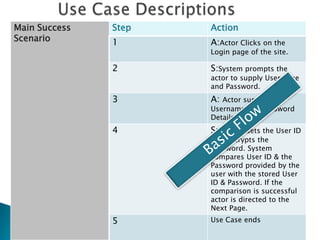
Main Success
Scenario
Step Action
1 A:Actor Clicks on the
Login page of the site.
2 S:System prompts the
actor to supply Username
and Password.
3 A: Actor supplies the
Username and Password
Details.
4 S:System Gets the User ID
and decrypts the
Password. System
compares User ID & the
Password provided by the
user with the stored User
ID & Password. If the
comparison is successful
actor is directed to the
Next Page.
5 Use Case ends
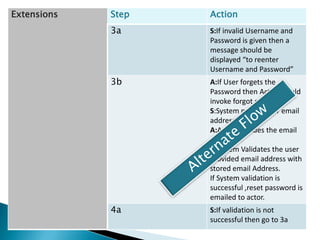
Extensions Step Action
3a S:If invalid Username and
Password is given then a
message should be
displayed “to reenter
Username and Password”
3b A:If User forgets the
Password then Actor should
invoke forgot password
S:System prompts for email
address
A:Actor provides the email
address
S:System Validates the user
provided email address with
stored email Address.
If System validation is
successful ,reset password is
emailed to actor.
4a S:If validation is not
successful then go to 3a
Thank You

Black Box Testing

  • 2.
     It isa good all-round specification-based black-box technique. It can be applied at any level of testing and is often a good technique.  It is better to use the technique informally than not at all, it is much better to use the technique in a formal way to attain the full benefits that it can deliver.  The idea behind the technique is to divide a set of test conditions into groups or sets that can be considered the same.  The equivalence partitioning technique then describes that we need to test only one condition from each partition.  For example, a saving account in a bank earns a different rate of interest depending on the balance in the account.  When we say a partition is ‘invalid ‘,it doesn’t mean that it represents a value that cannot be entered by user. It just means that it is not one of the expected inputs for this particular field.  The software should correctly handle values from the invalid partition, by replying with an error message ‘Balance must me at least $0.00.
  • 3.
     Definition: A boundaryvalue is any input or output value on the edge of an equivalence partition. It’s a black box test design technique where test cases are designed by using boundary values; BVA is used in range checking.  Objective : Boundary value analysis leads to a selection of test cases that exercise bounding values.  Guidelines : If an input condition specifies a range bounded by values a and b, test cases should be designed with value a and b, just above and below a and b.
  • 4.
    CONDITIONS (Candidate) VALID BOUNDARY & EDGES TAG (applicable) INVALID BOUNDARY TAG (not- applicable) Relevant Experience Number should be0 to 99 0 ,1 – 98,99 A1 -0.01 & 99.01 B1 Year of Passing 1975 to 2008 1975,1976 – 2007,2008 A2 1974 – 2009 B2
  • 5.
     A black-boxtest design technique where the cases are designed to execute the combinations of inputs(causes) with their associated outputs(effects) in a table format where each column represents a unique combination.  The input conditions and actions are often stated either true/false(Boolean).  It overcomes the defect of EP/BVP which becomes complicated when different combinations of inputs has to be given.
  • 6.
    State Transition diagramrepresents one specific entity at a time It describes the states of an entity It also describes the events that affect the entity, the transitions of the entity from one state to another, and actions that are initiated by the entity.
  • 7.
    o What isa Scenario? o Who is an Actor? o What is a Use case?
  • 8.
  • 9.
    Main Success Scenario Step Action 1A:Actor Clicks on the Login page of the site. 2 S:System prompts the actor to supply Username and Password. 3 A: Actor supplies the Username and Password Details. 4 S:System Gets the User ID and decrypts the Password. System compares User ID & the Password provided by the user with the stored User ID & Password. If the comparison is successful actor is directed to the Next Page. 5 Use Case ends
  • 10.
    Extensions Step Action 3aS:If invalid Username and Password is given then a message should be displayed “to reenter Username and Password” 3b A:If User forgets the Password then Actor should invoke forgot password S:System prompts for email address A:Actor provides the email address S:System Validates the user provided email address with stored email Address. If System validation is successful ,reset password is emailed to actor. 4a S:If validation is not successful then go to 3a
  • 11.