Software Testing
Software Process Model
Contents
• Why do we do testing?
• What is testing?
• Who does testing?
• What are levels of testing?
• What are different methods/techniques of testing?
• How to test a software?
Common software problems!
• What are the problems you encounter as software users?
• Incorrect calculation
• Incorrect data edits & ineffective data edits
• Incorrect matching and merging of data
• Data searches that yield incorrect results
• Incorrect processing of data relationship
• Incorrect coding/processing of business rules
• Inadequate software performance
• Confusing or misleading data
• Inconsistent processing
• Unreliable results or performance
• Incorrect or inadequate interfaces with other systems
• Incorrect file handling
Who is responsible for testing?
Objectives of a software tester
• Find bugs as early as possible and make sure they get fixed
• To understand the application well
• Study the functionality in detail to find where the bugs are likely to
occur.
• Study the code to ensure that each and every line of code is tested.
• Create test cases in such a way that testing is done to uncover the
hidden bugs and also ensure that the software is usable and reliable
Objectives of testing
• Executing a program with the intent of finding an error
• To check if the system meets the requirements and be executed
successfully in the Intended environment
• To check if the system is “ Fit for purpose”
• To check if the system does what it is expected to do
• A good test case is one that has a probability of finding an as yet
undiscovered error
• A good test is not redundant
• A good test should neither be too simple nor too complex
Confusing but related!!!
• Verification (Are the algorithms coded correctly?)
– The set of activities that ensure that software correctly implements a
specific function or algorithm
– Involves reviews and meeting to evaluate documents, plans, code,
requirements, and specifications.
– Usually done with checklists, issues lists, walkthroughs, and inspection
meeting.
• Validation (Does it meet user requirements?)
– The set of activities that ensure that the software that has been
built is traceable to customer requirements
– Involves actual testing and takes place after verifications are completed.
• Validation and Verification process continue in a cycle till the
software becomes defects free.
S/W Testing lifecycle phases
• Requirements study
• Analysis and planning
• Test Case Design and Development
• Test Execution
• Test Closure
• Test Process Analysis
Requirements study
• Testing Cycle starts with the study of client’s requirements.
• Understanding of the requirements is very essential for testing the
product – Why?.
Analysis & Planning
• Test objective and coverage
• Overall schedule
• Standards and Methodologies
• Resources required, including necessary training
• Roles and responsibilities of the team members
• Tools used
Test Case Design and Development
• Component Identification
• Test Specification Design
• Test Specification Review
Test Execution
• Code Review
• Test execution and evaluation
• Performance and simulation
Test Closure
• Test summary report
• Project De-brief
• Project Documentation
Test Process Analysis
• On the reports
• To improve the application’s performance by implementing new
technology and additional features
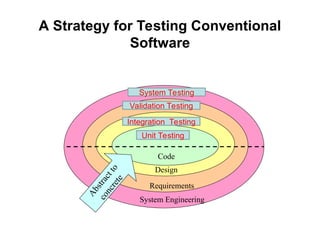
A Strategy for Testing Conventional
Software
Code
Design
Requirements
System Engineering
A
b
s
t
r
a
c
t
t
o
c
o
n
c
r
e
t
e
Unit Testing
Integration Testing
Validation Testing
System Testing
Testing levels
• Unit testing
• Integration testing
• System testing
• Acceptance testing
Unit testing
• The most ‘micro’ scale of testing.
• Tests done on particular functions or code modules.
• Requires knowledge of the internal program design and code.
• Done by Programmers (not by testers).
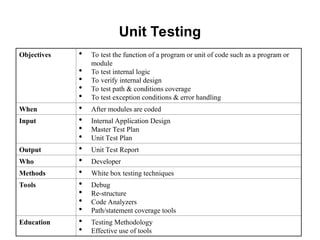
Unit Testing
Objectives  To test the function of a program or unit of code such as a program or
module
 To test internal logic
 To verify internal design
 To test path & conditions coverage
 To test exception conditions & error handling
When  After modules are coded
Input  Internal Application Design
 Master Test Plan
 Unit Test Plan
Output  Unit Test Report
Who  Developer
Methods  White box testing techniques
Tools  Debug
 Re-structure
 Code Analyzers
 Path/statement coverage tools
Education  Testing Methodology
 Effective use of tools
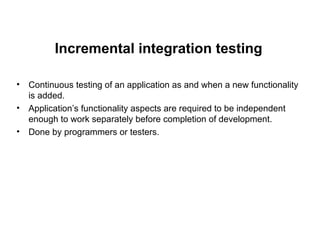
Incremental integration testing
• Continuous testing of an application as and when a new functionality
is added.
• Application’s functionality aspects are required to be independent
enough to work separately before completion of development.
• Done by programmers or testers.
Integration Testing
• Testing of combined parts of an application to determine their
functional correctness.
• ‘Parts’ can be
– code modules
– individual applications
– client/server applications on a network.
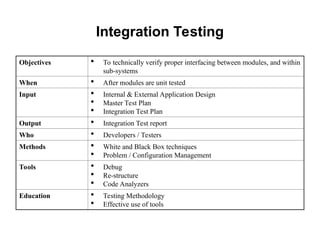
Integration Testing
Objectives  To technically verify proper interfacing between modules, and within
sub-systems
When  After modules are unit tested
Input  Internal & External Application Design
 Master Test Plan
 Integration Test Plan
Output  Integration Test report
Who  Developers / Testers
Methods  White and Black Box techniques
 Problem / Configuration Management
Tools  Debug
 Re-structure
 Code Analyzers
Education  Testing Methodology
 Effective use of tools
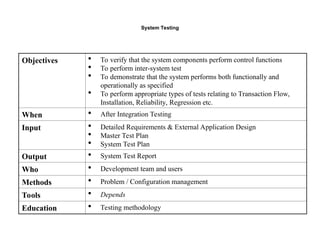
System Testing
Objectives  To verify that the system components perform control functions
 To perform inter-system test
 To demonstrate that the system performs both functionally and
operationally as specified
 To perform appropriate types of tests relating to Transaction Flow,
Installation, Reliability, Regression etc.
When  After Integration Testing
Input  Detailed Requirements & External Application Design
 Master Test Plan
 System Test Plan
Output  System Test Report
Who  Development team and users
Methods  Problem / Configuration management
Tools  Depends
Education  Testing methodology
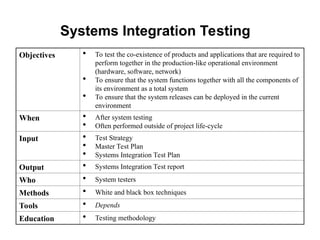
Systems Integration Testing
Objectives  To test the co-existence of products and applications that are required to
perform together in the production-like operational environment
(hardware, software, network)
 To ensure that the system functions together with all the components of
its environment as a total system
 To ensure that the system releases can be deployed in the current
environment
When  After system testing
 Often performed outside of project life-cycle
Input  Test Strategy
 Master Test Plan
 Systems Integration Test Plan
Output  Systems Integration Test report
Who  System testers
Methods  White and black box techniques
Tools  Depends
Education  Testing methodology
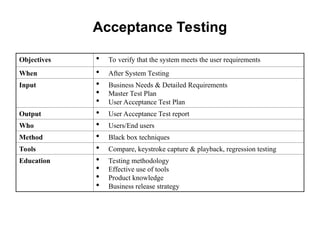
Acceptance Testing
Objectives  To verify that the system meets the user requirements
When  After System Testing
Input  Business Needs & Detailed Requirements
 Master Test Plan
 User Acceptance Test Plan
Output  User Acceptance Test report
Who  Users/End users
Method  Black box techniques
Tools  Compare, keystroke capture & playback, regression testing
Education  Testing methodology
 Effective use of tools
 Product knowledge
 Business release strategy
Summary
• Software testing
– Why do we do testing?
– When it is done?
– Who does it?
• Software testing process / phases in software testing
• Levels of testing
Software Engineering Testing and development .ppt

  • 1.
  • 2.
  • 3.
    Contents • Why dowe do testing? • What is testing? • Who does testing? • What are levels of testing? • What are different methods/techniques of testing? • How to test a software?
  • 4.
    Common software problems! •What are the problems you encounter as software users? • Incorrect calculation • Incorrect data edits & ineffective data edits • Incorrect matching and merging of data • Data searches that yield incorrect results • Incorrect processing of data relationship • Incorrect coding/processing of business rules • Inadequate software performance • Confusing or misleading data • Inconsistent processing • Unreliable results or performance • Incorrect or inadequate interfaces with other systems • Incorrect file handling
  • 5.
    Who is responsiblefor testing?
  • 6.
    Objectives of asoftware tester • Find bugs as early as possible and make sure they get fixed • To understand the application well • Study the functionality in detail to find where the bugs are likely to occur. • Study the code to ensure that each and every line of code is tested. • Create test cases in such a way that testing is done to uncover the hidden bugs and also ensure that the software is usable and reliable
  • 7.
    Objectives of testing •Executing a program with the intent of finding an error • To check if the system meets the requirements and be executed successfully in the Intended environment • To check if the system is “ Fit for purpose” • To check if the system does what it is expected to do • A good test case is one that has a probability of finding an as yet undiscovered error • A good test is not redundant • A good test should neither be too simple nor too complex
  • 8.
    Confusing but related!!! •Verification (Are the algorithms coded correctly?) – The set of activities that ensure that software correctly implements a specific function or algorithm – Involves reviews and meeting to evaluate documents, plans, code, requirements, and specifications. – Usually done with checklists, issues lists, walkthroughs, and inspection meeting. • Validation (Does it meet user requirements?) – The set of activities that ensure that the software that has been built is traceable to customer requirements – Involves actual testing and takes place after verifications are completed. • Validation and Verification process continue in a cycle till the software becomes defects free.
  • 9.
    S/W Testing lifecyclephases • Requirements study • Analysis and planning • Test Case Design and Development • Test Execution • Test Closure • Test Process Analysis
  • 10.
    Requirements study • TestingCycle starts with the study of client’s requirements. • Understanding of the requirements is very essential for testing the product – Why?.
  • 11.
    Analysis & Planning •Test objective and coverage • Overall schedule • Standards and Methodologies • Resources required, including necessary training • Roles and responsibilities of the team members • Tools used
  • 12.
    Test Case Designand Development • Component Identification • Test Specification Design • Test Specification Review
  • 13.
    Test Execution • CodeReview • Test execution and evaluation • Performance and simulation
  • 14.
    Test Closure • Testsummary report • Project De-brief • Project Documentation
  • 15.
    Test Process Analysis •On the reports • To improve the application’s performance by implementing new technology and additional features
  • 16.
    A Strategy forTesting Conventional Software Code Design Requirements System Engineering A b s t r a c t t o c o n c r e t e Unit Testing Integration Testing Validation Testing System Testing
  • 17.
    Testing levels • Unittesting • Integration testing • System testing • Acceptance testing
  • 18.
    Unit testing • Themost ‘micro’ scale of testing. • Tests done on particular functions or code modules. • Requires knowledge of the internal program design and code. • Done by Programmers (not by testers).
  • 19.
    Unit Testing Objectives To test the function of a program or unit of code such as a program or module  To test internal logic  To verify internal design  To test path & conditions coverage  To test exception conditions & error handling When  After modules are coded Input  Internal Application Design  Master Test Plan  Unit Test Plan Output  Unit Test Report Who  Developer Methods  White box testing techniques Tools  Debug  Re-structure  Code Analyzers  Path/statement coverage tools Education  Testing Methodology  Effective use of tools
  • 20.
    Incremental integration testing •Continuous testing of an application as and when a new functionality is added. • Application’s functionality aspects are required to be independent enough to work separately before completion of development. • Done by programmers or testers.
  • 21.
    Integration Testing • Testingof combined parts of an application to determine their functional correctness. • ‘Parts’ can be – code modules – individual applications – client/server applications on a network.
  • 22.
    Integration Testing Objectives To technically verify proper interfacing between modules, and within sub-systems When  After modules are unit tested Input  Internal & External Application Design  Master Test Plan  Integration Test Plan Output  Integration Test report Who  Developers / Testers Methods  White and Black Box techniques  Problem / Configuration Management Tools  Debug  Re-structure  Code Analyzers Education  Testing Methodology  Effective use of tools
  • 23.
    System Testing Objectives To verify that the system components perform control functions  To perform inter-system test  To demonstrate that the system performs both functionally and operationally as specified  To perform appropriate types of tests relating to Transaction Flow, Installation, Reliability, Regression etc. When  After Integration Testing Input  Detailed Requirements & External Application Design  Master Test Plan  System Test Plan Output  System Test Report Who  Development team and users Methods  Problem / Configuration management Tools  Depends Education  Testing methodology
  • 24.
    Systems Integration Testing Objectives To test the co-existence of products and applications that are required to perform together in the production-like operational environment (hardware, software, network)  To ensure that the system functions together with all the components of its environment as a total system  To ensure that the system releases can be deployed in the current environment When  After system testing  Often performed outside of project life-cycle Input  Test Strategy  Master Test Plan  Systems Integration Test Plan Output  Systems Integration Test report Who  System testers Methods  White and black box techniques Tools  Depends Education  Testing methodology
  • 25.
    Acceptance Testing Objectives To verify that the system meets the user requirements When  After System Testing Input  Business Needs & Detailed Requirements  Master Test Plan  User Acceptance Test Plan Output  User Acceptance Test report Who  Users/End users Method  Black box techniques Tools  Compare, keystroke capture & playback, regression testing Education  Testing methodology  Effective use of tools  Product knowledge  Business release strategy
  • 26.
    Summary • Software testing –Why do we do testing? – When it is done? – Who does it? • Software testing process / phases in software testing • Levels of testing