Software
Maintenance
Unit II
What is Software
Maintenance?
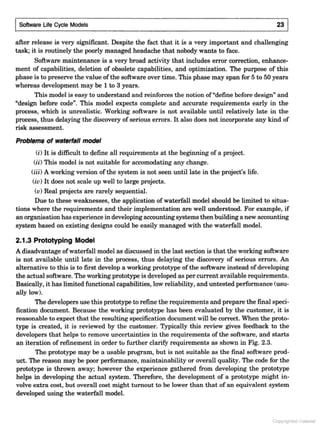
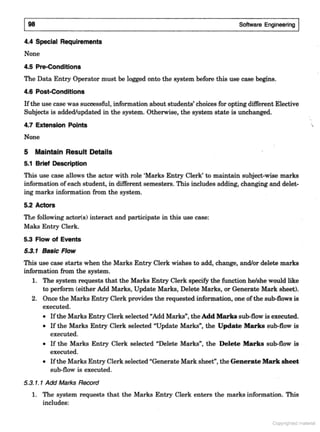
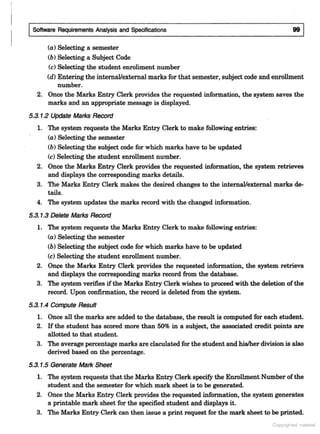
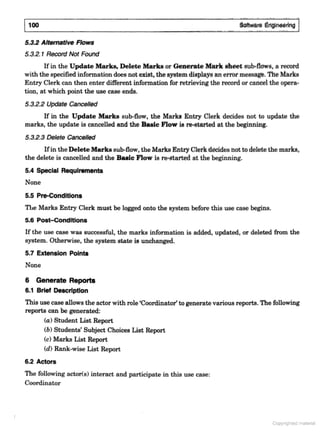
 Software Maintenance is a broad activity
that includes:
│ Error Corrections,
│ Enhancements of Capabilities,
│ Deletion of Obsolete Capabilities, and
│ Optimization
 Any work done to change the software
after it is in operation is considered as
maintenance work.
 The purpose is to preserve the value of
the software over time.
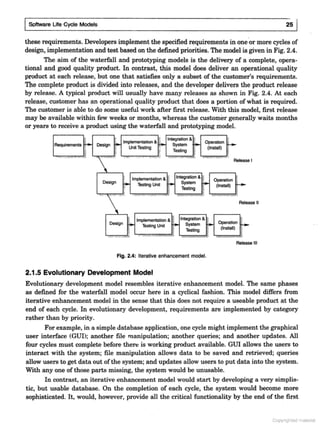
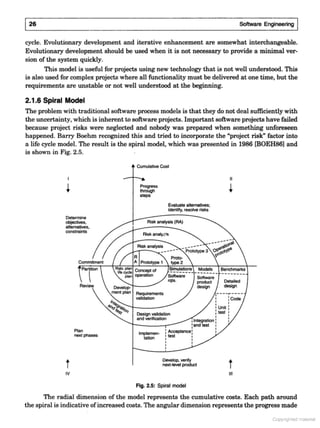
Categories of Maintenance
 There are three major categories of
software maintenance:
│ Corrective Maintenance
│ Adaptive Maintenance
│ Perfective Maintenance
Categories of Maintenance
 Corrective Maintenance:
│ Refers to modifications initiated by defects
in the software.
│ A defect can result from
 Design errors,
 Logical errors, and
 Coding errors.
Categories of Maintenance
 Corrective Maintenance:
│ Design Errors occur when the software is
 Incorrect,
 Incomplete,
 The requirement specifications are
misunderstood.
│ Logical Errors result from
 Invalid tests and conclusions,
 Incorrect implementation of design
specifications,
 Faulty logic flow,
 Incomplete test data
Categories of Maintenance
 Corrective Maintenance:
│ Coding Errors are caused by
 Incorrect implementation of detailed logic
design,
 Incorrect use of source code logic.
│ Defects are also caused by data
processing errors and system
performance errors.
│ Any effort made to correct these errors
comes under corrective maintenance.
│ Sometimes emergency fixes, also called
as “patching”, are done to restore the
operations of a software.
Categories of Maintenance
 Adaptive Maintenance:
│ It includes modifying the software to
match changes in the environment.
│ Environment refers to the totality of all
conditions and influences which act upon
the software from outside.
│ For example,
 Business rules,
 Government policies,
 Work patterns,
 Software and hardware operating platforms.
Categories of Maintenance
 Adaptive Maintenance:
│ This type of maintenance includes any
work that has been started due to moving
the software to a different hardware or
software platform (a new operating
system or a new processor).
Categories of Maintenance
 Perfective Maintenance:
│ It means improving processing efficiency
or performance of the software.
│ It also means restructuring the software to
improve changeability.
│ When software becomes useful, the user
may want to extend it beyond the scope
for which it was initially developed.
Categories of Maintenance
 Perfective Maintenance:
│ Expansion in requirements then results in
enhancements to the existing system
functionality or efficiency.
│ Thus, Perfective maintenance refers to
enhancements to make the product better,
faster, and cleanly structured with more
functions and reports.
Categories of Maintenance
 Preventive Maintenance:
│ Modification of a software product after its
delivery to detect and correct latent faults
in the software product before they
become effective faults.
│ It is a predictable type of maintenance,
where the software is checked periodically
for adjustments, and repairs.
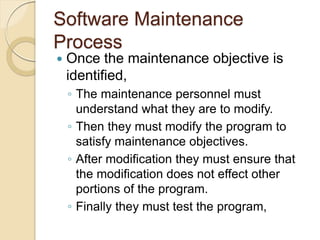
Software Maintenance
Process
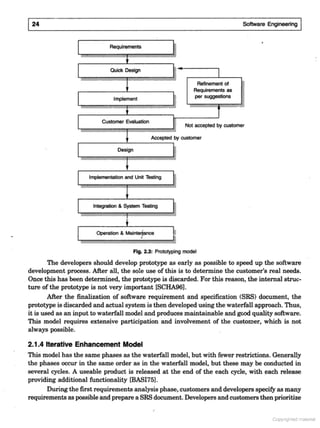
 Once the maintenance objective is
identified,
│ The maintenance personnel must
understand what they are to modify.
│ Then they must modify the program to
satisfy maintenance objectives.
│ After modification they must ensure that
the modification does not effect other
portions of the program.
│ Finally they must test the program,
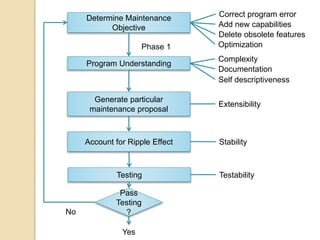
Determine Maintenance
Objective
Program Understanding
Generate particular
maintenance proposal
Account for Ripple Effect
Testing
Pass
Testing
?
Correct program error
Add new capabilities
Delete obsolete features
Optimization
Phase 1
Complexity
Documentation
Self descriptiveness
Extensibility
Stability
Testability
Yes
No
Software Maintenance
Process
 Program Understanding
│ Analyze the program to understand it.
│ Complexity of the program,
documentation, self descriptiveness of the
program help in understanding it.
│ Complexity of the program is usually
based on its data or control flow.
Software Maintenance
Process
 Generating Maintenance Proposal
│ This is done to accomplish the
maintenance objective.
│ It requires clear understanding of both the
maintenance objective and the program to
be modified.
│ This process becomes easy if the
program is extensible and supports
extensions to its functions.
Software Maintenance
Process
 Ripple Effect
│ In software, the effect of a modification
may not be local to the changed module
only.
│ It may also effect other portions of the
program.
│ This effect is called as Ripple Effect.
│ One aspect of the effect is logical or
functional.
│ Another aspect concerns the performance
of the program.
│ Thus it becomes necessary to understand
the potential of the ripple effect.
Software Maintenance
Process
 Ripple Effect
│ The primary attribute of the program that
gets effected by the ripple effect is the
stability of the program.
│ Program Stability is defined as the
resistance to amplification of changes in
the program.
Software Maintenance
Process
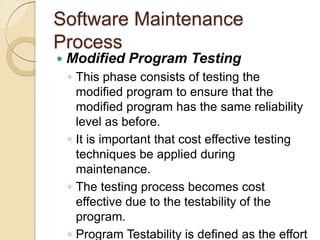
 Modified Program Testing
│ This phase consists of testing the
modified program to ensure that the
modified program has the same reliability
level as before.
│ It is important that cost effective testing
techniques be applied during
maintenance.
│ The testing process becomes cost
effective due to the testability of the
program.
│ Program Testability is defined as the effort
Software Maintenance
Process
 Maintainability
│ All of the factors of above four phases are
combined to form maintainability of the
program.
 How easy is it to maintain the program?
│ The answer to this question depends upon
how difficult the program is to understand.
│ Program maintainability and program
understandability are parallel concepts.
│ The more difficult a program is to understand,
the more difficult it is to maintain.
│ And the more difficult it is to maintain, the
1234567894814ABC
1234567894814ABC
12345678948A4BCD
12345678948A4BCD
1 12345363789AB55C3DE4AE3453F5B32934B243
2EB3A988BA2B55C3A97B2BB55363F6423
9363592D68B
13B4B532B524365
1 32EB3789AB55393B6F624363552B33
6F639836F2962B3B653293B8432E623
423562454B5357BA44B38BF48BB253983293
4B2434B8BAB53B2DBB3B7BA2B363
6A2F638B5F25
1234564578548695ABC7D
1 1238B9B53B88985C3DE4AE378BB2363592D68B3893
789FA439736AA9843293F5B838BF48BB25
1 1238B9B53B889832E623B63293592D68B364F8B
1 123B2B84B53DEB2EB832EB3552B3BB253
F54B55363F5B83BB5
1 123B5F8B532E6232EB3592D68B3453BB97B3
6AA9843293F5B838BF48BB25
1 1234789B532EB3F6423932EB3592D68B33
8B94364F379554B3B88985389342
E87B3BF64B2C9EA9E6B64B2C
1 B844A62493D9EFFE99F9E9F99
F99 EF9E9E F9
9F!99 9  F9
F #9
1 4F$F9F9EF%F9  !9
F9 EF9!9F9E9
%FE #
E87B3BF64B2C9EA9E6B64B2C
1 6462493EFFE99F9EF99F9
 9F9F%FF9 EF9FF9F9
EF$EFF9FF9!9F9FE#9
1 B844A6249D96EF9F9F%F9F9
592D68B384E2 34F9%FE!99FF99
F9!F
1 646249D96EF9F9F%F9F984E23
592D68B 34F9 FF99FFE9E99
F9!F99 F99 9FE  9
9678987727A932C9BC9A2345678
1 !898643B88985D9'EE FE9 9 F9
 F9F9F%F9F9EF9F
1 AB6838BF48BB25D94F9FE999F E9 9
F9FEF9EF$EFF9E9F9F%FFE9 EF9
 F99FE 9F9FE9EF$EFF99 9
F E9 FE
1 #92D68B3A97B42D94F9F(!99EEF9)9
 9F999EFF9E9F9F99
F99 %F9EE9F(FEFF99)9F%FF
1 $E6438BF48BB25D94F9FE9 !99
FE 9F9FF99 F#9
1 %4B378B55F8B5D95F9F F9 EF99
F9F9 F99FF99F9E9 F9
FEEE
1 !99839AFB2B3A9BD9A9999
  9 9!9 9F9 99 !9
EF9E9E!9FF9 !9F 99
FEEE
291298A4927972D76
291298A4927972D76
1 *9FF9 EF9F99FF9 9F!9
EF9+999 99#
1 49EE FE99 %9F9FE9
9EE #
1 4F9 99F9 F99 9
FFF9F9E999EFF9
9FF9FEEE9 9 !9 %F9FF9
FFF9!9F9 EF9F%FFE#
B8BC8A92391234567898A4BCD
1 ,FF9F9F(FF92D9
1 AF929D
1 AF94F9 F9E9A% 9 9
-F(FF9.D
1 4F9F9*F9EE 99F99
F(FF9FEE F
8A49F6A8
8A49F6A8
1 692B523A65B99 EF9FFFE99 9F9
99E9% E F9FE99 9
FFE99FFEF9FFE9 9  9
E9 EF9!F99E9EEF!9E9
#9
1 A9EFE99!9F9 9 9F9EF$EFF9
9 9  9 EF9F9FEF99F9123
451623278325623916563A8B3519C3B5DEFB552D9
2 %F9F9 F
2 F %F9F9 F
19E1
19E1
1 -94F
1 AFE 94F
1 1!F94F
1 6F F94F
CB498A4BCD
CB498A4BCD
1 -9F99 9F999F9% 9
99F9 EF9 EF9FF99 9
E9FE9 E99 9EE #
6%  F9D
1 949 9F9FF9 9E9 9F9F E!9
 F99 EF9F%FF#
1 49/F9F9E 99FF9FEF9
%99F(9F%F
C48D764B2C98A4BCD
C48D764B2C98A4BCD
4F99%  F9E99F9
EF9F99E9 9!F#94F9
EF99FE 9F999
FEF9 9 9F9F9F99
E99 E F99FE9
EF$EFF9F%F9 FE9FE #
3 090 94F
3 09-94F
3 49,94F
3 7FEF9F
!BD9!6CD98A4BCD
!BD9!6CD98A4BCD
289#9$
1A48
289#9%
289#9
289#9'
289#9(
289#9)
!BD9!6CD98A4BCD
!BD9!6CD98A4BCD
1 69!F99FE 999 EF9
F99 9  9 EF9
F9 9 9F99 9%FE 9
!F9 E999 E
!BD9!6CD98A4BCD
!BD9!6CD98A4BCD
6%  F9D9
1 . 9FFF9% E9F99
FF
, %  FD
1 A99F9 9 9F99FEEE99FFF9
999EEF9FF9FEEE9 9F9
EE 99%FE!9 EF#
!2442#*9C48D764B2C948A4BCD
1 019AFE 9F9D
A999FE 9 9F9 EF9
F9E9F9E9FE9F%F9
FE E!99FE9F%F9FE E!9A#F#9F9
FE9F%F9F99FF99 9E9
F9F9F(9F99FE9F%F9F9
EF9FF99F9EF%!9FF9FE9
F#
2*#25C9BC48D764B2C948A4BCD
1 A !9!9F9F99 9F9 9
E9F99FF#94F9 9F9
F9 F9!99 EF9F999 9
FF#949EF9F99 9F9
F99F9 EF9 EF9FE F9 9
FF#
1 4F9 9E9F99F9 9 9F9
E%FE9 99 EF9F99EF F9 9F9
FE9F99 EF9EF!9E F9
9F9 9E9F#
E7FC78864785F
E7FC78864785F
1 38BF99FF9EF9 F9!9F9
%FEF9FF99EE 9 F
1 '626B5
18EF9 9F9 F9 E99 9 EF9
E9EFE!
198EF9 9 9FEEE9 9 %F9EEF99F9
 EF9F99 9 EF9EEFF9 9 EF9
9 F99E#
1 (456626B53
1F99 %!
1FEF999F9F(F%F
1A4898A4BCD
1A4898A4BCD
1 #52B32B52499 EF9E9 E EF99 9F9
F99 9FF9FE F9!F99
F%  F9F9!F29 F999FF9
EF$EFF9
1 A9 EF9F9!F99F99 9
!F9EF$EFF99 9FE!9FF9
E !9 9EF !#
1 8 99
2 3  9 9%FE!9F9 9F9F 
2 8( 99F9E9FFE
2 8%  F9F(FE 9FE F99FE9  9 9
F9E9F9#
1A4898A4BCD
1A4898A4BCD
3 E999F9FEEF9 9 9 E9
9!F9F
1 7F%FE!9F
1 1FE!9F
1 1EF9F
1 'FEE F9F
+8F2,87948A4BCD
+8F2,87948A4BCD
1 A9EF9F9!F99 99FEF9 !9
9%FEF9 9F9 EF9EF%FE9E9
F(FF9E9F(FF9F%F999
9  #
9 F%F9F 99 EF9 EF9!F9E F9
 E EF9 EF99F#
1 1!F99F9 9FE #9A9 F9999
99FF99F9EEFF#
+8F2,87948A4BCD
+8F2,87948A4BCD
'626B5
19F9FFE9F9 9  99 %F9
EFE!9E9
19FEF9 9  99EF99 9FEF9
 
19FEF9EFE9EF%FE!9EFEF99F9
  F
A8F7B4948A4BCD
A8F7B4948A4BCD
1 49F99FEEF99FF9 9
EF%F9 EF9 9 9 !9F !9
F 99FE!9% 
1 4F9FFE9 !9F9EF99F9% 9
E!99FFE F9F9!F9F9  9
F9!F99 EF99EF 99
!9EF9F 999EF9
F9!F9 9EF9FEEE99F9!F
1  9FE!
1!F9FE!
1 '774A624935BAF842D9%FEF9 9F9FE9
 9 F9!9F9  9 99E9
9F9FE99!F9 9%F9
FE
1 #52B35BAF842D9%FEF9 9!9F9FE9
9 %F9FE99 F9F9!F9
EF9 F9#
A478AA948A4BCD
A478AA948A4BCD
1 A9F9F9)99 E 9 #
1 A99F99F%  F9 9!F9E9
F9 9E9F!9F9999
FF9EF$EFF#
-,6C46D8A9239A478AA948A4BCD
1 A9 F9F9F(FF9F %E99 9
!F9F99EF F9F9F(EFF9F%F99
9  !
1 A9F(FF9 9!F999 #949F F9
F9FFE99FFEF9F99FFF9F9
F(FF9FE 99 9F9 EF9
#
1 A9FFEF9F9 99 9 9 F9 9
!F99
873276CF8948A4BCD
873276CF8948A4BCD
1 49F99F99%FE!9F9 9 9
EFF9F9FF9!9F9EF$EFF#
4F9
1 57BBD99EFFE99F9  !99 9
!F99EF99FE9 9$!9 9
!
1 5A66442D9F9  !99 9!F99
 F9F9 9%F99
1 9526442D9  !99 9!F99EF%F9
F9E9 EF9 99 9F
-FF8*4BCD948A4BCD
1 A8889FF99 959E 9F99EFF99
FE9FF9EF$EFF9 9F9EFF9
F99FFEF9FFE9E99 9!F9
 F9F9 F F9EFE 9 99F F9F9
FE9FE9E9FE9 E/F9F!99
FFEF9FFE9E999 F9F9!F
1 1F9F9)99FF9E9 EF9FE99FE9
999F99FEE9 F F9F99
9F9FE#94FEFEF9E / 9F F99
)9F%FF9F9  9 9F 9F9 9 9
EF99FF9FEEE9!9 9 9F9
FE99FE99F9F9)
1 '7E63  9F1FE9F9FEEF99F9
F%FF9F%EF
1 49F9 FF9F9FEE F99 9)99
F9F%EF99999F%FF#
1 )B263F1FE9F9FEEF99F9FE9
F%EF9EE99FFE 9EFF F#
1 949F99FEEF99 !9FEFEFF9
E9F9F%FFE#90F 9F99FEEF99
9FFE9F9F%FF9)9 F9FE9
EF$EFF9 999F9F9
F%EF9E9
8A4BCD948FCB.8A
1 2F9F9)99F%FF999F9FF99 9
EFE9 FE9FEF9F9!F99F%FEF99F9
FE#
1 2F9F9FE 9E99 9)999F9
EF9FEEF99FEF9 9 9FE 9FE 9
9 9)9 EF9FEEF9 E99F #9
499EFFEEF99 9DE42B3932B524#
1 2F9F9FF99E99 9)9 9
FF9FF999F9 EF9EFEF99
FEF9 9F 999E9EFE!#949
99EFFEEF99 96A*3932B524
B489!2/948A4BCD
1 69 FD9.F E90(94F9C 90(9
4F9 91EE 94F
1 4F9* 6E96F%F99F1(9F99999FE 9
EE 9EEF9 9%FE9 9FE 9EE 9FEEE#
C5318B32562F3A89E656
3B8B1362BE92EB56
3B8B1362125526313B19C56
31BF8E63F638A3B8B1312C6
3B8B13F25B14348F9313121362BE92EB56
3B8B13F25B1435C1F8B63136212561
B489!2/948A4BCD
1 4F9 99D
19C E FF9 9 9FFF9 99 9F9
 %F9FF9F(FEF9 9F 9F#
198(FEF9 9 9F99FE9EF9 9 F9F#
198(FF9 99 9FE9 EF9 99FE9
FE  9#
198(FEF9FE 9  9EEF99 EF9FE9% !#9
198(FEF9 9  9FF9 9F9 #
B489!2/948A4BCD
3 E9F99 EF9 E99F9(9
F9 EF
1 .E9EEF9F
1 0 9 9F
1 * 9F
!6F09!2/948A4BCD
1 A99 99 9 9F#94F9
 !99FFEF9!9FE%9F9
)99F9EEF9)#
1 3 E9F9F99 9(9F9
EF9BF46BAB3A6553768242494C3
9F6836FB366545
1
Software Engineering (3rd ed.), By K.K Aggarwal  Yogesh Singh, Copyright © New Age International Publishers, 2007
2
Software Engineering (3rd ed.), By K.K Aggarwal  Yogesh Singh, Copyright © New Age International Publishers, 2007
123456789A72B8C49AD6EEFE
After the finalization of SRS, we would like to
estimate size, cost and development time of the
project. Also, in many cases, customer may like to
know the cost and development time even prior to
finalization of the SRS.
3
Software Engineering (3rd ed.), By K.K Aggarwal  Yogesh Singh, Copyright © New Age International Publishers, 2007
In order to conduct a successful software project, we
must understand:
1 Scope of work to be done
123456789A72B8C49AD6EEFE
1 The risk to be incurred
1 The resources required
1 The task to be accomplished
1 The cost to be expended
1 The schedule to be followed
4
Software Engineering (3rd ed.), By K.K Aggarwal  Yogesh Singh, Copyright © New Age International Publishers, 2007
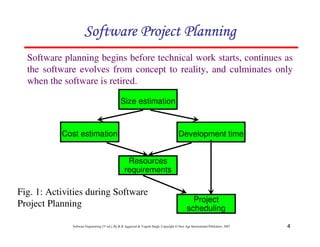
Software planning begins before technical work starts, continues as
the software evolves from concept to reality, and culminates only
when the software is retired.
123456789A72B8C49AD6EEFE
Size estimation
Cost estimation Development time
Resources
requirements
Project
scheduling
Fig. 1: Activities during Software
Project Planning
5
Software Engineering (3rd ed.), By K.K Aggarwal  Yogesh Singh, Copyright © New Age International Publishers, 2007
}
18.
return 0;
17.
}
16.
}
15.
x[j] = save;
14.
x[i] = x[j];
13.
Save = x[i];
12.
{
11.
if (x[i]  x[j])
10.
for (j=1; j=im; j++)
9.
im1=i-1;
8.
{
7.
for (i=2; i=n; i++)
6.
If (n2) return 1;
5.
/*This function sorts array x in ascending order */
4.
int i, j, save, im1;
3.
{
2.
int. sort (int x[ ], int n)
1.
If LOC is simply a count of
the number of lines then
figure shown below contains
18 LOC .
When comments and blank
lines are ignored, the
program in figure 2 shown
below contains 17 LOC.
Lines of Code (LOC)
Size Estimation
123456789A72B8C49AD6EEFE
Fig. 2: Function for sorting an array
6
Software Engineering (3rd ed.), By K.K Aggarwal  Yogesh Singh, Copyright © New Age International Publishers, 2007
0
500,000
1,000,000
1,500,000
2,000,000
2,500,000
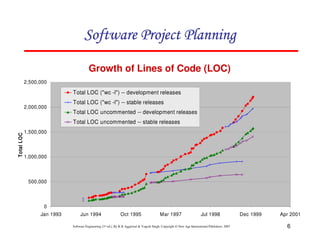
Jan 1993 Jun 1994 Oct 1995 Mar 1997 Jul 1998 Dec 1999 Apr 2001
Total
LOC
Total LOC (wc -l) -- development releases
Total LOC (wc -l) -- stable releases
Total LOC uncommented -- development releases
Total LOC uncommented -- stable releases
Growth of Lines of Code (LOC)
123456789A72B8C49AD6EEFE
7
Software Engineering (3rd ed.), By K.K Aggarwal  Yogesh Singh, Copyright © New Age International Publishers, 2007
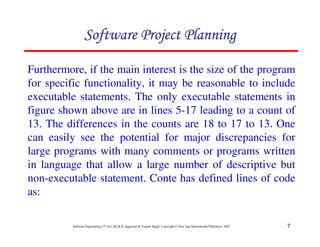
Furthermore, if the main interest is the size of the program
for specific functionality, it may be reasonable to include
executable statements. The only executable statements in
figure shown above are in lines 5-17 leading to a count of
13. The differences in the counts are 18 to 17 to 13. One
can easily see the potential for major discrepancies for
large programs with many comments or programs written
in language that allow a large number of descriptive but
non-executable statement. Conte has defined lines of code
as:
123456789A72B8C49AD6EEFE
8
Software Engineering (3rd ed.), By K.K Aggarwal  Yogesh Singh, Copyright © New Age International Publishers, 2007
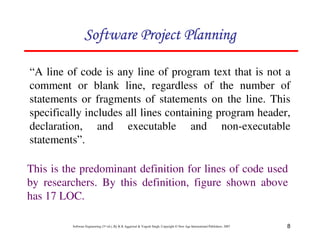
“A line of code is any line of program text that is not a
comment or blank line, regardless of the number of
statements or fragments of statements on the line. This
specifically includes all lines containing program header,
declaration, and executable and non-executable
statements”.
This is the predominant definition for lines of code used
by researchers. By this definition, figure shown above
has 17 LOC.
123456789A72B8C49AD6EEFE
9
Software Engineering (3rd ed.), By K.K Aggarwal  Yogesh Singh, Copyright © New Age International Publishers, 2007
Alan Albrecht while working for IBM, recognized the
problem in size measurement in the 1970s, and
developed a technique (which he called Function Point
Analysis), which appeared to be a solution to the size
measurement problem.
Function Count
123456789A72B8C49AD6EEFE
10
Software Engineering (3rd ed.), By K.K Aggarwal  Yogesh Singh, Copyright © New Age International Publishers, 2007
The principle of Albrecht’s function point analysis (FPA)
is that a system is decomposed into functional units.
1 Inputs : information entering the system
1 Outputs : information leaving the system
1 Enquiries : requests for instant access to
information
1 Internal logical files : information held within the
system
1 External interface files : information held by other system
that is used by the system being
analyzed.
123456789A72B8C49AD6EEFE
11
Software Engineering (3rd ed.), By K.K Aggarwal  Yogesh Singh, Copyright © New Age International Publishers, 2007
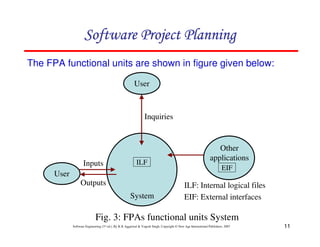
The FPA functional units are shown in figure given below:
ILF
EIF
User
User
Other
applications
System
Outputs
Inputs
Inquiries
ILF: Internal logical files
EIF: External interfaces
Fig. 3: FPAs functional units System
123456789A72B8C49AD6EEFE
12
Software Engineering (3rd ed.), By K.K Aggarwal  Yogesh Singh, Copyright © New Age International Publishers, 2007
The five functional units are divided in two categories:
(i) Data function types
1 Internal Logical Files (ILF): A user identifiable group of
logical related data or control information maintained
within the system.
123456789A72B8C49AD6EEFE
1 External Interface files (EIF): A user identifiable group of
logically related data or control information referenced by
the system, but maintained within another system. This
means that EIF counted for one system, may be an ILF in
another system.
13
Software Engineering (3rd ed.), By K.K Aggarwal  Yogesh Singh, Copyright © New Age International Publishers, 2007
(ii) Transactional function types
1 External Input (EI): An EI processes data or control information
that comes from outside the system. The EI is an elementary
process, which is the smallest unit of activity that is meaningful
to the end user in the business.
1 External Output (EO): An EO is an elementary process that
generate data or control information to be sent outside the
system.
1 External Inquiry (EQ): An EQ is an elementary process that is
made up to an input-output combination that results in data
retrieval.
123456789A72B8C49AD6EEFE
14
Software Engineering (3rd ed.), By K.K Aggarwal  Yogesh Singh, Copyright © New Age International Publishers, 2007
Special features
123456789A72B8C49AD6EEFE
2 Function point approach is independent of the language,
tools, or methodologies used for implementation; i.e. they
do not take into consideration programming languages,
data base management systems, processing hardware or
any other data base technology.
2 Function points can be estimated from requirement
specification or design specification, thus making it
possible to estimate development efforts in early phases of
development.
15
Software Engineering (3rd ed.), By K.K Aggarwal  Yogesh Singh, Copyright © New Age International Publishers, 2007
2 Function points are directly linked to the statement of
requirements; any change of requirements can easily
be followed by a re-estimate.
123456789A72B8C49AD6EEFE
2 Function points are based on the system user’s
external view of the system, non-technical users of
the software system have a better understanding of
what function points are measuring.
16
Software Engineering (3rd ed.), By K.K Aggarwal  Yogesh Singh, Copyright © New Age International Publishers, 2007
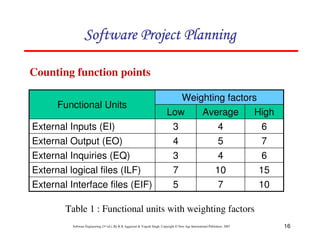
Counting function points
10
7
5
External Interface files (EIF)
15
10
7
External logical files (ILF)
6
4
3
External Inquiries (EQ)
7
5
4
External Output (EO)
6
4
3
External Inputs (EI)
High
Average
Low
Weighting factors
Functional Units
Table 1 : Functional units with weighting factors
123456789A72B8C49AD6EEFE
17
Software Engineering (3rd ed.), By K.K Aggarwal  Yogesh Singh, Copyright © New Age International Publishers, 2007
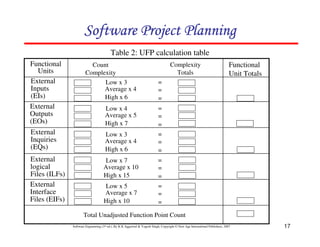
Table 2: UFP calculation table
Count
Complexity
Complexity
Totals
Low x 3
Average x 4
High x 6
=
=
=
=
=
=
=
=
=
=
=
=
=
=
=
Low x 4
Average x 5
High x 7
Low x 3
Average x 4
High x 6
Low x 7
Average x 10
High x 15
Low x 5
Average x 7
High x 10
Functional
Units
External
Inputs
(EIs)
External
Outputs
(EOs)
External
Inquiries
(EQs)
External
logical
Files (ILFs)
External
Interface
Files (EIFs)
Functional
Unit Totals
Total Unadjusted Function Point Count
123456789A72B8C49AD6EEFE
18
Software Engineering (3rd ed.), By K.K Aggarwal  Yogesh Singh, Copyright © New Age International Publishers, 2007
The weighting factors are identified for all
functional units and multiplied with the functional
units accordingly. The procedure for the
calculation of Unadjusted Function Point (UFP) is
given in table shown above.
123456789A72B8C49AD6EEFE
19
Software Engineering (3rd ed.), By K.K Aggarwal  Yogesh Singh, Copyright © New Age International Publishers, 2007
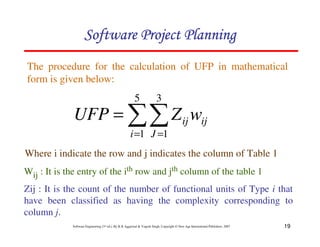
The procedure for the calculation of UFP in mathematical
form is given below:
Where i indicate the row and j indicates the column of Table 1
Wij : It is the entry of the ith row and jth column of the table 1
Zij : It is the count of the number of functional units of Type i that
have been classified as having the complexity corresponding to
column j.
11
= =
=
5
1
3
1
i J
ij
ij w
Z
UFP
123456789A72B8C49AD6EEFE
20
Software Engineering (3rd ed.), By K.K Aggarwal  Yogesh Singh, Copyright © New Age International Publishers, 2007
Organizations that use function point methods develop a criterion for
determining whether a particular entry is Low, Average or High.
Nonetheless, the determination of complexity is somewhat
subjective.
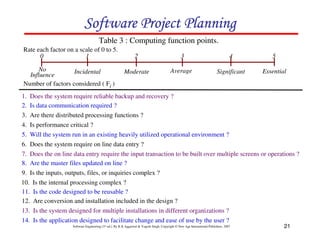
FP = UFP * CAF
Where CAF is complexity adjustment factor and is equal to [0.65 +
0.01 x 1Fi]. The Fi (i=1 to 14) are the degree of influence and are
based on responses to questions noted in table 3.
123456789A72B8C49AD6EEFE
21
Software Engineering (3rd ed.), By K.K Aggarwal  Yogesh Singh, Copyright © New Age International Publishers, 2007
Table 3 : Computing function points.
Rate each factor on a scale of 0 to 5.
2
0 3 5
4
1
Moderate
No
Influence
Average Essential
Significant
Incidental
Number of factors considered ( Fi )
1. Does the system require reliable backup and recovery ?
2. Is data communication required ?
3. Are there distributed processing functions ?
4. Is performance critical ?
5. Will the system run in an existing heavily utilized operational environment ?
6. Does the system require on line data entry ?
7. Does the on line data entry require the input transaction to be built over multiple screens or operations ?
8. Are the master files updated on line ?
9. Is the inputs, outputs, files, or inquiries complex ?
10. Is the internal processing complex ?
11. Is the code designed to be reusable ?
12. Are conversion and installation included in the design ?
13. Is the system designed for multiple installations in different organizations ?
14. Is the application designed to facilitate change and ease of use by the user ?
123456789A72B8C49AD6EEFE
22
Software Engineering (3rd ed.), By K.K Aggarwal  Yogesh Singh, Copyright © New Age International Publishers, 2007
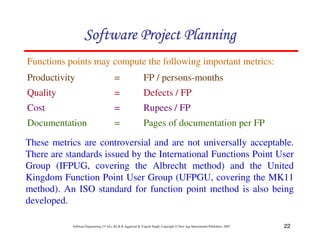
Functions points may compute the following important metrics:
Productivity = FP / persons-months
Quality = Defects / FP
Cost = Rupees / FP
Documentation = Pages of documentation per FP
These metrics are controversial and are not universally acceptable.
There are standards issued by the International Functions Point User
Group (IFPUG, covering the Albrecht method) and the United
Kingdom Function Point User Group (UFPGU, covering the MK11
method). An ISO standard for function point method is also being
developed.
123456789A72B8C49AD6EEFE
23
Software Engineering (3rd ed.), By K.K Aggarwal  Yogesh Singh, Copyright © New Age International Publishers, 2007
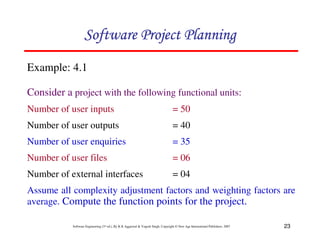
Example: 4.1
Consider a project with the following functional units:
Number of user inputs = 50
Number of user outputs = 40
Number of user enquiries = 35
Number of user files = 06
Number of external interfaces = 04
Assume all complexity adjustment factors and weighting factors are
average. Compute the function points for the project.
123456789A72B8C49AD6EEFE
24
Software Engineering (3rd ed.), By K.K Aggarwal  Yogesh Singh, Copyright © New Age International Publishers, 2007
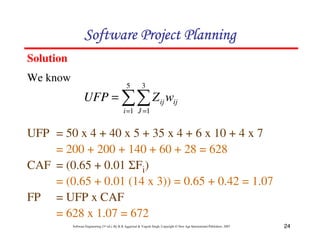
Solution
11
= =
=
5
1
3
1
i J
ij
ij w
Z
UFP
UFP = 50 x 4 + 40 x 5 + 35 x 4 + 6 x 10 + 4 x 7
= 200 + 200 + 140 + 60 + 28 = 628
CAF = (0.65 + 0.01 1Fi)
= (0.65 + 0.01 (14 x 3)) = 0.65 + 0.42 = 1.07
FP = UFP x CAF
= 628 x 1.07 = 672
123456789A72B8C49AD6EEFE
We know
25
Software Engineering (3rd ed.), By K.K Aggarwal  Yogesh Singh, Copyright © New Age International Publishers, 2007
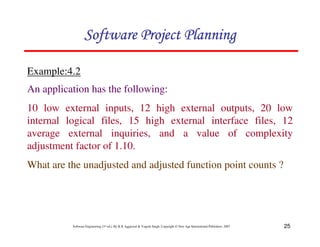
Example:4.2
123456789A72B8C49AD6EEFE
An application has the following:
10 low external inputs, 12 high external outputs, 20 low
internal logical files, 15 high external interface files, 12
average external inquiries, and a value of complexity
adjustment factor of 1.10.
What are the unadjusted and adjusted function point counts ?
26
Software Engineering (3rd ed.), By K.K Aggarwal  Yogesh Singh, Copyright © New Age International Publishers, 2007
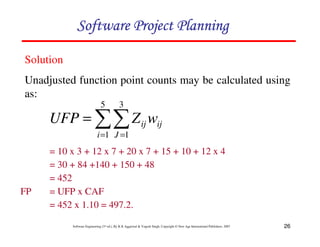
= 10 x 3 + 12 x 7 + 20 x 7 + 15 + 10 + 12 x 4
= 30 + 84 +140 + 150 + 48
= 452
FP = UFP x CAF
= 452 x 1.10 = 497.2.
11
= =
=
5
1
3
1
i J
ij
ij w
Z
UFP
Solution
Unadjusted function point counts may be calculated using
as:
123456789A72B8C49AD6EEFE
27
Software Engineering (3rd ed.), By K.K Aggarwal  Yogesh Singh, Copyright © New Age International Publishers, 2007
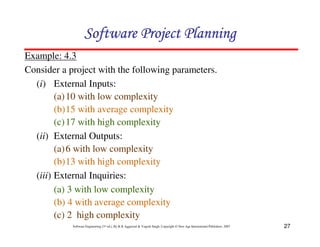
Example: 4.3
Consider a project with the following parameters.
(i) External Inputs:
(a)10 with low complexity
(b)15 with average complexity
(c)17 with high complexity
(ii) External Outputs:
(a)6 with low complexity
(b)13 with high complexity
(iii) External Inquiries:
(a) 3 with low complexity
(b) 4 with average complexity
(c) 2 high complexity
123456789A72B8C49AD6EEFE
28
Software Engineering (3rd ed.), By K.K Aggarwal  Yogesh Singh, Copyright © New Age International Publishers, 2007
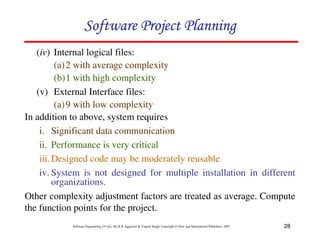
(iv) Internal logical files:
(a)2 with average complexity
(b)1 with high complexity
(v) External Interface files:
(a)9 with low complexity
In addition to above, system requires
i. Significant data communication
ii. Performance is very critical
iii.Designed code may be moderately reusable
iv. System is not designed for multiple installation in different
organizations.
Other complexity adjustment factors are treated as average. Compute
the function points for the project.
123456789A72B8C49AD6EEFE
29
Software Engineering (3rd ed.), By K.K Aggarwal  Yogesh Singh, Copyright © New Age International Publishers, 2007
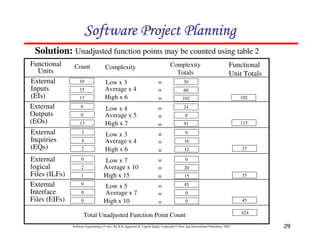
Solution: Unadjusted function points may be counted using table 2
Count Complexity
Totals
Low x 3
Average x 4
High x 6
=
=
=
=
=
=
=
=
=
=
=
=
=
=
=
Low x 4
Average x 5
High x 7
Low x 3
Average x 4
High x 6
Low x 7
Average x 10
High x 15
Low x 5
Average x 7
High x 10
Functional
Units
External
Inputs
(EIs)
External
Outputs
(EOs)
External
Inquiries
(EQs)
External
logical
Files (ILFs)
External
Interface
Files (EIFs)
Functional
Unit Totals
Total Unadjusted Function Point Count
10
Complexity
15
17
6
0
13
3
4
2
0
2
1
9
0
0
30
60
102
24
0
91
9
16
12
0
20
15
45
0
0
192
115
37
35
45
424
123456789A72B8C49AD6EEFE
30
Software Engineering (3rd ed.), By K.K Aggarwal  Yogesh Singh, Copyright © New Age International Publishers, 2007
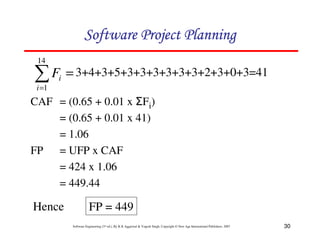
=
1
=
14
1
i
i
F 3+4+3+5+3+3+3+3+3+3+2+3+0+3=41
CAF = (0.65 + 0.01 x 1Fi)
= (0.65 + 0.01 x 41)
= 1.06
FP = UFP x CAF
= 424 x 1.06
= 449.44
Hence FP = 449
123456789A72B8C49AD6EEFE
31
Software Engineering (3rd ed.), By K.K Aggarwal  Yogesh Singh, Copyright © New Age International Publishers, 2007
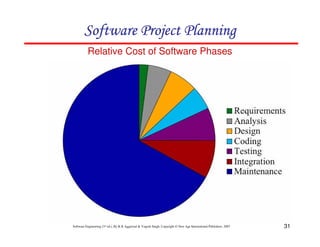
Relative Cost of Software Phases
123456789A72B8C49AD6EEFE
32
Software Engineering (3rd ed.), By K.K Aggarwal  Yogesh Singh, Copyright © New Age International Publishers, 2007
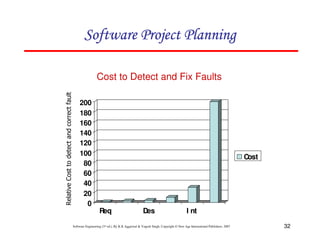
Cost to Detect and Fix Faults
0
20
40
60
80
100
120
140
160
180
200
Req Des I nt
Cost
1234567289AB585A8C252D584EC8DAFF2D584358
123456789A72B8C49AD6EEFE
33
Software Engineering (3rd ed.), By K.K Aggarwal  Yogesh Singh, Copyright © New Age International Publishers, 2007
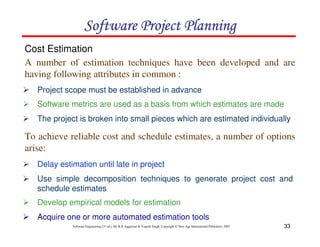
2 Project scope must be established in advance
Cost Estimation
2 Software metrics are used as a basis from which estimates are made
2 The project is broken into small pieces which are estimated individually
2 Delay estimation until late in project
2 Use simple decomposition techniques to generate project cost and
schedule estimates
2 Develop empirical models for estimation
2 Acquire one or more automated estimation tools
A number of estimation techniques have been developed and are
having following attributes in common :
To achieve reliable cost and schedule estimates, a number of options
arise:
123456789A72B8C49AD6EEFE
34
Software Engineering (3rd ed.), By K.K Aggarwal  Yogesh Singh, Copyright © New Age International Publishers, 2007
MODELS
Static, Single
Variable
Models
Static,
Multivariable
Models
123456789A72B8C49AD6EEFE
35
Software Engineering (3rd ed.), By K.K Aggarwal  Yogesh Singh, Copyright © New Age International Publishers, 2007
123456789A72B8C49AD6EEFE
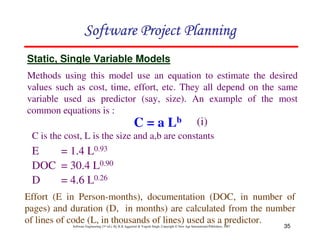
C = a Lb
E = 1.4 L0.93
DOC = 30.4 L0.90
D = 4.6 L0.26
Static, Single Variable Models
Effort (E in Person-months), documentation (DOC, in number of
pages) and duration (D, in months) are calculated from the number
of lines of code (L, in thousands of lines) used as a predictor.
Methods using this model use an equation to estimate the desired
values such as cost, time, effort, etc. They all depend on the same
variable used as predictor (say, size). An example of the most
common equations is :
(i)
C is the cost, L is the size and a,b are constants
36
Software Engineering (3rd ed.), By K.K Aggarwal  Yogesh Singh, Copyright © New Age International Publishers, 2007
123456789A72B8C49AD6EEFE
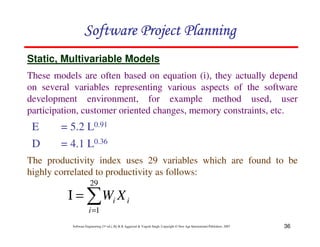
E = 5.2 L0.91
D = 4.1 L0.36
Static, Multivariable Models
The productivity index uses 29 variables which are found to be
highly correlated to productivity as follows:
These models are often based on equation (i), they actually depend
on several variables representing various aspects of the software
development environment, for example method used, user
participation, customer oriented changes, memory constraints, etc.
1
=
=
Ι
29
1
i
i
i X
W
37
Software Engineering (3rd ed.), By K.K Aggarwal  Yogesh Singh, Copyright © New Age International Publishers, 2007
Example: 4.4
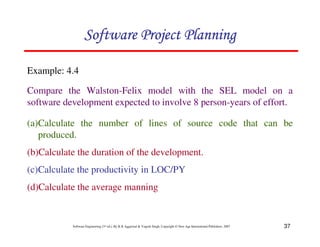
Compare the Walston-Felix model with the SEL model on a
software development expected to involve 8 person-years of effort.
123456789A72B8C49AD6EEFE
(a)Calculate the number of lines of source code that can be
produced.
(b)Calculate the duration of the development.
(c)Calculate the productivity in LOC/PY
(d)Calculate the average manning
38
Software Engineering (3rd ed.), By K.K Aggarwal  Yogesh Singh, Copyright © New Age International Publishers, 2007
Solution
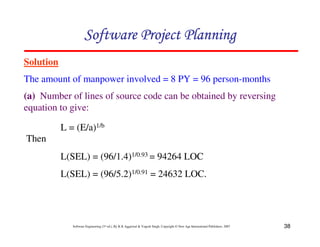
The amount of manpower involved = 8 PY = 96 person-months
(a) Number of lines of source code can be obtained by reversing
equation to give:
L = (E/a)1/b
123456789A72B8C49AD6EEFE
L(SEL) = (96/1.4)1/0.93 = 94264 LOC
L(SEL) = (96/5.2)1/0.91 = 24632 LOC.
Then
39
Software Engineering (3rd ed.), By K.K Aggarwal  Yogesh Singh, Copyright © New Age International Publishers, 2007
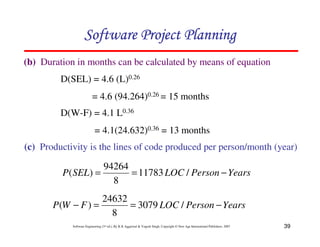
(b) Duration in months can be calculated by means of equation
123456789A72B8C49AD6EEFE
D(W-F) = 4.1 L0.36
= 4.1(24.632)0.36 = 13 months
D(SEL) = 4.6 (L)0.26
= 4.6 (94.264)0.26 = 15 months
(c) Productivity is the lines of code produced per person/month (year)
Years
Person
LOC
SEL
P −
=
= /
11783
8
94264
)
(
Years
Person
LOC
F
W
P −
=
=
− /
3079
8
24632
)
(
40
Software Engineering (3rd ed.), By K.K Aggarwal  Yogesh Singh, Copyright © New Age International Publishers, 2007
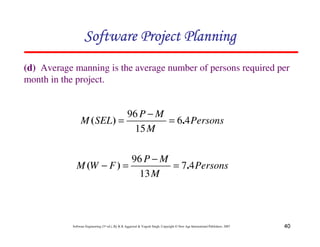
(d) Average manning is the average number of persons required per
month in the project.
123456789A72B8C49AD6EEFE
Persons
M
M
P
SEL
M 4
6
15
96
.
)
( =
−
=
Persons
M
M
P
F
W
M 4
7
13
96
.
)
( =
−
=
−
41
Software Engineering (3rd ed.), By K.K Aggarwal  Yogesh Singh, Copyright © New Age International Publishers, 2007
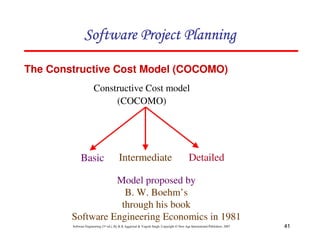
Constructive Cost model
(COCOMO)
Basic Intermediate Detailed
Model proposed by
B. W. Boehm’s
through his book
Software Engineering Economics in 1981
123456789A72B8C49AD6EEFE
The Constructive Cost Model (COCOMO)
42
Software Engineering (3rd ed.), By K.K Aggarwal  Yogesh Singh, Copyright © New Age International Publishers, 2007
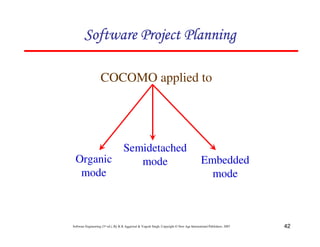
COCOMO applied to
Semidetached
mode Embedded
mode
Organic
mode
123456789A72B8C49AD6EEFE
43
Software Engineering (3rd ed.), By K.K Aggarwal  Yogesh Singh, Copyright © New Age International Publishers, 2007
Deadline of
the project
Innovation Development
Environment
Nature of Project
Project size
Mode
Small size project, experienced
developers in the familiar
environment. For example, pay
roll, inventory projects etc.
Medium size project, Medium
size team, Average previous
experience on similar project.
For example: Utility systems
like compilers, database
systems, editors etc.
Organic
Semi
detached
Embedded
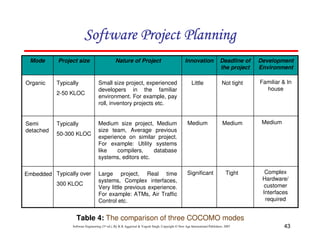
Table 4: The comparison of three COCOMO modes
Typically
2-50 KLOC
Typically
50-300 KLOC
Typically over
300 KLOC
Little Not tight Familiar  In
house
Medium Medium Medium
Significant Tight Complex
Hardware/
customer
Interfaces
required
Large project, Real time
systems, Complex interfaces,
Very little previous experience.
For example: ATMs, Air Traffic
Control etc.
123456789A72B8C49AD6EEFE
44
Software Engineering (3rd ed.), By K.K Aggarwal  Yogesh Singh, Copyright © New Age International Publishers, 2007
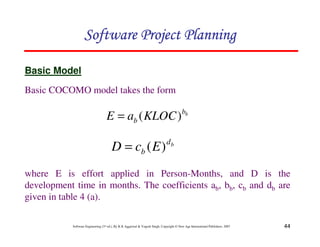
Basic COCOMO model takes the form
Basic Model
b
b
b KLOC
a
E )
(
=
b
d
b E
c
D )
(
=
where E is effort applied in Person-Months, and D is the
development time in months. The coefficients ab, bb, cb and db are
given in table 4 (a).
123456789A72B8C49AD6EEFE
45
Software Engineering (3rd ed.), By K.K Aggarwal  Yogesh Singh, Copyright © New Age International Publishers, 2007
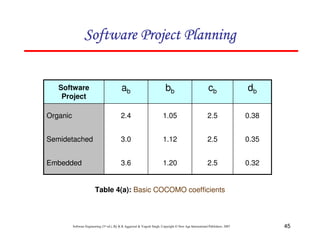
0.32
2.5
1.20
3.6
Embedded
0.35
2.5
1.12
3.0
Semidetached
0.38
2.5
1.05
2.4
Organic
db
cb
bb
ab
Software
Project
Table 4(a): Basic COCOMO coefficients
123456789A72B8C49AD6EEFE
46
Software Engineering (3rd ed.), By K.K Aggarwal  Yogesh Singh, Copyright © New Age International Publishers, 2007
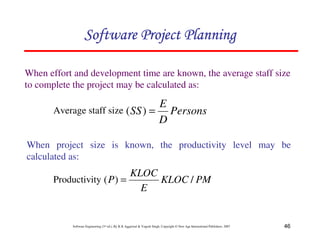
When effort and development time are known, the average staff size
to complete the project may be calculated as:
Persons
D
E
SS =
)
(
123456789A72B8C49AD6EEFE
Average staff size
When project size is known, the productivity level may be
calculated as:
PM
KLOC
E
KLOC
P /
)
( =
Productivity
47
Software Engineering (3rd ed.), By K.K Aggarwal  Yogesh Singh, Copyright © New Age International Publishers, 2007
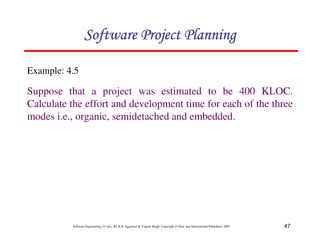
Example: 4.5
Suppose that a project was estimated to be 400 KLOC.
Calculate the effort and development time for each of the three
modes i.e., organic, semidetached and embedded.
123456789A72B8C49AD6EEFE
48
Software Engineering (3rd ed.), By K.K Aggarwal  Yogesh Singh, Copyright © New Age International Publishers, 2007
Solution
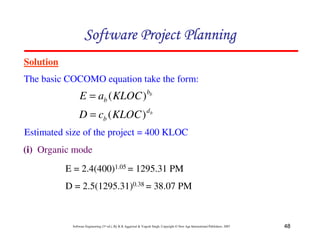
The basic COCOMO equation take the form:
123456789A72B8C49AD6EEFE
b
b
b KLOC
a
E )
(
=
b
d
b KLOC
c
D )
(
=
Estimated size of the project = 400 KLOC
(i) Organic mode
E = 2.4(400)1.05 = 1295.31 PM
D = 2.5(1295.31)0.38 = 38.07 PM
49
Software Engineering (3rd ed.), By K.K Aggarwal  Yogesh Singh, Copyright © New Age International Publishers, 2007
123456789A72B8C49AD6EEFE
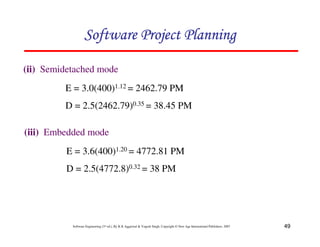
(ii) Semidetached mode
E = 3.0(400)1.12 = 2462.79 PM
D = 2.5(2462.79)0.35 = 38.45 PM
(iii) Embedded mode
E = 3.6(400)1.20 = 4772.81 PM
D = 2.5(4772.8)0.32 = 38 PM
50
Software Engineering (3rd ed.), By K.K Aggarwal  Yogesh Singh, Copyright © New Age International Publishers, 2007
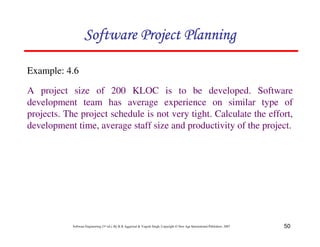
Example: 4.6
A project size of 200 KLOC is to be developed. Software
development team has average experience on similar type of
projects. The project schedule is not very tight. Calculate the effort,
development time, average staff size and productivity of the project.
123456789A72B8C49AD6EEFE
51
Software Engineering (3rd ed.), By K.K Aggarwal  Yogesh Singh, Copyright © New Age International Publishers, 2007
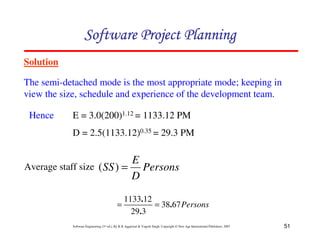
Solution
The semi-detached mode is the most appropriate mode; keeping in
view the size, schedule and experience of the development team.
123456789A72B8C49AD6EEFE
Average staff size
E = 3.0(200)1.12 = 1133.12 PM
D = 2.5(1133.12)0.35 = 29.3 PM
Hence
Persons
D
E
SS =
)
(
Persons
67
38
3
29
12
1133
.
.
.
=
=
52
Software Engineering (3rd ed.), By K.K Aggarwal  Yogesh Singh, Copyright © New Age International Publishers, 2007
123456789A72B8C49AD6EEFE
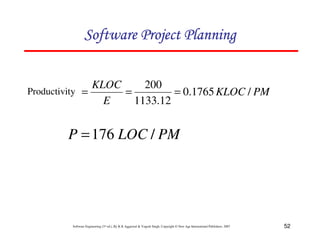
Productivity PM
KLOC
E
KLOC
/
1765
.
0
12
.
1133
200
=
=
=
PM
LOC
P /
176
=
53
Software Engineering (3rd ed.), By K.K Aggarwal  Yogesh Singh, Copyright © New Age International Publishers, 2007
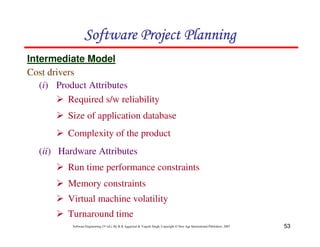
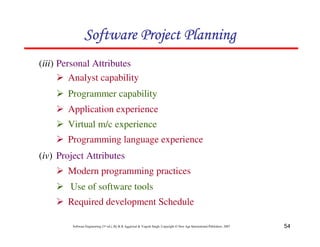
Cost drivers
Intermediate Model
123456789A72B8C49AD6EEFE
(i) Product Attributes
2 Required s/w reliability
2 Size of application database
2 Complexity of the product
(ii) Hardware Attributes
2 Run time performance constraints
2 Memory constraints
2 Virtual machine volatility
2 Turnaround time
54
Software Engineering (3rd ed.), By K.K Aggarwal  Yogesh Singh, Copyright © New Age International Publishers, 2007
123456789A72B8C49AD6EEFE
(iii) Personal Attributes
2 Analyst capability
2 Programmer capability
2 Application experience
2 Virtual m/c experience
2 Programming language experience
(iv) Project Attributes
2 Modern programming practices
2 Use of software tools
2 Required development Schedule
55
Software Engineering (3rd ed.), By K.K Aggarwal  Yogesh Singh, Copyright © New Age International Publishers, 2007
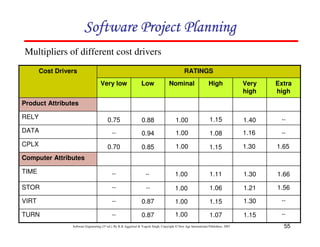
123456789A72B8C49AD6EEFE
TURN
VIRT
STOR
TIME
Computer Attributes
CPLX
DATA
RELY
Product Attributes
Extra
high
Very
high
High
Nominal
Low
Very low
Cost Drivers RATINGS
Multipliers of different cost drivers
1.65
1.30
1.15
1.00
0.85
0.70
--
1.16
1.08
1.00
0.94
--
--
1.40
1.15
1.00
0.88
0.75
--
1.15
1.07
1.00
0.87
--
--
1.30
1.15
1.00
0.87
--
1.56
1.21
1.06
1.00
--
--
1.66
1.30
1.11
1.00
--
--
56
Software Engineering (3rd ed.), By K.K Aggarwal  Yogesh Singh, Copyright © New Age International Publishers, 2007
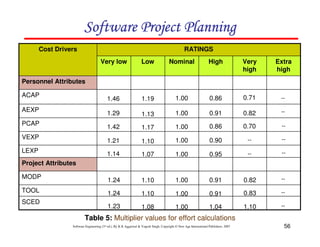
123456789A72B8C49AD6EEFE
SCED
TOOL
MODP
Project Attributes
LEXP
VEXP
PCAP
AEXP
ACAP
Personnel Attributes
Extra
high
Very
high
High
Nominal
Low
Very low
Cost Drivers RATINGS
--
--
0.95
1.00
1.07
1.14
--
0.90
1.00
1.10
1.21
0.70
0.86
1.00
1.17
1.42
0.82
0.91
1.00
1.13
1.29 --
0.71
0.86
1.00
1.19
1.46
1.10
1.04
1.00
1.08
1.23
0.83
0.91
1.00
1.10
1.24
0.82
0.91
1.00
1.10
1.24
Table 5: Multiplier values for effort calculations
--
--
--
--
--
--
57
Software Engineering (3rd ed.), By K.K Aggarwal  Yogesh Singh, Copyright © New Age International Publishers, 2007
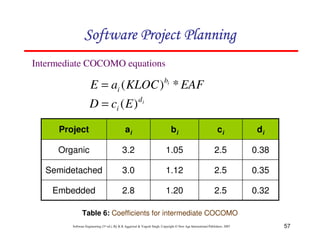
Intermediate COCOMO equations
0.32
2.5
1.20
2.8
Embedded
0.35
2.5
1.12
3.0
Semidetached
0.38
2.5
1.05
3.2
Organic
di
ci
bi
ai
Project
123456789A72B8C49AD6EEFE
Table 6: Coefficients for intermediate COCOMO
EAF
KLOC
a
E i
b
i *
)
(
=
i
d
i E
c
D )
(
=
58
Software Engineering (3rd ed.), By K.K Aggarwal  Yogesh Singh, Copyright © New Age International Publishers, 2007
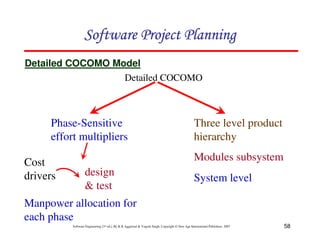
Detailed COCOMO
Phase-Sensitive
effort multipliers
Three level product
hierarchy
Modules subsystem
System level
Cost
drivers design
 test
Manpower allocation for
each phase
Detailed COCOMO Model
123456789A72B8C49AD6EEFE
59
Software Engineering (3rd ed.), By K.K Aggarwal  Yogesh Singh, Copyright © New Age International Publishers, 2007
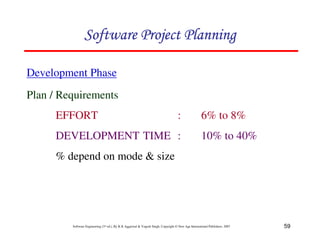
Development Phase
123456789A72B8C49AD6EEFE
Plan / Requirements
EFFORT : 6% to 8%
DEVELOPMENT TIME : 10% to 40%
% depend on mode  size
60
Software Engineering (3rd ed.), By K.K Aggarwal  Yogesh Singh, Copyright © New Age International Publishers, 2007
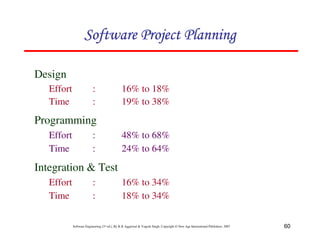
Design
Effort : 16% to 18%
Time : 19% to 38%
Programming
Effort : 48% to 68%
Time : 24% to 64%
Integration  Test
Effort : 16% to 34%
Time : 18% to 34%
123456789A72B8C49AD6EEFE
61
Software Engineering (3rd ed.), By K.K Aggarwal  Yogesh Singh, Copyright © New Age International Publishers, 2007
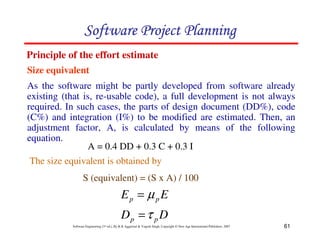
Size equivalent
Principle of the effort estimate
D
D
E
E
p
p
p
p
τ
µ
=
=
123456789A72B8C49AD6EEFE
As the software might be partly developed from software already
existing (that is, re-usable code), a full development is not always
required. In such cases, the parts of design document (DD%), code
(C%) and integration (I%) to be modified are estimated. Then, an
adjustment factor, A, is calculated by means of the following
equation.
A = 0.4 DD + 0.3 C + 0.3 I
The size equivalent is obtained by
S (equivalent) = (S x A) / 100
62
Software Engineering (3rd ed.), By K.K Aggarwal  Yogesh Singh, Copyright © New Age International Publishers, 2007
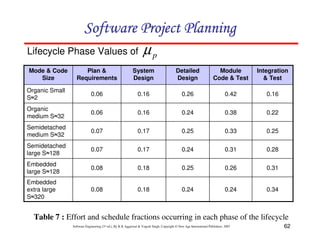
Lifecycle Phase Values of
0.34
0.24
0.24
0.18
0.08
Embedded
extra large
S2320
0.31
0.26
0.25
0.18
0.08
Embedded
large S2128
0.28
0.31
0.24
0.17
0.07
Semidetached
large S2128
0.25
0.33
0.25
0.17
0.07
Semidetached
medium S232
0.22
0.38
0.24
0.16
0.06
Organic
medium S232
0.16
0.42
0.26
0.16
0.06
Organic Small
S22
Integration
 Test
Module
Code  Test
Detailed
Design
System
Design
Plan 
Requirements
Mode  Code
Size
p
µ
Table 7 : Effort and schedule fractions occurring in each phase of the lifecycle
123456789A72B8C49AD6EEFE
63
Software Engineering (3rd ed.), By K.K Aggarwal  Yogesh Singh, Copyright © New Age International Publishers, 2007
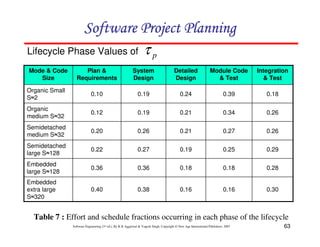
Lifecycle Phase Values of
0.30
0.16
0.16
0.38
0.40
Embedded
extra large
S2320
0.28
0.18
0.18
0.36
0.36
Embedded
large S2128
0.29
0.25
0.19
0.27
0.22
Semidetached
large S2128
0.26
0.27
0.21
0.26
0.20
Semidetached
medium S232
0.26
0.34
0.21
0.19
0.12
Organic
medium S232
0.18
0.39
0.24
0.19
0.10
Organic Small
S22
Integration
 Test
Module Code
 Test
Detailed
Design
System
Design
Plan 
Requirements
Mode  Code
Size
p
τ
Table 7 : Effort and schedule fractions occurring in each phase of the lifecycle
123456789A72B8C49AD6EEFE
64
Software Engineering (3rd ed.), By K.K Aggarwal  Yogesh Singh, Copyright © New Age International Publishers, 2007
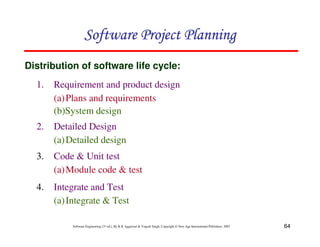
1. Requirement and product design
(a)Plans and requirements
(b)System design
Distribution of software life cycle:
123456789A72B8C49AD6EEFE
2. Detailed Design
(a)Detailed design
3. Code  Unit test
(a)Module code  test
4. Integrate and Test
(a)Integrate  Test
65
Software Engineering (3rd ed.), By K.K Aggarwal  Yogesh Singh, Copyright © New Age International Publishers, 2007
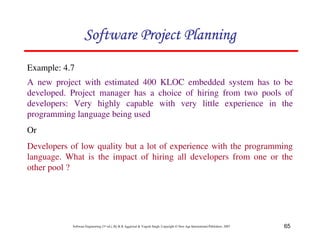
Example: 4.7
A new project with estimated 400 KLOC embedded system has to be
developed. Project manager has a choice of hiring from two pools of
developers: Very highly capable with very little experience in the
programming language being used
Or
Developers of low quality but a lot of experience with the programming
language. What is the impact of hiring all developers from one or the
other pool ?
123456789A72B8C49AD6EEFE
66
Software Engineering (3rd ed.), By K.K Aggarwal  Yogesh Singh, Copyright © New Age International Publishers, 2007
Solution
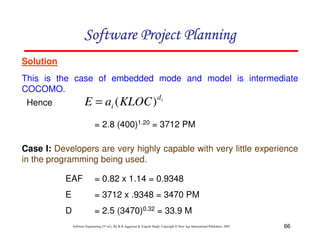
This is the case of embedded mode and model is intermediate
COCOMO.
Case I: Developers are very highly capable with very little experience
in the programming being used.
= 2.8 (400)1.20 = 3712 PM
EAF = 0.82 x 1.14 = 0.9348
E = 3712 x .9348 = 3470 PM
D = 2.5 (3470)0.32 = 33.9 M
123456789A72B8C49AD6EEFE
Hence i
d
i KLOC
a
E )
(
=
67
Software Engineering (3rd ed.), By K.K Aggarwal  Yogesh Singh, Copyright © New Age International Publishers, 2007
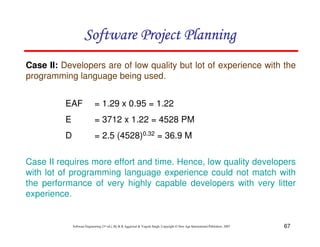
Case II: Developers are of low quality but lot of experience with the
programming language being used.
EAF = 1.29 x 0.95 = 1.22
E = 3712 x 1.22 = 4528 PM
D = 2.5 (4528)0.32 = 36.9 M
Case II requires more effort and time. Hence, low quality developers
with lot of programming language experience could not match with
the performance of very highly capable developers with very litter
experience.
123456789A72B8C49AD6EEFE
68
Software Engineering (3rd ed.), By K.K Aggarwal  Yogesh Singh, Copyright © New Age International Publishers, 2007
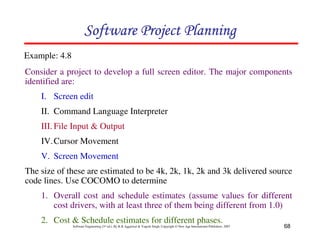
Consider a project to develop a full screen editor. The major components
identified are:
I. Screen edit
II. Command Language Interpreter
III. File Input  Output
IV.Cursor Movement
V. Screen Movement
The size of these are estimated to be 4k, 2k, 1k, 2k and 3k delivered source
code lines. Use COCOMO to determine
1. Overall cost and schedule estimates (assume values for different
cost drivers, with at least three of them being different from 1.0)
2. Cost  Schedule estimates for different phases.
Example: 4.8
123456789A72B8C49AD6EEFE
69
Software Engineering (3rd ed.), By K.K Aggarwal  Yogesh Singh, Copyright © New Age International Publishers, 2007
Solution
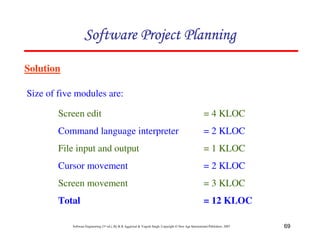
Size of five modules are:
123456789A72B8C49AD6EEFE
Screen edit = 4 KLOC
Command language interpreter = 2 KLOC
File input and output = 1 KLOC
Cursor movement = 2 KLOC
Screen movement = 3 KLOC
Total = 12 KLOC
70
Software Engineering (3rd ed.), By K.K Aggarwal  Yogesh Singh, Copyright © New Age International Publishers, 2007
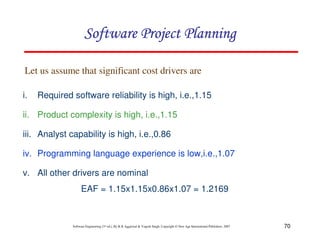
i. Required software reliability is high, i.e.,1.15
ii. Product complexity is high, i.e.,1.15
iii. Analyst capability is high, i.e.,0.86
iv. Programming language experience is low,i.e.,1.07
v. All other drivers are nominal
EAF = 1.15x1.15x0.86x1.07 = 1.2169
Let us assume that significant cost drivers are
123456789A72B8C49AD6EEFE
71
Software Engineering (3rd ed.), By K.K Aggarwal  Yogesh Singh, Copyright © New Age International Publishers, 2007
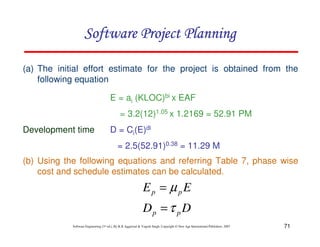
(a) The initial effort estimate for the project is obtained from the
following equation
E = ai (KLOC)bi x EAF
= 3.2(12)1.05 x 1.2169 = 52.91 PM
Development time D = Ci(E)di
= 2.5(52.91)0.38 = 11.29 M
123456789A72B8C49AD6EEFE
(b) Using the following equations and referring Table 7, phase wise
cost and schedule estimates can be calculated.
D
D
E
E
p
p
p
p
τ
µ
=
=
72
Software Engineering (3rd ed.), By K.K Aggarwal  Yogesh Singh, Copyright © New Age International Publishers, 2007
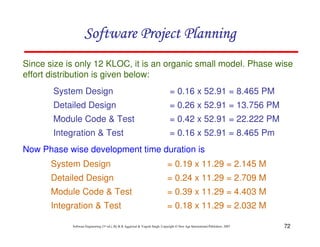
Since size is only 12 KLOC, it is an organic small model. Phase wise
effort distribution is given below:
System Design = 0.16 x 52.91 = 8.465 PM
Detailed Design = 0.26 x 52.91 = 13.756 PM
Module Code  Test = 0.42 x 52.91 = 22.222 PM
Integration  Test = 0.16 x 52.91 = 8.465 Pm
123456789A72B8C49AD6EEFE
Now Phase wise development time duration is
System Design = 0.19 x 11.29 = 2.145 M
Detailed Design = 0.24 x 11.29 = 2.709 M
Module Code  Test = 0.39 x 11.29 = 4.403 M
Integration  Test = 0.18 x 11.29 = 2.032 M
73
Software Engineering (3rd ed.), By K.K Aggarwal  Yogesh Singh, Copyright © New Age International Publishers, 2007
COCOMO-II
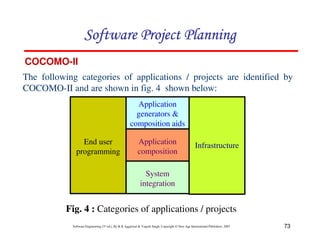
The following categories of applications / projects are identified by
COCOMO-II and are shown in fig. 4 shown below:
End user
programming
Infrastructure
Application
generators 
composition aids
Application
composition
System
integration
123456789A72B8C49AD6EEFE
Fig. 4 : Categories of applications / projects
74
Software Engineering (3rd ed.), By K.K Aggarwal  Yogesh Singh, Copyright © New Age International Publishers, 2007
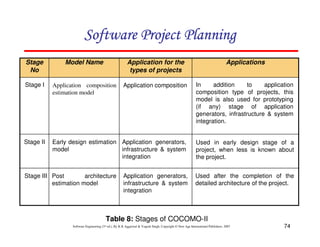
Table 8: Stages of COCOMO-II
Applications
Application for the
types of projects
Model Name
Stage
No
Stage I
Stage II
Stage III
Application composition
estimation model
Early design estimation
model
Post architecture
estimation model
Application composition
Application generators,
infrastructure  system
integration
Application generators,
infrastructure  system
integration
In addition to application
composition type of projects, this
model is also used for prototyping
(if any) stage of application
generators, infrastructure  system
integration.
Used in early design stage of a
project, when less is known about
the project.
Used after the completion of the
detailed architecture of the project.
123456789A72B8C49AD6EEFE
75
Software Engineering (3rd ed.), By K.K Aggarwal  Yogesh Singh, Copyright © New Age International Publishers, 2007
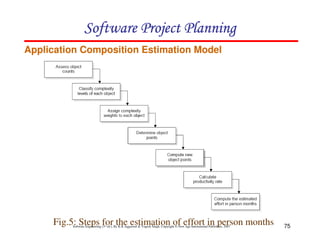
Application Composition Estimation Model
Fig.5: Steps for the estimation of effort in person months
123456789A72B8C49AD6EEFE
76
Software Engineering (3rd ed.), By K.K Aggarwal  Yogesh Singh, Copyright © New Age International Publishers, 2007
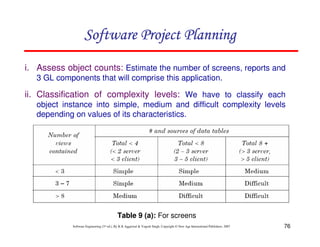
i. Assess object counts: Estimate the number of screens, reports and
3 GL components that will comprise this application.
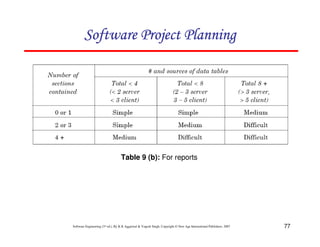
ii. Classification of complexity levels: We have to classify each
object instance into simple, medium and difficult complexity levels
depending on values of its characteristics.
Table 9 (a): For screens
123456789A72B8C49AD6EEFE
77
Software Engineering (3rd ed.), By K.K Aggarwal  Yogesh Singh, Copyright © New Age International Publishers, 2007
Table 9 (b): For reports
123456789A72B8C49AD6EEFE
78
Software Engineering (3rd ed.), By K.K Aggarwal  Yogesh Singh, Copyright © New Age International Publishers, 2007
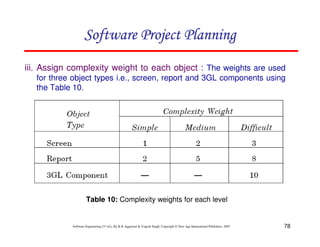
iii. Assign complexity weight to each object : The weights are used
for three object types i.e., screen, report and 3GL components using
the Table 10.
Table 10: Complexity weights for each level
123456789A72B8C49AD6EEFE
79
Software Engineering (3rd ed.), By K.K Aggarwal  Yogesh Singh, Copyright © New Age International Publishers, 2007
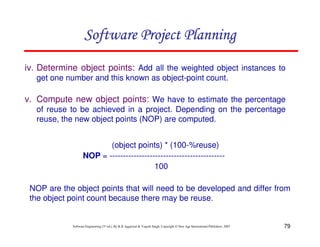
iv. Determine object points: Add all the weighted object instances to
get one number and this known as object-point count.
v. Compute new object points: We have to estimate the percentage
of reuse to be achieved in a project. Depending on the percentage
reuse, the new object points (NOP) are computed.
(object points) * (100-%reuse)
NOP = -------------------------------------------
100
NOP are the object points that will need to be developed and differ from
the object point count because there may be reuse.
123456789A72B8C49AD6EEFE
80
Software Engineering (3rd ed.), By K.K Aggarwal  Yogesh Singh, Copyright © New Age International Publishers, 2007
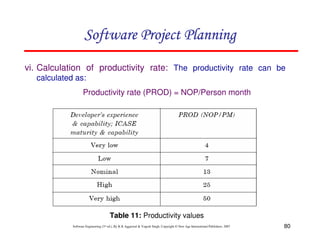
vi. Calculation of productivity rate: The productivity rate can be
calculated as:
Productivity rate (PROD) = NOP/Person month
Table 11: Productivity values
123456789A72B8C49AD6EEFE
81
Software Engineering (3rd ed.), By K.K Aggarwal  Yogesh Singh, Copyright © New Age International Publishers, 2007
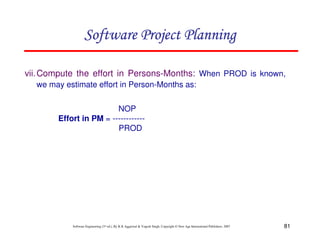
vii.Compute the effort in Persons-Months: When PROD is known,
we may estimate effort in Person-Months as:
NOP
Effort in PM = ------------
PROD
123456789A72B8C49AD6EEFE
82
Software Engineering (3rd ed.), By K.K Aggarwal  Yogesh Singh, Copyright © New Age International Publishers, 2007
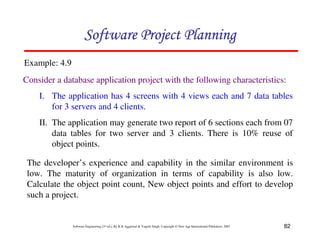
Consider a database application project with the following characteristics:
I. The application has 4 screens with 4 views each and 7 data tables
for 3 servers and 4 clients.
II. The application may generate two report of 6 sections each from 07
data tables for two server and 3 clients. There is 10% reuse of
object points.
Example: 4.9
123456789A72B8C49AD6EEFE
The developer’s experience and capability in the similar environment is
low. The maturity of organization in terms of capability is also low.
Calculate the object point count, New object points and effort to develop
such a project.
83
Software Engineering (3rd ed.), By K.K Aggarwal  Yogesh Singh, Copyright © New Age International Publishers, 2007
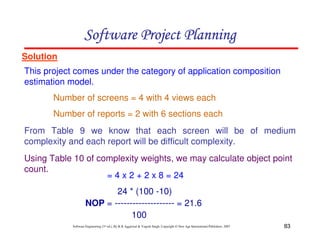
Solution
This project comes under the category of application composition
estimation model.
24 * (100 -10)
NOP = -------------------- = 21.6
100
123456789A72B8C49AD6EEFE
Number of screens = 4 with 4 views each
Number of reports = 2 with 6 sections each
From Table 9 we know that each screen will be of medium
complexity and each report will be difficult complexity.
Using Table 10 of complexity weights, we may calculate object point
count.
= 4 x 2 + 2 x 8 = 24
84
Software Engineering (3rd ed.), By K.K Aggarwal  Yogesh Singh, Copyright © New Age International Publishers, 2007
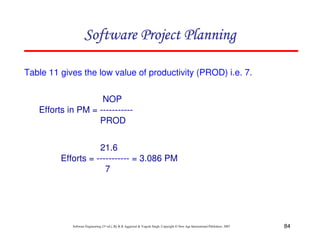
Table 11 gives the low value of productivity (PROD) i.e. 7.
NOP
Efforts in PM = -----------
PROD
21.6
Efforts = ----------- = 3.086 PM
7
123456789A72B8C49AD6EEFE
85
Software Engineering (3rd ed.), By K.K Aggarwal  Yogesh Singh, Copyright © New Age International Publishers, 2007
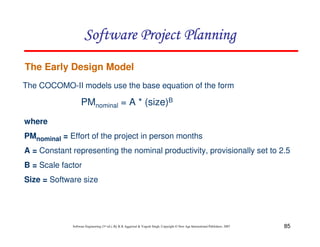
The Early Design Model
The COCOMO-II models use the base equation of the form
PMnominal = A * (size)B
where
PMnominal = Effort of the project in person months
A = Constant representing the nominal productivity, provisionally set to 2.5
B = Scale factor
Size = Software size
123456789A72B8C49AD6EEFE
86
Software Engineering (3rd ed.), By K.K Aggarwal  Yogesh Singh, Copyright © New Age International Publishers, 2007
Cont…
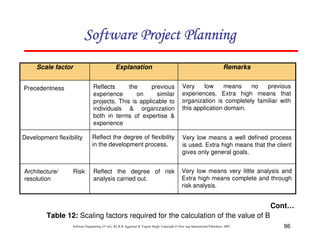
Remarks
Explanation
Scale factor
Precedentness
Development flexibility
Architecture/ Risk
resolution
Reflects the previous
experience on similar
projects. This is applicable to
individuals  organization
both in terms of expertise 
experience
Reflect the degree of flexibility
in the development process.
Reflect the degree of risk
analysis carried out.
Very low means no previous
experiences, Extra high means that
organization is completely familiar with
this application domain.
Very low means a well defined process
is used. Extra high means that the client
gives only general goals.
Very low means very little analysis and
Extra high means complete and through
risk analysis.
123456789A72B8C49AD6EEFE
Table 12: Scaling factors required for the calculation of the value of B
87
Software Engineering (3rd ed.), By K.K Aggarwal  Yogesh Singh, Copyright © New Age International Publishers, 2007
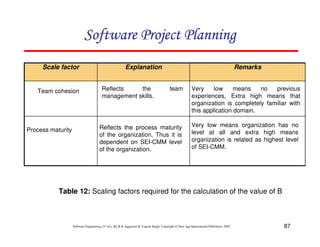
Table 12: Scaling factors required for the calculation of the value of B
Remarks
Explanation
Scale factor
Team cohesion
Process maturity
Reflects the team
management skills.
Reflects the process maturity
of the organization. Thus it is
dependent on SEI-CMM level
of the organization.
Very low means no previous
experiences, Extra high means that
organization is completely familiar with
this application domain.
Very low means organization has no
level at all and extra high means
organization is related as highest level
of SEI-CMM.
123456789A72B8C49AD6EEFE
88
Software Engineering (3rd ed.), By K.K Aggarwal  Yogesh Singh, Copyright © New Age International Publishers, 2007
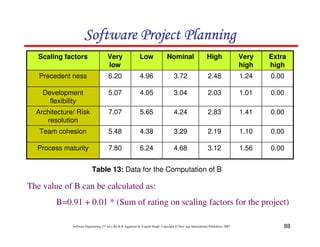
0.00
1.56
3.12
4.68
6.24
7.80
Process maturity
0.00
1.10
2.19
3.29
4.38
5.48
Team cohesion
0.00
1.41
2.83
4.24
5.65
7.07
Architecture/ Risk
resolution
0.00
1.01
2.03
3.04
4.05
5.07
Development
flexibility
0.00
1.24
2.48
3.72
4.96
6.20
Precedent ness
Extra
high
Very
high
High
Nominal
Low
Very
low
Scaling factors
Table 13: Data for the Computation of B
The value of B can be calculated as:
B=0.91 + 0.01 * (Sum of rating on scaling factors for the project)
123456789A72B8C49AD6EEFE
89
Software Engineering (3rd ed.), By K.K Aggarwal  Yogesh Singh, Copyright © New Age International Publishers, 2007
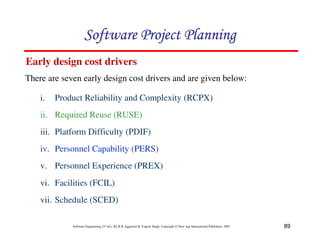
Early design cost drivers
There are seven early design cost drivers and are given below:
i. Product Reliability and Complexity (RCPX)
ii. Required Reuse (RUSE)
iii. Platform Difficulty (PDIF)
iv. Personnel Capability (PERS)
v. Personnel Experience (PREX)
vi. Facilities (FCIL)
vii. Schedule (SCED)
123456789A72B8C49AD6EEFE
90
Software Engineering (3rd ed.), By K.K Aggarwal  Yogesh Singh, Copyright © New Age International Publishers, 2007
Post architecture cost drivers
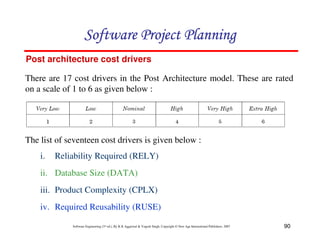
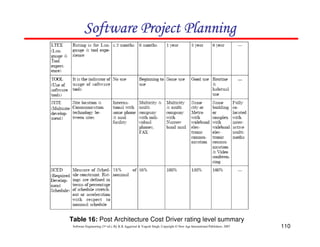
There are 17 cost drivers in the Post Architecture model. These are rated
on a scale of 1 to 6 as given below :
i. Reliability Required (RELY)
ii. Database Size (DATA)
iii. Product Complexity (CPLX)
iv. Required Reusability (RUSE)
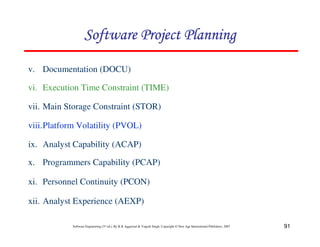
The list of seventeen cost drivers is given below :
123456789A72B8C49AD6EEFE
91
Software Engineering (3rd ed.), By K.K Aggarwal  Yogesh Singh, Copyright © New Age International Publishers, 2007
v. Documentation (DOCU)
vi. Execution Time Constraint (TIME)
vii. Main Storage Constraint (STOR)
viii.Platform Volatility (PVOL)
ix. Analyst Capability (ACAP)
x. Programmers Capability (PCAP)
xi. Personnel Continuity (PCON)
xii. Analyst Experience (AEXP)
123456789A72B8C49AD6EEFE
92
Software Engineering (3rd ed.), By K.K Aggarwal  Yogesh Singh, Copyright © New Age International Publishers, 2007
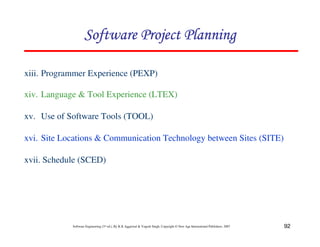
xiii. Programmer Experience (PEXP)
xiv. Language  Tool Experience (LTEX)
xv. Use of Software Tools (TOOL)
xvi. Site Locations  Communication Technology between Sites (SITE)
xvii. Schedule (SCED)
123456789A72B8C49AD6EEFE
93
Software Engineering (3rd ed.), By K.K Aggarwal  Yogesh Singh, Copyright © New Age International Publishers, 2007
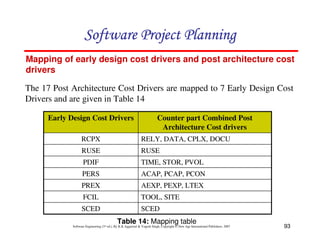
Mapping of early design cost drivers and post architecture cost
drivers
The 17 Post Architecture Cost Drivers are mapped to 7 Early Design Cost
Drivers and are given in Table 14
SCED
SCED
TOOL, SITE
FCIL
AEXP, PEXP, LTEX
PREX
ACAP, PCAP, PCON
PERS
TIME, STOR, PVOL
PDIF
RUSE
RUSE
RELY, DATA, CPLX, DOCU
RCPX
Counter part Combined Post
Architecture Cost drivers
Early Design Cost Drivers
Table 14: Mapping table
123456789A72B8C49AD6EEFE
94
Software Engineering (3rd ed.), By K.K Aggarwal  Yogesh Singh, Copyright © New Age International Publishers, 2007
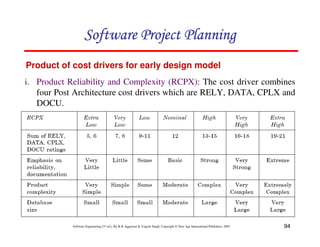
i. Product Reliability and Complexity (RCPX): The cost driver combines
four Post Architecture cost drivers which are RELY, DATA, CPLX and
DOCU.
Product of cost drivers for early design model
123456789A72B8C49AD6EEFE
95
Software Engineering (3rd ed.), By K.K Aggarwal  Yogesh Singh, Copyright © New Age International Publishers, 2007
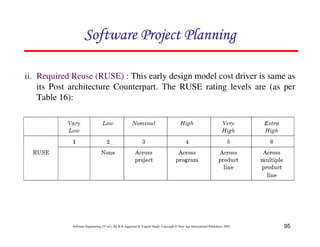
ii. Required Reuse (RUSE) : This early design model cost driver is same as
its Post architecture Counterpart. The RUSE rating levels are (as per
Table 16):
123456789A72B8C49AD6EEFE
96
Software Engineering (3rd ed.), By K.K Aggarwal  Yogesh Singh, Copyright © New Age International Publishers, 2007
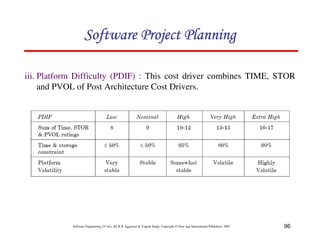
iii. Platform Difficulty (PDIF) : This cost driver combines TIME, STOR
and PVOL of Post Architecture Cost Drivers.
123456789A72B8C49AD6EEFE
97
Software Engineering (3rd ed.), By K.K Aggarwal  Yogesh Singh, Copyright © New Age International Publishers, 2007
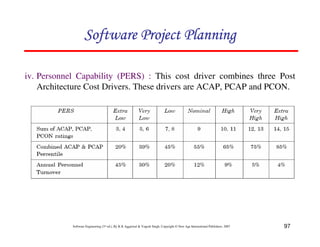
iv. Personnel Capability (PERS) : This cost driver combines three Post
Architecture Cost Drivers. These drivers are ACAP, PCAP and PCON.
123456789A72B8C49AD6EEFE
98
Software Engineering (3rd ed.), By K.K Aggarwal  Yogesh Singh, Copyright © New Age International Publishers, 2007
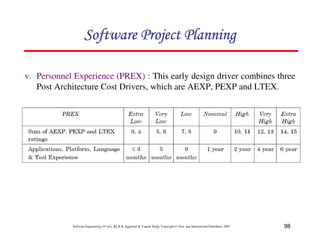
v. Personnel Experience (PREX) : This early design driver combines three
Post Architecture Cost Drivers, which are AEXP, PEXP and LTEX.
123456789A72B8C49AD6EEFE
99
Software Engineering (3rd ed.), By K.K Aggarwal  Yogesh Singh, Copyright © New Age International Publishers, 2007
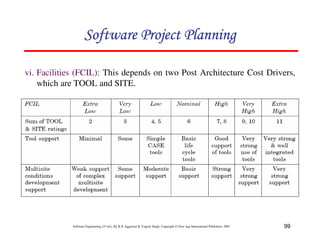
vi. Facilities (FCIL): This depends on two Post Architecture Cost Drivers,
which are TOOL and SITE.
123456789A72B8C49AD6EEFE
100
Software Engineering (3rd ed.), By K.K Aggarwal  Yogesh Singh, Copyright © New Age International Publishers, 2007
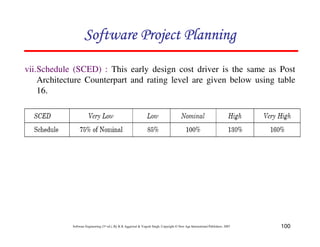
vii.Schedule (SCED) : This early design cost driver is the same as Post
Architecture Counterpart and rating level are given below using table
16.
123456789A72B8C49AD6EEFE
101
Software Engineering (3rd ed.), By K.K Aggarwal  Yogesh Singh, Copyright © New Age International Publishers, 2007
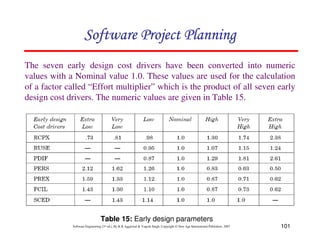
The seven early design cost drivers have been converted into numeric
values with a Nominal value 1.0. These values are used for the calculation
of a factor called “Effort multiplier” which is the product of all seven early
design cost drivers. The numeric values are given in Table 15.
Table 15: Early design parameters
123456789A72B8C49AD6EEFE
102
Software Engineering (3rd ed.), By K.K Aggarwal  Yogesh Singh, Copyright © New Age International Publishers, 2007
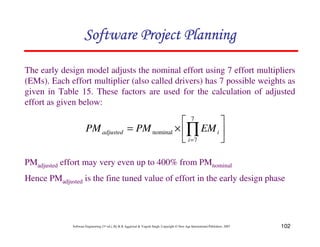
The early design model adjusts the nominal effort using 7 effort multipliers
(EMs). Each effort multiplier (also called drivers) has 7 possible weights as
given in Table 15. These factors are used for the calculation of adjusted
effort as given below:
PMadjusted effort may very even up to 400% from PMnominal
Hence PMadjusted is the fine tuned value of effort in the early design phase
2
3
4
5
6
7
×
= ∏
=
7
7
nominal
i
i
adjusted EM
PM
PM
123456789A72B8C49AD6EEFE
103
Software Engineering (3rd ed.), By K.K Aggarwal  Yogesh Singh, Copyright © New Age International Publishers, 2007
A software project of application generator category with estimated 50
KLOC has to be developed. The scale factor (B) has low
precedentness, high development flexibility and low team cohesion.
Other factors are nominal. The early design cost drivers like platform
difficult (PDIF) and Personnel Capability (PERS) are high and others
are nominal. Calculate the effort in person months for the
development of the project.
Example: 4.10
123456789A72B8C49AD6EEFE
104
Software Engineering (3rd ed.), By K.K Aggarwal  Yogesh Singh, Copyright © New Age International Publishers, 2007
Solution
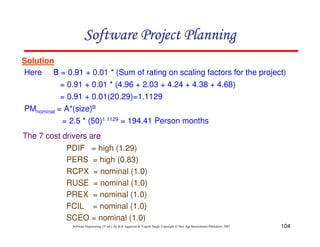
Here B = 0.91 + 0.01 * (Sum of rating on scaling factors for the project)
= 0.91 + 0.01 * (4.96 + 2.03 + 4.24 + 4.38 + 4.68)
= 0.91 + 0.01(20.29)=1.1129
PMnominal = A*(size)B
= 2.5 * (50)1.1129 = 194.41 Person months
The 7 cost drivers are
PDIF = high (1.29)
PERS = high (0.83)
RCPX = nominal (1.0)
RUSE = nominal (1.0)
PREX = nominal (1.0)
FCIL = nominal (1.0)
SCEO = nominal (1.0)
123456789A72B8C49AD6EEFE
105
Software Engineering (3rd ed.), By K.K Aggarwal  Yogesh Singh, Copyright © New Age International Publishers, 2007
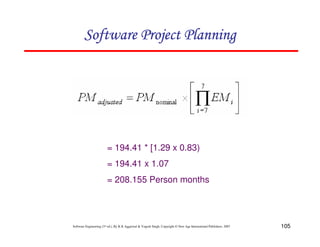
= 194.41 * [1.29 x 0.83)
= 194.41 x 1.07
= 208.155 Person months
123456789A72B8C49AD6EEFE
106
Software Engineering (3rd ed.), By K.K Aggarwal  Yogesh Singh, Copyright © New Age International Publishers, 2007
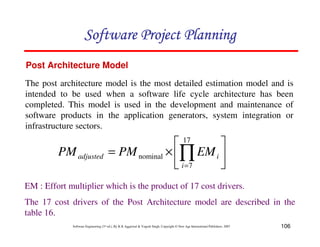
Post Architecture Model
The post architecture model is the most detailed estimation model and is
intended to be used when a software life cycle architecture has been
completed. This model is used in the development and maintenance of
software products in the application generators, system integration or
infrastructure sectors.
2
3
4
5
6
7
×
= ∏
=
17
7
nominal
i
i
adjusted EM
PM
PM
EM : Effort multiplier which is the product of 17 cost drivers.
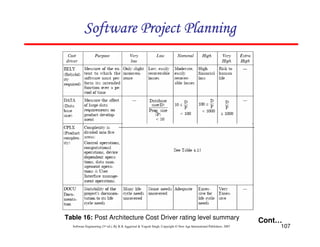
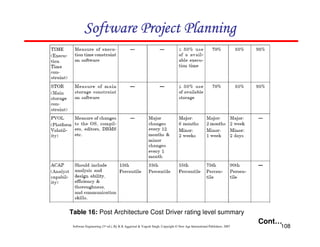
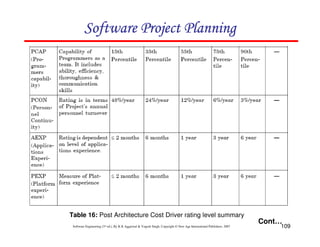
The 17 cost drivers of the Post Architecture model are described in the
table 16.
123456789A72B8C49AD6EEFE
107
Software Engineering (3rd ed.), By K.K Aggarwal  Yogesh Singh, Copyright © New Age International Publishers, 2007
Cont…
Table 16: Post Architecture Cost Driver rating level summary
123456789A72B8C49AD6EEFE
108
Software Engineering (3rd ed.), By K.K Aggarwal  Yogesh Singh, Copyright © New Age International Publishers, 2007
Cont…
Table 16: Post Architecture Cost Driver rating level summary
123456789A72B8C49AD6EEFE
109
Software Engineering (3rd ed.), By K.K Aggarwal  Yogesh Singh, Copyright © New Age International Publishers, 2007
Cont…
Table 16: Post Architecture Cost Driver rating level summary
123456789A72B8C49AD6EEFE
110
Software Engineering (3rd ed.), By K.K Aggarwal  Yogesh Singh, Copyright © New Age International Publishers, 2007
Table 16: Post Architecture Cost Driver rating level summary
123456789A72B8C49AD6EEFE
111
Software Engineering (3rd ed.), By K.K Aggarwal  Yogesh Singh, Copyright © New Age International Publishers, 2007
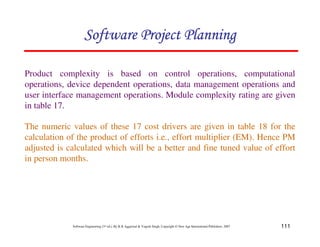
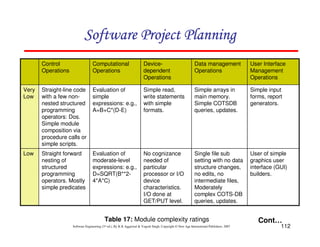
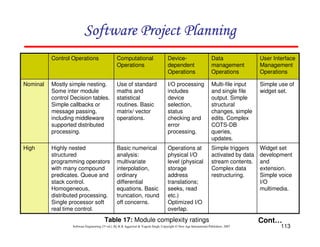
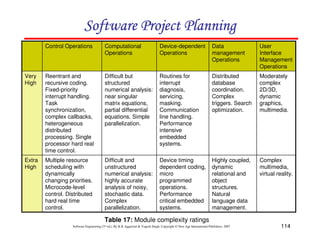
Product complexity is based on control operations, computational
operations, device dependent operations, data management operations and
user interface management operations. Module complexity rating are given
in table 17.
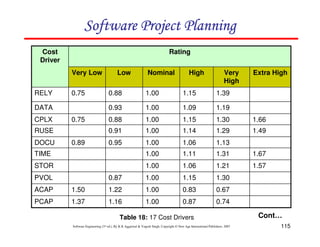
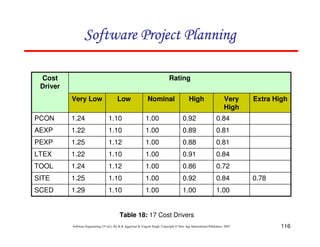
The numeric values of these 17 cost drivers are given in table 18 for the
calculation of the product of efforts i.e., effort multiplier (EM). Hence PM
adjusted is calculated which will be a better and fine tuned value of effort
in person months.
123456789A72B8C49AD6EEFE
112
Software Engineering (3rd ed.), By K.K Aggarwal  Yogesh Singh, Copyright © New Age International Publishers, 2007
User of simple
graphics user
interface (GUI)
builders.
Single file sub
setting with no data
structure changes,
no edits, no
intermediate files,
Moderately
complex COTS-DB
queries, updates.
No cognizance
needed of
particular
processor or I/O
device
characteristics.
I/O done at
GET/PUT level.
Evaluation of
moderate-level
expressions: e.g.,
D=SQRT(B**2-
4*A*C)
Straight forward
nesting of
structured
programming
operators. Mostly
simple predicates
Low
Simple input
forms, report
generators.
Simple arrays in
main memory.
Simple COTSDB
queries, updates.
Simple read,
write statements
with simple
formats.
Evaluation of
simple
expressions: e.g.,
A=B+C*(D-E)
Straight-line code
with a few non-
nested structured
programming
operators: Dos.
Simple module
composition via
procedure calls or
simple scripts.
Very
Low
User Interface
Management
Operations
Data management
Operations
Device-
dependent
Operations
Computational
Operations
Control
Operations
Table 17: Module complexity ratings Cont…
123456789A72B8C49AD6EEFE
113
Software Engineering (3rd ed.), By K.K Aggarwal  Yogesh Singh, Copyright © New Age International Publishers, 2007
Widget set
development
and
extension.
Simple voice
I/O
multimedia.
Simple triggers
activated by data
stream contents.
Complex data
restructuring.
Operations at
physical I/O
level (physical
storage
address
translations;
seeks, read
etc.)
Optimized I/O
overlap.
Basic numerical
analysis:
multivariate
interpolation,
ordinary
differential
equations. Basic
truncation, round
off concerns.
Highly nested
structured
programming operators
with many compound
predicates. Queue and
stack control.
Homogeneous,
distributed processing.
Single processor soft
real time control.
High
Simple use of
widget set.
Multi-file input
and single file
output. Simple
structural
changes, simple
edits. Complex
COTS-DB
queries,
updates.
I/O processing
includes
device
selection,
status
checking and
error
processing.
Use of standard
maths and
statistical
routines. Basic
matrix/ vector
operations.
Mostly simple nesting.
Some inter module
control Decision tables.
Simple callbacks or
message passing,
including middleware
supported distributed
processing.
Nominal
User Interface
Management
Operations
Data
management
Operations
Device-
dependent
Operations
Computational
Operations
Control Operations
Table 17: Module complexity ratings Cont…
123456789A72B8C49AD6EEFE
114
Software Engineering (3rd ed.), By K.K Aggarwal  Yogesh Singh, Copyright © New Age International Publishers, 2007
Complex
multimedia,
virtual reality.
Highly coupled,
dynamic
relational and
object
structures.
Natural
language data
management.
Device timing
dependent coding,
micro
programmed
operations.
Performance
critical embedded
systems.
Difficult and
unstructured
numerical analysis:
highly accurate
analysis of noisy,
stochastic data.
Complex
parallelization.
Multiple resource
scheduling with
dynamically
changing priorities.
Microcode-level
control. Distributed
hard real time
control.
Extra
High
Moderately
complex
2D/3D,
dynamic
graphics,
multimedia.
Distributed
database
coordination.
Complex
triggers. Search
optimization.
Routines for
interrupt
diagnosis,
servicing,
masking.
Communication
line handling.
Performance
intensive
embedded
systems.
Difficult but
structured
numerical analysis:
near singular
matrix equations,
partial differential
equations. Simple
parallelization.
Reentrant and
recursive coding.
Fixed-priority
interrupt handling.
Task
synchronization,
complex callbacks,
heterogeneous
distributed
processing. Single
processor hard real
time control.
Very
High
User
Interface
Management
Operations
Data
management
Operations
Device-dependent
Operations
Computational
Operations
Control Operations
Table 17: Module complexity ratings
123456789A72B8C49AD6EEFE
115
Software Engineering (3rd ed.), By K.K Aggarwal  Yogesh Singh, Copyright © New Age International Publishers, 2007
Table 18: 17 Cost Drivers
0.74
0.87
1.00
1.16
1.37
PCAP
0.67
0.83
1.00
1.22
1.50
ACAP
1.30
1.15
1.00
0.87
PVOL
1.57
1.21
1.06
1.00
STOR
1.67
1.31
1.11
1.00
TIME
1.13
1.06
1.00
0.95
0.89
DOCU
1.49
1.29
1.14
1.00
0.91
RUSE
1.66
1.30
1.15
1.00
0.88
0.75
CPLX
1.19
1.09
1.00
0.93
DATA
1.39
1.15
1.00
0.88
0.75
RELY
Extra High
Very
High
High
Nominal
Low
Very Low
Rating
Cost
Driver
Cont…
123456789A72B8C49AD6EEFE
116
Software Engineering (3rd ed.), By K.K Aggarwal  Yogesh Singh, Copyright © New Age International Publishers, 2007
Table 18: 17 Cost Drivers
1.00
1.00
1.00
1.10
1.29
SCED
0.78
0.84
0.92
1.00
1.10
1.25
SITE
0.72
0.86
1.00
1.12
1.24
TOOL
0.84
0.91
1.00
1.10
1.22
LTEX
0.81
0.88
1.00
1.12
1.25
PEXP
0.81
0.89
1.00
1.10
1.22
AEXP
0.84
0.92
1.00
1.10
1.24
PCON
Extra High
Very
High
High
Nominal
Low
Very Low
Rating
Cost
Driver
123456789A72B8C49AD6EEFE
117
Software Engineering (3rd ed.), By K.K Aggarwal  Yogesh Singh, Copyright © New Age International Publishers, 2007
Schedule estimation
Development time can be calculated using PMadjusted as a key factor and the
desired equation is:
100
%
)
(
[ ))]
091
.
0
(
2
.
0
28
.
0
(
nominal
SCED
PM
TDEV B
adjusted ∗
×
= −
+
φ
where 3 = constant, provisionally set to 3.67
TDEVnominal = calendar time in months with a scheduled constraint
B = Scaling factor
PMadjusted = Estimated effort in Person months (after adjustment)
123456789A72B8C49AD6EEFE
118
Software Engineering (3rd ed.), By K.K Aggarwal  Yogesh Singh, Copyright © New Age International Publishers, 2007
Size measurement
Size can be measured in any unit and the model can be calibrated
accordingly. However, COCOMO II details are:
i. Application composition model uses the size in object points.
ii. The other two models use size in KLOC
Early design model uses unadjusted function points. These function points
are converted into KLOC using Table 19. Post architecture model may
compute KLOC after defining LOC counting rules. If function points are
used, then use unadjusted function points and convert it into KLOC using
Table 19.
123456789A72B8C49AD6EEFE
119
Software Engineering (3rd ed.), By K.K Aggarwal  Yogesh Singh, Copyright © New Age International Publishers, 2007
29
C++
128
C
128
Basic-Interpreted
91
Basic-Compiled
64
ANSI/Quick/Turbo Basic
213
Assembly (Macro)
320
Assembly
32
APL
49
AI Shell
71
Ada
SLOC/UFP
Language
Table 19: Converting function points to lines of code
Cont…
123456789A72B8C49AD6EEFE
120
Software Engineering (3rd ed.), By K.K Aggarwal  Yogesh Singh, Copyright © New Age International Publishers, 2007
6
Spreadsheet
80
Report Generator
64
Prolog
91
Pascal
80
Modula 2
64
Lisp
105
Jovial
64
Forth
105
Fortan 77
91
ANSI Cobol 85
SLOC/UFP
Language
Table 19: Converting function points to lines of code
123456789A72B8C49AD6EEFE
121
Software Engineering (3rd ed.), By K.K Aggarwal  Yogesh Singh, Copyright © New Age International Publishers, 2007
Consider the software project given in example 4.10. Size and scale factor
(B) are the same. The identified 17 Cost drivers are high reliability (RELY),
very high database size (DATA), high execution time constraint (TIME),
very high analyst capability (ACAP), high programmers capability (PCAP).
The other cost drivers are nominal. Calculate the effort in Person-Months for
the development of the project.
Example: 4.11
123456789A72B8C49AD6EEFE
122
Software Engineering (3rd ed.), By K.K Aggarwal  Yogesh Singh, Copyright © New Age International Publishers, 2007
Solution
Here B = 1.1129
PMnominal = 194.41 Person-months
= 194.41 x (1.15 x 1.19 x 1.11 x 0.67 x 0.87)
= 194.41 x 0.885
= 172.05 Person-months
2
3
4
5
6
7
×
= ∏
=
17
7
nominal
i
i
adjusted EM
PM
PM
123456789A72B8C49AD6EEFE
123
Software Engineering (3rd ed.), By K.K Aggarwal  Yogesh Singh, Copyright © New Age International Publishers, 2007
Putnam Resource Allocation Model
Norden of IBM
Rayleigh curve
Model for a range of hardware development projects.
Fig.6: The Rayleigh manpower loading curve
123456789A72B8C49AD6EEFE
Persons
Time
Overall Curve
Design and Coding
124
Software Engineering (3rd ed.), By K.K Aggarwal  Yogesh Singh, Copyright © New Age International Publishers, 2007
Putnam observed that this curve was a close
approximation at project level and software subsystem
level.
No. of projects = 150
123456789A72B8C49AD6EEFE
125
Software Engineering (3rd ed.), By K.K Aggarwal  Yogesh Singh, Copyright © New Age International Publishers, 2007
The Norden / Rayleigh Curve
= manpower utilization rate per unit time
a = parameter that affects the shape of the curve
K = area under curve in the interval [0, 4 ]
t = elapsed time
dt
dy
2
2
)
( at
kate
dt
dy
t
m −
=
= --------- (1)
The curve is modeled by differential equation
123456789A72B8C49AD6EEFE
126
Software Engineering (3rd ed.), By K.K Aggarwal  Yogesh Singh, Copyright © New Age International Publishers, 2007
On Integration on interval [o, t]
Where y(t): cumulative manpower used upto time t.
y(0) = 0
y(4) = k
123456789A72B8C49AD6EEFE
y(t) = K [1-e-at2
] -------------(2)
The cumulative manpower is null at the start of the project, and
grows monotonically towards the total effort K (area under the
curve).
127
Software Engineering (3rd ed.), By K.K Aggarwal  Yogesh Singh, Copyright © New Age International Publishers, 2007
0
]
2
1
[
2 2
2
2
2
=
−
= −
at
kae
dt
y
d at
a
td
2
1
2
=
“td”: time where maximum effort rate occurs
Replace “td” for t in equation (2)
2
5
.
0
2
2
1
3935
.
0
)
(
)
1
(
1
)
(
2
2
d
t
t
t
a
k
t
y
E
e
K
e
k
t
y
E d
d
=
=
=
−
=
8
8
9
A
B
B
C
D
−
=
= −
123456789A72B8C49AD6EEFE
128
Software Engineering (3rd ed.), By K.K Aggarwal  Yogesh Singh, Copyright © New Age International Publishers, 2007
Replace “a” with in the Norden/Rayleigh model. By
making this substitution in equation we have
2
2
1
d
t
2
2
2
2
2
2 d
t
t
d
te
t
K
t
m
−
=
)
(
2
2
2
2
d
t
t
d
te
t
K −
=
123456789A72B8C49AD6EEFE
129
Software Engineering (3rd ed.), By K.K Aggarwal  Yogesh Singh, Copyright © New Age International Publishers, 2007
m (t)
Person
Time (years)
a=2
a=0.5
a=0.222
a=0.125
Fig.7: Influence of parameter ‘a’ on the manpower
distribution
123456789A72B8C49AD6EEFE
130
Software Engineering (3rd ed.), By K.K Aggarwal  Yogesh Singh, Copyright © New Age International Publishers, 2007
At time t=td, peak manning m (td) is obtained and denoted by mo.
e
t
k
m
d
o =
k = Total project cost/effort in person-years.
td = Delivery time in years
m0 = No. of persons employed at the peak
e = 2.71828
123456789A72B8C49AD6EEFE
131
Software Engineering (3rd ed.), By K.K Aggarwal  Yogesh Singh, Copyright © New Age International Publishers, 2007
Example: 4.12
A software development project is planned to cost 95 MY in a period
of 1 year and 9 months. Calculate the peak manning and average rate
of software team build up.
123456789A72B8C49AD6EEFE
132
Software Engineering (3rd ed.), By K.K Aggarwal  Yogesh Singh, Copyright © New Age International Publishers, 2007
persons
33
94
.
32
648
.
1
75
.
1
95
=
=
×
Average rate of software team build up
month
person
or
year
persons
t
m
d
/
56
.
1
/
8
.
18
75
.
1
33
0
=
=
=
Software development cost k=95 MY
Peak development time td = 1.75 years
Peak manning mo=
e
t
k
d
Solution
123456789A72B8C49AD6EEFE
133
Software Engineering (3rd ed.), By K.K Aggarwal  Yogesh Singh, Copyright © New Age International Publishers, 2007
Example: 4.13
Consider a large-scale project for which the manpower requirement is
K=600 PY and the development time is 3 years 6 months.
(a)Calculate the peak manning and peak time.
(b)What is the manpower cost after 1 year and 2 months?
123456789A72B8C49AD6EEFE
134
Software Engineering (3rd ed.), By K.K Aggarwal  Yogesh Singh, Copyright © New Age International Publishers, 2007
(a)We know td=3 years and 6 months = 3.5 years
NOW
=
∴ 0
m
Solution
600/(3.5x1.648) 104 persons
≅
e
t
K
m
d
=
0
123456789A72B8C49AD6EEFE
135
Software Engineering (3rd ed.), By K.K Aggarwal  Yogesh Singh, Copyright © New Age International Publishers, 2007
(b) We know
[ ]
2
1
)
( at
e
K
t
y −
−
=
t = 1 year and 2 months
= 1.17 years
041
.
0
)
5
.
3
(
2
1
2
1
2
2
=
×
=
=
d
t
a
[ ]
2
)
17
.
1
(
041
.
0
1
600
)
17
.
1
( −
−
= e
y
= 32.6 PY
123456789A72B8C49AD6EEFE
136
Software Engineering (3rd ed.), By K.K Aggarwal  Yogesh Singh, Copyright © New Age International Publishers, 2007
Slope of manpower distribution curve at start time t=0 has
some useful properties.
)
2
1
(
2
)
(
' 2
2
2
2
at
kae
dt
y
d
t
m at
−
=
= −
Then, for t=0
2
2
2
2
2
)
0
(
'
d
d t
K
t
K
Ka
m =
=
=
Difficulty Metric
123456789A72B8C49AD6EEFE
137
Software Engineering (3rd ed.), By K.K Aggarwal  Yogesh Singh, Copyright © New Age International Publishers, 2007
The ratio is called difficulty and denoted by D,
which is measured in person/year :
2
d
t
K
D= persons/year
2
d
t
k
123456789A72B8C49AD6EEFE
138
Software Engineering (3rd ed.), By K.K Aggarwal  Yogesh Singh, Copyright © New Age International Publishers, 2007
Project is difficult to develop
if
Manpower demand
is high
When time schedule
is short
123456789A72B8C49AD6EEFE
139
Software Engineering (3rd ed.), By K.K Aggarwal  Yogesh Singh, Copyright © New Age International Publishers, 2007
Peak manning is defined as:
Thus difficult projects tend to have a higher peak
manning for a given development time, which is in line
with Norden’s observations relative to the parameter “a”.
e
t
k
m
d
=
0
d
d t
e
m
t
k
D 0
2
=
=
123456789A72B8C49AD6EEFE
140
Software Engineering (3rd ed.), By K.K Aggarwal  Yogesh Singh, Copyright © New Age International Publishers, 2007
D is dependent upon “K”. The derivative of D relative to
“K” and “td” are
2
3
2
year
persons
t
k
t
D
d
d /
)
(
'
−
=
2
2
1
)
(
' −
= year
t
k
D
d
Manpower buildup
123456789A72B8C49AD6EEFE
141
Software Engineering (3rd ed.), By K.K Aggarwal  Yogesh Singh, Copyright © New Age International Publishers, 2007
D1(K) will always be very much smaller than the absolute value of
D1(td). This difference in sensitivity is shown by considering two
projects
Project A : Cost = 20 PY  td = 1 year
Project B : Cost = 120 PY  td = 2.5 years
Project A : D` (td) = -40  D`(K) = 1
Project B : D` (td) = -15.36  D`(K) = 0.16
The derivative values are
This shows that a given software development is time sensitive.
123456789A72B8C49AD6EEFE
142
Software Engineering (3rd ed.), By K.K Aggarwal  Yogesh Singh, Copyright © New Age International Publishers, 2007
Putnam observed that
Difficulty derivative relative to time
Behavior of s/w development
If project scale is increased, the development time also
increase to such an extent that remains constant
around a value which could be 8,15,27.
3
d
t
k
123456789A72B8C49AD6EEFE
143
Software Engineering (3rd ed.), By K.K Aggarwal  Yogesh Singh, Copyright © New Age International Publishers, 2007
It is represented by D0 and can be expressed as:
2
3
0 / year
person
t
k
D
d
=
D0 =8, new s/w with many interfaces  interactions
with other systems.
D0 =15, New standalone system.
D0 =27, The software is rebuild form existing software.
123456789A72B8C49AD6EEFE
144
Software Engineering (3rd ed.), By K.K Aggarwal  Yogesh Singh, Copyright © New Age International Publishers, 2007
Example: 4.14
Consider the example 4.13 and calculate the difficulty and
manpower build up.
123456789A72B8C49AD6EEFE
145
Software Engineering (3rd ed.), By K.K Aggarwal  Yogesh Singh, Copyright © New Age International Publishers, 2007
We know
Solution
2
d
t
K
D =
Difficulty
year
person/
49
)
5
.
3
(
600
2
=
=
Manpower build up can be calculated by following equation
3
0
d
t
K
D =
2
3
/
14
)
5
.
3
(
600
year
person
=
=
123456789A72B8C49AD6EEFE
146
Software Engineering (3rd ed.), By K.K Aggarwal  Yogesh Singh, Copyright © New Age International Publishers, 2007
Productivity = No. of LOC developed per person-month
P 4 D2
Avg. productivity
P =
code
produce
to
used
manpower
cumulative
produced
LOC
Productivity Versus Difficulty
123456789A72B8C49AD6EEFE
147
Software Engineering (3rd ed.), By K.K Aggarwal  Yogesh Singh, Copyright © New Age International Publishers, 2007
P = S/E
)
3935
.
0
(
3
2
2
k
t
k
S
d
−
2
3
4
5
6
7
= φ
3
4
3
1
3935
0
/
/
. d
t
K
S φ
=
)
.
(
/
/
/
K
D
E
D
S
D
P
3935
0
3
2
3
2
3
2
−
−
−
=
=
=
φ
φ
φ
123456789A72B8C49AD6EEFE
148
Software Engineering (3rd ed.), By K.K Aggarwal  Yogesh Singh, Copyright © New Age International Publishers, 2007
c
Technology Factor
Programming
environment
Hardware
constraints
Complexity
Experience
φ
39
.
0
123456789A72B8C49AD6EEFE
149
Software Engineering (3rd ed.), By K.K Aggarwal  Yogesh Singh, Copyright © New Age International Publishers, 2007
C 610 – 57314
K : P-Y
T : Years
3
/
4
3
/
1
d
t
CK
S =
3
/
4
3
/
1
.
−
−
= d
t
K
S
C
C
S
t
K d /
3
/
4
3
/
1
=
3
4
1
8
9
A
B
C
D
=
C
S
t
K
d
The trade off of time versus cost
123456789A72B8C49AD6EEFE
150
Software Engineering (3rd ed.), By K.K Aggarwal  Yogesh Singh, Copyright © New Age International Publishers, 2007
C = 5000
S = 5,00,000 LOC
3
4
)
100
(
1
d
t
K =
12346
3.0
6664
3.5
3906
4.0
1600
5.0
K (P-Y)
td (years)
Table 20: (Manpower versus development time)
123456789A72B8C49AD6EEFE
151
Software Engineering (3rd ed.), By K.K Aggarwal  Yogesh Singh, Copyright © New Age International Publishers, 2007
Development Subcycle
All that has been discussed so far is related to project life cycle as
represented by project curve
Manpower
distribution
123456789A72B8C49AD6EEFE
Fig.8: Project life cycle
Maintenance
Project
Test 
Validation
Design code
development
Requirements
 Specification
Time
152
Software Engineering (3rd ed.), By K.K Aggarwal  Yogesh Singh, Copyright © New Age International Publishers, 2007
Project curve is the addition of two curves
Development
Curve
Test 
Validation
Curve
Project life cycle
123456789A72B8C49AD6EEFE
153
Software Engineering (3rd ed.), By K.K Aggarwal  Yogesh Singh, Copyright © New Age International Publishers, 2007
An examination of md(t) function shows a non-zero value of md
at time td.
This is because the manpower involved in design  coding is
still completing this activity after td in form of rework due to
the validation of the product.
Nevertheless, for the model, a level of completion has to be
assumed for development.
It is assumed that 95% of the development will be completed
by the time td.
md (t) = 2kdbt e-bt2
yd (t) = Kd [1-e-bt2
]
∴
123456789A72B8C49AD6EEFE
154
Software Engineering (3rd ed.), By K.K Aggarwal  Yogesh Singh, Copyright © New Age International Publishers, 2007
95
.
0
1
)
( 2
=
−
=
−bt
e
K
t
y
d
d
2
2
1
od
t
b =
Tod: time at which development curve exhibits a peak
manning.
6
d
od
t
t =
We may say that
∴
123456789A72B8C49AD6EEFE
155
Software Engineering (3rd ed.), By K.K Aggarwal  Yogesh Singh, Copyright © New Age International Publishers, 2007
Relationship between Kd  K must be established.
At the time of origin, both cycles have the same slope.
o
d
od
d
d
o dt
dm
t
K
t
K
dt
dm
8
9
A
B
C
D
=
=
=
8
9
A
B
C
D
2
2
Kd=K/6
2
2
od
d
d t
K
t
K
D =
=
123456789A72B8C49AD6EEFE
156
Software Engineering (3rd ed.), By K.K Aggarwal  Yogesh Singh, Copyright © New Age International Publishers, 2007
This does not apply to the manpower build up D0.
Conte investigated that
Larger projects reasonable
Medium  small projects overestimate
3
3
6 od
d
d
o
t
K
t
K
D =
=
123456789A72B8C49AD6EEFE
157
Software Engineering (3rd ed.), By K.K Aggarwal  Yogesh Singh, Copyright © New Age International Publishers, 2007
Example: 4.15
A software development requires 90 PY during the total development
sub-cycle. The development time is planned for a duration of 3 years
and 5 months
(a)Calculate the manpower cost expended until development time
(b) Determine the development peak time
(c) Calculate the difficulty and manpower build up.
123456789A72B8C49AD6EEFE
158
Software Engineering (3rd ed.), By K.K Aggarwal  Yogesh Singh, Copyright © New Age International Publishers, 2007
(a) Duration td = 3.41 years
Solution
95
.
0
)
(
=
d
d
d
K
t
y
90
95
.
0
)
( ×
=
d
d t
Y
= 85.5 PY
We know from equation 95
.
0
1
)
(
=
−
=
− d
bt
e
K
t
y
d
d
123456789A72B8C49AD6EEFE
159
Software Engineering (3rd ed.), By K.K Aggarwal  Yogesh Singh, Copyright © New Age International Publishers, 2007
(b) We know from equation
6
d
od
t
t =
years
t
t d
od 39
.
1
449
.
2
/
41
.
3
6
=
=
=
months
17
≅
123456789A72B8C49AD6EEFE
160
Software Engineering (3rd ed.), By K.K Aggarwal  Yogesh Singh, Copyright © New Age International Publishers, 2007
(c) Total Manpower development
PY
K
K d 540
6
90
6 =
×
=
=
46
)
41
.
3
/(
540
/ 2
2
=
=
= d
t
K
D
95
.
0
/
)
( d
d
d t
y
K =
= 85.5 / 0.95 = 90
persons/years
6
.
13
)
41
.
3
/(
540 3
3
=
=
=
d
o
t
K
D persons/years2
123456789A72B8C49AD6EEFE
161
Software Engineering (3rd ed.), By K.K Aggarwal  Yogesh Singh, Copyright © New Age International Publishers, 2007
Example:4.16
A software development for avionics has consumed 32 PY
up to development cycle and produced a size of 48000
LOC. The development of project was completed in 25
months. Calculate the development time, total manpower
requirement, development peak time, difficulty,
manpower build up and technology factor.
123456789A72B8C49AD6EEFE
162
Software Engineering (3rd ed.), By K.K Aggarwal  Yogesh Singh, Copyright © New Age International Publishers, 2007
Solution:
PY
t
Y
k d
d
d 7
.
33
95
.
0
32
95
.
0
)
(
=
=
=
months
years
t
t d
od 10
85
0
6
=
=
= .
)
(
K = 6Kd = 6 x 33.7 = 202 PY
years
pesons
t
k
D
d
/
7
.
46
)
08
.
2
(
202
2
2
=
=
=
Development time td = 25 months = 2.08 years
Total manpower development
Development peak time
123456789A72B8C49AD6EEFE
163
Software Engineering (3rd ed.), By K.K Aggarwal  Yogesh Singh, Copyright © New Age International Publishers, 2007
2
3
3
0 5
22
08
2
202
year
Persons
t
k
D
d
/
.
)
.
(
=
=
=
3
/
4
3
/
1 −
−
= d
t
SK
C
= 3077
Technology factor
123456789A72B8C49AD6EEFE
164
Software Engineering (3rd ed.), By K.K Aggarwal  Yogesh Singh, Copyright © New Age International Publishers, 2007
Example 4.17
What amount of software can be delivered in 1 year 10 months in an
organization whose technology factor is 2400 if a total of 25 PY is
permitted for development effort.
123456789A72B8C49AD6EEFE
165
Software Engineering (3rd ed.), By K.K Aggarwal  Yogesh Singh, Copyright © New Age International Publishers, 2007
Solution:
3
/
4
3
/
1
d
t
CK
S =
= 2400 x 5.313 x 2.18 = 27920 LOC
We know
td = 1.8 years
Kd = 25 PY
K = 25 x 6 = 150 PY
C = 2400
123456789A72B8C49AD6EEFE
166
Software Engineering (3rd ed.), By K.K Aggarwal  Yogesh Singh, Copyright © New Age International Publishers, 2007
Example 4.18
The software development organization developing real time
software has been assessed at technology factor of 2200. The
maximum value of manpower build up for this type of
software is Do=7.5. The estimated size to be developed is
S=55000 LOC.
(a) Determine the total development time, the total
development manpower cost, the difficulty and the
development peak manning.
(b) The development time determined in (a) is considered too
long. It is recommended that it be reduced by two months.
What would happen?
123456789A72B8C49AD6EEFE
167
Software Engineering (3rd ed.), By K.K Aggarwal  Yogesh Singh, Copyright © New Age International Publishers, 2007
Solution
3
/
4
3
/
1
d
t
CK
S =
4
3
d
kt
c
s
=
8
9
A
B
C
D
7
3
d
ot
D
C
S
=
8
9
A
B
C
D
7
/
1
3
0
1
2
2
3
4
5
5
6
7
8
9
A
B
C
D
=
C
S
D
td
We have
which is also equivalent to
then
123456789A72B8C49AD6EEFE
168
Software Engineering (3rd ed.), By K.K Aggarwal  Yogesh Singh, Copyright © New Age International Publishers, 2007
25
=
C
S
Since
td = 3 years
PY
Kd 75
.
33
06
202
=
=
D = D0td = 22.5 persons / year
years
t
t d
od 2
.
1
6
3
6
=
=
=
Total development manpower cost
PY
t
D
K d 202
27
5
.
7
3
0 =
×
=
=
123456789A72B8C49AD6EEFE
169
Software Engineering (3rd ed.), By K.K Aggarwal  Yogesh Singh, Copyright © New Age International Publishers, 2007
Md(t) = 2kd bte-bt2
Yd(t) = kd (1-e-bt2
)
Here t = tod
2
/
1
−
=
= e
Dt
m od
od
= 22.5 x 1.2 x .606 = 16 persons
Peak manning
123456789A72B8C49AD6EEFE
170
Software Engineering (3rd ed.), By K.K Aggarwal  Yogesh Singh, Copyright © New Age International Publishers, 2007
III. If development time is reduced by 2 months
Developing
s/w at higher
manpower
build-up
Producing
less software
123456789A72B8C49AD6EEFE
171
Software Engineering (3rd ed.), By K.K Aggarwal  Yogesh Singh, Copyright © New Age International Publishers, 2007
3
7
1
8
9
A
B
C
D
=
C
S
t
D
d
o
Now td = 3 years – 2 months = 2.8 years
years
persons
Do /
.
)
.
/(
)
( 6
11
8
2
25 7
3
=
=
PY
t
D
k d 254
3
0 =
=
(i) Increase Manpower Build-up
PY
Kd 4
.
42
6
254
=
=
123456789A72B8C49AD6EEFE
172
Software Engineering (3rd ed.), By K.K Aggarwal  Yogesh Singh, Copyright © New Age International Publishers, 2007
D = D0td = 32.5 persons / year
The peak time is tod = 1.14 years
Peak manning mod = Dtod e-0.5
= 32.5 x 1.14 x 0.6
= 22 persons
Note the huge increase in peak manning  manpower
cost.
123456789A72B8C49AD6EEFE
173
Software Engineering (3rd ed.), By K.K Aggarwal  Yogesh Singh, Copyright © New Age International Publishers, 2007
696
.
10119
)
8
.
2
(
5
.
7 7
7
0
3
=
×
=
=
8
9
A
B
C
D
d
t
D
C
S
62989
.
21
3
=
8
9
A
B
C
D
C
S
Then for C=2200
S=47586 LOC
(ii) Produce Less Software
123456789A72B8C49AD6EEFE
174
Software Engineering (3rd ed.), By K.K Aggarwal  Yogesh Singh, Copyright © New Age International Publishers, 2007
A72C4FF49879F33FCD4
A72C4FF49879F33FCD4
A72C4FF49879F33FCD4
A72C4FF49879F33FCD4
Example 4.19
A stand alone project for which the size is estimated at 12500
LOC is to be developed in an environment such that the
technology factor is 1200. Choosing a manpower build up
Do=15, Calculate the minimum development time, total
development man power cost, the difficulty, the peak manning,
the development peak time, and the development productivity.
175
Software Engineering (3rd ed.), By K.K Aggarwal  Yogesh Singh, Copyright © New Age International Publishers, 2007
Solution
3
/
4
3
/
1
d
t
CK
S =
Size (S) = 12500 LOC
Technology factor (C) = 1200
Manpower buildup (Do) = 15
Now
3
/
4
3
/
1
d
t
K
C
S
=
4
3
d
Kt
C
S
=
8
9
A
B
C
D
123456789A72B8C49AD6EEFE
176
Software Engineering (3rd ed.), By K.K Aggarwal  Yogesh Singh, Copyright © New Age International Publishers, 2007
3
d
o
t
K
D
know
we
Also =
7
3
d
ot
D
C
S
=
8
9
A
B
C
D
7
/
1
3
15
)
416
.
10
(
2
3
4
5
6
7
=
d
t
Substituting the values, we get
3
3
d
o
d
o t
D
t
D
K =
=
Hence
7
3
15
1200
12500
d
t
=
8
9
A
B
C
D
years
td 85
.
1
=
123456789A72B8C49AD6EEFE
177
Software Engineering (3rd ed.), By K.K Aggarwal  Yogesh Singh, Copyright © New Age International Publishers, 2007
(i) Hence Minimum development time (td)=1.85 years
(ii) Total development manpower cost
6
K
Kd =
3
15 d
t
K=
PY
K
Kd 83
.
15
6
97
.
94
6
=
=
=
=15(1.85)3=94.97 PY
Hence
(iii) Difficulty year
Persons
t
K
D
d
/
.
)
.
(
.
75
27
85
1
97
94
2
2
=
=
=
123456789A72B8C49AD6EEFE
178
Software Engineering (3rd ed.), By K.K Aggarwal  Yogesh Singh, Copyright © New Age International Publishers, 2007
(iv) Peak Manning
e
t
K
m
d
=
0
Persons
15
.
31
648
.
1
85
.
1
97
.
94
=
×
=
(v) Development Peak time
6
d
od
t
t =
years
755
.
0
449
.
2
85
.
1
=
=
123456789A72B8C49AD6EEFE
179
Software Engineering (3rd ed.), By K.K Aggarwal  Yogesh Singh, Copyright © New Age International Publishers, 2007
(vi) Development Productivity
)
(
)
(
.
d
K
effort
S
code
of
lines
of
No
=
PY
LOC /
6
.
789
83
.
15
12500
=
=
123456789A72B8C49AD6EEFE
180
Software Engineering (3rd ed.), By K.K Aggarwal  Yogesh Singh, Copyright © New Age International Publishers, 2007
2 We Software developers are extremely optimists.
2 We assume, everything will go exactly as planned.
2 Other view
not possible to predict what is going to happen ?
Software surprises
Never good news
Software Risk Management
123456789A72B8C49AD6EEFE
181
Software Engineering (3rd ed.), By K.K Aggarwal  Yogesh Singh, Copyright © New Age International Publishers, 2007
Risk management is required to reduce this surprise
factor
Dealing with concern before it becomes a crisis.
123456789A72B8C49AD6EEFE
Quantify probability of failure  consequences of failure.
182
Software Engineering (3rd ed.), By K.K Aggarwal  Yogesh Singh, Copyright © New Age International Publishers, 2007
What is risk ?
123456789A72B8C49AD6EEFE
Tomorrow’s problems are today’s risks.
“Risk is a problem that may cause some loss or
threaten the success of the project, but which has
not happened yet”.
183
Software Engineering (3rd ed.), By K.K Aggarwal  Yogesh Singh, Copyright © New Age International Publishers, 2007
Risk management is the process of identifying addressing
and eliminating these problems before they can damage
the project.
123456789A72B8C49AD6EEFE
Current problems 
Potential Problems
184
Software Engineering (3rd ed.), By K.K Aggarwal  Yogesh Singh, Copyright © New Age International Publishers, 2007
Capers Jones has identified the top five risk factors that
threaten projects in different applications.
1. Dependencies on outside agencies or factors.
Typical Software Risk
• Availability of trained, experienced persons
• Inter group dependencies
• Customer-Furnished items or information
• Internal  external subcontractor relationships
123456789A72B8C49AD6EEFE
185
Software Engineering (3rd ed.), By K.K Aggarwal  Yogesh Singh, Copyright © New Age International Publishers, 2007
2. Requirement issues
Uncertain requirements
Wrong product
or
Right product badly
Either situation results in unpleasant surprises and
unhappy customers.
123456789A72B8C49AD6EEFE
186
Software Engineering (3rd ed.), By K.K Aggarwal  Yogesh Singh, Copyright © New Age International Publishers, 2007
• Lack of clear product vision
• Unprioritized requirements
• Lack of agreement on product requirements
• New market with uncertain needs
• Rapidly changing requirements
• Inadequate Impact analysis of requirements changes
123456789A72B8C49AD6EEFE
187
Software Engineering (3rd ed.), By K.K Aggarwal  Yogesh Singh, Copyright © New Age International Publishers, 2007
3. Management Issues
Project managers usually write the risk management
plans, and most people do not wish to air their
weaknesses in public.
• Inadequate planning
• Inadequate visibility into actual project status
• Unclear project ownership and decision making
• Staff personality conflicts
• Unrealistic expectation
• Poor communication
123456789A72B8C49AD6EEFE
188
Software Engineering (3rd ed.), By K.K Aggarwal  Yogesh Singh, Copyright © New Age International Publishers, 2007
4. Lack of knowledge
• Inadequate training
• Poor understanding of methods, tools, and
techniques
• Inadequate application domain experience
• New Technologies
• Ineffective, poorly documented or neglected
processes
123456789A72B8C49AD6EEFE
189
Software Engineering (3rd ed.), By K.K Aggarwal  Yogesh Singh, Copyright © New Age International Publishers, 2007
5. Other risk categories
• Unavailability of adequate testing facilities
• Turnover of essential personnel
• Unachievable performance requirements
• Technical approaches that may not work
123456789A72B8C49AD6EEFE
190
Software Engineering (3rd ed.), By K.K Aggarwal  Yogesh Singh, Copyright © New Age International Publishers, 2007
Risk
Management
Risk
Assessment
Risk Control
Risk Identification
Risk Analysis
Risk Prioritization
Risk Management
Planning
Risk Monitoring
Risk Resolution
Risk Management Activities
Fig. 9: Risk Management
Activities
123456789A72B8C49AD6EEFE
191
Software Engineering (3rd ed.), By K.K Aggarwal  Yogesh Singh, Copyright © New Age International Publishers, 2007
Identification of risks
Risk Assessment
Risk analysis involves examining how project outcomes
might change with modification of risk input variables.
Risk prioritization focus for severe risks.
123456789A72B8C49AD6EEFE
Risk exposure: It is the product of the probability of incurring
a loss due to the risk and the potential magnitude of that loss.
192
Software Engineering (3rd ed.), By K.K Aggarwal  Yogesh Singh, Copyright © New Age International Publishers, 2007
Another way of handling risk is the risk avoidance. Do not do
the risky things! We may avoid risks by not undertaking
certain projects, or by relying on proven rather than cutting
edge technologies.
123456789A72B8C49AD6EEFE
193
Software Engineering (3rd ed.), By K.K Aggarwal  Yogesh Singh, Copyright © New Age International Publishers, 2007
Risk Management Planning produces a plan for dealing with
each significant risks.
Risk Control
2 Record decision in the plan.
Risk resolution is the execution of the plans of dealing with
each risk.
123456789A72B8C49AD6EEFE
194
Software Engineering (3rd ed.), By K.K Aggarwal  Yogesh Singh, Copyright © New Age International Publishers, 2007
4.1 After the finalization of SRS, we may like to estimate
(a) Size (b) Cost
(c) Development time (d) All of the above.
4.2 Which one is not a size measure for software
(a) LOC (b) Function Count
(c) Cyclomatic Complexity (d) Halstead’s program length
4.3 Function count method was developed by
(a) B.Beizer (b) B.Boehm
(c) M.halstead (d) Alan Albrecht
4.4 Function point analysis (FPA) method decomposes the system into functional
units. The total number of functional units are
(a) 2 (b) 5
(c) 4 (d) 1
D4FD892FC8984F2E
Note: Choose most appropriate answer of the following questions:
195
Software Engineering (3rd ed.), By K.K Aggarwal  Yogesh Singh, Copyright © New Age International Publishers, 2007
4.6 Function point can be calculated by
(a) UFP * CAF (b) UFP * FAC
(c) UFP * Cost (d) UFP * Productivity
D4FD892FC8984F2E
4.7 Putnam resource allocation model is based on
(a) Function points
(b) Norden/ Rayleigh curve
(c) Putnam theory of software management
(d) Boehm’s observation on manpower utilisation rate
4.5 IFPUG stand for
(a) Initial function point uniform group
(b) International function point uniform group
(c) International function point user group
(d) Initial function point user group
4.8 Manpower buildup for Putnam resource allocation model is
2
2
year
persons
t
K
a d /
/
)
( 2
3
year
persons
t
K
b d /
/
)
(
year
persons
t
K
c d /
/
)
( 2
year
persons
t
K
d d /
/
)
( 3
196
Software Engineering (3rd ed.), By K.K Aggarwal  Yogesh Singh, Copyright © New Age International Publishers, 2007
4.9 COCOMO was developed initially by
(a) B.W.Bohem (b) Gregg Rothermal
(c) B.Beizer (d) Rajiv Gupta
D4FD892FC8984F2E
4.10 A COCOMO model is
(a) Common Cost estimation model
(b) Constructive cost Estimation model
(c) Complete cost estimation model
(d) Comprehensive Cost estimation model
4.11 Estimation of software development effort for organic software is COCOMO is
(a) E=2.4(KLOC)1.05PM (b) E=3.4(KLOC)1.06PM
(c) E=2.0(KLOC)1.05PM (d) E-2.4(KLOC)1.07PM
4.12 Estimation of size for a project is dependent on
(a) Cost (b) Schedule
(c) Time (d) None of the above
4.13 In function point analysis, number of Complexity adjustment factor are
(a) 10 (b) 20
(c) 14 (d) 12
197
Software Engineering (3rd ed.), By K.K Aggarwal  Yogesh Singh, Copyright © New Age International Publishers, 2007
4.14 COCOMO-II estimation model is based on
(a) Complex approach (b) Algorithm approach
(c) Bottom up approach (d) Top down approach
4.15 Cost estimation for a project may include
(a) Software Cost (b) Hardware Cost
(c) Personnel Costs (d) All of the above
4.16 In COCOMO model, if project size is typically 2-50 KLOC, then which mode
is to be selected?
(a) Organic (b) Semidetached
(c) Embedded (d) None of the above
D4FD892FC8984F2E
4.17 COCOMO-II was developed at
(a) University of Maryland (b) University of Southern California
(c) IBM (d) AT  T Bell labs
4.18 Which one is not a Category of COCOMO-II
(a) End User Programming (b) Infrastructure Sector
(c) Requirement Sector (d) System Integration
198
Software Engineering (3rd ed.), By K.K Aggarwal  Yogesh Singh, Copyright © New Age International Publishers, 2007
D4FD892FC8984F2E
4.19 Which one is not an infrastructure software?
(a) Operating system (b) Database management system
(c) Compilers (d) Result management system
4.20 How many stages are in COCOMO-II?
(a) 2 (b) 3
(c) 4 (d) 5
4.21 Which one is not a stage of COCOMO-II?
(a) Application Composition estimation model
(b) Early design estimation model
(c) Post architecture estimation model
(d) Comprehensive cost estimation model
4.22 In Putnam resource allocation model, Rayleigh curve is modeled by the equation
2
2
)
(
)
( at
e
at
t
m
a −
=
2
2
)
(
)
( at
e
Kt
t
m
b −
=
2
2
)
(
)
( at
e
Kat
t
m
c −
=
2
2
)
(
)
( at
e
Kbt
t
m
d −
=
199
Software Engineering (3rd ed.), By K.K Aggarwal  Yogesh Singh, Copyright © New Age International Publishers, 2007
4.23 In Putnam resource allocation model, technology factor ‘C’ is defined as
4.24 Risk management activities are divided in
(a) 3 Categories (b) 2 Categories
(c) 5 Categories (d) 10 Categories
D4FD892FC8984F2E
4.25 Which one is not a risk management activity?
(a) Risk assessment (b) Risk control
(c) Risk generation (d) None of the above
3
/
4
3
/
1
)
( −
−
= d
t
SK
C
a 3
/
4
3
/
1
)
( d
t
SK
C
b =
3
/
4
3
/
1
)
( −
= d
t
SK
C
c 3
/
4
3
/
1
)
( d
t
SK
C
d −
=
200
Software Engineering (3rd ed.), By K.K Aggarwal  Yogesh Singh, Copyright © New Age International Publishers, 2007
87CF8
4.1 What are various activities during software project planning?
4.2 Describe any two software size estimation techniques.
4.3 A proposal is made to count the size of ‘C’ programs by number of
semicolons, except those occurring with literal strings. Discuss the
strengths and weaknesses to this size measure when compared with the
lines of code count.
4.4 Design a LOC counter for counting LOC automatically. Is it language
dependent? What are the limitations of such a counter?
4.5 Compute the function point value for a project with the following
information domain characteristics.
Number of user inputs = 30
Number of user outputs = 42
Number of user enquiries = 08
Number of files = 07
Number of external interfaces = 6
Assume that all complexity adjustment values are moderate.
201
Software Engineering (3rd ed.), By K.K Aggarwal  Yogesh Singh, Copyright © New Age International Publishers, 2007
87CF8
4.6 Explain the concept of function points. Why FPs are becoming
acceptable in industry?
4.7 What are the size metrics? How is function point metric advantageous
over LOC metric? Explain.
4.8 Is it possible to estimate software size before coding? Justify your answer
with suitable example.
4.9 Describe the Albrecht’s function count method with a suitable example.
4.10 Compute the function point FP for a payroll program that reads a file of
employee and a file of information for the current month and prints
cheque for all the employees. The program is capable of handling an
interactive command to print an individually requested cheque
immediately.
202
Software Engineering (3rd ed.), By K.K Aggarwal  Yogesh Singh, Copyright © New Age International Publishers, 2007
87CF8
4.11 Assume that the previous payroll program is expected to read a file
containing information about all the cheques that have been printed. The
file is supposed to be printed and also used by the program next time it is
run, to produce a report that compares payroll expenses of the current
month with those of the previous month. Compute functions points for
this program. Justify the difference between the function points of this
program and previous one by considering how the complexity of the
program is affected by adding the requirement of interfacing with
another application (in this case, itself).
4.12 Explain the Walson  Felix model and compare with the SEL model.
4.13 The size of a software product to be developed has been estimated to be
22000 LOC. Predict the manpower cost (effort) by Walston-Felix Model
and SEL model.
4.14 A database system is to be developed. The effort has been estimated to
be 100 Persons-Months. Calculate the number of lines of code and
productivity in LOC/Person-Month.
203
Software Engineering (3rd ed.), By K.K Aggarwal  Yogesh Singh, Copyright © New Age International Publishers, 2007
87CF8
4.15 Discuss various types of COCOMO mode. Explain the phase wise
distribution of effort.
4.16 Explain all the levels of COCOMO model. Assume that the size of an
organic software product has been estimated to be 32,000 lines of code.
Determine the effort required to developed the software product and the
nominal development time.
4.17 Using the basic COCOMO model, under all three operating modes,
determine the performance relation for the ratio of delivered source code
lines per person-month of effort. Determine the reasonableness of this
relation for several types of software projects.
4.18 The effort distribution for a 240 KLOC organic mode software
development project is: product design 12%, detailed design 24%, code
and unit test 36%, integrate and test 28%. How would the following
changes, from low to high, affect the phase distribution of effort and the
total effort: analyst capability, use of modern programming languages,
required reliability, requirements volatility?
204
Software Engineering (3rd ed.), By K.K Aggarwal  Yogesh Singh, Copyright © New Age International Publishers, 2007
87CF8
4.19 Specify, design, and develop a program that implements COCOMO.
Using reference as a guide, extend the program so that it can be used as a
planning tool.
4.20 Suppose a system for office automation is to be designed. It is clear
from requirements that there will be five modules of size 0.5 KLOC, 1.5
KLOC, 2.0 KLOC, 1.0 KLOC and 2.0 KLOC respectively. Complexity,
and reliability requirements are high. Programmer’s capability and
experience is low. All other factors are of nominal rating. Use COCOMO
model to determine overall cost and schedule estimates. Also calculate
the cost and schedule estimates for different phases.
4.21 Suppose that a project was estimated to be 600 KLOC. Calculate the
effort and development time for each of the three modes i.e., organic,
semidetached and embedded.
4.22 Explain the COCOMO-II in detail. What types of categories of projects
are identified?
205
Software Engineering (3rd ed.), By K.K Aggarwal  Yogesh Singh, Copyright © New Age International Publishers, 2007
87CF8
4.24 Describe various stages of COCOMO-II. Which stage is more popular
and why?
4.25 A software project of application generator category with estimated size
of 100 KLOC has to be developed. The scale factor (B) has high
percedentness, high development flexibility. Other factors are nominal.
The cost drivers are high reliability, medium database size, high
Personnel capability, high analyst capability. The other cost drivers are
nominal. Calculate the effort in Person-Months for the development of
the project.
4.27 Describe the trade-off between time versus cost in Putnam resource
allocation model.
4.26 Explain the Putnam resource allocation model. What are the limitations
of this model?
4.23 Discuss the Infrastructure Sector of COCOMO-II.
4.28 Discuss the Putnam resources allocation model. Derive the time and
effort equations.
206
Software Engineering (3rd ed.), By K.K Aggarwal  Yogesh Singh, Copyright © New Age International Publishers, 2007
87CF8
4.30 Obtain software productivity data for two or three software development
programs. Use several cost estimating models discussed in this chapter.
How to the results compare with actual project results?
4.31 It seems odd that cost and size estimates are developed during software
project planning-before detailed software requirements analysis or design
has been conducted. Why do we think this is done? Are there
circumstances when it should not be done?
4.29 Assuming the Putnam model, with S=100,000 , C=5000, Do=15,
Compute development time td and manpower development Kd.
4.32 Discuss typical software risks. How staff turnover problem affects
software projects?
4.33 What are risk management activities? Is it possible to prioritize the risk?
207
Software Engineering (3rd ed.), By K.K Aggarwal  Yogesh Singh, Copyright © New Age International Publishers, 2007
87CF8
4.35 What is risk? Is it economical to do risk management? What is the effect
of this activity on the overall cost of the project?
4.36 There are significant risks even in student projects. Analyze a student
project and list all the risk.
4.34 What is risk exposure? What techniques can be used to control each
risk?
Data Flow Diagrams
(DFD)
 Context diagrams
Data Flow Diagrams
(DFD)
 Context diagrams
Data Flow Diagrams
 A graphical tool, useful for communicating with
users, managers, and other personnel.
 Used to perform structured analysis to determine
logical requirements.
 Useful for analyzing existing as well as proposed
systems.
 Focus on the movement of data between external
entities and processes, and between processes and
data stores.
 A relatively simple technique to learn and use.
Why DFD ?
 Provides an overview of-
 What data a system processes
 What transformations are performed
 What data are stored
 What results are produced and where they flow
 Graphical nature makes it a good communication tool
between-
 User and analyst
 Analyst and System designer
DFD elements
Source/Sinks (External entity)
Processes
Data Stores
Data flows
5
Symbols Used:
Symbol
Gane  Sarson
Symbol
DeMarco 
Yourdan Symbol
External Entity
Process
Data store
Data flow
S.Sakthybaalan
6
Descriptions :
 External Entity - people or organisations that send data
into the system or receive data from the system.
 Process - models what happens to the data
i.e. transforms incoming data into outgoing data.
 Data Store - represents permanent data that is used by
the system.
 Data Flow - models the actual flow of the data between
the other elements.
S.Sakthybaalan
7
External Entity  Noun
Data Flow  Names of data
Process  verb phrase
Data Store  Noun
Symbol naming
S.Sakthybaalan
External Entities
 They either supply or receive data
• Source Entity that supplies data to the
system.
• Sink Entity that receives data from the
system.
 They do not process data
Processes
 Work or actions performed on data (inside the system)
 Straight line with incoming arrows are input data flows
 Straight lines with outgoing arrows are output data flows
 Labels are assigned to Data flow. These aid documentation
1.
STORES
Stores demand
note
Delivery Slip
Issue Slip
1.0
Produce
Grade
Report
Grade Detail Grade Report
Processes
 Can have more than one outgoing data flow
or more than one incoming data flow
1.0
Grade
Student
Work
Submitted Work
Graded Work
Student Grade
3.0
Calculated
Gross
Pay
Hours Worked
Pay Rate
Gross Pay
Processes
 Can connect to any other symbol (including another
process symbol)
 Contain the business logic, also called business
rules
 Referred to as a black box
1.0
Verify
Order
2.0
Assemble
Order
Order Accepted Order
Inventory
Change
Data Stores
 A Data Store is a repository of data
 Data can be written into the data store. This is
depicted by an incoming arrow
 Data can be read from a data store. This is depicted
by an outgoing arrow
Data Stores
D1 Data Stores
D1 Data Stores
D1
Writing Reading
Data store
Data store
Data Flows
 Data in motion
 Marks movement of data through the system
- a pipeline to carry data.
 Connects the processes, external entities and
data stores.
Data Flow
Data Flow
 Generally unidirectional, If same data flows in
both directions, double-headed arrow can be
used.
 Can represent flow between process and data
store by two separate arrows
2.1
Post
Payment
Accounts
Receivable
D1
Payment Detail
Invoice Detail
Decomposition Of DFD
Levels Description Explanation
Level 0 Context diagram
Contains only one
process
Level 1 Overview diagram
Utilizes all four
elements
Level 2 Detailed diagram
A breakdown of a
level 2 process
There is no rule as to how many levels of DFD that can be used.
17
Rules for Level 0 Diagram :
 1 process represents the entire system.
 Data arrows show input and output.
 Data Stores NOT shown. They are within the system.
S.Sakthybaalan
18
Layers of DFD Abstraction for Course Registration System
A Context Diagram (Level 0)
 The major information flows between the entities
and the system.
 A Context Diagram addresses only one process.
19
20
Rules for Level 1 Diagram :
 Level 1 DFD, must balance with the context diagram it
describes.
 Input going into a process are different from outputs
leaving the process.
 Data stores are first shown at this level.
21
Rules for Level 2 Diagram :
 Level 2 DFD must balance with the Level 1 it describes.
 Input going into a process are different from outputs
leaving the process.
 Continue to show data stores.
22
Numbering
 On level 1 processes are numbered 1,2,3
 On level 2 processes are numbered x.1, x.2, x.3 where
x is the number of the parent level 1 process.
 Number is used to uniquely identify process not to
represent any order of processing
 Data store numbers usually D1, D2, D3...
S.Sakthybaalan
Rules of Data Flow
 Data can flow from
 External entity to process
 Process to external entity
 Process to store and back
 Process to process
 Data cannot flow from
 External entity to external
entity
 External entity to store
 Store to external entity
 Store to store
24
Common errors in DFD
S.Sakthybaalan
25
 Miracle (Spontaneous
generation)
 Black Hole
 Gray Hole
1.0
Produce
Grade
Report
Grade Report
1.0
Produce
Grade
Report
Grade Detail
1.0
Produce
Grade
Report
Grade Report
Student name
Three INCORRECT Data Flow
Good Style in Drawing DFD
 Use meaningful names for data flows, processes and
data stores.
 Use top down development starting from context
diagram and successively levelling DFD
 Only previously stored data can be read
 A process can only transfer input to output. It cannot
create new data
 Data stores cannot create new data
Creating DFDs
 Create a preliminary Context Diagram.
 Identify Use Cases, i.e. the ways in which users most
commonly use the system.
 Create DFD fragments for each use case.
 Create a Level 0 diagram from fragments.
 Decompose to Level
 Validate DFDs with users.
Creating the Context Diagram
 Draw one process representing
the entire system (process 0)
 Find all inputs and outputs that
come from or go to external
entities; draw as data flows.
 Draw in external entities as the
source or destination of the
data flows.
Creating Level 0 Diagram
 Combine the set of
DFD fragments into
one diagram.
 Generally move from
top to bottom, left to
right.
 Minimize crossed lines.
Creating Level 1 Diagram
 Each use case is turned into its own DFD.
 Take the steps listed on the use case and depict
each as a process on the level 1 DFD.
 Inputs and outputs listed on use case become data
flows on DFD.
 Include sources and destinations of data flows to
processes and stores within the DFD.
 May also include external entities for clarity.
When to stop decomposing
DFDs?
Ideally, a DFD has at least
three levels.
When the system becomes
primitive i.e. lowest level
is reached and further
decomposition is useless.
Validating DFD
 Check for syntax errors to
assure correct DFD structure.
 Check for semantics errors to
assure accuracy of DFD
relative to actual/desired
system.
University
Admission
System
0
Student
Student Information
Report
Staff
Admission Approval
or Rejection
Report Request
Context Diagram
DFD for University Admission System
Perform
Intake
Procedure
1
Student
Student
Information
Report
Admission Approval
or Rejection
Report Request
Approved
Application
Verified
Approved
Application
Data
Query
Data
Request for Student
Information Maintenance
Other Student Data
Data Item
Prompt
Staff
Data
Items
Generate
Reports
3
Maintain
Student
Information
2
Student
Name  ID
Student Data
D1
Prior
Application
Data
Level 0
Receive
Admission
Application
1.1
Student
Student
Information
Application Approval
or Rejection
Verify
Admission
Application
1.2
Review
Admission
Application
1.3
Admission Application
Student Data
D1
Verified
Admission
Application
Application
Request
Application
Data
Student Name
and ID
Prior
Application
Data
Approved Application
Level 1 Process 1, Perform Intake Procedure
Add New
Student
2.2
Edit Existing
Student
2.3
Delete
Existing
Student
2.4
Student Data
D1
Cancel
Operation
2.5
Approved Application to Edit
ID of Student
to Delete
Determination to
Cancel Operation
Determine
Operation
2.1
Approved Application
Request for Student
Information Maintenance
Approved Application
to Add
Verified Approved
Application
Verified Changed
Student Data
Verified ID of
Student to Delete
Level 1 Process 2, Maintain Student
Information
Context Diagram
DFD for Lemonade Stand
0.0
Lemonade
System
EMPLOYEE
CUSTOMER
Pay
Payment
Order
VENDOR
Payment
Purchase Order
Production Schedule
Received Goods
Time Worked
Sales Forecast
Product Served
Level 0
2.0
Production
EMPLOYEE
Production
Schedule
1.0
Sale
3.0
Procure-
ment
Sales Forecast
Product Ordered
CUSTOMER
Pay
Payment
Customer Order
VENDOR
Payment
Purchase Order
Order
Decisions
Received Goods
Time Worked
Inventory
Product Served
4.0
Payroll
Level 1, Process 1
1.3
Produce
Sales
Forecast
Sales Forecast
Payment
1.1
Record
Order
Customer Order
ORDER
1.2
Receive
Payment
PAYMENT
Severed Order
Request for Forecast
CUSTOMER
Level 1, Process 2 and Process 3
2.1
Serve
Product
Product Order
ORDER
2.2
Produce
Product
INVENTORTY
Quantity Severed
Production
Schedule
RAW
MATERIALS
2.3
Store
Product
Quantity Produced 
Location Stored
Quantity Used
Production Data
3.1
Produce
Purchase
Order
Order Decision
PURCHASE
ORDER
3.2
Receive
Items
Received
Goods
RAW
MATERIALS
3.3
Pay
Vendor
Quantity
Received
Quantity On-Hand
RECEIVED
ITEMS
VENDOR
Payment Approval
Payment
Level 1, Process 4
Time Worked
4.1
Record
Time
Worked
TIME CARDS
4.2
Calculate
Payroll
Payroll Request
EMPLOYEE
4.3
Pay
Employe
e
Employee ID
PAYROLL
PAYMENTS
Payment Approval
Payment
Unpaid time cards
Process
Decomposition
4.1
Record
Time
Worked
4.2
Calculate
Payroll
4.3
Pay
Employe
e
3.1
Produce
Purchase
Order
3.2
Receive
Items
3.3
Pay
Vendor
2.1
Serve
Product
2.2
Produce
Product
2.3
Store
Product
1.1
Record
Order
1.2
Receive
Payment
2.0
Production
1.0
Sale
3.0
Procure-
ment
4.0
Payroll
0.0
Lemonade
System
Level 0 Level 1
Context Level
Logical and Physical DFD
 DFDs considered so far are called logical DFDs
 A physical DFD is similar to a document flow diagram
 It specifies who does the operations specified by the
logical DFD
 Physical DFD may depict physical movements of the
goods
 Physical DFDs can be drawn during fact gathering
phase of a life cycle
Physical DFD for Cheque Encashment
Cash
Clerk
Verify A/C
Signature Update
Balance
Bad Cheque
Store cheques
Customer Accounts
Cheque
Cheque with
Token number
Cashier
Verify Token
Take Signature
Entry in Day Book
CUSTOMER
Token
Token
Logical DFD for Cheque Encashment
Cash
Retrieve
Customer
Record
Cheque
with token
Store cheques
Customer Accounts
Cheque
Cheque with
Token
Entry in Day
Book
CUSTOMER
Token Slip
Cheque Check
Balance,
Issue token
Store Token
no 
cheques
Search 
match token
Update
Daily cash
book
Token Slip
or Cheque
Questions
? ? ?
 In a DFD external entities are represented by a
a. Rectangle
b. Ellipse
c. Diamond shaped box
d. Circle
 External Entities may be a
a. Source of input data only
b. Source of input data or destination of results
c. Destination of results only
d. Repository of data
 A data store in a DFD represents
a. A sequential file
b. A disk store
c. A repository of data
d. A random access memory
 By an external entity we mean a
a. Unit outside the system being designed which can be controlled by an analyst
b. Unit outside the system whose behaviour is independent of the system being
designed
c. A unit external to the system being designed
d. A unit which is not part of DFD
 A data flow can
a. Only enter a data store
b. Only leave a data store
c. Enter or leave a data store
d. Either enter or leave a data store but not both
 A circle in a DFD represents
a. A data store
b. A an external entity
c. A process
d. An input unit
Thanks for
your
Cooperation
SOFTWARE TESTING – AN OVERVIEW
Why are we Training 
Why Testing is necessary
Testing Techniques
Test Planning
Test Specification and Execution
Psychology of Testing
Defect Management
Test Automation
What is Testing?
 Testing is a process used to identify the correctness,
completeness and quality of developed computer
software. Testing, apart from finding errors, is also used
to test performance, safety, fault-tolerance or security.
 Software testing is a broad term that covers a variety of
processes designed to ensure that software
applications function as intended, are able to handle
the volume required, and integrate correctly with other
software applications.
What is a “bug”?
 Error: a human action that produces an
incorrect result
 Fault: a manifestation of an error in software
- also known as a defect or bug
- if executed, a fault may cause a failure
 Failure: deviation of the software from its
expected delivery or service
- (found defect)
Failure is an event; fault is a state of
the software, caused by an error
Error - Fault - Failure
A person makes
an error ...
… that creates a
fault in the
software ...
… that can cause
a failure
in operation
Reliability versus faults
 Reliability: the probability that software will not
cause the failure of the system for a specified
time under specified conditions
- Can a system be fault-free? (zero faults, right first
time)
- Can a software system be reliable but still have
faults?
- Is a “fault-free” software application always
reliable?
Reliability versus faults
 Reliability: the probability that software will not
cause the failure of the system for a specified
time under specified conditions
- Can a system be fault-free? (zero faults, right first
time)
- Can a software system be reliable but still have
faults?
- Is a “fault-free” software application always
reliable?
Why do faults occur in software?
 Software is written by human beings
- who know something, but not everything
- who have skills, but aren‟t perfect
- who do make mistakes (errors)
 Under increasing pressure to deliver to strict
deadlines
- no time to check but assumptions may be wrong
- systems may be incomplete
 If you have ever written software ...
What do software faults cost?
 Huge sums
- Ariane 5 ($7billion)
- Mariner space probe to Venus ($250m)
- American Airlines ($50m)
 Very little or nothing at all
- minor inconvenience
- no visible or physical detrimental impact
 Software is not “linear”:
- small input may have very large effect
Safety-critical systems
 software faults can cause death or injury
- radiation treatment kills patients (Therac-25)
- train driver killed
- aircraft crashes (Airbus  Korean Airlines)
- bank system overdraft letters cause suicide
So why is testing necessary?
- because software is likely to have faults
- to learn about the reliability of the software
- to fill the time between delivery of the software and
the release date
- to prove that the software has no faults
- because testing is included in the project plan
- because failures can be very expensive
- to avoid being sued by customers
- to stay in business
Why not just test everything?
system has
20 screens
Average: 10 fields / screen
2 types input / field
(date as Jan 3 or 3/1)
(number as integer or decimal)
Around 100 possible values
Total for 'exhaustive' testing:
20 x 4 x 3 x 10 x 2 x 100 = 480,000 tests
If 1 second per test, 8000 mins, 133 hrs, 17.7 days
(not counting finger trouble, faults or retest)
Avr. 4 menus
3 options / menu
10 secs = 34 wks, 1 min = 4 yrs, 10 min = 40 yrs
Exhaustive testing?
 What is exhaustive testing?
- when all the testers are exhausted
- when all the planned tests have been executed
- exercising all combinations of inputs and
preconditions
 How much time will exhaustive testing take?
- infinite time
- not much time
- impractical amount of time
How much testing is enough?
- it‟s never enough
- when you have done what you planned
- when your customer/user is happy
- when you have proved that the system works
correctly
- when you are confident that the system works
correctly
- it depends on the risks for your system
How much testing?
 It depends on RISK
- risk of missing important faults
- risk of incurring failure costs
- risk of releasing untested or under-tested software
- risk of losing credibility and market share
- risk of missing a market window
- risk of over-testing, ineffective testing
- what not to test (this time)
 use RISK to
- allocate the time available for testing by
prioritising testing ...
So little time, so much to test ..
 Test time will always be limited
 use RISK to determine:
- what to test first
- what to test most
- how thoroughly to test each item
} i.e. where to
place emphasis
Most important principle
Prioritise tests
so that,
whenever you stop testing,
you have done the best testing
in the time available.
Testing and Quality
 Testing measures software quality
 Testing can find faults; when they are removed,
software quality (and possibly reliability) is
improved
 What does testing test?
- system function, correctness of operation
- non-functional qualities: reliability, usability,
maintainability, reusability, testability, etc.
Other factors that influence testing
 Contractual requirements
 Legal requirements
 Industry-specific requirements
- e.g. pharmaceutical industry (FDA), compiler
standard tests, safety-critical or safety-related such
as railroad switching, air traffic control
It is difficult to determine
how much testing is enough
but it is not impossible
Testing Techniques
Verification

Validation
 Reviews
 Walkthrough
 Inspection
Verification Types
 Find all the missing information
• Who
• What
• Where
• When
• Why
• How
Verification “What to Look For?”
 Simply giving a document to a colleague
and asking them to look at it closely which
will identify defects we might never find
on our own.
Peer Review
Informal meetings, where participants come to the
meeting and the author gives the presentation.
 Objective:
- To detect defects and become familiar with the material
 Elements:
- A planned meeting where only the presenter must
prepare
- A team of 2-7 people, led by the author
- Author usually the presenter.
 Inputs:
- Element under examination, objectives for the
walkthroughs applicable standards.
 Output:
- Defect report
Walkthrough
Formal meeting, characterized by individual preparation by all
participants prior to the meeting.
 Objectives:
- To obtain defects and collect data.
- To communicate important work product information .
 Elements:
- A planned, structured meeting requiring individual
preparation by all participants.
- A team of people, led by an impartial moderator who assure
that rules are being followed and review is effective.
- Presenter is “reader” other than the author.
- Other participants are inspectors who review,
- Recorder to record defects identified in work product
Inspection
 An important tool specially in formal meetings
like inspections
 They provide maximum leverage on verification
 There are generic checklists that can be applied
at a high level and maintained for each type of
inspection
 There are checklists for requirements, functional
design specifications, internal design
specifications, for code
Checklists : the verification tool
Two main strategies for validating software
- White Box testing
- Black Box testing
Validation Strategies
White Box Testing
- Deals with the internal logic and structure of the
code
- The tests are written based on the white box testing
strategy incorporate coverage of the code written,
branches, paths, statements and internal logic of
the code etc.
- Normally done the developers
Validation Strategies
White Box Testing can be done by:
- Data Coverage
- Code Coverage
White Box testing
Data Coverage
- Data flow is monitored or examined
through out the program. E.g. watch
window we use to monitor the values of
the variables and expressions.
White Box Testing
Code Coverage
- It’s a process of finding areas of a program
not exercised by a set of test cases.
- Creating additional test cases to increase
coverage
- Code coverage can be implemented using
basic measure like, statement coverage,
decision coverage, condition coverage and
path coverage
White Box Testing
Black Box Testing
- Does not need any knowledge of internal design or
code
- Its totally based on the testing for the requirements
and functionality of the work product/software
application.
- Tester is needed to be thorough with the
requirement specifications of the system and as a
user, should know how the system should behave in
response to the particular action.
Validation Strategies
Commonly used Black Box methods :
- Equivalence partitioning
- Boundary-value analysis
- Error guessing
Black Box testing Methods
 An equivalence class is a subset of data that is
representative of a larger class.
 Equivalence partitioning is a technique for testing
equivalence classes rather than undertaking
exhaustive testing of each value of the larger
class.
Equivalence Partitioning
If we expect the same result from two tests, you consider
them equivalent. A group of tests from an equivalence
class if,
- They all test the same thing
- If one test catches a bug, the others probably will too
- If one test doesn’t catch a bug, the others probably won’t either
Equivalence Partitioning
For example, a program which edits credit limits
within a given range ($10,000-$15,000) would
have three equivalence classes:
- Less than $10,000 (invalid)
- Between $10,000 and $15,000 (valid)
- Greater than $15,000 (invalid)
Equivalence Partitioning
 Partitioning system inputs and outputs into
„equivalence sets‟
- If input is a 5-digit integer between 10,000 and 99,999
equivalence partitions are 10,000, 10,000-99,999 and
99,999
 The aim is to minimize the number of test cases
required to cover these input conditions
Equivalence Partitioning
Equivalence classes may be defined according to the
following guidelines:
- If an input condition specifies a range, one valid and two
invalid equivalence classes are defined.
- If an input condition requires a specific value, then one valid
and two invalid equivalence classes are defined.
- If an input condition is Boolean, then one valid and one
invalid equivalence class are defined.
Equivalence Partitioning
 Divide the input domain into classes of data for which test
cases can be generated.
 Attempting to uncover classes of errors.
 Based on equivalence classes for input conditions.
 An equivalence class represents a set of valid or invalid
states
 An input condition is either a specific numeric value, range
of values, a set of related values, or a Boolean condition.
 Equivalence classes can be defined by:
If an input condition specifies a range or a specific value,
one valid and two invalid equivalence classes defined.
If an input condition specifies a Boolean or a member of a
set, one valid and one invalid equivalence classes defined.
 Test cases for each input domain data item developed and
executed.
Equivalence Partitioning Summary
 “Bugs lurk in corners and congregate at boundaries…”
Boris Beizer
Boundary value analysis
 A technique that consists of developing test cases and data
that focus on the input and output boundaries of a given
function.
 In same credit limit example, boundary analysis would test:
- Low boundary plus or minus one ($9,999 and $10,001)
- On the boundary ($10,000 and $15,000)
- Upper boundary plus or minus one ($14,999 and $15,001)
Boundary value analysis
 Large number of errors tend to occur at boundaries of the input
domain
 BVA leads to selection of test cases that exercise boundary
values
 BVA complements equivalence partitioning. Rather than select
any element in an equivalence class, select those at the ''edge' of
the class
 Examples:
 For a range of values bounded by a and b, test (a-1), a, (a+1), (b-1),
b, (b+1)
 If input conditions specify a number of values n, test with (n-1), n
and (n+1) input values
 Apply 1 and 2 to output conditions (e.g., generate table of
minimum and maximum size)
Boundary value analysis
Example: Loan application
Customer Name
Account number
Loan amount requested
Term of loan
Monthly repayment
Term:
Repayment:
Interest rate:
Total paid back:
6 digits, 1st
non-zero
£500 to £9000
1 to 30 years
Minimum £10
2-64 chars.
Account number
5 6 7
invalid
valid
invalid
Number of digits:
First character:
invalid: zero
valid: non-zero
Conditions Valid
Partitions
Invalid
Partitions
Valid
Boundaries
Invalid
Boundaries
Account
number
6 digits
1st non-zero
 6 digits
 6 digits
1st digit = 0
non-digit
100000
999999
5 digits
7 digits
0 digits
 Based on the theory that test cases can be
developed based upon the intuition and
experience of the Test Engineer
 For example, in an example where one of the
inputs is the date, a test engineer might try
February 29,2000 or 9/9/99
Error Guessing
Various Types of Testing
Validation is done at two levels
- Low Level
• Unit testing
• Integration Testing
- High Level
• Function Testing
• System Testing
• Acceptance Testing
Validation Activities
- Searches for defect and verifies the functionality of
software, depending upon the context of the development
- It includes testing of functional and non-functional
characteristics
- It occurs with access to code being tested and with the
support of development environment
- Defects are fixed as soon as they are found with out
formally recording incident
- If test cases are prepared and automated before coding, it
is termed as test-first approach or test-driven
development.
Unit Testing
Integration Testing
 Integration testing tests interface between
components, interaction to different parts of system.
 Greater the scope of Integration, more it becomes to
isolate failures to specific component or system, which
may leads to increased risk.
 Integration testing should normally be integral rather
than big bang, in order to reduce the risk of late defect
discovery
 Non functional characteristics (e.g. performance) may
be included in Integration Testing
Functional Testing
 It is used to detect discrepancies between a program‟s
functional specification and the actual behavior of an
application.
 The goal of function testing is to verify whether your
product meets the intended functional specifications
laid out the development documentation.
 When a discrepancy is detected, either the program or
the specification is incorrect.
 All the black box methods are applicable to function
based testing
 It is concerned with the behavior of whole system as
defined by the scope of development project
 It includes both functional and non-functional
requirement of system
 System testing falls within the scope of black box
testing.
 On building the entire system, it needs to be tested
against the system specification.
 An Independent testing team may carry out System
Testing
System Testing
 Usability testing
 Performance Testing
 Load Testing
 Stress Testing
 Security Testing
 Configuration Testing
 Compatibility Testing
 Installation Testing
 Back up  Recovery Testing
 Availability Testing
 Volume Testing
System Testing Types
Usability Testing
 The typical aim of usability testing is to cause the application to
fail to meet its usability requirements so that the underlying
defects can be identified, analyzed, fixed, and prevented in the
future.
 Performance testing is testing to ensure that the application
response in the limit set by the user.
Performance Testing
 Subject the system to extreme pressure in a short
span.
 E.g Simultaneous log-on of 500 users
 Saturation load of transactions
Stress Testing
Configuration Testing
 Configuration testing is the process of checking the
operation of the software you are testing with all
these various types of hardware.
Compatibility Testing
 The purpose of compatibility testing is to evaluate
how well software performs in a particular hardware,
software, operating system, browser or network
environment.
Acceptance Testing
 Acceptance testing may assess the system readiness
for deployment and use
 The goal is to establish confidence in the system,
parts of system or non-functional characteristics of
the system
 Following are types of Acceptance Testing:
- User Acceptance Testing
- Operational Testing
- Contract and Regulation Acceptance Testing
- Alpha and Beta Testing
Objectives of Different Types of Testing
 In development Testing, main objective is to cause as
many failures as possible.
 In Acceptance Testing, main objective is to confirm that
system work as expected.
 In Maintenance Testing, main objective is to make sure
that no new errors have been introduced.
 In Operational testing, main objective may be to access
system characteristics such as reliability and availability.
Other Testing Types
Other than validation activities like unit, integration,
system and acceptance we have the following other
types of testing
 Mutation testing
 Progressive testing
 Regression testing
 Retesting
 Localization testing
 Internationalization testing
 Mutation testing is a process of adding known faults
intentionally, in a computer program to monitor the
rate of detection and removal, and estimating the
umber of faults remaining in the program. It is also
called Be-bugging or fault injection.
Mutation testing
 Most test cases, unless they are truly throw-away, begin as
progressive test cases and eventually become regression test
cases for the life of the product.
Progressive/Regressive Testing
 Regression testing is not another testing activity
 It is a re-execution of some or all of the tests developed for a
specific testing activity for each build of the application
 Verify that changes or fixes have not introduced new problems
 It may be performed for each activity (e.g. unit test, function test,
system test etc)
Regression Testing
Regression Testing
 evolve over time
 are run often
 may become rather large
Why retest?
 Because any software product that is actively
used and supported must be changed from time to
time, and every new version of a product should
be retested
Retesting
 The process of adapting software to a specific locale,
taking into account, its language, dialect, local
conventions and culture is called localization.
Localization Testing
 The process of designing an application so that it can be
adapted to various languages and regions without
engineering changes.
Internationalization Testing
Test Types : The Target of Testing
 Testing of functions (functional testing)
- It is the testing of “what” the system does
- Functional testing considers external behavior of the system
- Functional testing may be performed at all test levels
 Testing of software product characteristics (non-functional
testing)
- It is the testing of “How” the system works
- Nonfunctional testing describes the test required to measure
characteristics of systems and s/w that can be quantified on varying
scale
- Non-functional testing may be performed at all levels
Test Types : The Target of Testing
Testing of software structure/architecture (structural testing)
- Structural testing is used in order to help measure the thoroughness of
testing through assessment of coverage of a type of structure
- Structural testing may be performed at all levels.
Testing related to changes (confirmation and regression testing)
- When a defect is detected and fixed then the software should be retested to
confirm that the original defects has been successfully removed. This is
called Confirmation testing
- Regression Testing is the repeated testing of an already tested program,
after modification, to discover any defects as a result of changes.
- Regression Testing may be performed at all levels.
 It is the process of defining a testing project such that
it can be properly measured and controlled
 It includes test designing, test strategy, test
requirements and testing resources
Test Planning
Test Planning - different levels
Test
Policy
Test
Strategy
Company level
High Level
Test Plan
High Level
Test Plan
Project level (IEEE 829)
(one for each project)
Detailed
Test Plan
Detailed
Test Plan
Detailed
Test Plan
Detailed
Test Plan
Test stage level (IEEE 829)
(one for each stage within a project,
e.g. Component, System, etc.)
Parts of Test Planning
Comm’n
Mgmt
Risk
Mgmt
Test Script
And
Scheduling
Identifying
Test
Deliverables Identifying
Env needs
Identifying
Skill sets /
Trng
Setting
Entry / Exit
Criteria
Deciding
Test
Strategy
Scope
Mgmt
Preparing
A Test
Plan
Test
Planning
Start
Here
Test Planning
 Test Planning is a continuous activity and is performed in all
the life cycle processes and activities
 Test Planning activities includes:
- Defining the overall approach
- Integrating and coordinating the testing activities into software life
cycle activities
- Assigning resources for different tasks defined
- Defining the amount, level of detail, structure and templates for test
documentation
- Selecting metrics for monitoring and controlling test preparation
- Making decisions about what to test, what roles will perform the test
activities, when and how test activities should be done, how the test
results will be evaluated and when to stop the testing
Test Planning
 Exit Criteria – Defines when to stop testing
 Exit criteria may consist of
- Thoroughness measures, such as coverage of code,
functionality or risk
- Estimates of defect density or reliability measures
- Cost
- Residual risk
- Schedules such as those based on time to market
Risk Objectives
 Suppliers Issues
• Failure of a third party
• Contractual Issues
 Organizational Factors
• Skill and staff shortage
• Personal and training issues
• Potential issues, such as problem with testers communication,
failure to follow up the information found in Testing
• Improper attitude towards testing
 Technical Issues
• Problem in defining the right requirement
• The extent that requirements can be met given existing
constraints
• Quality of design, code and tests
Risk Objectives
 Product/Project Risks Objective
- Error prone software delivered
- Potential that the software/hardware could cause
harm to company/individual
- Poor software characteristics
- Software that does not perform its intended
functions
 A risk based approach to testing provides
proactive opportunities to reduce the levels of
product risks, starting in the initial stages of
project
Test Designing and Execution
Test Design Specification
specification execution recording
check
completion
Identify conditions
Design test cases
Build tests
Design(detailed level)
A good test case
 effective
 exemplary
 evolvable
 economic
Finds faults
Represents others
Easy to maintain
Cheap to use
Test specification
 test specification can be broken down into three
distinct tasks:
1. identify: determine „what‟ is to be tested (identify
test conditions) and prioritise
2. design: determine „how‟ the „what‟ is to be tested
(i.e. design test cases)
3. build: implement the tests (data, scripts, etc.)
Task 1: identify conditions
 list the conditions that we would like to test:
- use the test design techniques specified in the test plan
- there may be many conditions for each system function
or attribute
- e.g.
• “life assurance for a winter sportsman”
• “number items ordered  99”
• “date = 29-Feb-2004”
 prioritise the test conditions
- must ensure most important conditions are covered
(determine „what‟ is to be tested and prioritise)
Selecting test conditions
Importance
Time
Best set
4
8
First set
Task 2: design test cases
 design test input and test data
- each test exercises one or more test conditions
 determine expected results
- predict the outcome of each test case, what is
output, what is changed and what is not changed
 design sets of tests
- different test sets for different objectives such as
regression, building confidence, and finding faults
(determine „how‟ the „what‟ is to be tested)
Designing test cases
Importance
Time
Most important
test conditions
Least important
test conditions
Test cases
Task 3: build test cases
 prepare test scripts
- less system knowledge tester has the more detailed
the scripts will have to be
- scripts for tools have to specify every detail
 prepare test data
- data that must exist in files and databases at the start
of the tests
 prepare expected results
- should be defined before the test is executed
(implement the test cases)
Test execution
specification execution recording
check
completion
Planning (detailed level)
Execution
 Execute prescribed test cases
- most important ones first
- would not execute all test cases if
• testing only fault fixes
• too many faults found by early test cases
• time pressure
- can be performed manually or automated
Test Recording
specification execution recording
check
completion
Planning (detailed level)
Test recording 1
 The test record contains:
- identities and versions (unambiguously) of
• software under test
• test specifications
 Follow the plan
- mark off progress on test script
- document actual outcomes from the test
- capture any other ideas you have for new test cases
- note that these records are used to establish that all
test activities have been carried out as specified
Test recording 2
 Compare actual outcome with expected
outcome. Log discrepancies accordingly:
- software fault
- test fault (e.g. expected results wrong)
- environment or version fault
- test run incorrectly
 Log coverage levels achieved (for measures
specified as test completion criteria)
 After the fault has been fixed, repeat the
required test activities (execute, design, plan)
Check test completion
specification execution recording
check
completion
Planning (detailed level)
Check test completion
 Test completion criteria were specified in the
test plan
 If not met, need to repeat test activities, e.g.
test specification to design more tests
specification execution recording
check
completion
Coverage too low
Coverage
OK
Test completion criteria
 Completion or exit criteria apply to all levels
of testing - to determine when to stop
- coverage, using a measurement technique, e.g.
• branch coverage for unit testing
• user requirements
• most frequently used transactions
- faults found (e.g. versus expected)
- cost or time
Comparison of tasks
Clerical
Intellectual
one-off
activity
activity
repeated
many times
Governs the
quality of tests
Good to
automate
Execute
Recording
Planning
Specification
Psychology of testing
Why test?
 build confidence
 prove that the software is correct
 demonstrate conformance to requirements
 find faults
 reduce costs
 show system meets user needs
 assess the software quality
Fault found
Faults found
Confidence
Time
Confidence
No faults found = confidence?
Few
Faults
Many
Faults
Few
Faults
Few
Faults
Few
Faults
You may
be here
You think
you are here
Test
Quality
Low
High
Software Quality
Low High
Assessing software quality
A traditional testing approach
 Show that the system:
- does what it should
- doesn't do what it shouldn't
Fastest achievement: easy test cases
Goal: show working
Success: system works
Result: faults left in
A better testing approach
 Show that the system:
- does what it shouldn't
- doesn't do what it should
Fastest achievement: difficult test cases
Goal: find faults
Success: system fails
Result: fewer faults left in
The testing paradox
Purpose of testing: to find faults
The best way to build confidence
is to try to destroy it
Purpose of testing: build confidence
Finding faults destroys confidence
Purpose of testing: destroy confidence
Who wants to be a tester?
 A destructive process
 Bring bad news (“your baby is ugly”)
 Under worst time pressure (at the end)
 Need to take a different view, a different mindset
(“What if it isn‟t?”, “What could go wrong?”)
 How should fault information be communicated
(to authors and managers?)
Tester’s have the right to:
- accurate information about progress and changes
- insight from developers about areas of the software
- delivered code tested to an agreed standard
- be regarded as a professional (no abuse!)
- find faults!
- challenge specifications and test plans
- have reported faults taken seriously (non-reproducible)
- make predictions about future fault levels
- improve your own testing process
Testers have responsibility to:
- follow the test plans, scripts etc. as documented
- report faults objectively and factually (no abuse!)
- check tests are correct before reporting s/w faults
- remember it is the software, not the programmer,
that you are testing
- assess risk objectively
- prioritise what you report
- communicate the truth
Independence
 Test your own work?
- find 30% - 50% of your own faults
- same assumptions and thought processes
- see what you meant or want to see, not what is there
- emotional attachment
• don‟t want to find faults
• actively want NOT to find faults
Levels of independence
 None: tests designed by the person who wrote
the software
 Tests designed by a different person
 Tests designed by someone from a different
department or team (e.g. test team)
 Tests designed by someone from a different
organisation (e.g. agency)
 Tests generated by a tool (low quality tests?)
Software Defect Life Cycle
Defect Management
A flaw in a system or system component that causes the
system or component to fail to perform its required
function. - SEI
A defect, if encountered during execution, may cause a failure
of the system.
What is definition of defect?
Defect Discovery
Defect Discovery Process
Defect Resolution
Defect Resolution Process
Defect Life Cycle
When a tester reports a Defect, it is tracked through the following
stages: New, Open, Fixed, and Closed. A defect may also be
Rejected, or Reopened after it is fixed. A defect may be Deferred
for a look at a later point of time.
By default a defect is assigned the status New.
A quality assurance or project manager reviews the defect, and
determines whether or not to consider the defect for repair. If the
defect is refused, it is assigned the status Rejected.
If the defect is accepted, the quality assurance or project manager
determines a repair priority, changes its status to Open, and
assigns it to a member of the development team.
Defect Life Cycle
A developer repairs the defect and assigns it the
status Fixed.
Tester retests the application, making sure that the
defect does not recur. If the defect recurs, the quality
assurance or project manager assigns it the status
Reopened.
If the defect is actually repaired, it is assigned the
status Closed.
Defect Life Cycle
Defect Life Cycle Paths
Defect Classification
How many testers do we need to
change a light bulb?
 None. Testers just noticed that the room was dark.
 Testers don't fix the problems, they just find them
 Report a defect
 The point of writing Problem Reports is to get bugs fixed.
What Do You Do When You Find a defect?
 Summary
 Date reported
 Detailed description
 Assigned to
 Severity
 Detected in Version
 Priority
 System Info
 Status
 Reproducible
 Detected by
 Screen prints, logs, etc.
Some typical defect report fields
 Project Manager
 Executives
 Development
 Customer Support
 Marketing
 Quality Assurance
 Any member of the Project Team
Who reads the defect reports?
Software Test Automation
Principles of Test Automation
# 1: Choose carefully what to automate
 Automate tests for highly visible areas
 Minimize automating change-prone areas
 Between GUI and non-GUI portion automation, go for automating
non-GUI portions first
 Automate tests for dependencies to catch ripple effects early
 Automate areas where multiple combos are possible (pros and
cons)
 Automate areas that are re-usable
 Automate “easy areas” to show low hanging fruits
Principles of Test Automation
# 2: Ensure Automation Covers Full
Circle
Plan
Do
Check
Act
• Automatic Analysis
• Fish Bone Diagrams
• Problem Identification
• Test Capture
• Test Execution
• Results Comparison
• Test Planning
• Automation Planning
• Corrective Action
Implementation
• Automatic Rollover
to next runs
• Incorporation into
Regression
 Compatibility to Platform
 Portability across platforms
 Integration with TCDB, DR and SCM
 2-way mapping to source code (may not be possible
in services)
 Scripting Language
 Compatible to Multiple Programming Environments
 Configurability
 Test Case Reusability
 Selective Execution
 Smart Comparison
 Reliable Support
 Current documentation
Principles of Test Automation
# 3: Choose Proper Automation Tool
 Resources for Installation
 Resources for ongoing execution
 People Resources
Principles of Test Automation
# 4: Plan for Infrastructure
 Training
 Development
 Testing the Tests
 Sync-ing with product
version changes
Principles of Test Automation
# 5: Account for Gestation Period
 Start small
 Don‟t try to automate everything
at the same time
 Allow time for evolving standards
Principles of Test Automation
# 6: Run a Trial  Calibrate the Tool
Planning
Reqmts
Design Test Design
Test planning
Test reqmts
Coding
The V - Model of Software Development
Test
Execution
Process of Test Automation
• There are plenty of tools available and rarely does one tool meet
all the requirements
• The test tools are expensive (both in upfront costs and running
costs)
• Test tools also require good amount of training and only few
vendors available for training
•Training may not always keep pace with new versions of the tools
• Test tools expect the users to learn new language/scripts and may
not use standard languages/scripts
• Deploying a test tool requires equal amount of effort as deploying a
new product in a company – never underestimate the effort and pain
involved!
Common Experiences in Test Automation
• Migrating from one test tool to another may be difficult and requires
good amount of effort
• Test tools are one generation behind and may not provide
backward / forward compatibility (eg. JAVA SDK support)
• Good number of test tools requires their libraries linked with
product binaries – Causes portions of the testing to be repeated
after those libraries are removed (eg. Performance)
• Test tools are not 100% cross platform – They are supported only
on some platforms and the sources generated from these tools may
not be compatible on other
• Developing sharewares/public domain test tools may not get same
amount of participation/involvement/support as of
standards/products (eg. As against Linux)
Common Experiences in Test Automation
The experiences
• Test tools may not go through same amount of
evaluation for new requirements (eg Year 2000, 508)
•The test tools increases the system requirements and
requires the H/W and S/W to be upgraded at
compile/run-time
• The test tools are capable of testing only the product,
not the impact because of the product/test tool to the
system or network
• Good number of test tools can‟t differentiate between a
product failure and the test suite failure – Causing
increased analysis time and manual testing
Common Experiences in Test Automation
The experiences
•The test tools may not provide good degree of
trouble shooting / debug/error messages to help
in analysis – Resulting in increased “printf”/log
messages in the test suite
• The test tools determine the results based on
messages and screen co-ordinates at run-time –
Intelligence needed to proactively find out the
changes
Common Experiences in Test Automation
• Automation shouldn‟t be considered as stop-gap arrangement to
engage test engineers (when no test execution, do automation!). Test
Automation, like any other project, should start with the end in mind
• A separate team in the organization looking at automation
requirements, tool evaluation and developing generic test suites would
add more value (may not always apply to testing services organization)
• Automation doesn‟t stop with automating the test cases alone. The
test suite needs to be linked with other tools for increased
effectiveness (e.g., Test case database, Defect filing, auto mails,
preparing automatic reports, etc)
• Automation doesn‟t stop with recording  playing back the user
commands; Automated tool should be intelligent enough to say what
was expected, why a test case failed and give manual steps to
reproduce the problem
Common Pitfalls in Test Automation
SOFTWARE ENGINEERING Software Engineering (3rd Edition) by K.K. Aggarwal & Yogesh Singh

SOFTWARE ENGINEERING Software Engineering (3rd Edition) by K.K. Aggarwal & Yogesh Singh

  • 1.
  • 2.
    What is Software Maintenance? Software Maintenance is a broad activity that includes: │ Error Corrections, │ Enhancements of Capabilities, │ Deletion of Obsolete Capabilities, and │ Optimization  Any work done to change the software after it is in operation is considered as maintenance work.  The purpose is to preserve the value of the software over time.
  • 3.
    Categories of Maintenance There are three major categories of software maintenance: │ Corrective Maintenance │ Adaptive Maintenance │ Perfective Maintenance
  • 4.
    Categories of Maintenance Corrective Maintenance: │ Refers to modifications initiated by defects in the software. │ A defect can result from  Design errors,  Logical errors, and  Coding errors.
  • 5.
    Categories of Maintenance Corrective Maintenance: │ Design Errors occur when the software is  Incorrect,  Incomplete,  The requirement specifications are misunderstood. │ Logical Errors result from  Invalid tests and conclusions,  Incorrect implementation of design specifications,  Faulty logic flow,  Incomplete test data
  • 6.
    Categories of Maintenance Corrective Maintenance: │ Coding Errors are caused by  Incorrect implementation of detailed logic design,  Incorrect use of source code logic. │ Defects are also caused by data processing errors and system performance errors. │ Any effort made to correct these errors comes under corrective maintenance. │ Sometimes emergency fixes, also called as “patching”, are done to restore the operations of a software.
  • 7.
    Categories of Maintenance Adaptive Maintenance: │ It includes modifying the software to match changes in the environment. │ Environment refers to the totality of all conditions and influences which act upon the software from outside. │ For example,  Business rules,  Government policies,  Work patterns,  Software and hardware operating platforms.
  • 8.
    Categories of Maintenance Adaptive Maintenance: │ This type of maintenance includes any work that has been started due to moving the software to a different hardware or software platform (a new operating system or a new processor).
  • 9.
    Categories of Maintenance Perfective Maintenance: │ It means improving processing efficiency or performance of the software. │ It also means restructuring the software to improve changeability. │ When software becomes useful, the user may want to extend it beyond the scope for which it was initially developed.
  • 10.
    Categories of Maintenance Perfective Maintenance: │ Expansion in requirements then results in enhancements to the existing system functionality or efficiency. │ Thus, Perfective maintenance refers to enhancements to make the product better, faster, and cleanly structured with more functions and reports.
  • 11.
    Categories of Maintenance Preventive Maintenance: │ Modification of a software product after its delivery to detect and correct latent faults in the software product before they become effective faults. │ It is a predictable type of maintenance, where the software is checked periodically for adjustments, and repairs.
  • 12.
    Software Maintenance Process  Oncethe maintenance objective is identified, │ The maintenance personnel must understand what they are to modify. │ Then they must modify the program to satisfy maintenance objectives. │ After modification they must ensure that the modification does not effect other portions of the program. │ Finally they must test the program,
  • 13.
    Determine Maintenance Objective Program Understanding Generateparticular maintenance proposal Account for Ripple Effect Testing Pass Testing ? Correct program error Add new capabilities Delete obsolete features Optimization Phase 1 Complexity Documentation Self descriptiveness Extensibility Stability Testability Yes No
  • 14.
    Software Maintenance Process  ProgramUnderstanding │ Analyze the program to understand it. │ Complexity of the program, documentation, self descriptiveness of the program help in understanding it. │ Complexity of the program is usually based on its data or control flow.
  • 15.
    Software Maintenance Process  GeneratingMaintenance Proposal │ This is done to accomplish the maintenance objective. │ It requires clear understanding of both the maintenance objective and the program to be modified. │ This process becomes easy if the program is extensible and supports extensions to its functions.
  • 16.
    Software Maintenance Process  RippleEffect │ In software, the effect of a modification may not be local to the changed module only. │ It may also effect other portions of the program. │ This effect is called as Ripple Effect. │ One aspect of the effect is logical or functional. │ Another aspect concerns the performance of the program. │ Thus it becomes necessary to understand the potential of the ripple effect.
  • 17.
    Software Maintenance Process  RippleEffect │ The primary attribute of the program that gets effected by the ripple effect is the stability of the program. │ Program Stability is defined as the resistance to amplification of changes in the program.
  • 18.
    Software Maintenance Process  ModifiedProgram Testing │ This phase consists of testing the modified program to ensure that the modified program has the same reliability level as before. │ It is important that cost effective testing techniques be applied during maintenance. │ The testing process becomes cost effective due to the testability of the program. │ Program Testability is defined as the effort
  • 19.
    Software Maintenance Process  Maintainability │All of the factors of above four phases are combined to form maintainability of the program.  How easy is it to maintain the program? │ The answer to this question depends upon how difficult the program is to understand. │ Program maintainability and program understandability are parallel concepts. │ The more difficult a program is to understand, the more difficult it is to maintain. │ And the more difficult it is to maintain, the
  • 20.
  • 21.
  • 22.
    1234564578548695ABC7D 1234564578548695ABC7D 1 1238B9B53B88985C3DE4AE378BB2363592D68B3893 789FA439736AA9843293F5B838BF48BB25 1 1238B9B53B889832E623B63293592D68B364F8B 1123B2B84B53DEB2EB832EB3552B3BB253 F54B55363F5B83BB5 1 123B5F8B532E6232EB3592D68B3453BB97B3 6AA9843293F5B838BF48BB25 1 1234789B532EB3F6423932EB3592D68B33 8B94364F379554B3B88985389342
  • 23.
  • 24.
    E87B3BF64B2C9EA9E6B64B2C E87B3BF64B2C9EA9E6B64B2C 1 6462493EFFE99F9EF99F9 9F9F%FF9EF9FF9F9 EF$EFF9FF9!9F9FE#9 1 B844A6249D96EF9F9F%F9F9 592D68B384E2 34F9%FE!99FF99 F9!F 1 646249D96EF9F9F%F9F984E23 592D68B 34F9 FF99FFE9E99 F9!F99 F99 9FE 9
  • 25.
    9678987727A932C9BC9A2345678 9678987727A932C9BC9A2345678 1 !898643B88985D9'EE FE99 F9 F9F9F%F9F9EF9F 1 AB6838BF48BB25D94F9FE999F E9 9 F9FEF9EF$EFF9E9F9F%FFE9 EF9 F99FE 9F9FE9EF$EFF99 9 F E9 FE 1 #92D68B3A97B42D94F9F(!99EEF9)9 9F999EFF9E9F9F99 F99 %F9EE9F(FEFF99)9F%FF
  • 26.
    1 $E6438BF48BB25D94F9FE9 !99 FE9F9FF99 F#9 1 %4B378B55F8B5D95F9F F9 EF99 F9F9 F99FF99F9E9 F9 FEEE 1 !99839AFB2B3A9BD9A9999 9 9!9 9F9 99 !9 EF9E9E!9FF9 !9F 99 FEEE
  • 27.
    291298A4927972D76 291298A4927972D76 1 *9FF9 EF9F99FF99F!9 EF9+999 99# 1 49EE FE99 %9F9FE9 9EE # 1 4F9 99F9 F99 9 FFF9F9E999EFF9 9FF9FEEE9 9 !9 %F9FF9 FFF9!9F9 EF9F%FFE#
  • 28.
    B8BC8A92391234567898A4BCD B8BC8A92391234567898A4BCD 1 ,FF9F9F(FF92D9 1 AF929D 1AF94F9 F9E9A% 9 9 -F(FF9.D 1 4F9F9*F9EE 99F99 F(FF9FEE F
  • 29.
    8A49F6A8 8A49F6A8 1 692B523A65B99 EF9FFFE999F9 99E9% E F9FE99 9 FFE99FFEF9FFE9 9 9 E9 EF9!F99E9EEF!9E9 #9 1 A9EFE99!9F9 9 9F9EF$EFF9 9 9 9 EF9F9FEF99F9123 451623278325623916563A8B3519C3B5DEFB552D9 2 %F9F9 F 2 F %F9F9 F
  • 30.
    19E1 19E1 1 -94F 1 AFE94F 1 1!F94F 1 6F F94F
  • 31.
    CB498A4BCD CB498A4BCD 1 -9F99 9F999F9%9 99F9 EF9 EF9FF99 9 E9FE9 E99 9EE # 6% F9D 1 949 9F9FF9 9E9 9F9F E!9 F99 EF9F%FF# 1 49/F9F9E 99FF9FEF9 %99F(9F%F
  • 32.
    C48D764B2C98A4BCD C48D764B2C98A4BCD 4F99% F9E99F9 EF9F99E99!F#94F9 EF99FE 9F999 FEF9 9 9F9F9F99 E99 E F99FE9 EF$EFF9F%F9 FE9FE # 3 090 94F 3 09-94F 3 49,94F 3 7FEF9F
  • 33.
  • 34.
    !BD9!6CD98A4BCD !BD9!6CD98A4BCD 1 69!F99FE 999EF9 F99 9 9 EF9 F9 9 9F99 9%FE 9 !F9 E999 E
  • 35.
    !BD9!6CD98A4BCD !BD9!6CD98A4BCD 6% F9D9 1. 9FFF9% E9F99 FF , % FD 1 A99F9 9 9F99FEEE99FFF9 999EEF9FF9FEEE9 9F9 EE 99%FE!9 EF#
  • 36.
    !2442#*9C48D764B2C948A4BCD !2442#*9C48D764B2C948A4BCD 1 019AFE 9F9D A999FE9 9F9 EF9 F9E9F9E9FE9F%F9 FE E!99FE9F%F9FE E!9A#F#9F9 FE9F%F9F99FF99 9E9 F9F9F(9F99FE9F%F9F9 EF9FF99F9EF%!9FF9FE9 F#
  • 37.
    2*#25C9BC48D764B2C948A4BCD 2*#25C9BC48D764B2C948A4BCD 1 A !9!9F9F999F9 9 E9F99FF#94F9 9F9 F9 F9!99 EF9F999 9 FF#949EF9F99 9F9 F99F9 EF9 EF9FE F9 9 FF# 1 4F9 9E9F99F9 9 9F9 E%FE9 99 EF9F99EF F9 9F9 FE9F99 EF9EF!9E F9 9F9 9E9F#
  • 38.
    E7FC78864785F E7FC78864785F 1 38BF99FF9EF9 F9!9F9 %FEF9FF99EE9 F 1 '626B5 18EF9 9F9 F9 E99 9 EF9 E9EFE! 198EF9 9 9FEEE9 9 %F9EEF99F9 EF9F99 9 EF9EEFF9 9 EF9 9 F99E# 1 (456626B53 1F99 %! 1FEF999F9F(F%F
  • 39.
    1A4898A4BCD 1A4898A4BCD 1 #52B32B52499 EF9E9E EF99 9F9 F99 9FF9FE F9!F99 F% F9F9!F29 F999FF9 EF$EFF9 1 A9 EF9F9!F99F99 9 !F9EF$EFF99 9FE!9FF9 E !9 9EF !# 1 8 99 2 3 9 9%FE!9F9 9F9F 2 8( 99F9E9FFE 2 8% F9F(FE 9FE F99FE9 9 9 F9E9F9#
  • 40.
    1A4898A4BCD 1A4898A4BCD 3 E999F9FEEF9 99 E9 9!F9F 1 7F%FE!9F 1 1FE!9F 1 1EF9F 1 'FEE F9F
  • 41.
    +8F2,87948A4BCD +8F2,87948A4BCD 1 A9EF9F9!F99 99FEF9!9 9%FEF9 9F9 EF9EF%FE9E9 F(FF9E9F(FF9F%F999 9 # 9 F%F9F 99 EF9 EF9!F9E F9 E EF9 EF99F# 1 1!F99F9 9FE #9A9 F9999 99FF99F9EEFF#
  • 42.
    +8F2,87948A4BCD +8F2,87948A4BCD '626B5 19F9FFE9F9 9 99 %F9 EFE!9E9 19FEF9 9 99EF99 9FEF9 19FEF9EFE9EF%FE!9EFEF99F9 F
  • 43.
    A8F7B4948A4BCD A8F7B4948A4BCD 1 49F99FEEF99FF9 9 EF%F9EF9 9 9 !9F !9 F 99FE!9% 1 4F9FFE9 !9F9EF99F9% 9 E!99FFE F9F9!F9F9 9 F9!F99 EF99EF 99 !9EF9F 999EF9 F9!F9 9EF9FEEE99F9!F 1 9FE! 1!F9FE!
  • 44.
    1 '774A624935BAF842D9%FEF9 9F9FE9 9 F9!9F9 9 99E9 9F9FE99!F9 9%F9 FE 1 #52B35BAF842D9%FEF9 9!9F9FE9 9 %F9FE99 F9F9!F9 EF9 F9#
  • 45.
    A478AA948A4BCD A478AA948A4BCD 1 A9F9F9)99 E9 # 1 A99F99F% F9 9!F9E9 F9 9E9F!9F9999 FF9EF$EFF#
  • 46.
    -,6C46D8A9239A478AA948A4BCD 1 A9 F9F9F(FF9F%E99 9 !F9F99EF F9F9F(EFF9F%F99 9 ! 1 A9F(FF9 9!F999 #949F F9 F9FFE99FFEF9F99FFF9F9 F(FF9FE 99 9F9 EF9 # 1 A9FFEF9F9 99 9 9 F9 9 !F99
  • 47.
    873276CF8948A4BCD 873276CF8948A4BCD 1 49F99F99%FE!9F9 99 EFF9F9FF9!9F9EF$EFF# 4F9 1 57BBD99EFFE99F9 !99 9 !F99EF99FE9 9$!9 9 ! 1 5A66442D9F9 !99 9!F99 F9F9 9%F99 1 9526442D9 !99 9!F99EF%F9 F9E9 EF9 99 9F
  • 48.
    -FF8*4BCD948A4BCD 1 A8889FF99 959E9F99EFF99 FE9FF9EF$EFF9 9F9EFF9 F99FFEF9FFE9E99 9!F9 F9F9 F F9EFE 9 99F F9F9 FE9FE9E9FE9 E/F9F!99 FFEF9FFE9E999 F9F9!F 1 1F9F9)99FF9E9 EF9FE99FE9 999F99FEE9 F F9F99 9F9FE#94FEFEF9E / 9F F99 )9F%FF9F9 9 9F 9F9 9 9 EF99FF9FEEE9!9 9 9F9 FE99FE99F9F9)
  • 49.
    1 '7E63 9F1FE9F9FEEF99F9 F%FF9F%EF 1 49F9 FF9F9FEE F99 9)99 F9F%EF99999F%FF# 1 )B263F1FE9F9FEEF99F9FE9 F%EF9EE99FFE 9EFF F# 1 949F99FEEF99 !9FEFEFF9 E9F9F%FFE#90F 9F99FEEF99 9FFE9F9F%FF9)9 F9FE9 EF$EFF9 999F9F9 F%EF9E9
  • 50.
    8A4BCD948FCB.8A 1 2F9F9)99F%FF999F9FF99 9 EFE9FE9FEF9F9!F99F%FEF99F9 FE# 1 2F9F9FE 9E99 9)999F9 EF9FEEF99FEF9 9 9FE 9FE 9 9 9)9 EF9FEEF9 E99F #9 499EFFEEF99 9DE42B3932B524# 1 2F9F9FF99E99 9)9 9 FF9FF999F9 EF9EFEF99 FEF9 9F 999E9EFE!#949 99EFFEEF99 96A*3932B524
  • 51.
    B489!2/948A4BCD 1 69 FD9.FE90(94F9C 90(9 4F9 91EE 94F 1 4F9* 6E96F%F99F1(9F99999FE 9 EE 9EEF9 9%FE9 9FE 9EE 9FEEE# C5318B32562F3A89E656 3B8B1362BE92EB56 3B8B1362125526313B19C56 31BF8E63F638A3B8B1312C6 3B8B13F25B14348F9313121362BE92EB56 3B8B13F25B1435C1F8B63136212561
  • 52.
    B489!2/948A4BCD 1 4F9 99D 19CE FF9 9 9FFF9 99 9F9 %F9FF9F(FEF9 9F 9F# 198(FEF9 9 9F99FE9EF9 9 F9F# 198(FF9 99 9FE9 EF9 99FE9 FE 9# 198(FEF9FE 9 9EEF99 EF9FE9% !#9 198(FEF9 9 9FF9 9F9 #
  • 53.
    B489!2/948A4BCD 3 E9F99 EF9E99F9(9 F9 EF 1 .E9EEF9F 1 0 9 9F 1 * 9F
  • 54.
    !6F09!2/948A4BCD 1 A99 999 9F#94F9 !99FFEF9!9FE%9F9 )99F9EEF9)# 1 3 E9F9F99 9(9F9 EF9BF46BAB3A6553768242494C3 9F6836FB366545
  • 55.
    1 Software Engineering (3rded.), By K.K Aggarwal Yogesh Singh, Copyright © New Age International Publishers, 2007
  • 56.
    2 Software Engineering (3rded.), By K.K Aggarwal Yogesh Singh, Copyright © New Age International Publishers, 2007 123456789A72B8C49AD6EEFE 123456789A72B8C49AD6EEFE 123456789A72B8C49AD6EEFE 123456789A72B8C49AD6EEFE After the finalization of SRS, we would like to estimate size, cost and development time of the project. Also, in many cases, customer may like to know the cost and development time even prior to finalization of the SRS.
  • 57.
    3 Software Engineering (3rded.), By K.K Aggarwal Yogesh Singh, Copyright © New Age International Publishers, 2007 In order to conduct a successful software project, we must understand: 1 Scope of work to be done 123456789A72B8C49AD6EEFE 123456789A72B8C49AD6EEFE 123456789A72B8C49AD6EEFE 123456789A72B8C49AD6EEFE 1 The risk to be incurred 1 The resources required 1 The task to be accomplished 1 The cost to be expended 1 The schedule to be followed
  • 58.
    4 Software Engineering (3rded.), By K.K Aggarwal Yogesh Singh, Copyright © New Age International Publishers, 2007 Software planning begins before technical work starts, continues as the software evolves from concept to reality, and culminates only when the software is retired. 123456789A72B8C49AD6EEFE 123456789A72B8C49AD6EEFE 123456789A72B8C49AD6EEFE 123456789A72B8C49AD6EEFE Size estimation Cost estimation Development time Resources requirements Project scheduling Fig. 1: Activities during Software Project Planning
  • 59.
    5 Software Engineering (3rded.), By K.K Aggarwal Yogesh Singh, Copyright © New Age International Publishers, 2007 } 18. return 0; 17. } 16. } 15. x[j] = save; 14. x[i] = x[j]; 13. Save = x[i]; 12. { 11. if (x[i] x[j]) 10. for (j=1; j=im; j++) 9. im1=i-1; 8. { 7. for (i=2; i=n; i++) 6. If (n2) return 1; 5. /*This function sorts array x in ascending order */ 4. int i, j, save, im1; 3. { 2. int. sort (int x[ ], int n) 1. If LOC is simply a count of the number of lines then figure shown below contains 18 LOC . When comments and blank lines are ignored, the program in figure 2 shown below contains 17 LOC. Lines of Code (LOC) Size Estimation 123456789A72B8C49AD6EEFE 123456789A72B8C49AD6EEFE 123456789A72B8C49AD6EEFE 123456789A72B8C49AD6EEFE Fig. 2: Function for sorting an array
  • 60.
    6 Software Engineering (3rded.), By K.K Aggarwal Yogesh Singh, Copyright © New Age International Publishers, 2007 0 500,000 1,000,000 1,500,000 2,000,000 2,500,000 Jan 1993 Jun 1994 Oct 1995 Mar 1997 Jul 1998 Dec 1999 Apr 2001 Total LOC Total LOC (wc -l) -- development releases Total LOC (wc -l) -- stable releases Total LOC uncommented -- development releases Total LOC uncommented -- stable releases Growth of Lines of Code (LOC) 123456789A72B8C49AD6EEFE 123456789A72B8C49AD6EEFE 123456789A72B8C49AD6EEFE 123456789A72B8C49AD6EEFE
  • 61.
    7 Software Engineering (3rded.), By K.K Aggarwal Yogesh Singh, Copyright © New Age International Publishers, 2007 Furthermore, if the main interest is the size of the program for specific functionality, it may be reasonable to include executable statements. The only executable statements in figure shown above are in lines 5-17 leading to a count of 13. The differences in the counts are 18 to 17 to 13. One can easily see the potential for major discrepancies for large programs with many comments or programs written in language that allow a large number of descriptive but non-executable statement. Conte has defined lines of code as: 123456789A72B8C49AD6EEFE 123456789A72B8C49AD6EEFE 123456789A72B8C49AD6EEFE 123456789A72B8C49AD6EEFE
  • 62.
    8 Software Engineering (3rded.), By K.K Aggarwal Yogesh Singh, Copyright © New Age International Publishers, 2007 “A line of code is any line of program text that is not a comment or blank line, regardless of the number of statements or fragments of statements on the line. This specifically includes all lines containing program header, declaration, and executable and non-executable statements”. This is the predominant definition for lines of code used by researchers. By this definition, figure shown above has 17 LOC. 123456789A72B8C49AD6EEFE 123456789A72B8C49AD6EEFE 123456789A72B8C49AD6EEFE 123456789A72B8C49AD6EEFE
  • 63.
    9 Software Engineering (3rded.), By K.K Aggarwal Yogesh Singh, Copyright © New Age International Publishers, 2007 Alan Albrecht while working for IBM, recognized the problem in size measurement in the 1970s, and developed a technique (which he called Function Point Analysis), which appeared to be a solution to the size measurement problem. Function Count 123456789A72B8C49AD6EEFE 123456789A72B8C49AD6EEFE 123456789A72B8C49AD6EEFE 123456789A72B8C49AD6EEFE
  • 64.
    10 Software Engineering (3rded.), By K.K Aggarwal Yogesh Singh, Copyright © New Age International Publishers, 2007 The principle of Albrecht’s function point analysis (FPA) is that a system is decomposed into functional units. 1 Inputs : information entering the system 1 Outputs : information leaving the system 1 Enquiries : requests for instant access to information 1 Internal logical files : information held within the system 1 External interface files : information held by other system that is used by the system being analyzed. 123456789A72B8C49AD6EEFE 123456789A72B8C49AD6EEFE 123456789A72B8C49AD6EEFE 123456789A72B8C49AD6EEFE
  • 65.
    11 Software Engineering (3rded.), By K.K Aggarwal Yogesh Singh, Copyright © New Age International Publishers, 2007 The FPA functional units are shown in figure given below: ILF EIF User User Other applications System Outputs Inputs Inquiries ILF: Internal logical files EIF: External interfaces Fig. 3: FPAs functional units System 123456789A72B8C49AD6EEFE 123456789A72B8C49AD6EEFE 123456789A72B8C49AD6EEFE 123456789A72B8C49AD6EEFE
  • 66.
    12 Software Engineering (3rded.), By K.K Aggarwal Yogesh Singh, Copyright © New Age International Publishers, 2007 The five functional units are divided in two categories: (i) Data function types 1 Internal Logical Files (ILF): A user identifiable group of logical related data or control information maintained within the system. 123456789A72B8C49AD6EEFE 123456789A72B8C49AD6EEFE 123456789A72B8C49AD6EEFE 123456789A72B8C49AD6EEFE 1 External Interface files (EIF): A user identifiable group of logically related data or control information referenced by the system, but maintained within another system. This means that EIF counted for one system, may be an ILF in another system.
  • 67.
    13 Software Engineering (3rded.), By K.K Aggarwal Yogesh Singh, Copyright © New Age International Publishers, 2007 (ii) Transactional function types 1 External Input (EI): An EI processes data or control information that comes from outside the system. The EI is an elementary process, which is the smallest unit of activity that is meaningful to the end user in the business. 1 External Output (EO): An EO is an elementary process that generate data or control information to be sent outside the system. 1 External Inquiry (EQ): An EQ is an elementary process that is made up to an input-output combination that results in data retrieval. 123456789A72B8C49AD6EEFE 123456789A72B8C49AD6EEFE 123456789A72B8C49AD6EEFE 123456789A72B8C49AD6EEFE
  • 68.
    14 Software Engineering (3rded.), By K.K Aggarwal Yogesh Singh, Copyright © New Age International Publishers, 2007 Special features 123456789A72B8C49AD6EEFE 123456789A72B8C49AD6EEFE 123456789A72B8C49AD6EEFE 123456789A72B8C49AD6EEFE 2 Function point approach is independent of the language, tools, or methodologies used for implementation; i.e. they do not take into consideration programming languages, data base management systems, processing hardware or any other data base technology. 2 Function points can be estimated from requirement specification or design specification, thus making it possible to estimate development efforts in early phases of development.
  • 69.
    15 Software Engineering (3rded.), By K.K Aggarwal Yogesh Singh, Copyright © New Age International Publishers, 2007 2 Function points are directly linked to the statement of requirements; any change of requirements can easily be followed by a re-estimate. 123456789A72B8C49AD6EEFE 123456789A72B8C49AD6EEFE 123456789A72B8C49AD6EEFE 123456789A72B8C49AD6EEFE 2 Function points are based on the system user’s external view of the system, non-technical users of the software system have a better understanding of what function points are measuring.
  • 70.
    16 Software Engineering (3rded.), By K.K Aggarwal Yogesh Singh, Copyright © New Age International Publishers, 2007 Counting function points 10 7 5 External Interface files (EIF) 15 10 7 External logical files (ILF) 6 4 3 External Inquiries (EQ) 7 5 4 External Output (EO) 6 4 3 External Inputs (EI) High Average Low Weighting factors Functional Units Table 1 : Functional units with weighting factors 123456789A72B8C49AD6EEFE 123456789A72B8C49AD6EEFE 123456789A72B8C49AD6EEFE 123456789A72B8C49AD6EEFE
  • 71.
    17 Software Engineering (3rded.), By K.K Aggarwal Yogesh Singh, Copyright © New Age International Publishers, 2007 Table 2: UFP calculation table Count Complexity Complexity Totals Low x 3 Average x 4 High x 6 = = = = = = = = = = = = = = = Low x 4 Average x 5 High x 7 Low x 3 Average x 4 High x 6 Low x 7 Average x 10 High x 15 Low x 5 Average x 7 High x 10 Functional Units External Inputs (EIs) External Outputs (EOs) External Inquiries (EQs) External logical Files (ILFs) External Interface Files (EIFs) Functional Unit Totals Total Unadjusted Function Point Count 123456789A72B8C49AD6EEFE 123456789A72B8C49AD6EEFE 123456789A72B8C49AD6EEFE 123456789A72B8C49AD6EEFE
  • 72.
    18 Software Engineering (3rded.), By K.K Aggarwal Yogesh Singh, Copyright © New Age International Publishers, 2007 The weighting factors are identified for all functional units and multiplied with the functional units accordingly. The procedure for the calculation of Unadjusted Function Point (UFP) is given in table shown above. 123456789A72B8C49AD6EEFE 123456789A72B8C49AD6EEFE 123456789A72B8C49AD6EEFE 123456789A72B8C49AD6EEFE
  • 73.
    19 Software Engineering (3rded.), By K.K Aggarwal Yogesh Singh, Copyright © New Age International Publishers, 2007 The procedure for the calculation of UFP in mathematical form is given below: Where i indicate the row and j indicates the column of Table 1 Wij : It is the entry of the ith row and jth column of the table 1 Zij : It is the count of the number of functional units of Type i that have been classified as having the complexity corresponding to column j. 11 = = = 5 1 3 1 i J ij ij w Z UFP 123456789A72B8C49AD6EEFE 123456789A72B8C49AD6EEFE 123456789A72B8C49AD6EEFE 123456789A72B8C49AD6EEFE
  • 74.
    20 Software Engineering (3rded.), By K.K Aggarwal Yogesh Singh, Copyright © New Age International Publishers, 2007 Organizations that use function point methods develop a criterion for determining whether a particular entry is Low, Average or High. Nonetheless, the determination of complexity is somewhat subjective. FP = UFP * CAF Where CAF is complexity adjustment factor and is equal to [0.65 + 0.01 x 1Fi]. The Fi (i=1 to 14) are the degree of influence and are based on responses to questions noted in table 3. 123456789A72B8C49AD6EEFE 123456789A72B8C49AD6EEFE 123456789A72B8C49AD6EEFE 123456789A72B8C49AD6EEFE
  • 75.
    21 Software Engineering (3rded.), By K.K Aggarwal Yogesh Singh, Copyright © New Age International Publishers, 2007 Table 3 : Computing function points. Rate each factor on a scale of 0 to 5. 2 0 3 5 4 1 Moderate No Influence Average Essential Significant Incidental Number of factors considered ( Fi ) 1. Does the system require reliable backup and recovery ? 2. Is data communication required ? 3. Are there distributed processing functions ? 4. Is performance critical ? 5. Will the system run in an existing heavily utilized operational environment ? 6. Does the system require on line data entry ? 7. Does the on line data entry require the input transaction to be built over multiple screens or operations ? 8. Are the master files updated on line ? 9. Is the inputs, outputs, files, or inquiries complex ? 10. Is the internal processing complex ? 11. Is the code designed to be reusable ? 12. Are conversion and installation included in the design ? 13. Is the system designed for multiple installations in different organizations ? 14. Is the application designed to facilitate change and ease of use by the user ? 123456789A72B8C49AD6EEFE 123456789A72B8C49AD6EEFE 123456789A72B8C49AD6EEFE 123456789A72B8C49AD6EEFE
  • 76.
    22 Software Engineering (3rded.), By K.K Aggarwal Yogesh Singh, Copyright © New Age International Publishers, 2007 Functions points may compute the following important metrics: Productivity = FP / persons-months Quality = Defects / FP Cost = Rupees / FP Documentation = Pages of documentation per FP These metrics are controversial and are not universally acceptable. There are standards issued by the International Functions Point User Group (IFPUG, covering the Albrecht method) and the United Kingdom Function Point User Group (UFPGU, covering the MK11 method). An ISO standard for function point method is also being developed. 123456789A72B8C49AD6EEFE 123456789A72B8C49AD6EEFE 123456789A72B8C49AD6EEFE 123456789A72B8C49AD6EEFE
  • 77.
    23 Software Engineering (3rded.), By K.K Aggarwal Yogesh Singh, Copyright © New Age International Publishers, 2007 Example: 4.1 Consider a project with the following functional units: Number of user inputs = 50 Number of user outputs = 40 Number of user enquiries = 35 Number of user files = 06 Number of external interfaces = 04 Assume all complexity adjustment factors and weighting factors are average. Compute the function points for the project. 123456789A72B8C49AD6EEFE 123456789A72B8C49AD6EEFE 123456789A72B8C49AD6EEFE 123456789A72B8C49AD6EEFE
  • 78.
    24 Software Engineering (3rded.), By K.K Aggarwal Yogesh Singh, Copyright © New Age International Publishers, 2007 Solution 11 = = = 5 1 3 1 i J ij ij w Z UFP UFP = 50 x 4 + 40 x 5 + 35 x 4 + 6 x 10 + 4 x 7 = 200 + 200 + 140 + 60 + 28 = 628 CAF = (0.65 + 0.01 1Fi) = (0.65 + 0.01 (14 x 3)) = 0.65 + 0.42 = 1.07 FP = UFP x CAF = 628 x 1.07 = 672 123456789A72B8C49AD6EEFE 123456789A72B8C49AD6EEFE 123456789A72B8C49AD6EEFE 123456789A72B8C49AD6EEFE We know
  • 79.
    25 Software Engineering (3rded.), By K.K Aggarwal Yogesh Singh, Copyright © New Age International Publishers, 2007 Example:4.2 123456789A72B8C49AD6EEFE 123456789A72B8C49AD6EEFE 123456789A72B8C49AD6EEFE 123456789A72B8C49AD6EEFE An application has the following: 10 low external inputs, 12 high external outputs, 20 low internal logical files, 15 high external interface files, 12 average external inquiries, and a value of complexity adjustment factor of 1.10. What are the unadjusted and adjusted function point counts ?
  • 80.
    26 Software Engineering (3rded.), By K.K Aggarwal Yogesh Singh, Copyright © New Age International Publishers, 2007 = 10 x 3 + 12 x 7 + 20 x 7 + 15 + 10 + 12 x 4 = 30 + 84 +140 + 150 + 48 = 452 FP = UFP x CAF = 452 x 1.10 = 497.2. 11 = = = 5 1 3 1 i J ij ij w Z UFP Solution Unadjusted function point counts may be calculated using as: 123456789A72B8C49AD6EEFE 123456789A72B8C49AD6EEFE 123456789A72B8C49AD6EEFE 123456789A72B8C49AD6EEFE
  • 81.
    27 Software Engineering (3rded.), By K.K Aggarwal Yogesh Singh, Copyright © New Age International Publishers, 2007 Example: 4.3 Consider a project with the following parameters. (i) External Inputs: (a)10 with low complexity (b)15 with average complexity (c)17 with high complexity (ii) External Outputs: (a)6 with low complexity (b)13 with high complexity (iii) External Inquiries: (a) 3 with low complexity (b) 4 with average complexity (c) 2 high complexity 123456789A72B8C49AD6EEFE 123456789A72B8C49AD6EEFE 123456789A72B8C49AD6EEFE 123456789A72B8C49AD6EEFE
  • 82.
    28 Software Engineering (3rded.), By K.K Aggarwal Yogesh Singh, Copyright © New Age International Publishers, 2007 (iv) Internal logical files: (a)2 with average complexity (b)1 with high complexity (v) External Interface files: (a)9 with low complexity In addition to above, system requires i. Significant data communication ii. Performance is very critical iii.Designed code may be moderately reusable iv. System is not designed for multiple installation in different organizations. Other complexity adjustment factors are treated as average. Compute the function points for the project. 123456789A72B8C49AD6EEFE 123456789A72B8C49AD6EEFE 123456789A72B8C49AD6EEFE 123456789A72B8C49AD6EEFE
  • 83.
    29 Software Engineering (3rded.), By K.K Aggarwal Yogesh Singh, Copyright © New Age International Publishers, 2007 Solution: Unadjusted function points may be counted using table 2 Count Complexity Totals Low x 3 Average x 4 High x 6 = = = = = = = = = = = = = = = Low x 4 Average x 5 High x 7 Low x 3 Average x 4 High x 6 Low x 7 Average x 10 High x 15 Low x 5 Average x 7 High x 10 Functional Units External Inputs (EIs) External Outputs (EOs) External Inquiries (EQs) External logical Files (ILFs) External Interface Files (EIFs) Functional Unit Totals Total Unadjusted Function Point Count 10 Complexity 15 17 6 0 13 3 4 2 0 2 1 9 0 0 30 60 102 24 0 91 9 16 12 0 20 15 45 0 0 192 115 37 35 45 424 123456789A72B8C49AD6EEFE 123456789A72B8C49AD6EEFE 123456789A72B8C49AD6EEFE 123456789A72B8C49AD6EEFE
  • 84.
    30 Software Engineering (3rded.), By K.K Aggarwal Yogesh Singh, Copyright © New Age International Publishers, 2007 = 1 = 14 1 i i F 3+4+3+5+3+3+3+3+3+3+2+3+0+3=41 CAF = (0.65 + 0.01 x 1Fi) = (0.65 + 0.01 x 41) = 1.06 FP = UFP x CAF = 424 x 1.06 = 449.44 Hence FP = 449 123456789A72B8C49AD6EEFE 123456789A72B8C49AD6EEFE 123456789A72B8C49AD6EEFE 123456789A72B8C49AD6EEFE
  • 85.
    31 Software Engineering (3rded.), By K.K Aggarwal Yogesh Singh, Copyright © New Age International Publishers, 2007 Relative Cost of Software Phases 123456789A72B8C49AD6EEFE 123456789A72B8C49AD6EEFE 123456789A72B8C49AD6EEFE 123456789A72B8C49AD6EEFE
  • 86.
    32 Software Engineering (3rded.), By K.K Aggarwal Yogesh Singh, Copyright © New Age International Publishers, 2007 Cost to Detect and Fix Faults 0 20 40 60 80 100 120 140 160 180 200 Req Des I nt Cost 1234567289AB585A8C252D584EC8DAFF2D584358 123456789A72B8C49AD6EEFE 123456789A72B8C49AD6EEFE 123456789A72B8C49AD6EEFE 123456789A72B8C49AD6EEFE
  • 87.
    33 Software Engineering (3rded.), By K.K Aggarwal Yogesh Singh, Copyright © New Age International Publishers, 2007 2 Project scope must be established in advance Cost Estimation 2 Software metrics are used as a basis from which estimates are made 2 The project is broken into small pieces which are estimated individually 2 Delay estimation until late in project 2 Use simple decomposition techniques to generate project cost and schedule estimates 2 Develop empirical models for estimation 2 Acquire one or more automated estimation tools A number of estimation techniques have been developed and are having following attributes in common : To achieve reliable cost and schedule estimates, a number of options arise: 123456789A72B8C49AD6EEFE 123456789A72B8C49AD6EEFE 123456789A72B8C49AD6EEFE 123456789A72B8C49AD6EEFE
  • 88.
    34 Software Engineering (3rded.), By K.K Aggarwal Yogesh Singh, Copyright © New Age International Publishers, 2007 MODELS Static, Single Variable Models Static, Multivariable Models 123456789A72B8C49AD6EEFE 123456789A72B8C49AD6EEFE 123456789A72B8C49AD6EEFE 123456789A72B8C49AD6EEFE
  • 89.
    35 Software Engineering (3rded.), By K.K Aggarwal Yogesh Singh, Copyright © New Age International Publishers, 2007 123456789A72B8C49AD6EEFE 123456789A72B8C49AD6EEFE 123456789A72B8C49AD6EEFE 123456789A72B8C49AD6EEFE C = a Lb E = 1.4 L0.93 DOC = 30.4 L0.90 D = 4.6 L0.26 Static, Single Variable Models Effort (E in Person-months), documentation (DOC, in number of pages) and duration (D, in months) are calculated from the number of lines of code (L, in thousands of lines) used as a predictor. Methods using this model use an equation to estimate the desired values such as cost, time, effort, etc. They all depend on the same variable used as predictor (say, size). An example of the most common equations is : (i) C is the cost, L is the size and a,b are constants
  • 90.
    36 Software Engineering (3rded.), By K.K Aggarwal Yogesh Singh, Copyright © New Age International Publishers, 2007 123456789A72B8C49AD6EEFE 123456789A72B8C49AD6EEFE 123456789A72B8C49AD6EEFE 123456789A72B8C49AD6EEFE E = 5.2 L0.91 D = 4.1 L0.36 Static, Multivariable Models The productivity index uses 29 variables which are found to be highly correlated to productivity as follows: These models are often based on equation (i), they actually depend on several variables representing various aspects of the software development environment, for example method used, user participation, customer oriented changes, memory constraints, etc. 1 = = Ι 29 1 i i i X W
  • 91.
    37 Software Engineering (3rded.), By K.K Aggarwal Yogesh Singh, Copyright © New Age International Publishers, 2007 Example: 4.4 Compare the Walston-Felix model with the SEL model on a software development expected to involve 8 person-years of effort. 123456789A72B8C49AD6EEFE 123456789A72B8C49AD6EEFE 123456789A72B8C49AD6EEFE 123456789A72B8C49AD6EEFE (a)Calculate the number of lines of source code that can be produced. (b)Calculate the duration of the development. (c)Calculate the productivity in LOC/PY (d)Calculate the average manning
  • 92.
    38 Software Engineering (3rded.), By K.K Aggarwal Yogesh Singh, Copyright © New Age International Publishers, 2007 Solution The amount of manpower involved = 8 PY = 96 person-months (a) Number of lines of source code can be obtained by reversing equation to give: L = (E/a)1/b 123456789A72B8C49AD6EEFE 123456789A72B8C49AD6EEFE 123456789A72B8C49AD6EEFE 123456789A72B8C49AD6EEFE L(SEL) = (96/1.4)1/0.93 = 94264 LOC L(SEL) = (96/5.2)1/0.91 = 24632 LOC. Then
  • 93.
    39 Software Engineering (3rded.), By K.K Aggarwal Yogesh Singh, Copyright © New Age International Publishers, 2007 (b) Duration in months can be calculated by means of equation 123456789A72B8C49AD6EEFE 123456789A72B8C49AD6EEFE 123456789A72B8C49AD6EEFE 123456789A72B8C49AD6EEFE D(W-F) = 4.1 L0.36 = 4.1(24.632)0.36 = 13 months D(SEL) = 4.6 (L)0.26 = 4.6 (94.264)0.26 = 15 months (c) Productivity is the lines of code produced per person/month (year) Years Person LOC SEL P − = = / 11783 8 94264 ) ( Years Person LOC F W P − = = − / 3079 8 24632 ) (
  • 94.
    40 Software Engineering (3rded.), By K.K Aggarwal Yogesh Singh, Copyright © New Age International Publishers, 2007 (d) Average manning is the average number of persons required per month in the project. 123456789A72B8C49AD6EEFE 123456789A72B8C49AD6EEFE 123456789A72B8C49AD6EEFE 123456789A72B8C49AD6EEFE Persons M M P SEL M 4 6 15 96 . ) ( = − = Persons M M P F W M 4 7 13 96 . ) ( = − = −
  • 95.
    41 Software Engineering (3rded.), By K.K Aggarwal Yogesh Singh, Copyright © New Age International Publishers, 2007 Constructive Cost model (COCOMO) Basic Intermediate Detailed Model proposed by B. W. Boehm’s through his book Software Engineering Economics in 1981 123456789A72B8C49AD6EEFE 123456789A72B8C49AD6EEFE 123456789A72B8C49AD6EEFE 123456789A72B8C49AD6EEFE The Constructive Cost Model (COCOMO)
  • 96.
    42 Software Engineering (3rded.), By K.K Aggarwal Yogesh Singh, Copyright © New Age International Publishers, 2007 COCOMO applied to Semidetached mode Embedded mode Organic mode 123456789A72B8C49AD6EEFE 123456789A72B8C49AD6EEFE 123456789A72B8C49AD6EEFE 123456789A72B8C49AD6EEFE
  • 97.
    43 Software Engineering (3rded.), By K.K Aggarwal Yogesh Singh, Copyright © New Age International Publishers, 2007 Deadline of the project Innovation Development Environment Nature of Project Project size Mode Small size project, experienced developers in the familiar environment. For example, pay roll, inventory projects etc. Medium size project, Medium size team, Average previous experience on similar project. For example: Utility systems like compilers, database systems, editors etc. Organic Semi detached Embedded Table 4: The comparison of three COCOMO modes Typically 2-50 KLOC Typically 50-300 KLOC Typically over 300 KLOC Little Not tight Familiar In house Medium Medium Medium Significant Tight Complex Hardware/ customer Interfaces required Large project, Real time systems, Complex interfaces, Very little previous experience. For example: ATMs, Air Traffic Control etc. 123456789A72B8C49AD6EEFE 123456789A72B8C49AD6EEFE 123456789A72B8C49AD6EEFE 123456789A72B8C49AD6EEFE
  • 98.
    44 Software Engineering (3rded.), By K.K Aggarwal Yogesh Singh, Copyright © New Age International Publishers, 2007 Basic COCOMO model takes the form Basic Model b b b KLOC a E ) ( = b d b E c D ) ( = where E is effort applied in Person-Months, and D is the development time in months. The coefficients ab, bb, cb and db are given in table 4 (a). 123456789A72B8C49AD6EEFE 123456789A72B8C49AD6EEFE 123456789A72B8C49AD6EEFE 123456789A72B8C49AD6EEFE
  • 99.
    45 Software Engineering (3rded.), By K.K Aggarwal Yogesh Singh, Copyright © New Age International Publishers, 2007 0.32 2.5 1.20 3.6 Embedded 0.35 2.5 1.12 3.0 Semidetached 0.38 2.5 1.05 2.4 Organic db cb bb ab Software Project Table 4(a): Basic COCOMO coefficients 123456789A72B8C49AD6EEFE 123456789A72B8C49AD6EEFE 123456789A72B8C49AD6EEFE 123456789A72B8C49AD6EEFE
  • 100.
    46 Software Engineering (3rded.), By K.K Aggarwal Yogesh Singh, Copyright © New Age International Publishers, 2007 When effort and development time are known, the average staff size to complete the project may be calculated as: Persons D E SS = ) ( 123456789A72B8C49AD6EEFE 123456789A72B8C49AD6EEFE 123456789A72B8C49AD6EEFE 123456789A72B8C49AD6EEFE Average staff size When project size is known, the productivity level may be calculated as: PM KLOC E KLOC P / ) ( = Productivity
  • 101.
    47 Software Engineering (3rded.), By K.K Aggarwal Yogesh Singh, Copyright © New Age International Publishers, 2007 Example: 4.5 Suppose that a project was estimated to be 400 KLOC. Calculate the effort and development time for each of the three modes i.e., organic, semidetached and embedded. 123456789A72B8C49AD6EEFE 123456789A72B8C49AD6EEFE 123456789A72B8C49AD6EEFE 123456789A72B8C49AD6EEFE
  • 102.
    48 Software Engineering (3rded.), By K.K Aggarwal Yogesh Singh, Copyright © New Age International Publishers, 2007 Solution The basic COCOMO equation take the form: 123456789A72B8C49AD6EEFE 123456789A72B8C49AD6EEFE 123456789A72B8C49AD6EEFE 123456789A72B8C49AD6EEFE b b b KLOC a E ) ( = b d b KLOC c D ) ( = Estimated size of the project = 400 KLOC (i) Organic mode E = 2.4(400)1.05 = 1295.31 PM D = 2.5(1295.31)0.38 = 38.07 PM
  • 103.
    49 Software Engineering (3rded.), By K.K Aggarwal Yogesh Singh, Copyright © New Age International Publishers, 2007 123456789A72B8C49AD6EEFE 123456789A72B8C49AD6EEFE 123456789A72B8C49AD6EEFE 123456789A72B8C49AD6EEFE (ii) Semidetached mode E = 3.0(400)1.12 = 2462.79 PM D = 2.5(2462.79)0.35 = 38.45 PM (iii) Embedded mode E = 3.6(400)1.20 = 4772.81 PM D = 2.5(4772.8)0.32 = 38 PM
  • 104.
    50 Software Engineering (3rded.), By K.K Aggarwal Yogesh Singh, Copyright © New Age International Publishers, 2007 Example: 4.6 A project size of 200 KLOC is to be developed. Software development team has average experience on similar type of projects. The project schedule is not very tight. Calculate the effort, development time, average staff size and productivity of the project. 123456789A72B8C49AD6EEFE 123456789A72B8C49AD6EEFE 123456789A72B8C49AD6EEFE 123456789A72B8C49AD6EEFE
  • 105.
    51 Software Engineering (3rded.), By K.K Aggarwal Yogesh Singh, Copyright © New Age International Publishers, 2007 Solution The semi-detached mode is the most appropriate mode; keeping in view the size, schedule and experience of the development team. 123456789A72B8C49AD6EEFE 123456789A72B8C49AD6EEFE 123456789A72B8C49AD6EEFE 123456789A72B8C49AD6EEFE Average staff size E = 3.0(200)1.12 = 1133.12 PM D = 2.5(1133.12)0.35 = 29.3 PM Hence Persons D E SS = ) ( Persons 67 38 3 29 12 1133 . . . = =
  • 106.
    52 Software Engineering (3rded.), By K.K Aggarwal Yogesh Singh, Copyright © New Age International Publishers, 2007 123456789A72B8C49AD6EEFE 123456789A72B8C49AD6EEFE 123456789A72B8C49AD6EEFE 123456789A72B8C49AD6EEFE Productivity PM KLOC E KLOC / 1765 . 0 12 . 1133 200 = = = PM LOC P / 176 =
  • 107.
    53 Software Engineering (3rded.), By K.K Aggarwal Yogesh Singh, Copyright © New Age International Publishers, 2007 Cost drivers Intermediate Model 123456789A72B8C49AD6EEFE 123456789A72B8C49AD6EEFE 123456789A72B8C49AD6EEFE 123456789A72B8C49AD6EEFE (i) Product Attributes 2 Required s/w reliability 2 Size of application database 2 Complexity of the product (ii) Hardware Attributes 2 Run time performance constraints 2 Memory constraints 2 Virtual machine volatility 2 Turnaround time
  • 108.
    54 Software Engineering (3rded.), By K.K Aggarwal Yogesh Singh, Copyright © New Age International Publishers, 2007 123456789A72B8C49AD6EEFE 123456789A72B8C49AD6EEFE 123456789A72B8C49AD6EEFE 123456789A72B8C49AD6EEFE (iii) Personal Attributes 2 Analyst capability 2 Programmer capability 2 Application experience 2 Virtual m/c experience 2 Programming language experience (iv) Project Attributes 2 Modern programming practices 2 Use of software tools 2 Required development Schedule
  • 109.
    55 Software Engineering (3rded.), By K.K Aggarwal Yogesh Singh, Copyright © New Age International Publishers, 2007 123456789A72B8C49AD6EEFE 123456789A72B8C49AD6EEFE 123456789A72B8C49AD6EEFE 123456789A72B8C49AD6EEFE TURN VIRT STOR TIME Computer Attributes CPLX DATA RELY Product Attributes Extra high Very high High Nominal Low Very low Cost Drivers RATINGS Multipliers of different cost drivers 1.65 1.30 1.15 1.00 0.85 0.70 -- 1.16 1.08 1.00 0.94 -- -- 1.40 1.15 1.00 0.88 0.75 -- 1.15 1.07 1.00 0.87 -- -- 1.30 1.15 1.00 0.87 -- 1.56 1.21 1.06 1.00 -- -- 1.66 1.30 1.11 1.00 -- --
  • 110.
    56 Software Engineering (3rded.), By K.K Aggarwal Yogesh Singh, Copyright © New Age International Publishers, 2007 123456789A72B8C49AD6EEFE 123456789A72B8C49AD6EEFE 123456789A72B8C49AD6EEFE 123456789A72B8C49AD6EEFE SCED TOOL MODP Project Attributes LEXP VEXP PCAP AEXP ACAP Personnel Attributes Extra high Very high High Nominal Low Very low Cost Drivers RATINGS -- -- 0.95 1.00 1.07 1.14 -- 0.90 1.00 1.10 1.21 0.70 0.86 1.00 1.17 1.42 0.82 0.91 1.00 1.13 1.29 -- 0.71 0.86 1.00 1.19 1.46 1.10 1.04 1.00 1.08 1.23 0.83 0.91 1.00 1.10 1.24 0.82 0.91 1.00 1.10 1.24 Table 5: Multiplier values for effort calculations -- -- -- -- -- --
  • 111.
    57 Software Engineering (3rded.), By K.K Aggarwal Yogesh Singh, Copyright © New Age International Publishers, 2007 Intermediate COCOMO equations 0.32 2.5 1.20 2.8 Embedded 0.35 2.5 1.12 3.0 Semidetached 0.38 2.5 1.05 3.2 Organic di ci bi ai Project 123456789A72B8C49AD6EEFE 123456789A72B8C49AD6EEFE 123456789A72B8C49AD6EEFE 123456789A72B8C49AD6EEFE Table 6: Coefficients for intermediate COCOMO EAF KLOC a E i b i * ) ( = i d i E c D ) ( =
  • 112.
    58 Software Engineering (3rded.), By K.K Aggarwal Yogesh Singh, Copyright © New Age International Publishers, 2007 Detailed COCOMO Phase-Sensitive effort multipliers Three level product hierarchy Modules subsystem System level Cost drivers design test Manpower allocation for each phase Detailed COCOMO Model 123456789A72B8C49AD6EEFE 123456789A72B8C49AD6EEFE 123456789A72B8C49AD6EEFE 123456789A72B8C49AD6EEFE
  • 113.
    59 Software Engineering (3rded.), By K.K Aggarwal Yogesh Singh, Copyright © New Age International Publishers, 2007 Development Phase 123456789A72B8C49AD6EEFE 123456789A72B8C49AD6EEFE 123456789A72B8C49AD6EEFE 123456789A72B8C49AD6EEFE Plan / Requirements EFFORT : 6% to 8% DEVELOPMENT TIME : 10% to 40% % depend on mode size
  • 114.
    60 Software Engineering (3rded.), By K.K Aggarwal Yogesh Singh, Copyright © New Age International Publishers, 2007 Design Effort : 16% to 18% Time : 19% to 38% Programming Effort : 48% to 68% Time : 24% to 64% Integration Test Effort : 16% to 34% Time : 18% to 34% 123456789A72B8C49AD6EEFE 123456789A72B8C49AD6EEFE 123456789A72B8C49AD6EEFE 123456789A72B8C49AD6EEFE
  • 115.
    61 Software Engineering (3rded.), By K.K Aggarwal Yogesh Singh, Copyright © New Age International Publishers, 2007 Size equivalent Principle of the effort estimate D D E E p p p p τ µ = = 123456789A72B8C49AD6EEFE 123456789A72B8C49AD6EEFE 123456789A72B8C49AD6EEFE 123456789A72B8C49AD6EEFE As the software might be partly developed from software already existing (that is, re-usable code), a full development is not always required. In such cases, the parts of design document (DD%), code (C%) and integration (I%) to be modified are estimated. Then, an adjustment factor, A, is calculated by means of the following equation. A = 0.4 DD + 0.3 C + 0.3 I The size equivalent is obtained by S (equivalent) = (S x A) / 100
  • 116.
    62 Software Engineering (3rded.), By K.K Aggarwal Yogesh Singh, Copyright © New Age International Publishers, 2007 Lifecycle Phase Values of 0.34 0.24 0.24 0.18 0.08 Embedded extra large S2320 0.31 0.26 0.25 0.18 0.08 Embedded large S2128 0.28 0.31 0.24 0.17 0.07 Semidetached large S2128 0.25 0.33 0.25 0.17 0.07 Semidetached medium S232 0.22 0.38 0.24 0.16 0.06 Organic medium S232 0.16 0.42 0.26 0.16 0.06 Organic Small S22 Integration Test Module Code Test Detailed Design System Design Plan Requirements Mode Code Size p µ Table 7 : Effort and schedule fractions occurring in each phase of the lifecycle 123456789A72B8C49AD6EEFE 123456789A72B8C49AD6EEFE 123456789A72B8C49AD6EEFE 123456789A72B8C49AD6EEFE
  • 117.
    63 Software Engineering (3rded.), By K.K Aggarwal Yogesh Singh, Copyright © New Age International Publishers, 2007 Lifecycle Phase Values of 0.30 0.16 0.16 0.38 0.40 Embedded extra large S2320 0.28 0.18 0.18 0.36 0.36 Embedded large S2128 0.29 0.25 0.19 0.27 0.22 Semidetached large S2128 0.26 0.27 0.21 0.26 0.20 Semidetached medium S232 0.26 0.34 0.21 0.19 0.12 Organic medium S232 0.18 0.39 0.24 0.19 0.10 Organic Small S22 Integration Test Module Code Test Detailed Design System Design Plan Requirements Mode Code Size p τ Table 7 : Effort and schedule fractions occurring in each phase of the lifecycle 123456789A72B8C49AD6EEFE 123456789A72B8C49AD6EEFE 123456789A72B8C49AD6EEFE 123456789A72B8C49AD6EEFE
  • 118.
    64 Software Engineering (3rded.), By K.K Aggarwal Yogesh Singh, Copyright © New Age International Publishers, 2007 1. Requirement and product design (a)Plans and requirements (b)System design Distribution of software life cycle: 123456789A72B8C49AD6EEFE 123456789A72B8C49AD6EEFE 123456789A72B8C49AD6EEFE 123456789A72B8C49AD6EEFE 2. Detailed Design (a)Detailed design 3. Code Unit test (a)Module code test 4. Integrate and Test (a)Integrate Test
  • 119.
    65 Software Engineering (3rded.), By K.K Aggarwal Yogesh Singh, Copyright © New Age International Publishers, 2007 Example: 4.7 A new project with estimated 400 KLOC embedded system has to be developed. Project manager has a choice of hiring from two pools of developers: Very highly capable with very little experience in the programming language being used Or Developers of low quality but a lot of experience with the programming language. What is the impact of hiring all developers from one or the other pool ? 123456789A72B8C49AD6EEFE 123456789A72B8C49AD6EEFE 123456789A72B8C49AD6EEFE 123456789A72B8C49AD6EEFE
  • 120.
    66 Software Engineering (3rded.), By K.K Aggarwal Yogesh Singh, Copyright © New Age International Publishers, 2007 Solution This is the case of embedded mode and model is intermediate COCOMO. Case I: Developers are very highly capable with very little experience in the programming being used. = 2.8 (400)1.20 = 3712 PM EAF = 0.82 x 1.14 = 0.9348 E = 3712 x .9348 = 3470 PM D = 2.5 (3470)0.32 = 33.9 M 123456789A72B8C49AD6EEFE 123456789A72B8C49AD6EEFE 123456789A72B8C49AD6EEFE 123456789A72B8C49AD6EEFE Hence i d i KLOC a E ) ( =
  • 121.
    67 Software Engineering (3rded.), By K.K Aggarwal Yogesh Singh, Copyright © New Age International Publishers, 2007 Case II: Developers are of low quality but lot of experience with the programming language being used. EAF = 1.29 x 0.95 = 1.22 E = 3712 x 1.22 = 4528 PM D = 2.5 (4528)0.32 = 36.9 M Case II requires more effort and time. Hence, low quality developers with lot of programming language experience could not match with the performance of very highly capable developers with very litter experience. 123456789A72B8C49AD6EEFE 123456789A72B8C49AD6EEFE 123456789A72B8C49AD6EEFE 123456789A72B8C49AD6EEFE
  • 122.
    68 Software Engineering (3rded.), By K.K Aggarwal Yogesh Singh, Copyright © New Age International Publishers, 2007 Consider a project to develop a full screen editor. The major components identified are: I. Screen edit II. Command Language Interpreter III. File Input Output IV.Cursor Movement V. Screen Movement The size of these are estimated to be 4k, 2k, 1k, 2k and 3k delivered source code lines. Use COCOMO to determine 1. Overall cost and schedule estimates (assume values for different cost drivers, with at least three of them being different from 1.0) 2. Cost Schedule estimates for different phases. Example: 4.8 123456789A72B8C49AD6EEFE 123456789A72B8C49AD6EEFE 123456789A72B8C49AD6EEFE 123456789A72B8C49AD6EEFE
  • 123.
    69 Software Engineering (3rded.), By K.K Aggarwal Yogesh Singh, Copyright © New Age International Publishers, 2007 Solution Size of five modules are: 123456789A72B8C49AD6EEFE 123456789A72B8C49AD6EEFE 123456789A72B8C49AD6EEFE 123456789A72B8C49AD6EEFE Screen edit = 4 KLOC Command language interpreter = 2 KLOC File input and output = 1 KLOC Cursor movement = 2 KLOC Screen movement = 3 KLOC Total = 12 KLOC
  • 124.
    70 Software Engineering (3rded.), By K.K Aggarwal Yogesh Singh, Copyright © New Age International Publishers, 2007 i. Required software reliability is high, i.e.,1.15 ii. Product complexity is high, i.e.,1.15 iii. Analyst capability is high, i.e.,0.86 iv. Programming language experience is low,i.e.,1.07 v. All other drivers are nominal EAF = 1.15x1.15x0.86x1.07 = 1.2169 Let us assume that significant cost drivers are 123456789A72B8C49AD6EEFE 123456789A72B8C49AD6EEFE 123456789A72B8C49AD6EEFE 123456789A72B8C49AD6EEFE
  • 125.
    71 Software Engineering (3rded.), By K.K Aggarwal Yogesh Singh, Copyright © New Age International Publishers, 2007 (a) The initial effort estimate for the project is obtained from the following equation E = ai (KLOC)bi x EAF = 3.2(12)1.05 x 1.2169 = 52.91 PM Development time D = Ci(E)di = 2.5(52.91)0.38 = 11.29 M 123456789A72B8C49AD6EEFE 123456789A72B8C49AD6EEFE 123456789A72B8C49AD6EEFE 123456789A72B8C49AD6EEFE (b) Using the following equations and referring Table 7, phase wise cost and schedule estimates can be calculated. D D E E p p p p τ µ = =
  • 126.
    72 Software Engineering (3rded.), By K.K Aggarwal Yogesh Singh, Copyright © New Age International Publishers, 2007 Since size is only 12 KLOC, it is an organic small model. Phase wise effort distribution is given below: System Design = 0.16 x 52.91 = 8.465 PM Detailed Design = 0.26 x 52.91 = 13.756 PM Module Code Test = 0.42 x 52.91 = 22.222 PM Integration Test = 0.16 x 52.91 = 8.465 Pm 123456789A72B8C49AD6EEFE 123456789A72B8C49AD6EEFE 123456789A72B8C49AD6EEFE 123456789A72B8C49AD6EEFE Now Phase wise development time duration is System Design = 0.19 x 11.29 = 2.145 M Detailed Design = 0.24 x 11.29 = 2.709 M Module Code Test = 0.39 x 11.29 = 4.403 M Integration Test = 0.18 x 11.29 = 2.032 M
  • 127.
    73 Software Engineering (3rded.), By K.K Aggarwal Yogesh Singh, Copyright © New Age International Publishers, 2007 COCOMO-II The following categories of applications / projects are identified by COCOMO-II and are shown in fig. 4 shown below: End user programming Infrastructure Application generators composition aids Application composition System integration 123456789A72B8C49AD6EEFE 123456789A72B8C49AD6EEFE 123456789A72B8C49AD6EEFE 123456789A72B8C49AD6EEFE Fig. 4 : Categories of applications / projects
  • 128.
    74 Software Engineering (3rded.), By K.K Aggarwal Yogesh Singh, Copyright © New Age International Publishers, 2007 Table 8: Stages of COCOMO-II Applications Application for the types of projects Model Name Stage No Stage I Stage II Stage III Application composition estimation model Early design estimation model Post architecture estimation model Application composition Application generators, infrastructure system integration Application generators, infrastructure system integration In addition to application composition type of projects, this model is also used for prototyping (if any) stage of application generators, infrastructure system integration. Used in early design stage of a project, when less is known about the project. Used after the completion of the detailed architecture of the project. 123456789A72B8C49AD6EEFE 123456789A72B8C49AD6EEFE 123456789A72B8C49AD6EEFE 123456789A72B8C49AD6EEFE
  • 129.
    75 Software Engineering (3rded.), By K.K Aggarwal Yogesh Singh, Copyright © New Age International Publishers, 2007 Application Composition Estimation Model Fig.5: Steps for the estimation of effort in person months 123456789A72B8C49AD6EEFE 123456789A72B8C49AD6EEFE 123456789A72B8C49AD6EEFE 123456789A72B8C49AD6EEFE
  • 130.
    76 Software Engineering (3rded.), By K.K Aggarwal Yogesh Singh, Copyright © New Age International Publishers, 2007 i. Assess object counts: Estimate the number of screens, reports and 3 GL components that will comprise this application. ii. Classification of complexity levels: We have to classify each object instance into simple, medium and difficult complexity levels depending on values of its characteristics. Table 9 (a): For screens 123456789A72B8C49AD6EEFE 123456789A72B8C49AD6EEFE 123456789A72B8C49AD6EEFE 123456789A72B8C49AD6EEFE
  • 131.
    77 Software Engineering (3rded.), By K.K Aggarwal Yogesh Singh, Copyright © New Age International Publishers, 2007 Table 9 (b): For reports 123456789A72B8C49AD6EEFE 123456789A72B8C49AD6EEFE 123456789A72B8C49AD6EEFE 123456789A72B8C49AD6EEFE
  • 132.
    78 Software Engineering (3rded.), By K.K Aggarwal Yogesh Singh, Copyright © New Age International Publishers, 2007 iii. Assign complexity weight to each object : The weights are used for three object types i.e., screen, report and 3GL components using the Table 10. Table 10: Complexity weights for each level 123456789A72B8C49AD6EEFE 123456789A72B8C49AD6EEFE 123456789A72B8C49AD6EEFE 123456789A72B8C49AD6EEFE
  • 133.
    79 Software Engineering (3rded.), By K.K Aggarwal Yogesh Singh, Copyright © New Age International Publishers, 2007 iv. Determine object points: Add all the weighted object instances to get one number and this known as object-point count. v. Compute new object points: We have to estimate the percentage of reuse to be achieved in a project. Depending on the percentage reuse, the new object points (NOP) are computed. (object points) * (100-%reuse) NOP = ------------------------------------------- 100 NOP are the object points that will need to be developed and differ from the object point count because there may be reuse. 123456789A72B8C49AD6EEFE 123456789A72B8C49AD6EEFE 123456789A72B8C49AD6EEFE 123456789A72B8C49AD6EEFE
  • 134.
    80 Software Engineering (3rded.), By K.K Aggarwal Yogesh Singh, Copyright © New Age International Publishers, 2007 vi. Calculation of productivity rate: The productivity rate can be calculated as: Productivity rate (PROD) = NOP/Person month Table 11: Productivity values 123456789A72B8C49AD6EEFE 123456789A72B8C49AD6EEFE 123456789A72B8C49AD6EEFE 123456789A72B8C49AD6EEFE
  • 135.
    81 Software Engineering (3rded.), By K.K Aggarwal Yogesh Singh, Copyright © New Age International Publishers, 2007 vii.Compute the effort in Persons-Months: When PROD is known, we may estimate effort in Person-Months as: NOP Effort in PM = ------------ PROD 123456789A72B8C49AD6EEFE 123456789A72B8C49AD6EEFE 123456789A72B8C49AD6EEFE 123456789A72B8C49AD6EEFE
  • 136.
    82 Software Engineering (3rded.), By K.K Aggarwal Yogesh Singh, Copyright © New Age International Publishers, 2007 Consider a database application project with the following characteristics: I. The application has 4 screens with 4 views each and 7 data tables for 3 servers and 4 clients. II. The application may generate two report of 6 sections each from 07 data tables for two server and 3 clients. There is 10% reuse of object points. Example: 4.9 123456789A72B8C49AD6EEFE 123456789A72B8C49AD6EEFE 123456789A72B8C49AD6EEFE 123456789A72B8C49AD6EEFE The developer’s experience and capability in the similar environment is low. The maturity of organization in terms of capability is also low. Calculate the object point count, New object points and effort to develop such a project.
  • 137.
    83 Software Engineering (3rded.), By K.K Aggarwal Yogesh Singh, Copyright © New Age International Publishers, 2007 Solution This project comes under the category of application composition estimation model. 24 * (100 -10) NOP = -------------------- = 21.6 100 123456789A72B8C49AD6EEFE 123456789A72B8C49AD6EEFE 123456789A72B8C49AD6EEFE 123456789A72B8C49AD6EEFE Number of screens = 4 with 4 views each Number of reports = 2 with 6 sections each From Table 9 we know that each screen will be of medium complexity and each report will be difficult complexity. Using Table 10 of complexity weights, we may calculate object point count. = 4 x 2 + 2 x 8 = 24
  • 138.
    84 Software Engineering (3rded.), By K.K Aggarwal Yogesh Singh, Copyright © New Age International Publishers, 2007 Table 11 gives the low value of productivity (PROD) i.e. 7. NOP Efforts in PM = ----------- PROD 21.6 Efforts = ----------- = 3.086 PM 7 123456789A72B8C49AD6EEFE 123456789A72B8C49AD6EEFE 123456789A72B8C49AD6EEFE 123456789A72B8C49AD6EEFE
  • 139.
    85 Software Engineering (3rded.), By K.K Aggarwal Yogesh Singh, Copyright © New Age International Publishers, 2007 The Early Design Model The COCOMO-II models use the base equation of the form PMnominal = A * (size)B where PMnominal = Effort of the project in person months A = Constant representing the nominal productivity, provisionally set to 2.5 B = Scale factor Size = Software size 123456789A72B8C49AD6EEFE 123456789A72B8C49AD6EEFE 123456789A72B8C49AD6EEFE 123456789A72B8C49AD6EEFE
  • 140.
    86 Software Engineering (3rded.), By K.K Aggarwal Yogesh Singh, Copyright © New Age International Publishers, 2007 Cont… Remarks Explanation Scale factor Precedentness Development flexibility Architecture/ Risk resolution Reflects the previous experience on similar projects. This is applicable to individuals organization both in terms of expertise experience Reflect the degree of flexibility in the development process. Reflect the degree of risk analysis carried out. Very low means no previous experiences, Extra high means that organization is completely familiar with this application domain. Very low means a well defined process is used. Extra high means that the client gives only general goals. Very low means very little analysis and Extra high means complete and through risk analysis. 123456789A72B8C49AD6EEFE 123456789A72B8C49AD6EEFE 123456789A72B8C49AD6EEFE 123456789A72B8C49AD6EEFE Table 12: Scaling factors required for the calculation of the value of B
  • 141.
    87 Software Engineering (3rded.), By K.K Aggarwal Yogesh Singh, Copyright © New Age International Publishers, 2007 Table 12: Scaling factors required for the calculation of the value of B Remarks Explanation Scale factor Team cohesion Process maturity Reflects the team management skills. Reflects the process maturity of the organization. Thus it is dependent on SEI-CMM level of the organization. Very low means no previous experiences, Extra high means that organization is completely familiar with this application domain. Very low means organization has no level at all and extra high means organization is related as highest level of SEI-CMM. 123456789A72B8C49AD6EEFE 123456789A72B8C49AD6EEFE 123456789A72B8C49AD6EEFE 123456789A72B8C49AD6EEFE
  • 142.
    88 Software Engineering (3rded.), By K.K Aggarwal Yogesh Singh, Copyright © New Age International Publishers, 2007 0.00 1.56 3.12 4.68 6.24 7.80 Process maturity 0.00 1.10 2.19 3.29 4.38 5.48 Team cohesion 0.00 1.41 2.83 4.24 5.65 7.07 Architecture/ Risk resolution 0.00 1.01 2.03 3.04 4.05 5.07 Development flexibility 0.00 1.24 2.48 3.72 4.96 6.20 Precedent ness Extra high Very high High Nominal Low Very low Scaling factors Table 13: Data for the Computation of B The value of B can be calculated as: B=0.91 + 0.01 * (Sum of rating on scaling factors for the project) 123456789A72B8C49AD6EEFE 123456789A72B8C49AD6EEFE 123456789A72B8C49AD6EEFE 123456789A72B8C49AD6EEFE
  • 143.
    89 Software Engineering (3rded.), By K.K Aggarwal Yogesh Singh, Copyright © New Age International Publishers, 2007 Early design cost drivers There are seven early design cost drivers and are given below: i. Product Reliability and Complexity (RCPX) ii. Required Reuse (RUSE) iii. Platform Difficulty (PDIF) iv. Personnel Capability (PERS) v. Personnel Experience (PREX) vi. Facilities (FCIL) vii. Schedule (SCED) 123456789A72B8C49AD6EEFE 123456789A72B8C49AD6EEFE 123456789A72B8C49AD6EEFE 123456789A72B8C49AD6EEFE
  • 144.
    90 Software Engineering (3rded.), By K.K Aggarwal Yogesh Singh, Copyright © New Age International Publishers, 2007 Post architecture cost drivers There are 17 cost drivers in the Post Architecture model. These are rated on a scale of 1 to 6 as given below : i. Reliability Required (RELY) ii. Database Size (DATA) iii. Product Complexity (CPLX) iv. Required Reusability (RUSE) The list of seventeen cost drivers is given below : 123456789A72B8C49AD6EEFE 123456789A72B8C49AD6EEFE 123456789A72B8C49AD6EEFE 123456789A72B8C49AD6EEFE
  • 145.
    91 Software Engineering (3rded.), By K.K Aggarwal Yogesh Singh, Copyright © New Age International Publishers, 2007 v. Documentation (DOCU) vi. Execution Time Constraint (TIME) vii. Main Storage Constraint (STOR) viii.Platform Volatility (PVOL) ix. Analyst Capability (ACAP) x. Programmers Capability (PCAP) xi. Personnel Continuity (PCON) xii. Analyst Experience (AEXP) 123456789A72B8C49AD6EEFE 123456789A72B8C49AD6EEFE 123456789A72B8C49AD6EEFE 123456789A72B8C49AD6EEFE
  • 146.
    92 Software Engineering (3rded.), By K.K Aggarwal Yogesh Singh, Copyright © New Age International Publishers, 2007 xiii. Programmer Experience (PEXP) xiv. Language Tool Experience (LTEX) xv. Use of Software Tools (TOOL) xvi. Site Locations Communication Technology between Sites (SITE) xvii. Schedule (SCED) 123456789A72B8C49AD6EEFE 123456789A72B8C49AD6EEFE 123456789A72B8C49AD6EEFE 123456789A72B8C49AD6EEFE
  • 147.
    93 Software Engineering (3rded.), By K.K Aggarwal Yogesh Singh, Copyright © New Age International Publishers, 2007 Mapping of early design cost drivers and post architecture cost drivers The 17 Post Architecture Cost Drivers are mapped to 7 Early Design Cost Drivers and are given in Table 14 SCED SCED TOOL, SITE FCIL AEXP, PEXP, LTEX PREX ACAP, PCAP, PCON PERS TIME, STOR, PVOL PDIF RUSE RUSE RELY, DATA, CPLX, DOCU RCPX Counter part Combined Post Architecture Cost drivers Early Design Cost Drivers Table 14: Mapping table 123456789A72B8C49AD6EEFE 123456789A72B8C49AD6EEFE 123456789A72B8C49AD6EEFE 123456789A72B8C49AD6EEFE
  • 148.
    94 Software Engineering (3rded.), By K.K Aggarwal Yogesh Singh, Copyright © New Age International Publishers, 2007 i. Product Reliability and Complexity (RCPX): The cost driver combines four Post Architecture cost drivers which are RELY, DATA, CPLX and DOCU. Product of cost drivers for early design model 123456789A72B8C49AD6EEFE 123456789A72B8C49AD6EEFE 123456789A72B8C49AD6EEFE 123456789A72B8C49AD6EEFE
  • 149.
    95 Software Engineering (3rded.), By K.K Aggarwal Yogesh Singh, Copyright © New Age International Publishers, 2007 ii. Required Reuse (RUSE) : This early design model cost driver is same as its Post architecture Counterpart. The RUSE rating levels are (as per Table 16): 123456789A72B8C49AD6EEFE 123456789A72B8C49AD6EEFE 123456789A72B8C49AD6EEFE 123456789A72B8C49AD6EEFE
  • 150.
    96 Software Engineering (3rded.), By K.K Aggarwal Yogesh Singh, Copyright © New Age International Publishers, 2007 iii. Platform Difficulty (PDIF) : This cost driver combines TIME, STOR and PVOL of Post Architecture Cost Drivers. 123456789A72B8C49AD6EEFE 123456789A72B8C49AD6EEFE 123456789A72B8C49AD6EEFE 123456789A72B8C49AD6EEFE
  • 151.
    97 Software Engineering (3rded.), By K.K Aggarwal Yogesh Singh, Copyright © New Age International Publishers, 2007 iv. Personnel Capability (PERS) : This cost driver combines three Post Architecture Cost Drivers. These drivers are ACAP, PCAP and PCON. 123456789A72B8C49AD6EEFE 123456789A72B8C49AD6EEFE 123456789A72B8C49AD6EEFE 123456789A72B8C49AD6EEFE
  • 152.
    98 Software Engineering (3rded.), By K.K Aggarwal Yogesh Singh, Copyright © New Age International Publishers, 2007 v. Personnel Experience (PREX) : This early design driver combines three Post Architecture Cost Drivers, which are AEXP, PEXP and LTEX. 123456789A72B8C49AD6EEFE 123456789A72B8C49AD6EEFE 123456789A72B8C49AD6EEFE 123456789A72B8C49AD6EEFE
  • 153.
    99 Software Engineering (3rded.), By K.K Aggarwal Yogesh Singh, Copyright © New Age International Publishers, 2007 vi. Facilities (FCIL): This depends on two Post Architecture Cost Drivers, which are TOOL and SITE. 123456789A72B8C49AD6EEFE 123456789A72B8C49AD6EEFE 123456789A72B8C49AD6EEFE 123456789A72B8C49AD6EEFE
  • 154.
    100 Software Engineering (3rded.), By K.K Aggarwal Yogesh Singh, Copyright © New Age International Publishers, 2007 vii.Schedule (SCED) : This early design cost driver is the same as Post Architecture Counterpart and rating level are given below using table 16. 123456789A72B8C49AD6EEFE 123456789A72B8C49AD6EEFE 123456789A72B8C49AD6EEFE 123456789A72B8C49AD6EEFE
  • 155.
    101 Software Engineering (3rded.), By K.K Aggarwal Yogesh Singh, Copyright © New Age International Publishers, 2007 The seven early design cost drivers have been converted into numeric values with a Nominal value 1.0. These values are used for the calculation of a factor called “Effort multiplier” which is the product of all seven early design cost drivers. The numeric values are given in Table 15. Table 15: Early design parameters 123456789A72B8C49AD6EEFE 123456789A72B8C49AD6EEFE 123456789A72B8C49AD6EEFE 123456789A72B8C49AD6EEFE
  • 156.
    102 Software Engineering (3rded.), By K.K Aggarwal Yogesh Singh, Copyright © New Age International Publishers, 2007 The early design model adjusts the nominal effort using 7 effort multipliers (EMs). Each effort multiplier (also called drivers) has 7 possible weights as given in Table 15. These factors are used for the calculation of adjusted effort as given below: PMadjusted effort may very even up to 400% from PMnominal Hence PMadjusted is the fine tuned value of effort in the early design phase 2 3 4 5 6 7 × = ∏ = 7 7 nominal i i adjusted EM PM PM 123456789A72B8C49AD6EEFE 123456789A72B8C49AD6EEFE 123456789A72B8C49AD6EEFE 123456789A72B8C49AD6EEFE
  • 157.
    103 Software Engineering (3rded.), By K.K Aggarwal Yogesh Singh, Copyright © New Age International Publishers, 2007 A software project of application generator category with estimated 50 KLOC has to be developed. The scale factor (B) has low precedentness, high development flexibility and low team cohesion. Other factors are nominal. The early design cost drivers like platform difficult (PDIF) and Personnel Capability (PERS) are high and others are nominal. Calculate the effort in person months for the development of the project. Example: 4.10 123456789A72B8C49AD6EEFE 123456789A72B8C49AD6EEFE 123456789A72B8C49AD6EEFE 123456789A72B8C49AD6EEFE
  • 158.
    104 Software Engineering (3rded.), By K.K Aggarwal Yogesh Singh, Copyright © New Age International Publishers, 2007 Solution Here B = 0.91 + 0.01 * (Sum of rating on scaling factors for the project) = 0.91 + 0.01 * (4.96 + 2.03 + 4.24 + 4.38 + 4.68) = 0.91 + 0.01(20.29)=1.1129 PMnominal = A*(size)B = 2.5 * (50)1.1129 = 194.41 Person months The 7 cost drivers are PDIF = high (1.29) PERS = high (0.83) RCPX = nominal (1.0) RUSE = nominal (1.0) PREX = nominal (1.0) FCIL = nominal (1.0) SCEO = nominal (1.0) 123456789A72B8C49AD6EEFE 123456789A72B8C49AD6EEFE 123456789A72B8C49AD6EEFE 123456789A72B8C49AD6EEFE
  • 159.
    105 Software Engineering (3rded.), By K.K Aggarwal Yogesh Singh, Copyright © New Age International Publishers, 2007 = 194.41 * [1.29 x 0.83) = 194.41 x 1.07 = 208.155 Person months 123456789A72B8C49AD6EEFE 123456789A72B8C49AD6EEFE 123456789A72B8C49AD6EEFE 123456789A72B8C49AD6EEFE
  • 160.
    106 Software Engineering (3rded.), By K.K Aggarwal Yogesh Singh, Copyright © New Age International Publishers, 2007 Post Architecture Model The post architecture model is the most detailed estimation model and is intended to be used when a software life cycle architecture has been completed. This model is used in the development and maintenance of software products in the application generators, system integration or infrastructure sectors. 2 3 4 5 6 7 × = ∏ = 17 7 nominal i i adjusted EM PM PM EM : Effort multiplier which is the product of 17 cost drivers. The 17 cost drivers of the Post Architecture model are described in the table 16. 123456789A72B8C49AD6EEFE 123456789A72B8C49AD6EEFE 123456789A72B8C49AD6EEFE 123456789A72B8C49AD6EEFE
  • 161.
    107 Software Engineering (3rded.), By K.K Aggarwal Yogesh Singh, Copyright © New Age International Publishers, 2007 Cont… Table 16: Post Architecture Cost Driver rating level summary 123456789A72B8C49AD6EEFE 123456789A72B8C49AD6EEFE 123456789A72B8C49AD6EEFE 123456789A72B8C49AD6EEFE
  • 162.
    108 Software Engineering (3rded.), By K.K Aggarwal Yogesh Singh, Copyright © New Age International Publishers, 2007 Cont… Table 16: Post Architecture Cost Driver rating level summary 123456789A72B8C49AD6EEFE 123456789A72B8C49AD6EEFE 123456789A72B8C49AD6EEFE 123456789A72B8C49AD6EEFE
  • 163.
    109 Software Engineering (3rded.), By K.K Aggarwal Yogesh Singh, Copyright © New Age International Publishers, 2007 Cont… Table 16: Post Architecture Cost Driver rating level summary 123456789A72B8C49AD6EEFE 123456789A72B8C49AD6EEFE 123456789A72B8C49AD6EEFE 123456789A72B8C49AD6EEFE
  • 164.
    110 Software Engineering (3rded.), By K.K Aggarwal Yogesh Singh, Copyright © New Age International Publishers, 2007 Table 16: Post Architecture Cost Driver rating level summary 123456789A72B8C49AD6EEFE 123456789A72B8C49AD6EEFE 123456789A72B8C49AD6EEFE 123456789A72B8C49AD6EEFE
  • 165.
    111 Software Engineering (3rded.), By K.K Aggarwal Yogesh Singh, Copyright © New Age International Publishers, 2007 Product complexity is based on control operations, computational operations, device dependent operations, data management operations and user interface management operations. Module complexity rating are given in table 17. The numeric values of these 17 cost drivers are given in table 18 for the calculation of the product of efforts i.e., effort multiplier (EM). Hence PM adjusted is calculated which will be a better and fine tuned value of effort in person months. 123456789A72B8C49AD6EEFE 123456789A72B8C49AD6EEFE 123456789A72B8C49AD6EEFE 123456789A72B8C49AD6EEFE
  • 166.
    112 Software Engineering (3rded.), By K.K Aggarwal Yogesh Singh, Copyright © New Age International Publishers, 2007 User of simple graphics user interface (GUI) builders. Single file sub setting with no data structure changes, no edits, no intermediate files, Moderately complex COTS-DB queries, updates. No cognizance needed of particular processor or I/O device characteristics. I/O done at GET/PUT level. Evaluation of moderate-level expressions: e.g., D=SQRT(B**2- 4*A*C) Straight forward nesting of structured programming operators. Mostly simple predicates Low Simple input forms, report generators. Simple arrays in main memory. Simple COTSDB queries, updates. Simple read, write statements with simple formats. Evaluation of simple expressions: e.g., A=B+C*(D-E) Straight-line code with a few non- nested structured programming operators: Dos. Simple module composition via procedure calls or simple scripts. Very Low User Interface Management Operations Data management Operations Device- dependent Operations Computational Operations Control Operations Table 17: Module complexity ratings Cont… 123456789A72B8C49AD6EEFE 123456789A72B8C49AD6EEFE 123456789A72B8C49AD6EEFE 123456789A72B8C49AD6EEFE
  • 167.
    113 Software Engineering (3rded.), By K.K Aggarwal Yogesh Singh, Copyright © New Age International Publishers, 2007 Widget set development and extension. Simple voice I/O multimedia. Simple triggers activated by data stream contents. Complex data restructuring. Operations at physical I/O level (physical storage address translations; seeks, read etc.) Optimized I/O overlap. Basic numerical analysis: multivariate interpolation, ordinary differential equations. Basic truncation, round off concerns. Highly nested structured programming operators with many compound predicates. Queue and stack control. Homogeneous, distributed processing. Single processor soft real time control. High Simple use of widget set. Multi-file input and single file output. Simple structural changes, simple edits. Complex COTS-DB queries, updates. I/O processing includes device selection, status checking and error processing. Use of standard maths and statistical routines. Basic matrix/ vector operations. Mostly simple nesting. Some inter module control Decision tables. Simple callbacks or message passing, including middleware supported distributed processing. Nominal User Interface Management Operations Data management Operations Device- dependent Operations Computational Operations Control Operations Table 17: Module complexity ratings Cont… 123456789A72B8C49AD6EEFE 123456789A72B8C49AD6EEFE 123456789A72B8C49AD6EEFE 123456789A72B8C49AD6EEFE
  • 168.
    114 Software Engineering (3rded.), By K.K Aggarwal Yogesh Singh, Copyright © New Age International Publishers, 2007 Complex multimedia, virtual reality. Highly coupled, dynamic relational and object structures. Natural language data management. Device timing dependent coding, micro programmed operations. Performance critical embedded systems. Difficult and unstructured numerical analysis: highly accurate analysis of noisy, stochastic data. Complex parallelization. Multiple resource scheduling with dynamically changing priorities. Microcode-level control. Distributed hard real time control. Extra High Moderately complex 2D/3D, dynamic graphics, multimedia. Distributed database coordination. Complex triggers. Search optimization. Routines for interrupt diagnosis, servicing, masking. Communication line handling. Performance intensive embedded systems. Difficult but structured numerical analysis: near singular matrix equations, partial differential equations. Simple parallelization. Reentrant and recursive coding. Fixed-priority interrupt handling. Task synchronization, complex callbacks, heterogeneous distributed processing. Single processor hard real time control. Very High User Interface Management Operations Data management Operations Device-dependent Operations Computational Operations Control Operations Table 17: Module complexity ratings 123456789A72B8C49AD6EEFE 123456789A72B8C49AD6EEFE 123456789A72B8C49AD6EEFE 123456789A72B8C49AD6EEFE
  • 169.
    115 Software Engineering (3rded.), By K.K Aggarwal Yogesh Singh, Copyright © New Age International Publishers, 2007 Table 18: 17 Cost Drivers 0.74 0.87 1.00 1.16 1.37 PCAP 0.67 0.83 1.00 1.22 1.50 ACAP 1.30 1.15 1.00 0.87 PVOL 1.57 1.21 1.06 1.00 STOR 1.67 1.31 1.11 1.00 TIME 1.13 1.06 1.00 0.95 0.89 DOCU 1.49 1.29 1.14 1.00 0.91 RUSE 1.66 1.30 1.15 1.00 0.88 0.75 CPLX 1.19 1.09 1.00 0.93 DATA 1.39 1.15 1.00 0.88 0.75 RELY Extra High Very High High Nominal Low Very Low Rating Cost Driver Cont… 123456789A72B8C49AD6EEFE 123456789A72B8C49AD6EEFE 123456789A72B8C49AD6EEFE 123456789A72B8C49AD6EEFE
  • 170.
    116 Software Engineering (3rded.), By K.K Aggarwal Yogesh Singh, Copyright © New Age International Publishers, 2007 Table 18: 17 Cost Drivers 1.00 1.00 1.00 1.10 1.29 SCED 0.78 0.84 0.92 1.00 1.10 1.25 SITE 0.72 0.86 1.00 1.12 1.24 TOOL 0.84 0.91 1.00 1.10 1.22 LTEX 0.81 0.88 1.00 1.12 1.25 PEXP 0.81 0.89 1.00 1.10 1.22 AEXP 0.84 0.92 1.00 1.10 1.24 PCON Extra High Very High High Nominal Low Very Low Rating Cost Driver 123456789A72B8C49AD6EEFE 123456789A72B8C49AD6EEFE 123456789A72B8C49AD6EEFE 123456789A72B8C49AD6EEFE
  • 171.
    117 Software Engineering (3rded.), By K.K Aggarwal Yogesh Singh, Copyright © New Age International Publishers, 2007 Schedule estimation Development time can be calculated using PMadjusted as a key factor and the desired equation is: 100 % ) ( [ ))] 091 . 0 ( 2 . 0 28 . 0 ( nominal SCED PM TDEV B adjusted ∗ × = − + φ where 3 = constant, provisionally set to 3.67 TDEVnominal = calendar time in months with a scheduled constraint B = Scaling factor PMadjusted = Estimated effort in Person months (after adjustment) 123456789A72B8C49AD6EEFE 123456789A72B8C49AD6EEFE 123456789A72B8C49AD6EEFE 123456789A72B8C49AD6EEFE
  • 172.
    118 Software Engineering (3rded.), By K.K Aggarwal Yogesh Singh, Copyright © New Age International Publishers, 2007 Size measurement Size can be measured in any unit and the model can be calibrated accordingly. However, COCOMO II details are: i. Application composition model uses the size in object points. ii. The other two models use size in KLOC Early design model uses unadjusted function points. These function points are converted into KLOC using Table 19. Post architecture model may compute KLOC after defining LOC counting rules. If function points are used, then use unadjusted function points and convert it into KLOC using Table 19. 123456789A72B8C49AD6EEFE 123456789A72B8C49AD6EEFE 123456789A72B8C49AD6EEFE 123456789A72B8C49AD6EEFE
  • 173.
    119 Software Engineering (3rded.), By K.K Aggarwal Yogesh Singh, Copyright © New Age International Publishers, 2007 29 C++ 128 C 128 Basic-Interpreted 91 Basic-Compiled 64 ANSI/Quick/Turbo Basic 213 Assembly (Macro) 320 Assembly 32 APL 49 AI Shell 71 Ada SLOC/UFP Language Table 19: Converting function points to lines of code Cont… 123456789A72B8C49AD6EEFE 123456789A72B8C49AD6EEFE 123456789A72B8C49AD6EEFE 123456789A72B8C49AD6EEFE
  • 174.
    120 Software Engineering (3rded.), By K.K Aggarwal Yogesh Singh, Copyright © New Age International Publishers, 2007 6 Spreadsheet 80 Report Generator 64 Prolog 91 Pascal 80 Modula 2 64 Lisp 105 Jovial 64 Forth 105 Fortan 77 91 ANSI Cobol 85 SLOC/UFP Language Table 19: Converting function points to lines of code 123456789A72B8C49AD6EEFE 123456789A72B8C49AD6EEFE 123456789A72B8C49AD6EEFE 123456789A72B8C49AD6EEFE
  • 175.
    121 Software Engineering (3rded.), By K.K Aggarwal Yogesh Singh, Copyright © New Age International Publishers, 2007 Consider the software project given in example 4.10. Size and scale factor (B) are the same. The identified 17 Cost drivers are high reliability (RELY), very high database size (DATA), high execution time constraint (TIME), very high analyst capability (ACAP), high programmers capability (PCAP). The other cost drivers are nominal. Calculate the effort in Person-Months for the development of the project. Example: 4.11 123456789A72B8C49AD6EEFE 123456789A72B8C49AD6EEFE 123456789A72B8C49AD6EEFE 123456789A72B8C49AD6EEFE
  • 176.
    122 Software Engineering (3rded.), By K.K Aggarwal Yogesh Singh, Copyright © New Age International Publishers, 2007 Solution Here B = 1.1129 PMnominal = 194.41 Person-months = 194.41 x (1.15 x 1.19 x 1.11 x 0.67 x 0.87) = 194.41 x 0.885 = 172.05 Person-months 2 3 4 5 6 7 × = ∏ = 17 7 nominal i i adjusted EM PM PM 123456789A72B8C49AD6EEFE 123456789A72B8C49AD6EEFE 123456789A72B8C49AD6EEFE 123456789A72B8C49AD6EEFE
  • 177.
    123 Software Engineering (3rded.), By K.K Aggarwal Yogesh Singh, Copyright © New Age International Publishers, 2007 Putnam Resource Allocation Model Norden of IBM Rayleigh curve Model for a range of hardware development projects. Fig.6: The Rayleigh manpower loading curve 123456789A72B8C49AD6EEFE 123456789A72B8C49AD6EEFE 123456789A72B8C49AD6EEFE 123456789A72B8C49AD6EEFE Persons Time Overall Curve Design and Coding
  • 178.
    124 Software Engineering (3rded.), By K.K Aggarwal Yogesh Singh, Copyright © New Age International Publishers, 2007 Putnam observed that this curve was a close approximation at project level and software subsystem level. No. of projects = 150 123456789A72B8C49AD6EEFE 123456789A72B8C49AD6EEFE 123456789A72B8C49AD6EEFE 123456789A72B8C49AD6EEFE
  • 179.
    125 Software Engineering (3rded.), By K.K Aggarwal Yogesh Singh, Copyright © New Age International Publishers, 2007 The Norden / Rayleigh Curve = manpower utilization rate per unit time a = parameter that affects the shape of the curve K = area under curve in the interval [0, 4 ] t = elapsed time dt dy 2 2 ) ( at kate dt dy t m − = = --------- (1) The curve is modeled by differential equation 123456789A72B8C49AD6EEFE 123456789A72B8C49AD6EEFE 123456789A72B8C49AD6EEFE 123456789A72B8C49AD6EEFE
  • 180.
    126 Software Engineering (3rded.), By K.K Aggarwal Yogesh Singh, Copyright © New Age International Publishers, 2007 On Integration on interval [o, t] Where y(t): cumulative manpower used upto time t. y(0) = 0 y(4) = k 123456789A72B8C49AD6EEFE 123456789A72B8C49AD6EEFE 123456789A72B8C49AD6EEFE 123456789A72B8C49AD6EEFE y(t) = K [1-e-at2 ] -------------(2) The cumulative manpower is null at the start of the project, and grows monotonically towards the total effort K (area under the curve).
  • 181.
    127 Software Engineering (3rded.), By K.K Aggarwal Yogesh Singh, Copyright © New Age International Publishers, 2007 0 ] 2 1 [ 2 2 2 2 2 = − = − at kae dt y d at a td 2 1 2 = “td”: time where maximum effort rate occurs Replace “td” for t in equation (2) 2 5 . 0 2 2 1 3935 . 0 ) ( ) 1 ( 1 ) ( 2 2 d t t t a k t y E e K e k t y E d d = = = − = 8 8 9 A B B C D − = = − 123456789A72B8C49AD6EEFE 123456789A72B8C49AD6EEFE 123456789A72B8C49AD6EEFE 123456789A72B8C49AD6EEFE
  • 182.
    128 Software Engineering (3rded.), By K.K Aggarwal Yogesh Singh, Copyright © New Age International Publishers, 2007 Replace “a” with in the Norden/Rayleigh model. By making this substitution in equation we have 2 2 1 d t 2 2 2 2 2 2 d t t d te t K t m − = ) ( 2 2 2 2 d t t d te t K − = 123456789A72B8C49AD6EEFE 123456789A72B8C49AD6EEFE 123456789A72B8C49AD6EEFE 123456789A72B8C49AD6EEFE
  • 183.
    129 Software Engineering (3rded.), By K.K Aggarwal Yogesh Singh, Copyright © New Age International Publishers, 2007 m (t) Person Time (years) a=2 a=0.5 a=0.222 a=0.125 Fig.7: Influence of parameter ‘a’ on the manpower distribution 123456789A72B8C49AD6EEFE 123456789A72B8C49AD6EEFE 123456789A72B8C49AD6EEFE 123456789A72B8C49AD6EEFE
  • 184.
    130 Software Engineering (3rded.), By K.K Aggarwal Yogesh Singh, Copyright © New Age International Publishers, 2007 At time t=td, peak manning m (td) is obtained and denoted by mo. e t k m d o = k = Total project cost/effort in person-years. td = Delivery time in years m0 = No. of persons employed at the peak e = 2.71828 123456789A72B8C49AD6EEFE 123456789A72B8C49AD6EEFE 123456789A72B8C49AD6EEFE 123456789A72B8C49AD6EEFE
  • 185.
    131 Software Engineering (3rded.), By K.K Aggarwal Yogesh Singh, Copyright © New Age International Publishers, 2007 Example: 4.12 A software development project is planned to cost 95 MY in a period of 1 year and 9 months. Calculate the peak manning and average rate of software team build up. 123456789A72B8C49AD6EEFE 123456789A72B8C49AD6EEFE 123456789A72B8C49AD6EEFE 123456789A72B8C49AD6EEFE
  • 186.
    132 Software Engineering (3rded.), By K.K Aggarwal Yogesh Singh, Copyright © New Age International Publishers, 2007 persons 33 94 . 32 648 . 1 75 . 1 95 = = × Average rate of software team build up month person or year persons t m d / 56 . 1 / 8 . 18 75 . 1 33 0 = = = Software development cost k=95 MY Peak development time td = 1.75 years Peak manning mo= e t k d Solution 123456789A72B8C49AD6EEFE 123456789A72B8C49AD6EEFE 123456789A72B8C49AD6EEFE 123456789A72B8C49AD6EEFE
  • 187.
    133 Software Engineering (3rded.), By K.K Aggarwal Yogesh Singh, Copyright © New Age International Publishers, 2007 Example: 4.13 Consider a large-scale project for which the manpower requirement is K=600 PY and the development time is 3 years 6 months. (a)Calculate the peak manning and peak time. (b)What is the manpower cost after 1 year and 2 months? 123456789A72B8C49AD6EEFE 123456789A72B8C49AD6EEFE 123456789A72B8C49AD6EEFE 123456789A72B8C49AD6EEFE
  • 188.
    134 Software Engineering (3rded.), By K.K Aggarwal Yogesh Singh, Copyright © New Age International Publishers, 2007 (a)We know td=3 years and 6 months = 3.5 years NOW = ∴ 0 m Solution 600/(3.5x1.648) 104 persons ≅ e t K m d = 0 123456789A72B8C49AD6EEFE 123456789A72B8C49AD6EEFE 123456789A72B8C49AD6EEFE 123456789A72B8C49AD6EEFE
  • 189.
    135 Software Engineering (3rded.), By K.K Aggarwal Yogesh Singh, Copyright © New Age International Publishers, 2007 (b) We know [ ] 2 1 ) ( at e K t y − − = t = 1 year and 2 months = 1.17 years 041 . 0 ) 5 . 3 ( 2 1 2 1 2 2 = × = = d t a [ ] 2 ) 17 . 1 ( 041 . 0 1 600 ) 17 . 1 ( − − = e y = 32.6 PY 123456789A72B8C49AD6EEFE 123456789A72B8C49AD6EEFE 123456789A72B8C49AD6EEFE 123456789A72B8C49AD6EEFE
  • 190.
    136 Software Engineering (3rded.), By K.K Aggarwal Yogesh Singh, Copyright © New Age International Publishers, 2007 Slope of manpower distribution curve at start time t=0 has some useful properties. ) 2 1 ( 2 ) ( ' 2 2 2 2 at kae dt y d t m at − = = − Then, for t=0 2 2 2 2 2 ) 0 ( ' d d t K t K Ka m = = = Difficulty Metric 123456789A72B8C49AD6EEFE 123456789A72B8C49AD6EEFE 123456789A72B8C49AD6EEFE 123456789A72B8C49AD6EEFE
  • 191.
    137 Software Engineering (3rded.), By K.K Aggarwal Yogesh Singh, Copyright © New Age International Publishers, 2007 The ratio is called difficulty and denoted by D, which is measured in person/year : 2 d t K D= persons/year 2 d t k 123456789A72B8C49AD6EEFE 123456789A72B8C49AD6EEFE 123456789A72B8C49AD6EEFE 123456789A72B8C49AD6EEFE
  • 192.
    138 Software Engineering (3rded.), By K.K Aggarwal Yogesh Singh, Copyright © New Age International Publishers, 2007 Project is difficult to develop if Manpower demand is high When time schedule is short 123456789A72B8C49AD6EEFE 123456789A72B8C49AD6EEFE 123456789A72B8C49AD6EEFE 123456789A72B8C49AD6EEFE
  • 193.
    139 Software Engineering (3rded.), By K.K Aggarwal Yogesh Singh, Copyright © New Age International Publishers, 2007 Peak manning is defined as: Thus difficult projects tend to have a higher peak manning for a given development time, which is in line with Norden’s observations relative to the parameter “a”. e t k m d = 0 d d t e m t k D 0 2 = = 123456789A72B8C49AD6EEFE 123456789A72B8C49AD6EEFE 123456789A72B8C49AD6EEFE 123456789A72B8C49AD6EEFE
  • 194.
    140 Software Engineering (3rded.), By K.K Aggarwal Yogesh Singh, Copyright © New Age International Publishers, 2007 D is dependent upon “K”. The derivative of D relative to “K” and “td” are 2 3 2 year persons t k t D d d / ) ( ' − = 2 2 1 ) ( ' − = year t k D d Manpower buildup 123456789A72B8C49AD6EEFE 123456789A72B8C49AD6EEFE 123456789A72B8C49AD6EEFE 123456789A72B8C49AD6EEFE
  • 195.
    141 Software Engineering (3rded.), By K.K Aggarwal Yogesh Singh, Copyright © New Age International Publishers, 2007 D1(K) will always be very much smaller than the absolute value of D1(td). This difference in sensitivity is shown by considering two projects Project A : Cost = 20 PY td = 1 year Project B : Cost = 120 PY td = 2.5 years Project A : D` (td) = -40 D`(K) = 1 Project B : D` (td) = -15.36 D`(K) = 0.16 The derivative values are This shows that a given software development is time sensitive. 123456789A72B8C49AD6EEFE 123456789A72B8C49AD6EEFE 123456789A72B8C49AD6EEFE 123456789A72B8C49AD6EEFE
  • 196.
    142 Software Engineering (3rded.), By K.K Aggarwal Yogesh Singh, Copyright © New Age International Publishers, 2007 Putnam observed that Difficulty derivative relative to time Behavior of s/w development If project scale is increased, the development time also increase to such an extent that remains constant around a value which could be 8,15,27. 3 d t k 123456789A72B8C49AD6EEFE 123456789A72B8C49AD6EEFE 123456789A72B8C49AD6EEFE 123456789A72B8C49AD6EEFE
  • 197.
    143 Software Engineering (3rded.), By K.K Aggarwal Yogesh Singh, Copyright © New Age International Publishers, 2007 It is represented by D0 and can be expressed as: 2 3 0 / year person t k D d = D0 =8, new s/w with many interfaces interactions with other systems. D0 =15, New standalone system. D0 =27, The software is rebuild form existing software. 123456789A72B8C49AD6EEFE 123456789A72B8C49AD6EEFE 123456789A72B8C49AD6EEFE 123456789A72B8C49AD6EEFE
  • 198.
    144 Software Engineering (3rded.), By K.K Aggarwal Yogesh Singh, Copyright © New Age International Publishers, 2007 Example: 4.14 Consider the example 4.13 and calculate the difficulty and manpower build up. 123456789A72B8C49AD6EEFE 123456789A72B8C49AD6EEFE 123456789A72B8C49AD6EEFE 123456789A72B8C49AD6EEFE
  • 199.
    145 Software Engineering (3rded.), By K.K Aggarwal Yogesh Singh, Copyright © New Age International Publishers, 2007 We know Solution 2 d t K D = Difficulty year person/ 49 ) 5 . 3 ( 600 2 = = Manpower build up can be calculated by following equation 3 0 d t K D = 2 3 / 14 ) 5 . 3 ( 600 year person = = 123456789A72B8C49AD6EEFE 123456789A72B8C49AD6EEFE 123456789A72B8C49AD6EEFE 123456789A72B8C49AD6EEFE
  • 200.
    146 Software Engineering (3rded.), By K.K Aggarwal Yogesh Singh, Copyright © New Age International Publishers, 2007 Productivity = No. of LOC developed per person-month P 4 D2 Avg. productivity P = code produce to used manpower cumulative produced LOC Productivity Versus Difficulty 123456789A72B8C49AD6EEFE 123456789A72B8C49AD6EEFE 123456789A72B8C49AD6EEFE 123456789A72B8C49AD6EEFE
  • 201.
    147 Software Engineering (3rded.), By K.K Aggarwal Yogesh Singh, Copyright © New Age International Publishers, 2007 P = S/E ) 3935 . 0 ( 3 2 2 k t k S d − 2 3 4 5 6 7 = φ 3 4 3 1 3935 0 / / . d t K S φ = ) . ( / / / K D E D S D P 3935 0 3 2 3 2 3 2 − − − = = = φ φ φ 123456789A72B8C49AD6EEFE 123456789A72B8C49AD6EEFE 123456789A72B8C49AD6EEFE 123456789A72B8C49AD6EEFE
  • 202.
    148 Software Engineering (3rded.), By K.K Aggarwal Yogesh Singh, Copyright © New Age International Publishers, 2007 c Technology Factor Programming environment Hardware constraints Complexity Experience φ 39 . 0 123456789A72B8C49AD6EEFE 123456789A72B8C49AD6EEFE 123456789A72B8C49AD6EEFE 123456789A72B8C49AD6EEFE
  • 203.
    149 Software Engineering (3rded.), By K.K Aggarwal Yogesh Singh, Copyright © New Age International Publishers, 2007 C 610 – 57314 K : P-Y T : Years 3 / 4 3 / 1 d t CK S = 3 / 4 3 / 1 . − − = d t K S C C S t K d / 3 / 4 3 / 1 = 3 4 1 8 9 A B C D = C S t K d The trade off of time versus cost 123456789A72B8C49AD6EEFE 123456789A72B8C49AD6EEFE 123456789A72B8C49AD6EEFE 123456789A72B8C49AD6EEFE
  • 204.
    150 Software Engineering (3rded.), By K.K Aggarwal Yogesh Singh, Copyright © New Age International Publishers, 2007 C = 5000 S = 5,00,000 LOC 3 4 ) 100 ( 1 d t K = 12346 3.0 6664 3.5 3906 4.0 1600 5.0 K (P-Y) td (years) Table 20: (Manpower versus development time) 123456789A72B8C49AD6EEFE 123456789A72B8C49AD6EEFE 123456789A72B8C49AD6EEFE 123456789A72B8C49AD6EEFE
  • 205.
    151 Software Engineering (3rded.), By K.K Aggarwal Yogesh Singh, Copyright © New Age International Publishers, 2007 Development Subcycle All that has been discussed so far is related to project life cycle as represented by project curve Manpower distribution 123456789A72B8C49AD6EEFE 123456789A72B8C49AD6EEFE 123456789A72B8C49AD6EEFE 123456789A72B8C49AD6EEFE Fig.8: Project life cycle Maintenance Project Test Validation Design code development Requirements Specification Time
  • 206.
    152 Software Engineering (3rded.), By K.K Aggarwal Yogesh Singh, Copyright © New Age International Publishers, 2007 Project curve is the addition of two curves Development Curve Test Validation Curve Project life cycle 123456789A72B8C49AD6EEFE 123456789A72B8C49AD6EEFE 123456789A72B8C49AD6EEFE 123456789A72B8C49AD6EEFE
  • 207.
    153 Software Engineering (3rded.), By K.K Aggarwal Yogesh Singh, Copyright © New Age International Publishers, 2007 An examination of md(t) function shows a non-zero value of md at time td. This is because the manpower involved in design coding is still completing this activity after td in form of rework due to the validation of the product. Nevertheless, for the model, a level of completion has to be assumed for development. It is assumed that 95% of the development will be completed by the time td. md (t) = 2kdbt e-bt2 yd (t) = Kd [1-e-bt2 ] ∴ 123456789A72B8C49AD6EEFE 123456789A72B8C49AD6EEFE 123456789A72B8C49AD6EEFE 123456789A72B8C49AD6EEFE
  • 208.
    154 Software Engineering (3rded.), By K.K Aggarwal Yogesh Singh, Copyright © New Age International Publishers, 2007 95 . 0 1 ) ( 2 = − = −bt e K t y d d 2 2 1 od t b = Tod: time at which development curve exhibits a peak manning. 6 d od t t = We may say that ∴ 123456789A72B8C49AD6EEFE 123456789A72B8C49AD6EEFE 123456789A72B8C49AD6EEFE 123456789A72B8C49AD6EEFE
  • 209.
    155 Software Engineering (3rded.), By K.K Aggarwal Yogesh Singh, Copyright © New Age International Publishers, 2007 Relationship between Kd K must be established. At the time of origin, both cycles have the same slope. o d od d d o dt dm t K t K dt dm 8 9 A B C D = = = 8 9 A B C D 2 2 Kd=K/6 2 2 od d d t K t K D = = 123456789A72B8C49AD6EEFE 123456789A72B8C49AD6EEFE 123456789A72B8C49AD6EEFE 123456789A72B8C49AD6EEFE
  • 210.
    156 Software Engineering (3rded.), By K.K Aggarwal Yogesh Singh, Copyright © New Age International Publishers, 2007 This does not apply to the manpower build up D0. Conte investigated that Larger projects reasonable Medium small projects overestimate 3 3 6 od d d o t K t K D = = 123456789A72B8C49AD6EEFE 123456789A72B8C49AD6EEFE 123456789A72B8C49AD6EEFE 123456789A72B8C49AD6EEFE
  • 211.
    157 Software Engineering (3rded.), By K.K Aggarwal Yogesh Singh, Copyright © New Age International Publishers, 2007 Example: 4.15 A software development requires 90 PY during the total development sub-cycle. The development time is planned for a duration of 3 years and 5 months (a)Calculate the manpower cost expended until development time (b) Determine the development peak time (c) Calculate the difficulty and manpower build up. 123456789A72B8C49AD6EEFE 123456789A72B8C49AD6EEFE 123456789A72B8C49AD6EEFE 123456789A72B8C49AD6EEFE
  • 212.
    158 Software Engineering (3rded.), By K.K Aggarwal Yogesh Singh, Copyright © New Age International Publishers, 2007 (a) Duration td = 3.41 years Solution 95 . 0 ) ( = d d d K t y 90 95 . 0 ) ( × = d d t Y = 85.5 PY We know from equation 95 . 0 1 ) ( = − = − d bt e K t y d d 123456789A72B8C49AD6EEFE 123456789A72B8C49AD6EEFE 123456789A72B8C49AD6EEFE 123456789A72B8C49AD6EEFE
  • 213.
    159 Software Engineering (3rded.), By K.K Aggarwal Yogesh Singh, Copyright © New Age International Publishers, 2007 (b) We know from equation 6 d od t t = years t t d od 39 . 1 449 . 2 / 41 . 3 6 = = = months 17 ≅ 123456789A72B8C49AD6EEFE 123456789A72B8C49AD6EEFE 123456789A72B8C49AD6EEFE 123456789A72B8C49AD6EEFE
  • 214.
    160 Software Engineering (3rded.), By K.K Aggarwal Yogesh Singh, Copyright © New Age International Publishers, 2007 (c) Total Manpower development PY K K d 540 6 90 6 = × = = 46 ) 41 . 3 /( 540 / 2 2 = = = d t K D 95 . 0 / ) ( d d d t y K = = 85.5 / 0.95 = 90 persons/years 6 . 13 ) 41 . 3 /( 540 3 3 = = = d o t K D persons/years2 123456789A72B8C49AD6EEFE 123456789A72B8C49AD6EEFE 123456789A72B8C49AD6EEFE 123456789A72B8C49AD6EEFE
  • 215.
    161 Software Engineering (3rded.), By K.K Aggarwal Yogesh Singh, Copyright © New Age International Publishers, 2007 Example:4.16 A software development for avionics has consumed 32 PY up to development cycle and produced a size of 48000 LOC. The development of project was completed in 25 months. Calculate the development time, total manpower requirement, development peak time, difficulty, manpower build up and technology factor. 123456789A72B8C49AD6EEFE 123456789A72B8C49AD6EEFE 123456789A72B8C49AD6EEFE 123456789A72B8C49AD6EEFE
  • 216.
    162 Software Engineering (3rded.), By K.K Aggarwal Yogesh Singh, Copyright © New Age International Publishers, 2007 Solution: PY t Y k d d d 7 . 33 95 . 0 32 95 . 0 ) ( = = = months years t t d od 10 85 0 6 = = = . ) ( K = 6Kd = 6 x 33.7 = 202 PY years pesons t k D d / 7 . 46 ) 08 . 2 ( 202 2 2 = = = Development time td = 25 months = 2.08 years Total manpower development Development peak time 123456789A72B8C49AD6EEFE 123456789A72B8C49AD6EEFE 123456789A72B8C49AD6EEFE 123456789A72B8C49AD6EEFE
  • 217.
    163 Software Engineering (3rded.), By K.K Aggarwal Yogesh Singh, Copyright © New Age International Publishers, 2007 2 3 3 0 5 22 08 2 202 year Persons t k D d / . ) . ( = = = 3 / 4 3 / 1 − − = d t SK C = 3077 Technology factor 123456789A72B8C49AD6EEFE 123456789A72B8C49AD6EEFE 123456789A72B8C49AD6EEFE 123456789A72B8C49AD6EEFE
  • 218.
    164 Software Engineering (3rded.), By K.K Aggarwal Yogesh Singh, Copyright © New Age International Publishers, 2007 Example 4.17 What amount of software can be delivered in 1 year 10 months in an organization whose technology factor is 2400 if a total of 25 PY is permitted for development effort. 123456789A72B8C49AD6EEFE 123456789A72B8C49AD6EEFE 123456789A72B8C49AD6EEFE 123456789A72B8C49AD6EEFE
  • 219.
    165 Software Engineering (3rded.), By K.K Aggarwal Yogesh Singh, Copyright © New Age International Publishers, 2007 Solution: 3 / 4 3 / 1 d t CK S = = 2400 x 5.313 x 2.18 = 27920 LOC We know td = 1.8 years Kd = 25 PY K = 25 x 6 = 150 PY C = 2400 123456789A72B8C49AD6EEFE 123456789A72B8C49AD6EEFE 123456789A72B8C49AD6EEFE 123456789A72B8C49AD6EEFE
  • 220.
    166 Software Engineering (3rded.), By K.K Aggarwal Yogesh Singh, Copyright © New Age International Publishers, 2007 Example 4.18 The software development organization developing real time software has been assessed at technology factor of 2200. The maximum value of manpower build up for this type of software is Do=7.5. The estimated size to be developed is S=55000 LOC. (a) Determine the total development time, the total development manpower cost, the difficulty and the development peak manning. (b) The development time determined in (a) is considered too long. It is recommended that it be reduced by two months. What would happen? 123456789A72B8C49AD6EEFE 123456789A72B8C49AD6EEFE 123456789A72B8C49AD6EEFE 123456789A72B8C49AD6EEFE
  • 221.
    167 Software Engineering (3rded.), By K.K Aggarwal Yogesh Singh, Copyright © New Age International Publishers, 2007 Solution 3 / 4 3 / 1 d t CK S = 4 3 d kt c s = 8 9 A B C D 7 3 d ot D C S = 8 9 A B C D 7 / 1 3 0 1 2 2 3 4 5 5 6 7 8 9 A B C D = C S D td We have which is also equivalent to then 123456789A72B8C49AD6EEFE 123456789A72B8C49AD6EEFE 123456789A72B8C49AD6EEFE 123456789A72B8C49AD6EEFE
  • 222.
    168 Software Engineering (3rded.), By K.K Aggarwal Yogesh Singh, Copyright © New Age International Publishers, 2007 25 = C S Since td = 3 years PY Kd 75 . 33 06 202 = = D = D0td = 22.5 persons / year years t t d od 2 . 1 6 3 6 = = = Total development manpower cost PY t D K d 202 27 5 . 7 3 0 = × = = 123456789A72B8C49AD6EEFE 123456789A72B8C49AD6EEFE 123456789A72B8C49AD6EEFE 123456789A72B8C49AD6EEFE
  • 223.
    169 Software Engineering (3rded.), By K.K Aggarwal Yogesh Singh, Copyright © New Age International Publishers, 2007 Md(t) = 2kd bte-bt2 Yd(t) = kd (1-e-bt2 ) Here t = tod 2 / 1 − = = e Dt m od od = 22.5 x 1.2 x .606 = 16 persons Peak manning 123456789A72B8C49AD6EEFE 123456789A72B8C49AD6EEFE 123456789A72B8C49AD6EEFE 123456789A72B8C49AD6EEFE
  • 224.
    170 Software Engineering (3rded.), By K.K Aggarwal Yogesh Singh, Copyright © New Age International Publishers, 2007 III. If development time is reduced by 2 months Developing s/w at higher manpower build-up Producing less software 123456789A72B8C49AD6EEFE 123456789A72B8C49AD6EEFE 123456789A72B8C49AD6EEFE 123456789A72B8C49AD6EEFE
  • 225.
    171 Software Engineering (3rded.), By K.K Aggarwal Yogesh Singh, Copyright © New Age International Publishers, 2007 3 7 1 8 9 A B C D = C S t D d o Now td = 3 years – 2 months = 2.8 years years persons Do / . ) . /( ) ( 6 11 8 2 25 7 3 = = PY t D k d 254 3 0 = = (i) Increase Manpower Build-up PY Kd 4 . 42 6 254 = = 123456789A72B8C49AD6EEFE 123456789A72B8C49AD6EEFE 123456789A72B8C49AD6EEFE 123456789A72B8C49AD6EEFE
  • 226.
    172 Software Engineering (3rded.), By K.K Aggarwal Yogesh Singh, Copyright © New Age International Publishers, 2007 D = D0td = 32.5 persons / year The peak time is tod = 1.14 years Peak manning mod = Dtod e-0.5 = 32.5 x 1.14 x 0.6 = 22 persons Note the huge increase in peak manning manpower cost. 123456789A72B8C49AD6EEFE 123456789A72B8C49AD6EEFE 123456789A72B8C49AD6EEFE 123456789A72B8C49AD6EEFE
  • 227.
    173 Software Engineering (3rded.), By K.K Aggarwal Yogesh Singh, Copyright © New Age International Publishers, 2007 696 . 10119 ) 8 . 2 ( 5 . 7 7 7 0 3 = × = = 8 9 A B C D d t D C S 62989 . 21 3 = 8 9 A B C D C S Then for C=2200 S=47586 LOC (ii) Produce Less Software 123456789A72B8C49AD6EEFE 123456789A72B8C49AD6EEFE 123456789A72B8C49AD6EEFE 123456789A72B8C49AD6EEFE
  • 228.
    174 Software Engineering (3rded.), By K.K Aggarwal Yogesh Singh, Copyright © New Age International Publishers, 2007 A72C4FF49879F33FCD4 A72C4FF49879F33FCD4 A72C4FF49879F33FCD4 A72C4FF49879F33FCD4 Example 4.19 A stand alone project for which the size is estimated at 12500 LOC is to be developed in an environment such that the technology factor is 1200. Choosing a manpower build up Do=15, Calculate the minimum development time, total development man power cost, the difficulty, the peak manning, the development peak time, and the development productivity.
  • 229.
    175 Software Engineering (3rded.), By K.K Aggarwal Yogesh Singh, Copyright © New Age International Publishers, 2007 Solution 3 / 4 3 / 1 d t CK S = Size (S) = 12500 LOC Technology factor (C) = 1200 Manpower buildup (Do) = 15 Now 3 / 4 3 / 1 d t K C S = 4 3 d Kt C S = 8 9 A B C D 123456789A72B8C49AD6EEFE 123456789A72B8C49AD6EEFE 123456789A72B8C49AD6EEFE 123456789A72B8C49AD6EEFE
  • 230.
    176 Software Engineering (3rded.), By K.K Aggarwal Yogesh Singh, Copyright © New Age International Publishers, 2007 3 d o t K D know we Also = 7 3 d ot D C S = 8 9 A B C D 7 / 1 3 15 ) 416 . 10 ( 2 3 4 5 6 7 = d t Substituting the values, we get 3 3 d o d o t D t D K = = Hence 7 3 15 1200 12500 d t = 8 9 A B C D years td 85 . 1 = 123456789A72B8C49AD6EEFE 123456789A72B8C49AD6EEFE 123456789A72B8C49AD6EEFE 123456789A72B8C49AD6EEFE
  • 231.
    177 Software Engineering (3rded.), By K.K Aggarwal Yogesh Singh, Copyright © New Age International Publishers, 2007 (i) Hence Minimum development time (td)=1.85 years (ii) Total development manpower cost 6 K Kd = 3 15 d t K= PY K Kd 83 . 15 6 97 . 94 6 = = = =15(1.85)3=94.97 PY Hence (iii) Difficulty year Persons t K D d / . ) . ( . 75 27 85 1 97 94 2 2 = = = 123456789A72B8C49AD6EEFE 123456789A72B8C49AD6EEFE 123456789A72B8C49AD6EEFE 123456789A72B8C49AD6EEFE
  • 232.
    178 Software Engineering (3rded.), By K.K Aggarwal Yogesh Singh, Copyright © New Age International Publishers, 2007 (iv) Peak Manning e t K m d = 0 Persons 15 . 31 648 . 1 85 . 1 97 . 94 = × = (v) Development Peak time 6 d od t t = years 755 . 0 449 . 2 85 . 1 = = 123456789A72B8C49AD6EEFE 123456789A72B8C49AD6EEFE 123456789A72B8C49AD6EEFE 123456789A72B8C49AD6EEFE
  • 233.
    179 Software Engineering (3rded.), By K.K Aggarwal Yogesh Singh, Copyright © New Age International Publishers, 2007 (vi) Development Productivity ) ( ) ( . d K effort S code of lines of No = PY LOC / 6 . 789 83 . 15 12500 = = 123456789A72B8C49AD6EEFE 123456789A72B8C49AD6EEFE 123456789A72B8C49AD6EEFE 123456789A72B8C49AD6EEFE
  • 234.
    180 Software Engineering (3rded.), By K.K Aggarwal Yogesh Singh, Copyright © New Age International Publishers, 2007 2 We Software developers are extremely optimists. 2 We assume, everything will go exactly as planned. 2 Other view not possible to predict what is going to happen ? Software surprises Never good news Software Risk Management 123456789A72B8C49AD6EEFE 123456789A72B8C49AD6EEFE 123456789A72B8C49AD6EEFE 123456789A72B8C49AD6EEFE
  • 235.
    181 Software Engineering (3rded.), By K.K Aggarwal Yogesh Singh, Copyright © New Age International Publishers, 2007 Risk management is required to reduce this surprise factor Dealing with concern before it becomes a crisis. 123456789A72B8C49AD6EEFE 123456789A72B8C49AD6EEFE 123456789A72B8C49AD6EEFE 123456789A72B8C49AD6EEFE Quantify probability of failure consequences of failure.
  • 236.
    182 Software Engineering (3rded.), By K.K Aggarwal Yogesh Singh, Copyright © New Age International Publishers, 2007 What is risk ? 123456789A72B8C49AD6EEFE 123456789A72B8C49AD6EEFE 123456789A72B8C49AD6EEFE 123456789A72B8C49AD6EEFE Tomorrow’s problems are today’s risks. “Risk is a problem that may cause some loss or threaten the success of the project, but which has not happened yet”.
  • 237.
    183 Software Engineering (3rded.), By K.K Aggarwal Yogesh Singh, Copyright © New Age International Publishers, 2007 Risk management is the process of identifying addressing and eliminating these problems before they can damage the project. 123456789A72B8C49AD6EEFE 123456789A72B8C49AD6EEFE 123456789A72B8C49AD6EEFE 123456789A72B8C49AD6EEFE Current problems Potential Problems
  • 238.
    184 Software Engineering (3rded.), By K.K Aggarwal Yogesh Singh, Copyright © New Age International Publishers, 2007 Capers Jones has identified the top five risk factors that threaten projects in different applications. 1. Dependencies on outside agencies or factors. Typical Software Risk • Availability of trained, experienced persons • Inter group dependencies • Customer-Furnished items or information • Internal external subcontractor relationships 123456789A72B8C49AD6EEFE 123456789A72B8C49AD6EEFE 123456789A72B8C49AD6EEFE 123456789A72B8C49AD6EEFE
  • 239.
    185 Software Engineering (3rded.), By K.K Aggarwal Yogesh Singh, Copyright © New Age International Publishers, 2007 2. Requirement issues Uncertain requirements Wrong product or Right product badly Either situation results in unpleasant surprises and unhappy customers. 123456789A72B8C49AD6EEFE 123456789A72B8C49AD6EEFE 123456789A72B8C49AD6EEFE 123456789A72B8C49AD6EEFE
  • 240.
    186 Software Engineering (3rded.), By K.K Aggarwal Yogesh Singh, Copyright © New Age International Publishers, 2007 • Lack of clear product vision • Unprioritized requirements • Lack of agreement on product requirements • New market with uncertain needs • Rapidly changing requirements • Inadequate Impact analysis of requirements changes 123456789A72B8C49AD6EEFE 123456789A72B8C49AD6EEFE 123456789A72B8C49AD6EEFE 123456789A72B8C49AD6EEFE
  • 241.
    187 Software Engineering (3rded.), By K.K Aggarwal Yogesh Singh, Copyright © New Age International Publishers, 2007 3. Management Issues Project managers usually write the risk management plans, and most people do not wish to air their weaknesses in public. • Inadequate planning • Inadequate visibility into actual project status • Unclear project ownership and decision making • Staff personality conflicts • Unrealistic expectation • Poor communication 123456789A72B8C49AD6EEFE 123456789A72B8C49AD6EEFE 123456789A72B8C49AD6EEFE 123456789A72B8C49AD6EEFE
  • 242.
    188 Software Engineering (3rded.), By K.K Aggarwal Yogesh Singh, Copyright © New Age International Publishers, 2007 4. Lack of knowledge • Inadequate training • Poor understanding of methods, tools, and techniques • Inadequate application domain experience • New Technologies • Ineffective, poorly documented or neglected processes 123456789A72B8C49AD6EEFE 123456789A72B8C49AD6EEFE 123456789A72B8C49AD6EEFE 123456789A72B8C49AD6EEFE
  • 243.
    189 Software Engineering (3rded.), By K.K Aggarwal Yogesh Singh, Copyright © New Age International Publishers, 2007 5. Other risk categories • Unavailability of adequate testing facilities • Turnover of essential personnel • Unachievable performance requirements • Technical approaches that may not work 123456789A72B8C49AD6EEFE 123456789A72B8C49AD6EEFE 123456789A72B8C49AD6EEFE 123456789A72B8C49AD6EEFE
  • 244.
    190 Software Engineering (3rded.), By K.K Aggarwal Yogesh Singh, Copyright © New Age International Publishers, 2007 Risk Management Risk Assessment Risk Control Risk Identification Risk Analysis Risk Prioritization Risk Management Planning Risk Monitoring Risk Resolution Risk Management Activities Fig. 9: Risk Management Activities 123456789A72B8C49AD6EEFE 123456789A72B8C49AD6EEFE 123456789A72B8C49AD6EEFE 123456789A72B8C49AD6EEFE
  • 245.
    191 Software Engineering (3rded.), By K.K Aggarwal Yogesh Singh, Copyright © New Age International Publishers, 2007 Identification of risks Risk Assessment Risk analysis involves examining how project outcomes might change with modification of risk input variables. Risk prioritization focus for severe risks. 123456789A72B8C49AD6EEFE 123456789A72B8C49AD6EEFE 123456789A72B8C49AD6EEFE 123456789A72B8C49AD6EEFE Risk exposure: It is the product of the probability of incurring a loss due to the risk and the potential magnitude of that loss.
  • 246.
    192 Software Engineering (3rded.), By K.K Aggarwal Yogesh Singh, Copyright © New Age International Publishers, 2007 Another way of handling risk is the risk avoidance. Do not do the risky things! We may avoid risks by not undertaking certain projects, or by relying on proven rather than cutting edge technologies. 123456789A72B8C49AD6EEFE 123456789A72B8C49AD6EEFE 123456789A72B8C49AD6EEFE 123456789A72B8C49AD6EEFE
  • 247.
    193 Software Engineering (3rded.), By K.K Aggarwal Yogesh Singh, Copyright © New Age International Publishers, 2007 Risk Management Planning produces a plan for dealing with each significant risks. Risk Control 2 Record decision in the plan. Risk resolution is the execution of the plans of dealing with each risk. 123456789A72B8C49AD6EEFE 123456789A72B8C49AD6EEFE 123456789A72B8C49AD6EEFE 123456789A72B8C49AD6EEFE
  • 248.
    194 Software Engineering (3rded.), By K.K Aggarwal Yogesh Singh, Copyright © New Age International Publishers, 2007 4.1 After the finalization of SRS, we may like to estimate (a) Size (b) Cost (c) Development time (d) All of the above. 4.2 Which one is not a size measure for software (a) LOC (b) Function Count (c) Cyclomatic Complexity (d) Halstead’s program length 4.3 Function count method was developed by (a) B.Beizer (b) B.Boehm (c) M.halstead (d) Alan Albrecht 4.4 Function point analysis (FPA) method decomposes the system into functional units. The total number of functional units are (a) 2 (b) 5 (c) 4 (d) 1 D4FD892FC8984F2E Note: Choose most appropriate answer of the following questions:
  • 249.
    195 Software Engineering (3rded.), By K.K Aggarwal Yogesh Singh, Copyright © New Age International Publishers, 2007 4.6 Function point can be calculated by (a) UFP * CAF (b) UFP * FAC (c) UFP * Cost (d) UFP * Productivity D4FD892FC8984F2E 4.7 Putnam resource allocation model is based on (a) Function points (b) Norden/ Rayleigh curve (c) Putnam theory of software management (d) Boehm’s observation on manpower utilisation rate 4.5 IFPUG stand for (a) Initial function point uniform group (b) International function point uniform group (c) International function point user group (d) Initial function point user group 4.8 Manpower buildup for Putnam resource allocation model is 2 2 year persons t K a d / / ) ( 2 3 year persons t K b d / / ) ( year persons t K c d / / ) ( 2 year persons t K d d / / ) ( 3
  • 250.
    196 Software Engineering (3rded.), By K.K Aggarwal Yogesh Singh, Copyright © New Age International Publishers, 2007 4.9 COCOMO was developed initially by (a) B.W.Bohem (b) Gregg Rothermal (c) B.Beizer (d) Rajiv Gupta D4FD892FC8984F2E 4.10 A COCOMO model is (a) Common Cost estimation model (b) Constructive cost Estimation model (c) Complete cost estimation model (d) Comprehensive Cost estimation model 4.11 Estimation of software development effort for organic software is COCOMO is (a) E=2.4(KLOC)1.05PM (b) E=3.4(KLOC)1.06PM (c) E=2.0(KLOC)1.05PM (d) E-2.4(KLOC)1.07PM 4.12 Estimation of size for a project is dependent on (a) Cost (b) Schedule (c) Time (d) None of the above 4.13 In function point analysis, number of Complexity adjustment factor are (a) 10 (b) 20 (c) 14 (d) 12
  • 251.
    197 Software Engineering (3rded.), By K.K Aggarwal Yogesh Singh, Copyright © New Age International Publishers, 2007 4.14 COCOMO-II estimation model is based on (a) Complex approach (b) Algorithm approach (c) Bottom up approach (d) Top down approach 4.15 Cost estimation for a project may include (a) Software Cost (b) Hardware Cost (c) Personnel Costs (d) All of the above 4.16 In COCOMO model, if project size is typically 2-50 KLOC, then which mode is to be selected? (a) Organic (b) Semidetached (c) Embedded (d) None of the above D4FD892FC8984F2E 4.17 COCOMO-II was developed at (a) University of Maryland (b) University of Southern California (c) IBM (d) AT T Bell labs 4.18 Which one is not a Category of COCOMO-II (a) End User Programming (b) Infrastructure Sector (c) Requirement Sector (d) System Integration
  • 252.
    198 Software Engineering (3rded.), By K.K Aggarwal Yogesh Singh, Copyright © New Age International Publishers, 2007 D4FD892FC8984F2E 4.19 Which one is not an infrastructure software? (a) Operating system (b) Database management system (c) Compilers (d) Result management system 4.20 How many stages are in COCOMO-II? (a) 2 (b) 3 (c) 4 (d) 5 4.21 Which one is not a stage of COCOMO-II? (a) Application Composition estimation model (b) Early design estimation model (c) Post architecture estimation model (d) Comprehensive cost estimation model 4.22 In Putnam resource allocation model, Rayleigh curve is modeled by the equation 2 2 ) ( ) ( at e at t m a − = 2 2 ) ( ) ( at e Kt t m b − = 2 2 ) ( ) ( at e Kat t m c − = 2 2 ) ( ) ( at e Kbt t m d − =
  • 253.
    199 Software Engineering (3rded.), By K.K Aggarwal Yogesh Singh, Copyright © New Age International Publishers, 2007 4.23 In Putnam resource allocation model, technology factor ‘C’ is defined as 4.24 Risk management activities are divided in (a) 3 Categories (b) 2 Categories (c) 5 Categories (d) 10 Categories D4FD892FC8984F2E 4.25 Which one is not a risk management activity? (a) Risk assessment (b) Risk control (c) Risk generation (d) None of the above 3 / 4 3 / 1 ) ( − − = d t SK C a 3 / 4 3 / 1 ) ( d t SK C b = 3 / 4 3 / 1 ) ( − = d t SK C c 3 / 4 3 / 1 ) ( d t SK C d − =
  • 254.
    200 Software Engineering (3rded.), By K.K Aggarwal Yogesh Singh, Copyright © New Age International Publishers, 2007 87CF8 4.1 What are various activities during software project planning? 4.2 Describe any two software size estimation techniques. 4.3 A proposal is made to count the size of ‘C’ programs by number of semicolons, except those occurring with literal strings. Discuss the strengths and weaknesses to this size measure when compared with the lines of code count. 4.4 Design a LOC counter for counting LOC automatically. Is it language dependent? What are the limitations of such a counter? 4.5 Compute the function point value for a project with the following information domain characteristics. Number of user inputs = 30 Number of user outputs = 42 Number of user enquiries = 08 Number of files = 07 Number of external interfaces = 6 Assume that all complexity adjustment values are moderate.
  • 255.
    201 Software Engineering (3rded.), By K.K Aggarwal Yogesh Singh, Copyright © New Age International Publishers, 2007 87CF8 4.6 Explain the concept of function points. Why FPs are becoming acceptable in industry? 4.7 What are the size metrics? How is function point metric advantageous over LOC metric? Explain. 4.8 Is it possible to estimate software size before coding? Justify your answer with suitable example. 4.9 Describe the Albrecht’s function count method with a suitable example. 4.10 Compute the function point FP for a payroll program that reads a file of employee and a file of information for the current month and prints cheque for all the employees. The program is capable of handling an interactive command to print an individually requested cheque immediately.
  • 256.
    202 Software Engineering (3rded.), By K.K Aggarwal Yogesh Singh, Copyright © New Age International Publishers, 2007 87CF8 4.11 Assume that the previous payroll program is expected to read a file containing information about all the cheques that have been printed. The file is supposed to be printed and also used by the program next time it is run, to produce a report that compares payroll expenses of the current month with those of the previous month. Compute functions points for this program. Justify the difference between the function points of this program and previous one by considering how the complexity of the program is affected by adding the requirement of interfacing with another application (in this case, itself). 4.12 Explain the Walson Felix model and compare with the SEL model. 4.13 The size of a software product to be developed has been estimated to be 22000 LOC. Predict the manpower cost (effort) by Walston-Felix Model and SEL model. 4.14 A database system is to be developed. The effort has been estimated to be 100 Persons-Months. Calculate the number of lines of code and productivity in LOC/Person-Month.
  • 257.
    203 Software Engineering (3rded.), By K.K Aggarwal Yogesh Singh, Copyright © New Age International Publishers, 2007 87CF8 4.15 Discuss various types of COCOMO mode. Explain the phase wise distribution of effort. 4.16 Explain all the levels of COCOMO model. Assume that the size of an organic software product has been estimated to be 32,000 lines of code. Determine the effort required to developed the software product and the nominal development time. 4.17 Using the basic COCOMO model, under all three operating modes, determine the performance relation for the ratio of delivered source code lines per person-month of effort. Determine the reasonableness of this relation for several types of software projects. 4.18 The effort distribution for a 240 KLOC organic mode software development project is: product design 12%, detailed design 24%, code and unit test 36%, integrate and test 28%. How would the following changes, from low to high, affect the phase distribution of effort and the total effort: analyst capability, use of modern programming languages, required reliability, requirements volatility?
  • 258.
    204 Software Engineering (3rded.), By K.K Aggarwal Yogesh Singh, Copyright © New Age International Publishers, 2007 87CF8 4.19 Specify, design, and develop a program that implements COCOMO. Using reference as a guide, extend the program so that it can be used as a planning tool. 4.20 Suppose a system for office automation is to be designed. It is clear from requirements that there will be five modules of size 0.5 KLOC, 1.5 KLOC, 2.0 KLOC, 1.0 KLOC and 2.0 KLOC respectively. Complexity, and reliability requirements are high. Programmer’s capability and experience is low. All other factors are of nominal rating. Use COCOMO model to determine overall cost and schedule estimates. Also calculate the cost and schedule estimates for different phases. 4.21 Suppose that a project was estimated to be 600 KLOC. Calculate the effort and development time for each of the three modes i.e., organic, semidetached and embedded. 4.22 Explain the COCOMO-II in detail. What types of categories of projects are identified?
  • 259.
    205 Software Engineering (3rded.), By K.K Aggarwal Yogesh Singh, Copyright © New Age International Publishers, 2007 87CF8 4.24 Describe various stages of COCOMO-II. Which stage is more popular and why? 4.25 A software project of application generator category with estimated size of 100 KLOC has to be developed. The scale factor (B) has high percedentness, high development flexibility. Other factors are nominal. The cost drivers are high reliability, medium database size, high Personnel capability, high analyst capability. The other cost drivers are nominal. Calculate the effort in Person-Months for the development of the project. 4.27 Describe the trade-off between time versus cost in Putnam resource allocation model. 4.26 Explain the Putnam resource allocation model. What are the limitations of this model? 4.23 Discuss the Infrastructure Sector of COCOMO-II. 4.28 Discuss the Putnam resources allocation model. Derive the time and effort equations.
  • 260.
    206 Software Engineering (3rded.), By K.K Aggarwal Yogesh Singh, Copyright © New Age International Publishers, 2007 87CF8 4.30 Obtain software productivity data for two or three software development programs. Use several cost estimating models discussed in this chapter. How to the results compare with actual project results? 4.31 It seems odd that cost and size estimates are developed during software project planning-before detailed software requirements analysis or design has been conducted. Why do we think this is done? Are there circumstances when it should not be done? 4.29 Assuming the Putnam model, with S=100,000 , C=5000, Do=15, Compute development time td and manpower development Kd. 4.32 Discuss typical software risks. How staff turnover problem affects software projects? 4.33 What are risk management activities? Is it possible to prioritize the risk?
  • 261.
    207 Software Engineering (3rded.), By K.K Aggarwal Yogesh Singh, Copyright © New Age International Publishers, 2007 87CF8 4.35 What is risk? Is it economical to do risk management? What is the effect of this activity on the overall cost of the project? 4.36 There are significant risks even in student projects. Analyze a student project and list all the risk. 4.34 What is risk exposure? What techniques can be used to control each risk?
  • 262.
    Data Flow Diagrams (DFD) Context diagrams Data Flow Diagrams (DFD) Context diagrams
  • 263.
    Data Flow Diagrams A graphical tool, useful for communicating with users, managers, and other personnel.  Used to perform structured analysis to determine logical requirements.  Useful for analyzing existing as well as proposed systems.  Focus on the movement of data between external entities and processes, and between processes and data stores.  A relatively simple technique to learn and use.
  • 264.
    Why DFD ? Provides an overview of-  What data a system processes  What transformations are performed  What data are stored  What results are produced and where they flow  Graphical nature makes it a good communication tool between-  User and analyst  Analyst and System designer
  • 265.
    DFD elements Source/Sinks (Externalentity) Processes Data Stores Data flows
  • 266.
    5 Symbols Used: Symbol Gane Sarson Symbol DeMarco Yourdan Symbol External Entity Process Data store Data flow S.Sakthybaalan
  • 267.
    6 Descriptions :  ExternalEntity - people or organisations that send data into the system or receive data from the system.  Process - models what happens to the data i.e. transforms incoming data into outgoing data.  Data Store - represents permanent data that is used by the system.  Data Flow - models the actual flow of the data between the other elements. S.Sakthybaalan
  • 268.
    7 External Entity Noun Data Flow  Names of data Process  verb phrase Data Store  Noun Symbol naming S.Sakthybaalan
  • 269.
    External Entities  Theyeither supply or receive data • Source Entity that supplies data to the system. • Sink Entity that receives data from the system.  They do not process data
  • 270.
    Processes  Work oractions performed on data (inside the system)  Straight line with incoming arrows are input data flows  Straight lines with outgoing arrows are output data flows  Labels are assigned to Data flow. These aid documentation 1. STORES Stores demand note Delivery Slip Issue Slip 1.0 Produce Grade Report Grade Detail Grade Report
  • 271.
    Processes  Can havemore than one outgoing data flow or more than one incoming data flow 1.0 Grade Student Work Submitted Work Graded Work Student Grade 3.0 Calculated Gross Pay Hours Worked Pay Rate Gross Pay
  • 272.
    Processes  Can connectto any other symbol (including another process symbol)  Contain the business logic, also called business rules  Referred to as a black box 1.0 Verify Order 2.0 Assemble Order Order Accepted Order Inventory Change
  • 273.
    Data Stores  AData Store is a repository of data  Data can be written into the data store. This is depicted by an incoming arrow  Data can be read from a data store. This is depicted by an outgoing arrow Data Stores D1 Data Stores D1 Data Stores D1 Writing Reading Data store Data store
  • 274.
    Data Flows  Datain motion  Marks movement of data through the system - a pipeline to carry data.  Connects the processes, external entities and data stores. Data Flow
  • 275.
    Data Flow  Generallyunidirectional, If same data flows in both directions, double-headed arrow can be used.  Can represent flow between process and data store by two separate arrows 2.1 Post Payment Accounts Receivable D1 Payment Detail Invoice Detail
  • 276.
    Decomposition Of DFD LevelsDescription Explanation Level 0 Context diagram Contains only one process Level 1 Overview diagram Utilizes all four elements Level 2 Detailed diagram A breakdown of a level 2 process There is no rule as to how many levels of DFD that can be used.
  • 277.
    17 Rules for Level0 Diagram :  1 process represents the entire system.  Data arrows show input and output.  Data Stores NOT shown. They are within the system. S.Sakthybaalan
  • 278.
    18 Layers of DFDAbstraction for Course Registration System
  • 279.
    A Context Diagram(Level 0)  The major information flows between the entities and the system.  A Context Diagram addresses only one process. 19
  • 280.
    20 Rules for Level1 Diagram :  Level 1 DFD, must balance with the context diagram it describes.  Input going into a process are different from outputs leaving the process.  Data stores are first shown at this level.
  • 281.
    21 Rules for Level2 Diagram :  Level 2 DFD must balance with the Level 1 it describes.  Input going into a process are different from outputs leaving the process.  Continue to show data stores.
  • 282.
    22 Numbering  On level1 processes are numbered 1,2,3  On level 2 processes are numbered x.1, x.2, x.3 where x is the number of the parent level 1 process.  Number is used to uniquely identify process not to represent any order of processing  Data store numbers usually D1, D2, D3... S.Sakthybaalan
  • 283.
    Rules of DataFlow  Data can flow from  External entity to process  Process to external entity  Process to store and back  Process to process  Data cannot flow from  External entity to external entity  External entity to store  Store to external entity  Store to store
  • 284.
    24 Common errors inDFD S.Sakthybaalan
  • 285.
    25  Miracle (Spontaneous generation) Black Hole  Gray Hole 1.0 Produce Grade Report Grade Report 1.0 Produce Grade Report Grade Detail 1.0 Produce Grade Report Grade Report Student name Three INCORRECT Data Flow
  • 286.
    Good Style inDrawing DFD  Use meaningful names for data flows, processes and data stores.  Use top down development starting from context diagram and successively levelling DFD  Only previously stored data can be read  A process can only transfer input to output. It cannot create new data  Data stores cannot create new data
  • 287.
    Creating DFDs  Createa preliminary Context Diagram.  Identify Use Cases, i.e. the ways in which users most commonly use the system.  Create DFD fragments for each use case.  Create a Level 0 diagram from fragments.  Decompose to Level  Validate DFDs with users.
  • 288.
    Creating the ContextDiagram  Draw one process representing the entire system (process 0)  Find all inputs and outputs that come from or go to external entities; draw as data flows.  Draw in external entities as the source or destination of the data flows.
  • 289.
    Creating Level 0Diagram  Combine the set of DFD fragments into one diagram.  Generally move from top to bottom, left to right.  Minimize crossed lines.
  • 290.
    Creating Level 1Diagram  Each use case is turned into its own DFD.  Take the steps listed on the use case and depict each as a process on the level 1 DFD.  Inputs and outputs listed on use case become data flows on DFD.  Include sources and destinations of data flows to processes and stores within the DFD.  May also include external entities for clarity.
  • 291.
    When to stopdecomposing DFDs? Ideally, a DFD has at least three levels. When the system becomes primitive i.e. lowest level is reached and further decomposition is useless.
  • 292.
    Validating DFD  Checkfor syntax errors to assure correct DFD structure.  Check for semantics errors to assure accuracy of DFD relative to actual/desired system.
  • 293.
    University Admission System 0 Student Student Information Report Staff Admission Approval orRejection Report Request Context Diagram DFD for University Admission System
  • 294.
    Perform Intake Procedure 1 Student Student Information Report Admission Approval or Rejection ReportRequest Approved Application Verified Approved Application Data Query Data Request for Student Information Maintenance Other Student Data Data Item Prompt Staff Data Items Generate Reports 3 Maintain Student Information 2 Student Name ID Student Data D1 Prior Application Data Level 0
  • 295.
    Receive Admission Application 1.1 Student Student Information Application Approval or Rejection Verify Admission Application 1.2 Review Admission Application 1.3 AdmissionApplication Student Data D1 Verified Admission Application Application Request Application Data Student Name and ID Prior Application Data Approved Application Level 1 Process 1, Perform Intake Procedure
  • 296.
    Add New Student 2.2 Edit Existing Student 2.3 Delete Existing Student 2.4 StudentData D1 Cancel Operation 2.5 Approved Application to Edit ID of Student to Delete Determination to Cancel Operation Determine Operation 2.1 Approved Application Request for Student Information Maintenance Approved Application to Add Verified Approved Application Verified Changed Student Data Verified ID of Student to Delete Level 1 Process 2, Maintain Student Information
  • 297.
    Context Diagram DFD forLemonade Stand 0.0 Lemonade System EMPLOYEE CUSTOMER Pay Payment Order VENDOR Payment Purchase Order Production Schedule Received Goods Time Worked Sales Forecast Product Served
  • 298.
    Level 0 2.0 Production EMPLOYEE Production Schedule 1.0 Sale 3.0 Procure- ment Sales Forecast ProductOrdered CUSTOMER Pay Payment Customer Order VENDOR Payment Purchase Order Order Decisions Received Goods Time Worked Inventory Product Served 4.0 Payroll
  • 299.
    Level 1, Process1 1.3 Produce Sales Forecast Sales Forecast Payment 1.1 Record Order Customer Order ORDER 1.2 Receive Payment PAYMENT Severed Order Request for Forecast CUSTOMER
  • 300.
    Level 1, Process2 and Process 3 2.1 Serve Product Product Order ORDER 2.2 Produce Product INVENTORTY Quantity Severed Production Schedule RAW MATERIALS 2.3 Store Product Quantity Produced Location Stored Quantity Used Production Data 3.1 Produce Purchase Order Order Decision PURCHASE ORDER 3.2 Receive Items Received Goods RAW MATERIALS 3.3 Pay Vendor Quantity Received Quantity On-Hand RECEIVED ITEMS VENDOR Payment Approval Payment
  • 301.
    Level 1, Process4 Time Worked 4.1 Record Time Worked TIME CARDS 4.2 Calculate Payroll Payroll Request EMPLOYEE 4.3 Pay Employe e Employee ID PAYROLL PAYMENTS Payment Approval Payment Unpaid time cards
  • 302.
  • 303.
    Logical and PhysicalDFD  DFDs considered so far are called logical DFDs  A physical DFD is similar to a document flow diagram  It specifies who does the operations specified by the logical DFD  Physical DFD may depict physical movements of the goods  Physical DFDs can be drawn during fact gathering phase of a life cycle
  • 304.
    Physical DFD forCheque Encashment Cash Clerk Verify A/C Signature Update Balance Bad Cheque Store cheques Customer Accounts Cheque Cheque with Token number Cashier Verify Token Take Signature Entry in Day Book CUSTOMER Token Token
  • 305.
    Logical DFD forCheque Encashment Cash Retrieve Customer Record Cheque with token Store cheques Customer Accounts Cheque Cheque with Token Entry in Day Book CUSTOMER Token Slip Cheque Check Balance, Issue token Store Token no cheques Search match token Update Daily cash book Token Slip or Cheque
  • 306.
  • 307.
     In aDFD external entities are represented by a a. Rectangle b. Ellipse c. Diamond shaped box d. Circle  External Entities may be a a. Source of input data only b. Source of input data or destination of results c. Destination of results only d. Repository of data  A data store in a DFD represents a. A sequential file b. A disk store c. A repository of data d. A random access memory
  • 308.
     By anexternal entity we mean a a. Unit outside the system being designed which can be controlled by an analyst b. Unit outside the system whose behaviour is independent of the system being designed c. A unit external to the system being designed d. A unit which is not part of DFD  A data flow can a. Only enter a data store b. Only leave a data store c. Enter or leave a data store d. Either enter or leave a data store but not both  A circle in a DFD represents a. A data store b. A an external entity c. A process d. An input unit
  • 309.
  • 310.
  • 311.
    Why are weTraining 
  • 312.
    Why Testing isnecessary Testing Techniques Test Planning Test Specification and Execution Psychology of Testing Defect Management Test Automation
  • 313.
    What is Testing? Testing is a process used to identify the correctness, completeness and quality of developed computer software. Testing, apart from finding errors, is also used to test performance, safety, fault-tolerance or security.  Software testing is a broad term that covers a variety of processes designed to ensure that software applications function as intended, are able to handle the volume required, and integrate correctly with other software applications.
  • 314.
    What is a“bug”?  Error: a human action that produces an incorrect result  Fault: a manifestation of an error in software - also known as a defect or bug - if executed, a fault may cause a failure  Failure: deviation of the software from its expected delivery or service - (found defect) Failure is an event; fault is a state of the software, caused by an error
  • 315.
    Error - Fault- Failure A person makes an error ... … that creates a fault in the software ... … that can cause a failure in operation
  • 316.
    Reliability versus faults Reliability: the probability that software will not cause the failure of the system for a specified time under specified conditions - Can a system be fault-free? (zero faults, right first time) - Can a software system be reliable but still have faults? - Is a “fault-free” software application always reliable?
  • 317.
    Reliability versus faults Reliability: the probability that software will not cause the failure of the system for a specified time under specified conditions - Can a system be fault-free? (zero faults, right first time) - Can a software system be reliable but still have faults? - Is a “fault-free” software application always reliable?
  • 318.
    Why do faultsoccur in software?  Software is written by human beings - who know something, but not everything - who have skills, but aren‟t perfect - who do make mistakes (errors)  Under increasing pressure to deliver to strict deadlines - no time to check but assumptions may be wrong - systems may be incomplete  If you have ever written software ...
  • 319.
    What do softwarefaults cost?  Huge sums - Ariane 5 ($7billion) - Mariner space probe to Venus ($250m) - American Airlines ($50m)  Very little or nothing at all - minor inconvenience - no visible or physical detrimental impact  Software is not “linear”: - small input may have very large effect
  • 320.
    Safety-critical systems  softwarefaults can cause death or injury - radiation treatment kills patients (Therac-25) - train driver killed - aircraft crashes (Airbus Korean Airlines) - bank system overdraft letters cause suicide
  • 321.
    So why istesting necessary? - because software is likely to have faults - to learn about the reliability of the software - to fill the time between delivery of the software and the release date - to prove that the software has no faults - because testing is included in the project plan - because failures can be very expensive - to avoid being sued by customers - to stay in business
  • 322.
    Why not justtest everything? system has 20 screens Average: 10 fields / screen 2 types input / field (date as Jan 3 or 3/1) (number as integer or decimal) Around 100 possible values Total for 'exhaustive' testing: 20 x 4 x 3 x 10 x 2 x 100 = 480,000 tests If 1 second per test, 8000 mins, 133 hrs, 17.7 days (not counting finger trouble, faults or retest) Avr. 4 menus 3 options / menu 10 secs = 34 wks, 1 min = 4 yrs, 10 min = 40 yrs
  • 323.
    Exhaustive testing?  Whatis exhaustive testing? - when all the testers are exhausted - when all the planned tests have been executed - exercising all combinations of inputs and preconditions  How much time will exhaustive testing take? - infinite time - not much time - impractical amount of time
  • 324.
    How much testingis enough? - it‟s never enough - when you have done what you planned - when your customer/user is happy - when you have proved that the system works correctly - when you are confident that the system works correctly - it depends on the risks for your system
  • 325.
    How much testing? It depends on RISK - risk of missing important faults - risk of incurring failure costs - risk of releasing untested or under-tested software - risk of losing credibility and market share - risk of missing a market window - risk of over-testing, ineffective testing
  • 326.
    - what notto test (this time)  use RISK to - allocate the time available for testing by prioritising testing ... So little time, so much to test ..  Test time will always be limited  use RISK to determine: - what to test first - what to test most - how thoroughly to test each item } i.e. where to place emphasis
  • 327.
    Most important principle Prioritisetests so that, whenever you stop testing, you have done the best testing in the time available.
  • 328.
    Testing and Quality Testing measures software quality  Testing can find faults; when they are removed, software quality (and possibly reliability) is improved  What does testing test? - system function, correctness of operation - non-functional qualities: reliability, usability, maintainability, reusability, testability, etc.
  • 329.
    Other factors thatinfluence testing  Contractual requirements  Legal requirements  Industry-specific requirements - e.g. pharmaceutical industry (FDA), compiler standard tests, safety-critical or safety-related such as railroad switching, air traffic control It is difficult to determine how much testing is enough but it is not impossible
  • 330.
  • 331.
     Reviews  Walkthrough Inspection Verification Types
  • 332.
     Find allthe missing information • Who • What • Where • When • Why • How Verification “What to Look For?”
  • 333.
     Simply givinga document to a colleague and asking them to look at it closely which will identify defects we might never find on our own. Peer Review
  • 334.
    Informal meetings, whereparticipants come to the meeting and the author gives the presentation.  Objective: - To detect defects and become familiar with the material  Elements: - A planned meeting where only the presenter must prepare - A team of 2-7 people, led by the author - Author usually the presenter.  Inputs: - Element under examination, objectives for the walkthroughs applicable standards.  Output: - Defect report Walkthrough
  • 335.
    Formal meeting, characterizedby individual preparation by all participants prior to the meeting.  Objectives: - To obtain defects and collect data. - To communicate important work product information .  Elements: - A planned, structured meeting requiring individual preparation by all participants. - A team of people, led by an impartial moderator who assure that rules are being followed and review is effective. - Presenter is “reader” other than the author. - Other participants are inspectors who review, - Recorder to record defects identified in work product Inspection
  • 336.
     An importanttool specially in formal meetings like inspections  They provide maximum leverage on verification  There are generic checklists that can be applied at a high level and maintained for each type of inspection  There are checklists for requirements, functional design specifications, internal design specifications, for code Checklists : the verification tool
  • 337.
    Two main strategiesfor validating software - White Box testing - Black Box testing Validation Strategies
  • 338.
    White Box Testing -Deals with the internal logic and structure of the code - The tests are written based on the white box testing strategy incorporate coverage of the code written, branches, paths, statements and internal logic of the code etc. - Normally done the developers Validation Strategies
  • 339.
    White Box Testingcan be done by: - Data Coverage - Code Coverage White Box testing
  • 340.
    Data Coverage - Dataflow is monitored or examined through out the program. E.g. watch window we use to monitor the values of the variables and expressions. White Box Testing
  • 341.
    Code Coverage - It’sa process of finding areas of a program not exercised by a set of test cases. - Creating additional test cases to increase coverage - Code coverage can be implemented using basic measure like, statement coverage, decision coverage, condition coverage and path coverage White Box Testing
  • 342.
    Black Box Testing -Does not need any knowledge of internal design or code - Its totally based on the testing for the requirements and functionality of the work product/software application. - Tester is needed to be thorough with the requirement specifications of the system and as a user, should know how the system should behave in response to the particular action. Validation Strategies
  • 343.
    Commonly used BlackBox methods : - Equivalence partitioning - Boundary-value analysis - Error guessing Black Box testing Methods
  • 344.
     An equivalenceclass is a subset of data that is representative of a larger class.  Equivalence partitioning is a technique for testing equivalence classes rather than undertaking exhaustive testing of each value of the larger class. Equivalence Partitioning
  • 345.
    If we expectthe same result from two tests, you consider them equivalent. A group of tests from an equivalence class if, - They all test the same thing - If one test catches a bug, the others probably will too - If one test doesn’t catch a bug, the others probably won’t either Equivalence Partitioning
  • 346.
    For example, aprogram which edits credit limits within a given range ($10,000-$15,000) would have three equivalence classes: - Less than $10,000 (invalid) - Between $10,000 and $15,000 (valid) - Greater than $15,000 (invalid) Equivalence Partitioning
  • 347.
     Partitioning systeminputs and outputs into „equivalence sets‟ - If input is a 5-digit integer between 10,000 and 99,999 equivalence partitions are 10,000, 10,000-99,999 and 99,999  The aim is to minimize the number of test cases required to cover these input conditions Equivalence Partitioning
  • 348.
    Equivalence classes maybe defined according to the following guidelines: - If an input condition specifies a range, one valid and two invalid equivalence classes are defined. - If an input condition requires a specific value, then one valid and two invalid equivalence classes are defined. - If an input condition is Boolean, then one valid and one invalid equivalence class are defined. Equivalence Partitioning
  • 349.
     Divide theinput domain into classes of data for which test cases can be generated.  Attempting to uncover classes of errors.  Based on equivalence classes for input conditions.  An equivalence class represents a set of valid or invalid states  An input condition is either a specific numeric value, range of values, a set of related values, or a Boolean condition.  Equivalence classes can be defined by: If an input condition specifies a range or a specific value, one valid and two invalid equivalence classes defined. If an input condition specifies a Boolean or a member of a set, one valid and one invalid equivalence classes defined.  Test cases for each input domain data item developed and executed. Equivalence Partitioning Summary
  • 350.
     “Bugs lurkin corners and congregate at boundaries…” Boris Beizer Boundary value analysis
  • 351.
     A techniquethat consists of developing test cases and data that focus on the input and output boundaries of a given function.  In same credit limit example, boundary analysis would test: - Low boundary plus or minus one ($9,999 and $10,001) - On the boundary ($10,000 and $15,000) - Upper boundary plus or minus one ($14,999 and $15,001) Boundary value analysis
  • 352.
     Large numberof errors tend to occur at boundaries of the input domain  BVA leads to selection of test cases that exercise boundary values  BVA complements equivalence partitioning. Rather than select any element in an equivalence class, select those at the ''edge' of the class  Examples:  For a range of values bounded by a and b, test (a-1), a, (a+1), (b-1), b, (b+1)  If input conditions specify a number of values n, test with (n-1), n and (n+1) input values  Apply 1 and 2 to output conditions (e.g., generate table of minimum and maximum size) Boundary value analysis
  • 353.
    Example: Loan application CustomerName Account number Loan amount requested Term of loan Monthly repayment Term: Repayment: Interest rate: Total paid back: 6 digits, 1st non-zero £500 to £9000 1 to 30 years Minimum £10 2-64 chars.
  • 354.
    Account number 5 67 invalid valid invalid Number of digits: First character: invalid: zero valid: non-zero Conditions Valid Partitions Invalid Partitions Valid Boundaries Invalid Boundaries Account number 6 digits 1st non-zero 6 digits 6 digits 1st digit = 0 non-digit 100000 999999 5 digits 7 digits 0 digits
  • 355.
     Based onthe theory that test cases can be developed based upon the intuition and experience of the Test Engineer  For example, in an example where one of the inputs is the date, a test engineer might try February 29,2000 or 9/9/99 Error Guessing
  • 356.
    Various Types ofTesting Validation is done at two levels - Low Level • Unit testing • Integration Testing - High Level • Function Testing • System Testing • Acceptance Testing Validation Activities
  • 357.
    - Searches fordefect and verifies the functionality of software, depending upon the context of the development - It includes testing of functional and non-functional characteristics - It occurs with access to code being tested and with the support of development environment - Defects are fixed as soon as they are found with out formally recording incident - If test cases are prepared and automated before coding, it is termed as test-first approach or test-driven development. Unit Testing
  • 358.
    Integration Testing  Integrationtesting tests interface between components, interaction to different parts of system.  Greater the scope of Integration, more it becomes to isolate failures to specific component or system, which may leads to increased risk.  Integration testing should normally be integral rather than big bang, in order to reduce the risk of late defect discovery  Non functional characteristics (e.g. performance) may be included in Integration Testing
  • 359.
    Functional Testing  Itis used to detect discrepancies between a program‟s functional specification and the actual behavior of an application.  The goal of function testing is to verify whether your product meets the intended functional specifications laid out the development documentation.  When a discrepancy is detected, either the program or the specification is incorrect.  All the black box methods are applicable to function based testing
  • 360.
     It isconcerned with the behavior of whole system as defined by the scope of development project  It includes both functional and non-functional requirement of system  System testing falls within the scope of black box testing.  On building the entire system, it needs to be tested against the system specification.  An Independent testing team may carry out System Testing System Testing
  • 361.
     Usability testing Performance Testing  Load Testing  Stress Testing  Security Testing  Configuration Testing  Compatibility Testing  Installation Testing  Back up Recovery Testing  Availability Testing  Volume Testing System Testing Types
  • 362.
    Usability Testing  Thetypical aim of usability testing is to cause the application to fail to meet its usability requirements so that the underlying defects can be identified, analyzed, fixed, and prevented in the future.  Performance testing is testing to ensure that the application response in the limit set by the user. Performance Testing  Subject the system to extreme pressure in a short span.  E.g Simultaneous log-on of 500 users  Saturation load of transactions Stress Testing
  • 363.
    Configuration Testing  Configurationtesting is the process of checking the operation of the software you are testing with all these various types of hardware. Compatibility Testing  The purpose of compatibility testing is to evaluate how well software performs in a particular hardware, software, operating system, browser or network environment.
  • 364.
    Acceptance Testing  Acceptancetesting may assess the system readiness for deployment and use  The goal is to establish confidence in the system, parts of system or non-functional characteristics of the system  Following are types of Acceptance Testing: - User Acceptance Testing - Operational Testing - Contract and Regulation Acceptance Testing - Alpha and Beta Testing
  • 365.
    Objectives of DifferentTypes of Testing  In development Testing, main objective is to cause as many failures as possible.  In Acceptance Testing, main objective is to confirm that system work as expected.  In Maintenance Testing, main objective is to make sure that no new errors have been introduced.  In Operational testing, main objective may be to access system characteristics such as reliability and availability.
  • 366.
    Other Testing Types Otherthan validation activities like unit, integration, system and acceptance we have the following other types of testing  Mutation testing  Progressive testing  Regression testing  Retesting  Localization testing  Internationalization testing
  • 367.
     Mutation testingis a process of adding known faults intentionally, in a computer program to monitor the rate of detection and removal, and estimating the umber of faults remaining in the program. It is also called Be-bugging or fault injection. Mutation testing
  • 368.
     Most testcases, unless they are truly throw-away, begin as progressive test cases and eventually become regression test cases for the life of the product. Progressive/Regressive Testing  Regression testing is not another testing activity  It is a re-execution of some or all of the tests developed for a specific testing activity for each build of the application  Verify that changes or fixes have not introduced new problems  It may be performed for each activity (e.g. unit test, function test, system test etc) Regression Testing
  • 369.
    Regression Testing  evolveover time  are run often  may become rather large Why retest?  Because any software product that is actively used and supported must be changed from time to time, and every new version of a product should be retested Retesting
  • 370.
     The processof adapting software to a specific locale, taking into account, its language, dialect, local conventions and culture is called localization. Localization Testing  The process of designing an application so that it can be adapted to various languages and regions without engineering changes. Internationalization Testing
  • 371.
    Test Types :The Target of Testing  Testing of functions (functional testing) - It is the testing of “what” the system does - Functional testing considers external behavior of the system - Functional testing may be performed at all test levels  Testing of software product characteristics (non-functional testing) - It is the testing of “How” the system works - Nonfunctional testing describes the test required to measure characteristics of systems and s/w that can be quantified on varying scale - Non-functional testing may be performed at all levels
  • 372.
    Test Types :The Target of Testing Testing of software structure/architecture (structural testing) - Structural testing is used in order to help measure the thoroughness of testing through assessment of coverage of a type of structure - Structural testing may be performed at all levels. Testing related to changes (confirmation and regression testing) - When a defect is detected and fixed then the software should be retested to confirm that the original defects has been successfully removed. This is called Confirmation testing - Regression Testing is the repeated testing of an already tested program, after modification, to discover any defects as a result of changes. - Regression Testing may be performed at all levels.
  • 373.
     It isthe process of defining a testing project such that it can be properly measured and controlled  It includes test designing, test strategy, test requirements and testing resources Test Planning
  • 374.
    Test Planning -different levels Test Policy Test Strategy Company level High Level Test Plan High Level Test Plan Project level (IEEE 829) (one for each project) Detailed Test Plan Detailed Test Plan Detailed Test Plan Detailed Test Plan Test stage level (IEEE 829) (one for each stage within a project, e.g. Component, System, etc.)
  • 375.
    Parts of TestPlanning Comm’n Mgmt Risk Mgmt Test Script And Scheduling Identifying Test Deliverables Identifying Env needs Identifying Skill sets / Trng Setting Entry / Exit Criteria Deciding Test Strategy Scope Mgmt Preparing A Test Plan Test Planning Start Here
  • 376.
    Test Planning  TestPlanning is a continuous activity and is performed in all the life cycle processes and activities  Test Planning activities includes: - Defining the overall approach - Integrating and coordinating the testing activities into software life cycle activities - Assigning resources for different tasks defined - Defining the amount, level of detail, structure and templates for test documentation - Selecting metrics for monitoring and controlling test preparation - Making decisions about what to test, what roles will perform the test activities, when and how test activities should be done, how the test results will be evaluated and when to stop the testing
  • 377.
    Test Planning  ExitCriteria – Defines when to stop testing  Exit criteria may consist of - Thoroughness measures, such as coverage of code, functionality or risk - Estimates of defect density or reliability measures - Cost - Residual risk - Schedules such as those based on time to market
  • 378.
    Risk Objectives  SuppliersIssues • Failure of a third party • Contractual Issues  Organizational Factors • Skill and staff shortage • Personal and training issues • Potential issues, such as problem with testers communication, failure to follow up the information found in Testing • Improper attitude towards testing  Technical Issues • Problem in defining the right requirement • The extent that requirements can be met given existing constraints • Quality of design, code and tests
  • 379.
    Risk Objectives  Product/ProjectRisks Objective - Error prone software delivered - Potential that the software/hardware could cause harm to company/individual - Poor software characteristics - Software that does not perform its intended functions  A risk based approach to testing provides proactive opportunities to reduce the levels of product risks, starting in the initial stages of project
  • 380.
  • 381.
    Test Design Specification specificationexecution recording check completion Identify conditions Design test cases Build tests Design(detailed level)
  • 382.
    A good testcase  effective  exemplary  evolvable  economic Finds faults Represents others Easy to maintain Cheap to use
  • 383.
    Test specification  testspecification can be broken down into three distinct tasks: 1. identify: determine „what‟ is to be tested (identify test conditions) and prioritise 2. design: determine „how‟ the „what‟ is to be tested (i.e. design test cases) 3. build: implement the tests (data, scripts, etc.)
  • 384.
    Task 1: identifyconditions  list the conditions that we would like to test: - use the test design techniques specified in the test plan - there may be many conditions for each system function or attribute - e.g. • “life assurance for a winter sportsman” • “number items ordered 99” • “date = 29-Feb-2004”  prioritise the test conditions - must ensure most important conditions are covered (determine „what‟ is to be tested and prioritise)
  • 385.
  • 386.
    Task 2: designtest cases  design test input and test data - each test exercises one or more test conditions  determine expected results - predict the outcome of each test case, what is output, what is changed and what is not changed  design sets of tests - different test sets for different objectives such as regression, building confidence, and finding faults (determine „how‟ the „what‟ is to be tested)
  • 387.
    Designing test cases Importance Time Mostimportant test conditions Least important test conditions Test cases
  • 388.
    Task 3: buildtest cases  prepare test scripts - less system knowledge tester has the more detailed the scripts will have to be - scripts for tools have to specify every detail  prepare test data - data that must exist in files and databases at the start of the tests  prepare expected results - should be defined before the test is executed (implement the test cases)
  • 389.
    Test execution specification executionrecording check completion Planning (detailed level)
  • 390.
    Execution  Execute prescribedtest cases - most important ones first - would not execute all test cases if • testing only fault fixes • too many faults found by early test cases • time pressure - can be performed manually or automated
  • 391.
    Test Recording specification executionrecording check completion Planning (detailed level)
  • 392.
    Test recording 1 The test record contains: - identities and versions (unambiguously) of • software under test • test specifications  Follow the plan - mark off progress on test script - document actual outcomes from the test - capture any other ideas you have for new test cases - note that these records are used to establish that all test activities have been carried out as specified
  • 393.
    Test recording 2 Compare actual outcome with expected outcome. Log discrepancies accordingly: - software fault - test fault (e.g. expected results wrong) - environment or version fault - test run incorrectly  Log coverage levels achieved (for measures specified as test completion criteria)  After the fault has been fixed, repeat the required test activities (execute, design, plan)
  • 394.
    Check test completion specificationexecution recording check completion Planning (detailed level)
  • 395.
    Check test completion Test completion criteria were specified in the test plan  If not met, need to repeat test activities, e.g. test specification to design more tests specification execution recording check completion Coverage too low Coverage OK
  • 396.
    Test completion criteria Completion or exit criteria apply to all levels of testing - to determine when to stop - coverage, using a measurement technique, e.g. • branch coverage for unit testing • user requirements • most frequently used transactions - faults found (e.g. versus expected) - cost or time
  • 397.
    Comparison of tasks Clerical Intellectual one-off activity activity repeated manytimes Governs the quality of tests Good to automate Execute Recording Planning Specification
  • 398.
  • 399.
    Why test?  buildconfidence  prove that the software is correct  demonstrate conformance to requirements  find faults  reduce costs  show system meets user needs  assess the software quality
  • 400.
  • 401.
    Few Faults Many Faults Few Faults Few Faults Few Faults You may be here Youthink you are here Test Quality Low High Software Quality Low High Assessing software quality
  • 402.
    A traditional testingapproach  Show that the system: - does what it should - doesn't do what it shouldn't Fastest achievement: easy test cases Goal: show working Success: system works Result: faults left in
  • 403.
    A better testingapproach  Show that the system: - does what it shouldn't - doesn't do what it should Fastest achievement: difficult test cases Goal: find faults Success: system fails Result: fewer faults left in
  • 404.
    The testing paradox Purposeof testing: to find faults The best way to build confidence is to try to destroy it Purpose of testing: build confidence Finding faults destroys confidence Purpose of testing: destroy confidence
  • 405.
    Who wants tobe a tester?  A destructive process  Bring bad news (“your baby is ugly”)  Under worst time pressure (at the end)  Need to take a different view, a different mindset (“What if it isn‟t?”, “What could go wrong?”)  How should fault information be communicated (to authors and managers?)
  • 406.
    Tester’s have theright to: - accurate information about progress and changes - insight from developers about areas of the software - delivered code tested to an agreed standard - be regarded as a professional (no abuse!) - find faults! - challenge specifications and test plans - have reported faults taken seriously (non-reproducible) - make predictions about future fault levels - improve your own testing process
  • 407.
    Testers have responsibilityto: - follow the test plans, scripts etc. as documented - report faults objectively and factually (no abuse!) - check tests are correct before reporting s/w faults - remember it is the software, not the programmer, that you are testing - assess risk objectively - prioritise what you report - communicate the truth
  • 408.
    Independence  Test yourown work? - find 30% - 50% of your own faults - same assumptions and thought processes - see what you meant or want to see, not what is there - emotional attachment • don‟t want to find faults • actively want NOT to find faults
  • 409.
    Levels of independence None: tests designed by the person who wrote the software  Tests designed by a different person  Tests designed by someone from a different department or team (e.g. test team)  Tests designed by someone from a different organisation (e.g. agency)  Tests generated by a tool (low quality tests?)
  • 410.
  • 411.
    Defect Management A flawin a system or system component that causes the system or component to fail to perform its required function. - SEI A defect, if encountered during execution, may cause a failure of the system. What is definition of defect?
  • 412.
  • 413.
  • 414.
  • 415.
    When a testerreports a Defect, it is tracked through the following stages: New, Open, Fixed, and Closed. A defect may also be Rejected, or Reopened after it is fixed. A defect may be Deferred for a look at a later point of time. By default a defect is assigned the status New. A quality assurance or project manager reviews the defect, and determines whether or not to consider the defect for repair. If the defect is refused, it is assigned the status Rejected. If the defect is accepted, the quality assurance or project manager determines a repair priority, changes its status to Open, and assigns it to a member of the development team. Defect Life Cycle
  • 416.
    A developer repairsthe defect and assigns it the status Fixed. Tester retests the application, making sure that the defect does not recur. If the defect recurs, the quality assurance or project manager assigns it the status Reopened. If the defect is actually repaired, it is assigned the status Closed. Defect Life Cycle
  • 417.
  • 418.
  • 419.
  • 420.
  • 421.
    How many testersdo we need to change a light bulb?  None. Testers just noticed that the room was dark.  Testers don't fix the problems, they just find them
  • 422.
     Report adefect  The point of writing Problem Reports is to get bugs fixed. What Do You Do When You Find a defect?
  • 423.
     Summary  Datereported  Detailed description  Assigned to  Severity  Detected in Version  Priority  System Info  Status  Reproducible  Detected by  Screen prints, logs, etc. Some typical defect report fields
  • 424.
     Project Manager Executives  Development  Customer Support  Marketing  Quality Assurance  Any member of the Project Team Who reads the defect reports?
  • 425.
  • 426.
    Principles of TestAutomation # 1: Choose carefully what to automate  Automate tests for highly visible areas  Minimize automating change-prone areas  Between GUI and non-GUI portion automation, go for automating non-GUI portions first  Automate tests for dependencies to catch ripple effects early  Automate areas where multiple combos are possible (pros and cons)  Automate areas that are re-usable  Automate “easy areas” to show low hanging fruits
  • 427.
    Principles of TestAutomation # 2: Ensure Automation Covers Full Circle Plan Do Check Act • Automatic Analysis • Fish Bone Diagrams • Problem Identification • Test Capture • Test Execution • Results Comparison • Test Planning • Automation Planning • Corrective Action Implementation • Automatic Rollover to next runs • Incorporation into Regression
  • 428.
     Compatibility toPlatform  Portability across platforms  Integration with TCDB, DR and SCM  2-way mapping to source code (may not be possible in services)  Scripting Language  Compatible to Multiple Programming Environments  Configurability  Test Case Reusability  Selective Execution  Smart Comparison  Reliable Support  Current documentation Principles of Test Automation # 3: Choose Proper Automation Tool
  • 429.
     Resources forInstallation  Resources for ongoing execution  People Resources Principles of Test Automation # 4: Plan for Infrastructure
  • 430.
     Training  Development Testing the Tests  Sync-ing with product version changes Principles of Test Automation # 5: Account for Gestation Period
  • 431.
     Start small Don‟t try to automate everything at the same time  Allow time for evolving standards Principles of Test Automation # 6: Run a Trial Calibrate the Tool
  • 432.
    Planning Reqmts Design Test Design Testplanning Test reqmts Coding The V - Model of Software Development Test Execution Process of Test Automation
  • 433.
    • There areplenty of tools available and rarely does one tool meet all the requirements • The test tools are expensive (both in upfront costs and running costs) • Test tools also require good amount of training and only few vendors available for training •Training may not always keep pace with new versions of the tools • Test tools expect the users to learn new language/scripts and may not use standard languages/scripts • Deploying a test tool requires equal amount of effort as deploying a new product in a company – never underestimate the effort and pain involved! Common Experiences in Test Automation

  • 434.
    • Migrating fromone test tool to another may be difficult and requires good amount of effort • Test tools are one generation behind and may not provide backward / forward compatibility (eg. JAVA SDK support) • Good number of test tools requires their libraries linked with product binaries – Causes portions of the testing to be repeated after those libraries are removed (eg. Performance) • Test tools are not 100% cross platform – They are supported only on some platforms and the sources generated from these tools may not be compatible on other • Developing sharewares/public domain test tools may not get same amount of participation/involvement/support as of standards/products (eg. As against Linux) Common Experiences in Test Automation
  • 435.
    The experiences • Testtools may not go through same amount of evaluation for new requirements (eg Year 2000, 508) •The test tools increases the system requirements and requires the H/W and S/W to be upgraded at compile/run-time • The test tools are capable of testing only the product, not the impact because of the product/test tool to the system or network • Good number of test tools can‟t differentiate between a product failure and the test suite failure – Causing increased analysis time and manual testing Common Experiences in Test Automation
  • 436.
    The experiences •The testtools may not provide good degree of trouble shooting / debug/error messages to help in analysis – Resulting in increased “printf”/log messages in the test suite • The test tools determine the results based on messages and screen co-ordinates at run-time – Intelligence needed to proactively find out the changes Common Experiences in Test Automation
  • 437.
    • Automation shouldn‟tbe considered as stop-gap arrangement to engage test engineers (when no test execution, do automation!). Test Automation, like any other project, should start with the end in mind • A separate team in the organization looking at automation requirements, tool evaluation and developing generic test suites would add more value (may not always apply to testing services organization) • Automation doesn‟t stop with automating the test cases alone. The test suite needs to be linked with other tools for increased effectiveness (e.g., Test case database, Defect filing, auto mails, preparing automatic reports, etc) • Automation doesn‟t stop with recording playing back the user commands; Automated tool should be intelligent enough to say what was expected, why a test case failed and give manual steps to reproduce the problem Common Pitfalls in Test Automation