SOCIAL MEDIA
SECURITY ,
PRIVACY , RISKS
AND CHALLENGES
SANDEEP THONIPARAMBIL
HERE WE
DISCUSS
 The evolution of social media has created a new
paradigm of communication and interaction. It has
become a part of our social life that helps us
connect to friends, family, colleagues, or others
 Issues involving Cybersecurity for social
media
 Risks & Challenges
 Solutions To Social Media Threats
PRIVACY OF
DATA:
 Users share their personal information on social
media, which can cause privacy breaches. It can
also sometimes cause personal data loss or
instigate hackers to leverage the same for
malicious reasons. For example, a user’s
information can be viewed by everyone if the
user’s default setting is public.
DATA MINING:
 We all leave a data trail behind on the internet.
When someone creates a new social
media account and provides details such as date
of birth, name, location, and personal habits, and
without our knowledge, all these data are
leveraged and shared with third-party for targeting
advertising. It can cause security concerns as
third-party may collect real-time updates on the
user’s location.
VIRUS AND
MALWARE
ATTACKS:
 Malware and viruses quite often find a way into
the computer system through annoying ads. Once
gaining access to the network, the attacker steals
confidential data or causes complete disruption to
the computer system. This often causes the loss
of all kinds of data – personal, professional,
financial, etc.
ISSUES
INVOLVING
THE USE OF
3RD PARTY
APPLICATIONS
:
 Most applications nowadays ask permission from
users to access personal information such as
contacts, pictures, and current geographic
location before installing, and some of these
applications which are running in the background
might download malware on the user’s phone or
smart devices without their knowledge.
LEGAL
ISSUES:
 There are legal risks associated with the use
of social media, like posting offensive content
towards any individual, community, or country.
Often, legal actions can be and are taken when
such offensive posts are made and uploaded by
any individual or organization.
IDENTITY
THEFT:
 As millions share their personal information to get
registered on one or more social media platforms,
this data becomes vulnerable as hackers and
identity thieves use this information to reset
passwords, apply for loans, or other malicious
objectives.
CYBER
BULLYING:
CYBER TERRORISM:
 It refers to bullying through the digital medium. It
can take place on social media, gaming, and
messaging platforms. It is aimed at scaring,
shaming, or annoying the targeted victim.
 Cyber Terrorism: Nowadays, social media is also
used to facilitate terrorism-related activities. It can
support, promote, engage, and spread terrorism
propaganda like incitement to terrorism,
recruitment, radicalizing training, and planning of
terrorist attacks.
SOLUTIONS ON
SOCIAL MEDIA
THREATS
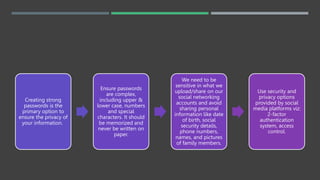
Creating strong
passwords is the
primary option to
ensure the privacy of
your information.
Ensure passwords
are complex,
including upper &
lower case, numbers
and special
characters. It should
be memorized and
never be written on
paper.
We need to be
sensitive in what we
upload/share on our
social networking
accounts and avoid
sharing personal
information like date
of birth, social
security details,
phone numbers,
names, and pictures
of family members.
Use security and
privacy options
provided by social
media platforms viz:
2-factor
authentication
system, access
control.
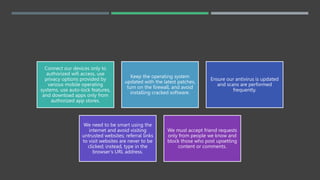
Connect our devices only to
authorized wifi access, use
privacy options provided by
various mobile operating
systems, use auto-lock features,
and download apps only from
authorized app stores.
Keep the operating system
updated with the latest patches,
turn on the firewall, and avoid
installing cracked software.
Ensure our antivirus is updated
and scans are performed
frequently.
We need to be smart using the
internet and avoid visiting
untrusted websites; referral links
to visit websites are never to be
clicked; instead, type in the
browser’s URL address.
We must accept friend requests
only from people we know and
block those who post upsetting
content or comments.
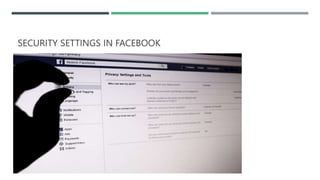
SECURITY SETTINGS IN FACEBOOK
 1. Clear your history using ‘Off-Facebook Activity’
 2. Hide your location
 Disable Facial Recognition
 Get rid of apps that track you off Facebook
 5. Enable two-factor authentication to lock out hackers
 6. Stop search engines from showing your Facebook account
 7. Limit the audience for your personal posts
 8. Stop your activity from being advertised
 9. Avoid those Like and Share buttons on other parts of the web
 10. Clean up your Friends’ List
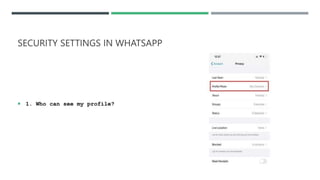
SECURITY SETTINGS IN WHATSAPP
 1. Who can see my profile?
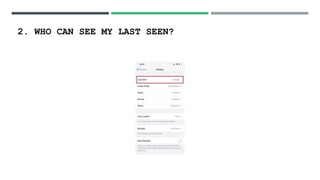
2. WHO CAN SEE MY LAST SEEN?
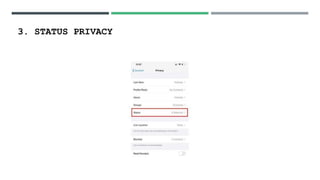
3. STATUS PRIVACY
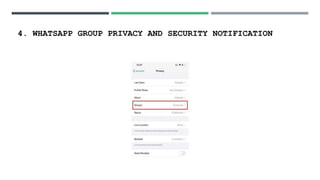
4. WHATSAPP GROUP PRIVACY AND SECURITY NOTIFICATION
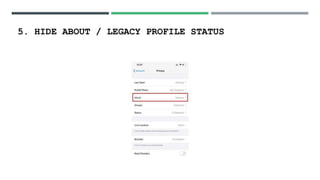
5. HIDE ABOUT / LEGACY PROFILE STATUS
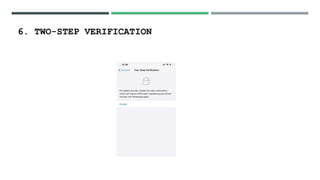
6. TWO-STEP VERIFICATION
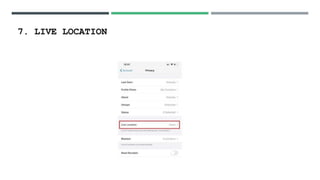
7. LIVE LOCATION
THANKS

Social media: Issues

  • 1.
    SOCIAL MEDIA SECURITY , PRIVACY, RISKS AND CHALLENGES SANDEEP THONIPARAMBIL
  • 2.
    HERE WE DISCUSS  Theevolution of social media has created a new paradigm of communication and interaction. It has become a part of our social life that helps us connect to friends, family, colleagues, or others  Issues involving Cybersecurity for social media  Risks & Challenges  Solutions To Social Media Threats
  • 3.
    PRIVACY OF DATA:  Usersshare their personal information on social media, which can cause privacy breaches. It can also sometimes cause personal data loss or instigate hackers to leverage the same for malicious reasons. For example, a user’s information can be viewed by everyone if the user’s default setting is public.
  • 4.
    DATA MINING:  Weall leave a data trail behind on the internet. When someone creates a new social media account and provides details such as date of birth, name, location, and personal habits, and without our knowledge, all these data are leveraged and shared with third-party for targeting advertising. It can cause security concerns as third-party may collect real-time updates on the user’s location.
  • 5.
    VIRUS AND MALWARE ATTACKS:  Malwareand viruses quite often find a way into the computer system through annoying ads. Once gaining access to the network, the attacker steals confidential data or causes complete disruption to the computer system. This often causes the loss of all kinds of data – personal, professional, financial, etc.
  • 6.
    ISSUES INVOLVING THE USE OF 3RDPARTY APPLICATIONS :  Most applications nowadays ask permission from users to access personal information such as contacts, pictures, and current geographic location before installing, and some of these applications which are running in the background might download malware on the user’s phone or smart devices without their knowledge.
  • 7.
    LEGAL ISSUES:  There arelegal risks associated with the use of social media, like posting offensive content towards any individual, community, or country. Often, legal actions can be and are taken when such offensive posts are made and uploaded by any individual or organization.
  • 8.
    IDENTITY THEFT:  As millionsshare their personal information to get registered on one or more social media platforms, this data becomes vulnerable as hackers and identity thieves use this information to reset passwords, apply for loans, or other malicious objectives.
  • 9.
    CYBER BULLYING: CYBER TERRORISM:  Itrefers to bullying through the digital medium. It can take place on social media, gaming, and messaging platforms. It is aimed at scaring, shaming, or annoying the targeted victim.  Cyber Terrorism: Nowadays, social media is also used to facilitate terrorism-related activities. It can support, promote, engage, and spread terrorism propaganda like incitement to terrorism, recruitment, radicalizing training, and planning of terrorist attacks.
  • 10.
  • 11.
    Creating strong passwords isthe primary option to ensure the privacy of your information. Ensure passwords are complex, including upper & lower case, numbers and special characters. It should be memorized and never be written on paper. We need to be sensitive in what we upload/share on our social networking accounts and avoid sharing personal information like date of birth, social security details, phone numbers, names, and pictures of family members. Use security and privacy options provided by social media platforms viz: 2-factor authentication system, access control.
  • 12.
    Connect our devicesonly to authorized wifi access, use privacy options provided by various mobile operating systems, use auto-lock features, and download apps only from authorized app stores. Keep the operating system updated with the latest patches, turn on the firewall, and avoid installing cracked software. Ensure our antivirus is updated and scans are performed frequently. We need to be smart using the internet and avoid visiting untrusted websites; referral links to visit websites are never to be clicked; instead, type in the browser’s URL address. We must accept friend requests only from people we know and block those who post upsetting content or comments.
  • 13.
  • 14.
     1. Clearyour history using ‘Off-Facebook Activity’  2. Hide your location  Disable Facial Recognition  Get rid of apps that track you off Facebook  5. Enable two-factor authentication to lock out hackers  6. Stop search engines from showing your Facebook account  7. Limit the audience for your personal posts  8. Stop your activity from being advertised  9. Avoid those Like and Share buttons on other parts of the web  10. Clean up your Friends’ List
  • 15.
    SECURITY SETTINGS INWHATSAPP  1. Who can see my profile?
  • 16.
    2. WHO CANSEE MY LAST SEEN?
  • 17.
  • 18.
    4. WHATSAPP GROUPPRIVACY AND SECURITY NOTIFICATION
  • 19.
    5. HIDE ABOUT/ LEGACY PROFILE STATUS
  • 20.
  • 21.
  • 22.