Lesson 7: Making Selects

Lesson 7: Making Selects
Reviewing your Footage
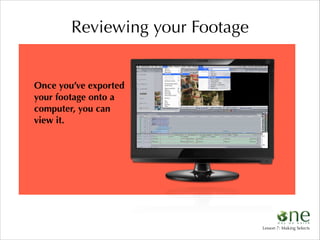
Once you’ve exported
your footage onto a
computer, you can
view it.

Lesson 7: Making Selects
Reviewing your Footage
Reviewing your
footage is a very
important step in the
process of creating a
video.

Lesson 7: Making Selects
Reviewing your Footage

Depending on the
camera you use, your
footage may be in one
long piece with no
breaks, or your
footage may be
divided into clips.

Lesson 7: Making Selects
CRITICAL	

PROCESS
Lesson 7: Making Selects
CRITICAL	

PROCESS
In order to prepare to make your selects...

Lesson 7: Making Selects
CRITICAL	

PROCESS

...look for the following things when viewing
your footage and make note of them when
you see them:

Lesson 7: Making Selects
First Determine:

I

What shots came out
successfully?

Gina	
  Nemirofsky

Lesson 7: Making Selects
First Determine:

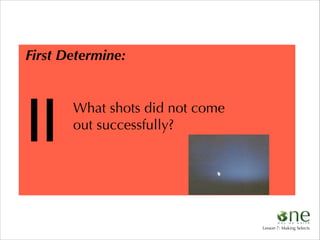
II

What shots did not come
out successfully?

Lesson 7: Making Selects
First Determine:

III

Did you miss any necessary shots?

?
Lesson 7: Making Selects
First Determine:

IV

Did any technical
problems occur?

Lesson 7: Making Selects
Then Look For the Following:
•strong composition or framing
•compelling imagery
•interesting movement in the frame
•interesting movement of the camera
•images that support the story you are
telling
•images that ask or answer a question

Terry	
  Henderson

Lesson 7: Making Selects
Then Look For the Following:
•strong composition or framing
•compelling imagery
•ointeresting movement in the frame
•interesting movement of the camera
•images that support the story you are
telling
•images that ask or answer a question

Michael	
  Fox

Lesson 7: Making Selects
Then Look For the Following:
•strong composition or framing
•compelling imagery
•interesting movement in the frame
•interesting movement of the camera
•images that support the story you are
telling
•images that ask or answer a question

Jamie	
  McConnell

Lesson 7: Making Selects
Then Look For the Following:
•strong composition or framing
•compelling imagery
•interesting movement in the frame
•interesting movement of the camera
•images that support the story you are
telling
•images that ask or answer a question

Luke	
  Cormack

Lesson 7: Making Selects
Then Look For the Following:
•strong composition or framing
•compelling imagery
•interesting movement in the frame
•interesting movement of the camera
•images that support the story you are
telling
•images that ask or answer a question

Jennifer	
  Serchia

Lesson 7: Making Selects
Then Look For the Following:
•strong composition or framing
•compelling imagery
•interesting movement in the frame
•interesting movement of the camera
•images that support the story you are
telling
•images that ask or answer a question

Daniel	
  Lichtblau

Lesson 7: Making Selects
Exercise:

take #

ex.

You should have
a logging chart
that looks like this:

in-point

out-point

00:25:10:02 00:25:32:02

duration

20 sec.

comment

overexposed

good

Y/N

Y/N

Y/N

Y/N

Y/N

Y/N

Y/N

Y/N

Y/N

Y/N

Y/N

Y/N

Lesson 7: Making Selects
Exercise:

take #

ex.

You should have
a logging chart
that looks like this:

in-point

out-point

00:25:10:02 00:25:32:02

duration

20 sec.

comment

overexposed

good

Y/N

Y/N

Y/N

Y/N

Y/N

Take some time with
it while reviewing
your footage to fill
out all of the
information about
your shots.

Y/N

Y/N

Y/N

Y/N

Y/N

Y/N

Y/N

Lesson 7: Making Selects

One Day on Earth Interactive Lesson #7

  • 1.
    Lesson 7: MakingSelects Lesson 7: Making Selects
  • 2.
    Reviewing your Footage Onceyou’ve exported your footage onto a computer, you can view it. Lesson 7: Making Selects
  • 3.
    Reviewing your Footage Reviewingyour footage is a very important step in the process of creating a video. Lesson 7: Making Selects
  • 4.
    Reviewing your Footage Dependingon the camera you use, your footage may be in one long piece with no breaks, or your footage may be divided into clips. Lesson 7: Making Selects
  • 5.
  • 6.
    CRITICAL PROCESS In order toprepare to make your selects... Lesson 7: Making Selects
  • 7.
    CRITICAL PROCESS ...look for thefollowing things when viewing your footage and make note of them when you see them: Lesson 7: Making Selects
  • 8.
    First Determine: I What shotscame out successfully? Gina  Nemirofsky Lesson 7: Making Selects
  • 9.
    First Determine: II What shotsdid not come out successfully? Lesson 7: Making Selects
  • 10.
    First Determine: III Did youmiss any necessary shots? ? Lesson 7: Making Selects
  • 11.
    First Determine: IV Did anytechnical problems occur? Lesson 7: Making Selects
  • 12.
    Then Look Forthe Following: •strong composition or framing •compelling imagery •interesting movement in the frame •interesting movement of the camera •images that support the story you are telling •images that ask or answer a question Terry  Henderson Lesson 7: Making Selects
  • 13.
    Then Look Forthe Following: •strong composition or framing •compelling imagery •ointeresting movement in the frame •interesting movement of the camera •images that support the story you are telling •images that ask or answer a question Michael  Fox Lesson 7: Making Selects
  • 14.
    Then Look Forthe Following: •strong composition or framing •compelling imagery •interesting movement in the frame •interesting movement of the camera •images that support the story you are telling •images that ask or answer a question Jamie  McConnell Lesson 7: Making Selects
  • 15.
    Then Look Forthe Following: •strong composition or framing •compelling imagery •interesting movement in the frame •interesting movement of the camera •images that support the story you are telling •images that ask or answer a question Luke  Cormack Lesson 7: Making Selects
  • 16.
    Then Look Forthe Following: •strong composition or framing •compelling imagery •interesting movement in the frame •interesting movement of the camera •images that support the story you are telling •images that ask or answer a question Jennifer  Serchia Lesson 7: Making Selects
  • 17.
    Then Look Forthe Following: •strong composition or framing •compelling imagery •interesting movement in the frame •interesting movement of the camera •images that support the story you are telling •images that ask or answer a question Daniel  Lichtblau Lesson 7: Making Selects
  • 18.
    Exercise: take # ex. You shouldhave a logging chart that looks like this: in-point out-point 00:25:10:02 00:25:32:02 duration 20 sec. comment overexposed good Y/N Y/N Y/N Y/N Y/N Y/N Y/N Y/N Y/N Y/N Y/N Y/N Lesson 7: Making Selects
  • 19.
    Exercise: take # ex. You shouldhave a logging chart that looks like this: in-point out-point 00:25:10:02 00:25:32:02 duration 20 sec. comment overexposed good Y/N Y/N Y/N Y/N Y/N Take some time with it while reviewing your footage to fill out all of the information about your shots. Y/N Y/N Y/N Y/N Y/N Y/N Y/N Lesson 7: Making Selects