Smart Shopping cart
Team member:
Sahiti MDN
Narain
Akilan
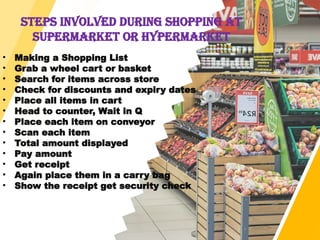
STEPS INVOLVED DURING SHOPPING AT
SUPERMARket or hypermarket
• Making a Shopping List
• Grab a wheel cart or basket
• Search for items across store
• Check for discounts and expiry dates
• Place all items in cart
• Head to counter, Wait in Q
• Place each item on conveyor
• Scan each item
• Total amount displayed
• Pay amount
• Get receipt
• Again place them in a carry bag
• Show the receipt get security check
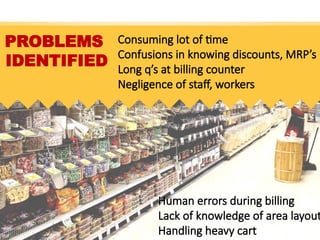
PROBLEMS
IDENTIFIED
Consuming lot of time
Confusions in knowing discounts, MRP’s
Long q’s at billing counter
Negligence of staff, workers
Human errors during billing
Lack of knowledge of area layout
Handling heavy cart
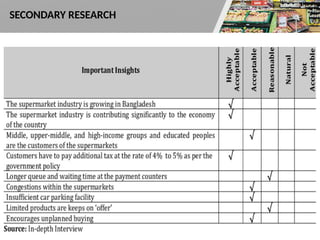
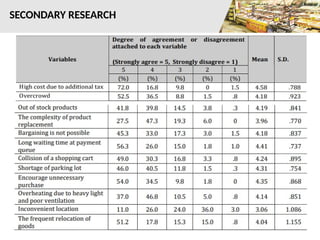
SECONDARY RESEARCH
Replace with your own text
SECONDARY RESEARCH
SECONDARY RESEARCH
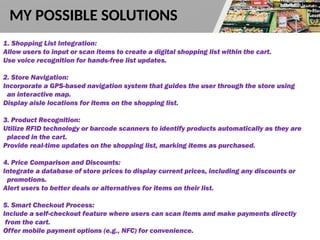
1. Shopping List Integration:
Allow users to input or scan items to create a digital shopping list within the cart.
Use voice recognition for hands-free list updates.
2. Store Navigation:
Incorporate a GPS-based navigation system that guides the user through the store using
an interactive map.
Display aisle locations for items on the shopping list.
3. Product Recognition:
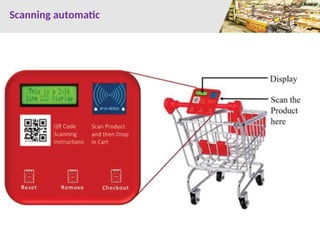
Utilize RFID technology or barcode scanners to identify products automatically as they are
placed in the cart.
Provide real-time updates on the shopping list, marking items as purchased.
4. Price Comparison and Discounts:
Integrate a database of store prices to display current prices, including any discounts or
promotions.
Alert users to better deals or alternatives for items on their list.
5. Smart Checkout Process:
Include a self-checkout feature where users can scan items and make payments directly
from the cart.
Offer mobile payment options (e.g., NFC) for convenience.
MY POSSIBLE SOLUTIONS
Solutions
6. Inventory Management:
Track purchased items and maintain a history to suggest future shopping lists.
Provide notifications for items running low at home based on previous purchases.
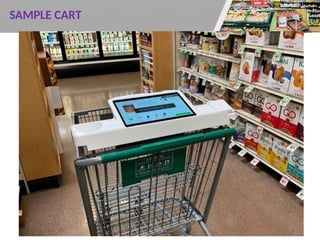
7. User Interface:
Equip the cart with a touch screen interface for easy navigation, list updates, and
product information.
Include voice commands for accessibility.
8. Bagging Assistance:
Integrate a compartment or automated system to help organize and bag
groceries as they are scanned.
9. Feedback and Suggestions:
Enable users to provide feedback on products and their shopping experience.
Use AI algorithms to suggest recipes or meal ideas based on purchased
ingredients.
10. Return Home Feature:
Include a tracking feature that helps users locate their vehicle in the parking lot
after shopping.
Main solution
Auto Movement of cart
(Follow us)
SAMPLE CART
Scanning automatic
THANK YOU

SlideMembers_SupermarketFreePPTSample_PS_4855.pptx

  • 1.
    Smart Shopping cart Teammember: Sahiti MDN Narain Akilan
  • 2.
    STEPS INVOLVED DURINGSHOPPING AT SUPERMARket or hypermarket • Making a Shopping List • Grab a wheel cart or basket • Search for items across store • Check for discounts and expiry dates • Place all items in cart • Head to counter, Wait in Q • Place each item on conveyor • Scan each item • Total amount displayed • Pay amount • Get receipt • Again place them in a carry bag • Show the receipt get security check
  • 3.
    PROBLEMS IDENTIFIED Consuming lot oftime Confusions in knowing discounts, MRP’s Long q’s at billing counter Negligence of staff, workers Human errors during billing Lack of knowledge of area layout Handling heavy cart
  • 4.
  • 5.
    Replace with yourown text SECONDARY RESEARCH
  • 6.
  • 7.
    1. Shopping ListIntegration: Allow users to input or scan items to create a digital shopping list within the cart. Use voice recognition for hands-free list updates. 2. Store Navigation: Incorporate a GPS-based navigation system that guides the user through the store using an interactive map. Display aisle locations for items on the shopping list. 3. Product Recognition: Utilize RFID technology or barcode scanners to identify products automatically as they are placed in the cart. Provide real-time updates on the shopping list, marking items as purchased. 4. Price Comparison and Discounts: Integrate a database of store prices to display current prices, including any discounts or promotions. Alert users to better deals or alternatives for items on their list. 5. Smart Checkout Process: Include a self-checkout feature where users can scan items and make payments directly from the cart. Offer mobile payment options (e.g., NFC) for convenience. MY POSSIBLE SOLUTIONS
  • 8.
    Solutions 6. Inventory Management: Trackpurchased items and maintain a history to suggest future shopping lists. Provide notifications for items running low at home based on previous purchases. 7. User Interface: Equip the cart with a touch screen interface for easy navigation, list updates, and product information. Include voice commands for accessibility. 8. Bagging Assistance: Integrate a compartment or automated system to help organize and bag groceries as they are scanned. 9. Feedback and Suggestions: Enable users to provide feedback on products and their shopping experience. Use AI algorithms to suggest recipes or meal ideas based on purchased ingredients. 10. Return Home Feature: Include a tracking feature that helps users locate their vehicle in the parking lot after shopping.
  • 9.
    Main solution Auto Movementof cart (Follow us)
  • 10.
  • 11.
  • 12.