Active Admin
Create your admin interface the easy way

Nestor Walker
Install
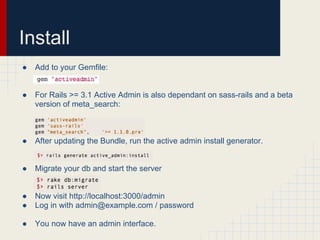
●   Add to your Gemfile:


●   For Rails >= 3.1 Active Admin is also dependant on sass-rails and a beta
    version of meta_search:


●   After updating the Bundle, run the active admin install generator.


●   Migrate your db and start the server


●   Now visit http://localhost:3000/admin
●   Log in with admin@example.com / password

●   You now have an admin interface.
Models
Active admin will set up your models with the following generator:


This creates a file in app/admin/my_model_name.rb
Models
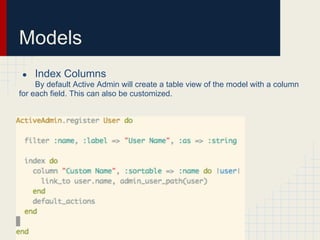
●   Index Columns
     By default Active Admin will create a table view of the model with a column
for each field. This can also be customized.
Models
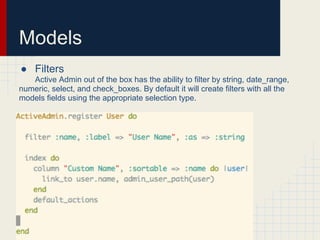
● Filters
   Active Admin out of the box has the ability to filter by string, date_range,
numeric, select, and check_boxes. By default it will create filters with all the
models fields using the appropriate selection type.
Models
Forms
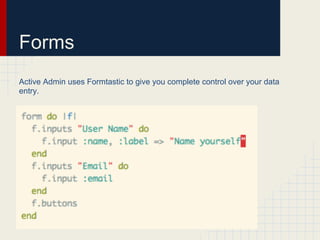
Active Admin uses Formtastic to give you complete control over your data
entry.
Forms
The form can also be put into a partial.


app/views/admin/users/_form.html.erb
Forms
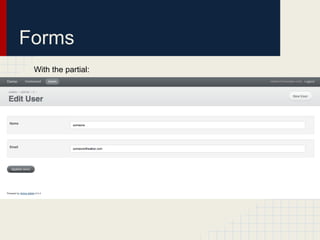
 With the partial:
Dashboard
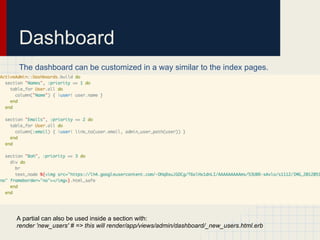
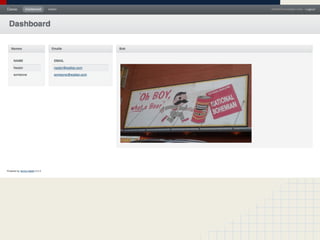
The dashboard can be customized in a way similar to the index pages.


A partial can also be used inside a section with:
render 'new_users' # => this will render/app/views/admin/dashboard/_new_users.html.erb
Active Admin: Create Your Admin Interface the Easy Way

Active Admin: Create Your Admin Interface the Easy Way

  • 1.
    Active Admin Create youradmin interface the easy way Nestor Walker
  • 2.
    Install ● Add to your Gemfile: ● For Rails >= 3.1 Active Admin is also dependant on sass-rails and a beta version of meta_search: ● After updating the Bundle, run the active admin install generator. ● Migrate your db and start the server ● Now visit http://localhost:3000/admin ● Log in with admin@example.com / password ● You now have an admin interface.
  • 4.
    Models Active admin willset up your models with the following generator: This creates a file in app/admin/my_model_name.rb
  • 5.
    Models ● Index Columns By default Active Admin will create a table view of the model with a column for each field. This can also be customized.
  • 6.
    Models ● Filters Active Admin out of the box has the ability to filter by string, date_range, numeric, select, and check_boxes. By default it will create filters with all the models fields using the appropriate selection type.
  • 7.
  • 8.
    Forms Active Admin usesFormtastic to give you complete control over your data entry.
  • 9.
    Forms The form canalso be put into a partial. app/views/admin/users/_form.html.erb
  • 10.
  • 11.
    Dashboard The dashboard canbe customized in a way similar to the index pages. A partial can also be used inside a section with: render 'new_users' # => this will render/app/views/admin/dashboard/_new_users.html.erb