ADM
Application Deployment
       Manager


   http://siebel-learnings.blogspot.com   1
Scope
• ADM Siebel
• ADM UI deployment
• Creating new ADM Content
  Object


       http://siebel-learnings.blogspot.com   2
ADM Siebel
                       ADM UI deployment


•After completing this , you will be able to:
    •Describe the use of ADM
    •Describe architecture, capabilities, deployment steps and
    process flows
    •Describe ADM Data Types, and some considerations
    and dependencies during the deployment process based
    on the specific data type
    •Describe best practices using ADM
    •Trouble shooting ADM errors


                   http://siebel-learnings.blogspot.com          3
ADM overview Agenda
•   Introduction
•   Architecture
•   Process of migration
•   Creating new data types
•   Best Practices


             http://siebel-learnings.blogspot.com   4
Introduction
• Problem:
• Migrating run-time customizations like
  LOVs, Assignment Rules, Predefined
  queries, views etc. from one
  environment to another is manual and
  error prone.


           http://siebel-learnings.blogspot.com   5
What is ADM ?
• ADM is a feature that automates the process of
  migrating enterprise customization data

• ADM is designed to provide a single deployment tool
  that covers various areas within the Siebel
  application.

• The objective is to reduce the potential manual setup
  and deployment work and provide as much
  automation as possible to decrease the error rate.


               http://siebel-learnings.blogspot.com       6
Data types available with ADM:
•   Assignment Rule
•   Assignment Groups
•   Access Group
•   List of Values (LOV)
•   Public Predefined Query (PDQs)
•   Expense Types
•   Product Feature
•   Product Line
•   Responsibility
•   View
•   State Model
•   User List
•   New Data types can be configured in Tools

                  http://siebel-learnings.blogspot.com   7
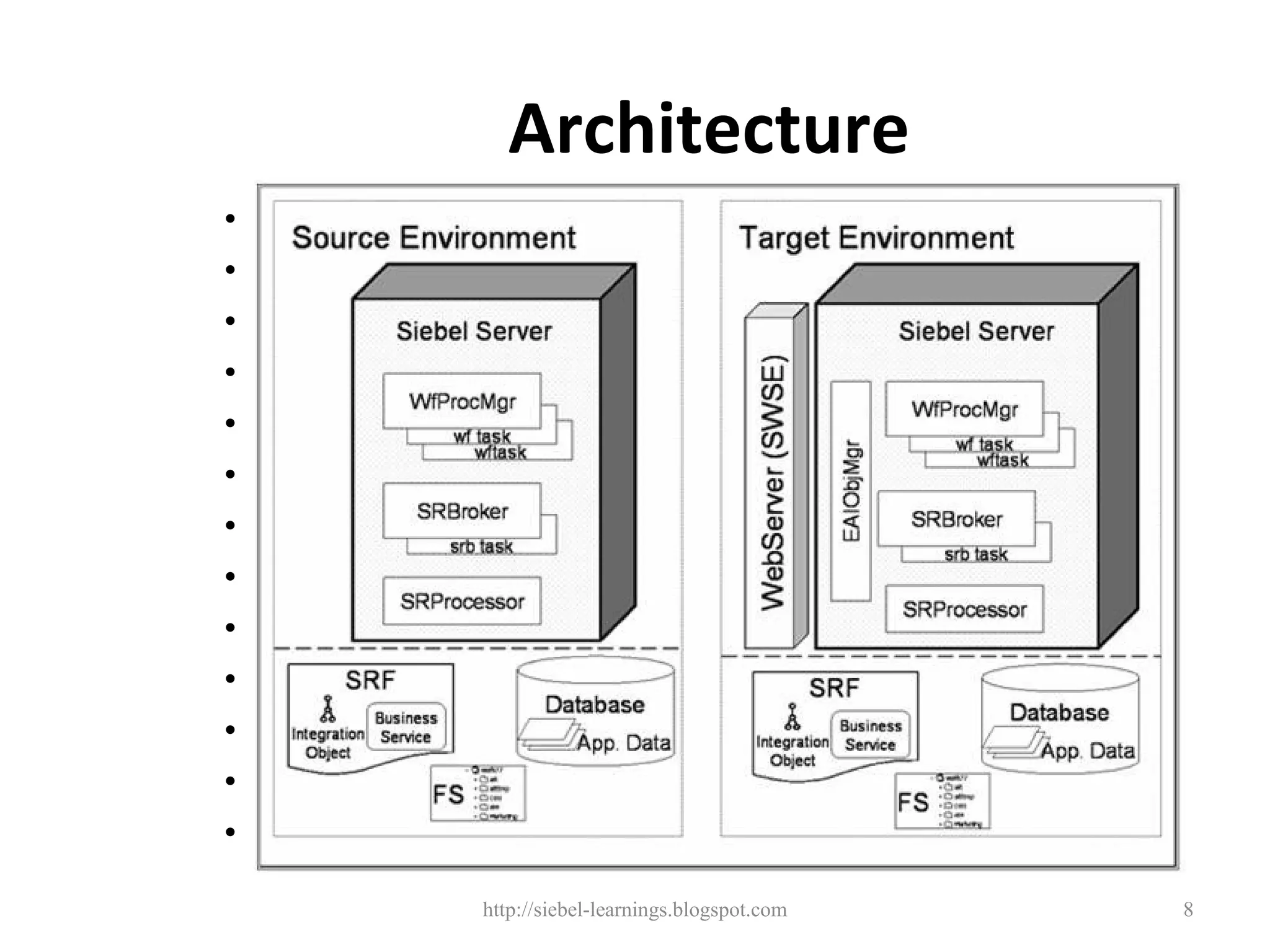
Architecture
•   Assignment Rule
•   Assignment Groups
•   Access Group
•   List of Values (LOV)
•   Public Predefined Query (PDQs)
•   Expense Types
•   Product Feature
•   Product Line
•   Responsibility
•   View
•   State Model
•   User List
•   New Data types can be configured in Tools

                  http://siebel-learnings.blogspot.com   8
Deployment Methods

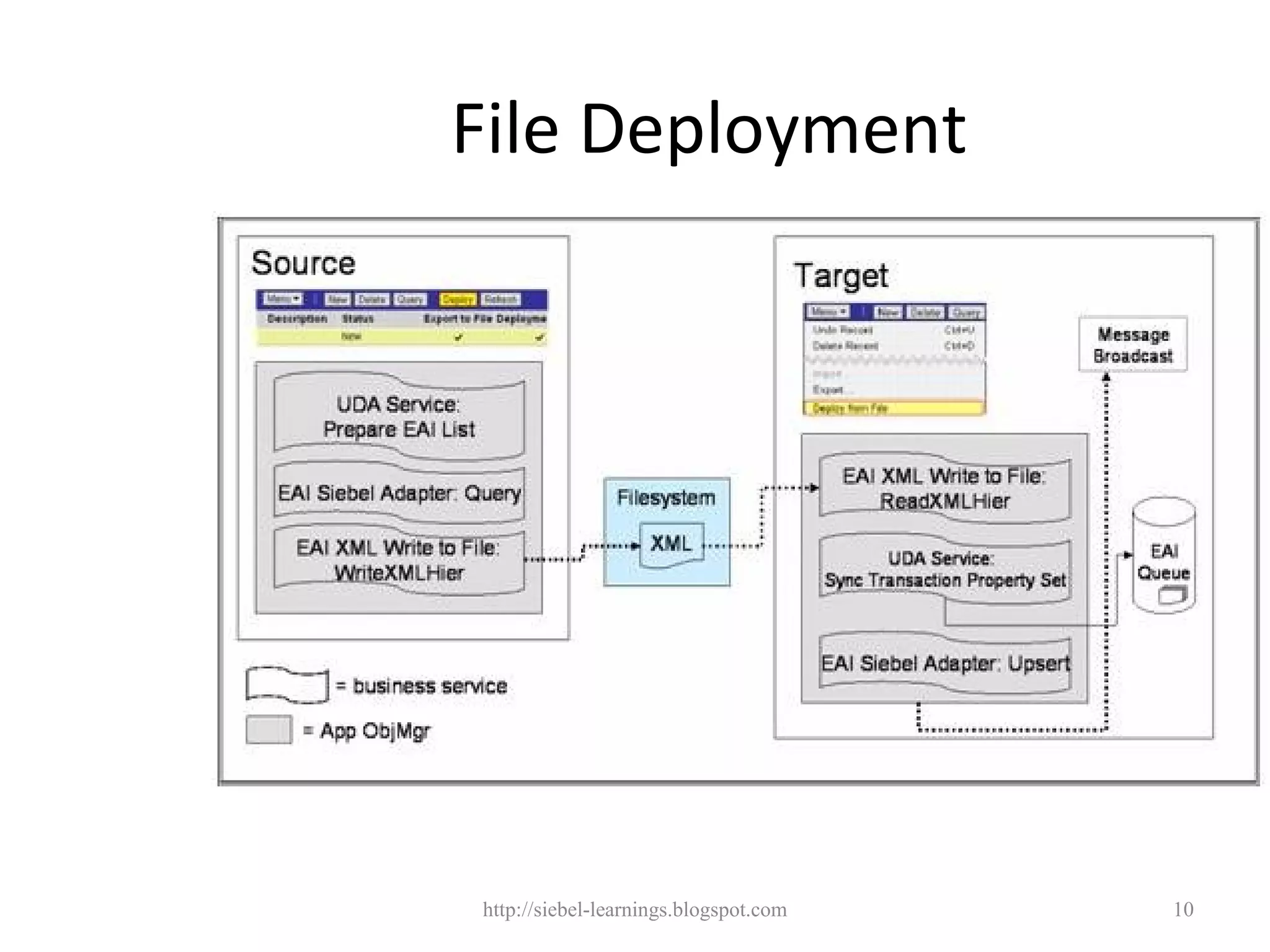
ADM File Deployment
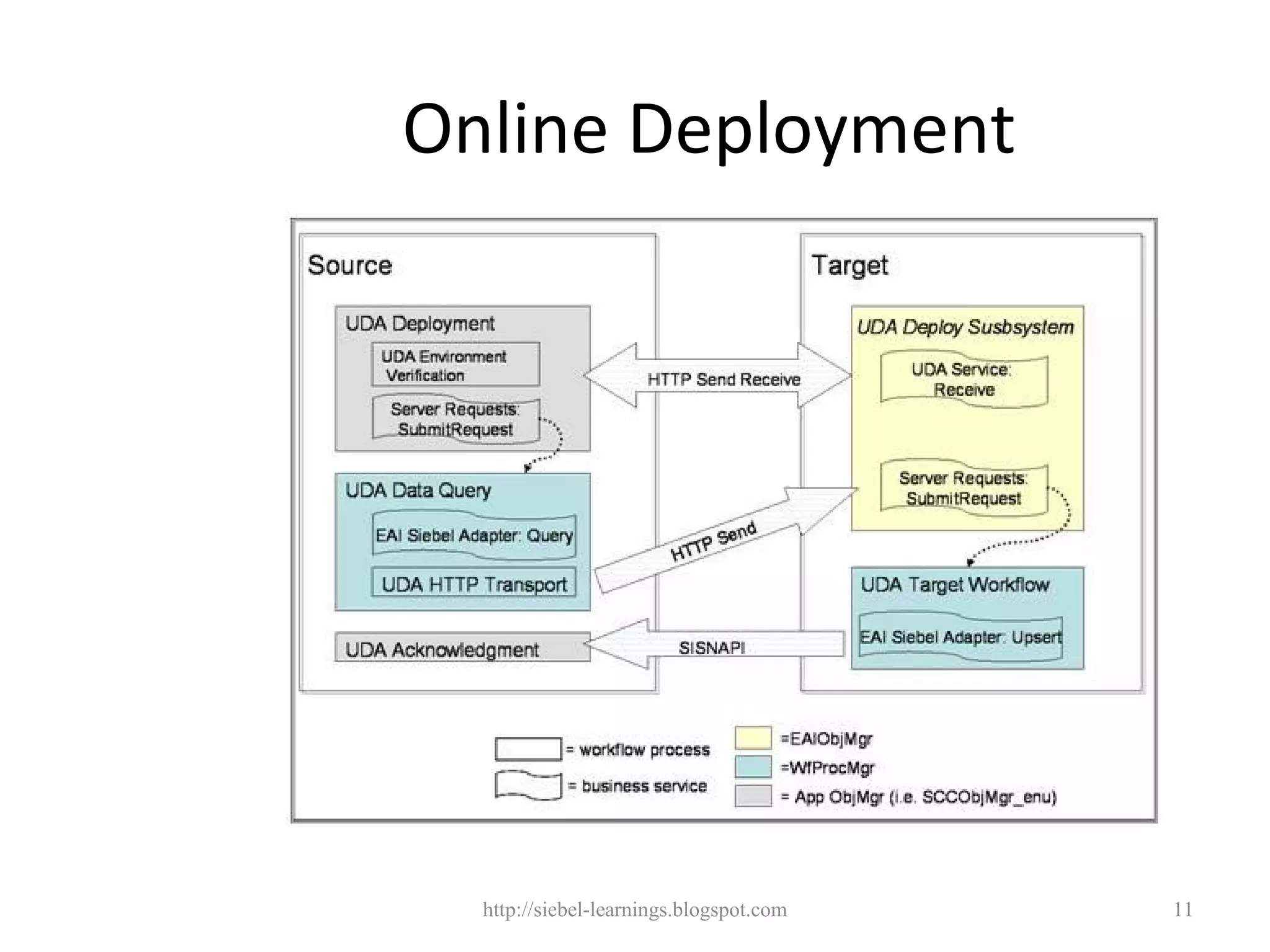
ADM Online Deployment


      http://siebel-learnings.blogspot.com   9
File Deployment


http://siebel-learnings.blogspot.com   10
Online Deployment


  http://siebel-learnings.blogspot.com   11
File Deployment illustration
Lets migrate LOV of type 'IBU_BUSINESS_LINE”

•Step1 : Create Deployment Project , Validate
Filters and enable project
•Step2 : Create Deployment Session -> deploy (will
create a XML file)
•Step 3: Go to target system, import from the XML
file
•Step 4: verify the results


                 http://siebel-learnings.blogspot.com   12
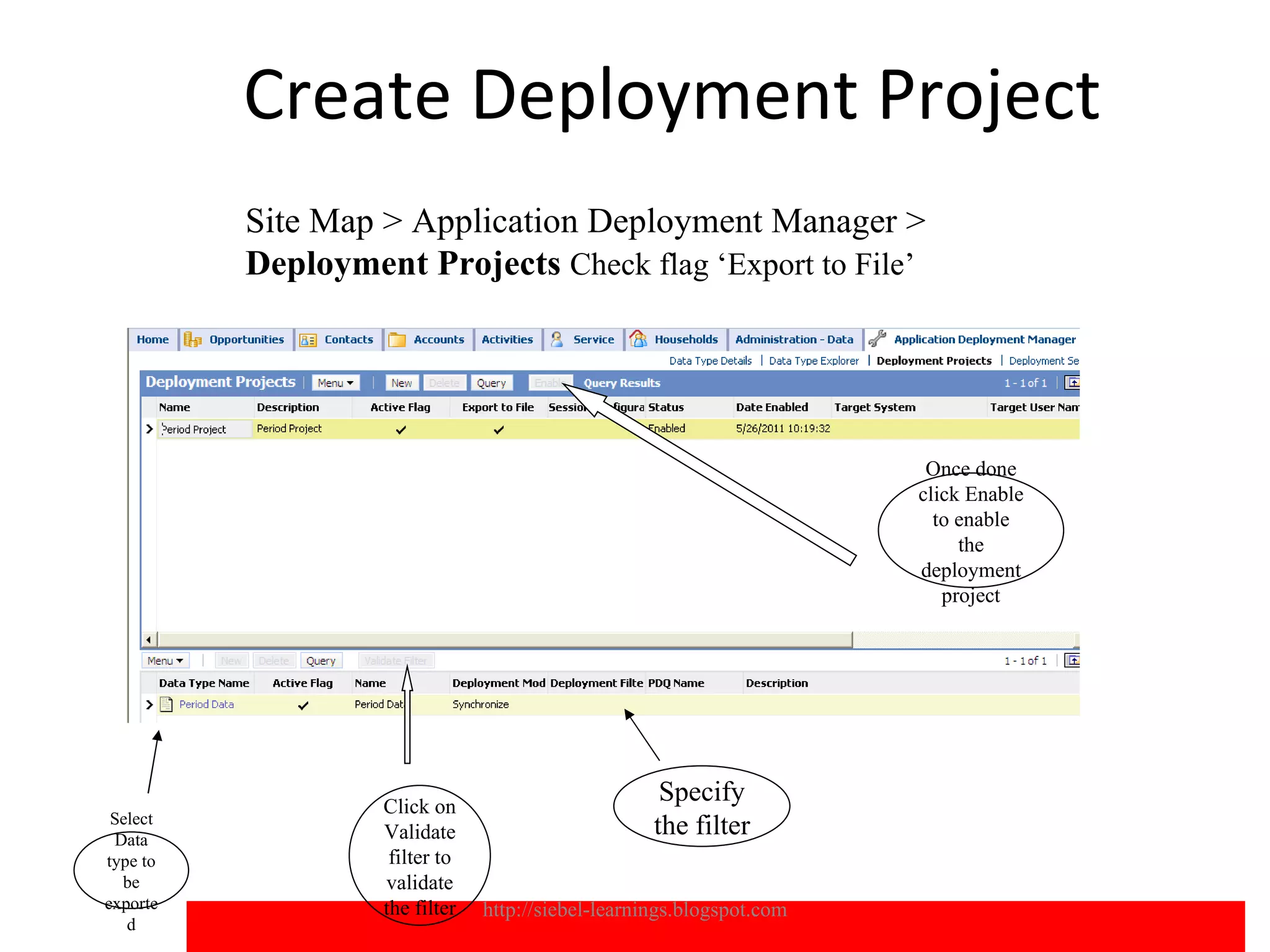
Create Deployment Project
          Site Map > Application Deployment Manager >
          Deployment Projects Check flag ‘Export to File’


                                                                        Once done
                                                                       click Enable
                                                                         to enable
                                                                            the
                                                                       deployment
                                                                          project


                   Click on
                                                     Specify
 Select
 Data              Validate                         the filter
type to             filter to
  be               validate
exporte            the filter   http://siebel-learnings.blogspot.com                  13
   d
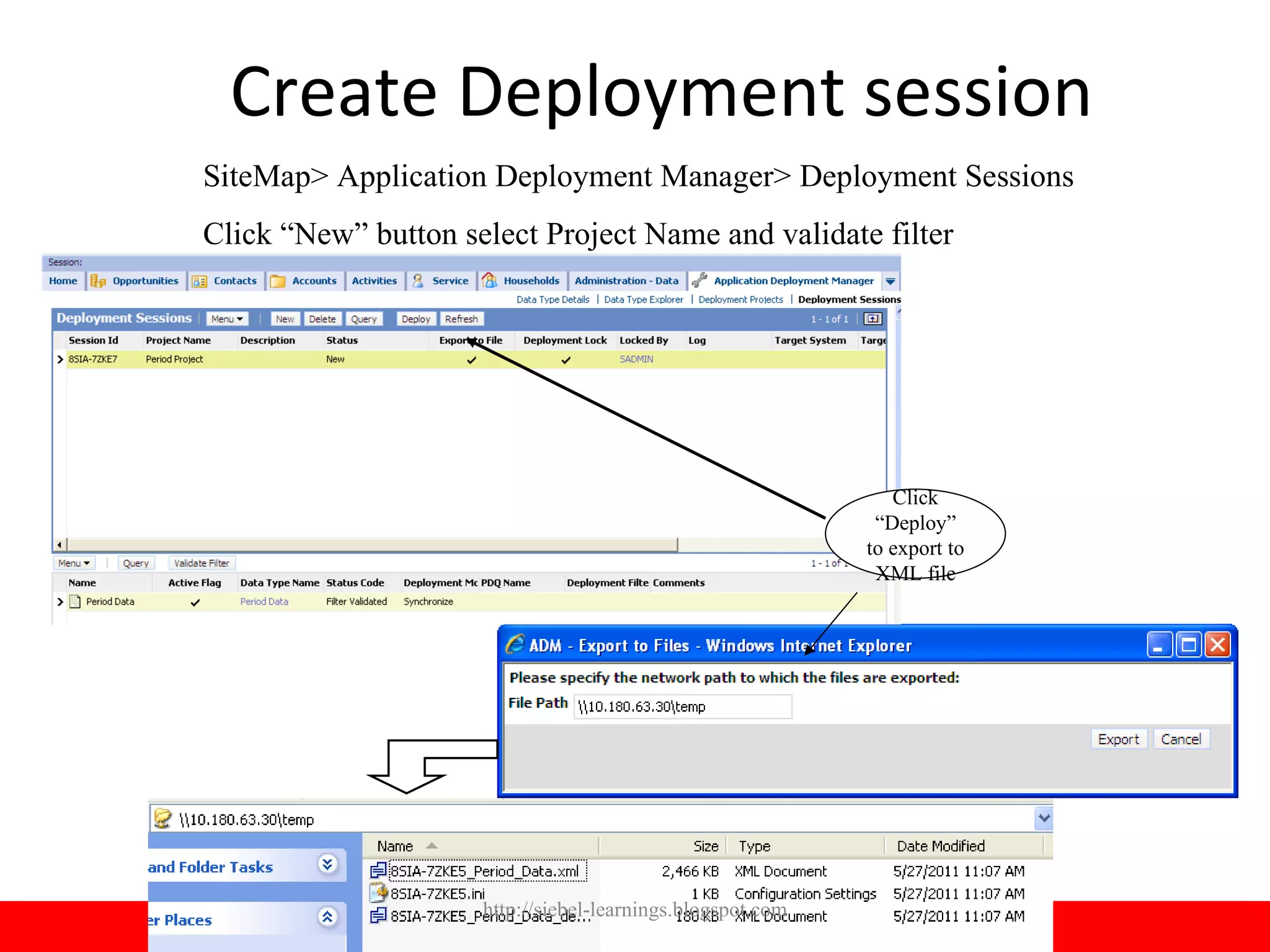
Create Deployment session
SiteMap> Application Deployment Manager> Deployment Sessions
Click “New” button select Project Name and validate filter


                                                               Click
                                                             “Deploy”
                                                            to export to
                                                             XML file


                     http://siebel-learnings.blogspot.com                  14
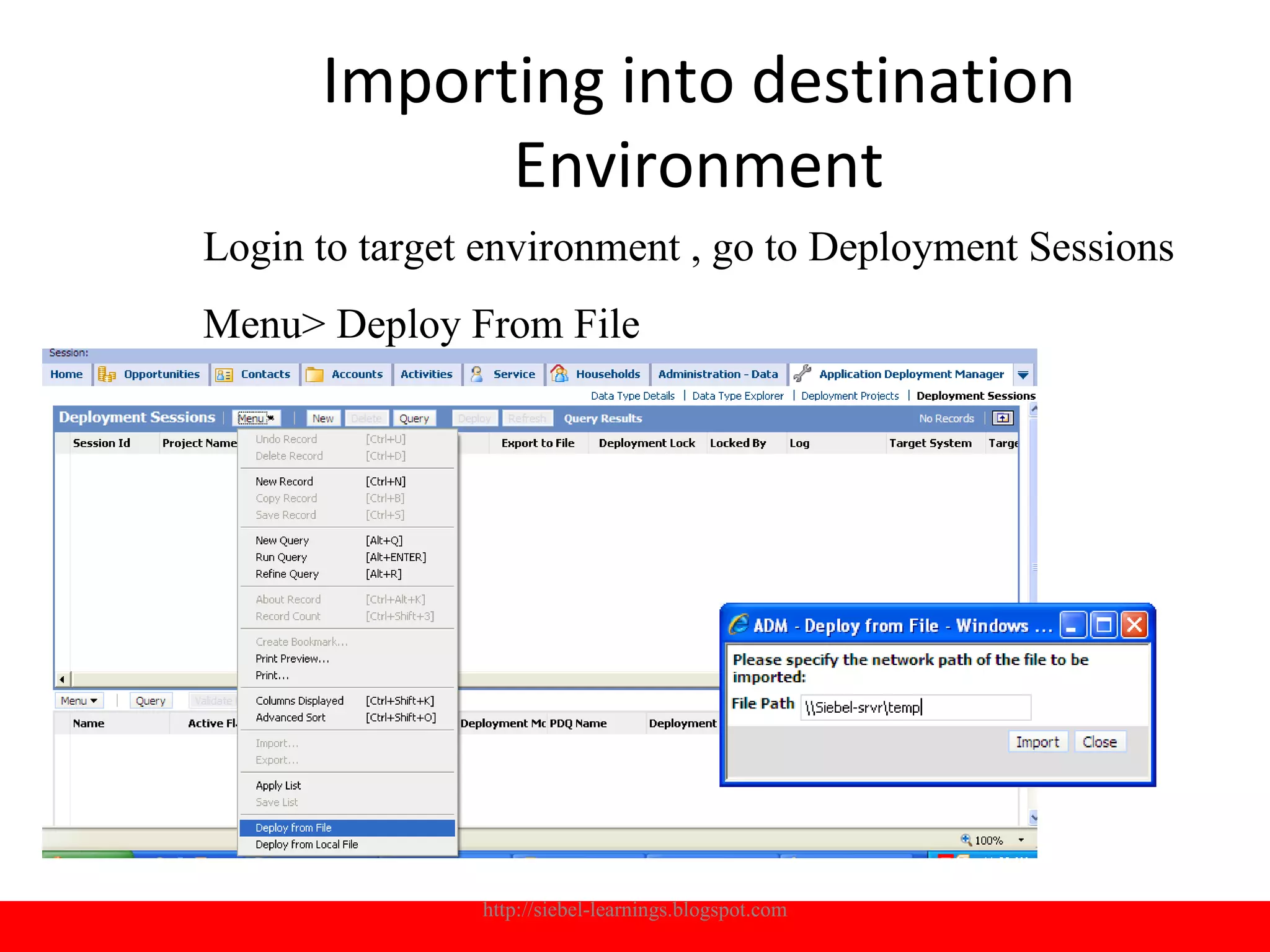
Importing into destination
            Environment
Login to target environment , go to Deployment Sessions
Menu> Deploy From File


               http://siebel-learnings.blogspot.com   15
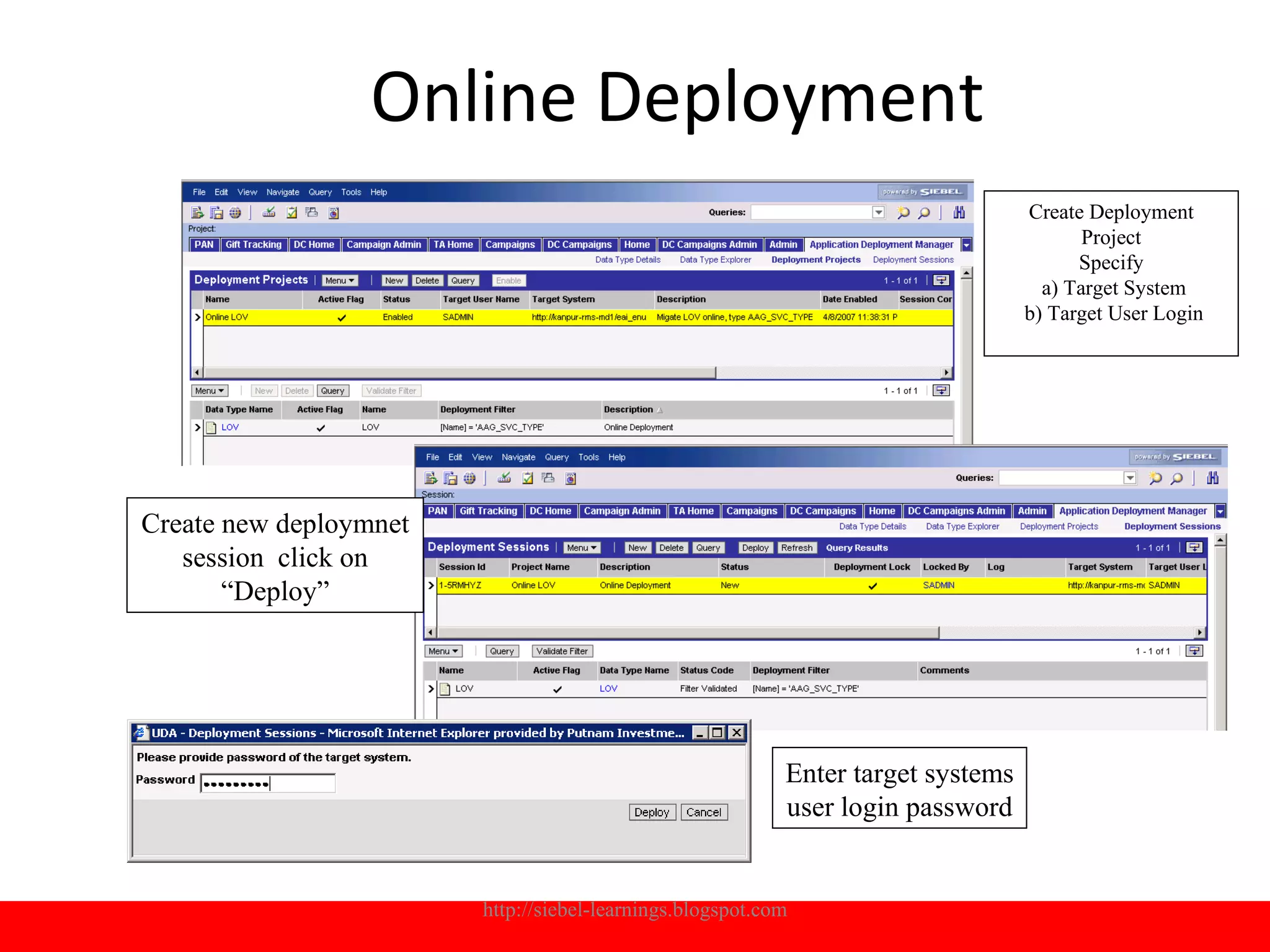
Online Deployment
                                                                                  Create Deployment
                                                                                         Project
                                                                                        Specify
                                                                                    a) Target System
                                                                                  b) Target User Login


Create new deploymnet
   session click on
       “Deploy”


                                                           Enter target systems
                                                           user login password


                        http://siebel-learnings.blogspot.com                                      16
Creating new Data types

• Step1: Identify the BO and BC of new ADM
           data type to be created.
• Step 2: Create Integration Object
• Step 3: Create Content Object
• Step 4: Export Newly created Data type


            http://siebel-learnings.blogspot.com   17
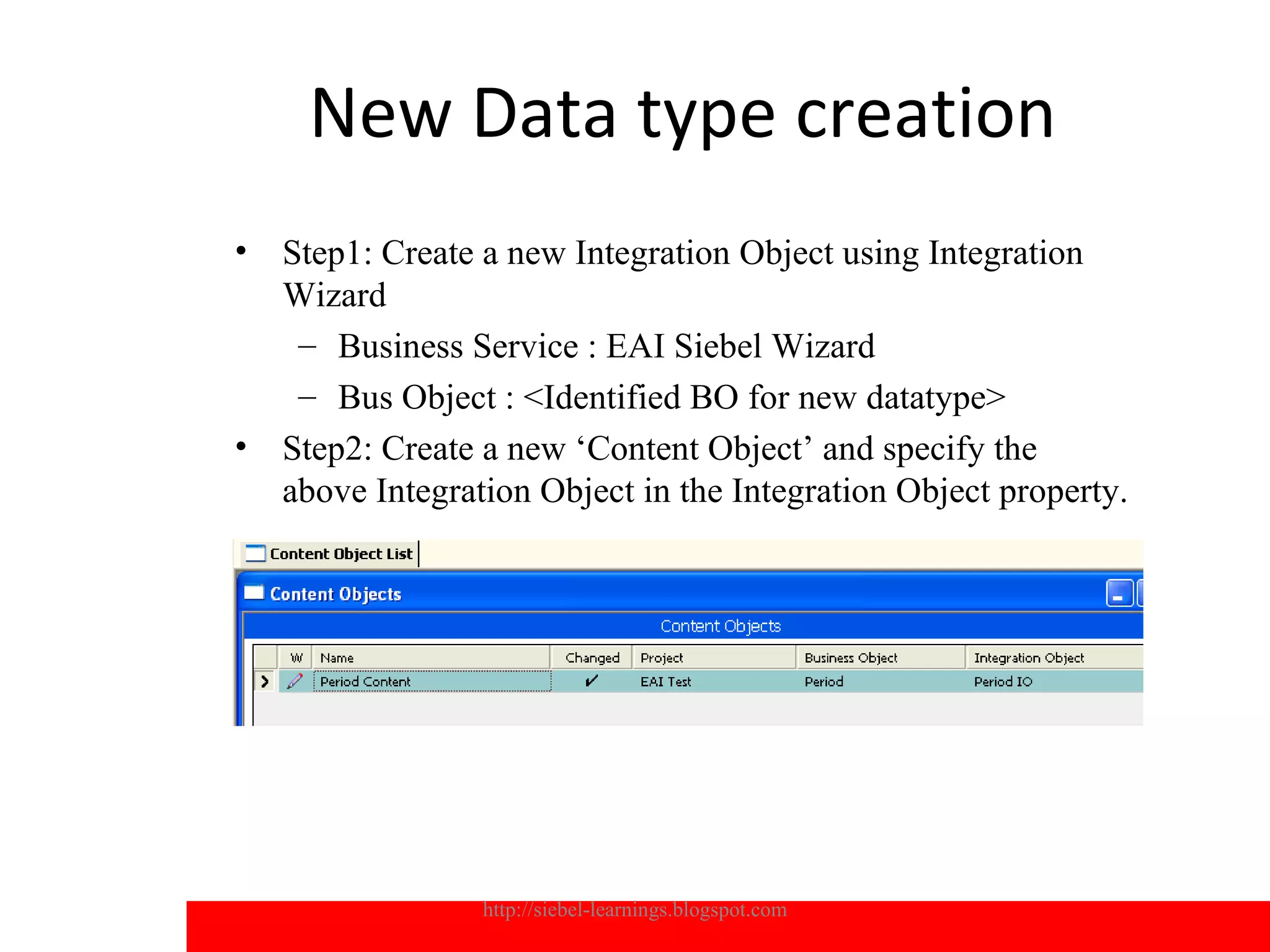
New Data type creation
•   Step1: Create a new Integration Object using Integration
    Wizard
     – Business Service : EAI Siebel Wizard
     – Bus Object : <Identified BO for new datatype>
•   Step2: Create a new ‘Content Object’ and specify the
    above Integration Object in the Integration Object property.


                  http://siebel-learnings.blogspot.com             18
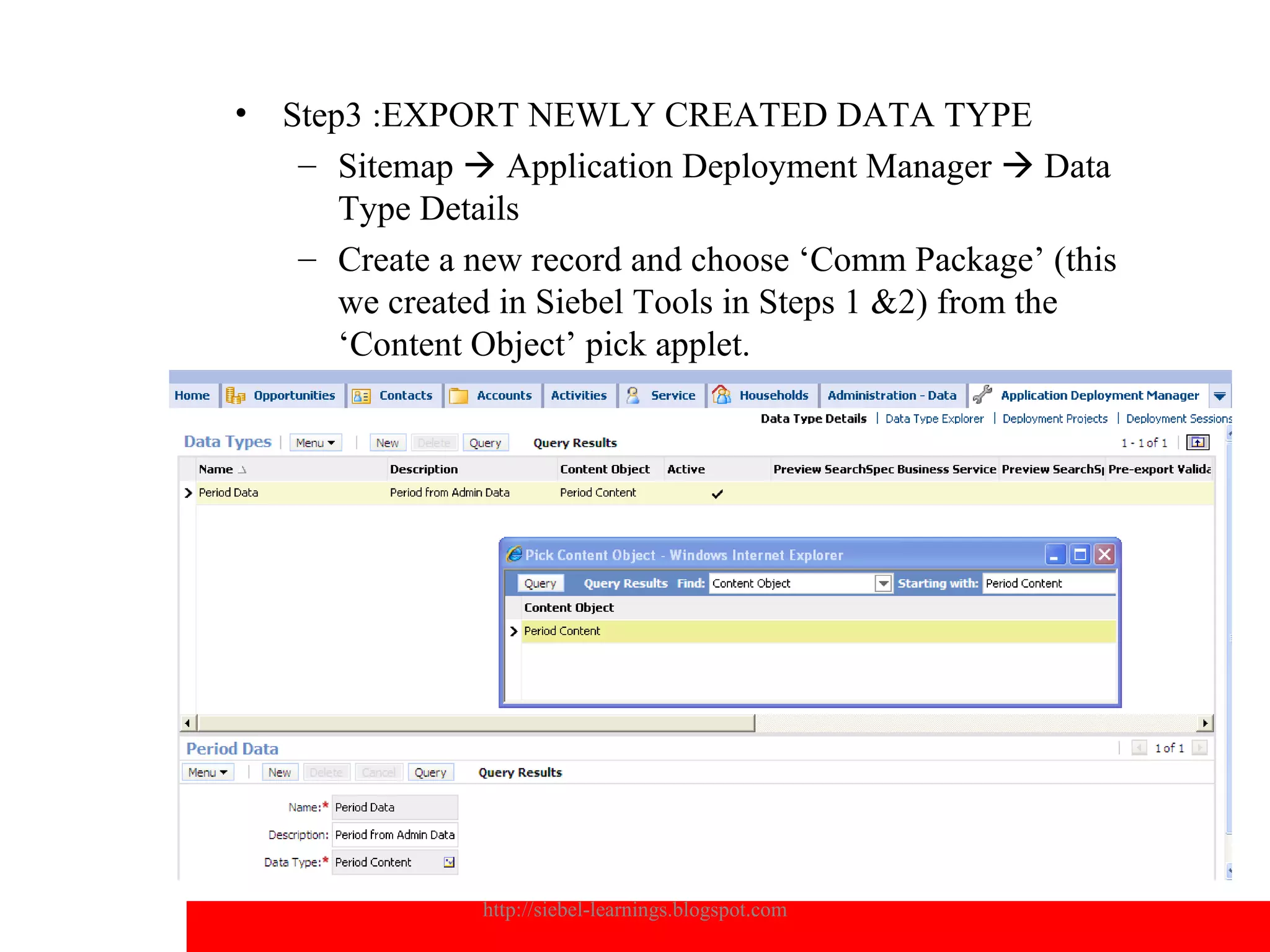
•   Step3 :EXPORT NEWLY CREATED DATA TYPE
     – Sitemap  Application Deployment Manager  Data
        Type Details
     – Create a new record and choose ‘Comm Package’ (this
        we created in Siebel Tools in Steps 1 &2) from the
        ‘Content Object’ pick applet.


                http://siebel-learnings.blogspot.com         19
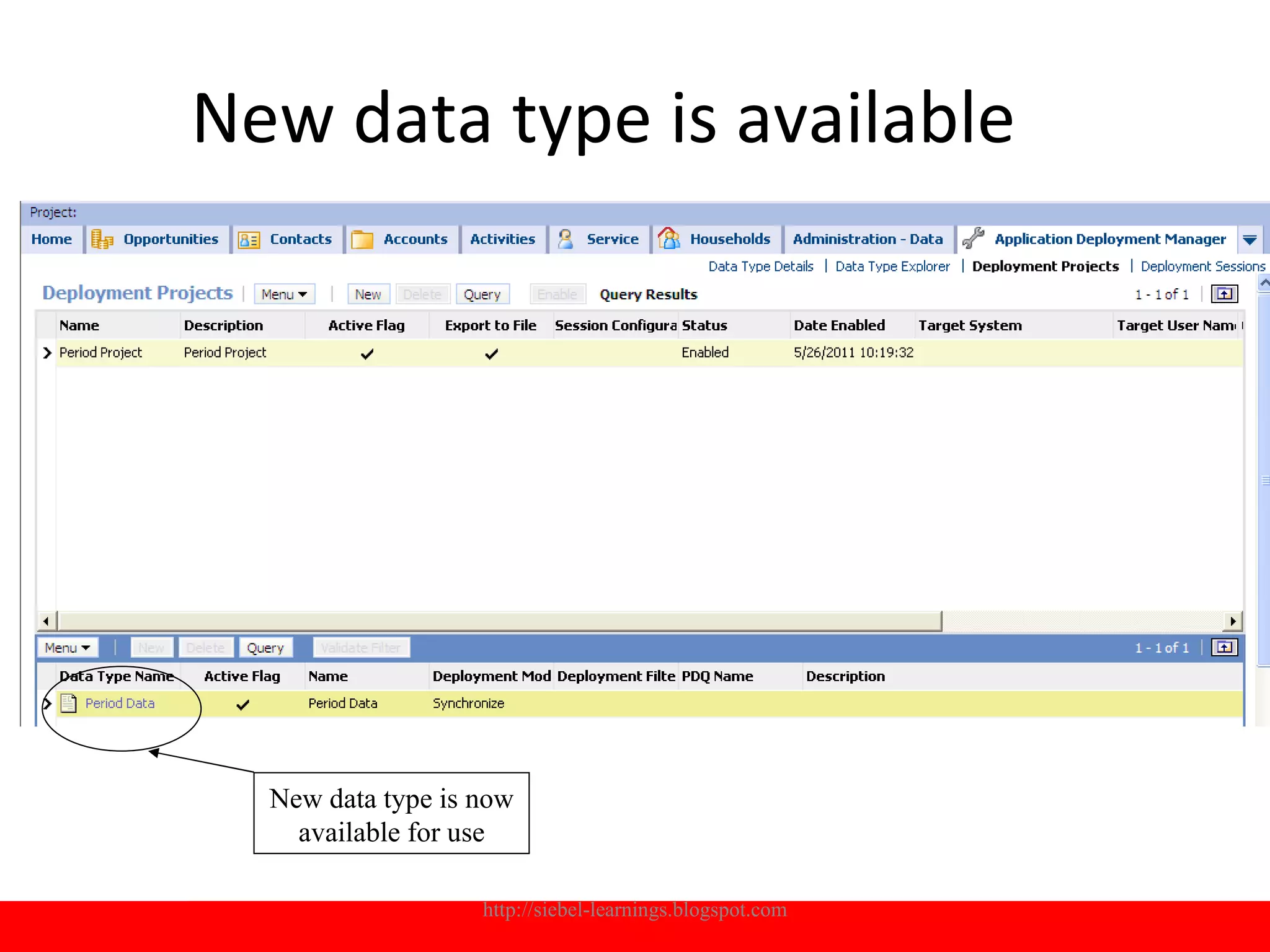
New data type is available


  New data type is now
    available for use

                   http://siebel-learnings.blogspot.com   20
Trouble shooting
•An error occurred exporting to file : Make sure
the path is accessible
•Activate all ADM related workflow processes :
“UDA*”
•Make sure Work flow process manager and
workflow process batch managers are available.
•Both the environments repository and SRF
should be identical
•EAI Object manager should be active on the
target system while doing online deployment
•Bulk transfer of data is not supported with
ADM, you will receive errors if the record count
is more than 10K


        http://siebel-learnings.blogspot.com       21
Trouble shooting
•   An error occurred exporting to file : Make sure the path is accessible
•   Activate all ADM related workflow processes : “UDA*”
•   Make sure Work flow process manager and workflow process batch managers
    are available.
•   Both the environments repository and SRF should be identical
•   EAI Object manager should be active on the target system while doing online
    deployment
•   Bulk transfer of data is not supported with ADM, you will receive errors if the
    record count is more than 10K


                    http://siebel-learnings.blogspot.com                          22
Q&A


http://siebel-learnings.blogspot.com   23

Siebel Application Deployment Manager

  • 1.
    ADM Application Deployment Manager http://siebel-learnings.blogspot.com 1
  • 2.
    Scope • ADM Siebel •ADM UI deployment • Creating new ADM Content Object http://siebel-learnings.blogspot.com 2
  • 3.
    ADM Siebel ADM UI deployment •After completing this , you will be able to: •Describe the use of ADM •Describe architecture, capabilities, deployment steps and process flows •Describe ADM Data Types, and some considerations and dependencies during the deployment process based on the specific data type •Describe best practices using ADM •Trouble shooting ADM errors http://siebel-learnings.blogspot.com 3
  • 4.
    ADM overview Agenda • Introduction • Architecture • Process of migration • Creating new data types • Best Practices http://siebel-learnings.blogspot.com 4
  • 5.
    Introduction • Problem: • Migratingrun-time customizations like LOVs, Assignment Rules, Predefined queries, views etc. from one environment to another is manual and error prone. http://siebel-learnings.blogspot.com 5
  • 6.
    What is ADM? • ADM is a feature that automates the process of migrating enterprise customization data • ADM is designed to provide a single deployment tool that covers various areas within the Siebel application. • The objective is to reduce the potential manual setup and deployment work and provide as much automation as possible to decrease the error rate. http://siebel-learnings.blogspot.com 6
  • 7.
    Data types availablewith ADM: • Assignment Rule • Assignment Groups • Access Group • List of Values (LOV) • Public Predefined Query (PDQs) • Expense Types • Product Feature • Product Line • Responsibility • View • State Model • User List • New Data types can be configured in Tools http://siebel-learnings.blogspot.com 7
  • 8.
    Architecture • Assignment Rule • Assignment Groups • Access Group • List of Values (LOV) • Public Predefined Query (PDQs) • Expense Types • Product Feature • Product Line • Responsibility • View • State Model • User List • New Data types can be configured in Tools http://siebel-learnings.blogspot.com 8
  • 9.
    Deployment Methods ADM FileDeployment ADM Online Deployment http://siebel-learnings.blogspot.com 9
  • 10.
  • 11.
    Online Deployment http://siebel-learnings.blogspot.com 11
  • 12.
    File Deployment illustration Letsmigrate LOV of type 'IBU_BUSINESS_LINE” •Step1 : Create Deployment Project , Validate Filters and enable project •Step2 : Create Deployment Session -> deploy (will create a XML file) •Step 3: Go to target system, import from the XML file •Step 4: verify the results http://siebel-learnings.blogspot.com 12
  • 13.
    Create Deployment Project Site Map > Application Deployment Manager > Deployment Projects Check flag ‘Export to File’ Once done click Enable to enable the deployment project Click on Specify Select Data Validate the filter type to filter to be validate exporte the filter http://siebel-learnings.blogspot.com 13 d
  • 14.
    Create Deployment session SiteMap>Application Deployment Manager> Deployment Sessions Click “New” button select Project Name and validate filter Click “Deploy” to export to XML file http://siebel-learnings.blogspot.com 14
  • 15.
    Importing into destination Environment Login to target environment , go to Deployment Sessions Menu> Deploy From File http://siebel-learnings.blogspot.com 15
  • 16.
    Online Deployment Create Deployment Project Specify a) Target System b) Target User Login Create new deploymnet session click on “Deploy” Enter target systems user login password http://siebel-learnings.blogspot.com 16
  • 17.
    Creating new Datatypes • Step1: Identify the BO and BC of new ADM data type to be created. • Step 2: Create Integration Object • Step 3: Create Content Object • Step 4: Export Newly created Data type http://siebel-learnings.blogspot.com 17
  • 18.
    New Data typecreation • Step1: Create a new Integration Object using Integration Wizard – Business Service : EAI Siebel Wizard – Bus Object : <Identified BO for new datatype> • Step2: Create a new ‘Content Object’ and specify the above Integration Object in the Integration Object property. http://siebel-learnings.blogspot.com 18
  • 19.
    Step3 :EXPORT NEWLY CREATED DATA TYPE – Sitemap  Application Deployment Manager  Data Type Details – Create a new record and choose ‘Comm Package’ (this we created in Siebel Tools in Steps 1 &2) from the ‘Content Object’ pick applet. http://siebel-learnings.blogspot.com 19
  • 20.
    New data typeis available New data type is now available for use http://siebel-learnings.blogspot.com 20
  • 21.
    Trouble shooting •An erroroccurred exporting to file : Make sure the path is accessible •Activate all ADM related workflow processes : “UDA*” •Make sure Work flow process manager and workflow process batch managers are available. •Both the environments repository and SRF should be identical •EAI Object manager should be active on the target system while doing online deployment •Bulk transfer of data is not supported with ADM, you will receive errors if the record count is more than 10K http://siebel-learnings.blogspot.com 21
  • 22.
    Trouble shooting • An error occurred exporting to file : Make sure the path is accessible • Activate all ADM related workflow processes : “UDA*” • Make sure Work flow process manager and workflow process batch managers are available. • Both the environments repository and SRF should be identical • EAI Object manager should be active on the target system while doing online deployment • Bulk transfer of data is not supported with ADM, you will receive errors if the record count is more than 10K http://siebel-learnings.blogspot.com 22
  • 23.