Team Number 1 | ShutApp – A mood prediction app based on phone activity detection
Madhumita Mallick | Amrith Krishna | Samiksha Meena | A. N. Rajitha
ShutApp
For those who do not
know when to shut up
1 Collect user specific data
- App history, web history, call logs, emails
- Sensor data
- Phone keyboard usage patterns & speed
2 Real time mood prediction model, based on collected data.
Sentiment analysis on collected emails & text data to label
the training data
No explicit user feedback required
Team Number 1 | ShutApp – A mood prediction app based on phone activity detection
Madhumita Mallick | Amrith Krishna | Samiksha Meena | A. N. Rajitha
ShutApp
For those who do not
know when to shut up
1 Collect user specific data
- App history, web history, call logs, emails
- Sensor data
- Phone keyboard usage patterns & speed
2 Real time mood prediction model, based on collected data.
Sentiment analysis on collected emails & text data to label
the training data
No explicit user feedback required
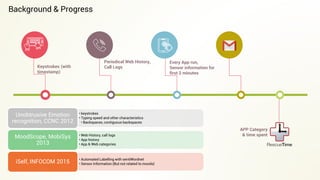
Keystrokes (with
timestamp)
Periodical Web History,
Call Logs
APP Category
& time spent
Every App run,
Sensor information for
first 2 minutes
• keystrokes
• Typing speed and other characteristics
• Backspaces, contiguous backspaces
Unobtrusive Emotion
recognition, CCNC 2012
• Web History, call logs
• App history
• App & Web categories
MoodScope, MobiSys
2013
• Automated Labelling with sentiWordnet
• Sensor Information (But not related to moods)iSelf, INFOCOM 2015
Background & Progress
Implementation Details
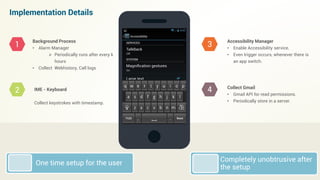
Background Process
• Alarm Manager
 Periodically runs after every k
hours
• Collect Webhistory, Call logs
IME - Keyboard
Collect keystrokes with timestamp.
Accessibility Manager
• Enable Accessibility service.
• Even trigger occurs, whenever there is
an app switch.
Collect Gmail
• Gmail API for read permissions.
• Periodically store in a server.
1
2
3
4
Completely unobtrusive after
the setup
One time setup for the user
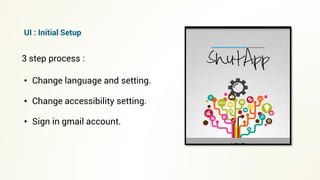
• Change language and setting.
• Change accessibility setting.
• Sign in gmail account.
3 step process :
UI : Initial Setup
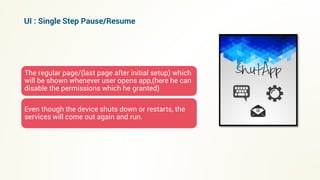
The regular page/(last page after initial setup) which
will be shown whenever user opens app,(here he can
disable the permissions which he granted)
Even though the device shuts down or restarts, the
services will come out again and run.
UI : Single Step Pause/Resume
For changing language and input settings,we used the input manager
class. A new prompt will open for changing the default keyboard.
Similarly for changing accessibility to a service, we used system
class, which will redirect the user to the accessibility page.
For giving gmail access, we used a webviewer which will open a site
hosted by us.
UI : Development
Once user opens the url
"www.cnergres.iitkgp.ac.in/~shutApp/quicker.html" user is requested for
gmail access.
Upon receiving access, a token is stored in the server,periodically a
python script checks for newly stored tokens and polls the gmail server
by gmail api for the mail-content.
Gmail api: user.get.message, user.list.message.
Gmail API
Demo Time
APP Demo Video
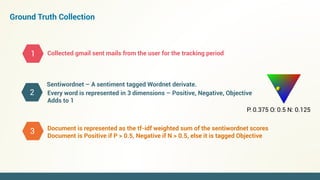
Ground Truth Collection
Collected gmail sent mails from the user for the tracking period
Sentiwordnet – A sentiment tagged Wordnet derivate.
1
2
3
P: 0.375 O: 0.5 N: 0.125
Every word is represented in 3 dimensions – Positive, Negative, Objective
Adds to 1
Document is represented as the tf-idf weighted sum of the sentiwordnet scores
Document is Positive if P > 0.5, Negative if N > 0.5, else it is tagged Objective
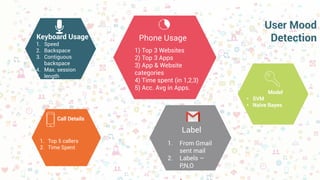
User Mood
Detection
1) Top 3 Websites
2) Top 3 Apps
3) App & Website
categories
4) Time spent (in 1,2,3)
5) Acc. Avg in Apps.
Phone Usage
Call Details
1. Top 5 callers
2. Time Spent
Keyboard Usage
1. Speed
2. Backspace
3. Contiguous
backspace
4. Max. session
5. length
Model
• SVM
• Naïve Bayes
1. From Gmail
sent mail
2. Labels –
P,N,O
Label
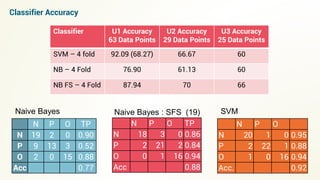
Naive Bayes
N P O TP
N 19 2 0 0.90
P 9 13 3 0.52
O 2 0 15 0.88
Acc 0.77
N P O TP
N 18 3 0 0.86
P 2 21 2 0.84
O 0 1 16 0.94
Acc 0.88
Naive Bayes : SFS (19)
N P O
N 20 1 0 0.95
P 2 22 1 0.88
O 1 0 16 0.94
Acc. 0.92
SVM
Classifier U1 Accuracy
63 Data Points
U2 Accuracy
29 Data Points
U3 Accuracy
25 Data Points
SVM – 4 fold 92.09 (68.27) 66.67 60
NB – 4 Fold 76.90 61.13 60
NB FS – 4 Fold 87.94 70 66
Classifier Accuracy
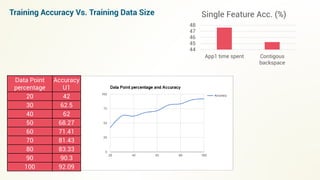
Data Point
percentage
Accuracy
U1
20 42
30 62.5
40 62
50 68.27
60 71.41
70 81.43
80 83.33
90 90.3
100 92.09
Training Accuracy Vs. Training Data Size
44
45
46
47
48
App1 time spent Contigous
backspace
Single Feature Acc. (%)
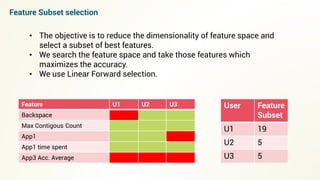
User Feature
Subset
U1 19
U2 5
U3 5
Feature U1 U2 U3
Backspace
Max Contigous Count
App1
App1 time spent
App3 Acc. Average
Feature Subset selection
• The objective is to reduce the dimensionality of feature space and
select a subset of best features.
• We search the feature space and take those features which
maximizes the accuracy.
• We use Linear Forward selection.
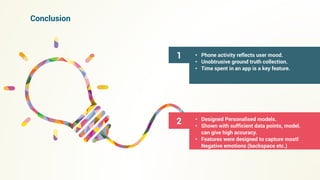
Conclusion
1 • Phone activity reflects user mood.
• Unobtrusive ground truth collection.
• Time spent in an app is a key feature.
2 • Designed Personalised models.
• Shown with sufficient data points, model.
can give high accuracy.
• Features were designed to capture mostl
Negative emotions (backspace etc.)
T
A
H N K O
Y
U
Surjya Ghosh
Rohit Verma
Special Thanks

ShutApp

  • 1.
    Team Number 1| ShutApp – A mood prediction app based on phone activity detection Madhumita Mallick | Amrith Krishna | Samiksha Meena | A. N. Rajitha ShutApp For those who do not know when to shut up 1 Collect user specific data - App history, web history, call logs, emails - Sensor data - Phone keyboard usage patterns & speed 2 Real time mood prediction model, based on collected data. Sentiment analysis on collected emails & text data to label the training data No explicit user feedback required
  • 2.
    Team Number 1| ShutApp – A mood prediction app based on phone activity detection Madhumita Mallick | Amrith Krishna | Samiksha Meena | A. N. Rajitha ShutApp For those who do not know when to shut up 1 Collect user specific data - App history, web history, call logs, emails - Sensor data - Phone keyboard usage patterns & speed 2 Real time mood prediction model, based on collected data. Sentiment analysis on collected emails & text data to label the training data No explicit user feedback required
  • 3.
    Keystrokes (with timestamp) Periodical WebHistory, Call Logs APP Category & time spent Every App run, Sensor information for first 2 minutes • keystrokes • Typing speed and other characteristics • Backspaces, contiguous backspaces Unobtrusive Emotion recognition, CCNC 2012 • Web History, call logs • App history • App & Web categories MoodScope, MobiSys 2013 • Automated Labelling with sentiWordnet • Sensor Information (But not related to moods)iSelf, INFOCOM 2015 Background & Progress
  • 4.
    Implementation Details Background Process •Alarm Manager  Periodically runs after every k hours • Collect Webhistory, Call logs IME - Keyboard Collect keystrokes with timestamp. Accessibility Manager • Enable Accessibility service. • Even trigger occurs, whenever there is an app switch. Collect Gmail • Gmail API for read permissions. • Periodically store in a server. 1 2 3 4 Completely unobtrusive after the setup One time setup for the user
  • 5.
    • Change languageand setting. • Change accessibility setting. • Sign in gmail account. 3 step process : UI : Initial Setup
  • 6.
    The regular page/(lastpage after initial setup) which will be shown whenever user opens app,(here he can disable the permissions which he granted) Even though the device shuts down or restarts, the services will come out again and run. UI : Single Step Pause/Resume
  • 7.
    For changing languageand input settings,we used the input manager class. A new prompt will open for changing the default keyboard. Similarly for changing accessibility to a service, we used system class, which will redirect the user to the accessibility page. For giving gmail access, we used a webviewer which will open a site hosted by us. UI : Development
  • 8.
    Once user opensthe url "www.cnergres.iitkgp.ac.in/~shutApp/quicker.html" user is requested for gmail access. Upon receiving access, a token is stored in the server,periodically a python script checks for newly stored tokens and polls the gmail server by gmail api for the mail-content. Gmail api: user.get.message, user.list.message. Gmail API
  • 9.
  • 10.
    Ground Truth Collection Collectedgmail sent mails from the user for the tracking period Sentiwordnet – A sentiment tagged Wordnet derivate. 1 2 3 P: 0.375 O: 0.5 N: 0.125 Every word is represented in 3 dimensions – Positive, Negative, Objective Adds to 1 Document is represented as the tf-idf weighted sum of the sentiwordnet scores Document is Positive if P > 0.5, Negative if N > 0.5, else it is tagged Objective
  • 11.
    User Mood Detection 1) Top3 Websites 2) Top 3 Apps 3) App & Website categories 4) Time spent (in 1,2,3) 5) Acc. Avg in Apps. Phone Usage Call Details 1. Top 5 callers 2. Time Spent Keyboard Usage 1. Speed 2. Backspace 3. Contiguous backspace 4. Max. session 5. length Model • SVM • Naïve Bayes 1. From Gmail sent mail 2. Labels – P,N,O Label
  • 12.
    Naive Bayes N PO TP N 19 2 0 0.90 P 9 13 3 0.52 O 2 0 15 0.88 Acc 0.77 N P O TP N 18 3 0 0.86 P 2 21 2 0.84 O 0 1 16 0.94 Acc 0.88 Naive Bayes : SFS (19) N P O N 20 1 0 0.95 P 2 22 1 0.88 O 1 0 16 0.94 Acc. 0.92 SVM Classifier U1 Accuracy 63 Data Points U2 Accuracy 29 Data Points U3 Accuracy 25 Data Points SVM – 4 fold 92.09 (68.27) 66.67 60 NB – 4 Fold 76.90 61.13 60 NB FS – 4 Fold 87.94 70 66 Classifier Accuracy
  • 13.
    Data Point percentage Accuracy U1 20 42 3062.5 40 62 50 68.27 60 71.41 70 81.43 80 83.33 90 90.3 100 92.09 Training Accuracy Vs. Training Data Size 44 45 46 47 48 App1 time spent Contigous backspace Single Feature Acc. (%)
  • 14.
    User Feature Subset U1 19 U25 U3 5 Feature U1 U2 U3 Backspace Max Contigous Count App1 App1 time spent App3 Acc. Average Feature Subset selection • The objective is to reduce the dimensionality of feature space and select a subset of best features. • We search the feature space and take those features which maximizes the accuracy. • We use Linear Forward selection.
  • 15.
    Conclusion 1 • Phoneactivity reflects user mood. • Unobtrusive ground truth collection. • Time spent in an app is a key feature. 2 • Designed Personalised models. • Shown with sufficient data points, model. can give high accuracy. • Features were designed to capture mostl Negative emotions (backspace etc.)
  • 16.
    T A H N KO Y U Surjya Ghosh Rohit Verma Special Thanks