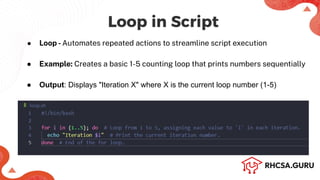
Loop in Script
●Loop -Automates repeated actions to streamline script execution
● Example: Creates a basic 1-5 counting loop that prints numbers sequentially
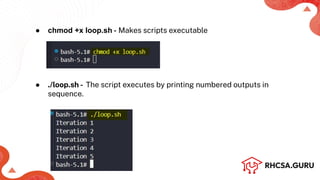
● Output: Displays "Iteration X" where X is the current loop number (1-5)
3.
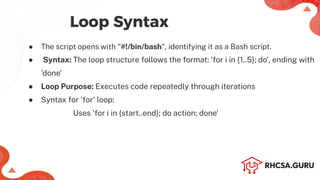
Loop Syntax
● Thescript opens with "#!/bin/bash", identifying it as a Bash script.
● Syntax: The loop structure follows the format: 'for i in {1..5}; do', ending with
'done'
● Loop Purpose: Executes code repeatedly through iterations
● Syntax for 'for' loop:
Uses 'for i in {start..end}; do action; done'
4.
● chmod +xloop.sh - Makes scripts executable
● ./loop.sh - The script executes by printing numbered outputs in
sequence.
● The scriptbegins with "#!/bin/bash", indicating it's a Bash script.
● Syntax: The loop uses 'while [ $count-le 5 ]; do', with 'done' as its closing
statement.
● Loop Purpose: Executes code repeatedly until count reaches 5
● Syntax for 'while' loop: Uses 'while [condition]; do action; done'
● Output: The script prints each count value in sequence, incrementing by 1
7.
● chmod +xwhile_loop.sh -grants execution permissions
● ./while_loop.sh -This script executes the script to display counting from 1
to 5.
8.
Shell Script Function
●Reusable blocks of code that help organize and modularize scripts.
● Improve readability and maintainability by avoiding redundant code.
● Syntax : function_name() { # Commands}
● Parameters are passed like arguments in scripts: $1, $2, ..., $N represent
positional parameters.
9.
● The scriptbegins with "#!/bin/bash", indicating it's a Bash script.
● Function Definition: Uses 'functionName() { commands; }' structure
● Function Call: Executes as 'functionName argument'
10.
● chmod +xfunction.sh -Makes the function script executable by granting
execution permissions.
● ./function.sh - Executes the function script which outputs "Hello, User!" as
greeting message.
11.
Shell Script InputValidation
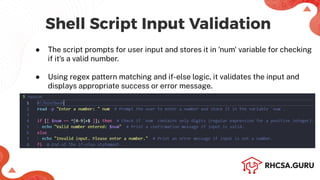
● The script prompts for user input and stores it in 'num' variable for checking
if it's a valid number.
● Using regex pattern matching and if-else logic, it validates the input and
displays appropriate success or error message.
12.
● The scriptbegins with "#!/bin/bash", indicating it's a Bash script.
● Input Structure: Uses 'read-p "prompt" variable' to capture user input
● Validation Syntax: Implements 'if [[ $variable =~ pattern ]]; then action; else
error; fi'
● Example Implementation: Shows number validation using 'if [[ $num =~
^[0-9]+$ ]]' with appropriate success/error messages
13.
● chmod +xinput.sh -Makes the input validation script executable by
granting execution permissions.
● ./input.sh - Executes the input validation script which prompts for a
number and validates if it's numeric.
14.
● Shell scriptshandle files using commands like touch, cat, cp, mv, and rm.
● Redirection (>, >>) and condition checks ([-f file ]) help manage files
efficiently.
● Example: Create a file, write text into it, and display its contents
Shell Script File Operations
15.
File Operation ScriptSyntax
● The script begins with "#!/bin/bash", indicating it's a Bash script.
● File Creation: Uses 'touch filename' to create an empty file
● File Writing: Implements 'echo "text" > filename' to write content
● File Reading: Uses 'cat filename' to display file contents
16.
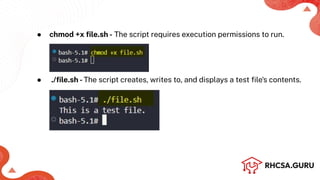
● chmod +xfile.sh - The script requires execution permissions to run.
● ./file.sh -The script creates, writes to, and displays a test file's contents.

![● The script begins with "#!/bin/bash", indicating it's a Bash script.
● Syntax: The loop uses 'while [ $count-le 5 ]; do', with 'done' as its closing
statement.
● Loop Purpose: Executes code repeatedly until count reaches 5
● Syntax for 'while' loop: Uses 'while [condition]; do action; done'
● Output: The script prints each count value in sequence, incrementing by 1](https://image.slidesharecdn.com/shellscriptingintermediate-rhcsa-250217073831-9b61387e/85/Shell-Scripting-Intermediate-RHCSA-pdf-6-320.jpg)



![● The script begins with "#!/bin/bash", indicating it's a Bash script.
● Input Structure: Uses 'read-p "prompt" variable' to capture user input
● Validation Syntax: Implements 'if [[ $variable =~ pattern ]]; then action; else
error; fi'
● Example Implementation: Shows number validation using 'if [[ $num =~
^[0-9]+$ ]]' with appropriate success/error messages](https://image.slidesharecdn.com/shellscriptingintermediate-rhcsa-250217073831-9b61387e/85/Shell-Scripting-Intermediate-RHCSA-pdf-12-320.jpg)

![● Shell scripts handle files using commands like touch, cat, cp, mv, and rm.
● Redirection (>, >>) and condition checks ([-f file ]) help manage files
efficiently.
● Example: Create a file, write text into it, and display its contents
Shell Script File Operations](https://image.slidesharecdn.com/shellscriptingintermediate-rhcsa-250217073831-9b61387e/85/Shell-Scripting-Intermediate-RHCSA-pdf-14-320.jpg)