Should I Stay or Should I Move
Business Track
SharePoint Online vs On-Premises vs Hosted
- How to make the Right Choice
1
About Me
What am I Going To Talk About ?
So you are in a
position to make
an informed
decision at the
end of the
session
The differences
between
SharePoint
Online,
SharePoint On-
Premises, and
hosted SharePoint
The benefits and
drawbacks of
each platform
The differences
between IaaS,
PaaS and SaaS
Is there an ideal SharePoint
environment?
There’s no «One size fits all» and
there will always be drawbacks!
So which one should I choose and how should I
choose it?
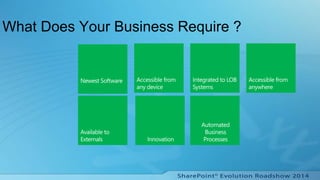
What Does Your Business Require ?
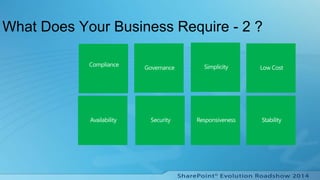
What Does Your Business Require - 2 ?
But You Have To Keep The Balance
8
Cost
Constraints
Governance
Compliance
Features
Functionality
Flexibility
Availability
Office 365
9
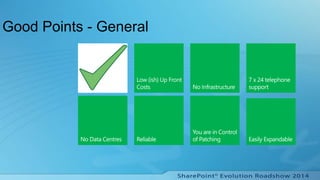
Good Points - General
Good Points - Worry Free
Installation/Deployment
Bad Points – 1
SharePoint 2013
has three
different “places”
for social
collaboration
Patches and
Upgrades
No PowerShell
within
SharePoint
Online (yet!)
Search – you
don’t know when
the Search
Crawler will run
Audience
compilations are
only once a
week (normally
Saturdays)
Bad Points – 2
Branding of
MySites
No ALM
Tenancies are
not always the
same
Cannot create
site templates or
Web Templates
Hosted (Azure)
14
Good Points - General
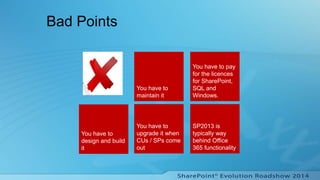
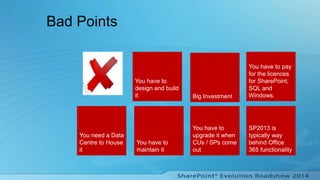
Bad Points
You have to
upgrade it when
CUs / SPs come
out
You have to
maintain it
You have to
design and build
it
You have to pay
for the licences
for SharePoint,
SQL and
Windows.
SP2013 is
typically way
behind Office
365 functionality
On Premises
17
Good Points - General
Bad Points
You have to
upgrade it when
CUs / SPs come
out
You have to
maintain it
You have to
design and build
it
You have to pay
for the licences
for SharePoint,
SQL and
Windows.
SP2013 is
typically way
behind Office
365 functionality
Big Investment
You need a Data
Centre to House
it
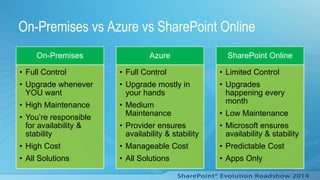
On-Premises vs Azure vs SharePoint Online
On-Premises
• Full Control
• Upgrade whenever
YOU want
• High Maintenance
• You’re responsible
for availability &
stability
• High Cost
• All Solutions
Azure
• Full Control
• Upgrade mostly in
your hands
• Medium
Maintenance
• Provider ensures
availability & stability
• Manageable Cost
• All Solutions
SharePoint Online
• Limited Control
• Upgrades
happening every
month
• Low Maintenance
• Microsoft ensures
availability & stability
• Predictable Cost
• Apps Only
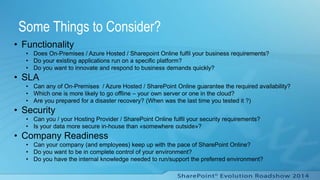
Some Things to Consider?
• Functionality
• Does On-Premises / Azure Hosted / Sharepoint Online fulfil your business requirements?
• Do your existing applications run on a specific platform?
• Do you want to innovate and respond to business demands quickly?
• SLA
• Can any of On-Premises / Azure Hosted / SharePoint Online guarantee the required availability?
• Which one is more likely to go offline – your own server or one in the cloud?
• Are you prepared for a disaster recovery? (When was the last time you tested it ?)
• Security
• Can you / your Hosting Provider / SharePoint Online fulfil your security requirements?
• Is your data more secure in-house than «somewhere outside»?
• Company Readiness
• Can your company (and employees) keep up with the pace of SharePoint Online?
• Do you want to be in complete control of your environment?
• Do you have the internal knowledge needed to run/support the preferred environment?
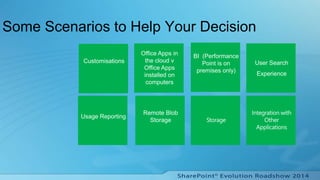
Some Scenarios to Help Your Decision
Remote Blob
Storage
Usage Reporting
Office Apps in
the cloud v
Office Apps
installed on
computers
BI (Performance
Point is on
premises only)
User Search
Experience
Customisations
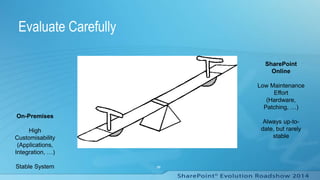
Evaluate Carefully
23
On-Premises
High
Customisability
(Applications,
Integration, …)
Stable System
SharePoint
Online
Low Maintenance
Effort
(Hardware,
Patching, …)
Always up-to-
date, but rarely
stable
Can I Use Only One Environment ?
24
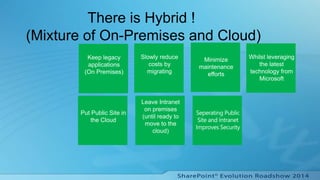
There is Hybrid !
(Mixture of On-Premises and Cloud)
Leave Intranet
on premises
(until ready to
move to the
cloud)
Put Public Site in
the Cloud
Slowly reduce
costs by
migrating
Minimize
maintenance
efforts
Whilst leveraging
the latest
technology from
Microsoft
Keep legacy
applications
(On Premises)
Bad Points
Its More Difficult
to Setup
There are more
decisions to
make
Search and
Search Results
Final Thoughts
 Include IT & The Business in your evaluation!
• The ‘Right Choice’ is whatever best suits your needs
• Don’t Forget Security
• What is your Roadmap ?
Any Questions ?
28
Diolch yn fawr !
29

Shall_I_move_or_shall_I_Stay

  • 1.
    Should I Stayor Should I Move Business Track SharePoint Online vs On-Premises vs Hosted - How to make the Right Choice 1
  • 2.
  • 3.
    What am IGoing To Talk About ? So you are in a position to make an informed decision at the end of the session The differences between SharePoint Online, SharePoint On- Premises, and hosted SharePoint The benefits and drawbacks of each platform The differences between IaaS, PaaS and SaaS
  • 4.
    Is there anideal SharePoint environment? There’s no «One size fits all» and there will always be drawbacks!
  • 5.
    So which oneshould I choose and how should I choose it?
  • 6.
    What Does YourBusiness Require ?
  • 7.
    What Does YourBusiness Require - 2 ?
  • 8.
    But You HaveTo Keep The Balance 8 Cost Constraints Governance Compliance Features Functionality Flexibility Availability
  • 9.
  • 10.
  • 11.
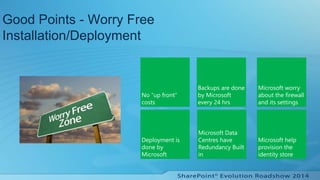
    Good Points -Worry Free Installation/Deployment
  • 12.
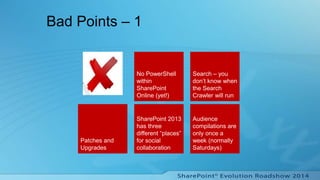
    Bad Points –1 SharePoint 2013 has three different “places” for social collaboration Patches and Upgrades No PowerShell within SharePoint Online (yet!) Search – you don’t know when the Search Crawler will run Audience compilations are only once a week (normally Saturdays)
  • 13.
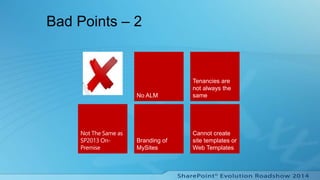
    Bad Points –2 Branding of MySites No ALM Tenancies are not always the same Cannot create site templates or Web Templates
  • 14.
  • 15.
  • 16.
    Bad Points You haveto upgrade it when CUs / SPs come out You have to maintain it You have to design and build it You have to pay for the licences for SharePoint, SQL and Windows. SP2013 is typically way behind Office 365 functionality
  • 17.
  • 18.
  • 19.
    Bad Points You haveto upgrade it when CUs / SPs come out You have to maintain it You have to design and build it You have to pay for the licences for SharePoint, SQL and Windows. SP2013 is typically way behind Office 365 functionality Big Investment You need a Data Centre to House it
  • 20.
    On-Premises vs Azurevs SharePoint Online On-Premises • Full Control • Upgrade whenever YOU want • High Maintenance • You’re responsible for availability & stability • High Cost • All Solutions Azure • Full Control • Upgrade mostly in your hands • Medium Maintenance • Provider ensures availability & stability • Manageable Cost • All Solutions SharePoint Online • Limited Control • Upgrades happening every month • Low Maintenance • Microsoft ensures availability & stability • Predictable Cost • Apps Only
  • 21.
    Some Things toConsider? • Functionality • Does On-Premises / Azure Hosted / Sharepoint Online fulfil your business requirements? • Do your existing applications run on a specific platform? • Do you want to innovate and respond to business demands quickly? • SLA • Can any of On-Premises / Azure Hosted / SharePoint Online guarantee the required availability? • Which one is more likely to go offline – your own server or one in the cloud? • Are you prepared for a disaster recovery? (When was the last time you tested it ?) • Security • Can you / your Hosting Provider / SharePoint Online fulfil your security requirements? • Is your data more secure in-house than «somewhere outside»? • Company Readiness • Can your company (and employees) keep up with the pace of SharePoint Online? • Do you want to be in complete control of your environment? • Do you have the internal knowledge needed to run/support the preferred environment?
  • 22.
    Some Scenarios toHelp Your Decision Remote Blob Storage Usage Reporting Office Apps in the cloud v Office Apps installed on computers BI (Performance Point is on premises only) User Search Experience Customisations
  • 23.
    Evaluate Carefully 23 On-Premises High Customisability (Applications, Integration, …) StableSystem SharePoint Online Low Maintenance Effort (Hardware, Patching, …) Always up-to- date, but rarely stable
  • 24.
    Can I UseOnly One Environment ? 24
  • 25.
    There is Hybrid! (Mixture of On-Premises and Cloud) Leave Intranet on premises (until ready to move to the cloud) Put Public Site in the Cloud Slowly reduce costs by migrating Minimize maintenance efforts Whilst leveraging the latest technology from Microsoft Keep legacy applications (On Premises)
  • 26.
    Bad Points Its MoreDifficult to Setup There are more decisions to make Search and Search Results
  • 27.
    Final Thoughts  IncludeIT & The Business in your evaluation! • The ‘Right Choice’ is whatever best suits your needs • Don’t Forget Security • What is your Roadmap ?
  • 28.
  • 29.

Editor's Notes

  • #3 Been in the IT business for over 40 years Started with MCMS 2001 and SharePoint 2003 Spent Time with a Number of Gold Partners Over the last 16 years Concentrated on SharePoint since 2006 Been working with SharePoint Online For the past year Now have own Company - NJPEnterprises
  • #4 IaaS – You manage everything from Operating System to application – The hosting Company manages the Infrastructure, Virtual infrastructure that hosts virtual machines and mostly existing applications. PaaS –You manage the applications and the data - the Hosting Provider manages everything up to and including the Operating System, Cloud application infrastructure that provides an on-demand application-hosting environment. SaaS – You don’t need to manage anything, Cloud services model where an application is delivered over the Internet and customers pay on a per-use basis (for example, Microsoft Office 365 or Microsoft CRM Online).
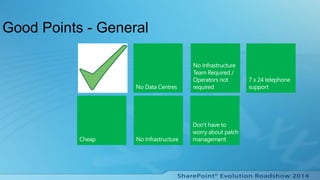
  • #11 Cheap – 32 different plans – Prices Start from £2.50 for SharePoint Plan 1 – No CAPEX required, only OPEX No Data centres – current availability is 99.99% - probably better that most on-premises data centres Operators not required – Nobody to feed and water servers. Overheads much reduced. You don have to buy the infrastructure You don’t have to worry about when you do patches, its all done by you. Microsoft provide a 7 x 24 support
  • #12 As hardware, installation and deployment is all done by Microsoft, you get best practises for free and there is no upfront hardware, installation and deployment costs. You can start straight away on your site. Identity store – you can manage aspects of it based on business need. No need for an AD much easier to add users. Can sync with on prem AD if required.
  • #13 Patches and Upgrades There is no notice of when they will be applied You have no control over when they are applied They may break your system SharePoint 2013 has three different “places” for social collaboration to happen: communities, team sites and the Newsfeed So two people could use three different “places” to have social collaboration
  • #14 Everything is not the same as On-Premise - Lots of subtle differences between On Premise and SharePoint Online. Search – managed properties not surfaced in search results No CSWP No – ALM - ie everything you do is on the production system without testing first on dev and test systems. Two workarounds – purchase extra tenancies or have dev and test on separate site collections on the same tenancy as the production system. Branding of MySites -> V difficult in O365 Use App ! Tenancies are not always the same – can be differences Different features on different tenancies eg some have a Tokyo masterpage Workflows which work on one tenancy may not work on another Composed Looks – may work on one tenancy, may not work the same on another.
  • #23 Usage Reporting – Not available on SharePoint Online Remote Blob Storage – only available on SharePoint 2013 Storage – SharePoint Online can now go up to 1TB Sharepoint On Premises is greater Search – Custom Entity Extraction and Search connector framework not available so cannot crawl content from non-standard format files.
  • #27 Patches and Upgrades There is no notice of when they will be applied You have no control over when they are applied They may break your system SharePoint 2013 has three different “places” for social collaboration to happen: communities, team sites and the Newsfeed So two people could use three different “places” to have social collaboration