Copyright © Sevana Oü, 2020
Roosikrantsi tn 2, Tallinna linn, Harju maakond, 10119
Estonia, Phone: +3726170331
VQM Manual
Copyright © Sevana Oü, 2020
Roosikrantsi tn 2, Tallinna linn, Harju maakond, 10119
Estonia, Phone: +3726170331
Contents
VQM Manual 1
Contents 2
Introduction 3
Glossary 3
Requirements 4
Components 4
Features 5
Test types 5
Echo server monitoring 6
Usage examples 6
Echo server install 6
Asterisk 6
FreeSWITCH 7
PSTN echo cancellation 7
Inbound monitoring 7
Usage examples 8
IVR quality assessment 8
Usage examples 8
Conference bridge quality assessment 8
Additional metrics 8
Usage examples 8
Combined test types 9
Solution overview 9
Main test listing 9
General options 9
Add echo test 9
Add conference test 10
Add IVR test 10
Audios 10
Servers 10
Alerting 11
License administration 11
Test calls 12
Test calls table 13
Test call information 14
Test call AQuA 14
Test call PVQA 15
Test call sniffer information 16
Copyright © Sevana Oü, 2020
Roosikrantsi tn 2, Tallinna linn, Harju maakond, 10119
Estonia, Phone: +3726170331
API Endpoints 17
Configuration values 18
CDR files 18
System cleanup settings 19
References 20
Introduction
Sevana VQM (Voice Quality Monitoring) is a powerful tool to provide perceptual voice quality
monitoring in communication networks. Open source based software solution provides
flexible customer development, fast deployment cost effective way to enable call quality
monitoring in VoIP, PSTN, mobile and converged networks.
Sevana VQM Framework delivered with the source code and functional API gives a unique
opportunity to design your own call quality monitoring solution not being dependent on
particular hardware and software.
Glossary
PSTN (Public switched telephone network) - aggregate of the world's circuit-switched
telephone networks that are operated by national, regional, or local telephony operators,
providing infrastructure and services for public telecommunication.
VoIP (Voice over Internet Protocol) - methodology and group of technologies for the delivery
of voice communications and multimedia sessions over Internet Protocol (IP) networks, such
as the Internet.
API (Application programming interface) - set of subroutine definitions, communication
protocols, and tools for building software
MOS (Mean opinion score) - measure used in the domain of Quality of Experience and
telecommunications engineering, representing overall quality of a stimulus or system.
CDR (call detail record) - data record produced by a telephone exchange or other
telecommunications equipment that documents the details of a telephone call or other
telecommunications transaction that passes through that facility or device.
OS (Operating System) - computer system software that manages the hardware and
software of a computer.
RTP (Real-time Transport Protocol) - network protocol for delivering audio and video over IP
networks. RTP is used in communication and entertainment systems that involve streaming
media, such as telephony, video teleconference applications including WebRTC, television
services and web-based push-to-talk features.
PLC (Packet loss concealment) - technique to mask the effects of packet loss in voice over IP
(VoIP) communications
IVR (Interactive voice response) - technology that allows a computer to interact with humans
through the use of voice and DTMF tones input via a keypad.
Copyright © Sevana Oü, 2020
Roosikrantsi tn 2, Tallinna linn, Harju maakond, 10119
Estonia, Phone: +3726170331
DID (Direct inward dialing) - PSTN number assigned to phone system and used for dialing by
outside caller
URI (Uniform Resource Identifier) - a string of characters that unambiguously identifies a
particular resource.
OAM (Operations, administration and management) - the processes, activities, tools, and
standards involved with operating, administering, managing and maintaining any system.
XML (Extensible Markup Language) - markup language that defines a set of rules for
encoding documents in a format that is both human-readable and machine-readable.
IVR (Interactive voice response) - technology that allows a computer to interact with humans
through the use of voice and DTMF tones input via a keypad.
Requirements
VQM support rapid deployment techniques based on modern containers technologies. This
is the reason to prefer installation on system like:
● Linux Centos 7.x
● Docker support
In case client environment could not satisfy this requirements manual VQM components
installation possible on Linux 4.x+ OS.
It is recommended to have:
● No more then 50 concurrent tests running (tests active same time per server)
● Not more then 5 concurrent tests in average (by overall call volume)
Components
Sevana VQM may use several components to get voice quality metrics. All of this
components considered as optional and would be used depending on VQM test types and
usage profile:
● Sevana AQuA Voice 7.3.5.300
● Sevana AQuA Widthband 7.3.5.300
● Sevana PVQA 1.5.708.657
● Voipmonitor 13.x+
Sevana utilities executed based on licensed installed and active in the system. There is also
bunch of open source components used in VQM operation, that could be configured based
on client project requirements:
● Nginx 1.11+
● Apache 2.4
● PHP 7.x
● Python 3.x
● MySQL 7.0+
● Clickhouse 19.x
● Graphana 6.x
Copyright © Sevana Oü, 2020
Roosikrantsi tn 2, Tallinna linn, Harju maakond, 10119
Estonia, Phone: +3726170331
● Asterisk 16.x+
Features
● Scheduled tests execution
● Multi User support
● SIP protocol support
● Codecs support
○ G.711a/u
○ G.722
○ OPUS
○ G.729
● Web interface
● Reporting
● Alerting
● Restful API
● Test calls reports with quality metrics
● MOS score of types:
○ G.107
○ Degraded sound file compare (Sevana Aqua)
○ Non-intrusive analysis (Sevana PVQA)
● Non-intrusive analysis metrics
○
● Test types
○ Echo
○ Inbound
○ IVR
○ Conference
● Monitoring integration
○ Zabbix
○ Prometeus
○ Graphana
Test types
The main task of VQM is to automate calls in the telephone network in accordance with the
schedule and test settings. The result of each test may be one or more artifacts, on the basis
of which the calculation of MOS and other metrics is made. Examples of such artifacts are:
● Audio files
● Network capture files
Each such artifact will be analyzed using available methods and the results will be used to
analyze the state of the tested infrastructure.
Copyright © Sevana Oü, 2020
Roosikrantsi tn 2, Tallinna linn, Harju maakond, 10119
Estonia, Phone: +3726170331
Echo server monitoring
This is the basic test type. The VQM server calls the SIP URI of a specially configured echo
server, which can be the VQM server, as well as specially configured open source software,
including Asterisk and Freeswitch. The echo server returns voice frames received in RTP
immediately after they are received, or with a fixed delay.
The received echo of the sent audio is recorded in the audio file and transmitted for analysis.
The resulting MOS score reflects the presence of distortions in both the incoming and
outgoing voice paths.
Usage examples
● Monitoring networks through light endpoints
○ Placing simple points with pre-configured software within a
heterogeneous network, it is possible to test the passage of voice traffic even
when receiving MOS in G.107 does not give the desired result (for example,
using PLC in a VoIP network)
● Monitoring complex routes
○ By managing the SIP URI, you can configure a series of tests that
define different call routes between two VQM servers
● Monitoring rfc6849 capable endpoints [3]
○ Using additional patches for the used B2BUA, it is possible to set the
parameters of the Media Loopback and test the end user devices on demand
via the API and OAM of the operator’s system.
By comparing the data obtained using Aqua and G.107, it is possible to determine whether
audio distortion occurs at the network level. Using PVQA allows you to accurately determine
the time and type of distortion.
Echo server install
Echo server suitable for usage with Sevana VQM can be installed using Asterisk or
FreeSWITCH. Unfortunately some echo services already available from voip providers can
not be used without limitation because have played echo after recording limited length of
sound.
Asterisk
Any asterisk installation can be used as echo server with limited setup. You can easy setup
clean server to be VoIP echo server. In most distributions asterisk can be installed by packet
manager:
yum install asterisk
apt install asterisk
After installing asterisk add record for Sevana VQM into sip.conf to accept calls from it:
Copyright © Sevana Oü, 2020
Roosikrantsi tn 2, Tallinna linn, Harju maakond, 10119
Estonia, Phone: +3726170331
[sevanavqm]
type=friend
host=192.168.1.100 ; <----- Your VQM IP address
insecure=invite
context=echo
disallow=all
allow=alaw
allow=ulaw
Add also record to extensions.conf dialplan file to execute Echo() application when call
received from VQM:
[echo]
exten => 0000,1,Echo()
Now you can use Echo server by specifying SIP URI: 0000@192.168.1.101 in VQM
(192.168.1.101 is an ip address of echo server). Do not forget open ports 5060/udp and
10000-20000/udp in firewall to pass SIP and RTP.
FreeSWITCH
Freeswitch have a little more complicated XML dialplan, but you still need to configure 3
parts:
● Setup SIP profile gateway
● XML Dialplan
● Echo application
○ <action application="echo" data=""/>
PSTN echo cancellation
In case of echo server setup on PSTN line you need to disable echo cancellation. In case of
echo cancellation enabled, ECHO tests is no suitable. In this case use IVR scenario or ask
for custom scenario development during VQM deployment.
Inbound monitoring
To test the quality of the received audio, an Inbound type test can be used. When used, the
VQM server:
● waiting for a connection to a specific DID
● receiving a call, answers it
● registers a call to the database
● records sound file equal to the duration of the reference sound file
● produces analysis using Aqua and PVQA
This type of tests allows you to test the quality of the incoming audio stream.
Copyright © Sevana Oü, 2020
Roosikrantsi tn 2, Tallinna linn, Harju maakond, 10119
Estonia, Phone: +3726170331
Usage examples
● Combined with another server's echo test
● For calls with arbitrary audio
IVR quality assessment
Another source for obtaining a sound file can be IVR menus, which work, including using
existing public DID numbers. To run such a test, you need a pre-recorded sample sound file
used in IVR to be loaded into VQM.
Making a call as part of the IVR test, VQM starts recording a sound file immediately after the
response of the remote DID. The record is compared with the reference sound file and the
MOS score is calculated. In this way, the incoming audio path can be estimated.
VQM also supports the execution of a sequence of DTMF characters. In this way, testing of
access to various levels of the IVR menu can be organized.
Usage examples
● IVR menu testing
● Testing quality without using specially configured servers
● DID testing
Conference bridge quality assessment
VQM able to dial conference room with multiple legs using different access numbers. One of
these legs considered to be a master leg, that used to playback file. Another leg(s) named
slave - used for degraded sound file recording.
Additional metrics
● Conference delay
Usage examples
● Conference room testing with geography distributed DID numbers
Could be used together with inbound test type and used to measure combined
inbound/outbound audio quality. In case of measuring multiple slave legs in same time could
be used to diagnose separate master/slave DID issues.
Copyright © Sevana Oü, 2020
Roosikrantsi tn 2, Tallinna linn, Harju maakond, 10119
Estonia, Phone: +3726170331
Combined test types
By using custom configuration files different test types could be combined during single call
to analyze different call direction quality during single call. Also VQM able to display multiple
test results for each call.
Solution overview
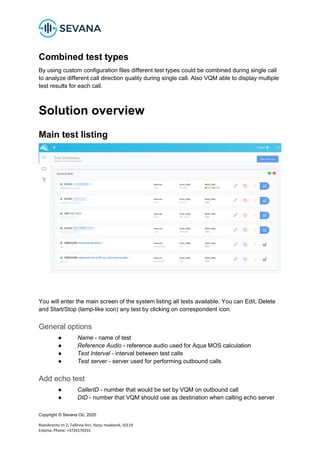
Main test listing
You will enter the main screen of the system listing all tests available. You can Edit, Delete
and Start/Stop (lamp-like icon) any test by clicking on correspondent icon.
General options
● Name - name of test
● Reference Audio - reference audio used for Aqua MOS calculation
● Test Interval - interval between test calls
● Test server - server used for performing outbound calls
Add echo test
● CallerID - number that would be set by VQM on outbound call
● DID - number that VQM should use as destination when calling echo server
Copyright © Sevana Oü, 2020
Roosikrantsi tn 2, Tallinna linn, Harju maakond, 10119
Estonia, Phone: +3726170331
Add conference test
● DID (master) - number in URI to dial master conference interface
● DID (slave) - number in URI to dial slave conference interface
● Conference PIN (master) - DTMF sequence to access master conference
room
● Conference PIN (slave) - DTMF sequence to access conference room using
slave DID number.
Add IVR test
● IVR Path - sequence of DTMF symbols, that would be dialed before degraded
audio recording started
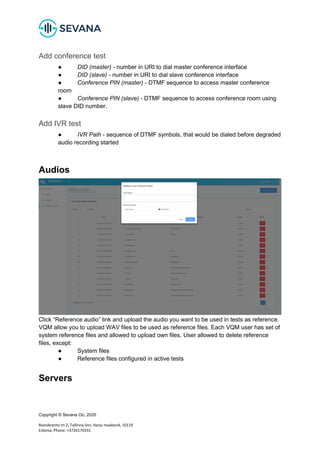
Audios
Click “Reference audio” link and upload the audio you want to be used in tests as reference.
VQM allow you to upload WAV files to be used as reference files. Each VQM user has set of
system reference files and allowed to upload own files. User allowed to delete reference
files, except:
● System files
● Reference files configured in active tests
Servers
Copyright © Sevana Oü, 2020
Roosikrantsi tn 2, Tallinna linn, Harju maakond, 10119
Estonia, Phone: +3726170331
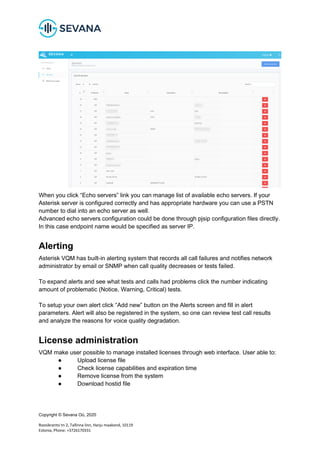
When you click “Echo servers” link you can manage list of available echo servers. If your
Asterisk server is configured correctly and has appropriate hardware you can use a PSTN
number to dial into an echo server as well.
Advanced echo servers configuration could be done through pjsip configuration files directly.
In this case endpoint name would be specified as server IP.
Alerting
Asterisk VQM has built-in alerting system that records all call failures and notifies network
administrator by email or SNMP when call quality decreases or tests failed.
To expand alerts and see what tests and calls had problems click the number indicating
amount of problematic (Notice, Warning, Critical) tests.
To setup your own alert click “Add new” button on the Alerts screen and fill in alert
parameters. Alert will also be registered in the system, so one can review test call results
and analyze the reasons for voice quality degradation.
License administration
VQM make user possible to manage installed licenses through web interface. User able to:
● Upload license file
● Check license capabilities and expiration time
● Remove license from the system
● Download hostid file
Copyright © Sevana Oü, 2020
Roosikrantsi tn 2, Tallinna linn, Harju maakond, 10119
Estonia, Phone: +3726170331
Test calls
You can listen to the audio that was used as reference for this test and compare to what was
recorded from the system under test by listening to both file, analyzing differences in signal
spectrum represented on the diagram, check MOS score, SNR (signal/noise ratio) and
check additional information about reasons for voice quality change in the test. Detailed
description of reasons for voice quality degradation is given in AQuA Manual [1].
Test display screen provide whole test information using single page. First part of page
provide general overview of test execution, including following elements:
● Date selector
● Average/maximum/minimum/last results for selected dates
● Color satisfaction scheme
Copyright © Sevana Oü, 2020
Roosikrantsi tn 2, Tallinna linn, Harju maakond, 10119
Estonia, Phone: +3726170331
● Reference audio playback
● Linear Aqua MOS diagram
● Heatmap Aqua MOS diagram (hour/weekday)
Test calls table
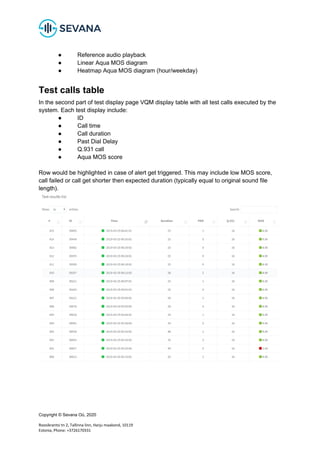
In the second part of test display page VQM display table with all test calls executed by the
system. Each test display include:
● ID
● Call time
● Call duration
● Past Dial Delay
● Q.931 call
● Aqua MOS score
Row would be highlighted in case of alert get triggered. This may include low MOS score,
call failed or call get shorter then expected duration (typically equal to original sound file
length).
Copyright © Sevana Oü, 2020
Roosikrantsi tn 2, Tallinna linn, Harju maakond, 10119
Estonia, Phone: +3726170331
Test call information
Information on each conducted test call provides basic test data available if other call details
are not available:
● Call time
● Call-ID (available when using SIP protocol)
● Call status (should be ANSWER in case of sucessfull test)
● Call disconnect case (Q.931, should be 16 in case of sucessfull test)
● Original sound file
● Degraded sound file
Test call AQuA
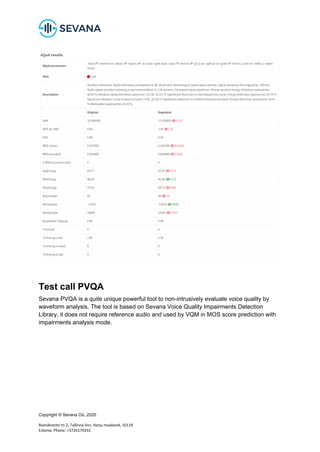
Besides audio quality score AQuA gives a possibility to analyze and determine possible
reasons that caused audio signal degradation. Software automatically prepares analysis
results that can be returned as a string or stored in a log file depending on the chosen option.
Additional audio quality metrics returned by the system may not look trivial to understand and
this chapter is devoted to the main principles of how these metrics are built and how one can
interpret them.
AQuA returns additional metrics only in the case when they are out of range for their “typical
values” (exception Signal/Noise Ratio (SNR) that is always present in the report). In case the
metrics are within the range the system returns “Cannot determine the major reason for audio
quality loss”. For more information about reasons for quality loss you could check [1]
Copyright © Sevana Oü, 2020
Roosikrantsi tn 2, Tallinna linn, Harju maakond, 10119
Estonia, Phone: +3726170331
Test call PVQA
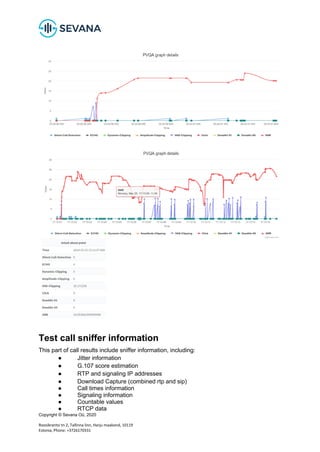
Sevana PVQA is a quite unique powerful tool to non-intrusively evaluate voice quality by
waveform analysis. The tool is based on Sevana Voice Quality Impairments Detection
Library, it does not require reference audio and used by VQM in MOS score prediction with
impairments analysis mode.
Copyright © Sevana Oü, 2020
Roosikrantsi tn 2, Tallinna linn, Harju maakond, 10119
Estonia, Phone: +3726170331
Test call sniffer information
This part of call results include sniffer information, including:
● Jitter information
● G.107 score estimation
● RTP and signaling IP addresses
● Download Capture (combined rtp and sip)
● Call times information
● Signaling information
● Countable values
● RTCP data
Copyright © Sevana Oü, 2020
Roosikrantsi tn 2, Tallinna linn, Harju maakond, 10119
Estonia, Phone: +3726170331
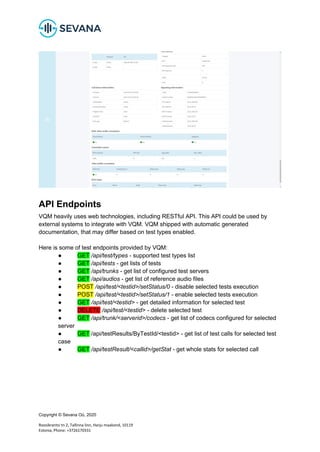
API Endpoints
VQM heavily uses web technologies, including RESTful API. This API could be used by
external systems to integrate with VQM. VQM shipped with automatic generated
documentation, that may differ based on test types enabled.
Here is some of test endpoints provided by VQM:
● GET /api/test/types - supported test types list
● GET /api/tests - get lists of tests
● GET /api/trunks - get list of configured test servers
● GET /api/audios - get list of reference audio files
● POST /api/test/<testid>/setStatus/0 - disable selected tests execution
● POST /api/test/<testid>/setStatus/1 - enable selected tests execution
● GET /api/test/<testid> - get detailed information for selected test
● DELETE /api/test/<testid> - delete selected test
● GET /api/trunk/<serverid>/codecs - get list of codecs configured for selected
server
● GET /api/testResults/ByTestId/<testid> - get list of test calls for selected test
case
● GET /api/testResult/<callid>/getStat - get whole stats for selected call
Copyright © Sevana Oü, 2020
Roosikrantsi tn 2, Tallinna linn, Harju maakond, 10119
Estonia, Phone: +3726170331
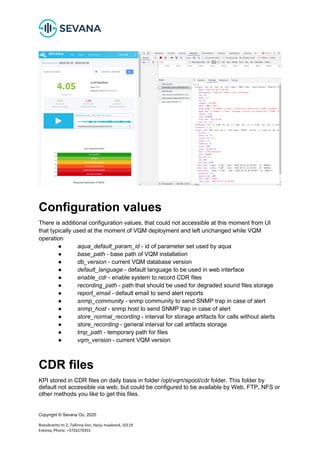
Configuration values
There is additional configuration values, that could not accessible at this moment from UI
that typically used at the moment of VQM deployment and left unchanged while VQM
operation
● aqua_default_param_id - id of parameter set used by aqua
● base_path - base path of VQM installation
● db_version - current VQM database version
● default_language - default language to be used in web interface
● enable_cdr - enable system to record CDR files
● recording_path - path that should be used for degraded sound files storage
● report_email - default email to send alert reports
● snmp_community - snmp community to send SNMP trap in case of alert
● snmp_host - snmp host to send SNMP trap in case of alert
● store_normal_recording - interval for storage artifacts for calls without alerts
● store_recording - general interval for call artifacts storage
● tmp_path - temporary path for files
● vqm_version - current VQM version
CDR files
KPI stored in CDR files on daily basis in folder /opt/vqm/spool/cdr folder. This folder by
default not accessible via web, but could be configured to be available by Web, FTP, NFS or
other methods you like to get this files.
Copyright © Sevana Oü, 2020
Roosikrantsi tn 2, Tallinna linn, Harju maakond, 10119
Estonia, Phone: +3726170331
System cleanup settings
To prevent corruption of databases and other unexpected effects VQM control available
storage space. By default minimum threshold for available storage - 1Gb. System also have
configuration to store degraded sound samples recordings for 7 days by default. There is
also configuration that control tests result storage in the database. Here is information about
space taken by VQM artifacts by month (single echo test executed every 15 minutes):
● Database test results: 50Mb;
● Wave recordings of degraded samples: 1.5Gb;
● Sniffer traces: 1.9Gb;
Setting up an Echo server
Setting up echo server using asterisk is very easy and can be done by asterisk Echo()
application, just follow the lines:
exten => 123/999,1,Answer()
exten => 123/999,n,Echo()
exten => 123/999,n,hangup()
Where 123 is a DID dialed by VQM and 999 is a callerid used by VQM
Internal operation
When test is created VQM performs the following operations:
1) Every minute Crontab checks if there are tests required for execution
2) If there are active tests VQM initiatea a call to echo server, configured for the test (SIP or
IAX protocols are supported). Echo server name may be a URL or trunk name
3) When the call is established VQM plays audio associated with the test to the echo server
and waits for the play back
3) Received audio is recorded, and stored on drive for further processing.
4) Record for executed test is stored in MySQL table `test_results`
Cron job also runs a script, that is used for processing recorded files. When new files appear
on the hard disk, scrip analizes them with help of AQuA and updates `test_results` table
So aftes arer file processed `test_restable containsnclude:
`test_case` - the id of test case
`time` - tithe me oof f end recording
`audio_id` - the id of audio usethe d for test
`recording_name` - reconame rding storhard diskon hdd
`perceaudio nt` - quality percentage score
`maudio os` - quMOSty mos score
`peaudio sq` - qualit-likey PESQ scorupcoming versions rsion theof VQM database struwill
change. Starting from version sinrovide SOAwill be used P API to initiate testing and retrieve
r.esults
Copyright © Sevana Oü, 2020
Roosikrantsi tn 2, Tallinna linn, Harju maakond, 10119
Estonia, Phone: +3726170331
References
1. Sevana AQuA - Audio Quality Analyzer, https://sevana.biz/products-aqua/
2. Sevana PVQA – Passive Voice Quality Analyzer User,
https://sevana.biz/pvqa-passive-voice-quality-analyzer/
3. RFC6849, https://tools.ietf.org/html/rfc6849

Sevana VQM Administration Manual

  • 1.
    Copyright © SevanaOü, 2020 Roosikrantsi tn 2, Tallinna linn, Harju maakond, 10119 Estonia, Phone: +3726170331 VQM Manual
  • 2.
    Copyright © SevanaOü, 2020 Roosikrantsi tn 2, Tallinna linn, Harju maakond, 10119 Estonia, Phone: +3726170331 Contents VQM Manual 1 Contents 2 Introduction 3 Glossary 3 Requirements 4 Components 4 Features 5 Test types 5 Echo server monitoring 6 Usage examples 6 Echo server install 6 Asterisk 6 FreeSWITCH 7 PSTN echo cancellation 7 Inbound monitoring 7 Usage examples 8 IVR quality assessment 8 Usage examples 8 Conference bridge quality assessment 8 Additional metrics 8 Usage examples 8 Combined test types 9 Solution overview 9 Main test listing 9 General options 9 Add echo test 9 Add conference test 10 Add IVR test 10 Audios 10 Servers 10 Alerting 11 License administration 11 Test calls 12 Test calls table 13 Test call information 14 Test call AQuA 14 Test call PVQA 15 Test call sniffer information 16
  • 3.
    Copyright © SevanaOü, 2020 Roosikrantsi tn 2, Tallinna linn, Harju maakond, 10119 Estonia, Phone: +3726170331 API Endpoints 17 Configuration values 18 CDR files 18 System cleanup settings 19 References 20 Introduction Sevana VQM (Voice Quality Monitoring) is a powerful tool to provide perceptual voice quality monitoring in communication networks. Open source based software solution provides flexible customer development, fast deployment cost effective way to enable call quality monitoring in VoIP, PSTN, mobile and converged networks. Sevana VQM Framework delivered with the source code and functional API gives a unique opportunity to design your own call quality monitoring solution not being dependent on particular hardware and software. Glossary PSTN (Public switched telephone network) - aggregate of the world's circuit-switched telephone networks that are operated by national, regional, or local telephony operators, providing infrastructure and services for public telecommunication. VoIP (Voice over Internet Protocol) - methodology and group of technologies for the delivery of voice communications and multimedia sessions over Internet Protocol (IP) networks, such as the Internet. API (Application programming interface) - set of subroutine definitions, communication protocols, and tools for building software MOS (Mean opinion score) - measure used in the domain of Quality of Experience and telecommunications engineering, representing overall quality of a stimulus or system. CDR (call detail record) - data record produced by a telephone exchange or other telecommunications equipment that documents the details of a telephone call or other telecommunications transaction that passes through that facility or device. OS (Operating System) - computer system software that manages the hardware and software of a computer. RTP (Real-time Transport Protocol) - network protocol for delivering audio and video over IP networks. RTP is used in communication and entertainment systems that involve streaming media, such as telephony, video teleconference applications including WebRTC, television services and web-based push-to-talk features. PLC (Packet loss concealment) - technique to mask the effects of packet loss in voice over IP (VoIP) communications IVR (Interactive voice response) - technology that allows a computer to interact with humans through the use of voice and DTMF tones input via a keypad.
  • 4.
    Copyright © SevanaOü, 2020 Roosikrantsi tn 2, Tallinna linn, Harju maakond, 10119 Estonia, Phone: +3726170331 DID (Direct inward dialing) - PSTN number assigned to phone system and used for dialing by outside caller URI (Uniform Resource Identifier) - a string of characters that unambiguously identifies a particular resource. OAM (Operations, administration and management) - the processes, activities, tools, and standards involved with operating, administering, managing and maintaining any system. XML (Extensible Markup Language) - markup language that defines a set of rules for encoding documents in a format that is both human-readable and machine-readable. IVR (Interactive voice response) - technology that allows a computer to interact with humans through the use of voice and DTMF tones input via a keypad. Requirements VQM support rapid deployment techniques based on modern containers technologies. This is the reason to prefer installation on system like: ● Linux Centos 7.x ● Docker support In case client environment could not satisfy this requirements manual VQM components installation possible on Linux 4.x+ OS. It is recommended to have: ● No more then 50 concurrent tests running (tests active same time per server) ● Not more then 5 concurrent tests in average (by overall call volume) Components Sevana VQM may use several components to get voice quality metrics. All of this components considered as optional and would be used depending on VQM test types and usage profile: ● Sevana AQuA Voice 7.3.5.300 ● Sevana AQuA Widthband 7.3.5.300 ● Sevana PVQA 1.5.708.657 ● Voipmonitor 13.x+ Sevana utilities executed based on licensed installed and active in the system. There is also bunch of open source components used in VQM operation, that could be configured based on client project requirements: ● Nginx 1.11+ ● Apache 2.4 ● PHP 7.x ● Python 3.x ● MySQL 7.0+ ● Clickhouse 19.x ● Graphana 6.x
  • 5.
    Copyright © SevanaOü, 2020 Roosikrantsi tn 2, Tallinna linn, Harju maakond, 10119 Estonia, Phone: +3726170331 ● Asterisk 16.x+ Features ● Scheduled tests execution ● Multi User support ● SIP protocol support ● Codecs support ○ G.711a/u ○ G.722 ○ OPUS ○ G.729 ● Web interface ● Reporting ● Alerting ● Restful API ● Test calls reports with quality metrics ● MOS score of types: ○ G.107 ○ Degraded sound file compare (Sevana Aqua) ○ Non-intrusive analysis (Sevana PVQA) ● Non-intrusive analysis metrics ○ ● Test types ○ Echo ○ Inbound ○ IVR ○ Conference ● Monitoring integration ○ Zabbix ○ Prometeus ○ Graphana Test types The main task of VQM is to automate calls in the telephone network in accordance with the schedule and test settings. The result of each test may be one or more artifacts, on the basis of which the calculation of MOS and other metrics is made. Examples of such artifacts are: ● Audio files ● Network capture files Each such artifact will be analyzed using available methods and the results will be used to analyze the state of the tested infrastructure.
  • 6.
    Copyright © SevanaOü, 2020 Roosikrantsi tn 2, Tallinna linn, Harju maakond, 10119 Estonia, Phone: +3726170331 Echo server monitoring This is the basic test type. The VQM server calls the SIP URI of a specially configured echo server, which can be the VQM server, as well as specially configured open source software, including Asterisk and Freeswitch. The echo server returns voice frames received in RTP immediately after they are received, or with a fixed delay. The received echo of the sent audio is recorded in the audio file and transmitted for analysis. The resulting MOS score reflects the presence of distortions in both the incoming and outgoing voice paths. Usage examples ● Monitoring networks through light endpoints ○ Placing simple points with pre-configured software within a heterogeneous network, it is possible to test the passage of voice traffic even when receiving MOS in G.107 does not give the desired result (for example, using PLC in a VoIP network) ● Monitoring complex routes ○ By managing the SIP URI, you can configure a series of tests that define different call routes between two VQM servers ● Monitoring rfc6849 capable endpoints [3] ○ Using additional patches for the used B2BUA, it is possible to set the parameters of the Media Loopback and test the end user devices on demand via the API and OAM of the operator’s system. By comparing the data obtained using Aqua and G.107, it is possible to determine whether audio distortion occurs at the network level. Using PVQA allows you to accurately determine the time and type of distortion. Echo server install Echo server suitable for usage with Sevana VQM can be installed using Asterisk or FreeSWITCH. Unfortunately some echo services already available from voip providers can not be used without limitation because have played echo after recording limited length of sound. Asterisk Any asterisk installation can be used as echo server with limited setup. You can easy setup clean server to be VoIP echo server. In most distributions asterisk can be installed by packet manager: yum install asterisk apt install asterisk After installing asterisk add record for Sevana VQM into sip.conf to accept calls from it:
  • 7.
    Copyright © SevanaOü, 2020 Roosikrantsi tn 2, Tallinna linn, Harju maakond, 10119 Estonia, Phone: +3726170331 [sevanavqm] type=friend host=192.168.1.100 ; <----- Your VQM IP address insecure=invite context=echo disallow=all allow=alaw allow=ulaw Add also record to extensions.conf dialplan file to execute Echo() application when call received from VQM: [echo] exten => 0000,1,Echo() Now you can use Echo server by specifying SIP URI: 0000@192.168.1.101 in VQM (192.168.1.101 is an ip address of echo server). Do not forget open ports 5060/udp and 10000-20000/udp in firewall to pass SIP and RTP. FreeSWITCH Freeswitch have a little more complicated XML dialplan, but you still need to configure 3 parts: ● Setup SIP profile gateway ● XML Dialplan ● Echo application ○ <action application="echo" data=""/> PSTN echo cancellation In case of echo server setup on PSTN line you need to disable echo cancellation. In case of echo cancellation enabled, ECHO tests is no suitable. In this case use IVR scenario or ask for custom scenario development during VQM deployment. Inbound monitoring To test the quality of the received audio, an Inbound type test can be used. When used, the VQM server: ● waiting for a connection to a specific DID ● receiving a call, answers it ● registers a call to the database ● records sound file equal to the duration of the reference sound file ● produces analysis using Aqua and PVQA This type of tests allows you to test the quality of the incoming audio stream.
  • 8.
    Copyright © SevanaOü, 2020 Roosikrantsi tn 2, Tallinna linn, Harju maakond, 10119 Estonia, Phone: +3726170331 Usage examples ● Combined with another server's echo test ● For calls with arbitrary audio IVR quality assessment Another source for obtaining a sound file can be IVR menus, which work, including using existing public DID numbers. To run such a test, you need a pre-recorded sample sound file used in IVR to be loaded into VQM. Making a call as part of the IVR test, VQM starts recording a sound file immediately after the response of the remote DID. The record is compared with the reference sound file and the MOS score is calculated. In this way, the incoming audio path can be estimated. VQM also supports the execution of a sequence of DTMF characters. In this way, testing of access to various levels of the IVR menu can be organized. Usage examples ● IVR menu testing ● Testing quality without using specially configured servers ● DID testing Conference bridge quality assessment VQM able to dial conference room with multiple legs using different access numbers. One of these legs considered to be a master leg, that used to playback file. Another leg(s) named slave - used for degraded sound file recording. Additional metrics ● Conference delay Usage examples ● Conference room testing with geography distributed DID numbers Could be used together with inbound test type and used to measure combined inbound/outbound audio quality. In case of measuring multiple slave legs in same time could be used to diagnose separate master/slave DID issues.
  • 9.
    Copyright © SevanaOü, 2020 Roosikrantsi tn 2, Tallinna linn, Harju maakond, 10119 Estonia, Phone: +3726170331 Combined test types By using custom configuration files different test types could be combined during single call to analyze different call direction quality during single call. Also VQM able to display multiple test results for each call. Solution overview Main test listing You will enter the main screen of the system listing all tests available. You can Edit, Delete and Start/Stop (lamp-like icon) any test by clicking on correspondent icon. General options ● Name - name of test ● Reference Audio - reference audio used for Aqua MOS calculation ● Test Interval - interval between test calls ● Test server - server used for performing outbound calls Add echo test ● CallerID - number that would be set by VQM on outbound call ● DID - number that VQM should use as destination when calling echo server
  • 10.
    Copyright © SevanaOü, 2020 Roosikrantsi tn 2, Tallinna linn, Harju maakond, 10119 Estonia, Phone: +3726170331 Add conference test ● DID (master) - number in URI to dial master conference interface ● DID (slave) - number in URI to dial slave conference interface ● Conference PIN (master) - DTMF sequence to access master conference room ● Conference PIN (slave) - DTMF sequence to access conference room using slave DID number. Add IVR test ● IVR Path - sequence of DTMF symbols, that would be dialed before degraded audio recording started Audios Click “Reference audio” link and upload the audio you want to be used in tests as reference. VQM allow you to upload WAV files to be used as reference files. Each VQM user has set of system reference files and allowed to upload own files. User allowed to delete reference files, except: ● System files ● Reference files configured in active tests Servers
  • 11.
    Copyright © SevanaOü, 2020 Roosikrantsi tn 2, Tallinna linn, Harju maakond, 10119 Estonia, Phone: +3726170331 When you click “Echo servers” link you can manage list of available echo servers. If your Asterisk server is configured correctly and has appropriate hardware you can use a PSTN number to dial into an echo server as well. Advanced echo servers configuration could be done through pjsip configuration files directly. In this case endpoint name would be specified as server IP. Alerting Asterisk VQM has built-in alerting system that records all call failures and notifies network administrator by email or SNMP when call quality decreases or tests failed. To expand alerts and see what tests and calls had problems click the number indicating amount of problematic (Notice, Warning, Critical) tests. To setup your own alert click “Add new” button on the Alerts screen and fill in alert parameters. Alert will also be registered in the system, so one can review test call results and analyze the reasons for voice quality degradation. License administration VQM make user possible to manage installed licenses through web interface. User able to: ● Upload license file ● Check license capabilities and expiration time ● Remove license from the system ● Download hostid file
  • 12.
    Copyright © SevanaOü, 2020 Roosikrantsi tn 2, Tallinna linn, Harju maakond, 10119 Estonia, Phone: +3726170331 Test calls You can listen to the audio that was used as reference for this test and compare to what was recorded from the system under test by listening to both file, analyzing differences in signal spectrum represented on the diagram, check MOS score, SNR (signal/noise ratio) and check additional information about reasons for voice quality change in the test. Detailed description of reasons for voice quality degradation is given in AQuA Manual [1]. Test display screen provide whole test information using single page. First part of page provide general overview of test execution, including following elements: ● Date selector ● Average/maximum/minimum/last results for selected dates ● Color satisfaction scheme
  • 13.
    Copyright © SevanaOü, 2020 Roosikrantsi tn 2, Tallinna linn, Harju maakond, 10119 Estonia, Phone: +3726170331 ● Reference audio playback ● Linear Aqua MOS diagram ● Heatmap Aqua MOS diagram (hour/weekday) Test calls table In the second part of test display page VQM display table with all test calls executed by the system. Each test display include: ● ID ● Call time ● Call duration ● Past Dial Delay ● Q.931 call ● Aqua MOS score Row would be highlighted in case of alert get triggered. This may include low MOS score, call failed or call get shorter then expected duration (typically equal to original sound file length).
  • 14.
    Copyright © SevanaOü, 2020 Roosikrantsi tn 2, Tallinna linn, Harju maakond, 10119 Estonia, Phone: +3726170331 Test call information Information on each conducted test call provides basic test data available if other call details are not available: ● Call time ● Call-ID (available when using SIP protocol) ● Call status (should be ANSWER in case of sucessfull test) ● Call disconnect case (Q.931, should be 16 in case of sucessfull test) ● Original sound file ● Degraded sound file Test call AQuA Besides audio quality score AQuA gives a possibility to analyze and determine possible reasons that caused audio signal degradation. Software automatically prepares analysis results that can be returned as a string or stored in a log file depending on the chosen option. Additional audio quality metrics returned by the system may not look trivial to understand and this chapter is devoted to the main principles of how these metrics are built and how one can interpret them. AQuA returns additional metrics only in the case when they are out of range for their “typical values” (exception Signal/Noise Ratio (SNR) that is always present in the report). In case the metrics are within the range the system returns “Cannot determine the major reason for audio quality loss”. For more information about reasons for quality loss you could check [1]
  • 15.
    Copyright © SevanaOü, 2020 Roosikrantsi tn 2, Tallinna linn, Harju maakond, 10119 Estonia, Phone: +3726170331 Test call PVQA Sevana PVQA is a quite unique powerful tool to non-intrusively evaluate voice quality by waveform analysis. The tool is based on Sevana Voice Quality Impairments Detection Library, it does not require reference audio and used by VQM in MOS score prediction with impairments analysis mode.
  • 16.
    Copyright © SevanaOü, 2020 Roosikrantsi tn 2, Tallinna linn, Harju maakond, 10119 Estonia, Phone: +3726170331 Test call sniffer information This part of call results include sniffer information, including: ● Jitter information ● G.107 score estimation ● RTP and signaling IP addresses ● Download Capture (combined rtp and sip) ● Call times information ● Signaling information ● Countable values ● RTCP data
  • 17.
    Copyright © SevanaOü, 2020 Roosikrantsi tn 2, Tallinna linn, Harju maakond, 10119 Estonia, Phone: +3726170331 API Endpoints VQM heavily uses web technologies, including RESTful API. This API could be used by external systems to integrate with VQM. VQM shipped with automatic generated documentation, that may differ based on test types enabled. Here is some of test endpoints provided by VQM: ● GET /api/test/types - supported test types list ● GET /api/tests - get lists of tests ● GET /api/trunks - get list of configured test servers ● GET /api/audios - get list of reference audio files ● POST /api/test/<testid>/setStatus/0 - disable selected tests execution ● POST /api/test/<testid>/setStatus/1 - enable selected tests execution ● GET /api/test/<testid> - get detailed information for selected test ● DELETE /api/test/<testid> - delete selected test ● GET /api/trunk/<serverid>/codecs - get list of codecs configured for selected server ● GET /api/testResults/ByTestId/<testid> - get list of test calls for selected test case ● GET /api/testResult/<callid>/getStat - get whole stats for selected call
  • 18.
    Copyright © SevanaOü, 2020 Roosikrantsi tn 2, Tallinna linn, Harju maakond, 10119 Estonia, Phone: +3726170331 Configuration values There is additional configuration values, that could not accessible at this moment from UI that typically used at the moment of VQM deployment and left unchanged while VQM operation ● aqua_default_param_id - id of parameter set used by aqua ● base_path - base path of VQM installation ● db_version - current VQM database version ● default_language - default language to be used in web interface ● enable_cdr - enable system to record CDR files ● recording_path - path that should be used for degraded sound files storage ● report_email - default email to send alert reports ● snmp_community - snmp community to send SNMP trap in case of alert ● snmp_host - snmp host to send SNMP trap in case of alert ● store_normal_recording - interval for storage artifacts for calls without alerts ● store_recording - general interval for call artifacts storage ● tmp_path - temporary path for files ● vqm_version - current VQM version CDR files KPI stored in CDR files on daily basis in folder /opt/vqm/spool/cdr folder. This folder by default not accessible via web, but could be configured to be available by Web, FTP, NFS or other methods you like to get this files.
  • 19.
    Copyright © SevanaOü, 2020 Roosikrantsi tn 2, Tallinna linn, Harju maakond, 10119 Estonia, Phone: +3726170331 System cleanup settings To prevent corruption of databases and other unexpected effects VQM control available storage space. By default minimum threshold for available storage - 1Gb. System also have configuration to store degraded sound samples recordings for 7 days by default. There is also configuration that control tests result storage in the database. Here is information about space taken by VQM artifacts by month (single echo test executed every 15 minutes): ● Database test results: 50Mb; ● Wave recordings of degraded samples: 1.5Gb; ● Sniffer traces: 1.9Gb; Setting up an Echo server Setting up echo server using asterisk is very easy and can be done by asterisk Echo() application, just follow the lines: exten => 123/999,1,Answer() exten => 123/999,n,Echo() exten => 123/999,n,hangup() Where 123 is a DID dialed by VQM and 999 is a callerid used by VQM Internal operation When test is created VQM performs the following operations: 1) Every minute Crontab checks if there are tests required for execution 2) If there are active tests VQM initiatea a call to echo server, configured for the test (SIP or IAX protocols are supported). Echo server name may be a URL or trunk name 3) When the call is established VQM plays audio associated with the test to the echo server and waits for the play back 3) Received audio is recorded, and stored on drive for further processing. 4) Record for executed test is stored in MySQL table `test_results` Cron job also runs a script, that is used for processing recorded files. When new files appear on the hard disk, scrip analizes them with help of AQuA and updates `test_results` table So aftes arer file processed `test_restable containsnclude: `test_case` - the id of test case `time` - tithe me oof f end recording `audio_id` - the id of audio usethe d for test `recording_name` - reconame rding storhard diskon hdd `perceaudio nt` - quality percentage score `maudio os` - quMOSty mos score `peaudio sq` - qualit-likey PESQ scorupcoming versions rsion theof VQM database struwill change. Starting from version sinrovide SOAwill be used P API to initiate testing and retrieve r.esults
  • 20.
    Copyright © SevanaOü, 2020 Roosikrantsi tn 2, Tallinna linn, Harju maakond, 10119 Estonia, Phone: +3726170331 References 1. Sevana AQuA - Audio Quality Analyzer, https://sevana.biz/products-aqua/ 2. Sevana PVQA – Passive Voice Quality Analyzer User, https://sevana.biz/pvqa-passive-voice-quality-analyzer/ 3. RFC6849, https://tools.ietf.org/html/rfc6849