Page 0Classification: Restricted
Selenium Training
Flow Control Statements
Page 1Classification: Restricted
Agenda
• Flow Control
• Types of Flow Control
• If-Else
• Activity
• Switch-Case
• For Loop
• While Loop
• Do-While Loop
Page 2Classification: Restricted
Flow Control
• A programs ‘flow’ refers to the order in which statements are executed.
• By default, statements are executed sequentially.
• Flow control statements are used to alter or modify the path of execution
of instructions when certain conditions are present.
Page 3Classification: Restricted
Types of Flow Control
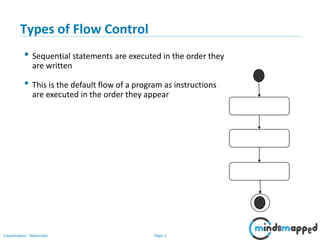
• Sequential statements are executed in the order they
are written
• This is the default flow of a program as instructions
are executed in the order they appear
Page 4Classification: Restricted
Types of Flow Control
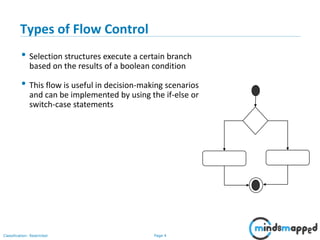
• Selection structures execute a certain branch
based on the results of a boolean condition
• This flow is useful in decision-making scenarios
and can be implemented by using the if-else or
switch-case statements
Page 5Classification: Restricted
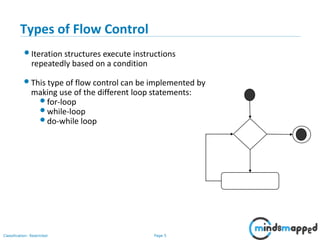
Types of Flow Control
•Iteration structures execute instructions
repeatedly based on a condition
•This type of flow control can be implemented by
making use of the different loop statements:
•for-loop
•while-loop
•do-while loop
Page 6Classification: Restricted
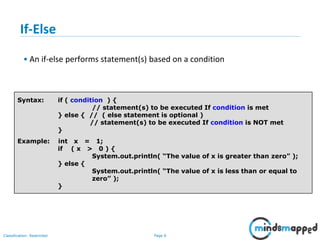
If-Else
• An if-else performs statement(s) based on a condition
Syntax: if ( condition ) {
// statement(s) to be executed If condition is met
} else { // ( else statement is optional )
// statement(s) to be executed If condition is NOT met
}
Example: int x = 1;
if ( x > 0 ) {
System.out.println( “The value of x is greater than zero” );
} else {
System.out.println( “The value of x is less than or equal to
zero” );
}
Page 7Classification: Restricted
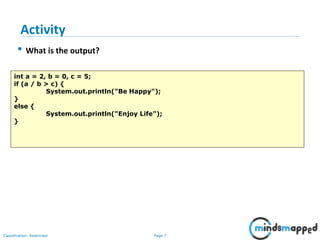
• What is the output?
int a = 2, b = 0, c = 5;
if (a / b > c) {
System.out.println("Be Happy");
}
else {
System.out.println("Enjoy Life");
}
Activity
Page 8Classification: Restricted
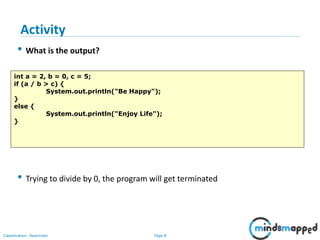
• What is the output?
• Trying to divide by 0, the program will get terminated
int a = 2, b = 0, c = 5;
if (a / b > c) {
System.out.println("Be Happy");
}
else {
System.out.println("Enjoy Life");
}
Activity
Page 9Classification: Restricted
• What is the output?
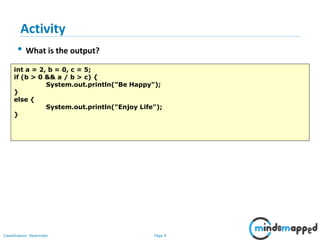
int a = 2, b = 0, c = 5;
if (b > 0 && a / b > c) {
System.out.println("Be Happy");
}
else {
System.out.println("Enjoy Life");
}
Activity
Page 10Classification: Restricted
• What is the output?
int a = 2, b = 0, c = 5;
if (b > 0 && a / b > c) {
System.out.println("Be Happy");
}
else {
System.out.println("Enjoy Life");
}
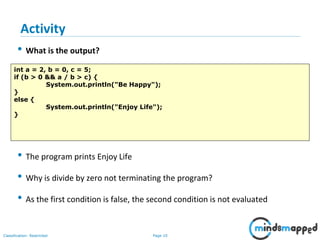
• The program prints Enjoy Life
• Why is divide by zero not terminating the program?
• As the first condition is false, the second condition is not evaluated
Activity
Page 11Classification: Restricted
• Get an positive integer in the range of 1 to 12 and print the equivalent
month name. Print the message “Invalid Month” if the integer is out of this
range
Activity
Page 12Classification: Restricted
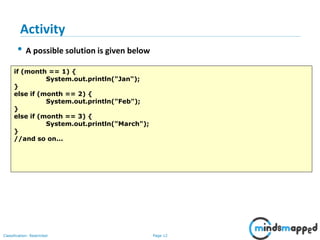
• A possible solution is given below
if (month == 1) {
System.out.println("Jan");
}
else if (month == 2) {
System.out.println("Feb");
}
else if (month == 3) {
System.out.println("March");
}
//and so on...
Activity
Page 13Classification: Restricted
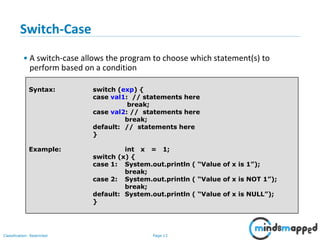
Switch-Case
• A switch-case allows the program to choose which statement(s) to
perform based on a condition
Syntax: switch (exp) {
case val1: // statements here
break;
case val2: // statements here
break;
default: // statements here
}
Example: int x = 1;
switch (x) {
case 1: System.out.println ( “Value of x is 1”);
break;
case 2: System.out.println ( “Value of x is NOT 1”);
break;
default: System.out.println ( “Value of x is NULL”);
}
Page 14Classification: Restricted
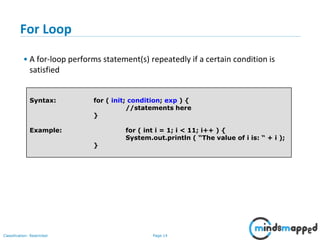
For Loop
• A for-loop performs statement(s) repeatedly if a certain condition is
satisfied
Syntax: for ( init; condition; exp ) {
//statements here
}
Example: for ( int i = 1; i < 11; i++ ) {
System.out.println ( “The value of i is: “ + i );
}
Page 15Classification: Restricted
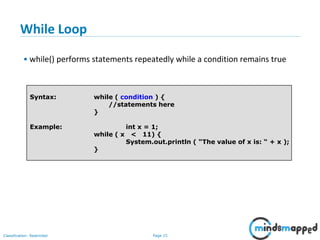
While Loop
• while() performs statements repeatedly while a condition remains true
Syntax: while ( condition ) {
//statements here
}
Example: int x = 1;
while ( x < 11) {
System.out.println ( “The value of x is: “ + x );
}
Page 16Classification: Restricted
Thank You!
Flow Control
Types of Flow Control
If-Else
Activity
Switch-Case
For Loop
While Loop
Do-While Loop

Session 07 - Flow Control Statements

  • 1.
    Page 0Classification: Restricted SeleniumTraining Flow Control Statements
  • 2.
    Page 1Classification: Restricted Agenda •Flow Control • Types of Flow Control • If-Else • Activity • Switch-Case • For Loop • While Loop • Do-While Loop
  • 3.
    Page 2Classification: Restricted FlowControl • A programs ‘flow’ refers to the order in which statements are executed. • By default, statements are executed sequentially. • Flow control statements are used to alter or modify the path of execution of instructions when certain conditions are present.
  • 4.
    Page 3Classification: Restricted Typesof Flow Control • Sequential statements are executed in the order they are written • This is the default flow of a program as instructions are executed in the order they appear
  • 5.
    Page 4Classification: Restricted Typesof Flow Control • Selection structures execute a certain branch based on the results of a boolean condition • This flow is useful in decision-making scenarios and can be implemented by using the if-else or switch-case statements
  • 6.
    Page 5Classification: Restricted Typesof Flow Control •Iteration structures execute instructions repeatedly based on a condition •This type of flow control can be implemented by making use of the different loop statements: •for-loop •while-loop •do-while loop
  • 7.
    Page 6Classification: Restricted If-Else •An if-else performs statement(s) based on a condition Syntax: if ( condition ) { // statement(s) to be executed If condition is met } else { // ( else statement is optional ) // statement(s) to be executed If condition is NOT met } Example: int x = 1; if ( x > 0 ) { System.out.println( “The value of x is greater than zero” ); } else { System.out.println( “The value of x is less than or equal to zero” ); }
  • 8.
    Page 7Classification: Restricted •What is the output? int a = 2, b = 0, c = 5; if (a / b > c) { System.out.println("Be Happy"); } else { System.out.println("Enjoy Life"); } Activity
  • 9.
    Page 8Classification: Restricted •What is the output? • Trying to divide by 0, the program will get terminated int a = 2, b = 0, c = 5; if (a / b > c) { System.out.println("Be Happy"); } else { System.out.println("Enjoy Life"); } Activity
  • 10.
    Page 9Classification: Restricted •What is the output? int a = 2, b = 0, c = 5; if (b > 0 && a / b > c) { System.out.println("Be Happy"); } else { System.out.println("Enjoy Life"); } Activity
  • 11.
    Page 10Classification: Restricted •What is the output? int a = 2, b = 0, c = 5; if (b > 0 && a / b > c) { System.out.println("Be Happy"); } else { System.out.println("Enjoy Life"); } • The program prints Enjoy Life • Why is divide by zero not terminating the program? • As the first condition is false, the second condition is not evaluated Activity
  • 12.
    Page 11Classification: Restricted •Get an positive integer in the range of 1 to 12 and print the equivalent month name. Print the message “Invalid Month” if the integer is out of this range Activity
  • 13.
    Page 12Classification: Restricted •A possible solution is given below if (month == 1) { System.out.println("Jan"); } else if (month == 2) { System.out.println("Feb"); } else if (month == 3) { System.out.println("March"); } //and so on... Activity
  • 14.
    Page 13Classification: Restricted Switch-Case •A switch-case allows the program to choose which statement(s) to perform based on a condition Syntax: switch (exp) { case val1: // statements here break; case val2: // statements here break; default: // statements here } Example: int x = 1; switch (x) { case 1: System.out.println ( “Value of x is 1”); break; case 2: System.out.println ( “Value of x is NOT 1”); break; default: System.out.println ( “Value of x is NULL”); }
  • 15.
    Page 14Classification: Restricted ForLoop • A for-loop performs statement(s) repeatedly if a certain condition is satisfied Syntax: for ( init; condition; exp ) { //statements here } Example: for ( int i = 1; i < 11; i++ ) { System.out.println ( “The value of i is: “ + i ); }
  • 16.
    Page 15Classification: Restricted WhileLoop • while() performs statements repeatedly while a condition remains true Syntax: while ( condition ) { //statements here } Example: int x = 1; while ( x < 11) { System.out.println ( “The value of x is: “ + x ); }
  • 17.
    Page 16Classification: Restricted ThankYou! Flow Control Types of Flow Control If-Else Activity Switch-Case For Loop While Loop Do-While Loop