Behold the incredible
multi-talented
service catalogue
Steve Lawless, Purple Griffon
1
“A well-defined service catalogue has
multiple uses and offers multiple solutions”
“Here’s how you can get started”
2
45 minutes of free training and consultancy…..
The rest you’ll have to pay for…
What are we going to look at?
• For some a daunting prospect, especially for smaller
organisations with limited resources
• Practical hints and tips about how to get started
• How to address the challenges and guidance on
reaping the benefits of a service catalogue
• Learn the starting point for building a service catalogue
on a limited budget
• Takeaway a high level process document to get you
started
• Receive a free template, getting stated guide and
implementation roadmap
3
Back to basics…..
• What is a Service?
– A means of delivering value to customers
• What is a Catalogue?
– A register of related items
• What is a Service Catalogue?
– A single, concise source of clear, accurate and up-to-date
information about all of your live services
• What is the Service Catalogue Management process?
– A way of keeping the catalogue up to date and accurate
4
In its basic form..
It describes…
• Core Services
• Supporting Services
– Enhancing services
– Enabling services
• Service Levels
• Service Level Packages
….and their descriptions and attributes
5
Multiple uses
• An ‘actionable service catalogue’ to handle automated
service requests/incidents…’Self Service Portal’
• Information source as to where to place requests for
services in the catalogue
• Marketing service to customers
• To communicate with customers about services
• Handling change proposals
• Reference for service provider staff regarding service,
dependencies and interfaces
• An integrated Portfolio of services
In practical terms you want a single Service Catalogue, but
with as many technical and business uses as possible
6
The actionable ‘self service’ catalogue
• The basis of a ‘self service’ portal - logging
Incidents, Problems and Service Requests
• Catalogue your services as your customers see
them…..
• Include:
– A description of the service
– Timeframes or service level agreed target for fulfilling
the service
– Who is entitled to request/view the service
– Costs (if any)
– How the service will be fulfilled
7
The information resource
• A Business Catalogue – describing what the service
provider can do for the customer
• A Technical Catalogue – describing how IT supports
business activities
• A Partitionable Catalogue – to show different views to
different customers
• Linked to your Configuration data (CMS/CMDB) – to
allow IT to drill down through the infrastructure
• A source of data for reporting
• Describes how the business and IT can interact
8
A marketing resource
• The Service Catalogue describes our actual and
present capabilities
• Allows us to:
– Identify new solutions for customers from existing
services
– Manage upgrades
– Manage updates
– Up-sell to existing services
– Package services and service levels
• Can even contain pricing and offers
9
Communication resource
• To Customers and users
– Dates for new releases
– Upgrade paths
– Accessing reports
• For IT
– For performing Business Impact Analysis
– For managing demand
– For managing capacity
10
Supporting change proposals and
requests
• The Service Portfolio comprises…
– The Service Pipeline
– The Service Catalogue
– Retired Services
• The Service catalogue is fed from the pipeline
• Movement is initiated by Change requests
11
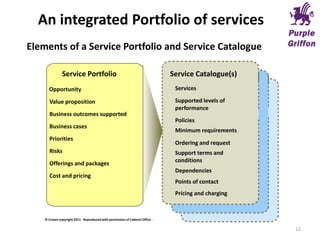
Elements of a Service Portfolio and Service Catalogue
Service Portfolio
Value proposition
Business outcomes supported
Business cases
Priorities
Risks
Offerings and packages
Cost and pricing
Service Catalogue(s)
Services
Supported levels of
performance
Policies
Ordering and request
Support terms and
conditions
Points of contact
Pricing and charging
Opportunity
Dependencies
Minimum requirements
© Crown copyright 2011. Reproduced with permission of Cabinet Office .
12
An integrated Portfolio of services
A source of reference
• What do we support?
• Where do we support?
• Who do we support?
• When do we support?
• What do 3rd parties support?
• How is support delivered?
• Why do we support?
13
Getting started…
Practical considerations
14
Practical considerations (1)
• Developing both IT, supplier and business buy-in
• Develop a vision for the use of a Service Catalogue
• Develop a road-map for the production of a Service
Catalogue. The Catalogue of Services may need to be agile, to
meet all of the rapidly changing and on-going market
requirements that your organisation may face now and in the
future
• Conduct a series of exercises and activities that help to
answer the major questions required to formulate a Service
Catalogue plan
15
Practical considerations (2)
• Defining project scope – what and who needs to be included?
• Define Service Catalogue requirements - purpose, scope, key
users, interfaces, tools?
• Define how you gather the required data/what already exists
and what needs to be collected?
• How much information is available (and what is required for
the use of this “catalogue”)? i.e. service availability,
service/SLA requirements, criticality, supplier details,
technical components etc
• Document who will be using the Service Catalogue, and what
will they require from it?
16
Practical considerations (3)
• How do the underpinning processes currently underpin the
creation of a Service Catalogue, i.e. Configuration
Management (which will be highly important), Change
Management, Service Level Management and others.
• Do you have a template for the catalogue? How will the
information be stored and presented? i.e. spreadsheet, on-
line, wiki…?
• Who will own the catalogue?
• Who will maintain the catalogue?
• Define how new services get into and leave the catalogue
17
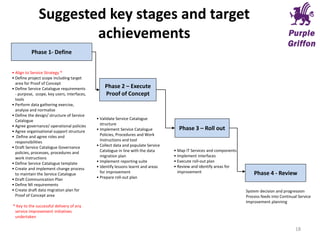
Suggested key stages and target
achievements
Phase 1- Define
Phase 2 – Execute
Proof of Concept
Phase 3 – Roll out
Phase 4 - Review
• Align to Service Strategy *
• Define project scope including target
area for Proof of Concept
• Define Service Catalogue requirements
- purpose, scope, key users, interfaces,
tools
• Perform data gathering exercise,
analyse and normalise
• Define the design/ structure of Service
Catalogue
• Agree governance/ operational policies
• Agree organisational support structure
• Define and agree roles and
responsibilities
• Draft Service Catalogue Governance
policies, processes, procedures and
work instructions
• Define Service Catalogue template
• Create and implement change process
to maintain the Service Catalogue
• Draft Communication Plan
• Define MI requirements
• Create draft data migration plan for
Proof of Concept area
* Key to the successful delivery of any
service improvement initiatives
undertaken
• Validate Service Catalogue
structure
• Implement Service Catalogue
Policies, Procedures and Work
Instructions and tool
• Collect data and populate Service
Catalogue in line with the data
migration plan
• Implement reporting suite
• Identify lessons learnt and areas
for improvement
• Prepare roll-out plan
• Map IT Services and components
• Implement interfaces
• Execute roll-out plan
• Review and identify areas for
improvement
System decision and progression
Process feeds into Continual Service
Improvement planning
18
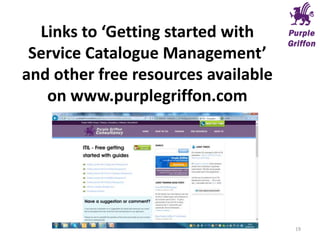
Links to ‘Getting started with
Service Catalogue Management’
and other free resources available
on www.purplegriffon.com
19
Any Questions?
20

Service Catalogue Management - Getting Started

  • 1.
    Behold the incredible multi-talented servicecatalogue Steve Lawless, Purple Griffon 1
  • 2.
    “A well-defined servicecatalogue has multiple uses and offers multiple solutions” “Here’s how you can get started” 2 45 minutes of free training and consultancy….. The rest you’ll have to pay for…
  • 3.
    What are wegoing to look at? • For some a daunting prospect, especially for smaller organisations with limited resources • Practical hints and tips about how to get started • How to address the challenges and guidance on reaping the benefits of a service catalogue • Learn the starting point for building a service catalogue on a limited budget • Takeaway a high level process document to get you started • Receive a free template, getting stated guide and implementation roadmap 3
  • 4.
    Back to basics….. •What is a Service? – A means of delivering value to customers • What is a Catalogue? – A register of related items • What is a Service Catalogue? – A single, concise source of clear, accurate and up-to-date information about all of your live services • What is the Service Catalogue Management process? – A way of keeping the catalogue up to date and accurate 4
  • 5.
    In its basicform.. It describes… • Core Services • Supporting Services – Enhancing services – Enabling services • Service Levels • Service Level Packages ….and their descriptions and attributes 5
  • 6.
    Multiple uses • An‘actionable service catalogue’ to handle automated service requests/incidents…’Self Service Portal’ • Information source as to where to place requests for services in the catalogue • Marketing service to customers • To communicate with customers about services • Handling change proposals • Reference for service provider staff regarding service, dependencies and interfaces • An integrated Portfolio of services In practical terms you want a single Service Catalogue, but with as many technical and business uses as possible 6
  • 7.
    The actionable ‘selfservice’ catalogue • The basis of a ‘self service’ portal - logging Incidents, Problems and Service Requests • Catalogue your services as your customers see them….. • Include: – A description of the service – Timeframes or service level agreed target for fulfilling the service – Who is entitled to request/view the service – Costs (if any) – How the service will be fulfilled 7
  • 8.
    The information resource •A Business Catalogue – describing what the service provider can do for the customer • A Technical Catalogue – describing how IT supports business activities • A Partitionable Catalogue – to show different views to different customers • Linked to your Configuration data (CMS/CMDB) – to allow IT to drill down through the infrastructure • A source of data for reporting • Describes how the business and IT can interact 8
  • 9.
    A marketing resource •The Service Catalogue describes our actual and present capabilities • Allows us to: – Identify new solutions for customers from existing services – Manage upgrades – Manage updates – Up-sell to existing services – Package services and service levels • Can even contain pricing and offers 9
  • 10.
    Communication resource • ToCustomers and users – Dates for new releases – Upgrade paths – Accessing reports • For IT – For performing Business Impact Analysis – For managing demand – For managing capacity 10
  • 11.
    Supporting change proposalsand requests • The Service Portfolio comprises… – The Service Pipeline – The Service Catalogue – Retired Services • The Service catalogue is fed from the pipeline • Movement is initiated by Change requests 11
  • 12.
    Elements of aService Portfolio and Service Catalogue Service Portfolio Value proposition Business outcomes supported Business cases Priorities Risks Offerings and packages Cost and pricing Service Catalogue(s) Services Supported levels of performance Policies Ordering and request Support terms and conditions Points of contact Pricing and charging Opportunity Dependencies Minimum requirements © Crown copyright 2011. Reproduced with permission of Cabinet Office . 12 An integrated Portfolio of services
  • 13.
    A source ofreference • What do we support? • Where do we support? • Who do we support? • When do we support? • What do 3rd parties support? • How is support delivered? • Why do we support? 13
  • 14.
  • 15.
    Practical considerations (1) •Developing both IT, supplier and business buy-in • Develop a vision for the use of a Service Catalogue • Develop a road-map for the production of a Service Catalogue. The Catalogue of Services may need to be agile, to meet all of the rapidly changing and on-going market requirements that your organisation may face now and in the future • Conduct a series of exercises and activities that help to answer the major questions required to formulate a Service Catalogue plan 15
  • 16.
    Practical considerations (2) •Defining project scope – what and who needs to be included? • Define Service Catalogue requirements - purpose, scope, key users, interfaces, tools? • Define how you gather the required data/what already exists and what needs to be collected? • How much information is available (and what is required for the use of this “catalogue”)? i.e. service availability, service/SLA requirements, criticality, supplier details, technical components etc • Document who will be using the Service Catalogue, and what will they require from it? 16
  • 17.
    Practical considerations (3) •How do the underpinning processes currently underpin the creation of a Service Catalogue, i.e. Configuration Management (which will be highly important), Change Management, Service Level Management and others. • Do you have a template for the catalogue? How will the information be stored and presented? i.e. spreadsheet, on- line, wiki…? • Who will own the catalogue? • Who will maintain the catalogue? • Define how new services get into and leave the catalogue 17
  • 18.
    Suggested key stagesand target achievements Phase 1- Define Phase 2 – Execute Proof of Concept Phase 3 – Roll out Phase 4 - Review • Align to Service Strategy * • Define project scope including target area for Proof of Concept • Define Service Catalogue requirements - purpose, scope, key users, interfaces, tools • Perform data gathering exercise, analyse and normalise • Define the design/ structure of Service Catalogue • Agree governance/ operational policies • Agree organisational support structure • Define and agree roles and responsibilities • Draft Service Catalogue Governance policies, processes, procedures and work instructions • Define Service Catalogue template • Create and implement change process to maintain the Service Catalogue • Draft Communication Plan • Define MI requirements • Create draft data migration plan for Proof of Concept area * Key to the successful delivery of any service improvement initiatives undertaken • Validate Service Catalogue structure • Implement Service Catalogue Policies, Procedures and Work Instructions and tool • Collect data and populate Service Catalogue in line with the data migration plan • Implement reporting suite • Identify lessons learnt and areas for improvement • Prepare roll-out plan • Map IT Services and components • Implement interfaces • Execute roll-out plan • Review and identify areas for improvement System decision and progression Process feeds into Continual Service Improvement planning 18
  • 19.
    Links to ‘Gettingstarted with Service Catalogue Management’ and other free resources available on www.purplegriffon.com 19
  • 20.

Editor's Notes