SensorStudio
Deep Dive
Agenda
• SensorStudio Introduction
• Sensor Hub Introduction
• Understand SensorStudio Samples
• Design your Sensor fusion
• Design your Sensor driver
• Use your CustomSensor
• Make SensorStudio work with your Product
3
InvenSense Inc. Company Confidential3
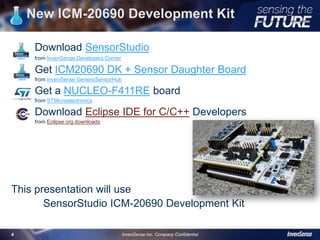
New ICM-20690 Development Kit
Download SensorStudio
from InvenSense Developers Corner
Get ICM20690 DK + Sensor Daughter Board
from InvenSense GenericSensorHub
Get a NUCLEO-F411RE board
from STMicroelectronics
Download Eclipse IDE for C/C++ Developers
from Eclipse.org downloads
This presentation will use
SensorStudio ICM-20690 Development Kit
4
InvenSense Inc. Company Confidential4
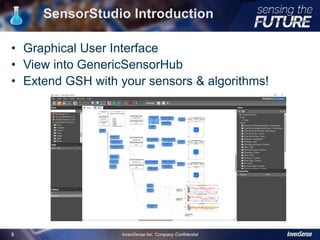
SensorStudio Introduction
• Graphical User Interface
• View into GenericSensorHub
• Extend GSH with your sensors & algorithms!
5
InvenSense Inc. Company Confidential5
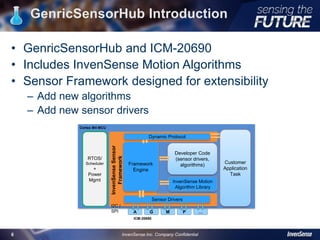
GenricSensorHub Introduction
• GenricSensorHub and ICM-20690
• Includes InvenSense Motion Algorithms
• Sensor Framework designed for extensibility
– Add new algorithms
– Add new sensor drivers
6
InvenSense Inc. Company Confidential6
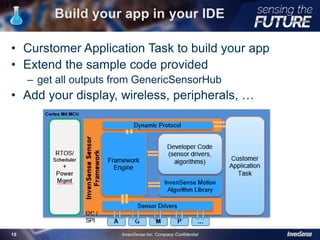
InvenSense Motion
Algorithm Library
Framework
Engine
Dynamic Protocol
Developer Code
(sensor drivers,
algorithms)
InvenSenseSensor
Framework
Sensor Drivers
RTOS/
Scheduler
+
Power
Mgmt
Cortex M4 MCU
I2C /
SPI A G M P …
Customer
Application
Task
ICM-20690
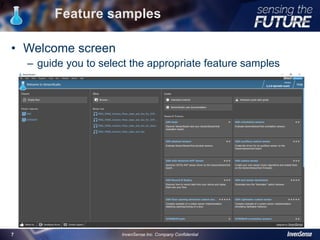
Feature samples
• Welcome screen
– guide you to select the appropriate feature samples
7
InvenSense Inc. Company Confidential7
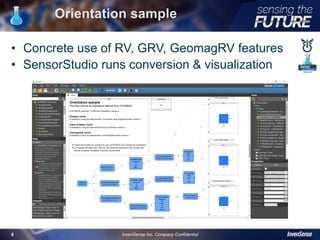
Orientation sample
• Concrete use of RV, GRV, GeomagRV features
• SensorStudio runs conversion & visualization
8
InvenSense Inc. Company Confidential8
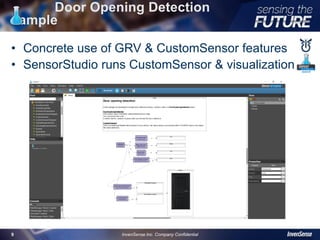
Door Opening Detection
sample
• Concrete use of GRV & CustomSensor features
• SensorStudio runs CustomSensor & visualization
9
InvenSense Inc. Company Confidential9
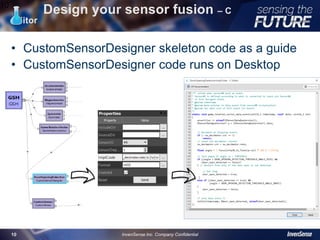
Design your sensor fusion – C
Editor
• CustomSensorDesigner skeleton code as a guide
• CustomSensorDesigner code runs on Desktop
10
InvenSense Inc. Company Confidential10
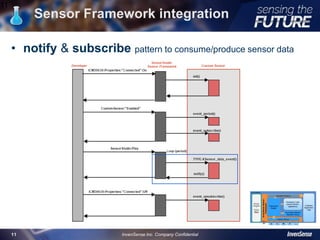
Sensor Framework integration
11
• notify & subscribe pattern to consume/produce sensor data
InvenSense Inc. Company Confidential11
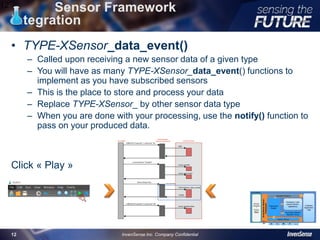
Sensor Framework
integration
• TYPE-XSensor_data_event()
– Called upon receiving a new sensor data of a given type
– You will have as many TYPE-XSensor_data_event() functions to
implement as you have subscribed sensors
– This is the place to store and process your data
– Replace TYPE-XSensor_ by other sensor data type
– When you are done with your processing, use the notify() function to
pass on your produced data.
Click « Play »
12
InvenSense Inc. Company Confidential12
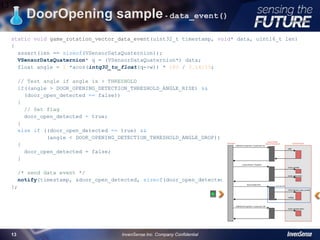
DoorOpening sample - data_event()
static void game_rotation_vector_data_event(uint32_t timestamp, void* data, uint16_t len)
{
assert(len == sizeof(VSensorDataQuaternion));
VSensorDataQuaternion* q = (VSensorDataQuaternion*) data;
float angle = 2 *acos(intq30_to_float(q->w)) * 180 / 3.14159;
// Test angle if angle is > THRESHOLD
if((angle > DOOR_OPENING_DETECTION_THRESHOLD_ANGLE_RISE) &&
(door_open_detected == false))
{
// Set flag
door_open_detected = true;
}
else if ((door_open_detected == true) &&
(angle < DOOR_OPENING_DETECTION_THRESHOLD_ANGLE_DROP))
{
door_open_detected = false;
}
/* send data event */
notify(timestamp, &door_open_detected, sizeof(door_open_detected));
};
13
InvenSense Inc. Company Confidential13
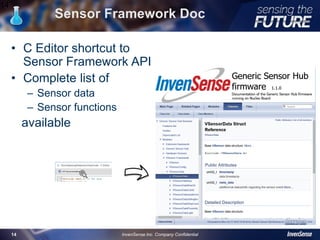
Sensor Framework Doc
• C Editor shortcut to
Sensor Framework API
• Complete list of
– Sensor data
– Sensor functions
available
14
InvenSense Inc. Company Confidential14
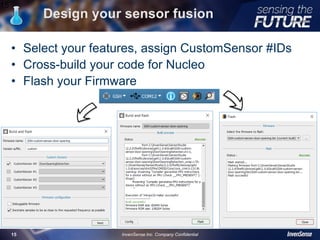
Design your sensor fusion
• Select your features, assign CustomSensor #IDs
• Cross-build your code for Nucleo
• Flash your Firmware
15
InvenSense Inc. Company Confidential15
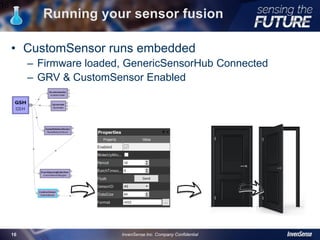
Running your sensor fusion
• CustomSensor runs embedded
– Firmware loaded, GenericSensorHub Connected
– GRV & CustomSensor Enabled
16
InvenSense Inc. Company Confidential16
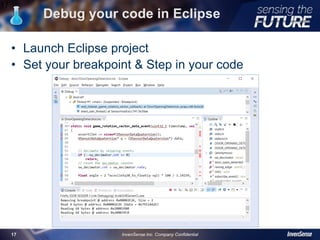
Debug your code in Eclipse
• Launch Eclipse project
• Set your breakpoint & Step in your code
17
InvenSense Inc. Company Confidential17
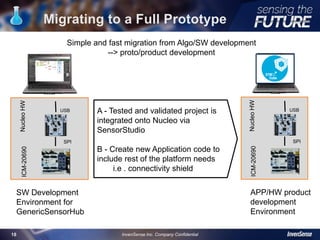
Migrating to a Full Prototype
18
A - Tested and validated project is
integrated onto Nucleo via
SensorStudio
B - Create new Application code to
include rest of the platform needs
i.e . connectivity shield
StudioSW
SW Development
Environment for
GenericSensorHub
ArduinoSW
APP/HW product
development
Environment
Simple and fast migration from Algo/SW development
--> proto/product development
InvenSense Inc. Company Confidential
USB
SPI
NucleoHWICM-20690
USB
SPI
NucleoHWICM-20690
Build your app in your IDE
• Curstomer Application Task to build your app
• Extend the sample code provided
– get all outputs from GenericSensorHub
• Add your display, wireless, peripherals, …
19
InvenSense Inc. Company Confidential19
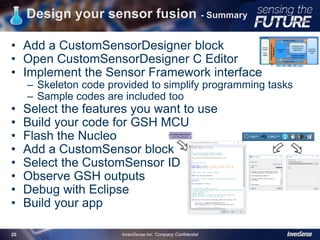
Design your sensor fusion - Summary
• Add a CustomSensorDesigner block
• Open CustomSensorDesigner C Editor
• Implement the Sensor Framework interface
– Skeleton code provided to simplify programming tasks
– Sample codes are included too
• Select the features you want to use
• Build your code for GSH MCU
• Flash the Nucleo
• Add a CustomSensor block
• Select the CustomSensor ID
• Observe GSH outputs
• Debug with Eclipse
• Build your app
20
InvenSense Inc. Company Confidential20
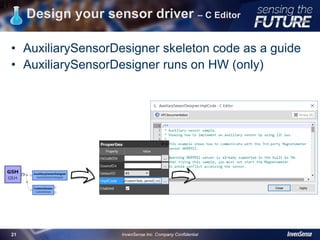
Design your sensor driver – C Editor
• AuxiliarySensorDesigner skeleton code as a guide
• AuxiliarySensorDesigner runs on HW (only)
21
InvenSense Inc. Company Confidential21
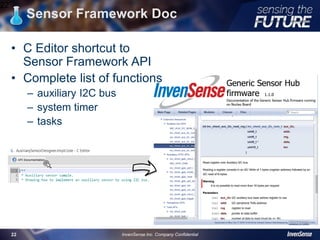
Sensor Framework Doc
22
InvenSense Inc. Company Confidential22
• C Editor shortcut to
Sensor Framework API
• Complete list of functions
– auxiliary I2C bus
– system timer
– tasks
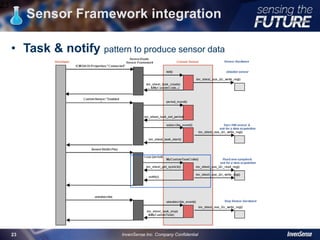
Sensor Framework integration
23
• Task & notify pattern to produce sensor data
InvenSense Inc. Company Confidential23
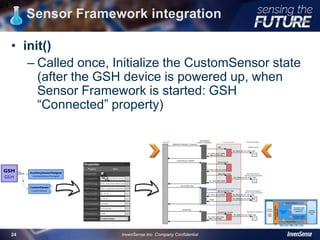
Sensor Framework integration
• init()
– Called once, Initialize the CustomSensor state
(after the GSH device is powered up, when
Sensor Framework is started: GSH
“Connected” property)
24
InvenSense Inc. Company Confidential24
Sensor Driver - Define a task
• Responsible for polling data from your sensor at the specified Period
/**
* Code for the custom task that will retrieve data from the AK09911
*/
static void MyCustomTaskCode(void * arg)
{
/* get current system time in us */
uint32_t t = inv_shext_get_systick();
int16_t sample[3];
ak09911_get_sample(sample); /* retrieve sensor data */
notify(t, sample, sizeof(sample)); /* notify data to the outside world */
/* The HW sensor performs a single acquisition, so ask for another one */
ak09911_start_single();
(void)arg; /* arg contains the value passed on inv_shext_task_create() */
}
Note : the notify is here, you don’t have to implement a data_event(), this is the
difference with an algorithm. Sensor Driver is only producing data while an
algorithm consumes data from depending sensors & produces data.
25
InvenSense Inc. Company Confidential25
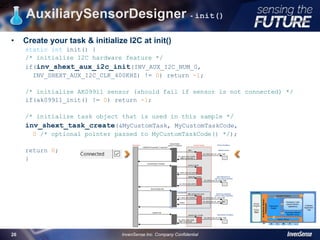
AuxiliarySensorDesigner - init()
• Create your task & initialize I2C at init()
static int init() {
/* initialize I2C hardware feature */
if(inv_shext_aux_i2c_init(INV_AUX_I2C_NUM_0,
INV_SHEXT_AUX_I2C_CLK_400KHZ) != 0) return -1;
/* initialize AK09911 sensor (should fail if sensor is not connected) */
if(ak09911_init() != 0) return -1;
/* initialize task object that is used in this sample */
inv_shext_task_create(&MyCustomTask, MyCustomTaskCode,
0 /* optional pointer passed to MyCustomTaskCode() */);
return 0;
}
26
InvenSense Inc. Company Confidential26
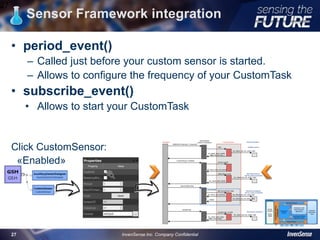
Sensor Framework integration
• period_event()
– Called just before your custom sensor is started.
– Allows to configure the frequency of your CustomTask
• subscribe_event()
• Allows to start your CustomTask
Click CustomSensor:
«Enabled»
27
InvenSense Inc. Company Confidential27
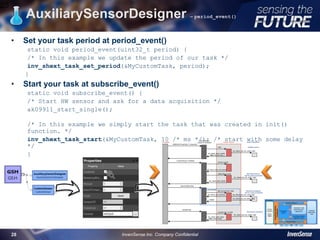
• Set your task period at period_event()
static void period_event(uint32_t period) {
/* In this example we update the period of our task */
inv_shext_task_set_period(&MyCustomTask, period);
}
• Start your task at subscribe_event()
static void subscribe_event() {
/* Start HW sensor and ask for a data acquisition */
ak09911_start_single();
/* In this example we simply start the task that was created in init()
function. */
inv_shext_task_start(&MyCustomTask, 10 /* ms */); /* start with some delay
*/
}
AuxiliarySensorDesigner – period_event()
28
InvenSense Inc. Company Confidential28
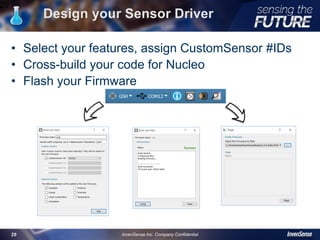
Design your Sensor Driver
• Select your features, assign CustomSensor #IDs
• Cross-build your code for Nucleo
• Flash your Firmware
29
InvenSense Inc. Company Confidential29
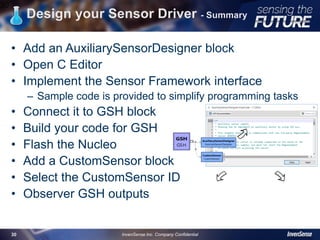
Design your Sensor Driver - Summary
• Add an AuxiliarySensorDesigner block
• Open C Editor
• Implement the Sensor Framework interface
– Sample code is provided to simplify programming tasks
• Connect it to GSH block
• Build your code for GSH
• Flash the Nucleo
• Add a CustomSensor block
• Select the CustomSensor ID
• Observer GSH outputs
30
InvenSense Inc. Company Confidential30
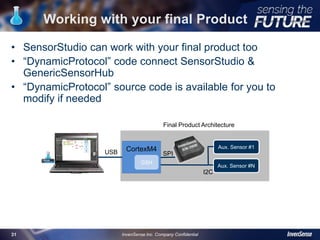
• SensorStudio can work with your final product too
• “DynamicProtocol” code connect SensorStudio &
GenericSensorHub
• “DynamicProtocol” source code is available for you to
modify if needed
Working with your final Product
USB
SPI
StudioSWArduinoHW
CortexM4 Aux. Sensor #1
SPI
I2C
Aux. Sensor #N
USB
Final Product Architecture
31 InvenSense Inc. Company Confidential
GSH
Presentation Summary
• Learned about SensorStudio
• Learned about GenerciSensorHub
• Evaluated INVN sensor, fusion & hub
• Understood SensorStudio Samples
• Designed your Sensor fusion
• Designed your Sensor driver
• Used your CustomSensor
• Used SensorStudio with your product
32
InvenSense Inc. Company Confidential32
Thank You

SensorStudio deep dive (IDC 2016)

  • 2.
  • 3.
    Agenda • SensorStudio Introduction •Sensor Hub Introduction • Understand SensorStudio Samples • Design your Sensor fusion • Design your Sensor driver • Use your CustomSensor • Make SensorStudio work with your Product 3 InvenSense Inc. Company Confidential3
  • 4.
    New ICM-20690 DevelopmentKit Download SensorStudio from InvenSense Developers Corner Get ICM20690 DK + Sensor Daughter Board from InvenSense GenericSensorHub Get a NUCLEO-F411RE board from STMicroelectronics Download Eclipse IDE for C/C++ Developers from Eclipse.org downloads This presentation will use SensorStudio ICM-20690 Development Kit 4 InvenSense Inc. Company Confidential4
  • 5.
    SensorStudio Introduction • GraphicalUser Interface • View into GenericSensorHub • Extend GSH with your sensors & algorithms! 5 InvenSense Inc. Company Confidential5
  • 6.
    GenricSensorHub Introduction • GenricSensorHuband ICM-20690 • Includes InvenSense Motion Algorithms • Sensor Framework designed for extensibility – Add new algorithms – Add new sensor drivers 6 InvenSense Inc. Company Confidential6 InvenSense Motion Algorithm Library Framework Engine Dynamic Protocol Developer Code (sensor drivers, algorithms) InvenSenseSensor Framework Sensor Drivers RTOS/ Scheduler + Power Mgmt Cortex M4 MCU I2C / SPI A G M P … Customer Application Task ICM-20690
  • 7.
    Feature samples • Welcomescreen – guide you to select the appropriate feature samples 7 InvenSense Inc. Company Confidential7
  • 8.
    Orientation sample • Concreteuse of RV, GRV, GeomagRV features • SensorStudio runs conversion & visualization 8 InvenSense Inc. Company Confidential8
  • 9.
    Door Opening Detection sample •Concrete use of GRV & CustomSensor features • SensorStudio runs CustomSensor & visualization 9 InvenSense Inc. Company Confidential9
  • 10.
    Design your sensorfusion – C Editor • CustomSensorDesigner skeleton code as a guide • CustomSensorDesigner code runs on Desktop 10 InvenSense Inc. Company Confidential10
  • 11.
    Sensor Framework integration 11 •notify & subscribe pattern to consume/produce sensor data InvenSense Inc. Company Confidential11
  • 12.
    Sensor Framework integration • TYPE-XSensor_data_event() –Called upon receiving a new sensor data of a given type – You will have as many TYPE-XSensor_data_event() functions to implement as you have subscribed sensors – This is the place to store and process your data – Replace TYPE-XSensor_ by other sensor data type – When you are done with your processing, use the notify() function to pass on your produced data. Click « Play » 12 InvenSense Inc. Company Confidential12
  • 13.
    DoorOpening sample -data_event() static void game_rotation_vector_data_event(uint32_t timestamp, void* data, uint16_t len) { assert(len == sizeof(VSensorDataQuaternion)); VSensorDataQuaternion* q = (VSensorDataQuaternion*) data; float angle = 2 *acos(intq30_to_float(q->w)) * 180 / 3.14159; // Test angle if angle is > THRESHOLD if((angle > DOOR_OPENING_DETECTION_THRESHOLD_ANGLE_RISE) && (door_open_detected == false)) { // Set flag door_open_detected = true; } else if ((door_open_detected == true) && (angle < DOOR_OPENING_DETECTION_THRESHOLD_ANGLE_DROP)) { door_open_detected = false; } /* send data event */ notify(timestamp, &door_open_detected, sizeof(door_open_detected)); }; 13 InvenSense Inc. Company Confidential13
  • 14.
    Sensor Framework Doc •C Editor shortcut to Sensor Framework API • Complete list of – Sensor data – Sensor functions available 14 InvenSense Inc. Company Confidential14
  • 15.
    Design your sensorfusion • Select your features, assign CustomSensor #IDs • Cross-build your code for Nucleo • Flash your Firmware 15 InvenSense Inc. Company Confidential15
  • 16.
    Running your sensorfusion • CustomSensor runs embedded – Firmware loaded, GenericSensorHub Connected – GRV & CustomSensor Enabled 16 InvenSense Inc. Company Confidential16
  • 17.
    Debug your codein Eclipse • Launch Eclipse project • Set your breakpoint & Step in your code 17 InvenSense Inc. Company Confidential17
  • 18.
    Migrating to aFull Prototype 18 A - Tested and validated project is integrated onto Nucleo via SensorStudio B - Create new Application code to include rest of the platform needs i.e . connectivity shield StudioSW SW Development Environment for GenericSensorHub ArduinoSW APP/HW product development Environment Simple and fast migration from Algo/SW development --> proto/product development InvenSense Inc. Company Confidential USB SPI NucleoHWICM-20690 USB SPI NucleoHWICM-20690
  • 19.
    Build your appin your IDE • Curstomer Application Task to build your app • Extend the sample code provided – get all outputs from GenericSensorHub • Add your display, wireless, peripherals, … 19 InvenSense Inc. Company Confidential19
  • 20.
    Design your sensorfusion - Summary • Add a CustomSensorDesigner block • Open CustomSensorDesigner C Editor • Implement the Sensor Framework interface – Skeleton code provided to simplify programming tasks – Sample codes are included too • Select the features you want to use • Build your code for GSH MCU • Flash the Nucleo • Add a CustomSensor block • Select the CustomSensor ID • Observe GSH outputs • Debug with Eclipse • Build your app 20 InvenSense Inc. Company Confidential20
  • 21.
    Design your sensordriver – C Editor • AuxiliarySensorDesigner skeleton code as a guide • AuxiliarySensorDesigner runs on HW (only) 21 InvenSense Inc. Company Confidential21
  • 22.
    Sensor Framework Doc 22 InvenSenseInc. Company Confidential22 • C Editor shortcut to Sensor Framework API • Complete list of functions – auxiliary I2C bus – system timer – tasks
  • 23.
    Sensor Framework integration 23 •Task & notify pattern to produce sensor data InvenSense Inc. Company Confidential23
  • 24.
    Sensor Framework integration •init() – Called once, Initialize the CustomSensor state (after the GSH device is powered up, when Sensor Framework is started: GSH “Connected” property) 24 InvenSense Inc. Company Confidential24
  • 25.
    Sensor Driver -Define a task • Responsible for polling data from your sensor at the specified Period /** * Code for the custom task that will retrieve data from the AK09911 */ static void MyCustomTaskCode(void * arg) { /* get current system time in us */ uint32_t t = inv_shext_get_systick(); int16_t sample[3]; ak09911_get_sample(sample); /* retrieve sensor data */ notify(t, sample, sizeof(sample)); /* notify data to the outside world */ /* The HW sensor performs a single acquisition, so ask for another one */ ak09911_start_single(); (void)arg; /* arg contains the value passed on inv_shext_task_create() */ } Note : the notify is here, you don’t have to implement a data_event(), this is the difference with an algorithm. Sensor Driver is only producing data while an algorithm consumes data from depending sensors & produces data. 25 InvenSense Inc. Company Confidential25
  • 26.
    AuxiliarySensorDesigner - init() •Create your task & initialize I2C at init() static int init() { /* initialize I2C hardware feature */ if(inv_shext_aux_i2c_init(INV_AUX_I2C_NUM_0, INV_SHEXT_AUX_I2C_CLK_400KHZ) != 0) return -1; /* initialize AK09911 sensor (should fail if sensor is not connected) */ if(ak09911_init() != 0) return -1; /* initialize task object that is used in this sample */ inv_shext_task_create(&MyCustomTask, MyCustomTaskCode, 0 /* optional pointer passed to MyCustomTaskCode() */); return 0; } 26 InvenSense Inc. Company Confidential26
  • 27.
    Sensor Framework integration •period_event() – Called just before your custom sensor is started. – Allows to configure the frequency of your CustomTask • subscribe_event() • Allows to start your CustomTask Click CustomSensor: «Enabled» 27 InvenSense Inc. Company Confidential27
  • 28.
    • Set yourtask period at period_event() static void period_event(uint32_t period) { /* In this example we update the period of our task */ inv_shext_task_set_period(&MyCustomTask, period); } • Start your task at subscribe_event() static void subscribe_event() { /* Start HW sensor and ask for a data acquisition */ ak09911_start_single(); /* In this example we simply start the task that was created in init() function. */ inv_shext_task_start(&MyCustomTask, 10 /* ms */); /* start with some delay */ } AuxiliarySensorDesigner – period_event() 28 InvenSense Inc. Company Confidential28
  • 29.
    Design your SensorDriver • Select your features, assign CustomSensor #IDs • Cross-build your code for Nucleo • Flash your Firmware 29 InvenSense Inc. Company Confidential29
  • 30.
    Design your SensorDriver - Summary • Add an AuxiliarySensorDesigner block • Open C Editor • Implement the Sensor Framework interface – Sample code is provided to simplify programming tasks • Connect it to GSH block • Build your code for GSH • Flash the Nucleo • Add a CustomSensor block • Select the CustomSensor ID • Observer GSH outputs 30 InvenSense Inc. Company Confidential30
  • 31.
    • SensorStudio canwork with your final product too • “DynamicProtocol” code connect SensorStudio & GenericSensorHub • “DynamicProtocol” source code is available for you to modify if needed Working with your final Product USB SPI StudioSWArduinoHW CortexM4 Aux. Sensor #1 SPI I2C Aux. Sensor #N USB Final Product Architecture 31 InvenSense Inc. Company Confidential GSH
  • 32.
    Presentation Summary • Learnedabout SensorStudio • Learned about GenerciSensorHub • Evaluated INVN sensor, fusion & hub • Understood SensorStudio Samples • Designed your Sensor fusion • Designed your Sensor driver • Used your CustomSensor • Used SensorStudio with your product 32 InvenSense Inc. Company Confidential32
  • 33.