Iron-Clad Google
AdWords Campaigns
David Rodnitzky
Executive Summary

     Improper keyword selection and match type
      costs advertisers millions annually
     Account structure mistakes also results in
      unnecessary cost
     The Alpha-Beta process and structure will help
      you identify and optimize winners and exclude
      losers = more profit!


2
Keywords vs. Queries
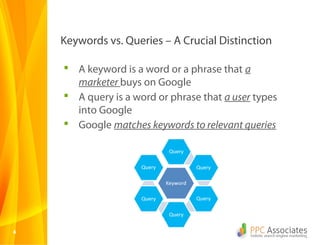
Keywords vs. Queries – A Crucial Distinction

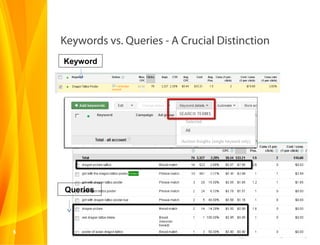
     A keyword is a word or a phrase that a
      marketer buys on Google
     A query is a word or phrase that a user types
      into Google
     Google matches keywords to relevant queries


4
Keywords vs. Queries - A Crucial Distinction
    Keyword


    Queries


5
A Quick Way to Measure Query Quality

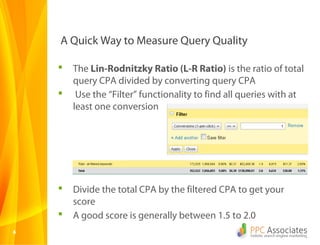
       The Lin-Rodnitzky Ratio (L-R Ratio) is the ratio of total
        query CPA divided by converting query CPA
        Use the “Filter” functionality to find all queries with at
        least one conversion


       Divide the total CPA by the filtered CPA to get your
        score
       A good score is generally between 1.5 to 2.0
6
Important Point #1

     Google will match your
     keywords to a lot of
     irrelevant queries if you
     give them the latitude
     to do so.

     This results in profit to
     Google and cost to
     you!


7
Match Type
Match Type – Broad Match

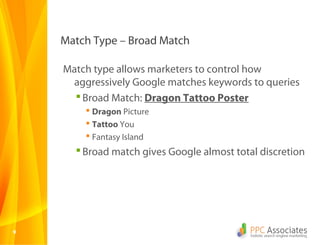
    Match type allows marketers to control how
     aggressively Google matches keywords to queries
       Broad Match: Dragon Tattoo Poster
         Dragon Picture
         Tattoo You
         Fantasy Island
       Broad match gives Google almost total discretion


9
Match Type – Broad Match Modified

     Match type allows marketers to control how
      aggressively Google matches keywords to queries
        Broad Match Modified: +Dragon +Tattoo
         +Poster
          Used Poster of Dragon and Tattoo
          Sell Dragon Tattoo Poster
        Broad match modified prevents synonyms


10
Match Type – Phrase Match

     Match type allows marketers to control how
      aggressively Google matches keywords to queries
        Phrase Match: “Dragon Tattoo Poster”
          Buy Dragon Tattoo Poster
          Dragon Tattoo Poster in Spanish
        Phrase match requires a complete phrase


11
Match Type – Exact Match

     Match type allows marketers to control how
      aggressively Google matches keywords to queries
        Exact Match: [Dragon Tattoo Poster]
          Dragon Tattoo Poster
        Exact match will only show the exact phrase


12
Match Type – Negative Match

     Match type allows marketers to control how
      aggressively Google matches keywords to queries
        Negative Match: -Picture
          Dragon Tattoo Poster is Ugly
          Fantasy Island Tattoo Guy
        Negative Match excludes any word or phrase


13
Important Point #2

     We recommend using:
         Broad match modified to discover new and profitable
          queries
         Exact match to isolate your top performing queries
          and bid accordingly
         Negative match to exclude unprofitable queries
         Broad match and phrase match rarely, if at all
     BUT WAIT – YOU NEED TO UNDERSTAND ACCOUNT
       HIERARCHY FIRST!!!!


14
Account Hierarchy
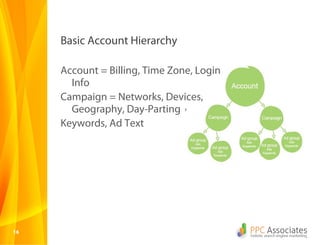
Basic Account Hierarchy

     Account = Billing, Time Zone, Login
       Info
     Campaign = Networks, Devices,
       Geography, Day-Parting
     Keywords, Ad Text


16
When Account hierarchy & Queries Collide

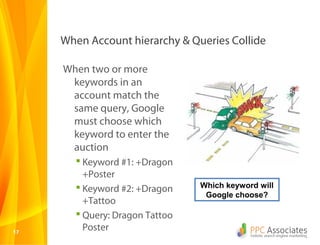
     When two or more
      keywords in an
      account match the
      same query, Google
      must choose which
      keyword to enter the
      auction
        Keyword #1: +Dragon
         +Poster
        Keyword #2: +Dragon    Which keyword will
                                 Google choose?
         +Tattoo
        Query: Dragon Tattoo
17
         Poster
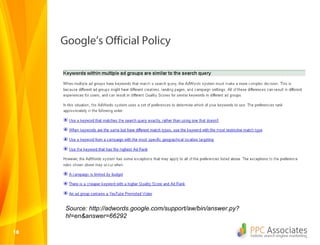
Google’s Official Policy


      Source: http://adwords.google.com/support/aw/bin/answer.py?
      hl=en&answer=66292

18
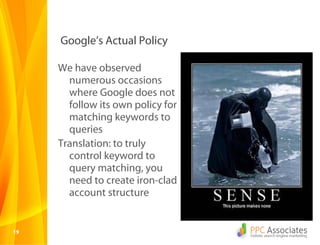
Google’s Actual Policy

     We have observed
       numerous occasions
       where Google does not
       follow its own policy for
       matching keywords to
       queries
     Translation: to truly
       control keyword to
       query matching, you
       need to create iron-clad
       account structure


19
Example of where it costs you money to have
     Bad structure
       Exact match keyword with targeted ad copy and
        landing page is bumped by broad match with
        generic copy and LP
       Negative keyword you added to one campaign is
        not included in another campaign – keyword gets
        served
       Same keyword with same match type in different
        campaigns but with different bids – most
        expensive keyword shown
     Account structure mistakes are sometimes caused by user error and
         sometimes caused by Google algorithmic errors/decisions

20
Important Point #3


     Failure to carefully plan out
       your account structure
       will cost you profit – I
       guarantee it


21
Alpha Beta Structure
The 30,000 Foot View of Alpha Beta

      A Beta campaign is designed to quickly identify
       profitable search queries and eliminate
       unprofitable ones
      An Alpha campaign is designed to isolate
       profitable queries into ad groups with targeted
       ad text and landing pages
      The overall objective is to take 100% control of
       your keywords and queries!


23
Creating & Analyzing The Beta Campaign

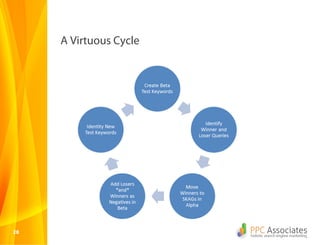
     Step One: Create the Beta
       campaign “The Bait”
        All keywords should be on
         broad match modified
         (+broad +match +modified)
     Step Two: Run raw search
       query analysis on Beta
       campaign
     Step Three: Identify winning
       queries and losing queries


24
Creating the Alpha Campaign, Refining the Beta

     Step Four: Create an Alpha
       campaign. Move winning queries
       into SKAGs in the Alpha
        SKAGs = Single Keyword Ad
         Groups
        Put all Alpha queries on Exact
         Match
        Create targeted ad text and
         landing pages for each SKAG
     Step Five: Add all losing queries to
       the Beta campaign as Negative
       Exact Match
25      -[free dragon tattoo poster]
The Air-Tight Account Secret

     Step Six: Add all Alpha queries to
       your Beta campaign as Exact
       Match Negatives!
        This prevents Google from
         matching a bait keywords to
         your profitable Alpha query
        You control bid, ad text, and
         landing page for winners!
     Step Seven: Continue to identify
       winners and losers in the Beta
       campaign. Move winners into
       the Alpha
26
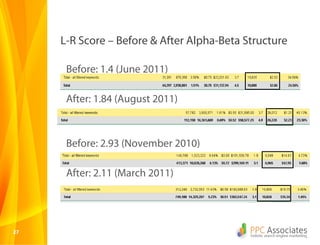
L-R Score – Before & After Alpha-Beta Structure

      Before: 1.4 (June 2011)

      After: 1.84 (August 2011)


      Before: 2.93 (November 2010)

      After: 2.11 (March 2011)


27
A Virtuous Cycle


28
Summary

      Queries are the lifeblood of AdWords
       campaigns, not keywords
      Match type is a limiter on Google’s discretion to
       expand your spend
      Beta campaigns use broad match modified to
       test Google’s algo; Alpha campaigns use exact
       match to lock-in profit
      Use the Lin-Rodnitzky Ratio to measure account
       health


29
Thank You!
david@ppcassociates.com
www.ppcassociates.com
@rodnitzky

SEMpdx - Awesome AdWords Account Structures

  • 1.
  • 2.
    Executive Summary  Improper keyword selection and match type costs advertisers millions annually  Account structure mistakes also results in unnecessary cost  The Alpha-Beta process and structure will help you identify and optimize winners and exclude losers = more profit! 2
  • 3.
  • 4.
    Keywords vs. Queries– A Crucial Distinction  A keyword is a word or a phrase that a marketer buys on Google  A query is a word or phrase that a user types into Google  Google matches keywords to relevant queries 4
  • 5.
    Keywords vs. Queries- A Crucial Distinction Keyword Queries 5
  • 6.
    A Quick Wayto Measure Query Quality  The Lin-Rodnitzky Ratio (L-R Ratio) is the ratio of total query CPA divided by converting query CPA  Use the “Filter” functionality to find all queries with at least one conversion  Divide the total CPA by the filtered CPA to get your score  A good score is generally between 1.5 to 2.0 6
  • 7.
    Important Point #1 Google will match your keywords to a lot of irrelevant queries if you give them the latitude to do so. This results in profit to Google and cost to you! 7
  • 8.
  • 9.
    Match Type –Broad Match Match type allows marketers to control how aggressively Google matches keywords to queries  Broad Match: Dragon Tattoo Poster  Dragon Picture  Tattoo You  Fantasy Island  Broad match gives Google almost total discretion 9
  • 10.
    Match Type –Broad Match Modified Match type allows marketers to control how aggressively Google matches keywords to queries  Broad Match Modified: +Dragon +Tattoo +Poster  Used Poster of Dragon and Tattoo  Sell Dragon Tattoo Poster  Broad match modified prevents synonyms 10
  • 11.
    Match Type –Phrase Match Match type allows marketers to control how aggressively Google matches keywords to queries  Phrase Match: “Dragon Tattoo Poster”  Buy Dragon Tattoo Poster  Dragon Tattoo Poster in Spanish  Phrase match requires a complete phrase 11
  • 12.
    Match Type –Exact Match Match type allows marketers to control how aggressively Google matches keywords to queries  Exact Match: [Dragon Tattoo Poster]  Dragon Tattoo Poster  Exact match will only show the exact phrase 12
  • 13.
    Match Type –Negative Match Match type allows marketers to control how aggressively Google matches keywords to queries  Negative Match: -Picture  Dragon Tattoo Poster is Ugly  Fantasy Island Tattoo Guy  Negative Match excludes any word or phrase 13
  • 14.
    Important Point #2 We recommend using:  Broad match modified to discover new and profitable queries  Exact match to isolate your top performing queries and bid accordingly  Negative match to exclude unprofitable queries  Broad match and phrase match rarely, if at all BUT WAIT – YOU NEED TO UNDERSTAND ACCOUNT HIERARCHY FIRST!!!! 14
  • 15.
  • 16.
    Basic Account Hierarchy Account = Billing, Time Zone, Login Info Campaign = Networks, Devices, Geography, Day-Parting Keywords, Ad Text 16
  • 17.
    When Account hierarchy& Queries Collide When two or more keywords in an account match the same query, Google must choose which keyword to enter the auction  Keyword #1: +Dragon +Poster  Keyword #2: +Dragon Which keyword will Google choose? +Tattoo  Query: Dragon Tattoo 17 Poster
  • 18.
    Google’s Official Policy Source: http://adwords.google.com/support/aw/bin/answer.py? hl=en&answer=66292 18
  • 19.
    Google’s Actual Policy We have observed numerous occasions where Google does not follow its own policy for matching keywords to queries Translation: to truly control keyword to query matching, you need to create iron-clad account structure 19
  • 20.
    Example of whereit costs you money to have Bad structure  Exact match keyword with targeted ad copy and landing page is bumped by broad match with generic copy and LP  Negative keyword you added to one campaign is not included in another campaign – keyword gets served  Same keyword with same match type in different campaigns but with different bids – most expensive keyword shown Account structure mistakes are sometimes caused by user error and sometimes caused by Google algorithmic errors/decisions 20
  • 21.
    Important Point #3 Failure to carefully plan out your account structure will cost you profit – I guarantee it 21
  • 22.
  • 23.
    The 30,000 FootView of Alpha Beta  A Beta campaign is designed to quickly identify profitable search queries and eliminate unprofitable ones  An Alpha campaign is designed to isolate profitable queries into ad groups with targeted ad text and landing pages  The overall objective is to take 100% control of your keywords and queries! 23
  • 24.
    Creating & AnalyzingThe Beta Campaign Step One: Create the Beta campaign “The Bait”  All keywords should be on broad match modified (+broad +match +modified) Step Two: Run raw search query analysis on Beta campaign Step Three: Identify winning queries and losing queries 24
  • 25.
    Creating the AlphaCampaign, Refining the Beta Step Four: Create an Alpha campaign. Move winning queries into SKAGs in the Alpha  SKAGs = Single Keyword Ad Groups  Put all Alpha queries on Exact Match  Create targeted ad text and landing pages for each SKAG Step Five: Add all losing queries to the Beta campaign as Negative Exact Match 25  -[free dragon tattoo poster]
  • 26.
    The Air-Tight AccountSecret Step Six: Add all Alpha queries to your Beta campaign as Exact Match Negatives!  This prevents Google from matching a bait keywords to your profitable Alpha query  You control bid, ad text, and landing page for winners! Step Seven: Continue to identify winners and losers in the Beta campaign. Move winners into the Alpha 26
  • 27.
    L-R Score –Before & After Alpha-Beta Structure Before: 1.4 (June 2011) After: 1.84 (August 2011) Before: 2.93 (November 2010) After: 2.11 (March 2011) 27
  • 28.
  • 29.
    Summary  Queries are the lifeblood of AdWords campaigns, not keywords  Match type is a limiter on Google’s discretion to expand your spend  Beta campaigns use broad match modified to test Google’s algo; Alpha campaigns use exact match to lock-in profit  Use the Lin-Rodnitzky Ratio to measure account health 29
  • 30.