Selenide. Пишем тесты быстро и
стабильно.
Сергей Брит
Что такое Selenide
•Библиотека (JVM)
•Построена на базе Selenium Webdriver
•Изначально для быстрых UI тестов
•Простой и без мусора
Проблемы UI тестов
•Ожидания
•Проверки
•Upload/download
•Репортинг(скриншотинг)
•Инфрструктура/архитектура
Начало
<dependency>
<groupId>com.codeborne</groupId>
<artifactId>selenide</artifactId>
<version>LATEST</version>
</dependency>
WebElements / SelenideElement
Selenium Webdriver Selenide
driver.findElementBy(locator) $(cssLocator)
By.id(locator), By.xpath(locator),
By.ByLinkText(locator)
withText(locator), byText, byTitle, byXpath,
byCssSelector
driver.findElementBy(locator).sendKeys(string) $(cssLocator).setValue(string)
1. WebElement.clear()
2. WebElement.sendKeys(text)
3. Trigger change event
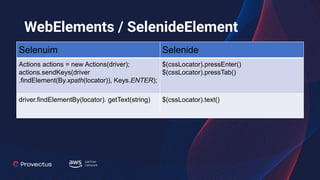
WebElements / SelenideElement
Selenuim Selenide
Actions actions = new Actions(driver);
actions.sendKeys(driver
.findElement(By.xpath(locator)), Keys.ENTER);
$(cssLocator).pressEnter()
$(cssLocator).pressTab()
driver.findElementBy(locator). getText(string) $(cssLocator).text()
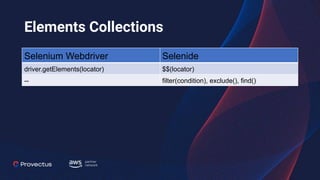
Elements Collections
Selenium Webdriver Selenide
driver.getElements(locator) $$(locator)
-- filter(condition), exclude(), find()
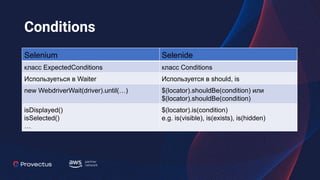
Conditions
Selenium Selenide
класс ExpectedConditions класс Conditions
Используеться в Waiter Используется в should, is
new WebdriverWait(driver).until(…) $(locator).shouldBe(condition) или
$(locator).shouldBe(condition)
isDisplayed()
isSelected()
…
$(locator).is(condition)
e.g. is(visible), is(exists), is(hidden)
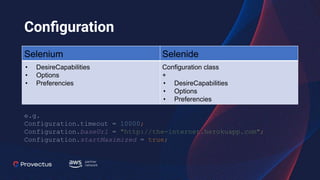
Configuration
Selenium Selenide
• DesireCapabilities
• Options
• Preferencies
Configuration class
+
• DesireCapabilities
• Options
• Preferencies
e.g.
Configuration.timeout = 10000;
Configuration.baseUrl = "http://the-internet.herokuapp.com";
Configuration.startMaximized = true;
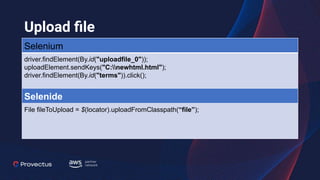
Upload file
Selenium
driver.findElement(By.id("uploadfile_0"));
uploadElement.sendKeys("C:newhtml.html");
driver.findElement(By.id("terms")).click();
Selenide
File fileToUpload = $(locator).uploadFromClasspath(“file”);
Download file Selenium
WebDriver driver;
File folder;
folder = new File(UUID.randomUUID().toString());
folder.mkdir();
FirefoxProfile profile = new FirefoxProfile();
profile.setPreference("browser.download.dir", folder.getAbsolutePath());
profile.setPreference("browser.download.folderList", 2);
profile.setPreference("browser.helperApps.neverAsk.saveToDisk", "image/jpeg,
application/pdf, application/octet-stream");
profile.setPreference("pdfjs.disabled", true);
driver = new FirefoxDriver(profile);
Download file Selenium
@Test
public void download() throws Exception {
driver.get("http://the-internet.herokuapp.com/download");
driver.findElement(By.cssSelector(".example a")).click();
// Wait 2 seconds to download file
Thread.sleep(2000);
File[] listOfFiles = folder.listFiles();
// Make sure the directory is not empty
assertThat(listOfFiles.length, is(not(0)));
for (File file : listOfFiles) {
// Make sure the downloaded file(s) is(are) not empty
assertThat(file.length(), is(not((long) 0)));
}
}
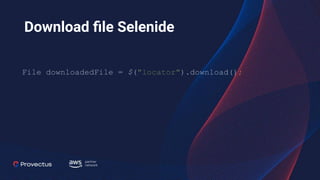
Download file Selenide
File downloadedFile = $("locator").download();
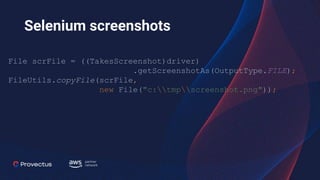
Selenium screenshots
File scrFile = ((TakesScreenshot)driver)
.getScreenshotAs(OutputType.FILE);
FileUtils.copyFile(scrFile,
new File("c:tmpscreenshot.png"));
Screenshot Selenide
@Attachment(type = "image/png", value = "{templateName}")
public byte[] saveScreenshot(ITestResult iTestResult) throws
IOException {
String file = Selenide.screenshot(iTestResult.getTestName());
return FileUtils.readFileToByteArray(new File(file));
}
DEMO
Q&A
Links
•https://selenide.org/
•https://www.seleniumhq.org/
•https://gitlab.com/brit.sergey/selenide_examples

Selenide